Snapchat Hacked: Getting Your Account Back, Then Keeping It

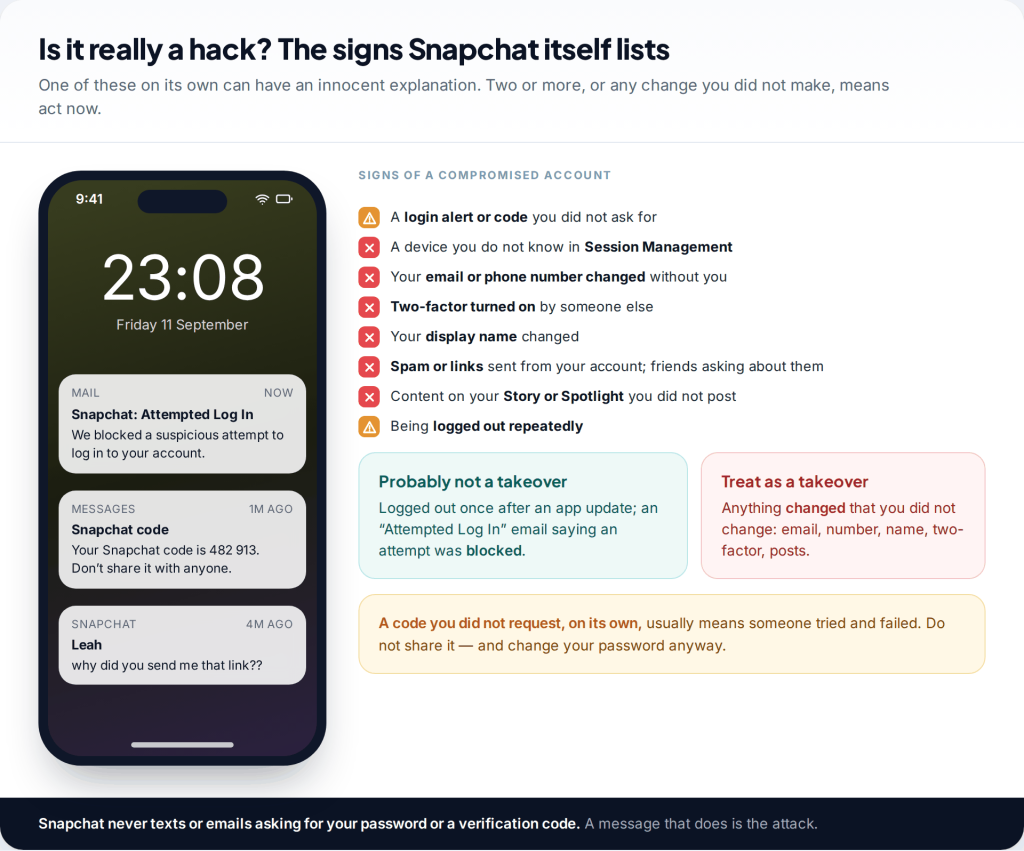
You open Snapchat and it has logged you out. The password no longer works, and friends are asking why you sent them a strange link. To recover a hacked Snapchat account, reset the password from the login screen or accounts.snapchat.com, remove unknown devices in Session Management, and use a Recovery Code if the attacker turned on two-factor. If every contact detail was changed, contact Snapchat Support.
- Secure your email before Snapchat. An attacker who reads your inbox can reverse any reset you make.
- Sessions first, password second. Removing the attacker’s device ends their access. A new password stops them coming back.
- No Recovery Code, no shortcut. Snapchat does not reissue lost codes. Without one, a changed two-factor means going through Support.
- Snapchat Support is free and only at help.snapchat.com. Anyone else offering to recover the account is running a second scam.
First, confirm it is a hack and not a glitch
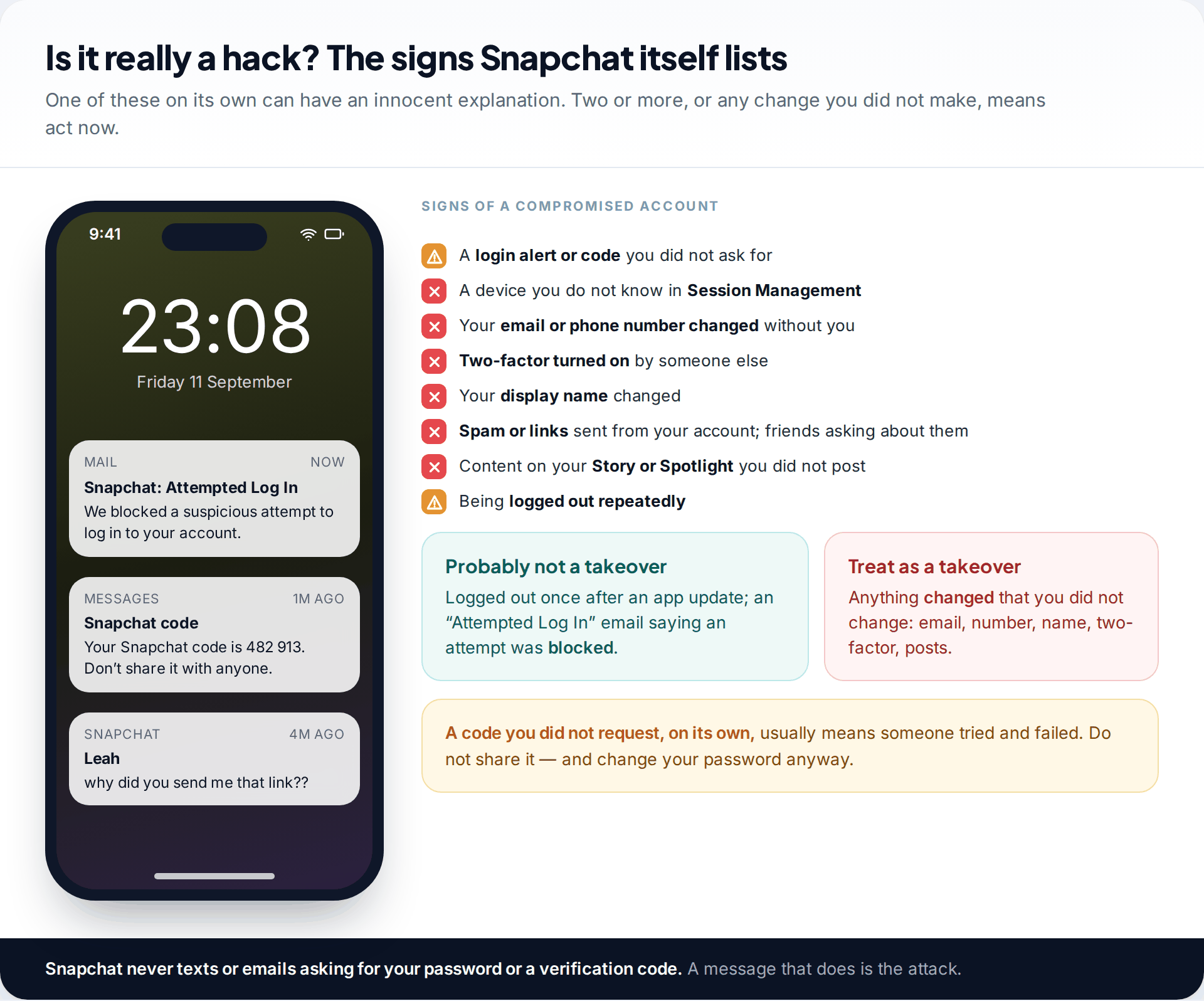
Snapchat’s help centre lists the signs of a compromised account. They include a login alert or code you didn’t ask for, a device you don’t recognise in Session Management, and an email address, phone number or display name changed without you. Two-factor turned on by someone else, spam sent to your friends, and Stories or Spotlight posts you didn’t make are also on the list.
Being logged out once is not proof. Snapchat logs people out after app updates, and repeated failed attempts can trigger a temporary block. An “Attempted Log In” email means Snapchat stopped a suspicious attempt, so your account is probably still yours. Change the password anyway, because the attacker may know the old one. Once something has changed without you, treat it as a takeover and go through the steps below.
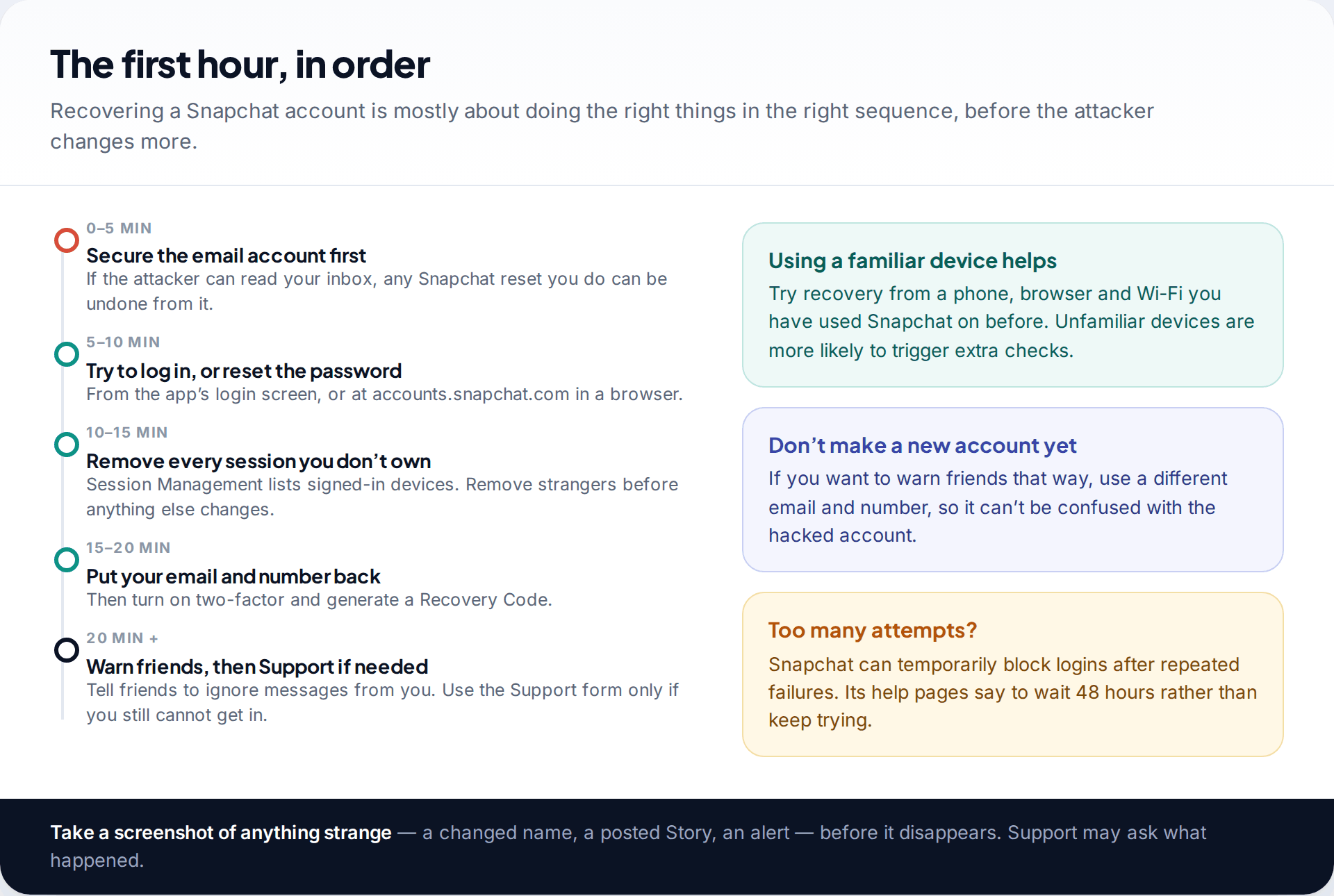
Before you touch Snapchat: check your email
Most Snapchat takeovers get the account first. Some get the inbox first. If the attacker controls the email address on your Snapchat, they can request a reset whenever you change the password. You then end up in a loop of resetting and losing the account again.
Log in to your email and change its password. Turn on the email provider’s own two-factor, and look for forwarding rules or filters you didn’t create. Attackers add these to copy or hide Snapchat’s security messages. If you can’t get into your email at all, fix that first.
If you can still open Snapchat on any device
Attackers often change the password without ending your session, especially on a phone you rarely use. If Snapchat is still open anywhere, whether on an old phone, a tablet or a browser, you can close the attacker out from there.
- Open Session Management. Profile › ⚙️ Settings › My Account › Session Management. Tap the ✕ next to every device or browser you don’t recognise, and confirm.
- Change the password to one you have never used before, from Settings or at accounts.snapchat.com.
- Check Mobile Number and Email under My Account. Put your own back and verify them.
- Open Two-Factor Authentication. If there is a method you didn’t add, remove it and set up your own.
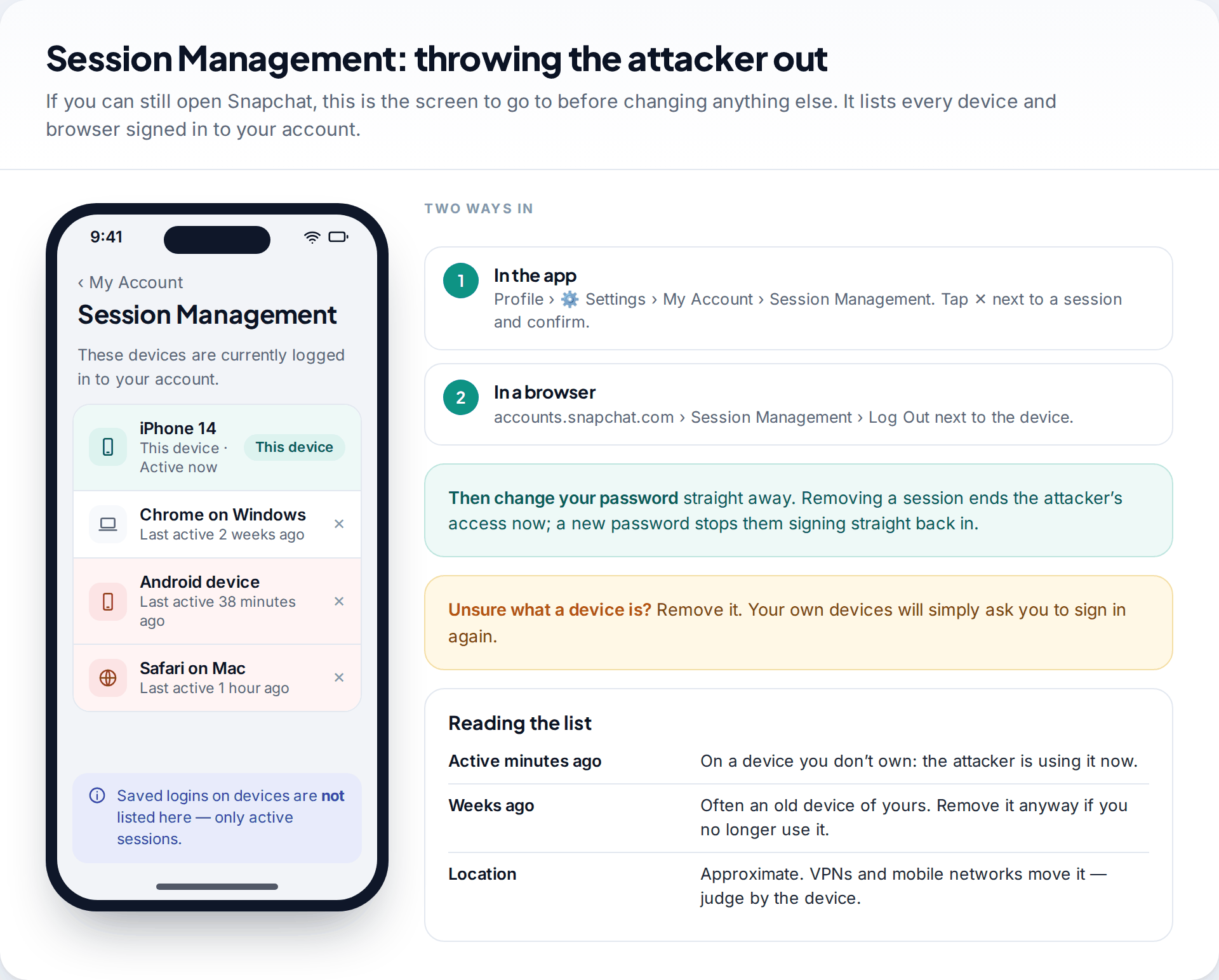
Snapchat’s help centre notes that Session Management only shows active sessions. Login details saved on a device are not listed, which is one more reason to change the password once the sessions are gone.
If you are logged out but your email or number still works
On the login screen, tap Forgot your password? and choose to reset it by phone or by email. Snapchat shows a masked version of each contact, such as “j••••@outlook.com”. Look at it carefully before tapping.
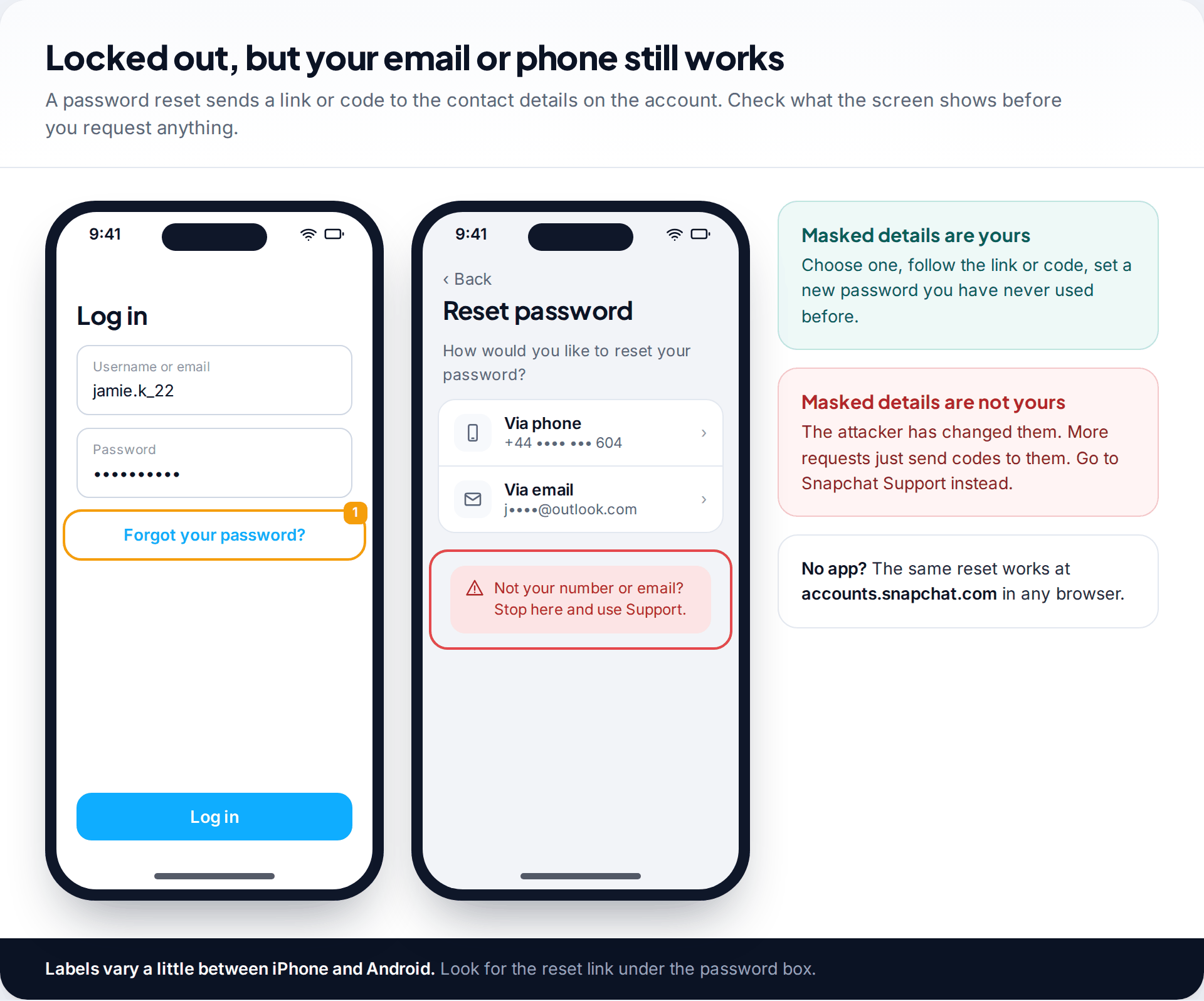
If the masked details are yours, follow the link or code and set a new password. Then complete the steps in the previous section: remove sessions, check contact details, fix two-factor. If they are not yours, stop requesting codes. The attacker receives every one, and repeated requests can get the account temporarily blocked. Go to Snapchat Support instead. The same reset also works in a browser at accounts.snapchat.com, which helps if the app keeps crashing or you have lost the phone.
Snapchat’s help pages add one condition: a password reset works only if you know the email address or phone number on the account. If you have forgotten which ones you used, check old inboxes for past Snapchat emails before contacting Support.
If the attacker switched on two-factor authentication
This is the hardest version of a Snapchat hack. With two-factor on, even the right password leads to a code prompt, and the codes go to the attacker’s phone or authenticator app. Snapchat’s help centre is clear that the way past it is a Recovery Code, and that the code “needs to have been created in advance”.
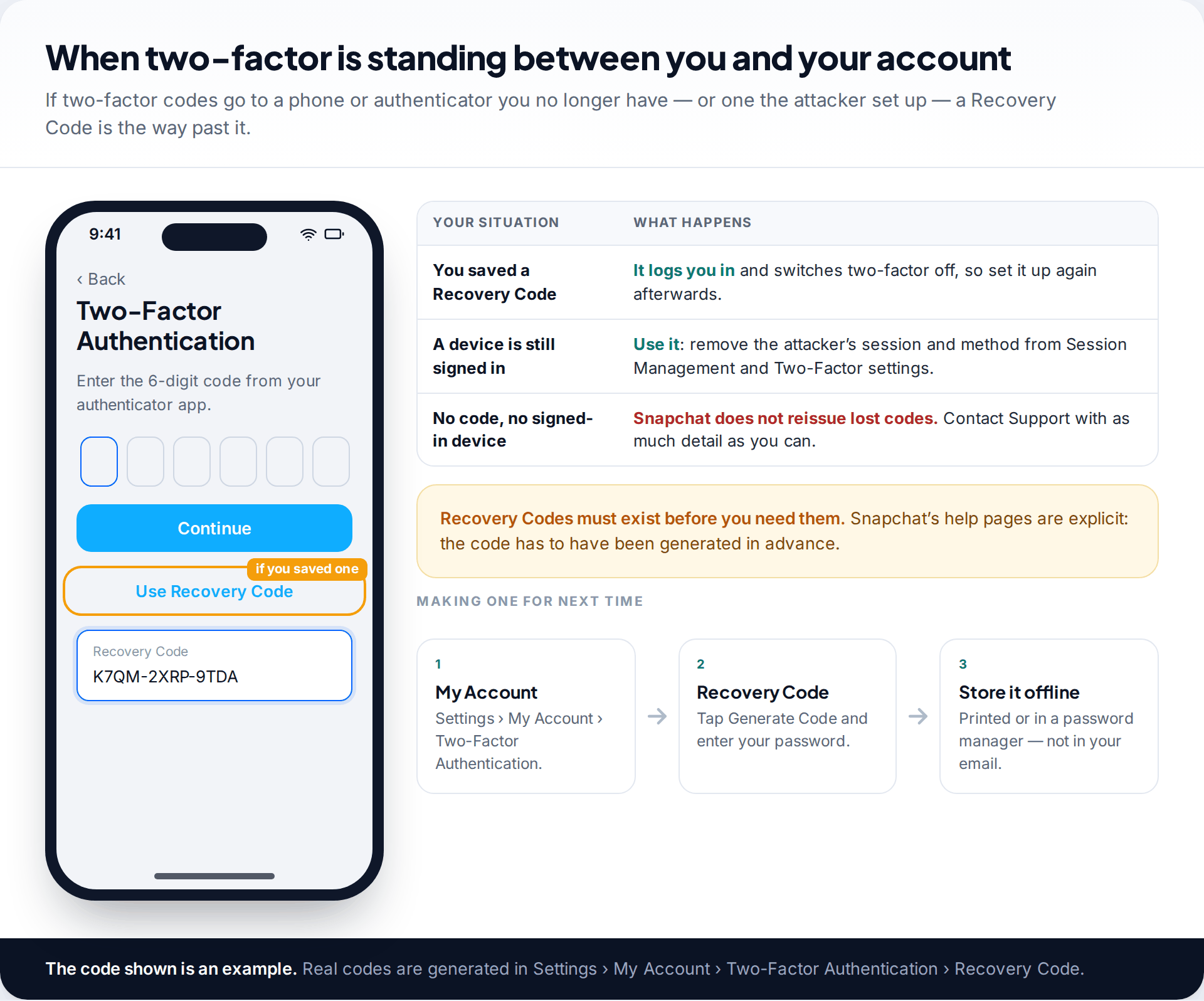
If you generated one before the attack, enter it when asked for the two-factor code. Snapchat logs you in and switches two-factor off. Set it up again straight away with your own method, then generate a new code. If you have no code but a device is still signed in, use that device to remove the attacker’s method. If you have neither, Snapchat says it does not offer support for lost Recovery Codes, so the remaining route is the Support request below. Give as much detail as you can.
If everything was changed: contacting Snapchat Support
When the password, email and phone number all belong to the attacker, there is nothing left to reset. Snapchat has to decide whether you are the owner. Requests go through Snapchat’s help site, at help.snapchat.com, where the Contact Us form and the Support Bot both handle compromised accounts. The exact wording of the menu options changes. Look for the one about being hacked or unable to log in.
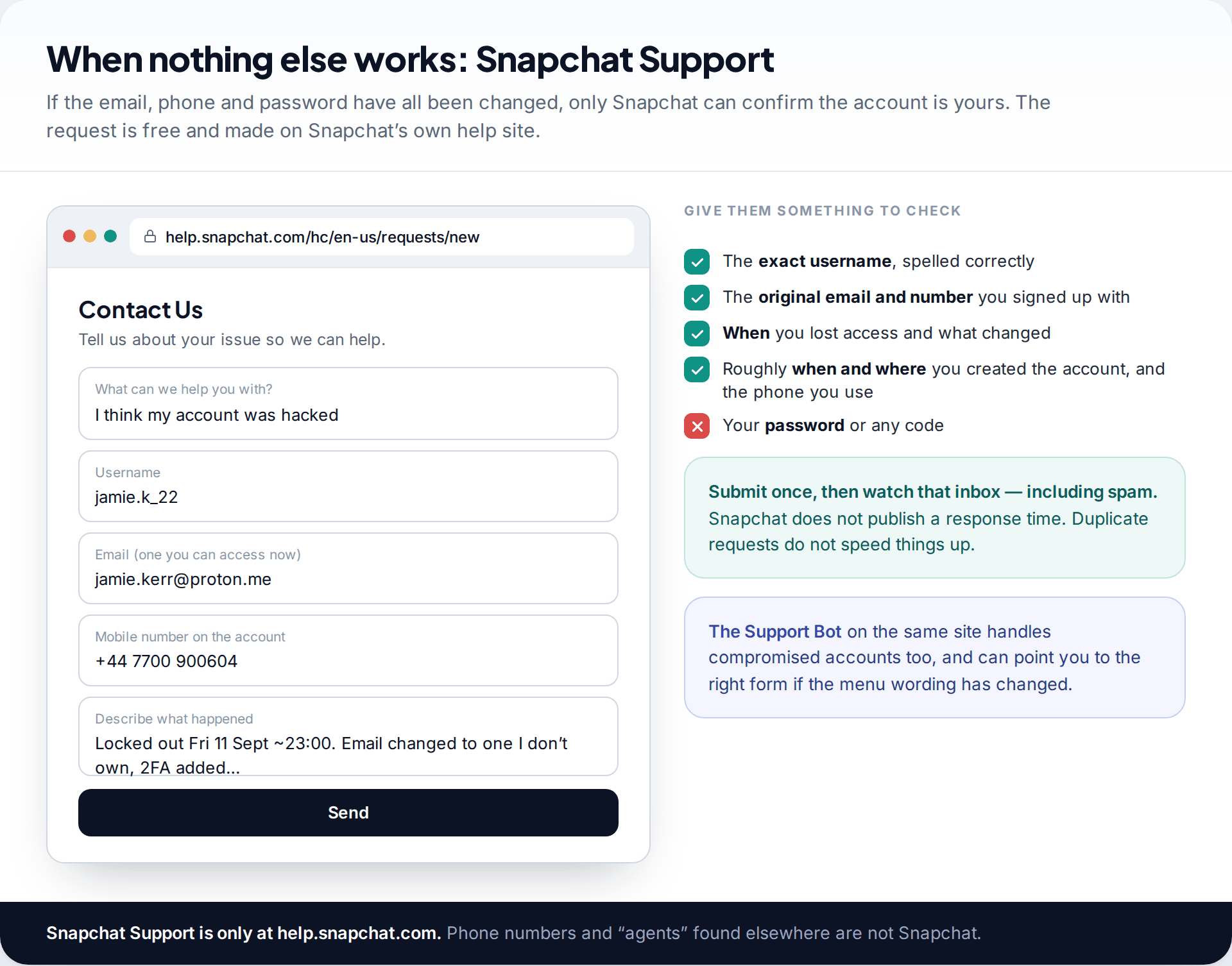
Use an email address you can read now, not the one on the hacked account. Give the exact username and the email and number you originally used. Say when you lost access and what changed, if you know. Details only the owner would know help, such as roughly when you created the account and the phone you normally use. Submit once, then check that inbox and its spam folder. Snapchat does not publish a response time, and sending the same request again does not move it up a queue.
“Too many attempts, try again later”
Snapchat temporarily blocks logins after repeated failures, which attackers and owners both trigger.
Fix: Stop for 48 hours, as Snapchat’s help pages advise, then try once from a device you have used before.
No reply from Support
Replies go to the email you typed into the form, and often land in spam or promotions.
Fix: Search that inbox for “Snapchat”. Wait several days before writing again, and mention any earlier request.
You don’t remember the username
Support needs the exact username to find the account, and the attacker may have changed the display name your friends see.
Fix: Ask a friend to open your Friendship Profile and read it to you. The username is shown there.
Locked, deactivated or deleted by the attacker
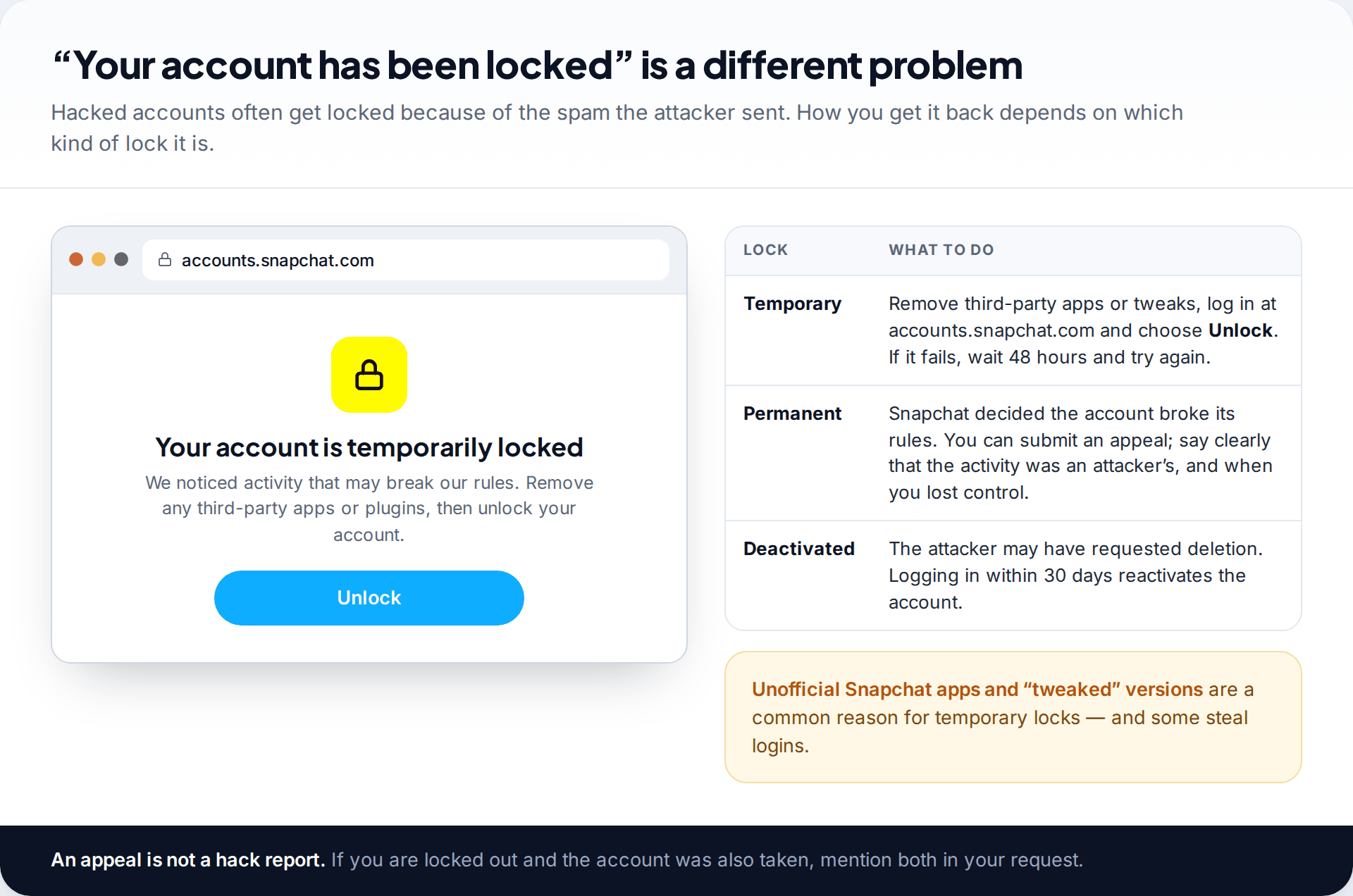
Attackers who use your account for spam often get it locked, which means you face a hack and a lock. A temporary lock can usually be lifted by removing any unofficial apps or tweaks, logging in at accounts.snapchat.com and choosing Unlock. If that fails, wait 48 hours. A permanent lock means Snapchat decided the account broke its rules. You can appeal, and it helps to say clearly that the activity came from an attacker and when you lost control.
Some attackers request deletion. Snapchat deactivates the account first and deletes it permanently after 30 days. Logging in during that window restores it, but you can’t change the password while it is deactivated. Our guide to reactivating a deleted Snapchat account explains the timing. Once an account is permanently deleted, nobody can restore it, including Snapchat.
Your friends are the next target
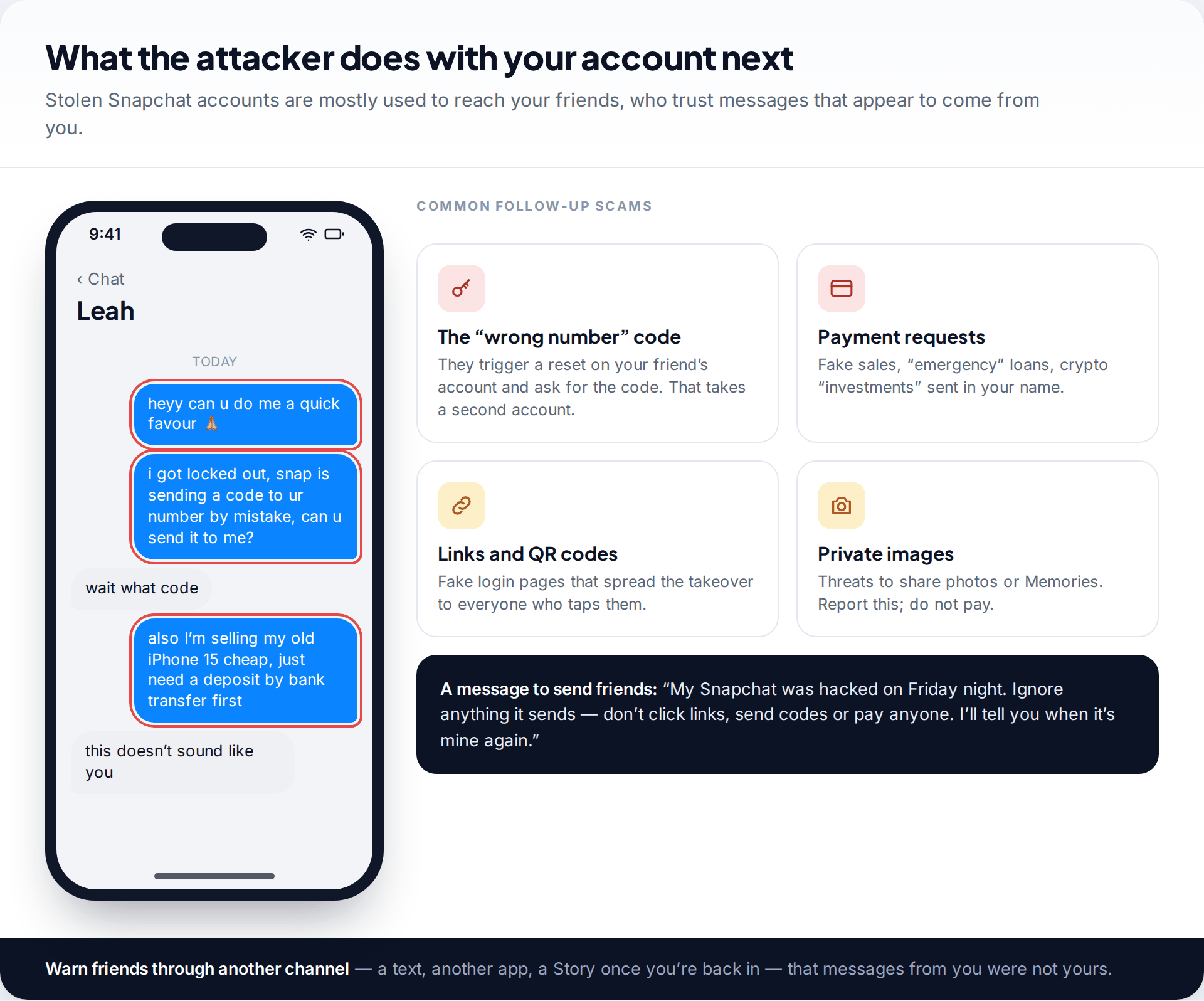
A stolen Snapchat account is valuable because your friends trust it. Expect the attacker to message them. They may say a code was “sent to their number by mistake”, advertise cheap phones or investments, or send links to fake login pages. Anyone who forwards the code loses their own account the same way.
Warn people through another channel, such as a text, another app or a group chat, that messages from you were not yours. If anyone threatens to share private photos or Memories, don’t pay or negotiate. Report the account in Snapchat, keep screenshots, and consider reporting it to the police. Payment rarely stops the threats.
Paid “recovery experts” are the second scam. Posting that you were hacked brings offers to recover the account for a fee. They can’t do anything that Snapchat’s free form can’t, and those who ask for your password or a code are trying to take the account themselves.
Back in: close every door the attacker opened
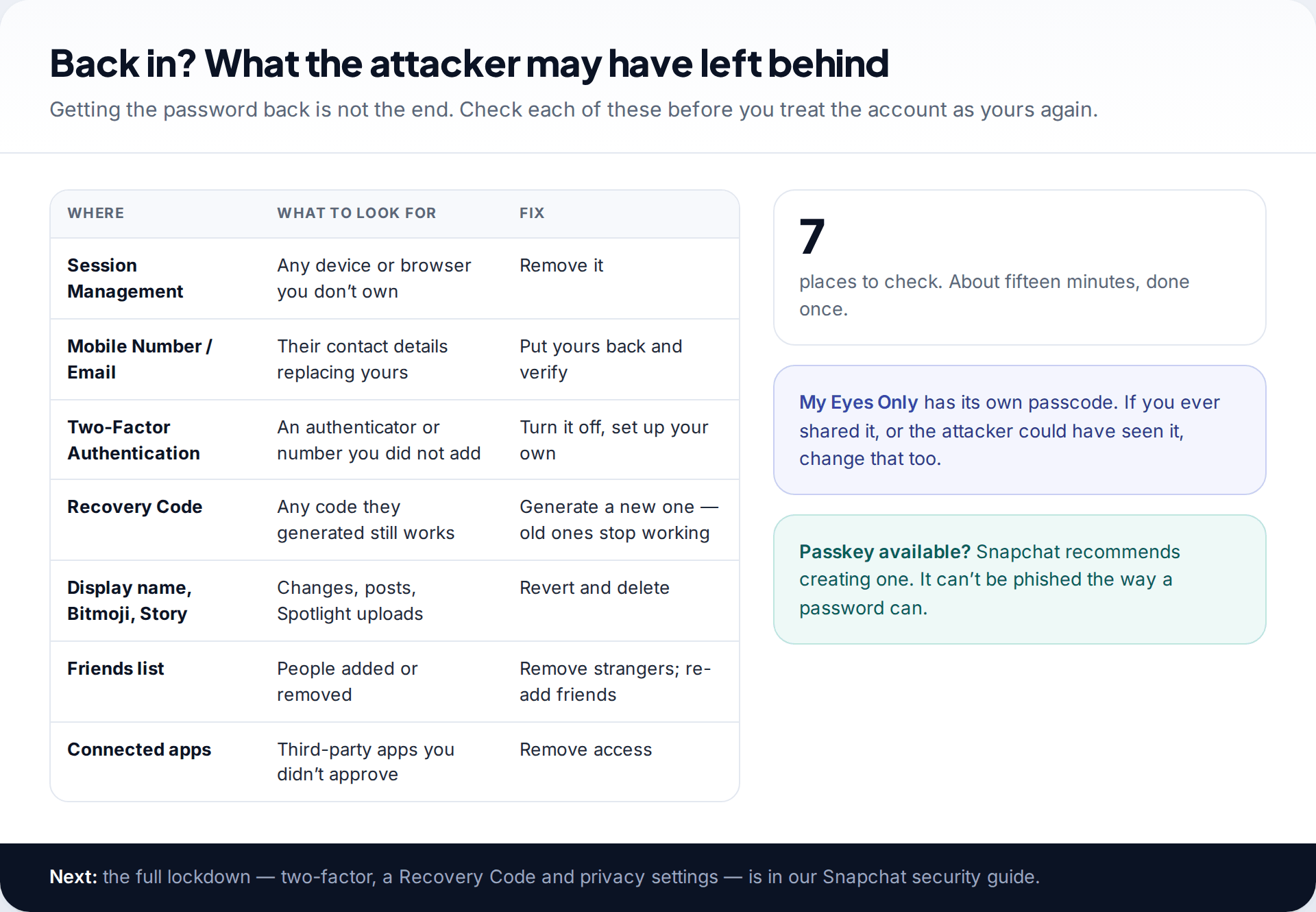
Getting the password back is only half the job. Before you treat the account as yours again, go through each item: sessions, contact details, two-factor, the Recovery Code, anything posted in your name, your friends list, and connected apps. Generate a new Recovery Code even if you had one, because the attacker may have made their own. Then store it somewhere other than your phone.
Snapchat also now supports passkeys, which it describes as stored on your device and not accessible to anyone else. Our guide to securing a Snapchat account covers passkeys, two-factor, Recovery Codes and the privacy settings that limit who can contact you.
Finally, think about how it happened: a password used somewhere else, a link sent by a “friend”, a code you were talked into sharing, or an unofficial Snapchat app. Fix that cause, or it can happen again.
How this page was put together
This guide was checked in September 2026 against Snapchat Support articles on compromised accounts, account access problems, Recovery Codes, Session Management and sign-in alerts. The screens shown are illustrative mockups, not screenshots. Snapchat adjusts its wording and menus often, so match on meaning rather than exact labels.
Snapchat doesn’t publish how long Support takes or how it weighs the evidence you send, so we haven’t guessed at either. We don’t link to or recommend any paid recovery service. There is more on how our guides are researched and corrected.
Common questions
How do I get my Snapchat account back if the hacker changed my email and phone number?
Contact Snapchat Support through help.snapchat.com. Choose the option for a hacked or compromised account and give your username, the original email and number, and an email address you can read now. Password resets won’t help at this point, because they go to the attacker’s details.
Can I recover my Snapchat without the Recovery Code?
If the attacker turned on two-factor and you have no code, you need either a device that is still signed in or Snapchat Support. Snapchat says it doesn’t reissue lost Recovery Codes, so generate a new one as soon as you are back in.
How long does Snapchat take to respond to a hacked account request?
Snapchat doesn’t publish a timeframe. Watch the email you gave on the form, including spam. Submitting the same request again doesn’t speed it up.
Will I get my Snaps, chats and Memories back?
Memories saved to your account normally come back with it, unless the attacker deleted them. Chats and Snaps that were already opened and cleared follow Snapchat’s normal deletion rules and usually can’t be brought back.
Can Snapchat tell me who hacked my account?
Snapchat doesn’t give out information about other users on request. If the hack involves threats, extortion or fraud, report it to the police. Snapchat responds to lawful requests from law enforcement.
Is it safe to log in to Snapchat through another app or website?
No. Snapchat’s help centre links temporary locks to third-party apps and plugins, and some unofficial apps collect logins. Use only the official app and accounts.snapchat.com.
The tools behind this guide. TheTruthSpy is a free parental control app for Android: GPS location tracker with geofencing, a screen time app with app limits, a website blocker and web filter, an SMS tracker and call tracker, and social media monitoring for the WhatsApp tracker, Instagram tracker, Snapchat tracker, Facebook Messenger tracker and Viber tracker. See the full parental control feature list, the free parental control pricing, or the download and setup guide.
Related guides
How to Secure Your Instagram Account: A Setting-by-Setting Lockdown
Secure your Instagram account in about twenty minutes: two-factor with an authentication app, saved backup codes, login alerts, your own…
Finding Hidden Spy Apps: Where They Sit in Your Phone’s Settings
Spy apps hide their icons, not their permissions. A settings-by-settings tour of where they show up on Android (special app…
Which Apps Used Your Camera or Mic? Reading the Privacy Dashboard
See which apps used your camera or microphone, and when: the live green and orange indicators, Android's Privacy dashboard timeline,…
Free parental control app for Android
GPS tracking, screen time limits, web filtering, SMS and call monitoring — visible on your child's phone. Pair a phone in about ten minutes.
Android · Free to set up · Visible on your child's phone