Kik Tracker Reality Check: Why Most Are Scams, How Accounts Really Get Accessed, and How to Protect One
 By TheTruthSpy Editor · Founder and editorPublished October 7, 2026Updated October 12, 202614 min read
Kik is an unusual messaging app, and the thing that makes it unusual is the thing that decides how it gets misused. Kik needs no phone number. An account is a username and a password and nothing else, which means there is no SIM to tie it to a person, no contact list to match it against, and no verification code to receive. Add that Kik does not encrypt messages end to end, so they are readable on Kik’s servers, and that it was shut down by its original owner in 2019 and bought and revived by MediaLab for exactly the anonymity that made it popular, and you have an app whose risks are different in kind from WhatsApp’s or Snapchat’s.
This guide is therefore shaped differently from the others in this series. On Kik the technical routes matter less, because almost every product sold as a “Kik tracker” is a scam that cannot do what it says. The real exposure is who can reach an account, and the real fix is in Kik’s own settings. The guide covers both: how to tell whether your Kik account has been accessed by someone else, how to detect the one kind of Kik monitoring that is real, and how to make a child’s account very hard for a stranger to reach.
What a “Kik tracker” usually is
Search for one and you will find websites and apps promising to “track any Kik username”, “see who someone is messaging on Kik”, “recover deleted Kik messages”, or “hack a Kik account”. Kik has no public interface that exposes any of that. There is no way, from outside Kik, to learn who a username talks to, and no way to recover a message Kik has deleted. So the products cannot be what they claim, and they fall into three groups that are worth being able to recognise on sight.
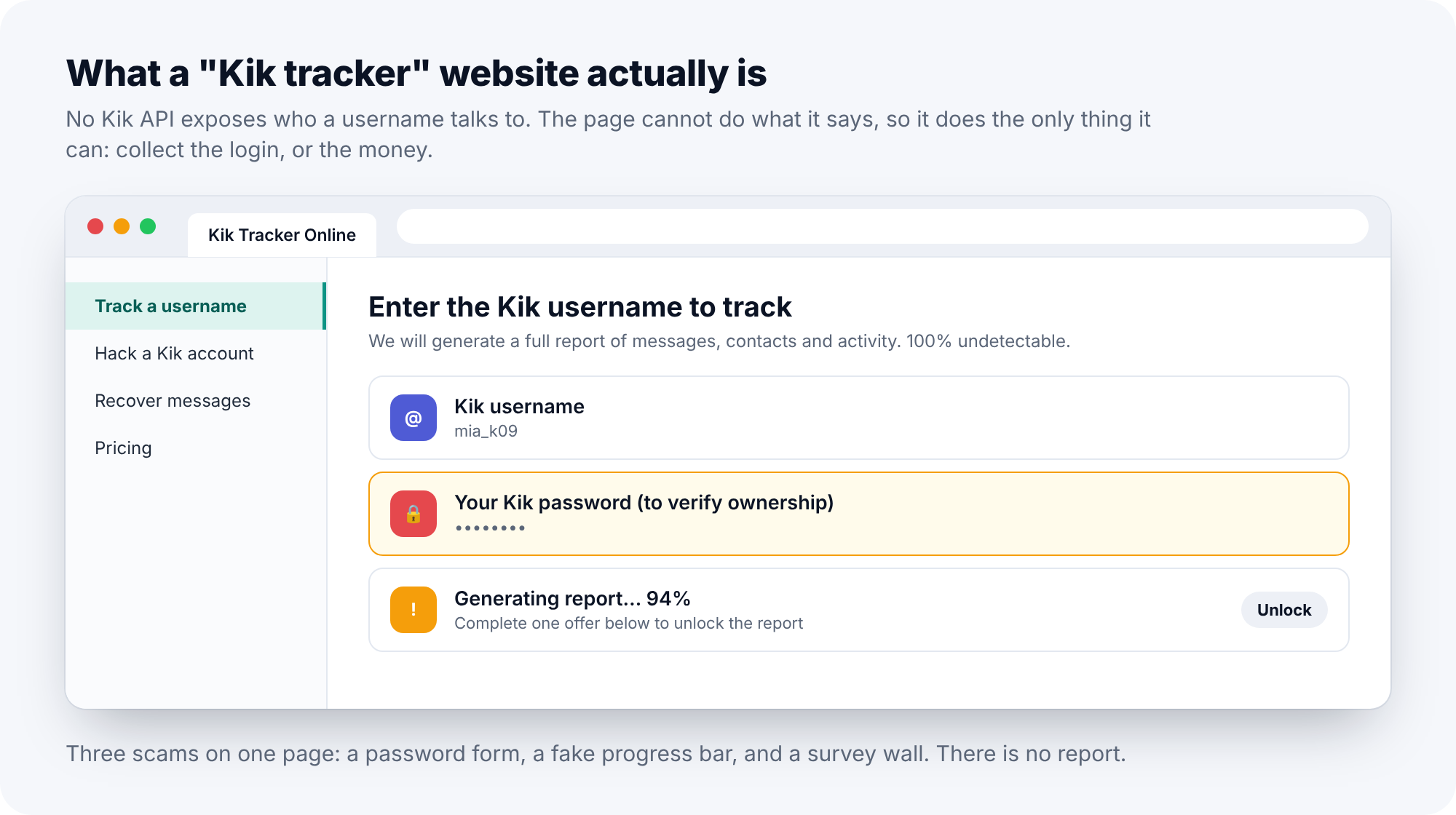
The first group is credential phishing. The site asks for the Kik username and password “to verify ownership” or “to connect to the account”. It then has the account, and whoever runs the site signs in as the owner from their own device. The second group is survey and download scams. The page shows a progress bar that stops at 94 percent and asks you to complete an offer, install an app or enter a card number to “unlock the report”. There is no report; the offers are the product. The third group, and the only one that does anything real, is notification-reading apps installed on the target’s phone, which need physical access to install and are covered below.
If you came here intending to use one of these to watch someone, the first two will cost you your own account or your own money, and the third is addressed in this guide from the other side.
Someone signed in as you
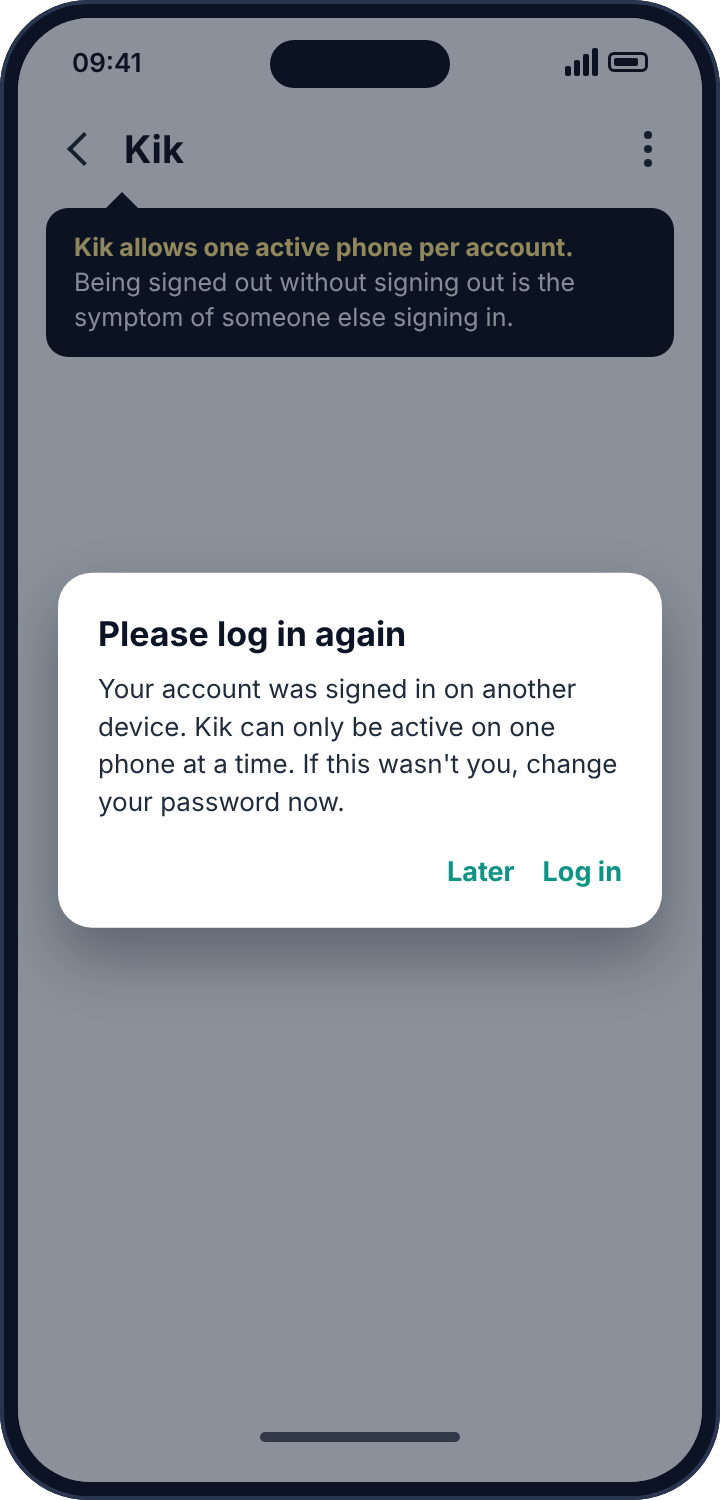
Because Kik stores messages on its servers, a second phone signed in to the same account sees the conversations. Kik does not offer a “where you’re logged in” screen the way Instagram or Facebook do. What it does do is simpler and, once you know it, quite reliable: Kik allows one active phone per account, and when a new device signs in, the previous one is signed out. The symptom of someone else having your Kik login is being logged out when you did not log out, and finding yourself asked to sign in again.
How to detect it
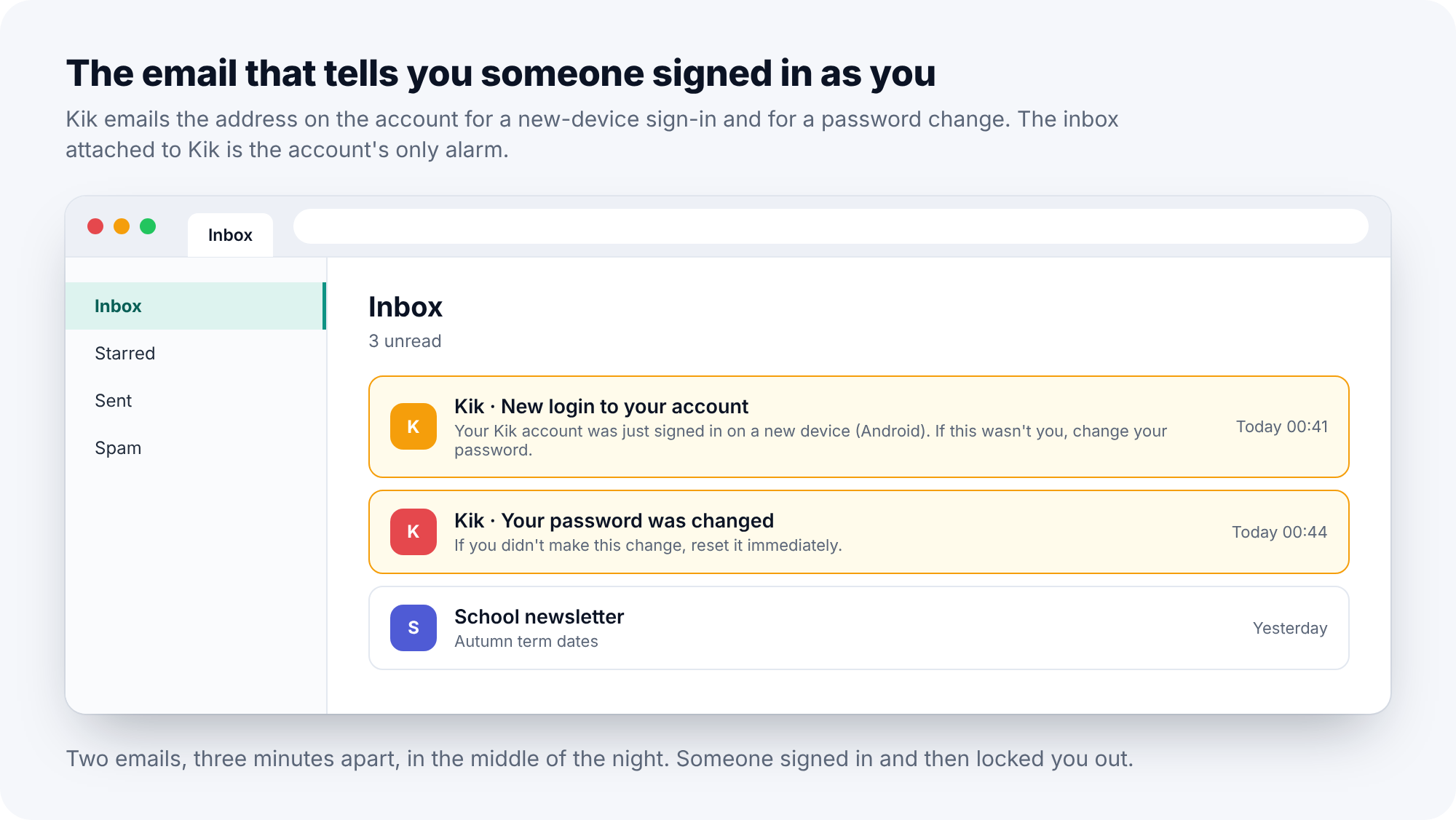
Treat any unexpected sign-out as a sign, and then check the email account attached to Kik. Kik sends an email when the account is signed in on a new device, and another when the password is changed. Those two emails, a few minutes apart, in the middle of the night, are the whole story of a stolen Kik account: someone signed in, and then changed the password to lock the owner out. Many people have those emails sitting unread in an inbox they rarely open.
How to remove it
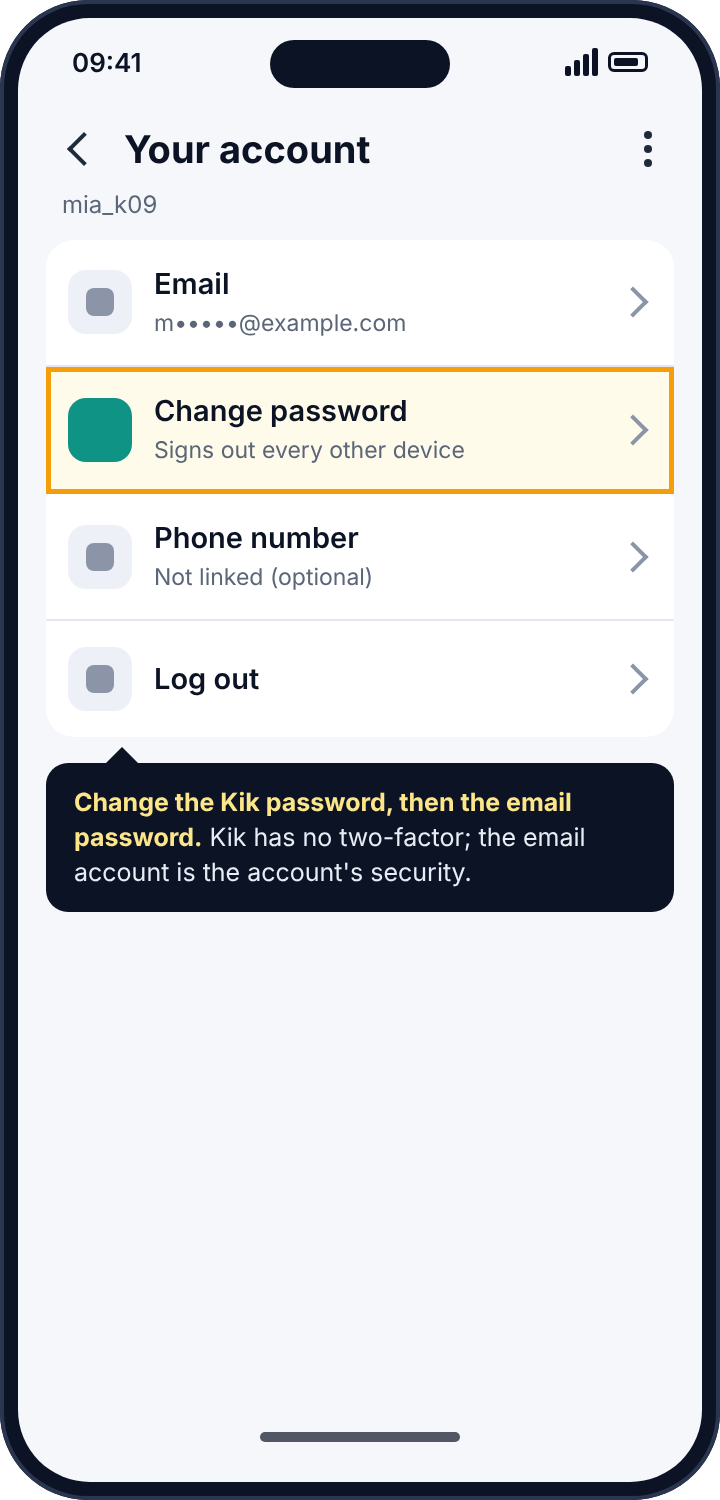
Change the Kik password from Settings, Your Account, Change Password, choosing something used nowhere else; this signs out every other device. Then change the password on the email account attached to Kik, because a Kik password reset goes to that inbox, and anyone who controls the inbox controls the account. Kik does not offer two-factor authentication, so the email account’s security is the Kik account’s security: put two-factor on the email instead, with an authentication app. If the password has already been changed and you are locked out, Kik’s reset flow runs through that same email, which is why securing the email first is the order that works.
Notification-reading apps on the phone
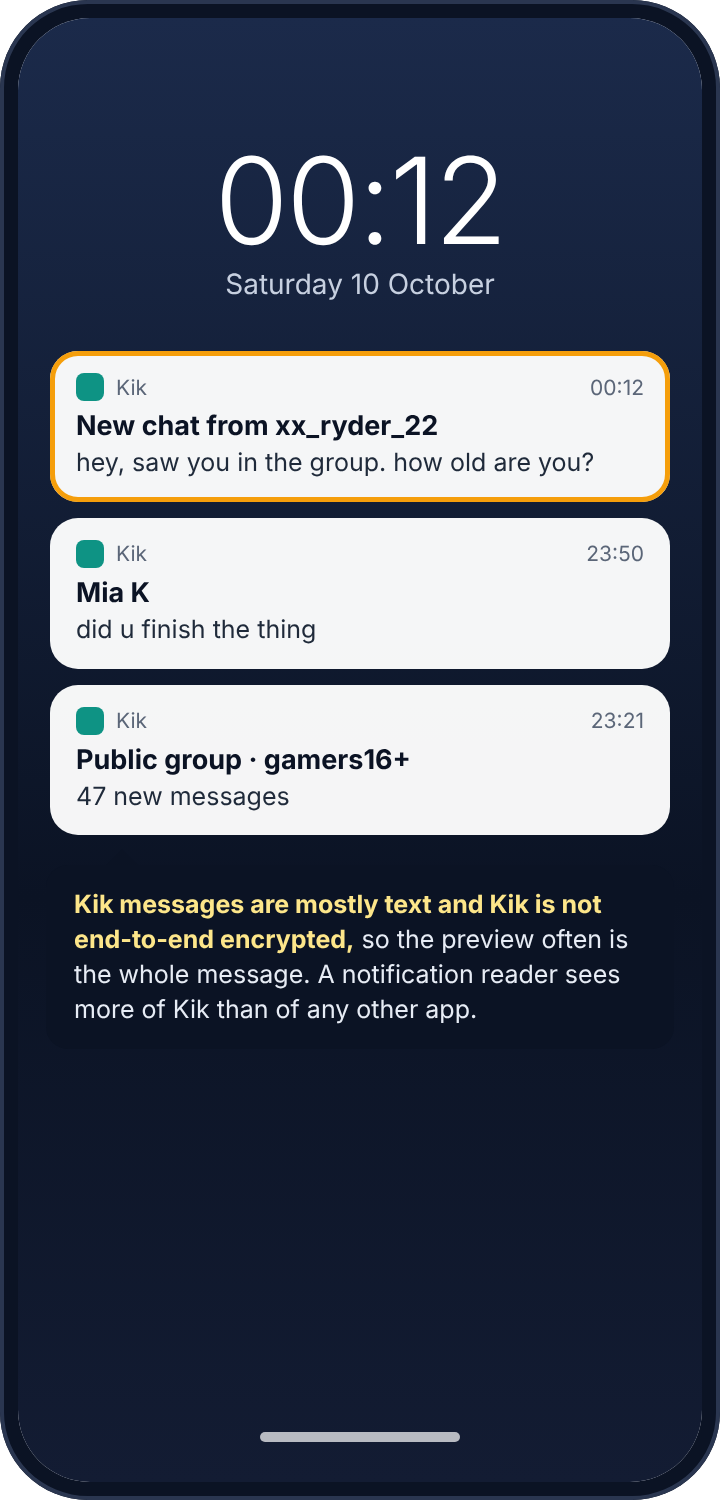
Android lets an app ask for a permission called notification access, which lets it read every notification other apps post. Smartwatch apps use it. Parental control apps use it. Stalkerware uses it. Kik posts a notification for each incoming message with the sender’s username and, if previews are on, the message text. And here Kik is worse than the encrypted apps, for a reason that is worth understanding: Kik messages are mostly text and Kik is not end-to-end encrypted, so there is no technical reason for Kik to hold anything back from the preview. The notification often is the whole message. An app with notification access on a phone sees more of Kik than it would of WhatsApp, Snapchat or Messenger.
How to detect it
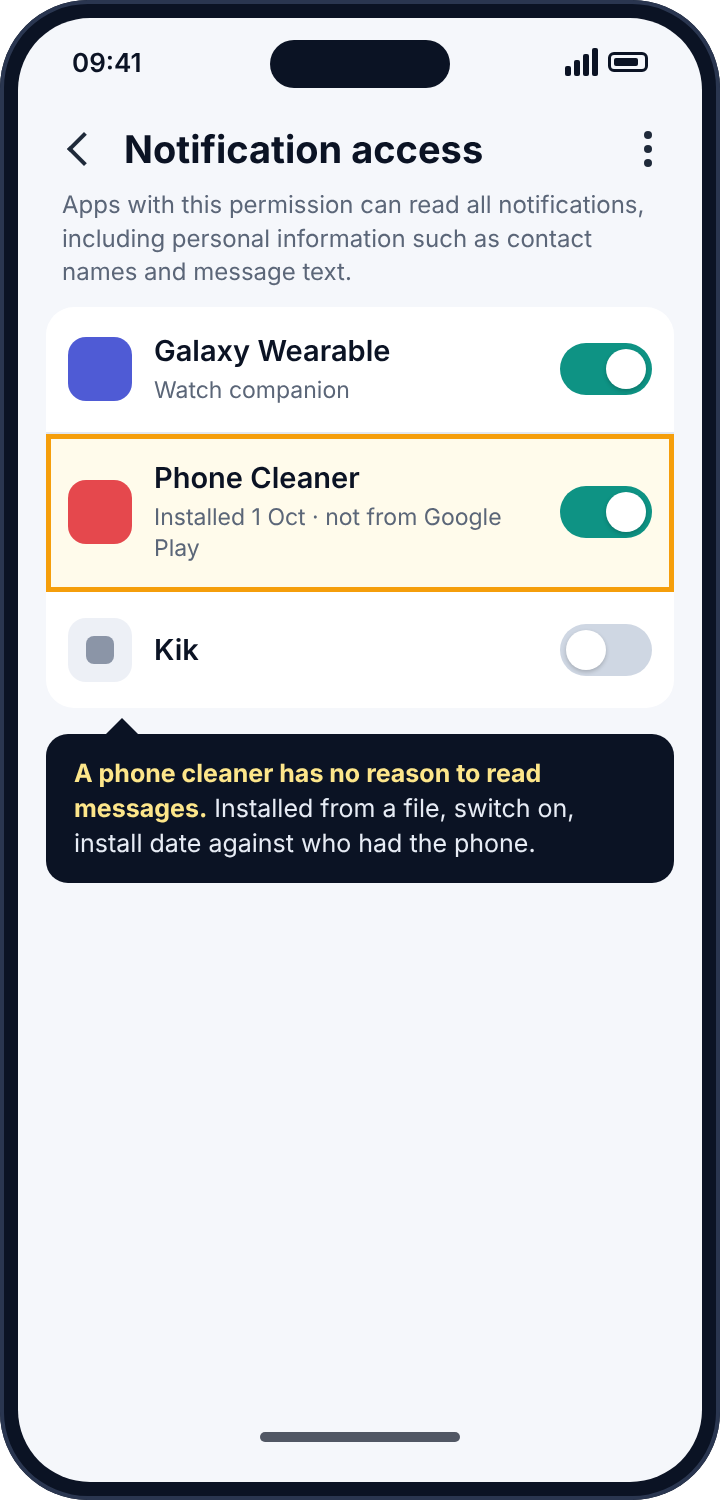
In the phone’s Settings, search for “notification access” and read the list of apps that have it. A smartwatch or car app is expected. Anything you cannot name the purpose of is the one to open: tap it, choose App info, and look at when it was installed and whether it has a Play Store listing. Stalkerware comes from a downloaded file, not the store, and names itself after a utility: “Phone Cleaner”, “Battery Doctor”, “Storage Manager”. A phone cleaner has no reason to read your messages. That mismatch is the tell.
How to remove it
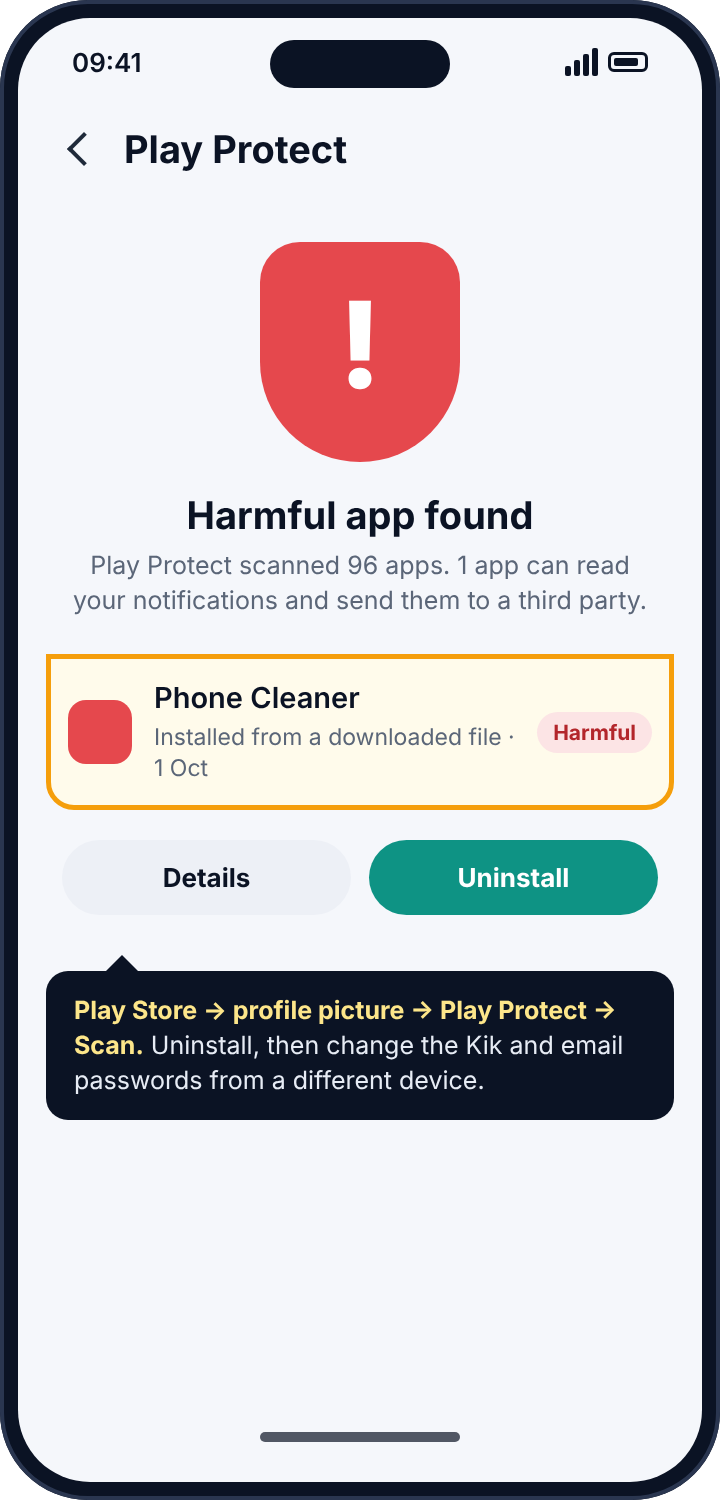
Turn the toggle off, then uninstall the app from Settings, Apps. If the uninstall button is disabled, go to Settings, Security, Device admin apps, deactivate the app there, and try again. Run a Play Protect scan, which recognises most known stalkerware (Play Store, profile picture, Play Protect, Scan). In Kik, Settings, Notifications, turn off message previews so that a future app with this permission sees only the sender’s name.
The real Kik risk: who can reach the account
On Kik, anyone who knows or guesses a username can message it. Public groups let strangers harvest usernames by the hundred, and a child who joins a group called something like “gamers16+” has just handed their username to everyone in it. For a child this is the exposure that matters. No tracker fixes it, and Kik’s own settings largely do.
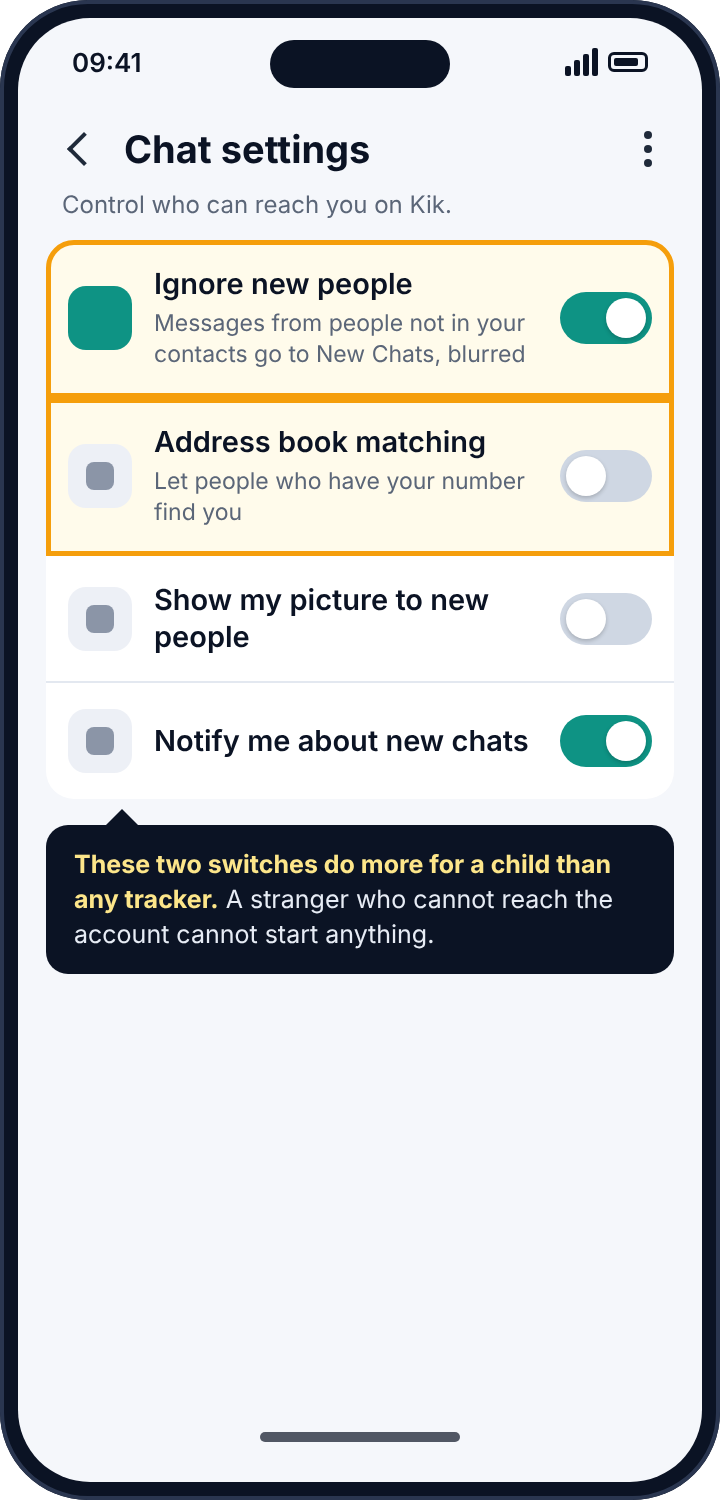
Three settings carry nearly all the weight. “Ignore new people”, under Settings, Chat Settings, sends messages from anyone not already in the contact list to a separate New Chats area, with the sender’s picture blurred, and the child decides whether to open them. “Address book matching”, in the same place, should be off; with it on, anyone who has the child’s phone number and uploads their contacts can find the Kik account and start from there. And the username itself should contain nothing: not a real name, not a school, not a year of birth. A username is public and searchable, and “mia.kelly.2012” is a first name, a surname and an age, which is enough for a stranger to find the school.
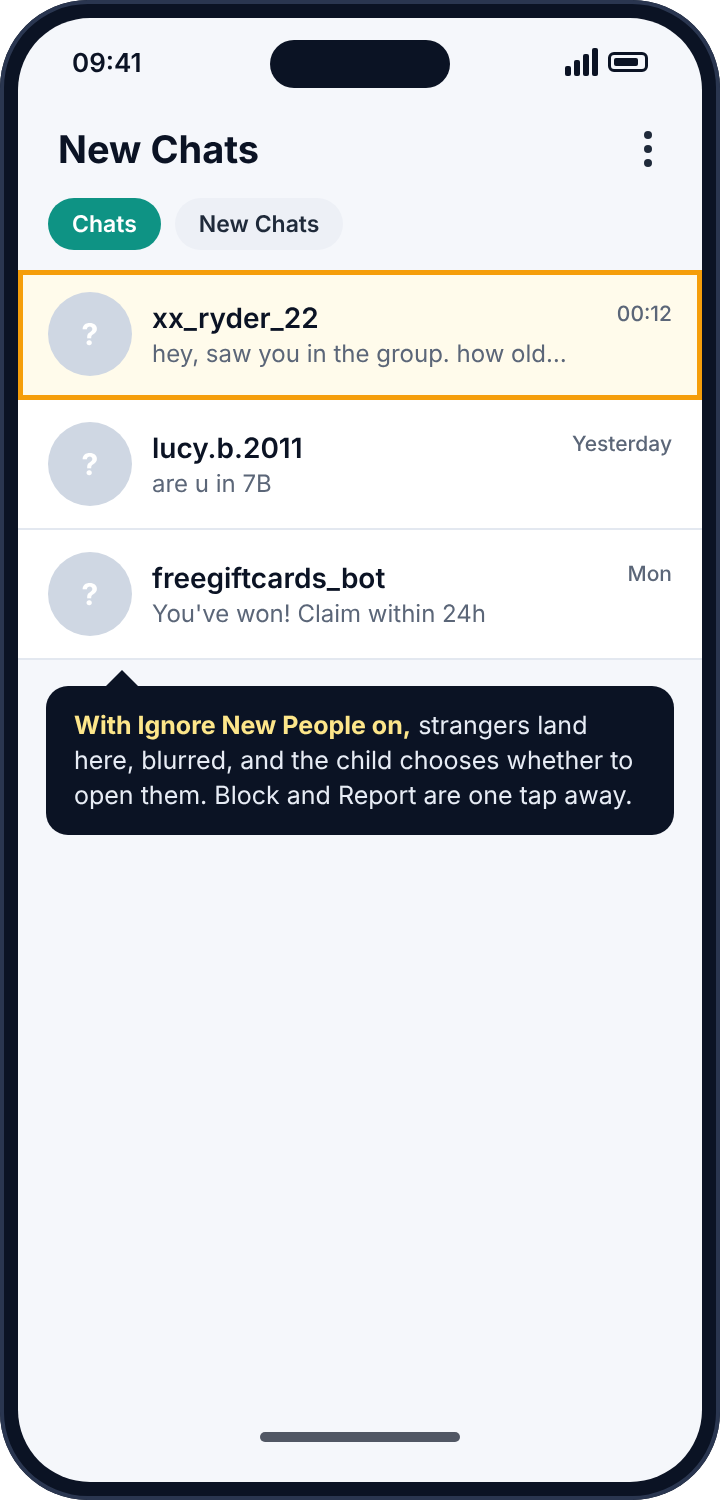
Kik has no parental supervision feature and no age verification beyond asking. Its stated minimum age is 13. Its safety centre explains blocking and reporting, which from inside any chat takes two taps, and a child who knows where those taps are has the most useful Kik safety tool there is.
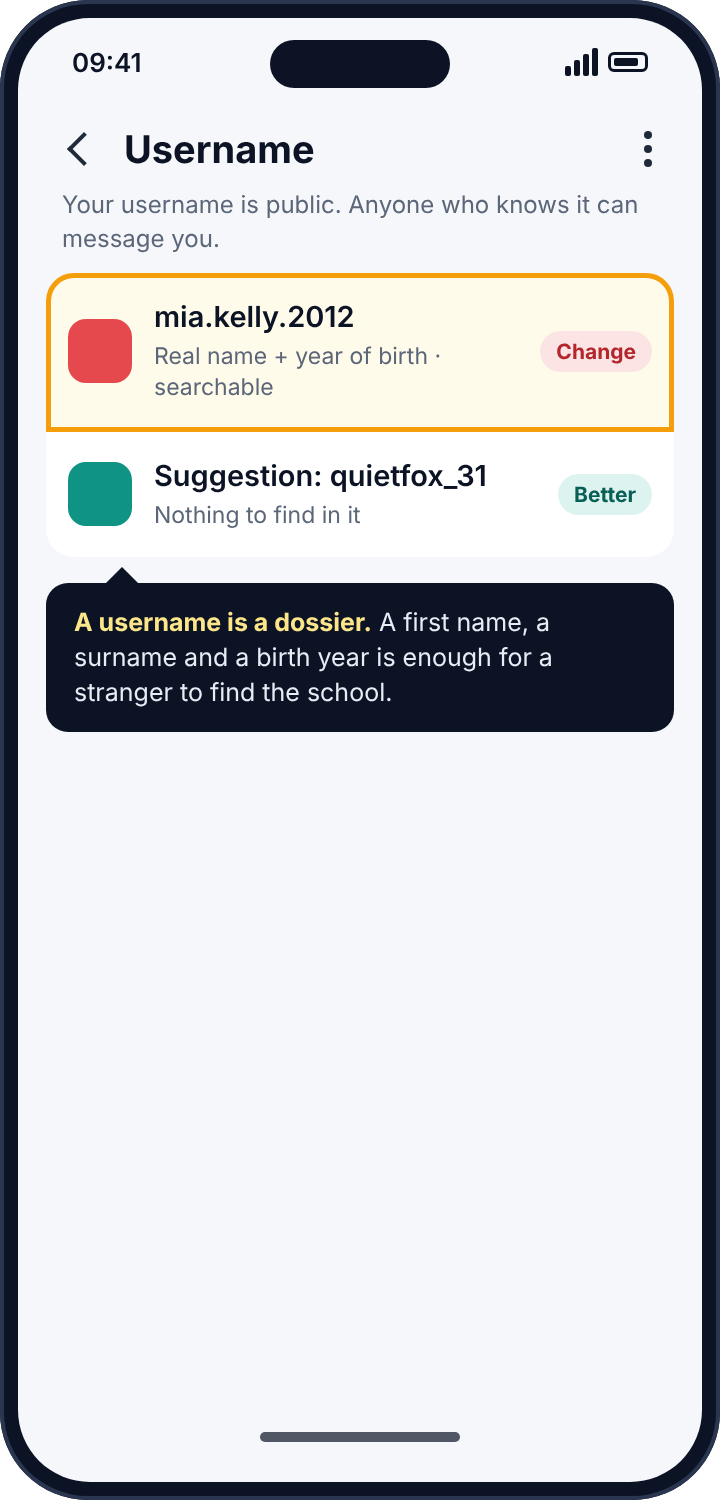
Public groups: how a username gets harvested
It is worth dwelling on public groups, because they are where most Kik contact from strangers begins and because the mechanism is invisible to a parent who has never used the app. Kik lets anyone search public groups by topic and join them without an invitation. A group has a name, a hashtag and up to fifty members, and every member can see every other member’s username. A child who searches for a game they like, joins the first group that comes up, and never posts a word has nonetheless published their username to forty-nine strangers, any of whom can open a private chat with it. Some people in those groups are there to collect usernames, and the opening message they send is designed to look like it came from inside the group: “saw you in the group”, “are you the one who posted about the thing”, “how old are you”.
That is why “Ignore new people” is the most important switch on a child’s Kik, and why a username that gives away nothing matters more than it seems. With both in place, a harvested username leads to a blurred message in the New Chats tab that the child can delete unread. Without them, it leads to a conversation, and the conversation is the thing every later problem grows from. The practical rule for a younger child is simple: no public groups at all, and the group search left alone.
If a stranger has already made contact
Parents usually find this guide after something has already happened, so it is worth saying what to do in that case, because the instinct to delete everything is the wrong one. Do not delete the chat. Screenshot it, including the username and the timestamps, before anything else. Block the username from inside the chat, which also reports it to Kik, and use Kik’s report option with the reason that fits. If the messages involve a request for images, a meeting, or any mention of age, report to the police or to your country’s child-exploitation reporting line; they will want the screenshots and the username, and they will not want the chat to have been deleted. Then, with the child, go through the settings above, change the username, and turn on Ignore New People. The settings are the lasting fix. The report is how the next child in that group is protected.
Where Kik stands on encryption, plainly
Kik encrypts messages between the phone and its servers, so someone on the same Wi-Fi cannot read them in transit. It does not encrypt them end to end, so Kik itself can read them and does provide them to law enforcement with a valid request. For an ordinary user this changes little day to day. It does mean that “Kik messages cannot be read” is not a claim anyone should make, that the preview a notification reader sees is usually the whole message, and that anything a child would not want seen should not be sent on Kik in the first place. It is also why “recover deleted Kik messages” services are scams rather than merely unlikely: Kik deletes server copies after delivery, and nothing outside Kik ever had them.
Reading the symptoms
If you were signed out without signing out, someone signed in. If there are Kik security emails you did not act on, someone signed in and may have changed the password. If a stranger knew the content of a Kik conversation, think a signed-in device first and a notification reader second. If a child is receiving messages from usernames they do not know, that is not a tracker; it is a settings problem, and “Ignore new people” fixes most of it tonight. If an app you do not recognise is using battery or data in the background, look at notification access.
Where parental monitoring apps fit in
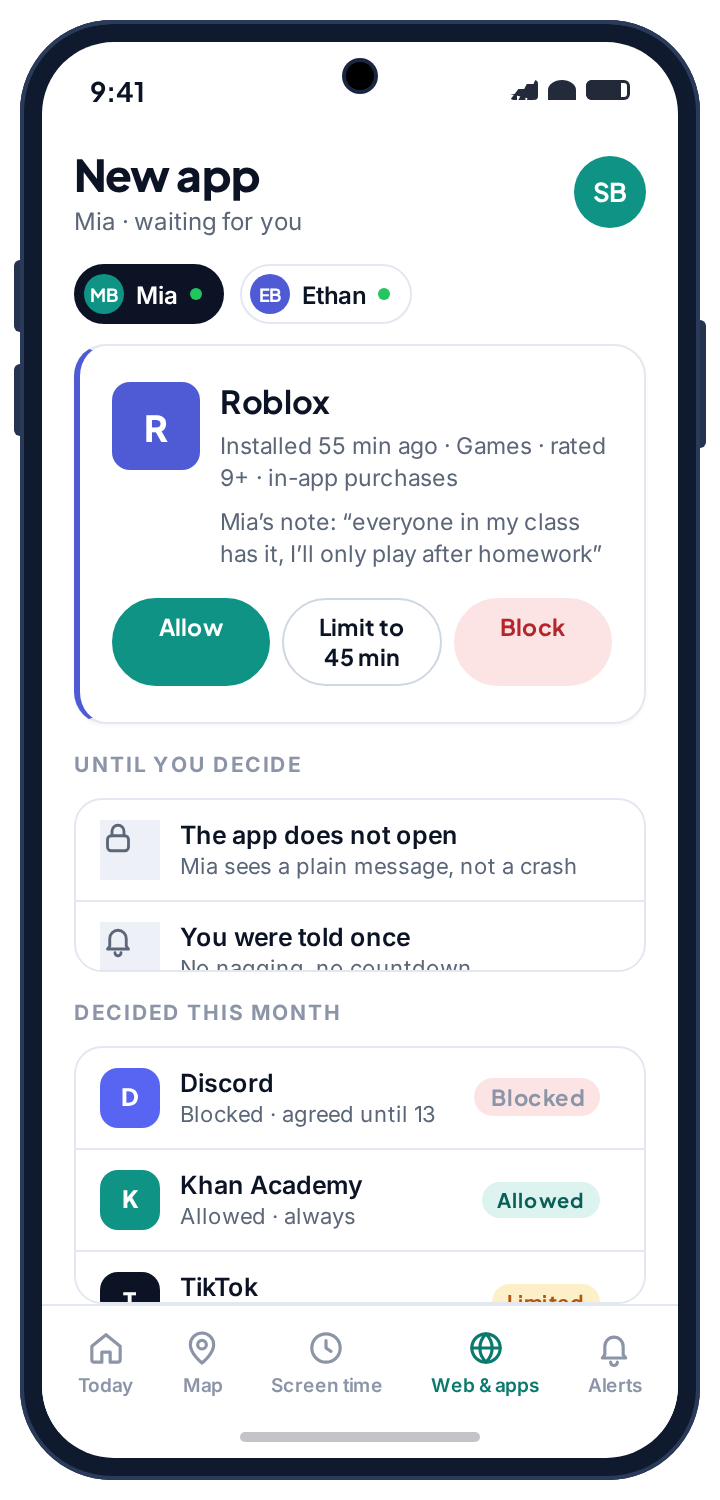
Parents will have recognised the notification route as the mechanism behind every parental control app that claims to monitor Kik. On Kik, because the previews are so complete, those alerts come closer to the content than on any other app, and it is worth thinking about whether that is what you want. What notification-based alerts honestly give you is the username that messaged, when, how often, whether it is new to the phone, and whether the text matched a word you asked about. For a parent whose worry is strangers, which on Kik it should be, the new-username flag is the useful signal, and it arrives without anyone reading a conversation.
The line between a monitoring tool and a spy tool is not the permission, which is identical, but whether the child knows. Our own alerts use it, visibly: the app sits in the drawer under its own name, lists what it reads on the child’s phone, and shows the child when a parent looked. The social alerts page describes exactly what a parent sees from Kik’s notifications. But Kik’s own settings above should come first, and if the honest answer for your family is that Kik should not be on the phone yet, the app rules page covers approving new installs before they open, which is a simpler conversation than any monitoring afterwards.
What a parent can see without any tool at all
Because Kik has no supervision feature, parents sometimes assume the choice is between a tracker and nothing. There is a third option, which is the phone itself, looked at together. Kik keeps recent chats on the device, the New Chats tab shows who has tried to make contact, and the group list shows which public groups the account is in. Sitting with a child and going through those three screens once a week, as a routine rather than an inspection, tells a parent more than a notification reader would, and it tells the child that the account is something the family talks about rather than something a parent watches from a distance. It also surfaces the one fact that no tracker reports: whether the child feels able to show you a message that worried them. A child who has done that once will do it again, and that reflex is worth more than any alert.
If the person behind it is someone close to you
Changing a password or removing an app will tell the person who did it that you know. If that person is a partner, an ex or a family member and you have any concern about their reaction, keep evidence first: the new-sign-in email from Kik, a screenshot of the notification-access list. Then talk to a domestic abuse service with technology-safety advisers before you act; the Coalition Against Stalkerware keeps a list of such services by country.
Frequently asked questions
Can a Kik tracker show who someone is messaging?
No. Kik exposes no such information to anyone outside Kik. Websites that claim to are collecting passwords or selling offers, and apps that claim to need to be installed on the target’s phone, where they read notifications.
Can Kik messages be recovered after deletion?
No. Kik’s servers delete messages after delivery, and the app keeps only a short history on the device. “Recovery” services are scams without exception.
Does Kik have two-factor authentication?
No. The email address on the account is its recovery route and therefore its security. Put two-factor on the email account instead.
How do I know if someone else is logged in to my Kik?
Kik allows one active phone. If you are signed out without signing out, another device signed in. Kik also emails the account’s address for every new-device login.
Can a parent see a child’s Kik messages?
Not through Kik, which has no supervision feature. A notification reader on the phone sees message previews, which on Kik are usually complete. The settings that keep strangers out matter more than either.
Is Kik safe for a 13-year-old?
Safer with Ignore New People on, address book matching off, a username with nothing in it, and no public groups. Without those, it is an app designed to let strangers reach children, and it works as designed.
The ten-minute version
Change the Kik password to something unique, then change the attached email’s password and put two-factor on the email. Search the phone’s settings for notification access and remove any app you cannot account for. Turn Kik message previews off. In Kik’s Chat Settings, turn Ignore New People on and Address Book Matching off. Give the account a username with nothing in it. Never enter a Kik login into any site or app that is not Kik. Kik is not tracked so much as reached. Make the account hard to reach and there is nothing left for a tracker, real or imaginary, to report.
Related guides
Android Keylogger Detection: The Two Settings Lists Where One Has to Hide, and How to Remove It
Android keylogger guide: a phone keylogger is an accessibility service or a keyboard. Where each hides, the symptoms, removal steps,…
Call Tracker Detection: Call Logs, Call Forwarding and Call Recording, and How to Stop Each One
Call tracker guide: how call logs, call forwarding and call recording work on Android, the screens and dial codes that…
Who Can See Your Phone Contacts? Shared Accounts, Sync and the Apps That Upload Your Address Book
Who can see your phone contacts: shared Google accounts, forgotten sync, and apps that upload your address book. Where to…
Parental controls your child can see
Location, screen time limits, a web filter and alerts from notifications — free, and visible on your child's phone. Pair a phone in about ten minutes.
Android · Free to set up · Visible on your child's phone