Screen Time Limits
A free screen time app for your child's Android phone: a daily budget for weekdays and weekends, a bedtime and a school schedule, a limit on the one app that eats the evening, and a request button so your child can ask for more time instead of arguing for it. This page covers what each control does, what the phone still does during bedtime, and why the first fortnight should be spent counting rather than capping. Most families who fail at screen time limits fail in week one, by starting with a number.
Free · Permission: Usage access · Visible on your child's phone
- A new child starts with no limits. Nothing is blocked, nothing is capped, and the app only counts until you decide otherwise.
- Four controls, and they stack. A daily budget, a bedtime or school window, a per-app limit and earned time. Most families end up using two.
- When matters more than how long. A phone-free window from 21:30 fixes more than shaving thirty minutes off a daily total, and it is far easier to explain.
- The phone stays a phone. Calls to you work during bedtime, homework and school apps sit outside the budget, and the alarm still goes off.
- Free, and visible on the phone. Your child sees the same ring you do, and can ask for more time from their own screen.
The daily budget, and the week of counting that should come before it
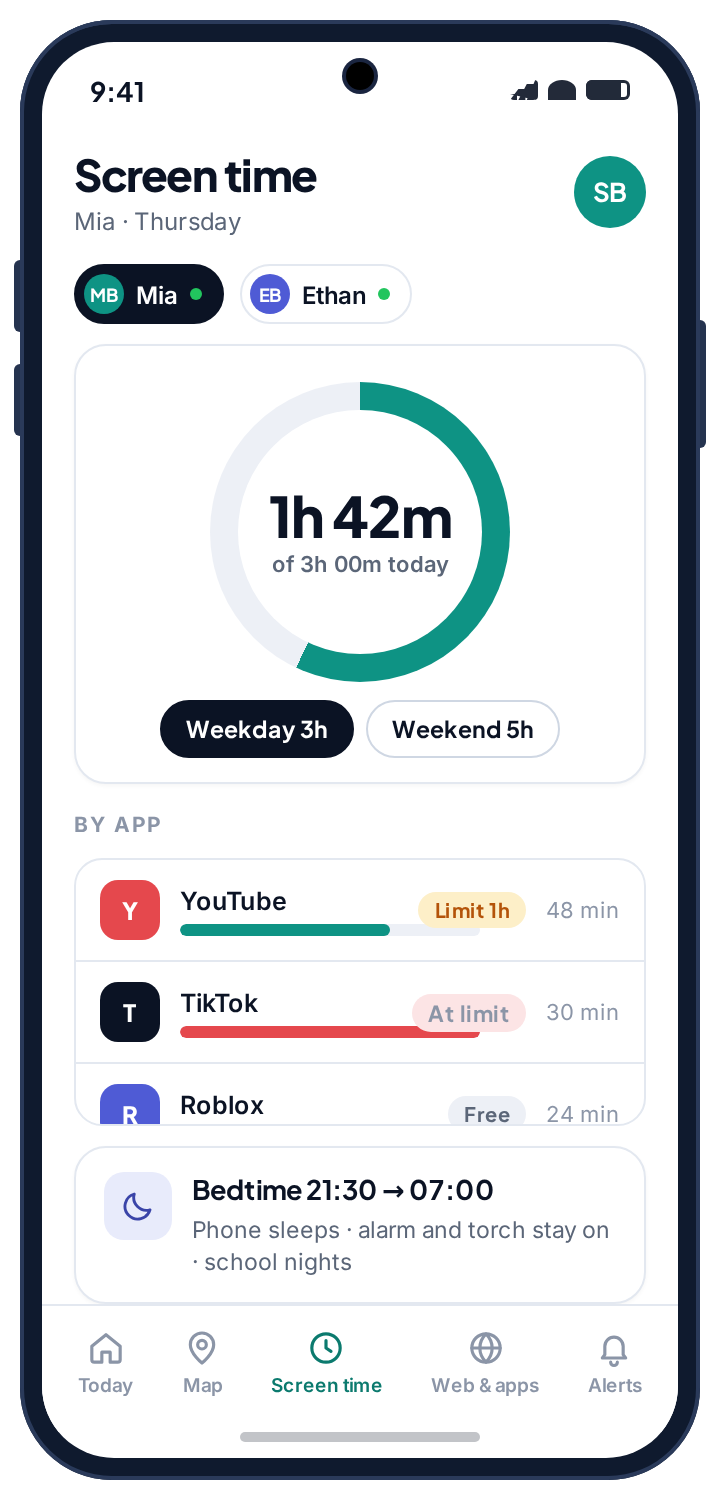
The daily budget is a total for the day, with a separate number for weekdays and for weekends. Your panel shows it as a ring: 1h 42m used of 3h, with the per-app totals underneath so you can see where the time went. Your child's phone shows the same ring, counted the same way, with the time left and a button to ask for more. There is no version of the number that only you can see.
A newly paired child in TheTruthSpy has no screen time limit at all. Nothing is blocked, nothing is capped, and the app collects usage without acting on it. That is deliberate, and it is the opposite of how most parental control software ships. You do not yet know whether their evening goes on a homework app or a game, and a limit you guess at is almost always wrong. Open the panel once a day for a week and look at where the hours actually went. Almost everyone is surprised by something, usually that the app they were worried about is not the one eating the evening.
Two numbers are worth writing down from that week: an ordinary school night, and a Saturday. Those become your two budgets, and because they came from real data, they are defensible. A first limit that bites immediately gets fought and then abandoned; one that is felt occasionally gets accepted, and can be tightened later without a row.
- Per-app totals, not a transcript. You see how long YouTube was open, not what was watched.
- Weekday and weekend are separate. A longer Saturday budget is the single change that makes the weekday one survive.
- A warning before it runs out. The phone warns before the budget ends so they can finish the episode or the round.
Bedtime, school hours and a homework block: shape before size
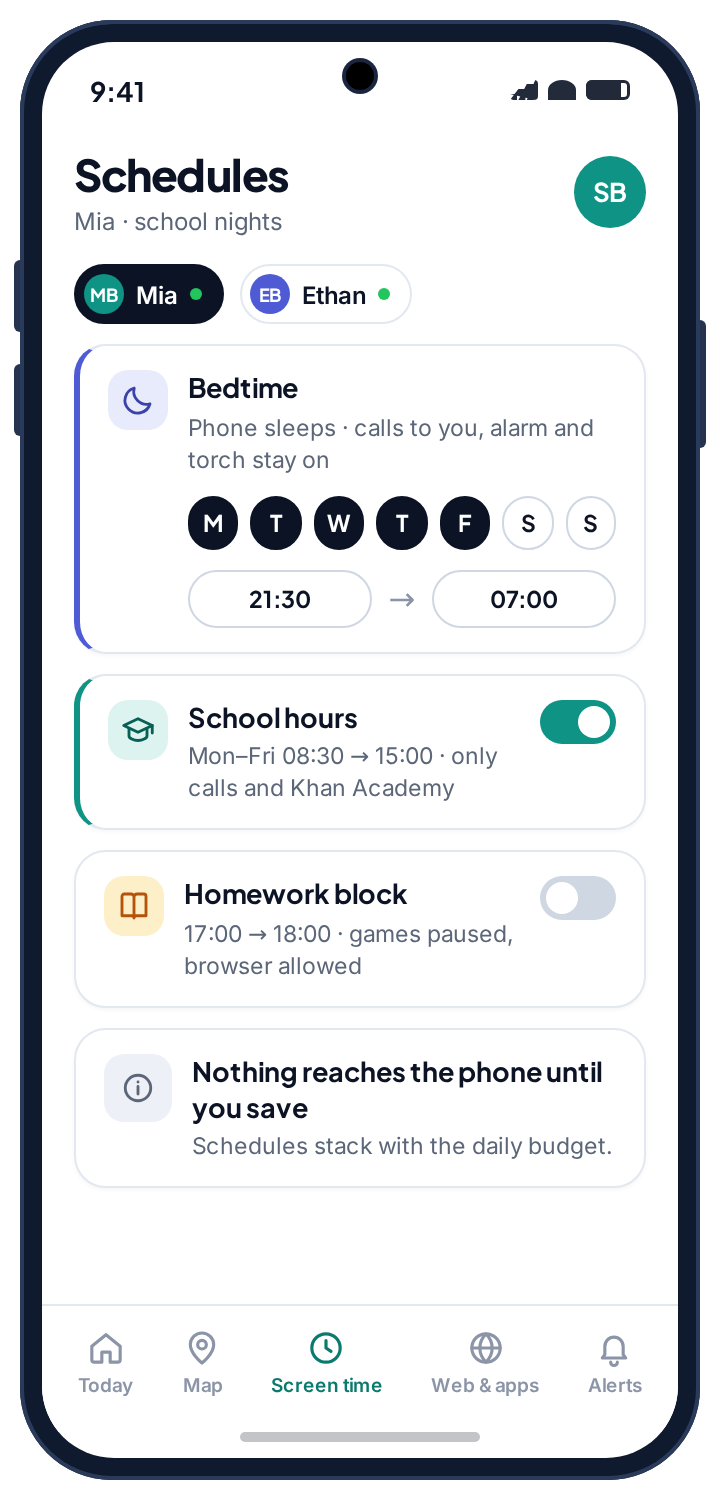
By the second week you can usually see whether the problem is total hours or the time of day they happen. Usually it is the second. A schedule is a phone-free window between two times: bedtime from 21:30 to 07:00 on school nights, school hours from 08:30 to 15:00, and an optional homework block in the early evening. Each is drawn on a grid rather than typed into forms, and nothing reaches the phone until you save.
During a window the phone is still a phone. Calls to you work, the alarm goes off, the torch works, and any app you mark as always allowed keeps running. Everything else stops, with a plain message saying when it comes back. A limit that stops a child phoning a parent is a broken limit, whatever the number says, so that case is handled for you and cannot be switched off. Bedtime is the schedule to add first, because it is the least contested: a daily number is an argument about them, a bedtime is an argument about sleep.
- Schedules stack. A school window, a bedtime and a daily budget can all apply on the same day.
- School nights and weekends differ. A 21:30 bedtime on Sunday to Thursday and a later one on Friday and Saturday is the usual shape.
- Both parents see the grid. A co-parent invited from Family access edits the same schedules, and every change is stamped with who made it.
App time limits: a cap on one app, counted separately
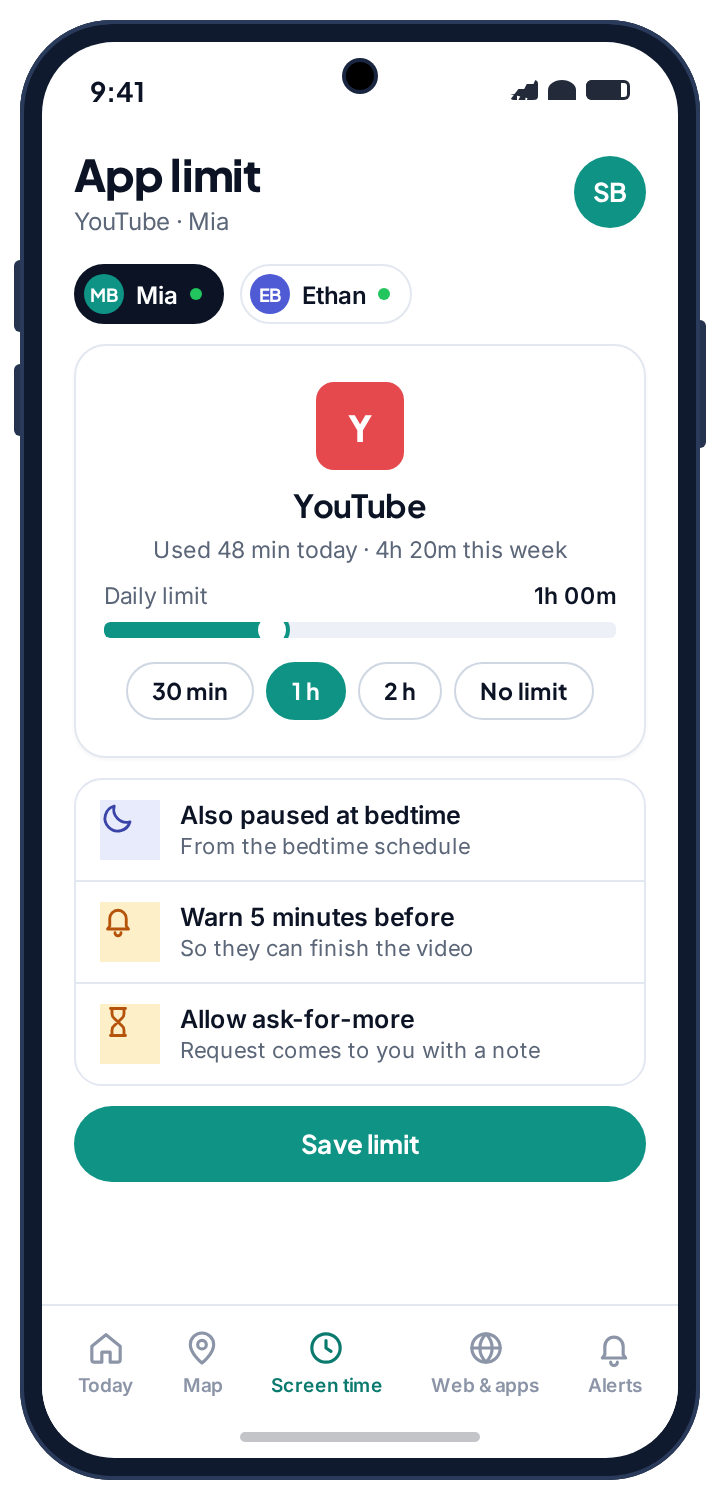
Sometimes the counting week shows that the total is fine and one app is not. The per-app limit is for that case: a daily cap on YouTube, say, of one hour, counted separately. The rest of the phone carries on when the hour is up. Each limit has its own warning, and its own switch for whether your child can ask for more time on it.
The temptation is to put a limit on everything. Resist it. A limit on one app is a conversation about that app; limits on eight apps are a wall, and a wall gets climbed. One, occasionally two, and the daily budget handles the rest.
Homework and school apps sit outside the budget entirely once marked always allowed. If you would rather an app did not open at all, that is the job of the app rules rather than a limit of zero minutes.
- Counted on its own clock. An hour of YouTube is an hour of YouTube, whatever else was used.
- Warn five minutes before. Set the warning so a video can be finished rather than cut.
- Ask for more, per app. Allow it on the app you are relaxed about and leave it off on the one you are not.
Ask for more time: the request that keeps the limit alive
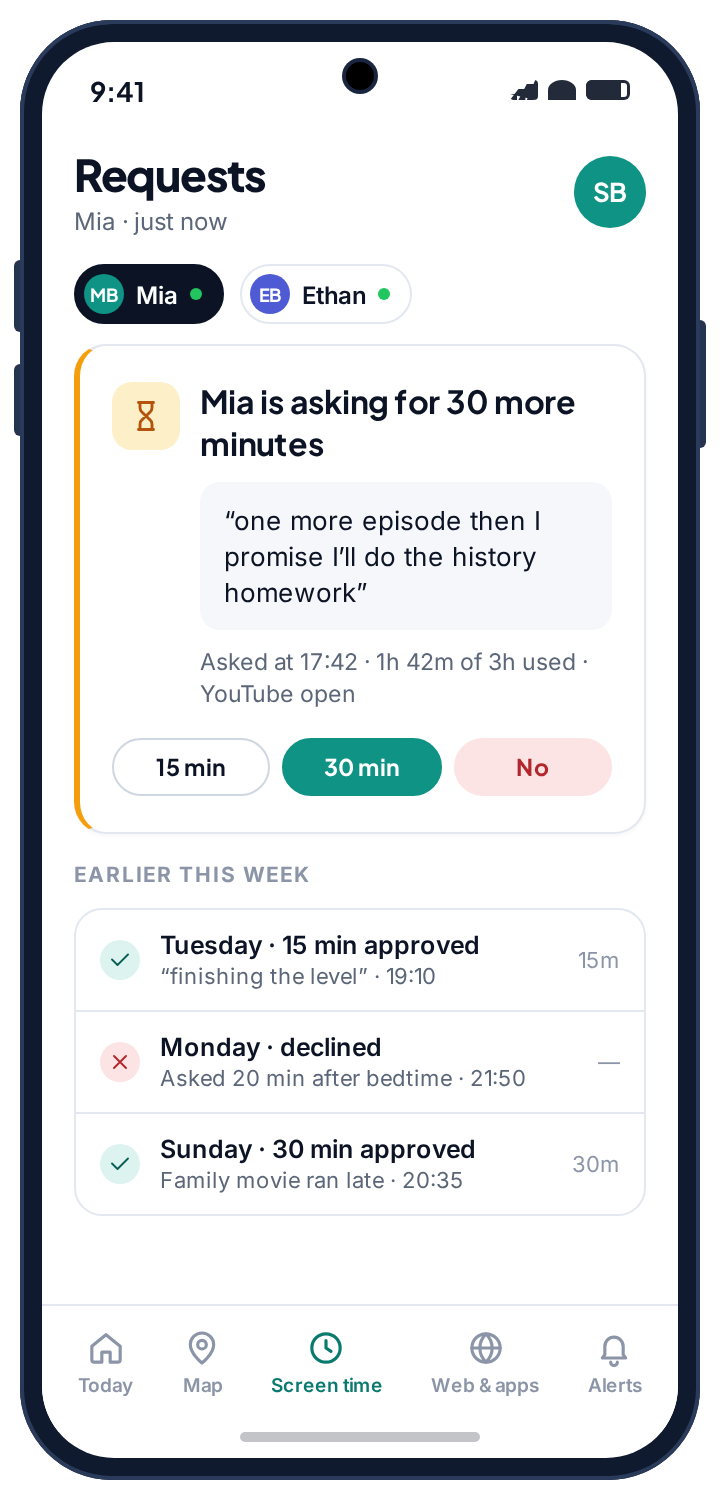
When the budget runs out, your child's phone offers a button rather than a wall. They choose how much they are asking for, add a note if they want to, and the request lands in your panel with a push notification. You tap 15 min, 30 min or No, and the answer reaches the phone within seconds. Earlier decisions sit underneath each request, so both of you can see what was agreed and why.
Expect the first request around day eight. Whatever you decide, decide it: fifteen minutes, thirty, or not tonight. The one answer that damages the arrangement is no answer, because silence teaches them the system is arbitrary. Saying yes is not losing. A limit you can negotiate is a limit that survives; a limit that never moves gets routed around.
- A note travels with the request. “Ten minutes to finish the match” is a different ask from a blank request.
- Both parents get it. Whoever answers first settles it, and the other sees the decision.
- Logged for both of you. A week of yes and no decisions is visible on the child's phone as well as in your panel. Twelve requests in a week is a budget that is wrong.
Four screen time controls, and they stack. Most families end up using two.
Everything a screen time app can do on Android comes down to these four. Knowing which one answers which problem saves most of the fiddling.
| Control | What it does | What the child sees | Use it when |
|---|---|---|---|
| Daily budget | A total for the day, separate for weekdays and weekends | The same ring as you, time left, and an ask-for-more button | Total hours are the problem. Start here. |
| Bedtime / school window | Phone-free between two times, with calls to you still working | A message saying when the phone comes back; alarm, torch and allowed apps still work | When is the problem rather than how long, which is more often the case. |
| Per-app limit | A cap on one app, counted separately | A warning before it runs out, then that app closes and the rest carries on | One game or one feed is doing the damage and the rest is fine. |
| Earned time | Minutes added for finishing chores you set | The chore list, and the minutes landing on the ring when you tick it off | You want the limit to be a system they can work with rather than a wall. |
The weekly report, and what to read in it
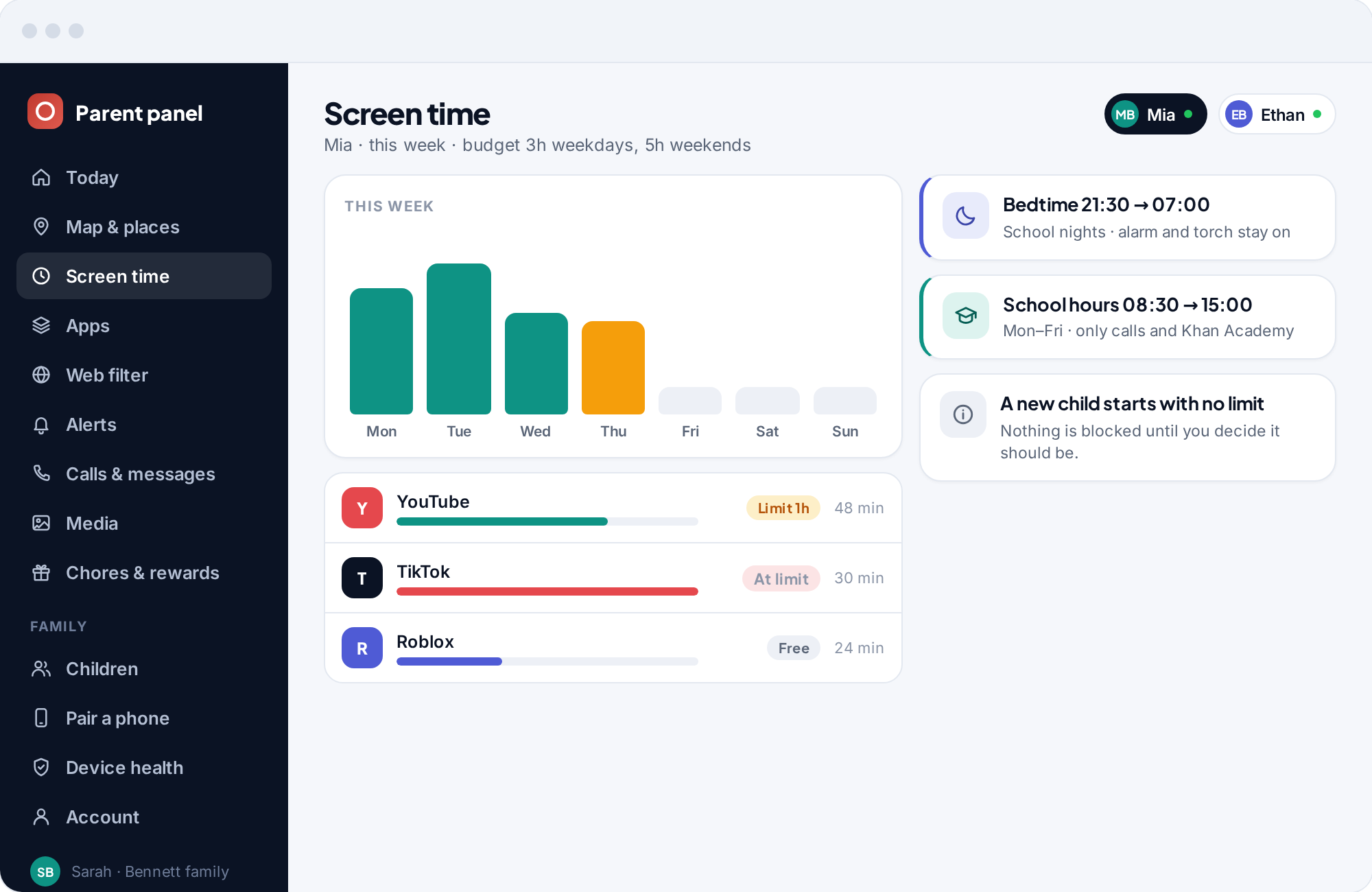
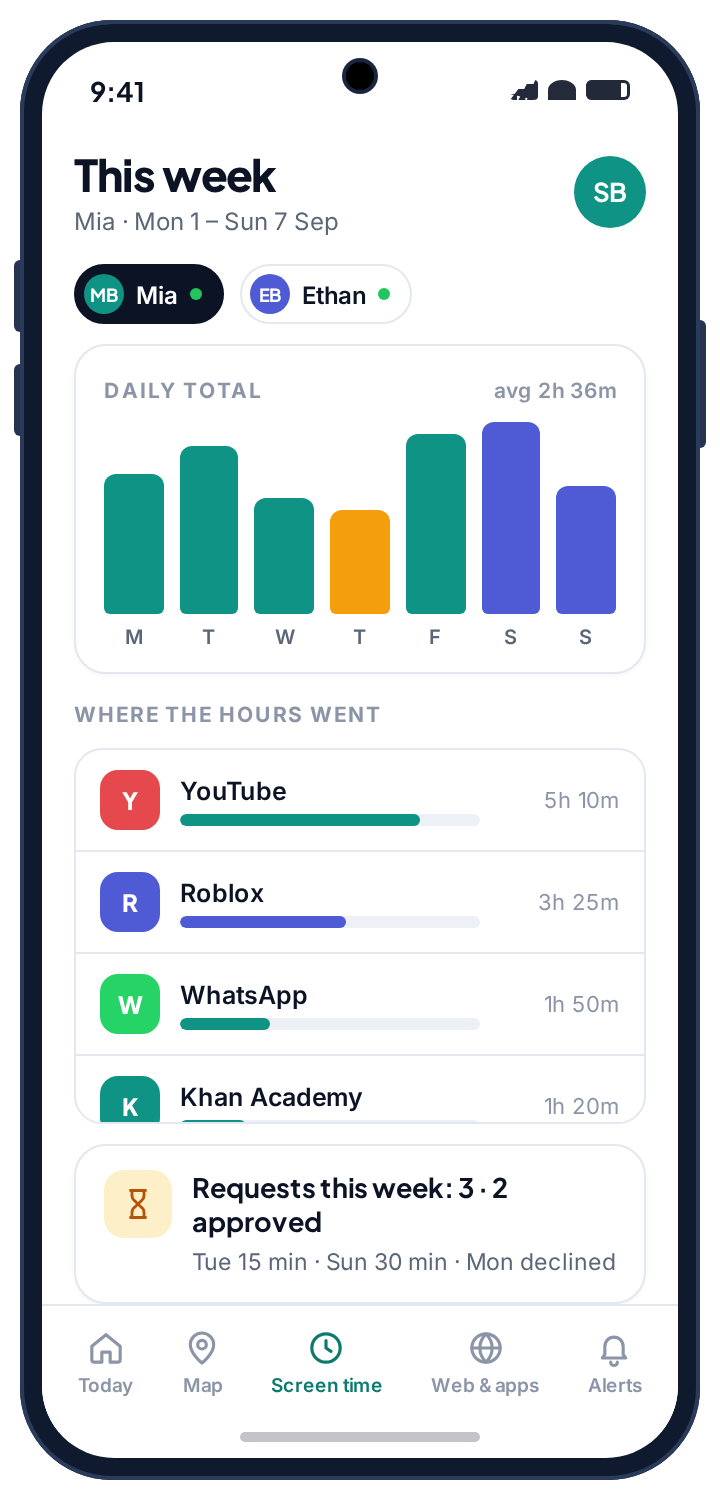
The panel keeps a weekly bar chart beside the per-app totals and the schedules, so one screen answers how much, on what, and when. A tall Saturday beside a flat Tuesday is a normal family; a Thursday that towers over everything is a question worth asking about Thursday rather than about the phone. Underneath, “where the hours went” lists the week by app with the request count beside it. When the first budget comes from this screen rather than from a guess, your child cannot argue with it, because they can open the same screen on their own phone.
- One screen, both of you. The child's app shows the same week with the same totals.
- Requests counted. “3 this week · 2 approved” is the quickest health check on the budget.
- No transcript. The report shows that an app was open and for how long. It does not show what was done inside it.
What a school day looks like with a budget, a bedtime and one app limit in place.
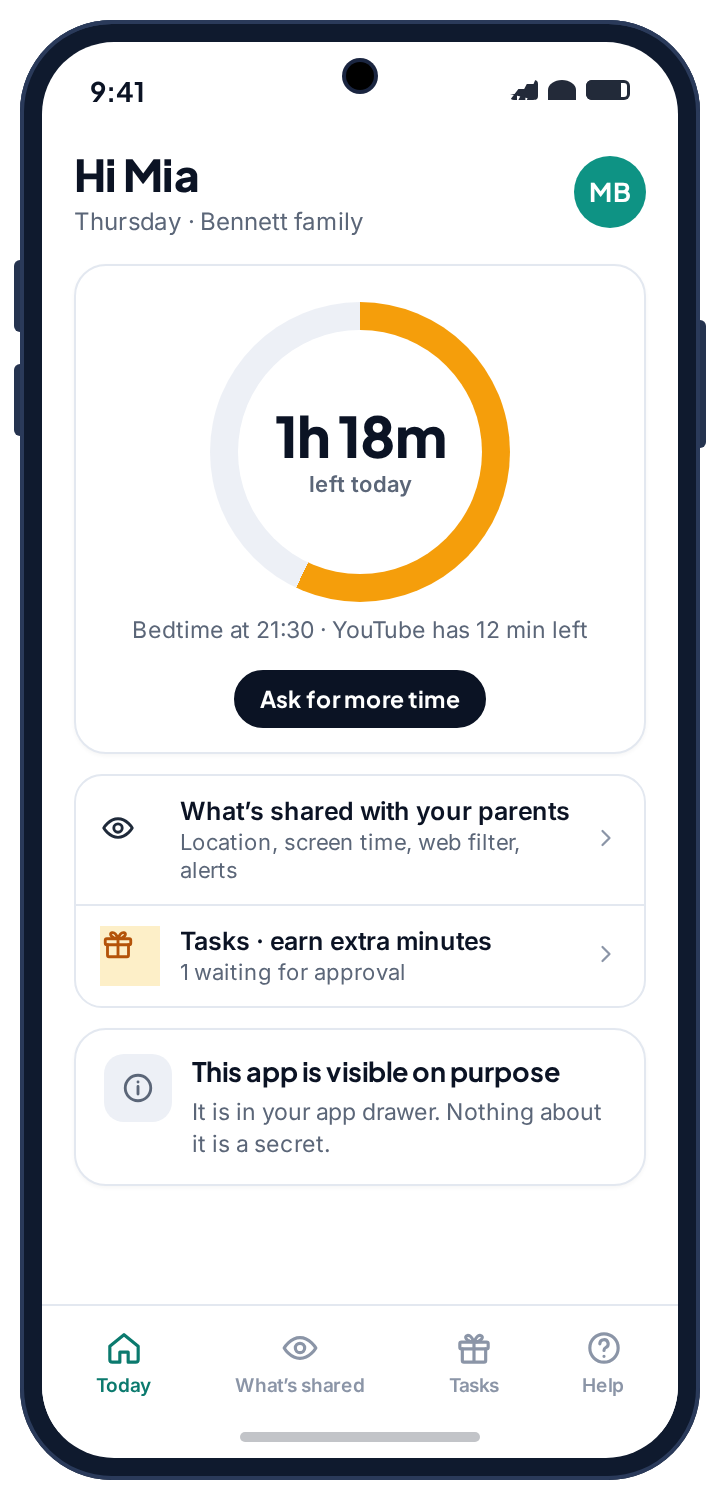
This is Mia's, aged thirteen, three weeks in: a 3h weekday budget, school hours, a 21:30 bedtime, and a one-hour limit on YouTube. It has one request in it, which is about average.
The phone comes back on its own.
The bedtime window closes and the apps return without anyone touching anything. The alarm went off at 06:45 regardless, because the alarm is never part of a window. Twenty minutes of messages over breakfast go on the ring.
Nothing counts, because nothing opens.
The school window runs to 15:00. The phone shows a message saying so, calls to you still connect, and the ring at lunchtime reads the same 0h 20m it did at breakfast. Nothing is sent to you; a quiet school day is not an event.
The five-minute warning.
The walk home and the sofa afterwards put 55 minutes on YouTube. The per-app limit warns five minutes before the hour, the video finishes, and YouTube closes at 16:00. The rest of the phone carries on. The ring reads 1h 18m left, which is what the child's home screen shows in the picture beside this.
The one thing worth deciding.
A group chat and a game take the budget down to its warning, and the request arrives in your panel: 30 more minutes, note attached, “match ends at half five”. You tap 15 min. The phone gets it within seconds, and the decision joins last week's two approvals and one decline underneath the request.
The document stays open.
Games and feeds pause for an hour. The school document app is marked always allowed, so the essay carries on and the hour does not count against the budget. This window only exists because the counting week showed homework being displaced.
The day closes without a conversation.
The phone shows “back at 07:00”, the alarm is set, and the torch still works for finding a charger. Total for the day: 2h 51m against a 3h budget, plus the fifteen minutes you added. Times you had to say “put the phone down”: none.
Six things that go wrong with screen time limits, and only two of them are the app.
Most screen time trouble is not a bug. It is a number that is too tight, a window that arrives without warning, or a thirteen-year-old with three other devices. The first two items below are the technical ones, and each is one Android setting. The rest are about the arrangement, and the fix for each is a change to the arrangement rather than a tighter limit. The weekly report is where you diagnose all of them: a total that reads zero is a missing permission, and twelve requests is a wrong number.
Screen time shows zero, and limits do nothing.
Usage access was never granted, or was reset after an update. Without it the app cannot see which app is in the foreground.
Fix: Settings → Apps → Special app access → Usage access → the app → Allow. Device health flags it and sends your child a one-tap fix. Totals resume from that moment.
The bedtime window did not start.
Battery optimisation put the app to sleep, so the schedule was never enforced on the phone. Samsung and some other manufacturers switch this back on after updates.
Fix: Settings → Apps → the app → Battery → Unrestricted. Device health names the setting. The schedule picks up at the next window boundary.
“They just use it anyway on the school Chromebook.”
The most common failure, and not a failure of the limit. A phone budget controls a phone. A determined thirteen-year-old with a laptop, a school device and a games console has three other routes and will find all of them.
Fix: Stop tightening the phone, which only makes it the least attractive device. Move the conversation to total screen time across everything, the hour is the hour whichever screen it happens on, and use the phone budget as the part you can actually measure.
“Every evening is now an argument about the phone.”
The number is too tight, or it arrives with no warning. A limit that ends mid-conversation or mid-round feels like a punishment for something they were doing when it landed.
Fix: Add fifteen minutes to the weekday budget and pull bedtime forward by fifteen. Same total, much less friction, because a bedtime is about sleep rather than about them.
The limit stops something it should not.
A homework app was never marked always allowed, so a window or the budget closes it.
Fix: Mark it always allowed in the app list and it sits outside the budget and every window. Calls to you never need this; they always work.
“They uninstalled it.”
They can. TheTruthSpy does not hide from uninstallation, does not disguise itself, and does not force permissions back on. Your panel tells you the phone stopped reporting, and that is the whole design.
Fix: Treat the removal as the signal it is. Something about the arrangement stopped feeling fair, and that is worth more than reinstalling it quietly. An app that cannot be removed is an app nobody agreed to, and that arms race is one a parent loses eventually.
What screen time limits are for, and how to set them without turning every evening into a negotiation.
Your first two weeks, in order
Day one, the setup evening. Install, pair with the code, grant the permissions together, and stop. Do not set a budget tonight. Tell them plainly what happens next: “for a week this just counts, then we'll look at it together and agree something.” A child who knows the counting phase is coming argues about the number later, not about the app now.
Days two to seven, the counting week. Open the panel once a day and look at where the hours went. Write down an ordinary school night and a Saturday. Day seven, the conversation. Show them the week. Ask what they would cut. Set the weekday budget a little above their actual average, and a longer one for weekends. You are setting a precedent more than a number.
Days eight to ten, the first collision. They will hit the limit mid-episode and send a request. Answer it, whichever way. Week two, shape not size. Add a bedtime window before you tighten the number. Add school hours and a homework block if they help. Leave the daily number alone for another fortnight.
What the limit is actually for
Parents install a screen time app for three reasons, and it is worth knowing which is yours. The first is sleep: a phone in the bedroom until midnight, and a child who cannot get up. A bedtime window answers this completely and is the least argued-about control on the phone. The second is displacement: homework, a sport, a meal, all losing to a feed. A daily budget and sometimes one app limit answer that, once the counting week has shown you which feed. The third is a vague unease that the number is too high, with no particular symptom. For that one, look at the weekly report for a fortnight and see whether the unease survives contact with the data. Whichever reason is yours, the limit works when it is the smallest change that fixes the symptom.
What it is not for
A screen time app answers how long, not what. It tells you YouTube was open for 55 minutes, not what was watched. For what a child reaches in those minutes, the web filter and the per-app blocking rules carry more weight, especially for a younger child, where what they can reach matters more than how long they can reach it for.
And no limit, however well set, does the work of an agreement about why it exists. A budget set quietly, tightened quietly and defended with “because the app says so” lasts until the first borrowed laptop. The families who get the most from screen time limits are the ones where the child saw the counting week, helped choose the number, and knows exactly what the ask-for-more button will and will not get them.
Telling your child
TheTruthSpy is visible on the phone by design. The app sits in the app drawer under its own name, the ring on the child's home screen shows the same budget you see, and the “What's shared” screen lists screen time in plain language: how long each app is open, and the limits and schedules you have set. Your child can see the request log, and that a parent opened the panel today. So the question is not whether to tell them, but what to say, and the version that works is the one from day one: “for a week this just counts, then we look at it together.” A child who helped set the budget argues about the budget, not about the app.
Earned time ends the bargaining
Children can earn extra minutes through chores and rewards you set, and the minutes land on the ring when you tick the chore off. It tends to end the nightly negotiation, because the way to get more time is written down and does not depend on who is more tired. The chores and rewards page covers it.
What is collected, and what is not
Screen time runs on one Android permission, usage access, which reports how long each app is in the foreground. That is the whole of what the feature collects: app names and durations, tied to your family account and visible to you and any co-parent you invite. It does not see inside apps, it does not record the screen, and there is no keylogger anywhere in TheTruthSpy. The privacy policy lists it exactly. Everything here works on either build, including the one from Google Play, because screen time does not touch calls, messages or contacts. Unpairing the phone removes every limit at once and the app on the child's phone confirms it.
How this compares with other screen time apps
Android's own Digital Wellbeing shows a child their totals and lets them set timers on themselves, which is optional on their side. Google's Family Link adds a daily limit and a bedtime a parent controls, with a blunter request flow. Paid parental control apps charge monthly, and most ship with limits switched on and hide from the child. TheTruthSpy's screen time app is free, visible on the phone, starts with no limits, and treats the ask-for-more request as the centre of the feature. The trade is that the child's phone must be Android, and that your child always knows the limit exists. The about page explains why we think that is the right trade.
The right screen time limit changes faster than most parents adjust it.
These are conventions, not evidence. Nobody has established a correct number of minutes, and anyone who tells you otherwise is selling something. Treat them as a sane opening bid, and weigh what the time is spent on over how much of it there is.
| Age | Weekday, recreational | Bedtime window | What usually matters more |
|---|---|---|---|
| 6–9 | 30–60 min | 19:30 | What they can reach, not how long. Filtering beats timing at this age. |
| 10–12 | 1–2 hours | 20:30 | The first phone year. Habits set now are the ones you live with. |
| 13–15 | 2–3 hours | 21:30 | Sleep. Almost every problem at this age traces back to it. |
| 16+ | Negotiated, if at all | Theirs to manage | Handing the decision over, before they take it anyway. |
Shape the day, not the number.
Ethan, at eleven, is in the first phone year. A bedtime window and a school window do most of the work, and the web filter matters more than any budget.
- Bedtime 20:30, school hours on
- A generous daily budget, rarely hit
- Earned time for chores
The years the budget earns its keep.
Mia, at thirteen, is where the counting week pays off. Agree the number together, add the bedtime first, and expect the request button to be used.
- Weekday and weekend budgets from real data
- Bedtime 21:30 on school nights
- One app limit at most
Usually a bedtime they agreed to, and little else.
At this age the limit is either an agreement or an argument. Make it the first, and loosen it in the open as they show they can manage it.
- Budget off, or set by them
- Bedtime negotiated, reviewed each term
- Totals visible to both, limits mostly gone
Questions parents ask about the screen time app.
Is the screen time app really free?
Yes. Budgets, schedules, app limits, requests and the weekly report are free on either build, with no card and no trial clock. The pricing page page explains how the app stays free.
What does a new child start with?
Nothing. A newly paired child has no screen time limit at all. The app counts usage without acting on it until you set a budget or a schedule, ideally after a week of looking at the numbers.
Can my child still call me during bedtime?
Yes, always. Calls to you work during every window, the alarm goes off, the torch works, and any app you mark as always allowed keeps running. That case cannot be switched off.
Can I see what they watched, or only how long?
Only how long. Usage access reports that an app was in the foreground and for how long. It does not see inside the app, and there is no screen recording and no keylogger.
Does screen time need any unusual permission?
Only usage access, which reports how long each app is in the foreground, and the battery-optimisation exemption that keeps the app alive overnight. Nothing else on this page needs anything more, and the app never asks for SMS, call log, contacts, camera or microphone access.
Why does screen time show zero?
Usage access is missing or was reset by an update. Settings → Apps → Special app access → Usage access → the app → Allow. Device health flags it and sends your child a one-tap fix. Counting resumes from that moment.
How does ask-for-more work?
When the budget runs out, your child picks how much they are asking for, adds a note if they like, and it lands in your panel with a notification. You tap 15 min, 30 min or No. The answer reaches the phone within seconds and is logged for both of you.
Will my child know the limits are there?
Yes, by design. The ring on their home screen shows the same budget you see, the “What's shared” screen lists every limit and schedule, and their phone shows that a parent opened the panel today. There is no hidden mode.
Can both parents manage the limits?
Yes. Invite a co-parent from Family access and you both see the same budgets, schedules and requests. Whoever answers a request first settles it.
What if they uninstall it?
They can. TheTruthSpy does not hide from uninstallation and does not reinstall itself. Your panel says the phone stopped reporting. Have the conversation about why before you put the app back.
Where screen time fits with everything else
Limits answer how long, not what. For what a child reaches in those minutes, the web filter and the app blocker carry more weight, especially for a younger child. For where the phone was, pair the clock with the GPS location tracker. Children can earn extra minutes through chores and rewards, which tends to end the nightly bargaining.
Screen time limits switches on once the child's phone is paired with your parent account, which takes about ten minutes. The setup guide covers each screen.
How many minutes suit a nine-year-old versus a sixteen-year-old is a separate question, and the parental control guides cover sensible limits by age in more depth than a product page can.
Start by counting, then set the limits.
Pair your child's phone tonight, set nothing for a week, and agree the first budget from real numbers instead of a guess. No card, no subscription.
Android · Free to set up · Visible on your child's phone