Who Can See Your Phone Contacts? Shared Accounts, Sync and the Apps That Upload Your Address Book
 By TheTruthSpy Editor · Founder and editorPublished October 8, 2026Updated October 12, 202614 min read
The contact list is the most over-shared thing on a phone and the least thought about. People worry, reasonably, that a tracker might be reading their messages, while in the background their entire address book is quietly synced to a tablet in the living room, to an old phone in a drawer, to a child’s handset that was set up with the parent’s account because it was quicker, and to the servers of twenty apps that once asked to “find your friends”. None of that is spyware. All of it is a leak.
This guide is about the ways a phone’s contacts get out, in the order they actually happen, and how to check each one. The short version is that it is almost never an app reading your contacts in secret and almost always an account you signed in to once and never signed out of. The long version is below, with the screens to look at, and it ends with why any of this matters, which is that a contact list is a map of the people who trust you, and that is exactly the raw material a scam needs.
One: a Google account signed in somewhere else
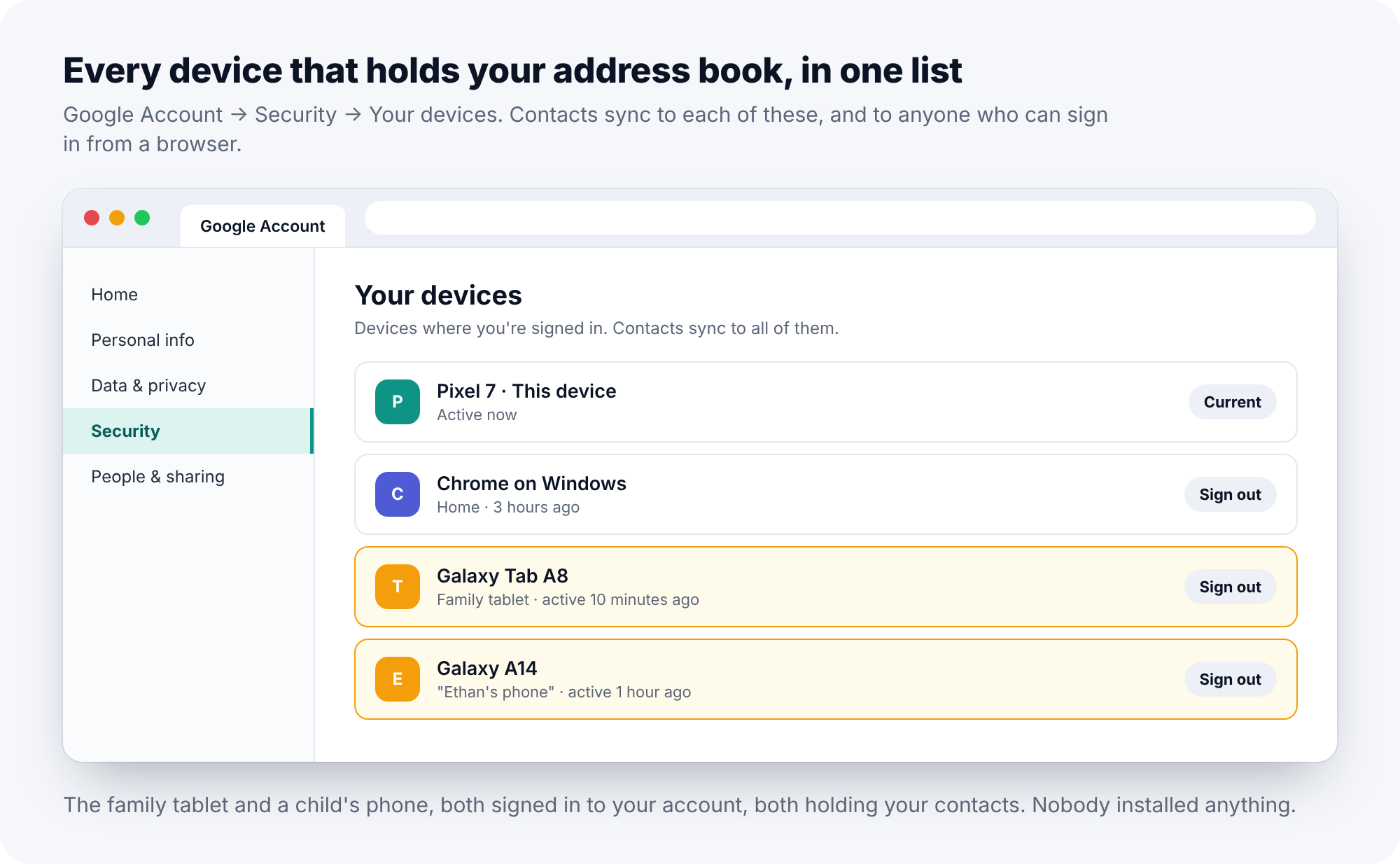
On Android, contacts are stored in the Google account and synced to every device that signs in to it. That is the feature, and most of the time it is a good one. It is also the leak. A family tablet set up with one parent’s Google account has that parent’s entire address book on it. A child’s phone set up with a parent’s account, because making a new account seemed like a hassle, has it too, and so does every app on the child’s phone that has been granted contacts access. An old handset handed down without a factory reset keeps syncing. A Chromebook, a smart display in the kitchen, a car with Android built in, a work laptop where you signed in to Chrome once: all of them hold the address book of whoever signed in.
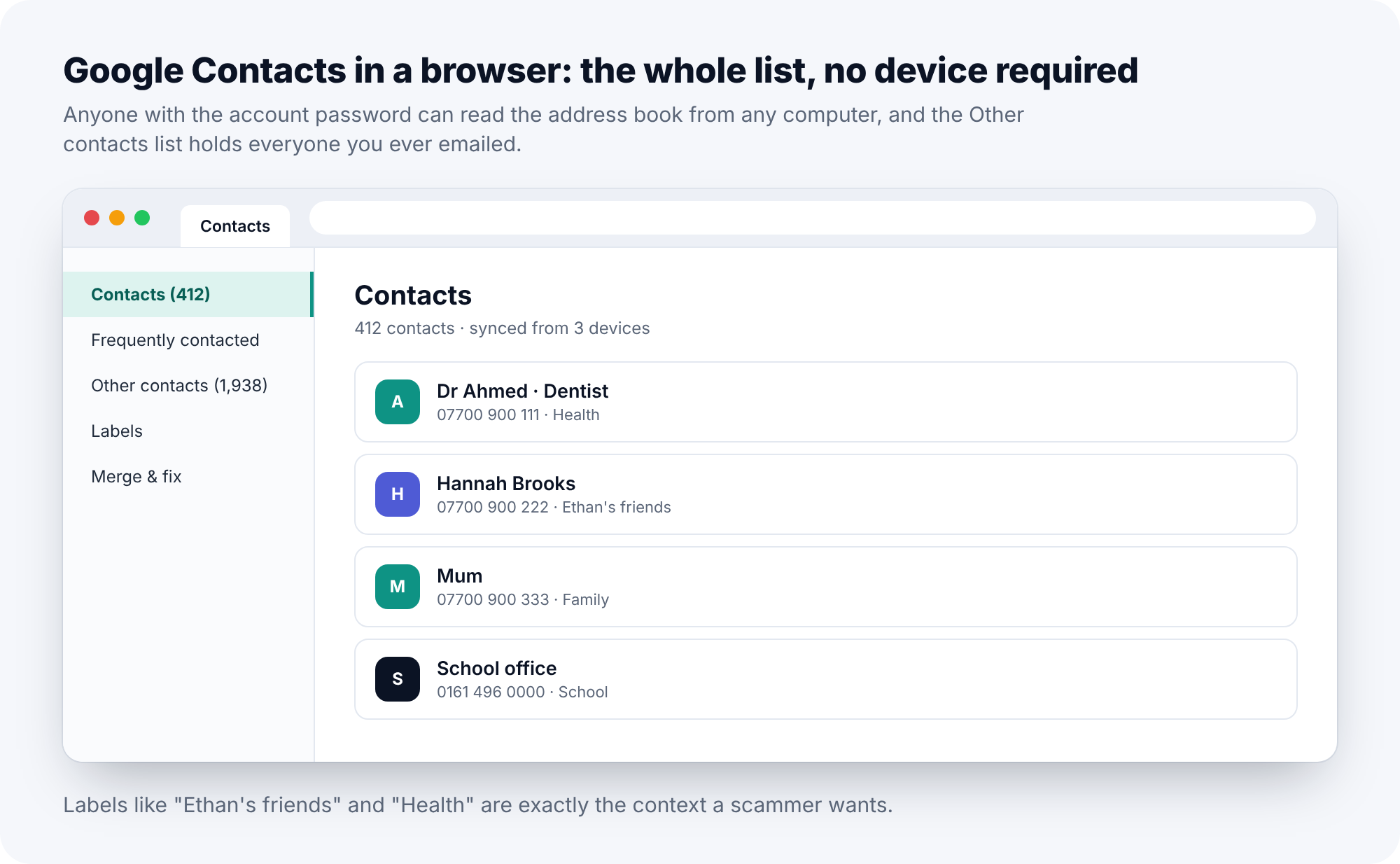
And someone who simply knows the Google password does not need a device at all. They open Google Contacts in a browser and read the whole list, with the labels you gave people, the notes you added, and the “Other contacts” list that Google builds from everyone you have ever emailed.
How to check
On the phone, open Settings, Google, Manage your Google Account, then the Security tab, then Your devices. Every phone, tablet, browser and other device signed in to the account is listed, with a name and a last-active time. On a computer, the same list is at the account’s Security page. Read it as an inventory: every entry is a place your contacts live. Then open Google Contacts in a browser and look at the left-hand panel. If the “Other contacts” count runs to thousands, apps have been feeding it for years.
How to fix it
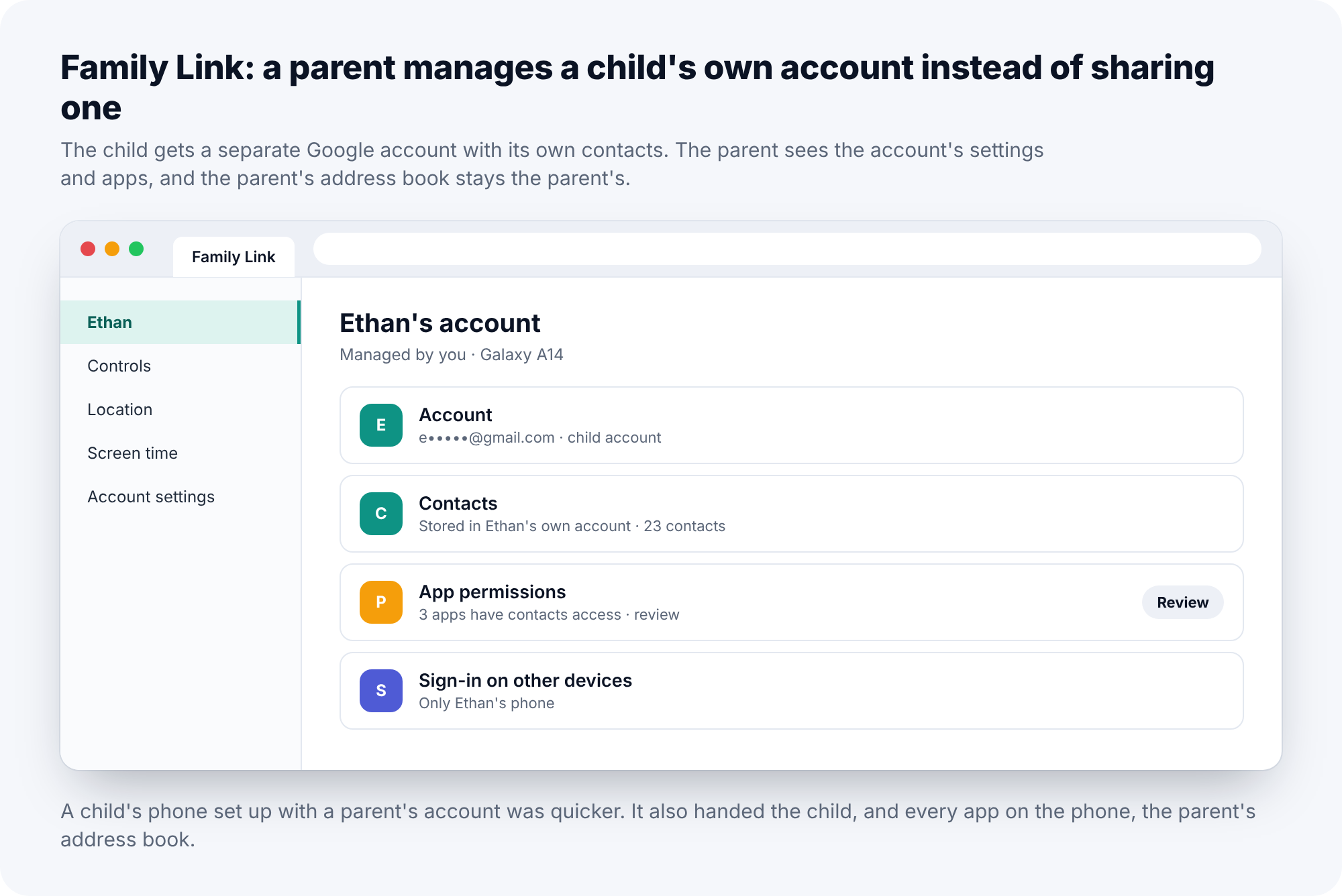
Sign out of any device that is not yours, or that you no longer use, with the Sign out button on its entry. Change the Google password and turn on two-step verification with a prompt or an authentication app rather than SMS. If a child’s phone is signed in to your account, give the child an account of their own; Google’s Family Link exists precisely so that a child can have a separate account that a parent still manages, with its own contacts, and a parent’s address book that stays the parent’s.
Two: apps with the Contacts permission
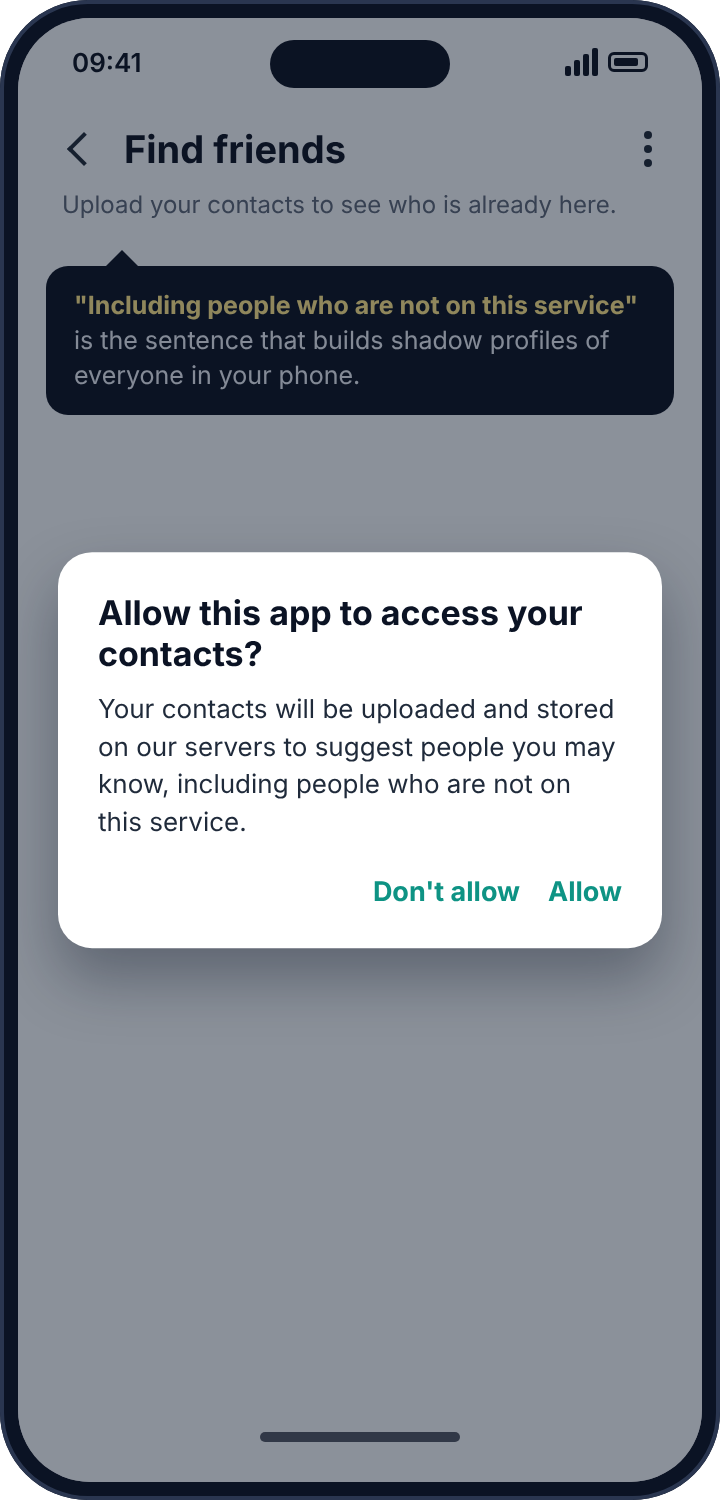
Android’s Contacts permission lets an app read the whole address book. Messaging apps need it, to show you which of your friends are on the service. Many other apps ask for it with far less reason: ride-hailing apps, shopping apps, photo editors, games, anything with a “find friends” or “invite a friend” feature. Once it is granted, the app can read every name and number and, in most cases, upload the lot to its own servers. Several of the largest platforms have, over the years, used uploaded address books to build profiles of people who never signed up for anything, which is why the phrase “including people who are not on this service” appears in so many permission dialogs.
Stalkerware uses the same permission, and uses it well. A tracker that has the names in a phone can turn an anonymous call log into “called Daniel at 23:40”, and a list of message senders into a list of friends. But the same permission, with the same reach, is held by apps you installed yourself, and in practice those are the ones that have your contacts.
How to check
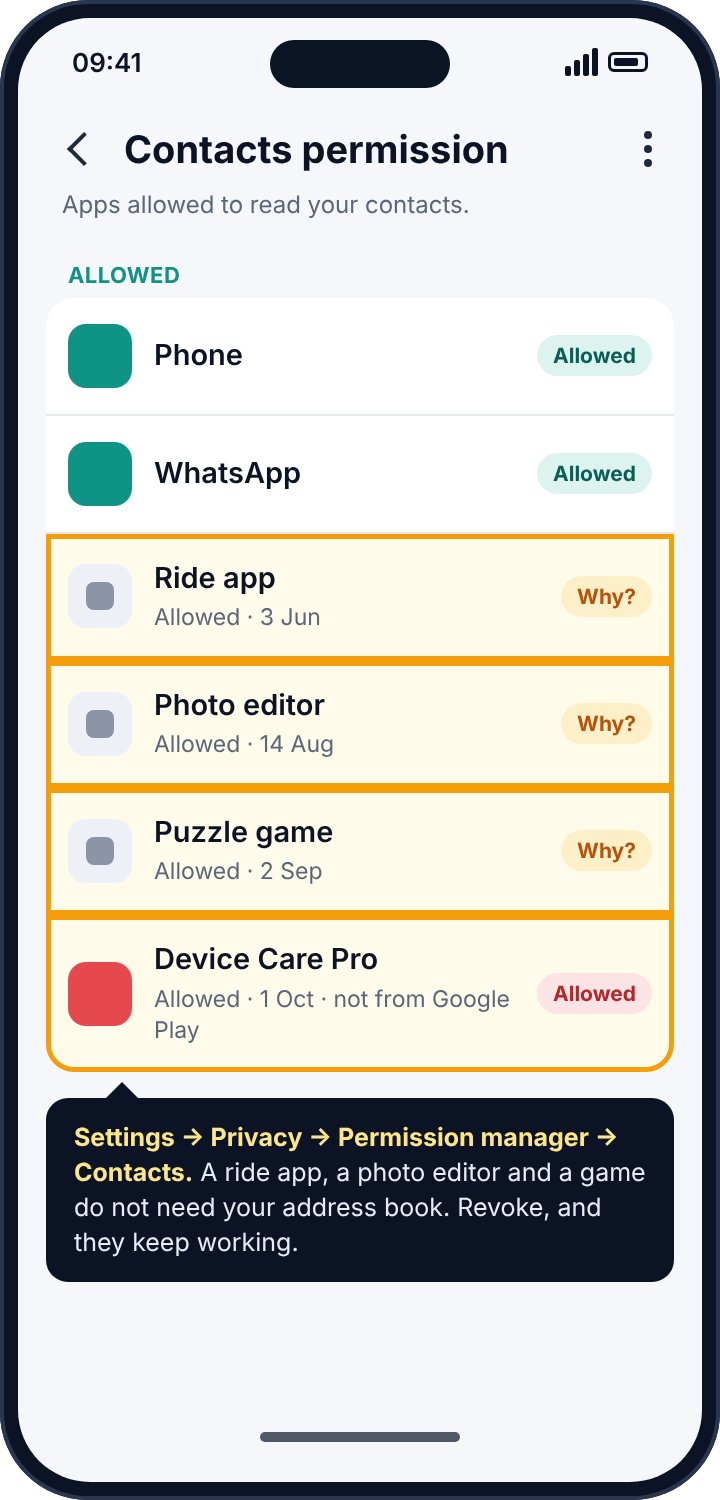
Settings, Privacy, Permission manager, Contacts. The list is often startling. Go down it asking one question of each app: does this do anything that needs my address book? A ride app does not. A photo editor does not. A puzzle game does not. For any app you do not recognise at all, open its App info and look at the install date and whether it has a Play Store listing; a sideloaded app with a generic name like “Device Care Pro” and contacts access is the one to investigate rather than merely revoke.
How to fix it
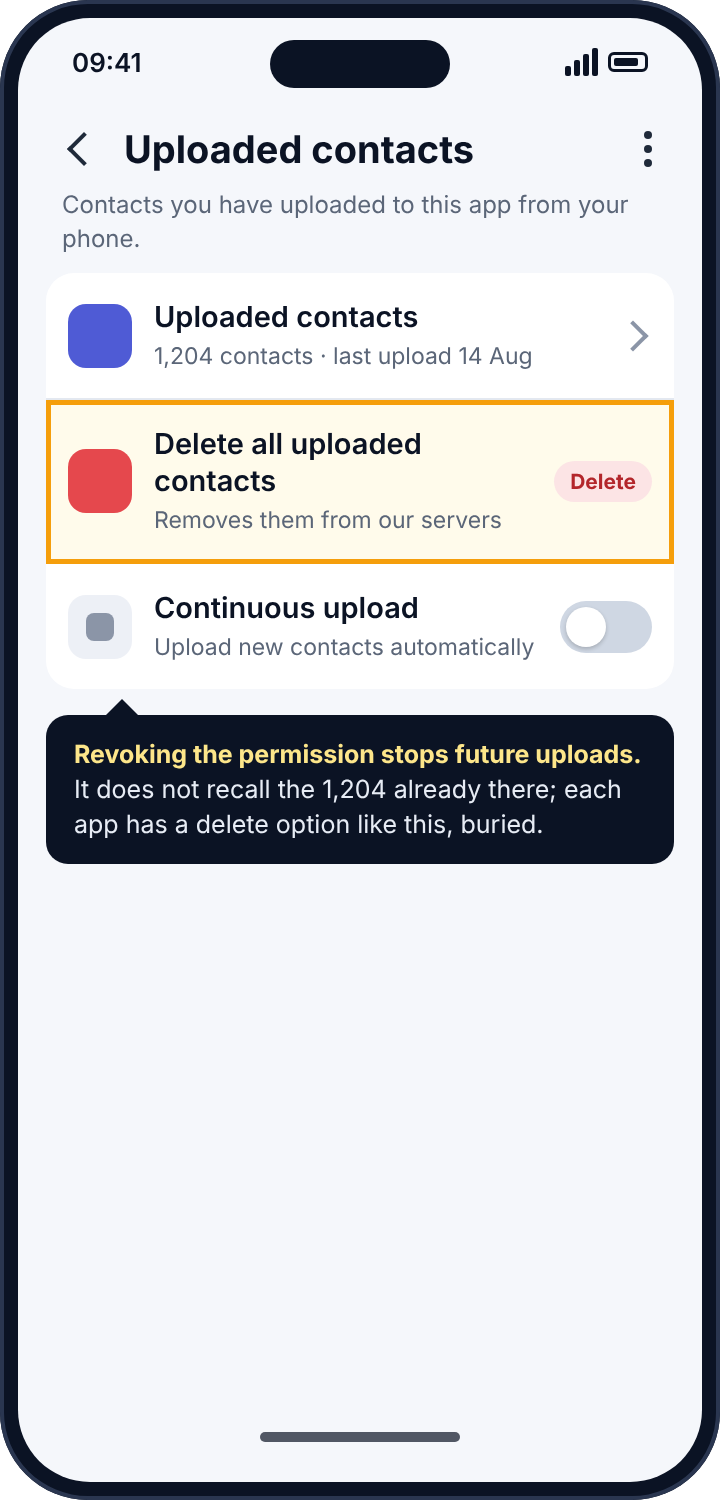
Revoke the permission from everything without a clear need; almost every app works perfectly well without it and simply stops suggesting friends. Uninstall anything you cannot identify, deactivating it first under Settings, Security, Device admin apps if the uninstall button is disabled. Then do the part people skip. Revoking the permission stops future reading. It does not recall what was already uploaded. For that, each service has its own “delete uploaded contacts” option, buried somewhere in its settings. WhatsApp, Instagram, Facebook, Snapchat, Telegram, TikTok and LinkedIn all have one, and a few minutes with each is the only way to get the copies back.
Three: a second account on the phone
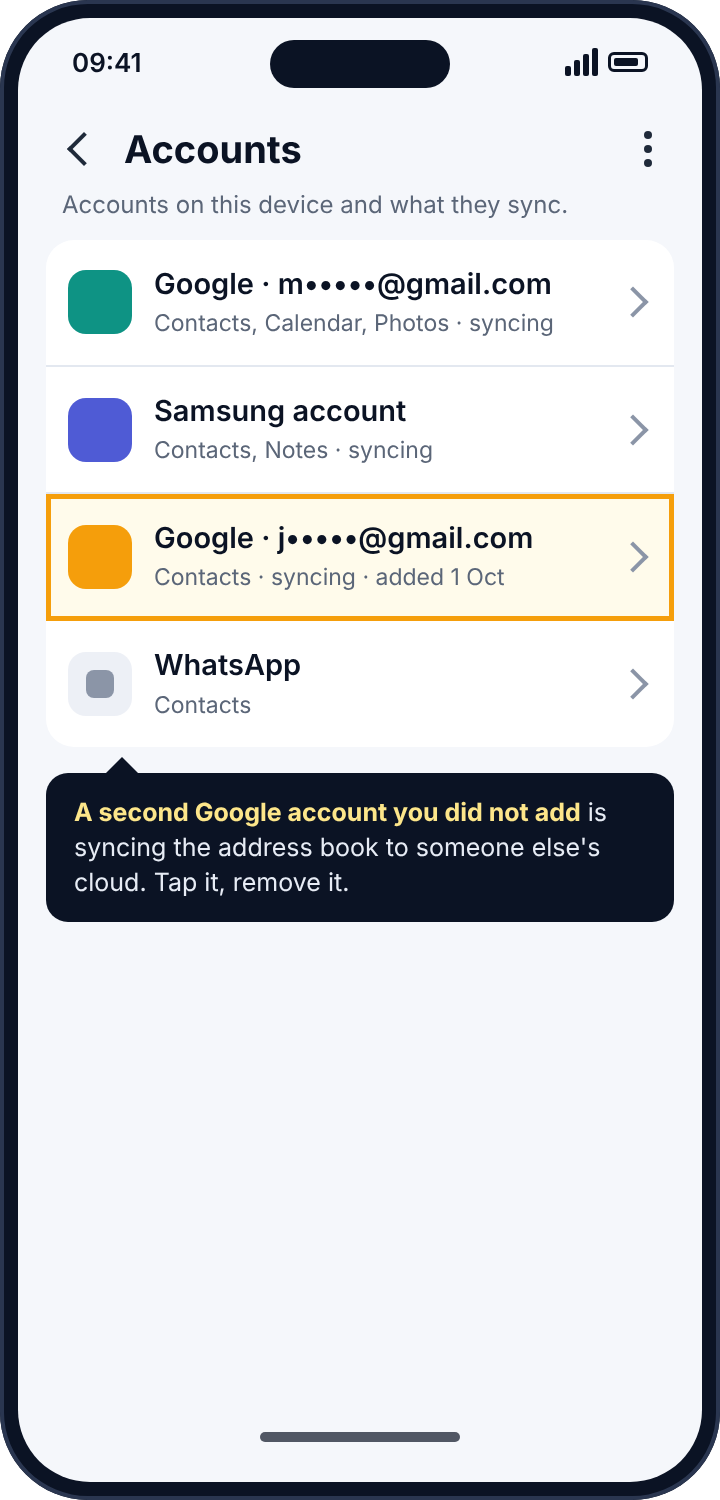
Google is not the only account that syncs contacts. Samsung accounts, Xiaomi accounts, Huawei IDs and the rest all do, and a phone can be signed in to several at once, each syncing the address book to its own cloud and to every other device on that account. This is also where a deliberate leak hides best. Someone who wants a copy of a phone’s contacts, and has the phone for a few minutes, does not need spyware. They add their own Google account to the phone under Settings, Accounts, with contact sync on. The phone shows two accounts, which most people never look at, and from then on every new contact flows to the second account’s cloud.
How to check
Settings, Accounts (on some phones, Passwords and accounts). Every account on the phone is listed. You should recognise each one. Tap each and look at what it is syncing; the Contacts toggle is the one that matters here.
How to fix it
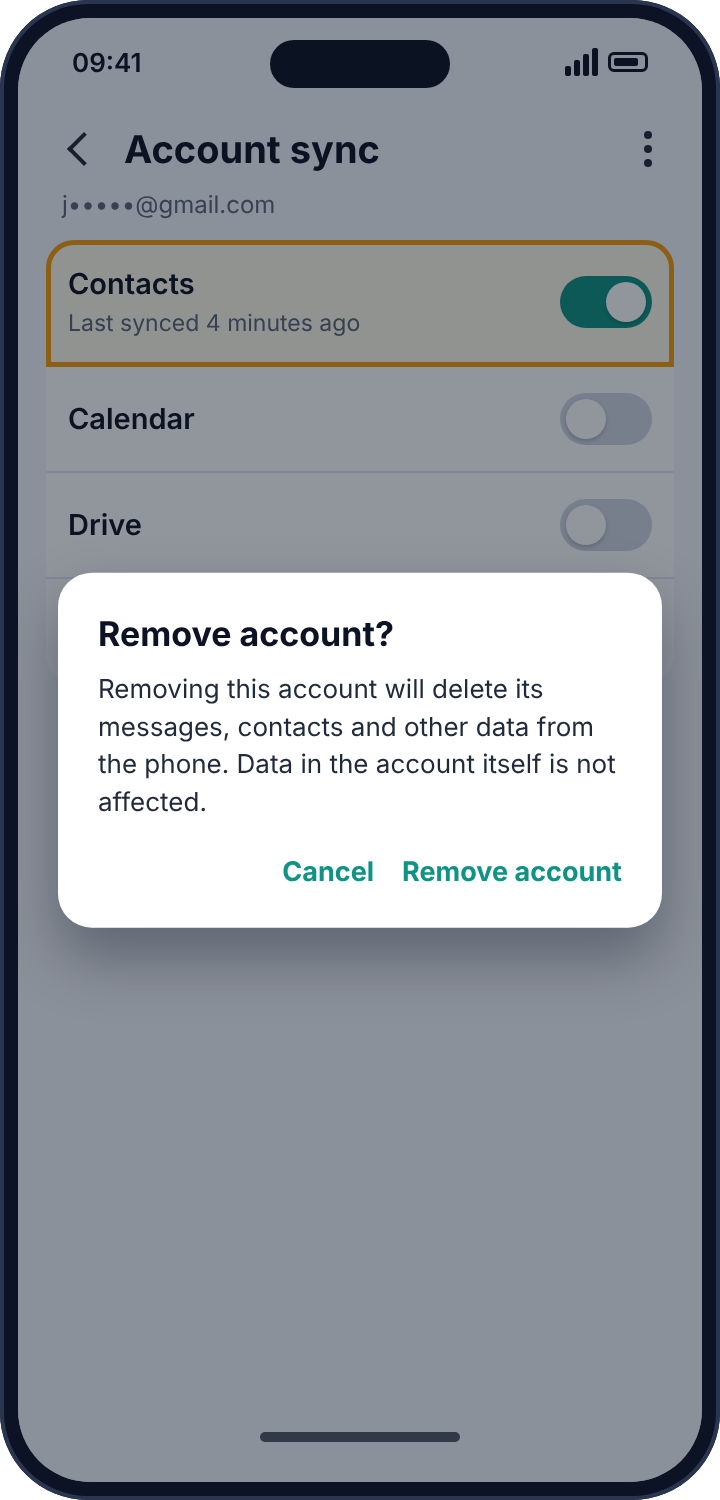
Turn contact sync off for any account that does not need it. Remove any account you do not recognise, which deletes its copies from the phone, although not from the account’s own cloud, which belongs to whoever added it. Note the date the account was added, because it is the date someone had the phone.
Four: the SIM card and the carrier
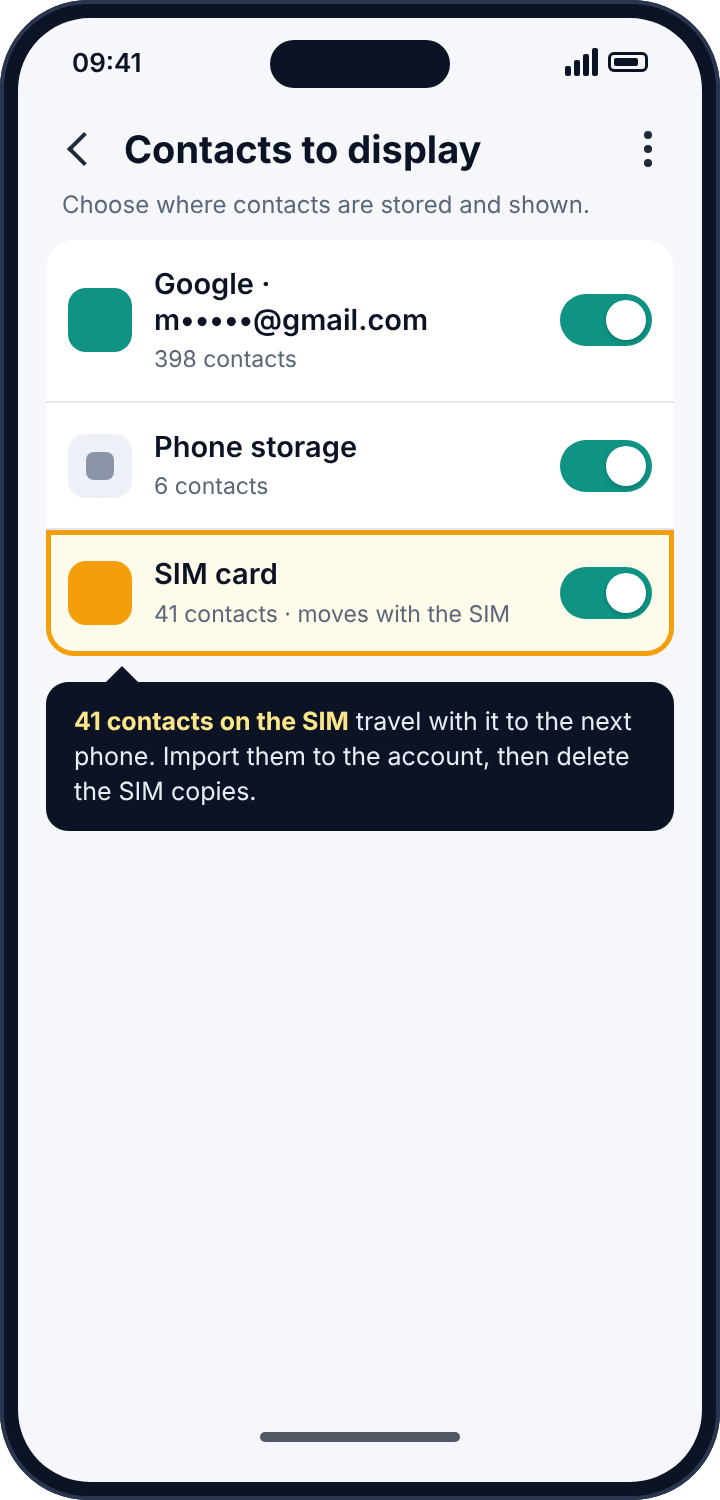
Older phones stored contacts on the SIM, and many phones still offer to. A SIM moved into another phone carries those contacts with it. Carriers also run contact backup services of their own on some plans, visible only in the carrier’s account portal. Neither is a common route today, but if you have ever moved a SIM between phones, the old phone may still hold a copy of everything that was on it, and so may the SIM.
How to check and fix
In the Contacts app, open its settings and look for contacts stored on the SIM or in phone storage. Move them to your Google account, then delete the SIM copies. Factory-reset any old phone before it leaves your hands, and ask the carrier whether a contact backup feature is active on the line.
Shared devices: cars, smart displays and the work laptop
The devices people forget are rarely phones. A car with Android built in, or one that pairs with a phone over Bluetooth, keeps a copy of the address book so that it can show caller names on the dashboard, and it keeps it for every phone that was ever paired, including the previous owner’s and the hire car’s last customer. A smart display in the kitchen signed in to one family member’s account shows that person’s contacts to anyone who asks it to call someone. A work laptop where you signed in to Chrome to check personal email once has, unless you turned sync off, your contacts in its profile, and an IT department with the ability to read it. None of these is a tracker. All of them are places the list lives.
The check for each is the same one as for phones: who is signed in, and what is syncing. Cars have a paired-devices list in their settings with a delete option for each phone; delete every phone that is not currently yours, and delete your own before the car is sold. Smart displays and speakers are listed in Your devices like anything else and can be signed out from there. For the work laptop, Chrome’s sync settings let you turn contacts off while keeping bookmarks, or sign the profile out entirely, which is the better answer.
What a shared account does to a child’s phone
The single most common way a parent’s contacts end up somewhere they should not be is a child’s phone set up with the parent’s Google account. It was quicker; the child was eight; nobody thought about it. What it means in practice is that every app the child installs and grants the Contacts permission to, and children grant permissions freely, uploads the parent’s address book to that app’s servers. A game with a “find friends” feature now has the dentist, the school office, the parent’s colleagues and the parent’s own parents. The fix is a separate account for the child, which Google’s Family Link makes manageable: the parent still approves apps, sets limits and sees settings, and the child’s address book is the child’s own, with twenty-three names in it instead of four hundred.
Reading the Your devices list properly
The Your devices list repays a slow read, because the entries are easy to misinterpret in both directions. An entry you do not recognise is not always an intruder: a browser session from a hotel computer where you signed in to print a boarding pass stays on the list for a long time, as does a phone you replaced a year ago. And an entry you do recognise is not always safe: the family tablet is yours, and it is also the device that any visitor to the house can pick up. The useful questions for each entry are three. Is this a device I still use? Is it a device that other people can use? And when was it last active? A device that is not yours, or that is shared, or that was active at a time you could not have been using it, is a device to sign out. Signing out a device you later need costs nothing but a login; leaving one signed in that you did not need costs an address book.
Why any of this matters
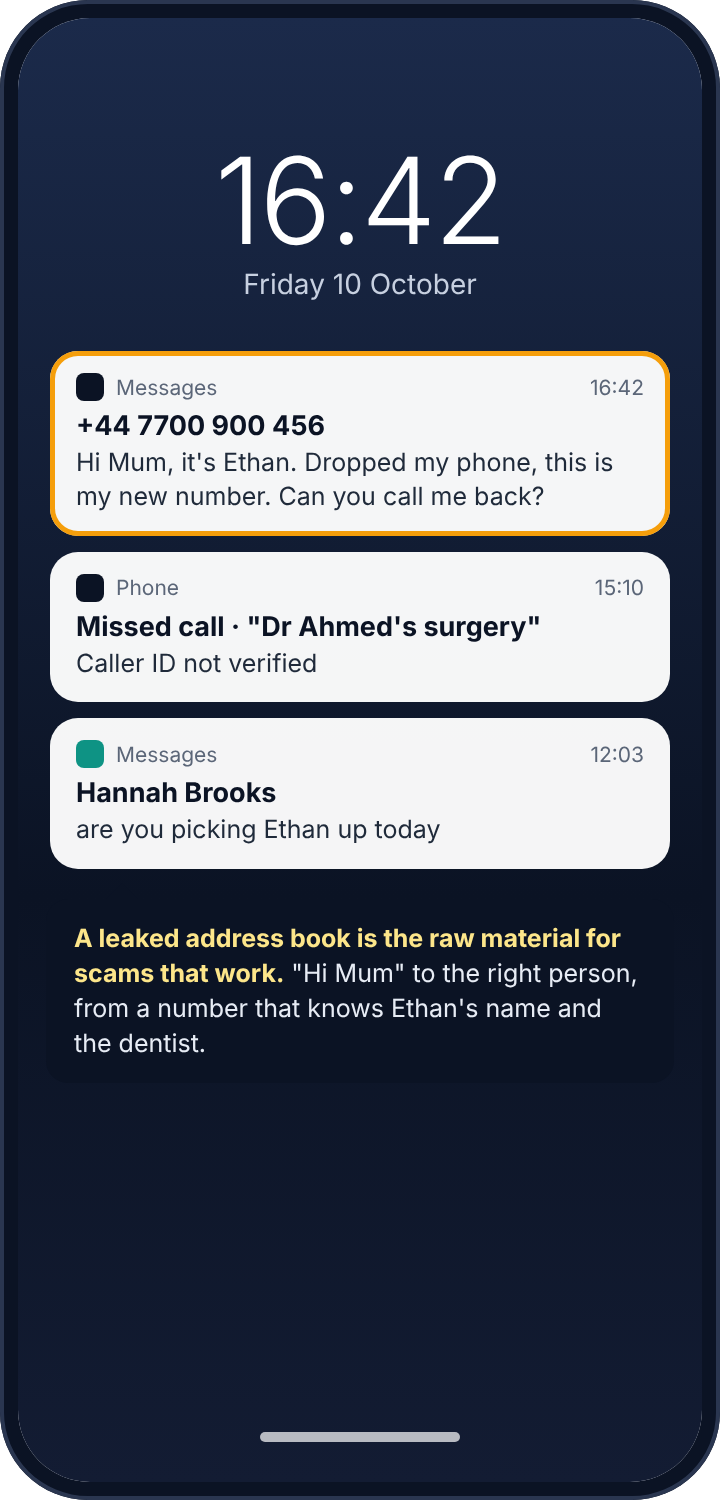
It is worth saying why a leaked address book is worth fifteen minutes of your time, beyond privacy in the abstract. A contact list is the raw material for the scams that actually work. “Hi Mum, dropped my phone, this is my new number” lands with the right parent because the sender knew which number was Mum’s and that there was a child called Ethan. A call that knows your dentist’s name gets answered. A message to your child from “a friend of Hannah’s” gets a reply, because Hannah is a real friend and the stranger learned her name from a list. For a child in particular, a leaked contact list tells a stranger who their friends are and gives the stranger a way to approach as a friend of a friend.
Locking the list down is not secrecy for its own sake. It is making sure the people who trust you cannot be reached through you.
Reading the symptoms
If friends or family are getting scam messages that know their names and their relationship to you, your address book is out, and the most likely route is an app upload or a shared account. If a stranger has contacted your child using a real friend’s name, the same. If a contact you added last week appears on a device you do not use, an account is syncing it there. If a family member seems to know who you have been in touch with, think a shared Google account before you think of spyware, and check Your devices. And if Settings, Accounts shows an account you did not add, you have found both the leak and the date it started.
Parents, and what honest contact monitoring would mean
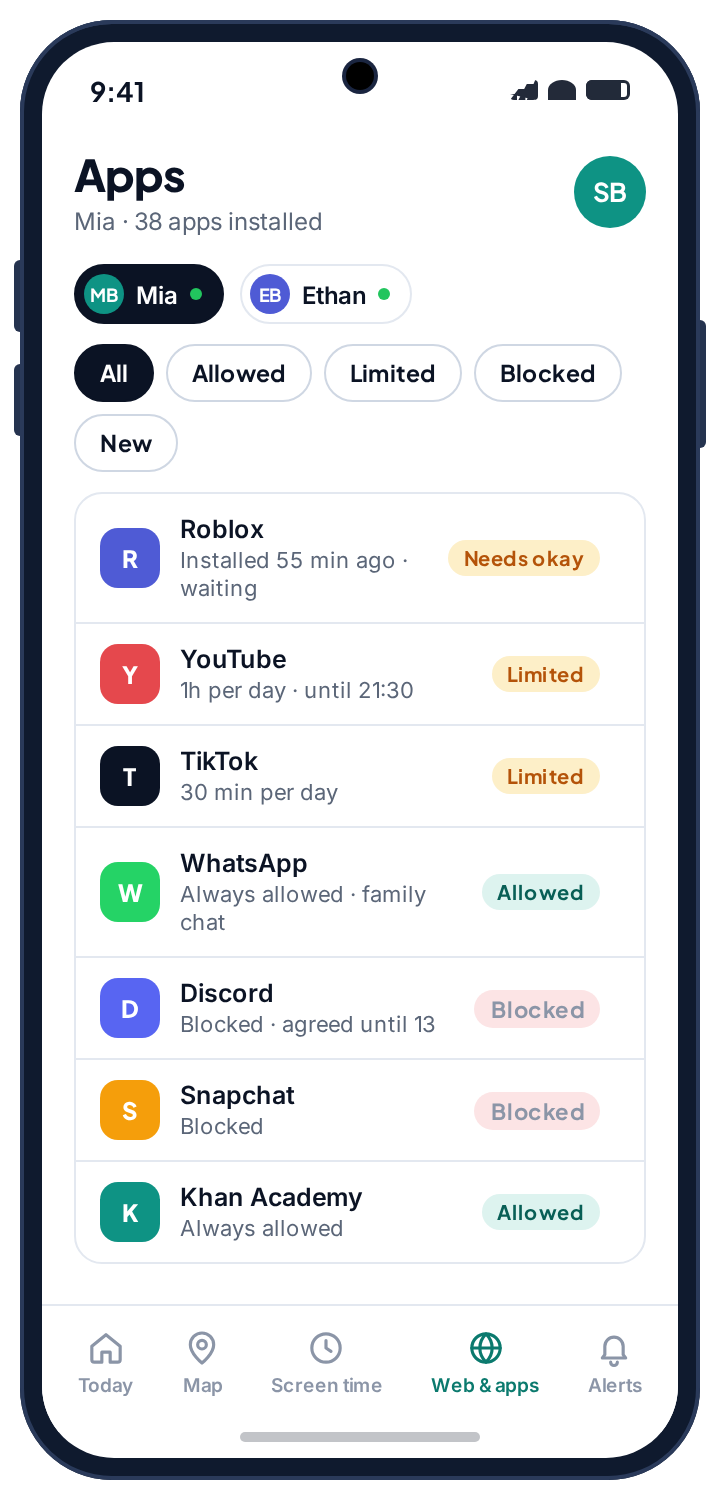
Some parental control apps offer to show a parent the child’s contact list and to alert when a new contact is added. The mechanism is the Contacts permission above, and because Google Play does not grant it to that category, such apps are installed from outside the store, which deserves a pause on its own. Before using one, consider the plain alternative, which involves no app at all: a child’s address book lives in the child’s Google account, and a parent who manages that account through Family Link can see it directly, in the open, from the parent’s own phone. If you would not want your own contact list uploaded to a company you had never heard of, the same applies to your child’s.
We decided our own app would not ask for the Contacts permission at all, and the child’s phone lists contacts under “never shared”. The worry a parent usually has, a new name appearing, is handled another way: the social alerts page describes how a sender that is new to the phone is flagged from notifications, without the address book ever leaving the phone, and the app rules page covers the install-time approval that stops a “find friends” app from ever getting a contact list to upload in the first place.
If someone in your household is behind it
Signing a device out of your account or removing a second account will tell the person who set it up that you know. If that person is a partner or an ex and you are unsure how they will react, screenshot the Your devices list and the Accounts list first, with their dates, and talk to a domestic abuse service with technology-safety advisers before you change anything. The Coalition Against Stalkerware keeps a list of such services by country.
Frequently asked questions
Can someone see my contacts without installing anything on my phone?
Yes, if they know the Google password, from any browser; or if they have ever been signed in to your account on a device they still have. Your devices and a password change close both.
Does revoking an app’s contacts permission delete what it uploaded?
No. It stops future reads. Deleting uploaded contacts is a separate option inside each app’s own settings.
Is it safe to share one Google account across a family?
It is convenient and it leaks everything: contacts, photos, search history, saved passwords. Family Link gives each child a managed account of their own, which is the safe version of the same convenience.
Can a parental control app see my contacts?
Only if it holds the Contacts permission, which appears in the Permission manager like any other app. A transparent one lists contacts on the child’s phone as shared or never shared, so there is no need to guess.
Why do I have thousands of “Other contacts”?
Google adds everyone you email to that list automatically. It is a leak of its own if the account is shared, and it can be cleared from Google Contacts in a browser.
Will a factory reset fix a leaked address book?
It removes apps and accounts from the phone. It does not sign other devices out of your account, and it does not recall copies already uploaded. Those two are done from the account and from each app.
The fifteen-minute version
Google Account, Security, Your devices: sign out anything that is not yours, set a new password, turn on two-step verification. Settings, Accounts: turn contact sync off for accounts that do not need it and remove any you do not recognise. Settings, Privacy, Permission manager, Contacts: revoke from everything without a clear need and uninstall anything you cannot identify. Inside each social app, delete previously uploaded contacts. Move SIM contacts to the account and delete the SIM copies; factory-reset old phones. Give any child who uses your account one of their own. Nobody needs to install anything to read your contacts. They just need you to have signed in once, somewhere, and never signed out.
Related guides
Android Keylogger Detection: The Two Settings Lists Where One Has to Hide, and How to Remove It
Android keylogger guide: a phone keylogger is an accessibility service or a keyboard. Where each hides, the symptoms, removal steps,…
Call Tracker Detection: Call Logs, Call Forwarding and Call Recording, and How to Stop Each One
Call tracker guide: how call logs, call forwarding and call recording work on Android, the screens and dial codes that…
SMS Tracker Detection: How to Find One on the Phone, at the Network or in a Paired Web Client, and Remove It
SMS tracker guide: how texts get read by an app, a forwarding rule or a paired web client, the screens…
Parental controls your child can see
Location, screen time limits, a web filter and alerts from notifications — free, and visible on your child's phone. Pair a phone in about ten minutes.
Android · Free to set up · Visible on your child's phone