Parental Control Features
Eight features, all free, all visible on your child's phone. This page explains each one the way we would explain it across a kitchen table: what it actually collects, which Android permission it depends on, what your child sees while it runs, and where its limits are. The detail pages go deeper; this is the map.
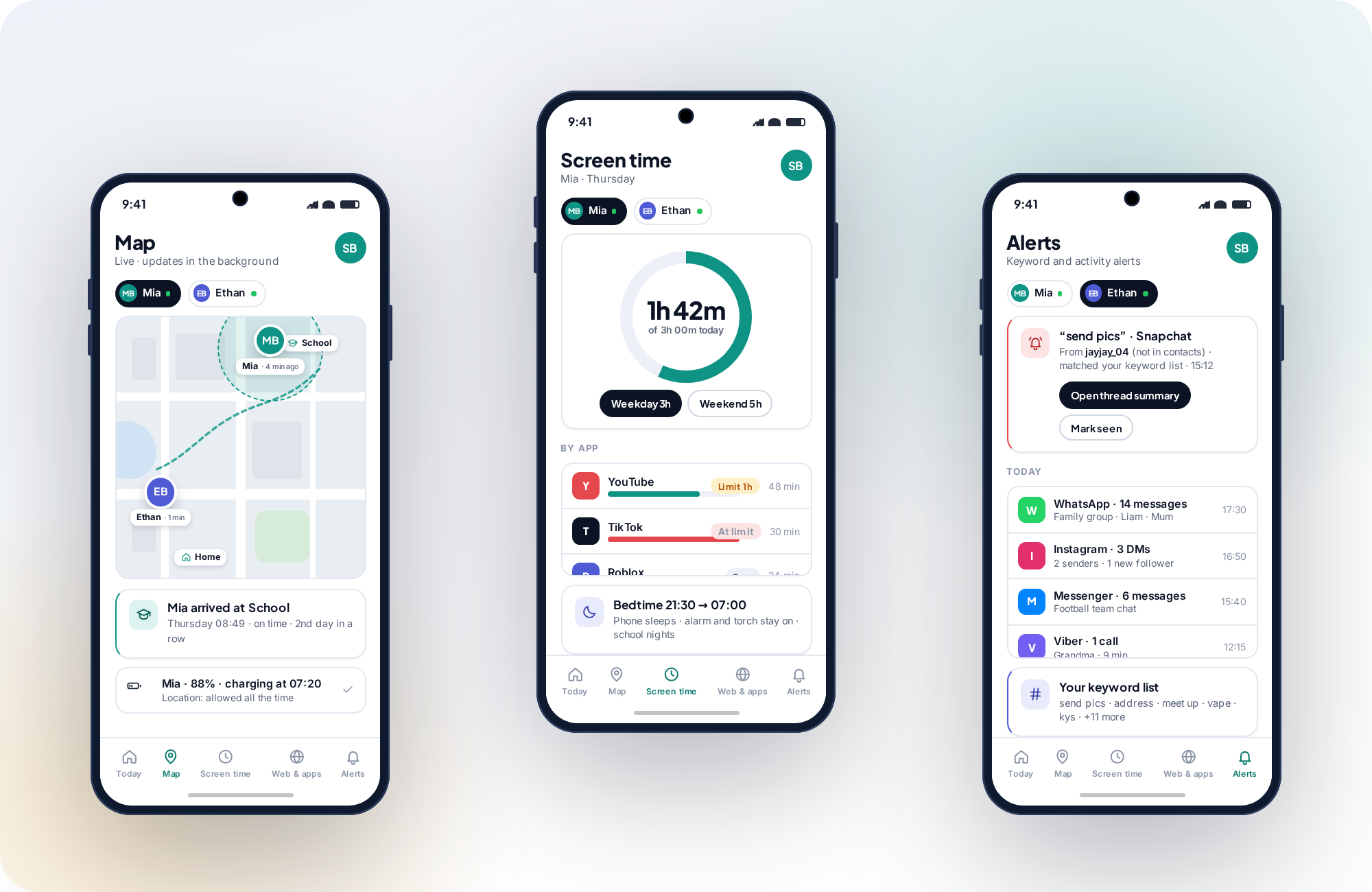
Every feature, what your child sees, and the permission it depends on.
All eight come in the one app on Google Play, and all eight show up on the child's phone while they run. The permission column is the one that predicts problems: almost every “it stopped working” report is a permission that was reset.
| Feature | What it does | What your child sees | Permission it needs | Cost |
|---|---|---|---|---|
| Location & geofencing | Live map, location history trail, geofence alerts on saved places. | A map pin icon while reporting; the trail on their own screen. | Location — “Allow all the time” | Free |
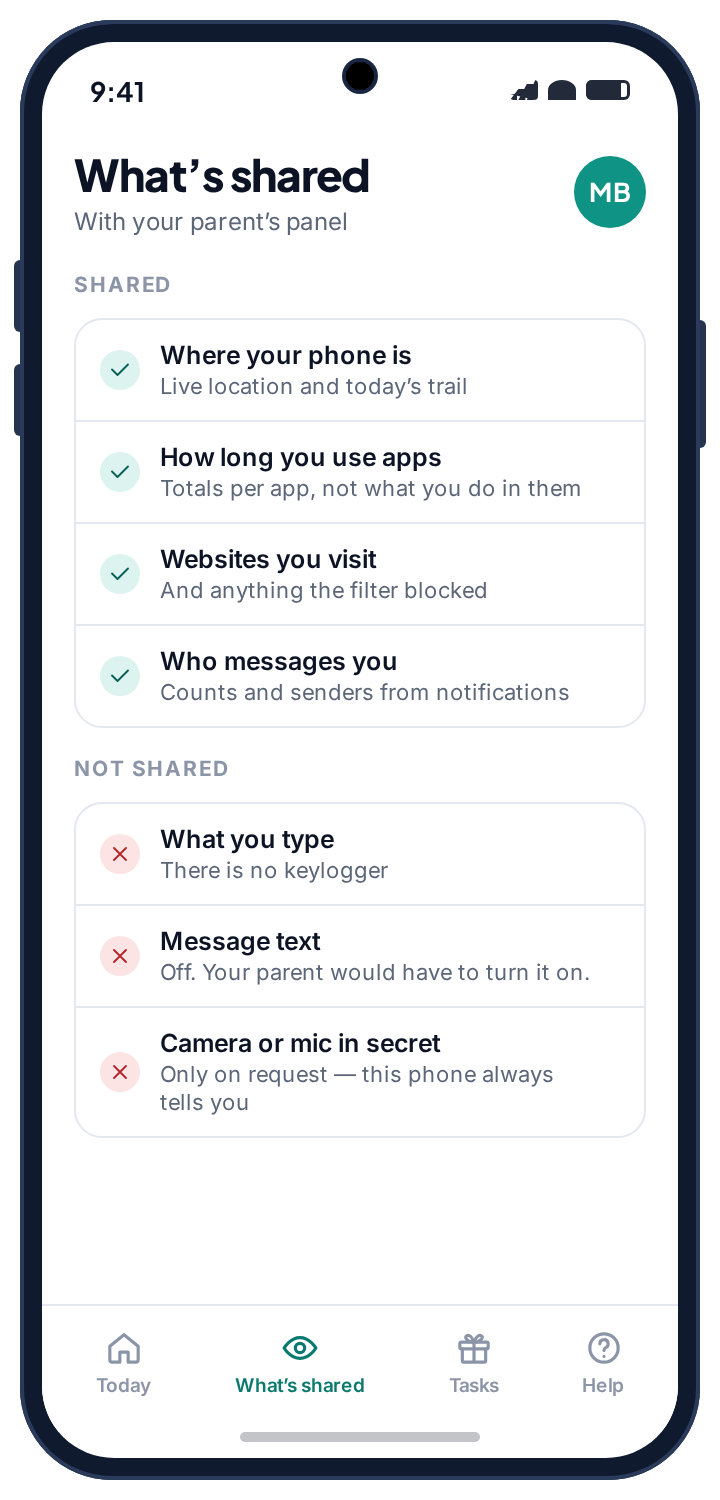
| Wi-Fi history | Which networks the phone joins and when. Corroborates the map indoors. | Listed under “What's shared”. | Location | Free |
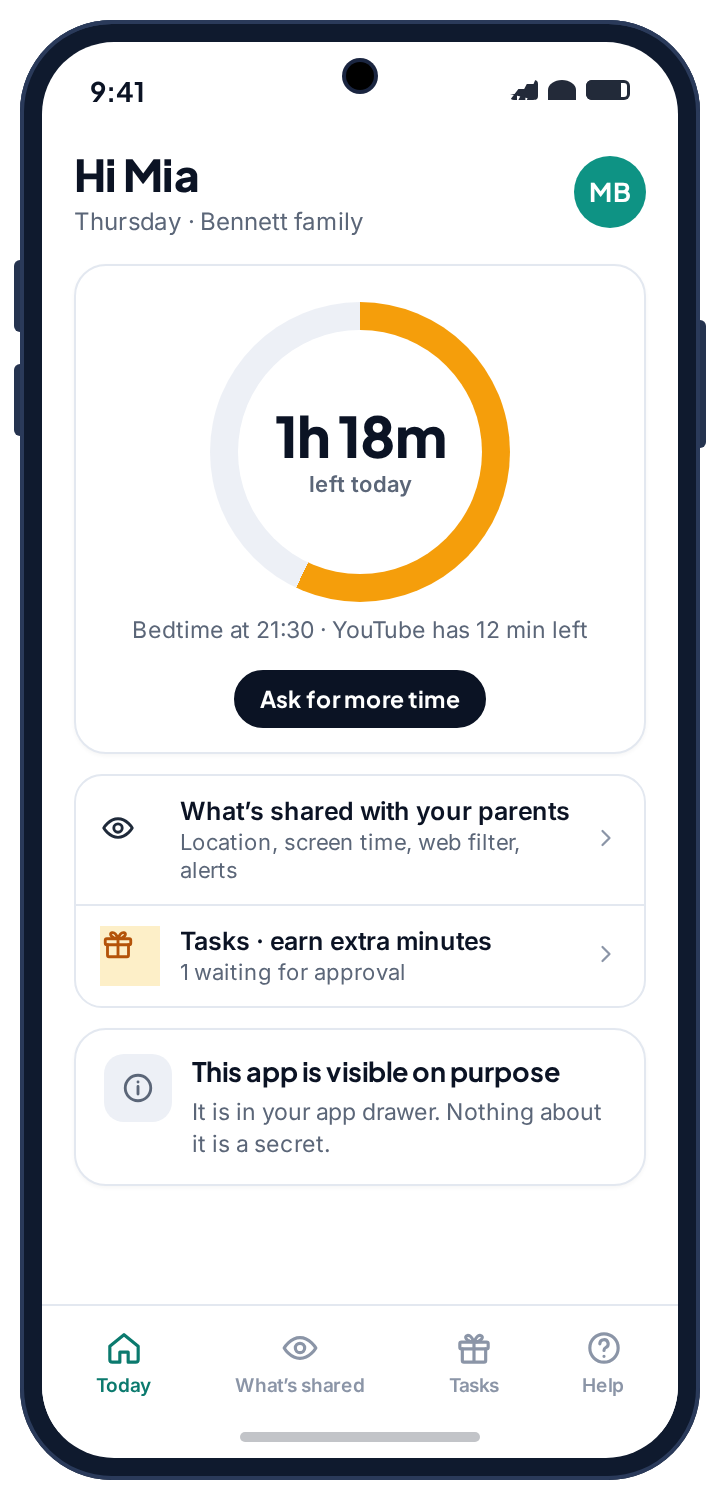
| Screen time limits | Daily budgets, bedtime and school windows, per-app time limits. | Time left today, and a button to ask for more. | Usage access | Free |
| App rules | Every app set to allowed, limited or blocked. Approval for new installs. | A plain “blocked by your parent” message. | Usage access | Free |
| Web filter | Category blocking, Safe Search enforcement, unknown browsers stopped. | A block page naming the category. | Accessibility service | Free |
| Browsing history | Sites visited with time, category and what the filter stopped. | Listed under “What's shared”. | Accessibility service | Free |
| Social alerts | Counts, senders and keyword alerts from app notifications. Never message text. | Listed under “What's shared”, by app. | Notification access | Free |
| Chores & rewards | Children earn minutes by finishing tasks you set. | Their own chores board. | None | Free |
One app, from Google Play
Everything on this page is in the one app, reviewed by Google Play like any other. It asks for nothing that Play does not allow a parental control app to use.
Nothing on this page is silent
Each row's “what your child sees” column is real. There is no message reading, no call log, no camera, no microphone and no keystroke logging, and the last section explains why.
Free means free
No card, no trial clock, no feature held back behind a plan. The pricing page page explains how that is paid for.
The features almost every family ends up living in.
Location, screen time, app control and the web filter carry nearly all the weight for most households. If you switch on nothing else, switch on these, and switch them on one at a time.
GPS location tracker & family locator
Every paired phone is a pin on one family map, tagged with its battery level and the last time it reported. The location history draws the day as a trail, so a detour is obvious and a normal afternoon looks boring. Save the places that matter, such as home, school or a grandparent's house, and a geofence alert arrives the moment a child gets there or leaves.
Accuracy is what Android gives us: usually a few metres outdoors with clear sky, and noticeably worse indoors, in a basement or in a dense city, where the Wi-Fi tracker fills in the gaps. Reporting continues in the background only when the location permission is set to “Allow all the time”. “While using the app” looks granted and collects nothing once the app is closed, and it is the single most common reason a family map goes stale.
- Arrivals and departures, not every step. Alerts fire for the places you save, so the panel stays quiet on a normal day.
- A trail you can scroll. Each stop shows when the phone got there and how long it stayed.
- Device health watches the permission. If location drops after a system update, the panel says which setting changed.
Screen time limits & app time limits
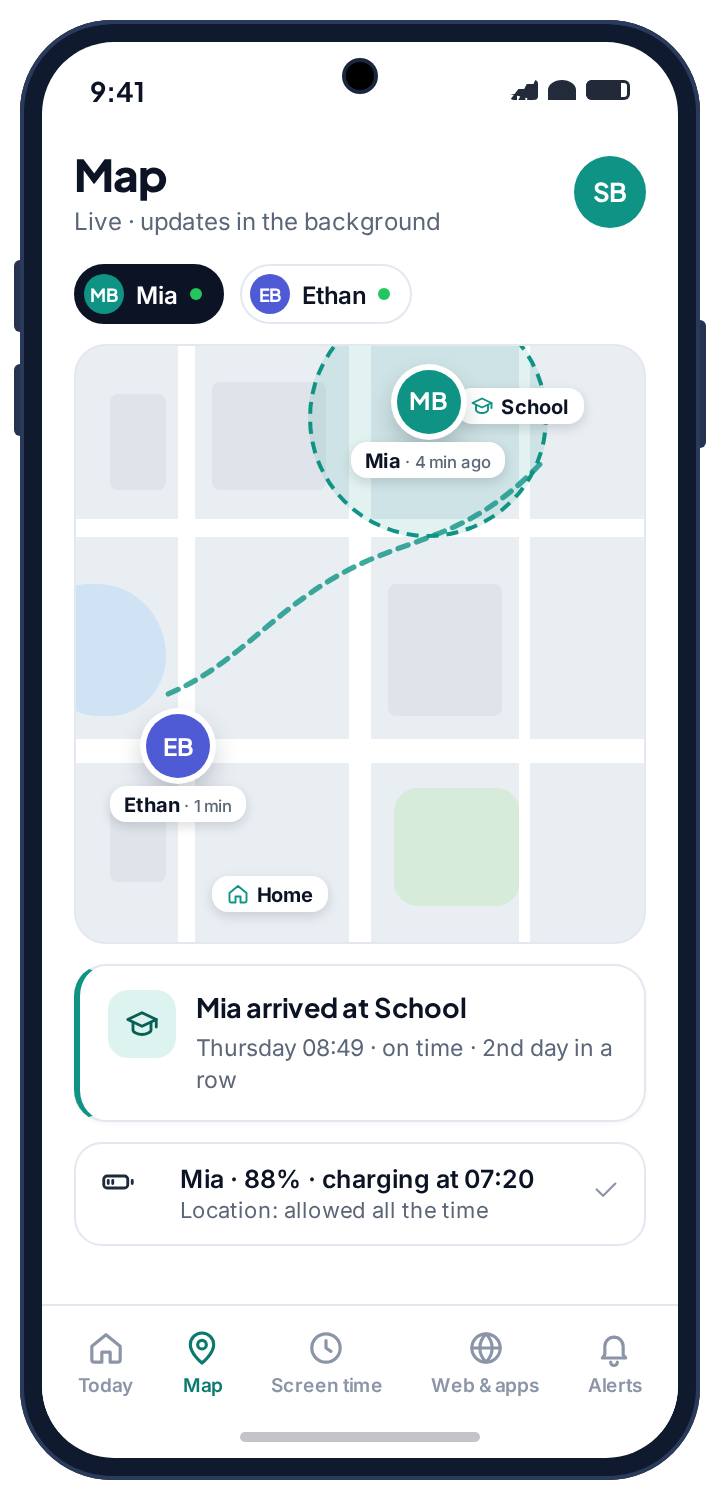
A newly paired child has no screen time limit at all. Nothing is blocked until you decide it should be, which is the opposite of most parental control software, where restrictions arrive switched on and you spend the first evening turning them back off. When you are ready, set a daily budget for weekdays and a longer one for weekends, draw a bedtime and a school schedule, and put a limit on the one app that eats the evening.
When they hit the limit they can ask for more from their own phone. The request lands in your panel with their note attached and you tap 15 min, 30 min or No. The extra time reaches the phone within seconds. The alarm, the torch and any apps you mark as always allowed keep working during bedtime, so the phone is still a phone.
- Per-app totals, not a transcript. You see how long YouTube was open, not what was watched.
- Schedules stack. A school window, a bedtime and a daily budget can all apply on the same day.
- Requests are logged. A week of “yes” and “no” decisions is visible to both of you.
App blocker & new-app approval
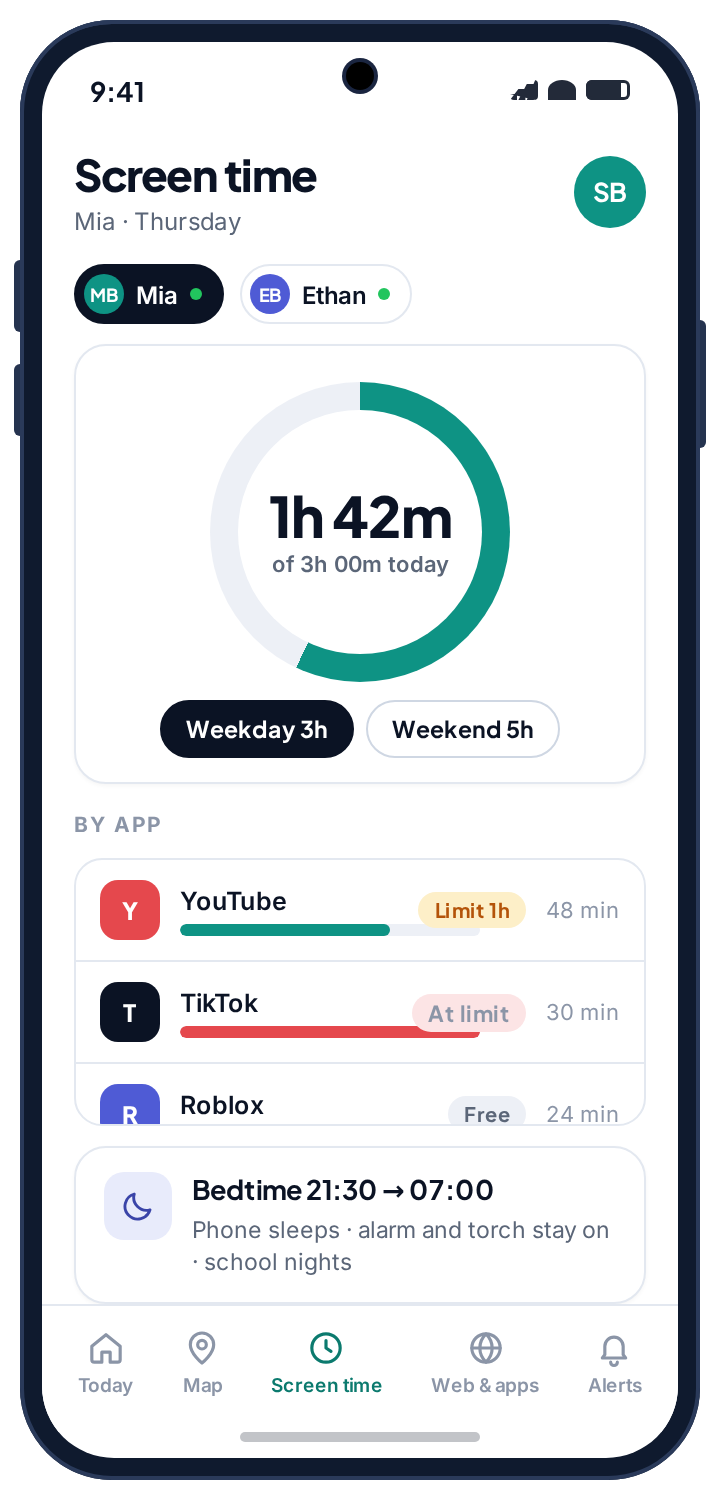
Every app on the phone is set to one of three states: allowed, limited or blocked. Allowed apps always work. Limited apps get a daily time budget of their own and stop when it runs out. Blocked apps do not open, and the child sees a plain message saying so rather than a crash.
The part families use most is the approval step for new installs. When a new app appears on the phone, it waits for your decision. You see the name and the store category, and you tap Allow, Limit or Block from wherever you are. It is the difference between finding out about a new game on the day it was installed and finding out about it from the bill.
- Three states, one screen. Filter the list by allowed, limited, blocked or new.
- Agreed-until dates. Block an app until a birthday and the panel remembers why.
- System apps are protected. Phone, messages, camera and settings cannot be blocked by accident.
Website blocker & web filter
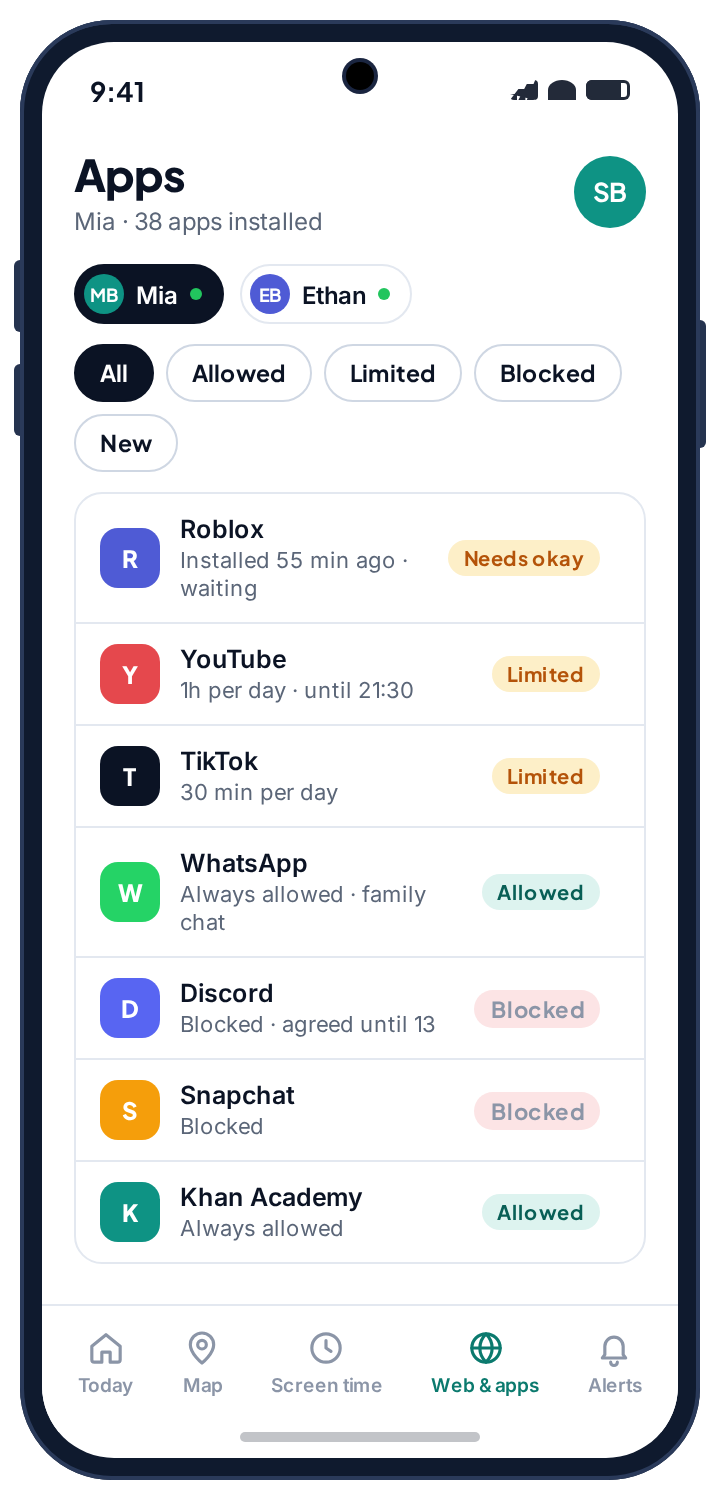
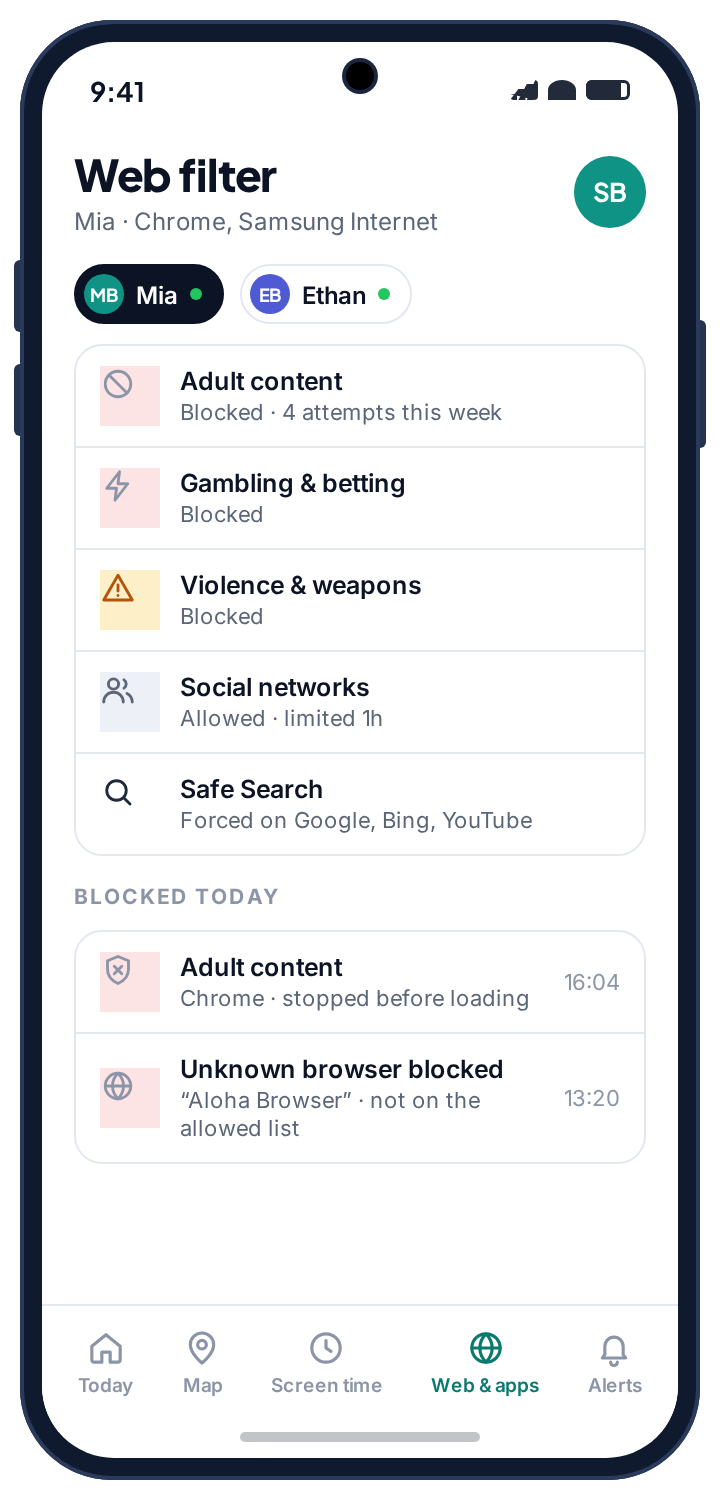
Block whole categories with one switch each: adult content, gambling, violence and weapons, and a handful of others. Force Safe Search on Google, Bing and YouTube so a search does not become a loophole. The filter reads the address bar in the browsers you allow, which means it works on the sites your child actually visits rather than a list someone made up years ago.
The detail that makes it a real filter is what it does with browsers you did not allow. A web filter that only covers Chrome is a filter in name only, because the first workaround any twelve-year-old finds is a different browser. TheTruthSpy stops unknown browsers from opening, logs the attempt, and leaves the conversation to you.
- A log of what was stopped. Category, browser and time, so you can see attempts without reading over a shoulder.
- Allow-list a site. One exception for the homework portal that a category rule catches by mistake.
- No keystrokes. The accessibility service sees the URL bar, not what is typed elsewhere.
The features that tell you when something deserves a conversation.
These work from what the phone already shows, such as notifications, browser history and Wi-Fi networks, and turn it into a short list of things worth your attention. They are designed to be glanced at, not studied.
Social media monitoring & keyword alerts
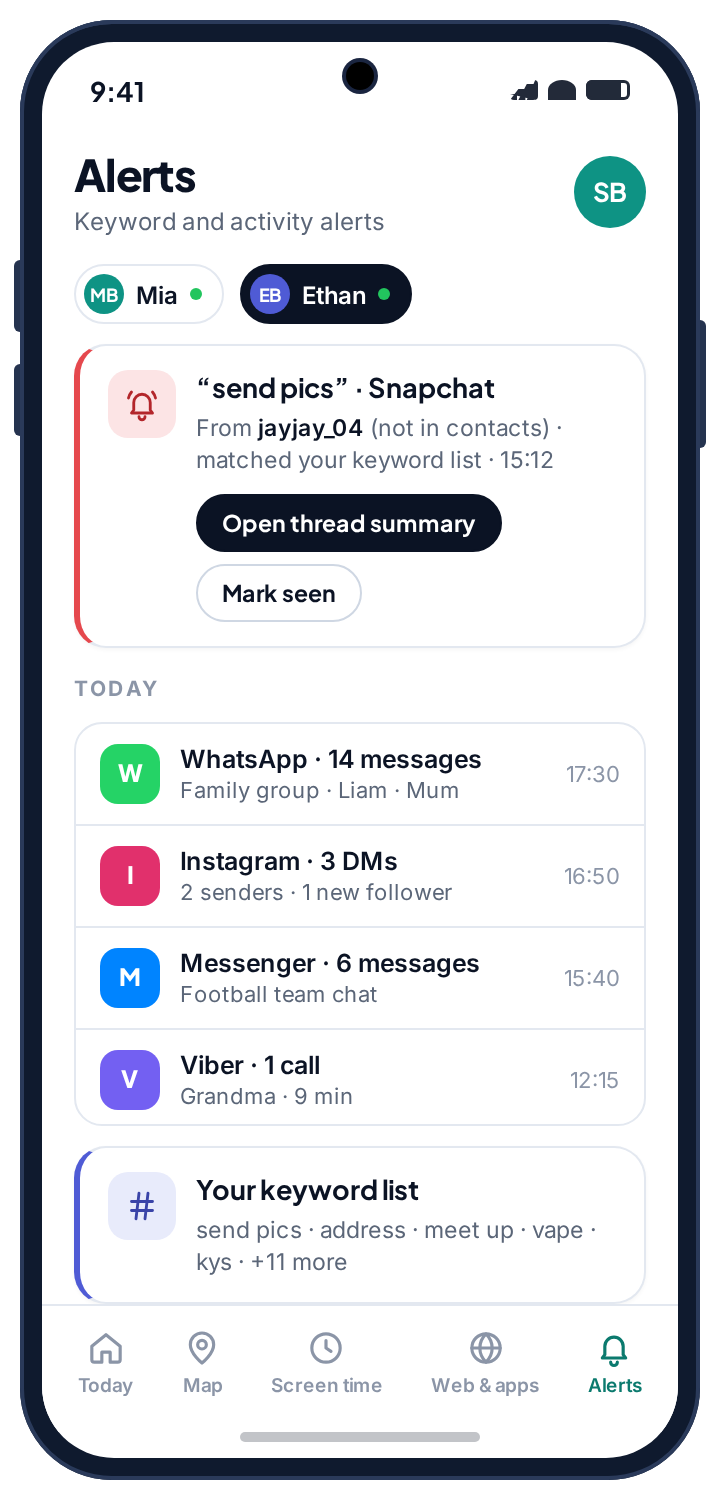
WhatsApp, Instagram, Snapchat, Messenger, Viber, Kik and TikTok are monitored through Android's notification access. That gives you message counts per app, who is sending them and when, and an alert when a notification matches a word or phrase on your list or from a sender the app has not seen on that phone before. It is enough to notice a new name appearing at midnight, or a phrase you told the panel to watch for.
It is not a transcript, and we will not pretend otherwise. End-to-end encrypted messages cannot be read by any app on the market, this one included. What every monitoring product sees is what the app chooses to show as a notification. Each social app's own page on this site says exactly where that line falls for that app.
- Your keyword list. Start from a suggested set and add the words that matter in your house.
- Unknown senders flagged. A message from a sender the app has not seen before is marked as new.
- Counts and timing. Enough to see a pattern change without reading a single message.
Chores & screen time rewards
Set a task, attach a number of minutes, and let your child earn them. They mark the chore done from their phone, optionally with a photo, and the request appears in your panel for a tap of approval. The minutes are added on top of the day's budget, so a Saturday morning of jobs can turn into a longer Saturday afternoon of games without anyone renegotiating the rules.
Streak tasks, such as feeding the cat every day for a week, pay out at the end of the streak. One-off tasks pay out on approval. Nothing is deducted for a task that is not done; rewards are a carrot, and the budget is the budget.
How chores and rewards work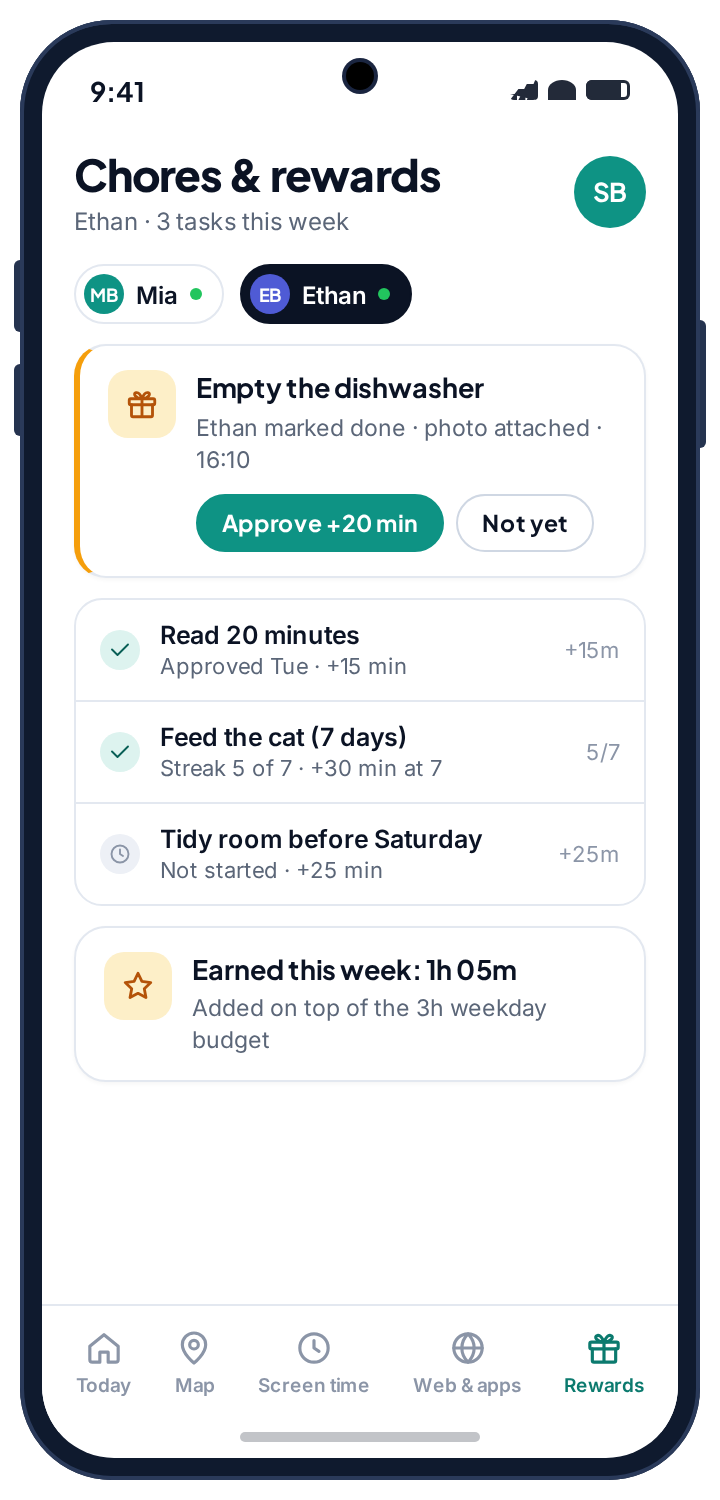
Browsing history tracker
Sites visited in the browsers you allow, with the time, the category the filter assigned and whether anything was stopped. Most parents open this once, see a list of homework sites and video sites, and never open it again. That is the correct outcome.
It is most useful in the week after a filter change, when you want to know whether a category rule is catching something it should not. The browsing history page shows what the log looks like on a good day and a bad one.
Wi-Fi tracker
Which Wi-Fi networks the phone joins and when. On its own it is a footnote. Next to the map it is corroboration: a phone that says it is at school and is connected to the school's network is at school, even in a building where GPS drifts across the street.
It also explains gaps. A phone that reported nothing for two hours and then joined a network called “Nan's Wi-Fi” was probably at Nan's, in a room with no signal. Details are on the Wi-Fi tracker page.
Ask for more time
Not a feature you switch on so much as the thing that makes the others workable. When a budget runs out, the child's phone shows a button, not a wall. They type a line, you get it in the panel, you answer in one tap.
A week of those requests and answers is visible to both of you. Families tell us it is the part that stops screen time being an argument, because the rule and the exceptions are written down in the same place.
Judge a parental control app by what it asks for, not by what it promises.
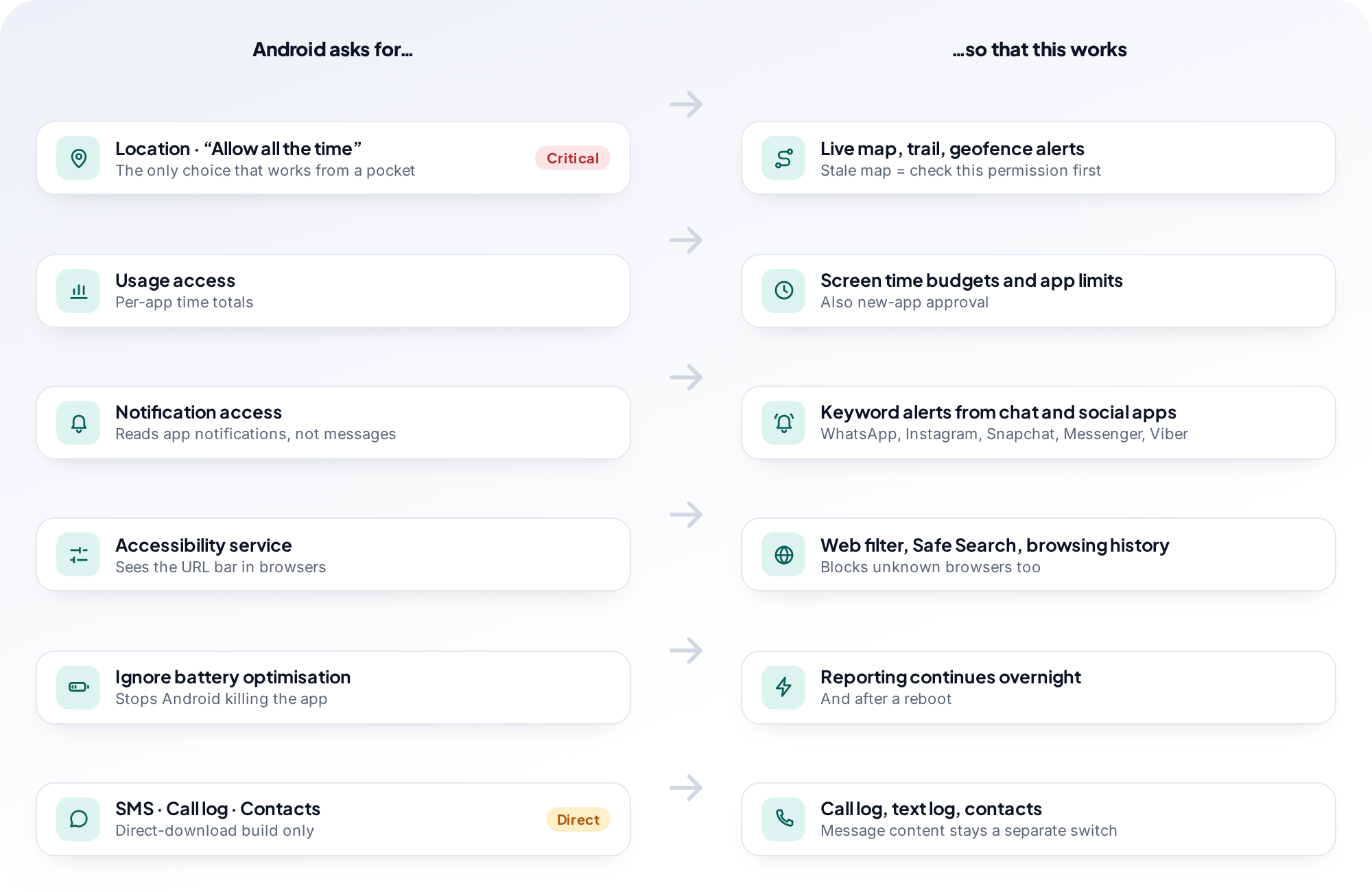
The feature list tells you what an app claims. The permission list tells you what it can do. TheTruthSpy asks for five things, and each one maps to a feature you can see in the panel and your child can see on the phone. It never asks for SMS, call log, contacts, camera, microphone or storage, and there is no permission for reading keystrokes, because there is no keylogger.
Location, “Allow all the time”
CriticalPowers the map, the trail and geofence alerts. Android offers “While using the app”, which looks granted and collects nothing from a pocket. Only “Allow all the time” keeps reporting alive in the background. If the map ever goes stale, this is the first thing to check, because system updates and accidental taps sometimes flip it back.
Usage access
Lets the app count how long each app is in the foreground. It powers screen time totals, per-app limits and the app blocker. It does not see what happens inside an app, only that the app was open and for how long.
Notification access
Lets the app read the notifications other apps post, which is where social media monitoring and keyword alerts come from. It sees the sender and preview text that the messaging app itself chose to show. It cannot see inside an encrypted conversation.
Accessibility service
Lets the app see the address bar in the browsers you allow, so the web filter can block categories, force Safe Search and log the sites visited. It is also what stops an unknown browser from opening. It does not read what is typed in other apps.
Ignore battery optimisation
Android aggressively kills background apps to save power, and on some phones it is enough to stop reporting overnight. This exemption keeps the app alive. The cost is small, typically a few percent of battery a day, and the panel shows the phone's battery level so you can judge for yourself.
Not asked for: SMS, call log, contacts, camera, microphone, storage
If a parental control app asks for any of these, ask what feature needs it. We could not name one that a child should not be able to see, so the app does not request them, and the Play Store listing shows that it does not.
Almost every “it stopped working” report traces back to a permission. Revoked by a system update, reset by a battery-saver mode, or never granted properly on the day. Your panel's Device health page lists each one and says which changed, so you fix the setting rather than reinstalling the app.
No stealth mode. No message reading. No camera, no microphone, no keylogger.
Every product in this category is defined by what it will not do, and ours is secrecy. TheTruthSpy sits in the app drawer with its own name and icon. A screen inside it lists everything being collected. It does not touch the camera or the microphone, it does not read texts or call logs, and there is no disguised package name and no way to run it without the person holding the phone knowing.
We used to offer more. Earlier versions had a second build, installed outside Google Play, that added call and text logs, a contacts list, photo flagging and on-request camera and audio. We removed all of it in 2026. Each tool was announced on the phone and off by default, and each one still turned out to be the reason a parent reached for the app on a bad day rather than for a conversation. A parental control app should make the conversation easier, not replace it.
That is a real cost. A determined teenager can uninstall it, and when they do, your panel tells you rather than hiding the failure. We think a tool that survives being discovered is worth more than one that works only until it is found, because a child who finds a hidden tracker learns two things, and neither of them helps you.
There is no keystroke logger either. A keylogger captures passwords, private notes and every half-typed message, most of it from apps you were never trying to monitor, and it collects far more about other people than about your child. Our guide on how Android keyloggers work and how to find one sets out what they do and how to remove one, and the about us page lists the rest of what we turned down.
Eight features is a list, not a recommendation. Here is the recommendation.
A list this long invites you to switch everything on, and that is the wrong instinct. In practice families live in three or four features, and which ones depends on the child's age more than anything else. Start small, and add a feature only when you can say what question it answers.
Limits and the filter carry nearly all the weight.
You already know where they are. Most of their messaging is with you. What matters is that the phone goes to sleep at night and that a search does not lead somewhere it should not.
- Daily budget and bedtime
- Web filter with Safe Search
- New-app approval
- Chores and rewards, if you like
Where they are and who is messaging them start to matter more.
The map and geofences earn their keep. Keyword alerts across social apps become the feature you are glad you set up. Screen time becomes a negotiation, and the request button is what keeps it civil.
- Location with school and home geofences
- Social alerts with a keyword list
- App blocker with approval for new installs
- Budget, bedtime and per-app limits
Often, the honest answer is less.
A location share they have agreed to, an alert on unknown senders and a bedtime schedule are usually the whole set-up. Loosening a limit on a visible app is a milestone worth marking.
- Location, agreed and visible
- Unknown-sender alerts
- Bedtime on school nights
- Everything else off
Questions parents ask about these features.
Can TheTruthSpy read WhatsApp, Snapchat or Instagram messages?
It sees what those apps show as Android notifications: the sender, the timing and usually a preview. That is enough for counts, unknown-sender alerts and keyword matches. It is not a transcript. End-to-end encrypted conversations cannot be read by any app on the market, and each social app's page on this site says exactly where the line falls for that app.
Does it work on iPhone?
The monitored phone must be Android 8.0 or later. Your own parent panel is a web page, so you can check in from an iPhone, a Mac or a work computer. If the child's phone is an iPhone, Apple's Screen Time is the right tool and one of our guides explains it properly.
Will it drain the battery?
Typically a few percent a day, mostly from location reporting. The panel shows each phone's battery level and last-seen time, so you can see the cost for yourself. The battery-optimisation exemption is what keeps reporting alive overnight; without it, some phones stop reporting when the screen has been off for a while.
Can my child tell when I look at the panel?
Their phone shows that a parent viewed the panel today. It does not show which screens you opened or how long you spent. We built it that way because a child who knows you looked, and knows what could be seen, has no reason to hunt for what else might be hidden.
What happens when a permission is removed?
The feature that depends on it stops, and your panel's Device health page says which one. TheTruthSpy does not force permissions back on or hide from uninstallation. It tells you, so the conversation happens the same day rather than weeks later.
Can both parents use the same family?
Yes. Invite a co-parent from Family access in your panel. Both of you see the same children and the same alerts, and every command is stamped with the name of whoever sent it, so a 30-minute approval never becomes a mystery.
Is there really no paid plan?
There is no subscription and no card. Every feature on this page is free. There is no locked tier underneath it. The guides on this website carry advertising, which is what pays for the app; the pricing page page says so plainly.
How is this different from Google's Family Link?
Family Link is free, made by Google, and for a younger child it may be all you need; several of our guides say so. TheTruthSpy adds a live family map with geofences and history, a request-based approach to screen time, keyword alerts from messaging-app notifications, and chores that earn screen time, none of which Family Link provides. The guides compare the two honestly.
Every parental control feature, free.
Create a free account and pair your child's Android phone in about ten minutes, or open the read-only demo first and click through every feature on this page.
Android · Free to set up · Visible on your child's phone