Website Blocker & Web Filter
A free website blocker and web filter for your child's Android phone that works by category rather than one address at a time, with Safe Search enforced and a log of every page it stopped. This page explains exactly which categories each preset blocks, what the filter cannot stop, which Android setting keeps it alive, and what to do when it blocks the wrong thing, which it will.
Free · Permission: Accessibility service · Visible on your child's phone
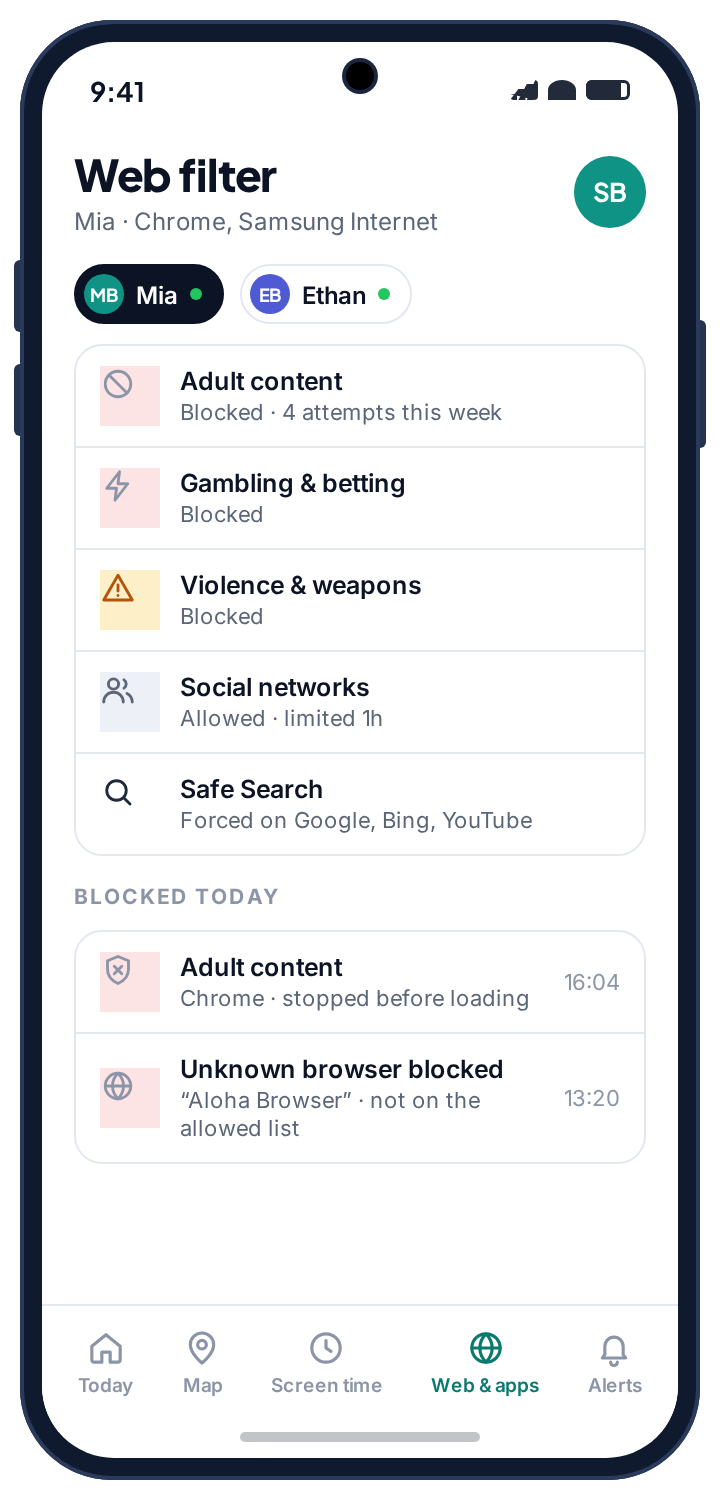
- Block by category, not by address. A list of banned sites is obsolete the day you write it. A category answers “what kind of site is this” for pages nobody has catalogued yet.
- Two presets cover most families. Child and Teen are a starting position, not a policy. Every row can be changed, and a new child starts with no filter at all until you pick one.
- Safe Search matters more than the blocklist. It is enforced at the network level on Google, Bing and DuckDuckGo, so the browser's own settings cannot switch it off.
- The second browser is the real test. TheTruthSpy filters below the browser and blocks any browser you have not approved, which is the part cheaper tools skip.
- It cannot see inside apps or through a VPN. The filter is a fence around the easy accidents. It tells you when a VPN appears rather than pretending the log is complete.
Category filtering: why a web filter beats a blocklist
A blocklist of individual addresses is obsolete the day you write it. New sites appear by the thousand, old ones move, and a child who finds one gap has found the whole web. Category filtering asks a different question, what kind of site is this, and answers it for pages nobody has catalogued yet. A gambling site that launched last week is still a gambling site.
You pick a preset per child, Child or Teen, and then change any row you disagree with. The presets exist so that you are not maintaining eleven decisions by hand; the rows exist because no two families draw the lines in the same place. Mia, at thirteen, is on Teen with Dating left blocked. Ethan, at eleven, is on Child with nothing changed. Both took under a minute.
Every blocked attempt is logged with the site, the category and the time. That is not a detail. A filter you cannot audit is a filter asking you to take its word for it, and the log is how you find out it is blocking a homework site before your child concludes the whole system is stupid.
- One preset per child, every row adjustable. Blocked, Warn, Time-limited or Allowed, per category, per child.
- Warn is the middle setting. The page opens after a notice, and the visit is logged, so a teenager's school project on drug policy does not hit a wall.
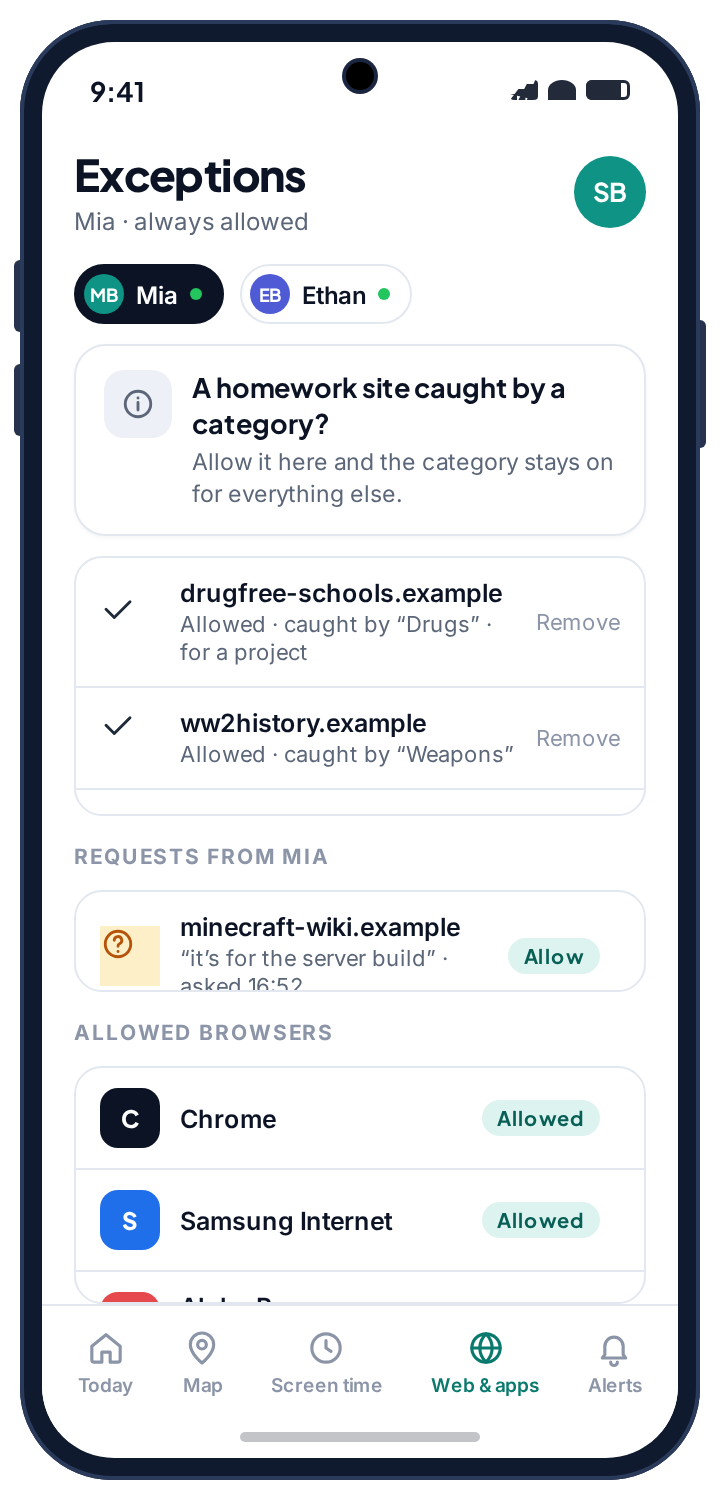
- Exceptions live alongside the rule. Allow one site despite its category and the category stays blocked for everything else.
The two presets, row by row.
Pick a preset per child, then change any row. The presets are a starting position, not a policy; the notes column records what a web filter for kids most often gets wrong.
| Category | Child (under ~12) | Teen (13+) | Note |
|---|---|---|---|
| Adult & pornography | Blocked | Blocked | The category everyone installs a filter for. |
| Gambling & betting | Blocked | Blocked | Includes loot-box and skin-betting sites, which slip past most filters. |
| Self-harm & pro-eating-disorder | Blocked | Blocked | Blocked at every age, and not something we make optional. |
| Violence & gore | Blocked | Blocked | History and news sites are categorised separately, but expect the occasional false stop. |
| Drugs & alcohol | Blocked | Warn | A teen doing a school project on drug policy should not hit a wall. |
| Dating | Blocked | Blocked | Worth revisiting at 16 rather than leaving on by default. |
| Weapons | Blocked | Warn | Catches airsoft and history sites too. Expect to allow a few. |
| Social networks | Blocked | Allowed | Blocking these on a teenager's phone moves the traffic to an app, not away. |
| Video & streaming | Time-limited | Allowed | Better handled by the screen time limits than by blocking. |
| Gaming | Time-limited | Allowed | Browser games on a Child preset count against the daily limit rather than being banned outright. |
| Unknown / uncategorised | Blocked | Allowed | Strict for a younger child; on a teen it produces too many false stops. |
Safe Search, which matters more than the blocklist
Blocking a site does not help if the search results page serves explicit thumbnails on an innocent query. A nine-year-old searching for a cartoon character's name does not need to reach a blocked site to see something they should not; the results page itself is the problem. TheTruthSpy enforces Safe Search on Google, Bing and DuckDuckGo at the network level, so it cannot be switched off in the browser's own settings, which is the first thing a curious child tries.
For a younger child this single setting does more than the entire category list, because it governs the route almost everything arrives through. Children rarely type addresses. They search, and tap the first thing that looks right. Filter the search and you have filtered the front door.
- Cannot be undone in the browser. Toggling the search engine's own Safe Search setting changes nothing, because the enforcement happens below it.
- Covers image and video results. The thumbnails are the thing parents worry about, and they are what Safe Search is for.
- Visible in the log. Safe Search shows as on at the top of the browsing log, so if it ever shows as off, you know the accessibility service needs attention.
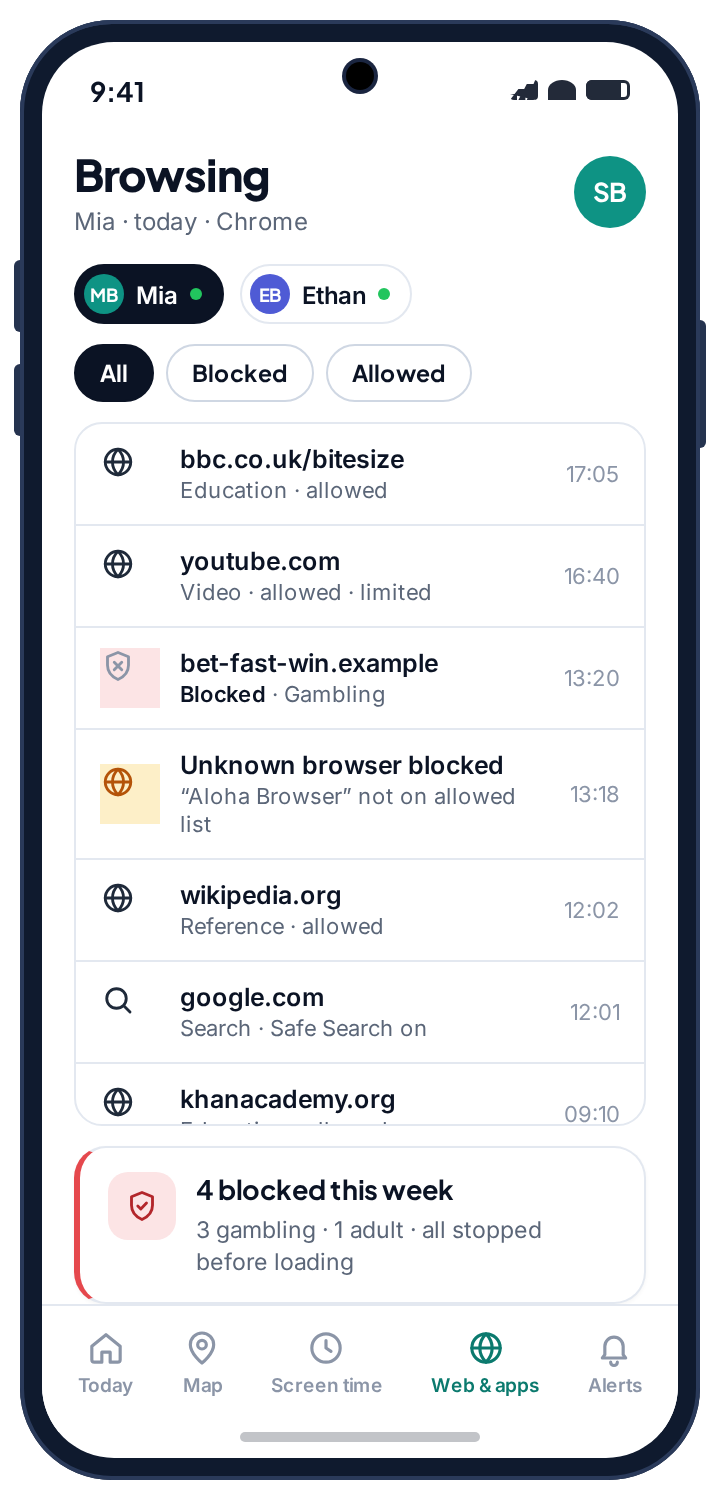
Closing the second-browser gap
Here is the trick every filtered child works out sooner or later: if the filter lives in one browser, install a different one. Download something obscure from the store, open it, and the web is wide open again. Many parental-control products are a Chrome extension with a nicer icon, and they fail this test within the first month.
TheTruthSpy filters below the browser rather than inside it, and blocks browsers that are not on your approved list. Chrome and Samsung Internet are allowed by default; anything else has to be approved by you before it opens a single page. When Mia installed Aloha, it did not quietly bypass anything. It appeared on the exceptions screen as a blocked browser, a blocked attempt went into the log, and she got the same block page she would get for a blocked site. This is the boring, unglamorous part that determines whether a filter still works in month three, and it is the part cheaper tools skip.
- Any browser, same rules. An approved browser is filtered exactly like Chrome. There is no “safe” browser that is also unfiltered.
- Approval is a tap, not a reinstall. If a school needs Firefox for a particular site, approve Firefox from the exceptions screen and it is filtered from then on.
- The unknown browser is logged. The attempt shows in the blocked-today list as an unknown browser, so you know it was tried even if nothing came of it.
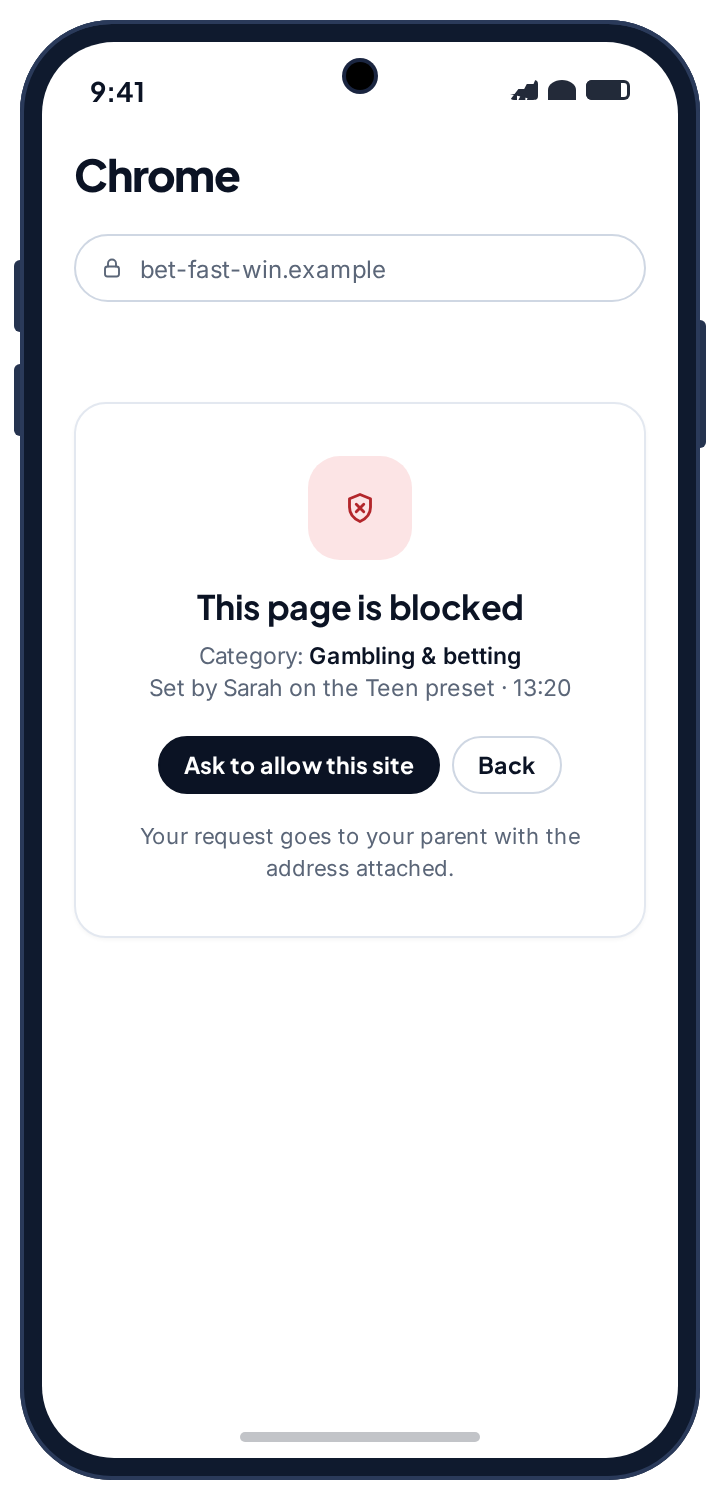
A block page that says what it is, who set it, and how to ask.
A fake network error is the worst design decision in this category, and it is common. A child who hits “This site can't be reached” three times concludes the phone is broken, or that something is being hidden from them, and both lead somewhere worse than the truth. TheTruthSpy's block page says what happened: this page is blocked, the category it fell into, which parent set the rule and on which preset, and a button to ask for the site to be allowed.
The ask goes to your panel as a request with the site and the category attached. You allow it, decline it, or leave it, and the answer is stamped with who decided. Most requests are homework. Handling those quickly, without a conversation, is what buys the filter its legitimacy for the ones that need one.
| On the block page | Why it is there |
|---|---|
| “This page is blocked” | Not a network error. The phone is fine and nothing is being hidden. |
| The category | “Gambling & betting” tells a child the rule, and tells you later whether the rule was right. |
| Who set it, and the preset | “Set by Sarah on the Teen preset” makes the rule a decision by a person, which is something a child can talk to. |
| “Ask to allow this site” | Turns a wall into a request. The request lands in your panel with the site attached. |
Four honest limits, because a filter sold as complete is a filter that gets trusted too far.
A web filter governs the browser. Most of what a teenager does on a phone does not happen in a browser, and the gaps below are the same for every product in this category, whatever the box says.
| Gap | What happens | What actually helps |
|---|---|---|
| Inside apps | Content in a social feed never touches the browser and is not filtered. | Platform settings and social alerts, which works from notifications. |
| A VPN | Routes traffic around the filter entirely. | TheTruthSpy tells you a VPN appeared rather than pretending the log is complete. |
| Another device | A school laptop or a friend's phone is untouched. | A household rule, not a device setting. |
| Anything sent to them directly | An image in a group chat arrives whatever the filter says. Encrypted messages cannot be read by any app. | A conversation about what to do when it happens. |
A fence, not a wall
A filter is a fence around the easy accidents, and most of what a younger child runs into is an accident. It is not a substitute for the conversation about what to do when something gets through.
Apps are a separate layer
Blocking a website does nothing to the app of the same name. The app rules handles apps, and the two are meant to be set together.
Nothing is hidden from them
The child's “What's shared” screen lists the web filter, the browsing log and the approved-browser list. There is no stealth mode, and the app does not hide from uninstallation.
What an ordinary school day looks like in the browsing log, event by event.
The clearest way to understand what a web filter will and will not tell you is to walk through a normal day on Mia's phone. This one has two things worth noticing in it, one of which turns out to be homework.
The log opens with nothing.
A weather page, a bus timetable, YouTube on the Teen preset where video is allowed. All of it logged as allowed, none of it sent to you. The line at the top says Safe Search is on. A normal morning in the log is a list of boring pages, and boring is what you want.
A homework site hits the Weapons category.
A history lesson sends her to a museum page about trench equipment, and Weapons on the Teen preset is set to Warn. She sees the notice, taps through, and the page opens. The visit is logged as warned rather than blocked, and nothing reaches your phone, because Warn is designed not to.
The first blocked attempt of the day.
A link from a group chat lands on a skin-betting site, which the filter files under Gambling & betting. The block page shows the category, “set by Sarah on the Teen preset”, and the ask button. She does not ask. The attempt is in the log with the site, the category and the time, and that is all that happens.
A request lands in your panel.
A biology revision page about the effects of alcohol is blocked by the Drugs & alcohol rule, which on her phone is set to Blocked rather than Warn. She taps Ask to allow this site. The request arrives in your panel with the address attached, you allow that one site in two taps, and the category stays blocked for everything else.
A new browser appears, and is stopped.
Aloha, installed after a friend recommended it, opens to the same block page a blocked site would show, because it is not on the approved list. The log records an unknown browser blocked. This is the one line of the day worth a sentence at dinner, and the sentence is “what was that browser for”, not an accusation.
The day closes.
Blocked attempts: two, plus one browser. Requests: one, allowed. Pages the filter let through: a few dozen, all in the browsing log if you ever want them, and most weeks you will not.
It will, and how you handle the first few times decides whether your child treats it as reasonable or as an obstacle.
Every web filter blocks the wrong page sometimes, because categorising the whole web is a guess at scale. The question is not whether this happens but what your child learns from it. Fix a wrong block in two taps, without a lecture, and they learn the filter is a rule a person stands behind. Leave it blocked for three days and they learn to route around it.
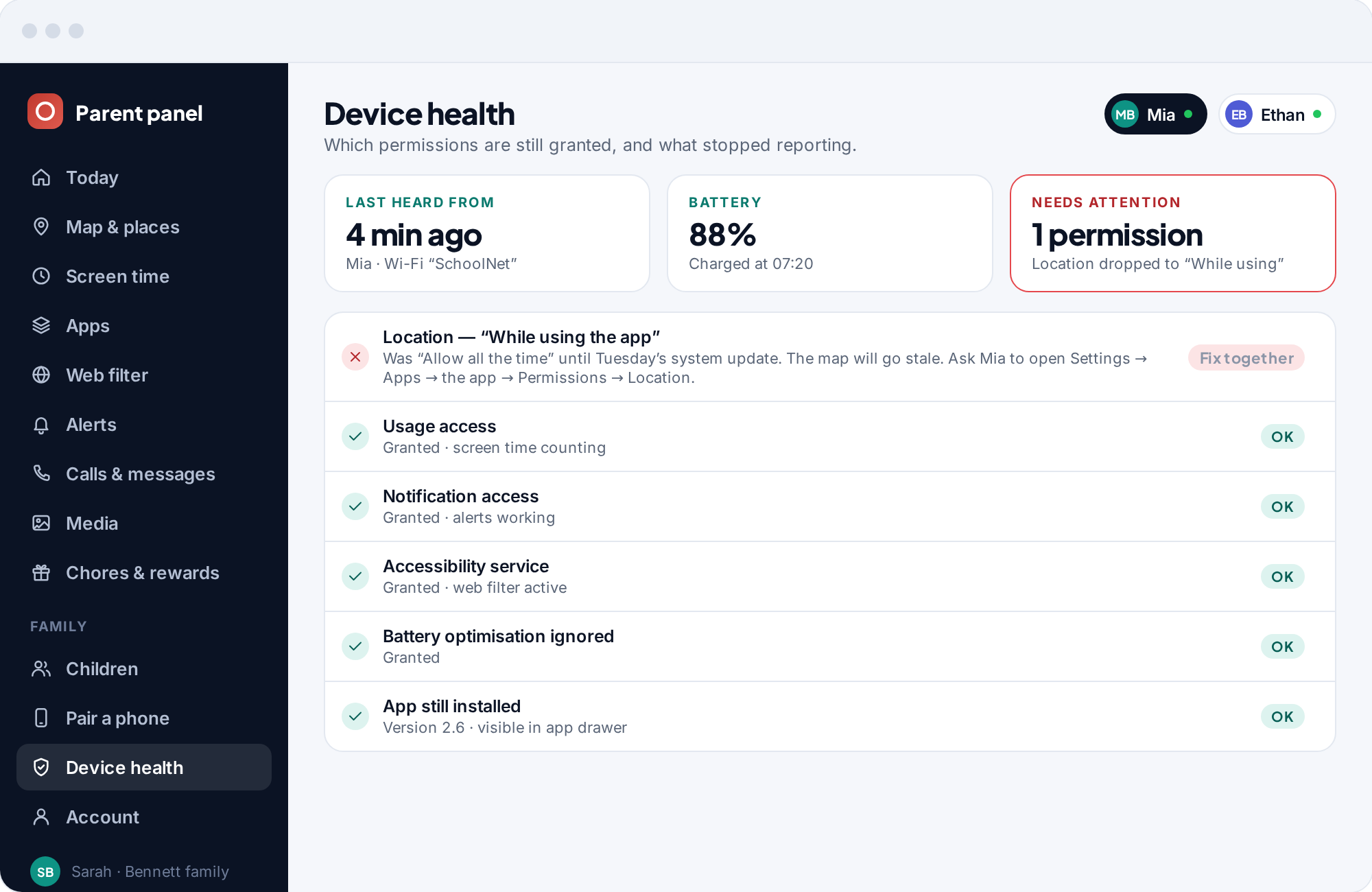
The last item below is not really a filter problem at all. An empty log and a broken filter look identical from the outside, which is why the phone's health card in your panel checks the accessibility service continuously and says so, rather than letting a quiet week look like a good one.
A homework site is blocked.
Usually a health, history or news topic caught by Drugs, Weapons or Violence.
Fix: Allow that site specifically from the web log: two taps, and the category stays on for everything else. Doing this quickly, without a negotiation, is what buys the filter its legitimacy.
A whole category feels too strict.
The Child preset applied to a thirteen-year-old is the usual cause.
Fix: Move that child to the Teen preset rather than unpicking rows one at a time. Presets exist so you are not maintaining eleven decisions by hand.
Blocked attempts keep appearing for one category.
Something specific is being looked for, repeatedly.
Fix: Do not lead with the log. One blocked page means nothing; a pattern late at night means something. Raise the subject, not the evidence. “Is there anything you've been trying to look up?” gets further than a printout.
A VPN has appeared on the phone.
Sometimes a school requirement. Sometimes not.
Fix: You are told, rather than silently bypassed. Ask what it is for. There are legitimate answers, and the question is more useful than blocking it outright.
Nothing is being logged at all.
The accessibility service that powers filtering was switched off, usually by a system update.
Fix: Check Settings → Devices in your panel. The phone's health card names the service and sends your child a one-tap fix. On the phone it is Settings → Accessibility → Installed apps → the app → On.
What a web filter is for, and how to run one without it becoming the thing your child learns to beat.
What the website blocker is actually for
Parents install a web filter for two reasons, and they call for different presets. The first is accidents: a younger child who searches for something innocent and lands somewhere that is not, or taps an advert in a free game and ends up on a gambling page dressed as a prize. The Child preset, Safe Search and the blocked-unknown rule between them stop nearly all of that. The second is deliberate looking, which starts somewhere around twelve and is normal. Here the filter's job is narrower than parents expect: keep the worst categories closed, warn on the grey ones, and log the rest so that a pattern is visible if one forms. The sign that it is time to change preset is not a blocked attempt; it is a run of requests for sites that were obviously fine.
What it is not for
A website blocker governs pages opened in a browser. It does not govern what happens inside TikTok, Instagram, Snapchat or a game, which is where most of a teenager's screen time actually goes. It cannot read a message, because WhatsApp, Snapchat, Instagram and iMessage are encrypted and no app can read them. It is not a keylogger, and there is no keylogger anywhere in TheTruthSpy. If you need to know who is messaging your child, that is the job of social media monitoring, which works from notifications; if you need to know how long the phone was in use, that is the screen time app.
It is also not a punishment. A web filter switched on after an incident, with the Child preset applied to a fifteen-year-old, gets beaten within a fortnight. Set it up as part of getting the phone, with a preset that matches the age, and it is furniture.
Telling your child
TheTruthSpy is visible on the phone by design. The app sits in the app drawer under its own name, the block page carries your name, and the “What's shared” screen lists the web filter, the browsing log and the approved-browser list in plain language. Whether to tell them is settled by the design; the only question left is how to say it. The version that works is short and specific: “There's a filter on the phone. It blocks the kinds of sites you'd expect, it keeps Safe Search on, and if it blocks something you need, press the button and I'll sort it the same day.” Then show them the category list and ask whether any of it seems wrong. A child who helped decide that Weapons should be Warn rather than Blocked argues about Weapons, not about the filter.
Answer the asks quickly
A request from the block page is a child choosing to go through the system rather than around it. Every one you answer the same day, allowed or declined, makes the next one more likely. Every one left for a week teaches the opposite.
The setting that keeps the filter alive
The web filter runs on Android's accessibility service, which is what lets it see the address a browser is about to open and stop it before the page loads. Granting it is a single switch during setup, and the setup checklist on the phone walks your child to it. The catch is that Android, and Samsung in particular, sometimes switch accessibility services off after a system update, and nothing on the phone tells anyone. The filter simply stops and the log goes quiet. This is why the Device health page in the panel checks the service continuously and names it when it drops, with a one-tap fix sent to the child's phone. By hand, it is Settings → Accessibility → Installed apps → the app → On. The download and setup guide shows the exact screen.
What is stored, and for how long
The browsing log keeps the address, the category, the time and whether the page was allowed, warned or blocked. It does not keep the page content, what was typed into it, or anything from inside apps. The log is tied to your family account, visible to you and any co-parent you invite from Family access, and kept for a rolling window of recent days before it is deleted. There is no permanent archive of a child's browsing. Unpairing a phone stops filtering and logging immediately, and the app on the child's phone confirms it. The privacy policy lists exactly what the web filter collects.
Legally, filtering a child's phone that you own and that they know about is uncontroversial. What changes the picture is secrecy, which is one of several reasons TheTruthSpy does not offer any. The block page says who set the rule, and the child's phone shows that a parent opened the panel today.
How this compares with other website blockers
Google's Family Link filters Chrome only and offers a coarse on-or-off for mature sites, with no categories, no log of what was blocked and nothing to stop a second browser. Browser extensions filter one browser and are gone the moment another is installed. Subscription parental-control suites usually have category filtering comparable to this, charge monthly for it, and in many cases hide themselves from the child. TheTruthSpy's web filter is free, works below the browser, logs every block, and is visible on the phone. The trade is that it is Android only on the child's side, and that it tells your child it exists. We think that is the right trade.
The right preset changes faster than most parents adjust it.
Child preset, as it comes.
Accidents are the whole risk at this age, and the Child preset is built for them. Unknown sites blocked, Safe Search on, video and gaming on a timer rather than banned.
- Child preset, unchanged
- Approved browsers: Chrome only, if you like
- Check the log for false blocks, not for sins
Teen preset, with the grey categories on Warn.
Deliberate looking starts, and so do the homework collisions. Move to Teen before it is asked for, and answer the requests the same day.
- Teen preset; Dating still blocked
- Drugs and Weapons on Warn
- Social networks allowed in the browser; handle them in the app blocker
A short list they agreed to.
At this age the filter is either an agreement or an argument. Keep the categories nobody disputes, revisit Dating, and let the log be the thing you rarely open.
- Adult, gambling and self-harm only
- Everything else Warn or Allowed
- Reviewed together every few months
Questions parents ask about the web filter.
How does the website blocker decide what to block?
By category, not by address. Each page a browser requests is matched to a category such as Adult, Gambling or Self-harm, and your preset decides whether that category is Blocked, Warn, Time-limited or Allowed for that child. A new site in a blocked category is blocked without anyone adding it to a list.
Can my child just install another browser?
They can install it, but it will not open a page. TheTruthSpy filters below the browser and blocks any browser that is not on your approved list. Chrome and Samsung Internet are allowed by default; anything else needs your approval from the exceptions screen, and once approved it is filtered like the rest.
Does the web filter work inside apps like TikTok or Instagram?
No, and no filter does. Content inside an app never touches the browser. Use each platform's own settings for that, the app blocker for the app itself, and social media monitoring for who is messaging your child, which works from notifications because the messages themselves are encrypted.
Will my child know the filter is on?
Yes, by design. The block page names the category and the parent who set the rule, the “What's shared” screen lists the filter and the log, and the app does not hide from uninstallation. There is no hidden mode.
What happens when it blocks a homework site?
Your child presses Ask to allow this site on the block page and the request lands in your panel with the address attached. Allow that one site in two taps and the category stays blocked for everything else. Doing it quickly is what makes the filter feel fair.
Does Safe Search really stay on?
Yes. It is enforced at the network level on Google, Bing and DuckDuckGo, so changing the search engine's own setting in the browser does nothing. It shows as on at the top of the browsing log so you can check at a glance.
Can the filter be bypassed with a VPN?
Yes. A VPN routes traffic around any filter, including this one. What TheTruthSpy does is tell you a VPN appeared on the phone rather than pretending the log is complete. Ask what it is for; sometimes it is a school requirement.
Why did the log go empty?
Almost always because a system update switched off the accessibility service the filter runs on. The Device health page in your panel names the service and sends a one-tap fix to the phone. An empty log and a broken filter look identical, which is why the panel checks for you.
Can the filter read what my child types?
No. The accessibility permission it uses sees the address bar of the browsers you allow, and only that. It does not read messages, passwords or anything typed in other apps, and the child's “What's shared” screen says so. If you want to understand how tools that do read keystrokes work, and how to find one on a phone, our guide on Android keyloggers covers it.
Is the website blocker free?
Yes. Category filtering, both presets, Safe Search, browser approval and the log are free on either build, with no card and no trial clock. The pricing page page explains how the app stays free.
Where the web filter fits with everything else
Blocking sites is one layer. Apps are handled separately by the app blocker, and the browsing history shows which pages were actually opened, including the ones the filter let through. The filter tells you what was stopped; the other two tell you what the phone was actually used for.
Web filtering switches on once the child's phone is paired with your parent account, which takes about ten minutes. The setup guide covers each screen.
Which preset suits a nine-year-old versus a sixteen-year-old is a separate question, and the guides take it on age by age.
Pick a preset and block the worst of the web tonight.
Pair your child's phone in about ten minutes, pick a preset, and check the log in the morning to see what it actually stopped. No card, no subscription.
Android · Free to set up · Visible on your child's phone