SMS Tracker Detection: How to Find One on the Phone, at the Network or in a Paired Web Client, and Remove It
 By TheTruthSpy Editor · Founder and editorPublished October 8, 2026Updated October 12, 202614 min read
Of all the things people worry about being tracked on a phone, text messages are the one where the worry is best founded. SMS is forty years old and was designed when nobody imagined it would carry bank codes. It is not encrypted. Android will let an app read it with a single permission. The network that carries it can copy it elsewhere without the phone knowing. And the web clients that make texting from a laptop convenient also make it convenient for someone else. There is no end-to-end encryption to lean on, as there is with WhatsApp or Signal, so this guide is less about debunking and more about finding.
An SMS tracker lives in one of three layers: the phone, where an app with the SMS permission can view SMS messages as they arrive; the network, where a forwarding or copy rule on your line sends texts to someone else; or the cloud, where a web client paired to your messaging app shows your conversations in a browser tab somewhere. Each layer has its own way of being detected and its own way of being closed. Checking all three takes about fifteen minutes, and the order below is the one that works.
Layer one: an app on the phone with the SMS permission
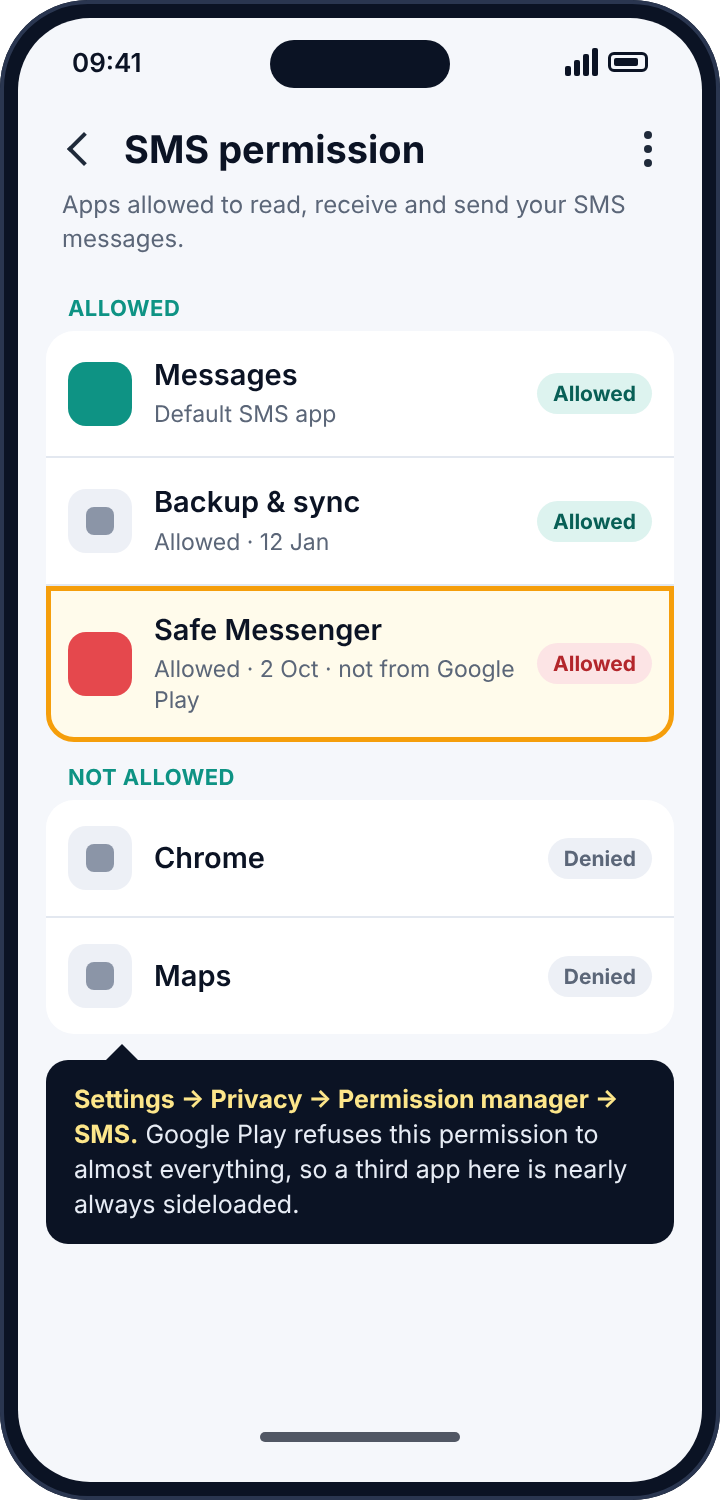
Android groups permissions, and the SMS group covers reading, receiving and sending texts. An app granted it can read every message in the inbox and see new ones the moment they arrive. There are legitimate reasons to hold it: the messaging app itself, a backup app, a two-factor code autofill. Commercial SMS trackers and stalkerware ask for the same permission, read the same inbox, and upload what they read to a server that the person who installed them can log in to from anywhere.
Google Play has, since 2019, refused the SMS permission to nearly every app that is not the phone’s default messaging app. That single policy decision is why real SMS trackers are installed from a downloaded file rather than from the store, and why one of the quickest things you can check about any app with this permission is whether it has a Play Store page at all.
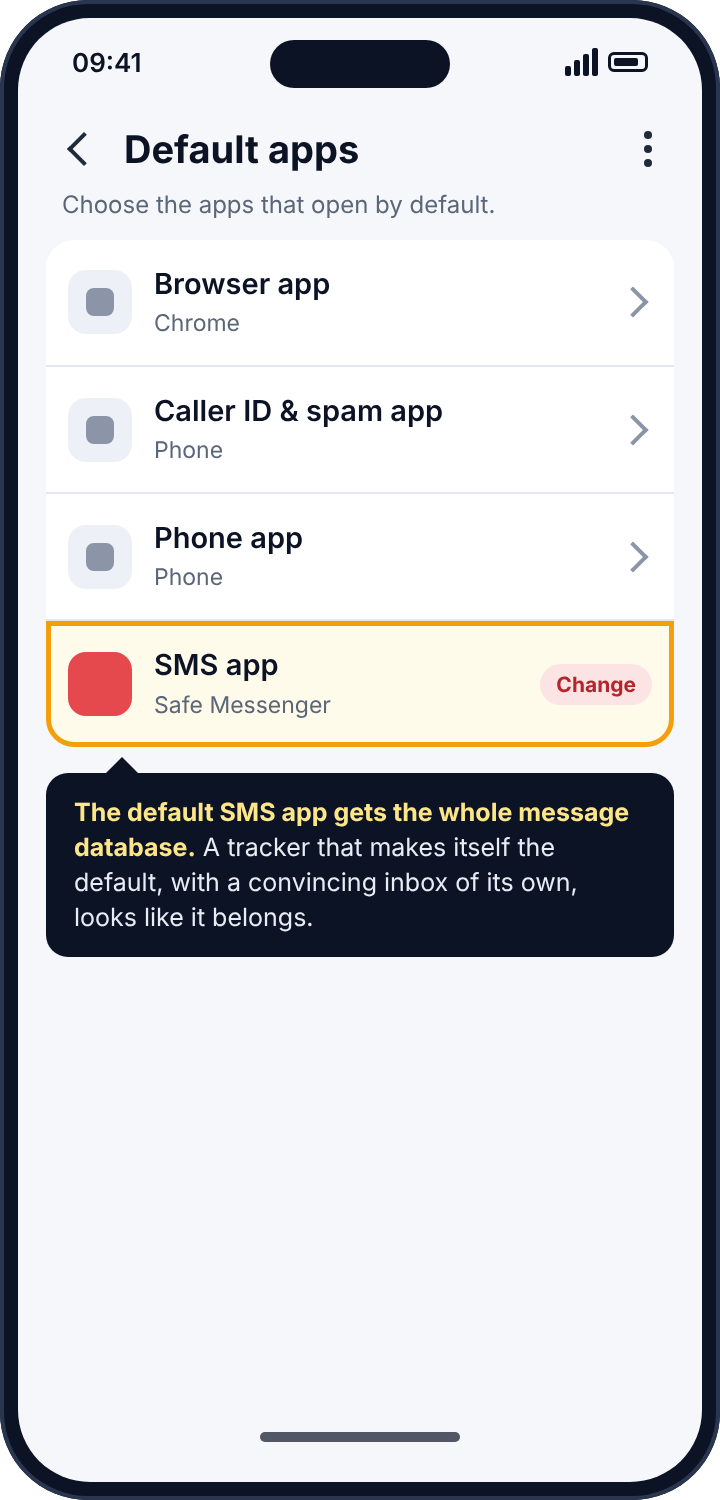
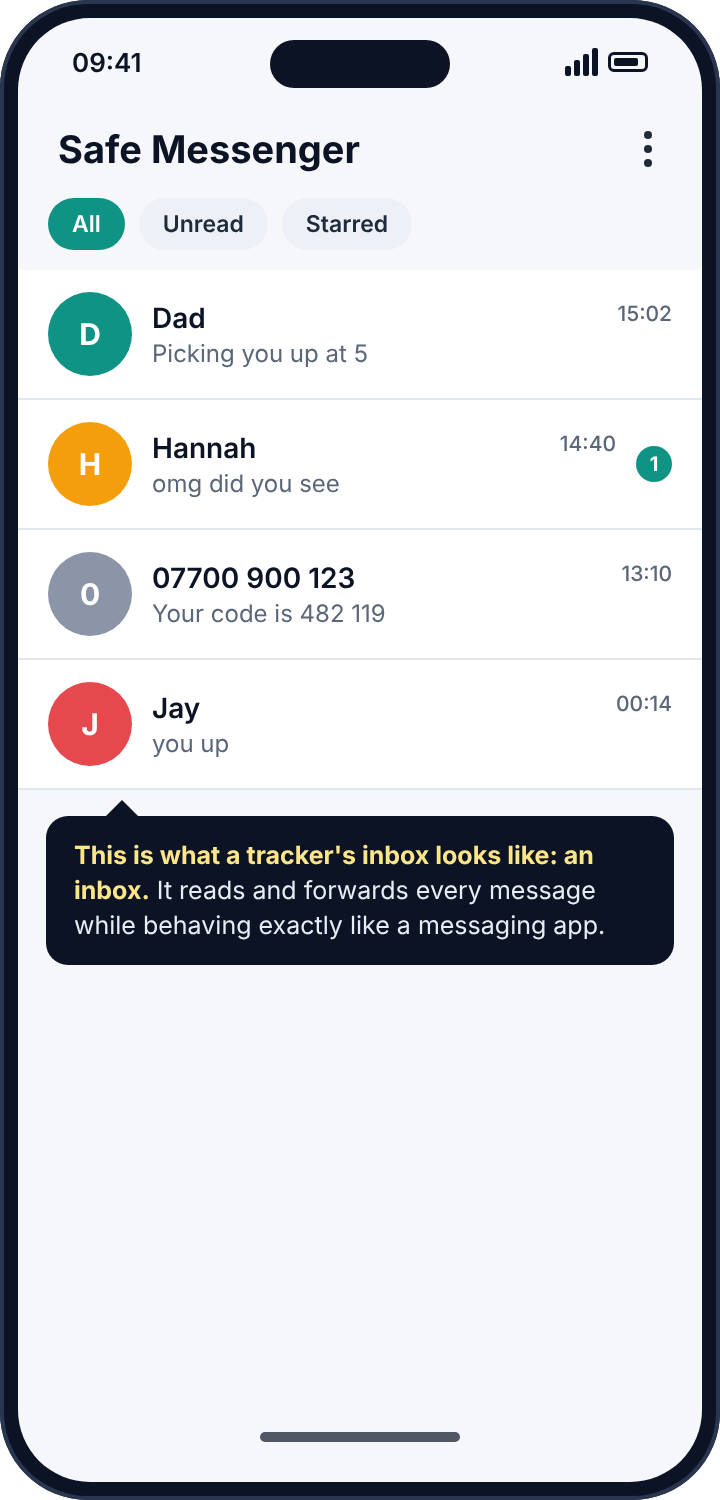
There is a sharper version of the same trick. Android lets you choose which app is the default SMS app, and the default app gets full access to the message database as a matter of course, with no extra permission prompt. A tracker that makes itself the default messaging app, while showing a perfectly convincing inbox of its own, sees everything and looks like it belongs. People use these for months without noticing, because from the outside they are a messaging app. The only thing that gives them away is that they are not the messaging app you chose.
How to detect an SMS tracker app
Two screens, and both take a minute. First, Settings, Privacy, Permission manager, SMS. Every app allowed to read texts is listed under Allowed. You should be able to say what each one is for. Second, Settings, Apps, Default apps, SMS app. It should say Google Messages, Samsung Messages, or whatever you deliberately installed. If it says anything else, open that app’s App info and look at the install date and whether there is a “View in Play Store” option. No Play Store page, installed on a day someone else had the phone, holding the SMS permission: that is the complete description of an SMS tracker.
How to remove it
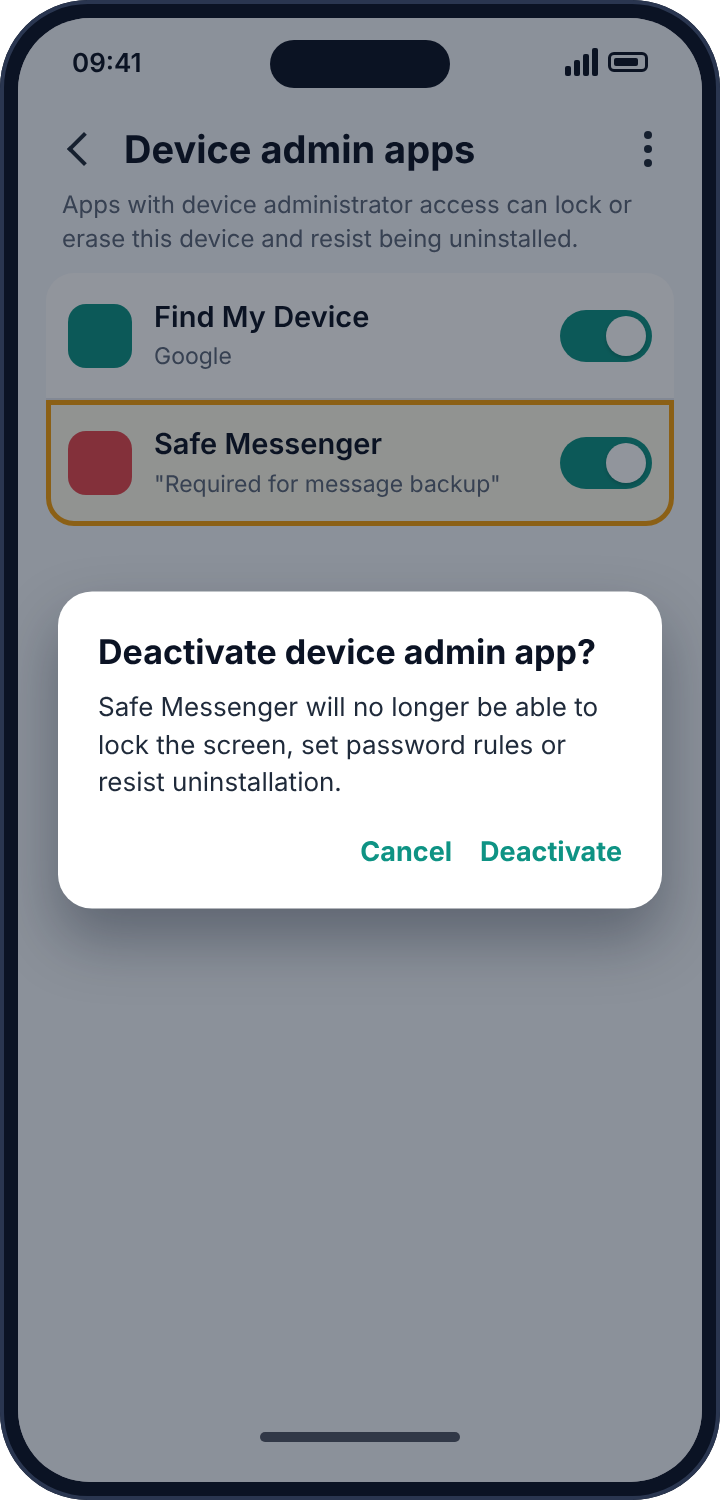
Set the default SMS app back to the one you want first, so that the tracker loses its special access before you fight it. Then, in the Permission manager, revoke SMS from anything you do not recognise, and uninstall it from Settings, Apps. If the uninstall button is greyed out, the app has registered itself as a device administrator, which is a trick to resist removal: go to Settings, Security, Device admin apps, deactivate it, and the button comes back. Finally run Play Protect (Play Store, profile picture, Play Protect, Scan), which recognises most known stalkerware families and will offer to uninstall anything it finds.
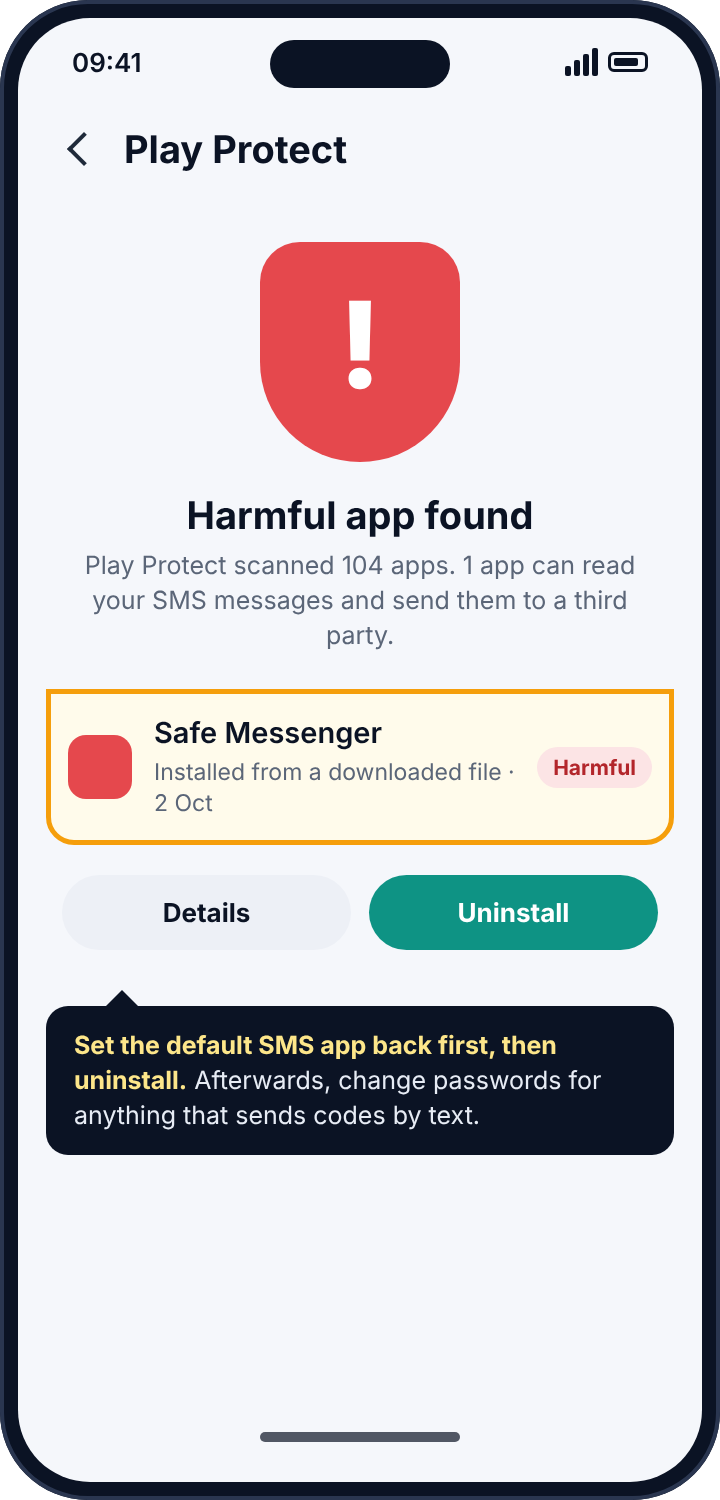
After removal, assume that everything sent to the phone by text since the install date was read, and that includes verification codes. Change the passwords for any account that sends codes by SMS, starting with email and banking, and consider moving two-factor codes to an authentication app, which an SMS tracker cannot see.
Layer two: forwarding at the network
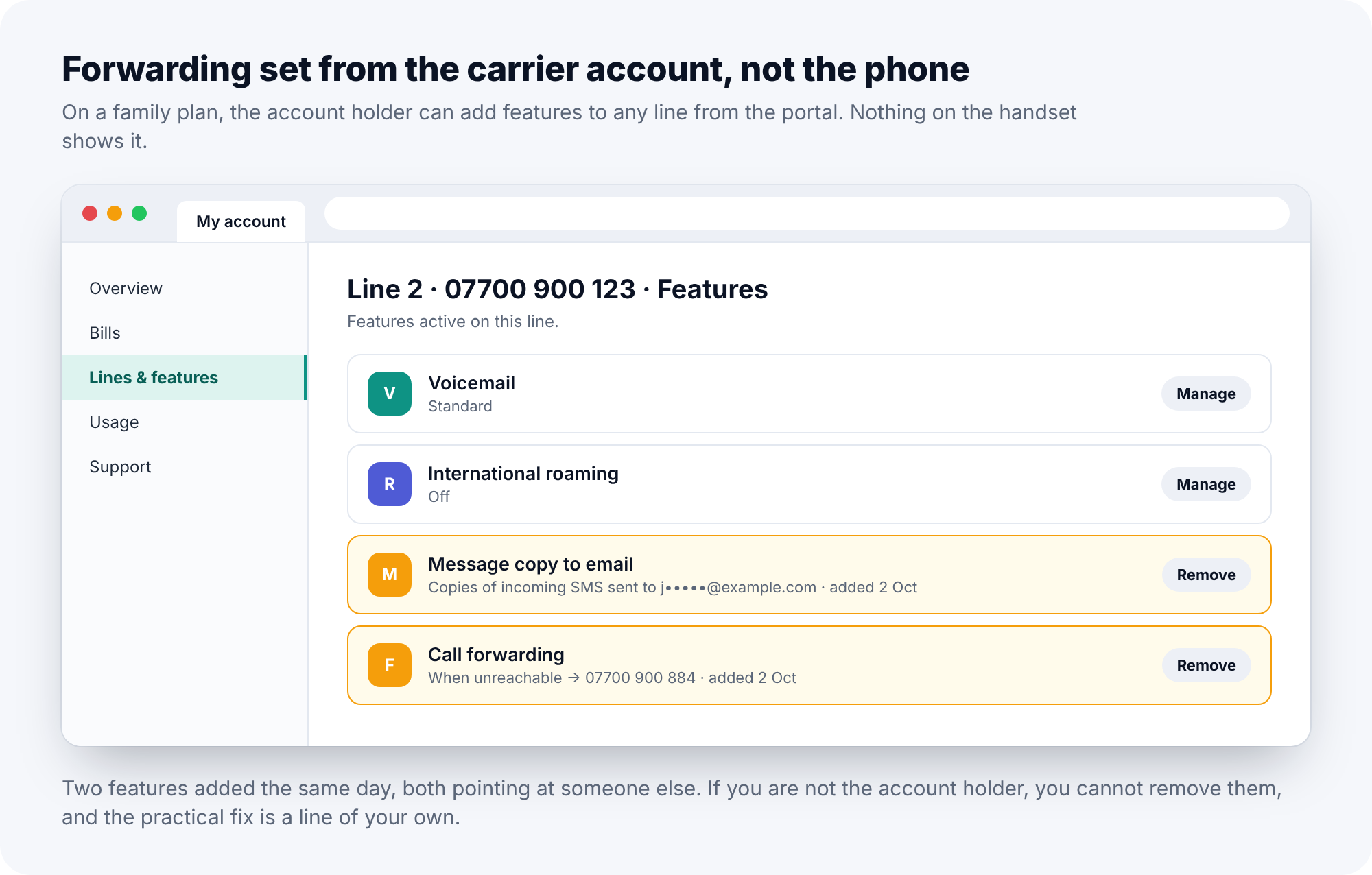
Mobile networks support rules that live on the line, not the phone. Call forwarding is the familiar one. SMS forwarding is less well known but exists on many carriers, and most carrier accounts let the account holder add features to a line from the account’s web portal: “message copy”, “SMS to email”, “simultaneous ring”. Nothing on the phone shows any of this. The phone still receives the message; a copy goes elsewhere at the same time, and the only evidence is at the network.
This is the layer that matters when the phone is on a family plan, or on a plan someone else pays for, because the account holder can set these features up from their own login without ever touching the handset. It is also the layer people forget, because it is the one with no app to find.
How to detect network forwarding
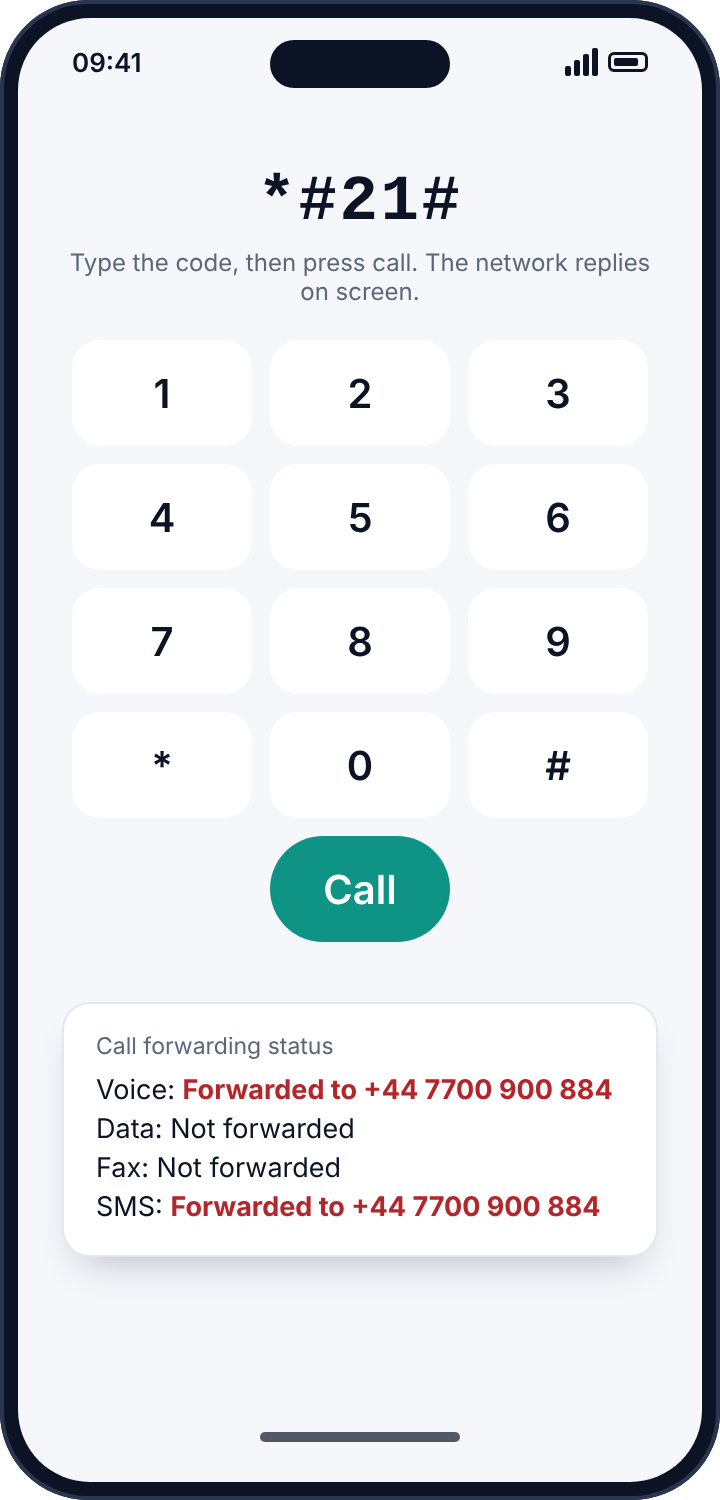
For forwarding, there is a direct test. Open the phone’s dialler and type *#21#, then press call. Instead of ringing, the network replies on screen with the status of unconditional forwarding for voice, data and SMS. *#62# reports where calls go when the phone is unreachable, *#61# when unanswered, and *#67# when busy. These are standard GSM codes that work on most networks worldwide; a few carriers block them, in which case the phone’s own Settings, Calls, Call forwarding screen shows the same information for voice.
For SMS copy and email forwarding features, there is no reliable dial code, because they are account features rather than line forwarding. Sign in to the carrier account online and read every feature listed on the line, or ring the carrier and ask them to read the line’s features to you. If you are not the account holder, ask the account holder to do it with you on the phone, and listen to the answer.
How to remove it
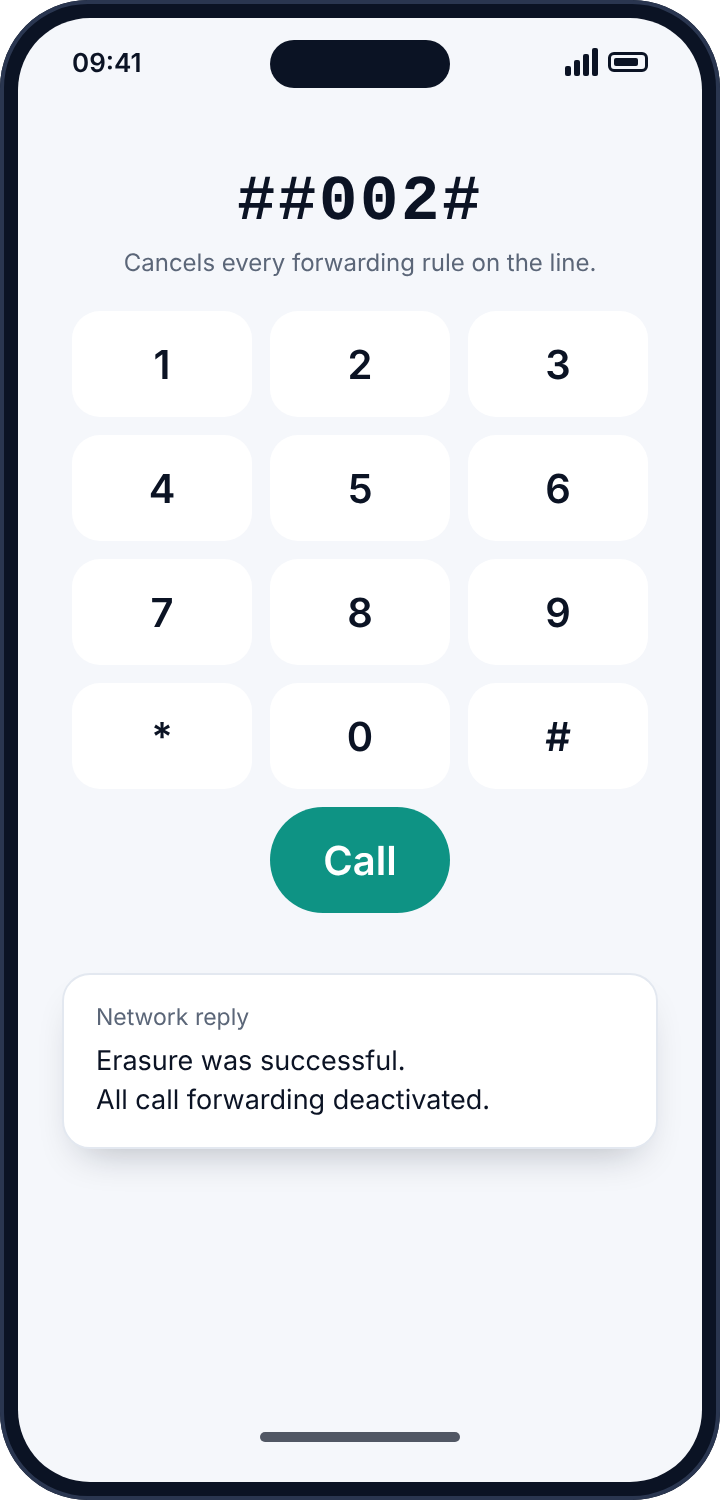
Dial ##002# and press call. On most GSM networks this cancels every forwarding rule on the line at once, and the network confirms on screen. For portal-level features, remove them in the account, or ask the carrier to. If you are not the account holder, you cannot do this yourself, and the honest advice is that the practical fix is a line of your own. If forwarding reappears after you cancel it, someone with access to the handset or the account is re-enabling it, and the lock screen code or the account password is the thing to change.
Layer three: a paired web client
Google Messages has a feature called Messages for web, under Device pairing: scan a QR code once with the phone, and a laptop browser shows and sends your texts from then on. Samsung Messages offers the same thing through the Samsung account. Pairing takes seconds with the unlocked phone in hand and keeps working after the phone is handed back, indefinitely, whether or not the phone is nearby. It is the same shape as a linked WhatsApp device, and it is the most common way one person in a household reads another person’s texts without installing anything at all.
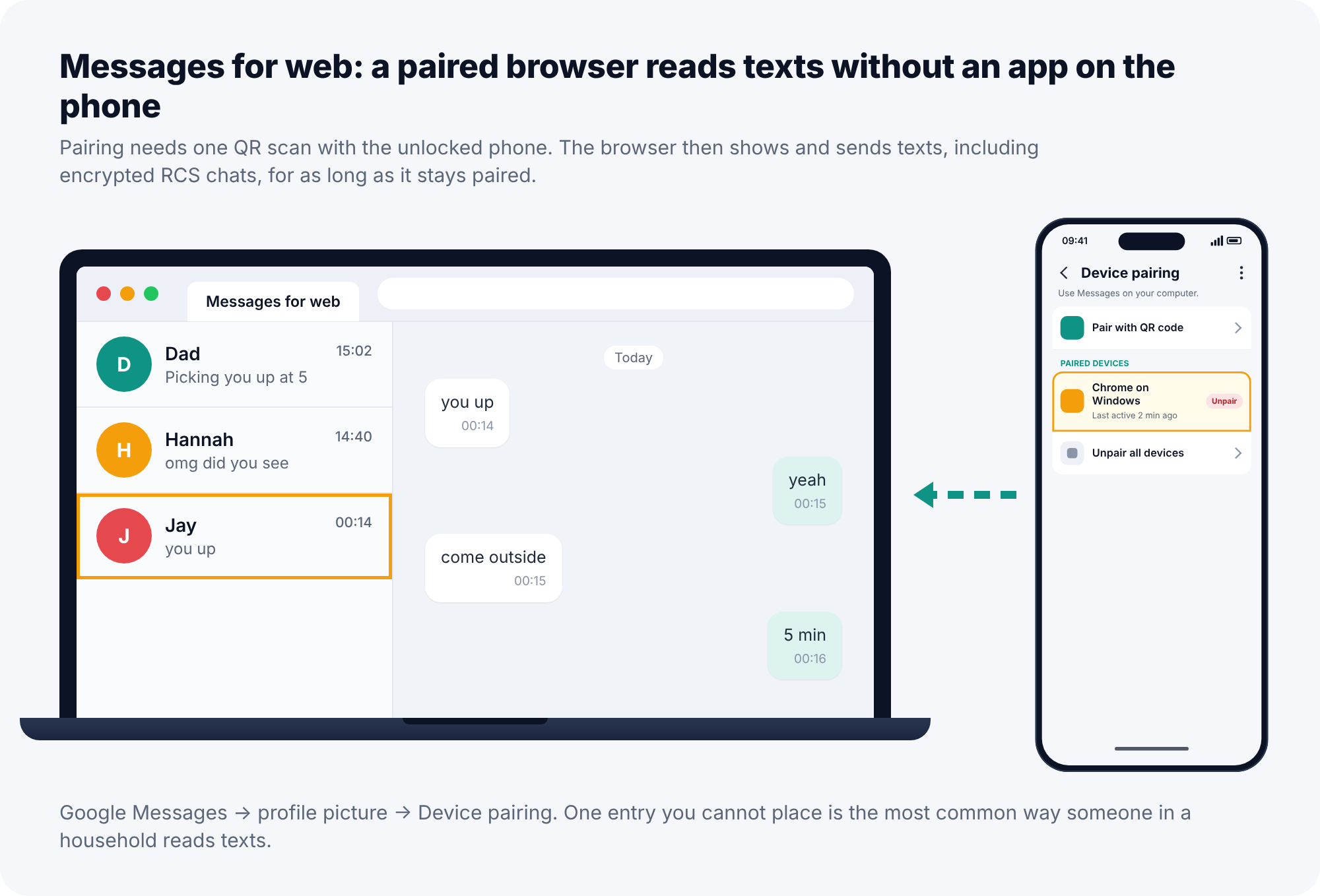
A detail worth knowing: a paired web client sees RCS chats too, including the encrypted ones, because it is part of your account rather than an interloper. The app and network layers cannot read an encrypted RCS conversation; the paired browser can.
How to detect a paired client
Open Google Messages, tap your profile picture or the three-dot menu, then Device pairing. Every paired browser is listed, with when it was last active. If you have never used Messages for web, the list should be empty. On a Samsung phone, the equivalent is under the Samsung account’s connected devices.
How to remove it
Tap “Unpair all devices”, or unpair each entry you do not recognise. Then change the phone’s lock screen code, because pairing needed the unlocked phone, and whoever paired that browser had it.
What an SMS tracker cannot read
For balance, it is worth being clear about the edges. None of the three layers reads messages in Signal, WhatsApp, iMessage between iPhones, or RCS chats between Google Messages users with encryption on, because none of those are SMS. If a conversation in Google Messages shows a small lock icon, it is an encrypted RCS chat, and an SMS tracker on the phone or at the network sees only that a message arrived. The paired web client on layer three is the exception, for the reason above. Someone who wants to be sure a message cannot be read by any of this has an easy answer: send it in an end-to-end encrypted app instead of as a text.
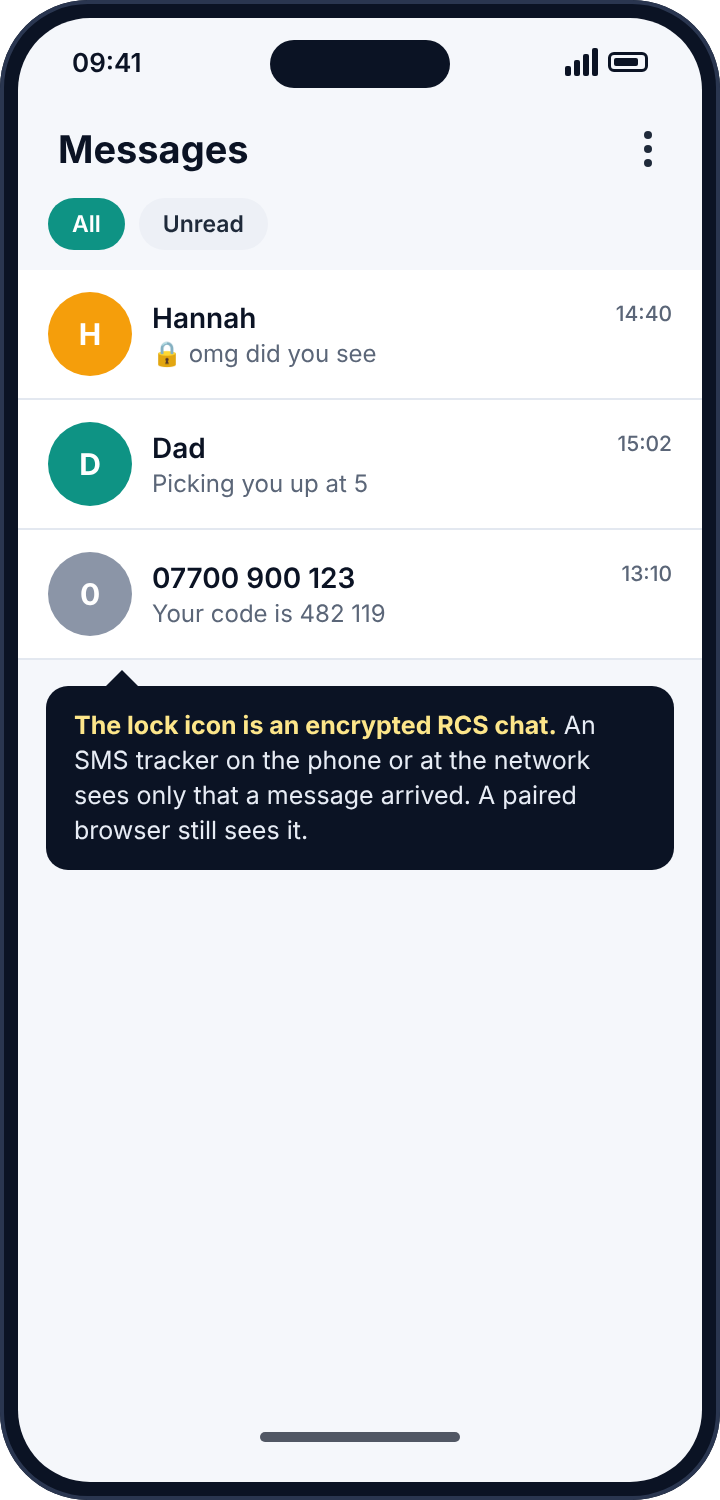
How the three layers look when you check them in one sitting
Because the layers are independent, it is worth describing what a full pass looks like, so that no layer is skipped on the strength of a clean result from another. Start with the phone. The Permission manager’s SMS list should contain the messaging app and perhaps a backup tool; anything else gets App info opened and its install source checked. The Default apps screen should name the messaging app you chose. If both are clean, the phone is clean, and it is tempting to stop. Do not, because the next two layers are precisely the ones that leave the phone clean.
Next, the network. *#21# for unconditional forwarding, *#62# for unreachable, *#61# for unanswered, each dialled and each reply read for a number you do not recognise. Then the carrier portal, or a call to the carrier, for message copy and email forwarding features that no dial code reports. Last, the cloud. Google Messages, Device pairing: the list should be empty unless you use Messages for web yourself, and every entry should be a browser you can name. A pass through all three takes about fifteen minutes and produces one of two results: a clean sheet, which is worth having, or a specific finding on a specific layer, which tells you exactly what to remove and roughly when it was put there.
Verification codes are the real prize
It is worth being clear about why text interception is treated more seriously than most monitoring. The content of an ordinary text is rarely the point. The point is that texts carry one-time codes: for email resets, bank logins, shopping accounts, and the “confirm it’s you” prompts that guard everything else. A tracker on any of the three layers sees those codes as they arrive, and a code plus a password that was guessed or reused is an account. That is why the aftermath of finding an SMS tracker is not just removal but a password change for every account that sends codes by text, and a move of those codes to an authentication app, where an SMS tracker cannot follow.
Reading the symptoms
If someone knew the content of a text you received, any of the three layers could be responsible. If they knew the content of a text you sent, think app or paired client; network forwarding copies incoming messages only. If a verification code you requested arrived late or not at all, or an account was accessed with a code you never saw, think forwarding or a tracker app reading codes as they arrive. If your messaging app looks slightly different than it used to, or has a name you do not remember choosing, think default-app replacement. If the phone is on someone else’s plan and that person seems to know things, think the portal. And if you cannot find anything on the phone, remember that two of the three layers are not on the phone.
Where parental SMS monitoring fits in
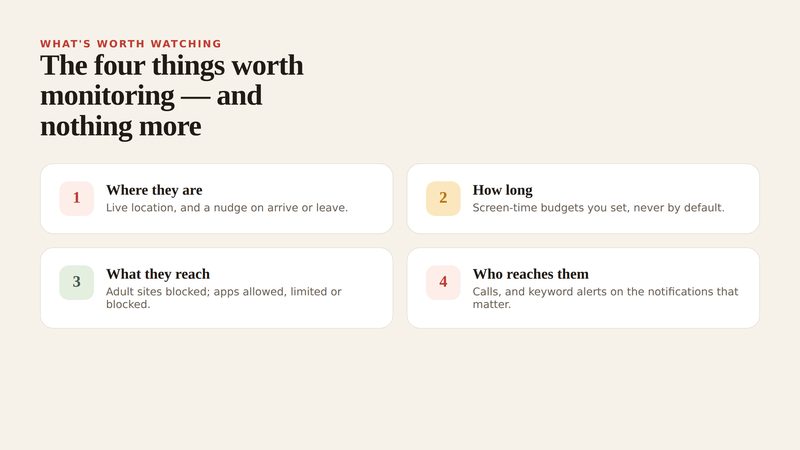
Parental control apps that advertise “SMS monitoring” or “read your child’s text messages” work on layer one, and because Google Play refuses them the SMS permission, they are installed from outside the store. That alone deserves a pause: an app that is supposed to be above board, that cannot be installed from the place above-board apps come from. The questions to ask of any such tool are whether the child can see it on the phone, whether the phone says plainly what it reads, and whether you would be comfortable with your own texts being handled the same way by a company you had never heard of. A tool that fails any of those is a tracker with a parenting label on the box.
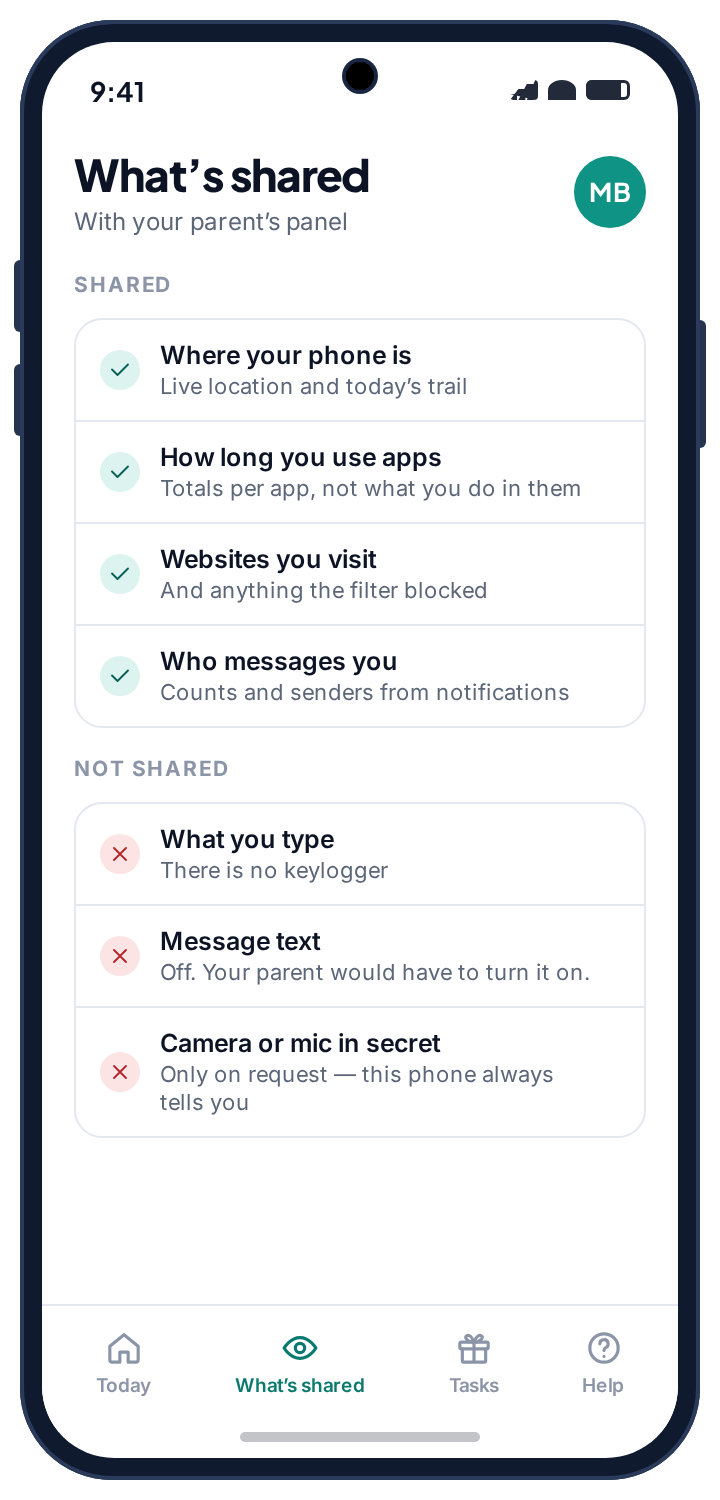
It is also worth being honest about what text monitoring buys a parent. The useful signal is almost never the content. It is who is in touch and when, and whether a number is new. We took the decision not to touch texts at all in our own app: it does not request the SMS permission, so there is no inbox for it to read and nothing for a child to feel read. What it does instead is covered on the social alerts page, which works from the notifications messaging apps post, and the screen time page, where a bedtime after which the phone goes quiet solves most of the midnight-text problems a parent is actually worried about. For a child whose phone is the thing you want to keep an eye on, that combination is more useful than a copy of their inbox, and a great deal easier to explain to them.
If someone in your household is behind it
Revoking a permission, unpairing a browser or cancelling forwarding will tell the person who set it up that you know, often within the hour. If that person is a partner or an ex and you have any concern about their reaction, record what you found before you change anything: screenshots of the permission list, the Device pairing screen and the dialler’s forwarding reply. Then speak to a domestic abuse service with technology-safety advisers; the Coalition Against Stalkerware keeps a list of such services by country. When you do act, work through all three layers in one sitting, so that nothing you close is reopened by something you had not closed yet.
Frequently asked questions
Can someone read my text messages without my phone?
Through network forwarding set up from a carrier account, yes, and through a web client that was paired when they did have the phone. Both leave records: the dialler’s forwarding reply and the Device pairing list.
Can an SMS tracker see my two-factor codes?
Yes, on any of the three layers. That is the most dangerous thing about them, and the reason to move codes to an authentication app once a tracker has been found.
Does *#21# work on every network?
On most GSM networks worldwide. A few carriers block the codes; the phone’s own call-forwarding settings show the voice status in that case, and the carrier can confirm the rest.
Can a tracker read encrypted RCS chats?
Not from the phone’s SMS permission or the network. A paired web client can, because it is part of your account.
Will a factory reset remove an SMS tracker?
It removes an app on the phone. It does not cancel network forwarding, which lives on the line, and it does not unpair a web client, which lives in your account. Do those by hand.
Is it legal for someone to forward my texts?
For another adult, without consent, almost nowhere. The exception in most places is a parent and their own minor child. If it was done to you, that matters for what you do next.
The fifteen-minute version
Settings, Privacy, Permission manager, SMS: revoke and uninstall anything you cannot account for. Settings, Apps, Default apps, SMS app: your real messaging app and nothing else. Settings, Security, Device admin apps: deactivate anything you do not recognise, then uninstall it. Dial *#21# to read forwarding and ##002# to cancel it. Read every feature on the carrier account, or ask the carrier to. Google Messages, Device pairing: unpair everything you do not use. Run Play Protect, change the lock screen code, and move your two-factor codes off SMS. Texts are the easiest thing on a phone to intercept and the easiest to audit. Three layers, fifteen minutes, and you know.
Related guides
Android Keylogger Detection: The Two Settings Lists Where One Has to Hide, and How to Remove It
Android keylogger guide: a phone keylogger is an accessibility service or a keyboard. Where each hides, the symptoms, removal steps,…
Call Tracker Detection: Call Logs, Call Forwarding and Call Recording, and How to Stop Each One
Call tracker guide: how call logs, call forwarding and call recording work on Android, the screens and dial codes that…
Who Can See Your Phone Contacts? Shared Accounts, Sync and the Apps That Upload Your Address Book
Who can see your phone contacts: shared Google accounts, forgotten sync, and apps that upload your address book. Where to…
Parental controls your child can see
Location, screen time limits, a web filter and alerts from notifications — free, and visible on your child's phone. Pair a phone in about ten minutes.
Android · Free to set up · Visible on your child's phone