Instagram Tracker Detection: Who Is Logged In to Your Account, Rogue Apps, and How to Lock It Down
 By TheTruthSpy Editor · Founder and editorPublished October 6, 2026Updated October 12, 202614 min read
Instagram is different from the messaging apps in a way that changes everything about how it gets watched. A WhatsApp conversation lives on two phones. An Instagram account lives on Instagram’s servers, and every device that signs in gets the whole thing: the DMs, the message requests, the follower lists, the saved posts, the search history. So the question “is someone tracking my Instagram” is almost never a question about software on your phone. It is a question about who, or what, has your login.
That is good news, in a way, because logins leave records and Instagram keeps them. This guide walks through the four ways an Instagram account gets watched, in rough order of how often they really happen: a person who knows the password, a third-party app that harvested it, an app on the phone reading notifications, and Instagram’s own supervision feature, which is legitimate and visible but misunderstood in both directions. For each, you will see how to detect it and how to shut it off. The whole audit takes a quarter of an hour, and most of it is reading lists that Instagram has been keeping for you all along.
Route one: someone knows the password
This is the boring, common case, and it is boring precisely because nothing clever is involved. A partner, an ex, a sibling, a friend learned the password at some point. Maybe it was shared years ago for a harmless reason. Maybe it was watched being typed. Maybe it is the same password as the Netflix account, which they also know. They open Instagram on their own phone, sign in as you, read the DMs, look at who you followed this week, and sign out again. No app is installed anywhere. Nothing on your phone changes. And Instagram records every bit of it on a page that most people have never opened.
How to detect it
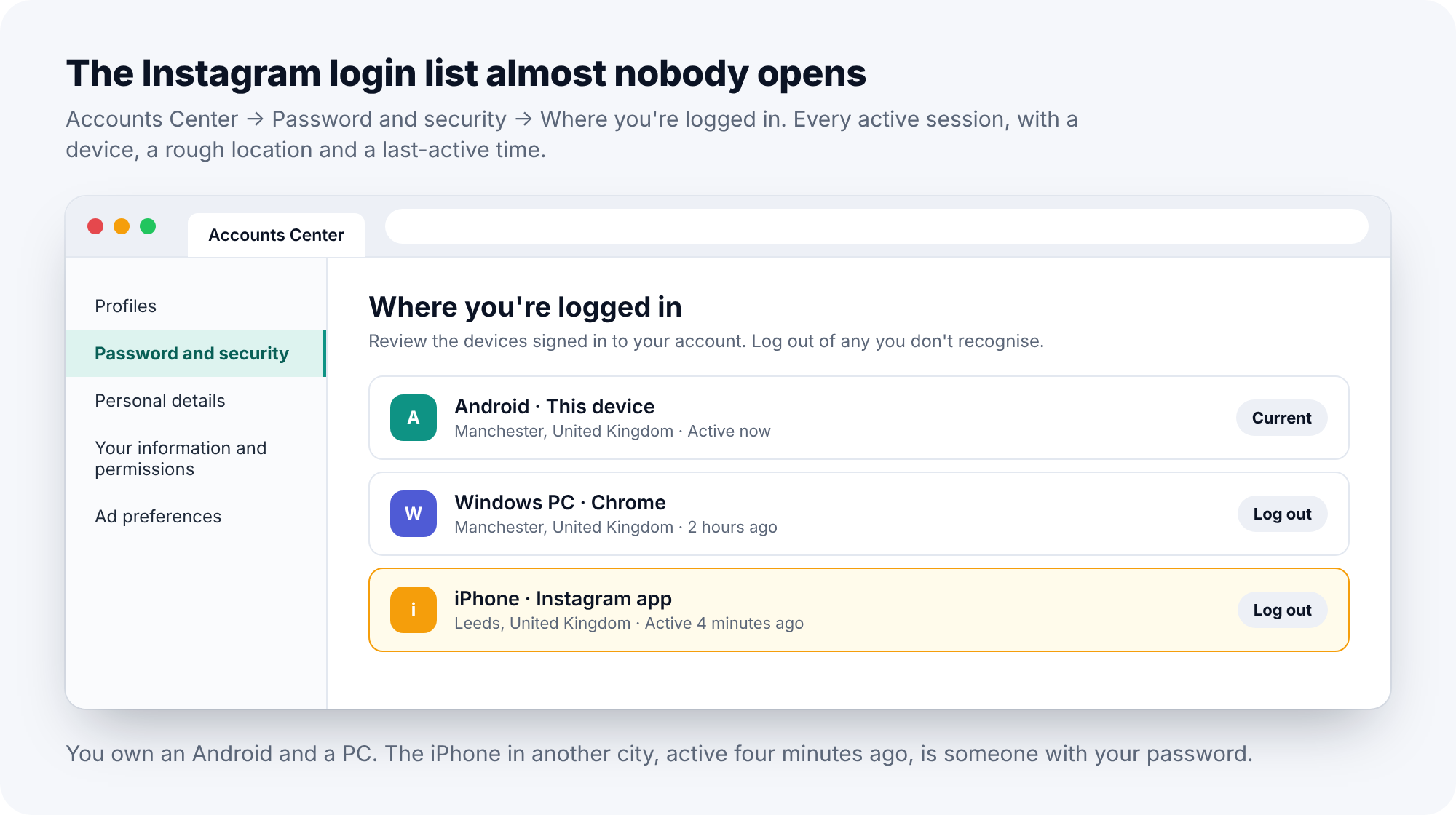
Open Instagram, go to your profile, tap the menu, then Settings and privacy, then Accounts Center. Under Password and security, tap “Where you’re logged in”. Every active session is listed with a device name, an approximate location worked out from the connection, and when it was last active. Your own phone is there, marked as the current device. A laptop you use is there. Anything else is the finding: a second phone, a device type you have never owned, a city you have not been to, a session “active 4 minutes ago” when your own phone is in your hand and you were not on Instagram.
Read the list slowly, and do not talk yourself out of an entry. People look at “iPhone, Leeds” and think, well, maybe the location is wrong, maybe it is my old phone, maybe it is nothing. The location can be a little off. A device you do not own with a last-active time from this week is not nothing.
How to remove it
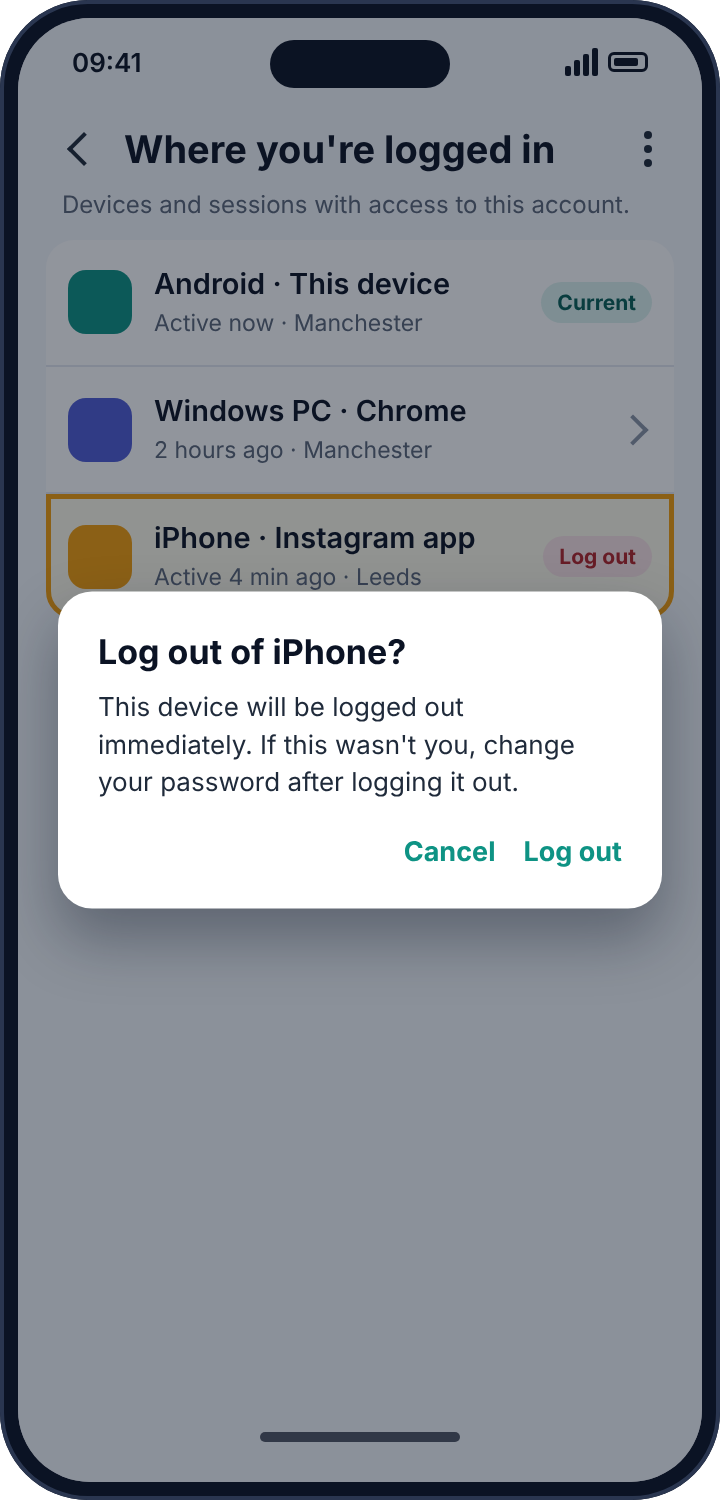
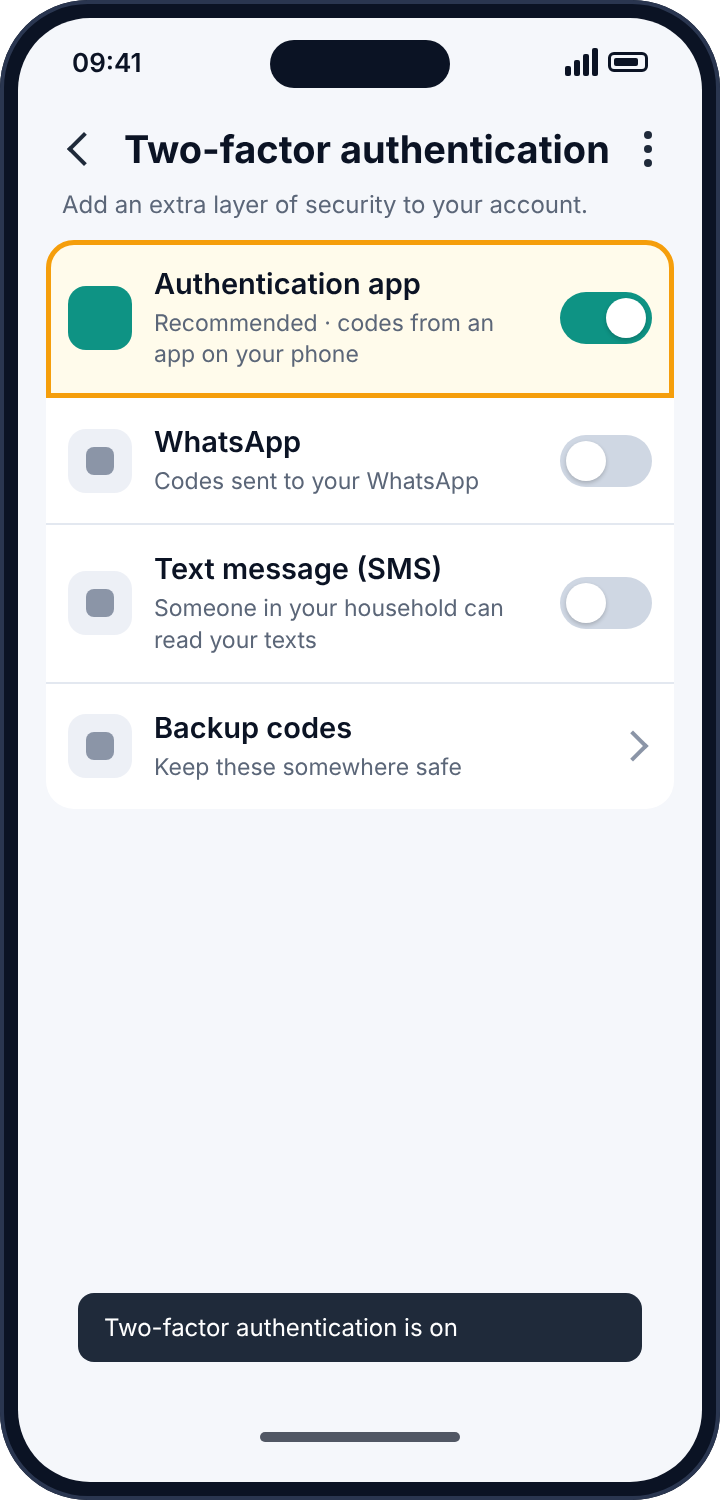
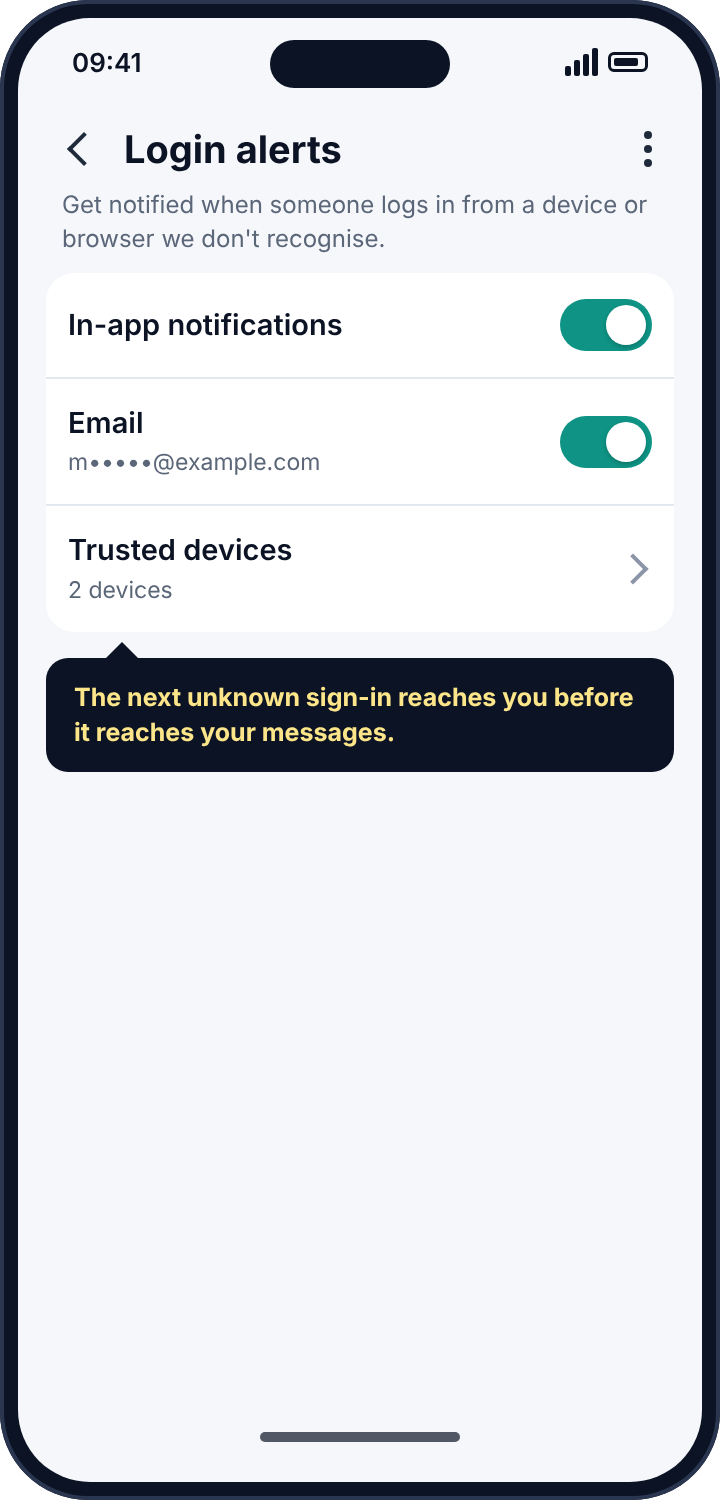
Tap the session and choose Log out. That ends it immediately. Then, in this order, because the order matters: change the password to one you have never used anywhere else, so that the Netflix password no longer opens Instagram; turn on two-factor authentication in the same Password and security section, choosing an authentication app rather than SMS, because anyone in your household who can see your text messages can see an SMS code; and switch on login alerts, so that the next sign-in from an unknown device reaches your email before it reaches your DMs.
Route two: an app that asked for your login
Search any app store for “Instagram followers tracker”, “who viewed my profile” or “unfollowers for Instagram” and you will find dozens of apps with hundreds of thousands of downloads. They promise to show who unfollowed you, who looks at your profile, who screenshots your stories, who your partner is messaging. Instagram does not expose any of that information to anyone, through any interface, so the apps cannot deliver what they promise. What they can do is ask you to sign in with your Instagram username and password, and keep them.
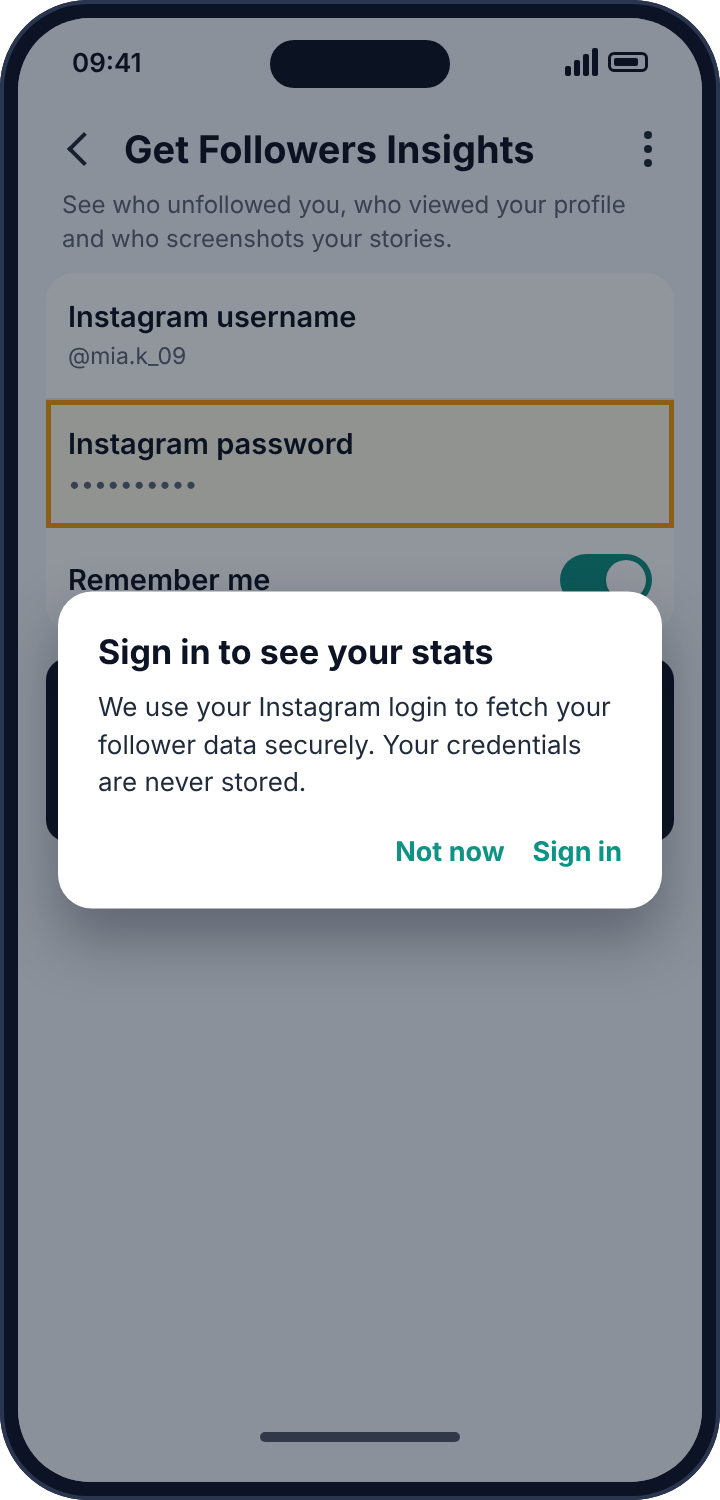
From that moment the app’s operator has your account. Some of these apps sell the credentials in bulk. Others use the accounts to follow spam profiles and like spam posts, which is why people find themselves following three hundred strangers. A few exist specifically to let one person watch another: install the app on the target’s phone, have them “sign in to see their stats”, and the login is quietly forwarded to the person who installed it. Instagram’s own systems are good at spotting unofficial logins, and the usual result for the account owner is a “suspicious login attempt” block, a forced password reset, or an outright suspension for automated behaviour they never performed.
How to detect it
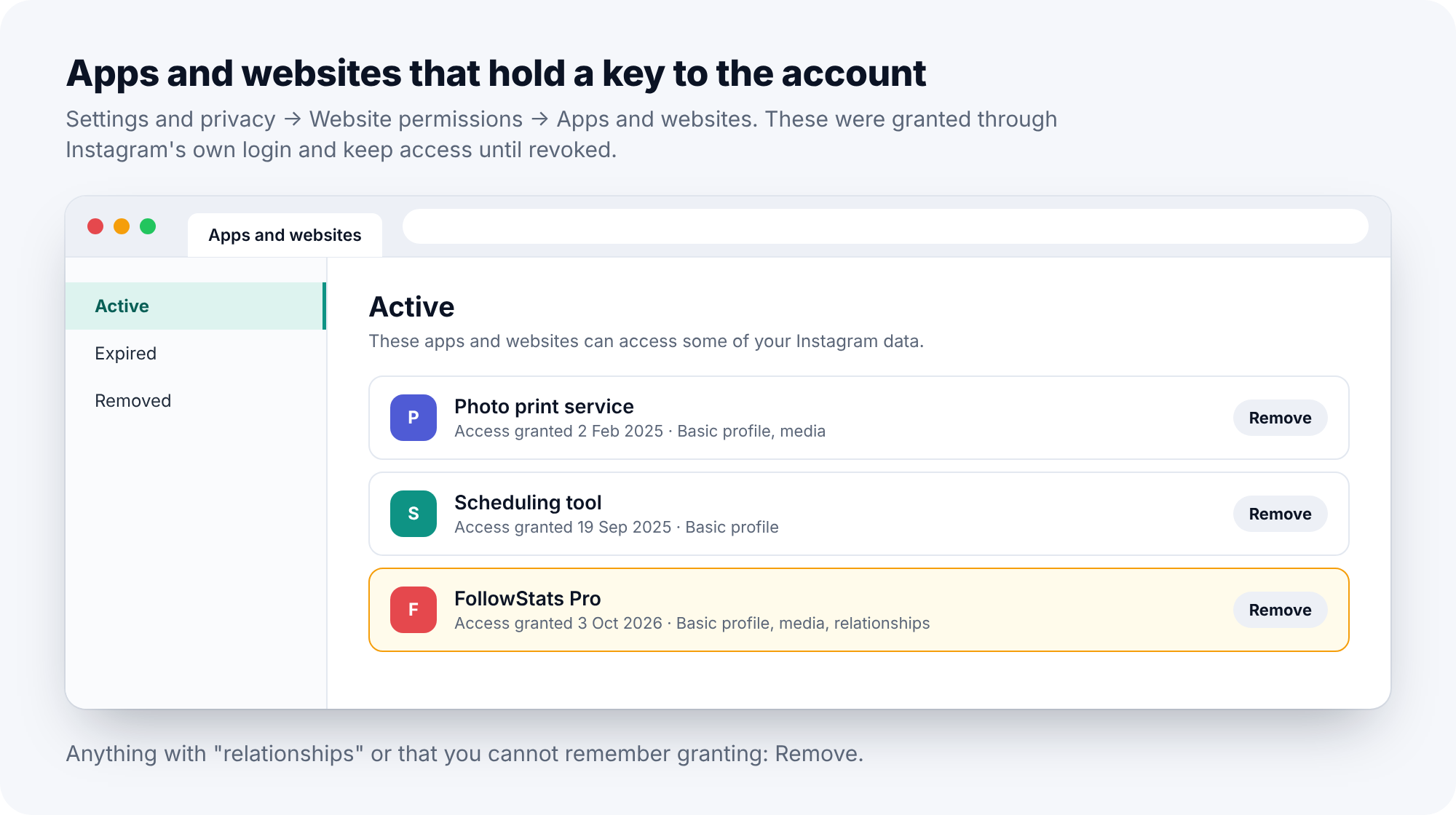
Two places. The first is the “Where you’re logged in” list from route one, because the app’s server usually appears there as a session from a device and location you do not recognise. The second is Settings and privacy, Website permissions, Apps and websites. This lists services you have granted access to through Instagram’s official login, with the date and what they can see. Anything that can see “relationships”, meaning your follower and following lists, and anything you do not remember granting, should go.
Then look at the phone itself. Settings, Apps, and scroll for anything with “Instagram”, “insta”, “followers” or “IG” in the name that is not Instagram. If you find one, open its App info and note the install date before you remove it.
How to remove it
Remove the app’s access on the Apps and websites screen. Uninstall the app from the phone. Log out of every session except your own. Change the Instagram password, and, because these apps often ask for the email account too, change the email password as well. If the account has been following strangers you did not choose, Instagram’s Following list will show the damage, and Settings, Security, Login activity will show when the followings happened and from where.
Route three: an app on the phone reading notifications
Android allows an app to request “notification access”, a permission that lets it read every notification that other apps post. A smartwatch app uses it to show messages on your wrist. A parental control app uses it to tell a parent that a message arrived. Stalkerware uses it to tell someone else. The permission does not care who is asking.
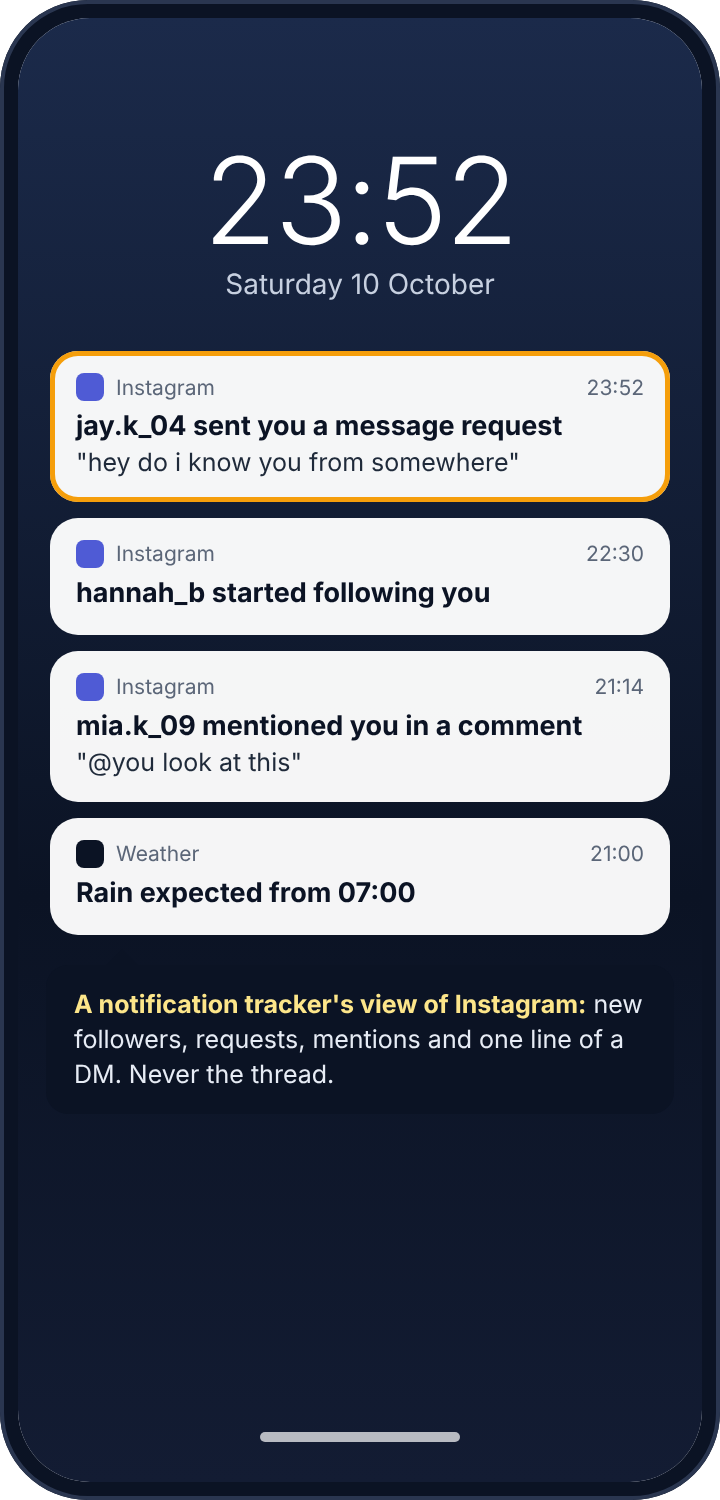
Instagram posts a notification for each DM, with the sender’s handle and a preview of the message. It also posts notifications for new followers, message requests from strangers, mentions in comments, and tags. An app with notification access captures all of those. It cannot open the DM, cannot scroll back through a thread, and cannot see a message that arrived while the chat was already open on screen. But a day of Instagram notifications is a fair summary of who is talking to you, who is new, and who is trying to be.
How to detect it
In the phone’s Settings, search for “notification access”. The resulting screen lists every app that has the permission. Your watch app, your car, perhaps a launcher: fine. Anything you did not knowingly set up, and especially anything with a bland, system-sounding name, is the one to investigate. “Device Health Monitor”, “System Service”, “Sync Manager”, “Android Core”: these are not Android components. Android’s own components do not appear in this list, because they do not have to ask.
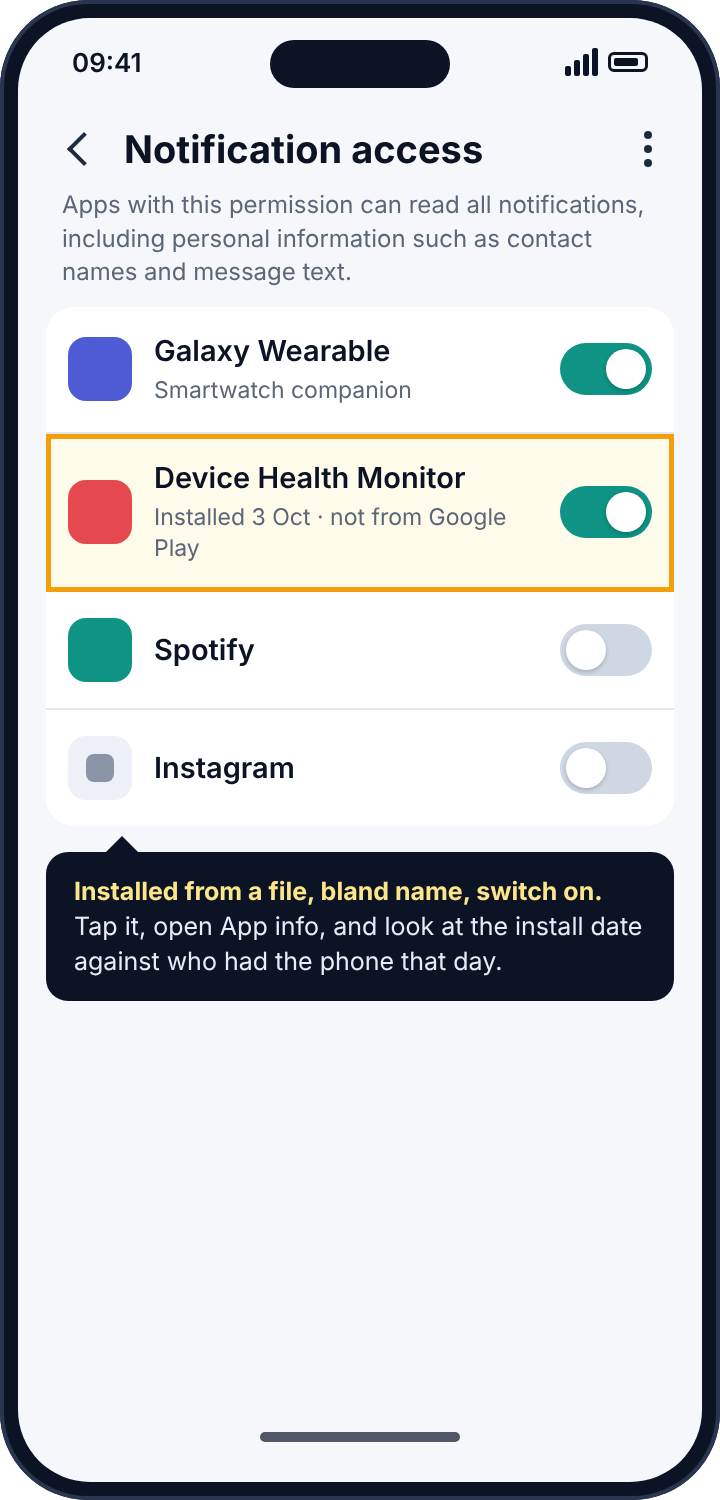
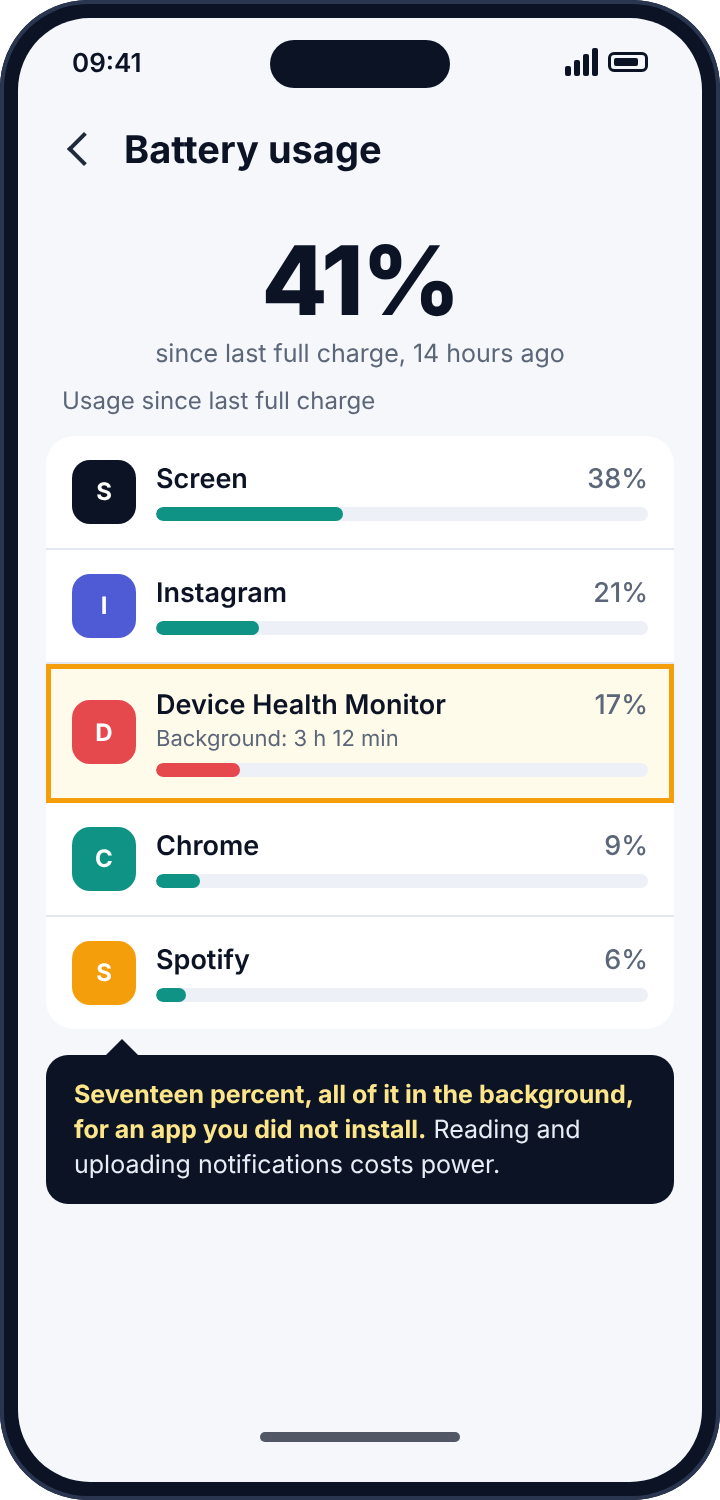
Tap the name and open App info. Look at the install date and think about who had the phone that day. Look for a “View in Play Store” option; if it is missing, the app was installed from a downloaded file, which is how stalkerware arrives because the Play Store will not carry it. A second, softer sign lives in Settings, Battery: an app you do not recognise using a noticeable share of the day’s battery, all of it in the background, is an app doing a job in the background.
How to remove it
Switch its toggle off on the Notification access screen first; some stalkerware uses other permissions to fight uninstallation, and taking away its purpose first is the safer order. Then uninstall it from Settings, Apps. If the uninstall button is disabled, the app has registered as a device administrator: go to Settings, Security, Device admin apps, deactivate it, and try again. Run a Play Protect scan afterwards (Play Store, profile picture, Play Protect, Scan). And in Instagram’s own settings, Settings and privacy, Notifications, Messages, turn message previews off, so that any future app with this permission sees only that a message arrived, not what it said.
Route four: Instagram’s own supervision
Instagram lets a parent supervise a teenager’s account, ages 13 to 17, through Family Center. It is worth knowing exactly what it shows, because teenagers sometimes assume it shows far more than it does, and parents sometimes assume it shows far less.
A supervising parent can see how much time the teen spends on Instagram each day, and can set a daily limit and scheduled breaks. They can see the teen’s follower and following lists, and get a notification when the teen follows someone new or is followed by someone new. They can see which accounts the teen has reported. Since the introduction of Teen Accounts, they can also see the teen’s privacy settings and, for under-16s, approve or decline changes to them. What a supervising parent cannot see is any DM, any post or story in the feed, any search, or any comment. Supervision has to be accepted by the teen, it is visible to the teen at all times under Settings, Supervision, and it ends automatically on the teen’s eighteenth birthday or sooner if either side removes it.
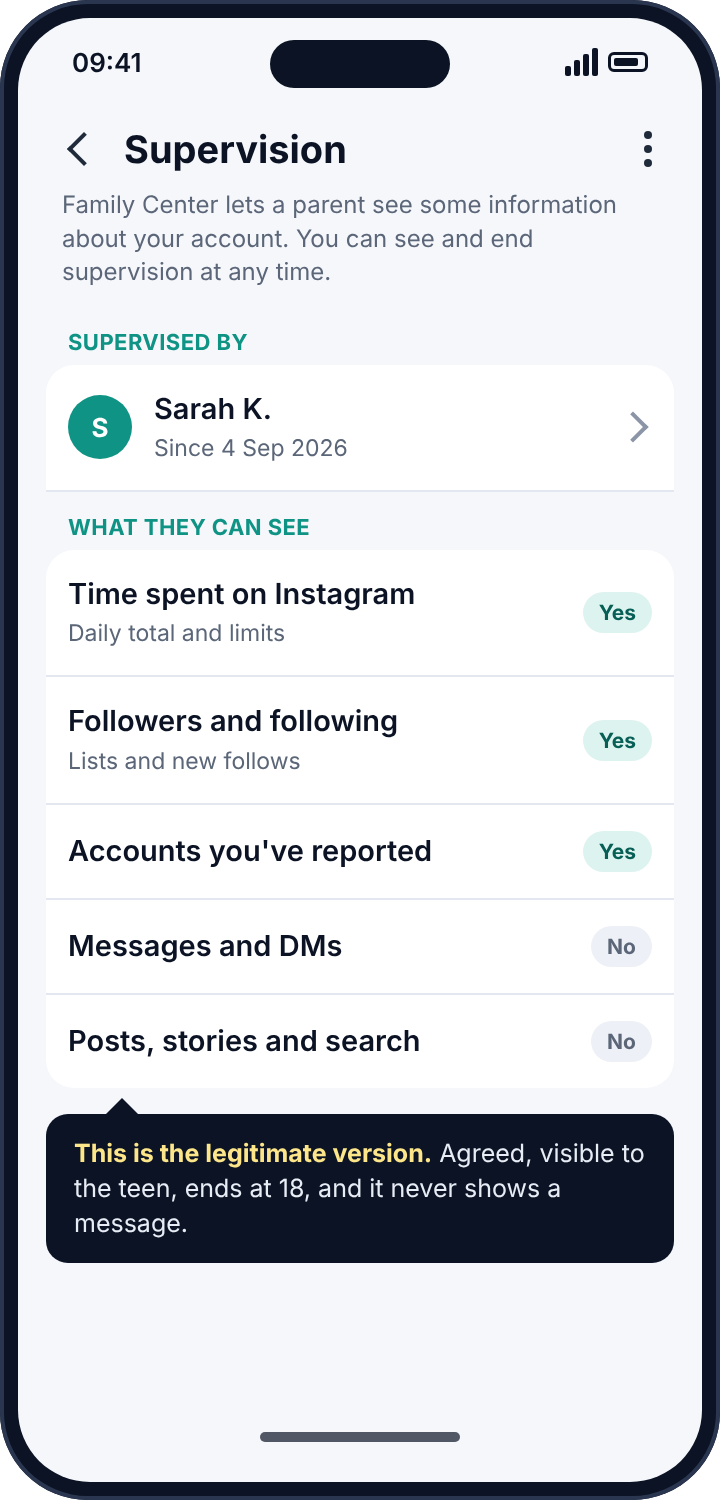
If you are a teenager reading this and want to know whether a parent is supervising your account, that Supervision entry in Settings is the whole answer. If it is there, you accepted it at some point; if it is not, nobody is supervising you through Instagram. If you are a parent, this is the tool to use rather than anything from routes two and three: it is agreed, it is visible, it does not involve handing a child’s password to an unknown company, and it will not get the account locked.
Why third-party Instagram trackers tend to cost you the account
There is a practical argument against these apps that has nothing to do with ethics. Instagram’s terms forbid signing in through unofficial software, and the detection is good. An account that has been accessed by a follower-tracking app typically ends up with a sequence of “we detected an unusual login” interruptions, forced password resets, action blocks that stop you following or commenting for days, and eventually a suspension for automated activity. People who install one of these apps to find out who unfollowed them usually end up, a few weeks later, trying to find out why they cannot post. Of all the reasons not to touch them, the most useful is that they tend to take the account down with them.
Reading the symptoms
If someone knew the content of a DM, think route one or three. A password-holder sees the whole thread; a notification tracker sees the preview line of incoming messages only, never your replies. If someone knew who followed you this week, think route one, two or four, since all three expose follower changes. If Instagram has been logging you out unexpectedly, or asking you to confirm your identity, or showing “suspicious login attempt” screens, something else is signing in as you. If you are following accounts you never chose, or liking posts you have never seen, an app has your login and is using it. If your battery or mobile data shows an app you do not recognise working in the background, look at notification access.
None of these is proof on its own. The login list, the Apps and websites list and the notification-access list are the proof. Between them they take five minutes to read.
Where parental monitoring apps fit in
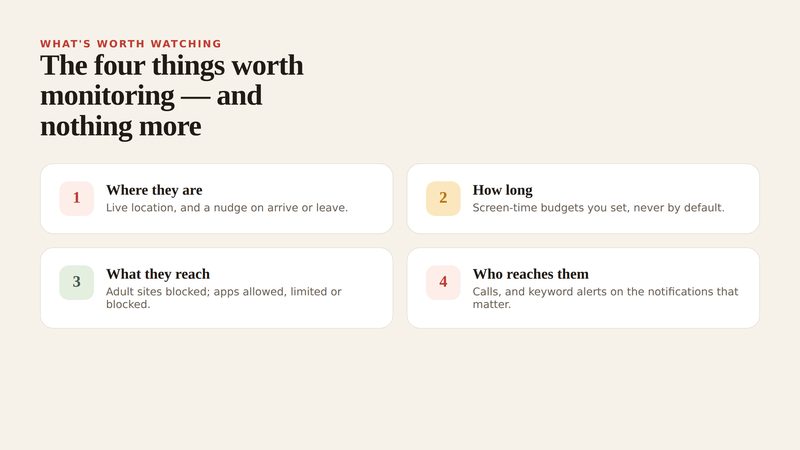
Parents will have recognised route three as the mechanism behind every parental control app that claims to “monitor Instagram”. It is worth being direct about what that gives you. No parental app reads a child’s Instagram DMs; the ones that say so are describing notification previews with ambitious language. What notification-based alerts honestly provide is who messaged, when, how many times, which message requests arrived from strangers, who followed and was followed, and whether an incoming preview matched a word you asked to be told about. For most families that is more useful than a transcript would be, because a transcript needs reading and a pattern only needs noticing.
What separates a monitoring tool from a spy tool is not the permission, which is identical. It is whether the child knows. Our own app works from exactly this permission, and the reason we are comfortable describing it on a page about detecting trackers is that it is visible in the app drawer, lists on the phone what it reads, and shows the child when a parent has looked. The social alerts page shows what a parent actually sees from Instagram’s notifications, and if the honest answer for your family is that Instagram should not be on the phone yet, the app rules page covers approving new installs before they open, which is a simpler conversation than any amount of watching.
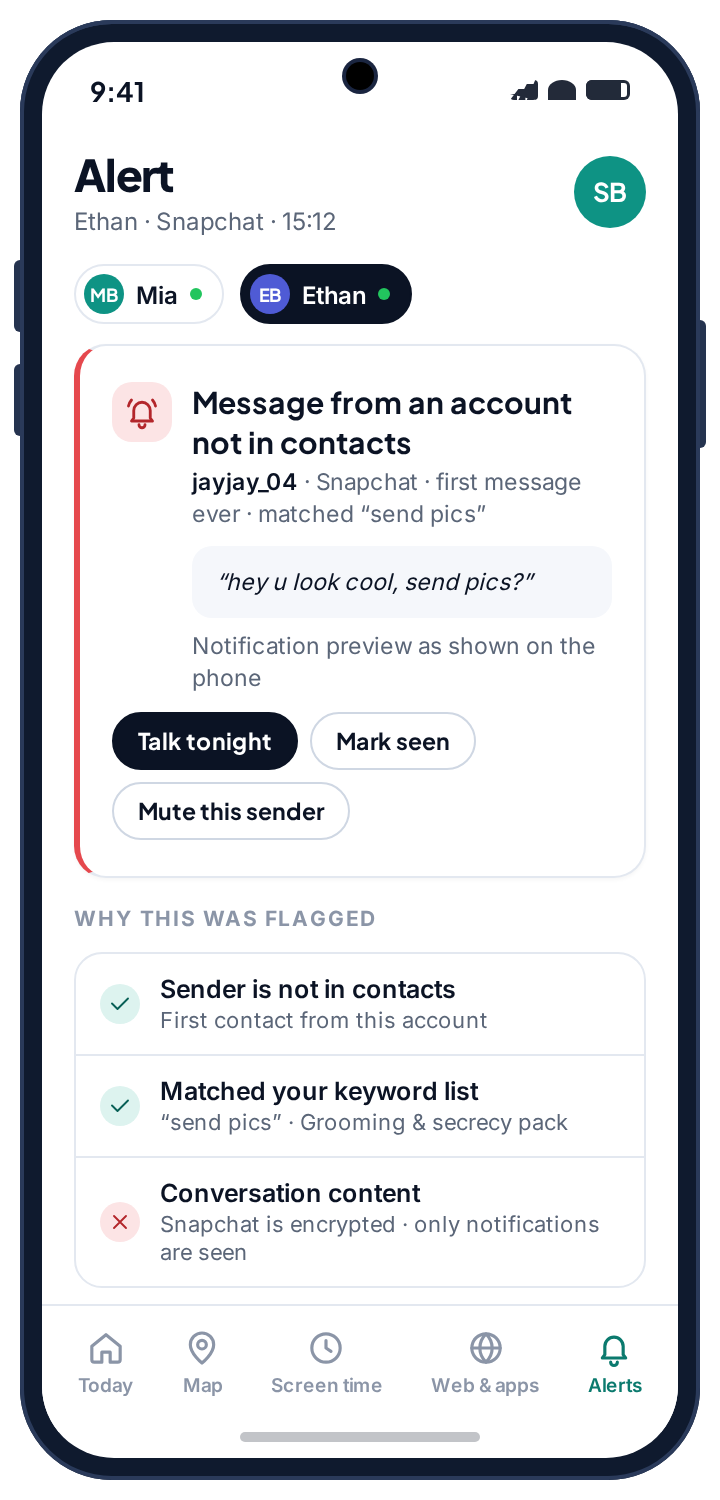
For a child’s account, the settings that do more than any tracker are Instagram’s own: a private account, message requests limited to people they follow, and the Family Center supervision above, agreed over a kitchen table rather than installed in secret. A teenager who has been shown where Block and Report live has the most effective Instagram safety tool there is.
If the person behind it is someone close to you
Logging out a session and changing the password will tell the person watching that you know. For most people that is fine, and even satisfying. If the person is a partner, an ex or a family member and you have any concern about how they will react, change the order. Read the login list and screenshot it. Screenshot the Apps and websites list and the notification-access list. Then talk to a domestic abuse service before you change anything; many have technology-safety specialists who help plan exactly this, and the Coalition Against Stalkerware keeps a list of them by country. When you are ready, do the whole lockdown in one sitting: log out all sessions, new password, two-factor through an authentication app, login alerts on.
Frequently asked questions
Can someone see my Instagram DMs without my password?
Not the threads. An app on your phone with notification access can see the preview line of incoming messages as they arrive, and nothing else. Reading full conversations needs a signed-in session, which needs the password.
Does Instagram tell me when someone logs in?
Only if login alerts are on. They are off by default. Turn them on and an unrecognised device triggers an email and an in-app notice before it has read anything.
Can an app really show who viewed my profile?
No. Instagram does not record profile views for personal accounts and exposes viewer identities to nobody. Every app that claims to is lying, and most of them keep the password you type to find out.
Can a parent see my messages through Family Center?
No. Supervision shows time spent, follower and following lists, reported accounts and privacy settings. It does not show DMs, posts, stories, searches or comments, and it tells you it is active.
Will changing my password log everyone out?
Instagram offers to log out other devices when you change the password; accept it. To be sure, go to “Where you’re logged in” afterwards and confirm that only your own device remains.
I removed the app but my account is still acting strangely. Why?
Because the credentials were already copied. Removing the app stops new access from the phone; only a new password, with other sessions logged out, stops access from the app’s servers.
The fifteen-minute version
Open Accounts Center and log out of every session that is not you. Set a new password used nowhere else, turn on two-factor with an authentication app, and turn on login alerts. Remove every connected app you do not actively use. Uninstall any “followers”, “who viewed” or “stats” app for Instagram. Search the phone’s settings for notification access and remove anything you cannot account for. Check Settings, Supervision so that you know whether Family Center is active and with whom. Instagram tracking is almost never a clever piece of software. It is a password that leaked, kept alive by a login list that nobody opens. Open the list.
Related guides
Android Keylogger Detection: The Two Settings Lists Where One Has to Hide, and How to Remove It
Android keylogger guide: a phone keylogger is an accessibility service or a keyboard. Where each hides, the symptoms, removal steps,…
Call Tracker Detection: Call Logs, Call Forwarding and Call Recording, and How to Stop Each One
Call tracker guide: how call logs, call forwarding and call recording work on Android, the screens and dial codes that…
Who Can See Your Phone Contacts? Shared Accounts, Sync and the Apps That Upload Your Address Book
Who can see your phone contacts: shared Google accounts, forgotten sync, and apps that upload your address book. Where to…
Parental controls your child can see
Location, screen time limits, a web filter and alerts from notifications — free, and visible on your child's phone. Pair a phone in about ten minutes.
Android · Free to set up · Visible on your child's phone