Snapchat Tracker Detection: Snap Map, Unofficial Apps and Notification Readers, and How to Stop Them
 By TheTruthSpy Editor · Founder and editorPublished October 5, 2026Updated October 12, 202614 min read
Snapchat is built around messages that disappear, so people assume a “Snapchat tracker” must be a clever tool for catching snaps before they vanish. Those tools do not exist in any working form. Snaps are encrypted between devices and deleted from Snapchat’s servers once they are opened, and an app on a phone cannot reach inside Snapchat to copy them. What actually gets tracked on Snapchat, far more often than anybody realises, is location, and the tracker is a feature of Snapchat itself that most people switched on years ago and forgot.
So this guide starts with Snap Map, because it is the real story. Then it covers the three other routes: unofficial apps that sign in as you (and get the account locked), apps on the phone that read notifications, and Snapchat’s own Family Center, which is the legitimate version of what the unofficial apps pretend to offer. For each, you will see how to detect it and how to turn it off. Most of what follows takes two minutes per step.
Snap Map: the tracker you turned on yourself
Snap Map shows your Bitmoji on a live map to the friends you choose, updated every time you open Snapchat. Open the app at a friend’s house, and the map shows the house. Open it on the bus home, and it shows the bus. Snapchat asked you about this when the feature launched in 2017 and again whenever you reinstalled, and a great many people tapped through the prompt once and never thought about it again. Meanwhile every friend on the list, which for a long-time user runs to hundreds, can open the map and see where your phone was last used, with a timestamp.
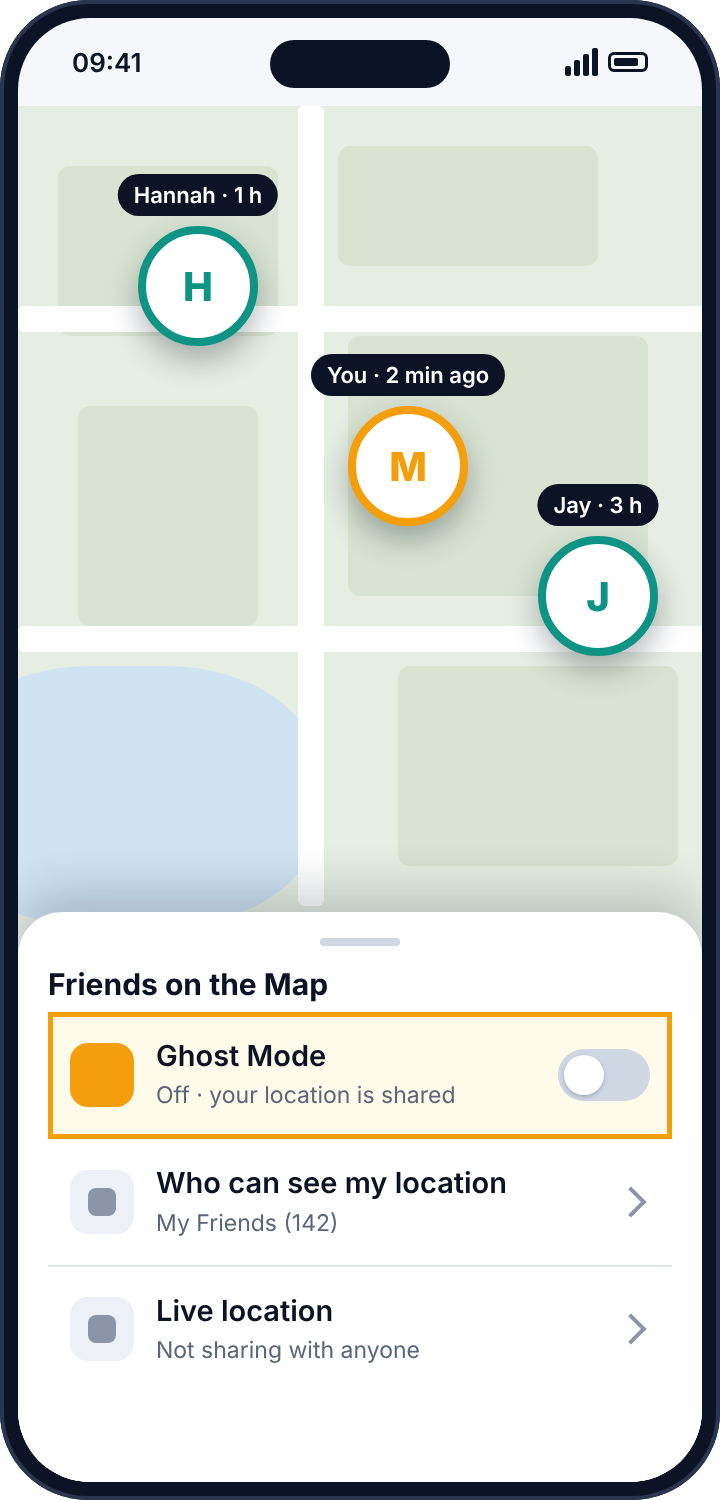
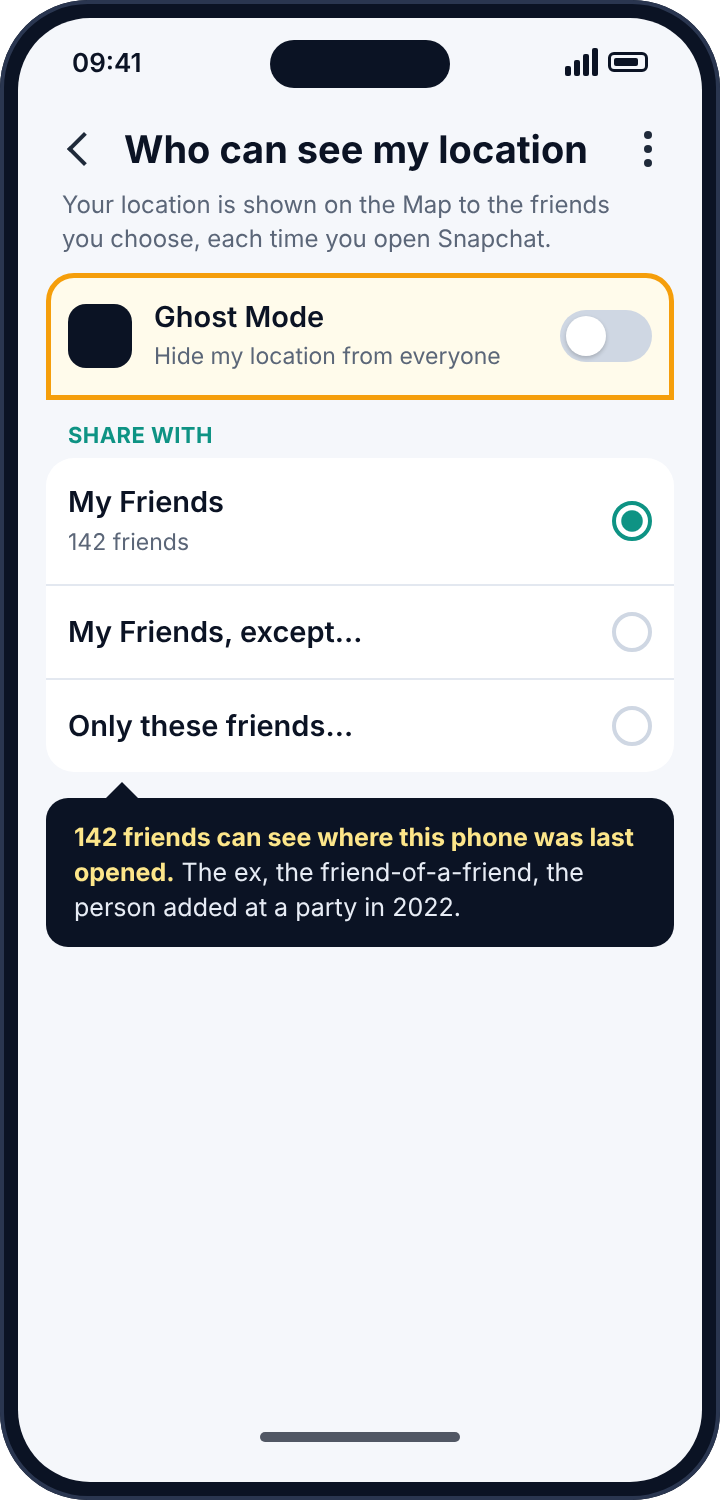
Two details make it worse than it sounds. The timestamp means the map reveals patterns, not just positions: “2 minutes ago” at a location at 23:40 says where you are and that you are awake. And the sharing setting is per-account rather than per-person by default. Unless you went into the settings and chose “Only these friends” and named them, your location is going to everyone you have ever added, including the ex, the friend of a friend, and the person who added you at a party in 2022 whom you could not now pick out of a line-up.
This is how most “Snapchat location tracking” happens. Nobody installed anything. Nobody guessed a password. They opened the map.
How to detect it
Open Snapchat and tap the map icon at the bottom, or swipe right from the camera. Tap the settings gear in the top corner. If Ghost Mode is off, your location is being shared, and the entry beneath it, “Who can see my location”, tells you with whom. “My Friends” means everyone. “My Friends, except…” means everyone minus a list you made once and have probably not updated. Look at the friends list itself with fresh eyes, because the map setting is only as safe as the list it points at.
How to remove it
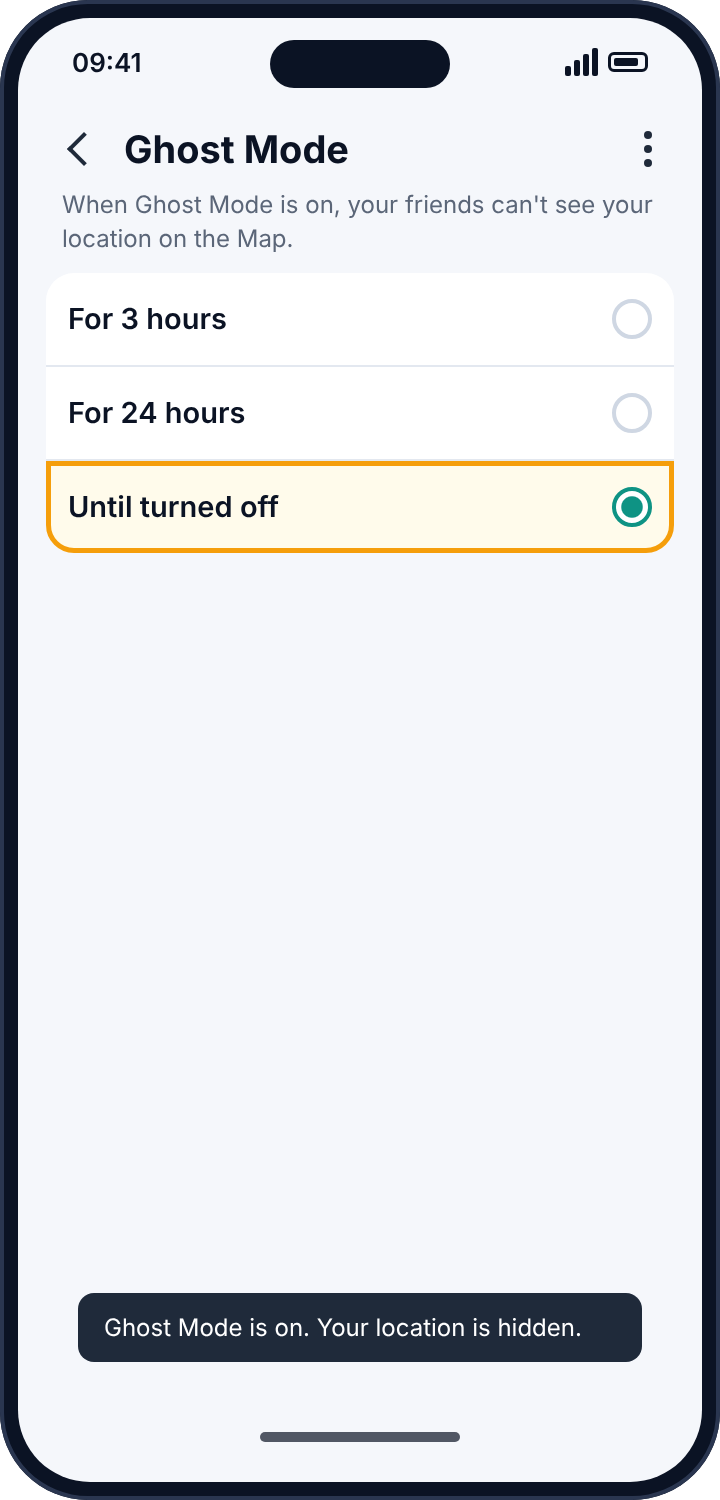
Turn Ghost Mode on and choose “Until turned off” rather than one of the timers, which quietly expire. If you do want some friends to see you, use “Only these friends” and pick them by name today; “My Friends, except” is the setting most likely to leave on the list someone you forgot. Then, separately, go to your profile, My Friends, and remove anyone you would not want standing behind you in a queue. A friends list that was curated in 2019 is a location-sharing list in 2026.
Unofficial Snapchat apps, and why they lock accounts
There is a long history of apps that promise to do things Snapchat will not: save snaps without the sender knowing, show who has viewed your story more than once, reveal who screenshots you, or “track” another user’s activity. They have different names every year and the same design every time. The app asks for your Snapchat username and password, signs in to Snapchat’s servers from its own computers while pretending to be the official app, and then does roughly what it promised, or nothing at all. In every case, it now has your password.
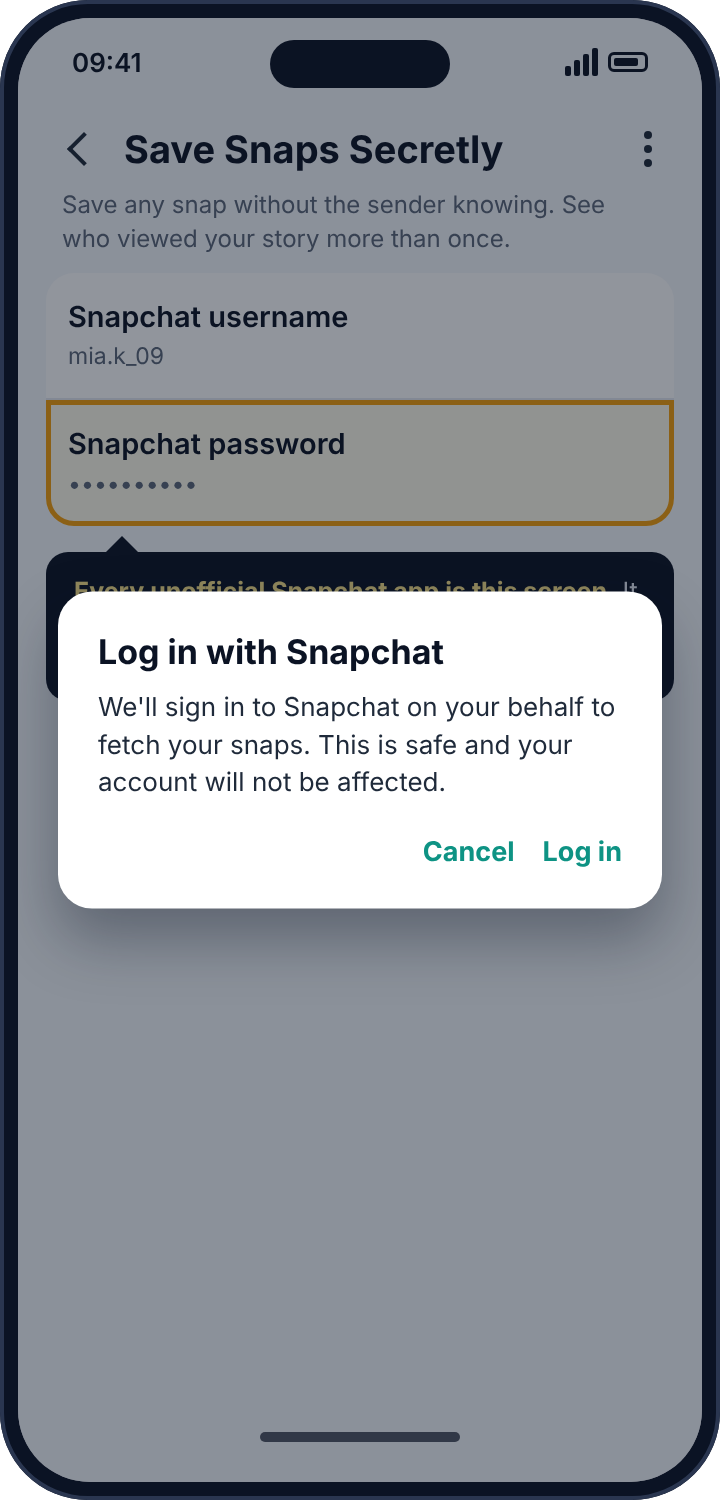
Snapchat’s response is quick and blunt. Its systems recognise logins that do not come from the real app, and the account is locked. The owner sees “Your account has been temporarily locked” and a note about third-party apps. The first lock can be lifted by uninstalling the app and signing in through the official one; repeated locks become permanent. There is a second cost that people discover later. Several of these services have, over the years, leaked their users’ saved snaps in bulk, because a company whose business is collecting other people’s passwords does not run careful servers.
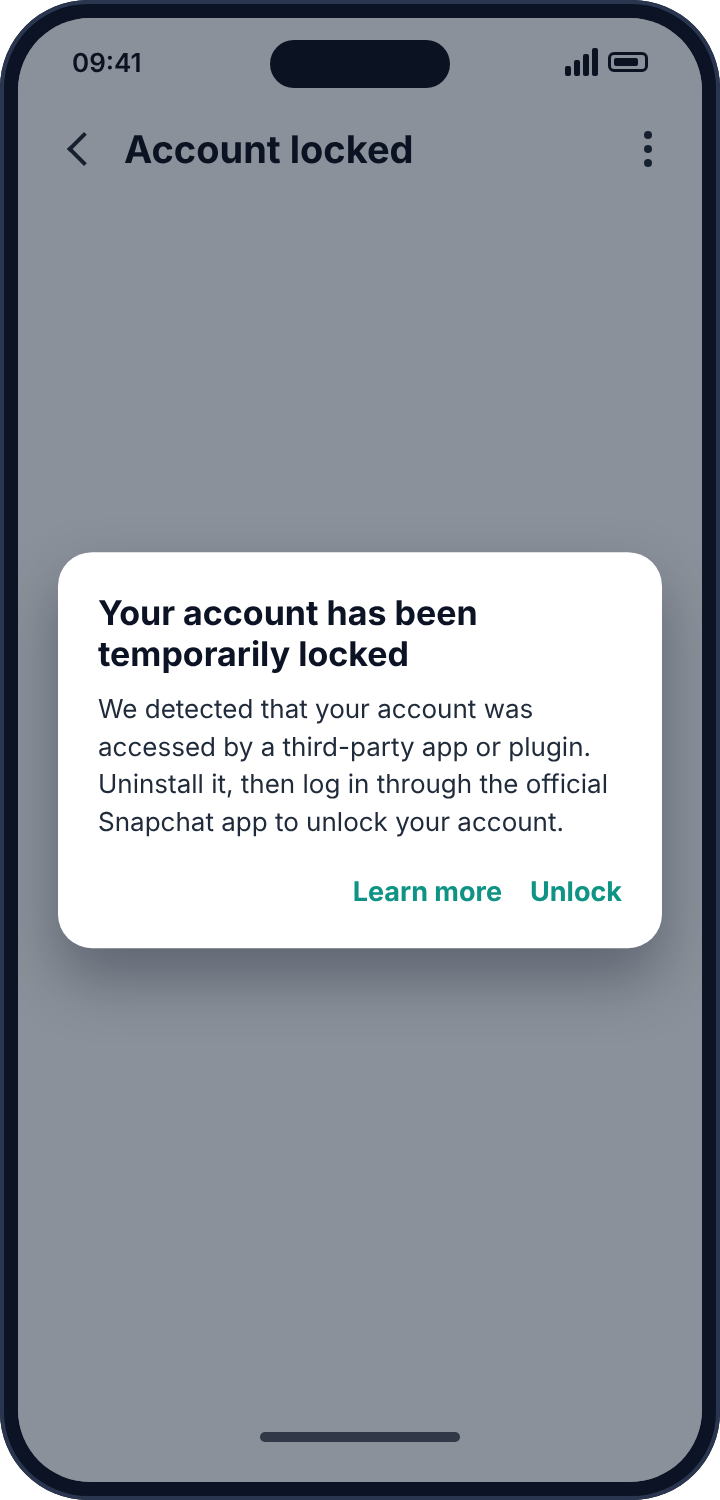
The version aimed at watching someone else works the same way with one twist. The person who wants to watch installs the app on the target’s phone and asks them, casually, to sign in “so you can see your stats”. The password goes to the app’s server, and from then on the watcher can sign in as the target from anywhere, read chats as they arrive, and see the friends list and the map.
How to detect it
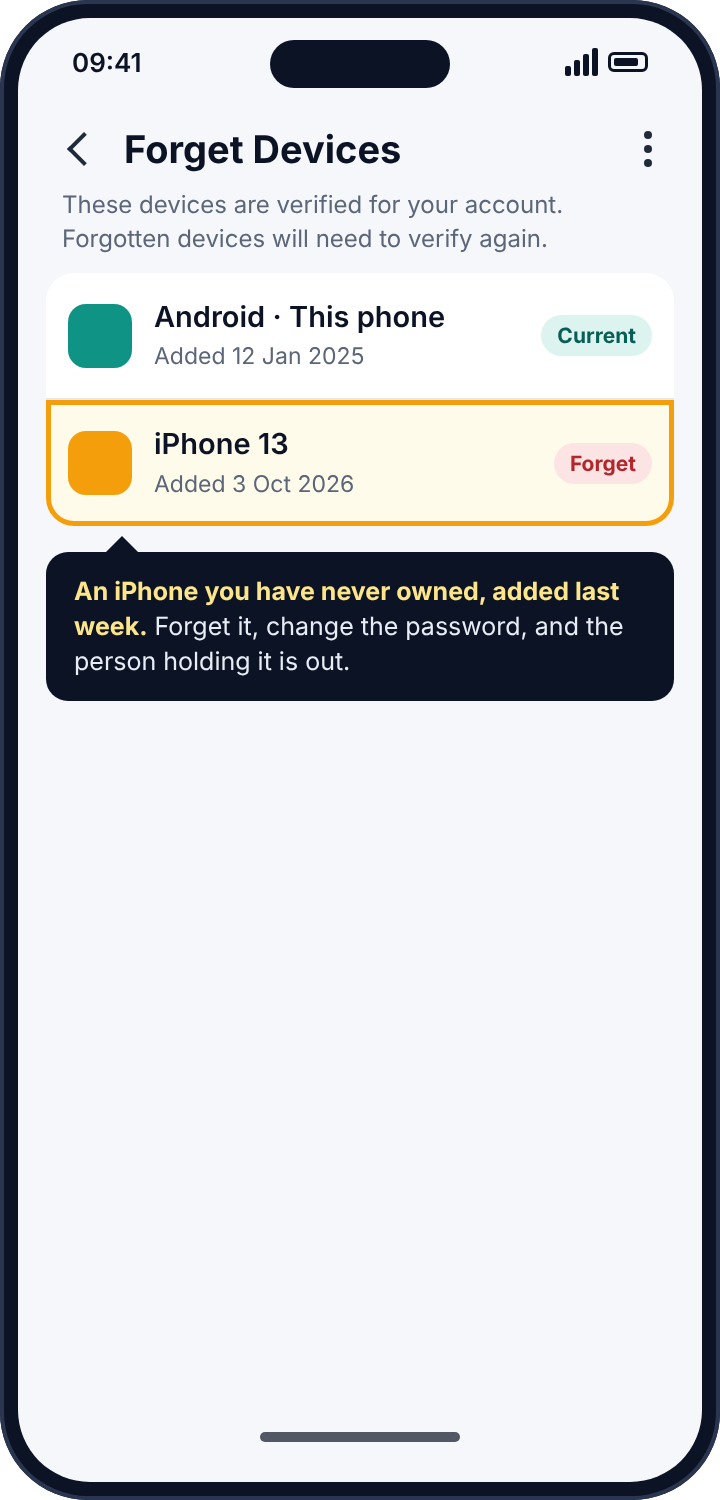
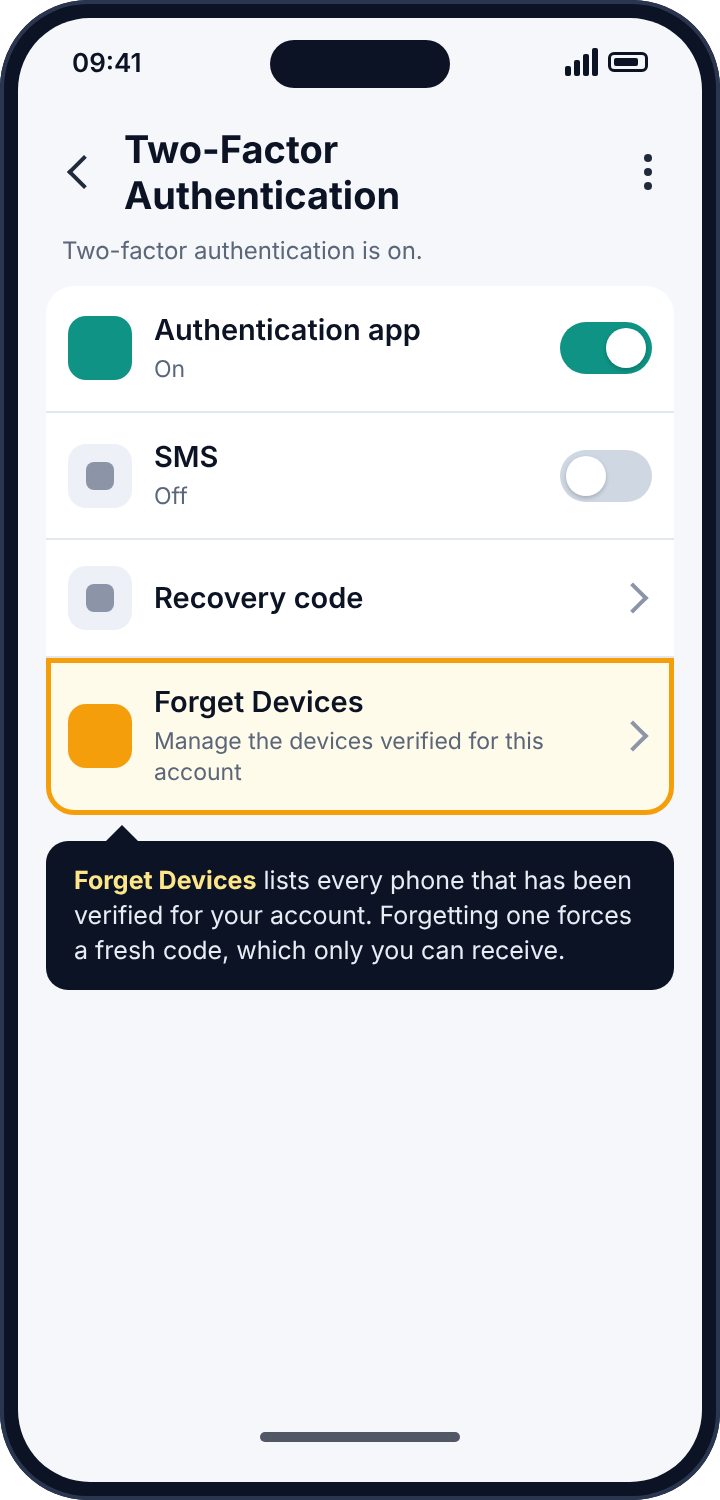
Snapchat does not show a “where you’re logged in” list the way Instagram does, but it has something close. Open Snapchat, go to Settings, then Two-Factor Authentication, then Forget Devices. Snapchat lists the devices that have been verified for your account, with the date each was added. A device you have never owned, added recently, is the finding. Also check Settings, Connected Apps, which lists third-party services you have authorised through Snapchat’s official login; revoke any you do not use. Then look through the phone’s app list for anything with “snap” in the name that is not Snapchat.
How to remove it
Uninstall the unofficial app. Change your Snapchat password to something used nowhere else. Turn on two-factor authentication with an authentication app rather than SMS, because an SMS code can be read by anyone in the household who can see your texts. Forget every device you do not recognise; a forgotten device has to verify again with a code only you receive. Expect Snapchat to lock the account briefly; follow its unlock steps once, and it will not recur if the app is gone.
Apps on the phone that read notifications
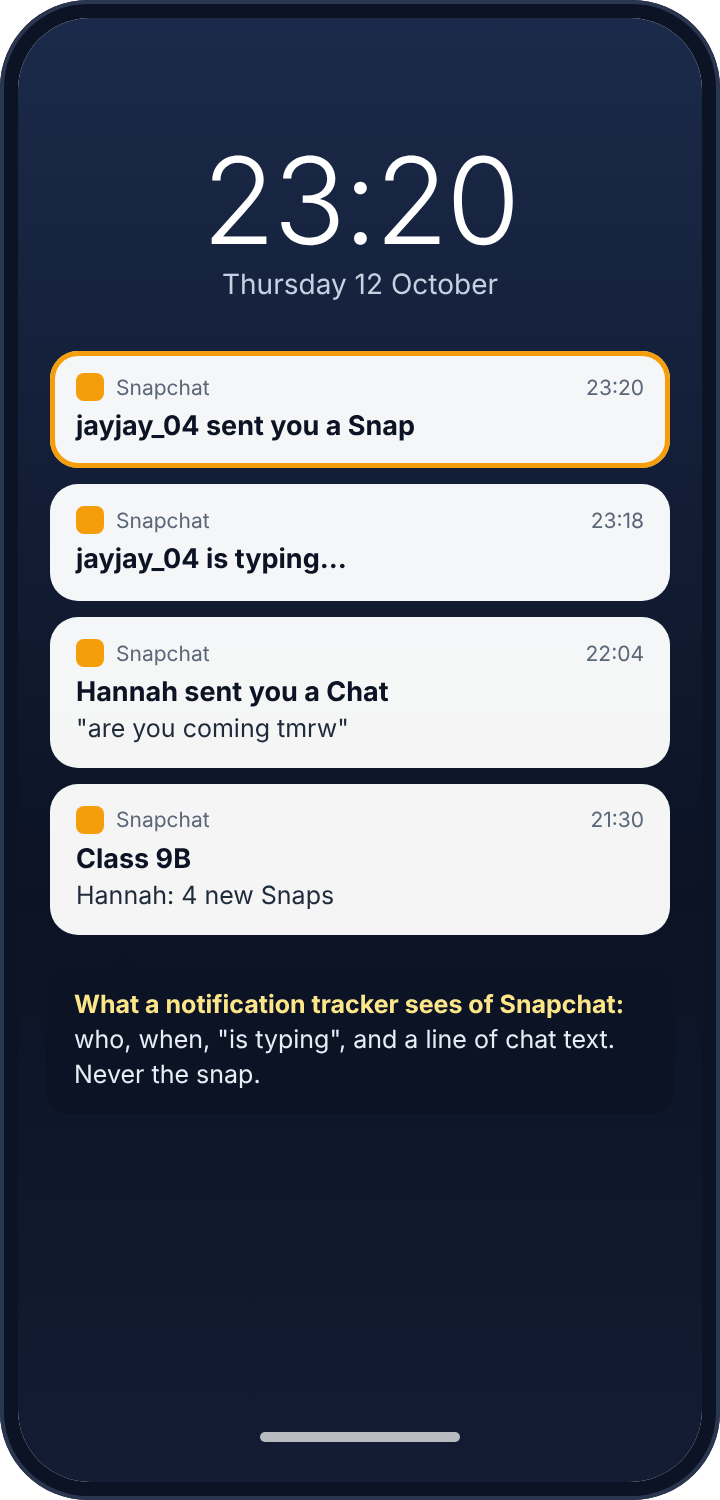
Snapchat is encrypted and its content disappears, but it posts ordinary Android notifications like any other app: “jayjay_04 sent you a Snap”, “Hannah is typing…”, and, if previews are on, the first line of a chat message. Android lets an app request “notification access”, which lets it read every notification the phone shows. A smartwatch app uses that to put messages on your wrist. A parental control app uses it to tell a parent who is messaging. Stalkerware uses it to tell someone else. This is how every “Snapchat monitoring” product works, and the limit is the same for all of them: the app sees who contacted you and when, and sometimes a line of text. It never sees the snap, which is a picture inside Snapchat that no notification carries.
How to detect it
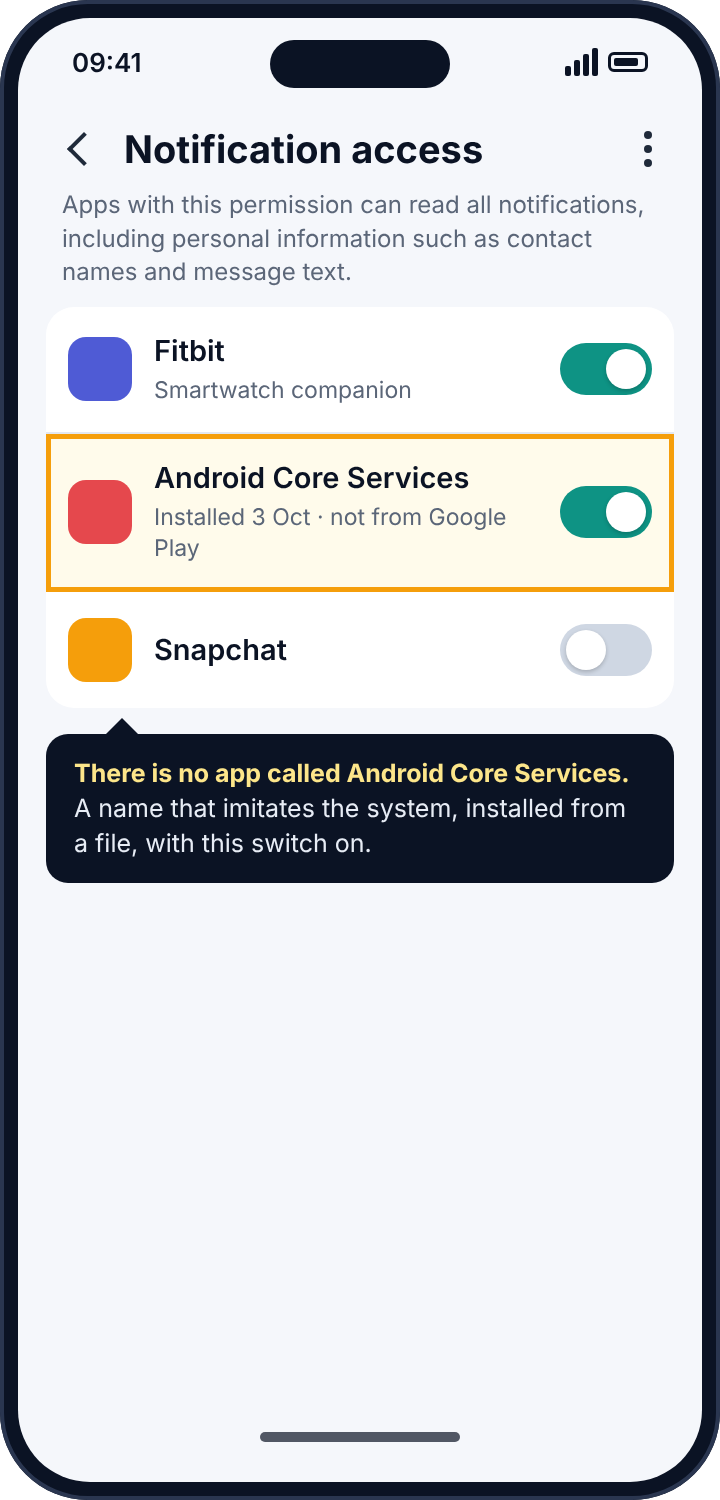
In the phone’s Settings, search for “notification access”. The screen lists every app that has it. A watch, a car, perhaps a launcher. Anything you cannot name the purpose of is the one to examine, and the examination is quick: tap it, open App info, and look at two things. The install date, which you can compare against who had the phone that day. And whether there is a “View in Play Store” option, because stalkerware is installed from downloaded files and has no Play Store page. Names that imitate Android, like “Android Core Services” or “System Manager”, are a sign in themselves; the real system does not appear in this list.
How to remove it
Switch the toggle off, then uninstall it. If the uninstall button is disabled, the app has registered as a device administrator: deactivate it under Settings, Security, Device admin apps, then uninstall. Run Play Protect afterwards (Play Store, profile picture, Play Protect, Scan). And in Snapchat’s Settings, Notifications, you can turn off message previews, so that a future app with this permission sees only that something arrived.
Family Center: what a parent can and cannot see
Snapchat’s Family Center is its supervision tool for parents of 13 to 17 year olds. It is worth being precise about it, because it is the honest answer to most of what the unofficial apps promise, and because teenagers often assume it does more than it does.
The teen has to accept the invitation; nothing can be imposed. Supervision is visible to the teen at any time in Settings, Family Center, and it ends at 18 or sooner if either side removes it. A supervising parent can see the teen’s friends list and, for the past seven days, which friends and groups the teen has sent messages to. Since 2023 they can also see the teen’s privacy and safety settings and can restrict sensitive content in Stories and Spotlight. What a supervising parent cannot see is the content of any message, any snap, or any story, and they cannot see the teen’s location unless the teen shares it with them on Snap Map as they would with any friend.
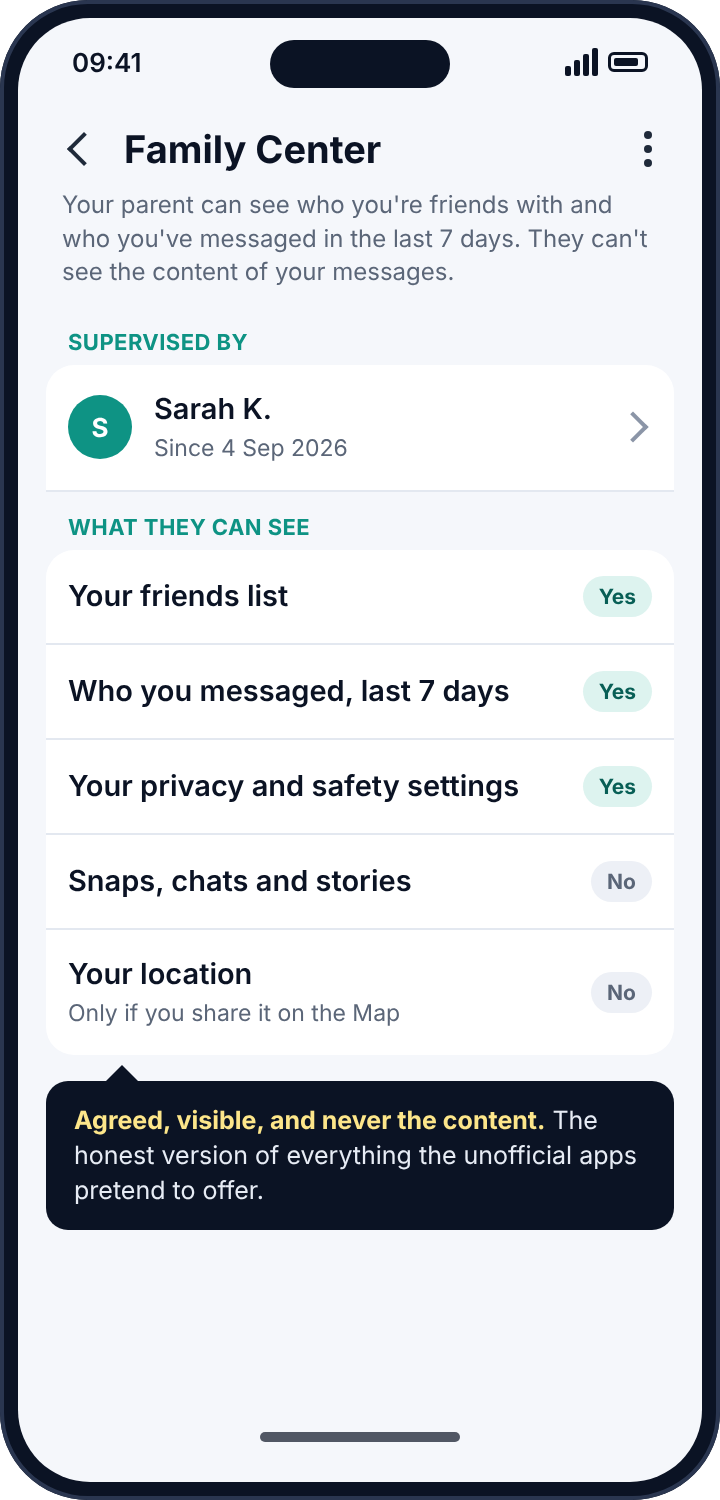
If you are a teenager and want to know whether your parent is supervising your account, that screen is the whole answer. If you are a parent, this is the tool to use rather than anything from the previous two sections. It is agreed, it is visible, it does not involve handing a child’s password to an unknown company, and it does not get the account locked.
The smaller leaks: Quick Add, Snap Score and story viewers
Snap Map is the big one, but Snapchat has several smaller features that tell people things, and they are worth a minute each because they are the ones a teenager is least likely to have considered. Quick Add suggests your account to people who share friends with you, and suggests theirs to you; with it on, a stranger two steps away from a child’s friend group sees the child’s name and picture as a suggestion. Settings, Privacy Controls, See Me in Quick Add, off, removes the child from that stream. Snap Score is a running count of snaps sent and received, visible to friends, and it moves in near real time; someone watching a score climb knows a person is active even in Ghost Mode. There is no setting to hide it from friends, which is one more reason to prune the friends list. Story viewers are listed to the poster, which is fine, but a story set to “Everyone” rather than “Friends” is visible to anyone with the username, and the viewer list then includes strangers. Settings, Privacy Controls, View My Story, Friends Only.
None of these is a tracker in the sense this guide uses the word. They are the ordinary social features of the app, and each of them leaks a little. For an adult, they are a matter of preference. For a child, they are the difference between a profile that is findable by strangers and one that is not, and they take less than two minutes to set.
What Snapchat sends to the email on the account
Like Instagram, Snapchat is quieter than it should be about logins, but it is not silent. When a new device verifies against an account, Snapchat emails the address on file, and when the password or the email itself is changed, it emails again. Those emails are the account’s alarm, and many people have them in an inbox they do not check. Make sure the email on the account is one you read, and that its own password is not shared with Snapchat’s; a reset for one should never open the other.
Reading the symptoms
If someone has turned up where you are, or has mentioned where you were, think Snap Map first; it is the only route that gives away location, and it does so to everyone on the list. If someone knew who you were snapping, think notification reader or a signed-in device. If you have been logged out unexpectedly, or Snapchat has asked you to verify your identity, or you have seen the temporary-lock screen, something that is not the official app has been signing in as you. If your battery or data usage shows an app you do not recognise working in the background, look at notification access. And if a “Snapchat tracker” app is on your phone that you did not install, somebody with access to the phone put it there, which tells you most of what you need to know.
Where parental monitoring apps fit in
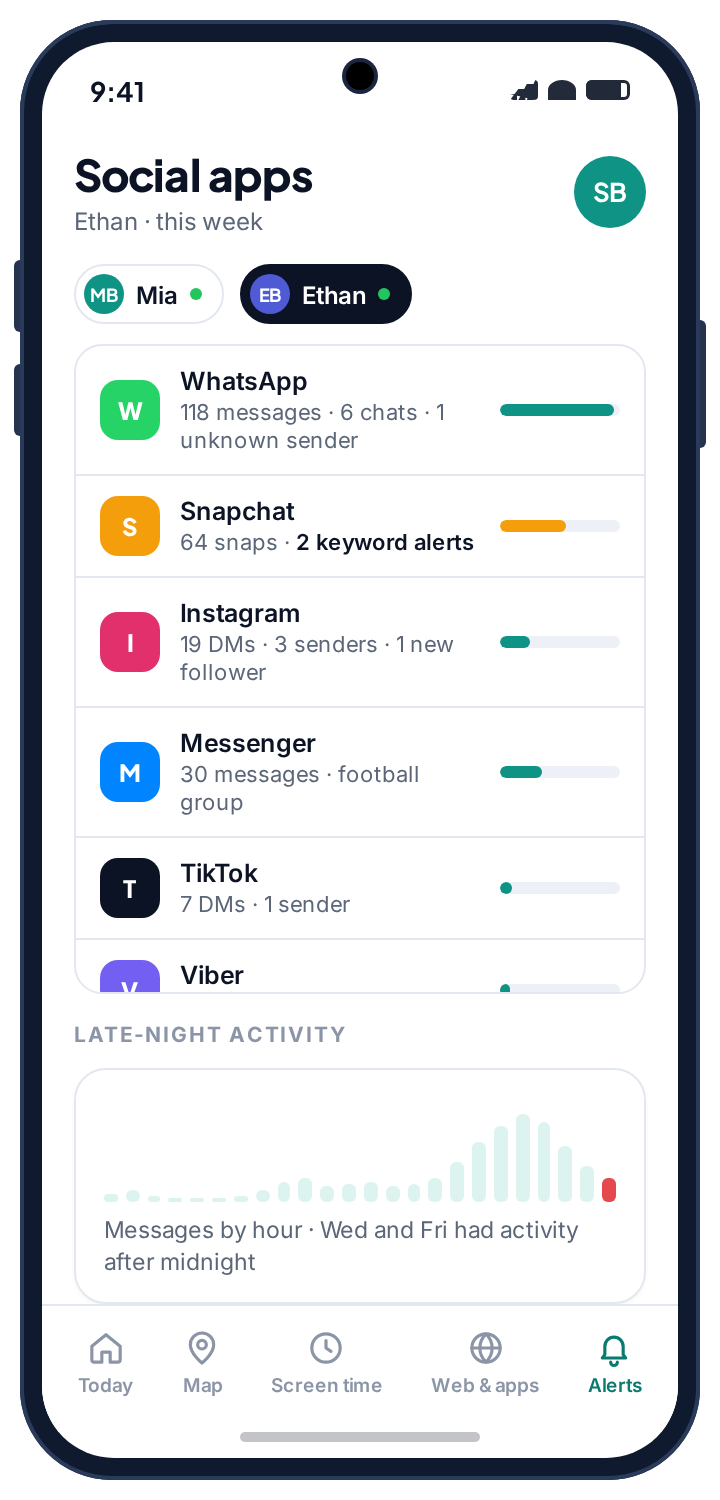
Parents will have recognised the notification route as the mechanism behind every parental control app that claims to monitor Snapchat. It is worth being direct. No parental app sees snaps. Snaps are pictures inside an encrypted app, and no notification carries them. What notification-based alerts honestly provide is who is snapping your child, how often, how late, whether a username is new, and whether an incoming chat line matched a word you asked about. For most families that is the useful part: a new name at midnight is a conversation worth having, and no amount of content would make it clearer.
What separates a monitoring tool from a spy tool is not the permission, which is identical. It is whether the child knows. Our own alerts work from the same permission, and the reason we can describe them on a page about detecting trackers is that they sit in the app drawer under their own name, list what they read on the child’s phone, and show the child when a parent has looked. The social alerts page shows what a parent actually sees from Snapchat’s notifications, and if the honest answer for your family is that Snapchat is a year too early, the app rules page describes approving a new app before it opens, which is a simpler conversation than any amount of monitoring after.
For a child’s account, the settings that matter more than any tracker are Snapchat’s own: Ghost Mode on, “Contact me” set to Friends, “See me in Quick Add” off, and Family Center agreed over a kitchen table. A teenager who knows where Block and Report live inside a chat has the most useful safety tool Snapchat offers.
If the person watching is someone close to you
Turning Ghost Mode on, forgetting a device and changing the password will tell the person who was watching that you know. If that person is a partner, an ex or a family member and you have any concern about how they will react, keep the record before you change anything: screenshot the map’s friends list, the Forget Devices list and the notification-access list. Then talk to a domestic abuse service; many have technology-safety specialists who help plan this, and the Coalition Against Stalkerware keeps a list of such services by country. The map has been on for years. Another day, with a plan, is safer than tonight without one.
Frequently asked questions
Can someone see my snaps with a tracker app?
No. Snaps are encrypted between devices and deleted from Snapchat’s servers once opened. An app with notification access sees “sent you a Snap” and nothing else. The only way to see a snap is to open it inside Snapchat on a signed-in device, which means someone has your password.
Does Snapchat tell me when someone else logs in?
Snapchat emails the address on the account when a login from a new device is verified, and the Forget Devices list shows every verified device. Two-factor authentication makes a new login impossible without a code only you receive.
Can someone track my location through Snapchat if I am in Ghost Mode?
No. Ghost Mode stops your location being shown on the map to anyone. Sharing live location in a chat is a separate, explicit action with a timer, and it is shown while it runs.
Can my parents see my messages in Family Center?
No. Family Center shows your friends list, who you have messaged in the last seven days, and your privacy settings. It does not show snaps, chats, stories or your location, and it shows you that it is active.
My account was locked for a third-party app I never installed. What happened?
Someone with your password signed in through one. Change the password, turn on two-factor, forget every device you do not recognise, and the lock will not recur.
Is it worth deleting old friends?
If Ghost Mode is on, the friends list no longer affects your location. It still affects who can message you and see your story, so an occasional prune is worth it; “My Friends” is only as safe as the people in it.
The five-minute version
Open the map and turn Ghost Mode on until turned off, or choose “Only these friends” and name them today. Prune the friends list. Forget every device you do not recognise, turn on two-factor through an authentication app, and change the password. Remove any unofficial Snapchat app. Search the phone’s settings for notification access and remove anything you cannot account for. Check Family Center so that you know whether supervision is active and with whom. Most “Snapchat tracking” is a map setting from 2018 and a password somebody else knows, and both are fixed before the kettle boils.
Related guides
Android Keylogger Detection: The Two Settings Lists Where One Has to Hide, and How to Remove It
Android keylogger guide: a phone keylogger is an accessibility service or a keyboard. Where each hides, the symptoms, removal steps,…
Call Tracker Detection: Call Logs, Call Forwarding and Call Recording, and How to Stop Each One
Call tracker guide: how call logs, call forwarding and call recording work on Android, the screens and dial codes that…
Who Can See Your Phone Contacts? Shared Accounts, Sync and the Apps That Upload Your Address Book
Who can see your phone contacts: shared Google accounts, forgotten sync, and apps that upload your address book. Where to…
Parental controls your child can see
Location, screen time limits, a web filter and alerts from notifications — free, and visible on your child's phone. Pair a phone in about ten minutes.
Android · Free to set up · Visible on your child's phone