GPS Location Tracker
Free GPS location tracking for Android families: a live family locator map, a location history trail you can scroll back through, and geofence alerts the moment a child arrives at school or leaves home. This page explains how accurate each of those really is, which single Android setting decides whether any of it works, and how to read the map so that a pin that jumps two streets does not ruin your evening.
Free · Permission: Location, “Allow all the time” · Visible on your child's phone
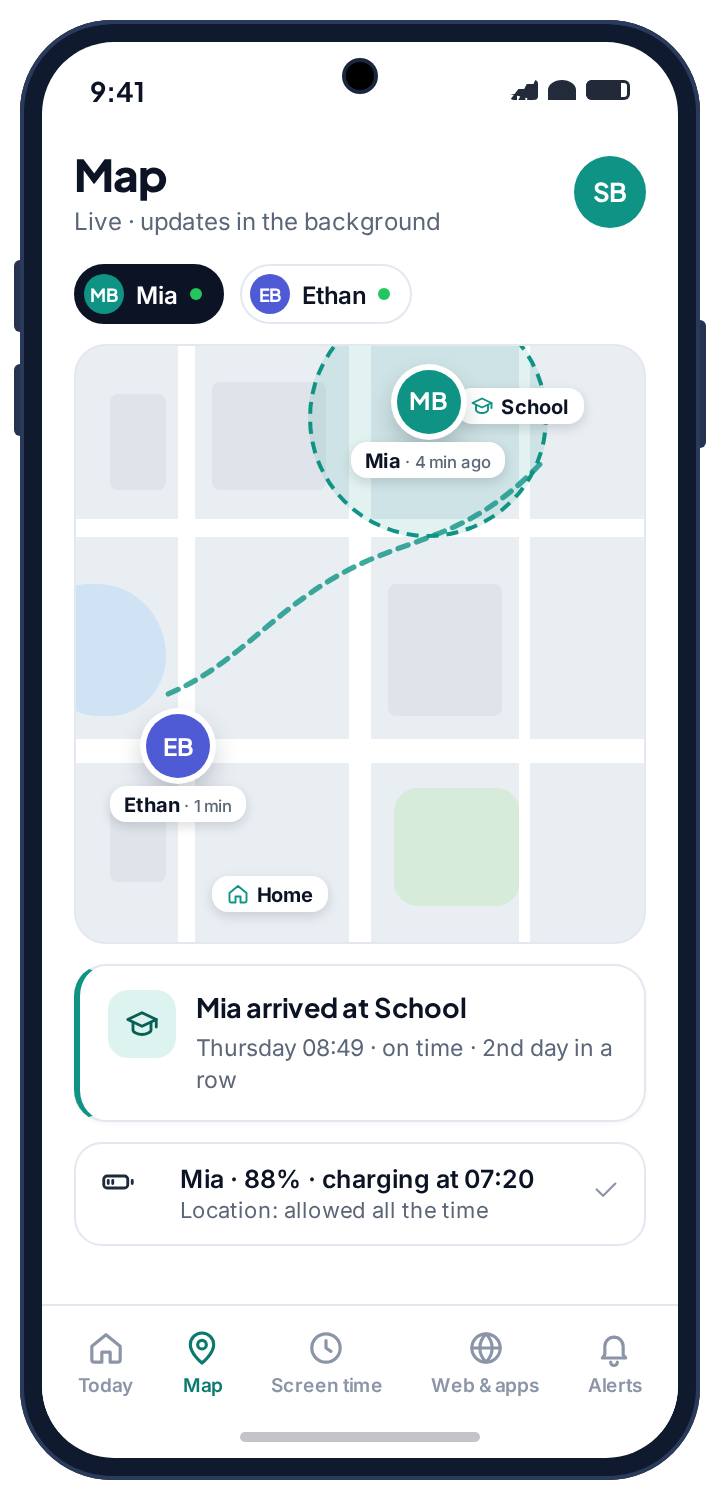
- Outdoors, expect a few metres. Indoors, expect tens of metres, because the phone stops using satellites and starts guessing from Wi-Fi.
- The trail matters more than the pin. One dot can be wrong. A line of dots almost never is.
- One Android setting decides everything. Location must be “Allow all the time”. “While using the app” looks granted and collects nothing.
- Geofence alerts replace checking. “Arrived at school, 08:49” is the message most parents actually install a location tracker for.
- Free, and visible on the phone. No card, no subscription, and your child can see that location is being shared.
The live family map, and what a pin is really saying
Every paired phone appears on one family locator map as a pin carrying three things: where it last reported, how long ago, and how much battery is left. That third number is the one experienced parents learn to read first. A phone at 6% is about to go quiet, and a pin that stops moving at 6% is a flat battery rather than anything else.
The “last seen” time is equally important and widely misread. A phone that reported four minutes ago is telling you something current. One that reported ninety minutes ago is telling you where it was ninety minutes ago, and the map says so plainly rather than leaving an old pin looking fresh. A good family tracking app is honest about its own staleness; a bad one lets a dead pin look like a quiet evening.
- Both children on one map. Each child has their own colour, and a tap on a pin opens their card with battery, last report and today's places.
- Reads in your child's local time. If they are away with the other parent in a different time zone, 08:49 means 08:49 where they are.
- Nothing is hidden from them. The child's phone shows that location is shared, and shows that a parent opened the map today.
Location history: why the trail beats the pin
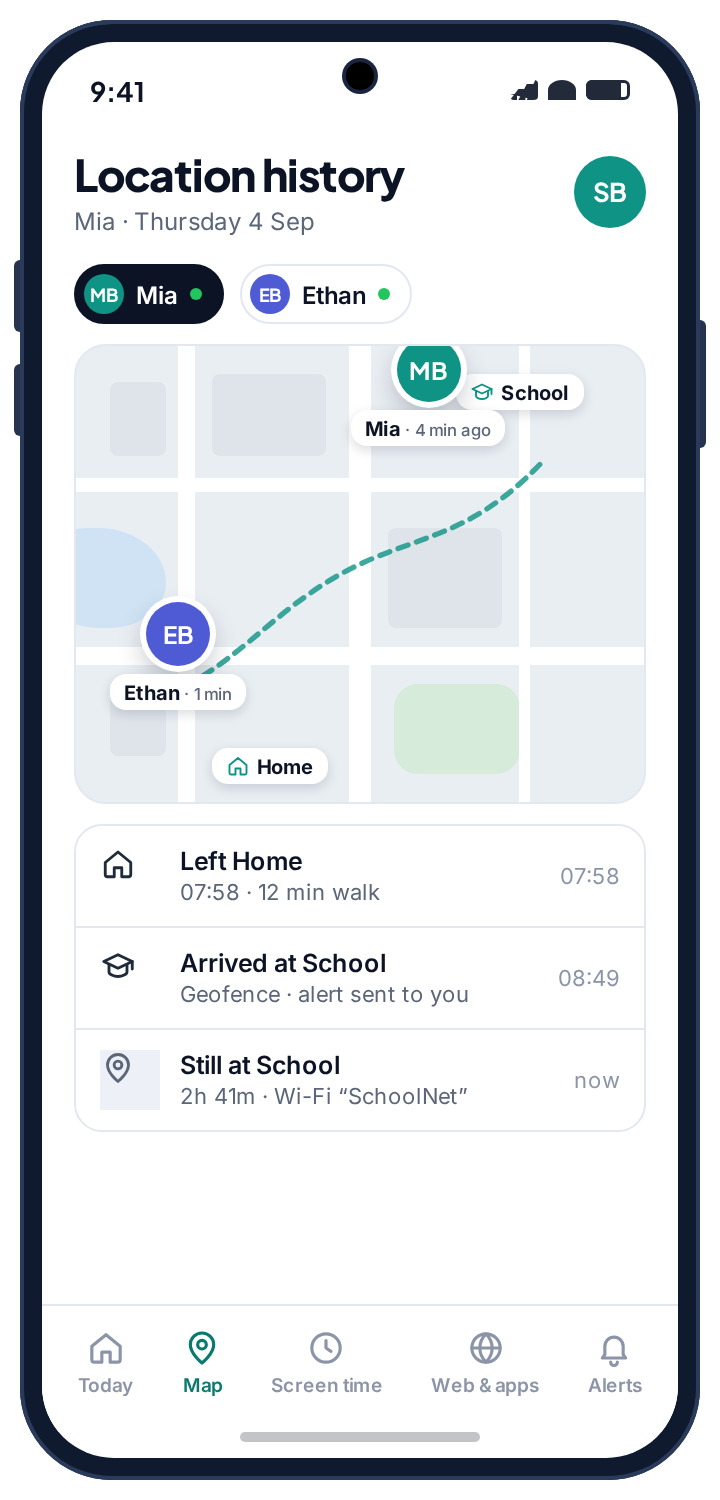
A single position can be wrong. A sequence of positions almost never is, because the errors are random and the route is not. This is why the history view answers questions the live map cannot. Scroll back through a day and you get a line: home until 07:58, a steady walk along the same road, stationary at school from 08:49, a twenty-minute stop somewhere new at 15:40, home by 16:20. If a single fix in the middle of that is forty metres off, the shape of the line is unaffected and you would never notice.
It is also what turns a vague worry into a specific question. “You were somewhere near the precinct after school” is an accusation built on one dot. “You stopped somewhere for twenty minutes on the way home. Where was that?” is a question built on a trail, and it gets an answer.
TheTruthSpy keeps a rolling window of recent days rather than an archive that grows forever. A few weeks covers every real situation a parent faces. A permanent record of a child's whole adolescence serves nobody, and it would be a liability if it ever leaked.
- Stops, not just points. The history groups a day into places the phone settled, with arrival time and how long it stayed.
- Gaps fill themselves in. A phone with no signal stores positions and uploads them when it reconnects, so the trail completes retroactively.
- Wi-Fi corroborates. A stop that coincides with joining the school's network is at school, however much the GPS drifted.
Geofence alerts: being told, instead of checking.
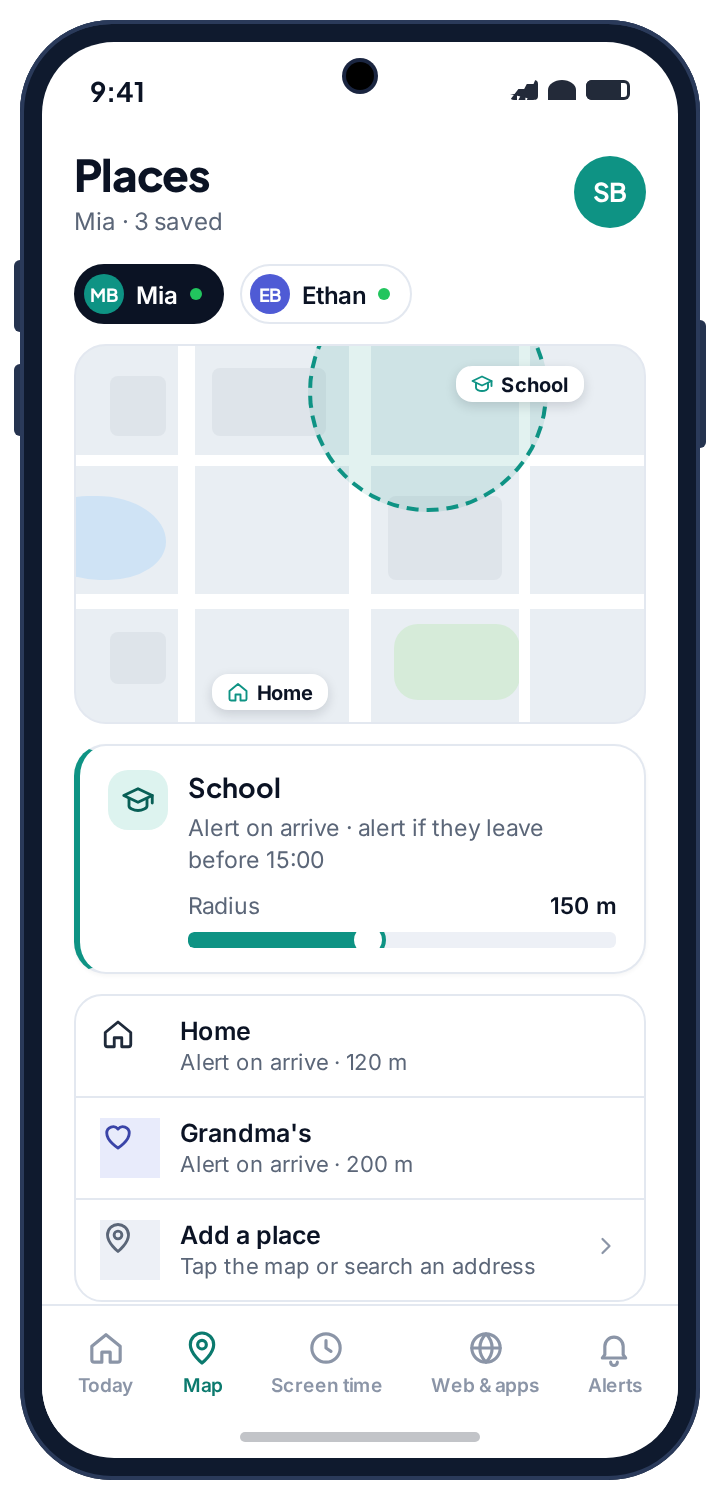
The compulsive habit a phone tracker can create, opening the map fifteen times an evening, is solved by not needing to open it. Save the places that repeat and the app tells you when a phone crosses the edge. On a normal day the panel stays quiet, which is the point.
Saving a place
Tap the map or search an address, give it a name, and drag the radius. Somewhere between 100 and 200 metres suits most places: tight enough that “arrived” means arrived, loose enough that a GPS fix fifty metres off does not fire a false departure. Each place has its own alert rules, so school can alert on arrival and on leaving before three o'clock, while home only alerts on arrival.
Let your child name the places with you. When they choose what gets saved, the map stops being something done to them and becomes a shared picture of the week, which is the difference between a tool that survives a year and one that gets uninstalled in a fortnight.
| Place worth saving | Useful alert | Why it earns its place |
|---|---|---|
| School | Arrive, and leave before a set time | “Left school at 11:20” is the single most useful alert a parent gets. |
| Home | Arrive | Ends the “are you back yet” text entirely. |
| A club or practice | Arrive | Confirms they got there without a phone call to a coach. |
| A grandparent's | Arrive | Useful on the days the route is unfamiliar. |
| A friend's house | Usually none | Tempting, and usually the point at which a teenager decides the whole arrangement is surveillance. |
What a week of alerts looks like
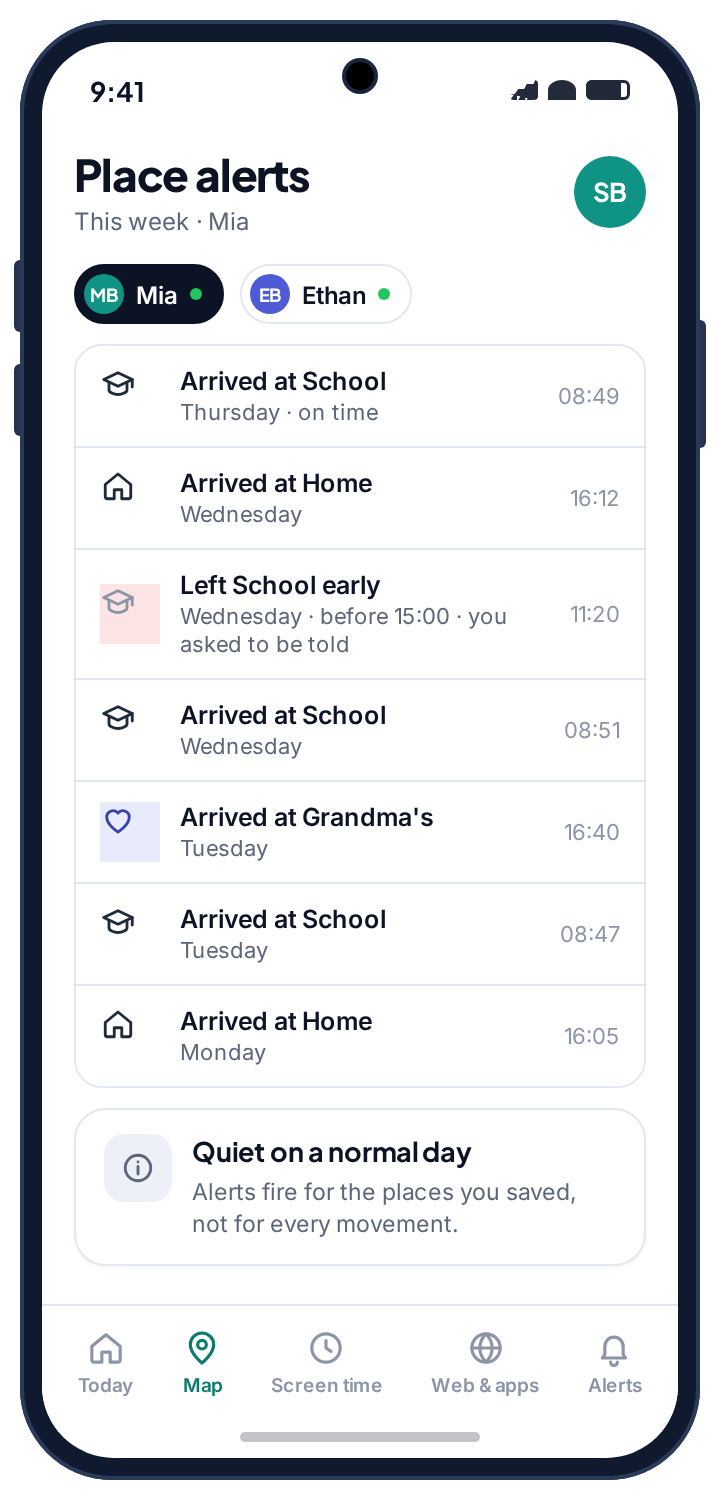
Most weeks the alert list is boring, and a boring list is what you want: arrived at school, arrived home, arrived at Grandma's on Tuesday. The one line that is not boring is the one the feature exists for. “Left School early, 11:20, before 15:00” is the alert that turns a two-hour gap you would never have noticed into a question you can ask at dinner.
Alerts are delivered as a push notification to your phone and listed in the panel, with the place, the time and a link to the map. They fire on crossings of the places you saved, not on every movement, so the alert list is a list of events rather than a stream of coordinates. If you want email as well, switch it on in your account; if you want a co-parent to receive them too, invite them from Family access and the alerts reach both of you.
- Arrival and departure are separate. Choose either, both, or a departure only before a certain time.
- A geofence is an event, not a point. It is more reliable than the coordinate behind it, because a crossing needs several fixes in a row to agree.
- Quiet hours. Mute place alerts overnight if you would rather not be told that a phone arrived home at 23:40 from the sofa.
“Location tracking” is four technologies wearing one name, and they fail in different ways.
This is the table nobody selling a phone tracker wants to show you. Android picks whichever method it can get and the app reports what it is handed, so reading the map with these numbers in mind saves a great deal of unnecessary worry.
| Method | Typical accuracy | Works indoors | Battery | What it is good for |
|---|---|---|---|---|
| GPS satellites | 3–10 m | Poorly | Highest | Outdoors, walking or driving. This is the one people picture. |
| Wi-Fi positioning | 15–50 m | Yes | Low | Inside buildings and dense city centres, where satellites are blocked. |
| Cell towers | 150 m – 2 km | Yes | Lowest | A rough fallback. Never trust a single cell-based fix for anything that matters. |
| Geofence crossing | Event, not a point | Edge-dependent | Low | “Arrived at school”, “left home”. More reliable than the coordinate behind it. |
| Network history | Router range | Yes | None | Confirming a phone settled somewhere. See the Wi-Fi history. |
Outdoors with clear sky
A walk to school, a bus route, a park. GPS is at its best here, typically within a few metres, and the trail is smooth. This is the case the marketing screenshots show, and for once it is true.
Inside a building
Satellites are blocked, so the phone guesses from nearby Wi-Fi networks. Expect the pin to wander within tens of metres and occasionally to sit on the building next door. The Wi-Fi tracker and the geofence radius are what make indoors reliable.
A dense city centre
Tall buildings bounce satellite signals, which produces the classic “pin jumps two streets at 4pm” effect. That is almost never a child moving; it is a phone that lost the sky. The history view smooths it out, and a single jump should never start a conversation.
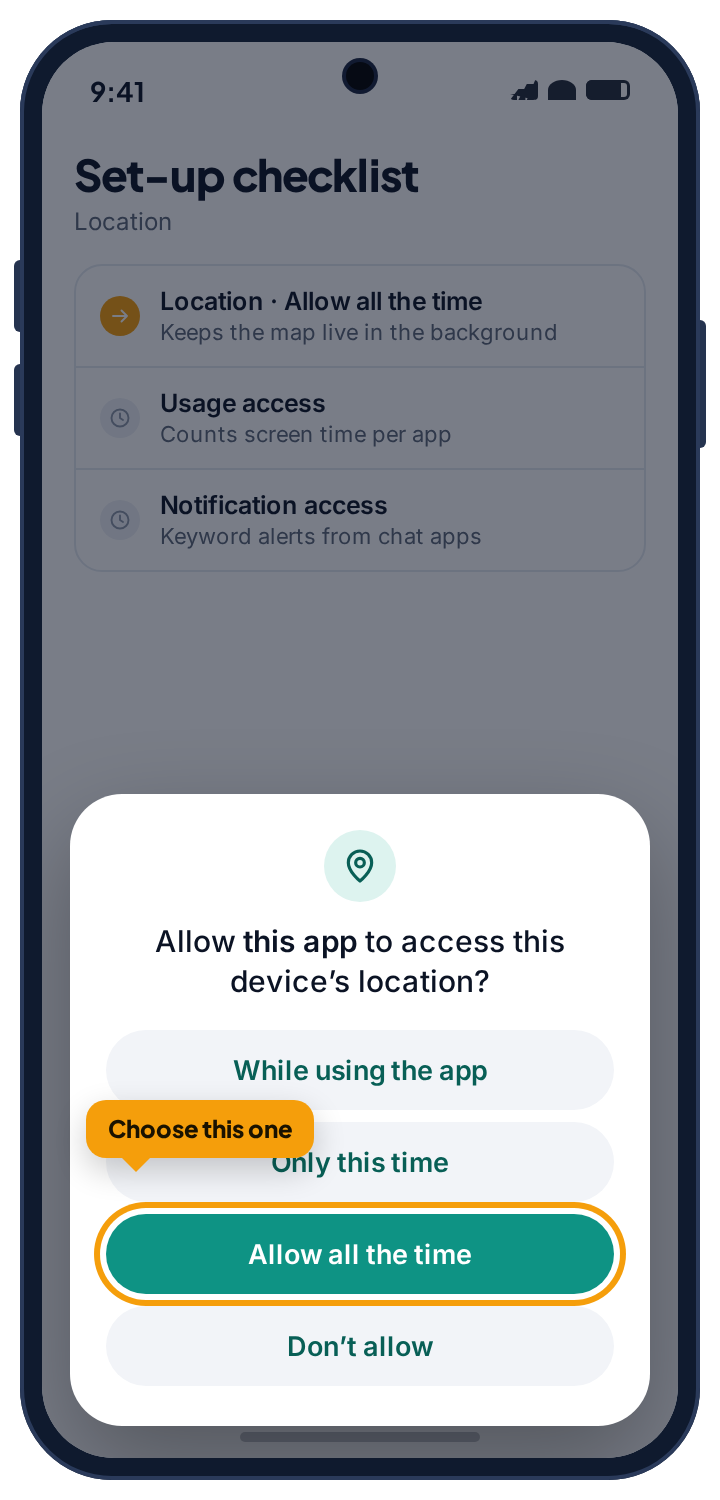
Location must be “Allow all the time”, or the map dies the moment the app is closed.
Android gates background location behind a permission with three states, and only one of them does what a parent assumes. This single setting is behind the overwhelming majority of “the tracker stopped working” complaints about every app in this category, ours included.
| Permission state | What it collects | Result |
|---|---|---|
| Allow all the time | Position in the background, phone locked, in a pocket | Everything on this page works |
| While using the app | Only while the app is open on screen | Map effectively dead, and it looks granted |
| Don't allow | Nothing | No location at all |
“While using the app” is the trap, because the permission screen shows it as allowed. A parent sets everything up, sees a green tick, and discovers three weeks later that the last position was recorded during setup. TheTruthSpy checks this state continuously and says so on the Device health page rather than letting you believe a dead map is a quiet evening. On newer Android versions the first dialog does not even offer “Allow all the time”; it offers “While using the app” and the app then sends you to Settings to upgrade it. The setup checklist on the phone handles this, but it is worth knowing if you are doing it by hand.
Grant this one together during setup and almost nothing else goes wrong. The download and setup guide shows the exact dialog.
What a school day looks like on the family locator, event by event.
The clearest way to understand what location tracking will and will not tell you is to walk through an ordinary day. This one has a single thing worth noticing in it, which is about average.
The day starts with a battery reading.
The phone reports from the kitchen at 88% and charging. Nothing is sent to you. The pin sits at home, which is where it has been all night, and the history shows one long stop since 16:12 yesterday.
The trail starts drawing.
The home geofence registers a departure. You did not ask to be told about leaving home on a school morning, so no alert fires, but the event is in the history. The walk is a smooth line of GPS fixes along the same road as every other day.
The one alert you wanted.
Several fixes in a row land inside the 150 metre school geofence and the arrival alert goes to your phone: “Mia arrived at School, 08:51.” A minute later the Wi-Fi tracker notes that the phone joined the school network, which is the corroboration that matters once GPS goes indoors.
The thing worth noticing.
The phone leaves the geofence before 15:00, which is the one departure rule you set. The alert fires. It turns out to be an orthodontist appointment the other parent arranged, which you learn by asking rather than by assuming, and the whole exchange takes one text. This is the feature doing its job: a two-hour gap you would never have seen, turned into a question with a boring answer.
Not a child moving.
Back at school and indoors, the phone loses satellites and falls back to Wi-Fi positioning. For twenty minutes the pin sits on the sports centre across the road. The history view shows it as part of the same school stop, because the Wi-Fi network has not changed. A single pin would have worried you; the trail does not.
The day closes.
Home arrival alert, 41% battery, phone put on charge. Total alerts for the day: three. Total times you opened the map: ideally none. The history will hold this day for a few weeks and then let it go.
Four things cause almost every reporting gap, and parents reliably assume the last one first.
A stale pin is the most common support question in this category and the least often sinister. Before you conclude anything from silence, check the two numbers on the child's card: the last battery reading and the last report time. Between them they explain nearly every gap.
What is missing from the list below is “your child disabled it”. It happens, but far less often than the four causes here, and when it does, your panel says the phone stopped reporting rather than showing you a stale pin. That is deliberate. A location tracker that hides its own failure is worse than no tracker at all.
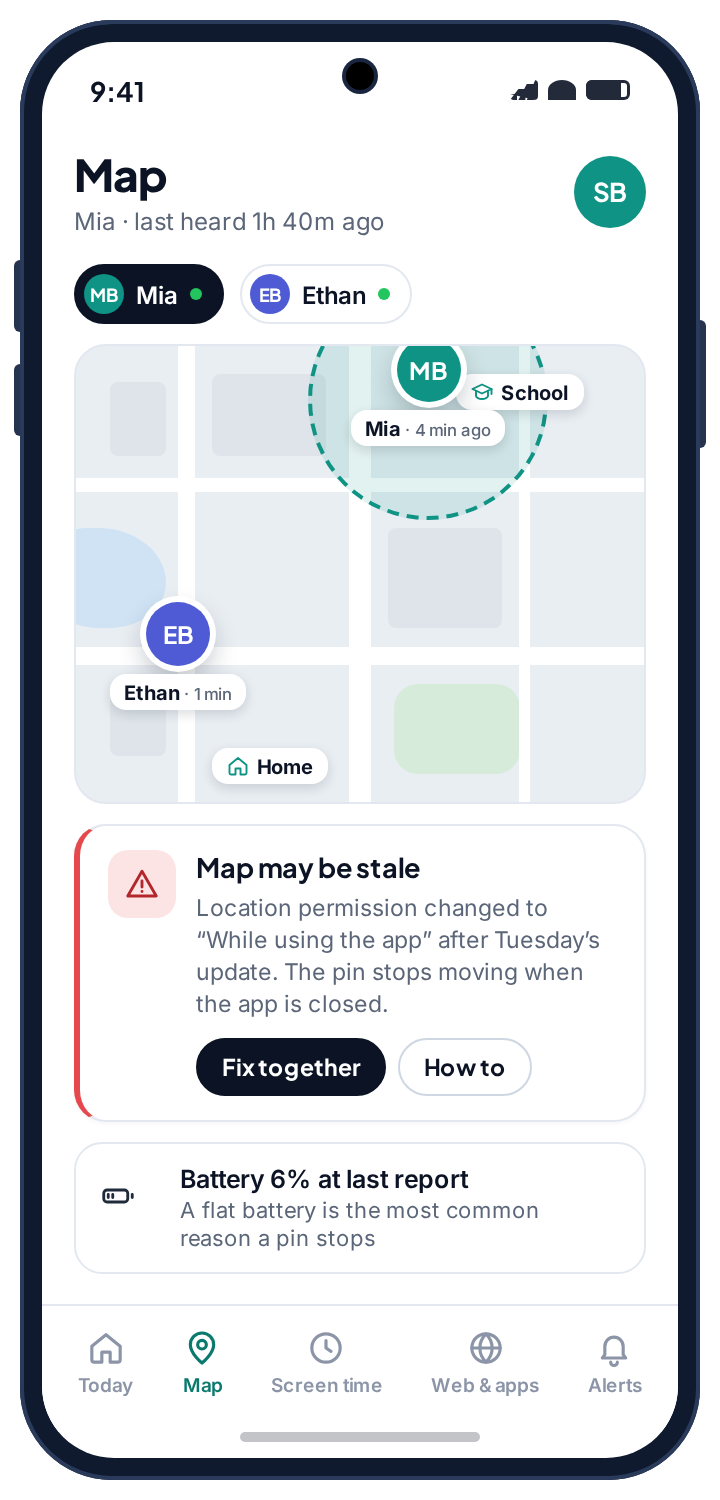
The pin stopped hours ago.
Flat battery. By a distance the most common cause, and the least alarming.
Fix: Check the last battery reading on the child card. 4% when it last reported is your answer. The map resumes on its own when the phone is charged.
Reports arrive, then stop for hours, then resume.
Battery optimisation switched back on. Android and Samsung do this after updates, and some manufacturers add their own “sleeping apps” list on top.
Fix: Device health names the setting and sends your child a one-tap fix, rather than making you talk them through a menu by phone. On the phone it is Settings → Apps → the app → Battery → Unrestricted.
Nothing since setup day.
The location permission reverted to “While using the app”, or was never upgraded from it in the first place.
Fix: Device health flags it. On the phone: Settings → Apps → the app → Permissions → Location → Allow all the time. Worth checking whenever a child has been away a few days with no reports.
A gap that fills itself in later.
Genuinely no signal: underground, a rural stretch, a plane, a building with thick walls.
Fix: Nothing. The phone stores positions and uploads them on reconnect, so the trail completes retroactively. If the gap coincides with the phone joining a Wi-Fi network, the Wi-Fi tracker will show where it settled.
The pin is in the wrong place.
Indoors, in a basement or in a dense city, Android is guessing from Wi-Fi or cell towers rather than satellites.
Fix: Look at the trail and the Wi-Fi history rather than the pin. A phone connected to the school network is at school, wherever the pin is drawn.
The phone stopped reporting and the app is gone.
Your child uninstalled it. TheTruthSpy does not hide from uninstallation and does not reinstall itself.
Fix: Treat it as the signal it is. Something about the arrangement stopped feeling fair, and that conversation is worth more than quietly putting the app back.
What a family locator is for, and how to use one without turning the house into a control room.
What the map is actually for
Parents install a GPS location tracker for three reasons, and it is worth knowing which one is yours, because they call for different settings. The first is reassurance on a routine: did they get to school, are they home yet, did they make it to practice. Geofence alerts on three or four saved places answer this completely, and you can leave the map closed. The second is the unfamiliar day: a school trip, a first solo bus journey, a sleepover across town. The live map earns its keep here, and the history lets you check afterwards that the route was the one agreed. The third is the bad day, when a child is late, not answering, and the last report time becomes the most important number in the house. For that day the history, the battery reading and the Wi-Fi tracker together tell you more than the pin ever will.
Most families live in the first case almost all the time. If you find yourself in the second or third more than occasionally, the location tracker is not the thing to adjust; the arrangement is.
What it is not for
A location tracker tells you where a phone is. It does not tell you what the phone was doing there, who was on the other end of a call, or whether the child was with the phone at all. A phone left in a locker is at school. A phone lent to a friend is wherever the friend is. If you need to know what the phone was doing, that is the job of screen time totals and the browsing log; if you need to know who they were with, no app on the market answers that, and the honest ones say so.
It is also not a substitute for an agreement. The families who get the most from location tracking are the ones where the child knows exactly which places are saved and which alerts are on, and agreed to them. A geofence on a friend's house, added quietly, is the fastest way we know to turn a tool into a grievance.
Telling your child
TheTruthSpy is visible on the phone by design. The app sits in the app drawer under its own name, and the “What's shared” screen lists location first, in plain language: where your phone is, and today's trail. Your child can also see that a parent opened the map today. So the question is not whether to tell them, but how.
The version that works is short and specific: “I can see where your phone is, and I get a message when you arrive at school and when you get home. I don't get told every time you move, and I'm not going to sit watching the map.” Then show them the places list and ask which ones they think should be on it. A child who helped choose the geofences argues about the geofences, not about the app, and that is a conversation a family can actually have.
They can see that you looked
The child's phone shows that a parent viewed the panel today. It does not show which screens. A child who knows you looked, and knows what could be seen, has no reason to hunt for what else might be hidden.
What is stored, and for how long
Position reports are tied to your family account and visible to you and any co-parent you invite. They are kept for a rolling window of recent days and then deleted; there is no permanent archive and no export of a child's movements to anyone else. Unpairing a phone stops collection immediately and the app on the child's phone confirms it. The privacy policy lists exactly what the location feature collects, including the fact that the Wi-Fi tracker's network names count as location data under Android's rules.
Battery cost is the other thing parents ask about. Background location reporting typically costs a few percent of battery a day, and the panel shows each phone's battery level so you can see the cost for yourself. The exemption from battery optimisation that the setup asks for is what keeps reporting alive overnight; without it, some phones go quiet once the screen has been off for a while.
How this compares with other family locator apps
Google's Family Link shows a child's current location and little else: no trail, no geofences, no alerts. Apple's Find My is excellent but only for iPhones. Dedicated family locator apps typically charge a monthly subscription for geofences and history, and most of them hide themselves from the child. TheTruthSpy's location tracker is free, includes history and geofence alerts, and is visible on the phone. The trade is that it is Android only on the child's side, and that it tells your child it exists. We think that is the right trade, and the about page explains why.
The right amount of tracking changes faster than most parents adjust it.
Reassurance, not surveillance.
You already know where they are most of the time. The map matters on the days you do not: a first walk to school alone, a trip with another family.
- Home and school geofences
- Arrival alerts only
- History for the unfamiliar day
The years the map earns its keep.
Independent journeys start, and so do the detours. Agree the saved places together and keep the list short.
- School with an early-departure rule
- Home and one or two activities
- No geofences on friends' houses
Usually a location share they agreed to.
At this age the tracker is either an agreement or an argument. Make it the first, and loosen it in the open.
- Live map, visible and agreed
- Alerts off, or home only
- Reviewed together every few months
Questions parents ask about the GPS tracker.
How accurate is the GPS location tracking?
Outdoors with a clear sky, usually within a few metres. Indoors, in a basement or in a dense city it can drift by tens of metres, because the phone falls back to Wi-Fi or cell-tower positioning. Read the trail rather than the pin, and use the Wi-Fi tracker to confirm where the phone settled.
Can I track my child's phone when it is off or flat?
No app can. A phone that is off reports nothing. What TheTruthSpy does is show you the last report time and the last battery reading, so a pin that stopped at 4% is explained, and store positions while the phone has no signal so the trail fills in once it reconnects.
Does the location tracker drain the battery?
Typically a few percent a day. The panel shows each phone's battery level so you can see the cost. The battery-optimisation exemption keeps reporting alive overnight; without it some phones stop reporting once the screen has been off for a while.
Will my child know their location is being tracked?
Yes, by design. The app is visible on their phone, the “What's shared” screen lists location first, and their phone shows that a parent opened the panel today. There is no hidden mode.
Can both parents see the map?
Yes. Invite a co-parent from Family access and you both see the same map, history and alerts. Every change to a saved place is stamped with who made it.
Why does the map say “While using the app”?
That is an Android permission state. It looks granted but collects nothing once the app is closed. Change it to “Allow all the time” under Settings → Apps → the app → Permissions → Location. Device health flags this automatically.
How long is location history kept?
A rolling window of recent days, then it is deleted. A few weeks covers every real situation; a permanent archive of a child's movements would serve nobody and would be a liability.
Does it work on iPhone?
The tracked phone must be Android 8.0 or later. Your parent panel is a web page and works on an iPhone, a Mac or anything with a browser. For an iPhone child, Apple's Find My and Screen Time are the right tools.
Can I set a geofence on a friend's house?
You can, and we would gently suggest you do not. It is usually the moment a teenager decides the whole arrangement is surveillance. Save the places that repeat and that your child agreed to.
Is it free?
Yes. The live map, location history and geofence alerts are free on either build, with no card and no trial clock. The pricing page page explains how the app stays free.
Where location fits with everything else
The map answers where, not what the phone was doing there or who was on the other end. Indoors, where GPS drifts, the Wi-Fi history is the better check: a phone on the school network is at school. For time spent on the phone, pair the map with the screen time app, and for who is messaging them, with social alerts.
Location tracking switches on once the child's phone is paired with your parent account, which takes about ten minutes. The setup guide covers each screen.
How much location tracking suits a nine-year-old versus a sixteen-year-old is a separate question, and the guides take it on age by age.
Put the family map on your phone tonight.
Pair your child's phone in about ten minutes, grant the one permission that matters, and the map fills in by the evening. No card, no subscription.
Android · Free to set up · Visible on your child's phone