Recording sound from a phone across town is about as heavy as a monitoring tool gets. Asking for a clip of what is happening around your child is not something to do lightly, and TheTruthSpy is built so you cannot do it quietly either. This page lays out how the feature works, the limits that hold it in check, and the narrow set of moments it is meant for.
Nothing here is hidden. Your child's phone shows a notice while a clip records, their app lists audio clips as switched on, and without the microphone permission no clip can be recorded at all.
What the ambient recording actually does
You choose a length, 30 or 60 seconds, and tap request. The paired phone records the sound around it for exactly that long and uploads the file to your panel, provided the microphone permission is granted and the phone has a connection.
There is no open microphone and no listen-in. Each clip stops on its own at the length you picked, and a second clip needs a second request, which shows up on the child's phone like the first.
- Clips are short by design — half a minute or a minute.
- There is no continuous or always-on listening.
- Whatever was captured turns up under that phone in your panel, stamped with when it ran.
- Nothing is kept: a clip self-deletes a day after it arrives, whether you listened or not.
The short length is not a limitation we are apologising for. It is the point. This tool answers “what is going on around them right now” — not “let me follow every conversation of the day”.
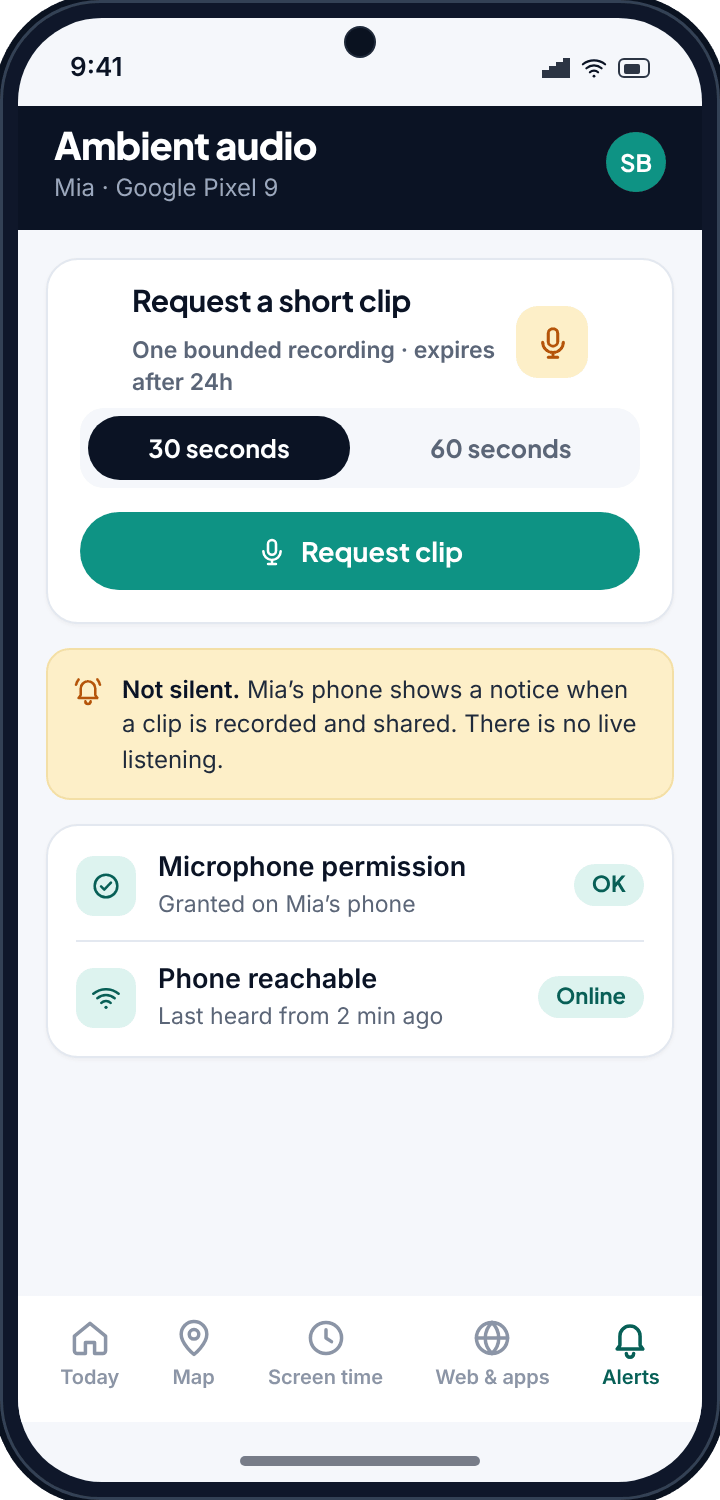
Limits built into ambient audio
A microphone is the most invasive thing on a phone, so this feature is deliberately hard to misuse. Four rules hold it in place, and you cannot switch any of them off.
Not on Google Play, and not by accident
You cannot arrive at ambient recording by tapping through the Play Store version. It exists only in the full build you download directly and install yourself, on a phone you can hold in your hand and have clear permission to set up. Two deliberate steps stand between a curious parent and a microphone.
Android holds the microphone, not us
The recording permission belongs to the person holding the phone. We can queue a request; the operating system decides whether anything is captured. Revoke the permission and the feature dies mid-sentence — no grace period, no backup route, no clever trick. There is nothing on our side that could override it even if we wanted one.
The phone announces every clip
A recording cannot happen quietly. The moment one starts, a notice appears on your child's screen saying audio was captured and shared, stamped with the time. Most Android versions add their own microphone indicator on top of ours. If you were hoping for something they would not notice, this is the wrong product.
Nothing is kept for long
Clips are short by design and gone within a day. There is no archive, no export, no way to build a record of somebody's week. Listen, decide, move on — that is the only workflow the feature supports.
Our plain testIf you could not tell your child you recorded that clip, you should not have. Every part of this feature assumes they know it exists.
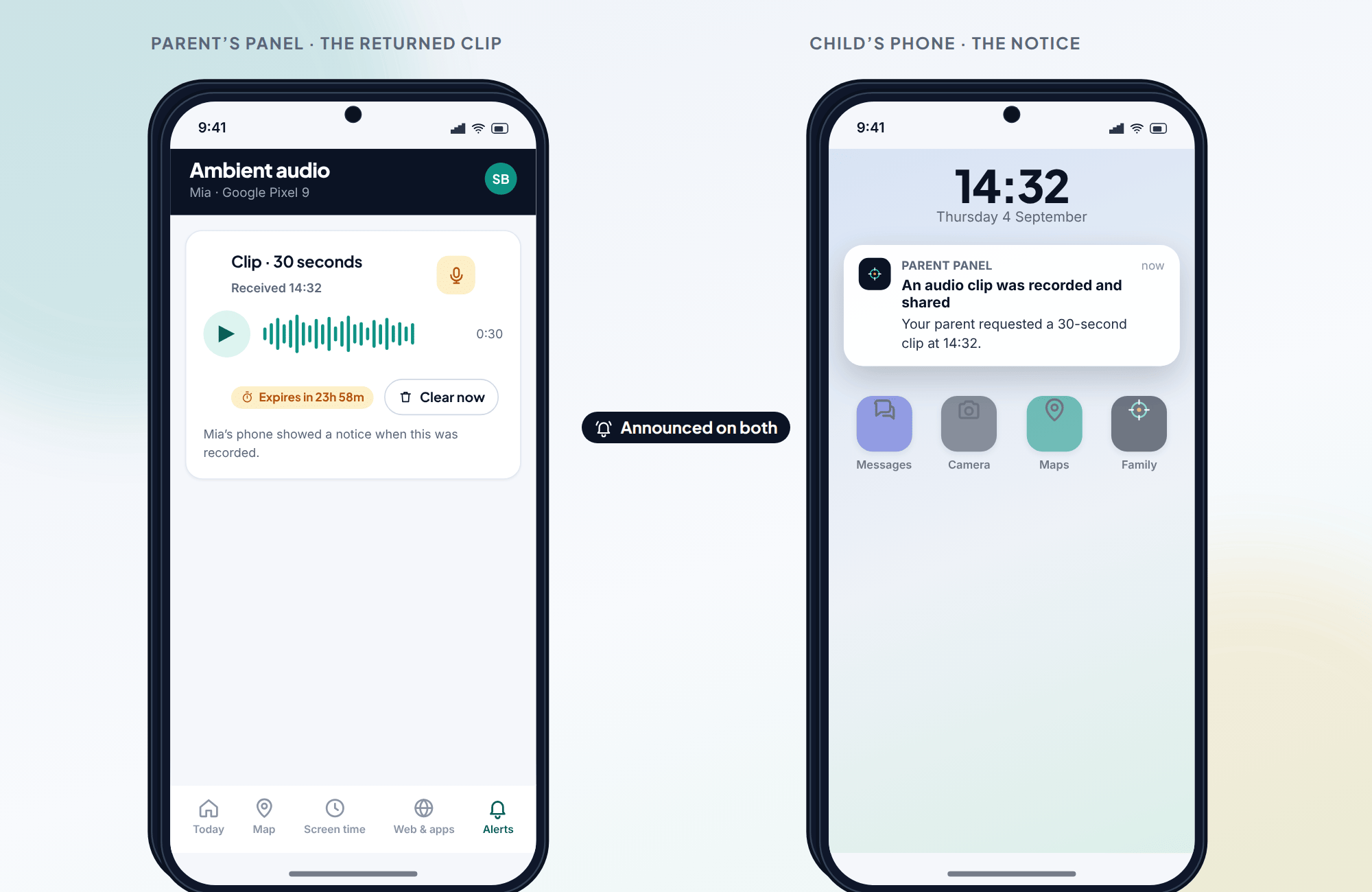
The one moment recording phone surroundings is really for
Most of the time this feature sits untouched, and it should. It is not a way to sit in on ordinary afternoons or to catch snippets of conversation out of habit. It exists for a single kind of moment: you are worried, right now, and briefly hearing your child's surroundings would tell you whether they are okay.
Picture the calls going unanswered and the messages unanswered, later than usual, with a knot in your stomach that a map dot cannot loosen. A short clip of ambient sound — a busy room, a car, a quiet house — can be the difference between panicking and breathing out. That is the honest use case, and it is a narrow one.
Read what that does not include. It does not include listening in on friends, checking who your teenager is with, or sampling the day out of curiosity. If you are reaching for ambient audio regularly, the tool is not the answer — a direct conversation with your child is.
How to record phone surroundings, step by step
- Have the conversation first. This feature only works as designed if your child already knows it exists. Installing it quietly and hoping is the failure mode, not the use case.
- Use the full build. The Play Store version has no microphone code in it at all, so start from the direct download.
- Grant the microphone permission on their phone, with them present. Denied or later revoked, and the feature simply does nothing — it cannot get past Android to record anything.
- Pair the handset so it shows up as a device in your panel alongside the rest of the family.
- When something genuinely warrants it, select the phone, choose how many seconds you want, and send. Listen when the clip lands, act on what you hear, and let it expire.
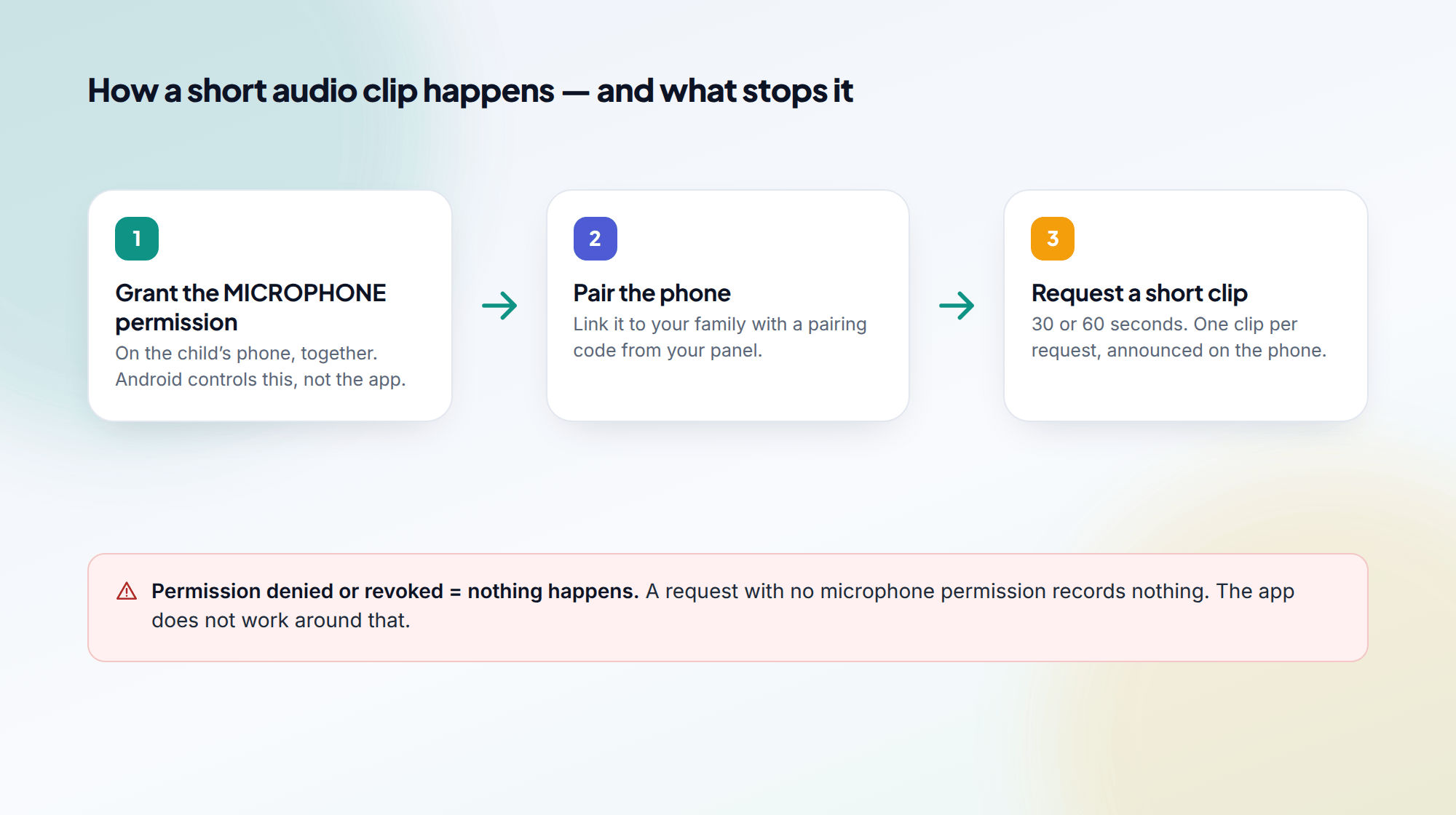
How ambient recording differs from call recording
Ambient audio captures the sound around a phone for a short window. Call recording is a separate, call-focused feature with its own permission and its own switch. They answer different worries and should not be confused. Reach for the tool that matches the actual worry, and reach for either only when the moment calls for it.
The tools that answer the same worry without a microphone
An audio clip is a last resort, and a blunt one. Nine times out of ten the worry behind it — where are they, who are they with, why is the phone silent — is answered better by the GPS location tracker, which shows the live position, the trail and whether the battery is about to die.
Day to day, limits and filtering do the shaping, and the message and call logs show who is in touch. An audio clip should rarely be the first tool you reach for.
If a still image would answer the question, the remote camera is the lighter option: one frame, no sound, announced the same way.
Ambient recording: common questions
Can TheTruthSpy record audio without the child knowing?
No. The child's phone puts a notice on screen saying a clip was captured and shared, Android shows its own microphone indicator alongside it, and the app's shared list names the feature. There is no quiet mode, lists audio clips as enabled.
What happens if the microphone permission is not granted?
The feature does not work. Android gates the microphone behind that permission, and without it your request records nothing. Revoke it later and ambient audio stops from that point on.
Can I listen in live or leave the microphone on?
No. There is no live listen-in and no always-on mode. Each request produces one short clip of 30 or 60 seconds. A later clip is a new request, and the child is notified again.
How long do clips stay in my panel?
24 hours, or less if you clear them. The feature is built to answer a worry in the moment, not to build up a record of someone's day.
Is this the same as call recording, and does it cost anything?
No — call recording is a separate feature with its own setup. Ambient audio is free to set up, Android only, and lives in the direct-download build.