
Browsing history is the record that web filtering leaves behind. The filter decides what loads; the history shows you what did, and what was stopped. This page explains what is recorded, how it copes with private tabs and cleared history, what it looks like in your panel, and how to read it without turning into a detective.
What is recorded
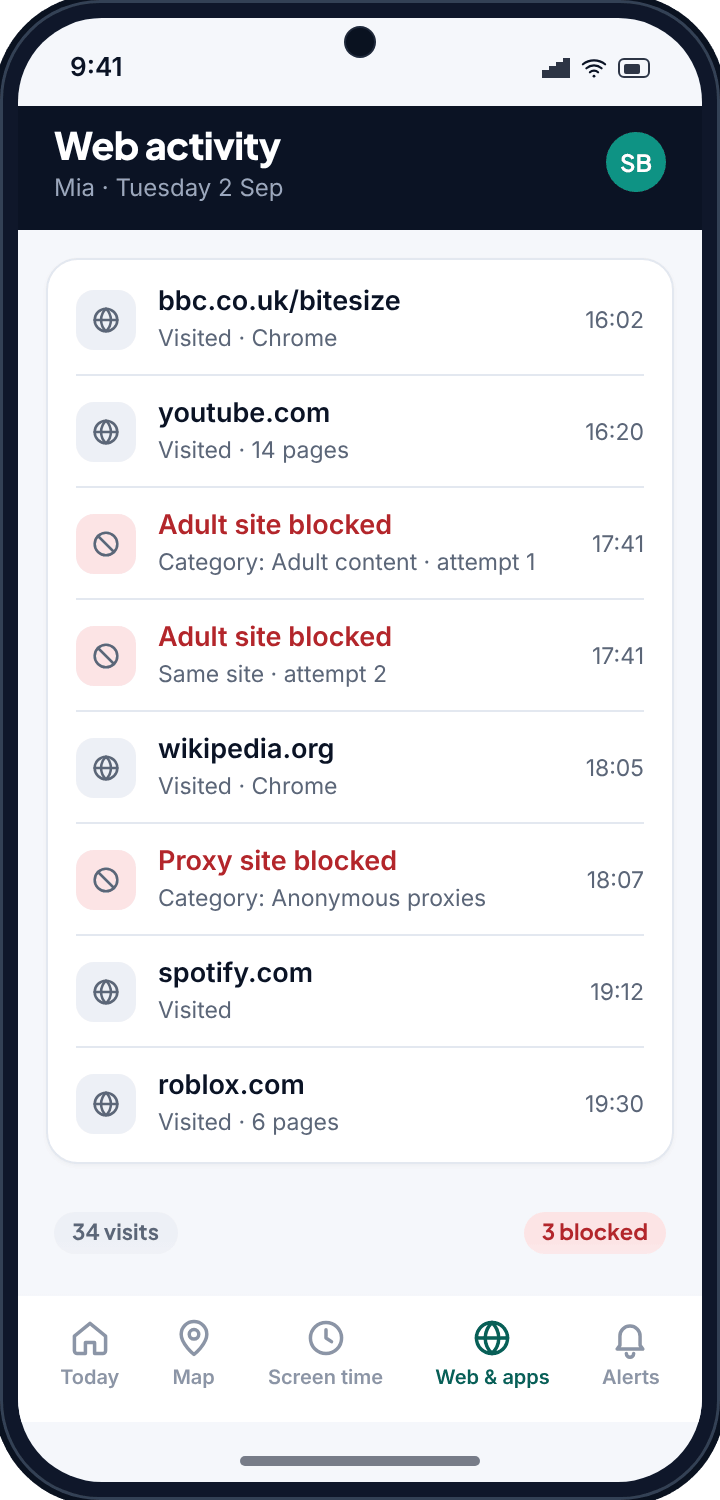
For each site your child's phone visits, TheTruthSpy notes the domain, the time, how many pages were opened there and which browser or app opened them. Sites that the filter blocked are recorded as attempts, with the category that stopped them. The panel then rolls that up into two views: a chronological log for a day, and a summary of the week by site and by time spent.
- Domain, not every URL. You see “youtube.com · 61 visits”, not sixty-one individual video links. That is enough to know what the phone is used for, and it keeps the list readable.
- Time spent per site, worked out from how long pages on that site stayed open.
- Blocked attempts, with the category, so a filter that is working shows its work.
- The browser or app that opened the page, because a lot of browsing happens inside social apps rather than in Chrome.
Private tabs and cleared history
Children learn about incognito mode early, and about clearing history not long after. Neither affects TheTruthSpy, because it does not read the browser's history at all. The filter sits at the device level and sees the request whichever browser makes it and whatever mode that browser is in. A private tab is private from other people who pick up the phone; it is not private from the filter.
The same goes for switching browsers. Samsung Internet, Firefox, the in-app browser inside Instagram or TikTok: they all go through the same filter and all appear in the same history. If your child installs a browser you have never heard of, it shows up in the app list, and the sites it opens show up here.
Worth saying out loudTell your child this. A filter they know about is a boundary; one they discover by trial and error is a game. “It sees private tabs too” saves everyone a month of testing.
Reading the history without over-reading it
A week of browsing from a normal child looks boring, and boring is the point. YouTube at the top, a homework site, a game, a search engine, a music service. The useful signals are the exceptions: a blocked attempt at a category you did not expect, a proxy or VPN site (which usually means the filter is being tested), a big jump in time on one site, or activity at two in the morning.
What TheTruthSpy will not do
It will not show you the contents of pages, what was typed into a search box, or anything inside an app that is not a web page. It does not record passwords or form entries; TheTruthSpy is not a keylogger. The history is a list of where the phone went on the web, at the level a parent needs to guide a child, and no deeper.
History and the filter, together
The history is most useful as a feedback loop for the filter. If a category keeps appearing as a blocked attempt, the filter is doing its job and a conversation is due. If a site you would rather they did not use keeps appearing as allowed, you can block it or its category from the same screen. If a proxy site appears, that is your cue to look at the app rules and check whether a VPN app has arrived.
Safe Search is enforced separately and cannot be switched off from the phone, so search results are already filtered before they appear in the history.
Setting it up
- Pair the phone with the six-character code from your panel. This works on both builds.
- Allow the filter when Android asks. It is the same permission that makes web filtering work; there is nothing extra for history.
- Open Web & apps in your panel. The day's log starts filling in straight away; the weekly summary needs a few days of data to be worth looking at.
- Show your child the screen. It is listed on their What is shared page, and it is better that they hear it from you.
Common questions
Does it see incognito or private browsing?
Yes. TheTruthSpy does not read the browser's own history; the device-level filter sees requests from every browser in every mode.
What if my child clears their history?
Nothing changes in your panel. TheTruthSpy keeps its own record, and clearing the browser's history on the phone does not touch it.
Does it work in apps like Instagram or TikTok?
Web pages opened inside those apps go through the filter and appear in the history, labelled with the app. What happens inside the app itself, such as the feed or messages, is not web browsing and is not recorded here.
Can I see what they searched for?
You see that a search engine was used and, where the search runs on a distinct address, the site. TheTruthSpy does not record typed search terms.
Do I need the direct build?
No. Browsing history and web filtering are in both builds.