Deleted Your Snapchat? How Reactivation Works Before the Deadline

Don’t reset your password, and don’t log in with your email address. Neither works on a deleted Snapchat account. To recover a deleted Snapchat account, open the Snapchat app within 30 days of deletion, log in with your username and the account’s existing password, and confirm reactivation. After 30 days the account is permanently deleted, and neither you nor Snapchat can bring it back.
Check the date first. The 30 days start from the moment deletion was requested, not when you noticed. If you’re close to the limit, stop reading and try the login now. The details below can wait.
How Snapchat deletion actually works
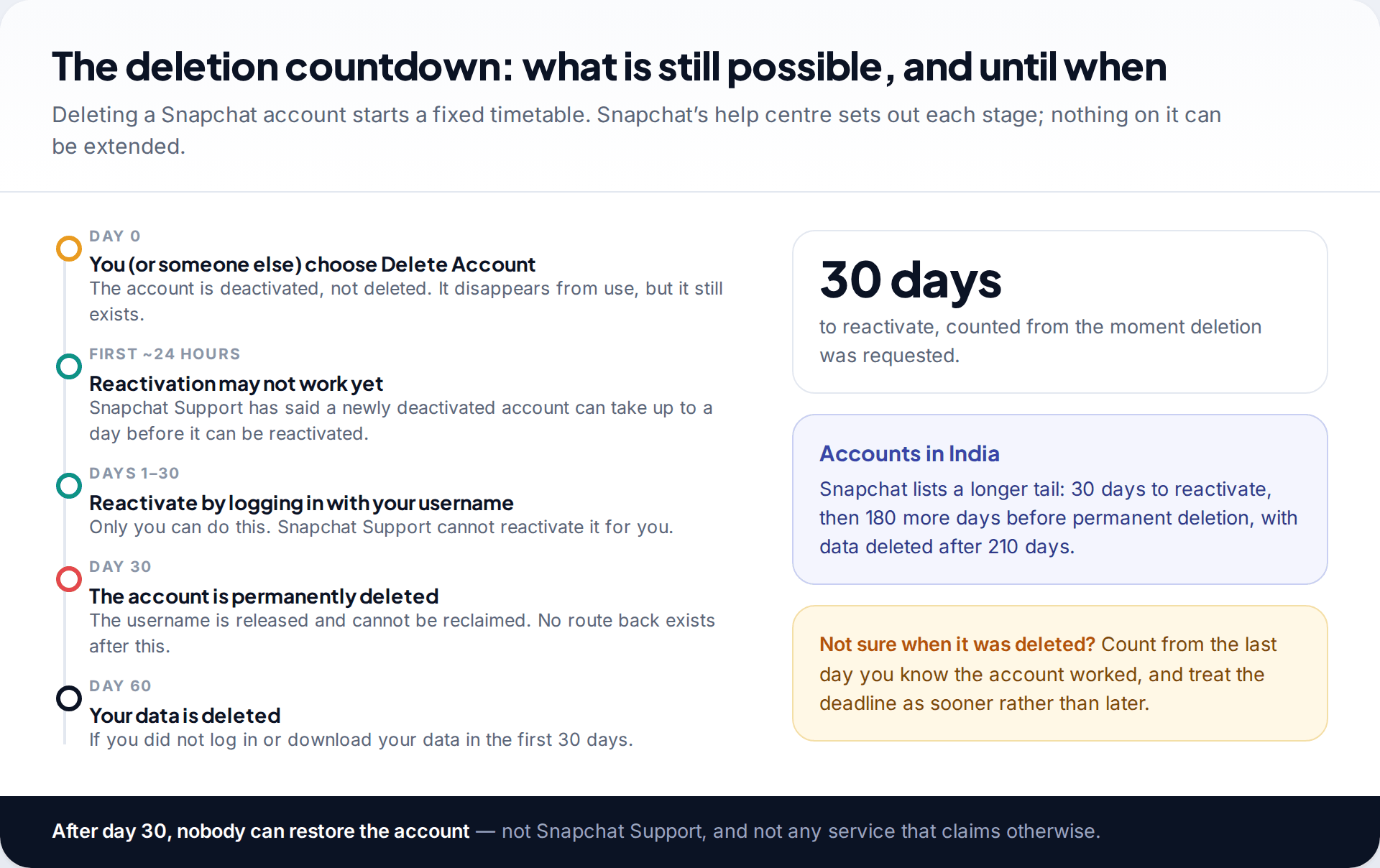
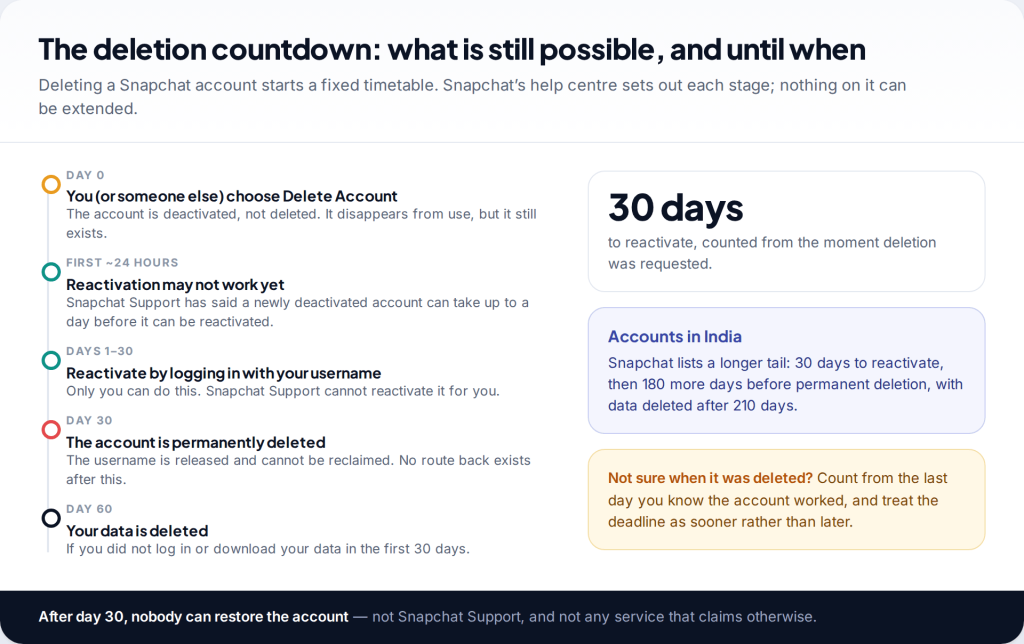
When you choose Delete Account, Snapchat doesn’t erase anything straight away. It deactivates the account, and Snapchat’s help centre says you then have 30 days to reactivate it. After that the account is permanently deleted. If you don’t log in or download your data in those first 30 days, Snapchat says your data is permanently deleted after 60 days.
Snapchat lists different timings for accounts in India. You still have 30 days to reactivate, but permanent deletion follows 180 days after that, and data is deleted after 210 days if it wasn’t downloaded.
During deactivation the account is out of use. Friends can’t contact or interact with you, and some will assume you have deleted or blocked them. That is normal and reverses when you reactivate.
First, make sure it is deleted and not locked or hacked
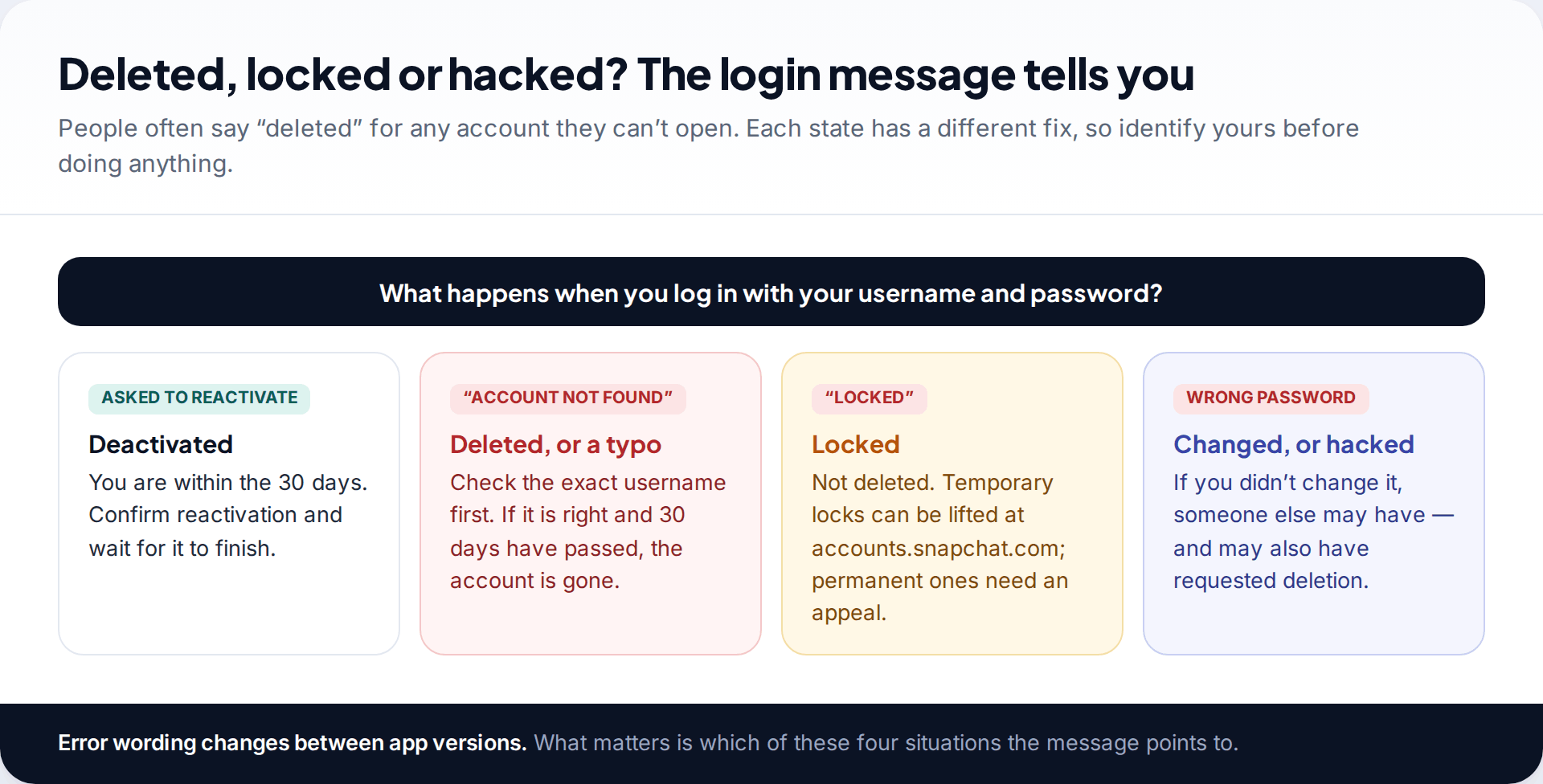
“My Snapchat got deleted” often means something else. A locked account shows a lock message. Temporary locks can usually be lifted by logging in at accounts.snapchat.com and choosing Unlock, while permanent locks need an appeal. A hacked account usually fails because the password was changed. An “account not found” message can be a typo in the username as easily as a deletion that has passed 30 days.
Work out which it is before you keep trying to log in. Repeated failed attempts can trigger a temporary block, which Snapchat’s help pages say can last 48 hours. On a 30-day clock, you don’t want to lose two of those days.
How to reactivate a deleted Snapchat account, step by step
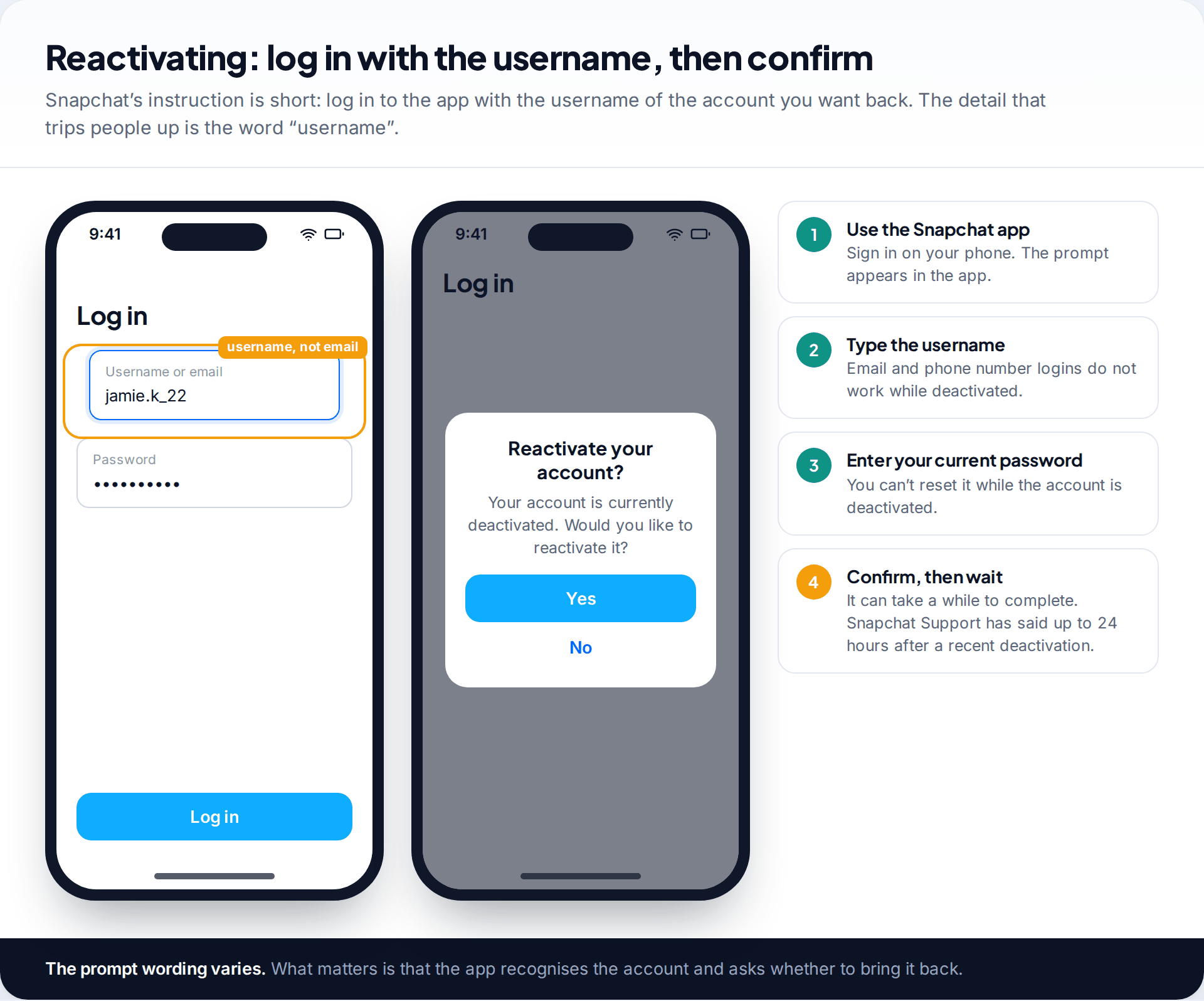
Snapchat’s help centre gives a short instruction: log in to the Snapchat app with the username of the account you want to bring back. In practice:
- Open the Snapchat app on your phone. Install it again if you removed it.
- Type the username into the login box, not your email address or phone number. Snapchat says you can’t use either to log in while an account is deactivated.
- Enter the password the account had when it was deleted. You can’t reset or change it while the account is deactivated.
- Confirm when asked whether to reactivate. The prompt’s wording varies, but it will ask whether you want the account back.
- Wait. Reactivation isn’t always instant. Snapchat Support has said that a recently deactivated account can take up to 24 hours before it can be reactivated.
Two small things help. Use the phone you normally use Snapchat on, over a network you normally use, because an unfamiliar device or location is more likely to trigger extra security checks. And keep a note of when you tried and what the app said each time. If you do end up contacting Support, those dates and messages are the most useful things you can give them, and on a 30-day clock nobody wants to repeat a step.
Only you can do this. Snapchat’s help centre states that Snapchat Support can’t reactivate an account for you. Anyone who offers to do it for a fee is running a scam. Once you’re back in, check your email address and phone number under Settings › My Account, because some details may need verifying again.
When reactivation doesn’t work
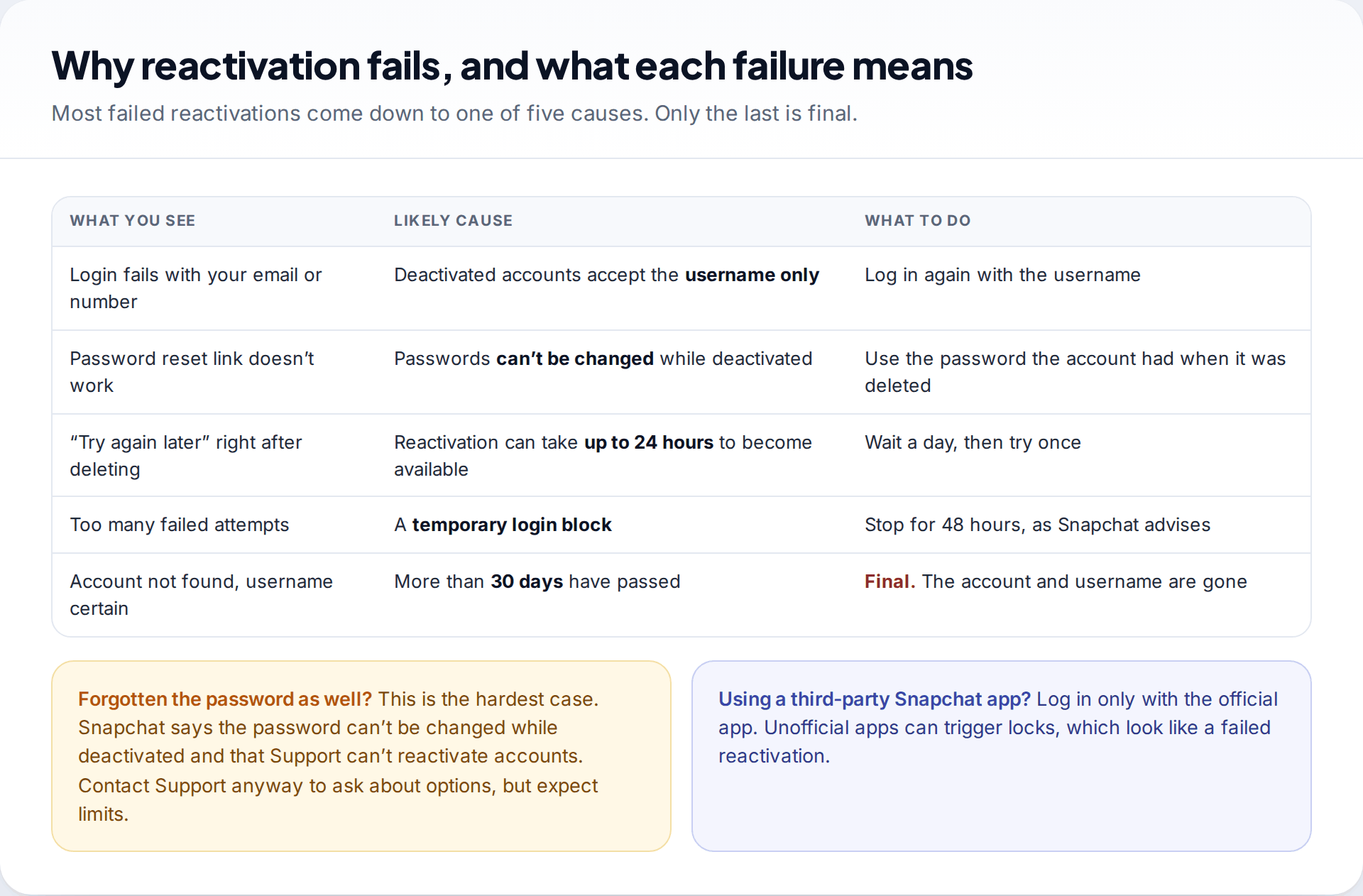
Almost every failed reactivation comes down to one of a handful of causes, and most can be fixed.
You used your email or phone number
Deactivated accounts accept only the username. Try again with the username, and check it character by character. Usernames can include dots, hyphens and underscores.
You tried to reset the password
Snapchat says passwords can’t be changed while an account is deactivated, so a reset request can’t help. You need the password as it was when the account was deleted. If you use a password manager or your phone’s saved passwords, look there.
You tried too soon
If you deleted the account in the last day, wait 24 hours and try once more, rather than trying repeatedly.
You are temporarily blocked
Stop for 48 hours. More attempts during a block don’t help.
More than 30 days have passed
The account has been permanently deleted and the username released. No form, support ticket or paid service can reverse that.
If you have forgotten both the password and the username, you’re in the hardest position. You can’t reset the password while the account is deactivated, and Snapchat says Support can’t reactivate accounts. It is still worth contacting Snapchat Support through help.snapchat.com to ask what options there are. Expect a limited answer.
Finding a forgotten username
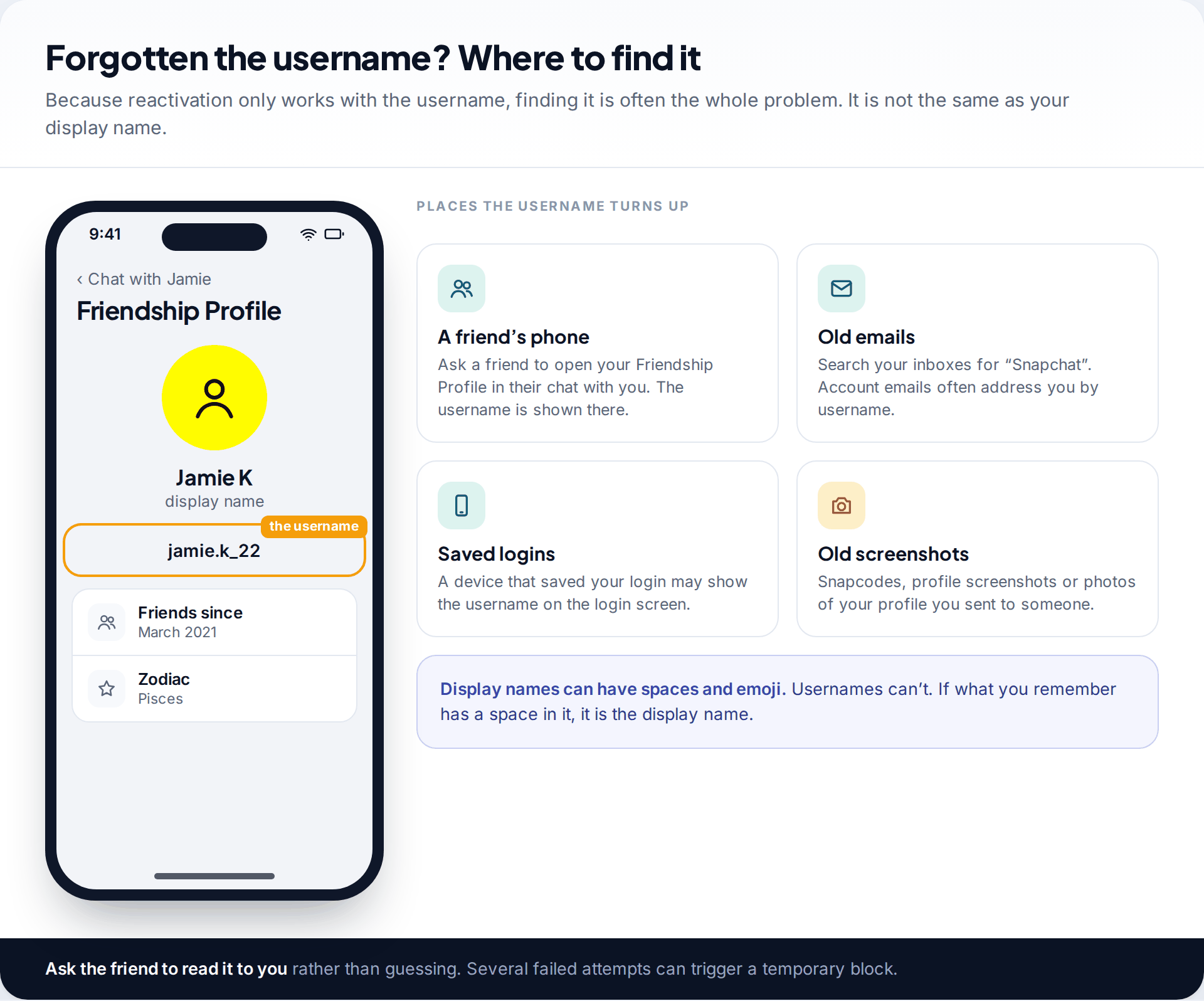
Because reactivation works only with the username, forgetting it can stop you completely. The username is not the same as your display name. Display names can contain spaces and emoji, but usernames can’t. Snapchat’s help centre suggests asking a friend to look at your Friendship Profile, where the username appears. Other places to look are old emails from Snapchat, the login screen on any device that saved your login, and old screenshots of your profile or Snapcode.
Ask the friend to read it out or send it by text, and type it carefully. Guessing variations can trigger the temporary block described above.
Not sure you want it back? Download your data first
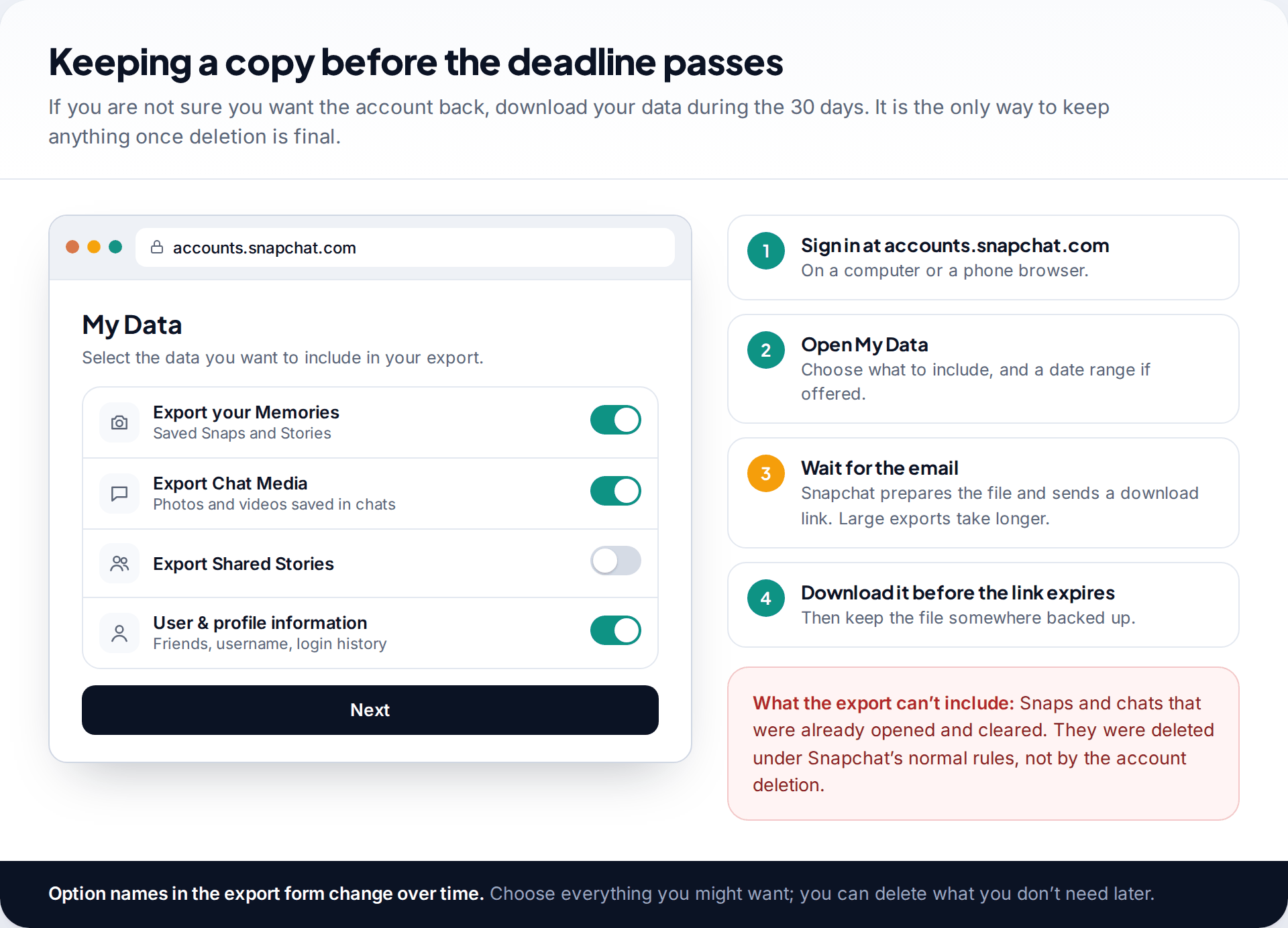
Snapchat gives you the same 30 days to download your data. Sign in at accounts.snapchat.com, open My Data, choose what to include and submit the request. Snapchat prepares the export and emails you a link. Large exports, especially those with lots of Memories, take longer, so don’t leave this until the last day.
Be realistic about what it contains. The export covers what is still stored on the account. Snaps and chats that were opened and cleared under Snapchat’s normal rules had already gone before the account was deleted. If they are what you are after, see our guide to where deleted Snapchat Memories might still be, which also covers copies saved to your phone’s camera roll.
What you get back, and what you don’t
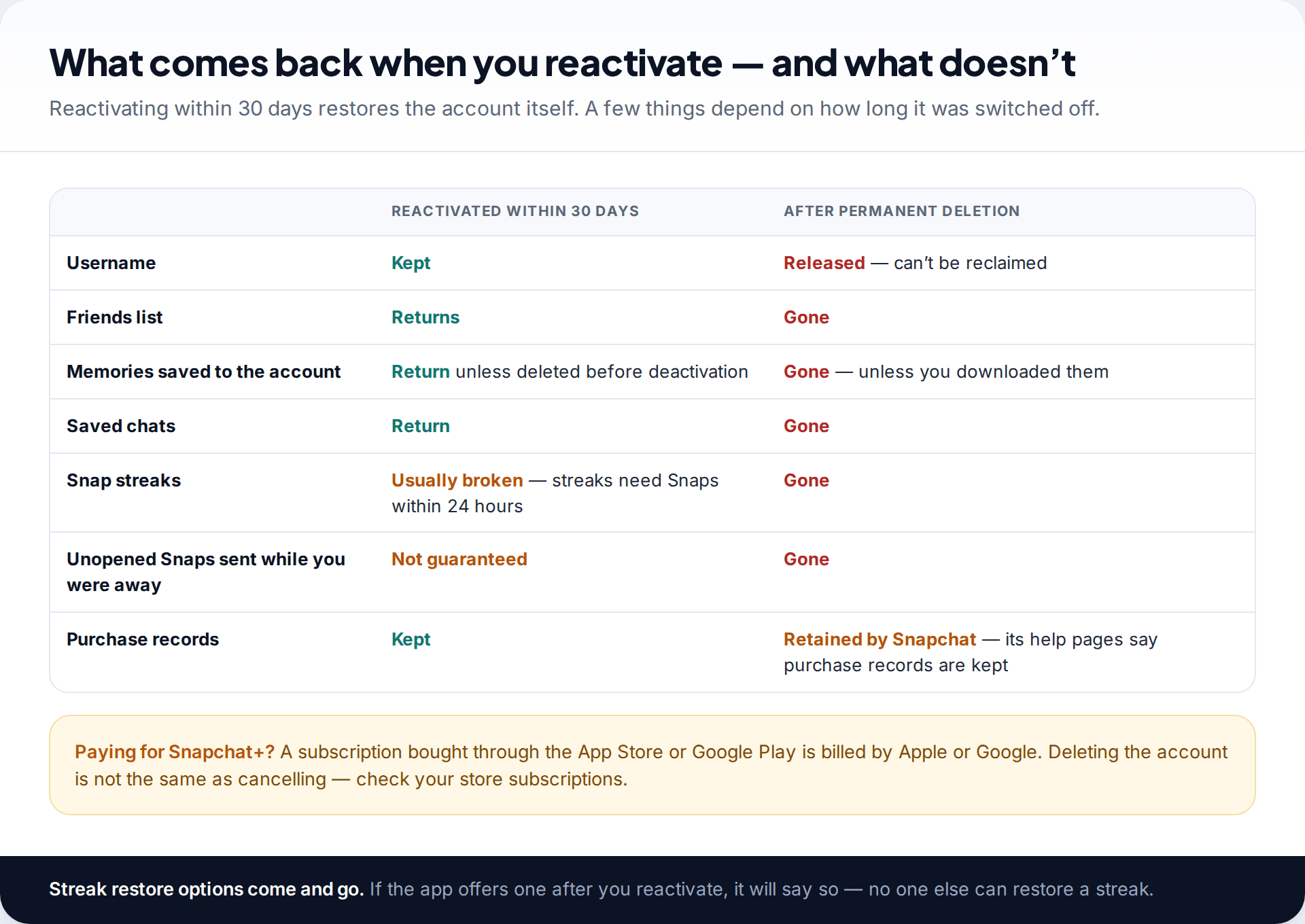
Reactivating within the window restores the account itself. That means your username, your friends and your saved Memories and chats. What doesn’t reliably survive is anything that depended on time passing. Streaks require Snaps within 24 hours, so a deactivation longer than that usually breaks them. Unopened Snaps sent while you were away may not be waiting for you.
After permanent deletion, nothing comes back. The username is released, and you can’t reclaim it. Snapchat’s help centre notes it keeps some records even then, such as information about purchases and when you accepted its terms. If you paid for Snapchat+ through Apple or Google, deleting the account doesn’t cancel the subscription in your app store, so check it there.
If someone else deleted your account
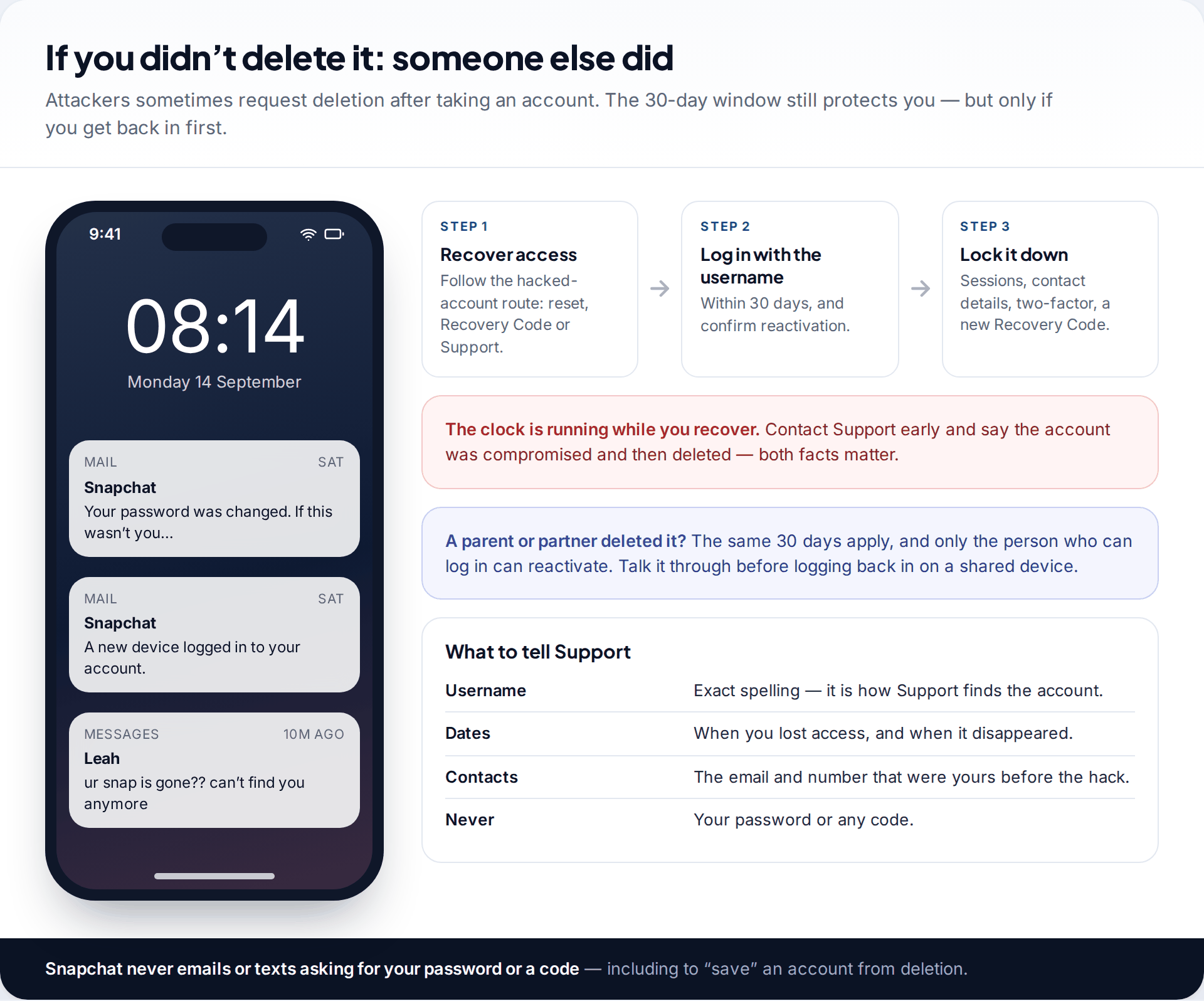
If you didn’t request deletion, someone else did, usually after taking over the account. The 30-day window still applies, but you need to get the login back first. Deactivated accounts can’t have their password reset, so contact Snapchat Support straight away. Explain that the account was compromised and deleted, and give dates if you know them. Our guide to getting a hacked Snapchat back covers the recovery routes and the lockdown afterwards.
If a parent or partner deleted it, the same rules apply. Only someone who can log in can reactivate it. It’s often better to talk before reactivating on a shared device.
Deleting it on purpose, and making the choice stick
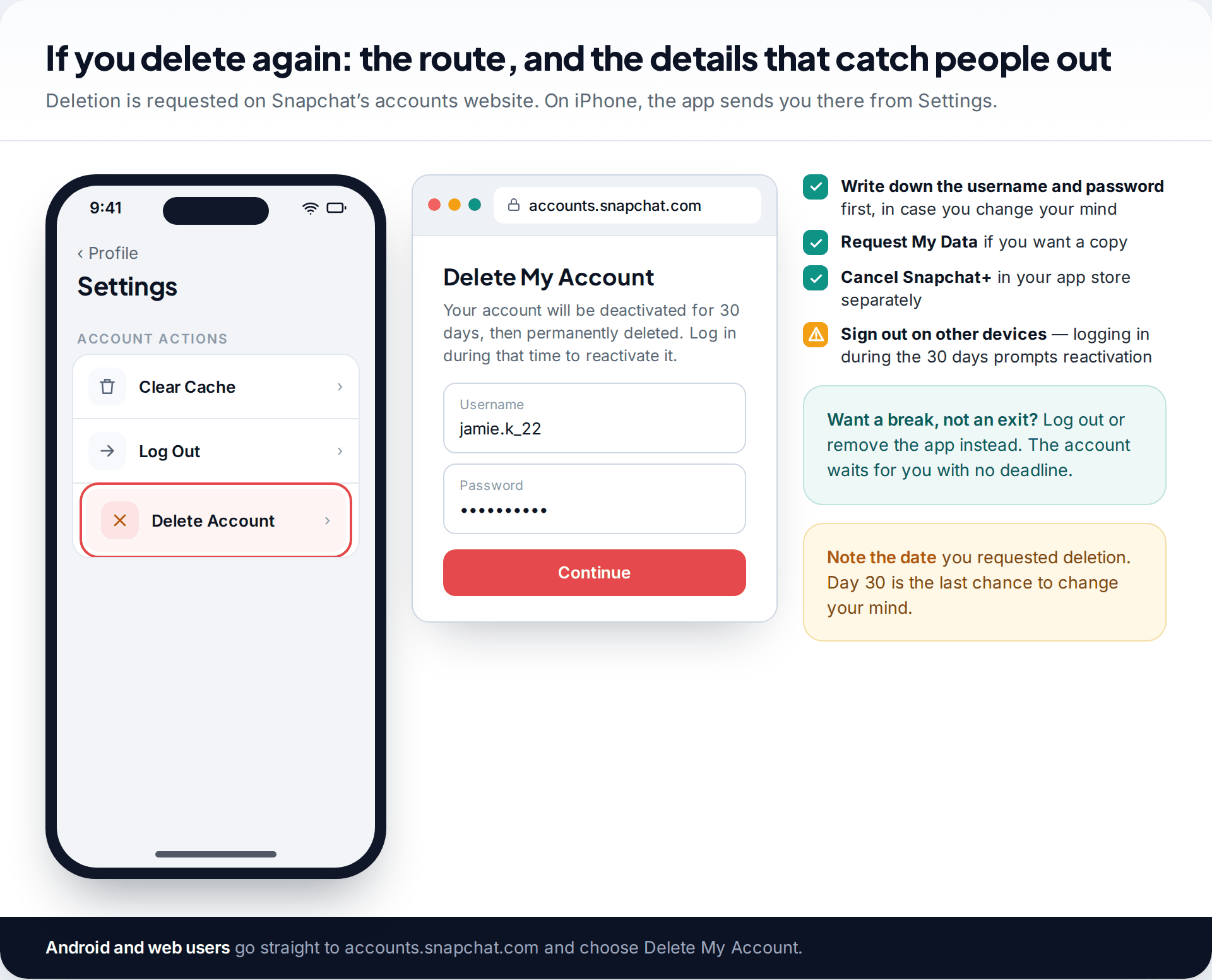
If you are here because you deleted the account in a hurry and regret it, the 30-day window is there for that. If you are thinking of deleting again, a little preparation keeps both options open. Snapchat’s help centre describes the route: on Android or the web, sign in at accounts.snapchat.com and choose to delete your account. On iPhone, go to Settings › Account Actions › Delete Account, which passes you to the same web form. Either way you confirm with your password.
Before you do, write down the username and password somewhere safe. Those two details are the only way to reactivate, and the password can’t be reset during deactivation. Download your data if you want a copy. Cancel any Snapchat+ subscription through the app store you bought it from. Then sign out on other phones and tablets. Logging in during the 30 days brings up the reactivation prompt, so a saved login on an old device can cause confusion later.
If your aim is a break rather than a clean exit, deletion is a blunt tool. Logging out, muting notifications or removing the app keeps the account without the deadline.
How this page was put together
The timings, reactivation steps and limits here come from Snapchat’s help centre articles on deactivating, deleting and reactivating accounts and on account access problems, checked in September 2026. The 24-hour delay comes from a public reply by Snapchat’s support team. Screens are illustrative mockups, and prompt wording varies by app version.
We have not tested reactivation on specific devices, and we don’t know of any way to restore an account after the 30 days. We would not trust anyone who claims one. Read how we source and review our guides.
Common questions
Can I recover a deleted Snapchat account after 30 days?
No. After 30 days Snapchat permanently deletes the account and releases the username. Snapchat Support can’t restore it, and services claiming they can are scams.
Why can’t I log in to reactivate my Snapchat account?
Check that you’re using the username, not your email or phone number. Use the password the account had when it was deleted, because you can’t reset it while deactivated. If you deleted it recently, wait up to 24 hours. After many failed attempts, wait 48 hours.
How long does Snapchat take to reactivate an account?
Often a short time once you confirm. Snapchat Support has said that a recently deactivated account can take up to 24 hours before it can be reactivated.
Will my friends know I deleted my Snapchat?
Snapchat’s help pages don’t mention any notice to friends. While deactivated, though, friends can’t contact or interact with you, and some will notice. Everything returns to normal when you reactivate.
Can I get my Snapchat username back after deletion?
Only by reactivating within 30 days. After permanent deletion the username is released and can’t be reclaimed.
Can Snapchat Support reactivate my account for me?
No. Snapchat’s help centre says only the account holder can reactivate an account, by logging in with the username within 30 days. Support can help with related problems, such as a locked or hacked account, but it can’t reactivate one on your behalf.
Does deleting Snapchat delete my Memories?
Not immediately. They come back if you reactivate within 30 days, and you can download them with My Data during that time. After permanent deletion they’re gone unless you saved a copy.
Looking for a tool to go with this? TheTruthSpy is a free parental control app for Android that stays visible on the child's phone. If it fits your family, see the Social media alerts feature.
Related guides
How to Fix a Phone That Keeps Freezing or Restarting
Fixes for a frozen or rebooting iPhone or Android phone, from a one-minute force restart to recovery mode, with a…
What to Do If Your Phone Gets Wet
Dropped your phone in water? What to do in the first five minutes, hour and day, what IP68 really means,…
Phone Not Charging? How to Find the Cause and Fix It
A ten-minute elimination test for a phone that won't charge: cable, adapter, port, software and battery, plus what liquid, heat…
Parental controls your child can see
Location, screen time limits, a web filter and alerts from notifications — free, and visible on your child's phone. Pair a phone in about ten minutes.
Android · Free to set up · Visible on your child's phone