App Blocker
Block apps on your child's Android phone for free. Set any app to allowed, limited or blocked, put a daily time limit on the one that eats the evening, and get asked before a new install is allowed to open at all. Most arguments about a phone are really arguments about one app: not the phone, not the internet, one game, one feed, one chat. An app blocker lets you deal with that single app without confiscating the whole device, and without turning every evening into a negotiation.
Free · Permission: Usage access · Visible on your child's phone
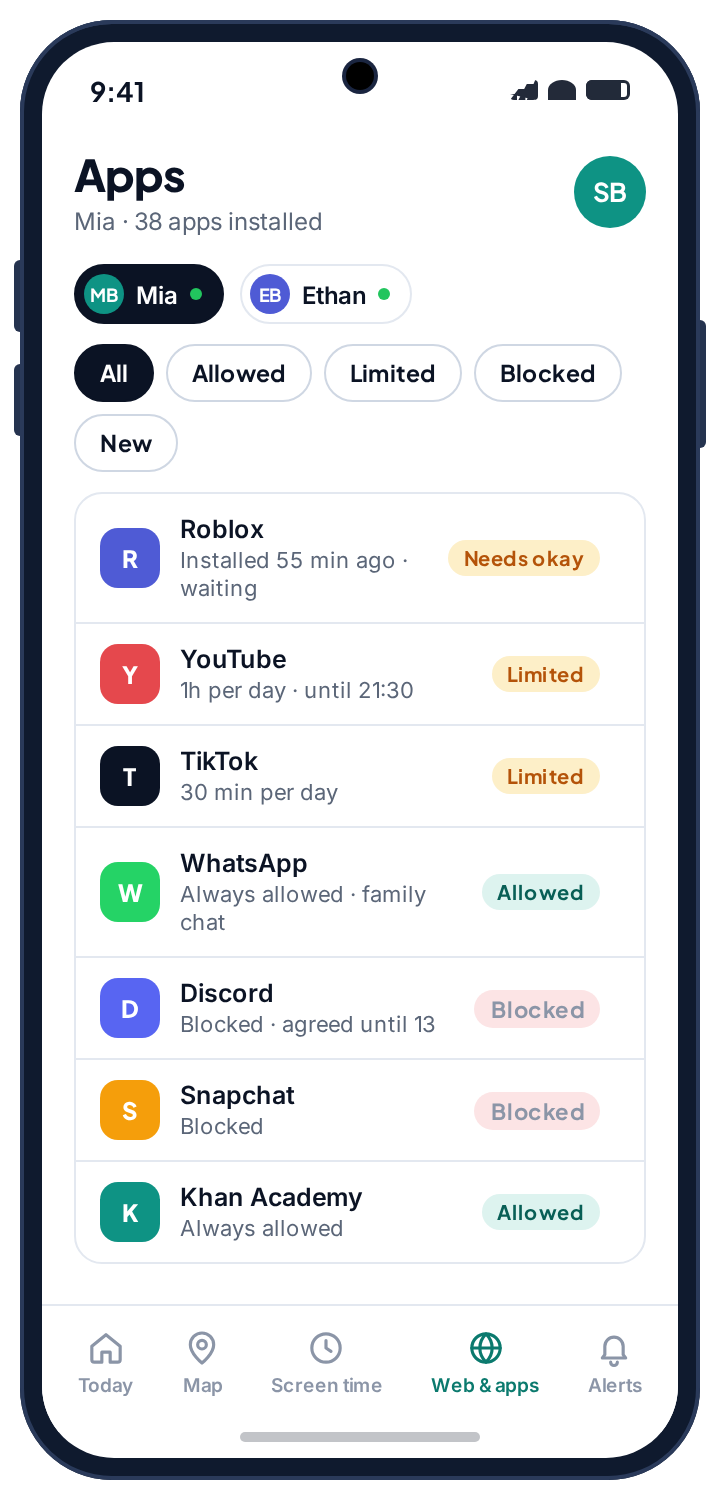
- Three states, not one switch. Allowed, limited or blocked, per app, changed any time from your panel. The middle one is the state families use most.
- New installs wait for you. A new app is held until you allow it, or allowed with a notification, or allowed quietly; you choose the default per child.
- Blocking an app never blocks the phone. The dialler, emergency calls, your own contact and the request button keep working whatever else is off.
- A blocked app shows a plain notice, not a crash, and running out of time starts a request rather than a row.
- Free, either build, visible. Usage access is the only permission, and the child sees every rule on their own phone.
Three settings, not one switch
A blunt app blocker only has on and off, which is why most of them end up switched off. TheTruthSpy gives every app on the phone one of three states, and you can change any of them at any time from your panel. The change reaches the phone within a minute or so, and setting it back is the same two taps.
| State | What happens | Where it belongs |
|---|---|---|
| Allowed | Works normally and does not count against anything. | School apps, the camera, maps, messaging with you. |
| Limited | Works for the minutes you allow each day, then stops opening until tomorrow or until you grant more. | The game or feed that eats the evening. The state families use most. |
| Blocked | Does not open. Tapping it shows a plain notice rather than a crash. | Apps that should not be on the phone yet, with an agreed-until date if you like. |
The middle state is the one that changes the tone of the house. A game your child loves does not have to be forbidden to stop being a problem; it just has to have an end. Set the limit, let the warning fire five minutes before, and the app closes itself instead of you closing it. Schedules stack on top: an app can be limited to forty-five minutes a day and also paused during school hours and after bedtime, with the screen time app handling the clock.
Block new app installs before they open
The gap in most app blockers is the app that was not there when you set the rules. A child installs something on Tuesday; your carefully arranged list says nothing about it; it runs unrestricted until you happen to notice. TheTruthSpy closes that by telling you when a new app appears and letting you decide what happens to it before it is used. You set the default per child.
- Ask me first. A new app is held until you allow it. Strict, and right for younger children.
- Allow but tell me. The app works, and you get a notification naming it. Fair for a teenager, and still no surprises.
- Allow quietly. No alert. For an older teenager where app-by-app approval has stopped being proportionate.
The alert names the app, its store category and age rating, and where it came from. An app pulled from the Play Store and an app installed from a link on a forum look different in that notification, and the second one is worth a question. Apps installed from outside Google Play skip Google's review entirely, which is how most harmful software reaches a phone and how a child gets around a restriction: a modified version of a blocked game, a browser nobody has heard of. TheTruthSpy flags these separately, because the fact that an app did not come from the store is itself the signal. You do not need to know what the app does to know it is worth asking about.
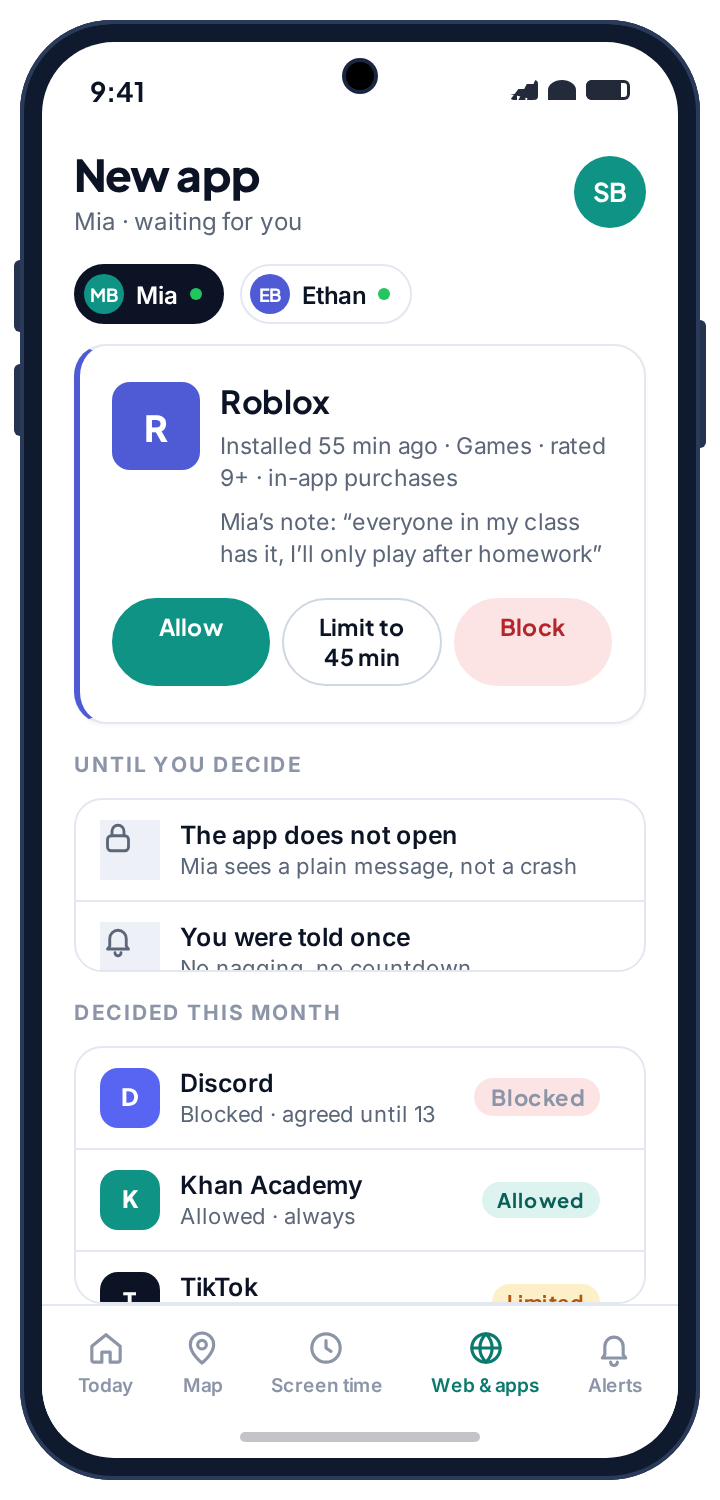
The blocked app becomes a conversation instead of a standoff.
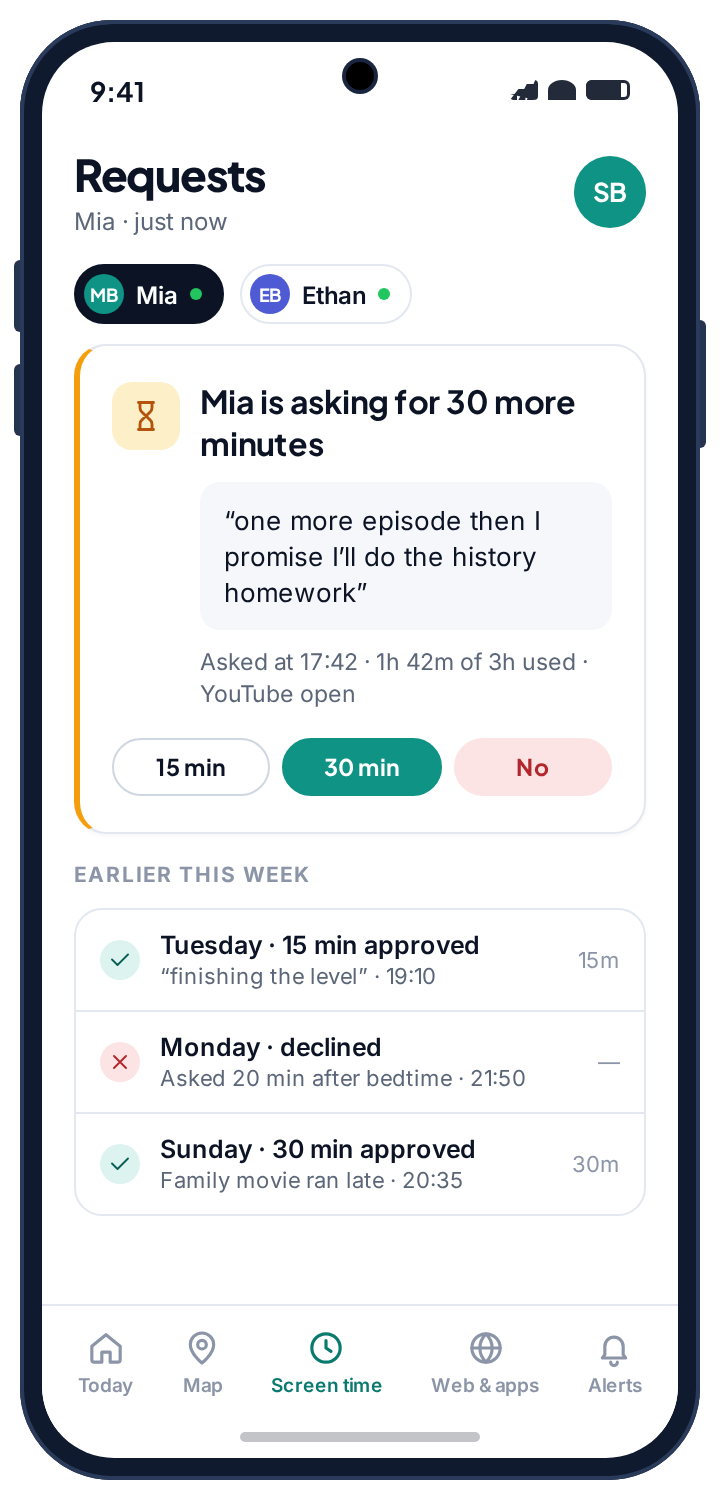
A limited app does not simply vanish mid-game. Your child gets a warning as the budget runs low, so they can finish a round rather than lose it. Then the app closes and will not reopen. At that point they can ask you for more from their own phone. The request arrives in your panel with whatever note they attached, and you tap fifteen minutes, thirty, or no. That one exchange replaces most of the shouting, because the answer comes from a person rather than from a wall.
Blocking an app is not the same as blocking the phone, and this is where blunt tools lose parents. Blocking a game does not stop your child calling you, does not stop maps working on the way home, and does not lock the phone. TheTruthSpy keeps a small set of things working no matter what you have blocked: the dialler, your own contact, emergency calls, and the TheTruthSpy app itself so they can still ask for more time. A phone that cannot reach a parent is not a safer phone.
- Warned five minutes before. So the limit ends a round, not a sentence.
- A plain notice, not a crash. A child who understands what happened argues less than one who thinks the phone is broken.
- Minutes can be earned back. A blocked game does not have to stay blocked forever; chores and rewards turn a flat no into a deal.
Being straight about this saves you disappointment later.
It controls whether an app opens, not what happens inside it.
Blocking is not monitoring. A limited chat app still carries whatever conversation it carries.
Pair it with: the web filter for content reached through a browser, and social media monitoring for who is messaging.
Blocking a chat app moves the conversation to another one.
Expect it. Whack-a-mole with messaging apps is a game a parent loses.
Instead: limit rather than block, and watch the pattern across apps on the social overview.
A determined teenager with the passcode can uninstall TheTruthSpy.
The app does not hide or resist removal.
What happens: your panel tells you the phone stopped reporting, which is the part that matters. A tool that cannot be removed is a tool nobody agreed to.
Usage access was reset and nothing is counted.
A system update or a battery-saver prompt switched the permission off. Without it the app cannot see which app is in the foreground.
Fix: Device health names it. Settings → Apps → Special app access → Usage access → the app → Allow.
Questions parents ask about blocking apps.
How do I block an app on my child's Android phone?
Open your parent panel, find the app in the list, and set it to Blocked. The change reaches the phone within a minute or so. Setting it back to Allowed is the same two taps.
Can I block an app only at certain times?
Yes. Use a schedule rather than a hard block; bedtime and school hours are the two most families set. Outside those windows the app behaves normally.
Will my child know an app has been blocked?
Yes. Tapping the app shows a plain message saying it is blocked, rather than failing silently, and every rule is listed on their own phone.
Can my child uninstall the app blocker?
They can remove TheTruthSpy the same way as any app, and it does not fight back or disguise itself. Your panel shows the phone has stopped reporting, so you find out. That is deliberate.
Does blocking apps stop calls and messages to me?
No. The dialler, emergency calls, your own contact and the TheTruthSpy app itself keep working whatever else is blocked.
Is the app blocker free?
Yes. App blocking, time limits and new-install alerts are free on Android with no card and no subscription. The pricing page page explains how.
What the app blocker sits beside
Blocking decides which apps open; it says nothing about how long. Total hours belong to daily screen time limits, and anything reached through the browser is the web filter's job. The browsing history shows which pages were actually opened inside the browsers you allow.
The app blocker switches on once the child's phone is paired with your parent account, which takes about ten minutes. The setup guide covers each screen.
Decide which apps open, and when.
Pair your child's phone and set your first app to limited tonight. No card, no subscription, and every rule visible on their phone.
Android · Free to set up · Visible on your child's phone