Was Your Email Hacked? The Evidence Inside Your Own Inbox

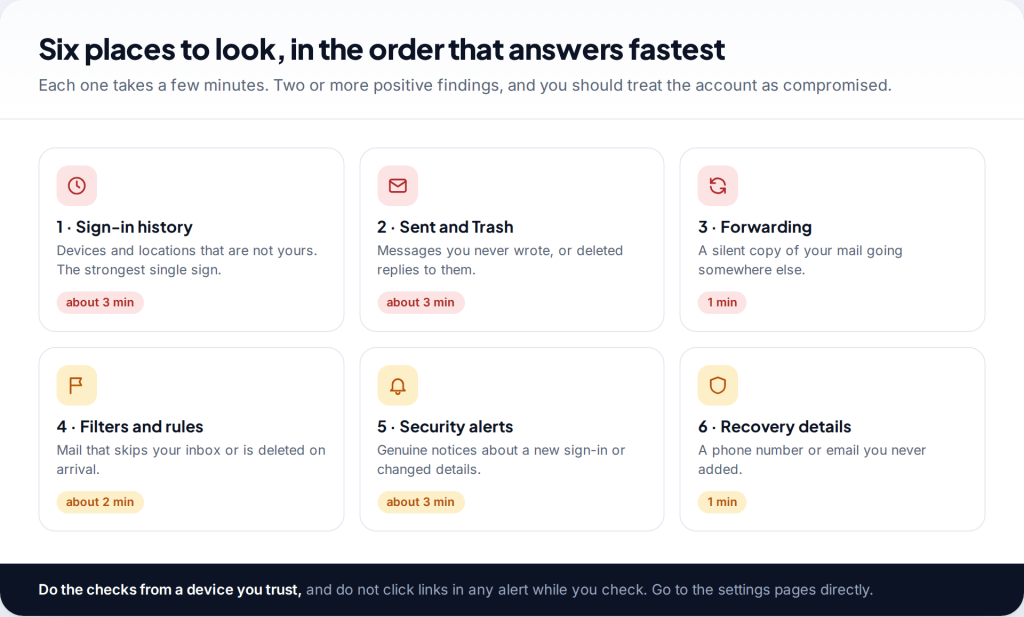
How do you tell if your email was hacked rather than just acting strangely? Look for evidence the account keeps about itself. Check the sign-in history for devices and places that aren’t yours, messages in Sent you never wrote, and forwarding or filters you never set up. Any one of these is strong evidence. Spam “from you” on its own is not.
The good news is that Gmail, Outlook.com and Yahoo all record enough to settle the question in about fifteen minutes. The checks below go from the fastest and most conclusive to the slower ones. Do them from a device you trust, and open each settings page directly rather than through a link in an email.
How to tell if email was hacked: where the evidence is
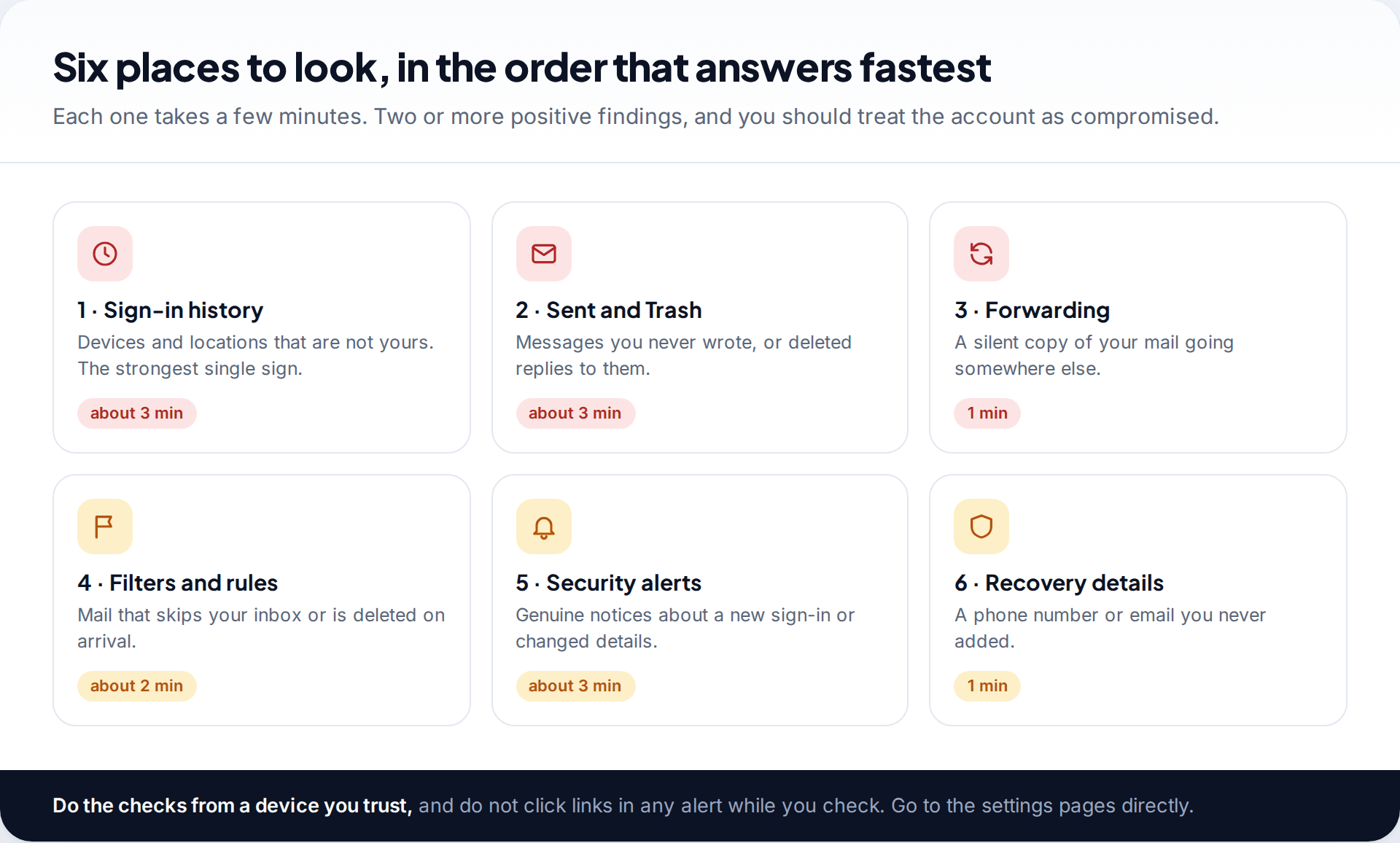
Most “was I hacked?” articles give a list of symptoms: slow mail, strange spam, friends asking questions. Symptoms are a reason to look, but they are not proof. The proof lives in six places inside the account. There’s the record of sign-ins, the Sent and Trash folders, forwarding settings, filters, the security alerts your provider sent you, and the recovery phone and email on file.
Yahoo’s own help page on hacked accounts lists four signs that line up with these. You stop receiving email. Your account sends spam to your contacts. Your activity history shows sign-ins you don’t recognise. Or your account info or mail settings changed without your knowledge. Each of those can be confirmed or ruled out in the places below.
1. Read your sign-in history
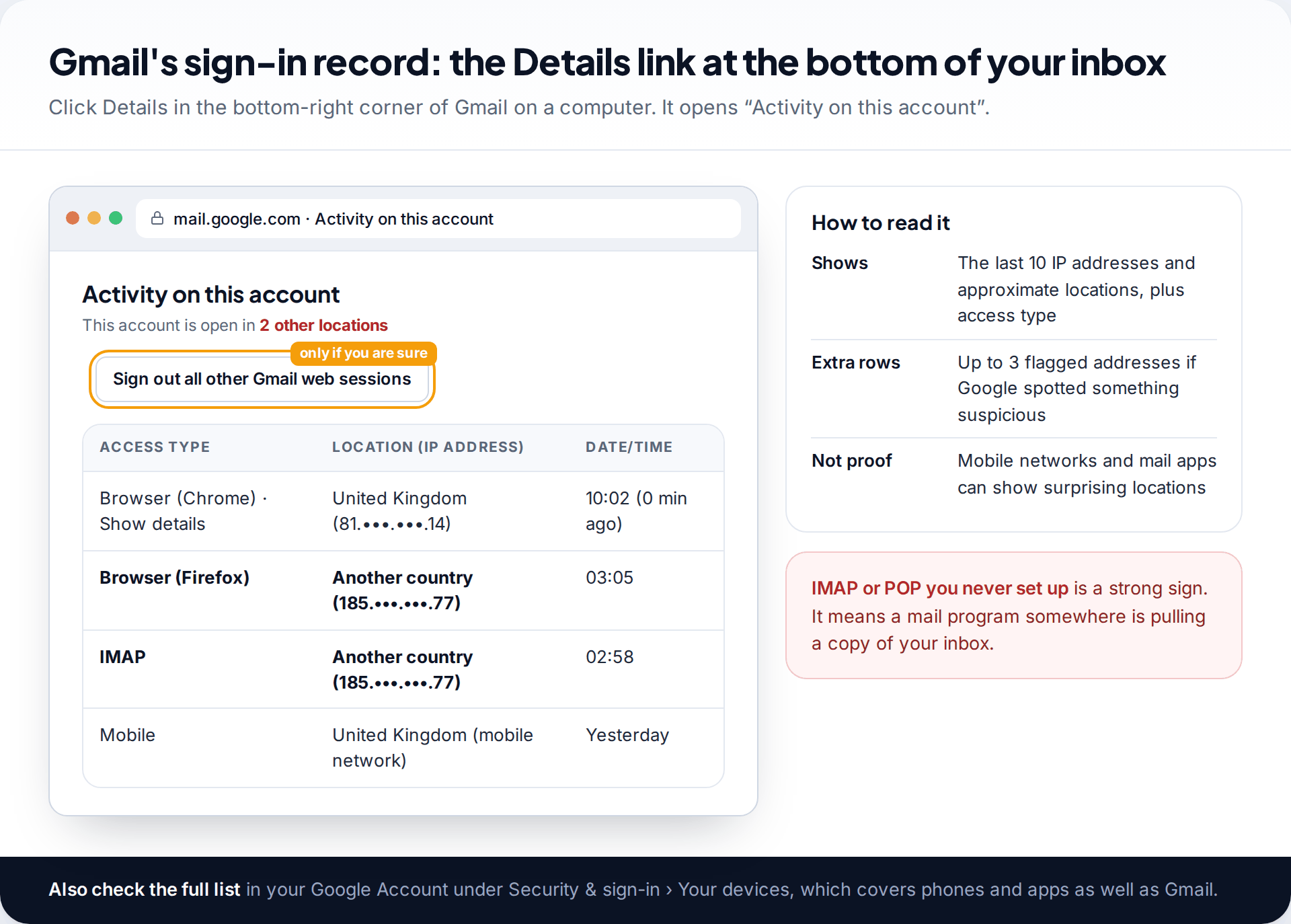
This is the most conclusive check, so do it first. In Gmail on a computer, scroll to the bottom of your inbox and click Details in the bottom-right corner. The “Activity on this account” page shows whether Gmail is open elsewhere right now. It also shows the access type (browser, mobile, or a mail protocol such as POP or IMAP) and the last 10 IP addresses with approximate locations. If Google flagged something suspicious, up to three more addresses appear.
Read it carefully before you panic. Google itself notes that mobile networks and mail apps can show locations far from where you are. What matters is an access type you never use, or a browser you don’t own, especially at 3 a.m. For the full picture, open your Google Account and go to Security & sign-in. The device list there covers phones and apps as well as Gmail.
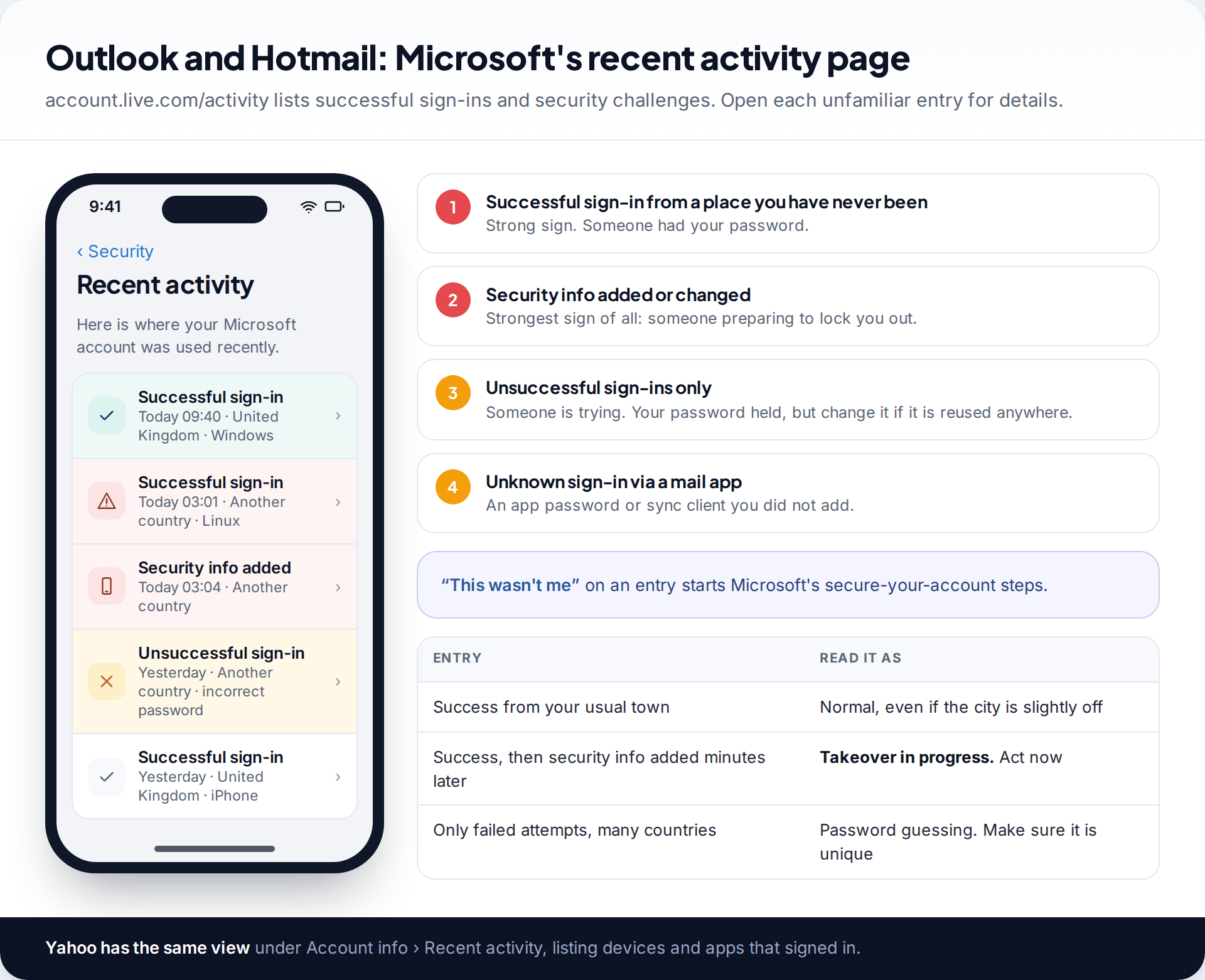
For Outlook, Hotmail and Live accounts, Microsoft keeps a recent activity page at account.live.com/activity. It lists successful sign-ins and security challenges, with location and device. Pay most attention to two kinds of entry. A successful sign-in you don’t recognise means someone had your password. Security info added or changed means someone was preparing to lock you out. A run of unsuccessful sign-ins is different: someone is trying, but your password held. For Yahoo, the equivalent is Recent activity in your account info.
2. Check Sent and Trash for messages you never wrote
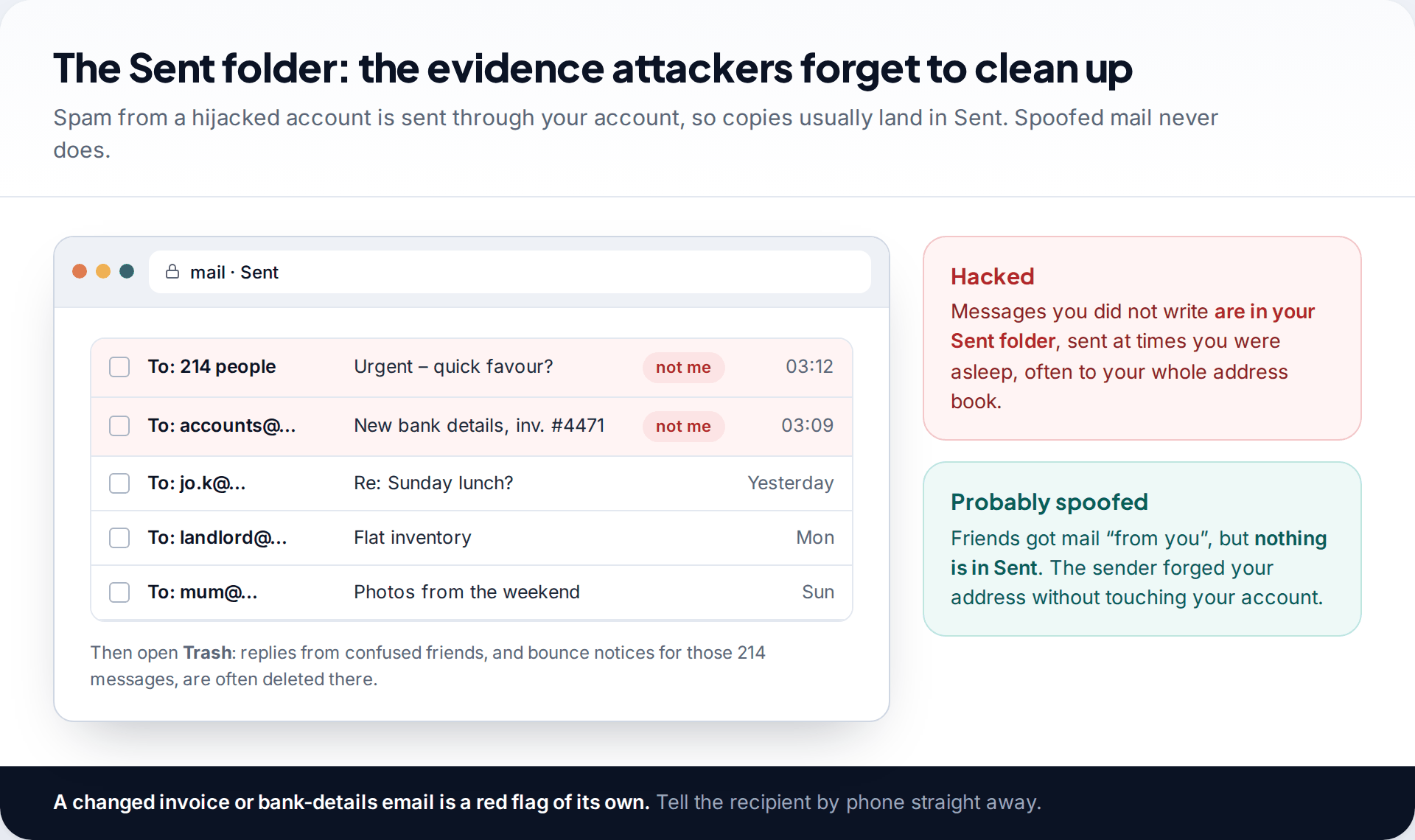
When an attacker uses your account to send spam or scams, the messages usually go through your provider, and a copy lands in your Sent folder. Look for anything sent at odd hours, to large numbers of people, or with subjects you’d never write. Watch especially for messages about invoices or changed bank details. Those are attempts to divert payments, and the recipient needs a phone call from you today.
Then open Trash. Careful attackers delete what they sent, and the replies from confused friends, and the “message undeliverable” bounces. Trash often catches what Sent doesn’t.
Three friends say they got a strange link from you
You check Sent: nothing unusual. Trash: nothing. Sign-in history on Gmail’s Details page shows only your laptop and phone. One friend forwards the message, and the sender’s address looks right, but the “reply-to” is an address you’ve never seen.
3. Look for forwarding, filters and delegates
This is the check most people skip, and it matters most. An attacker who wants to keep reading your mail after you change the password doesn’t need the password. They need one of these settings, and all three survive a password change.
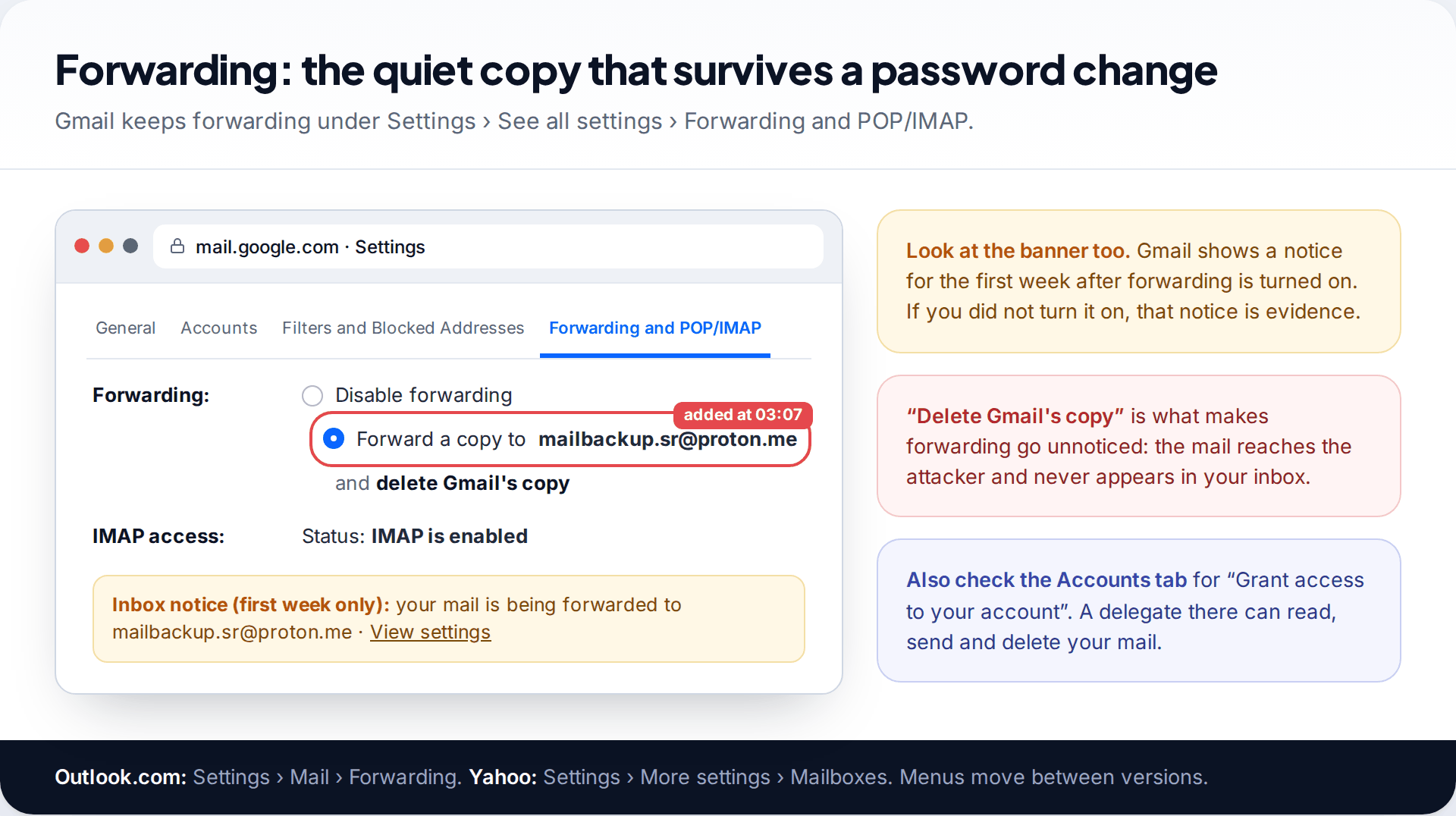
Forwarding. In Gmail, go to Settings › See all settings › Forwarding and POP/IMAP. If a forwarding address is set that you don’t recognise, that’s close to conclusive. Gmail shows a notice for the first week after forwarding is turned on, so an unexpected banner about forwarding is itself worth taking seriously. In Outlook.com the setting is under Settings › Mail › Forwarding. In Yahoo it’s under Mailboxes in the mail settings.
Delegates. Still in Gmail settings, open the Accounts tab and look at “Grant access to your account”. A delegate listed there can read, send and delete your email. Unless you added one on purpose, it should be empty.
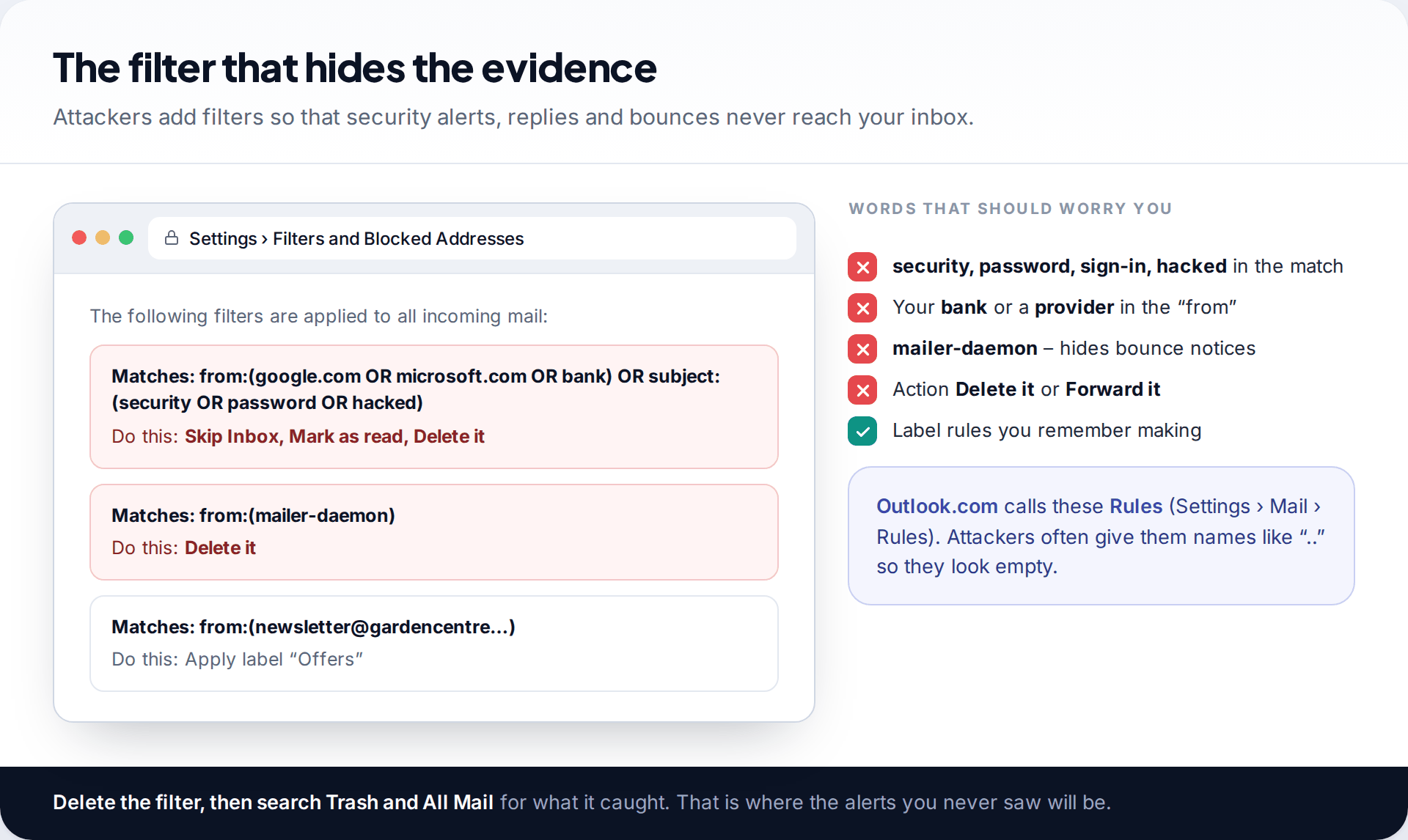
Filters and rules. Open Gmail’s Filters and Blocked Addresses tab, or Outlook.com’s Settings › Mail › Rules. Look for anything that matches words like “security”, “password” or “sign-in”, or your bank or email provider, and then deletes, archives or forwards the message. A filter that deletes mail from “mailer-daemon” hides the bounce notices you’d get if your account were sending spam. Delete the filter, then search Trash and All Mail for what it caught.
Found one of these? Don’t just delete it and move on. Its existence means someone was in your account. Go straight to our guide to recovering and locking down a hacked email account and work through the whole lockdown in order.
4. Separate real security alerts from fake ones
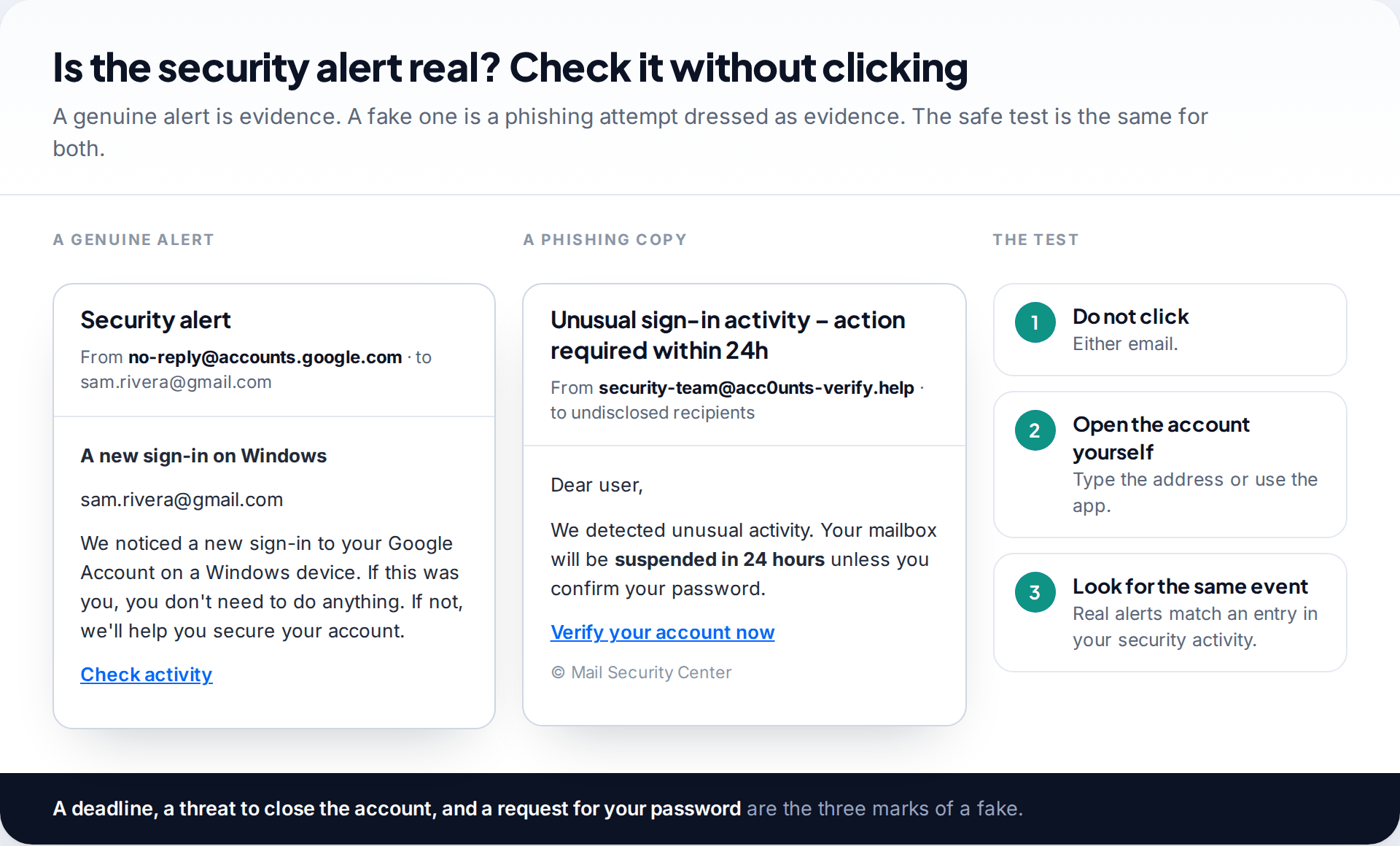
Providers email you when something important changes, such as a new sign-in, a password change or a new recovery phone. A genuine alert you didn’t cause is strong evidence. But fake alerts are among the most common phishing emails, precisely because they cause the panic that makes people click.
Don’t try to judge the email itself. Close it, open your account the way you normally would, and look at the security activity. If the event is listed there, the alert was real. If there is no matching event, the email was the attack. Deadlines (“suspended in 24 hours”), threats to close the account, and requests for your password are the marks of a fake. Google, Microsoft and Yahoo don’t ask for your password by email.
5. Check the recovery phone and email
Last, open your account’s security page and read the recovery phone number and recovery email. An attacker who plans to keep the account swaps these first. Then, when you finally change the password, they reset it again from their own phone. A number or address you don’t recognise, or yours with one digit changed, is conclusive.
On Microsoft accounts, a newly added security method also shows up in recent activity. On Google accounts, changes to recovery details appear in recent security activity with a date and device.
Hacked, spoofed or breached: which one is it?
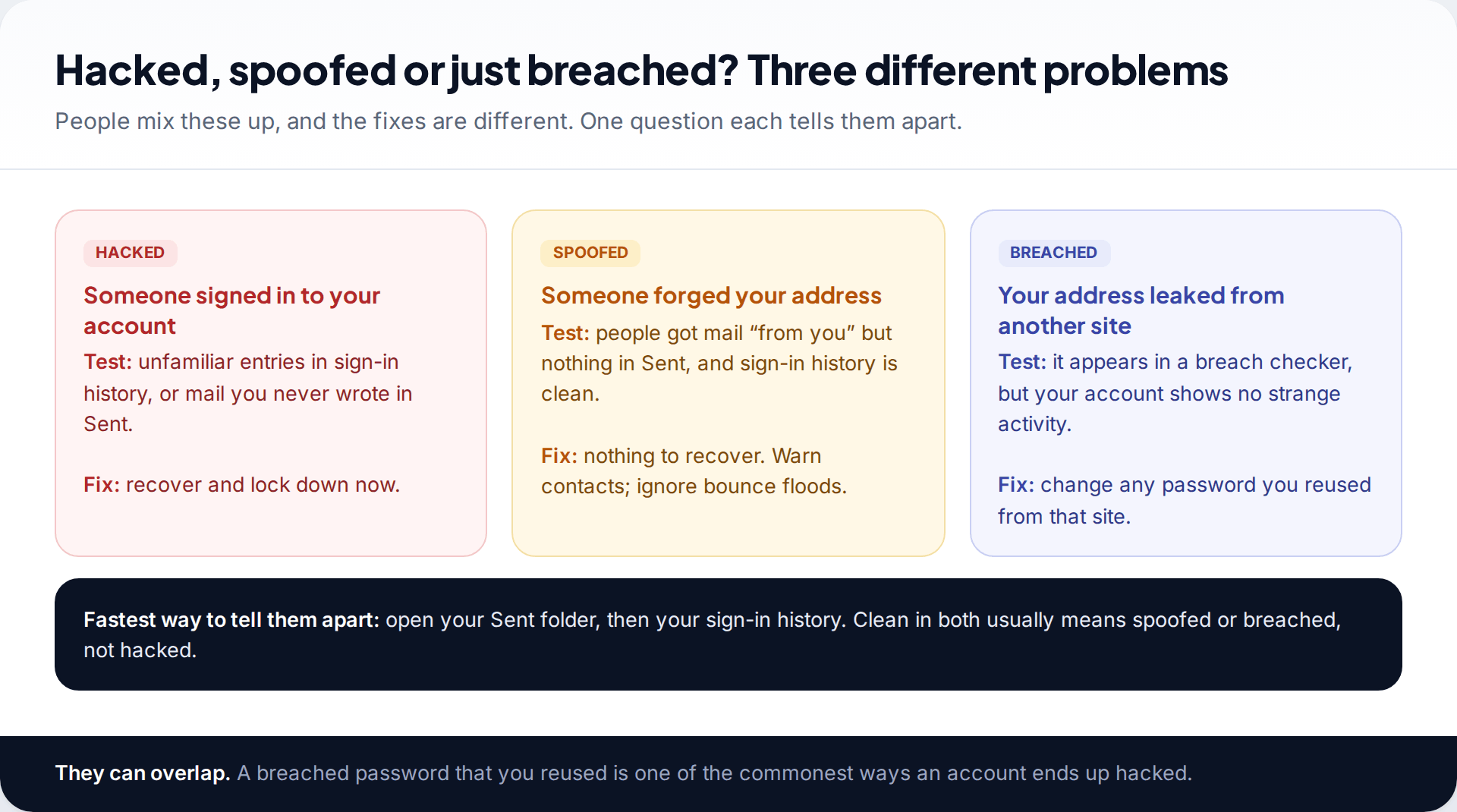
Three situations get called “hacked”, and they need different responses:
- Hacked: someone signed in. The evidence is in the sign-in history, Sent folder or settings. You need to recover and lock down.
- Spoofed: someone forged your address in the From line of their own mail. Your account is untouched. Sent is clean, the sign-in history is normal, and you may get a flood of bounce messages for mail you never sent. There’s nothing to recover.
- Breached: your address, and perhaps a password, leaked from another website. Your inbox may be fine, but any password you reused from that site is now in circulation.
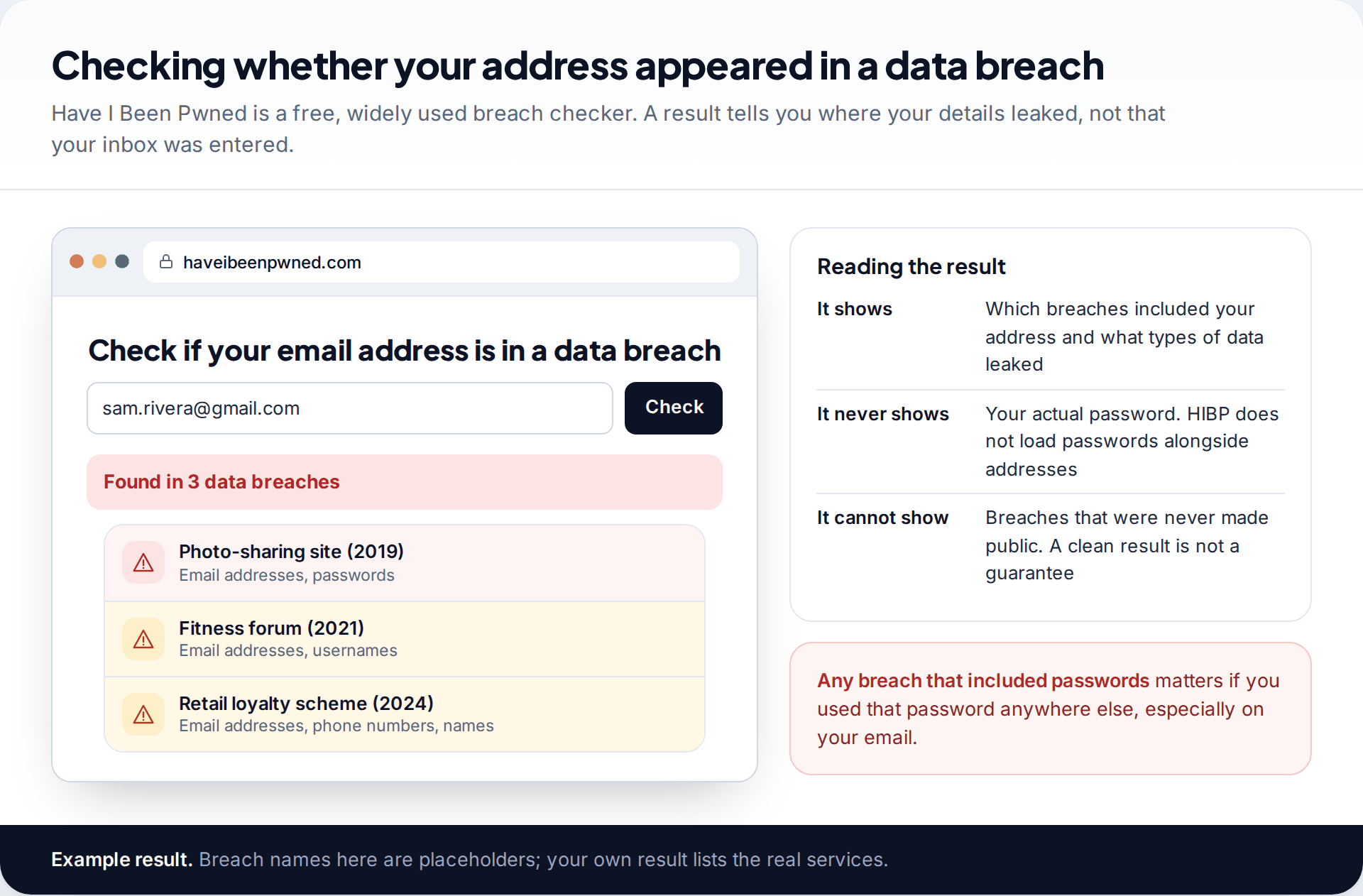
To check for breaches, Have I Been Pwned is the best-known free service. Enter your address and it lists the known breaches that included it and what kinds of data leaked. It never displays passwords. It also says openly that it holds only a subset of all breached records, so a clean result isn’t a guarantee. If a breach included passwords and you used that password on your email, change it now, even if nothing else looks wrong. Our guide to passwords you can actually remember shows how to replace it with one that is long and unique.
What these checks cannot tell you
These checks are good at catching someone who signed in to your account. They have limits:
- They won’t show what was read. Sign-in history shows access, not which messages were opened. If someone was in, assume they read anything they wanted.
- History is short. Gmail’s Details page shows the last 10 addresses. An intrusion weeks ago may have scrolled off.
- They can’t see your device. If malware or a monitoring app on your phone or computer reads your mail on the device itself, the provider sees your own device signing in. Nothing looks wrong. That needs a check of the device, not the account.
- Location is approximate. A VPN, mobile network or mail app can make your own sign-ins look foreign, and an attacker’s look local.
If the account checks come back clean but you still have a specific reason for concern, such as someone quoting your private emails back to you, the device is the next place to look.
How this page was put together
Each check was compared in September 2026 against Google’s Gmail and Account Help pages (recent activity, forwarding and delegation), Microsoft’s Outlook.com security guidance and recent activity page, Yahoo Help’s page on recognising a hacked account, and Have I Been Pwned’s own FAQ. Menu names are quoted as those pages give them. Providers rename settings often, so search the settings page if a label has moved.
The scenarios and screens are illustrations, not real accounts, and the breach names in the example are placeholders. You can read how we check and correct our guides.
Common questions
Can someone access my email without me knowing?
Yes, for a while. Forwarding, filters and delegates are designed to work silently, which is why checking them matters more than waiting for symptoms. Sign-in history and security alerts are what usually give it away.
My friends got spam from my email address. Was I hacked?
Not necessarily. If the messages are in your Sent folder, yes. If Sent is clean and your sign-in history is normal, your address was most likely spoofed, meaning forged by someone who never had access to your account.
How can I see who has logged into my Gmail?
Click Details at the bottom right of Gmail on a computer to see recent access by type, IP address and approximate location. For every device signed in to your Google Account, go to Security & sign-in and open your devices list.
Does being in a data breach mean my email was hacked?
No. It means your address, and possibly a password, leaked from another service. It becomes a risk to your email if you used the same password there. Change any reused password.
Will changing my password stop a hacker?
Not on its own. Forwarding addresses, filters, delegates, app passwords and a swapped recovery phone all survive a password change. Remove those as well, and sign out other sessions.
Why do I get “undeliverable” messages for emails I never sent?
Usually because someone spoofed your address and some of their spam bounced back to you. Check your Sent folder. If those messages aren’t there, your account wasn’t used to send them.
Looking for a tool to go with this? TheTruthSpy is a free parental control app for Android that stays visible on the child's phone. If it fits your family, see the Social media alerts feature.
Related guides
How to Check If Your Email Was in a Data Breach
Check if your email was in a data breach for free, then act on what leaked: passwords, card details or…
How to Start Using a Password Manager
Switch to a password manager without stress: built-in or standalone, protecting the main password, and a first-hour plan for the…
How to Tell If Your Phone Has a Virus or Malware
Most 'virus' signs have ordinary causes. How to check an iPhone or Android phone for real malware, remove it, secure…
Parental controls your child can see
Location, screen time limits, a web filter and alerts from notifications — free, and visible on your child's phone. Pair a phone in about ten minutes.
Android · Free to set up · Visible on your child's phone