Signs Someone Else Has Access to Your iCloud, and How to Cut Them Off

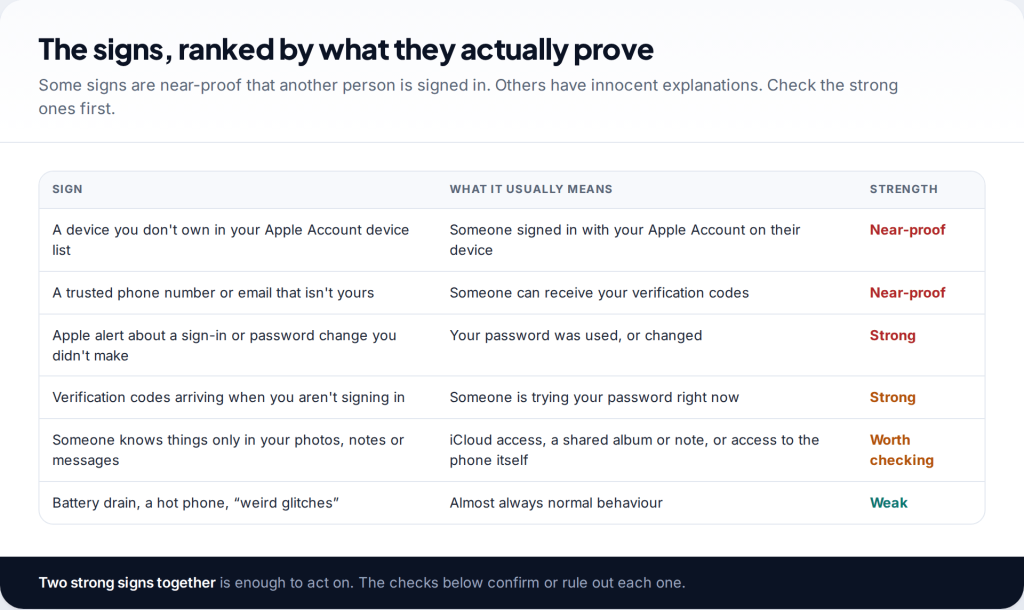
If you think someone has access to your iCloud, the proof is usually in two places: the device list on your Apple Account, and the trusted phone numbers that receive your codes. Check those first. But before you remove anyone, think about how they might react. If it’s a partner or someone you live with, cutting access may be noticed, and your safety matters more than speed.
This guide goes through the evidence in order, from near-proof to weak signs. It then covers the sharing features that explain many “how did they know?” moments, and the order for cutting access that stops them getting straight back in. Apple’s built-in Safety Check does much of the work. We’ll show where it helps and where it stops.
Signs someone has access to your iCloud, ranked
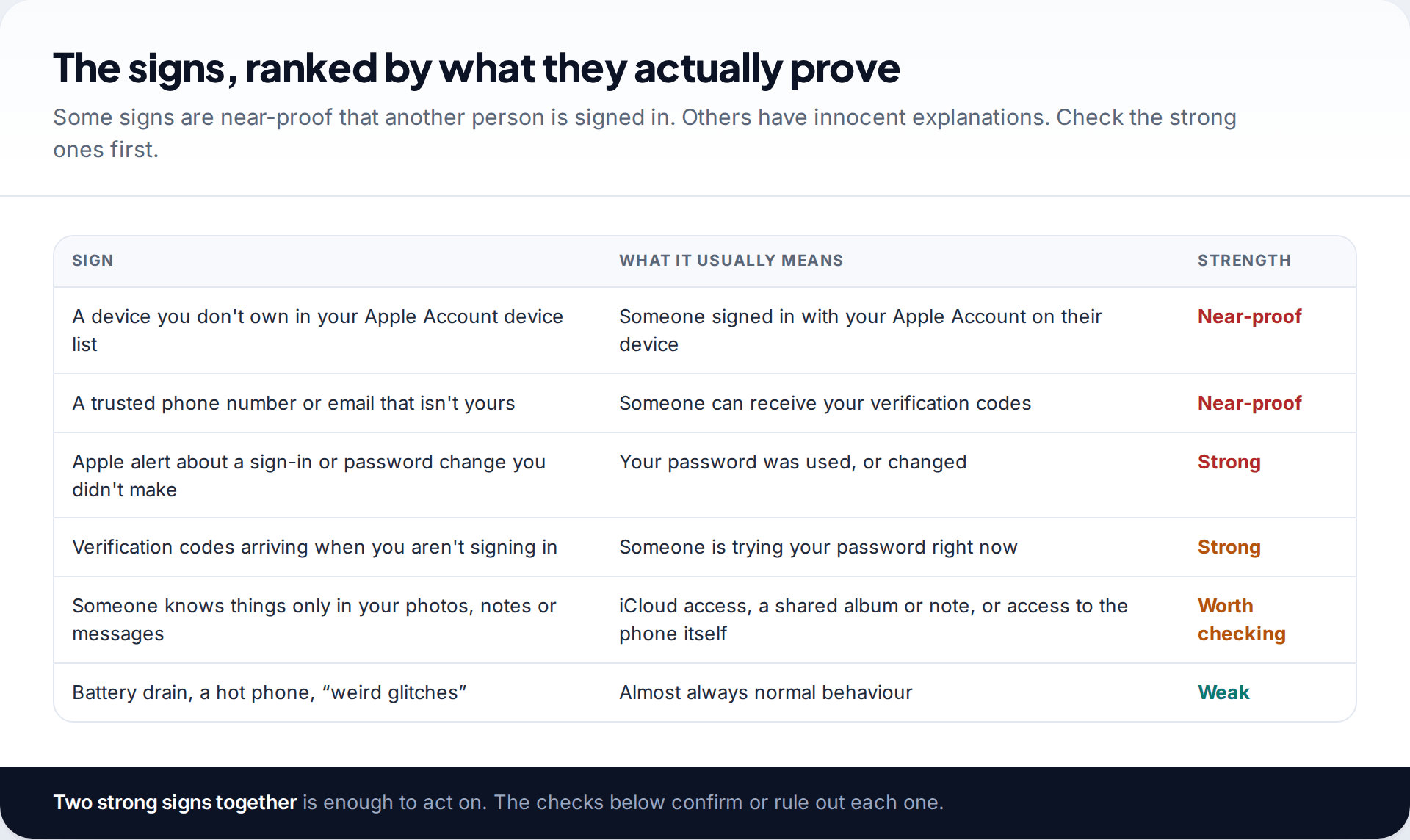
Apple’s own page on compromised accounts lists the signs to watch for. You get notifications about account activity you don’t recognise, or verification codes you didn’t request. There are messages you don’t recognise, devices you don’t recognise, and purchases you didn’t make. Those are strong. What is usually weak, despite how often it’s repeated online, is general phone behaviour: battery drain, heat, a slow camera. An iCloud sign-in on someone else’s device doesn’t make your phone behave any differently.
The most common real-world clue is simpler. Someone knows something they could only have seen in your photos, notes, messages or location. That is worth taking seriously, but it has several possible explanations. They may have iCloud access. They may be on a shared album, a shared note or location sharing you forgot about. Or they may have access to the phone itself. The checks below tell these apart.
Check the device list on your Apple Account
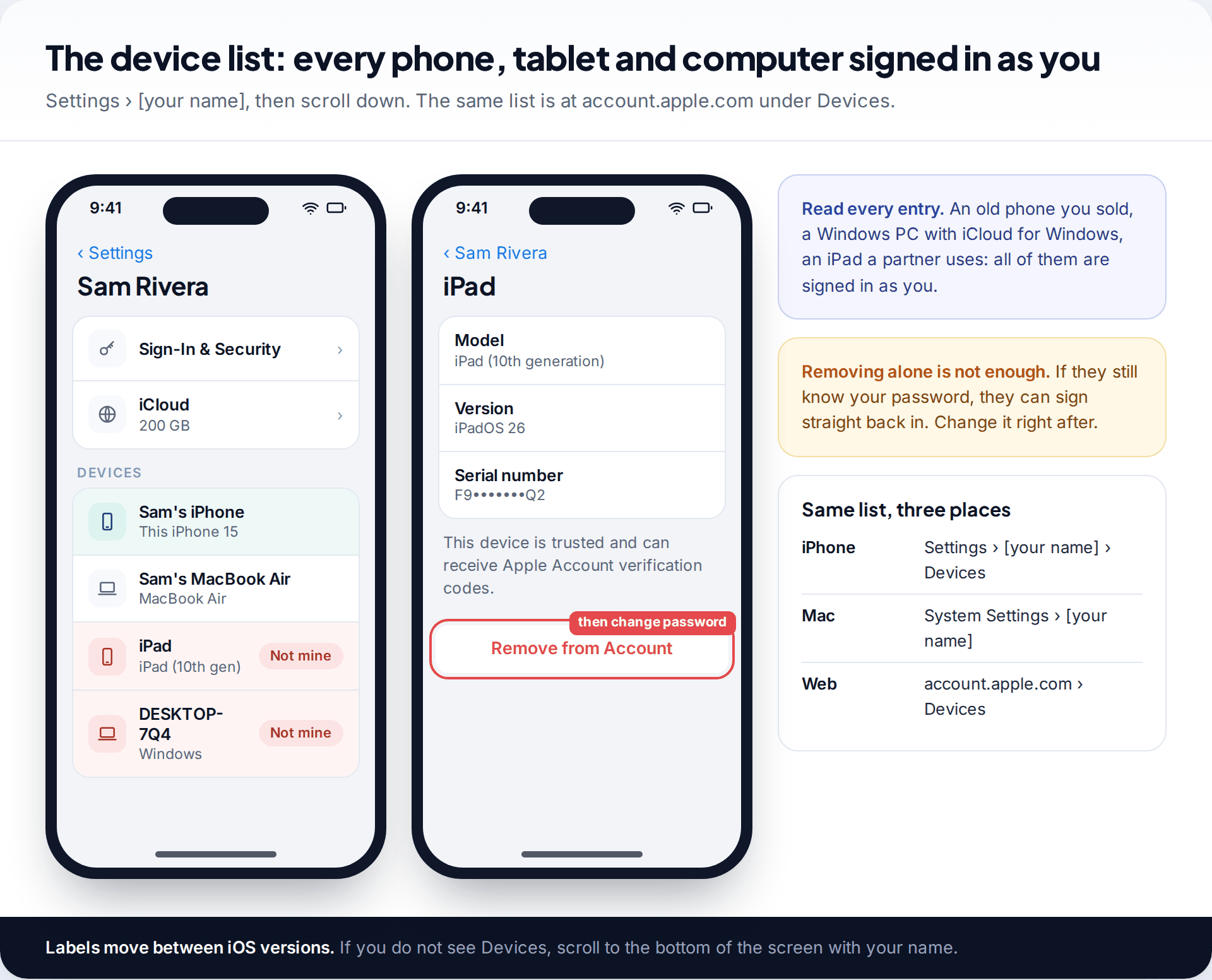
On your iPhone, open Settings, tap your name at the top, and scroll down to the list of devices. On a Mac it’s System Settings › your name. On the web, sign in at account.apple.com and open Devices. Apple notes that devices on this list can be used to change your password and receive verification codes. That’s why anything you don’t recognise is serious.
Look for more than strangers’ phones. An iPad a partner uses, an old iPhone you gave away, a Windows PC running iCloud for Windows: each one signed in with your Apple Account can see your synced photos, notes, and, depending on settings, your messages. Tap a device to see its model and serial number. When you’re ready, tap Remove from Account. Removing it is only half the job, though. If they know your password, they can sign in again, which is why the order later in this guide matters.
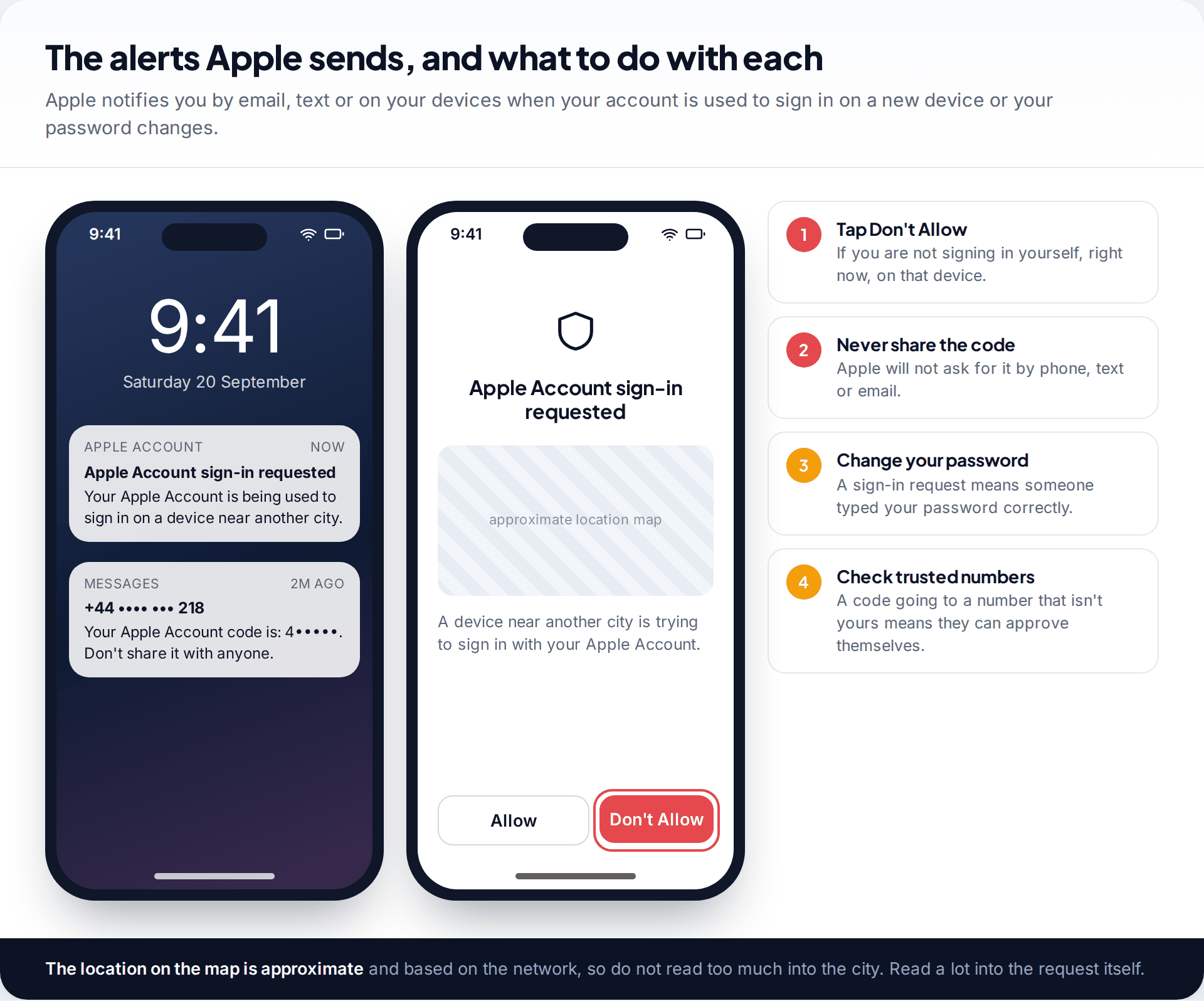
Apple also sends alerts by email, text or push notification when your account is used to sign in on a new device or your password is changed. A sign-in request you didn’t start means someone has your password. Tap Don’t Allow, and never read the code to anyone. Apple won’t ask for it by phone or message. If codes keep arriving unprompted, someone is trying repeatedly, and changing the password is urgent.
Check iCloud on the web
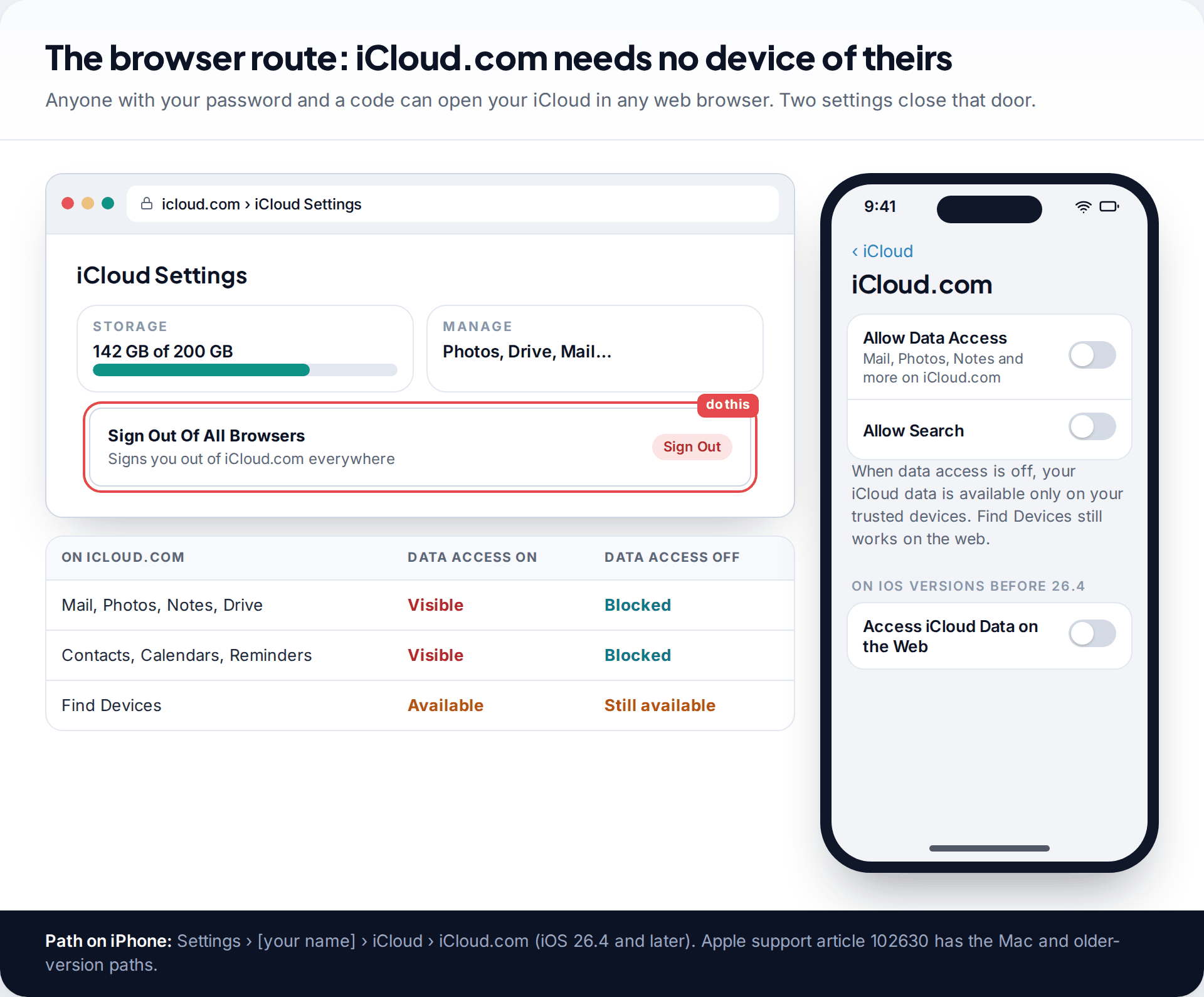
No device list shows every web session. Someone with your password and a code can open your mail, photos and notes at iCloud.com from any browser, and nothing new appears on your device list. There are two ways to deal with that. First, on iCloud.com, open your account menu, go to iCloud Settings and choose Sign Out Of All Browsers. Second, stop web access to your data altogether. On iOS 26.4 and later that’s Settings › your name › iCloud › iCloud.com, where you turn off Allow Data Access. Earlier versions call it Access iCloud Data on the Web. With it off, Apple says your data is available only on your trusted devices, though Find Devices still works on the web.
Sharing that’s working as designed
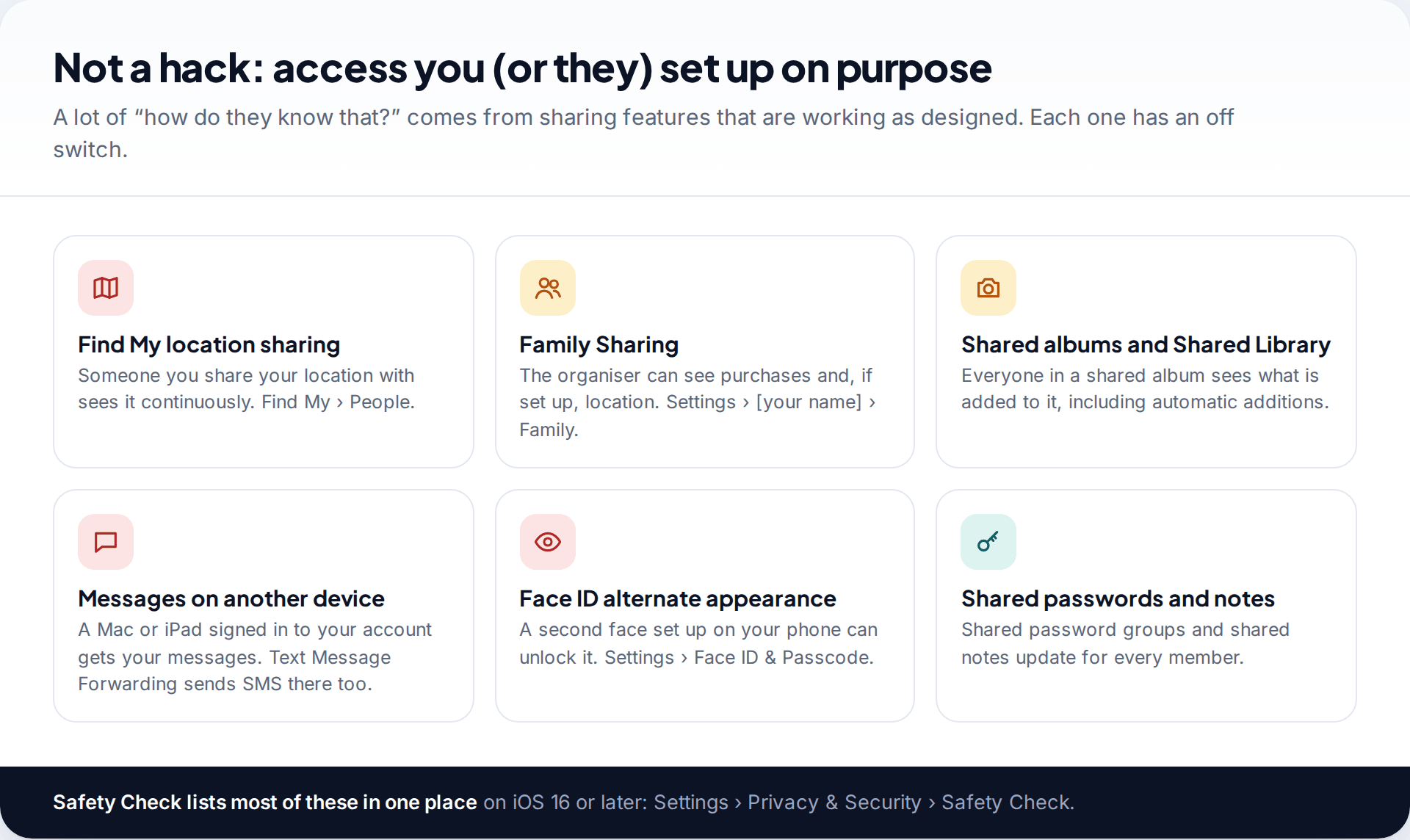
Not every leak is an intrusion. Location sharing in Find My shows your location continuously to anyone you shared it with, often years ago. Family Sharing gives the organiser visibility of purchases and, if location sharing is on, your whereabouts. A shared album or Shared Library shows everything added to it. A Mac or iPad signed in with your Apple Account receives your iMessages, and Text Message Forwarding can send your SMS to it too. Shared notes and shared password groups update for every member. Our guide to stopping someone from tracking your location goes through the location routes one by one.
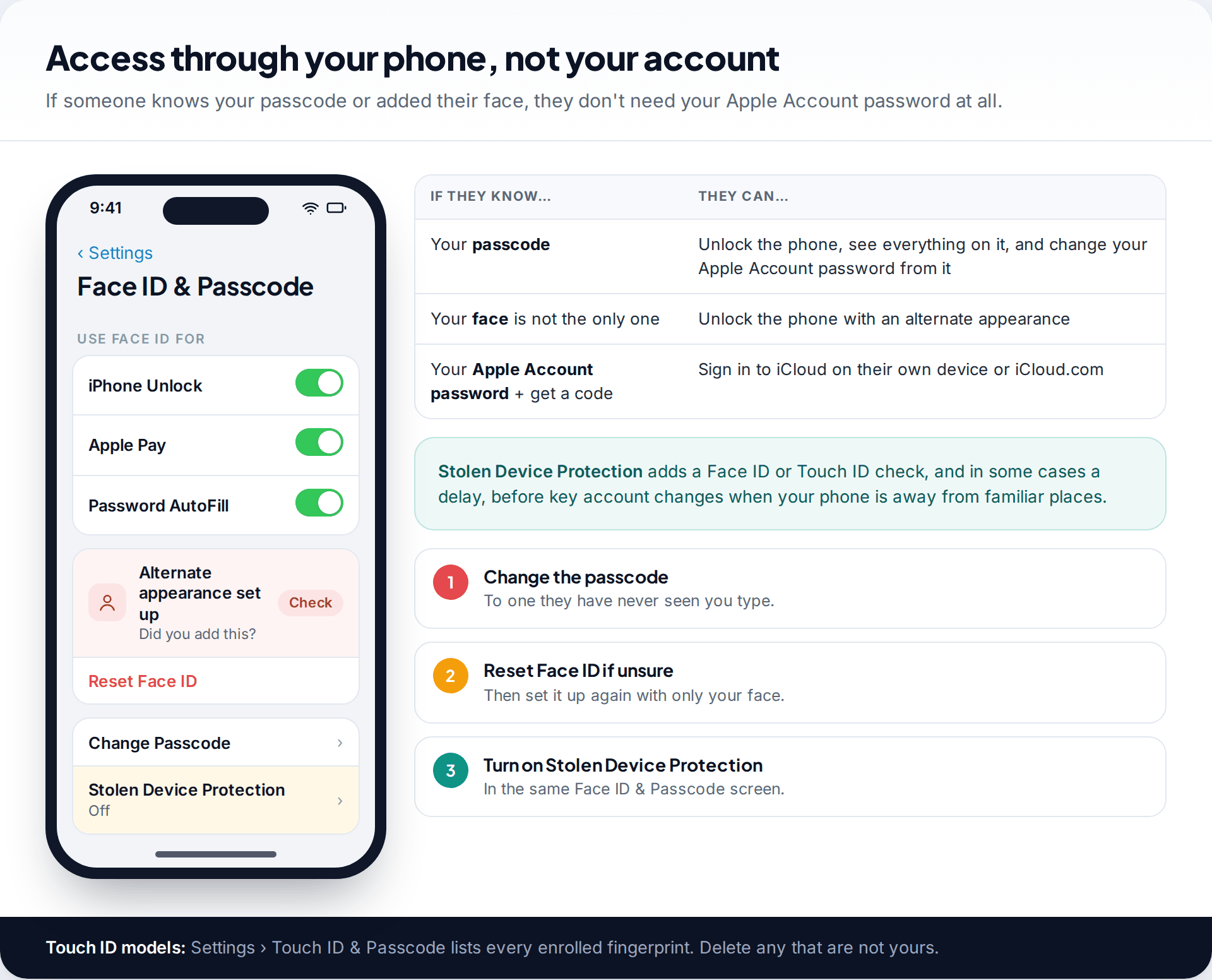
Then there’s access through the phone itself. Apple’s personal safety checklist starts with changing your passcode. It also says to check Face ID for an unexpected alternate appearance, or Touch ID for a fingerprint you didn’t enrol. Anyone who knows your passcode can unlock the phone, read everything on it and, on an unprotected phone, change your Apple Account password from it. The same checklist also mentions reviewing unfamiliar apps and looking for an unknown device management (MDM) configuration profile.
Use Safety Check to remove access
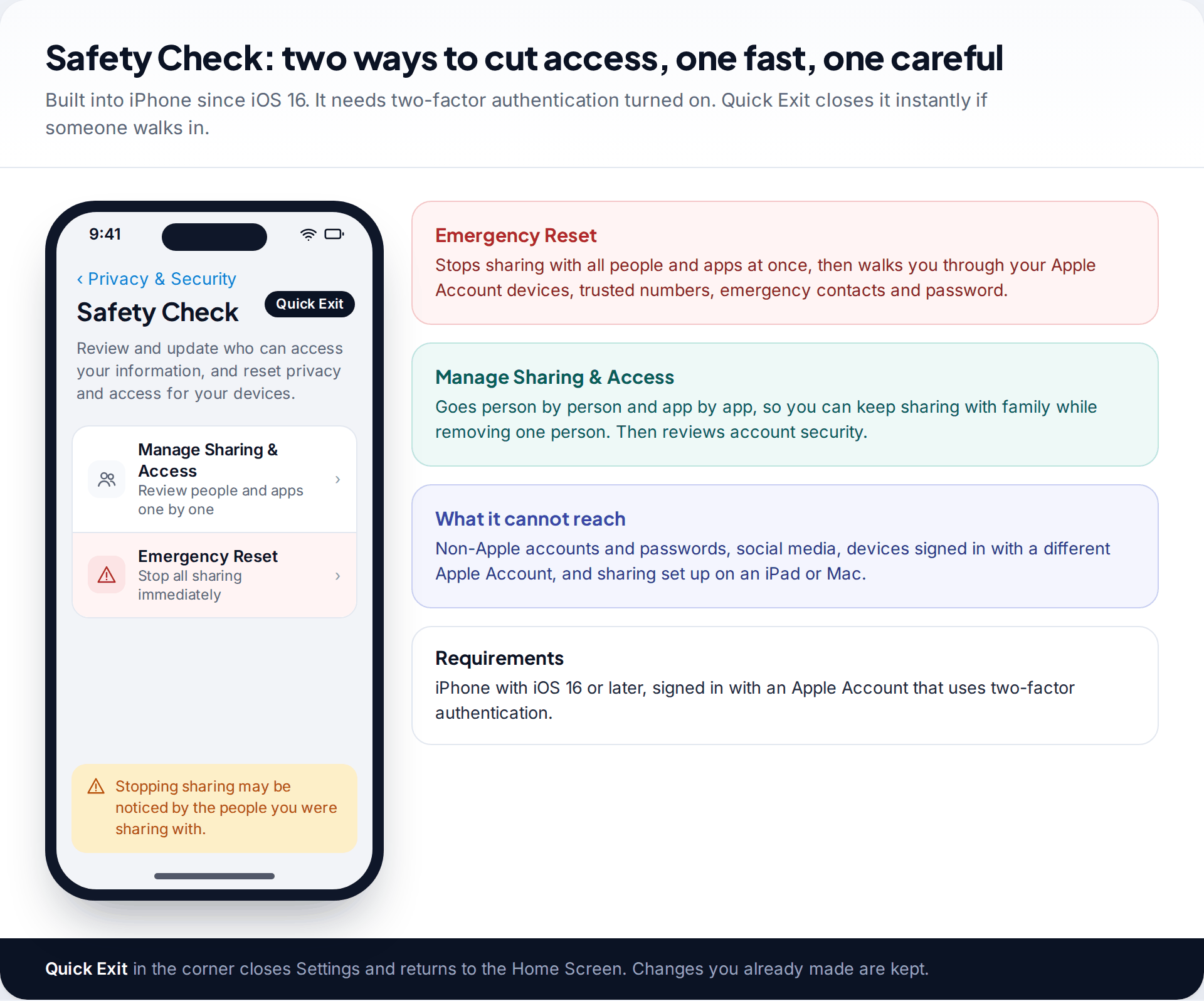
On iOS 16 and later, Safety Check brings most of this into one place. Go to Settings › Privacy & Security › Safety Check. It needs two-factor authentication turned on. It offers two routes:
- Emergency Reset stops sharing with all people and apps at once. It then takes you through your Apple Account devices, the phone numbers used to verify your identity, emergency contacts and your password.
- Manage Sharing & Access goes person by person and app by app. It suits you if you want to keep sharing with family while removing one person, and it ends with a review of account security.
A Quick Exit button closes Settings instantly and keeps any changes you’ve already made. Apple is clear about the limits. Safety Check doesn’t manage non-Apple accounts or passwords, social media, devices signed in with a different Apple Account, or sharing turned on from an iPad or Mac. Apple also asks you to consider your safety before you make changes, because people may notice when sharing stops.
Cutting them off in the right order
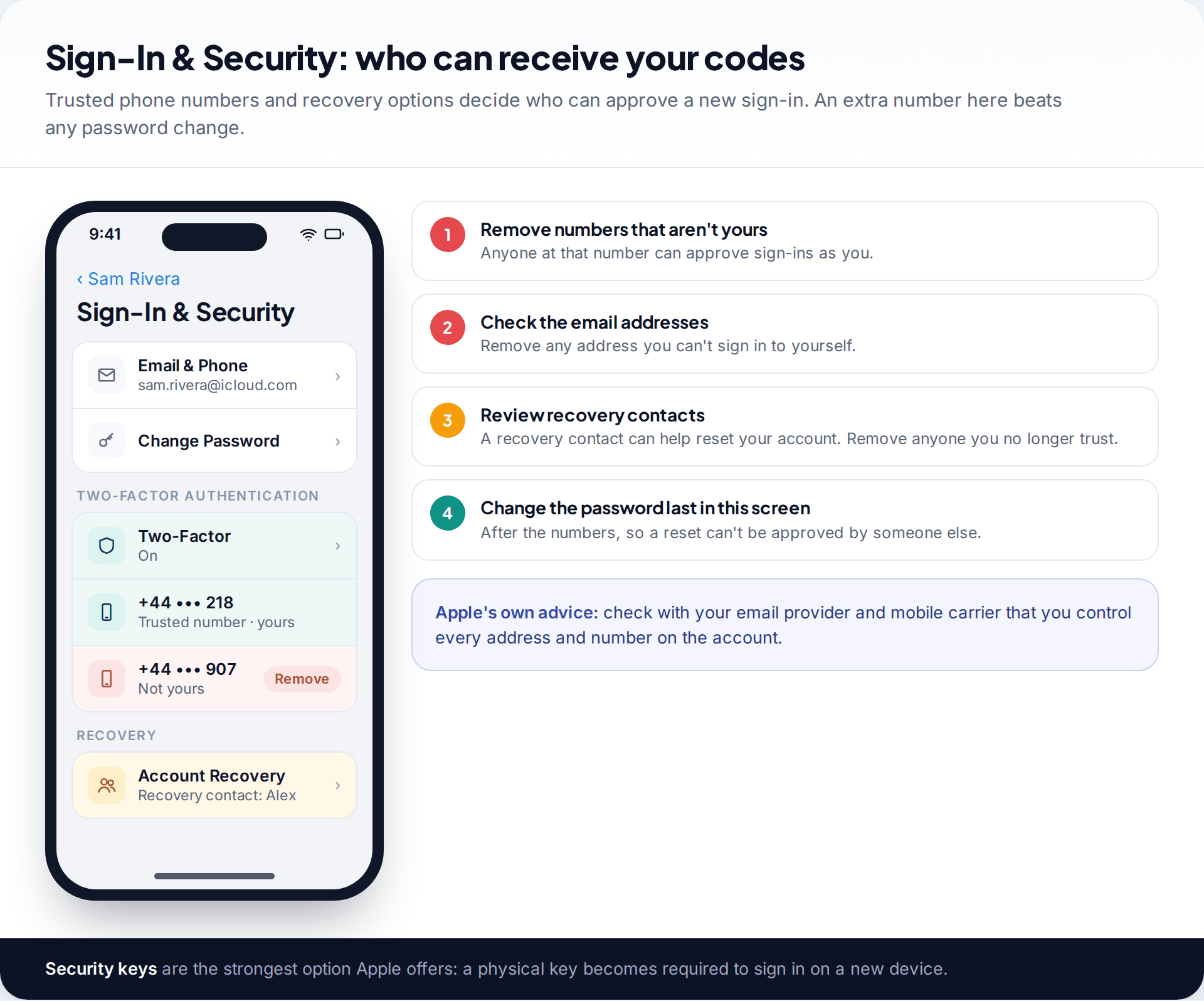
Whether or not you use Safety Check, the order matters. An attacker who still controls a trusted number can approve a sign-in with your new password. And one who knows your passcode can change your password from your own phone.
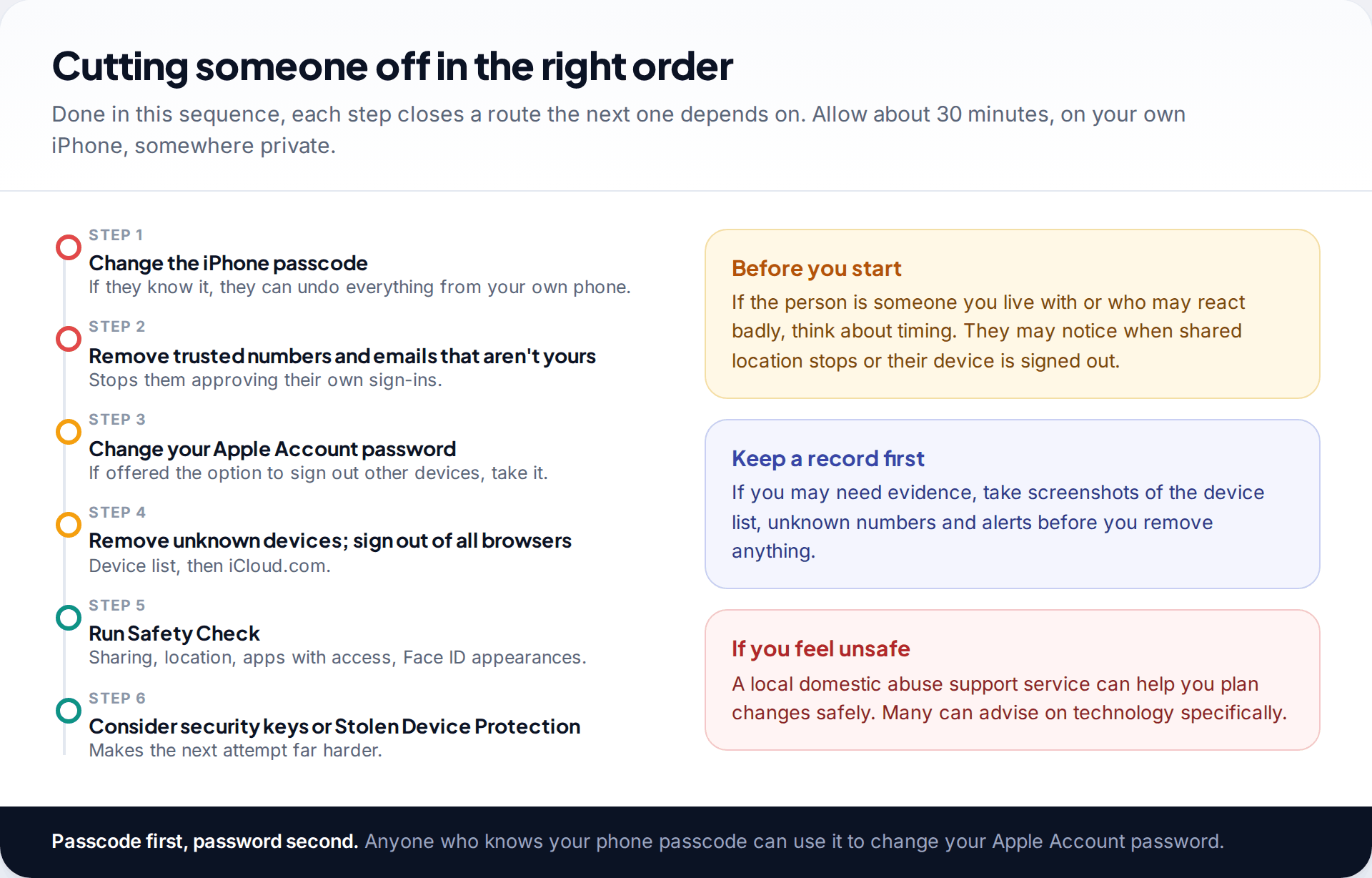
- Change your iPhone passcode (Settings › Face ID & Passcode), and reset Face ID if an unfamiliar appearance is set up.
- Open Settings › your name › Sign-In & Security. Remove any trusted phone number or email address that isn’t yours. Apple’s advice is to check with your email provider and mobile carrier that you control every address and number on the account.
- Change your Apple Account password. If you’re offered the option to sign out of other devices, take it.
- Remove unknown devices from the device list, and sign out of all browsers on iCloud.com.
- Run Safety Check to review sharing, apps with access and emergency contacts.
- Harden the account. Consider security keys, which make a physical key required for new sign-ins, and turn on Stolen Device Protection.
If the person is a partner or ex-partner and you’re worried about how they’ll react, it may be safer to plan these changes, or make them at a time when you’re not at home with them. A local domestic abuse support service can help you plan. Many have specialist advice on technology. If you may need evidence later, take screenshots of unknown devices, numbers and alerts before you remove them.
What an iCloud check can’t show you
| Situation | Shows up in these iCloud checks? | Where to look instead |
|---|---|---|
| Someone signed in with your Apple Account on their device | Yes in the device list | This guide |
| Someone viewing your data on iCloud.com | Not directly | Sign out of all browsers; turn off web data access |
| Someone using your unlocked phone | No | Change the passcode; check Face ID and Touch ID |
| Monitoring software on the phone | No | A device check: profiles, unknown apps, jailbreak signs |
| Access to your Google, Meta or other accounts | No | Each service’s own security settings |
If the account checks come back clean and the leaks continue, the phone itself is the next place to look. Our guide on checking an iPhone for stalkerware covers configuration profiles, unfamiliar apps and signs of a jailbreak. Be aware that legitimate, visible monitoring apps are flagged by the same checks. Removing monitoring software can also alert whoever installed it, so the same safety planning applies.
An ex keeps mentioning where you’ve been
The device list shows only your iPhone and laptop, and there are no unknown numbers. But Safety Check’s people list shows your location is still shared with your ex in Find My, set up years ago. Their old iPad was also still in a shared album.
How this page was put together
Paths and labels were checked in September 2026 against Apple Support’s pages on compromised Apple Accounts, checking and removing devices, managing web access to iCloud data, and the Apple Personal Safety User Guide chapters on Safety Check and on limiting device and account access. Apple renamed several settings in iOS 26. Where older versions differ, we’ve said so.
We didn’t test these steps on someone else’s account, and we don’t name any support helpline because numbers vary by country. Our editorial standards explain how these guides are researched and corrected.
Common questions
Can I see who is logged into my iCloud?
You can see which devices are signed in with your Apple Account, in Settings › your name and at account.apple.com under Devices. iCloud.com browser sessions aren’t listed one by one, so sign out of all browsers from iCloud Settings on iCloud.com if you’re unsure.
Will someone know if I remove their device from my Apple Account?
They may notice. The device stops receiving your iCloud data and will ask for your password. Stopping location sharing can also be noticed. If that could put you at risk, plan the timing first.
Can someone access my iCloud without my verification code?
Not normally, with two-factor authentication on. Unless they have a device that is already trusted, a trusted phone number that isn’t yours, or your unlocked phone. That’s why those are the first things to check.
Does changing my Apple Account password sign everyone out?
Not reliably on its own. If you’re offered the option to sign out of other devices, take it, and remove unknown devices and trusted numbers as well, or a person with those can get back in.
Can someone read my iMessages through iCloud?
If they have a Mac, iPad or other device signed in with your Apple Account, it can receive your messages. Check the device list, and check Text Message Forwarding in the Messages settings.
Is it illegal for someone to get into my iCloud without permission?
In many countries, using someone else’s account without their permission can be a criminal offence, even between partners. The details vary by country. If you’re thinking of reporting it, keep screenshots of unknown devices, numbers and alerts before you remove them, and ask the police or a local support service what they need.
What is the quickest way to cut off all access?
Safety Check’s Emergency Reset, on iOS 16 or later. It stops sharing with everyone and walks you through devices, trusted numbers and your password in one go. Change your iPhone passcode as well.
Looking for a tool to go with this? TheTruthSpy is a free parental control app for Android that stays visible on the child's phone. If it fits your family, see what the app does.
Related guides
How to Check If Your Email Was in a Data Breach
Check if your email was in a data breach for free, then act on what leaked: passwords, card details or…
How to Start Using a Password Manager
Switch to a password manager without stress: built-in or standalone, protecting the main password, and a first-hour plan for the…
How to Tell If Your Phone Has a Virus or Malware
Most 'virus' signs have ordinary causes. How to check an iPhone or Android phone for real malware, remove it, secure…
Parental controls your child can see
Location, screen time limits, a web filter and alerts from notifications — free, and visible on your child's phone. Pair a phone in about ten minutes.
Android · Free to set up · Visible on your child's phone