Hacked Email Account Recovery for Gmail, Outlook and Yahoo

Your password stopped working, or friends are asking about an email you never sent. To recover a hacked email account, go to the provider’s own recovery page: g.co/recover for Gmail, account.live.com/acsr for Outlook and Hotmail, and login.yahoo.com/forgot for Yahoo. Then remove what the attacker left behind before they can use it to get back in.
Recovery is only half the job. Most people who lose an email account a second time did get it back the first time. They changed the password and stopped there, and a forwarding rule or a swapped recovery phone did the rest. This guide covers both halves, provider by provider.
Start here: which situation are you in?
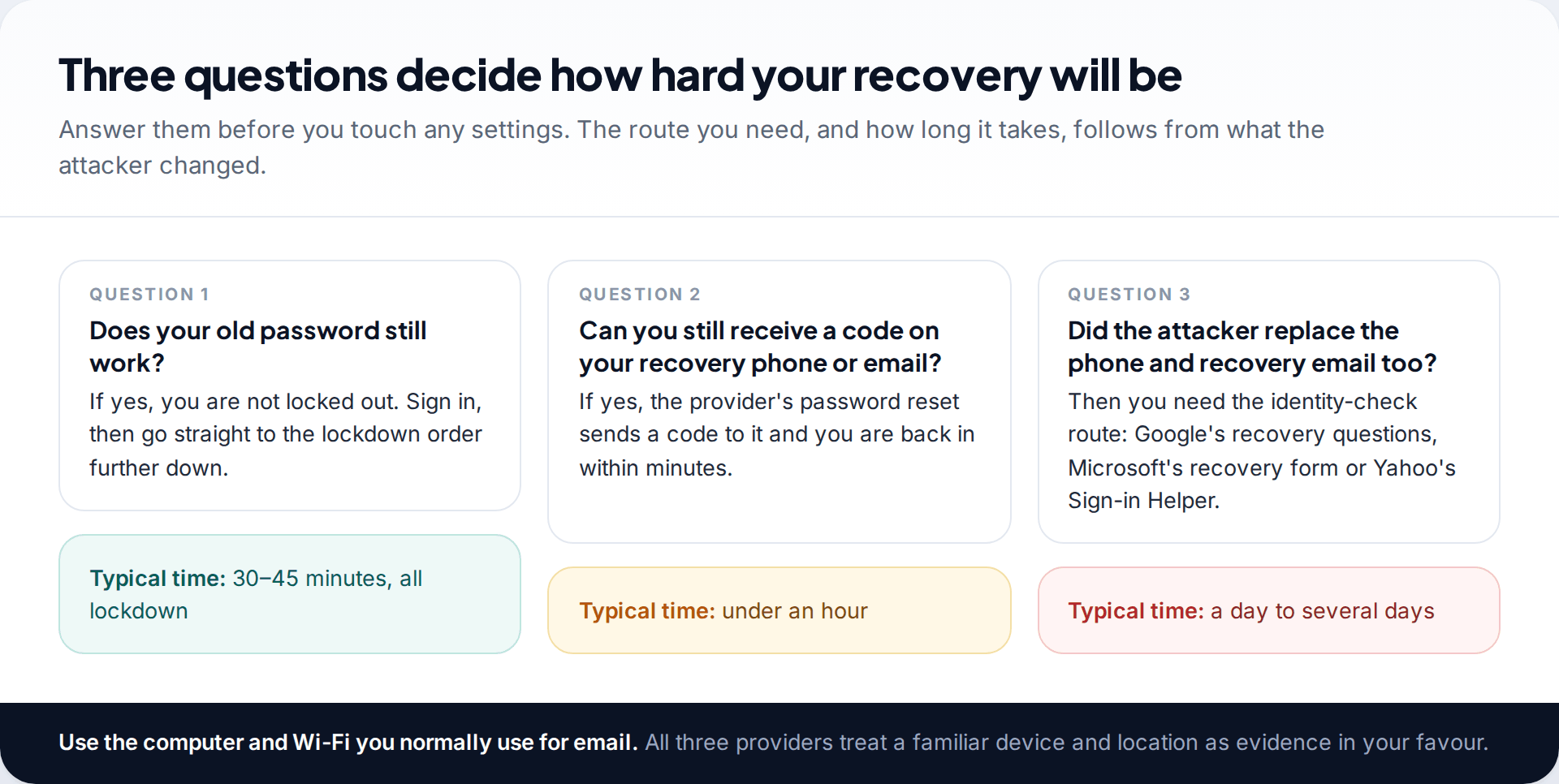
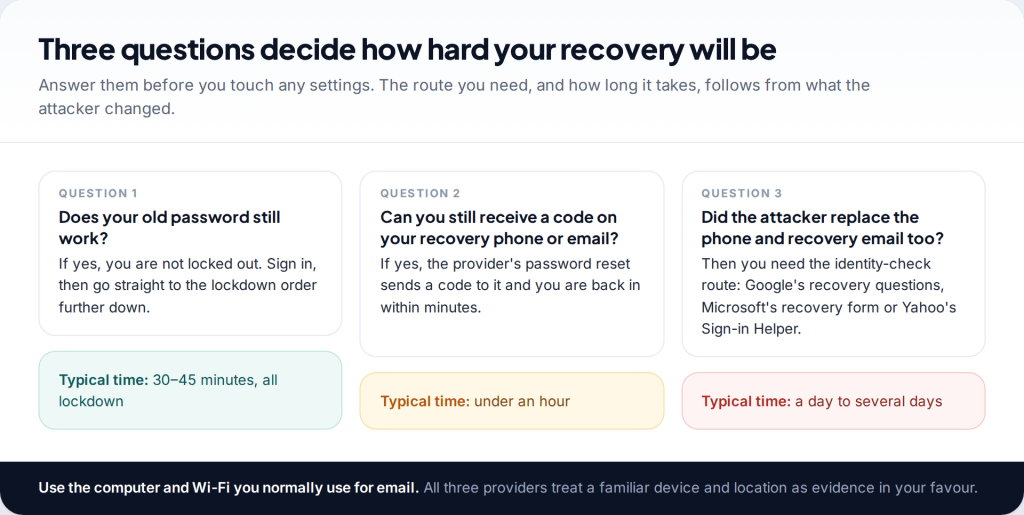
Before you open any recovery page, answer three questions. Does your old password still work? If so, you are not locked out. Skip to the lockdown order. If not, can you still receive a code on the recovery phone number or recovery email on the account? If you can, the ordinary “forgot password” route gets you in within minutes. Only if the attacker replaced those as well do you need the slower identity checks described below.
Two things help whichever route you are on. First, use a device and a network you have used this account on before. Google, Microsoft and Yahoo all weigh familiar devices and locations when deciding whether you are the owner. Second, if there is any chance the password was stolen by malware, such as a download you regret or a browser extension you don’t recognise, do the recovery from a different device. A new password typed on an infected computer is simply stolen again.
Gmail: recover a hacked Google account
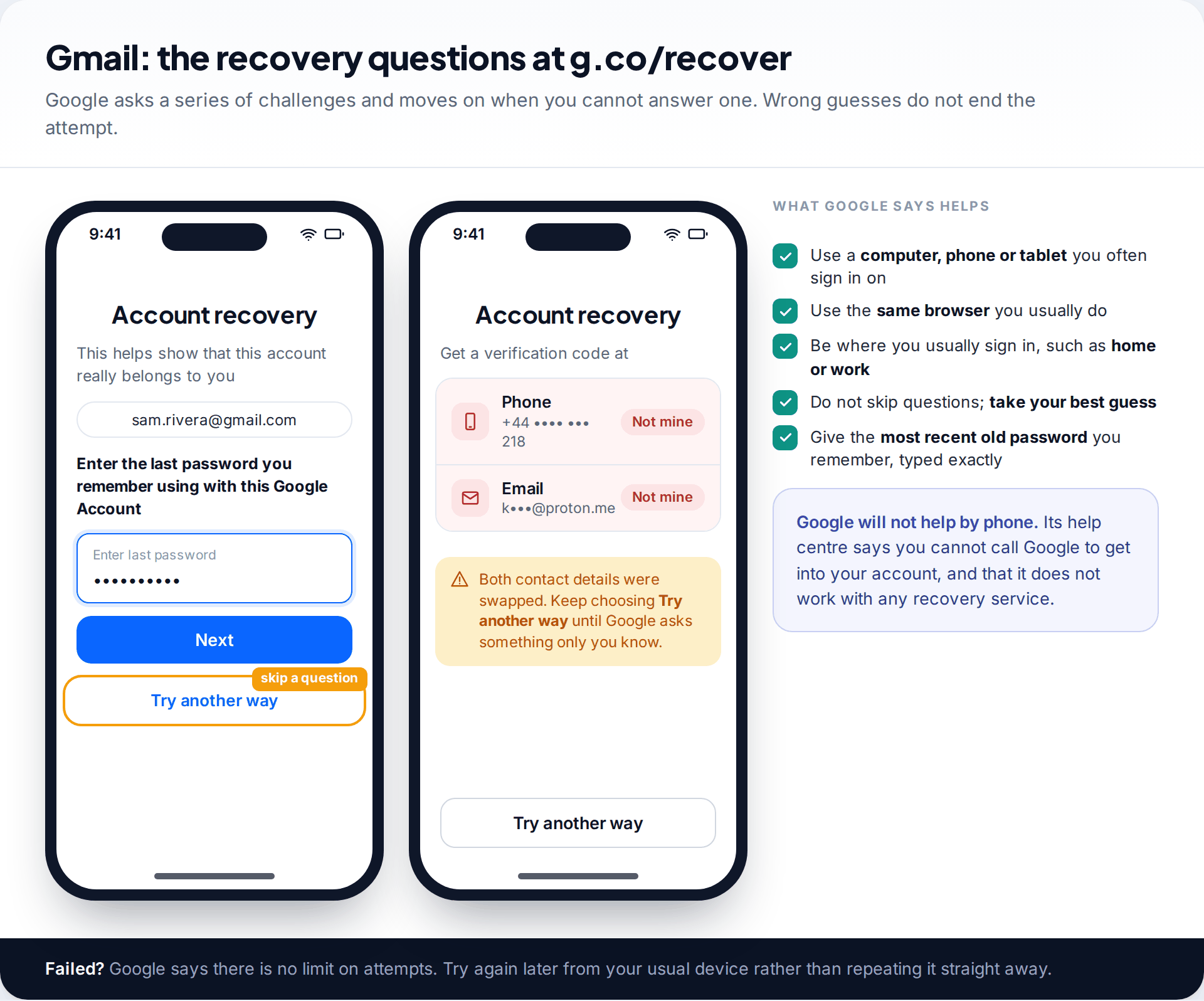
Go to g.co/recover (it redirects to Google’s account recovery page) and enter your Gmail address. Google then asks a series of challenges. It may ask for the last password you remember, send a code to your recovery phone or email, or prompt a phone that is still signed in to your account. If a challenge is impossible because the attacker changed it, tap Try another way. Google moves on to the next challenge.
Google’s help pages are specific about what improves your chances. Use a device and browser you normally sign in with, and be somewhere you usually sign in, such as home or work. Don’t skip questions. If you’re unsure, take your best guess, because wrong guesses don’t end the attempt. For the password question, enter the most recent old password you remember, exactly as typed, capitals included. Google says there is no limit on how many times you can try recovery. If you get “Google couldn’t verify this account belongs to you”, you can start again later.
No one at Google will recover it for you by phone. Google’s help centre says you cannot call Google for help signing in, and that it doesn’t work with any service claiming to provide account or password support. Anyone who says otherwise, whether a search ad, a phone number or a “specialist” in your messages, is running a scam.
Once you are in, open your Google Account and go to Security & sign-in. Start with the recent security events rather than the password.
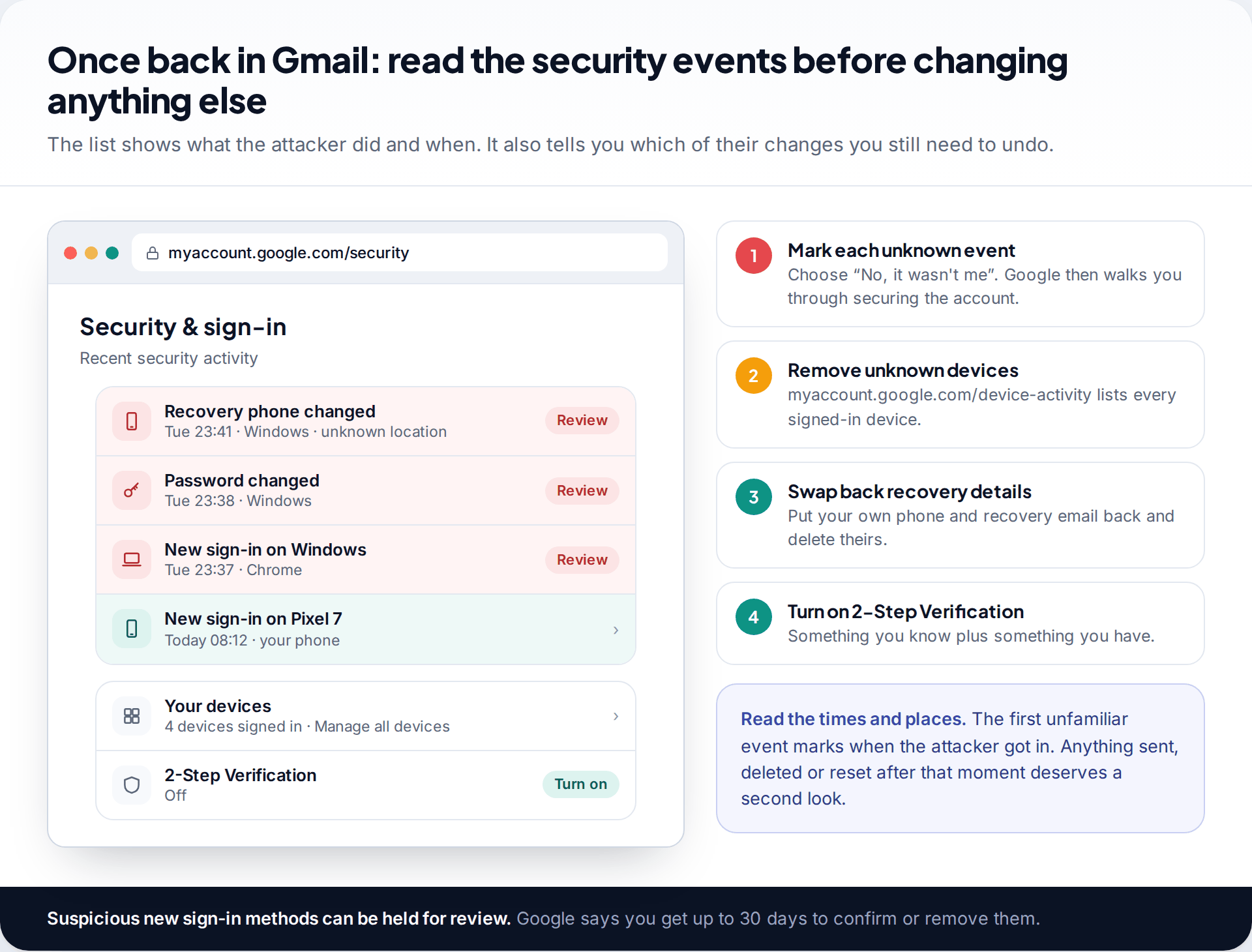
Mark every event you didn’t make as No, it wasn’t me. Then open your devices list (myaccount.google.com/device-activity) and sign out anything that isn’t yours. Put your own recovery phone and recovery email back, remove the attacker’s, and turn on 2-Step Verification. Google’s hacked-account page also says that when it detects suspicious sign-in methods on an account, you get up to 30 days to review them, which gives you time to find and remove what the attacker added.
Outlook, Hotmail and Live: Microsoft’s recovery form
If the password has changed but your security info still reaches you, use the “Forgot password” link on the sign-in page. Microsoft sends a code to the phone or email you already have on file. If those have been replaced, or never existed, the route is the account recovery form at account.live.com/acsr.
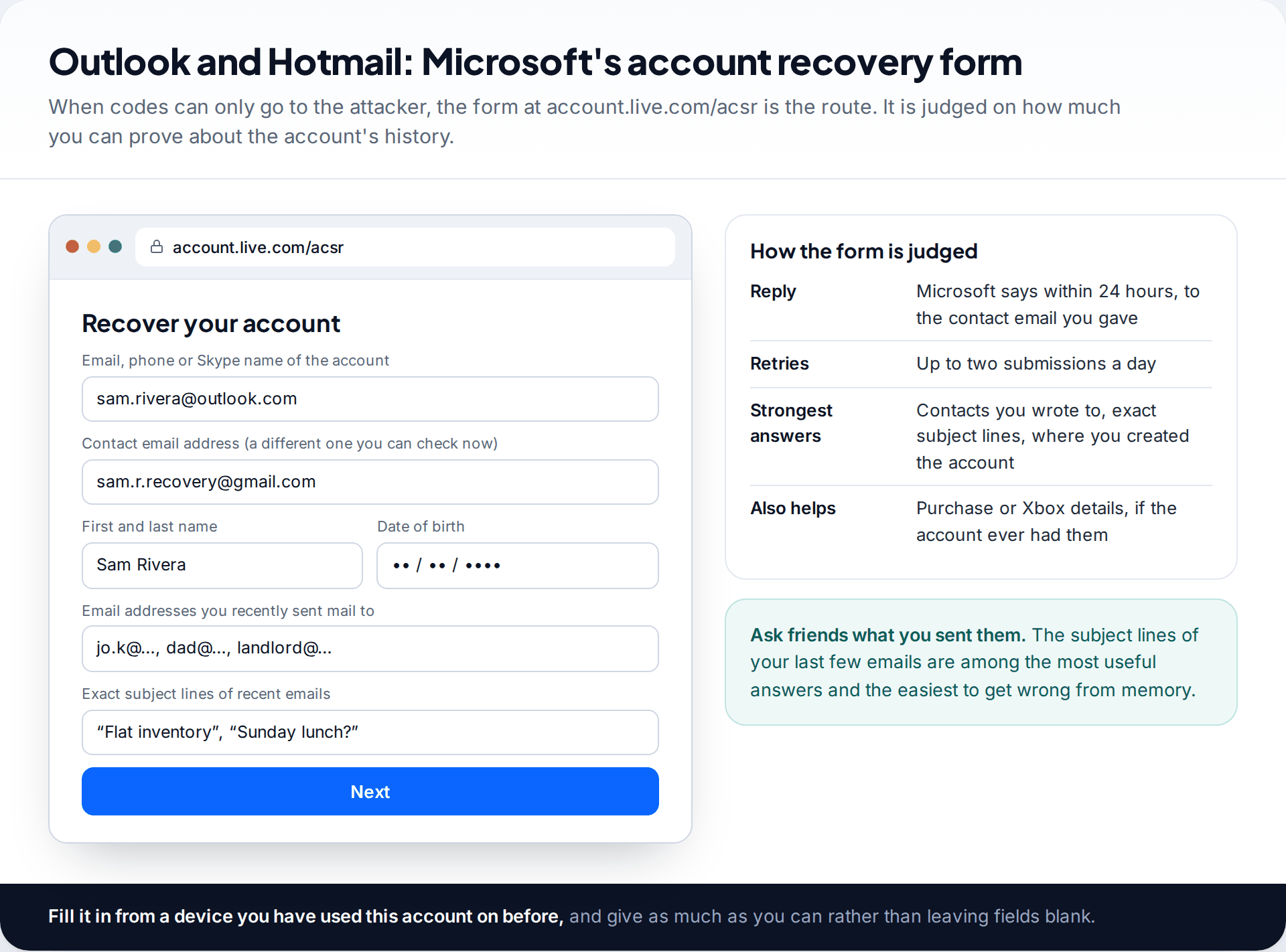
The form first asks for a contact email address you can check now. It needs to be a different account. Microsoft sends a code there and later its decision. Then it asks about the account’s history: your name and date of birth, email addresses you recently wrote to, the exact subject lines of recent messages, and, if relevant, purchase or Xbox details. Answer as many questions as you can. Blank fields count against you more than imperfect answers.
Microsoft typically replies within 24 hours, and you can submit up to two forms a day. If the first is rejected, don’t resubmit the same answers. Find better ones. Ask the people you email most often what subject lines they received from you, and look through old devices for the details you used when creating the account.
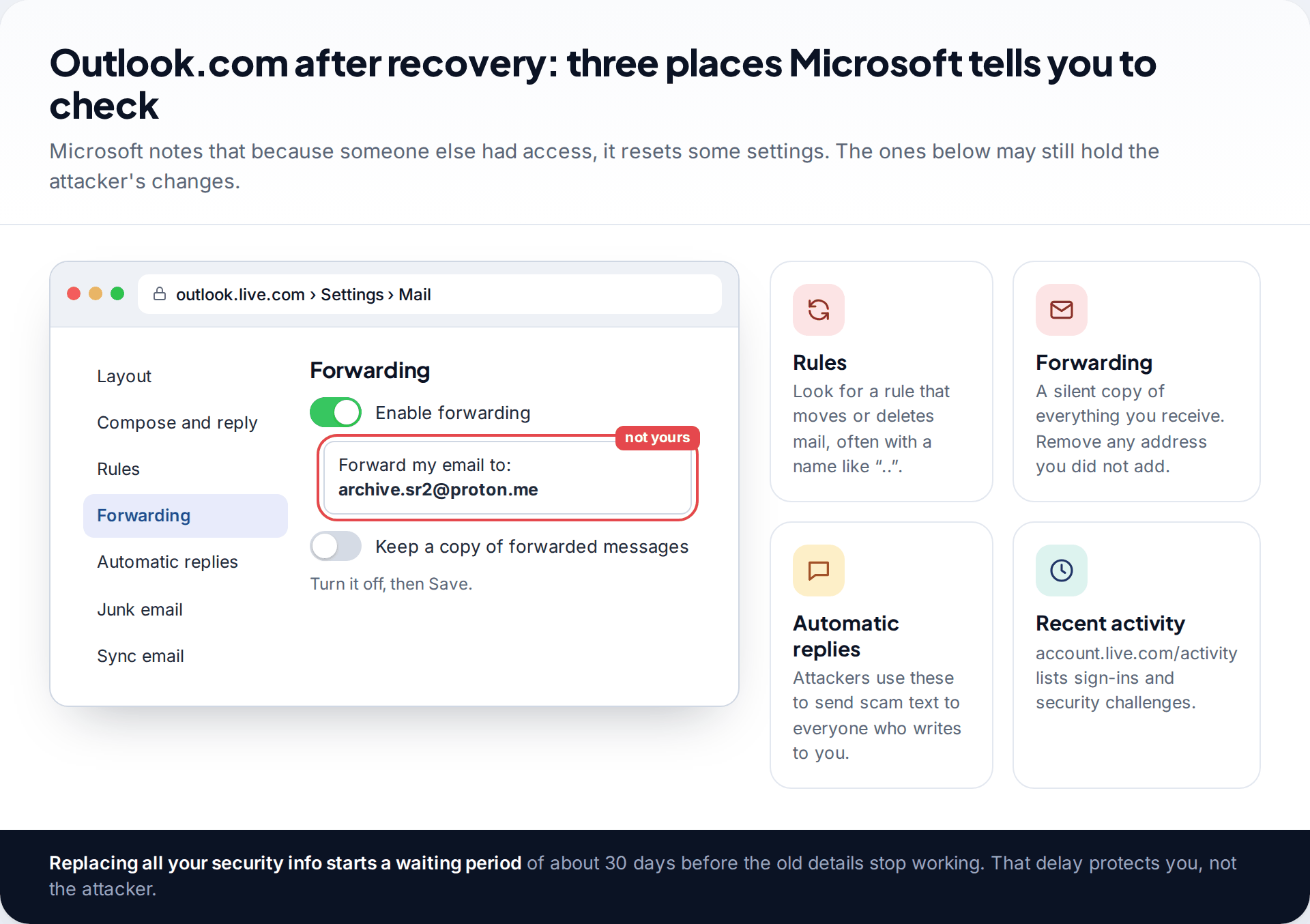
Once you are back in, Microsoft’s own guidance is to scan your computer for malware first, then change the password, then review three settings: connected accounts, forwarding and automatic replies. Also open Settings › Mail › Rules. A rule that moves incoming mail to an obscure folder, or deletes it, is how attackers hide the security alerts that would warn you. The recent activity page at account.live.com/activity shows successful sign-ins and security challenges, and its location entries are worth reading line by line.
One thing surprises people. If you replace all the security info on a Microsoft account, the old details don’t disappear at once. There is a waiting period, reported by Microsoft support staff as 30 days, during which the change is pending. It feels slow when you are the owner. It exists so that an attacker who swaps your details can’t lock you out immediately.
Yahoo Mail: the Sign-in Helper and the settings list
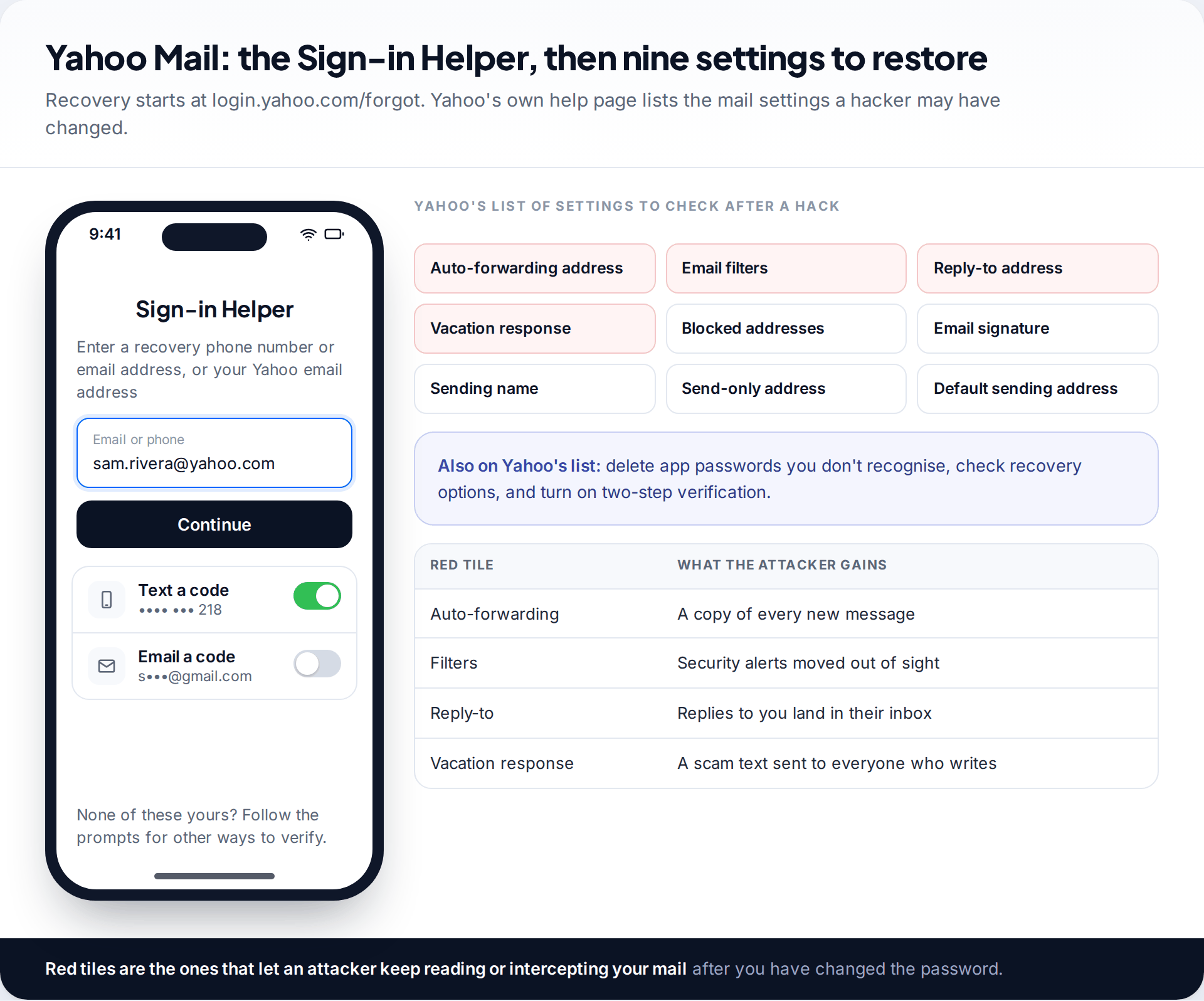
Yahoo’s recovery tool is the Sign-in Helper at login.yahoo.com/forgot. Enter your Yahoo address or a recovery phone or email, and it offers ways to verify you, usually a code. If none of the options reach you any more, follow its prompts. Yahoo’s help pages also offer contact with Yahoo Customer Care for help regaining access. Reach it by navigating from help.yahoo.com yourself, never through a number found in an ad or a message.
Yahoo’s help page on hacked accounts gives four signs: you stop receiving email, your account is sending spam to your contacts, there are sign-ins you don’t recognise, or account info or mail settings changed without your knowledge. Its fix list is practical. Change the password, delete any app passwords you don’t recognise, check that recovery options are yours, restore changed mail settings, turn on two-step verification, and make sure your antivirus is up to date. The mail settings it names are auto-forwarding, filters, reply-to address, vacation response, blocked addresses, signature, sending name, send-only address and default sending address.
App passwords deserve a moment of their own. They let older mail programs sign in without your main password. An attacker who creates one keeps access even after you change the main password, so delete every one you don’t recognise.
Settings to check after you recover a hacked email account
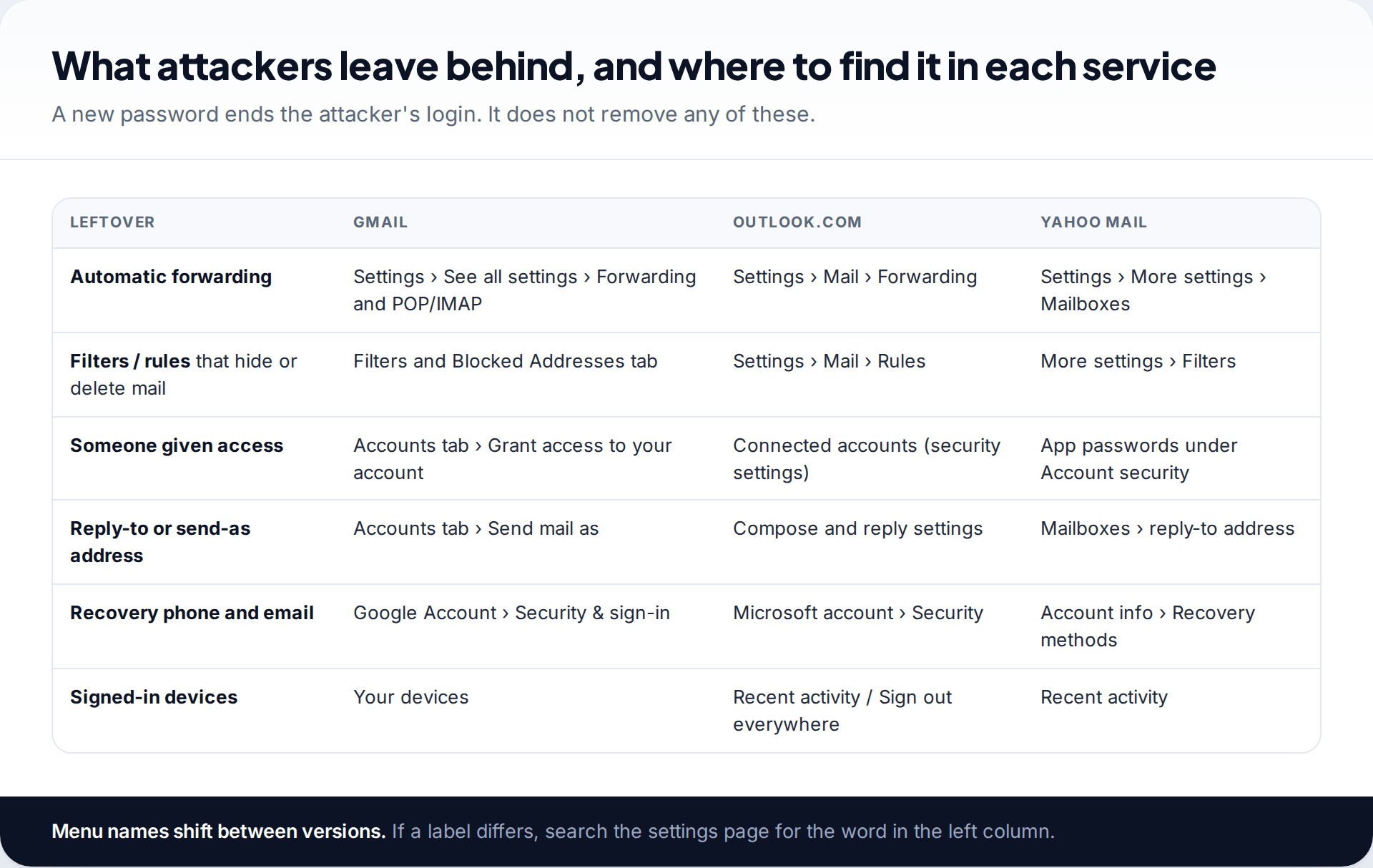
Whatever the provider, attackers who plan to come back leave the same few things behind. The table below brings the locations together. Menu names change between versions, so search settings for the key word if a path doesn’t match.
| Leftover | What it does for the attacker | Survives a password change? |
|---|---|---|
| Forwarding address | Sends them a copy of every message you receive | Yes |
| Filter or rule | Hides alerts, invoices or replies from specific senders | Yes |
| Delegate or connected account | Lets another account read and send as you | Yes |
| App password | A separate key for a mail program | Yes |
| Their recovery phone or email | Lets them reset the password again tomorrow | Yes |
| Open session | Keeps them signed in | Sometimes |
In Gmail, delegation lives under the Accounts tab as “Grant access to your account”. A delegate there can read, send and delete your mail. Forwarding sits under Forwarding and POP/IMAP. Gmail shows a notice for the first week after forwarding is turned on, so an unexpected forwarding banner is itself a sign. If you’re still unsure whether anyone has been in your inbox, our guide on how to tell if your email was hacked goes through the evidence in detail.
The lockdown order, and why it matters
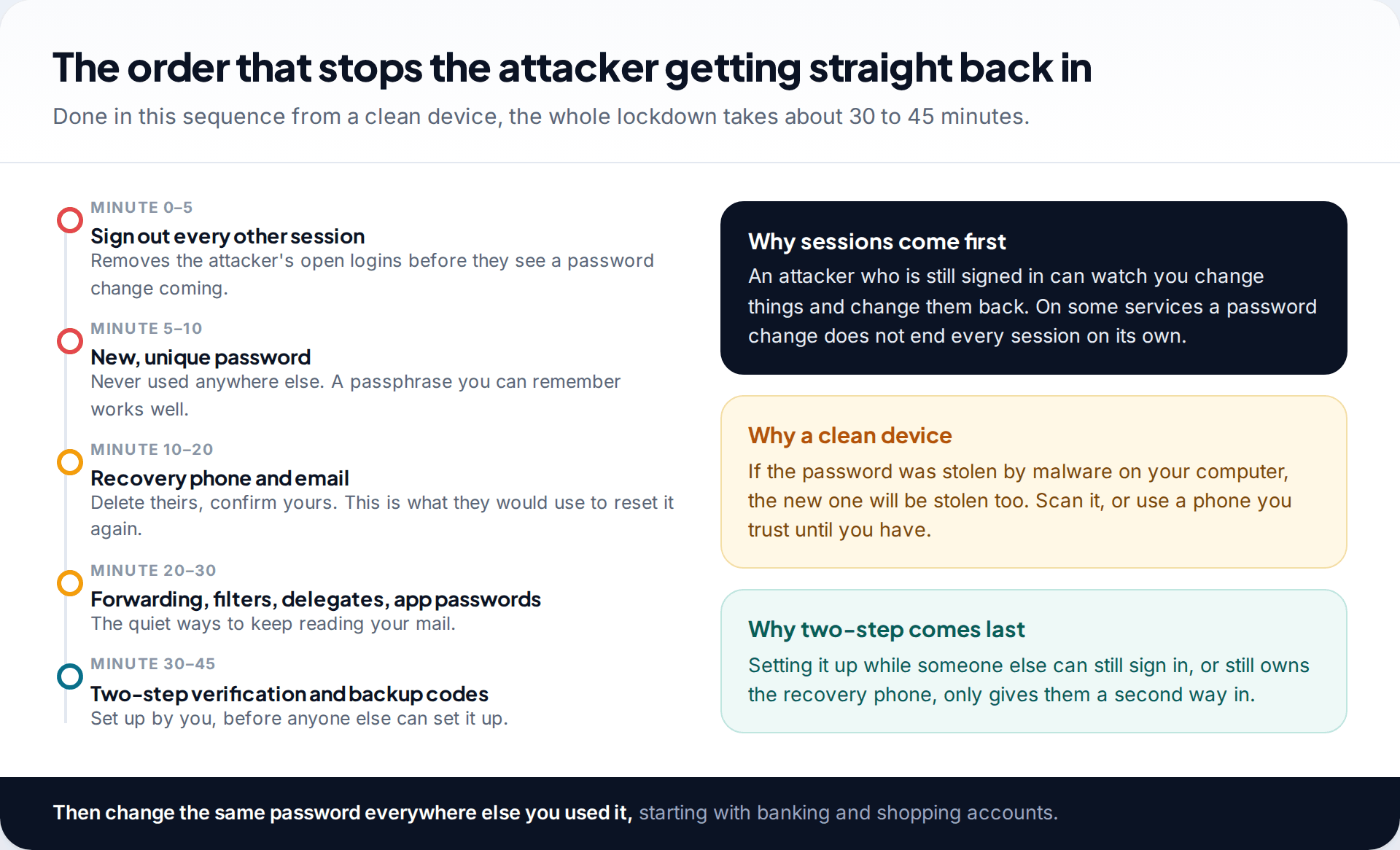
- Sign out every other session. Google’s device list, Microsoft’s “Sign out everywhere” and Yahoo’s recent activity all let you end sessions you don’t recognise.
- Set a new password you have never used anywhere. Length beats complexity. Our guide to passphrases you can remember shows a method that holds up.
- Replace the recovery phone and email with your own, and delete anything you didn’t add.
- Remove forwarding, filters, delegates and app passwords using the table above.
- Turn on two-step verification and save the backup codes somewhere other than your phone. If your provider offers passkeys, add one. They can’t be phished like a password.
The order isn’t arbitrary. If you change the password while the attacker is still signed in, they can see it coming. If you leave their recovery phone on the account, they can reset your new password the next day. Two-step verification comes last because setting it up on an account someone else still controls only helps them.
What email recovery cannot do
Getting the login back doesn’t reverse everything. Be realistic about these limits:
Deleted messages may be gone
Attackers sometimes empty Trash to hide what they did. Once a provider’s trash retention period passes, mail is not recoverable by you.
Fix: check Trash, Archive and “All mail” straight away. Ask contacts to forward important threads back to you.
Anything they read, they still have
Recovery stops future access. It can’t pull back attachments, ID scans or messages already downloaded.
Fix: assume sensitive documents in the mailbox are exposed. Change passwords sent by email, and watch bank statements.
The provider may say no
If you can’t prove ownership, especially on an account with no recovery details and little history, the provider may refuse.
Fix: try again from your usual device with better answers. If it still fails, create a new account and move your important logins to it.
Paid “recovery experts” can’t help
No outside service has access to Google, Microsoft or Yahoo’s recovery systems. They take a fee, a login code, or both.
Fix: use only the official pages named in this guide. They are free.
Secure the accounts that trusted your inbox
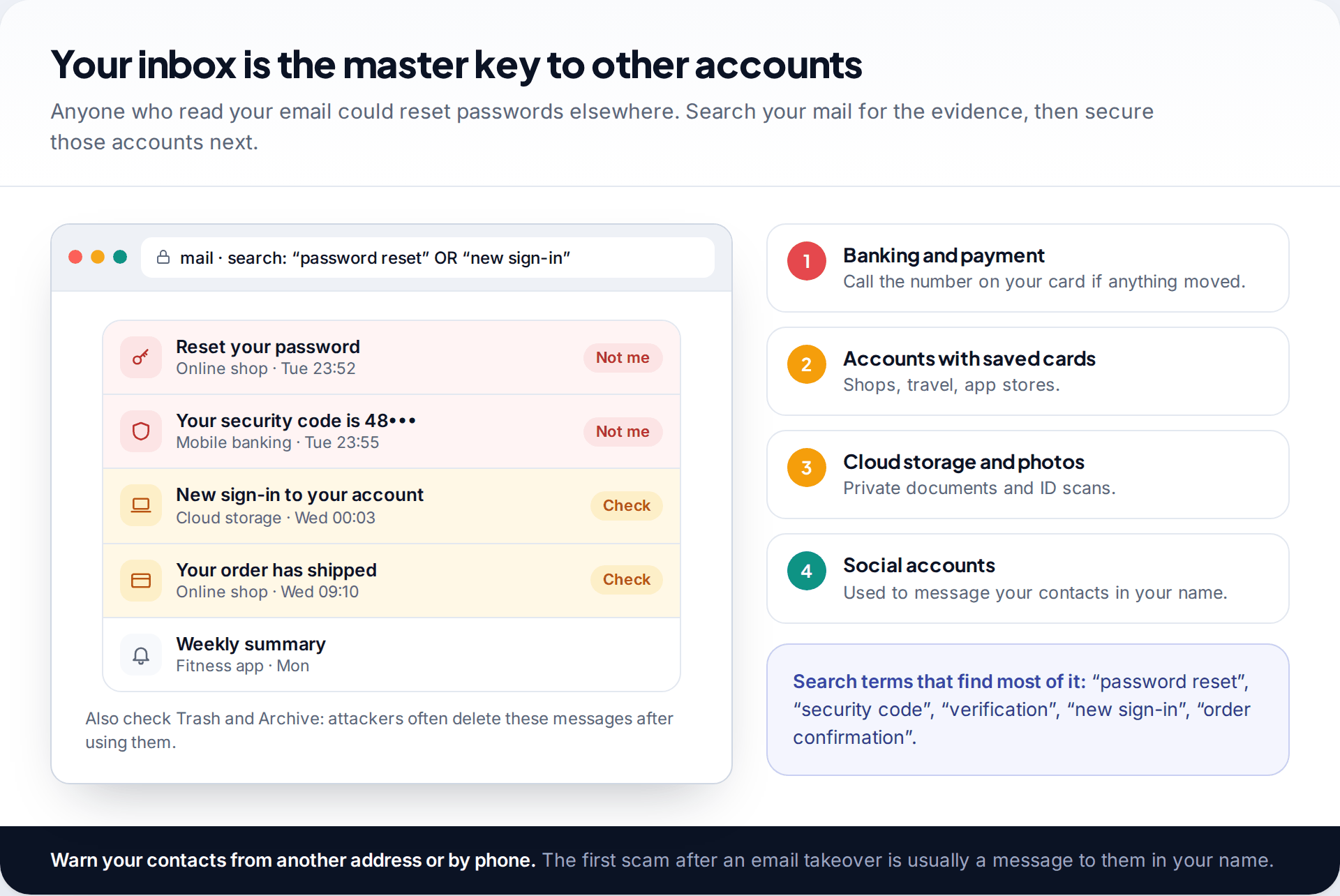
Your email address is the reset route for almost every other account you own. While the attacker had access, they could request a password reset for your online shops, cloud storage or social accounts, read the link, and delete the evidence. Search your mail, including Trash, for “password reset”, “security code”, “verification” and “new sign-in” during the period you were locked out.
Deal with money first. Call the number printed on your bank card if anything looks wrong, then check shops and services with saved cards. After that, secure cloud storage that may hold ID documents, then social accounts. Finally, warn your contacts by phone or from another address. The first scam after an email takeover is usually a message to them in your name asking for money or gift cards.
How this page was put together
Every recovery page, menu path and limit here was checked in September 2026 against Google Account Help, Microsoft Support and Yahoo Help, and against Microsoft’s own answers on its recovery form. Where a figure comes from a provider, such as Microsoft’s 24-hour reply or Google’s 30-day review window, the text says so. The 30-day security-info wait on Microsoft accounts is widely reported by Microsoft support staff but not stated on the main help page, so we have described it as reported.
We don’t recommend or link to any paid recovery service, and we didn’t create test accounts to hack. For more on sourcing and corrections, see our editorial standards.
Common questions
How long does it take to recover a hacked email account?
Minutes, if a code still reaches your recovery phone or email. If you need the identity checks, Google’s recovery questions can succeed straight away or take several attempts, Microsoft typically answers its recovery form within 24 hours, and Yahoo’s timing depends on which verification it can offer you.
Can I recover my Gmail if the hacker changed the phone number and recovery email?
Often, yes. At g.co/recover, keep tapping “Try another way” until Google asks something you can answer, such as an old password or a prompt on a device that is still signed in. Doing this from your usual device and location improves the odds.
Is there a phone number to call Google, Microsoft or Yahoo for a hacked account?
Google says you can’t call it for sign-in help. Microsoft routes locked-out users to its recovery form. Yahoo lists Customer Care on its help site. Never use a support number from a search ad or social media post. Fake support lines are a common follow-up scam.
Should I delete my hacked email account and start again?
Not until you have recovered it or given up on recovery. Deleting it doesn’t delete what the attacker already copied, and the address may be tied to accounts you can only reset through it. If you do move to a new address, update your important logins first.
Will changing my password kick the hacker out?
Not reliably on its own. Sign out other sessions as well, and remove forwarding, filters, delegates, app passwords and any recovery details you didn’t add. Those survive a password change.
How did they get into my email?
Usually through a reused password leaked from another site, a phishing page that copied your login, or malware on a device. If you reused the password anywhere, change it there too.
Looking for a tool to go with this? TheTruthSpy is a free parental control app for Android that stays visible on the child's phone. If it fits your family, see what the app does.
Related guides
How to Check If Your Email Was in a Data Breach
Check if your email was in a data breach for free, then act on what leaked: passwords, card details or…
How to Start Using a Password Manager
Switch to a password manager without stress: built-in or standalone, protecting the main password, and a first-hour plan for the…
How to Tell If Your Phone Has a Virus or Malware
Most 'virus' signs have ordinary causes. How to check an iPhone or Android phone for real malware, remove it, secure…
Parental controls your child can see
Location, screen time limits, a web filter and alerts from notifications — free, and visible on your child's phone. Pair a phone in about ten minutes.
Android · Free to set up · Visible on your child's phone