GPS Tracking for Small Business: A Starter Guide
 By TheTruthSpy Editor · Founder and editorPublished September 19, 2026Updated September 21, 20269 min read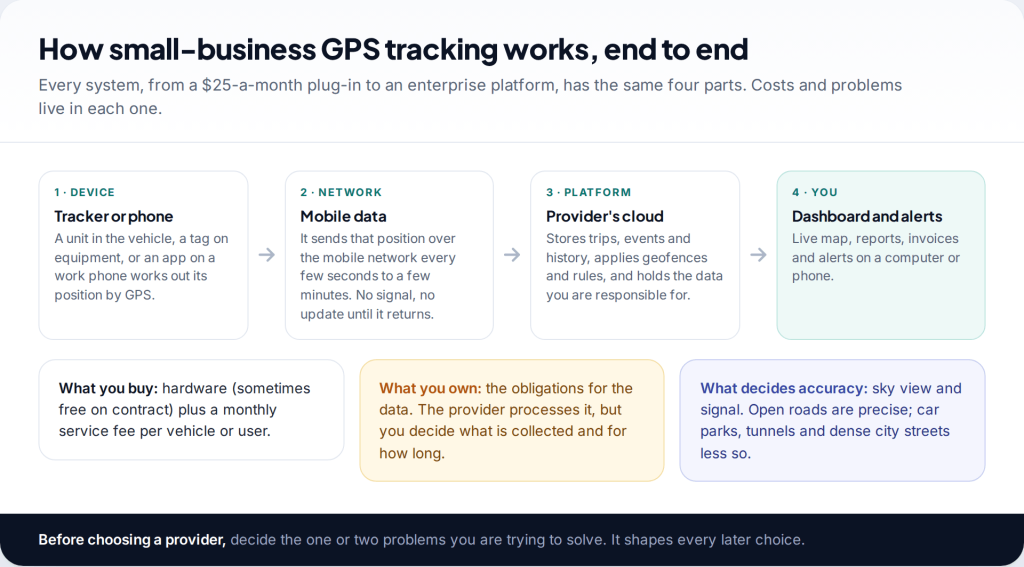
GPS tracking for small business usually means one of two things: trackers fitted to company vehicles, reporting to an online dashboard for a monthly fee, or an app on work phones that records location during shifts. For most small fleets, vehicle trackers are cheaper and legally simpler. Before choosing, decide what problem you’re solving, write a short driver policy, and set how long you’ll keep the data.
Tracking people is regulated. Many places require written notice, limit tracking outside working hours, or restrict tracking on personal devices. This guide covers the practical side. For the legal detail by country, see our overview of whether employee GPS tracking is legal where you are. Neither page is legal advice.
How GPS tracking for small business works
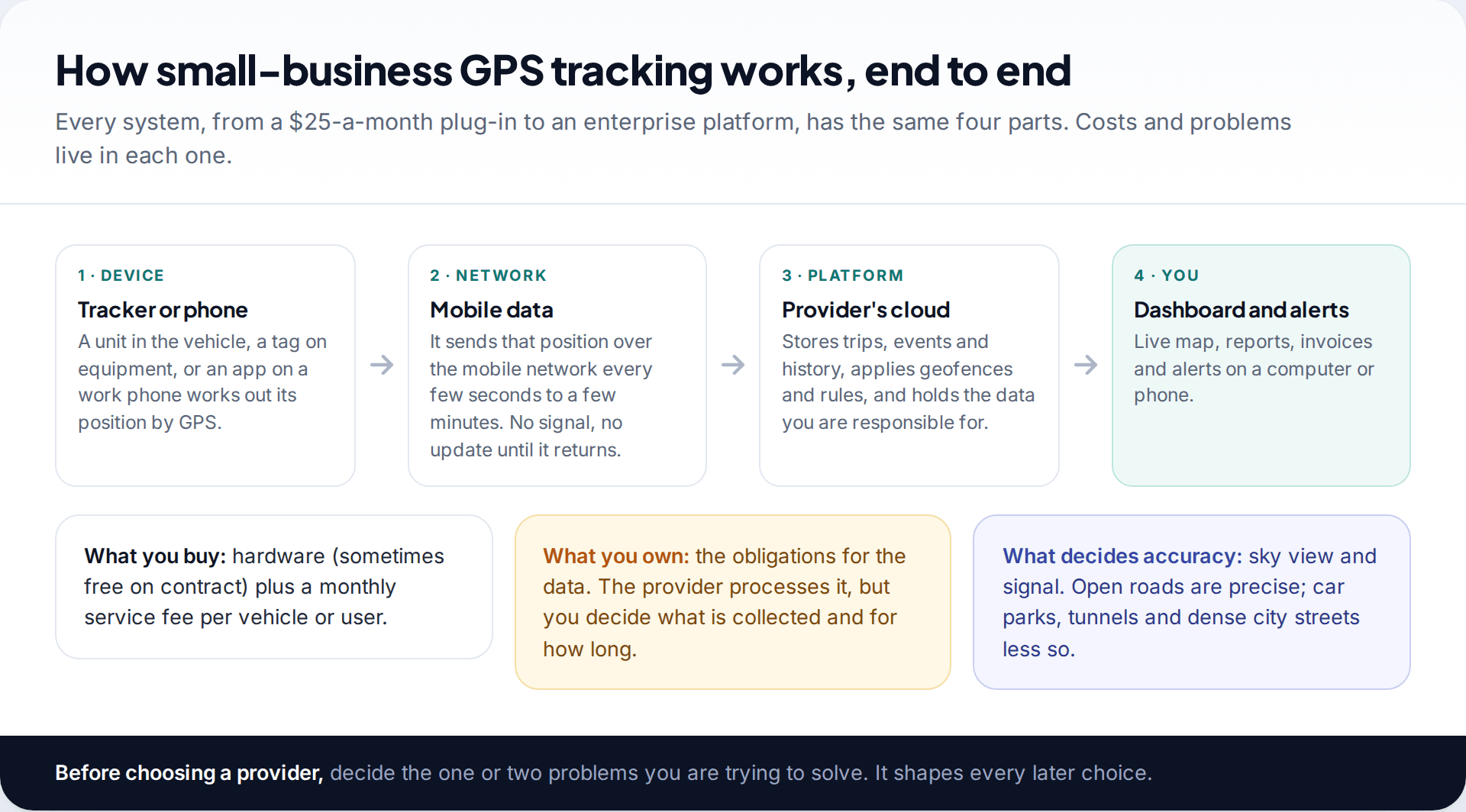
A tracker works out its own position from GPS satellites, then sends it over the mobile network to the provider’s servers, where it becomes trips, stops and alerts on your dashboard. That chain explains most of the frustrations owners report. A van in an underground car park can’t get a fix. A trailer in a rural yard with no signal won’t report until it’s back in coverage. A phone app stops reporting when a battery saver kills it.
Start by writing down the one or two problems you want to solve: getting the nearest van to an urgent call, proving to a customer that someone attended, recovering stolen vehicles, or cutting fuel and maintenance costs. Each points to different features, and the list becomes the purpose section of your driver policy later.
Vehicle trackers versus phone apps
| Vehicle tracker | Phone app | |
|---|---|---|
| Tracks | The vehicle, whoever drives it | The person carrying the phone |
| Hardware cost | Per device, sometimes free on contract | None |
| Reliability | Powered by the vehicle, always on | Depends on battery settings and permissions |
| Engine data | Mileage, faults, ignition (plug-in and hardwired) | No |
| Theft recovery | Yes | No |
| Privacy risk | Take-home and private use | Follows the person everywhere unless tied to shifts |
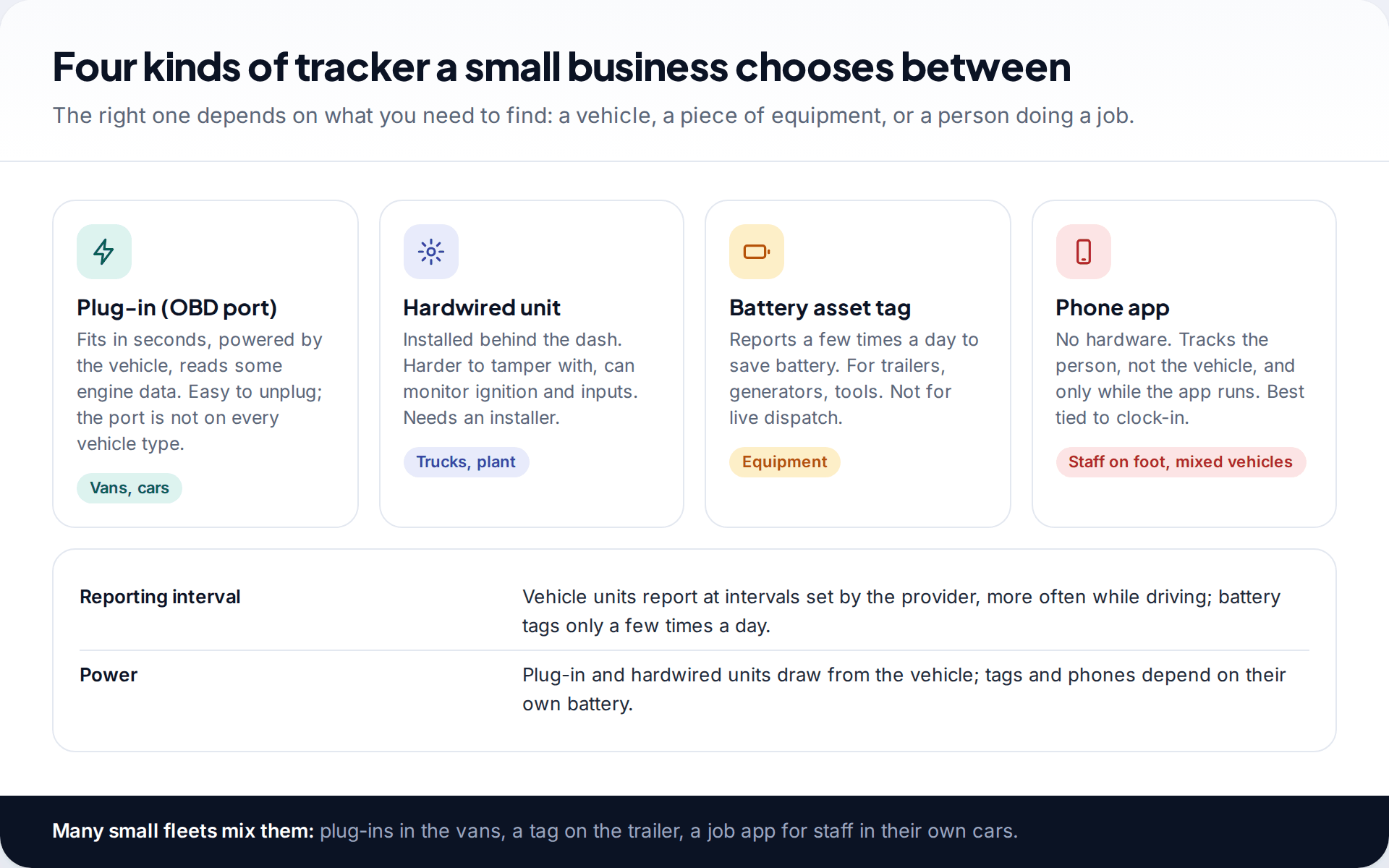
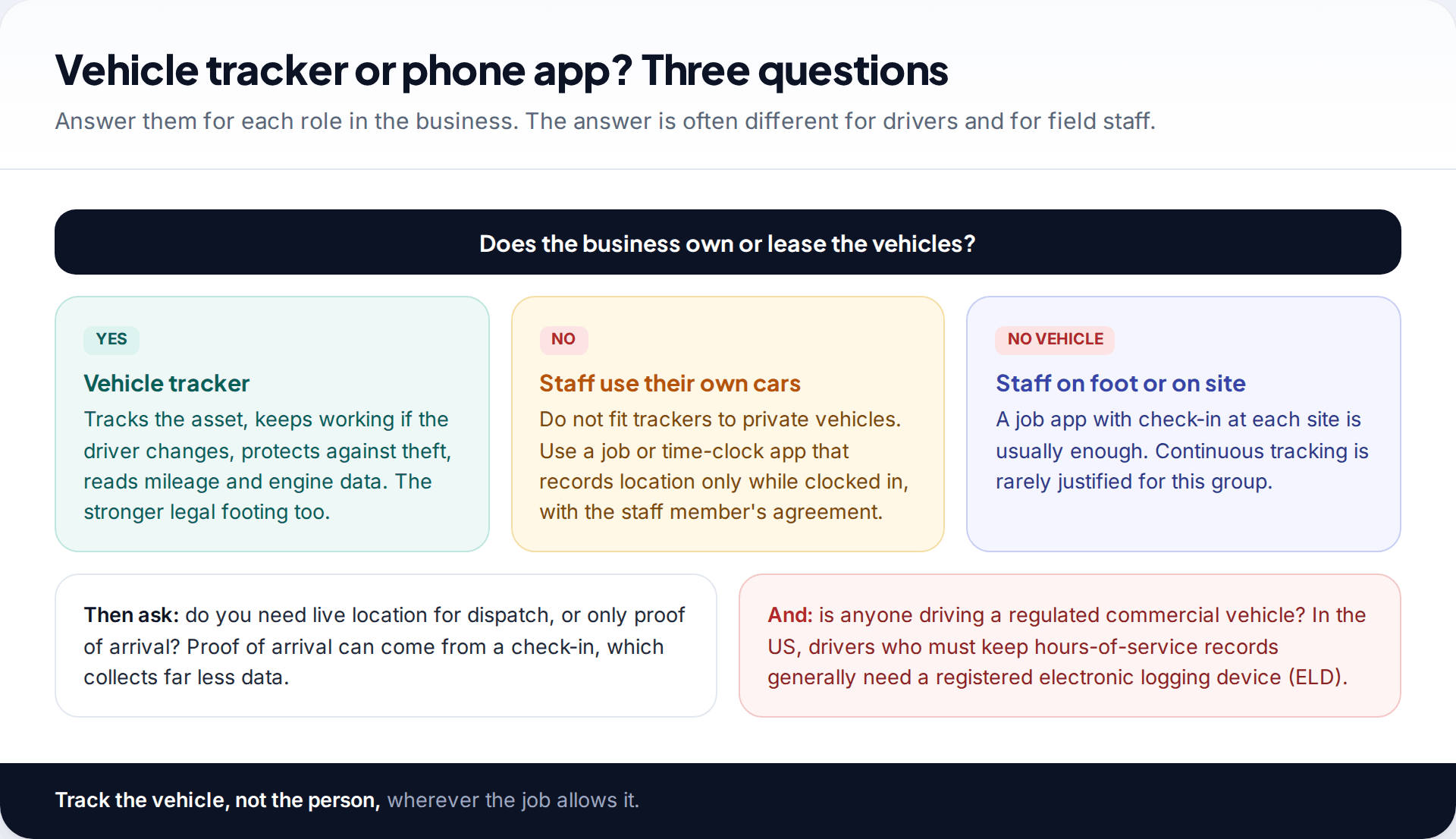
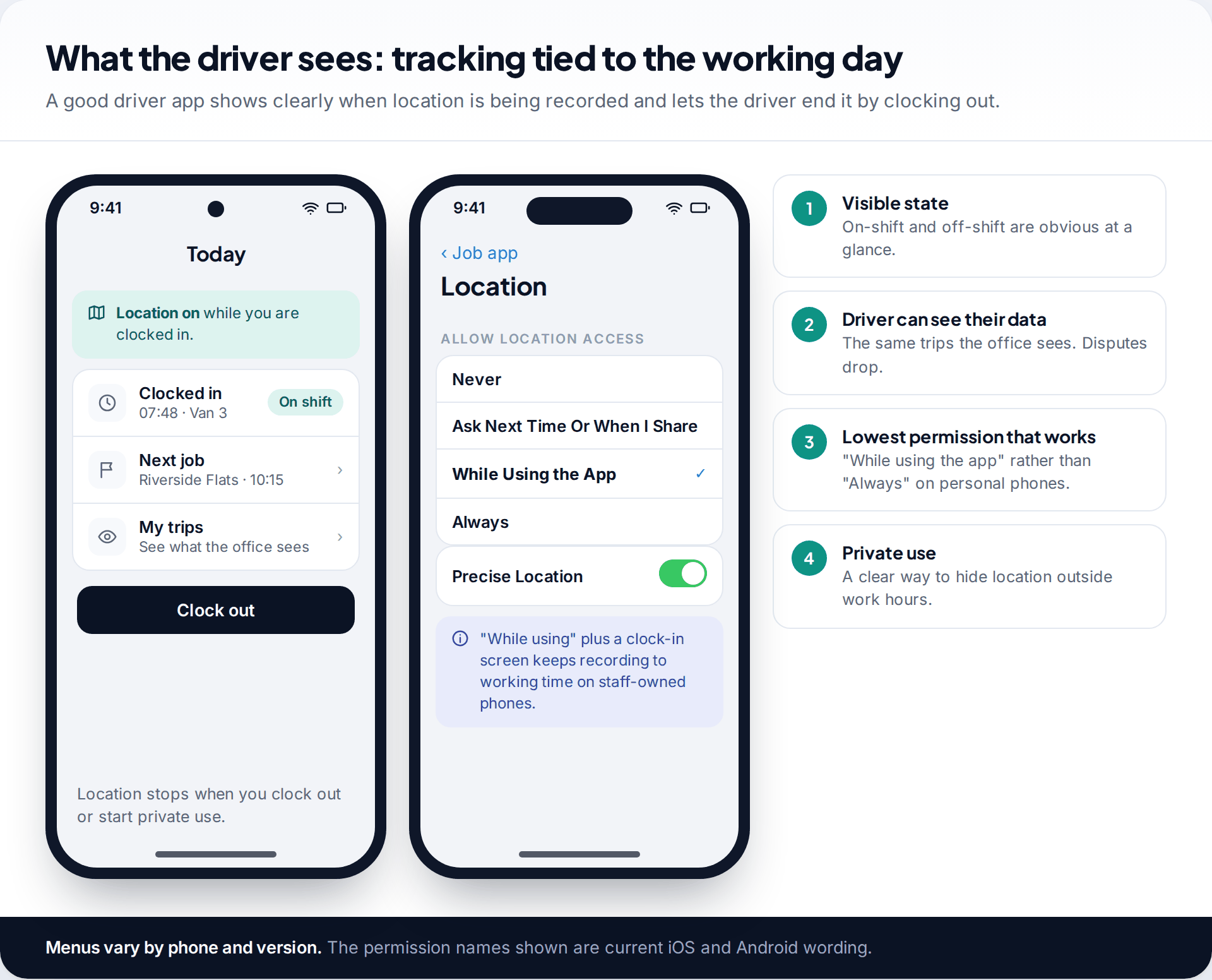
If the business owns the vehicles, a vehicle tracker is almost always the better starting point: it can’t be forgotten at home, it keeps working when drivers swap vans, and the legal footing is stronger because you are tracking your own asset. Phone apps suit staff who drive their own cars or work on foot, provided they record only between clock-in and clock-out.
What it costs: a model you can adapt
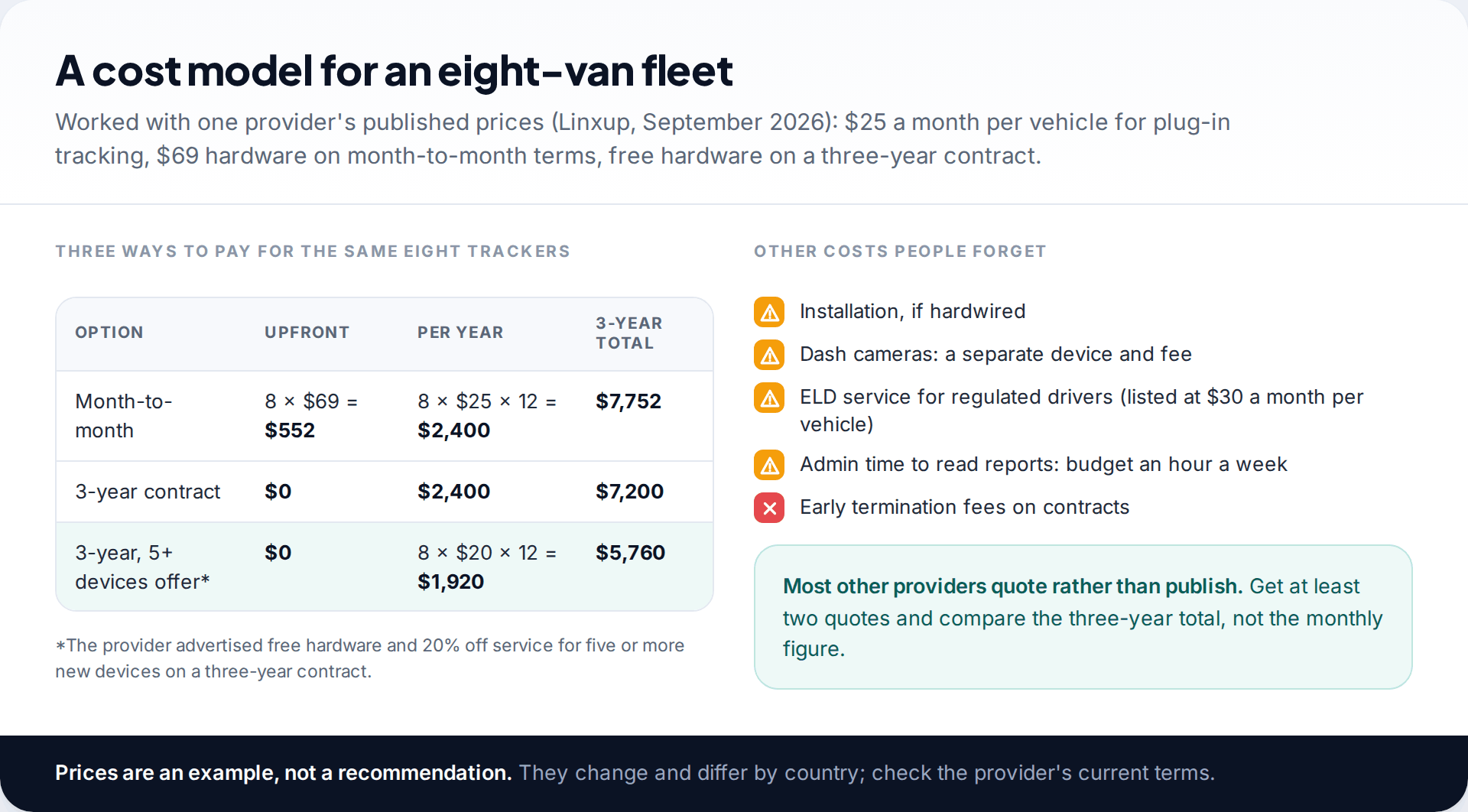
Most providers ask you to request a quote, which makes comparison hard. One that publishes its prices, Linxup, listed plug-in vehicle tracking at $25 a month per vehicle in September 2026, with hardware at $69 on month-to-month terms or free on a three-year contract, and an offer of 20% off service for five or more new devices on a three-year term. Worked through for eight vans, the three-year total ranges from about $5,760 to $7,750 depending on the terms.
Use those figures as a yardstick when quotes arrive, not as a recommendation. Ask every provider for the same three numbers: upfront hardware, monthly service per vehicle, and the cost of leaving early. Contracts that bundle free hardware usually carry early-termination fees, so a long contract only makes sense once a short trial has shown the system works for you.
Telematics features worth paying for
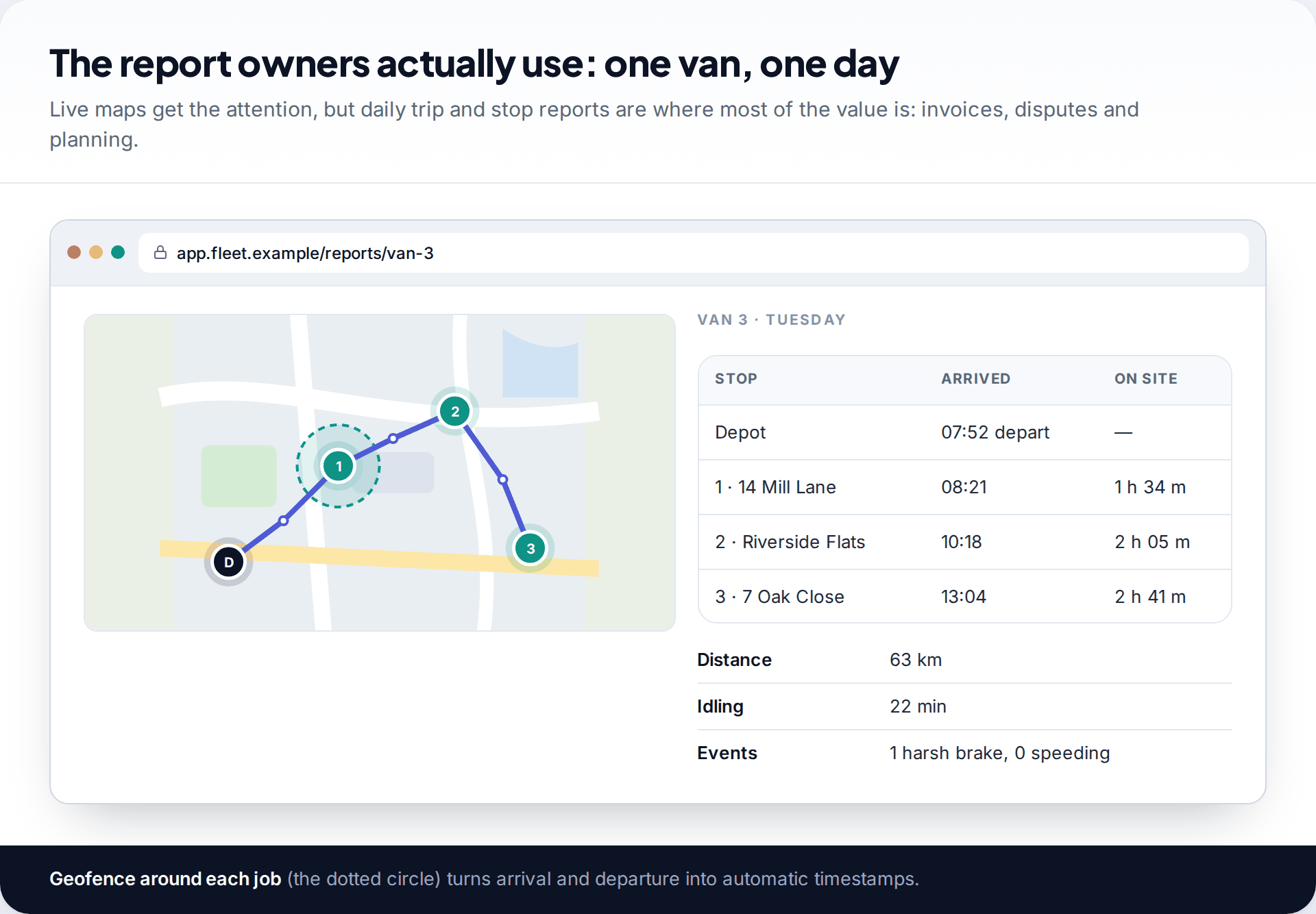
“Telematics” covers everything a tracker reports beyond location: engine data, driving events, fuel, cameras and logbooks. Dashboards make every feature look essential. In practice, small businesses get most of the value from trip and stop history, geofences around jobs and the depot, theft recovery, and maintenance reminders based on real mileage.
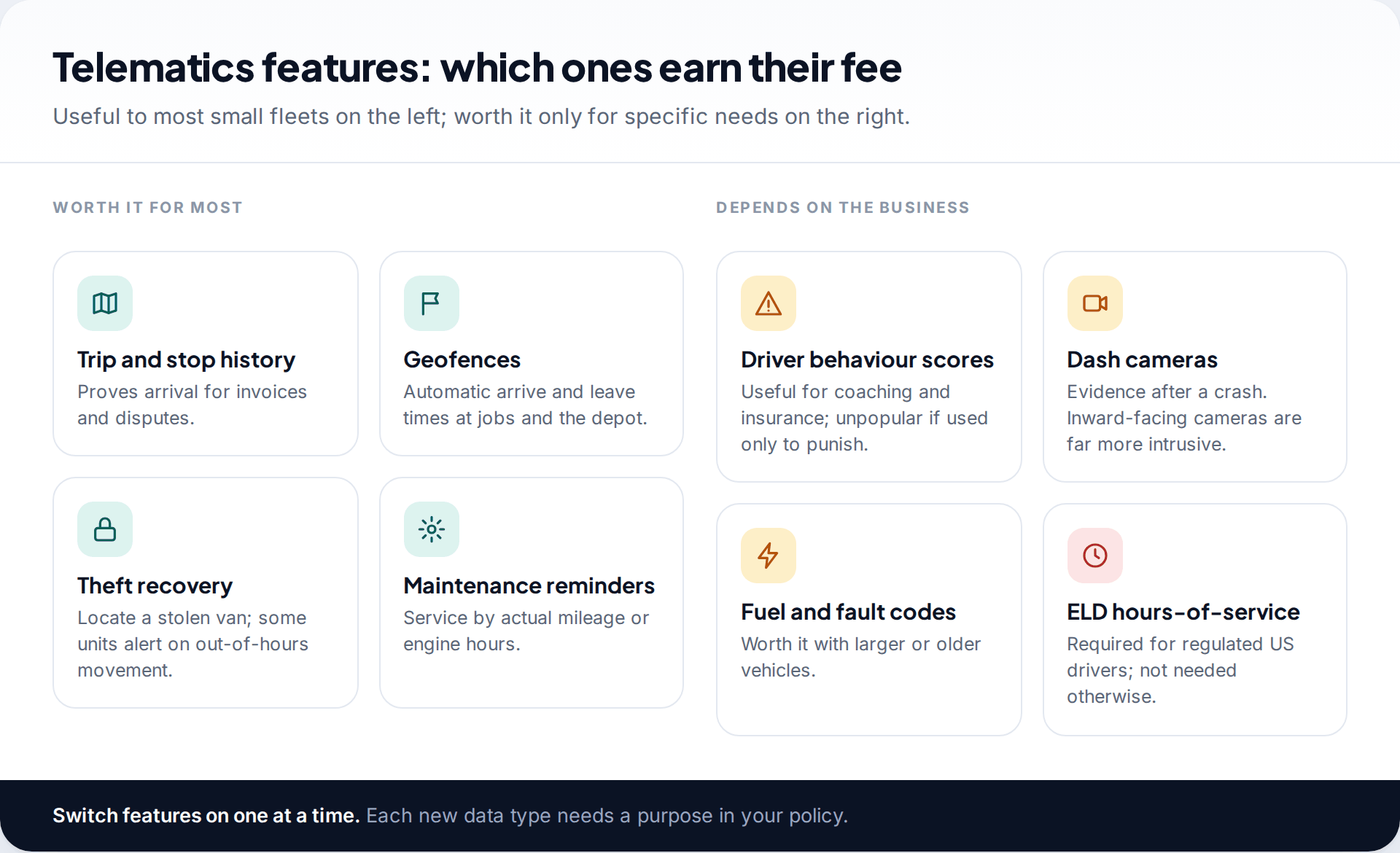
Driver behaviour scores and dash cameras can cut insurance costs and settle disputes after a collision, but they change how drivers feel about the system. Introduce them for a stated reason, share drivers’ own scores with them, and use them for coaching rather than as a hidden disciplinary tool. Inward-facing cameras are far more intrusive than road-facing ones and need a much stronger justification.
If you run regulated commercial vehicles in the US, hours-of-service rules are a separate obligation. Drivers who must keep records of duty status generally need a registered electronic logging device, with exemptions including some short-haul operations and vehicles with pre-2000 engines. An ordinary GPS tracker doesn’t satisfy that rule by itself; check the provider’s ELD is on the FMCSA’s registered list.
Driver consent and a written policy
Legally, many employers rely on notice rather than consent, because employees can’t freely refuse their employer. Practically, you want both understanding and acceptance. Talk to drivers before the devices arrive, explain the problems you are trying to solve, and ask what worries them. Take-home vans and private use almost always come up; settle them in writing.
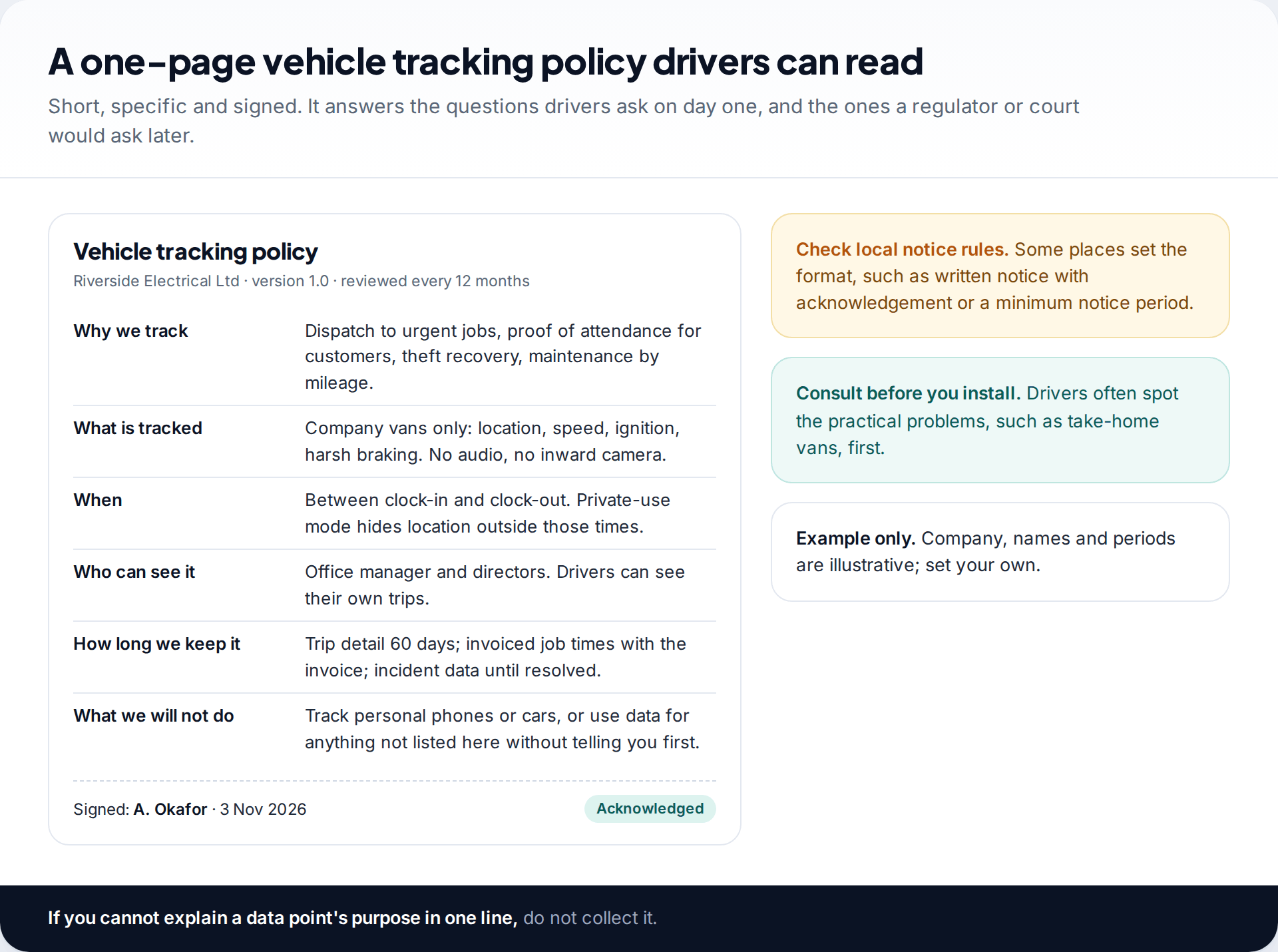
Your policy should fit on one page and answer six questions: why you track, what is tracked, when, who can see it, how long you keep it, and what you won’t do with it. Give it to every driver, get a signed or electronic acknowledgement, and give new starters a copy before their first shift.
Data retention: decide before you collect
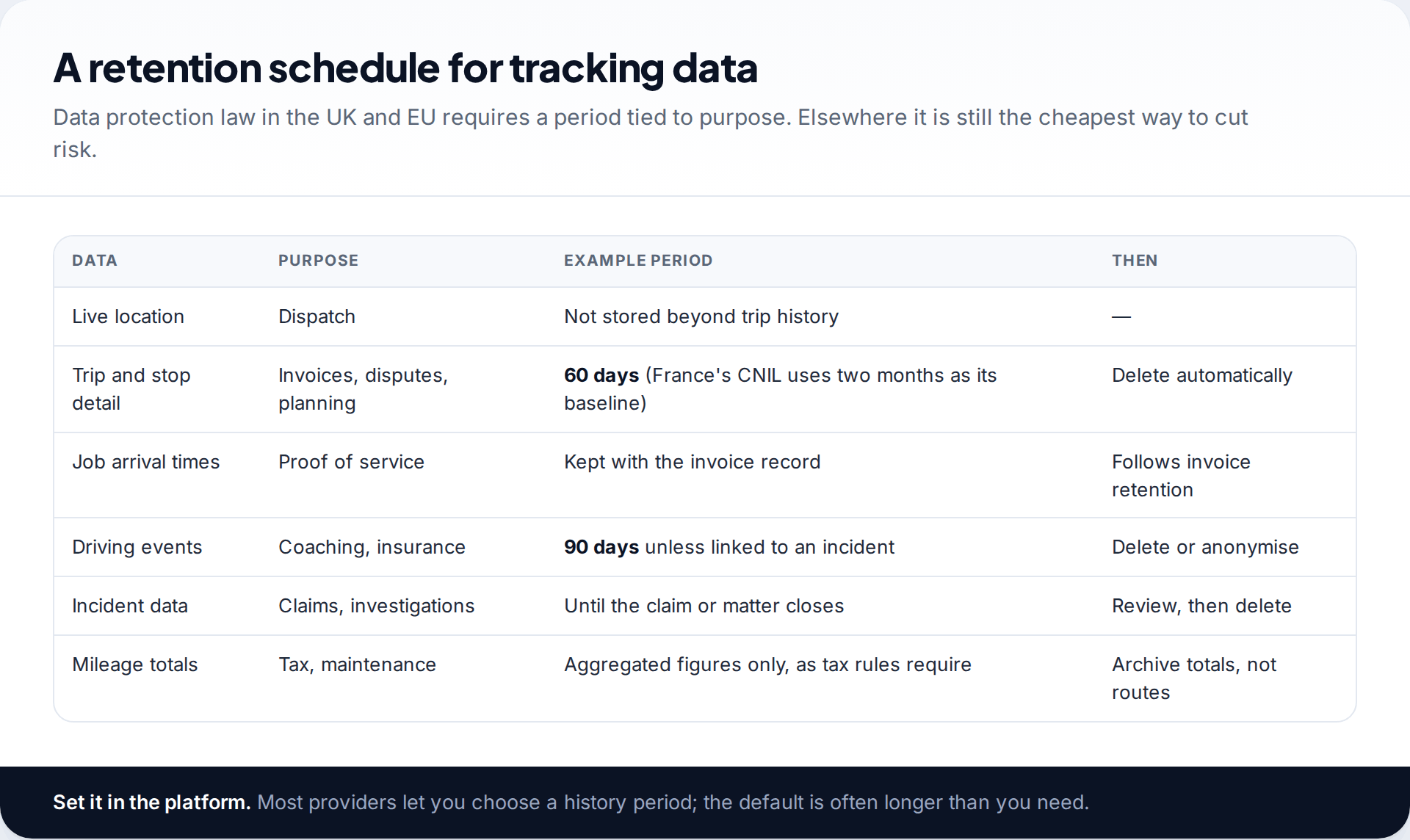
Tracking data piles up fast, and every month you keep it is another month it could be breached, requested in a dispute, or misused. Under UK and EU data protection law you need a retention period justified by purpose. France’s regulator, the CNIL, uses two months as its baseline for vehicle location data, with longer periods only for specific needs. Elsewhere there may be no fixed rule, but the same thinking protects you.
Set the history period in the provider’s settings rather than relying on a manual clear-out. Keep what supports invoices or tax records in those records, as totals or times rather than full routes.
Your first 30 days
Purpose, policy, conversation
Write the two problems you’re solving and the one-page policy. Brief drivers and collect acknowledgements before anything is fitted. Check your local notice rules.
Trial on two vehicles
Fit trackers to two vans on a month-to-month or trial basis. Set geofences for the depot and regular sites, and set the history period.
Use the reports, not the live map
Check whether trip reports answer your two problems. Show drivers their own data and ask what’s wrong or missing.
Decide, then scale
Only now sign a longer contract and roll out to the rest of the fleet. Diary a policy review for twelve months’ time.
Questions to ask every provider
- Where is the data stored, and can I set the history period? You want a setting you control, not a support ticket.
- Can drivers see their own trips? Transparency reduces disputes and is expected under data protection law.
- Is there a private-use or off-duty mode? Essential for take-home vehicles.
- What happens to the data if I cancel? Ask for export and deletion in writing.
- How often does the tracker report, and does that cost more? Faster updates can sit on a higher tier.
- Who owns the hardware on a “free” contract, and what does leaving early cost?
Common problems in the first months
A van keeps disappearing from the map
A plug-in unit has been knocked loose or unplugged, often by a knee in the footwell, or the van is parked out of signal.
Fix: check the device’s last-report time and the port. If it happens repeatedly in one vehicle, ask for a hardwired install or an extension cable that tucks the unit out of the way.
Arrival times don’t match what the driver says
Geofences drawn too small, or around the wrong entrance, miss the moment the van actually parks.
Fix: widen geofences to cover the car park and street, and treat the tracker’s time as evidence, not a verdict. Ask the driver before assuming anything.
Drivers feel watched and morale drops
Usually the live map has become the thing managers look at, and questions arrive about every stop.
Fix: go back to the purposes in the policy. Review weekly reports, not the live map, and share drivers’ own data with them.
Too many alerts
Every speeding, idling and geofence alert is switched on by default.
Fix: keep only the alerts linked to a purpose you wrote down, such as out-of-hours movement for theft, and turn the rest into a weekly summary.
A five-person cleaning company with two vans and three staff cars
The owner wants to prove attendance to commercial clients and to stop the vans being used at weekends. Fitting trackers to everyone’s car is out of the question: the cars are personal.
The plan: plug-in trackers in the two company vans with a private-use mode, and a job app on all five phones that records a check-in and check-out at each client site, with no continuous tracking. Clients receive the check-in times on their monthly report.
What GPS tracking will not do
- It won’t measure productivity. A van parked at a job for three hours tells you where it was, not how well the work went.
- It isn’t perfectly accurate. Positions drift in dense streets and car parks, and trackers report on a schedule, so short stops can be missed. Our explainer on how accurate location tracking is covers why.
- It can’t track what has no signal or power. Unplugged OBD trackers and phones with the app closed simply stop reporting.
- It doesn’t replace compliance systems. ELD, tachograph and tax mileage rules have their own requirements.
How this page was put together
We based this guide on providers’ published product and pricing pages, the FMCSA’s ELD rule pages, the CNIL’s guidance on vehicle geolocation and the UK ICO’s guidance on monitoring workers, all checked in September 2026. The cost model uses one provider’s published prices as an example because most competitors don’t publish theirs. We don’t recommend or receive payment from any provider, and we didn’t test hardware ourselves.
This isn’t legal advice. Read about how we research and keep these guides up to date.
Common questions
How much does GPS tracking cost for a small business?
Expect a monthly fee per vehicle plus hardware, which is often free on longer contracts. One provider publishing prices listed $25 a month per vehicle and $69 hardware in September 2026. Compare three-year totals, including early-termination fees.
Is it better to use phone apps or vehicle trackers?
For company-owned vehicles, trackers are more reliable, provide theft recovery and engine data, and track the asset rather than the person. Phone apps suit staff using their own cars or working on foot, recording only during shifts.
Do I need my employees’ consent to track company vehicles?
Rules vary. Many places require written notice rather than consent, and some set its format. Under UK and EU data protection law, employers usually rely on legitimate interests rather than consent. Either way, give written notice and a clear policy.
Can I track employees outside working hours?
It’s the riskiest part of any setup. Use private-use modes or clock-in-based tracking so location isn’t recorded outside work, especially for take-home vehicles.
How long should I keep GPS tracking data?
Only as long as each purpose needs. The CNIL treats two months as the baseline for vehicle location in France. Set a period in the platform and let it delete automatically.
Will a GPS tracker lower my insurance?
Some insurers offer discounts for tracked vehicles or telematics-based driving data. Ask your insurer directly before buying; it varies by insurer and policy.
The tools behind this guide. TheTruthSpy is a free parental control app for Android: GPS location tracker with geofencing, a screen time app with app limits, a website blocker and web filter, an SMS tracker and call tracker, and social media monitoring for the WhatsApp tracker, Instagram tracker, Snapchat tracker, Facebook Messenger tracker and Viber tracker. See the full parental control feature list, the free parental control pricing, or the download and setup guide.
Related guides
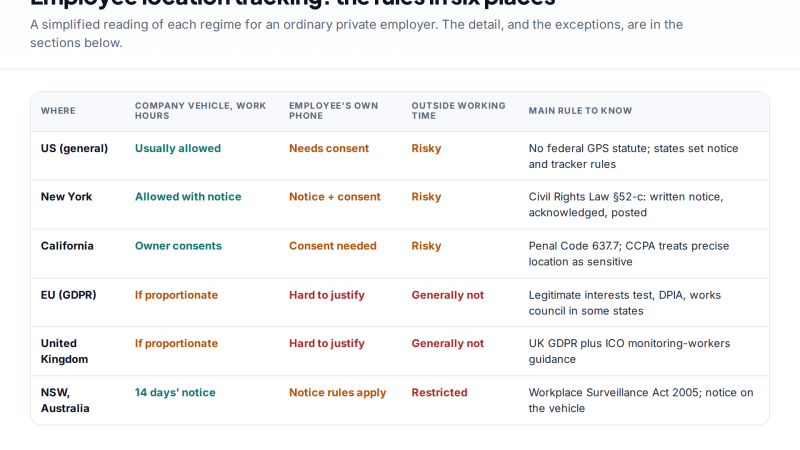
Is Employee GPS Tracking Legal? A Country-by-Country Overview
Employee GPS tracking is usually legal on company vehicles and devices during work time, with notice. Here is how the…
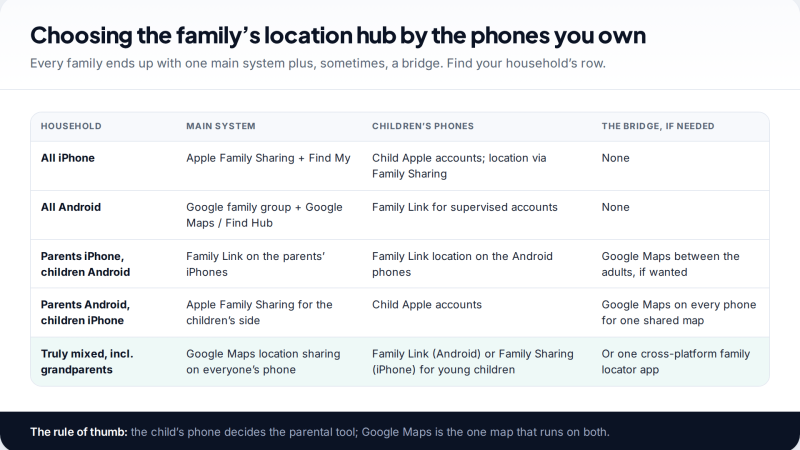
Whole-Family Location Sharing: One Setup Across iPhone and Android
A family location sharing setup for households that mix iPhones and Android phones: which system each person joins, how to…
Location Sharing for Couples: How to Set It Up Together
A practical, sit-down guide to location sharing for couples: which app suits two iPhones, two Androids or one of each,…
Free parental control app for Android
GPS tracking, screen time limits, web filtering, SMS and call monitoring — visible on your child's phone. Pair a phone in about ten minutes.
Android · Free to set up · Visible on your child's phone