Getting Back Deleted WhatsApp Voice Notes: Folders, Backups, Limits

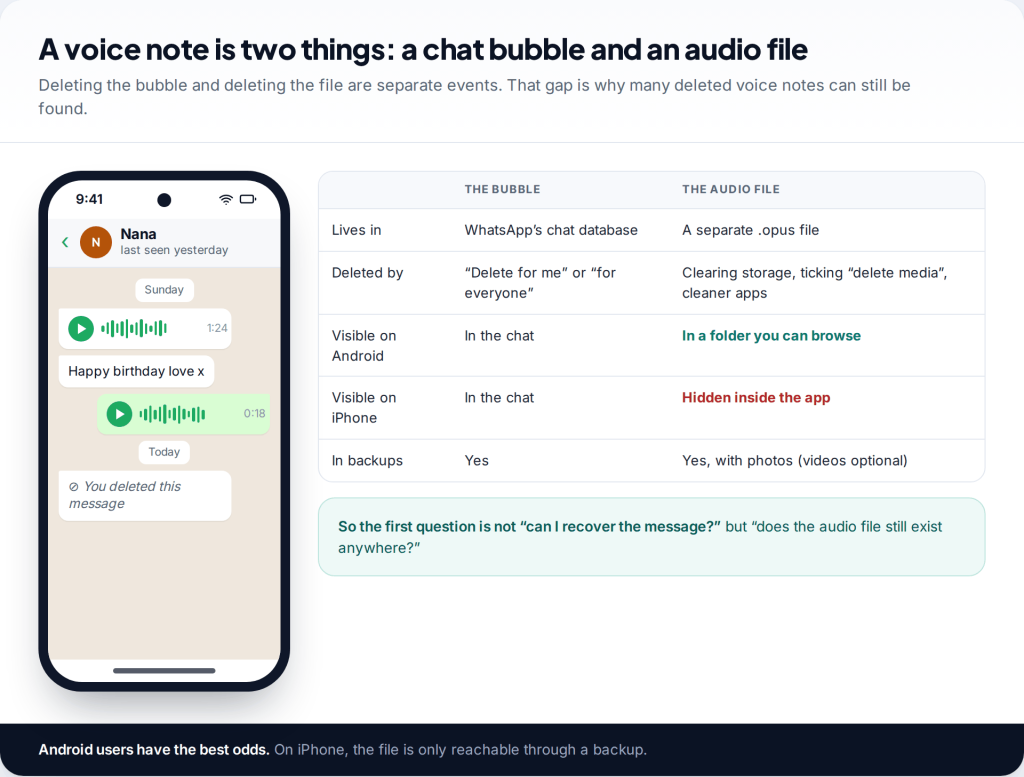
Deleting a voice note from a WhatsApp chat doesn’t always delete the recording. To recover deleted WhatsApp voice messages on Android, first look in the WhatsApp Voice Notes folder. The .opus audio file is often still there. On iPhone there’s no folder you can reach, so the options are a backup made before you deleted it, or asking the person who sent it for their copy.
Why a deleted voice note may still exist
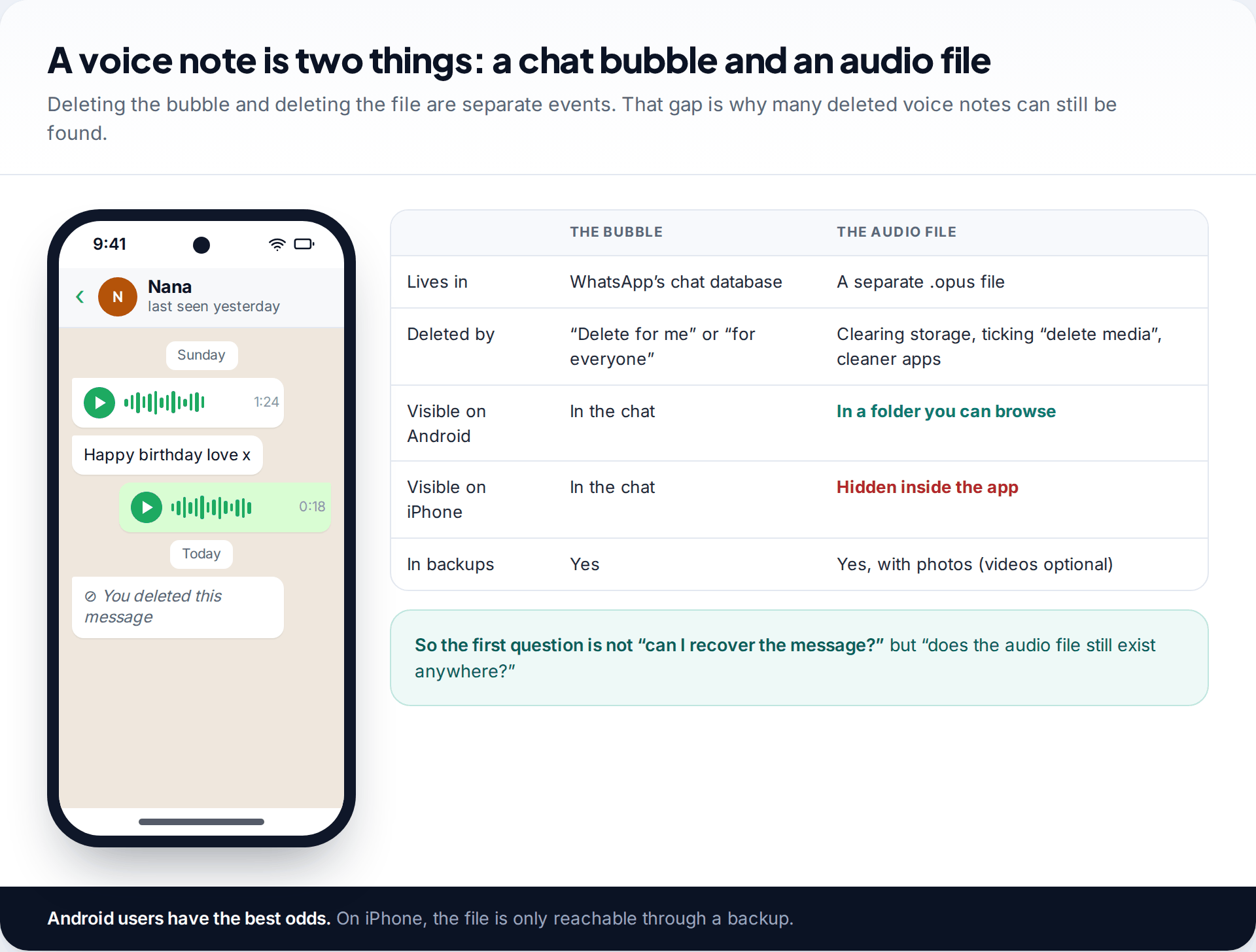
A voice note is really two things. There is the entry in the chat, which shows the waveform and duration. And there is the audio itself, saved as a separate file. When you choose Delete for me, WhatsApp removes the chat entry. Whether the file goes too depends on an option in the delete dialog, and on whether anything has cleaned up your storage since.
On Android that file sits in a folder you can open. On iPhone it’s kept inside WhatsApp’s private storage, which you can’t browse. That one difference shapes everything that follows, so start with the section for your phone.
How to recover deleted WhatsApp voice messages on Android
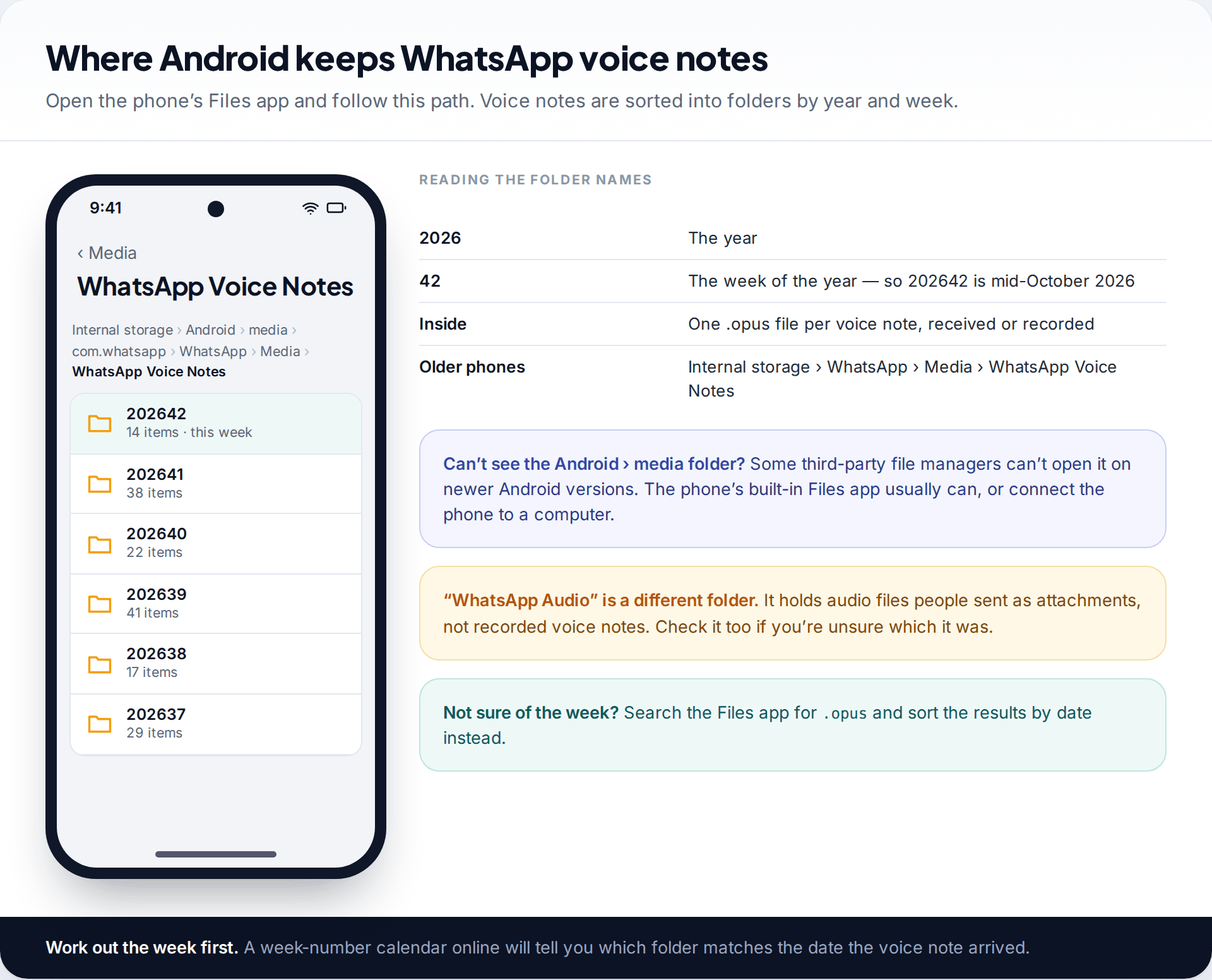
Open your phone’s built-in Files app (on Samsung, My Files) and go to Internal storage › Android › media › com.whatsapp › WhatsApp › Media › WhatsApp Voice Notes. On phones set up with older WhatsApp versions, the path may be Internal storage › WhatsApp › Media › WhatsApp Voice Notes instead.
Inside are folders with six-digit names such as 202641. The first four digits are the year and the last two are the week of the year. To find the right one, work out which week the voice note arrived in. Any week-number calendar will tell you. Then open that folder.
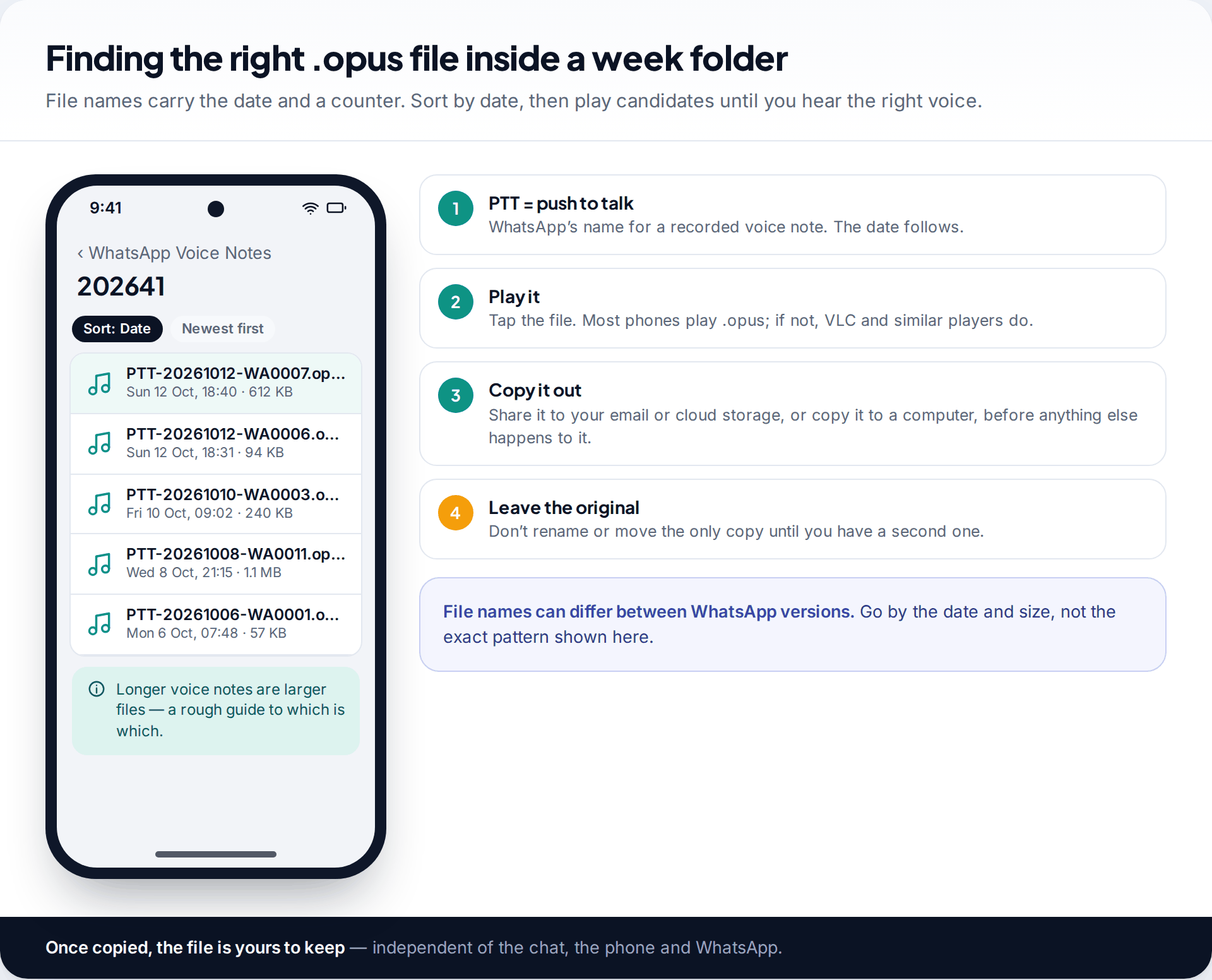
Each voice note is an .opus audio file, usually with “PTT” (push to talk) and the date in its name. Sort by date, then tap likely candidates to play them. Most Android phones play .opus directly. If yours doesn’t, a media player such as VLC will. When you find the right one, copy it somewhere else straight away: share it to your email or cloud storage, or connect the phone to a computer and copy it over. Until then it’s still a single copy on a phone.
Search the whole phone, and check the Trash
If you’re not sure of the week, search instead. Most Files apps let you search for .opus across the whole phone, and sorting by date narrows the results quickly. It’s also worth opening the file manager’s Trash or Recycle bin. Files by Google and Samsung’s My Files both have one, which keeps deleted files for a limited period if it’s switched on. Files removed from inside WhatsApp usually skip it. But if you, or someone tidying your phone, deleted voice notes through a file manager, they may be waiting there.
Can’t see the Android folder? On recent Android versions, some third-party file managers can’t open Android › media. Use the phone’s own Files app, or connect it to a computer by USB and browse from there.
If the file isn’t in the folder
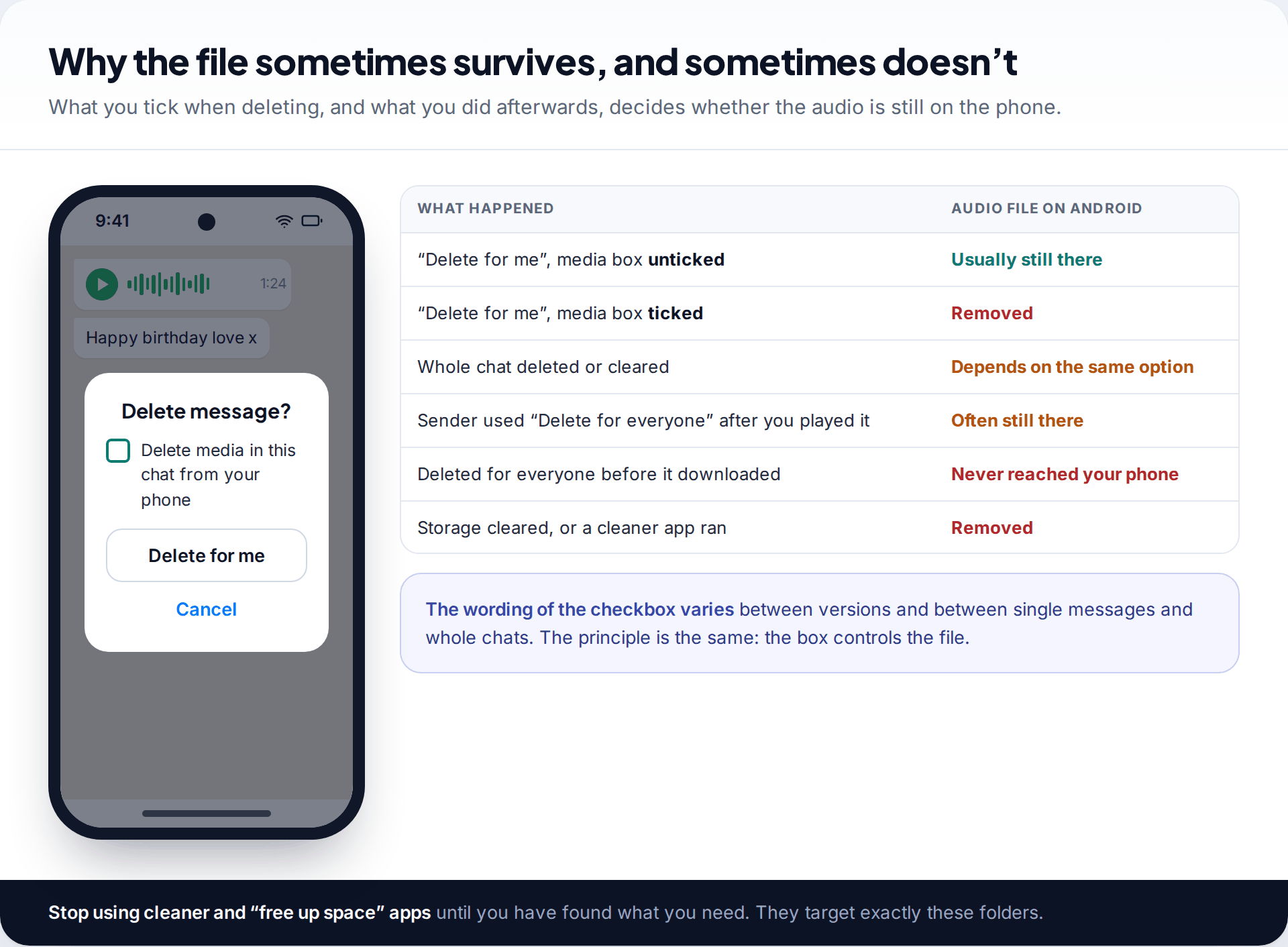
A missing file usually means one of three things. You ticked the option to delete the media from your phone when you deleted the message. You cleared that chat’s media later. Or a storage cleaner removed it, whether WhatsApp’s own tool, the phone’s “free up space” feature or a separate cleaner app.
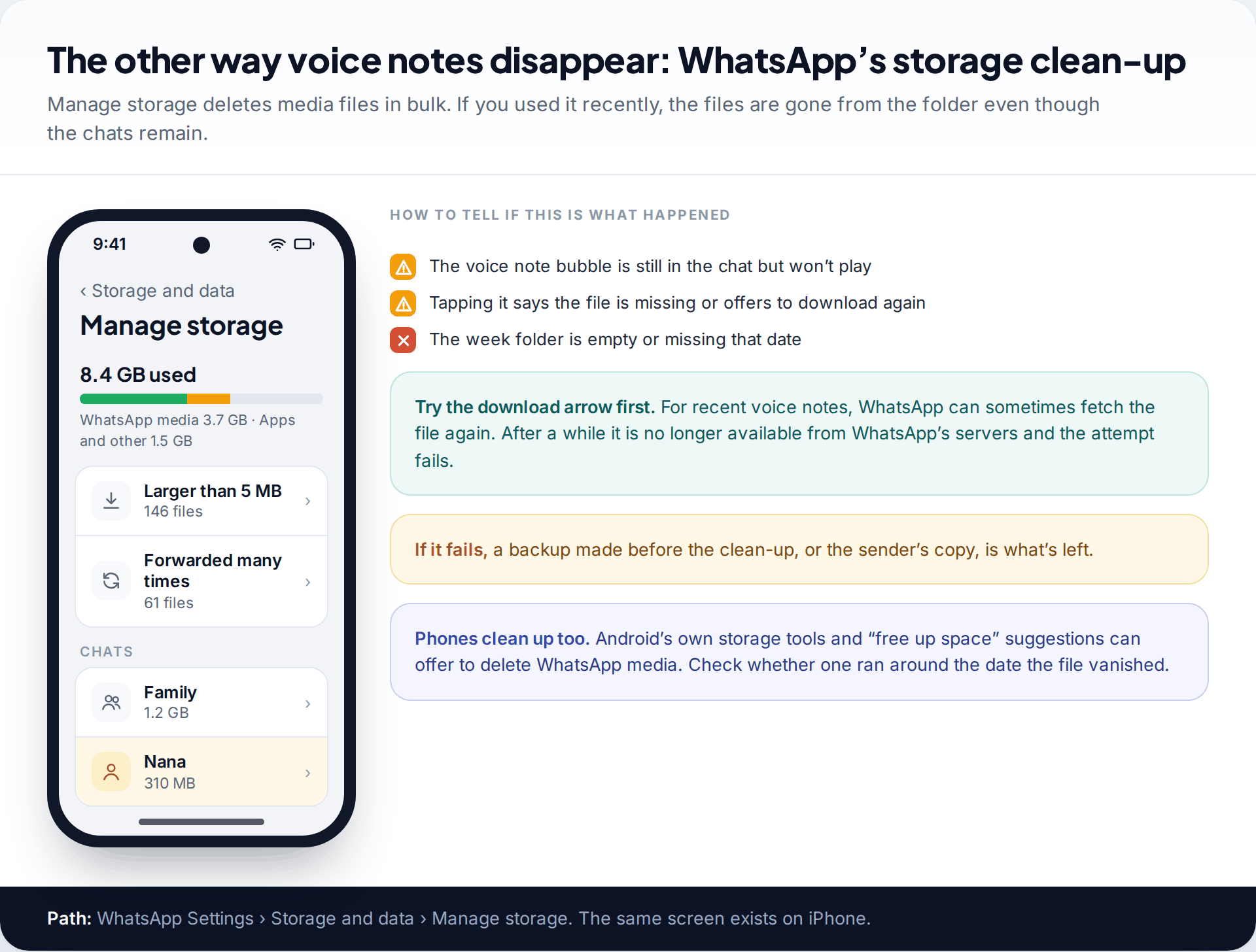
If the voice note bubble is still in the chat but won’t play, try tapping it. For fairly recent media, WhatsApp can sometimes download the file again. After a while it’s no longer available and the download fails. At that point, the options are a backup or another person’s copy.
What about recovery software that scans the phone’s storage for deleted files? We haven’t tested any and don’t recommend one. On modern Android phones, deleted files are hard to reach without weakening the phone’s security. Installing new software writes data that can overwrite what you’re looking for. The approach is covered in more depth, for photos, in our guide to recovering deleted photos on Android.
On iPhone, and when Android has nothing: the backup
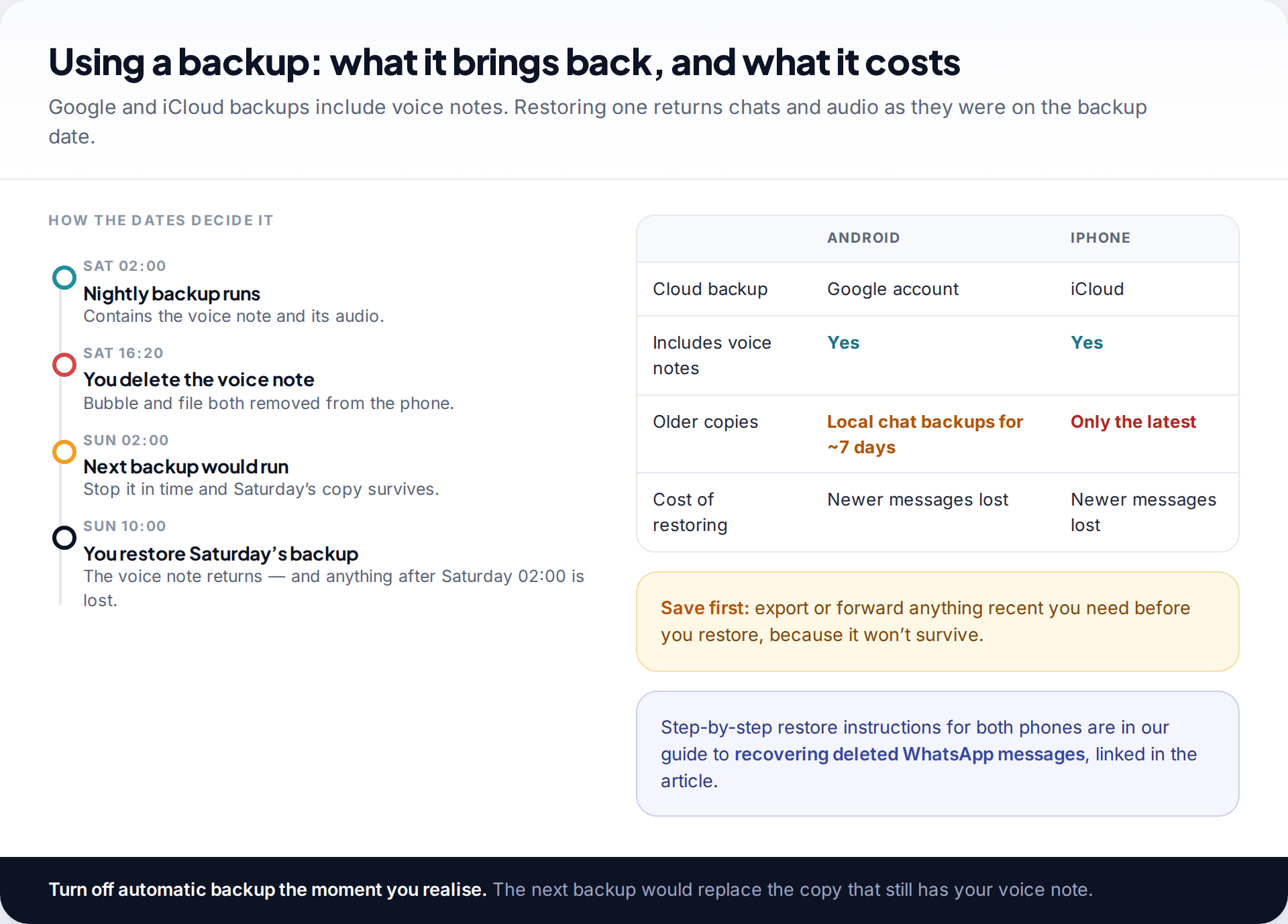
WhatsApp’s chat backups to Google (Android) and iCloud (iPhone) include voice notes, alongside photos. Videos are an optional extra. If your last backup was made before you deleted the voice note, restoring it brings the voice note back. You do this by reinstalling WhatsApp and choosing to restore when prompted.
Check the date first under Settings › Chats › Chat backup. If it predates the deletion, switch automatic backup off at once so tonight’s backup doesn’t replace it. Then save anything newer you need, because a restore takes the phone back to the backup date. The full process for each phone, including Android’s older local chat backups, is in our guide to recovering deleted WhatsApp messages.
One Android detail matters here. The local backup files that Android keeps for about a week hold the chats themselves, not the media. Restoring an older local file can bring back the voice note’s bubble, but if the audio file has already been removed from the Voice Notes folder, the bubble won’t play. For the audio, you need the folder, a Google backup that included it, or someone else’s copy.
On iPhone, if the only iCloud backup is newer than the deletion, WhatsApp itself can’t bring the voice note back. There is one less obvious possibility. If you back up the whole iPhone to a Mac or PC with Finder or iTunes, that computer backup contains WhatsApp’s data as it was on the backup date, voice notes included. Restoring it wipes the phone back to that date, which is a heavy price. Desktop tools that read individual files out of such a backup exist, but we haven’t tested any and don’t recommend one. If no computer backup exists, skip to asking the sender.
Ask the person who sent it
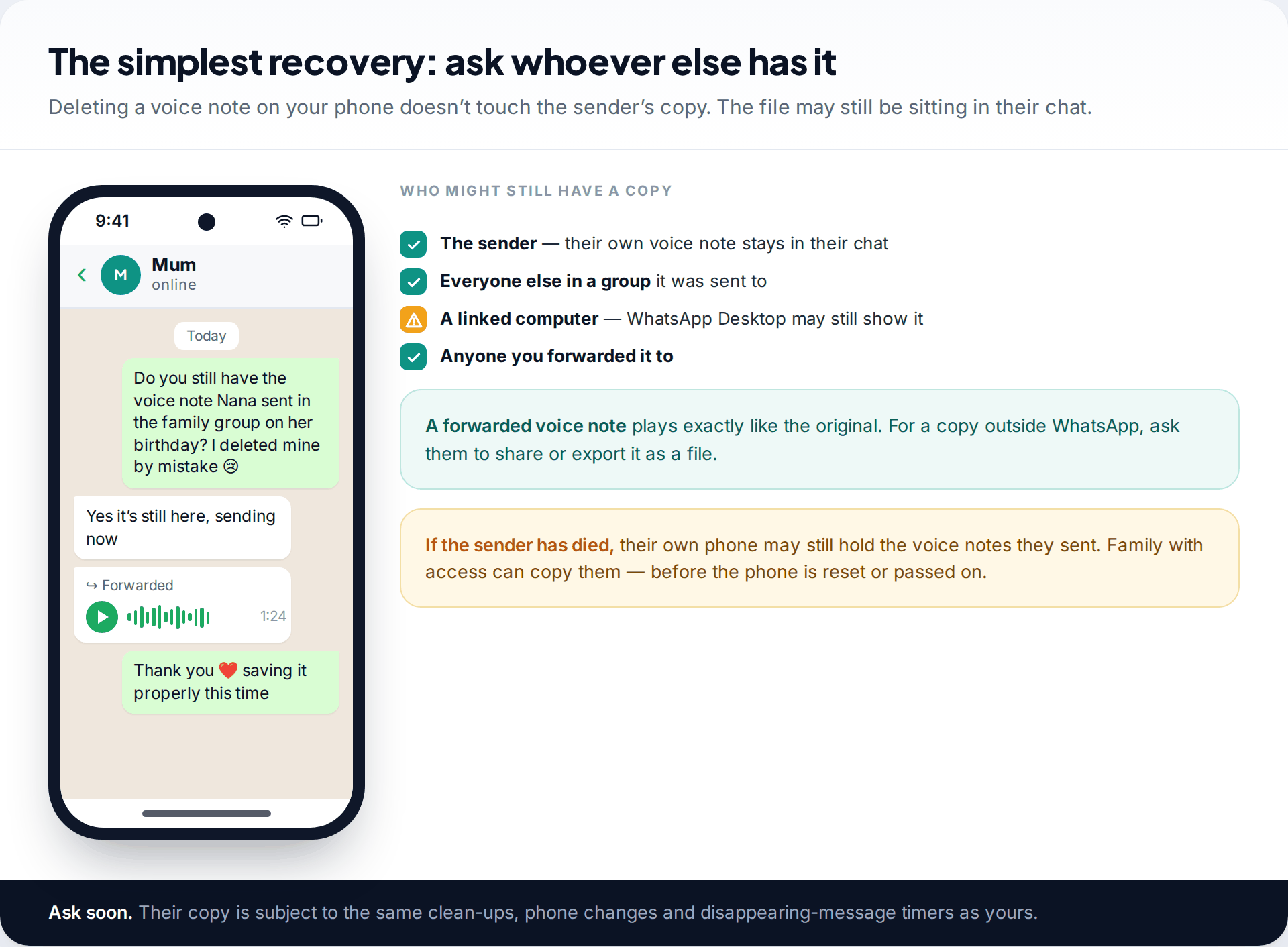
This sounds too simple to list, but it’s the method most likely to work, especially on iPhone. Deleting a voice note on your phone has no effect on the sender’s copy, or on the copies of everyone else in a group. Ask them to forward it back. For a file you can keep outside WhatsApp, ask them to share or export it.
If the sender has died, their phone may still hold the voice notes they sent, in the same folders described above if it’s an Android phone. Family members with access to it can copy the files. Do it before the phone is reset, passed on or recycled.
Check a linked computer before it catches up
If you use WhatsApp on a computer, through the desktop app or WhatsApp Web, look there before you do anything else. Linked devices keep their own copy of chats and download media separately. A voice note deleted on your phone with “Delete for me” isn’t always removed from the other device straight away. If it still appears, play it to make sure it works, then save it. In the desktop app you can usually download a voice note or other media from the message’s menu. Don’t count on this lasting. Linked devices sync regularly, and the voice note may vanish from the computer once it catches up.
Voice notes that can’t be recovered
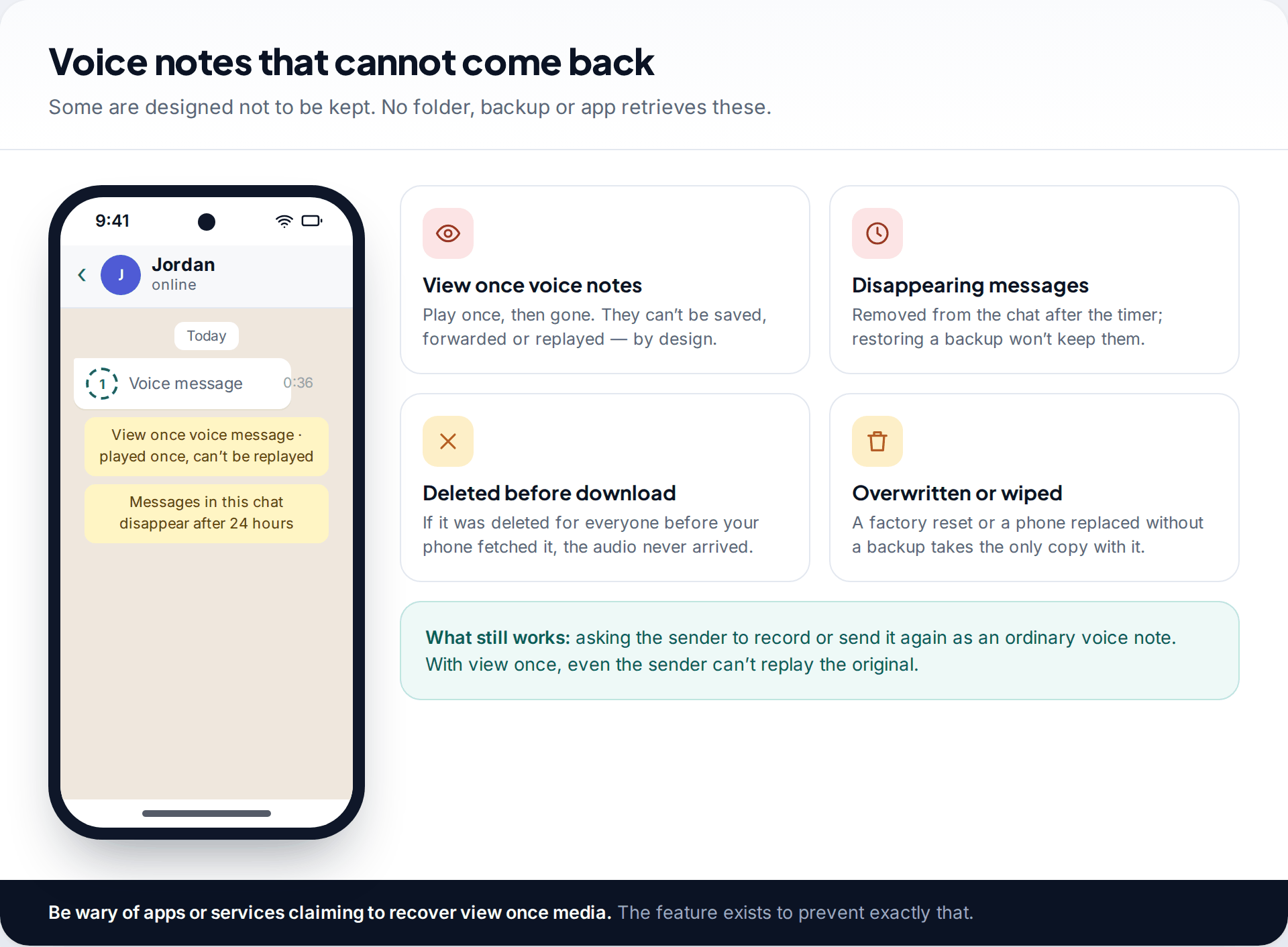
- View once voice messages. WhatsApp introduced these in December 2023. They play once and can’t be saved, forwarded or replayed, even by the sender.
- Disappearing messages. Once the timer removes them, restoring a backup won’t keep them either.
- Voice notes deleted for everyone before they downloaded. The audio never reached your phone.
- Anything on a phone that has been reset or replaced without a backup that included it.
Services promising to recover these are, at best, selling something that can’t work. Some ask for your WhatsApp verification code, which is how accounts are stolen.
A walk-through: the birthday message
A grandmother’s last birthday voice note, deleted while clearing space
Sam, on an Android phone, deleted a large group chat to free up storage on Tuesday and ticked the option to remove media. On Thursday, Sam realised the chat held a voice note from a grandmother who has since died.
The WhatsApp Voice Notes folder for that week is empty, because the media box was ticked. The last Google backup ran on Thursday at 2 a.m., after the deletion, so it no longer holds the chat. Monday night’s local chat backup is still on the phone, but it holds only the chat, not the audio file, so restoring it would bring back a bubble that can’t play. Sam turns off automatic backup to stop anything else changing, then messages a cousin in the same family group. The cousin forwards the voice note within minutes.
Keep irreplaceable voice notes out of the chat
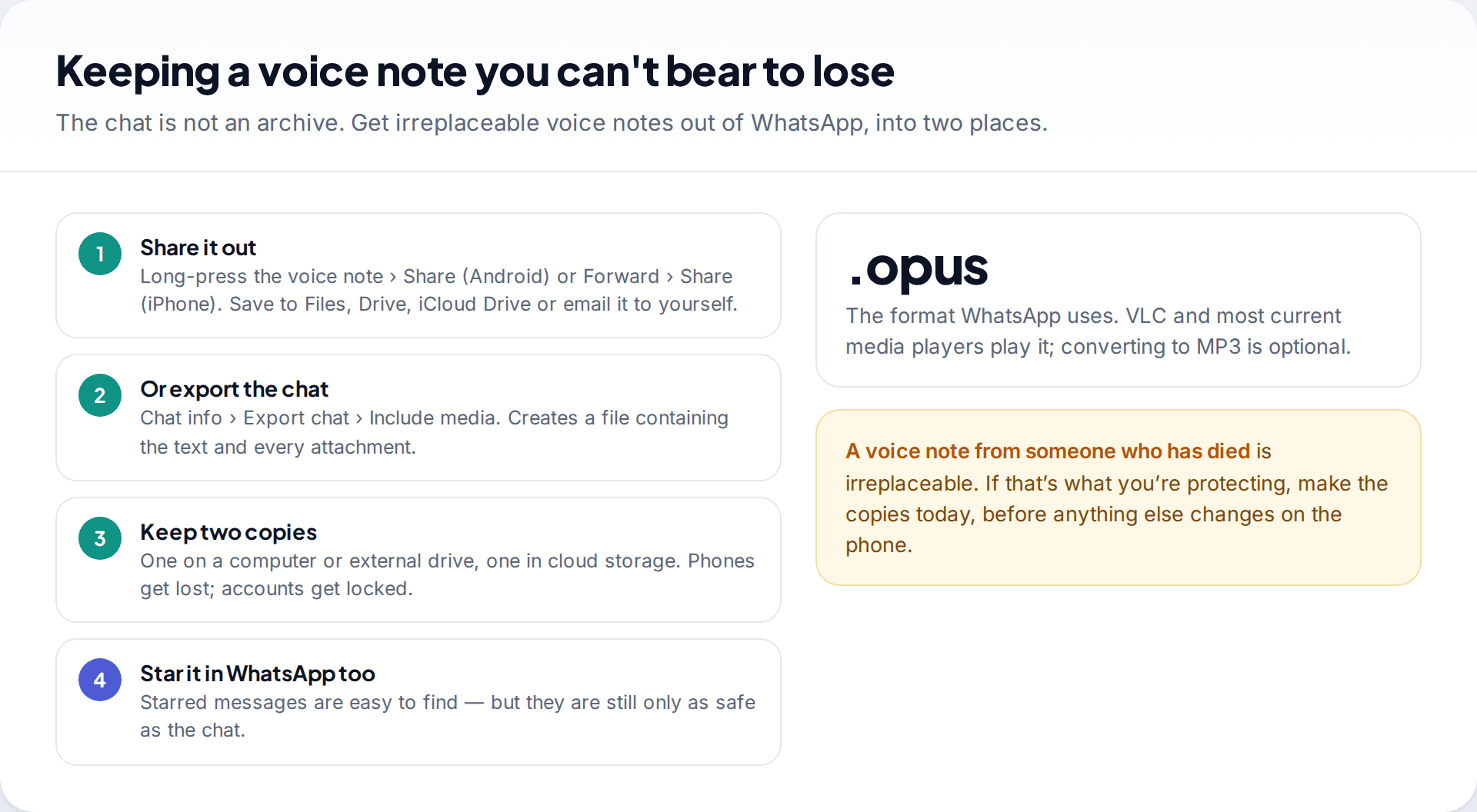
A WhatsApp chat is a conversation, not an archive. For voice notes that matter, get them out. Long-press the voice note and use Share (on iPhone, Forward, then the share icon). Save it to your files, cloud storage or email. For a whole conversation, Export chat with media included creates a file you can store anywhere. Keep two copies in different places, one of them off the phone.
How this page was put together
Folder locations, backup behaviour and the view once voice feature were checked in September 2026 against WhatsApp’s help centre, WhatsApp’s own feature announcements and current Android storage documentation. File names and folder paths vary between WhatsApp versions and phone makers, so use the dates and sizes to find files rather than exact names.
We didn’t test commercial recovery software and don’t endorse any. You can read more about how we check and correct our guides.
Common questions
Where are WhatsApp voice notes stored on Android?
In Internal storage › Android › media › com.whatsapp › WhatsApp › Media › WhatsApp Voice Notes, in subfolders named by year and week. Older installations use Internal storage › WhatsApp › Media › WhatsApp Voice Notes.
Can I recover deleted WhatsApp voice messages on iPhone without a backup?
Not from the phone itself. iPhone doesn’t expose WhatsApp’s files. Without an iCloud backup made before the deletion, ask the sender or someone else in the chat for their copy.
What app plays .opus files?
Most Android phones play them in their built-in player. On a computer, VLC and most current media players handle .opus. Converting to MP3 isn’t necessary unless another device needs it.
Does restoring a backup bring back voice notes?
Yes, if the backup was made before the voice note was deleted. Backups include voice notes. Restoring removes messages received after the backup date.
Can I recover a view once voice message?
No. View once voice messages are designed to be heard a single time and can’t be saved or replayed.
Can WhatsApp support recover a deleted voice note for me?
No. Voice notes are end-to-end encrypted like other messages, and WhatsApp doesn’t keep delivered media for you to request later. Support can’t search for or restore a recording. Your phone, your backup and the other people in the chat are the only places a copy can be.
Why does an old voice note say it can’t be downloaded?
The bubble is still in the chat, but the audio file is no longer on your phone, and it’s no longer available to download again. This usually follows a storage clean-up or a move to a new phone without media. Only a backup that included the file, or someone else’s copy, can fill the gap.
I deleted the whole chat. Are the voice notes gone?
Not necessarily. On Android, check the Voice Notes folder. The files remain unless you chose to delete media along with the chat or cleared storage afterwards.
Looking for a tool to go with this? TheTruthSpy is a free parental control app for Android that stays visible on the child's phone. If it fits your family, see the Social media alerts feature.
Related guides
Why Is My Phone Overheating? Causes and Fixes
Warm, hot or dangerous? Why phones heat up when charging, gaming or in the sun, how to cool one safely,…

How to Transfer Photos From Your Phone to a Computer
The best way to copy photos from iPhone or Android to Windows or Mac, what happens to HEIC files, dates…
How to Back Up WhatsApp Chats
Set up WhatsApp backups on Android and iPhone, keep an encryption key safe, check the backup exists, and fix the…
Parental controls your child can see
Location, screen time limits, a web filter and alerts from notifications — free, and visible on your child's phone. Pair a phone in about ten minutes.
Android · Free to set up · Visible on your child's phone