Recover Deleted Photos on Android: Trash, Backups and Recovery Apps

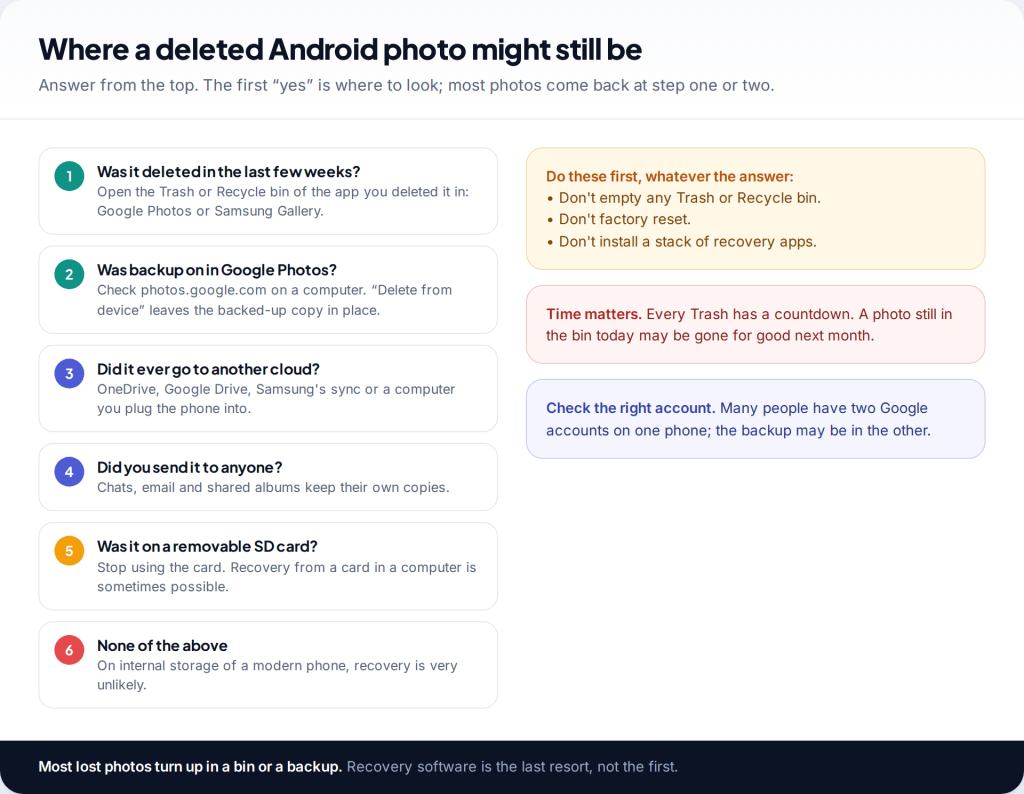
Before you try anything else, don’t empty any Trash, don’t factory reset, and don’t install the first “photo recovery” app you find. To recover deleted photos on Android, open the bin of the app you deleted them in: Collections › Trash in Google Photos, or the Recycle bin in Samsung’s Gallery. Then check your backups. Most lost photos come back from one of those two places.
If they don’t, there are still a few places copies hide: chats, cloud drives, a computer, an SD card. What almost never works on a current phone is scanning the internal storage for deleted files, and it’s worth understanding why before you spend money on an app that promises it.
Start here: where could the photo still be?
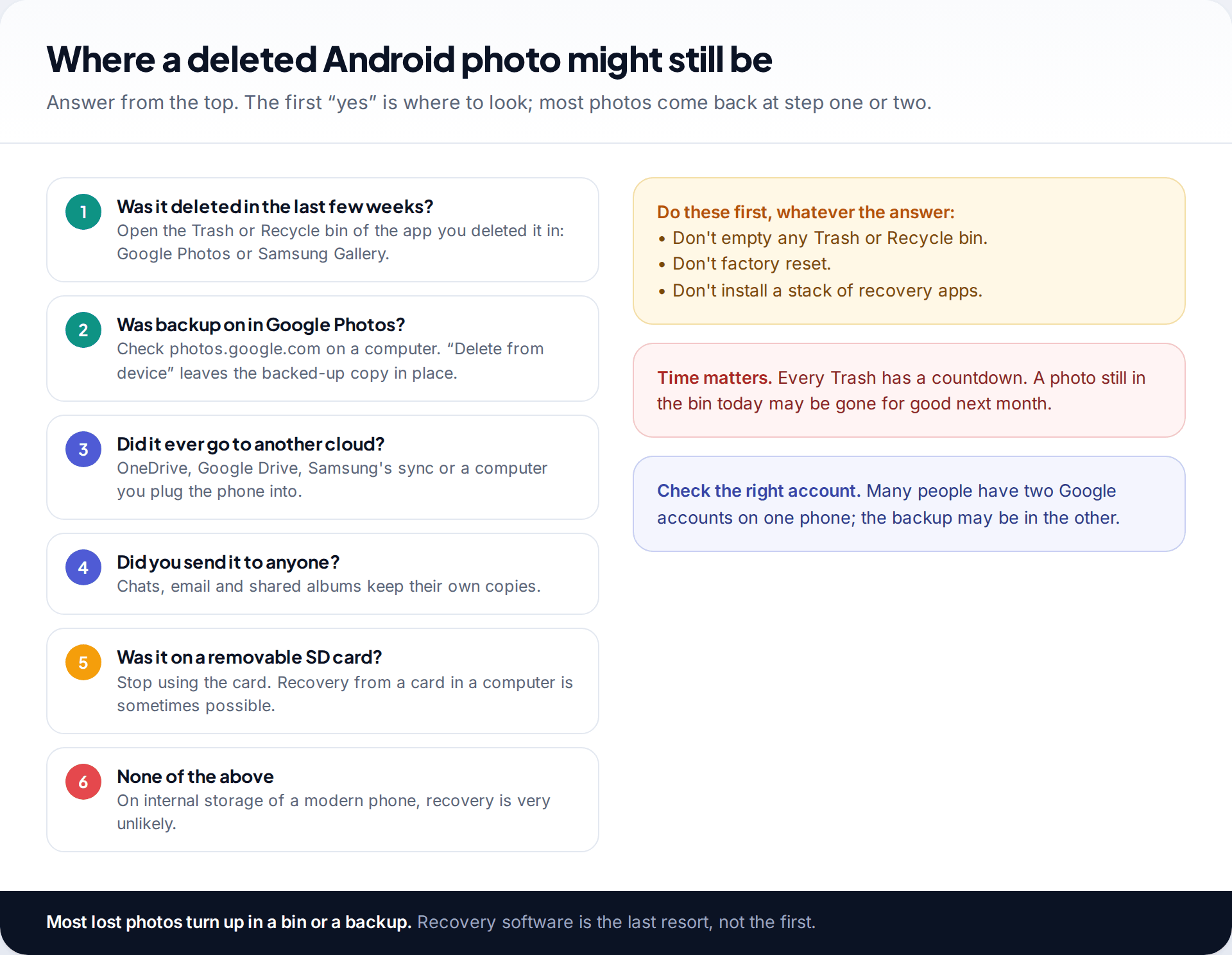
A deleted photo is rarely deleted everywhere at once. The phone’s gallery app usually keeps it in a bin for a while, a backup may still hold it, and if you ever sent or shared it there is a copy with someone else. The job is to find the copy that still exists, not to resurrect the deleted file.
Two things trip people up. First, there are often two gallery apps on one phone. Samsung phones have Samsung’s Gallery and usually Google Photos as well, and each has its own bin. Second, many phones are signed into more than one Google account. The backup belongs to whichever account had backup switched on, which may not be the one you’re looking at.
Google Photos Trash: the quickest way to recover deleted photos on Android
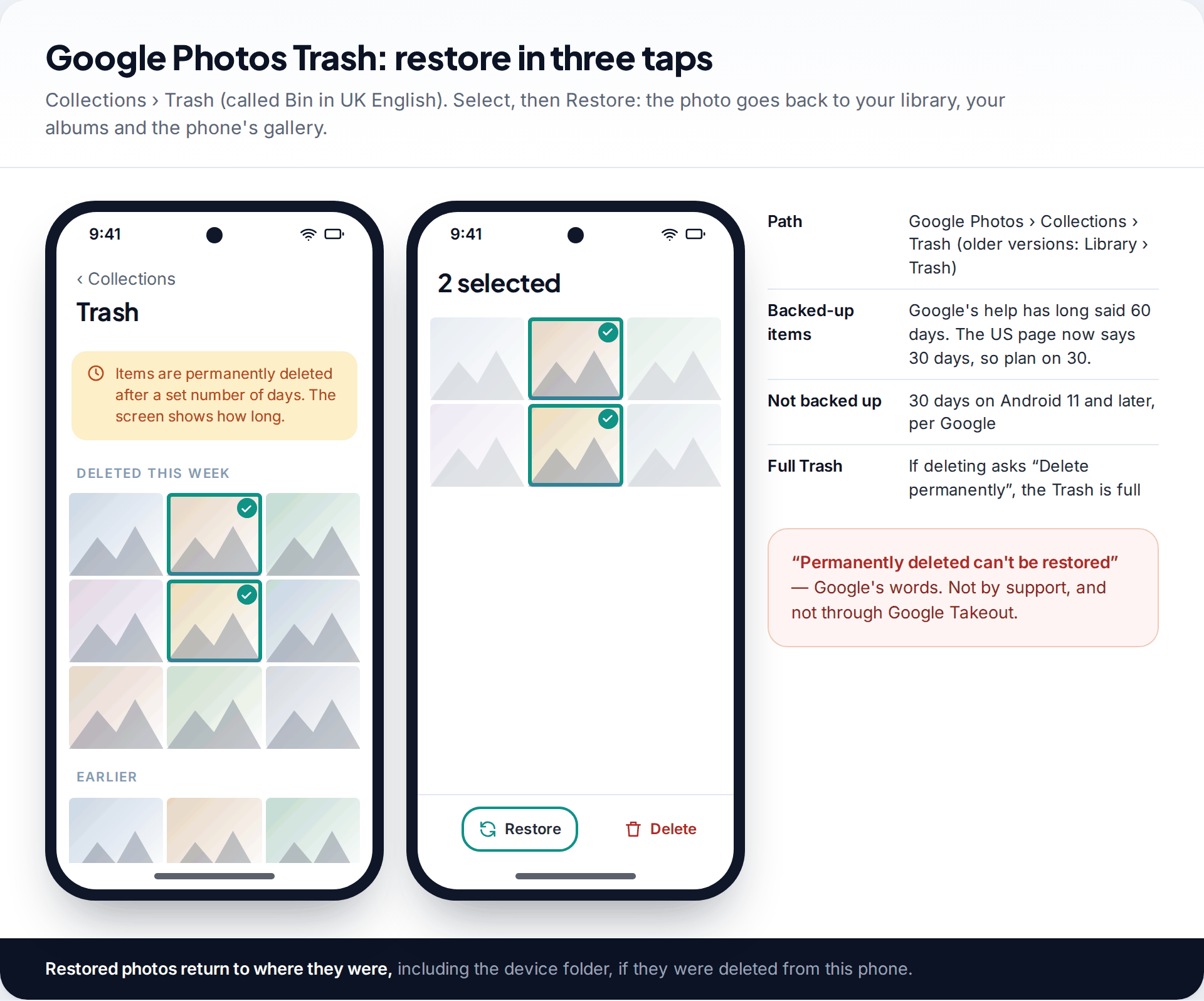
- Open Google Photos and tap Collections, then Trash. In UK English the app calls it Bin; older versions put it under Library.
- Touch and hold a photo to select it, then tap any others.
- Tap Restore. The photos return to your library and albums, and to the device folder if they were deleted from this phone.
How long they stay depends on whether they were backed up, and Google’s own pages disagree at the moment. The UK English version of Google’s help says backed-up photos stay in the bin for 60 days and photos that weren’t backed up are deleted after 30. The US English version now says 30 days in both cases. The Trash screen itself shows how long items are kept, so trust that, and if in doubt, assume 30 days.
If deleting a photo ever prompted “Delete permanently” rather than moving it to Trash, Google says that means your Trash was full, and those items skipped it. Google is also clear on the hard limit: permanently deleted photos can’t be restored, and Google Takeout can’t recover them either.
Deleted from the phone, still in your Google Photos backup
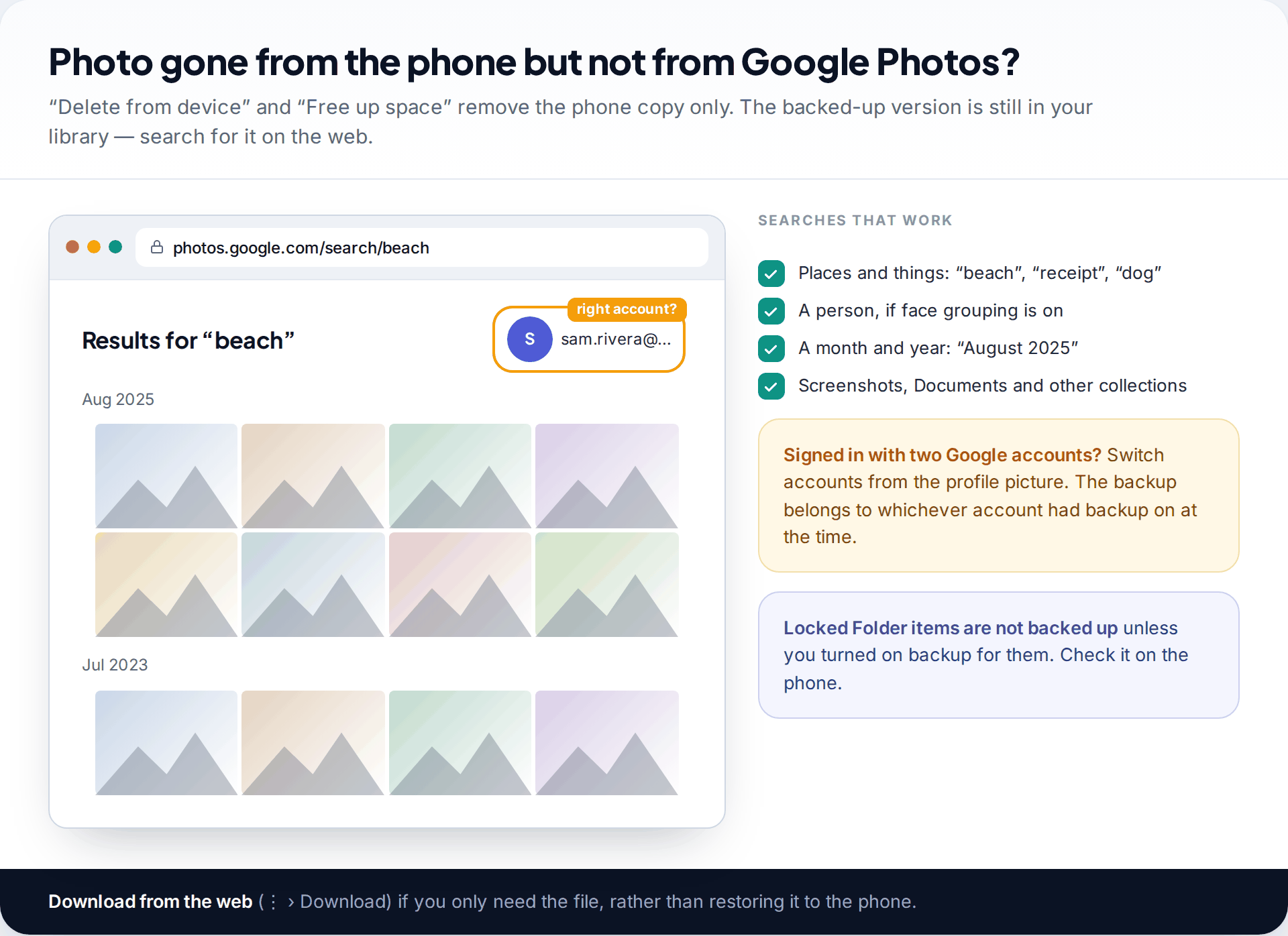
Google Photos has two kinds of delete. The normal one removes a photo everywhere. Delete from device and Free up space remove only the copy on the phone and leave the backed-up version in your library. Your phone’s gallery may no longer show the photo, but Google Photos will.
The easiest way to check is photos.google.com on a computer, where the larger screen and search help. Google Photos search understands things and places, so “beach”, “receipt” or “passport” often finds a photo faster than scrolling. Search for a month and year if you know when you took it.
If the photo isn’t there, check the account. Tap your profile picture and switch to any other Google account on the phone. If you can’t get into the account that held your backup, our guide to resetting a forgotten Google password walks through Google’s recovery steps. Also check the Locked Folder on the phone: items there aren’t backed up unless you switched on backup for it.
Samsung Gallery’s Recycle bin
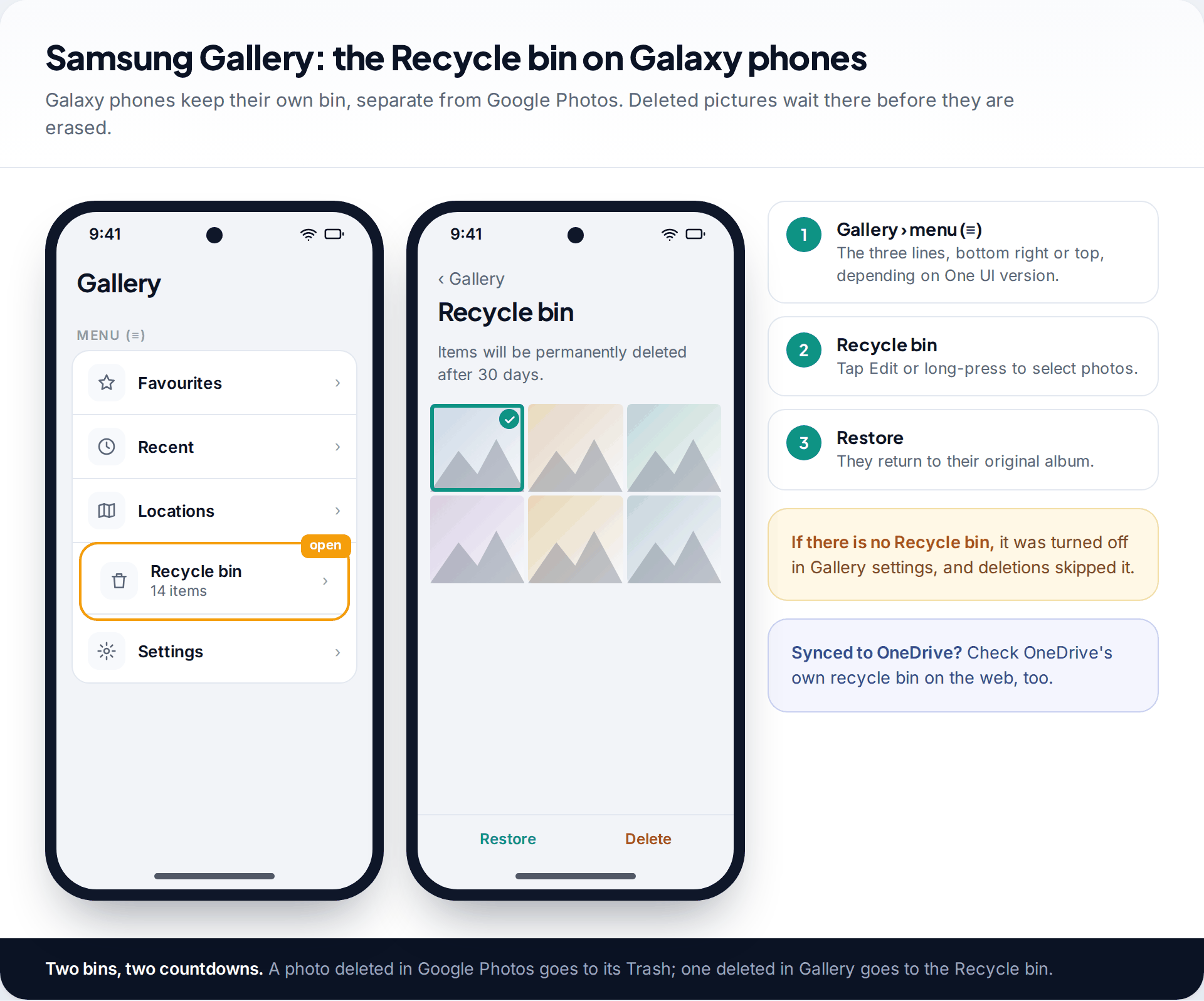
On a Galaxy phone, photos deleted in Samsung’s Gallery app go to its Recycle bin, where they’re kept for 30 days. Open Gallery, tap the menu (three lines), then Recycle bin. Select the photos and tap Restore, and they go back to their album. The menu’s position moves between One UI versions, but the name has stayed the same.
If there’s no Recycle bin, it has been turned off in the Gallery settings, and photos deleted while it was off went straight past it. Turn it back on for the future.
Many Samsung phones can also sync Gallery with OneDrive. If yours did, OneDrive has its own recycle bin, which Microsoft says keeps items deleted in the last 30 days for personal accounts (93 days for work or school accounts, unless an administrator changed it). Check it at onedrive.com.
A Galaxy phone, two gallery apps, three weeks later
Tom deleted an album of his daughter’s school play in Samsung’s Gallery three weeks ago, and he is also missing some party photos he cleared out in the spring. He opens Gallery’s Recycle bin first and finds the school-play photos with nine days left, and restores them. The spring photos are long past the bin’s 30 days. He then opens Google Photos, which had backup switched on: they aren’t in its Trash, but a search on photos.google.com for the month finds them. In his case, deleting in Samsung’s Gallery had removed the phone’s copy and left the backup untouched.
Other clouds and their deadlines
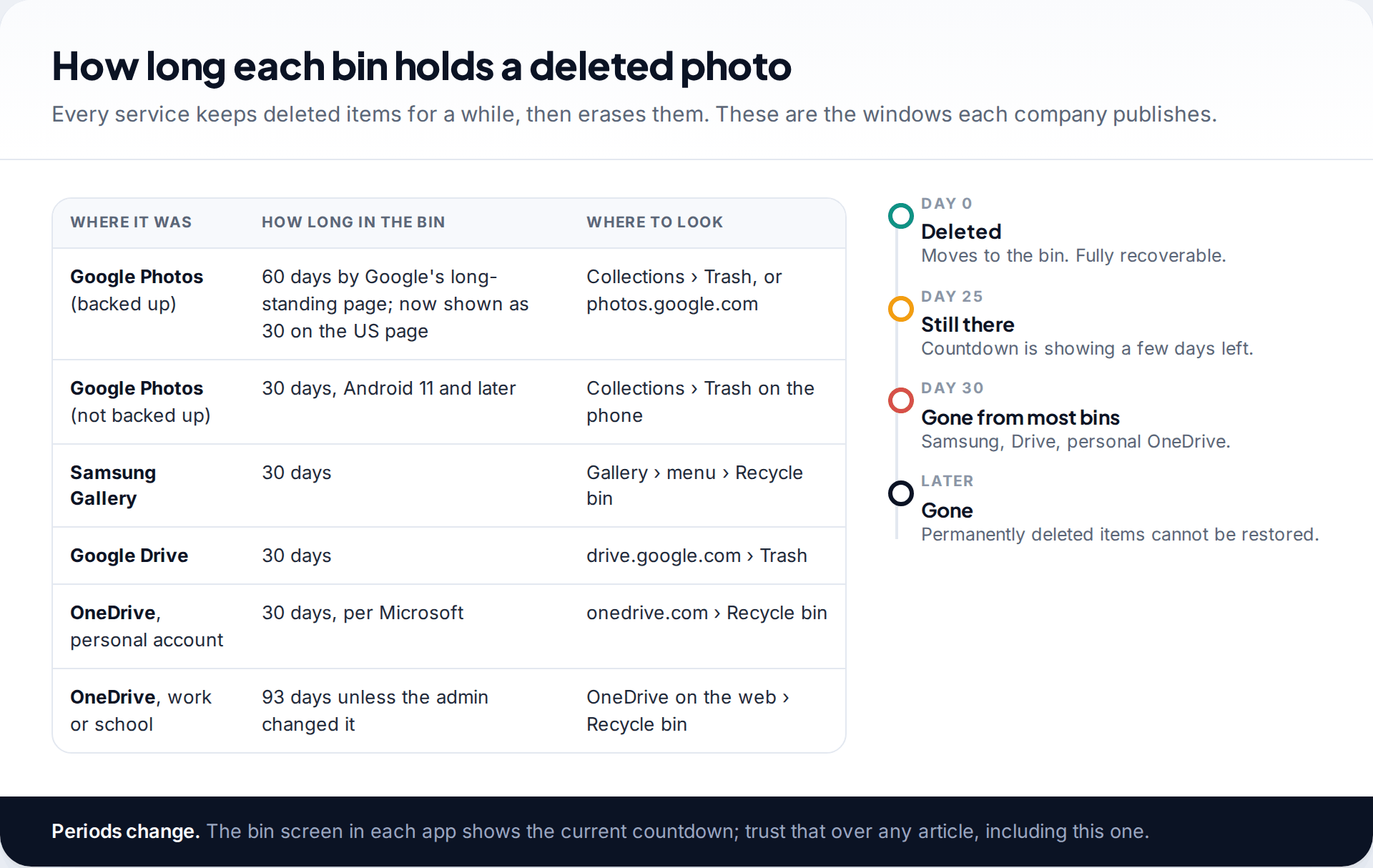
If you ever copied photos to Google Drive, look in Drive’s Trash as well; items there are deleted after 30 days. The same applies to any other service you used, such as a photo-printing site or a family storage service. Each keeps deleted items for a while and then erases them.
The pattern is the same everywhere: a bin, a countdown and then permanent deletion that support can’t undo. The countdown is the important part. If your photo is in a bin today, restore it today.
Copies you forgot you had
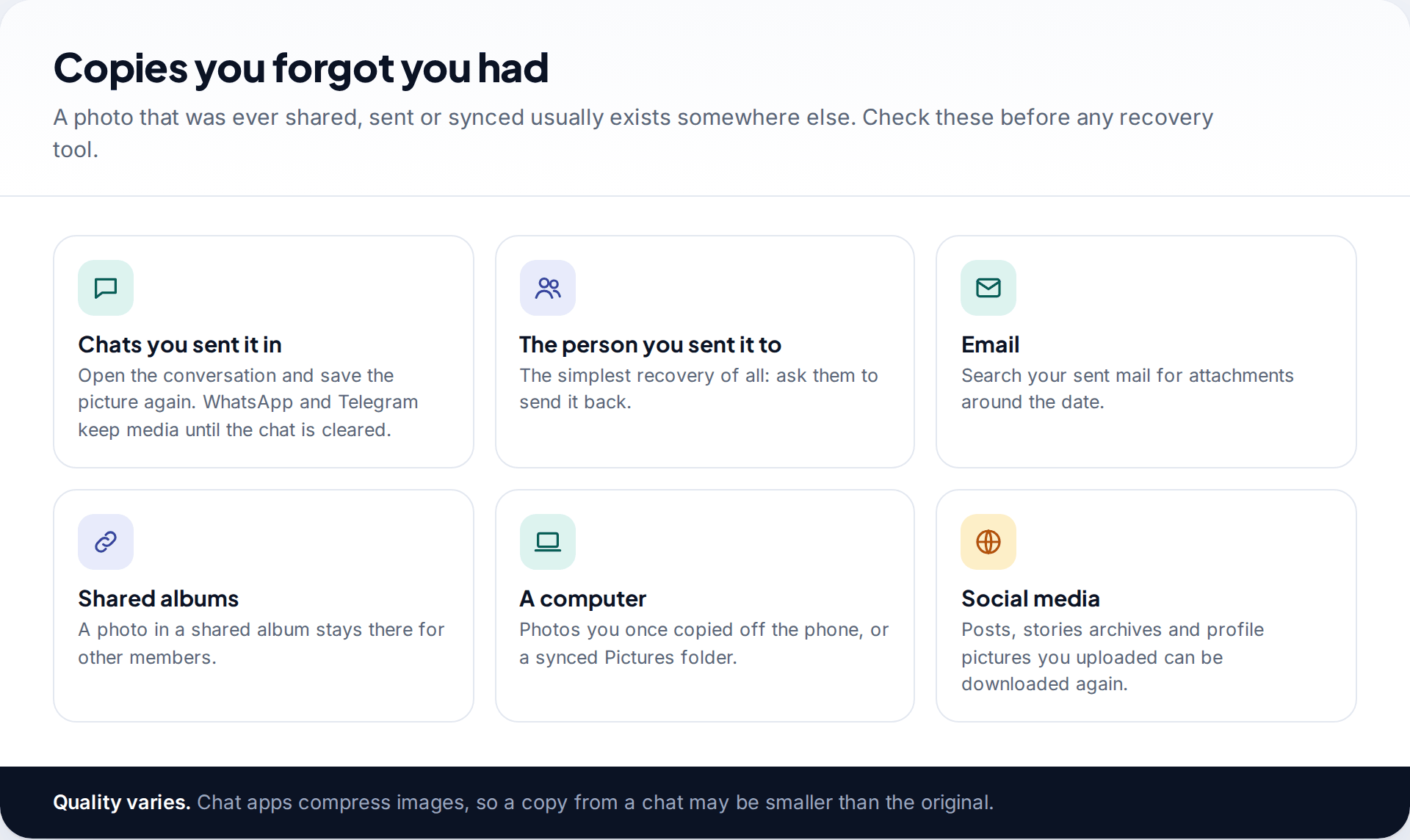
If the photo was ever sent anywhere, a copy exists outside your gallery. Open the chat you sent it in; WhatsApp, Telegram and similar apps keep media in the conversation until it is cleared. Search your sent email for attachments from around that date. Shared albums keep photos for their other members. And the simplest recovery of all is asking the person you sent it to.
Check any computer you ever plugged the phone into, and social media you posted to, including story archives. Chat apps compress images, so these copies may be smaller than the original, but a slightly softer photo beats none. If the lost pictures were Snapchat Memories rather than gallery photos, our guide to where deleted Snapchat Memories might still be covers that app’s own options.
Photos deleted from an SD card
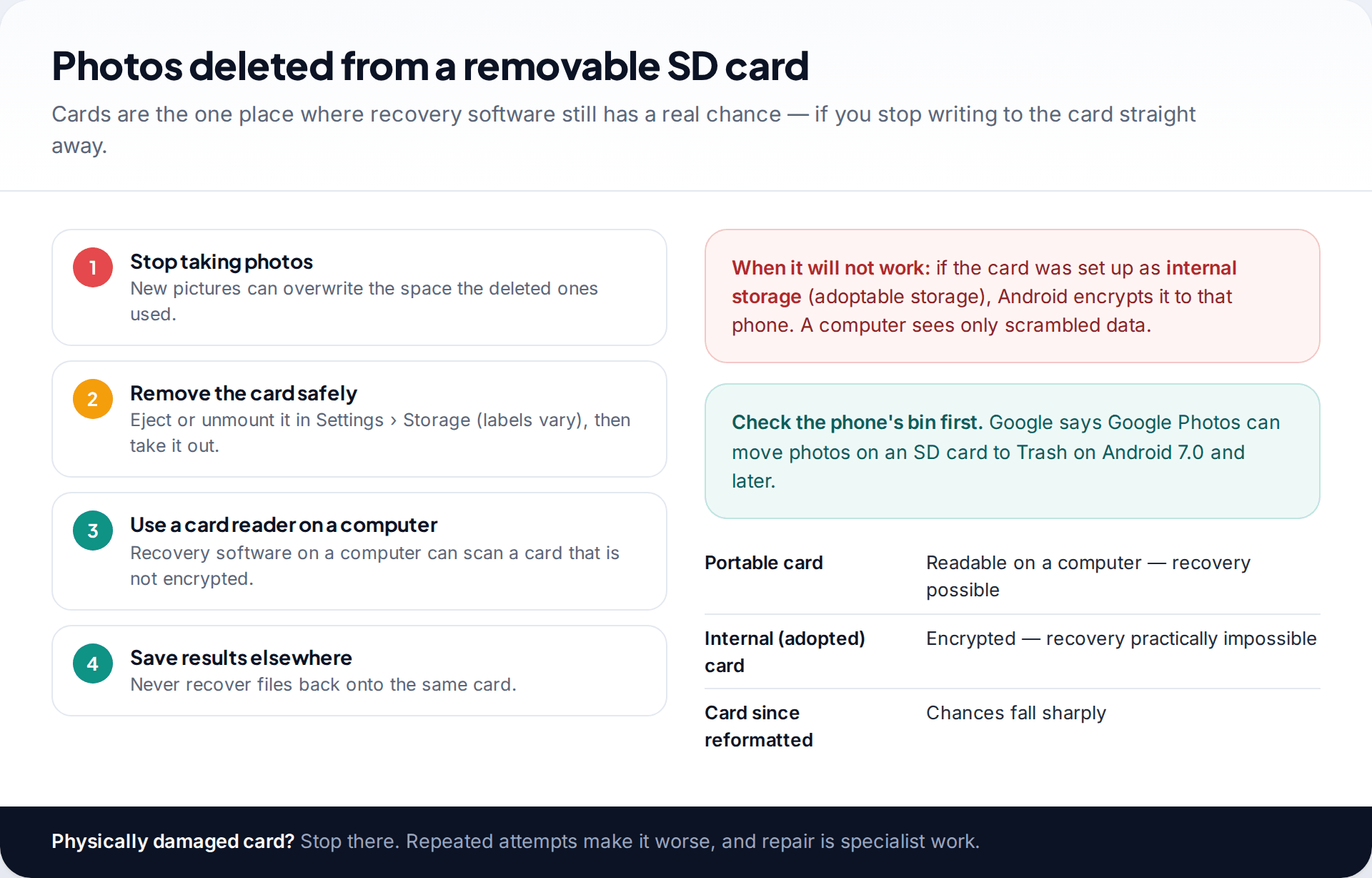
A removable microSD card is the exception to the “modern phones can’t recover deleted files” rule, as long as it was used as portable storage. First check Google Photos’ Trash; Google says it can move SD card photos to Trash on Android 7.0 and later. If they aren’t there, stop taking photos, eject the card in Settings and take it out. Every new file risks overwriting what you want back.
Put the card in a card reader on a computer and use reputable recovery software there, saving anything it finds to the computer, never back to the card. Results vary: some photos come back whole, some partly, some not at all.
If the card was set up as internal storage, Android encrypted it for that phone, and a computer sees only unreadable data. Recovery from such a card is practically impossible. The same is true if you have since reformatted it.
What photo recovery apps can and can’t do
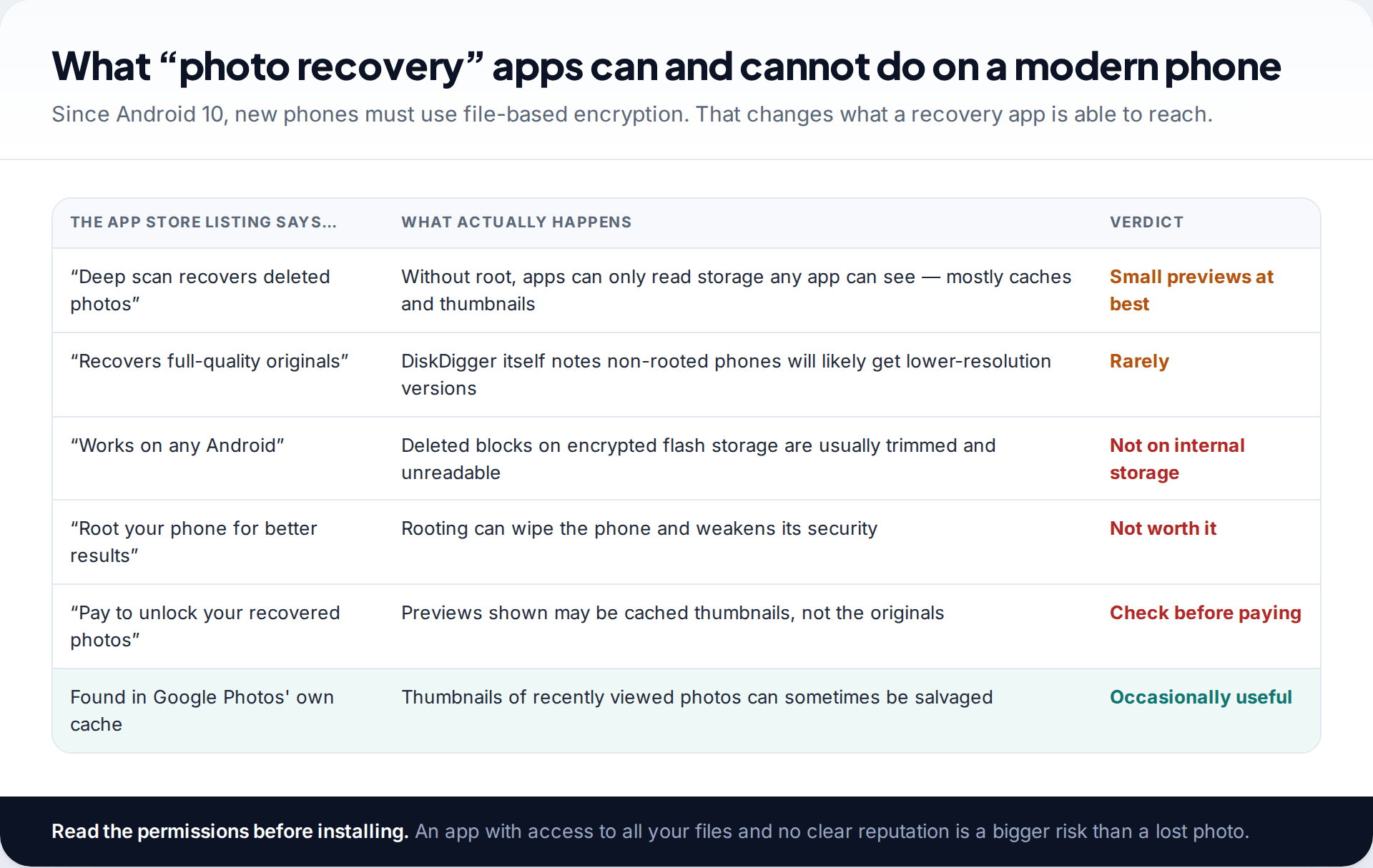
The Play Store is full of apps that promise to recover deleted photos. On an older phone they sometimes did. On a current one, the odds are against them, for technical reasons. Google’s Android documentation states that all devices launching with Android 10 and later must use file-based encryption. Flash storage also clears deleted blocks in the background. Put together, the original photo’s data is usually both erased and unreadable soon after deletion.
What these apps can still reach, without rooting the phone, is storage any app can read: mainly caches and thumbnails that gallery apps create for quick previews. DiskDigger, one of the best-known, says openly that on a non-rooted device it will “likely recover lower-resolution versions” of your photos. That can still be worth having if the photo is irreplaceable. Treat a full-quality recovery as unlikely, and be wary of apps that show you previews and then ask for payment to “unlock” them.
Don’t root the phone to improve your chances. Rooting usually wipes the phone in the process and weakens its security afterwards. And avoid paid “data recovery services” that promise to retrieve photos from your Google account or from a phone number. They can’t, and some are simply scams.
Making sure the next photo is safe
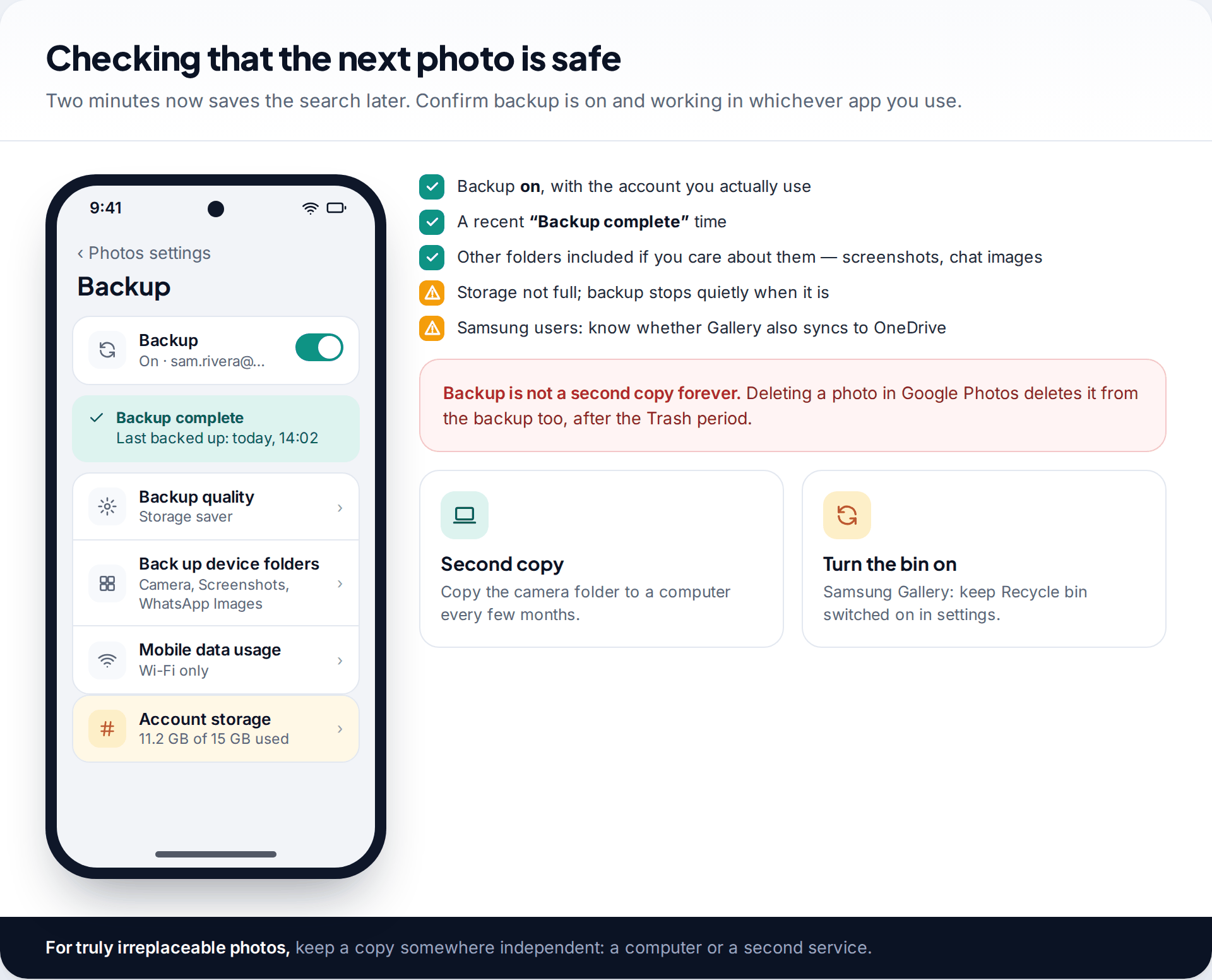
Open Google Photos, tap your profile picture and check the backup status. You want backup on, the account you actually use, and a recent “Backup complete” time. Add other device folders you care about, such as screenshots and chat images, and keep an eye on storage, because a full account stops backing up.
A cloud backup isn’t a permanent archive: deleting a photo in Google Photos removes it from the backup too once the Trash period ends. For photos you really can’t lose, keep a second, independent copy on a computer or another service.
How this page was put together
The Trash periods and paths were checked in September 2026 against Google Photos help (both the UK and US English versions, which currently differ on backed-up items), Microsoft’s OneDrive help and Google’s Android source documentation on file-based encryption. The note on non-rooted recovery comes from DiskDigger’s own documentation. Samsung’s Gallery menus vary between One UI versions.
We didn’t test recovery apps ourselves and we don’t recommend a data-recovery service. You can read how we check our guides for more on our process.
Common questions
Can I recover permanently deleted photos on Android?
From the phone’s internal storage, very rarely. Google says permanently deleted Google Photos items can’t be restored. Look for copies in backups, chats, email or an SD card instead.
How long do deleted photos stay in Google Photos Trash?
Google’s UK help page says 60 days for backed-up photos and 30 days for ones that weren’t backed up; the US page currently says 30 days for both. The Trash screen shows the current period.
Where is the Recycle bin on a Samsung phone?
In the Gallery app: tap the menu (three lines), then Recycle bin. Items stay for 30 days. If it’s missing, it was switched off in Gallery settings.
Do photo recovery apps actually work?
On modern phones, mostly for thumbnails and cached copies, not originals. They have a better chance with a removable SD card scanned on a computer.
Can I recover photos after a factory reset?
Only from backups: Google Photos, OneDrive, a computer, or copies you sent to others. A reset erases the encryption keys for the old data on the phone.
Why can’t I see my backed-up photos?
Usually you’re signed into a different Google account from the one that ran the backup. Switch accounts from your profile picture in Google Photos, or check photos.google.com.
Looking for a tool to go with this? TheTruthSpy is a free parental control app for Android that stays visible on the child's phone. If it fits your family, see what the app does.
Related guides
How to Fix a Phone That Keeps Freezing or Restarting
Fixes for a frozen or rebooting iPhone or Android phone, from a one-minute force restart to recovery mode, with a…
What to Do If Your Phone Gets Wet
Dropped your phone in water? What to do in the first five minutes, hour and day, what IP68 really means,…
Phone Not Charging? How to Find the Cause and Fix It
A ten-minute elimination test for a phone that won't charge: cable, adapter, port, software and battery, plus what liquid, heat…
Parental controls your child can see
Location, screen time limits, a web filter and alerts from notifications — free, and visible on your child's phone. Pair a phone in about ten minutes.
Android · Free to set up · Visible on your child's phone