Recover Deleted WhatsApp Messages From Backups on Android and iPhone

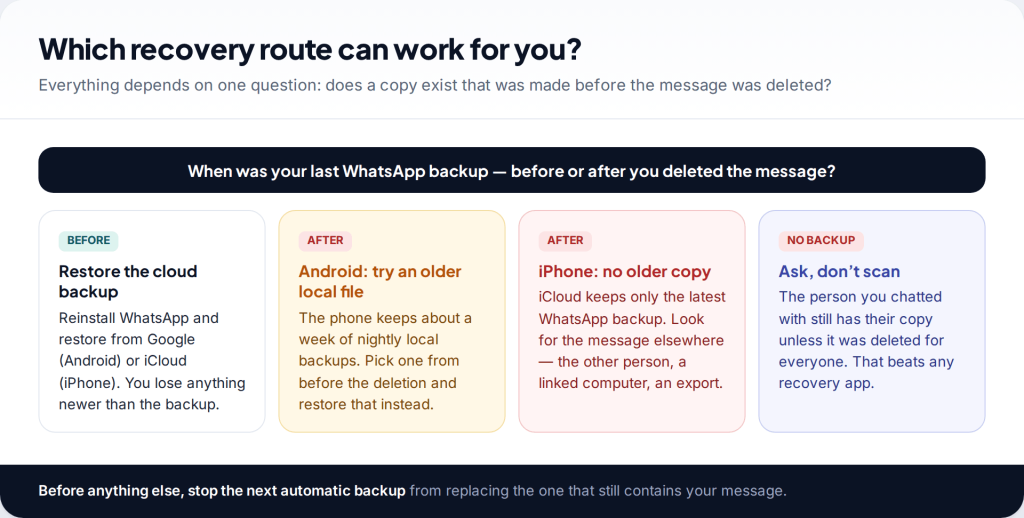
You can recover deleted WhatsApp messages only from a backup made before you deleted them. WhatsApp doesn’t keep your chats on its servers. So the options are a Google backup on Android, an iCloud backup on iPhone, or, on Android only, one of the older local backup files the phone keeps for about a week. If none of those predates the deletion, the other person’s copy of the chat is usually the only one left.
First, the facts that decide what is possible
A lot of time is lost on methods that can’t work, so it helps to start with how WhatsApp actually stores messages. They are end-to-end encrypted and held on your phone. Once delivered, they aren’t kept on WhatsApp’s servers. That means there is no “recover” button, no support request that brings a chat back, and nothing WhatsApp can restore for you.
| Common belief | What is true |
|---|---|
| WhatsApp can restore deleted chats from its servers | No. Delivered messages aren’t stored there. Only your own backup holds history. |
| Google or iCloud keeps older versions of the backup | No. Each new backup overwrites the last. There is one cloud copy per phone number. |
| Reinstalling WhatsApp brings back what I deleted | Only if the backup it restores was made before the deletion. |
| Android phones keep older copies | Yes. Local backups from roughly the last seven days sit on the phone. |
| The other person loses the message too | Only if it was deleted for everyone. “Delete for me” affects your phone alone. |
Work out which route you’re on
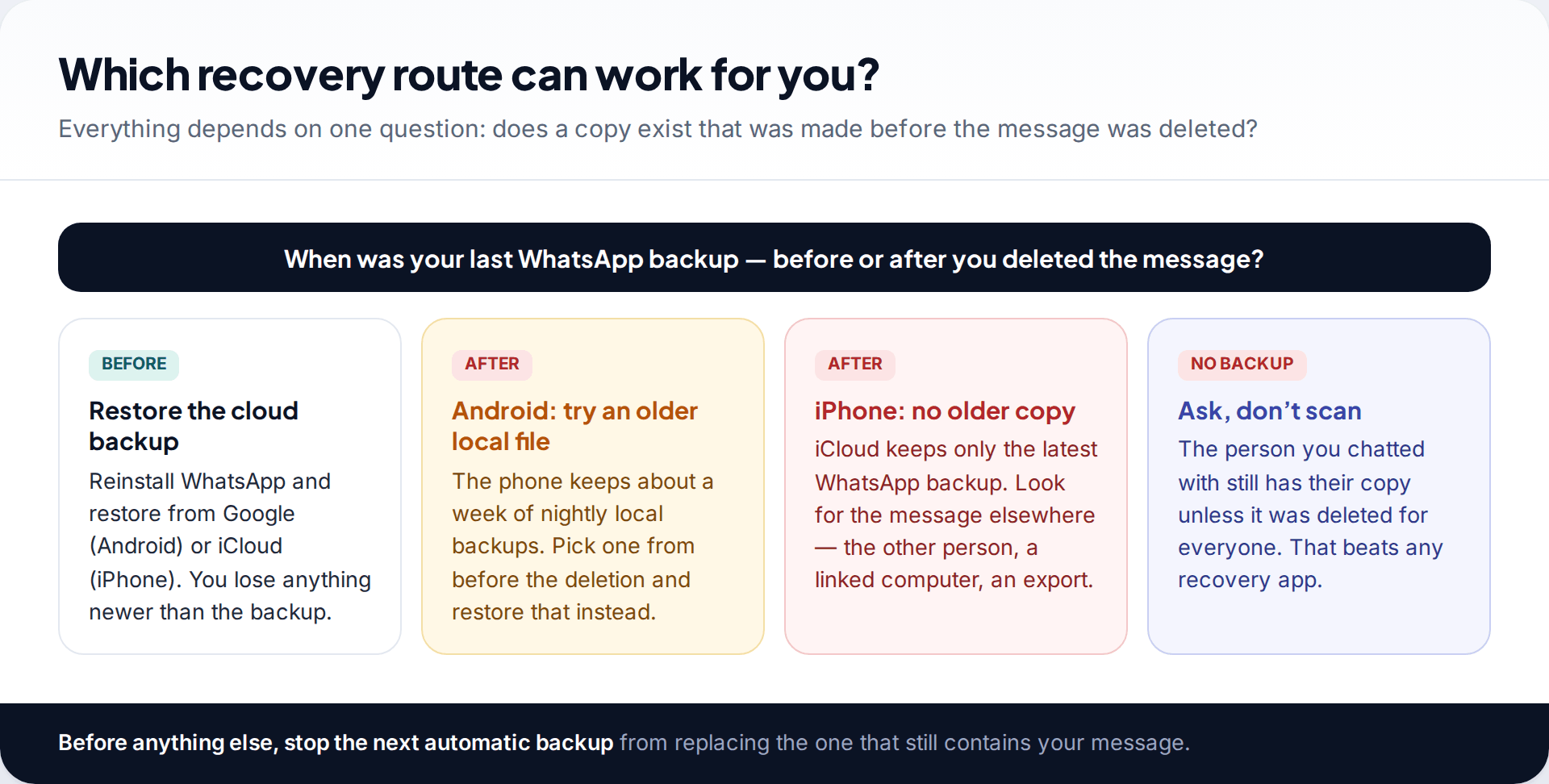
Everything hinges on timing. By default, WhatsApp backs up once a day, overnight. If you deleted a chat this afternoon, last night’s backup still contains it, and restoring that backup brings it back. If you deleted it last week and backups have run every night since, the cloud copy no longer has it.
On Android, that isn’t the end, because the phone also keeps dated local backups from the past several days. On iPhone there is no equivalent, so the cloud backup is the only one.
Step one: check the time of your last backup, and stop the next one
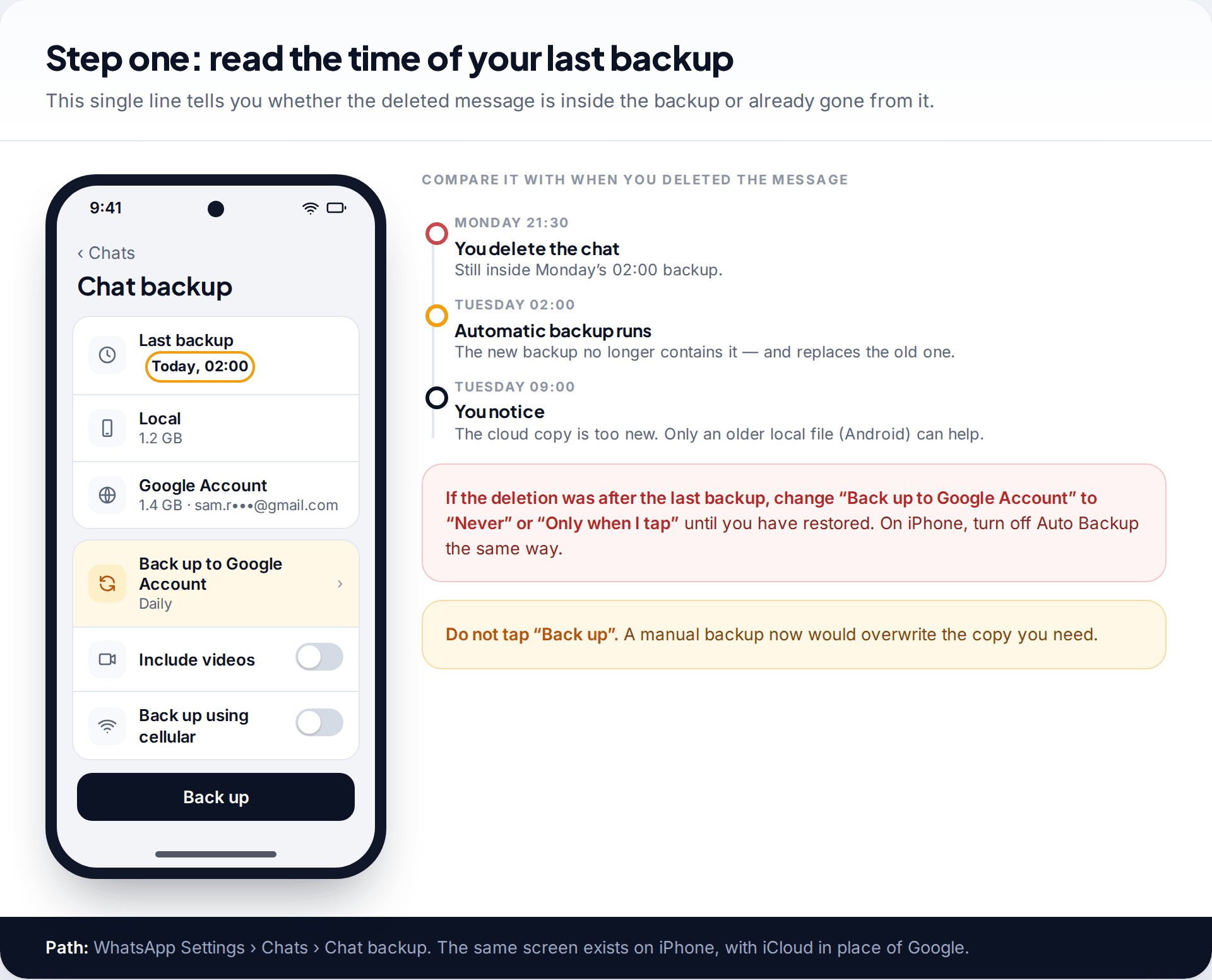
Open WhatsApp Settings › Chats › Chat backup. The screen shows the date and time of the last backup, both local and to Google or iCloud. Compare it with when you deleted the message.
If the backup is older than the deletion, the message is inside it. Your priority is to stop tonight’s automatic backup replacing it. Change the backup frequency to Never or Only when I tap “Back up” on Android, or turn off Auto Backup on iPhone, until you’ve restored. Don’t tap the Back up button to “be safe”. That is exactly what would destroy the copy you need.
If the backup is newer than the deletion, the cloud copy won’t help. On Android, go to the local backups section below. On iPhone, skip to the sections on other copies.
How to recover deleted WhatsApp messages on Android from Google
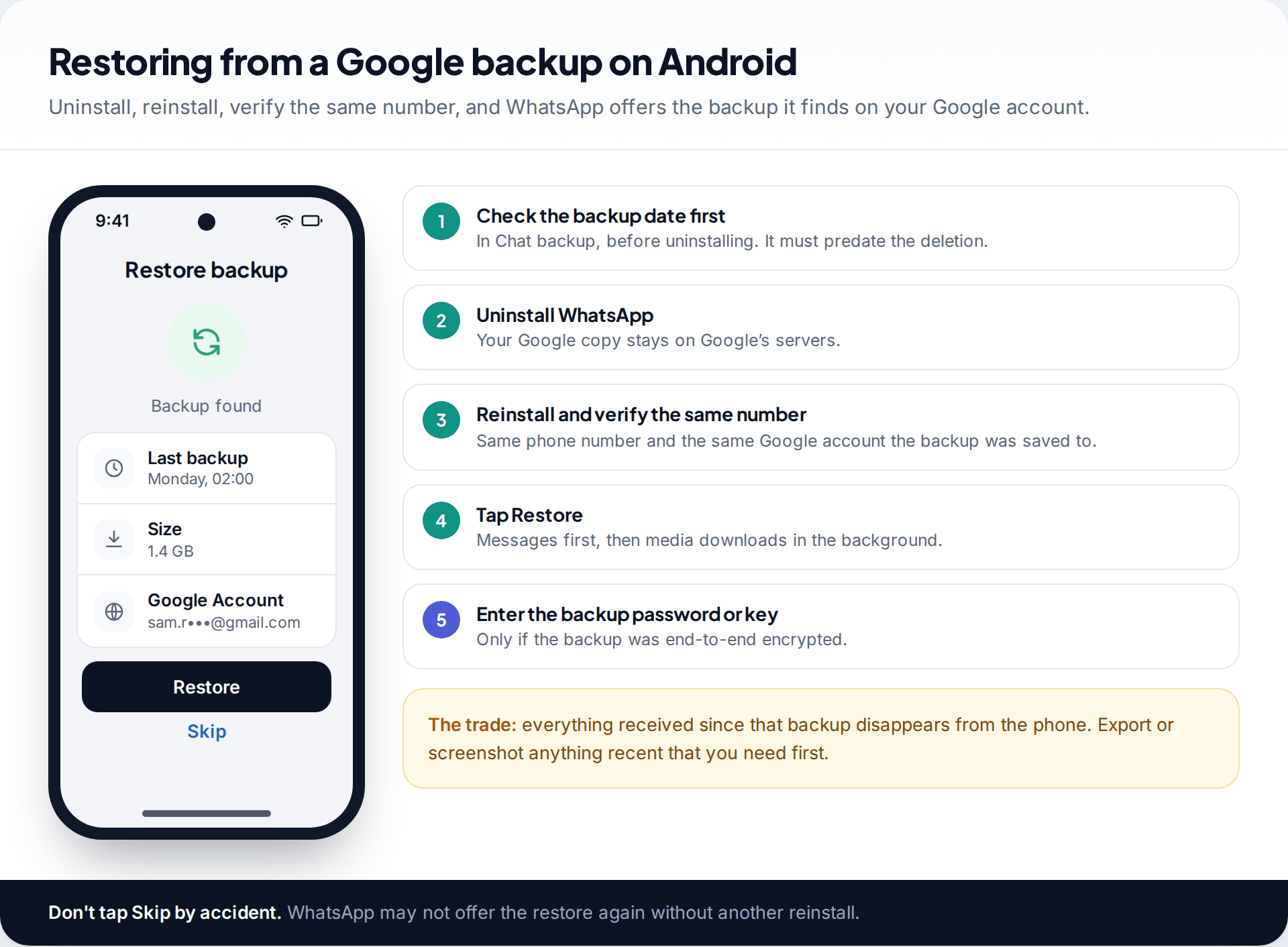
- Confirm the backup date in Chat backup, as above.
- Save anything recent you need. Restoring replaces the phone’s chat history with the backup. Messages received since then are removed. Screenshot or export them first.
- Uninstall WhatsApp. The Google copy isn’t affected.
- Reinstall WhatsApp from Google Play and verify the same phone number. The phone must be signed in to the same Google account the backup was saved to.
- Tap Restore when WhatsApp says it found a backup. Text comes back first. Photos and videos continue downloading afterwards.
- Enter your password or 64-digit key if you had turned on end-to-end encrypted backup.
If WhatsApp says no backup was found, the usual causes are a different Google account, a different phone number, or a backup that never completed. Android WhatsApp backups count towards your Google storage, and a full account can quietly stop them.
Restoring from iCloud on iPhone
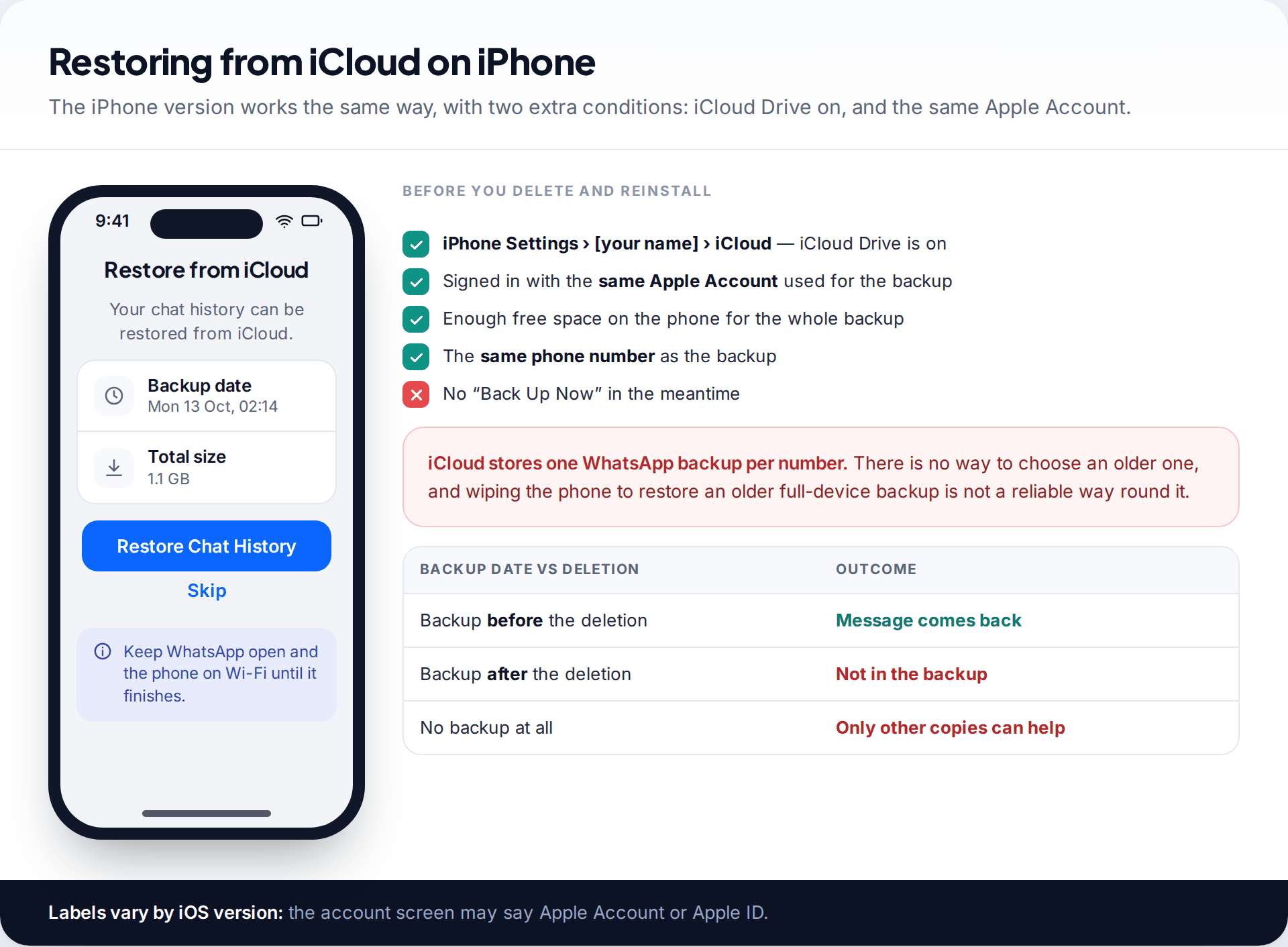
The process on iPhone is similar. First check WhatsApp Settings › Chats › Chat Backup for the date. Make sure iCloud Drive is on and you’re signed in with the same Apple Account. Delete and reinstall WhatsApp from the App Store, verify the same number, and tap Restore Chat History. Keep the phone on Wi-Fi with WhatsApp open until it finishes. Large backups can take a long time.
The limit is harder than on Android. iCloud holds one WhatsApp backup per number, and there are no local files to fall back on. If the backup was made after the deletion, it can’t give the message back. Restoring your whole iPhone from an older full-device backup is a drastic step that wipes the phone. It isn’t a reliable way round this either, because WhatsApp keeps its own chat backup in iCloud, separate from the device backup.
Android only: going back further with local backup files
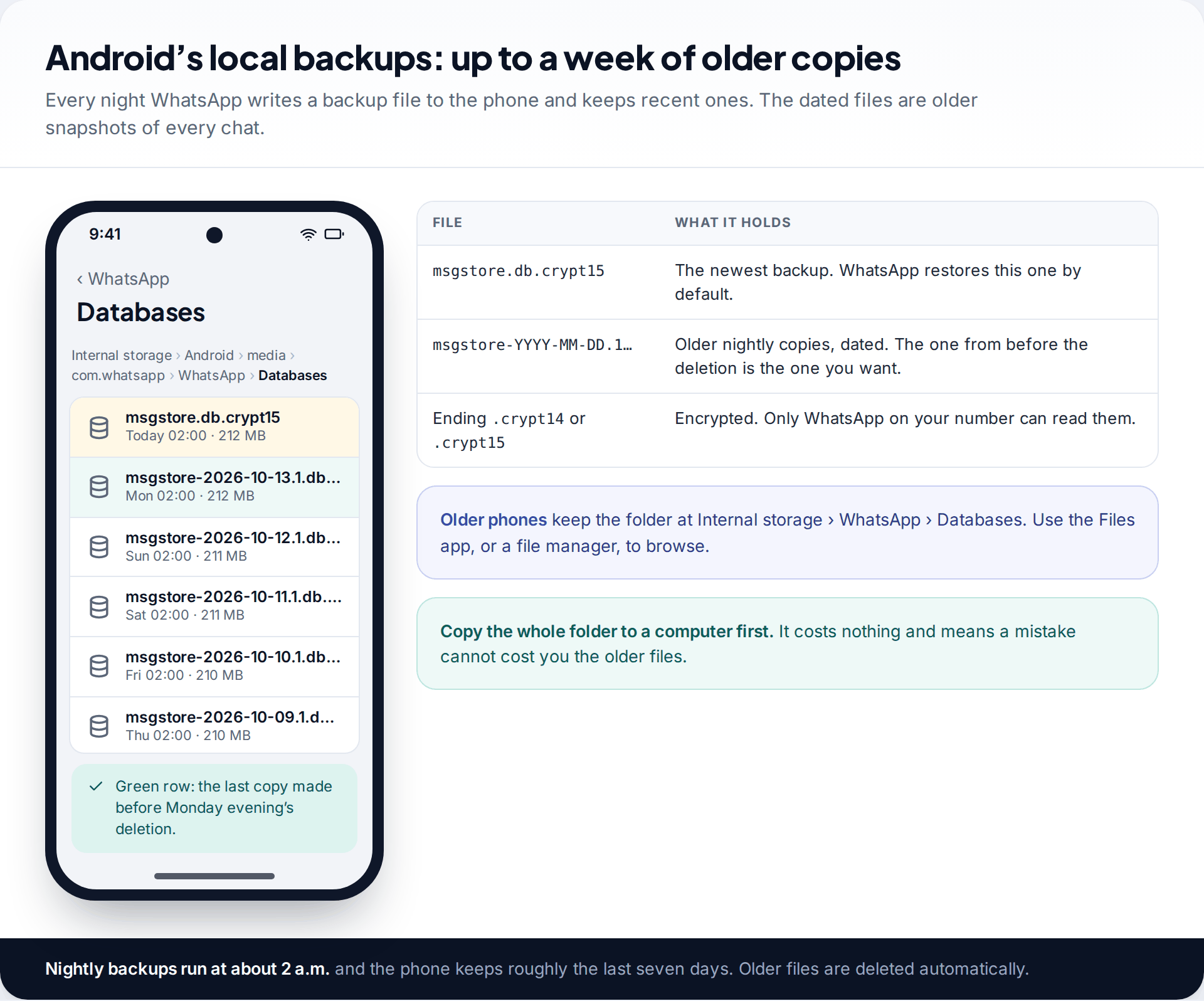
Android phones keep more than the latest backup. Every night, at around 2 a.m., WhatsApp writes a local backup file to the phone, and it keeps the files from roughly the past week. They live in Internal storage › Android › media › com.whatsapp › WhatsApp › Databases (on older phones, Internal storage › WhatsApp › Databases). The newest is called msgstore.db.crypt15 (or .crypt14). The older ones carry a date in the name.
WhatsApp restores whichever file is called msgstore.db.crypt15. To restore an older one, you give it that name.
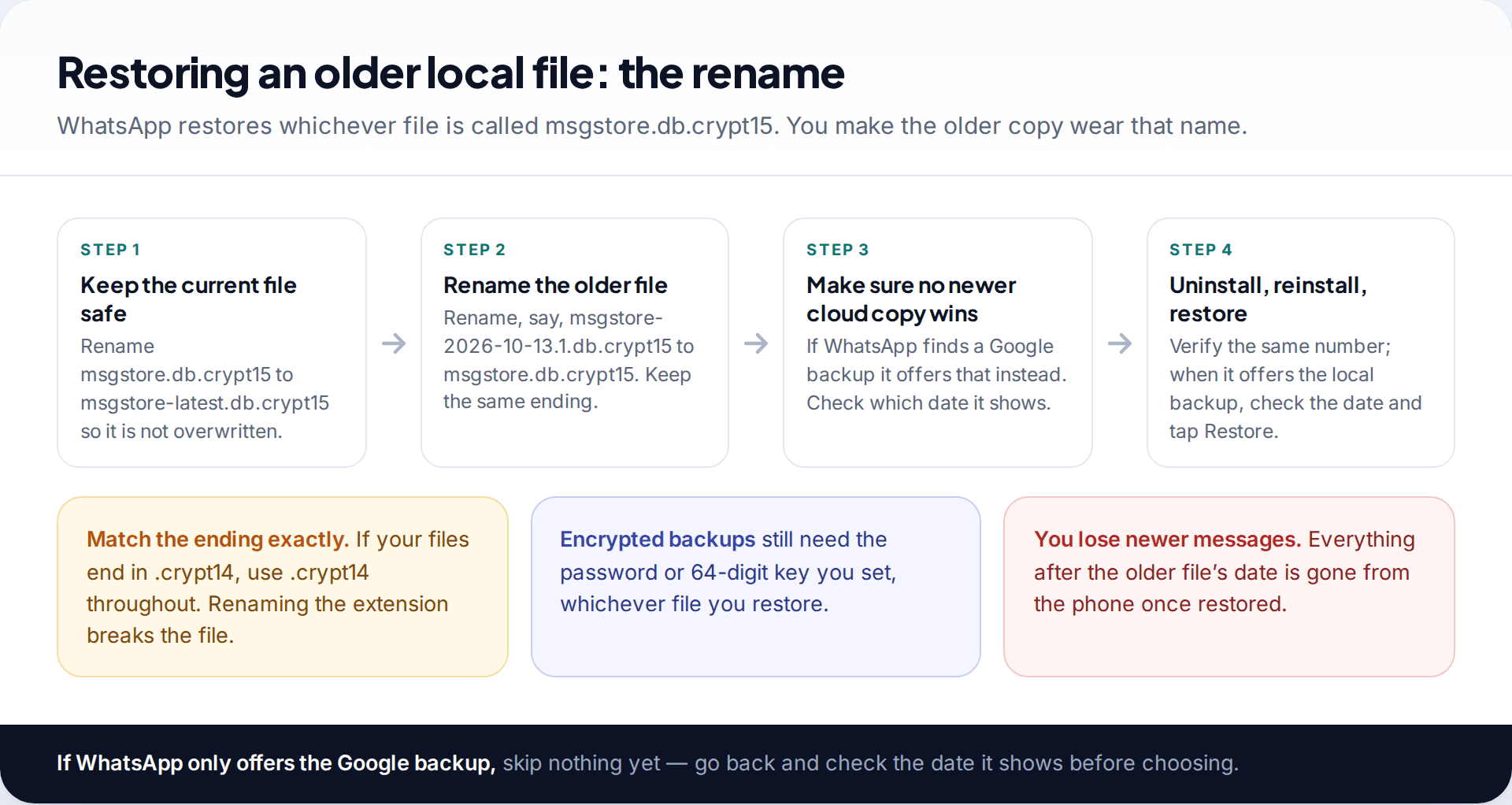
- Copy the whole Databases folder to a computer as a safety net.
- Rename the current file, for example to msgstore-latest.db.crypt15, so it isn’t lost.
- Rename the dated file from before the deletion to msgstore.db.crypt15. Keep the ending identical.
- Reinstall WhatsApp and verify the same number. When it offers to restore, read the date it shows.
One complication: if WhatsApp also finds a Google backup for your number, it offers that one, and the Google copy may be the newer one you don’t want. Look at the date on the restore screen before tapping anything. If it shows the wrong date, that is the Google copy. You’d need to stop WhatsApp finding it, for instance by not adding that Google account when setting up. Methods vary by phone and version, and this is where people most often lose messages by rushing.
When the restore doesn’t go as planned
“No backup found”
WhatsApp looks for a backup that matches both the phone number and the Google or Apple account on the phone.
Fix: sign in with the account the backup was made under, and verify the exact number, including country code. Then reinstall and try again.
Restore stuck or failing part-way
Large backups need a steady connection, free space on the phone and enough battery.
Fix: use Wi-Fi, plug the phone in, free up storage roughly equal to the backup size, and keep WhatsApp on screen until it finishes.
It asks for a password you’ve forgotten
An end-to-end encrypted backup can’t be opened without its password, key or passkey. WhatsApp can’t reset it for you.
Fix: try every password you might have used. If none works, that backup is lost. Skip it and set up a new encrypted backup you can reopen.
Seeing a message that was “deleted for everyone”
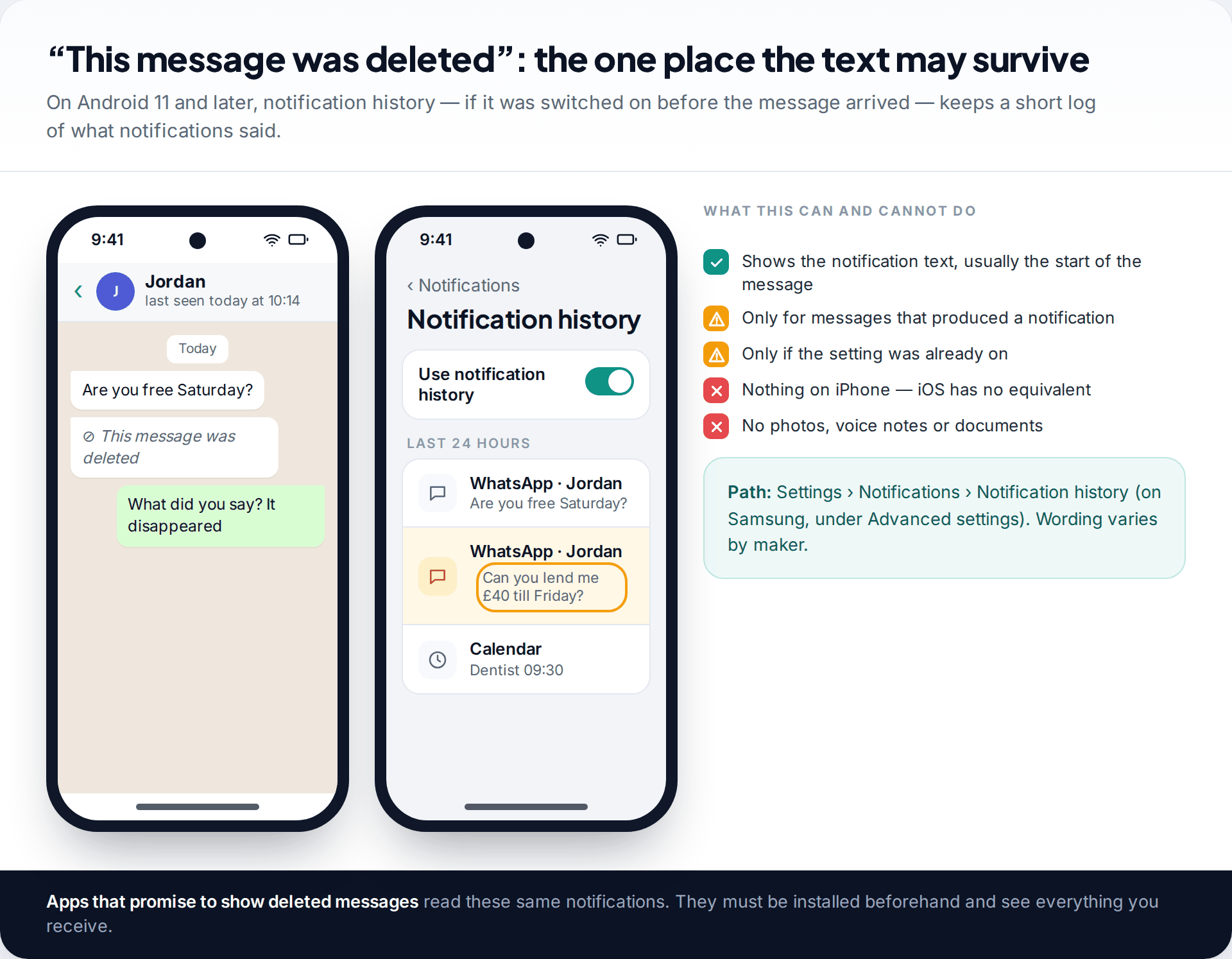
When someone uses Delete for everyone, the message is replaced by “This message was deleted” on both phones. No backup trick reveals it. It never reaches a backup if it was deleted before the next one ran, and WhatsApp doesn’t keep it.
There is one partial exception on Android 11 and later: notification history. If it was switched on before the message arrived, the phone keeps a log of recent notification text, including the start of that message. Find it under Settings › Notifications › Notification history (on Samsung phones, under Advanced settings). It holds text only, only for messages that produced a notification, and only for a limited time. iPhones have no equivalent.
Apps advertised as showing deleted messages work the same way, reading notifications as they arrive. They must be installed beforehand. They also read every notification you get, from every app. That is a large privacy trade for occasionally seeing a retracted message.
What about recovery software?
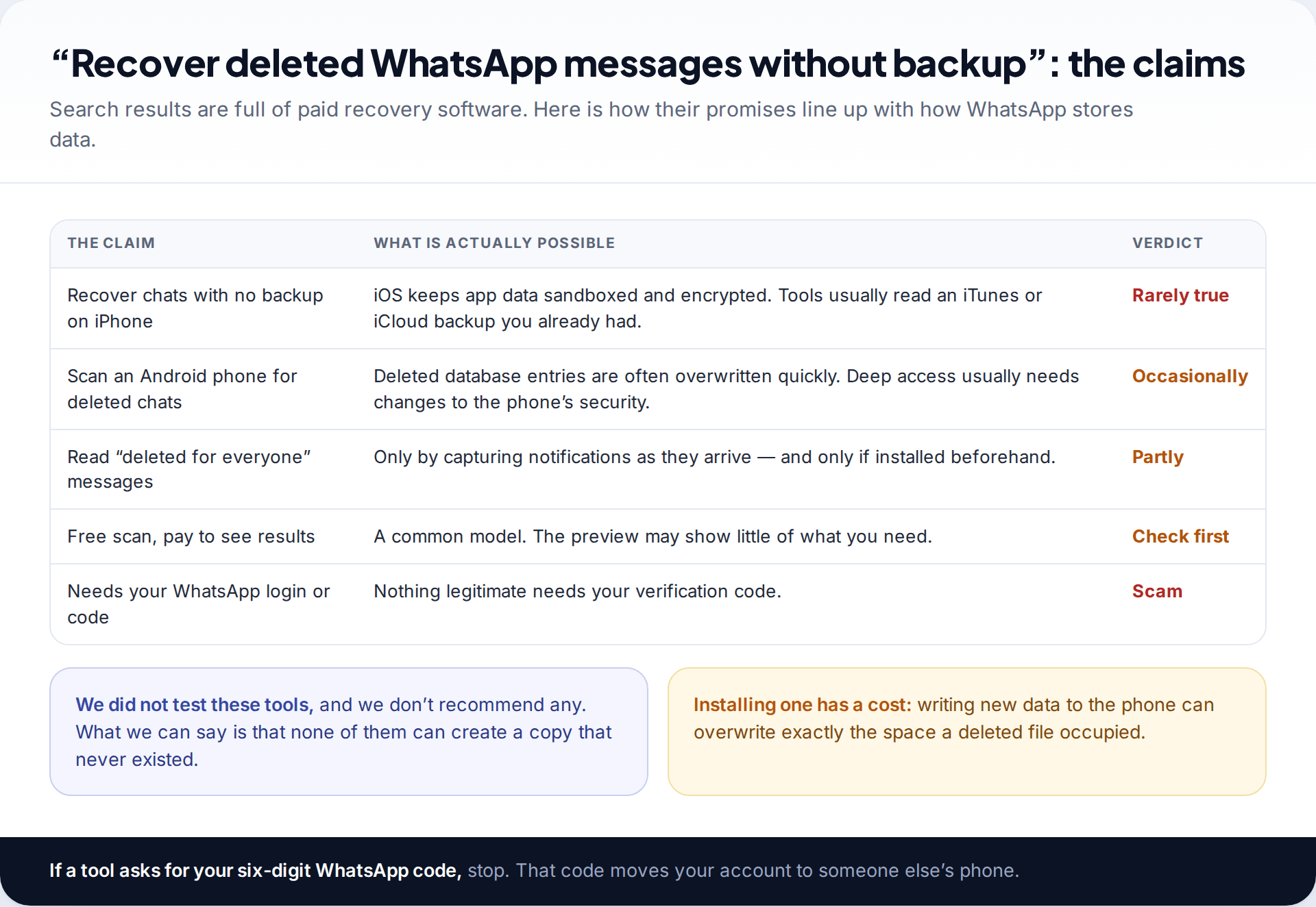
Search for ways to recover deleted WhatsApp messages without a backup and most results sell desktop software. We haven’t tested these tools and don’t recommend any. The mechanics are worth knowing before you pay. On iPhones, app data is encrypted and walled off, so such tools usually extract data from a computer or iCloud backup that already existed. On Android, deleted database entries are frequently overwritten soon after deletion, and reaching the raw storage can require weakening the phone’s security. Anything that asks for your WhatsApp verification code is a scam, full stop.
The copies people forget to check
- The other person. “Delete for me” removes a message from your phone only. Ask them to forward it or to export the chat (chat info › Export chat).
- A linked computer. WhatsApp Desktop or Web may still show the conversation if it hasn’t synced the deletion yet. Look before you open WhatsApp on your phone again.
- An earlier export. If you ever exported the chat to email or cloud storage, that file is a full text copy.
- The undo prompt. Straight after “Delete for me”, WhatsApp briefly offers Undo. It lasts seconds, but it’s the easiest recovery there is.
Voice notes behave differently from text, because they are separate files on the phone. If a voice message is what you lost, see our guide to getting back deleted WhatsApp voice notes.
Set things up so the next deletion is recoverable
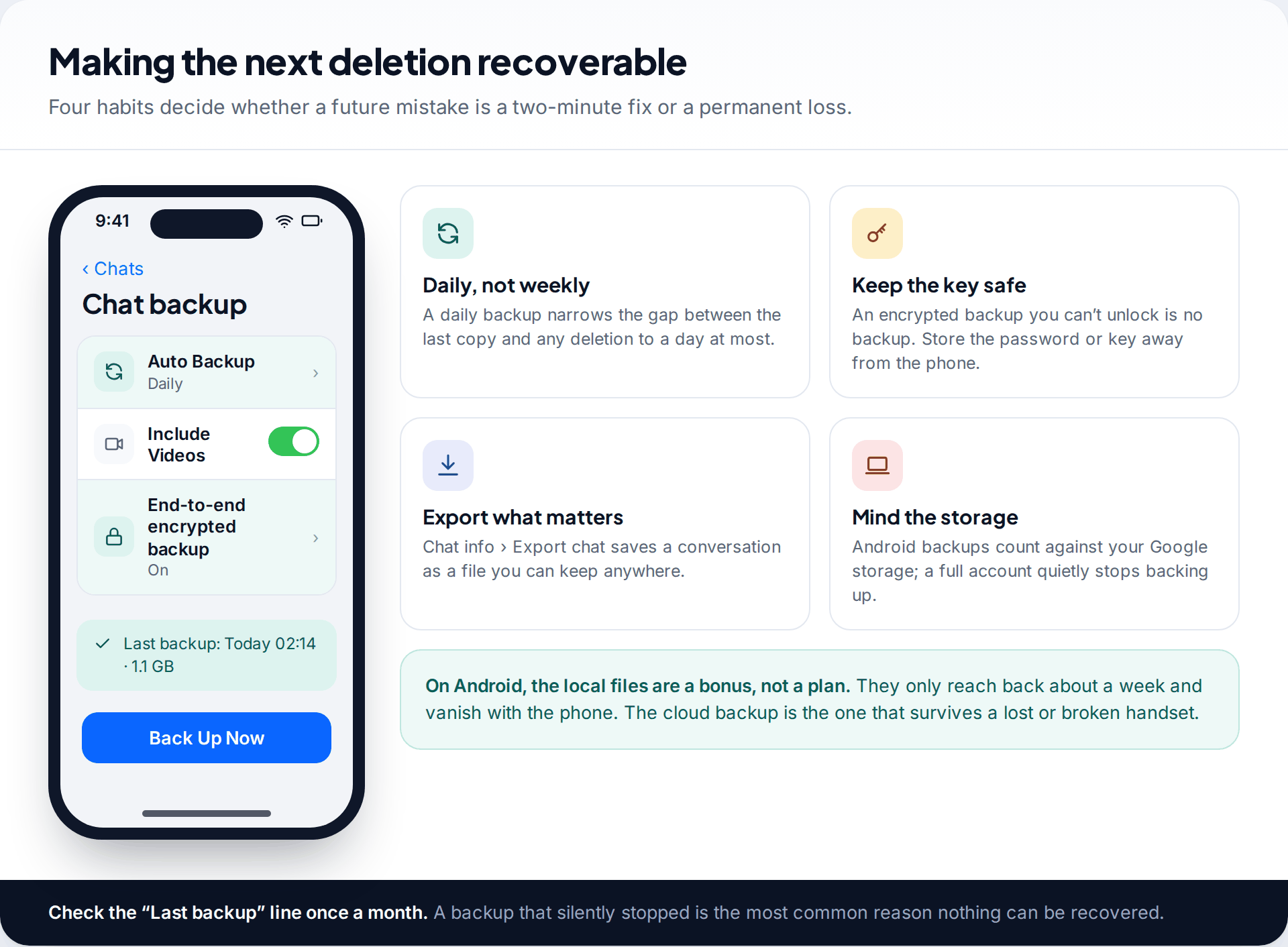
Set backups to Daily, so the most you can ever lose is one day. If you use an encrypted backup, store the password or 64-digit key away from the phone. Export conversations that really matter, such as those with a family member who has died or a record of an agreement. Now and then, check that the “Last backup” date is recent. A backup that silently stopped weeks ago is the most common reason there is nothing to restore. Clearing space on your Google account or iCloud is often all it takes to start it again.
How this page was put together
The restore steps, backup behaviour and file locations were checked in September 2026 against WhatsApp’s help centre pages on backing up and restoring chats, Google’s and Apple’s documentation on storage, and current guides on Android local backups. WhatsApp changes backup file endings between versions (crypt14, crypt15), so match whatever your own phone shows.
We didn’t test or rank recovery software, and we have no commercial relationship with any. Read how we research and update our guides.
Common questions
Can I recover deleted WhatsApp messages without a backup?
Usually not. WhatsApp doesn’t store delivered messages on its servers. Without a backup made before the deletion, the realistic options are the other person’s copy, a linked computer that still shows the chat, or Android’s notification history for short text.
How far back can I recover deleted WhatsApp messages?
From the cloud, only to the date of your single latest backup. On Android, local backups let you go back roughly seven days. Anything older than the oldest local file can’t be restored.
Will restoring a backup delete my newer messages?
Yes. Restoring replaces the phone’s chat history with the backup, so messages received after that backup are lost unless you save them first.
Can WhatsApp support recover my deleted chats?
No. Because messages are end-to-end encrypted and not kept after delivery, WhatsApp has nothing to restore from.
Can I recover messages someone else deleted for everyone?
Not through WhatsApp. On Android 11 and later, notification history may show the text if it was switched on before the message arrived.
Can I move a Google backup to iPhone to recover messages?
No. Google backups restore only to Android, and iCloud backups only to iPhone. WhatsApp’s chat transfer between platforms moves current chats from phone to phone. It doesn’t restore deleted ones.
Looking for a tool to go with this? TheTruthSpy is a free parental control app for Android that stays visible on the child's phone. If it fits your family, see the Social media alerts feature.
Related guides
Why Is My Phone Overheating? Causes and Fixes
Warm, hot or dangerous? Why phones heat up when charging, gaming or in the sun, how to cool one safely,…

How to Transfer Photos From Your Phone to a Computer
The best way to copy photos from iPhone or Android to Windows or Mac, what happens to HEIC files, dates…
How to Back Up WhatsApp Chats
Set up WhatsApp backups on Android and iPhone, keep an encryption key safe, check the backup exists, and fix the…
Parental controls your child can see
Location, screen time limits, a web filter and alerts from notifications — free, and visible on your child's phone. Pair a phone in about ten minutes.
Android · Free to set up · Visible on your child's phone