Spy App Detectors for iPhone: The 5 Worth Using and What They Can’t See

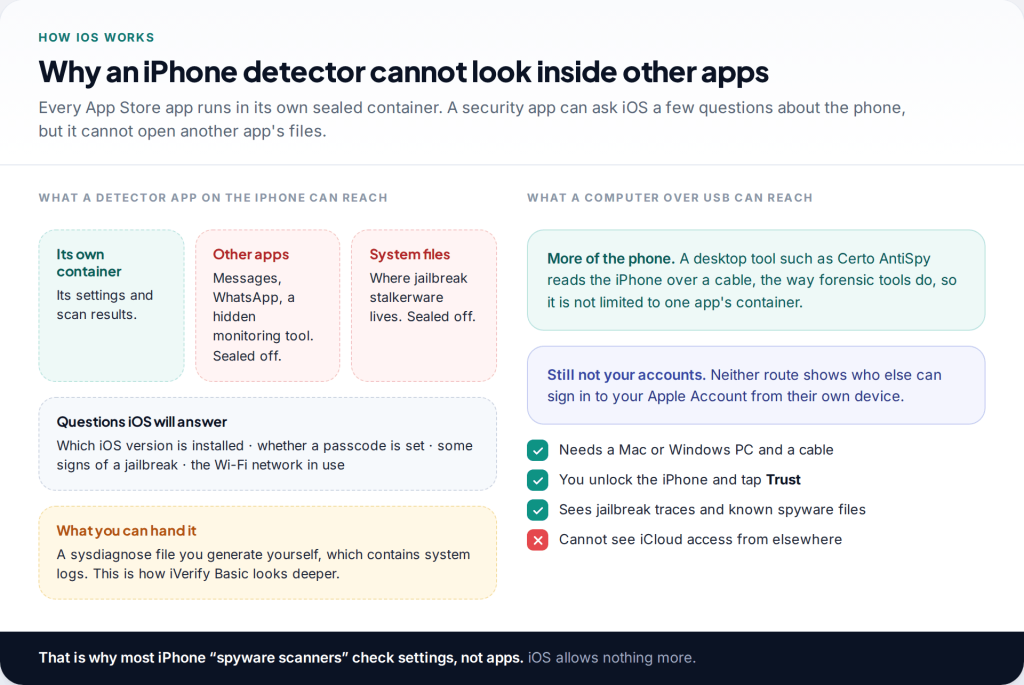
An iPhone spy app detector cannot scan your other apps. iOS doesn’t let any App Store app do that, so the Android-style “scan and remove” does not exist on iPhone. What a good spy app detector for iPhone can do is check your iOS version, look for signs of a jailbreak, and, in some cases, analyse system logs or scan the phone from a computer. Five tools do that well.
- For a real check of the phone itself: Certo AntiSpy, run on a computer, or iVerify Basic’s log-based scan.
- For ongoing basics: Lookout Life, Certo Mobile Security or Norton 360 flag an outdated iOS, jailbreak signs and risky Wi-Fi.
- For the most common kind of iPhone monitoring: no app helps. Use Apple’s Safety Check and your Apple Account device list.
- Before you remove anything, think about who set it up and how they might react.
Why a spy app detector on iPhone works differently
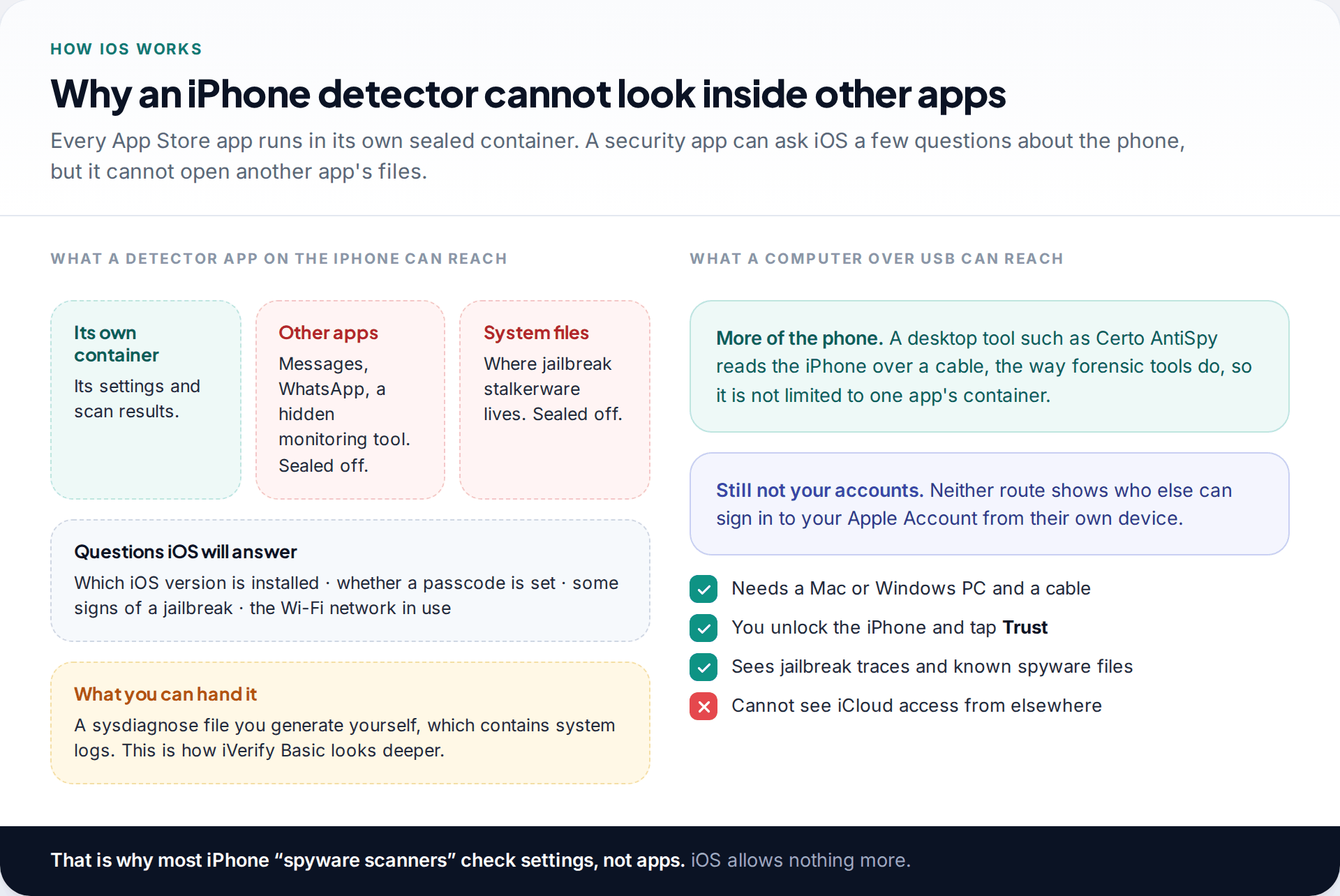
On Android, a security app can list every installed app and inspect it. On iPhone, every App Store app runs in its own sealed container. That includes security apps. A detector cannot see what Messages, WhatsApp or a disguised monitoring tool is doing, and it cannot read the system files where jailbreak-based stalkerware installs itself. Malwarebytes says so plainly in its App Store listing: because of iOS limitations, scanning for malware files is not possible.
What remains is still useful. An app can ask iOS which version is running, and an out-of-date iPhone is the precondition for most jailbreaks. It can look for some tell-tale signs that the system has been modified. And if you give it a sysdiagnose, a bundle of system logs iOS can produce on request, it can look through that for traces of known spyware. A computer connected by cable can reach further again.
No independent lab has published a stalkerware detection test for iPhone apps. AV-Comparatives’ 2025 test with the EFF covered Android only. So the five below are chosen on what iOS allows each tool to do and on what each developer documents, not on detection scores. We did not lab-test them ourselves.
How iPhones actually get monitored
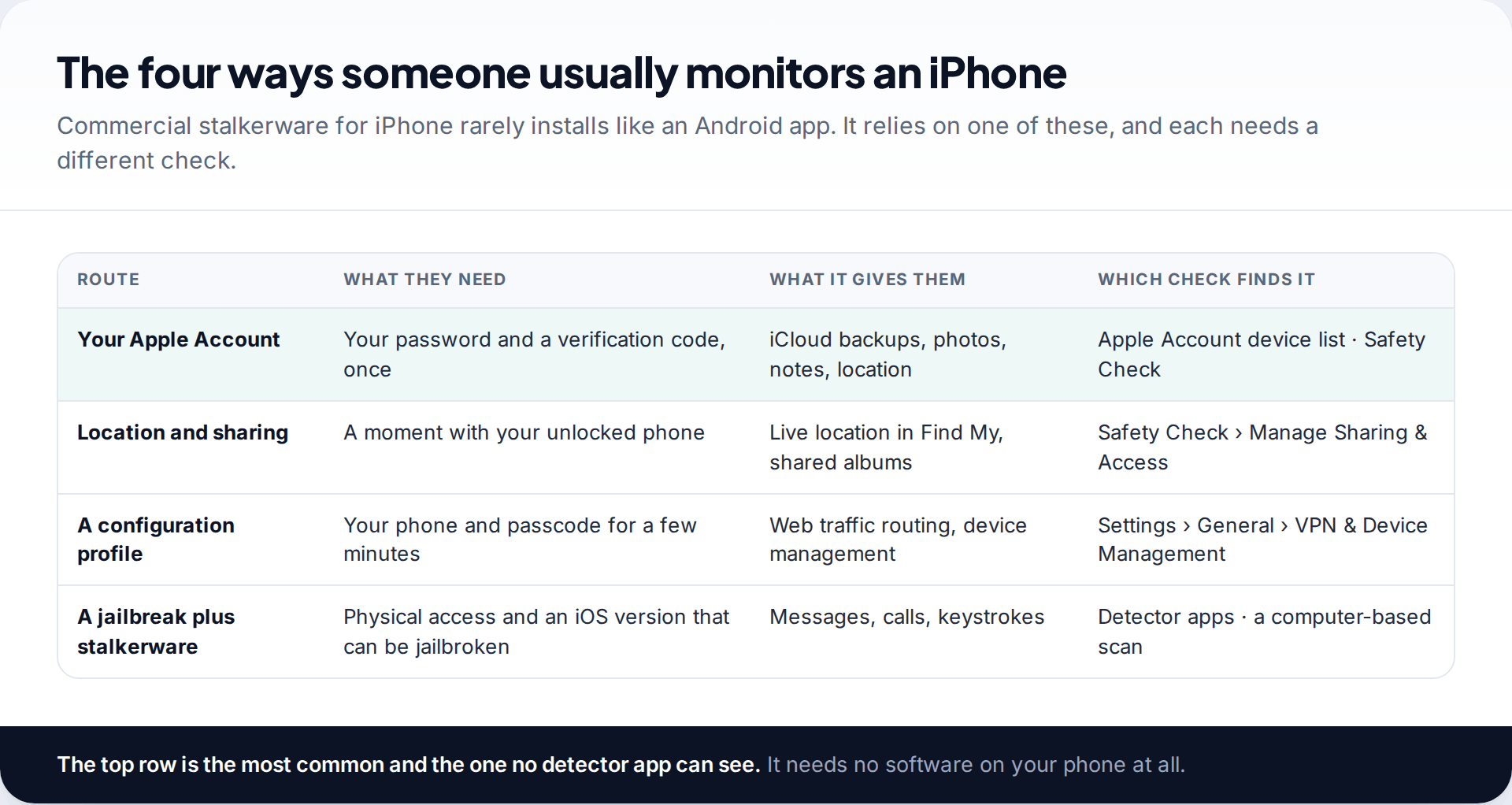
Knowing the route tells you which tool is worth your time. The most common route needs nothing on the phone at all. If someone knows your Apple Account password, and got a verification code once, they can read iCloud backups, photos and notes from their own device. Several commercial “iPhone monitoring” products work this way. A detector app on your phone will never see it.
The other routes do leave something behind. Location sharing and shared albums show up in Safety Check. A configuration profile appears under VPN & Device Management. Real stalkerware on an iPhone needs a jailbreak, which needs physical access and, in practice, an older iOS version. That last route is where detector apps help most.
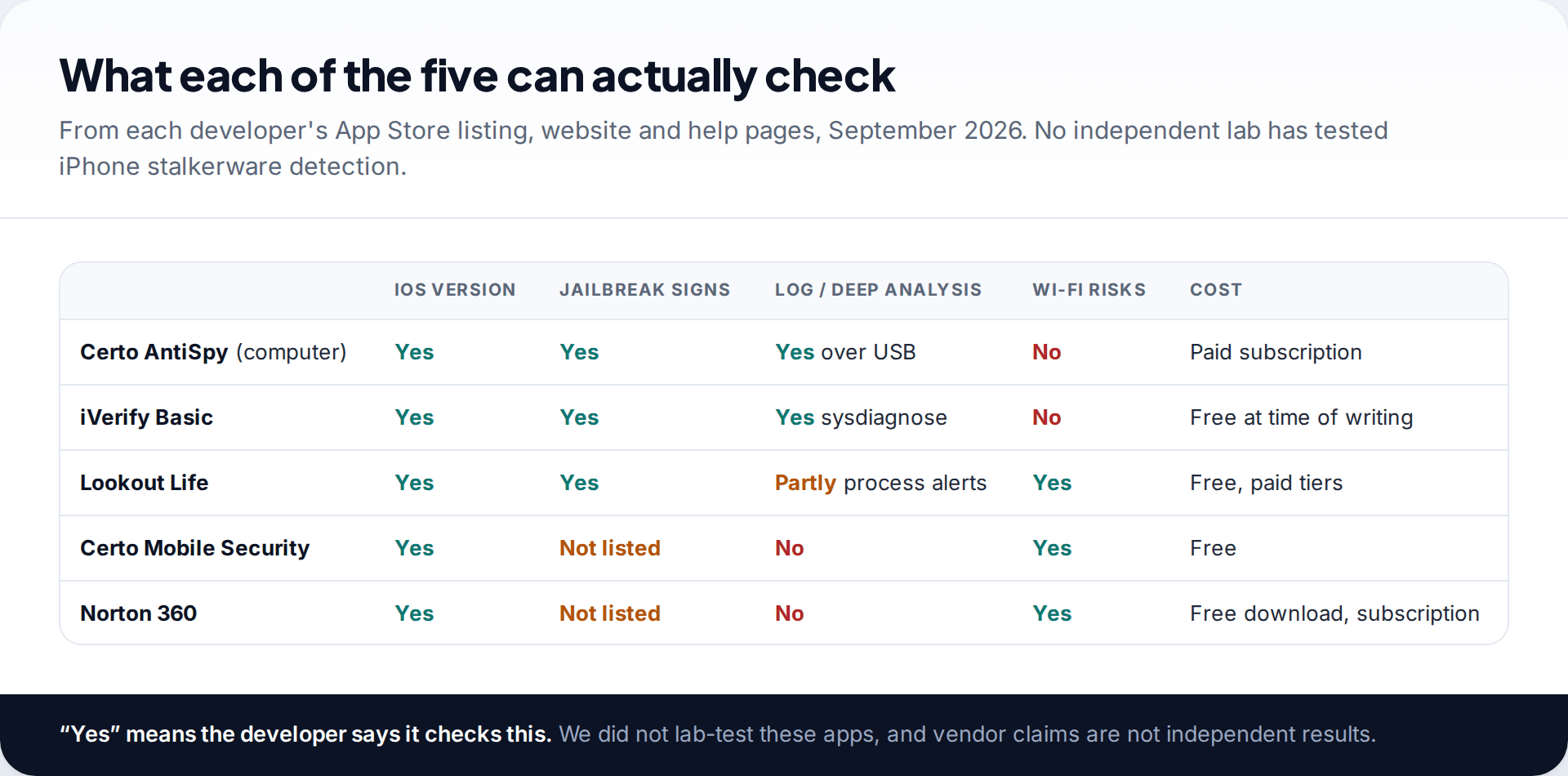
The five iPhone spy app detectors, and what each can check
1. Certo AntiSpy: the deepest check, from a computer
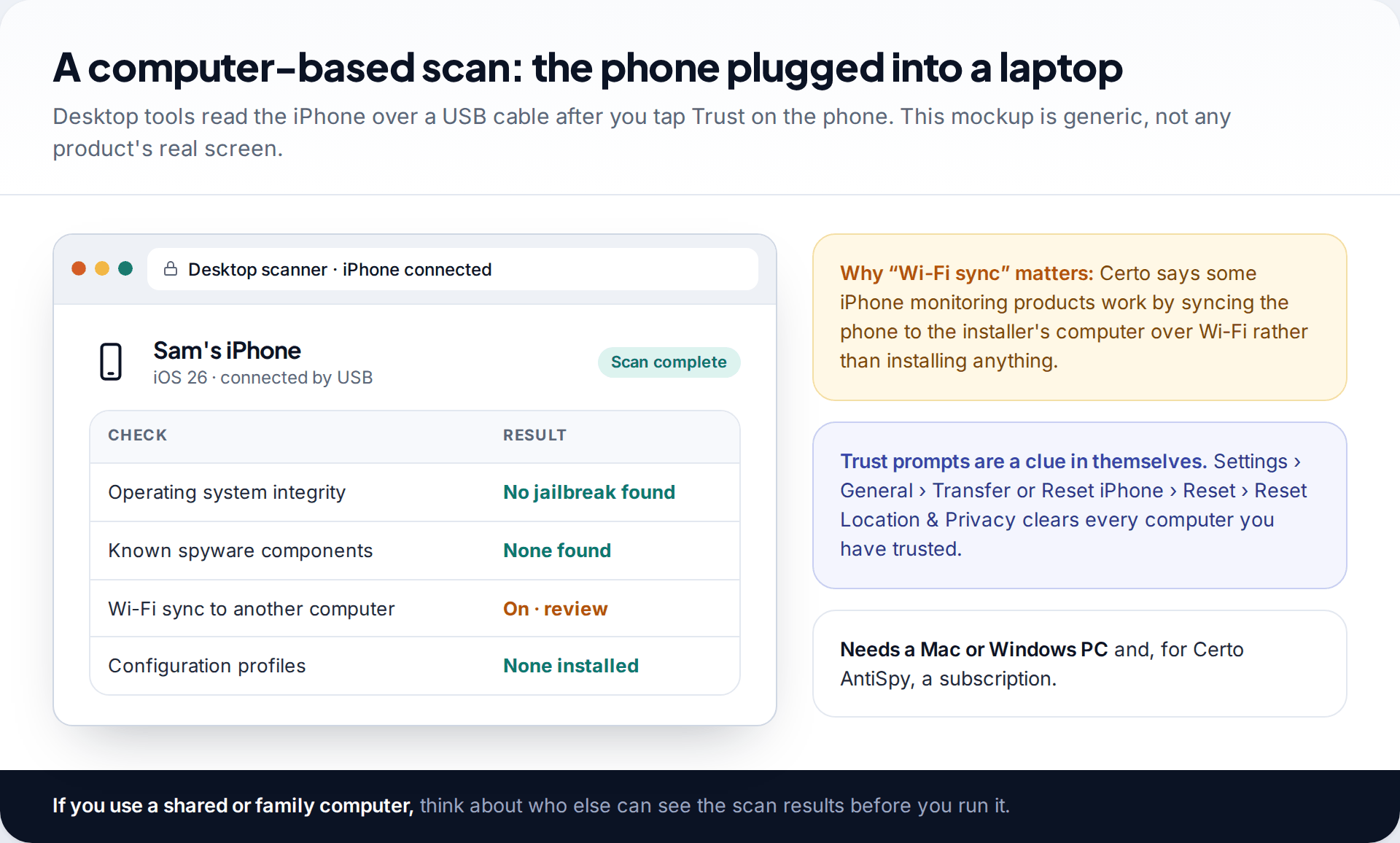
Certo AntiSpy runs on a Windows PC or a Mac and scans the iPhone over a USB cable. Certo explains the reason in its own documentation: the App Sandbox stops any App Store app from reaching the system files and processes where spyware hides, so it analyses the phone from outside, the way forensic tools do. It checks operating-system integrity for signs of a jailbreak and looks for known spyware components. Certo says the analysis happens on your computer rather than on its servers.
It is a paid subscription, and it needs a computer you trust. Certo has published a comparison in which AntiSpy found three commercial spyware products that iVerify missed. That is a vendor’s own test, so treat it as a claim, not an independent result.
2. iVerify Basic: log analysis without a computer
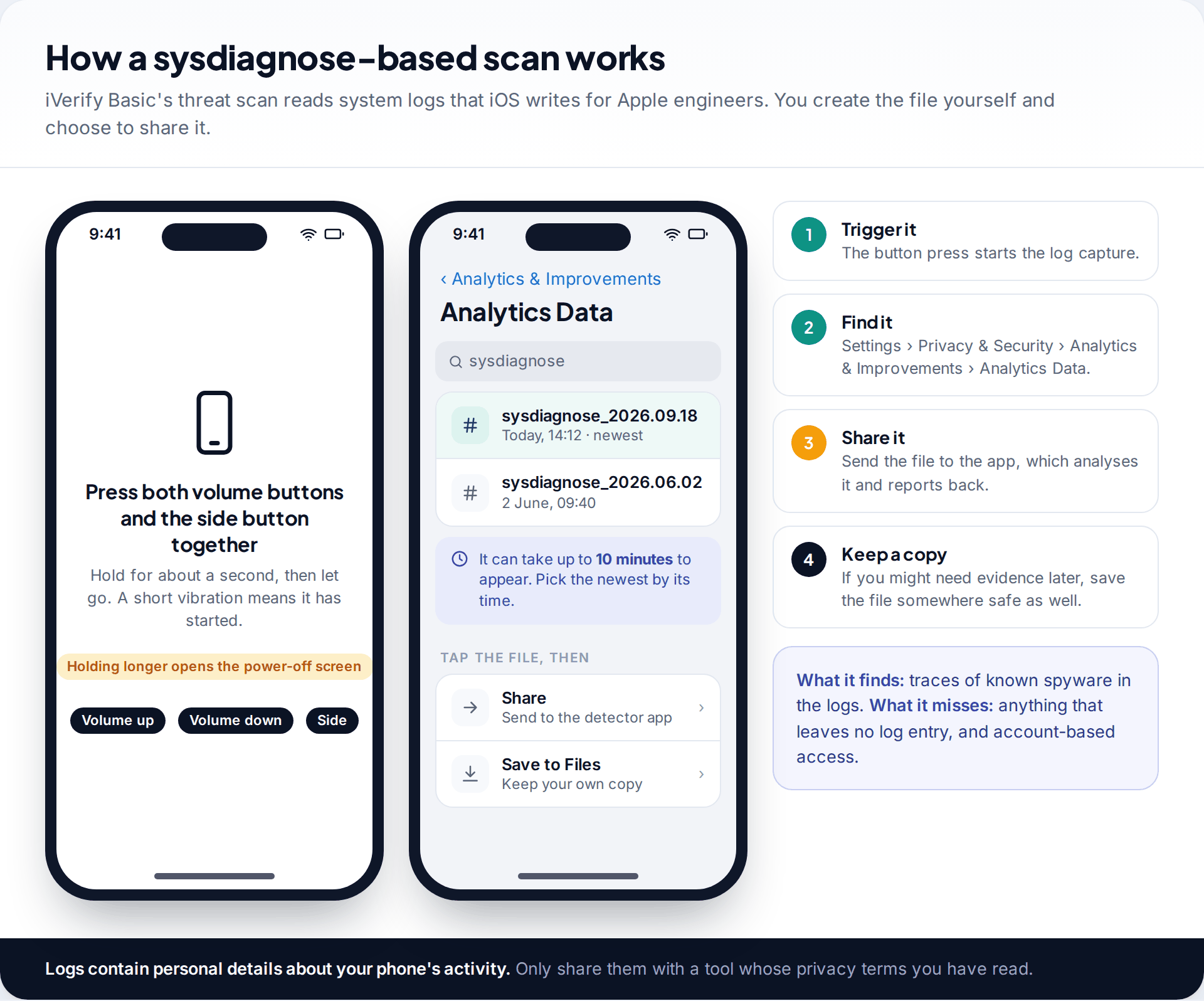
iVerify comes from mobile security researchers whose enterprise product is used for spyware threat-hunting. The consumer app, iVerify Basic, checks your iOS version and device security settings, and its threat scan analyses a sysdiagnose you create and share with it. When it launched this feature in 2024, iVerify reported finding seven Pegasus infections among the first 2,500 scans submitted. Its focus is advanced, mercenary spyware more than commercial stalkerware, and in Certo’s comparison it spotted a jailbreak but not the monitoring app installed on top of it. The App Store listed it as free when we checked.
3. Lookout Life: steady background checks
Lookout’s consumer app, now owned by F-Secure, is one of the longest-running iPhone security apps. On iOS its support pages say it alerts you if the operating system has been tampered with, if an iOS update is waiting, and if you join a risky Wi-Fi network. That is the right set of checks for what iOS allows. It will not find account-based monitoring.
4. Certo Mobile Security: the free on-phone version
Certo’s free iPhone app scans for security vulnerabilities in your settings, checks Wi-Fi networks, and gives a privacy checklist. It carries no ads. Certo itself positions the paid computer tool, not this app, as the way to find spyware, which is an honest distinction.
5. Norton 360: basics inside a wider suite
Norton’s iPhone app includes device security checks for an outdated iOS and a missing passcode, plus Wi-Fi security, scam filtering and a VPN. It is here for people who already pay for Norton. Its App Store listing does not claim jailbreak or spyware detection, so it is the lightest check of the five.
What no iPhone detector can see
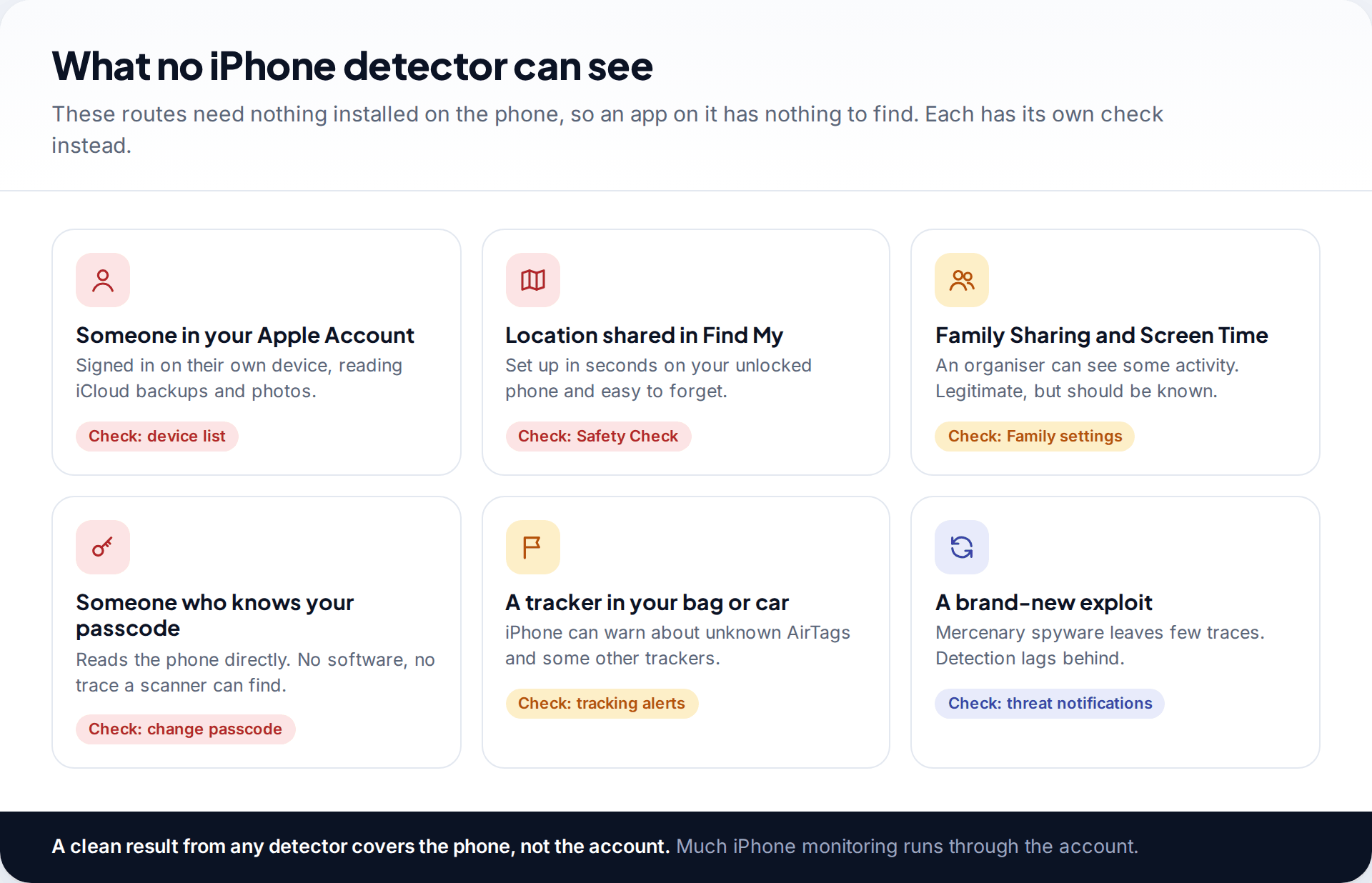
Put simply, a detector covers the phone and not the account. Someone signed into your Apple Account on their own iPad, a location share in Find My, an organiser in Family Sharing, a partner who knows your passcode: none of these installs software, so none shows up in a scan. A Bluetooth tracker in your bag is outside the phone altogether, though iPhones can warn you about unknown AirTags and some other trackers travelling with you.
That is not a reason to skip the scan. It is a reason not to stop at it. The two checks in the next section cover most of this list, and they cost nothing.
Apple’s built-in checks come first
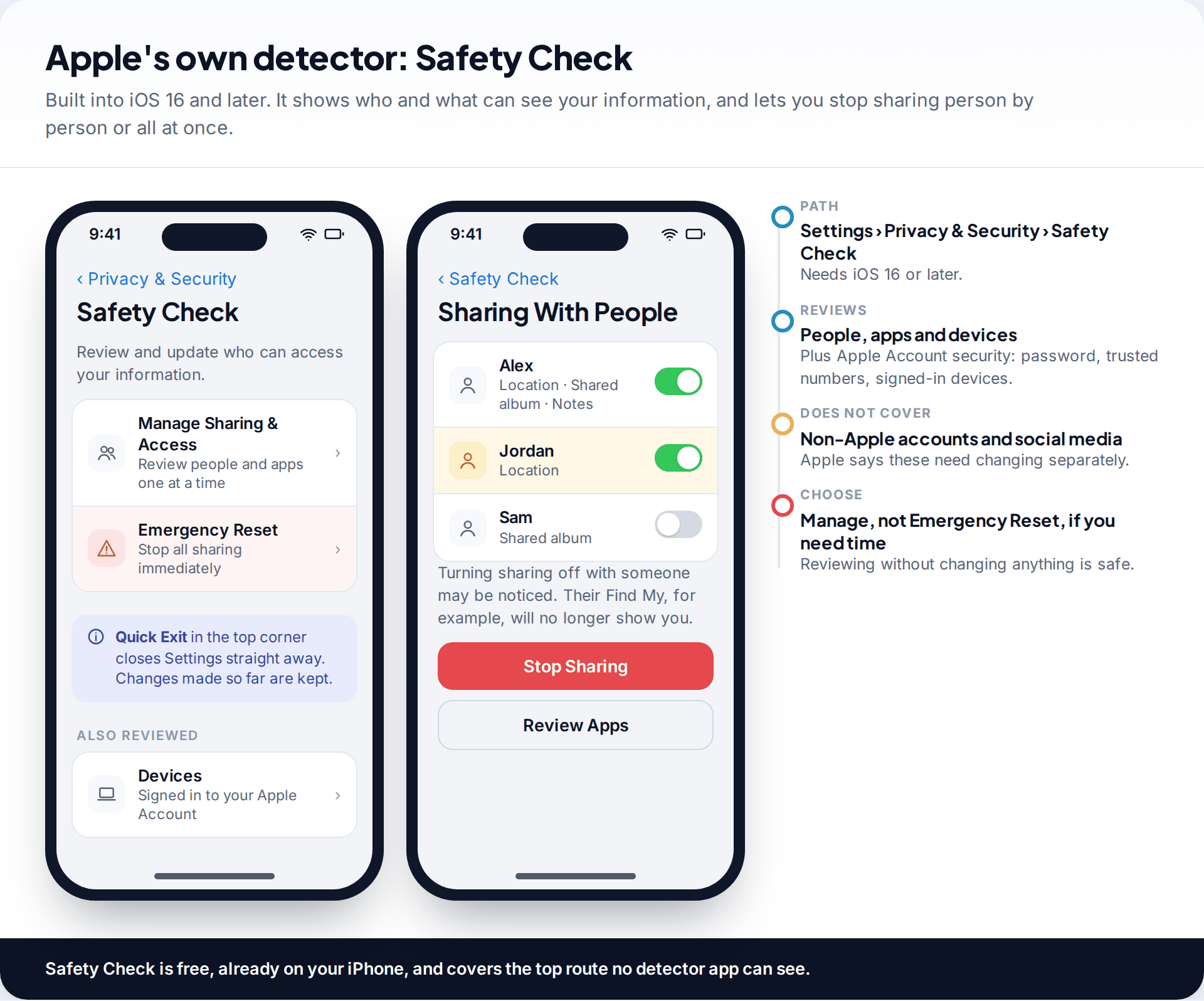
Safety Check, in Settings › Privacy & Security on iOS 16 and later, is the closest thing Apple ships to a detector. It lists the people you share location, photos and notes with, the apps that can access sensitive data, and the devices signed into your Apple Account. Manage Sharing & Access lets you review one at a time. Emergency Reset stops everything at once and prompts you to change your Apple Account password. Apple’s guide says it does not cover non-Apple accounts or social media sharing.
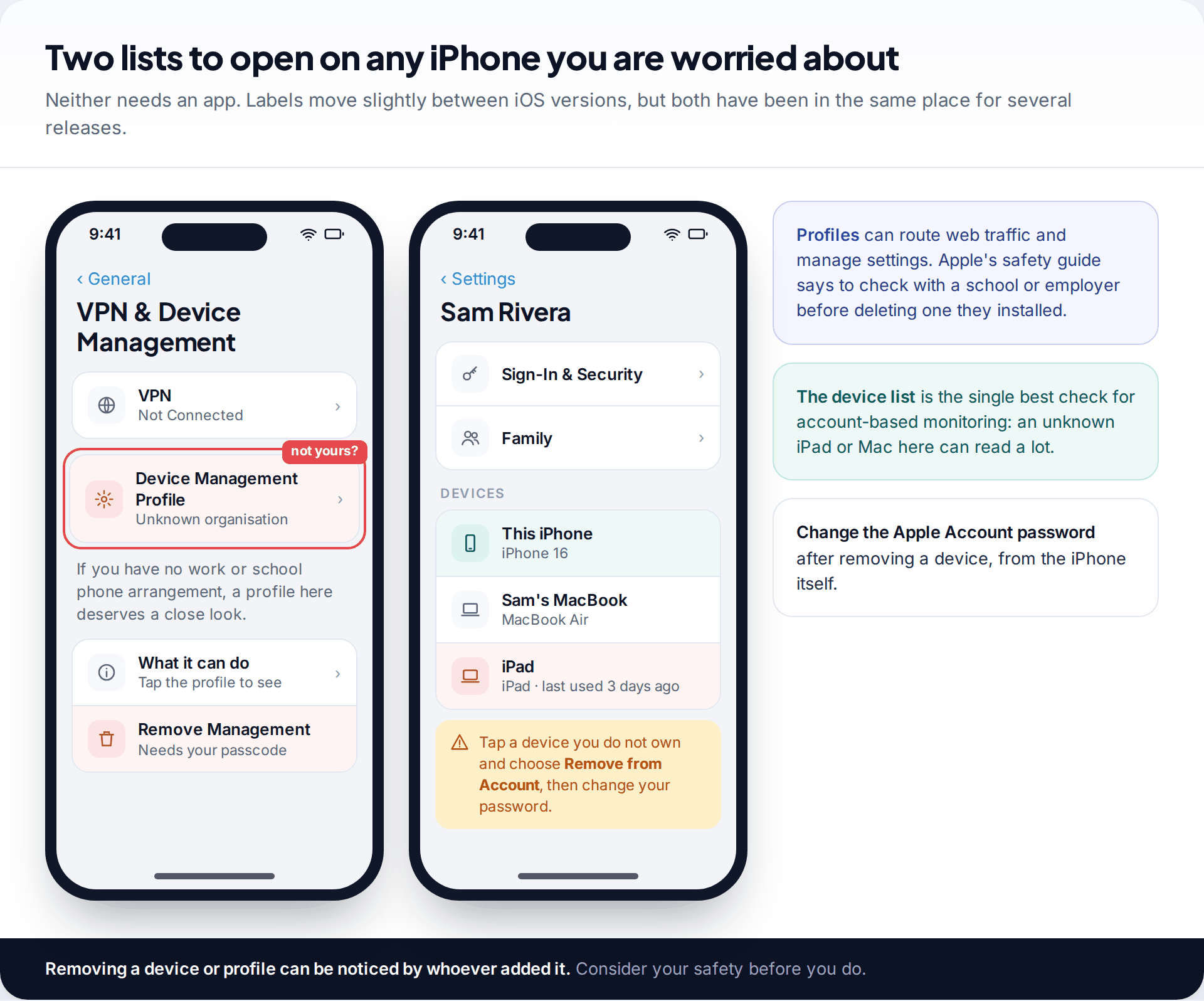
Then open two lists. In Settings, tap your name and scroll to the devices signed into your account: an iPad or Mac you don’t own is the clearest sign of account-based access. Next, go to Settings › General › VPN & Device Management. If your phone is not managed by an employer or school, there should normally be nothing listed under device management. Our guide to checking an iPhone for stalkerware covers iCloud, profiles and jailbreak signs step by step.
Before you act on what you find
A detector does not know whether you agreed to what it finds. A Screen Time arrangement in a family, a work profile, or a parent’s openly installed monitoring app will be reported the same way as something that was set up behind your back. Legitimate monitoring tools, ours included, are built to be visible and should show up when you look. What matters is who set it up and whether you knew.
Removing access can be noticed. When you remove a device, a profile or a location share, the person who set it up may see that it has stopped. If they are a partner or former partner and you are worried about their reaction, contact a domestic-abuse support service in your country first. They can help you plan when and how to make changes. Safety Check’s Quick Exit button closes Settings immediately if you need it to.
If you decide to act, change your Apple Account password from the iPhone itself, remove unknown devices, update iOS, and use Settings › General › Transfer or Reset iPhone › Reset › Reset Location & Privacy to clear the list of computers your phone trusts. Our step-by-step list of what to do if you think you have spyware puts these in order.
When the worry is Pegasus-class spyware
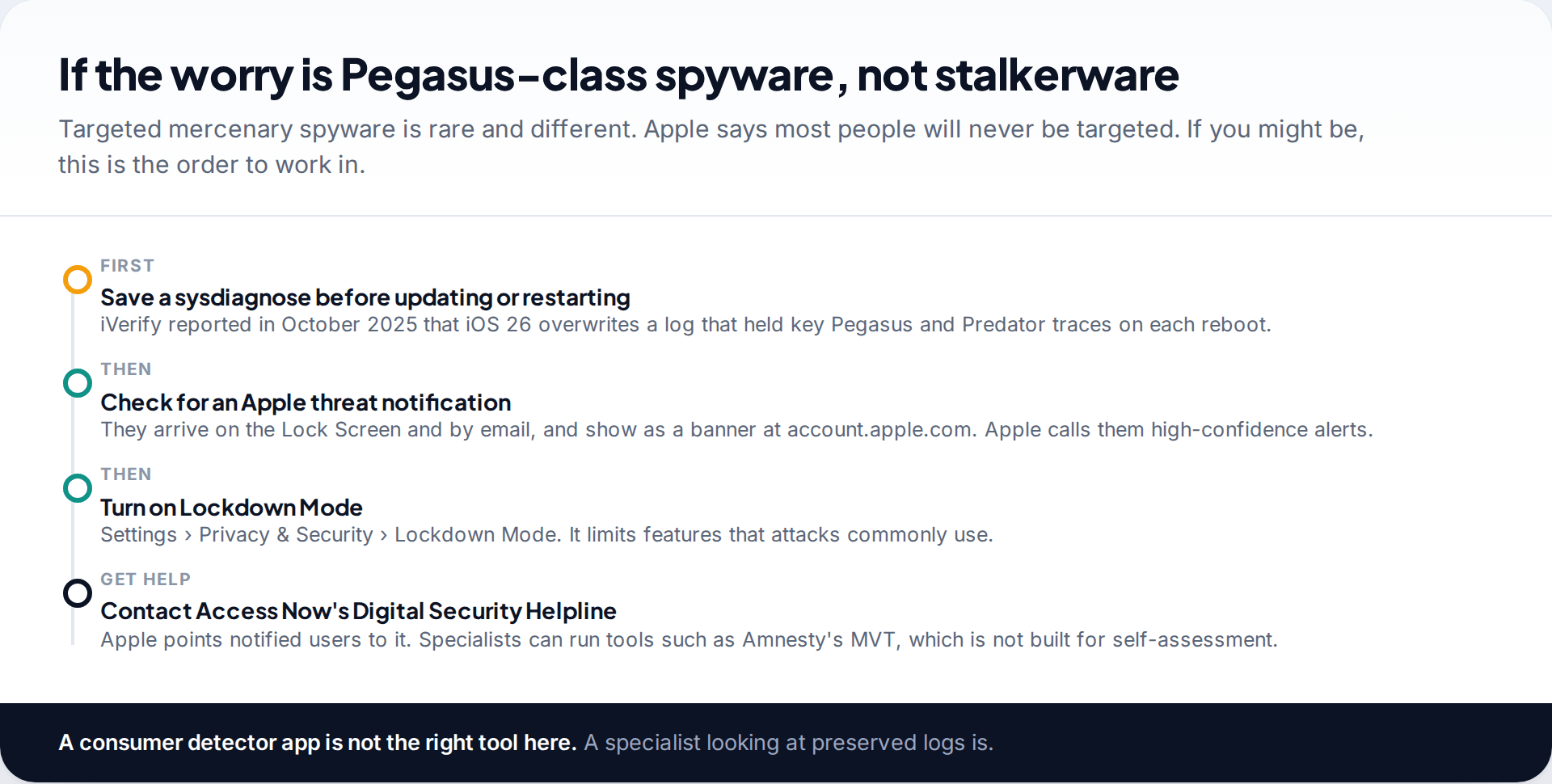
Mercenary spyware such as Pegasus is a different problem from stalkerware. Apple says the vast majority of users will never be targeted, and those who have been include journalists, activists, politicians and diplomats. If that could be you, the order of steps matters. iVerify reported in October 2025 that iOS 26 overwrites, on every restart, a log file that had held key traces of Pegasus and Predator. Its advice was to save a sysdiagnose before updating. Then check for an Apple threat notification, turn on Lockdown Mode, and contact Access Now’s Digital Security Helpline, which Apple itself recommends.
Amnesty International’s Mobile Verification Toolkit (MVT) is the best-known free tool for this work, but its developers state it is a forensic tool for investigators and not intended for end-user self-assessment.
How this page was put together
We checked each tool’s App Store listing, website and help pages, Apple’s Personal Safety User Guide and support pages, and iVerify’s and Certo’s published research in September 2026. Because no independent lab has tested iPhone stalkerware detection, the order reflects what iOS allows each tool to do, not a detection score. Vendor claims are described as claims.
We did not lab-test these apps and are not paid to include any of them. You can read our editorial standards for how guides are checked and updated.
Common questions
Is there a real spy app detector for iPhone?
Yes, within limits. Apps such as iVerify Basic and Lookout Life can check your iOS version and look for jailbreak signs, and iVerify can analyse system logs you share with it. For a deeper look, Certo AntiSpy scans the iPhone from a computer. No app on the iPhone can scan other apps.
Can someone put a spy app on my iPhone without jailbreaking it?
Not a full stalkerware app from outside the App Store. But much iPhone monitoring doesn’t need one: someone with your Apple Account password can read iCloud data, and someone with your unlocked phone can share your location or add a profile. Safety Check and your account’s device list show these.
Does resetting my iPhone remove spyware?
Erasing and updating the iPhone removes a jailbreak and anything installed with it. It does not remove someone’s access to your Apple Account, so change that password too. Restoring from a backup made while the phone was compromised can bring problems back.
Can the person monitoring me see that I ran a check?
Looking at Safety Check or running a detector app is unlikely to be visible to them. Changing things is different: stopping a location share or removing a device may be noticed. Plan that step if you are worried about how they will react.
Will a detector flag a parental control app on my child’s iPhone?
Often, yes, or Safety Check will list it. That is intended. Screen Time set up through Family Sharing and openly installed monitoring apps are meant to be visible to the person using the phone.
Do iPhone antivirus apps protect against Pegasus?
Mostly no. Consumer apps can help you notice an outdated iOS and, in iVerify’s case, look for known traces in logs. Protection comes from keeping iOS updated and, for people at real risk, Lockdown Mode.
Looking for a tool to go with this? TheTruthSpy is a free parental control app for Android that stays visible on the child's phone. If it fits your family, see the App blocker feature.
Related guides
How to Check If Your Email Was in a Data Breach
Check if your email was in a data breach for free, then act on what leaked: passwords, card details or…
How to Start Using a Password Manager
Switch to a password manager without stress: built-in or standalone, protecting the main password, and a first-hour plan for the…
How to Tell If Your Phone Has a Virus or Malware
Most 'virus' signs have ordinary causes. How to check an iPhone or Android phone for real malware, remove it, secure…
Parental controls your child can see
Location, screen time limits, a web filter and alerts from notifications — free, and visible on your child's phone. Pair a phone in about ten minutes.
Android · Free to set up · Visible on your child's phone