Stalkerware on iPhone: Checking iCloud, Profiles and Jailbreak Signs

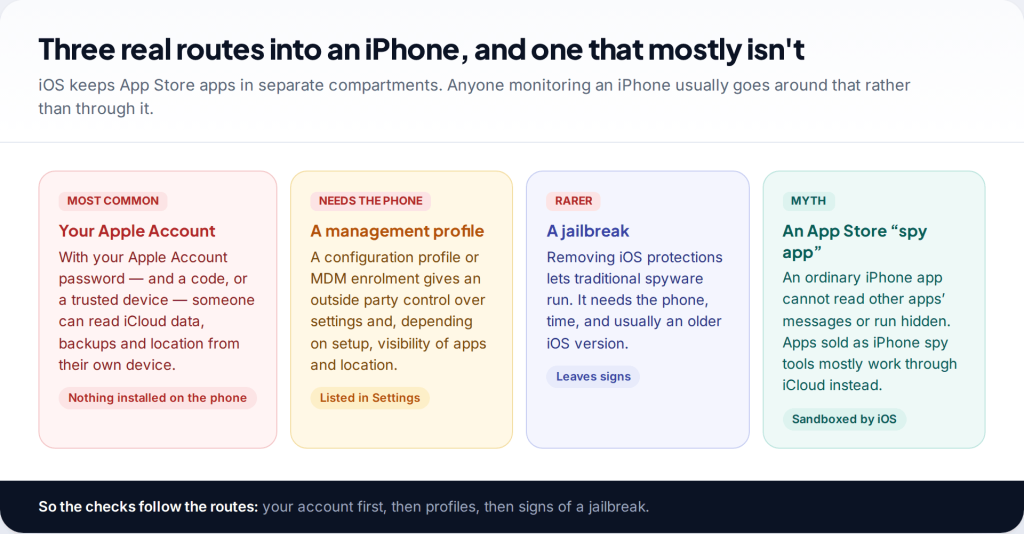
Myth: someone can install a hidden app from the App Store on your iPhone and read everything. For an iPhone that hasn’t been jailbroken, that is mostly false — iOS doesn’t let apps read each other’s data. To detect stalkerware on iPhone, check where monitoring really happens: your Apple Account and iCloud, Safety Check’s sharing list, configuration profiles and device management, and signs of a jailbreak.
Why app-based stalkerware is rare on an unmodified iPhone
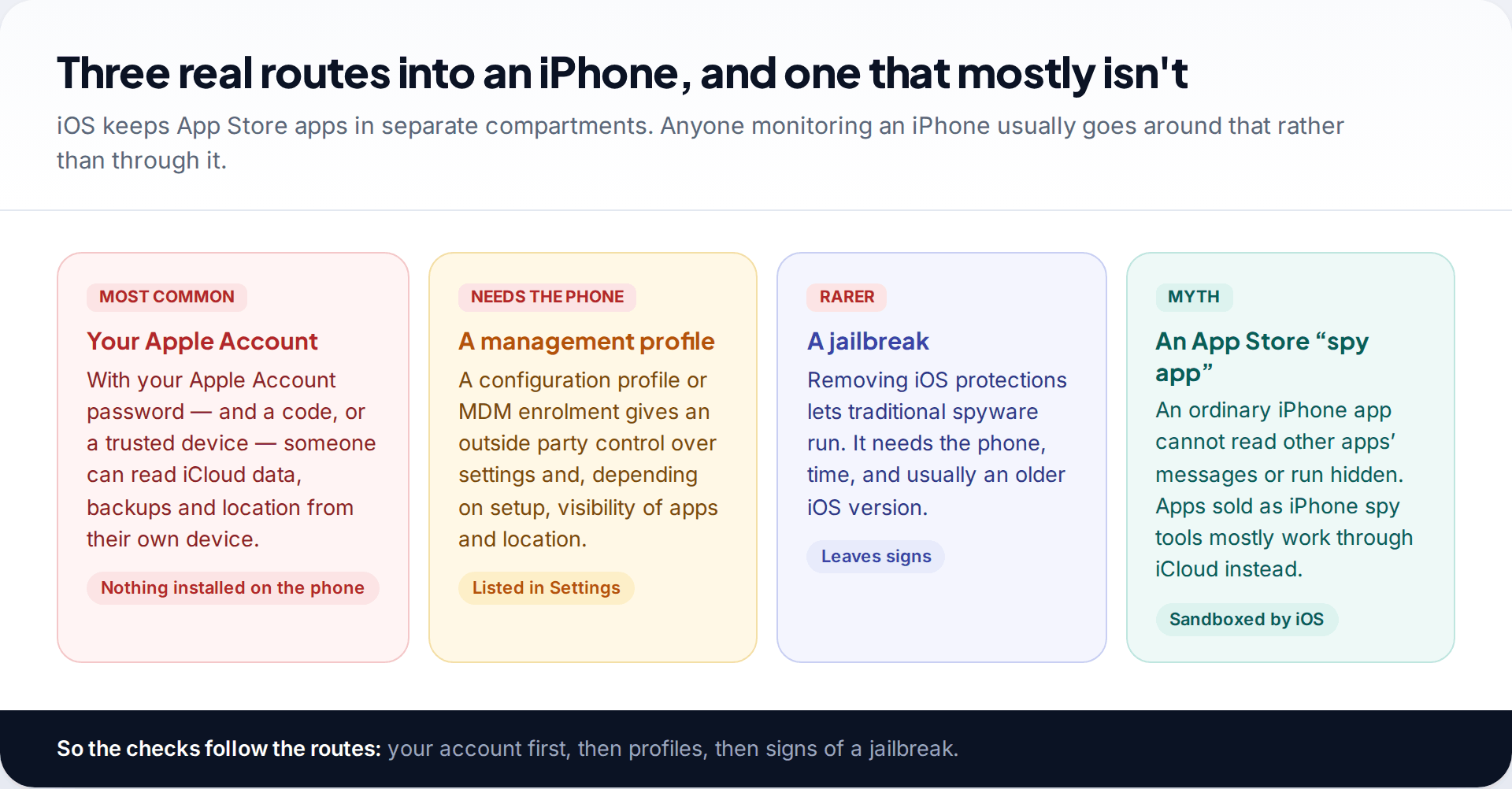
Every App Store app runs in its own sandbox. It can’t read your messages in another app, log what you type elsewhere or hide itself from the system. Apple also reviews apps before they reach the store. That is why the Android approach — hunting for an app with suspicious permissions — finds little on an iPhone.
What people call iPhone stalkerware usually works around the phone rather than on it. The most common route is the Apple Account: a monitoring service is given your Apple Account email and password and downloads your iCloud data from Apple’s servers. TechCrunch’s 2022 investigation of one such service found it had been downloading victims’ latest iCloud backups this way, with thousands of stolen iCloud credentials in its systems. Nothing was installed on the phones at all.
The other two routes need the phone in hand. A management profile lets an outside party supervise the device. A jailbreak strips out iOS protections so that traditional spyware can run. Both leave traces you can look for.
| Common belief | What is actually true |
|---|---|
| A spy app can be hidden on any iPhone | Only a jailbroken iPhone can run hidden spyware of that kind |
| A security app will scan my iPhone for spyware | iOS apps can’t inspect other apps; iPhone security apps check settings, versions and jailbreak signs |
| Two-factor means nobody else can get in | Not if someone added their own trusted number or knows your passcode and has a trusted device |
| Battery drain means spyware | On an iPhone, it almost never does on its own |
Before you start checking
If you think a partner, ex-partner or family member is monitoring you, plan before you change anything. Changing your Apple Account password, stopping location sharing or removing a profile will be noticed by the person who set it up, sometimes within minutes. A domestic-abuse support service can help you decide what to change and when. Where you can, read and check from a device the other person has never used.
Everything in the next sections can be done in read-only mode first. Look, record what you see by photographing the screen with another device, and hold back on changes until you’re ready. Apple’s own personal safety guidance makes the same point: consider what a change could mean for your safety before you make it.
Check 1: your Apple Account and iCloud
This is the check that matters most, because account access is the most common way an iPhone is monitored. Open Settings, tap your name, then Sign-In & Security (called Password & Security on older versions).
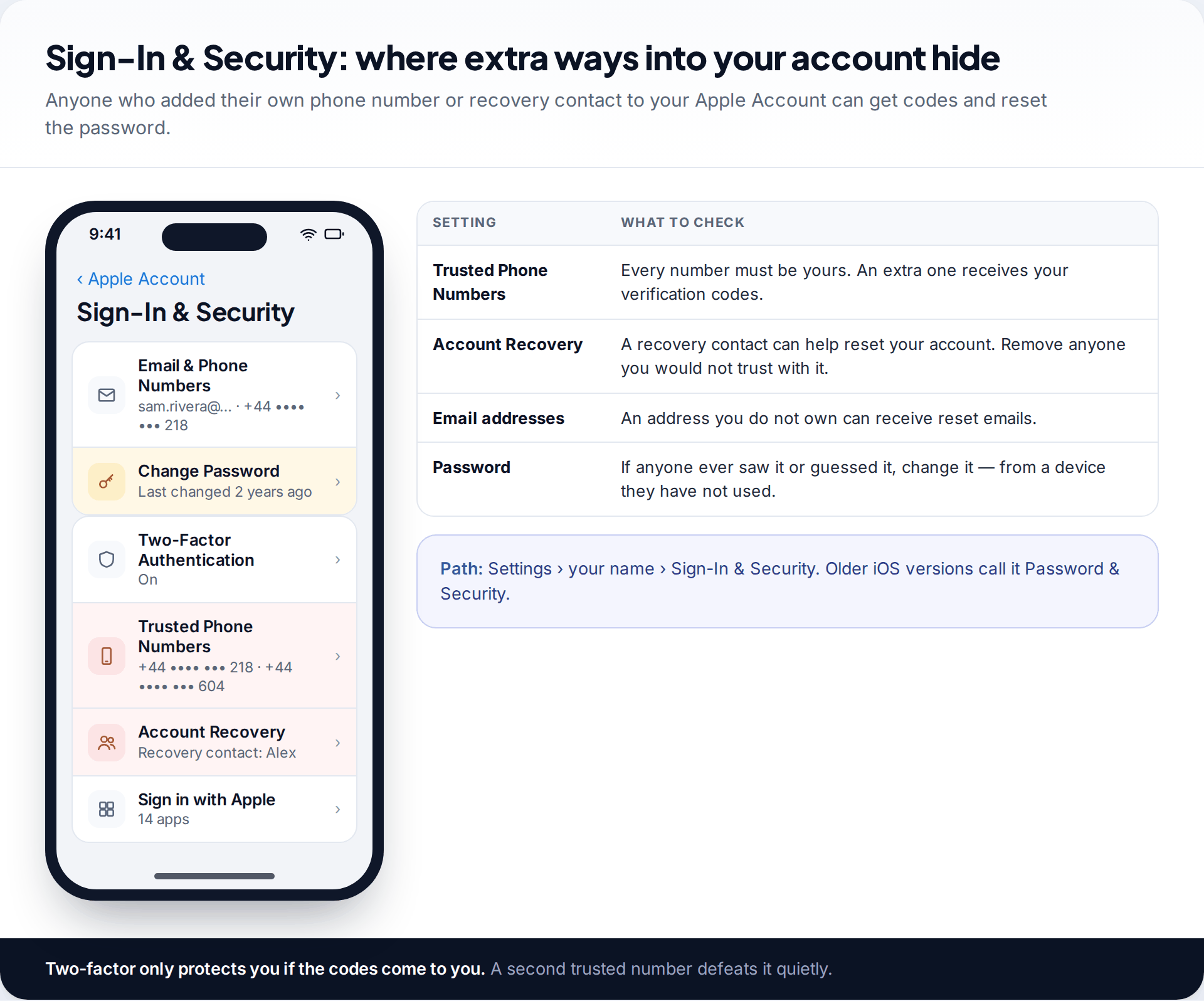
Read the Trusted Phone Numbers list carefully. Two-factor authentication only protects you if the codes reach you, and a number someone else added receives them too. Check the email addresses on the account and any Account Recovery contact. Then look at when you last changed the password. If a partner has ever known it, assume they may still.
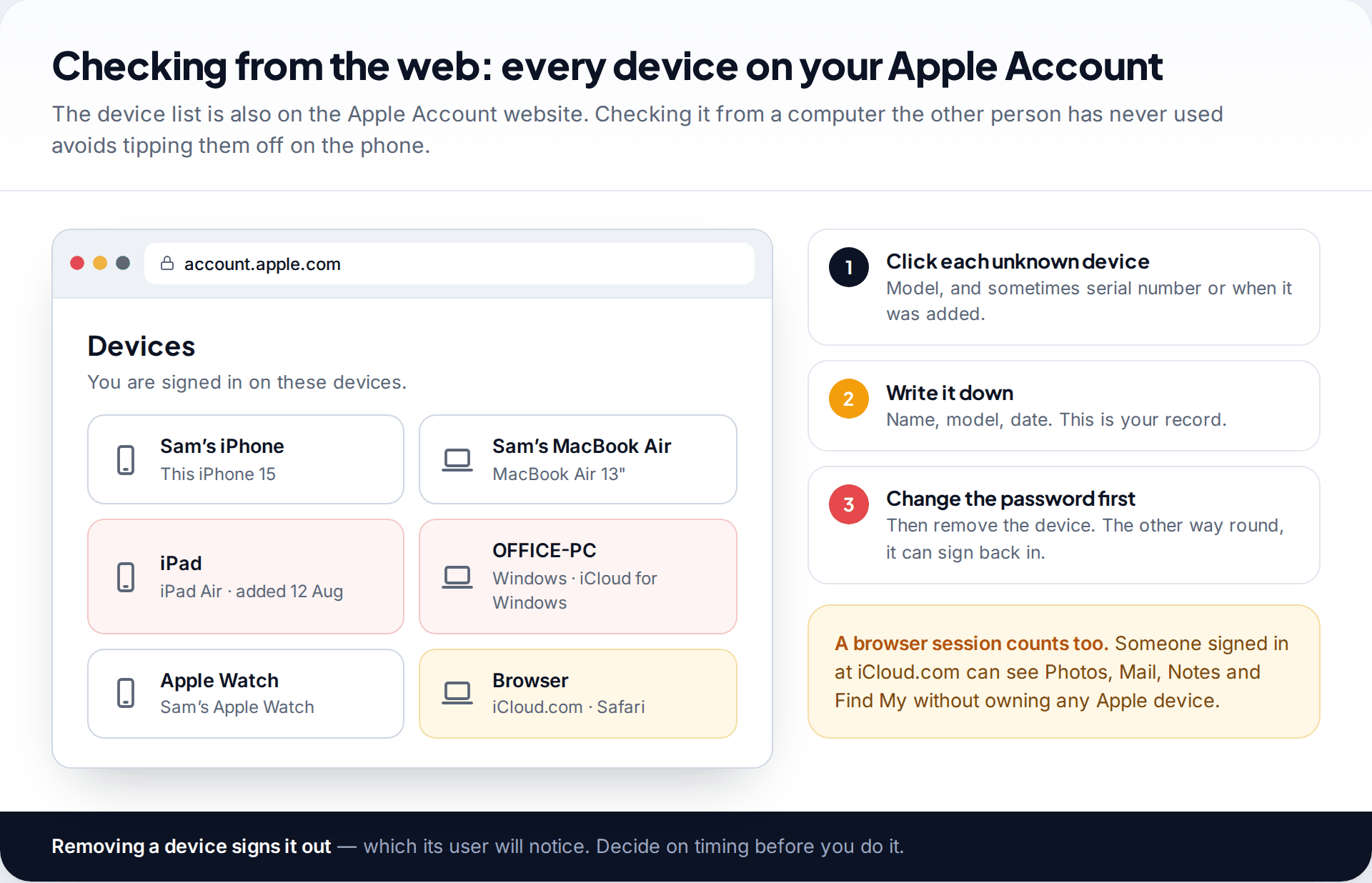
Next, look at the devices signed in to your account — at the bottom of the screen under your name in Settings, or on the Apple Account website from another computer. A Mac, iPad or Windows computer you don’t recognise may be receiving your messages, photos and backups. For the full set of iCloud checks, including Messages, Photos and backup access, see our guide to signs someone else has access to your iCloud.
When you’re ready to close this route, the order matters: change the Apple Account password from a safe device, remove numbers and recovery contacts you don’t control, and only then remove unknown devices. Removing devices first lets them sign straight back in with the old password.
Check 2: run through Safety Check
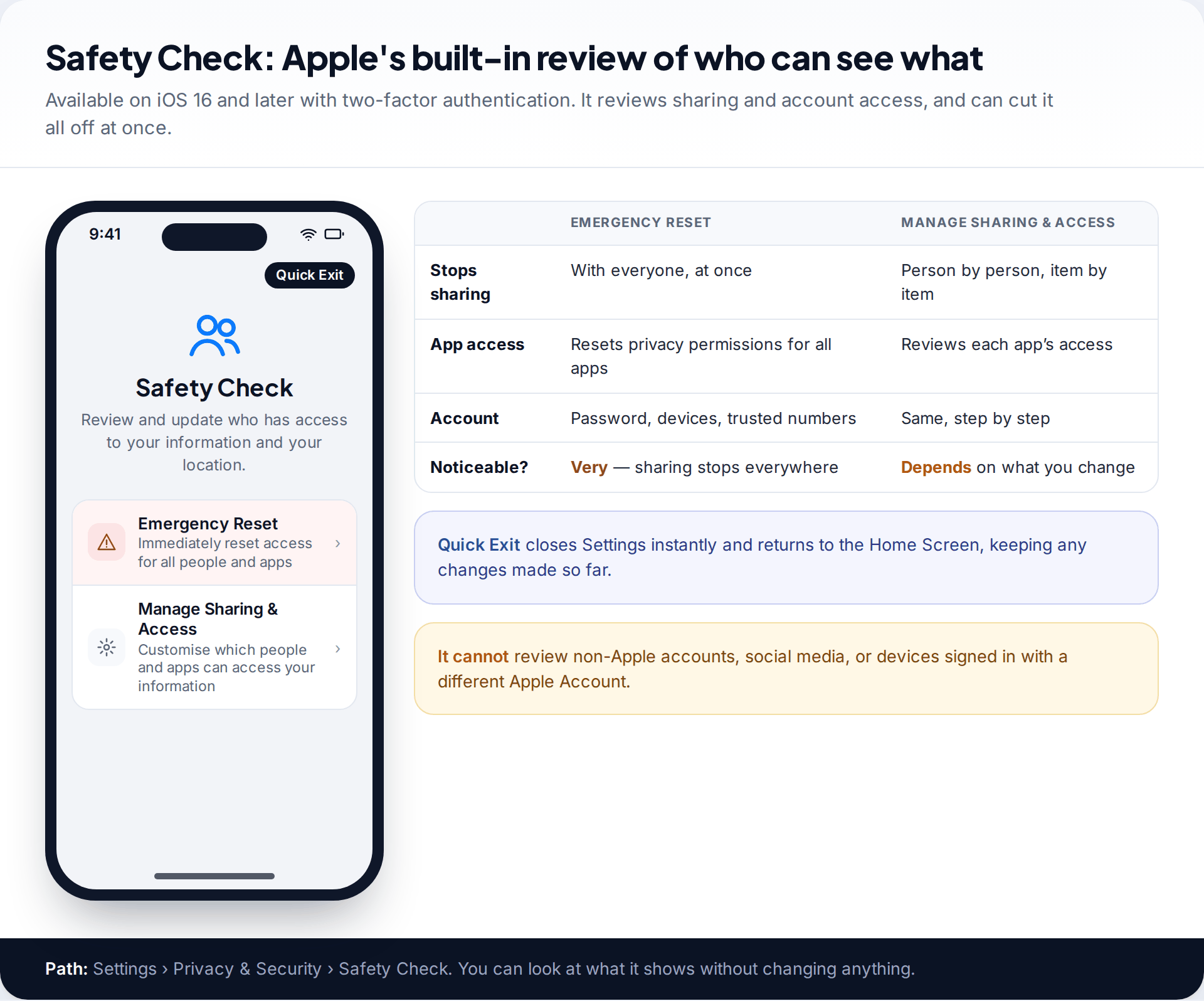
Apple built Safety Check for people whose partner or former partner may have access to their information. It is at Settings › Privacy & Security › Safety Check and needs iOS 16 or later and two-factor authentication. It has two modes. Emergency Reset immediately stops sharing with all people and apps and walks you through your account security. Manage Sharing & Access lets you review each person and app one at a time.
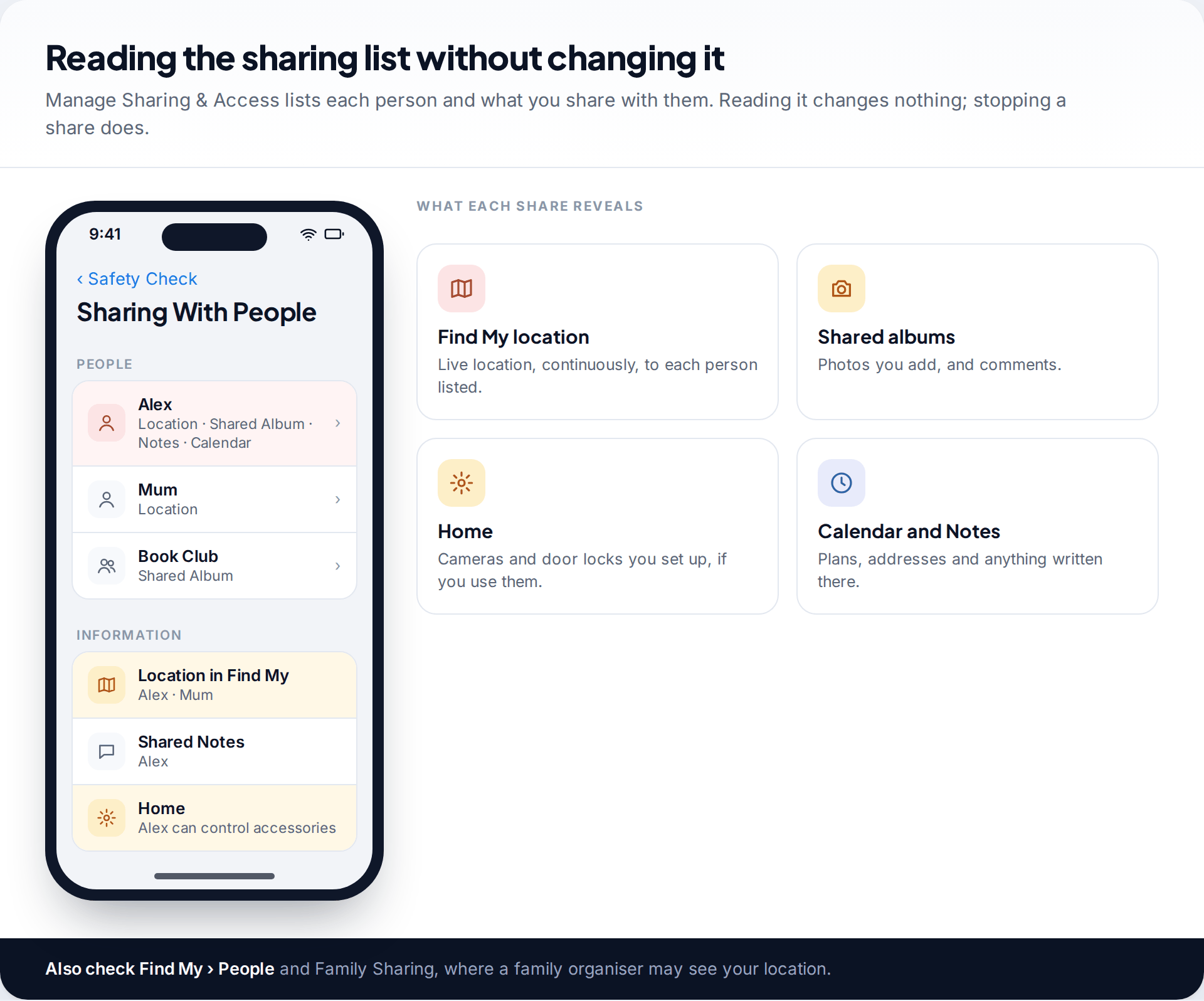
Use Manage Sharing & Access to look first. It lists everyone you share with — location in Find My, shared albums, notes, calendars, Home accessories — and which apps have access to things like your location, photos, camera and microphone. You can step through the review and read what it shows before stopping any share. The Quick Exit button in the corner closes Settings immediately if someone approaches.
Know its limits. Safety Check covers Apple’s own sharing and your Apple Account. It doesn’t review non-Apple apps and accounts, social media, or devices signed in with a different Apple Account, and Apple warns that Screen Time restrictions or a management profile can limit what it can change.
Check 3: configuration profiles and device management
Go to Settings › General › VPN & Device Management. A VPN you set up yourself appears here too, which is fine. What you are reading for is anything under configuration profile or device management. On a phone you bought for yourself and use only personally, there is usually nothing.
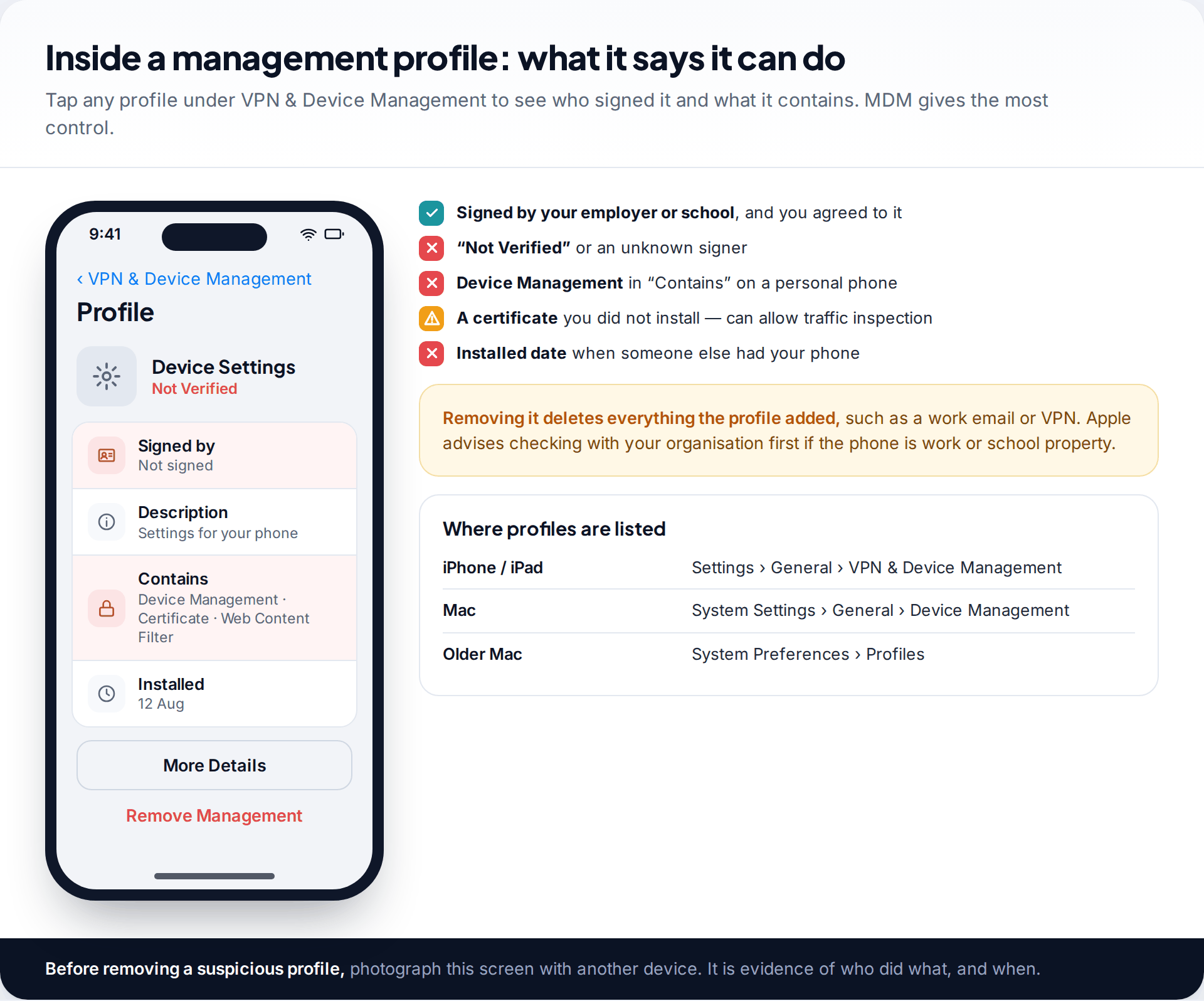
Tap any entry to see who signed it, what it contains and when it was installed. A profile from your employer or school that you knowingly accepted is expected; it is still reasonable to ask what it collects. A profile you don’t remember installing, marked “Not Verified”, containing device management — or an iPhone that says it is supervised when you bought it yourself — means someone set up control over it. Apple notes that management can give an organisation access to data and location.
Removing a profile deletes everything it added, and it is visible to whoever manages it. Photograph the detail screen before you do.
Check 4: signs of a jailbreak
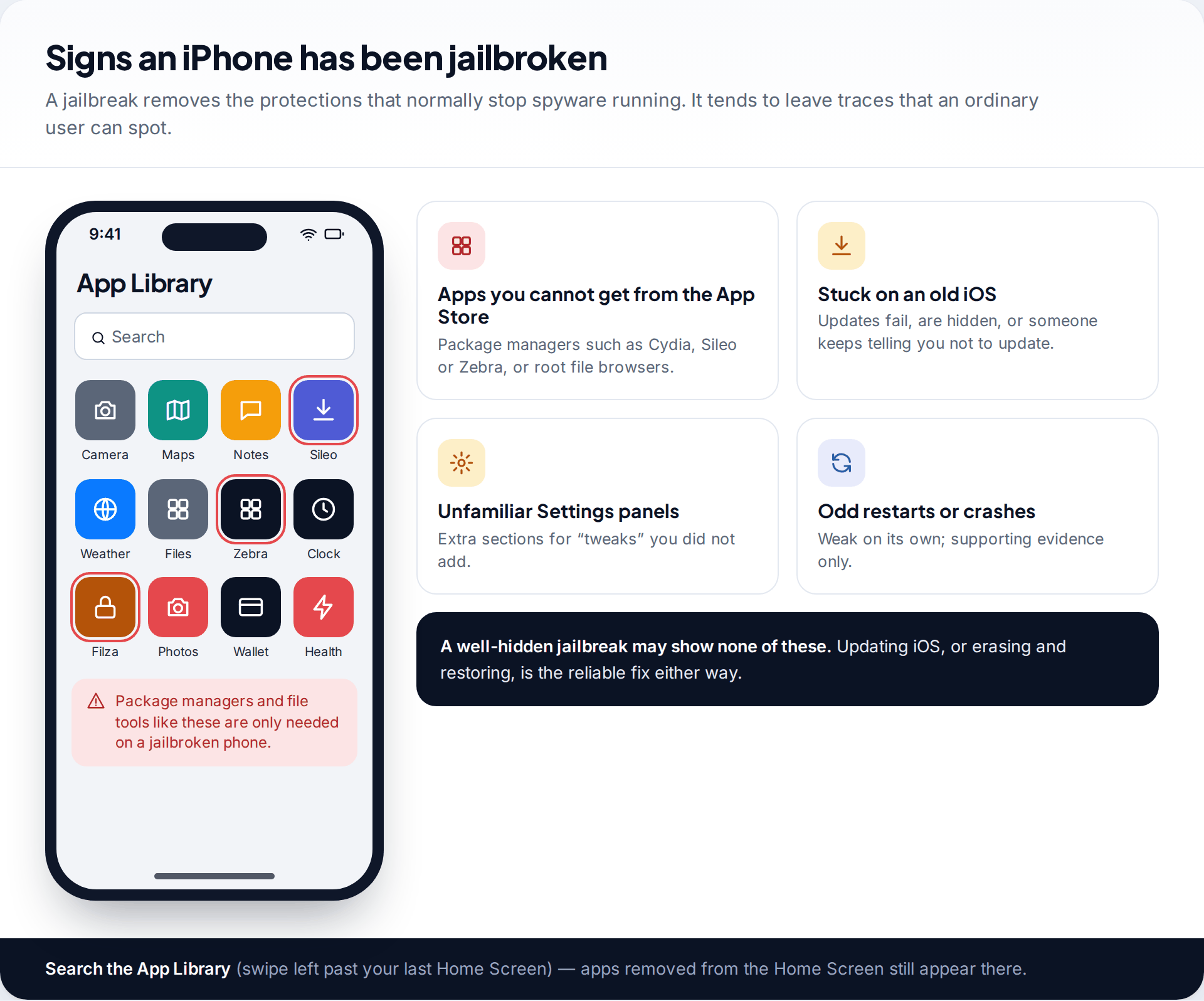
A jailbreak is the only route that lets traditional hidden spyware run on an iPhone, and it takes time with the phone and usually an iOS version with known flaws. Look in the App Library — swipe left past your last Home Screen and use the search — for apps that don’t come from the App Store: package managers such as Cydia, Sileo or Zebra, or file browsers that can reach system folders.
Other signs are weaker: an iPhone that won’t update or keeps being held back, unfamiliar sections in Settings, or frequent crashes. A careful installer may hide the obvious apps, so absence isn’t proof.
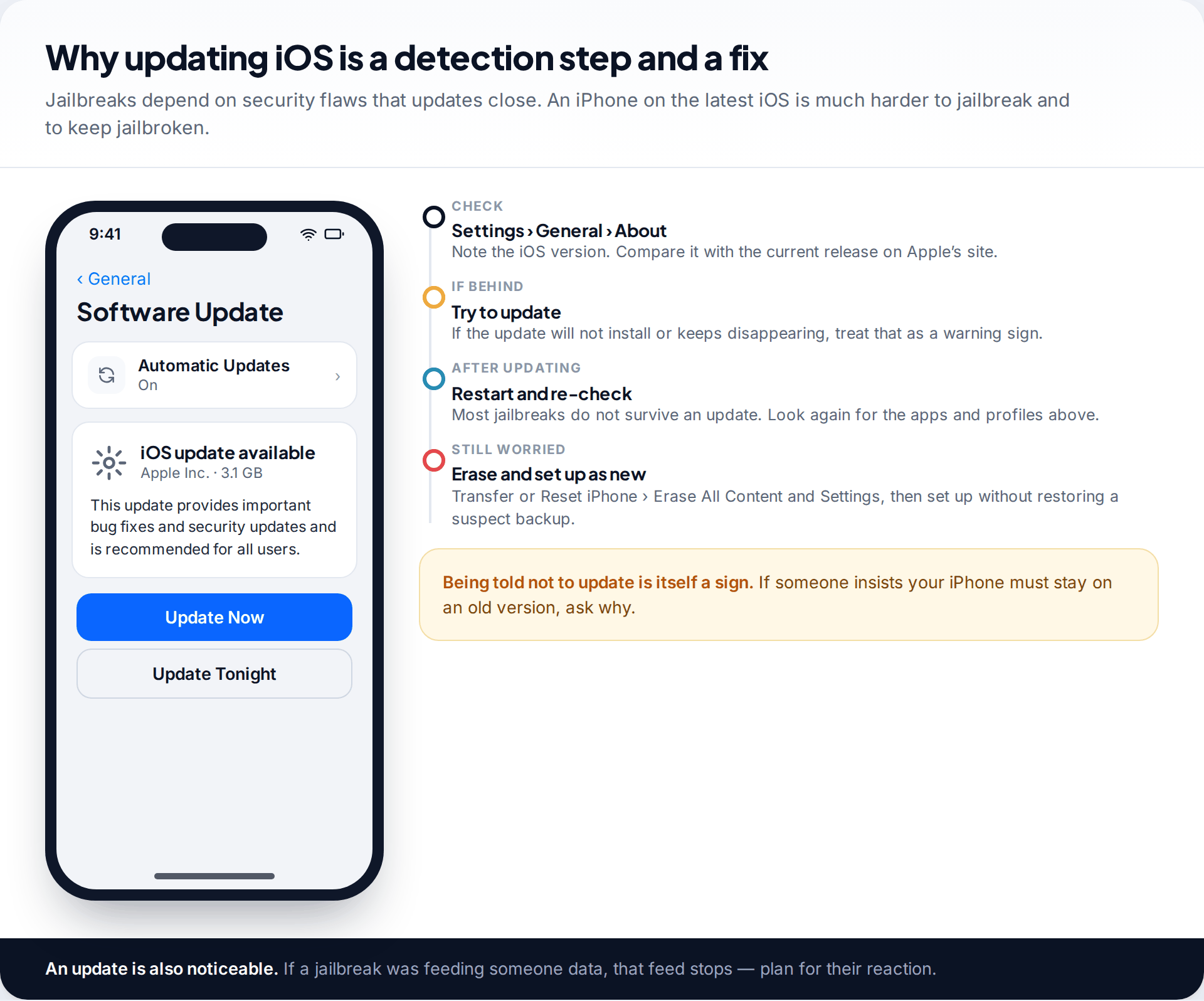
The reliable answer is the same whether or not you spot a sign. Check your version under Settings › General › About, then update in Software Update. Most jailbreaks don’t survive an update. If you’re still worried, Erase All Content and Settings (under Transfer or Reset iPhone) and set the phone up as new rather than restoring a backup you don’t trust.
A walk-through: when the checks point to the account
An ex-partner keeps mentioning photos you never sent them
Jo split up with a partner three months ago. The ex-partner has referred twice to photos from a weekend away that Jo never shared. Jo’s iPhone shows no profile under VPN & Device Management, no unfamiliar apps in the App Library, and it installs updates normally, so a jailbreak or profile looks unlikely.
The device list under Jo’s name, though, includes an iPad Jo doesn’t own, and Sign-In & Security shows a second trusted phone number. The couple once shared an iPad, and the ex-partner knew Jo’s Apple Account password. iCloud Photos has been syncing to that iPad ever since.
Jo speaks to a support service first, then — from a friend’s laptop — changes the Apple Account password, removes the extra number, and removes the iPad from the account.
What iPhone checks cannot tell you
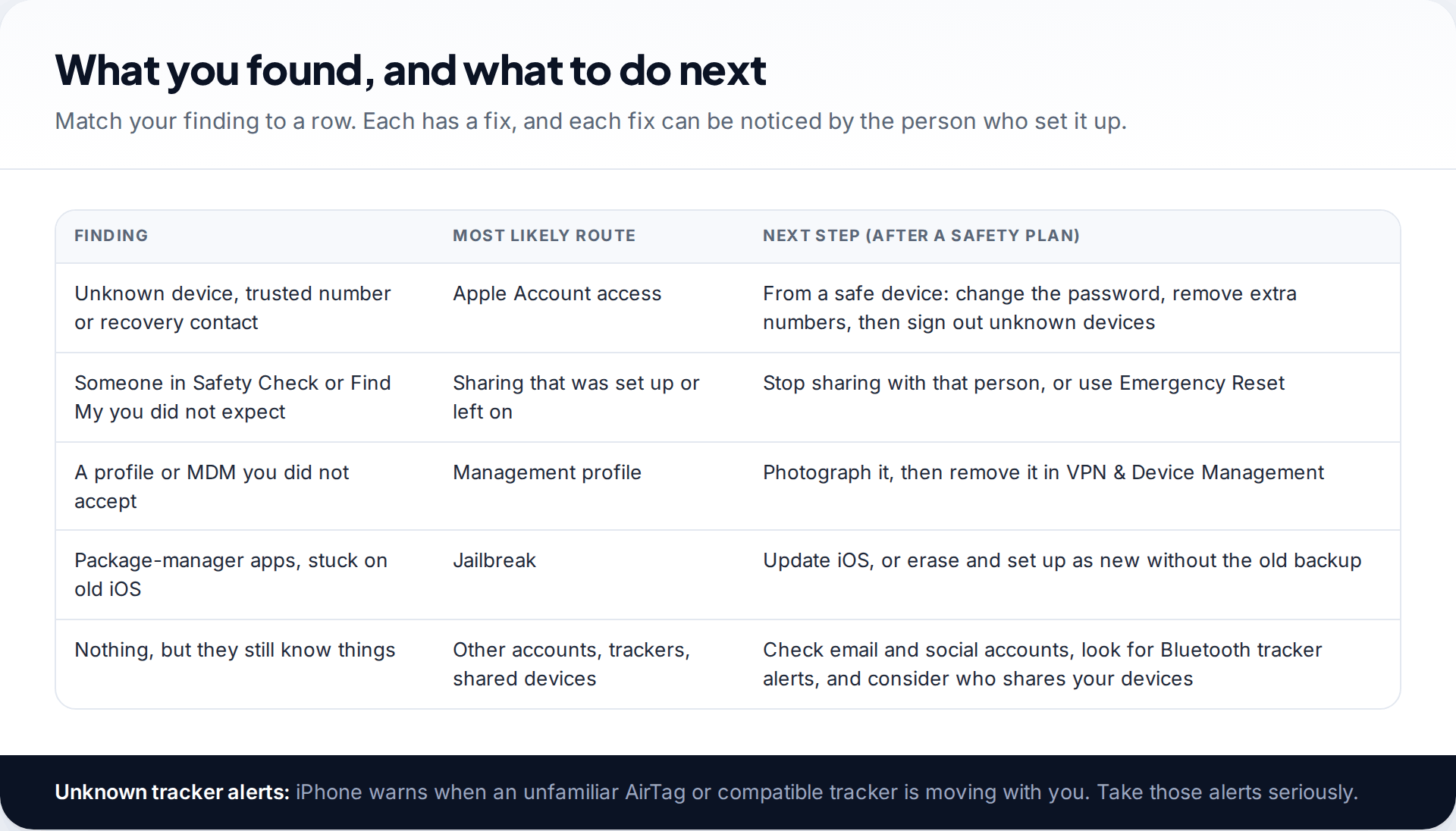
These checks cover the main routes, not every route. Someone signed in to your email, WhatsApp on the web or a social media account sees what those services show, and none of it appears in iPhone settings. A Bluetooth tracker in a bag or car isn’t on the phone either — though iPhone does alert you when an unfamiliar AirTag or compatible tracker seems to be moving with you, and those alerts are worth taking seriously.
Mercenary spyware used against journalists and activists is a separate category. It is expensive, targeted and not what most people face; Apple sends threat notifications to users it believes were targeted and offers Lockdown Mode for those at risk. If you’ve found something and need to decide what to do next, our guide to what to do first if you think you have spyware sets out a safe order.
How this page was put together
We checked Safety Check, configuration profile and Apple Account paths against Apple’s Personal Safety User Guide and iPhone User Guide in September 2026, and the iCloud-backup route against TechCrunch’s 2022 reporting on stalkerware that used stolen iCloud credentials. Apple renames some settings between iOS versions; searching Settings for the name usually finds it.
We didn’t jailbreak a phone or install monitoring software for this guide, and the names and devices in the illustrations are examples. You can read how we source and review our guides.
Common questions
Can an iPhone get stalkerware without being jailbroken?
Not in the Android sense of a hidden app reading everything. But someone with your Apple Account password can read iCloud data, and a management profile can give an outside party control. Both happen without a jailbreak.
Can someone monitor my iPhone through iCloud?
Yes, if they know your Apple Account password and can get past two-factor — for example with a trusted number they added or a device already signed in. Check your trusted numbers and devices, then change the password from a safe device.
Do iPhone anti-spyware apps work?
Only within iOS’s limits. They can’t inspect other apps, so they check things like your iOS version, profiles and jailbreak signs — which you can also check yourself in Settings.
Does Safety Check tell the other person?
Apple doesn’t send them a notice, but they may notice what changes — for example, that they can no longer see your location. Reading Safety Check without changing anything alters nothing.
Will a factory reset remove spyware from an iPhone?
Erasing removes a jailbreak, profiles and anything installed on the phone, as long as you set it up as new. It does nothing about someone who knows your Apple Account password, so change that too.
Can someone see my iMessages from another device?
Yes, if that device is signed in to your Apple Account with Messages turned on, or if Messages in iCloud syncs to it. Check the device list under your name and in Settings › Apps › Messages (or Settings › Messages on older versions), and remove devices you don’t own after changing your password.
How do I know if my iPhone has been jailbroken?
Look in the App Library for package managers such as Cydia, Sileo or Zebra, check whether iOS will update normally, and look for unfamiliar Settings sections. Updating or erasing the iPhone removes most jailbreaks.
Looking for a tool to go with this? TheTruthSpy is a free parental control app for Android that stays visible on the child's phone. If it fits your family, see what the app does.
Related guides
How to Check If Your Email Was in a Data Breach
Check if your email was in a data breach for free, then act on what leaked: passwords, card details or…
How to Start Using a Password Manager
Switch to a password manager without stress: built-in or standalone, protecting the main password, and a first-hour plan for the…
How to Tell If Your Phone Has a Virus or Malware
Most 'virus' signs have ordinary causes. How to check an iPhone or Android phone for real malware, remove it, secure…
Parental controls your child can see
Location, screen time limits, a web filter and alerts from notifications — free, and visible on your child's phone. Pair a phone in about ten minutes.
Android · Free to set up · Visible on your child's phone