Think You Have Spyware? Do These Things First, in This Order

Don’t delete it yet. If you think you have spyware on your phone, the instinct is to rip it out, but removing it can alert the person who installed it and destroys the evidence. Here is what to do if you have spyware, in order: check your immediate safety, move to a safer device, document what you see, avoid tipping off the installer, get support — and only then remove, reset or replace.
- Safety before technology. If someone you know put it there, how they react matters more than the app.
- Research and ask for help from a different device. The monitored phone may report your searches and messages.
- Document first. Removal and resets delete the proof.
- Removal is the last step, not the first. Then close the account routes, or monitoring simply continues.
Start with one question: who might be behind it?
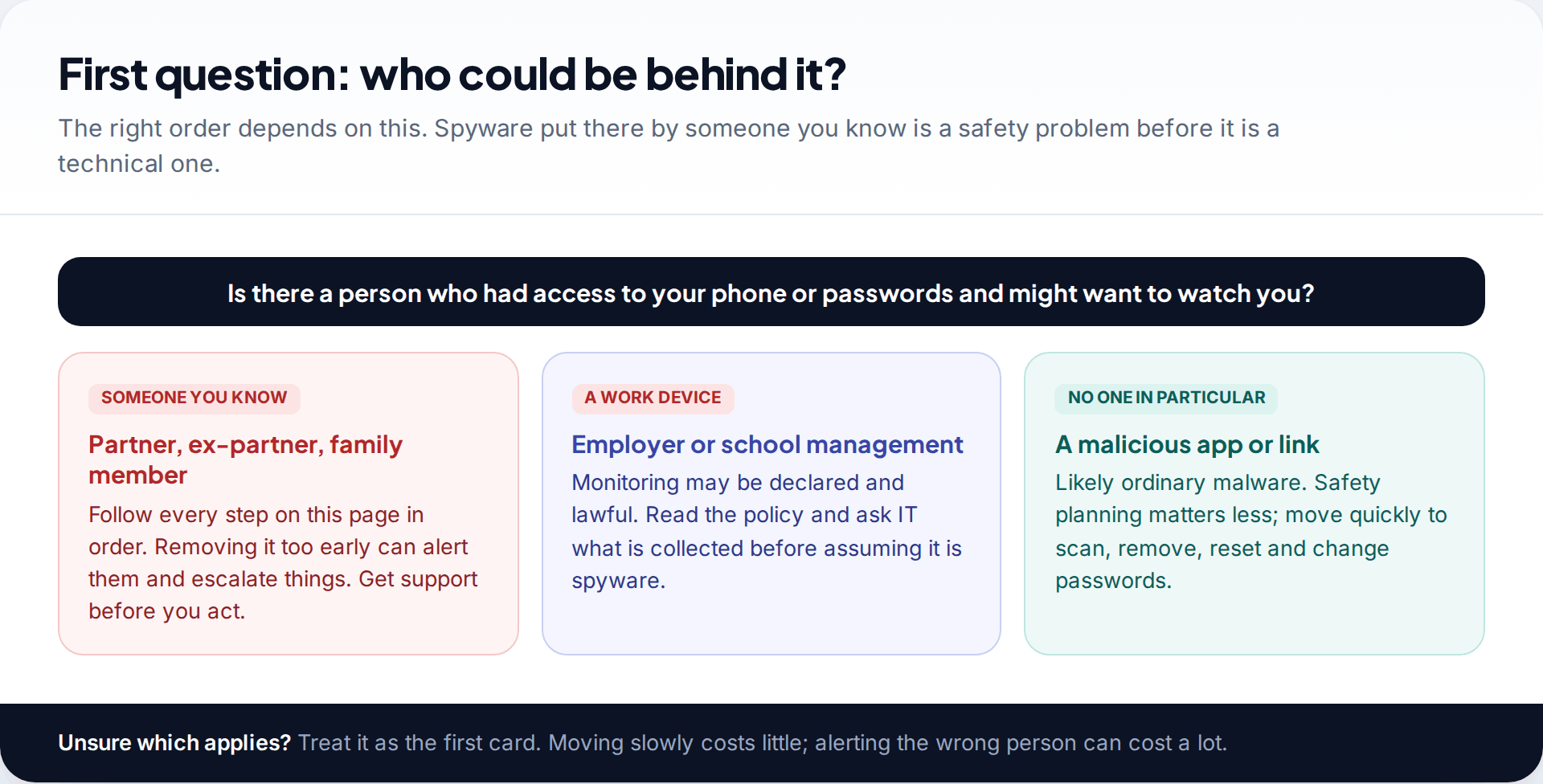
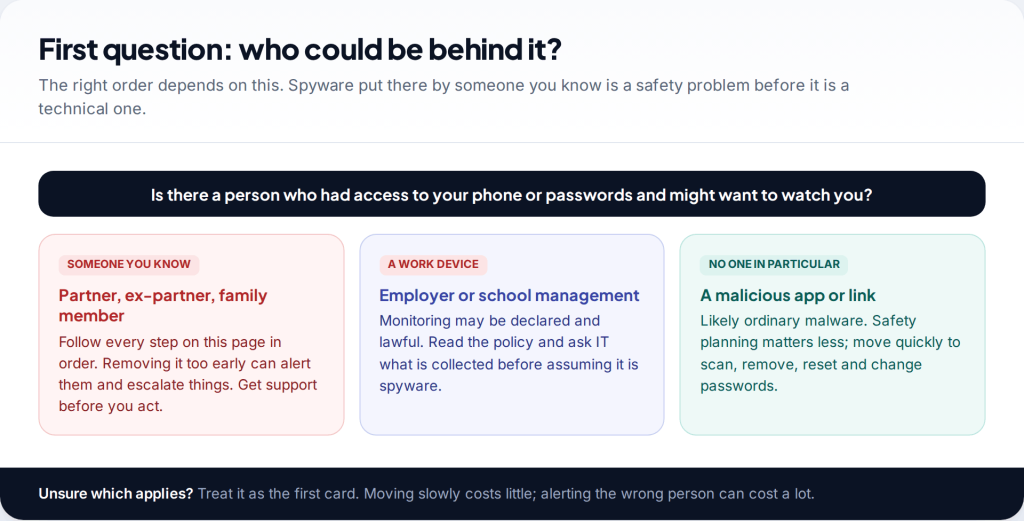
“Spyware” covers two quite different problems. One is ordinary malware — a malicious app or link from a stranger, after your bank details or accounts. The other is stalkerware: a monitoring app installed by someone who knows you, usually a partner, ex-partner or family member, to read your messages and track where you go.
For malware, speed is the priority: scan, remove, reset, change passwords. For stalkerware, speed can be dangerous. The person watching you will usually notice when their feed stops, and people who monitor a partner’s phone are often controlling in other ways too. So if there is any chance the spyware came from someone you know, follow the steps below in order. If you’re not sure, assume it might have; being slow is the cheaper mistake.
A third possibility is a work or school phone. Device management there may be declared and lawful. Read the policy and ask IT what it collects before treating it as spyware.
What to do if you have spyware: the steps, in order
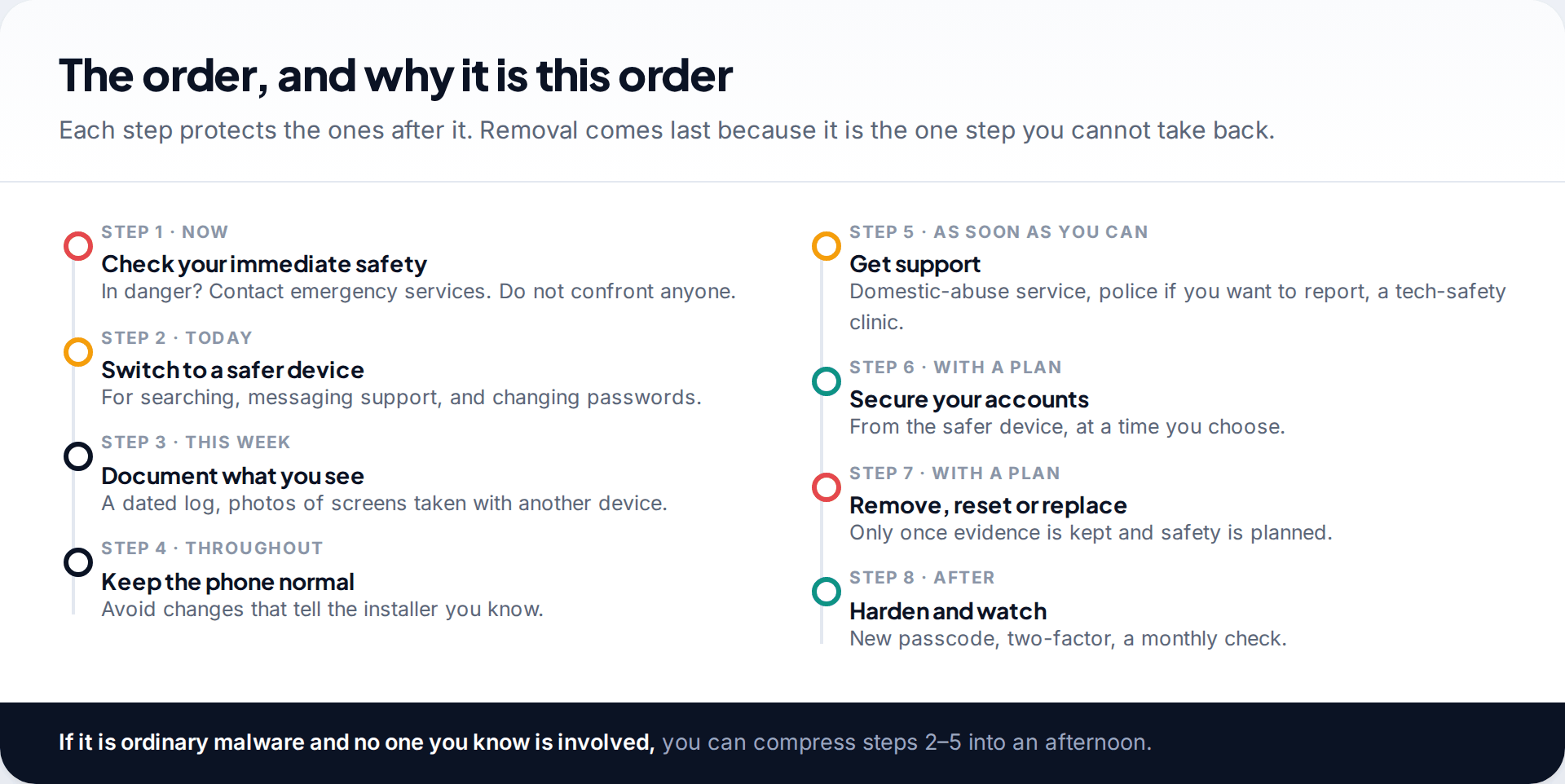
The sequence matters because each step protects the next. Using a safer device protects your research and your requests for help. Documenting before anything changes protects the evidence. Getting support before removal protects you from the reaction removal might cause. The rest of this page takes each step in turn.
Step 1: check your immediate safety
If you are in immediate danger, contact your local emergency services. Don’t confront the person you suspect, and don’t tell them what you’ve found. Confrontation gives them warning to delete evidence, move to other methods of monitoring, or react in ways that put you at risk.
Ask yourself honestly how the person is likely to respond if they realise you know — based on how they have behaved before, not how you hope they will behave. Monitoring someone’s phone is often one part of a wider pattern of control. If that pattern includes threats, intimidation or violence, the phone is not the only thing that needs a plan, and a domestic-abuse service is the right place to start.
Step 2: switch to a safer device
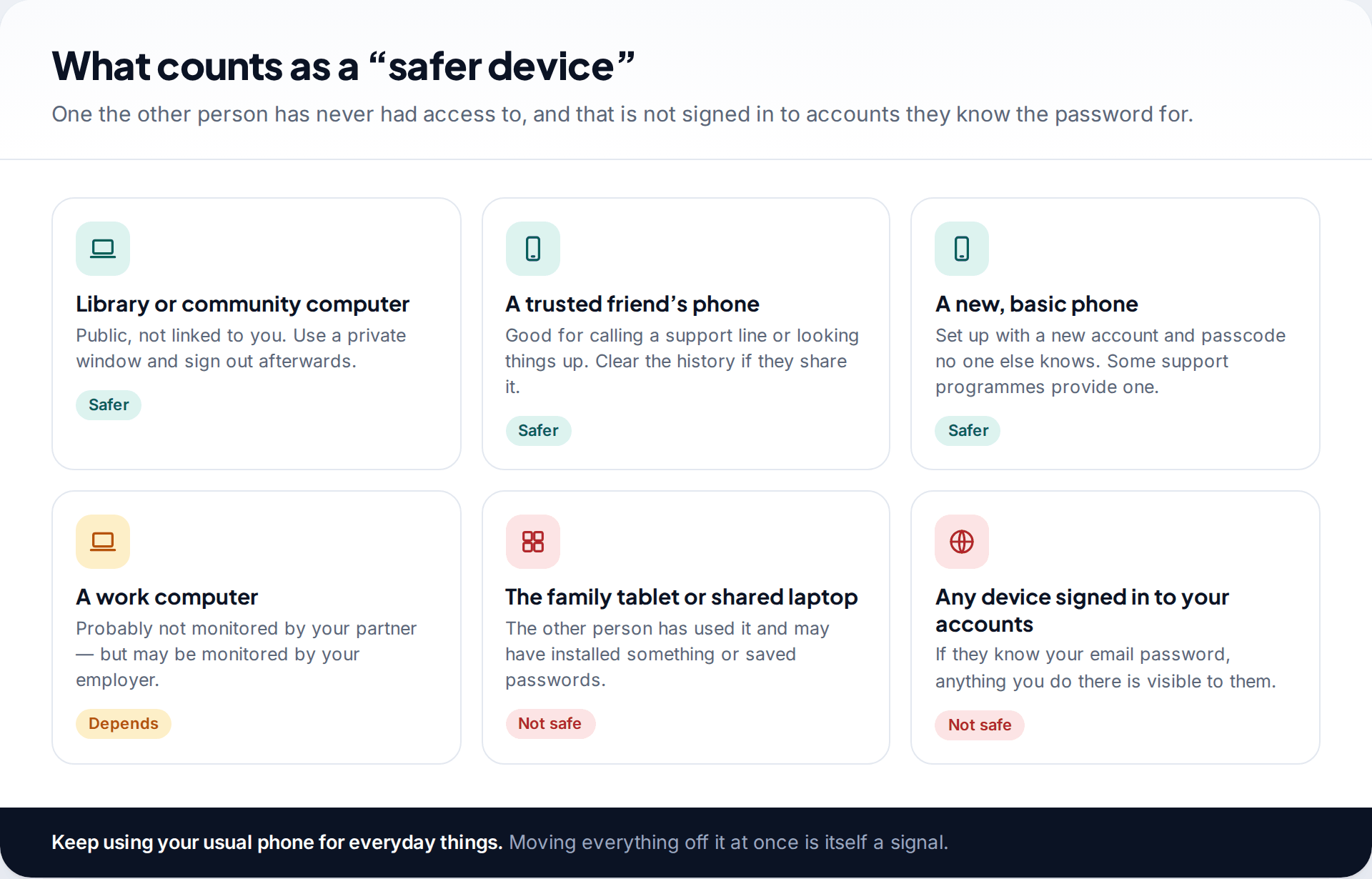
Stalkerware can capture what you type, the sites you visit and the messages you send. That includes searching for how to detect it, and contacting a support service about it. From now on, do anything related to the spyware on a device the other person has never had access to: a library computer, a trusted friend’s phone, or a new basic phone set up with a new account.
Be careful with devices that seem safe but aren’t. A shared family tablet may have been tampered with too. Any device signed in to an email or cloud account the other person knows the password for is visible to them through that account, even if the device itself is clean.
Keep using your usual phone for everyday things. Suddenly going silent on it is a signal in itself.
Step 3: document what you see
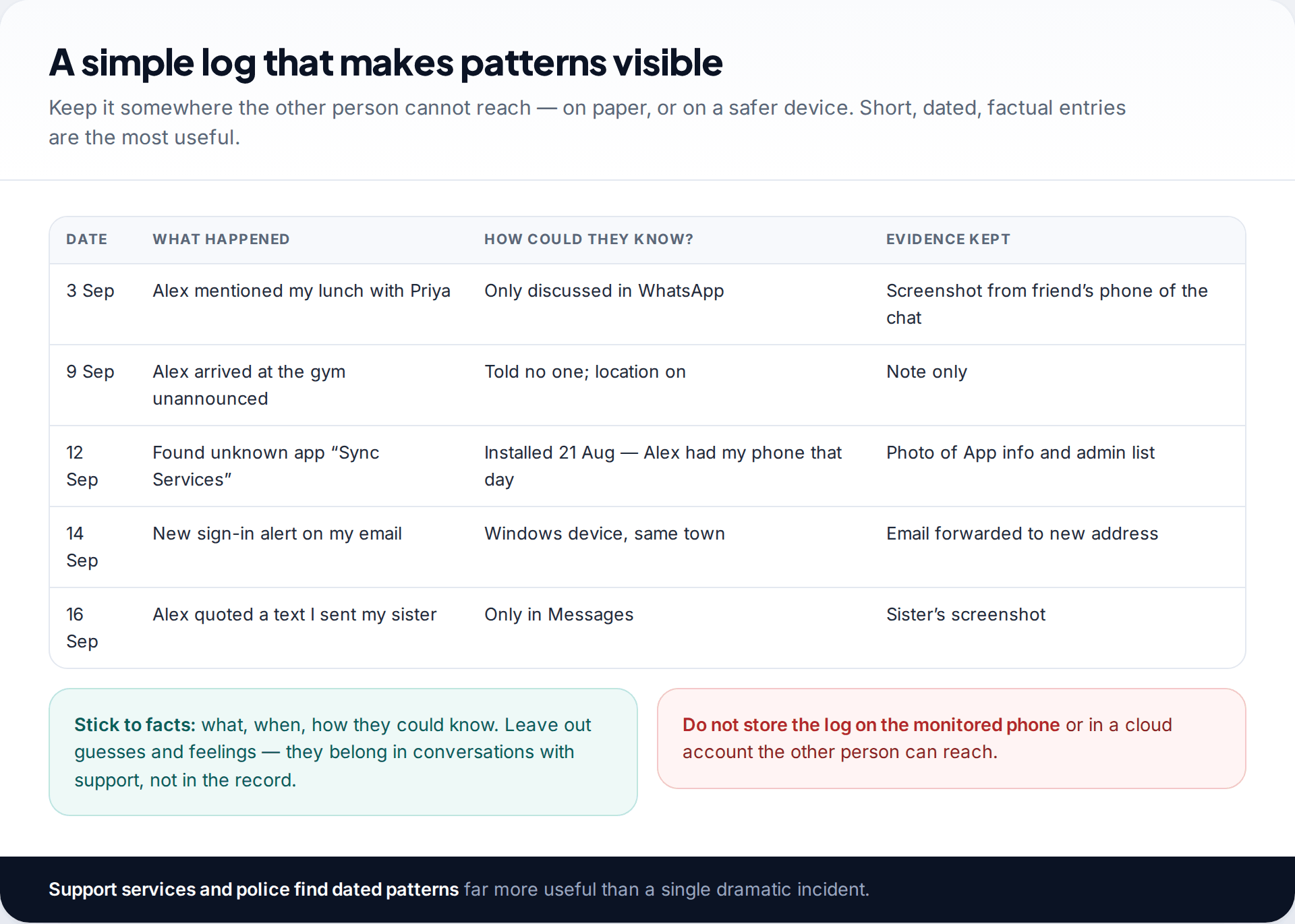
Support organisations, including the Coalition Against Stalkerware, recommend keeping a record, and there are two good reasons. Patterns are easier to see written down — you may notice the person only ever knows about texts, which points to the phone, or only about emails, which points to the account. And if you later report what happened, a dated record is far more useful than memory.
Keep entries short: the date, what happened, how the person could have known, and what evidence you have. Store the log on paper or on your safer device, never on the monitored phone or in a cloud account the other person can reach.
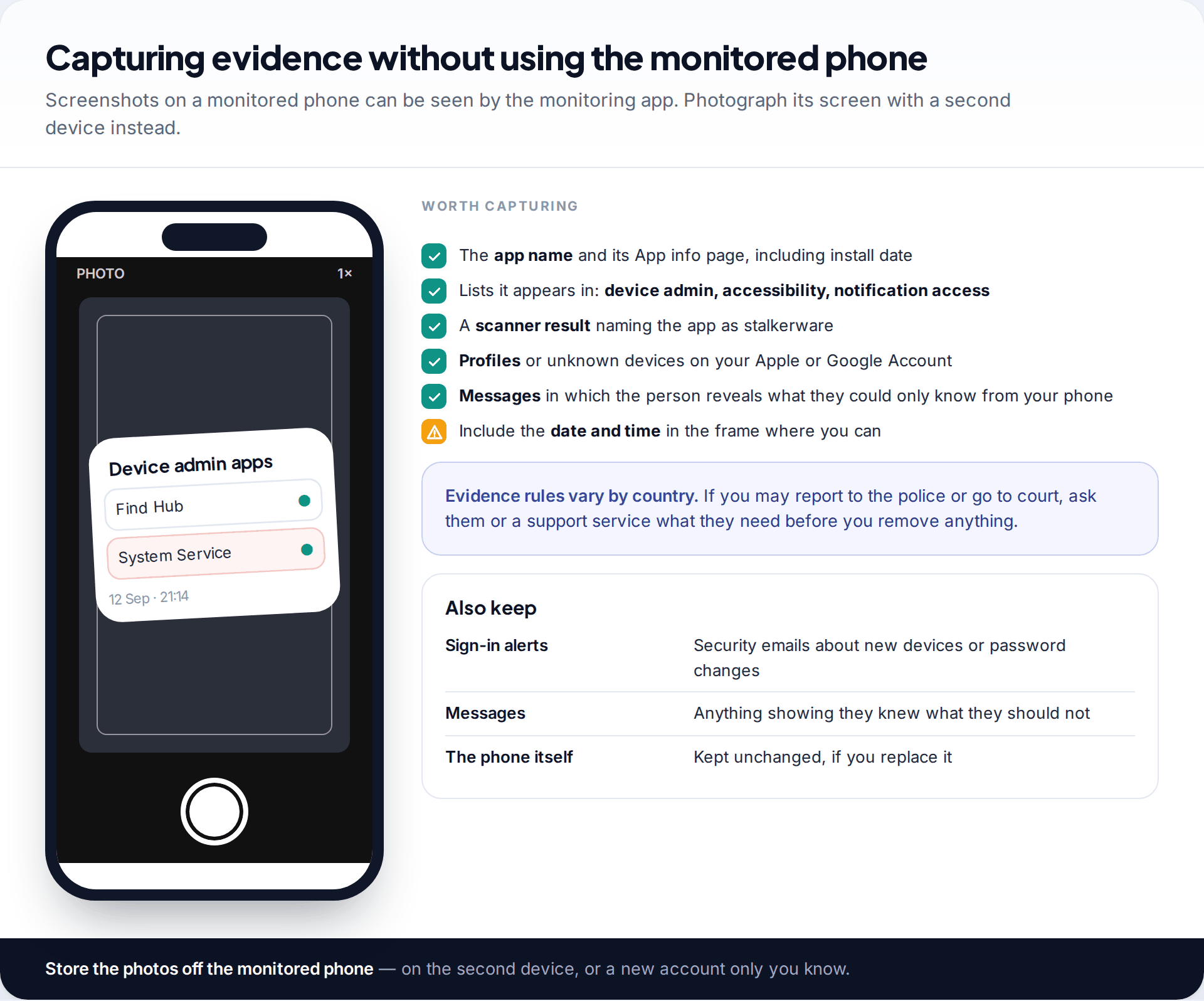
For the phone itself, photograph screens with a second device rather than taking screenshots: the app’s name and App info page, the lists it appears in (device admin, accessibility, notification access), any scanner result, profiles or unknown devices on your accounts. Include the date and time in the frame where you can. If you may go to the police or to court, ask them or a support service what they need before you change anything, as evidence rules differ between countries.
Step 4: don’t alert the installer before you are ready
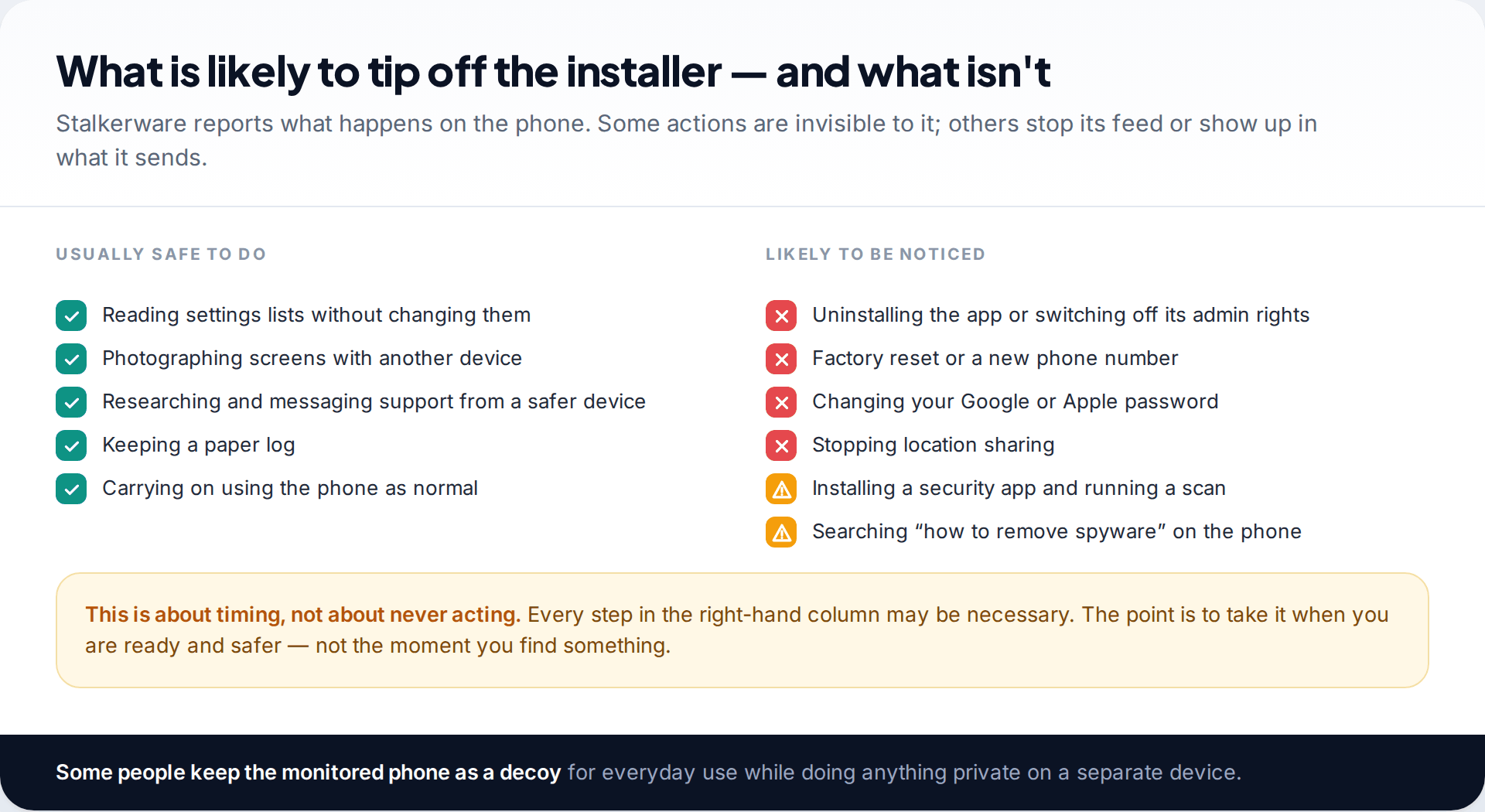
Stalkerware sends its owner what happens on the phone, and many apps also report their own status. Uninstalling it, switching off its admin rights or resetting the phone stops the feed, and the installer will usually notice within hours. Changing your Google or Apple password, stopping location sharing, or signing unknown devices out of your account are noticeable too.
None of this means you should never act. It means acting when you are ready: when evidence is kept, when support knows what you’re doing, and when you have thought about what the person might do. In AV-Comparatives’ 2025 stalkerware test, only one of the security products tested warned users that immediate removal could alert the person who installed it, so don’t rely on an app to remind you. Some people keep the monitored phone running as a decoy for ordinary use while they do anything private on a separate device.
Step 5: get help, and know who does what
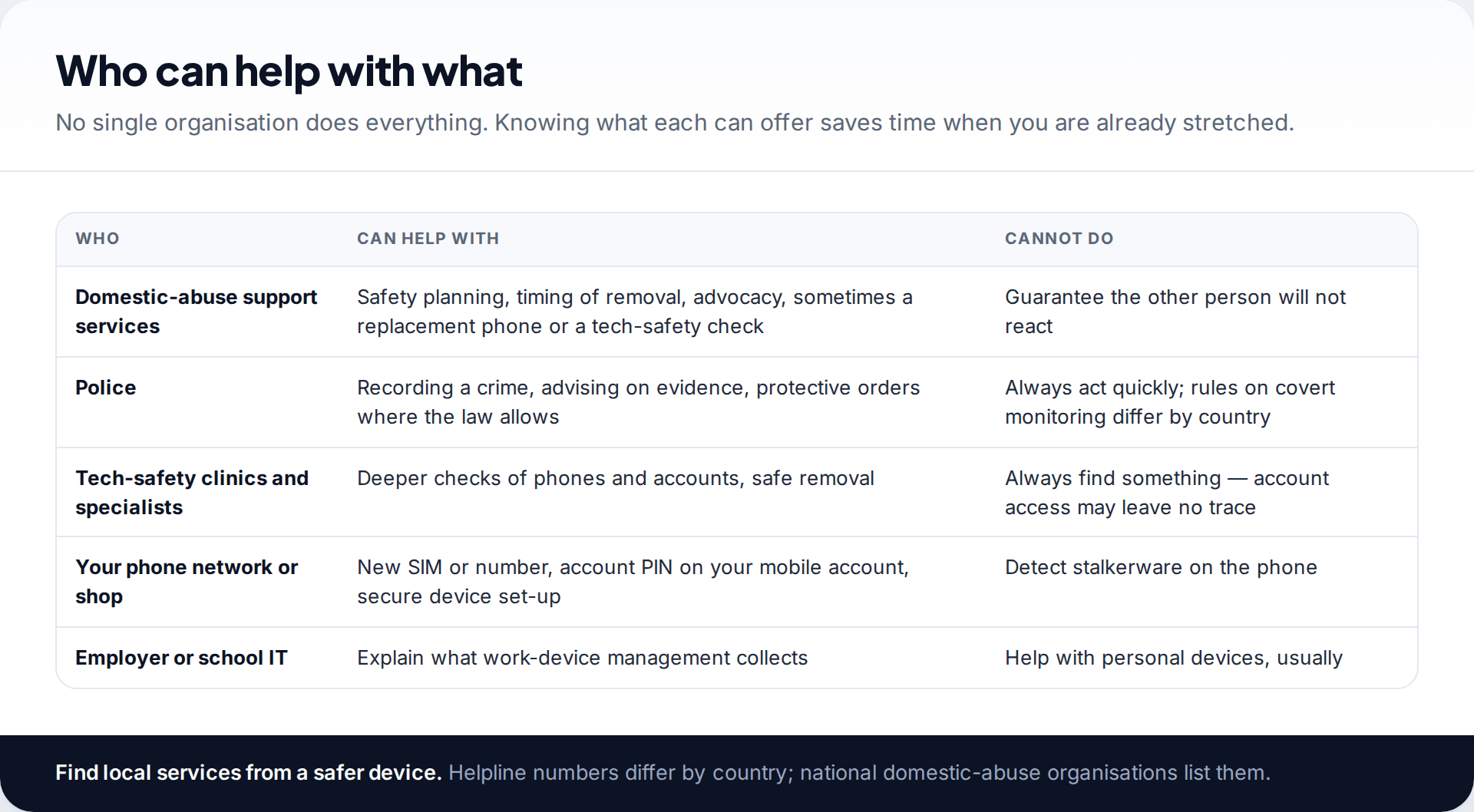
If someone you know is involved, a domestic-abuse support service is usually the best first call. They can help you make a safety plan, decide when and how to remove the spyware, and in some areas check your phone or provide a replacement. National domestic-abuse organisations list local services and helplines; look them up from your safer device, as numbers differ by country.
Installing stalkerware on another adult’s phone is a crime in many countries. If you want to report it, the police can record it and advise on what evidence to keep. A tech-safety specialist or clinic can do a deeper check than you can on your own — which also helps if you’re unsure whether the spyware is real. Your phone network can set a PIN or password on your mobile account to make SIM swaps harder.
Step 6: secure your accounts, at a time you choose
Spyware on the phone is often only half the picture. If the person knows your Google, Apple or email password, removing the app changes nothing — they can still read your backups, photos, location and mail. When you’re ready, and from your safer device, change those passwords, turn on two-factor authentication using your own number, remove recovery phone numbers, emails and contacts you don’t control, and sign out devices you don’t recognise. Change the password before signing devices out, or they can sign straight back in.
If you aren’t yet sure what is on the phone, our complete guide to detecting spyware on phones and computers covers the checks for Android, iPhone, Windows and Mac.
Step 7: remove it, reset the phone or replace it
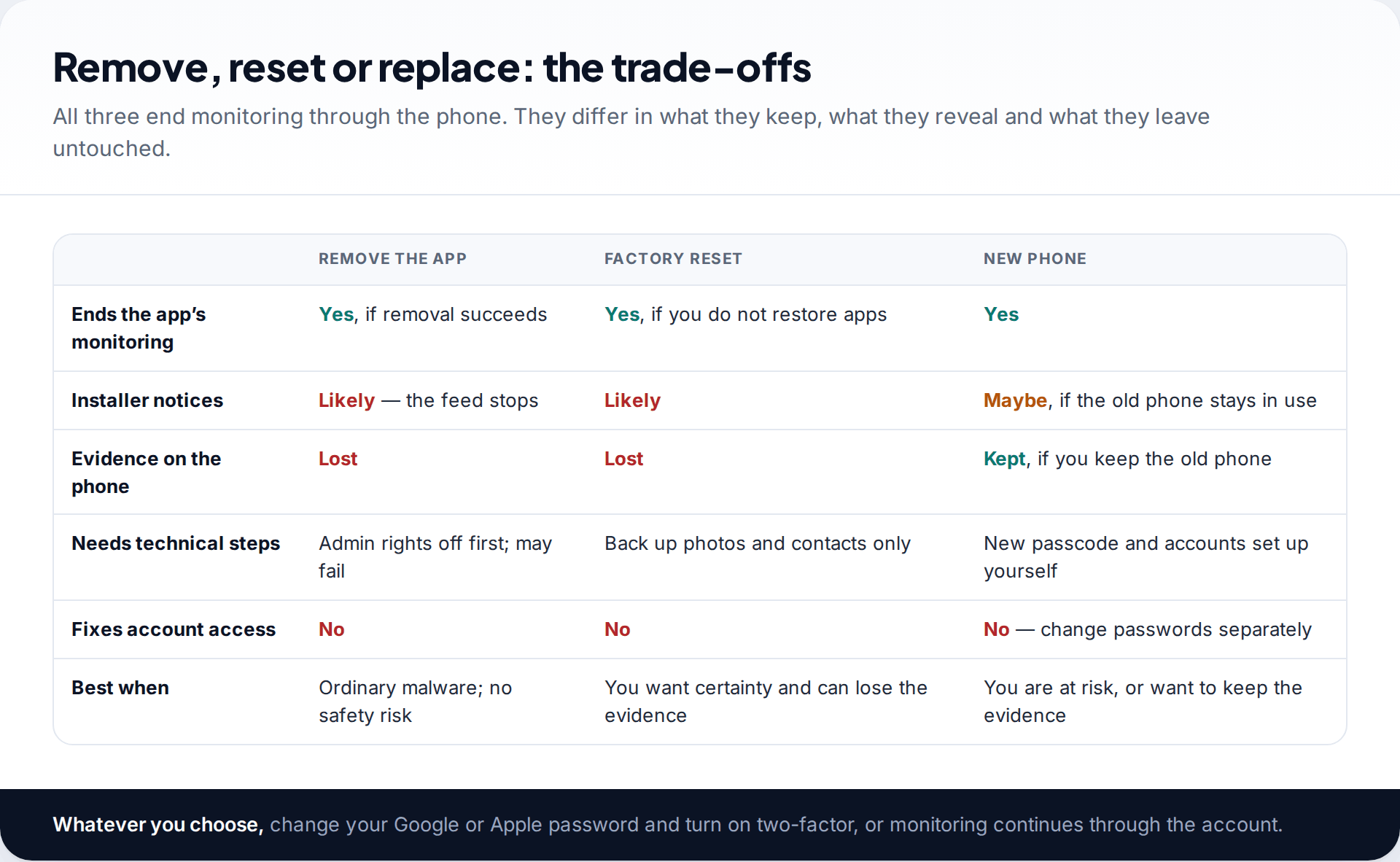
There are three ways to end monitoring through the phone. Removing the app is quickest but can fail — device admin rights have to be switched off first — and it loses the evidence. A factory reset removes apps, profiles and jailbreaks reliably, provided you restore only photos and contacts, not apps or a full backup from before. A new phone, set up yourself with a new passcode, is the most certain option and lets you keep the old phone, untouched, as evidence. Support programmes sometimes help with the cost.
Whichever you choose, change your account passwords at the same time. Otherwise the monitoring just moves from the phone to the account.
The app won’t uninstall
It holds device admin rights, which block normal removal on Android.
Fix: switch its admin right off under Device admin apps, then uninstall. If that is blocked as well, a factory reset is the dependable route.
After the reset, the phone asks for a Google Account you don’t recognise
Android’s reset protection asks for the last account signed in. If the other person added theirs, it will ask for that.
Fix: don’t guess. Take proof of purchase to the phone’s maker or seller; a support service can help if the phone was bought by the other person.
The spyware came back after a reset
A full backup restored it, or someone still has the passcode or account password.
Fix: reset again, restore only photos and contacts, set a new passcode first, then change account passwords from a safer device.
Step 8: afterwards, keep the doors shut
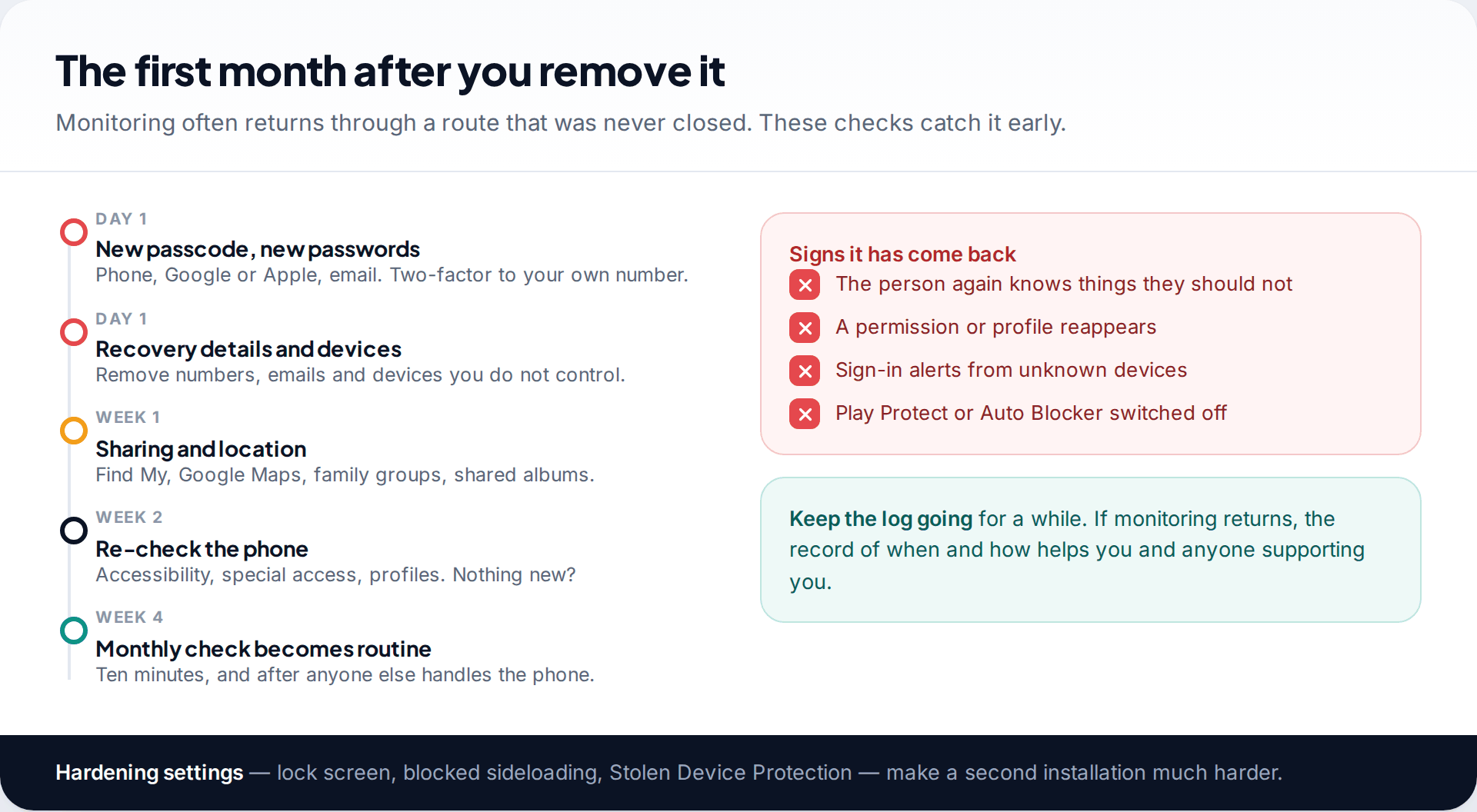
Set a new passcode nobody has seen, shorten auto-lock, and block installs from outside the app store. Re-check the phone after a week or two, and make a short monthly check a habit. Our guide to stalkerware-proofing your phone covers each setting. Keep your log going for a while: if the person starts knowing things again, the dates will help you work out how.
How this page was put together
The order of steps follows published guidance for survivors from the Coalition Against Stalkerware and Apple’s Personal Safety User Guide, and the note on removal warnings comes from AV-Comparatives’ 2025 stalkerware test report, checked in September 2026. We give no helpline numbers because they vary by country.
This page is general information, not legal advice or a substitute for a support service. For how we research and correct guides, see our editorial standards.
Common questions
Should I remove spyware as soon as I find it?
If it is ordinary malware and no one you know is involved, yes. If someone you know may have installed it, wait until you’ve documented it and talked to a support service, because removal can alert them and deletes evidence.
Will the person know if I remove the spyware?
Usually, yes. The app stops sending them information, and many stalkerware dashboards show when a device goes quiet. Plan for that before you remove it.
Does a factory reset get rid of spyware?
It removes apps, profiles and jailbreaks from the phone, provided you don’t restore a backup that brings them back. It doesn’t affect someone who knows your account passwords, so change those too.
Can I use the spyware as evidence?
Often, yes. Photographs of the app and its permissions, a scanner result and a dated log can all help. Keeping the old phone untouched is the strongest option. Ask the police or a support service what they need where you live.
Is it illegal for someone to put spyware on my phone?
In many countries, installing monitoring software on another adult’s device without their consent is a criminal offence, and it may also be part of a pattern of abuse the law recognises. The police or a legal adviser can tell you where you are.
What if I’m wrong and there is no spyware?
Then the steps still help: a safer device, a record of events and stronger account security protect you either way. A tech-safety specialist can confirm whether anything is there.
Looking for a tool to go with this? TheTruthSpy is a free parental control app for Android that stays visible on the child's phone. If it fits your family, see what the app does.
Related guides
How to Check If Your Email Was in a Data Breach
Check if your email was in a data breach for free, then act on what leaked: passwords, card details or…
How to Start Using a Password Manager
Switch to a password manager without stress: built-in or standalone, protecting the main password, and a first-hour plan for the…
How to Tell If Your Phone Has a Virus or Malware
Most 'virus' signs have ordinary causes. How to check an iPhone or Android phone for real malware, remove it, secure…
Parental controls your child can see
Location, screen time limits, a web filter and alerts from notifications — free, and visible on your child's phone. Pair a phone in about ten minutes.
Android · Free to set up · Visible on your child's phone