10 Spy App Detector Apps Compared Across Android, iPhone and PC

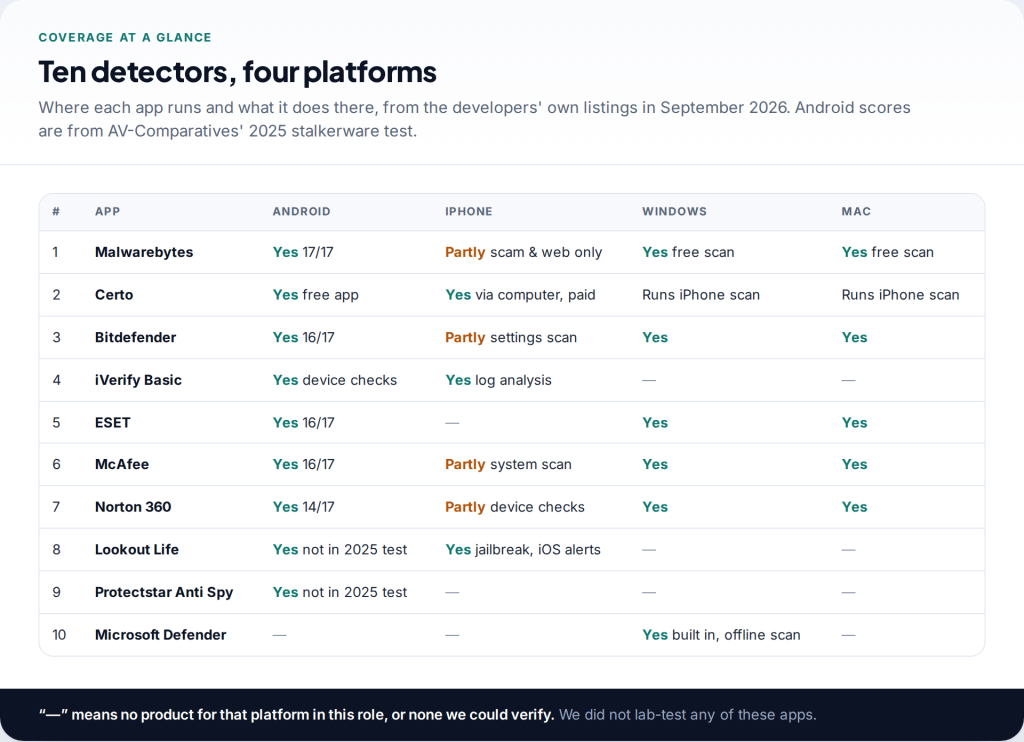
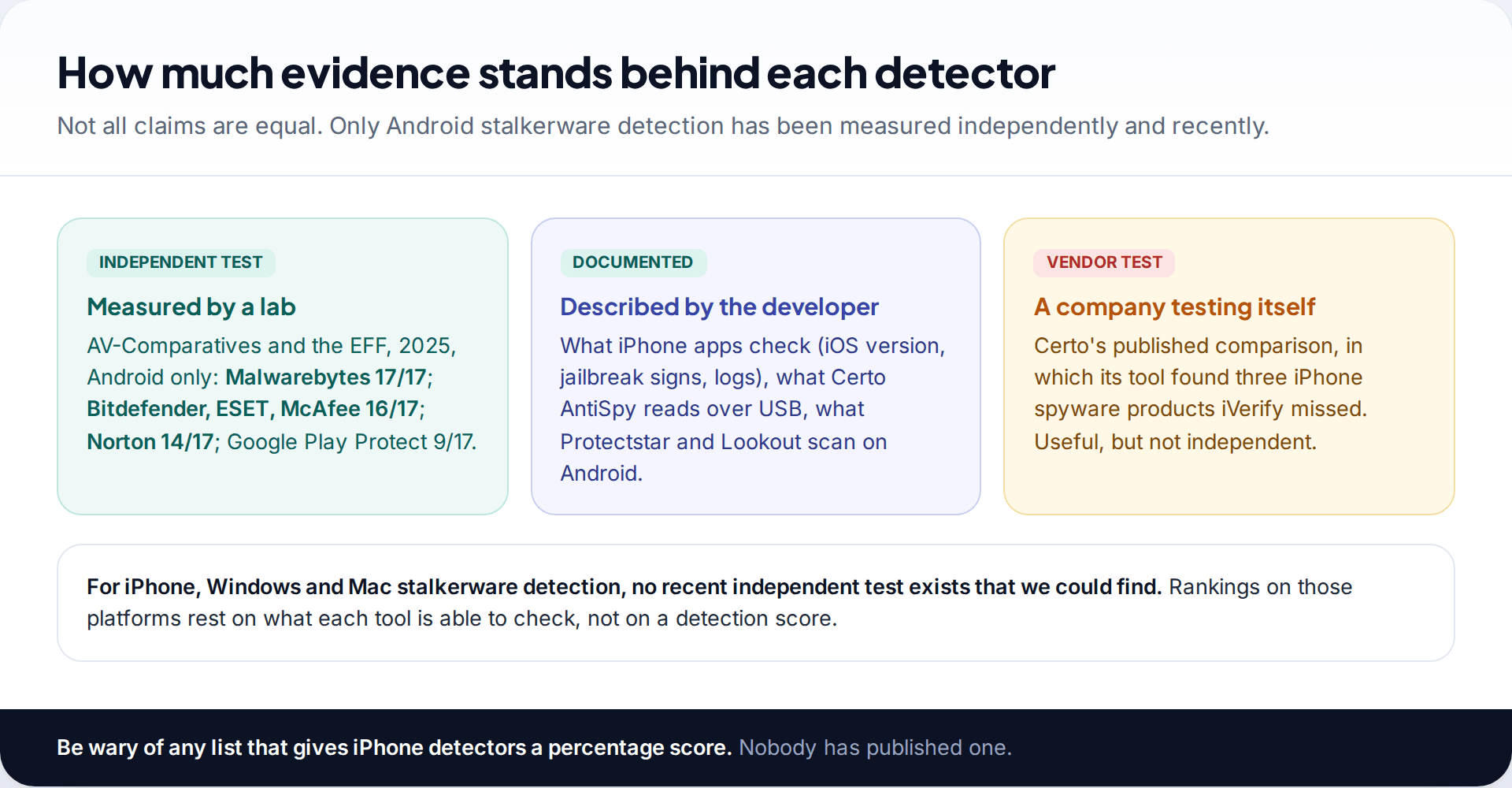
Spy app detector apps do not work the same way on every device. On Android they can scan other apps, and one independent test has measured how well. On iPhone they can only check settings, jailbreak signs and logs. On Windows and Mac, ordinary antivirus scanners do the job. This comparison covers ten tools across all four platforms.
- Widest coverage: Malwarebytes, with the top Android stalkerware result and free scanners for Windows and Mac.
- Best for iPhone: Certo AntiSpy, run on a computer, or iVerify Basic’s log analysis.
- Free on Windows already: Microsoft Defender’s offline scan.
- No detector anywhere sees someone using your Google or Apple account from their own device.
Ten spy app detector apps at a glance
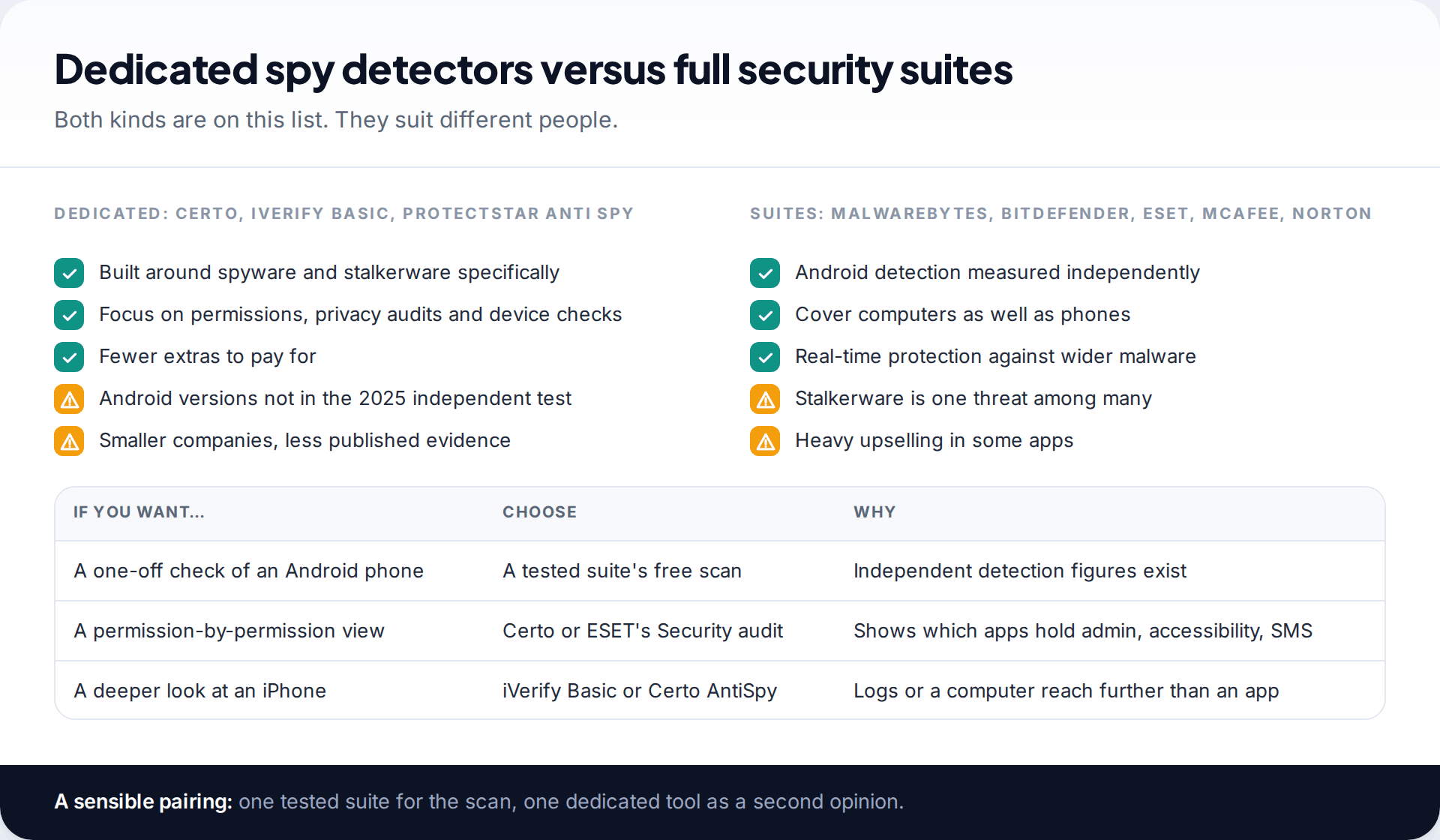
We ranked these ten on three things: how well they detect monitoring software where independent evidence exists, how many of your devices they can check, and what they let you do for free. The order favours tools that cover more than one platform. If you only have one device to worry about, the per-platform picks further down are a quicker route.
We did not lab-test any of the apps. Android detection figures come from AV-Comparatives’ Stalkerware Test 2025, run with the EFF in August and September 2025. Everything else comes from each developer’s store listings, product pages and help documentation, checked in September 2026.
What the evidence covers, and what it does not
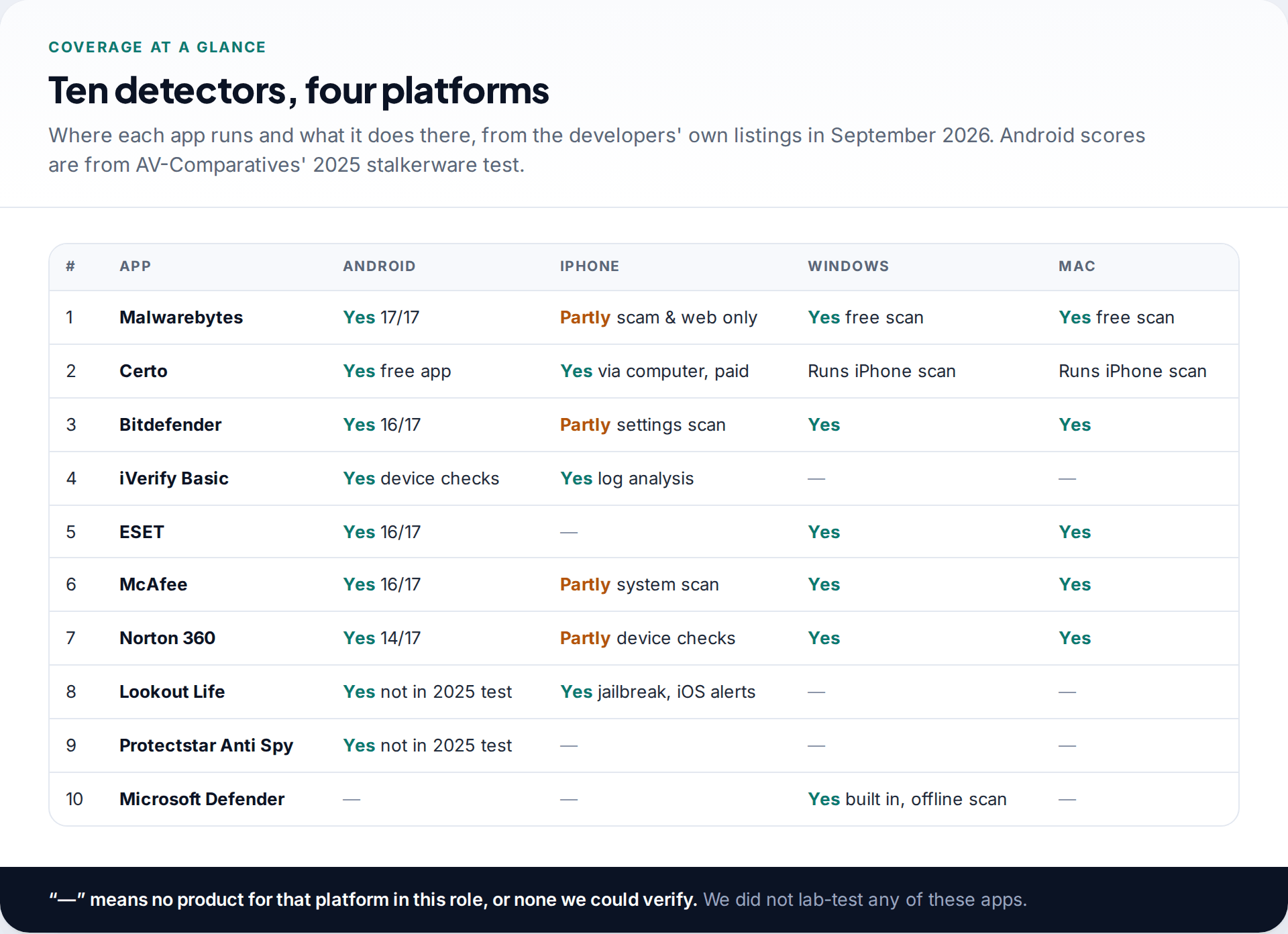
The 2025 test installed 17 commercial stalkerware apps on Android phones and scanned with 13 security products. That gives real numbers for five of the apps here. There is no equivalent recent test for iPhone, Windows or Mac stalkerware that we could find. So for those platforms, we compare what each tool is able to check, and we say plainly when a claim comes from the developer rather than an independent source.
The ten, ranked
1. Malwarebytes: Android, iPhone, Windows, Mac
Malwarebytes found all 17 samples in the 2025 Android test, the only product to do so. The Android app allows free manual scans, and the free Windows and Mac versions scan and clean on demand, with real-time protection in the paid plan. The iPhone app is a scam and web-protection tool and says openly that iOS does not allow malware scanning.
2. Certo: Android app, iPhone via a computer
Certo is a dedicated spyware specialist. Its free Android app scans for spyware, rooting, suspicious device admin rights and apps misusing accessibility, with a privacy audit. For iPhone, Certo AntiSpy runs on a Windows PC or Mac and reads the phone over USB, because App Store apps cannot reach the areas where spyware hides. That iPhone tool is a paid subscription. Certo’s Android app was not part of the 2025 test.
3. Bitdefender: all four platforms
Bitdefender Mobile Security found 16 of 17 on Android, and adds behaviour monitoring of running apps. It is a subscription after a 14-day trial, though a separate free Bitdefender antivirus app exists. The iPhone app runs a settings scan and web and scam protection. Desktop products cover Windows and Mac.
4. iVerify Basic: iPhone and Android
iVerify’s consumer app checks device security and, on iPhone, analyses a sysdiagnose you share with it for traces of known spyware. It is aimed at advanced spyware as much as stalkerware. The Android version is newer and less reviewed, and Google Play reviewers report a limit of one threat scan a month.
5. ESET: Android and computers
ESET found 16 of 17 on Android and gives the most away free there, including real-time scanning and a Security audit of app permissions. Its Windows and Mac products are well established. We could not verify an equivalent iPhone detector, so it ranks below the tools that cover iPhone.
6. McAfee: all four platforms
16 of 17 on Android, a free basic scan on one device, and a system scan on iPhone. Most features are in paid plans, and the apps push them hard.
7. Norton 360: all four platforms
Norton found 14 of 17 on Android, and the test report notes that one stalkerware sample stopped Norton’s app from working properly. The iPhone app checks for an outdated iOS and a missing passcode. It is best for people who already pay for Norton on a computer.
8. Lookout Life: Android and iPhone
Now owned by F-Secure, Lookout’s iPhone app alerts you to a tampered operating system, pending iOS updates and risky Wi-Fi. It was not in the 2025 Android test under this name.
9. Protectstar Anti Spy: Android
A dedicated Android spyware scanner with more than a million installs, looking for hidden apps, SMS and GPS monitoring tools and keyloggers. It cites AV-TEST malware certification from 2024, which is a general malware test, not a stalkerware test. A reasonable second opinion.
10. Microsoft Defender: Windows
Built into Windows and free. Its offline scan restarts the PC and scans before Windows loads, which Microsoft says makes it harder for persistent malware to hide. It is the first thing to run on a Windows computer you are unsure about.
The built-in detectors on each platform
Every platform ships with some protection of its own. None is enough by itself for stalkerware, but each is free, already installed, and worth confirming before you add anything.
| Platform | Built-in tool | What it does well | Where it falls short |
|---|---|---|---|
| Android | Google Play Protect | Checks apps before and after install; on by default | Found 9 of 17 stalkerware apps in the 2025 test; some installers tell the abuser to switch it off |
| iPhone | Safety Check | Shows who and what can access your data, and signed-in devices | Does not look for jailbreaks or spyware; does not cover non-Apple accounts |
| Windows | Microsoft Defender | Full antivirus, including an offline scan before Windows loads | No recent independent test against commercial monitoring software that we could find |
| Mac | macOS built-in malware protection | Blocks known malware automatically in the background | No on-demand scan you can run and read; a second scanner helps |
On Android, open the Play Store, tap your profile picture, then Play Protect, and make sure scanning is switched on. If it is off and you did not turn it off, treat that as a finding.
Red flags in “spy detector” apps
Search any app store for “spy detector” and you will find dozens of apps beyond the ten here. Some are fine. Many are thin wrappers around a permission list, covered in ads. A few are worse. Before installing one, look for these warning signs:
- It asks for accessibility or device admin access without explaining why. Those are the permissions stalkerware abuses; a scanner rarely needs both.
- It shows a frightening result before scanning anything, then asks you to pay to “remove” it.
- It claims to detect spyware on iPhone by scanning apps. iOS does not allow that.
- No named company, website or privacy policy. A detector sees a lot about your device. It should be accountable.
- Weekly billing after a short trial, hidden until the payment screen.
Sticking to tools with published independent results, or with clear documentation of how they work, avoids most of this.
Free versus paid, across the list
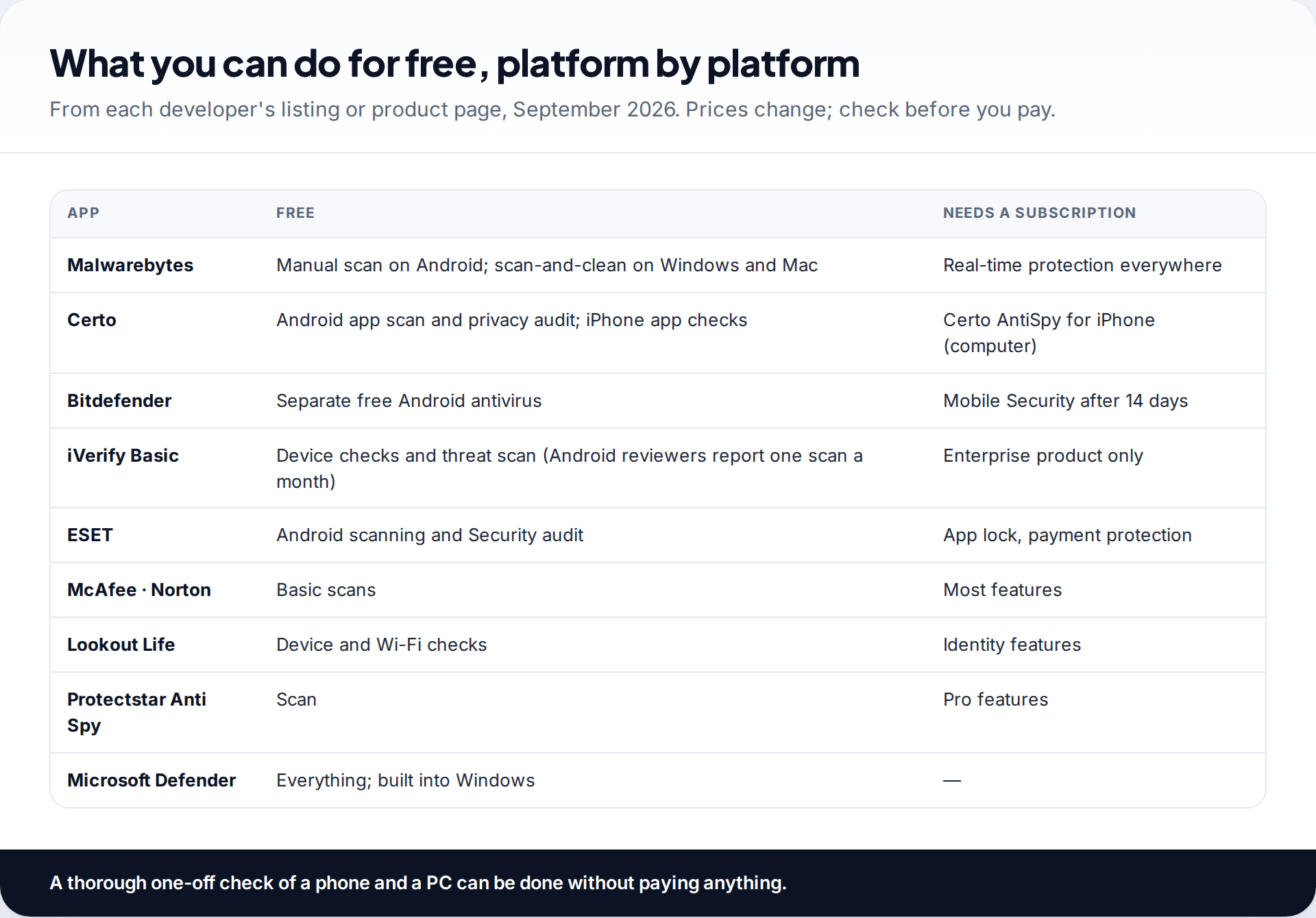
You can do a thorough one-off check without paying. On Android, the free tiers of Malwarebytes, ESET or Certo scan the phone. On iPhone, Safety Check is built in and iVerify Basic was listed as free when we checked. On Windows, Defender costs nothing, and Malwarebytes’ free scanner covers Windows and Mac. Paying mostly buys real-time protection, VPNs and identity monitoring, which are useful for ongoing protection but not needed to answer “is something on this device right now?”
Checking a Windows PC or Mac
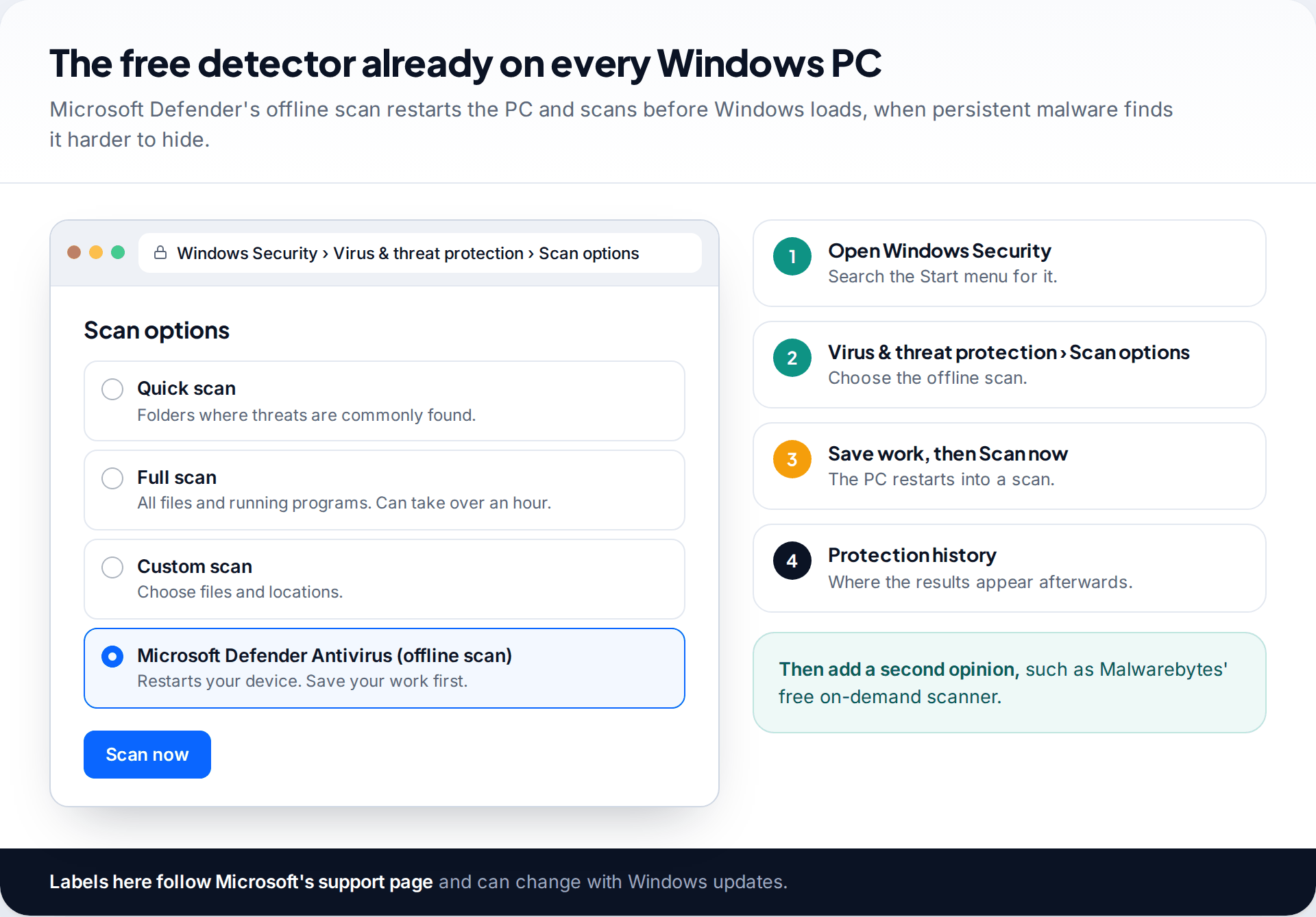
Monitoring software for computers exists too, and it is sold for the same purposes as phone stalkerware. On Windows, open Windows Security, go to Virus & threat protection, then Scan options, and run the Microsoft Defender Antivirus (offline scan). Save your work first, because the PC restarts. Afterwards, run a second scanner such as Malwarebytes’ free version.
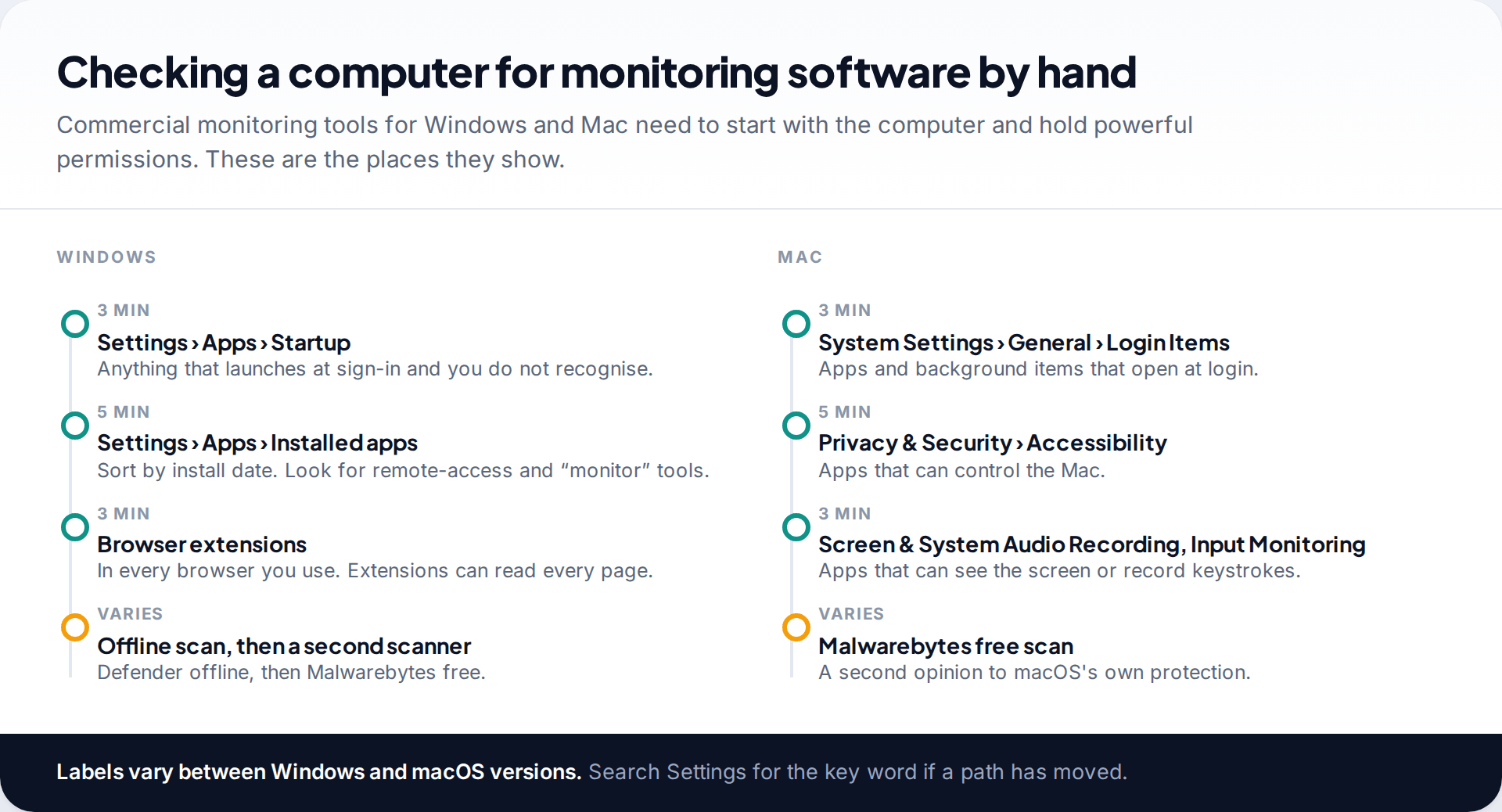
Then look by hand. On Windows, check startup apps, installed apps sorted by date, and browser extensions in every browser. On a Mac, check Login Items, then the Accessibility, Screen & System Audio Recording and Input Monitoring lists under Privacy & Security. An app you don’t recognise holding screen or keystroke access deserves attention. Menu names shift between versions, so search Settings if a path has moved.
Which to use first
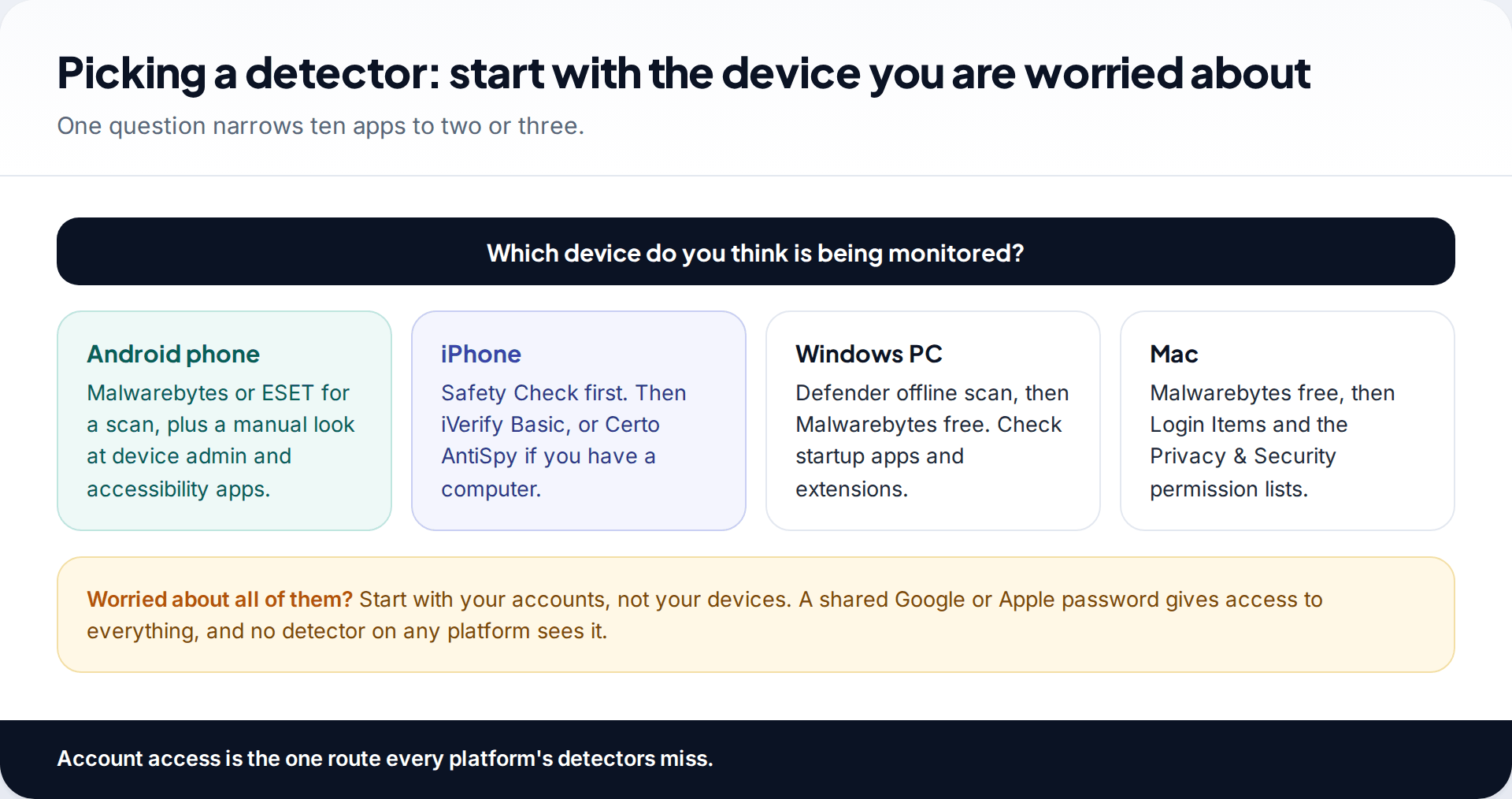
Start with the device you are worried about. Whichever it is, check your accounts too. Someone who knows your Google or Apple password can see a great deal without installing anything, and no detector on any platform will show it. The device lists in your Google and Apple account settings do. Our guide to the signs a phone is being monitored covers the account checks alongside the device ones.
What a detection means, and what to do next
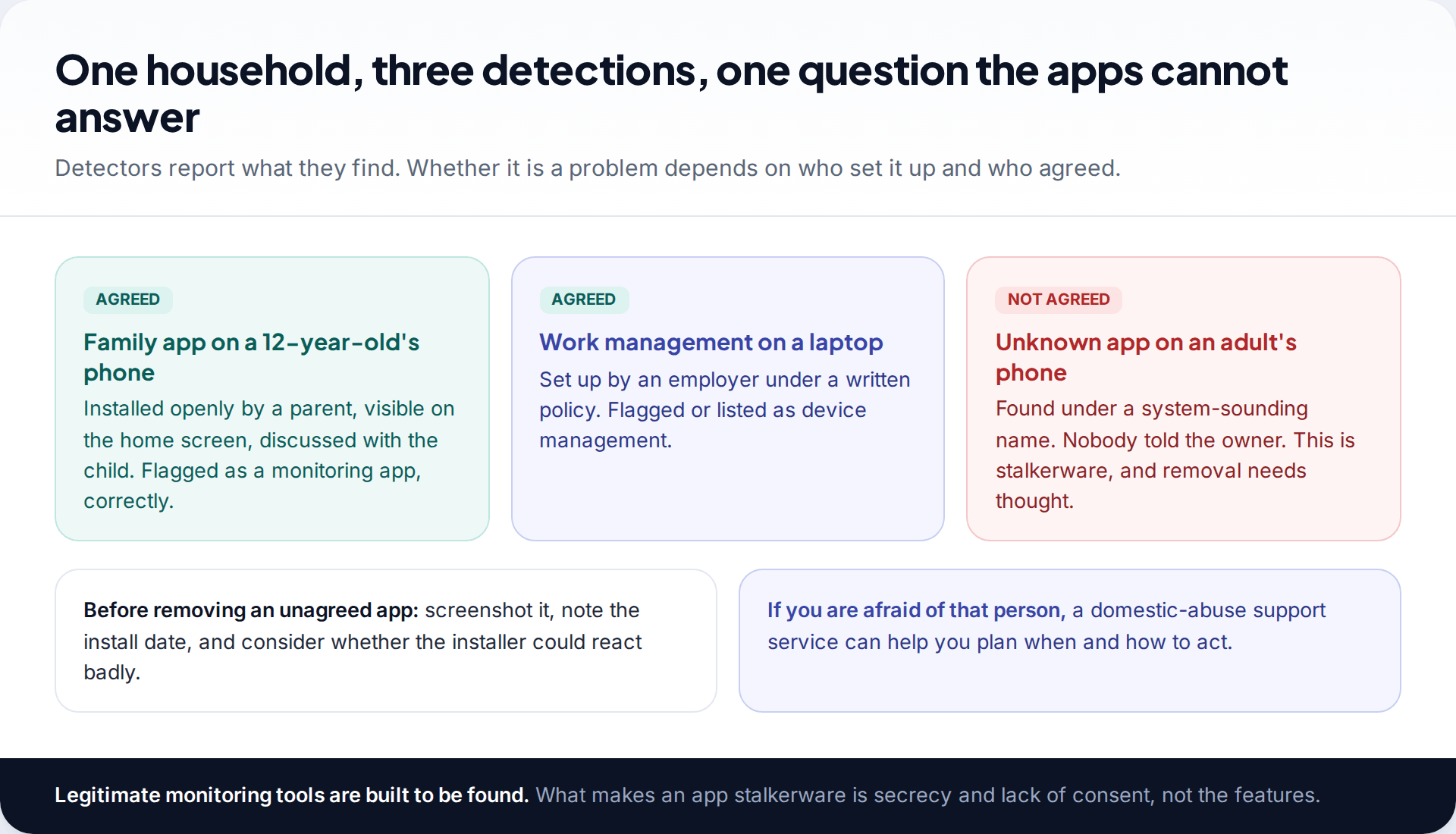
Detectors cannot see consent. A family app a parent installed openly, an employer’s device management, and stalkerware installed behind someone’s back can all trigger the same warning. Legitimate monitoring tools, ours included, are designed to be visible and detectable. What makes an app stalkerware is that the person using the device doesn’t know and hasn’t agreed.
If a detector finds something you did not agree to, don’t rush to remove it. Removal cuts off whoever installed it, and they may notice. Record what was found, and if the person could be a partner or former partner you are afraid of, talk to a domestic-abuse support service in your country before acting. Our walkthrough on finding hidden spy apps in your phone’s settings shows where to look to confirm what the detector found.
How this page was put together
Android detection results are from AV-Comparatives’ Stalkerware Test 2025 and the EFF’s report on it. Features, platforms and free tiers were checked against each developer’s Google Play and App Store listings, product pages and help centres, and Microsoft’s and Apple’s support pages, in September 2026.
We did not lab-test these tools and have no commercial relationship with any of them. Read our standards for research and corrections.
Common questions
What is the best spy app detector app overall?
For Android, Malwarebytes, which found all 17 stalkerware apps in the 2025 independent test. It also has free scanners for Windows and Mac. For iPhone, where no app can scan other apps, Certo AntiSpy on a computer or iVerify Basic’s log analysis go furthest.
Do spy app detectors work on iPhone?
Within limits. They can check your iOS version, look for jailbreak signs and, in iVerify’s case, analyse system logs. They cannot list or scan your other apps, because iOS does not allow it.
Can I check my phone for spyware from my computer?
For iPhone, yes: Certo AntiSpy runs on Windows or Mac and scans the iPhone over USB. Certo’s Android product runs on the phone itself. Amnesty’s MVT also works from a computer, but it is a forensic tool for specialists, not for self-checks.
Is there spyware for computers as well as phones?
Yes. Monitoring software is sold for Windows and Mac. Microsoft Defender’s offline scan, a second scanner such as Malwarebytes, and a look through startup items and privacy permissions are the usual checks.
Are free spy app detectors any good?
Several are. ESET’s free Android tier scored 16 of 17, and Malwarebytes’ free manual scan uses the engine that found all 17. Free tiers usually lack real-time protection, not detection.
Will a detector tell me who installed the spy app?
No. It can tell you what the app is and, through the phone’s app info, when it was installed. Who had access to the device around that date is usually the clearest clue.
Looking for a tool to go with this? TheTruthSpy is a free parental control app for Android that stays visible on the child's phone. If it fits your family, see what the app does.
Related guides
How to Check If Your Email Was in a Data Breach
Check if your email was in a data breach for free, then act on what leaked: passwords, card details or…
How to Start Using a Password Manager
Switch to a password manager without stress: built-in or standalone, protecting the main password, and a first-hour plan for the…
How to Tell If Your Phone Has a Virus or Malware
Most 'virus' signs have ordinary causes. How to check an iPhone or Android phone for real malware, remove it, secure…
Parental controls your child can see
Location, screen time limits, a web filter and alerts from notifications — free, and visible on your child's phone. Pair a phone in about ten minutes.
Android · Free to set up · Visible on your child's phone