Instagram Hacked? How to Recover Your Account in Every Situation

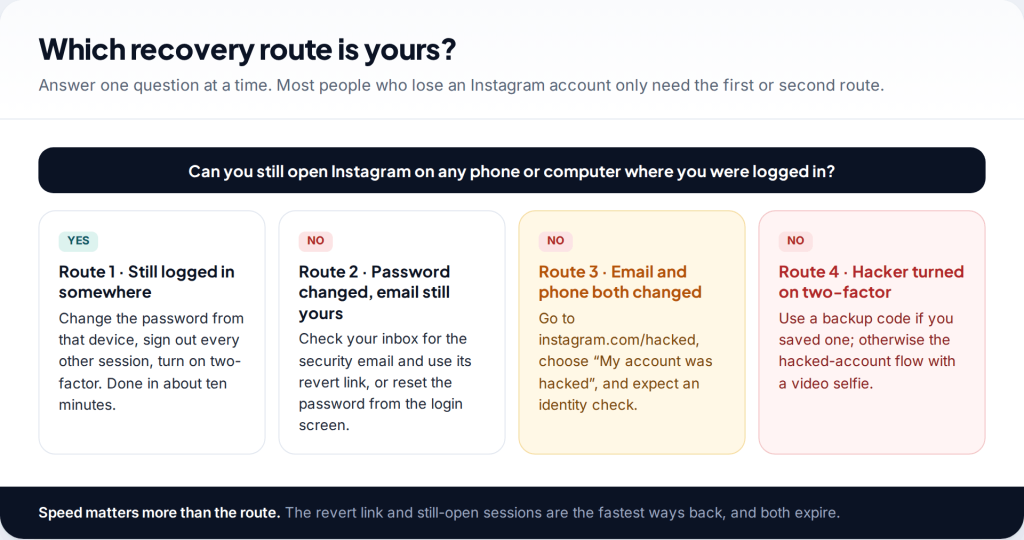
To recover a hacked Instagram account, first look for the security email Instagram sent to your old address and use its “revert this change” link. If that is gone, reset the password from the login screen. If the email and phone number have both been changed, go to instagram.com/hacked and complete the identity check. Which of these applies depends on one thing: what the attacker managed to change before you noticed.
- Act in the first hour if you can. The revert link and any sessions still logged in are the fastest ways back, and both disappear.
- Secure your email before Instagram. If the attacker can read your inbox, every reset you do is undone.
- The free route is the only route. instagram.com/hacked is where Instagram reviews takeovers. Paid “recovery experts” are a second scam.
- Once you are back in, lock it down. Log out the other sessions, remove the attacker’s two-factor, save your own backup codes.
First, work out which situation you are in
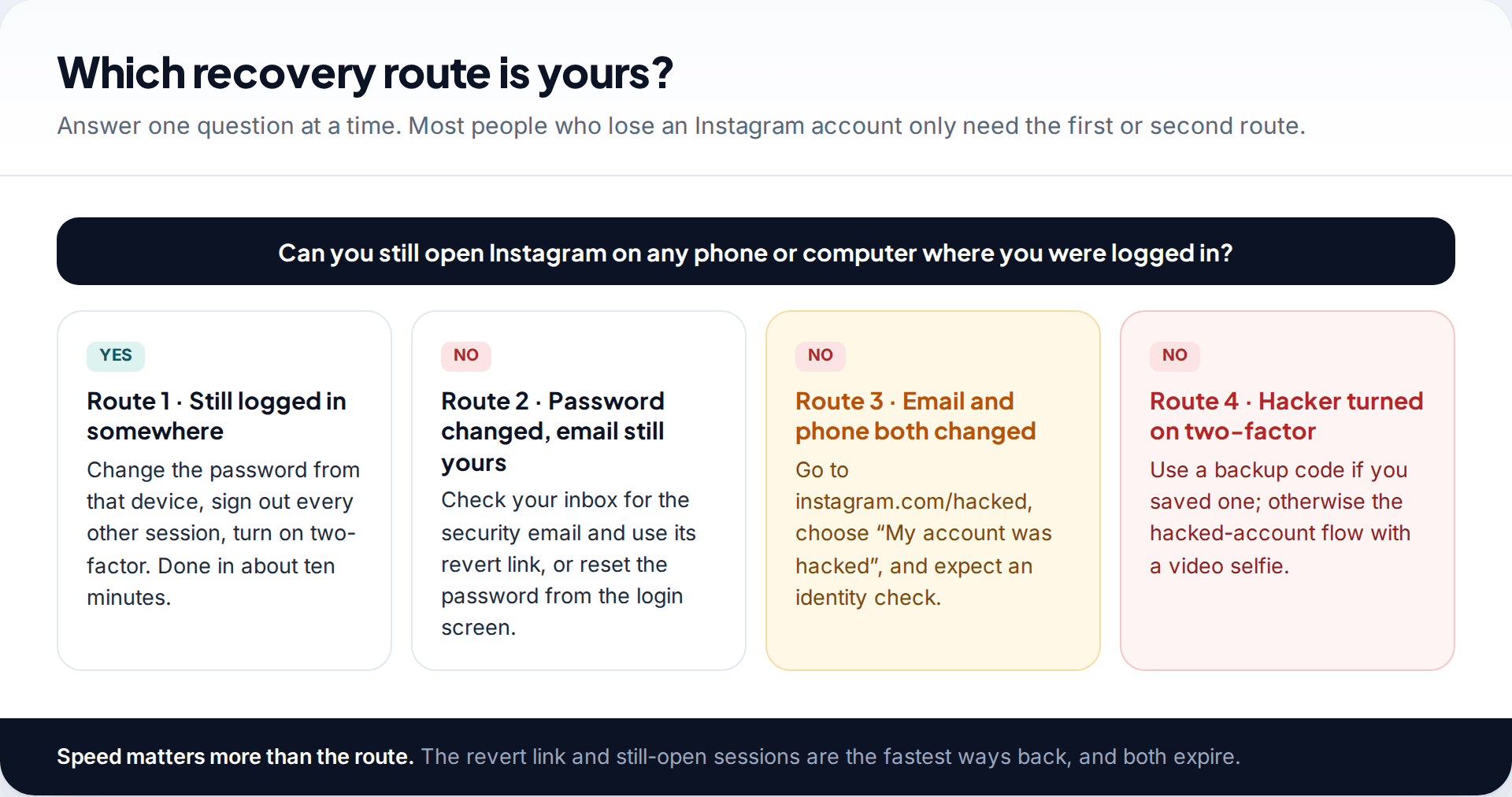
Most advice about hacked Instagram accounts lists every method at once, which makes the problem look harder than it usually is. In practice the route is decided by what the attacker changed, and you can find that out in a couple of minutes.
Ask yourself three questions in order. Is Instagram still open on any device you own — an old phone, a tablet, a laptop browser you forgot about? Is the email address on the account still yours? And has anyone turned on two-factor authentication that you did not set up? If the first answer is yes, you have the easiest recovery there is. If the email is still yours, you have the second easiest. Only when the email and phone are both gone do you need Instagram’s identity check.
One step comes before all of them: check that your email account is still yours. Many Instagram takeovers start with a compromised inbox, and resetting Instagram while someone else can read your email achieves nothing — they reset it straight back. If you can’t get into your email, deal with that first. Our guide to recovering a hacked email account walks through Gmail, Outlook and Yahoo.
Route 1: you are still logged in somewhere
Attackers usually change the password and log in from their own device, but they do not always end your sessions. An Instagram app on an old phone, or a browser tab on a work laptop, can stay signed in for weeks. If you find one, that device is worth more than any support form.
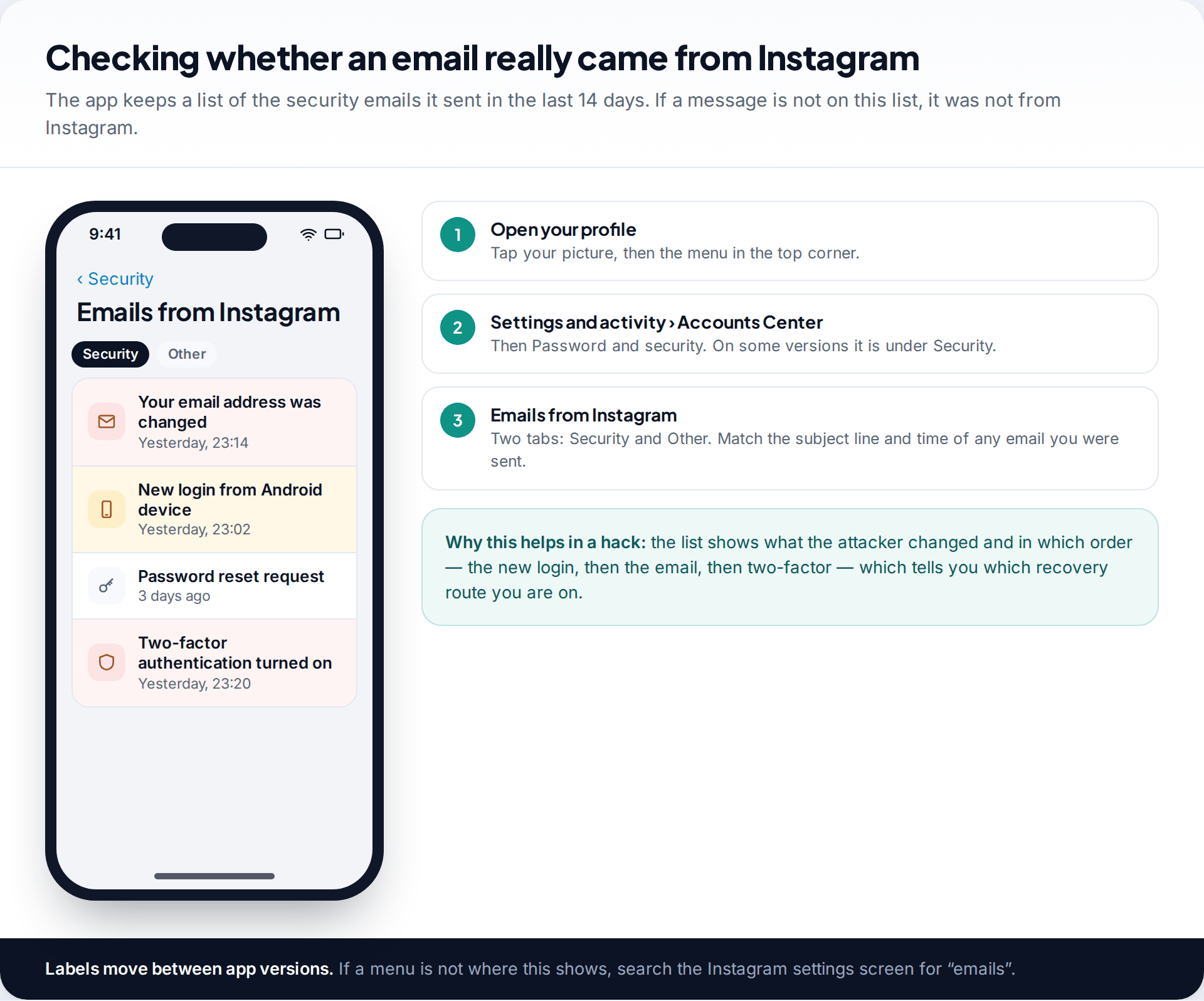
- Open Accounts Center from that device. In the app: your profile › menu › Settings and activity › Accounts Center › Password and security.
- Open “Where you’re logged in” and log out every device you don’t recognise. Do this before you change the password, not after.
- Change the password to one you have never used anywhere else.
- Check personal details. If the attacker added their own email or phone number, remove it and confirm yours.
- Open Two-factor authentication. If the attacker set it up, remove their method and add your own.
Done in that order, this takes about ten minutes and closes the account completely. Doing it out of order — password first — is the most common reason people “recover” an account and lose it again the same evening.
Route 2: the password was changed but your email still works
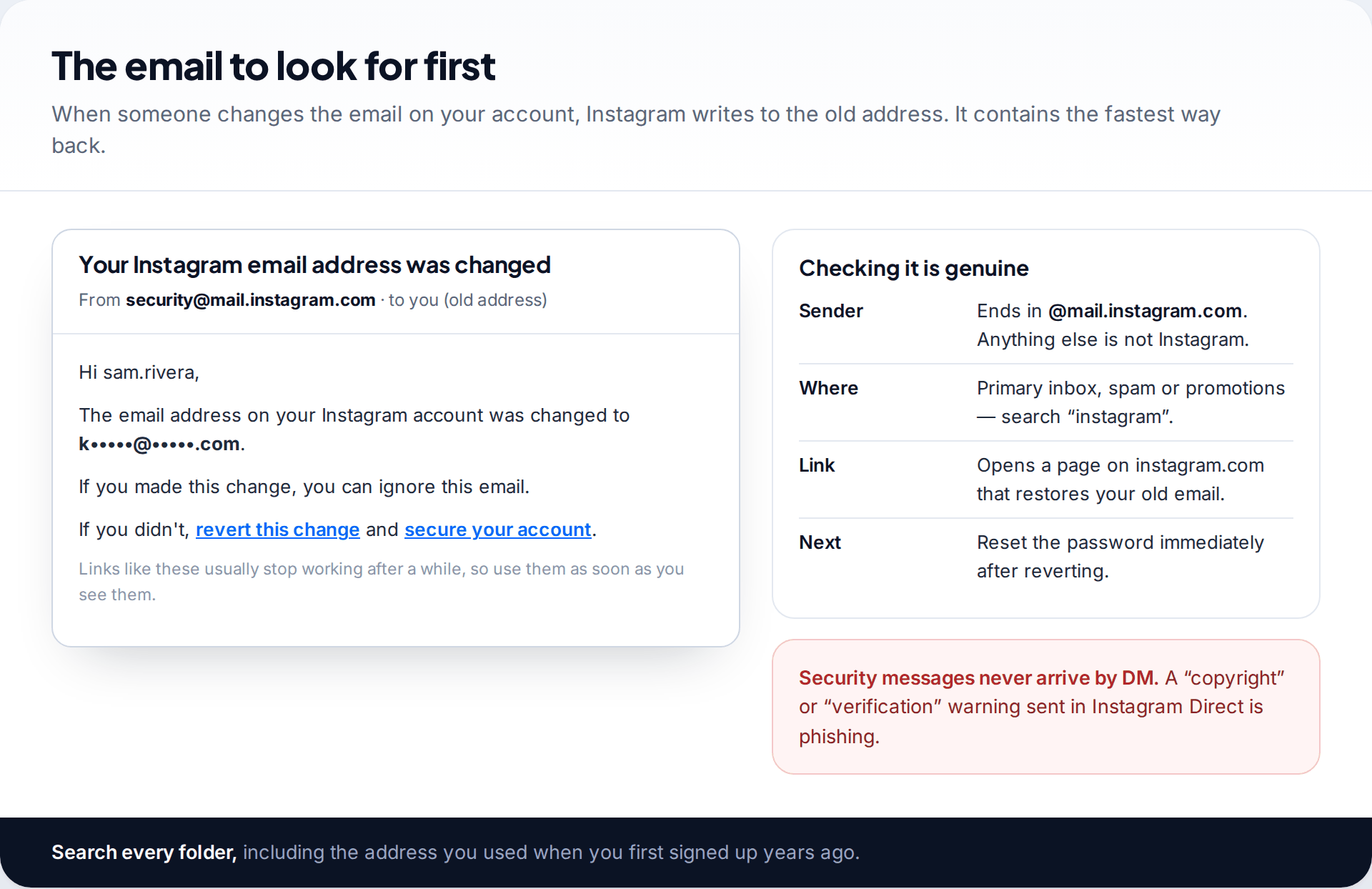
When an email address, phone number or password changes on an account, Instagram sends a security message to the previous address. If the attacker swapped your email for theirs, that message is in your inbox now, and it contains a link to revert the change. Clicking it puts your address back on the account. You can then reset the password.
Search every folder for “Instagram”, including spam, promotions and the address you signed up with years ago. Check the sender: genuine security email comes from [email protected] or another address ending in @mail.instagram.com. Attackers send look-alike messages too, so you can confirm any message in the app later. Instagram keeps a list of the security emails it sent in the last 14 days.
If there is no revert email, or the link has expired, reset from the login screen instead. Tap Forgot password?, enter your username, and choose to receive a code or login link by email or SMS. The screen shows a masked version of each contact, such as “s•••••@gmail.com”. Look at it carefully. If the masked address is not yours, the attacker has already replaced it, and repeating the request only sends codes to them. Stop and move to Route 3.
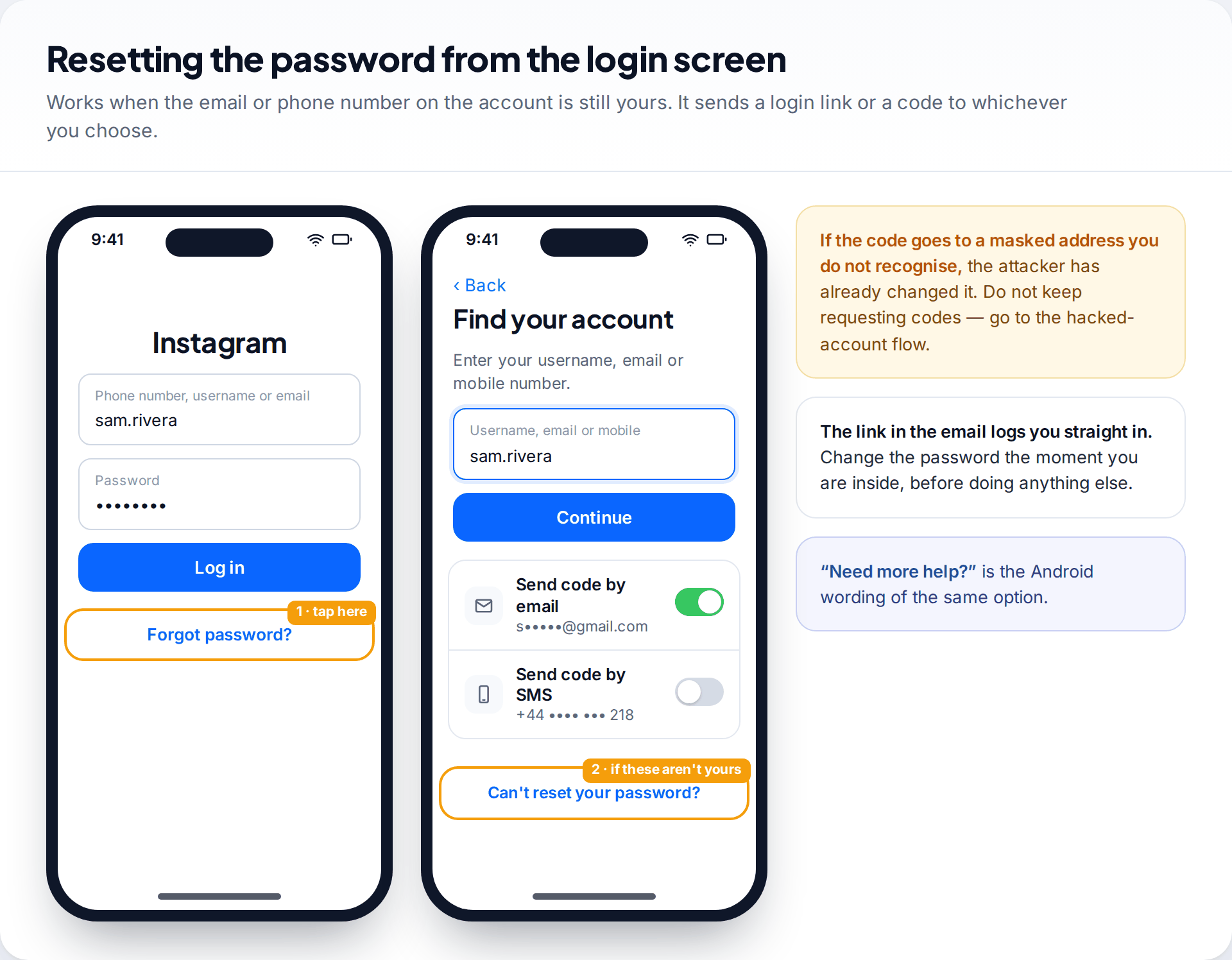
Route 3: the email and phone number were both changed
This is the situation most people searching for help are in. The attacker has replaced both contact details, so there is nowhere for Instagram to send a reset that reaches you. Instagram’s answer is its hacked-account flow, which verifies you in another way.
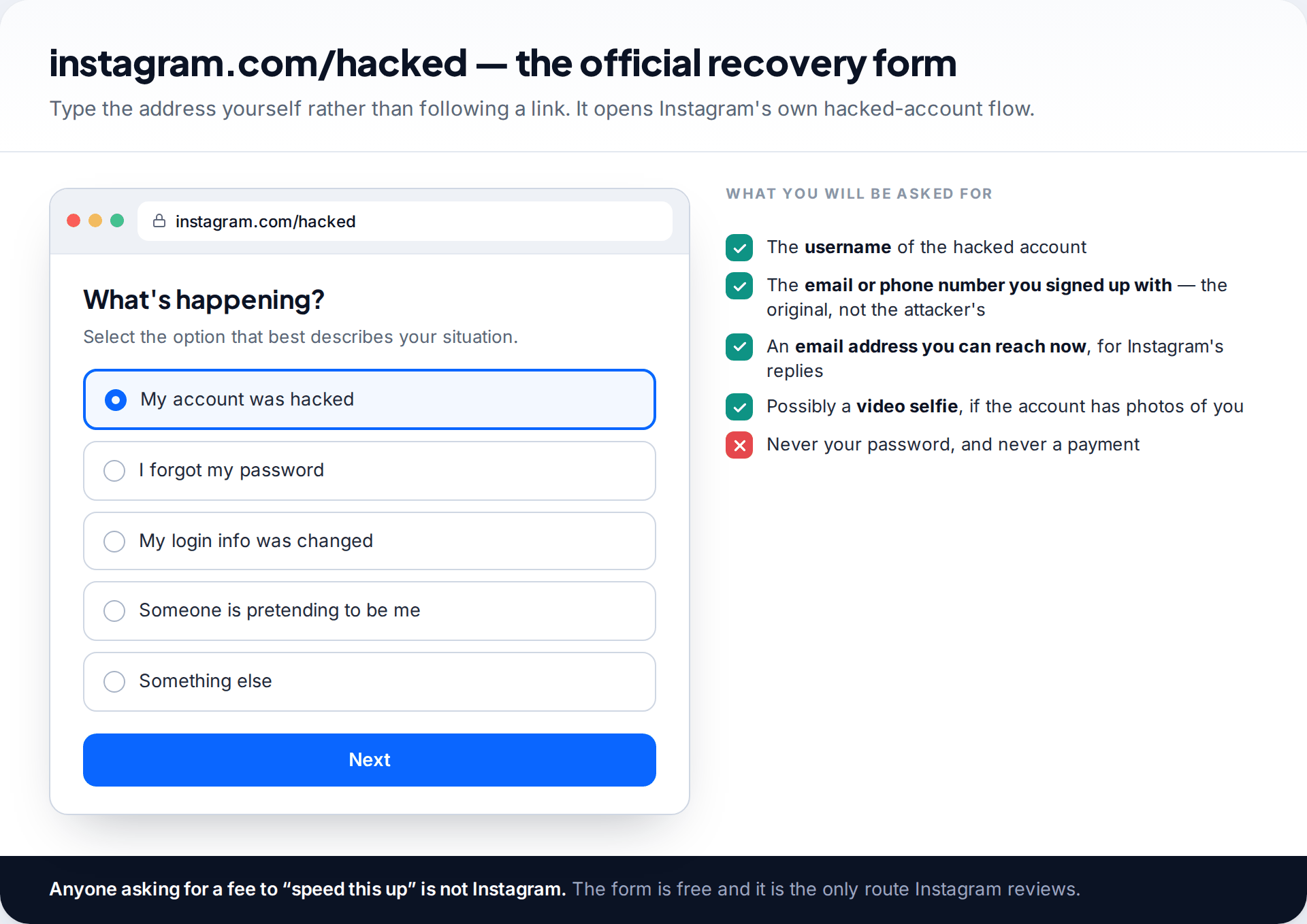
- Go to instagram.com/hacked in a browser, or tap “Can’t reset your password?” (iPhone) or “Need more help?” (Android) on the login screen.
- Choose “My account was hacked” and enter the username.
- Give the email or phone number you originally signed up with, plus an email address you can reach now. Instagram sends its replies there.
- Complete whatever verification is offered. For accounts with photos of the owner, this is usually a video selfie. Accounts without them may be asked for other information.
- Watch that inbox, including spam. The reply contains the next step, usually a link to set a new password.
Two things help. Use the device and the Wi-Fi network you normally use Instagram on, because familiar devices and locations count in your favour. And submit once. If nothing arrives, wait several days before trying again. Filling in the form repeatedly doesn’t move you up a queue.
How the video selfie check works, and how to pass it
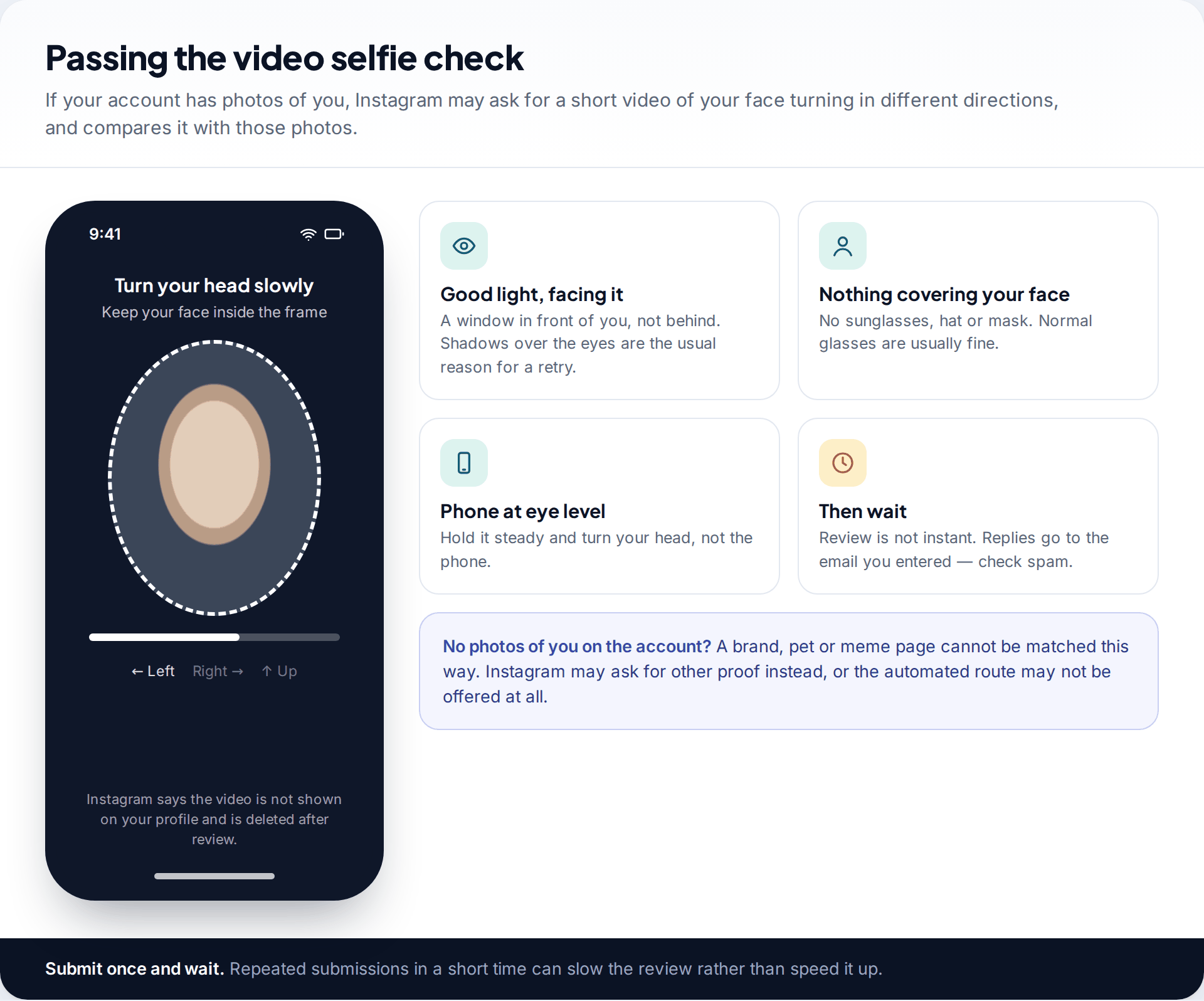
When Instagram can’t reach you by email or phone, it can check your identity by comparing a short video of your face with photos on the account. You’ll be asked to turn your head in several directions while keeping your face inside a frame. Instagram says the video is not posted to your profile and is deleted after review.
What helps is ordinary: sit facing a window rather than with your back to one, take off sunglasses and hats, hold the phone steady at eye level, and move your head slowly. The comparison relies on photos where your face is clearly visible, so it works best on personal accounts. If the attacker deleted your posts, it may still work from photos Instagram retains, but that is not guaranteed.
If the account has no photos of you — a business page, a fan account, a pet — there is nothing to compare the video against. Recovery then depends on the email or phone number you signed up with and whatever other proof Instagram asks for. It is slower and less certain, and it’s worth knowing that before you start.
Route 4: the hacker turned on two-factor authentication
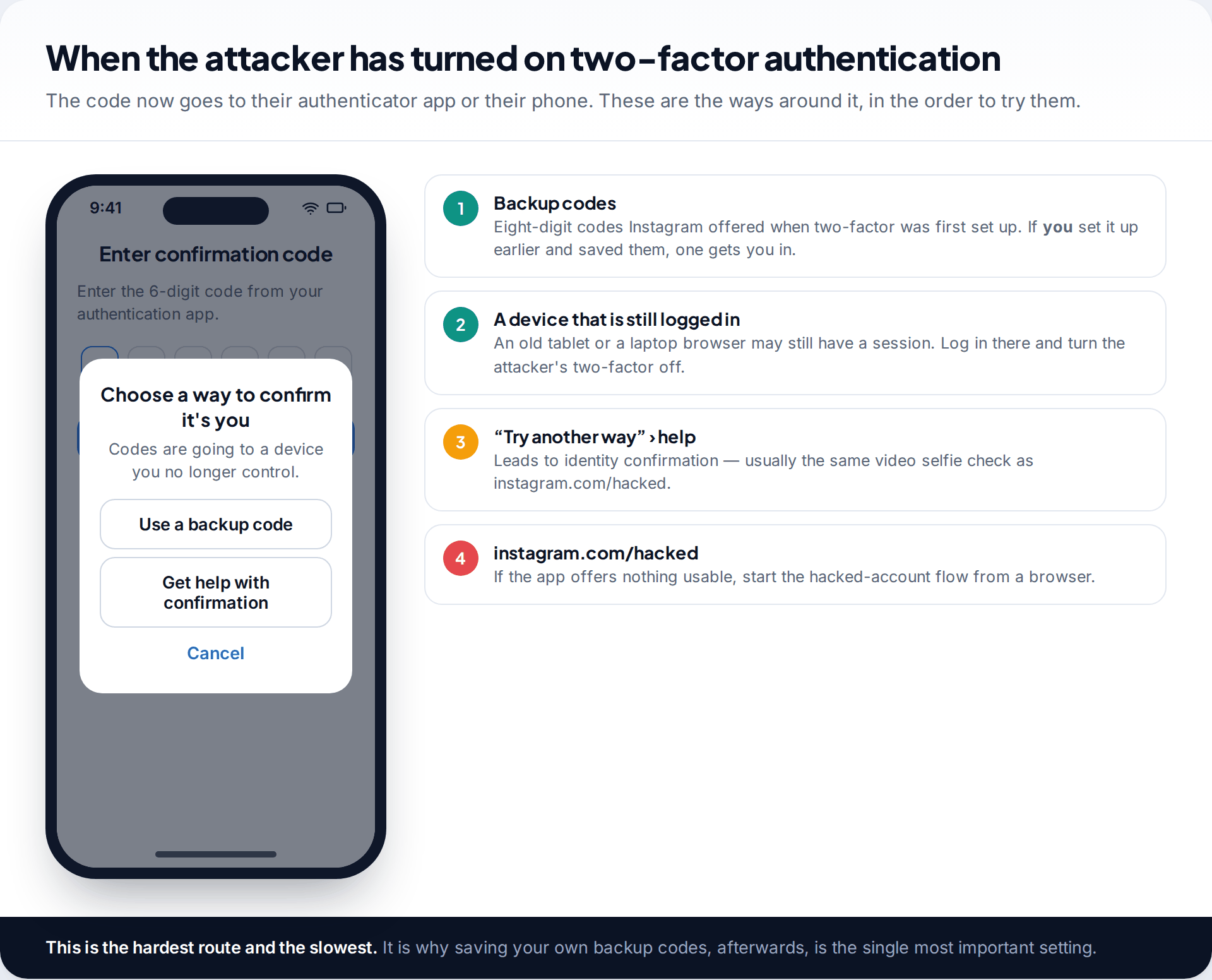
A growing number of takeovers end with the attacker turning on two-factor authentication using their own authenticator app. Now even the correct password gets you a code prompt you can’t answer. It is deliberate: it turns a password problem into an identity problem.
Try these in order. If you had two-factor turned on yourself before the attack and saved the backup codes, one of them still works. Next, look for any device that is still logged in (Route 1) and remove the attacker’s method from there. If neither is available, tap Try another way on the code screen and follow the help option. It leads to the same identity confirmation as instagram.com/hacked, usually the video selfie.
This route takes the longest. It is also the one most easily prevented. Two-factor authentication that you set up first, with the backup codes stored away from your phone, stops the attacker from adding their own.
If the account was disabled or deleted by the attacker
Some attackers post spam that gets the account disabled. Others request deletion out of spite. Both can be undone, within limits.
A disabled account shows a message when you try to log in, with an option to request a review. If the activity that triggered it wasn’t yours, say so in the review and mention that the account was compromised. A deletion request does not take effect immediately. Instagram keeps the account for a period (currently 30 days) before permanently removing it, and logging back in during that window cancels the deletion. So if you recover access by any route above within that window, the account comes back as it was. After that, it can’t be restored.
Once you are back in: the ten-minute lockdown
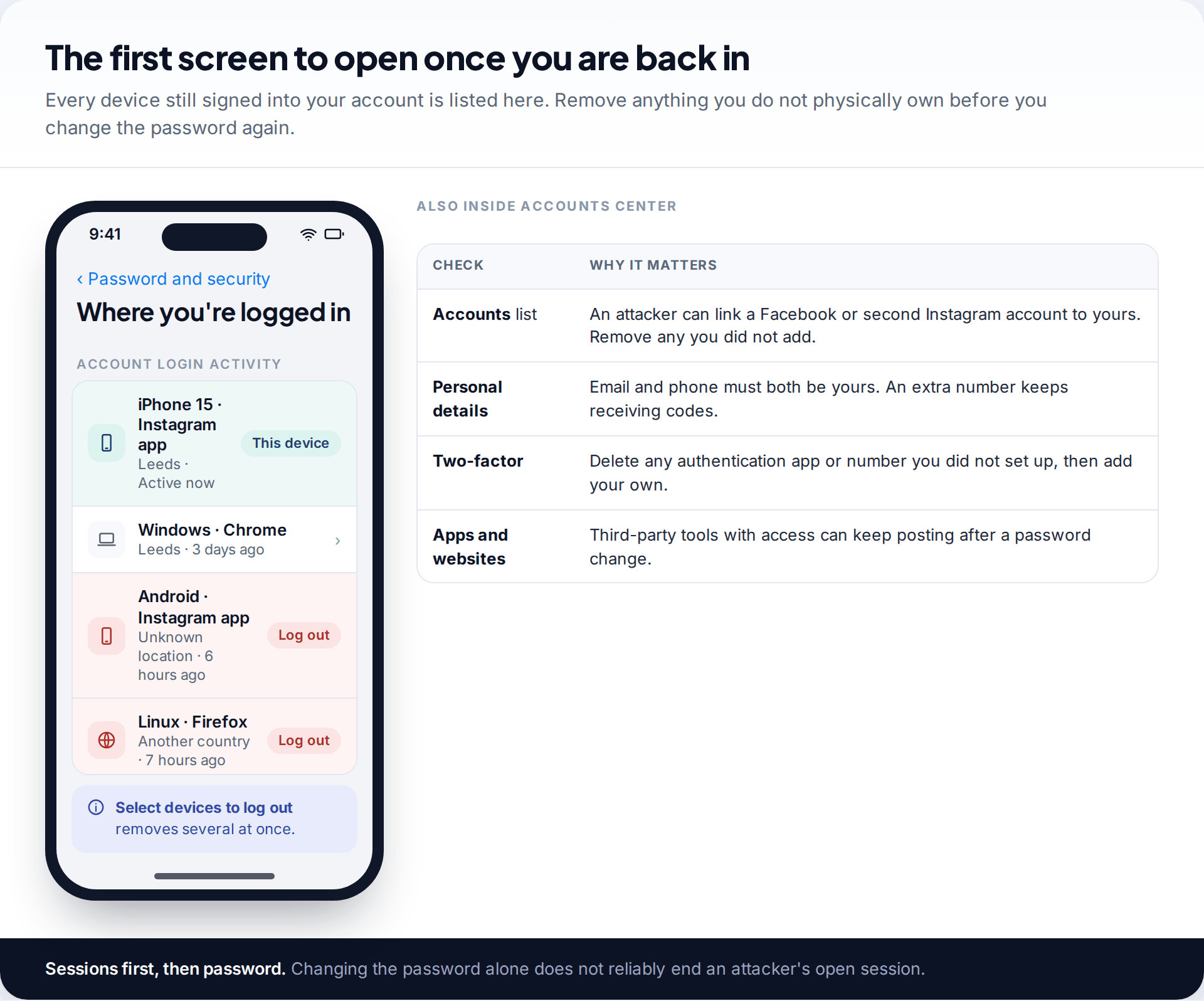
Recovering the login does not undo what the attacker set up. Work through these in one sitting:
- Log out every unfamiliar session under Where you’re logged in.
- Set a new, unique password. If it was reused anywhere, change it there too, starting with your email.
- Remove the attacker’s contact details and check the email and phone listed under Personal details are yours.
- Turn on two-factor with an authentication app and save the backup codes somewhere that is not your phone.
- Check linked accounts in Accounts Center. Attackers sometimes link their own Facebook or Instagram profile so they can switch back in.
- Review apps and websites with access and remove anything you didn’t connect.
- Check what was posted and sent. Delete the attacker’s posts, stories and bio link, and warn anyone who received messages in your name. A common follow-up scam is the attacker messaging your followers from your account.
Our guide to securing your Instagram account goes through each of these settings in detail, including the ones worth changing even if you have never been hacked.
Watch out for the second scam
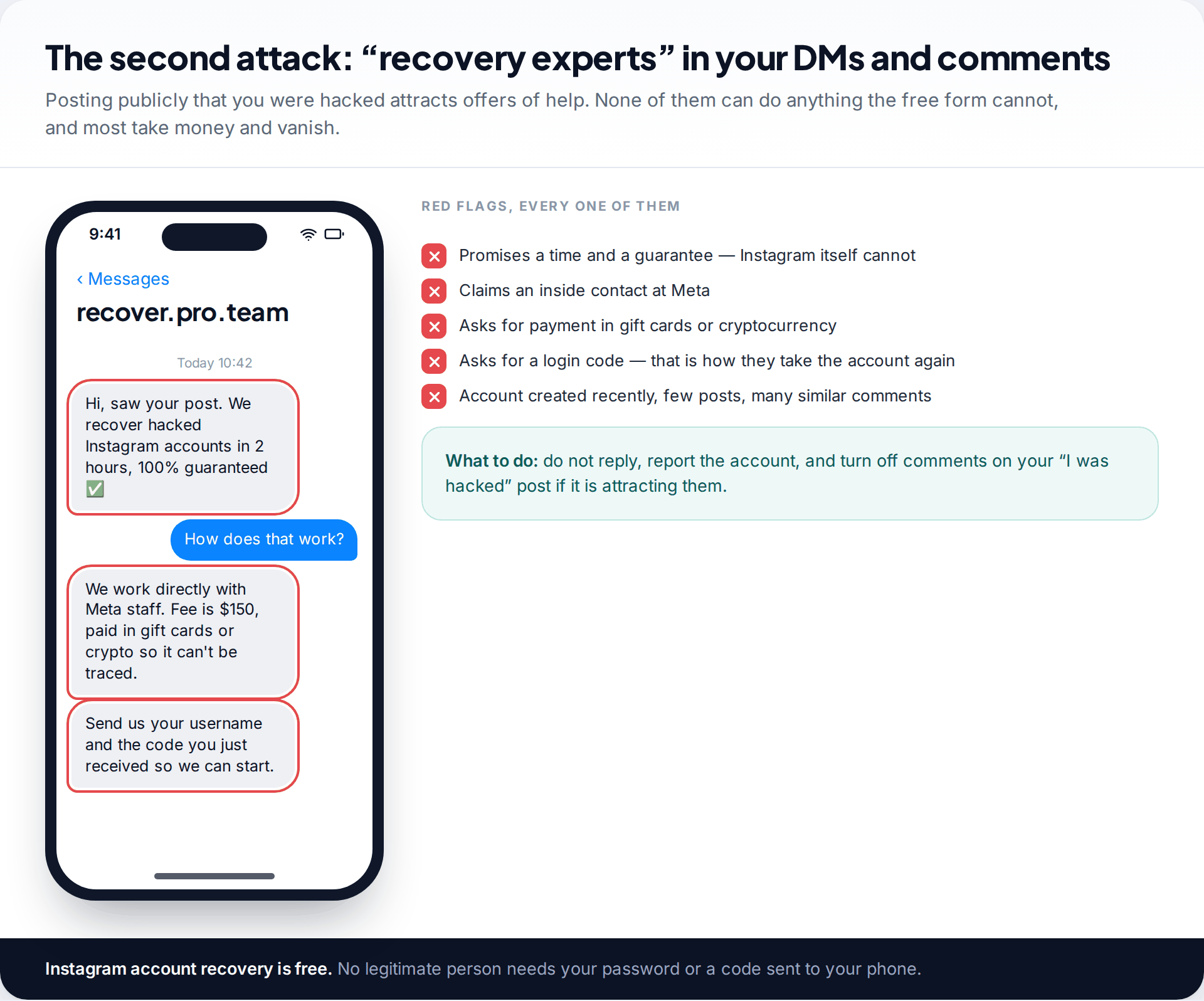
Post “my Instagram got hacked” anywhere public and, within minutes, accounts offering to recover it will appear in your comments and messages. They claim contacts inside Meta, promise a guaranteed timeframe, and ask for payment in gift cards or cryptocurrency. Some also ask for the code Instagram just sent you, which hands them the account a second time.
None of them can do anything the free form cannot. Instagram’s recovery process is only available through Instagram. Don’t reply to these accounts, and report them.
How the account was probably taken
Knowing the likely cause stops it happening again. The common routes are unremarkable:
- A reused password that leaked from another website and was tried on Instagram.
- A phishing message — often a “copyright violation” or “verification badge” notice sent by DM or email, leading to a fake login page. Instagram doesn’t send security warnings through Direct Messages.
- A code shared with a “friend” whose own account had already been taken. It is often presented as a vote in a contest, or as a code sent by mistake.
- A third-party app promising followers or analytics that asked for your password.
If one of these fits, fix it at its source. That might mean changing the reused password everywhere, or telling friends that their account may be compromised too.
How this page was put together
The routes and menu paths were checked against Instagram’s own help centre pages on hacked accounts, login help and security emails in September 2026. Instagram renames and moves these screens regularly, so if a label is not exactly where we describe it, search the settings screen for the same word rather than assuming the option has gone.
We have not linked to any paid recovery service, and we don’t recommend one. Every legitimate route on this page is free. You can read how we research, check and correct these guides.
Common questions
How long does it take to recover a hacked Instagram account?
With a revert link or a device that is still logged in, minutes. With a password reset to an email you control, also minutes. Through instagram.com/hacked with a video selfie, expect to wait days rather than hours, and occasionally longer. Instagram does not publish a fixed timeframe.
Can I recover my Instagram if the hacker changed my email and phone number?
Often, yes. Use instagram.com/hacked and give the email or phone number you originally signed up with. If the account has photos of you, the video selfie check is the usual way Instagram confirms it’s yours.
Can I contact Instagram support directly?
For most accounts, the hacked-account flow is the support route. Subscribers to Meta Verified get access to account support as part of the subscription. Be sceptical of any phone number or chat that claims to be Instagram support outside the app.
The video selfie keeps failing. What now?
Try once more in better light, facing a window, with nothing covering your face, then wait for the email reply rather than resubmitting. If the account has no clear photos of you, the check may not be able to succeed and Instagram may ask for other information.
Should I create a new account while I wait?
You can, but use a different email address and phone number from the ones tied to the hacked account, because reusing them can complicate recovery. Let followers know through the new account so they ignore messages from the old one.
Will the hacker be able to get back in after I recover it?
Not if you complete the lockdown. Log out every other session, set a unique password, remove their email, phone and two-factor method, and check linked accounts in Accounts Center. Skipping any one of these is how accounts get taken a second time.
Looking for a tool to go with this? TheTruthSpy is a free parental control app for Android that stays visible on the child's phone. If it fits your family, see the Social media alerts feature.
Related guides
How to Check If Your Email Was in a Data Breach
Check if your email was in a data breach for free, then act on what leaked: passwords, card details or…
How to Start Using a Password Manager
Switch to a password manager without stress: built-in or standalone, protecting the main password, and a first-hour plan for the…
How to Tell If Your Phone Has a Virus or Malware
Most 'virus' signs have ordinary causes. How to check an iPhone or Android phone for real malware, remove it, secure…
Parental controls your child can see
Location, screen time limits, a web filter and alerts from notifications — free, and visible on your child's phone. Pair a phone in about ten minutes.
Android · Free to set up · Visible on your child's phone