Recovering a Deleted Facebook Account Before It Is Gone for Good

Can you recover a deleted Facebook account? Yes, but only for 30 days after the deletion was requested. Within that window, log in with your usual email or phone and password and choose Cancel deletion, and everything returns as it was. After 30 days the deletion is permanent. Neither you nor Meta can undo it, and nobody else can either.
- Within 30 days: log in, tap Cancel deletion. Forgot the password? Reset it first; the reset still works.
- Only deactivated: log in and the account comes straight back. There is no deadline.
- Suspended by Facebook: that is an appeal, not a deletion, with a 180-day window.
- After 30 days: the account is gone, but photos and messages often survive elsewhere.
How long you have: the 30-day window
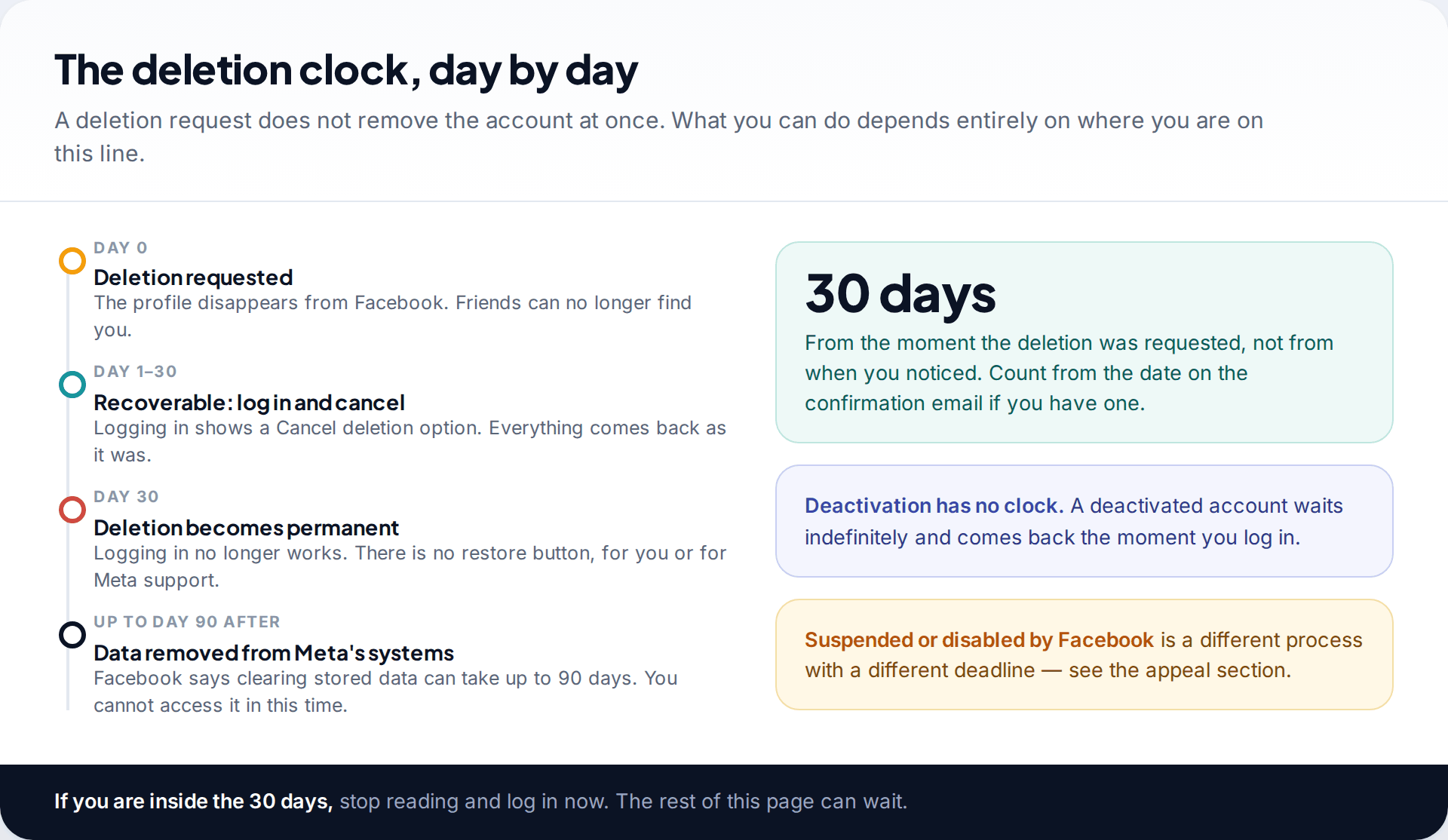
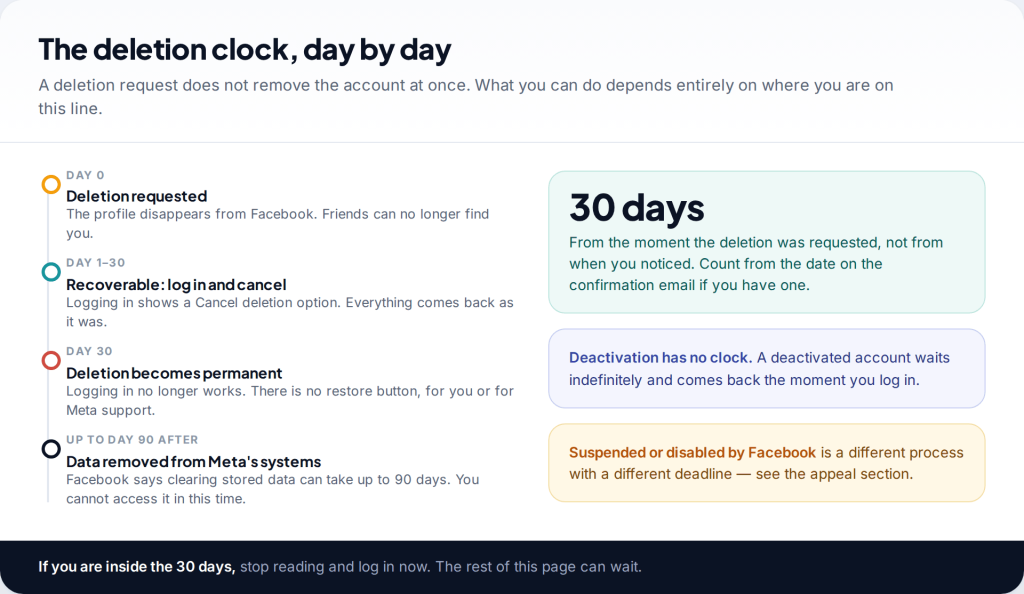
When someone asks Facebook to delete an account, it doesn’t disappear straight away. The profile vanishes from view at once, and friends can no longer find it. But Facebook holds the account for 30 days so that the owner can change their mind. Logging in at any point in that window brings up the option to cancel.
After day 30 the deletion goes ahead, and there is no restore button anywhere, not for you and not for Meta’s support staff. Facebook says it can take up to 90 days after that to erase the data from its systems. That doesn’t mean it is recoverable during those 90 days: the account can’t be accessed, and the data is only held while it’s being removed.
Count from the date of the request, not the date you noticed. If you have Facebook’s confirmation email, it shows the date. If someone else requested the deletion, such as an attacker who got into the account or a partner who knew the password, the clock started on the day they did it. You may have less time than you think.
The window is also the same wherever you start from. The app, the website and Facebook Lite all lead to the same account, so use whichever one you can get into fastest.
First, check which situation you are actually in
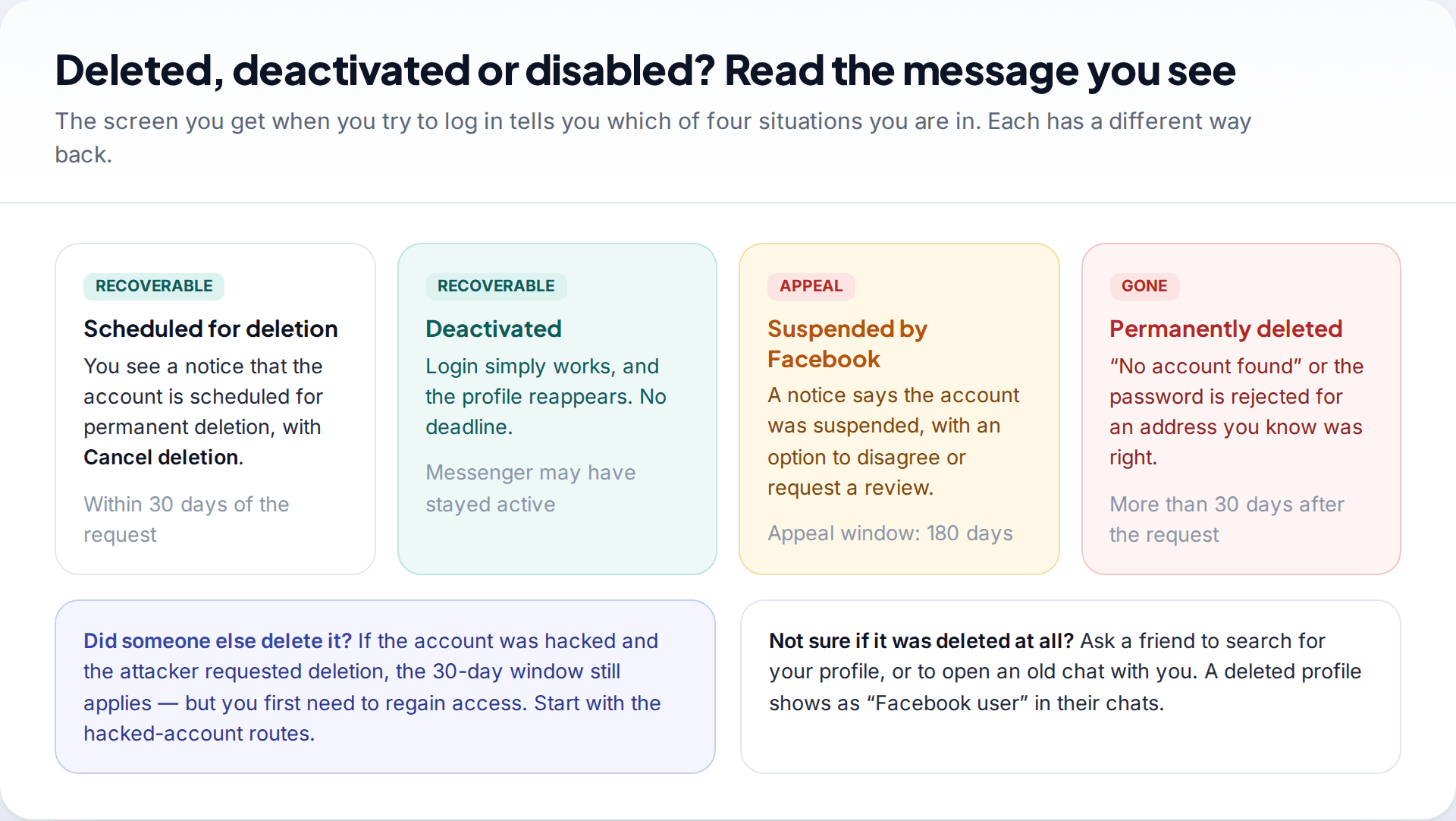
People often say “deleted” for four quite different situations. Each has its own route back, and the message Facebook shows when you try to log in tells you which one you’re in.
- Scheduled for deletion. You see a notice about a pending deletion, with a button to cancel it. This is the one this page is mostly about.
- Deactivated. Login just works and the profile reappears. Deactivation hides the account but never removes it, so there is no deadline.
- Suspended or disabled by Facebook. You see a notice that the account broke the rules, with an option to disagree. That is an appeal, covered below.
- Permanently deleted. “No account found”, or a password you know is right is rejected. If the deletion request was more than 30 days ago, this is where you are.
How to recover a deleted Facebook account within 30 days
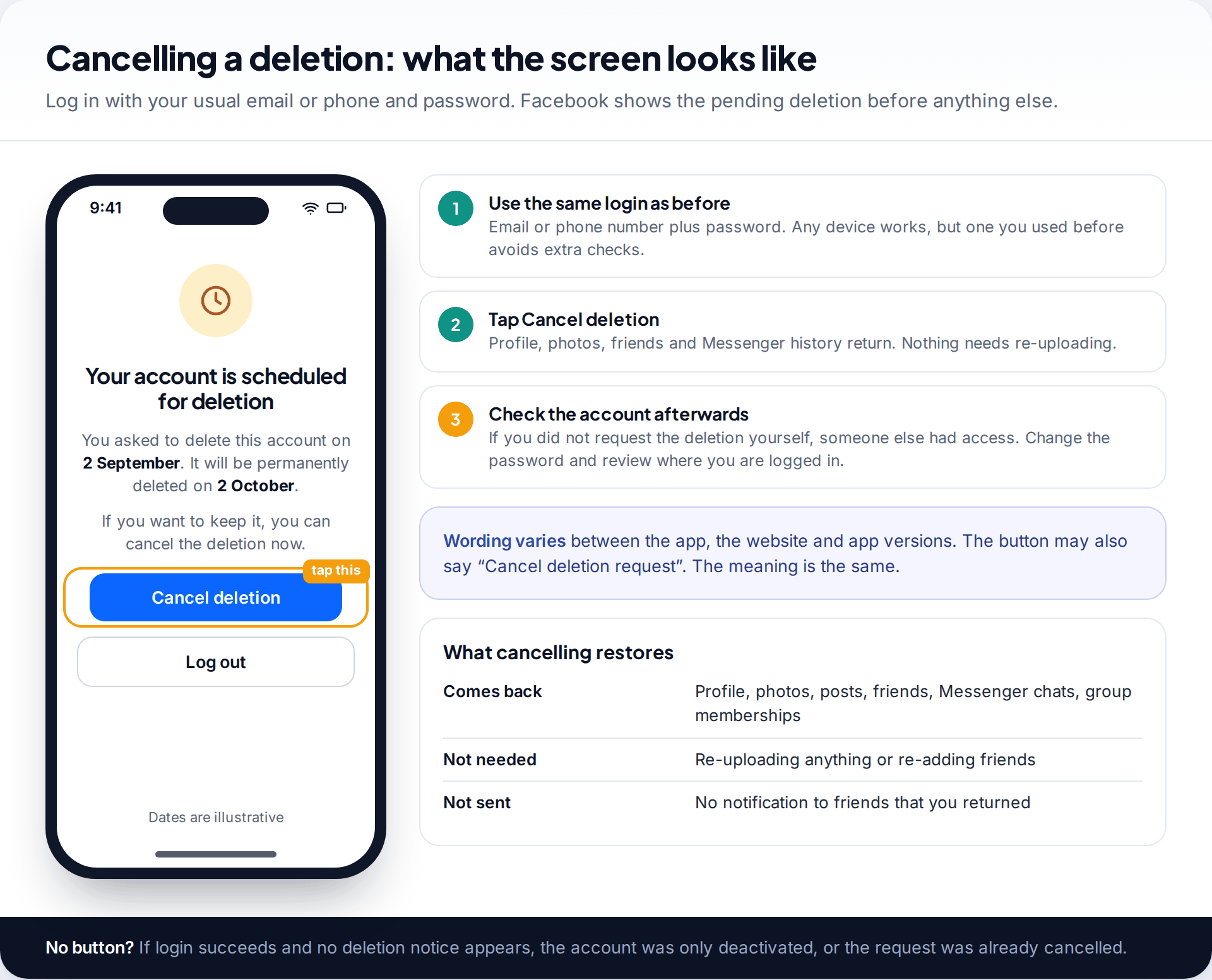
This is the whole process, and it takes a minute:
- Open Facebook in the app or at facebook.com, on any device. A phone or computer you’ve used before avoids extra security checks.
- Log in with the email address or phone number and password you used before.
- Choose Cancel deletion on the notice that appears. The wording differs a little between versions, but it’s the first thing you see.
Your profile, photos, friends and Messenger history come back as they were. Nothing needs re-uploading, and friends don’t get a notification that you returned.
If you didn’t request the deletion, someone else had your password. Once the deletion is cancelled, change the password straight away, check “Where you’re logged in” in Accounts Center, and turn on two-factor authentication. If you couldn’t log in at all because the password or email had been changed, start with our guide to getting a hacked Facebook account back, and move quickly, because the 30 days keep running while you do.
If you have forgotten the password
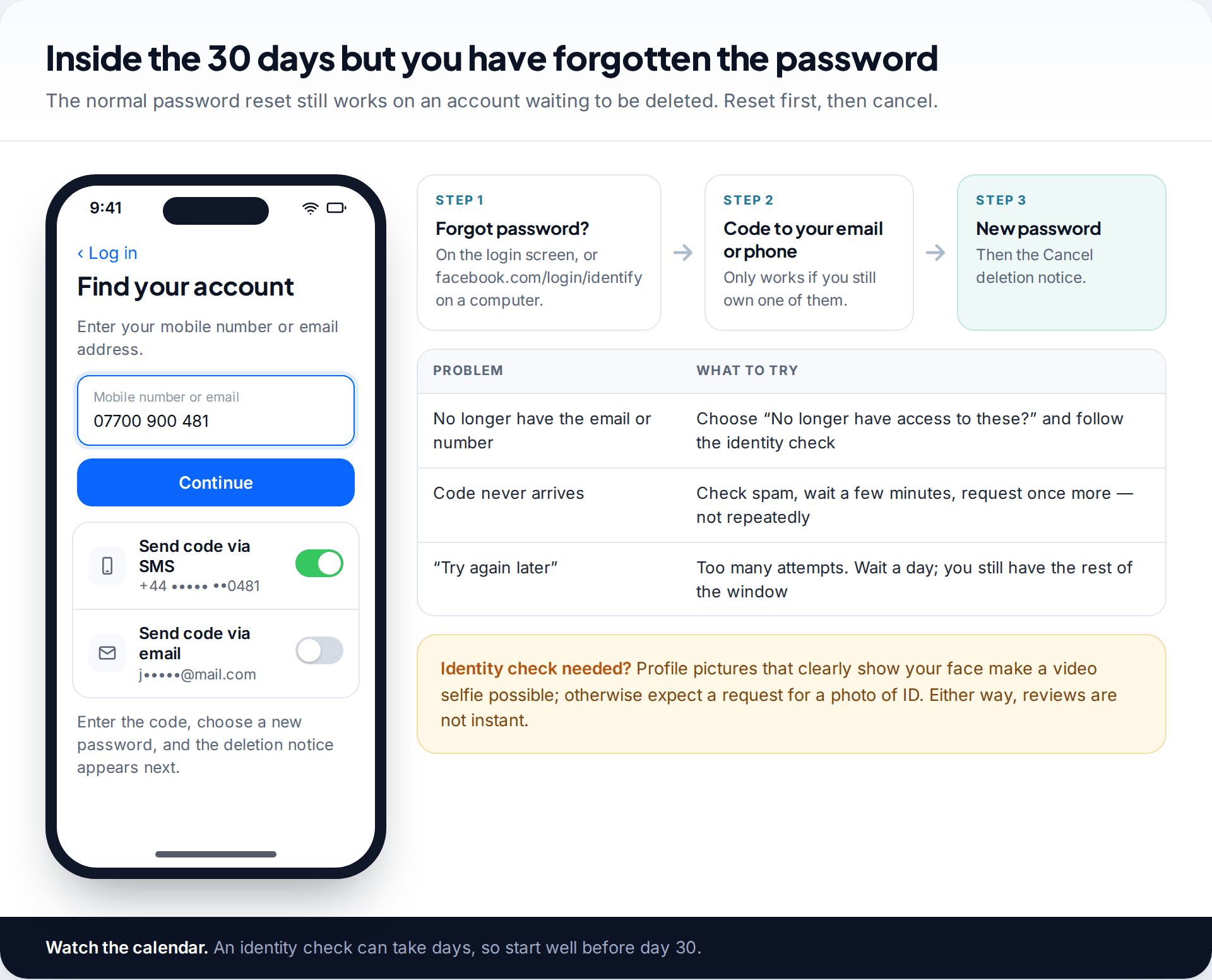
An account waiting to be deleted still accepts password resets. Tap Forgot password? on the login screen, or go to facebook.com/login/identify on a computer. Enter the email address or phone number linked to the account, and Facebook sends a code to whichever you choose. Enter it, set a new password, and the deletion notice appears next.
Day 22, old phone number, no password
Jo deleted her account on impulse three weeks ago and now wants it back. She has changed phone number since, and the password was saved on a phone she no longer has. The login screen rejects every password she tries. On the Find your account screen she searches by her email address instead of her old number. The masked email shown is hers, so she requests a code there, sets a new password and sees the deletion notice straight away.
If you no longer have that email address or phone number, choose the option saying you no longer have access. Facebook will then try to confirm your identity another way, usually with a photo of ID or a video selfie compared with your profile pictures. This can take days, so don’t leave it until day 28. If you hit “try again later”, stop and come back the next day. Repeated attempts extend the block, and you still have the rest of the window.
Deactivation versus deletion
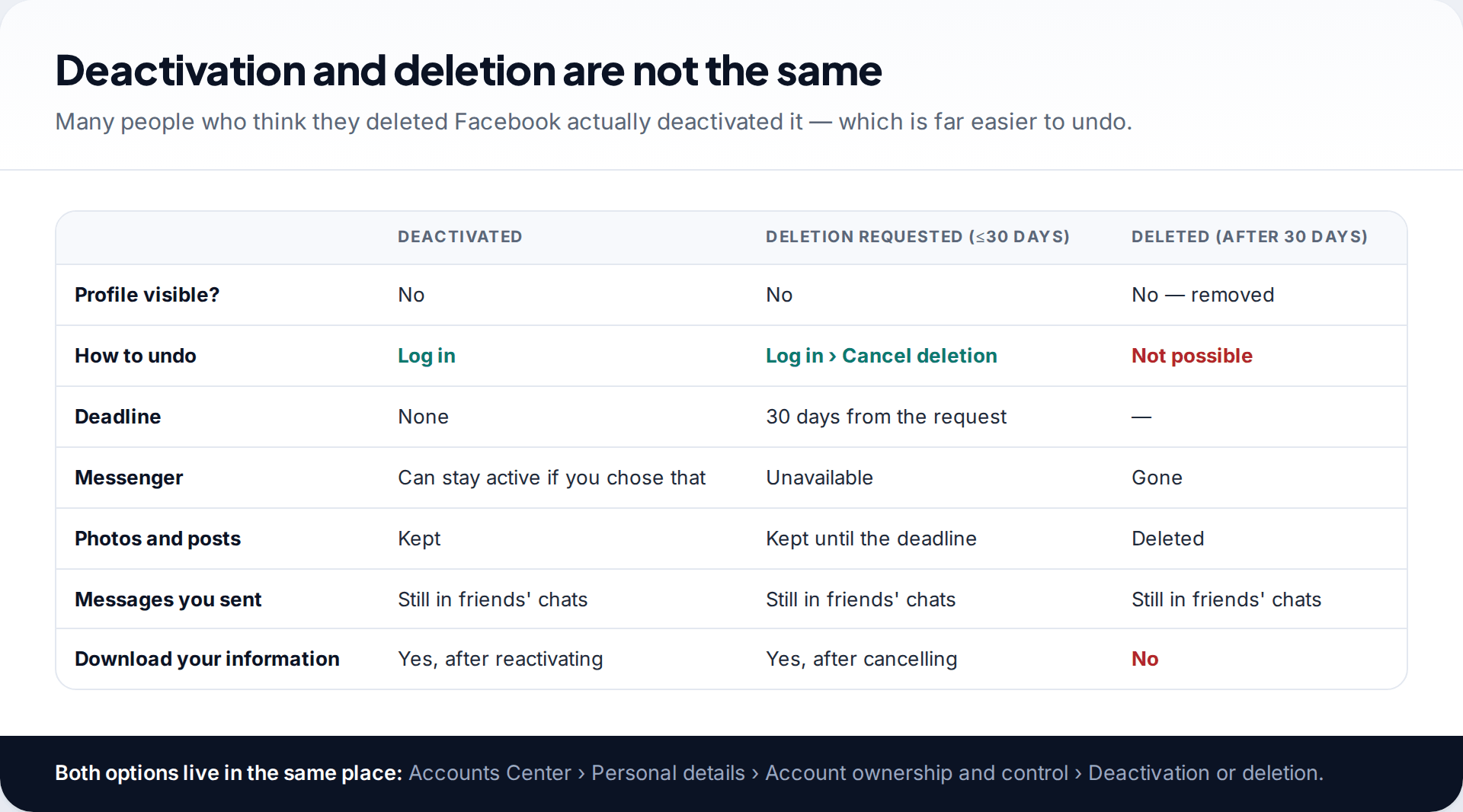
Both options sit together under Accounts Center › Personal details › Account ownership and control › Deactivation or deletion, which is why people mix them up. Deactivation hides your profile until you log in again, and you can choose to keep using Messenger while deactivated. Deletion starts the 30-day countdown, and Messenger goes with it.
If you aren’t sure which one you chose, just log in. A deactivated account comes back straight away with no questions. A deletion shows the cancel notice.
One thing is the same in every case: messages you sent to other people stay in their inboxes. Deleting your account doesn’t remove them from friends’ chats, where your name shows as “Facebook user” after permanent deletion.
If Facebook suspended or disabled the account
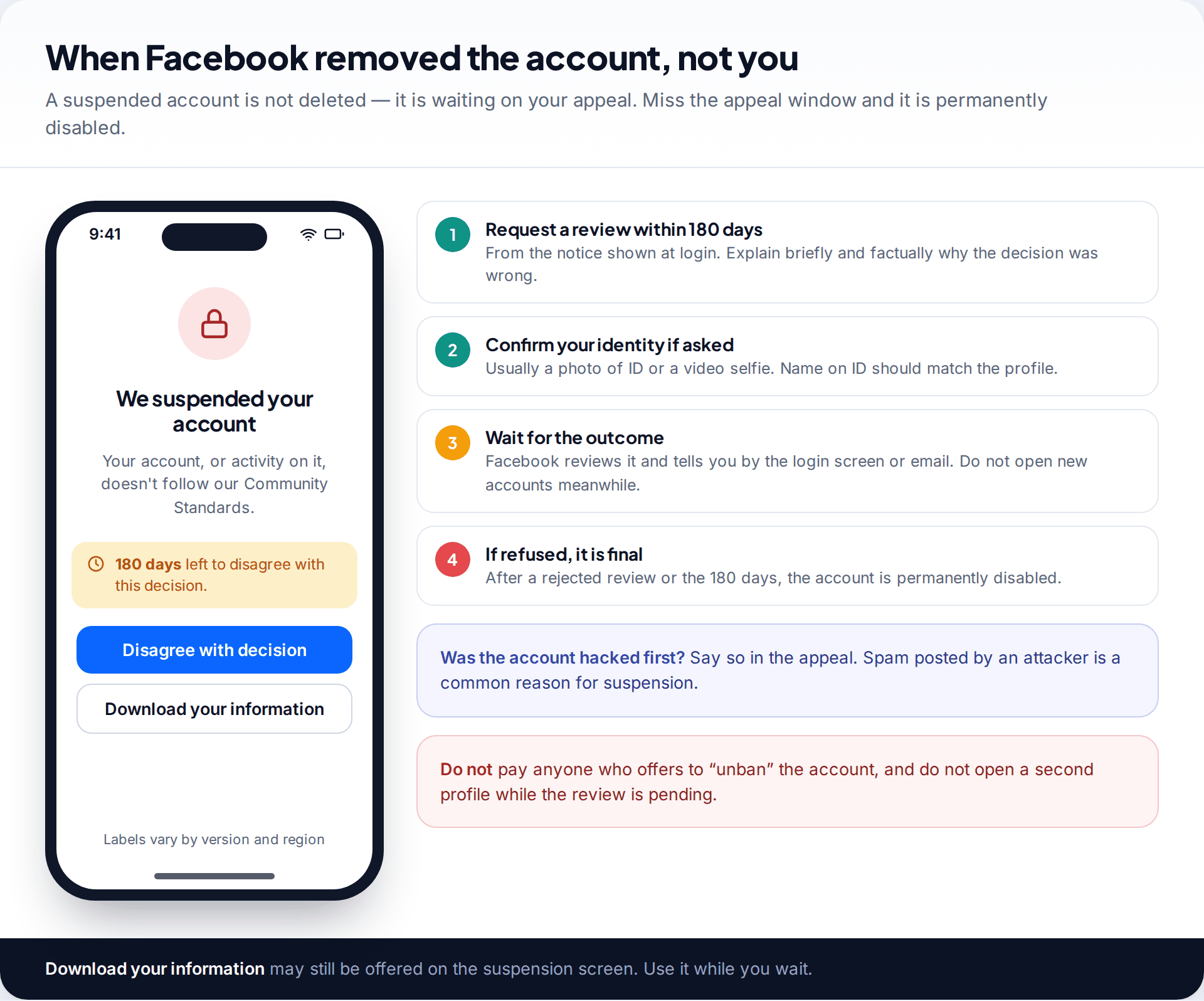
Sometimes the account wasn’t deleted by anyone: Facebook suspended it for breaking its rules. The login screen says so, and it usually shows how many days remain to disagree with the decision. Current help pages and recent guides give that window as 180 days.
Use the option to disagree or request a review, and explain briefly and factually why the decision was wrong. If the account had been hacked and the attacker posted spam, say that directly. Facebook may ask you to confirm your identity. If the review fails, or the window passes without an appeal, the account is permanently disabled, and that is final. While you wait, the suspension screen may still offer Download your information. It’s worth taking that copy whatever the outcome.
Don’t open a new account while an appeal is pending. Facebook’s terms don’t allow a new account to be used to get around a suspension, and doing so can count against you.
After 30 days: what can and cannot be recovered
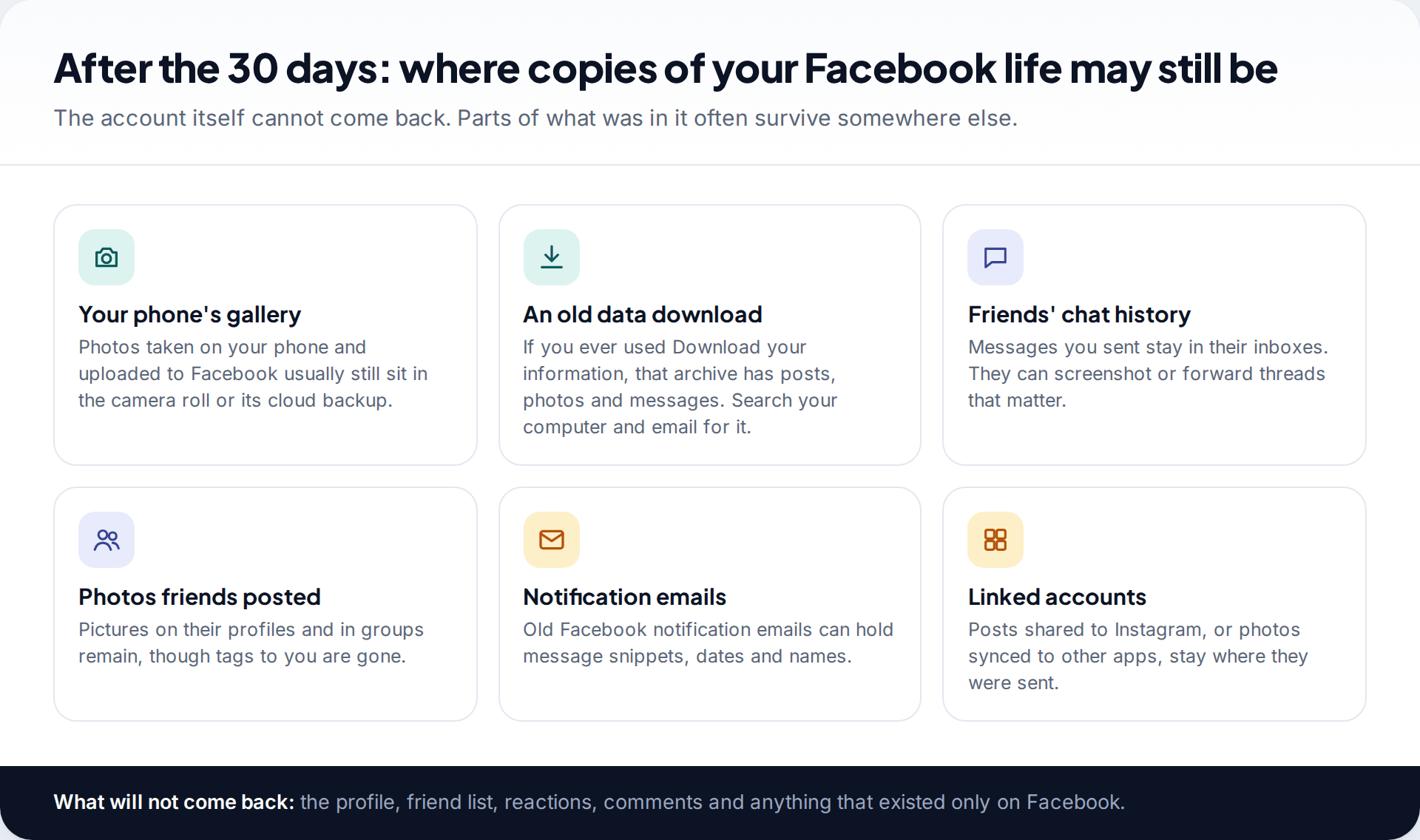
Once the deletion has gone through, the account itself can’t come back. You can sign up again with the same email or phone number, but it will be a new, empty account. What you can often rebuild is the content.
- Photos: most were taken on a phone first, so check your camera roll and its cloud backup (iCloud Photos, Google Photos or the manufacturer’s own).
- An old archive: if you ever used Download your information, that file holds posts, photos and messages. Search your computer and email for “facebook” plus “.zip”.
- Conversations: the other person still has the thread. Ask them to screenshot or forward anything that matters.
- Photos of you: pictures friends posted stay on their profiles, though the tags to you are gone.
What won’t come back: your friend list, reactions, comments on other people’s posts, group memberships and anything that existed only on Facebook.
Ignore anyone who says they can restore it
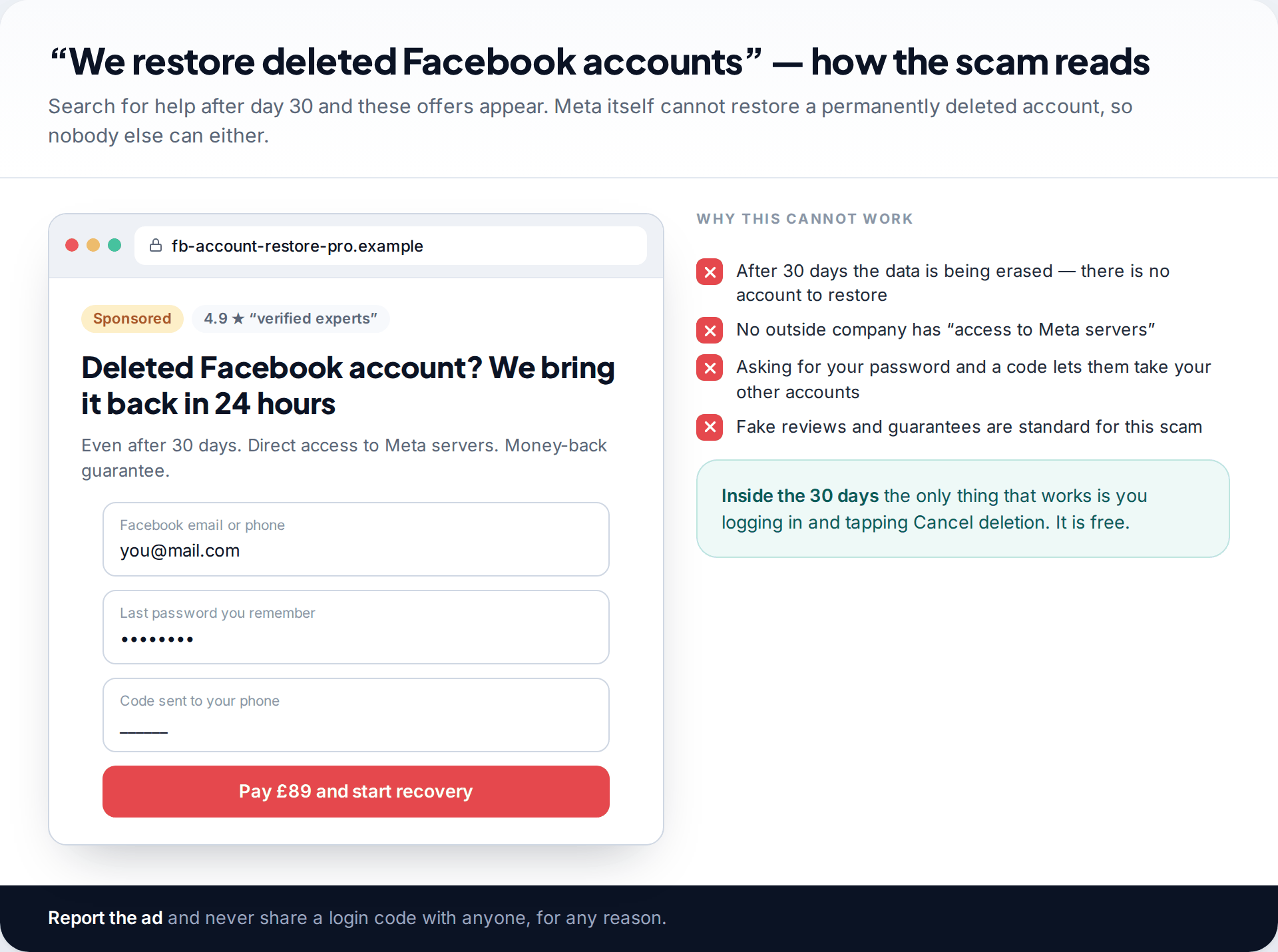
Search for help after the deadline and you’ll find adverts, forum replies and social accounts promising to “restore deleted Facebook accounts, even after 30 days”. They can’t. If Meta can’t restore a permanently deleted account, an outside company certainly can’t. Most of these offers are after a fee. Many also ask for your old password and a code sent to your phone, which lets them into your email or other accounts. Instagram works on a similar 30-day principle; our guide to recovering a deleted Instagram account explains its version.
Before you delete Facebook again
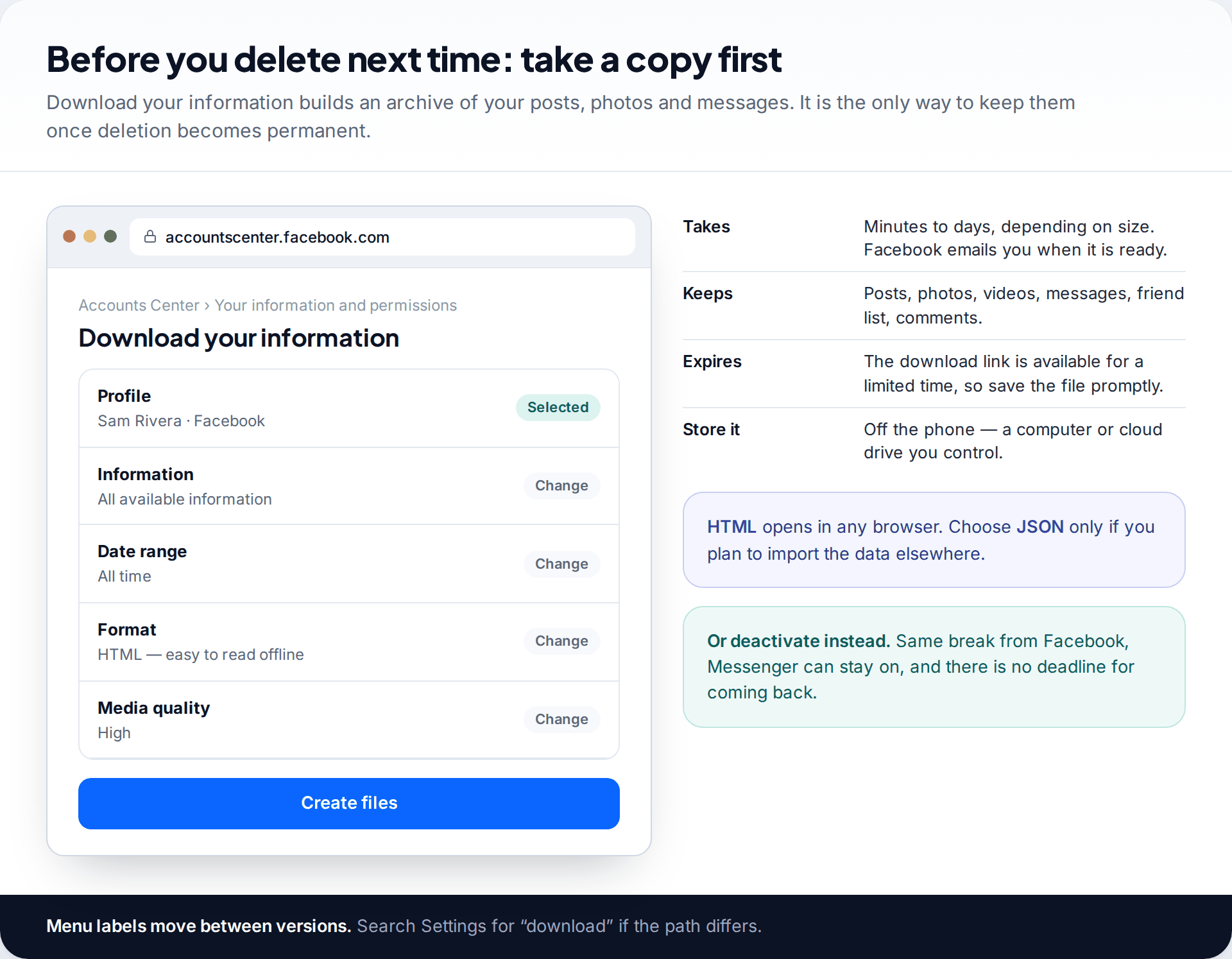
If you’re leaving Facebook deliberately, take a copy first. In Accounts Center, open Your information and permissions › Download your information, choose your Facebook profile, and pick “All time” and HTML format so the archive opens in any browser. Facebook emails you when the file is ready. Save it somewhere other than your phone.
And consider deactivating first. It gives you the same break from Facebook, keeps Messenger if you want it, and has no deadline if you change your mind.
How this page was put together
We checked the deletion window, the cancellation steps and the deactivation options against Facebook’s help centre pages on deleting and deactivating an account, and against recent independent guides, in September 2026. The 180-day appeal figure comes from Facebook’s suspension notices as reported in current guides. The notice on your own account is the one to go by.
Menu names in Accounts Center change between versions and regions; where a label isn’t where we say, search Settings for the same word. We haven’t linked to any recovery service. You can read our editorial standards and correction policy.
Common questions
Can I recover a Facebook account deleted more than 30 days ago?
No. After 30 days the deletion is permanent and Facebook has no way to restore it. You can create a new account, and you may be able to recover photos and messages from other places, such as your phone’s gallery or friends’ chats.
How do I know whether my account was deleted or deactivated?
Try to log in. A deactivated account comes straight back. An account waiting for deletion shows a notice with a Cancel deletion option. If Facebook finds no account, or rejects a password you know is right, and the request was over 30 days ago, it has been deleted.
Do my friends get notified when I cancel the deletion?
No. Your profile simply becomes visible again as it was.
Will my Messenger conversations come back?
Yes, if you cancel within 30 days. Messenger history returns with the account. After permanent deletion your side of the conversations is gone, but the other person still has their copy.
Can I use the same email to make a new account?
Yes, once the old account is permanently deleted, the email address and phone number can be used for a new account. The new account starts empty.
Why can’t I log in to cancel the deletion?
Usually because the password was changed, or the email or phone on the account is no longer yours. Reset the password with Forgot password? first. If the contact details aren’t yours any more, use the option for when you no longer have access and complete the identity check. If someone else changed them, follow the hacked-account steps. Either way, start as early in the 30 days as you can, because identity checks aren’t instant.
Does deleting Facebook delete my Instagram?
No. They are separate accounts even when linked in Accounts Center. Deleting one doesn’t delete the other.
Looking for a tool to go with this? TheTruthSpy is a free parental control app for Android that stays visible on the child's phone. If it fits your family, see the Social media alerts feature.
Related guides
Why Is My Phone Overheating? Causes and Fixes
Warm, hot or dangerous? Why phones heat up when charging, gaming or in the sun, how to cool one safely,…

How to Transfer Photos From Your Phone to a Computer
The best way to copy photos from iPhone or Android to Windows or Mac, what happens to HEIC files, dates…
How to Back Up WhatsApp Chats
Set up WhatsApp backups on Android and iPhone, keep an encryption key safe, check the backup exists, and fix the…
Parental controls your child can see
Location, screen time limits, a web filter and alerts from notifications — free, and visible on your child's phone. Pair a phone in about ten minutes.
Android · Free to set up · Visible on your child's phone