Can You Get a Deleted Instagram Account Back? The 30-Day Window Explained

“Deleted” on Instagram does not mean gone, at first. When you ask to delete an account, Instagram waits 30 days before carrying it out, and logging back in during that time cancels the request. So if you want to recover a deleted Instagram account and the 30 days have not passed, you almost certainly can. After day 30, you cannot. No form, support agent or paid service can undo a completed deletion.
- Inside 30 days: log in with the account’s password and choose to keep it. That is the whole process.
- Forgot the password? A normal reset works, and the login it gives you cancels the deletion too.
- After 30 days: the account is permanently deleted. Your options are saving what survived elsewhere and starting again.
- Check it was really deleted. A suspended, deactivated or hacked account looks similar from the outside and has a different fix.
The 30-day window, and why the clock matters more than anything else
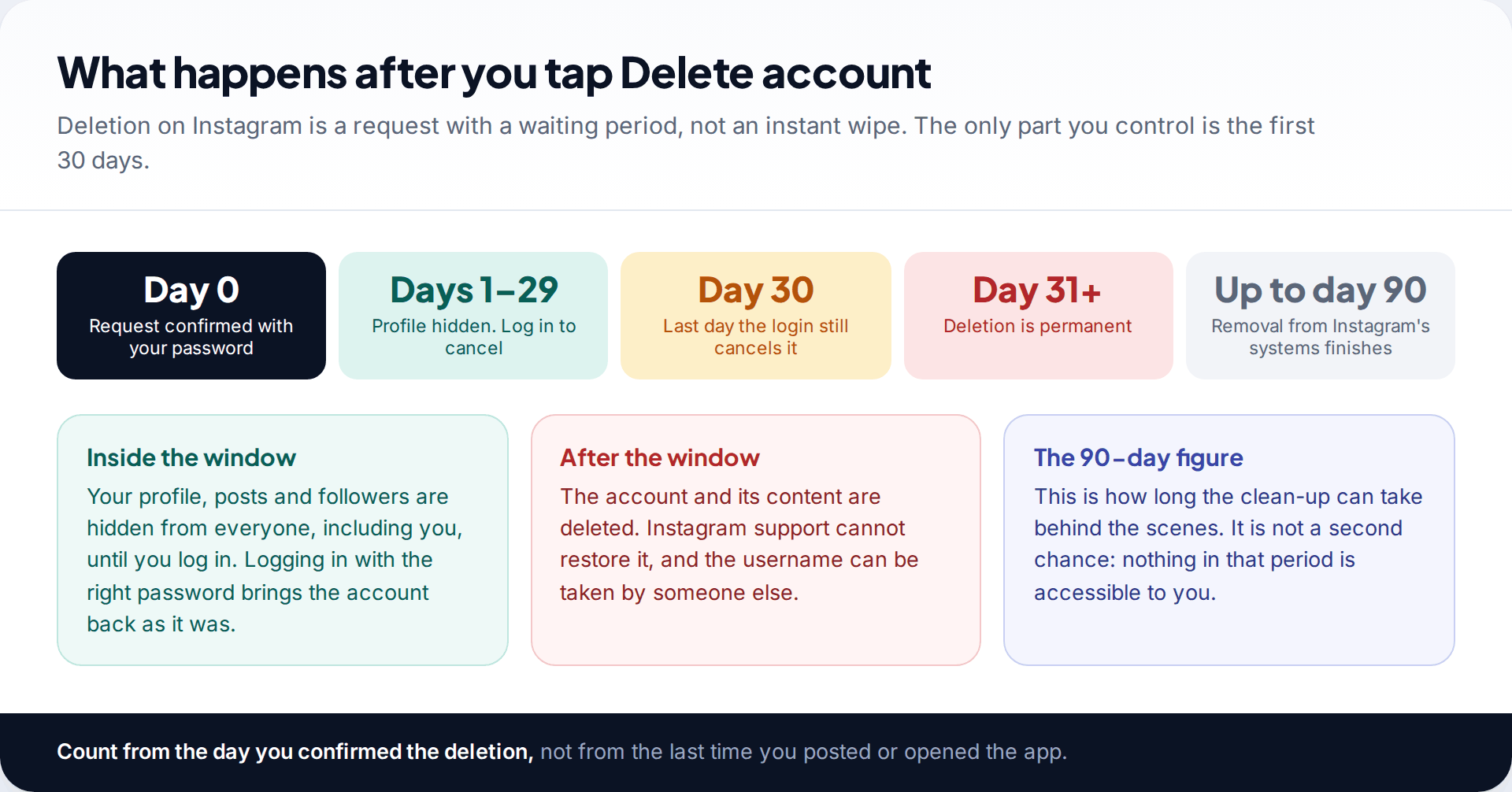
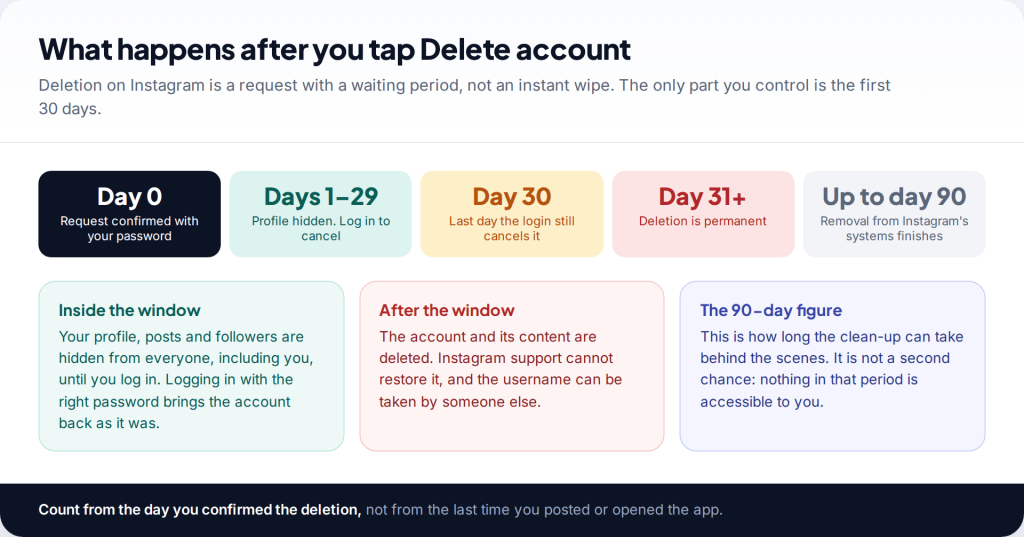
Instagram treats deletion as a request with a built-in cooling-off period. From the moment the request is confirmed, the profile is hidden. Other people can’t find it, your posts disappear from their feeds, and you can’t see it either unless you sign in. For 30 days, the account is intact behind that curtain. On day 31, deletion goes ahead.
You may also have seen a figure of 90 days. Instagram says the full removal of what you posted can take up to 90 days from the start of the process. That is housekeeping on Instagram’s side. The content is not visible or retrievable during that time, and it is not an extended recovery period. Plan around 30 days, counted from the day the deletion was confirmed.
Myth: “Instagram keeps deleted accounts for 90 days, so support can bring it back if I ask nicely.” Fact: once the 30 days are over, Instagram’s own help pages say the account and its information can’t be retrieved. Anyone who tells you otherwise, particularly for a fee, is not being straight with you.
First, make sure the account really was deleted
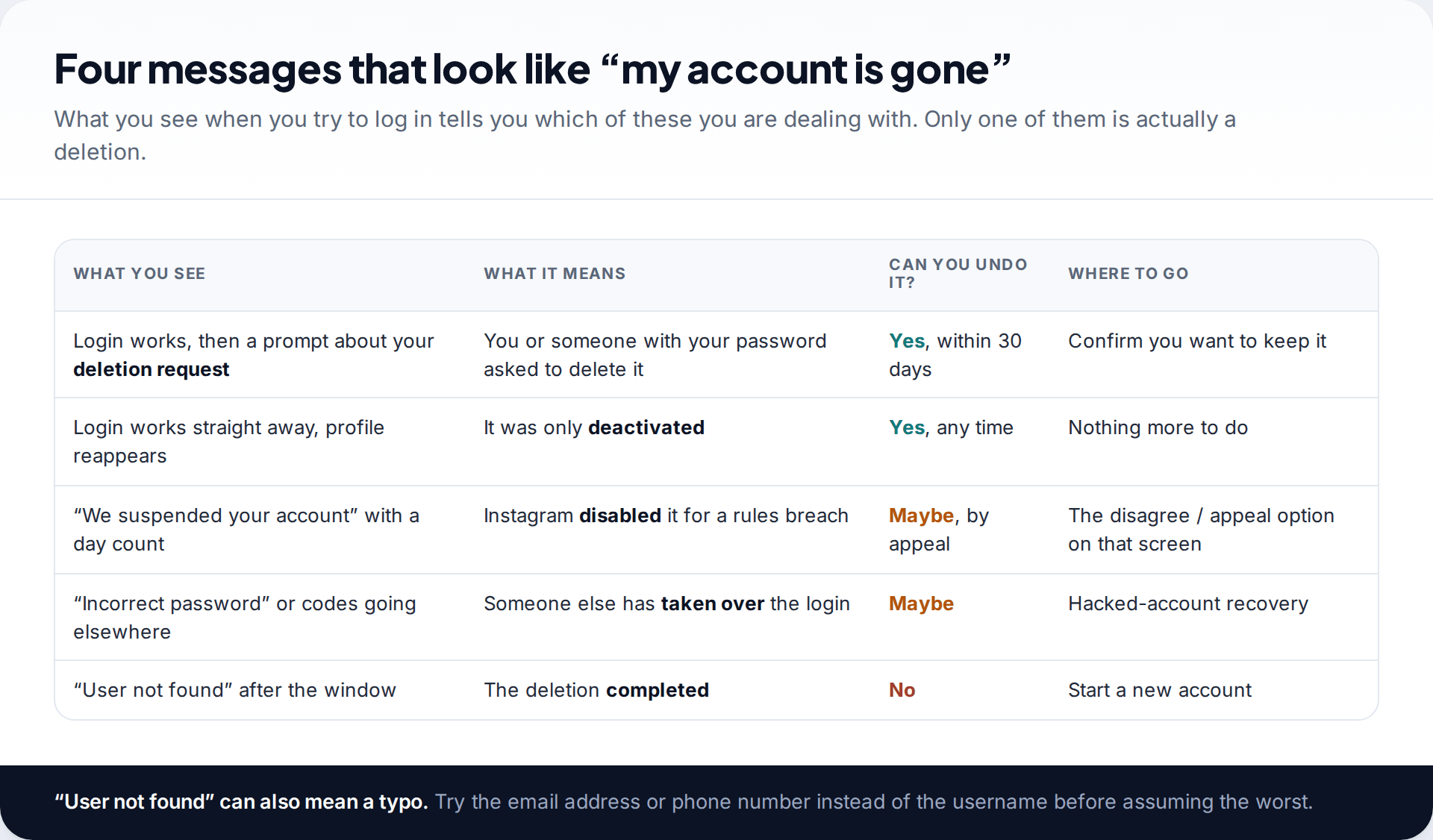
People search for how to get a deleted account back when they are actually facing one of four different situations. Each has a different fix, so it’s worth two minutes to identify yours before doing anything else.
- Deactivated. A temporary pause. The profile is hidden until you log in again, whenever you like, and the username stays yours. Instagram only lets you deactivate an account once a week.
- Scheduled for deletion. Someone confirmed a deletion request. Logging in inside 30 days cancels it.
- Suspended or disabled. Instagram removed access because it believes the rules were broken. You didn’t ask for this, and the fix is an appeal, not a login.
- Hijacked. Your password no longer works, or codes go somewhere you don’t recognise. The account may be perfectly intact. Someone else just controls it.
If you aren’t sure whether you deleted or deactivated it, just try logging in. Either way, a successful login brings the profile back, and you can confirm which one it was afterwards.
How to recover a deleted Instagram account within 30 days
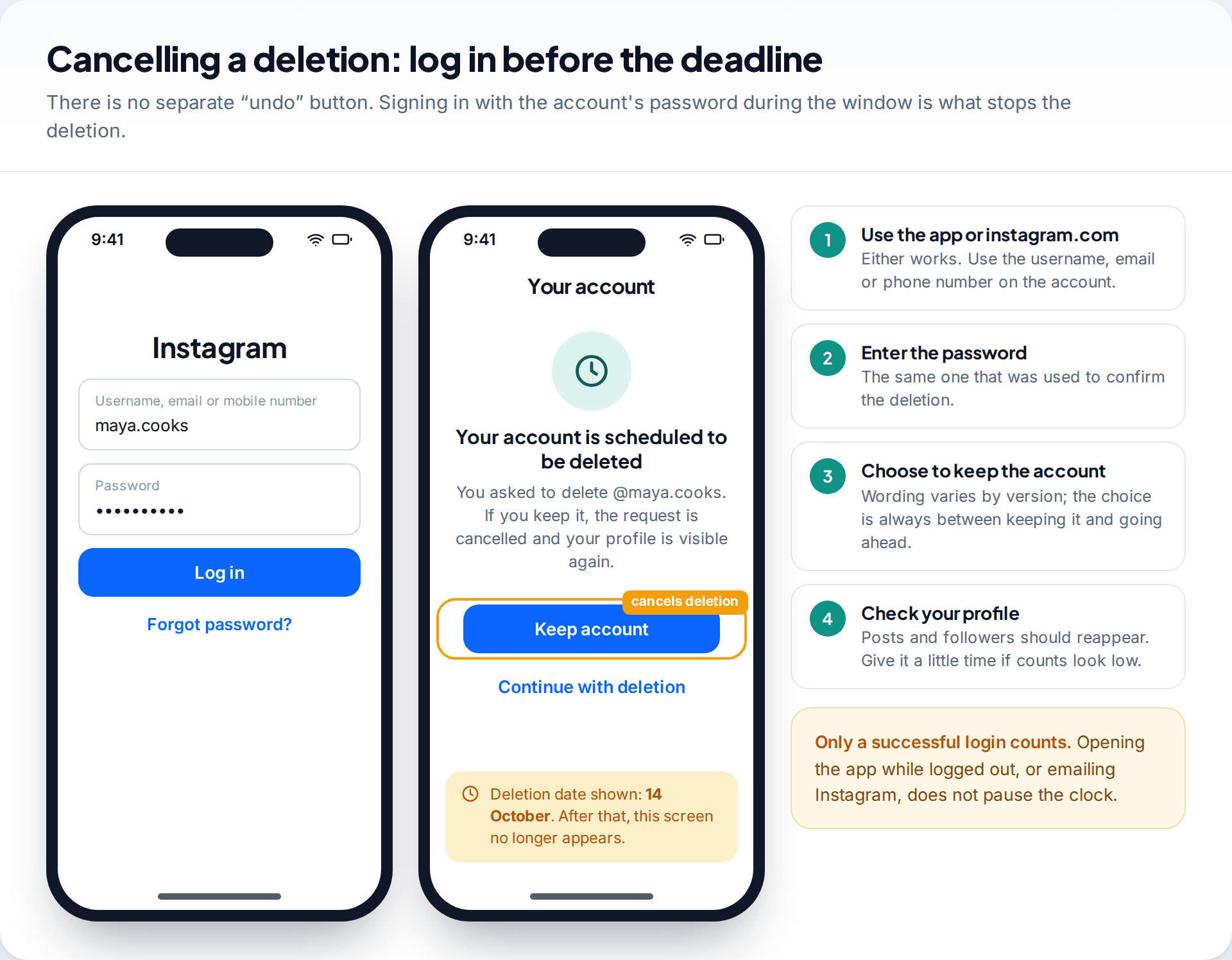
This is the easy case, and the process is short:
- Open Instagram in the app or at instagram.com.
- Log in with the username, email address or phone number on the account, and its password.
- Choose to keep the account when Instagram asks. You should see a screen explaining that the account is due to be deleted, with one option to keep it and one to go ahead.
- Look at your profile. Posts, followers and your bio should come back. Counts can take a little while to settle, so don’t panic if they look low at first.
That’s it. There is no email to send and no form to fill in. The login is the signal Instagram waits for, so a login that works cancels the request, even on the last day.
If you are still deciding whether to keep the account, put the deadline in your calendar a few days early. A deletion you started on purpose is easy to forget, and you shouldn’t count on a reminder arriving before the date. If you change your mind later but want a break, deactivation (below) gives you the pause without the deadline.
Don’t leave it until the last day, though. If anything goes wrong, such as a code that arrives late or a login check you need to repeat, you want days in hand, not hours.
If you can’t remember the password
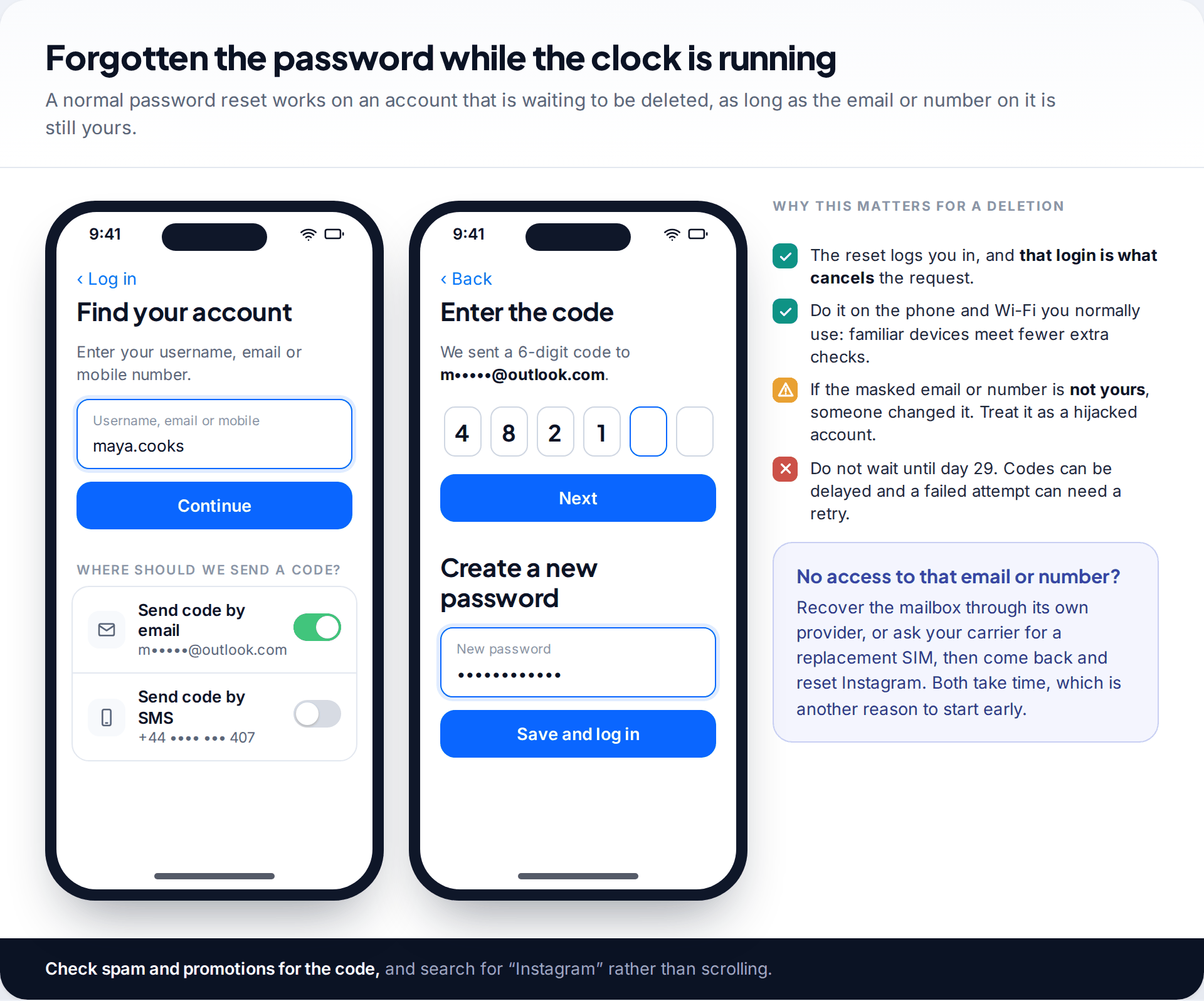
A forgotten password is the most common reason people miss the window. It doesn’t have to be. Instagram’s normal reset works on an account that is waiting to be deleted, because the account still exists.
On the login screen, tap Forgot password?, enter the username, email or phone number, and choose where to receive a code. Instagram shows a masked version of each contact, such as “m•••••@outlook.com”. Once you’ve entered the code and set a new password, you’re logged in. At that point Instagram should offer to keep the account.
The code never arrives
It is often filtered into spam or promotions, or sent to an address you no longer check.
Fix: search your mail for “Instagram”, check each address you might have used, then request the code by SMS instead if a number is listed.
The masked email or number isn’t yours
Someone changed the contact details before requesting the deletion.
Fix: stop requesting codes, because they are going to the other person. Follow the hacked-account route below.
You no longer have the email or phone number at all
Old work addresses and lost SIMs are the usual culprits.
Fix: try to get the address or number back first (an email provider’s own recovery, or a replacement SIM from your carrier), then reset Instagram.
Where the delete and deactivate options live, so you choose right next time
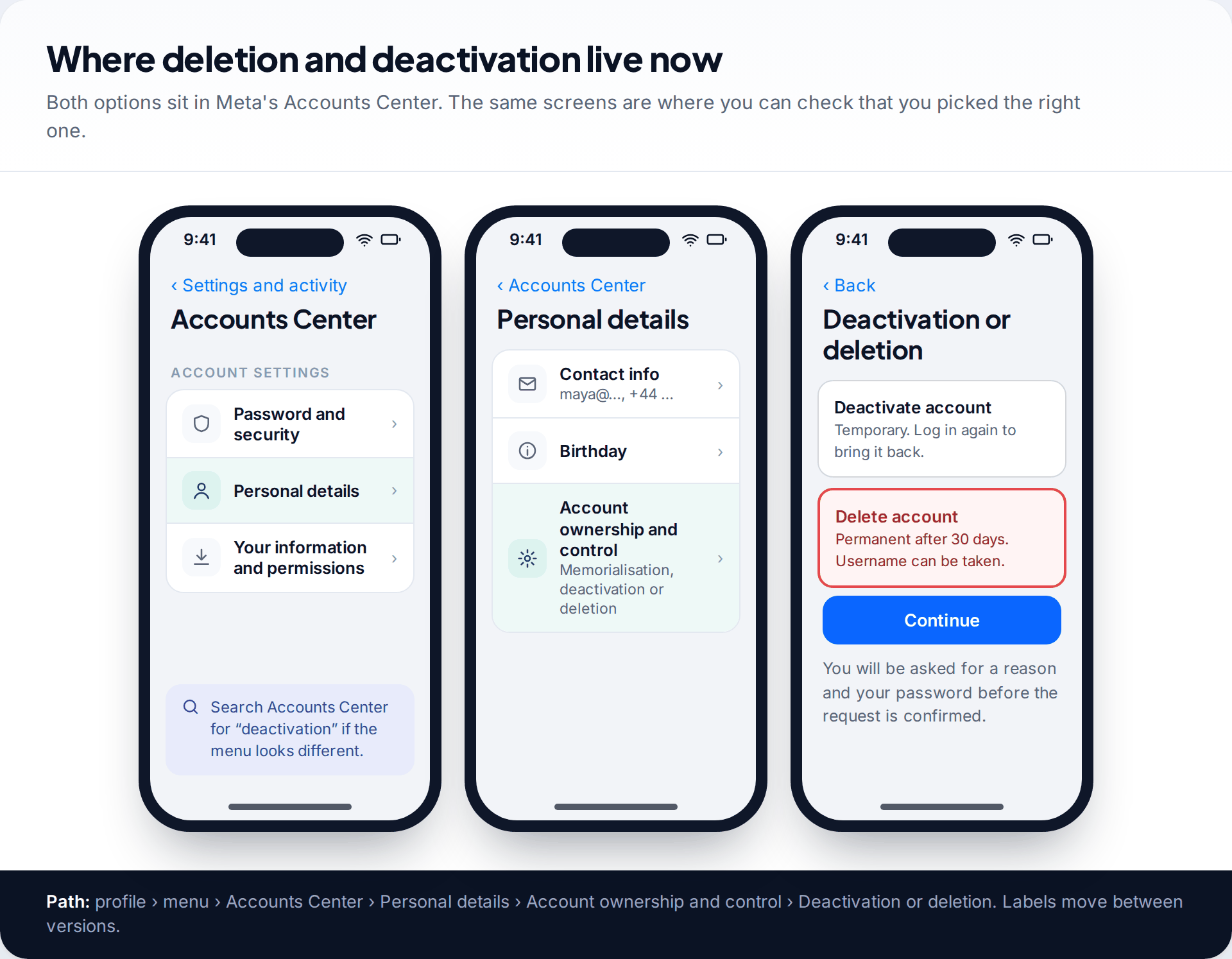
Many accidental deletions happen because someone meant to take a break and picked the wrong option. Both live in the same place. In the app, go to your profile, open the menu, then Accounts Center › Personal details › Account ownership and control › Deactivation or deletion. On the website, start from More › Settings. Meta moves these screens around, so if a label differs, search Accounts Center for “deactivation”.
If you want a pause, choose Deactivate account. It hides your profile until you return and keeps the username reserved for you. Choose Delete account only if you are sure. Before you do, request a copy of your data under Your information and permissions. The file can take a while to be prepared, and once the account is gone you can’t ask for it.
If the account was suspended, not deleted
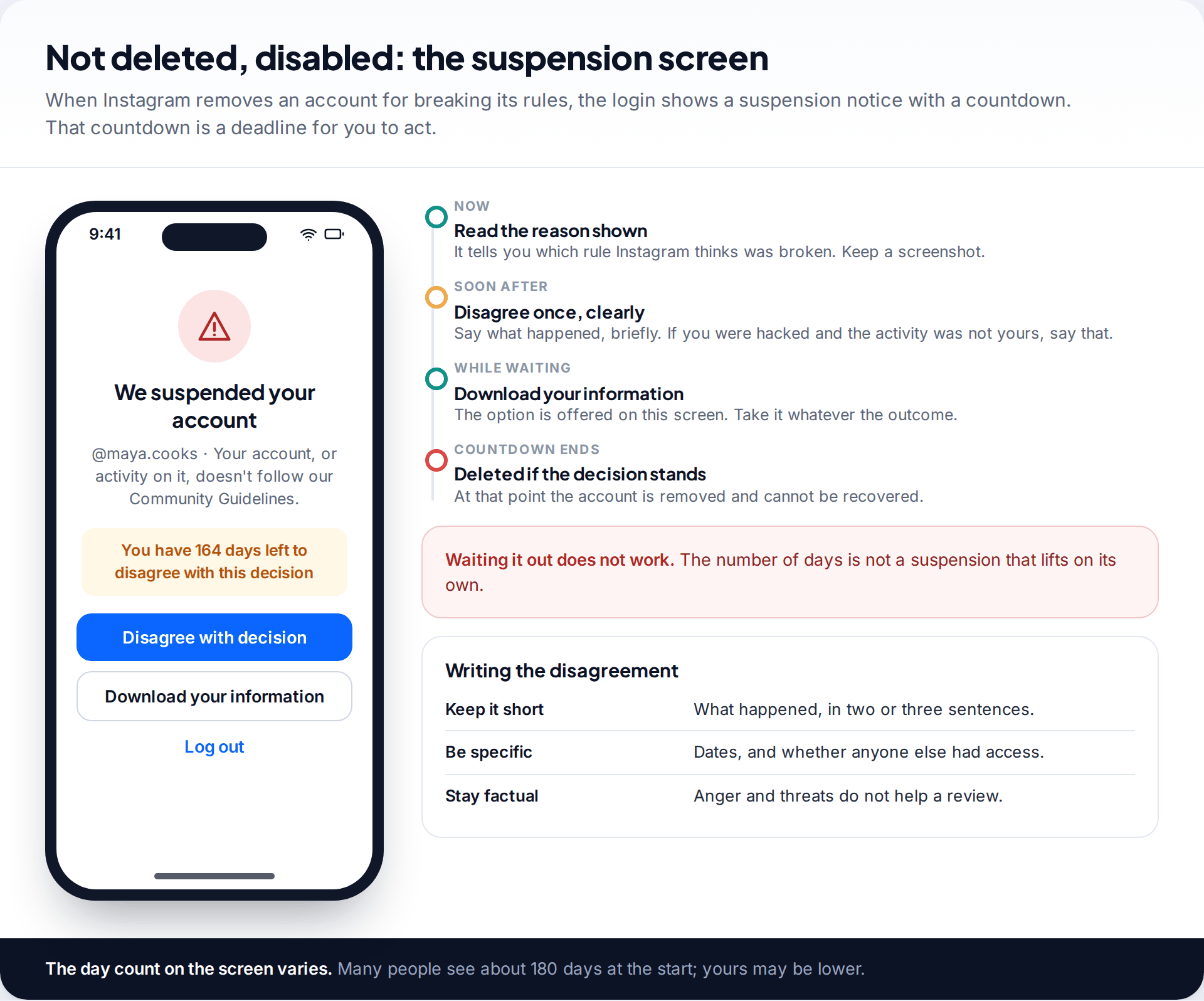
A suspension looks like deletion because the profile vanishes, but the login screen tells you otherwise. You’ll see a notice that the account was suspended, the reason Instagram gives, and a number of days left to disagree with the decision. Around 180 days is commonly shown at the start.
That number is not a sentence that expires on its own. If you don’t act, or your appeal is rejected, the account is permanently removed when the count runs out. Use the option to disagree, explain briefly what happened, and say so plainly if you believe the account was hacked and the activity was not yours. The same screen usually offers a download of your information. Take it now, whatever you expect the outcome to be.
If someone else deleted it
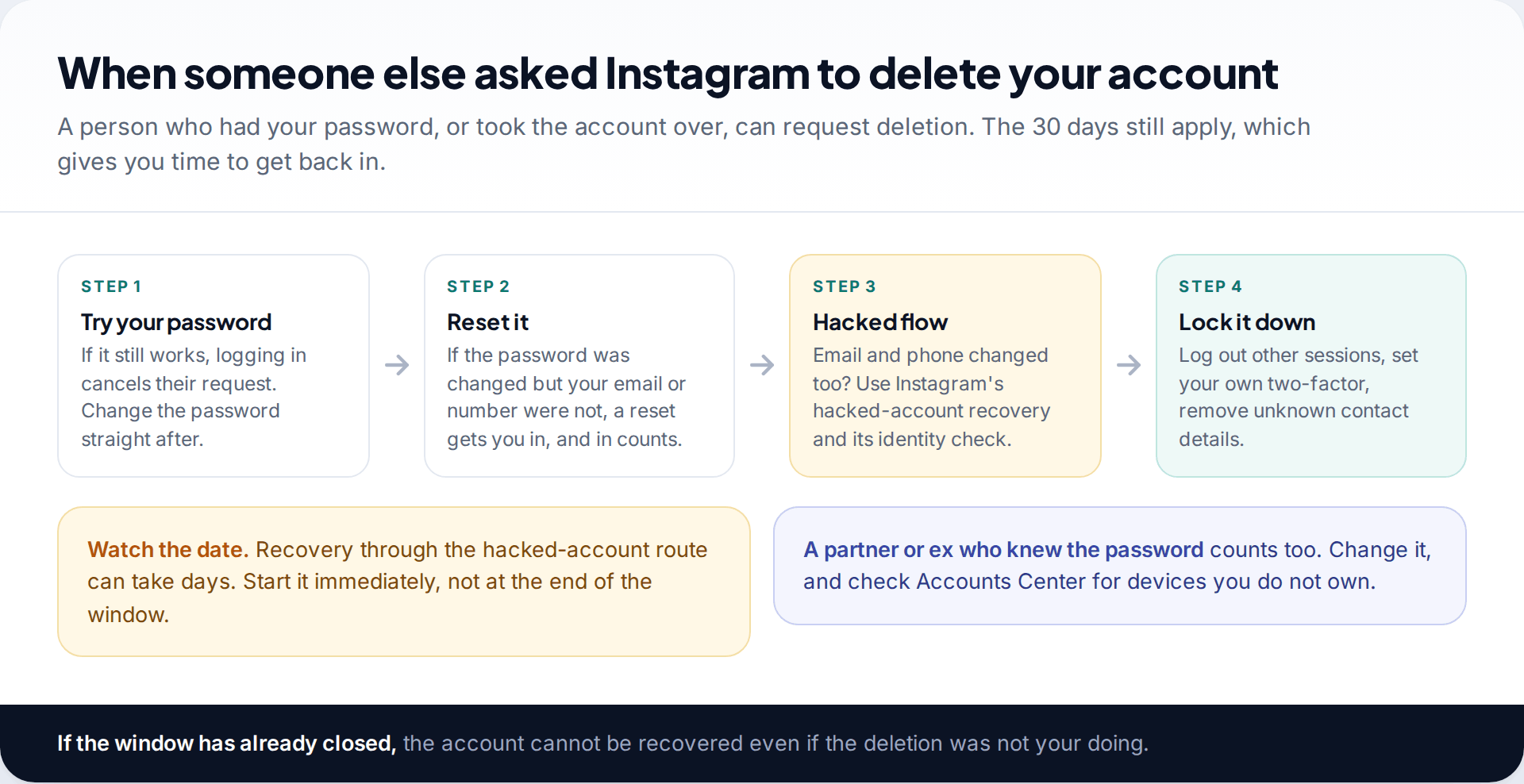
Deletion needs the account’s password, so a request you didn’t make means someone else had it. It might be a stranger who took the account over, or a person close to you who knew the password. Either way, the 30-day rule works in your favour. Get back in by any route before the window closes, and the deletion is cancelled along with it.
Try your password first, then a reset. If the email and phone number on the account have been changed too, you need Instagram’s hacked-account process and its identity check. That can take days, so start immediately. Our guide to getting a hacked Instagram account back covers each route and the video selfie check in detail.
Once you’re in, close the door behind you. Log out every session you don’t recognise, set a new password you’ve never used elsewhere, remove contact details that aren’t yours and turn on two-factor authentication.
Past 30 days: what you can and cannot get back
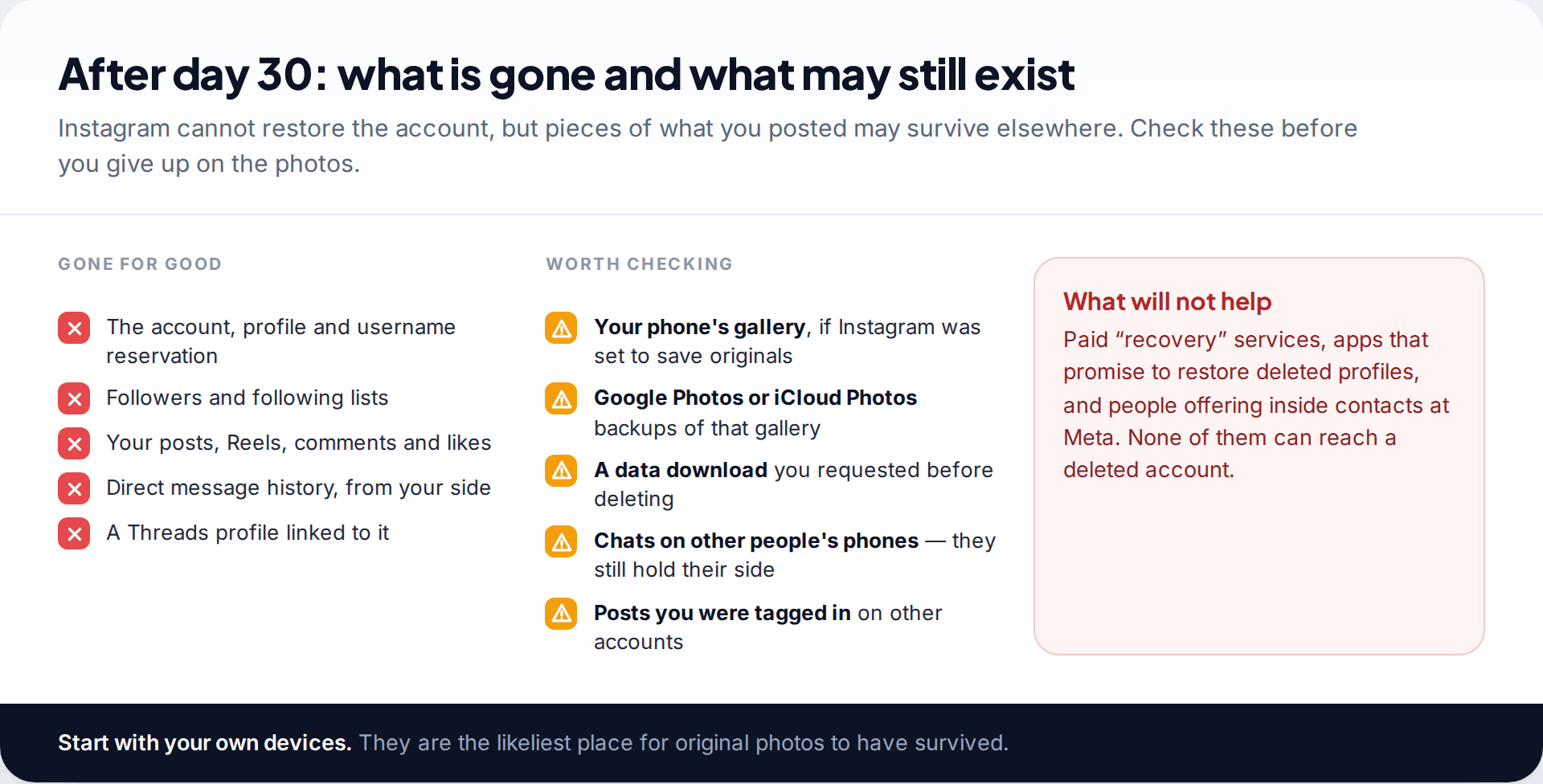
Once deletion completes, the account, username reservation, followers, posts, Reels, comments and your side of your direct messages are gone. A Threads profile tied to that Instagram account goes too. Instagram states that it can’t recover this, and there is no escalation route that changes the answer.
What often survives is the material itself. Check your phone’s gallery, especially if Instagram was set to save original photos, and any cloud photo backup you use. If you downloaded your information before deleting, that archive holds your posts and messages. Other people’s phones still have their copies of your conversations. Posts where friends tagged you stay on their accounts.
Ignore anyone selling deleted-account recovery. Apps, websites and “specialists” who claim they can restore a deleted Instagram profile can’t reach it. At best they take a fee. At worst they ask for your login details and use them.
Starting again with a new account
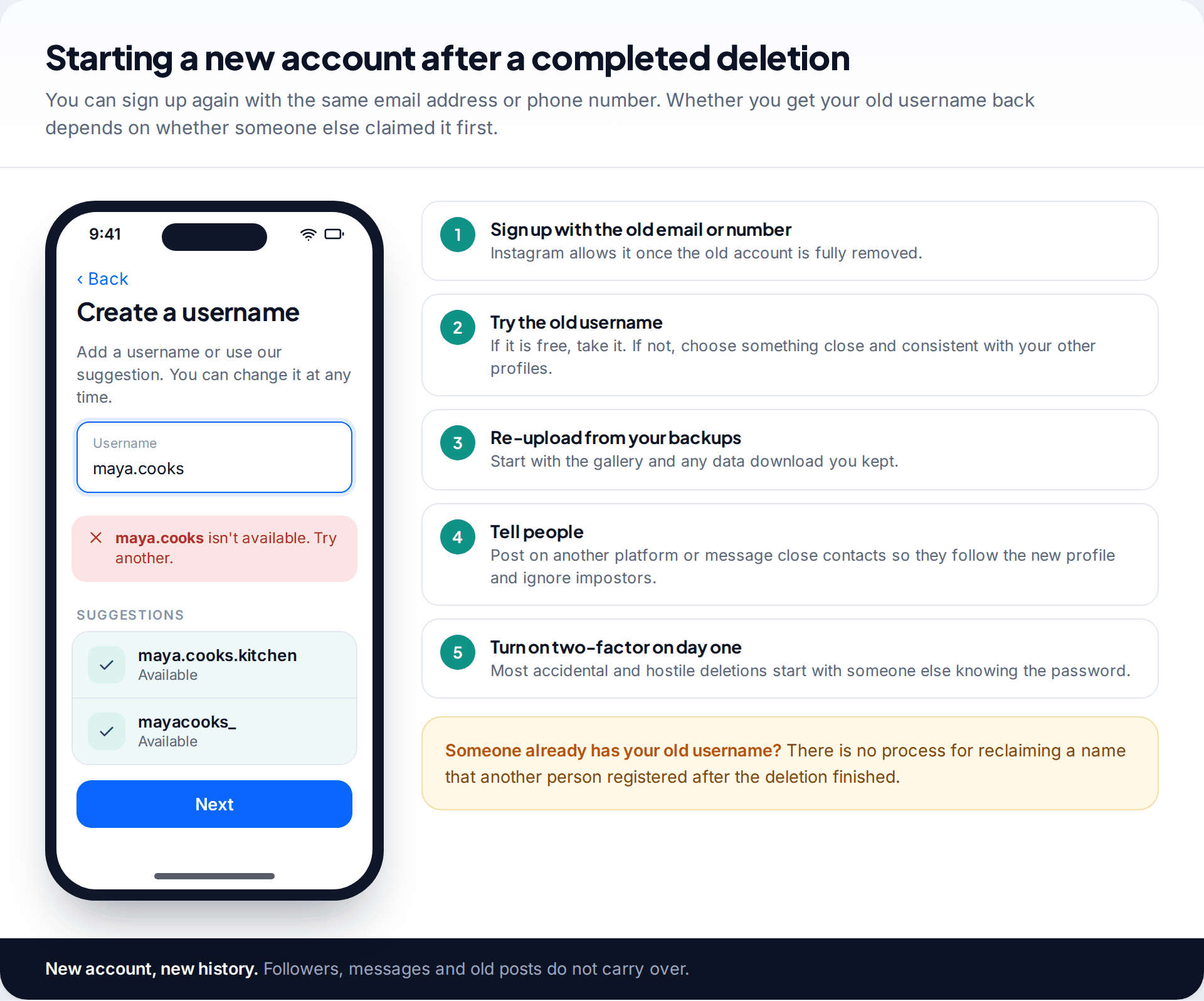
After a completed deletion, you can sign up again with the same email address or phone number. Try your old username. If someone else has claimed it in the meantime, there is no process for getting it back from them, so pick something close that matches your profiles elsewhere.
Rebuild from your backups, tell people where you’ve moved, and set up two-factor authentication from the first day. Our walkthrough on locking down an Instagram account covers the settings worth changing straight away.
How this page was put together
We checked the deletion and deactivation process, the 30-day window and the Accounts Center menu paths against Instagram’s help centre and current reporting in September 2026. The day count on suspension notices comes from the wording people are shown at login and varies from account to account. Menu labels change between app versions, so search your settings if a screen differs.
We did not test deletion on a live account, and we don’t recommend any paid recovery service. Our research and correction policy explains how guides like this are kept up to date.
Common questions
Can I recover a deleted Instagram account after 30 days?
No. Once the 30-day window has passed, Instagram permanently deletes the account and states it can’t be retrieved. You can create a new account, with the same email or phone number if you like.
How do I know how many days I have left?
Count 30 days from the day you confirmed the deletion. If you can’t remember, log in as soon as possible. If the deletion hasn’t happened yet, the login will offer to cancel it.
Will my followers and posts come back if I cancel?
Yes. Cancelling within the window restores the account as it was, including posts, followers and messages. Follower and post counts can take a short time to show correctly.
Can someone see my profile during the 30 days?
No. The profile is hidden while the deletion is pending, much like a deactivated account, until you log in and keep it.
What’s the difference between deactivating and deleting?
Deactivating hides your account until you log in again, with no deadline, and keeps your username. Deleting starts a 30-day countdown, after which the account and username are released for good.
Can Instagram support restore a deleted account?
Not after the window. Within the window you don’t need support at all, because logging in cancels the request.
Can I get my old username back?
Only if nobody else has taken it since the deletion finished. Deleted usernames become available to anyone.
Looking for a tool to go with this? TheTruthSpy is a free parental control app for Android that stays visible on the child's phone. If it fits your family, see the Social media alerts feature.
Related guides
How to Fix a Phone That Keeps Freezing or Restarting
Fixes for a frozen or rebooting iPhone or Android phone, from a one-minute force restart to recovery mode, with a…
What to Do If Your Phone Gets Wet
Dropped your phone in water? What to do in the first five minutes, hour and day, what IP68 really means,…
Phone Not Charging? How to Find the Cause and Fix It
A ten-minute elimination test for a phone that won't charge: cable, adapter, port, software and battery, plus what liquid, heat…
Parental controls your child can see
Location, screen time limits, a web filter and alerts from notifications — free, and visible on your child's phone. Pair a phone in about ten minutes.
Android · Free to set up · Visible on your child's phone