Facebook Account Hacked? The Recovery Routes Meta Actually Offers

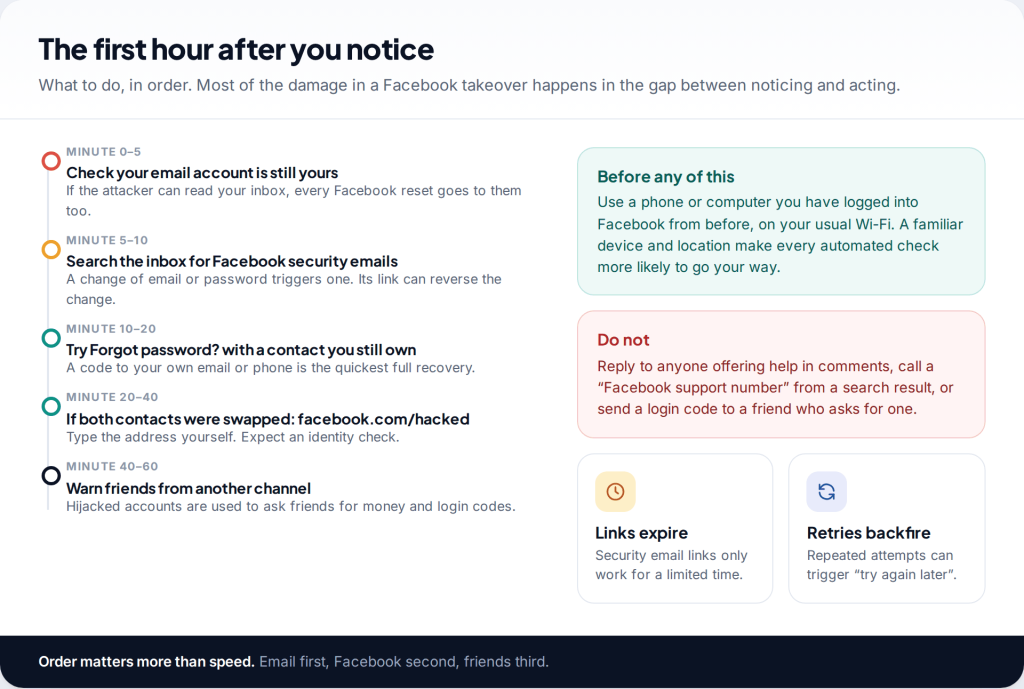
Before you try to recover a hacked Facebook account, check one thing: can you still get into the email account linked to it? Nearly every route Meta offers runs through that inbox. If it is safe, look there for Facebook’s security email and use its link to reverse the change. If not, use Forgot password? with a contact you still own, and if the attacker replaced both, go to facebook.com/hacked.
Why the email account comes first
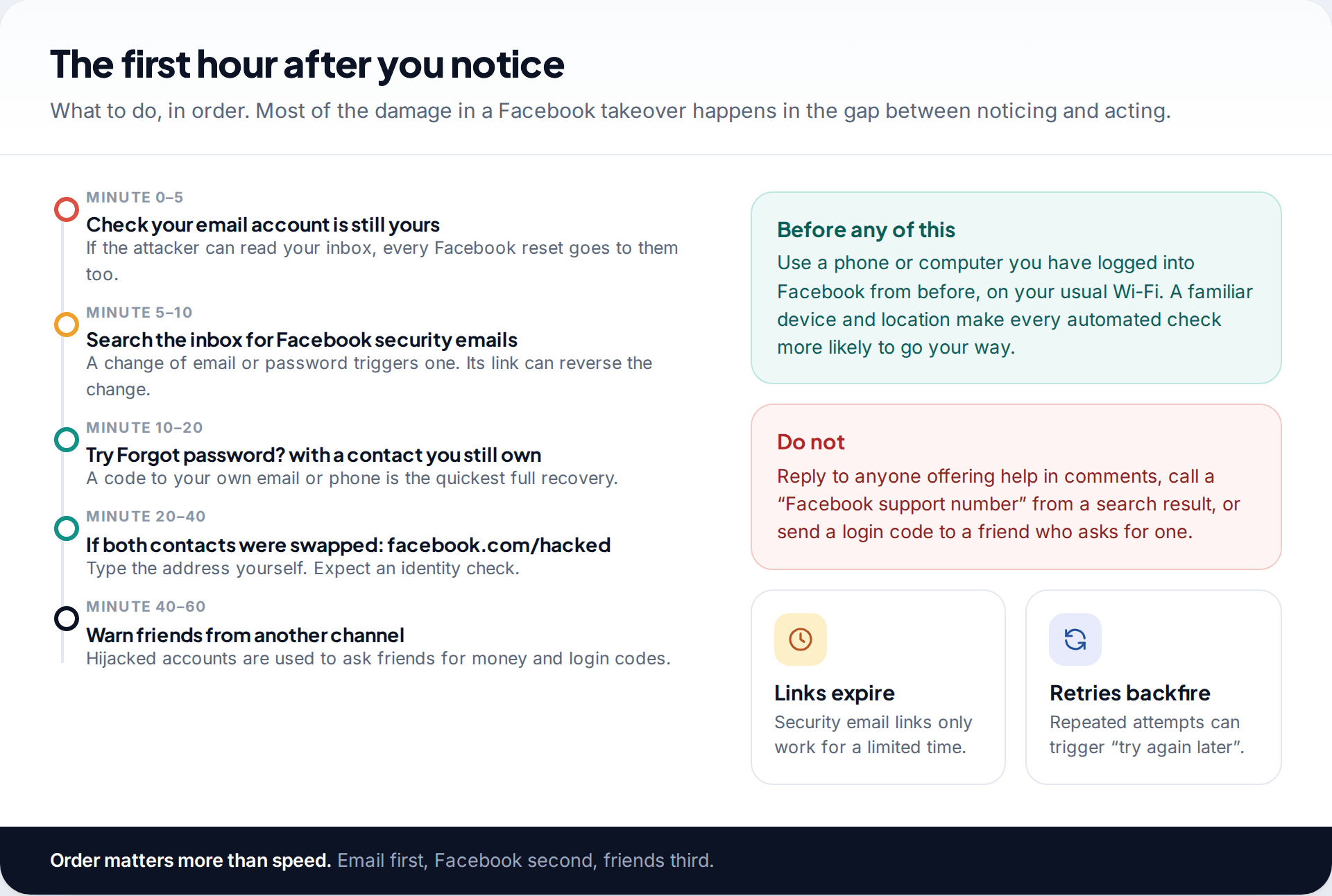
People who lose a Facebook account usually head straight for the login screen. That skips the question that decides whether any of it will stick. A reset code, a login link and a “secure your account” email all go to your inbox. If someone else can read that inbox, they see the code at the same moment you do, and they can reset Facebook straight back.
So spend five minutes on the email account first. Sign in, change its password, check its recent sign-in activity, and look for forwarding rules or filters you didn’t create. Attackers add these so copies of your mail keep reaching them. If you can’t get into the email account, recover that before anything else; our guide to getting a hacked email account back covers Gmail, Outlook and Yahoo.
Do the same check for your phone number if it’s on the account. If your phone suddenly lost signal around the time of the hack, ask your mobile provider whether your SIM was swapped or your number moved. A number the attacker controls receives your SMS codes.
Route 1: the security email and its reversal link
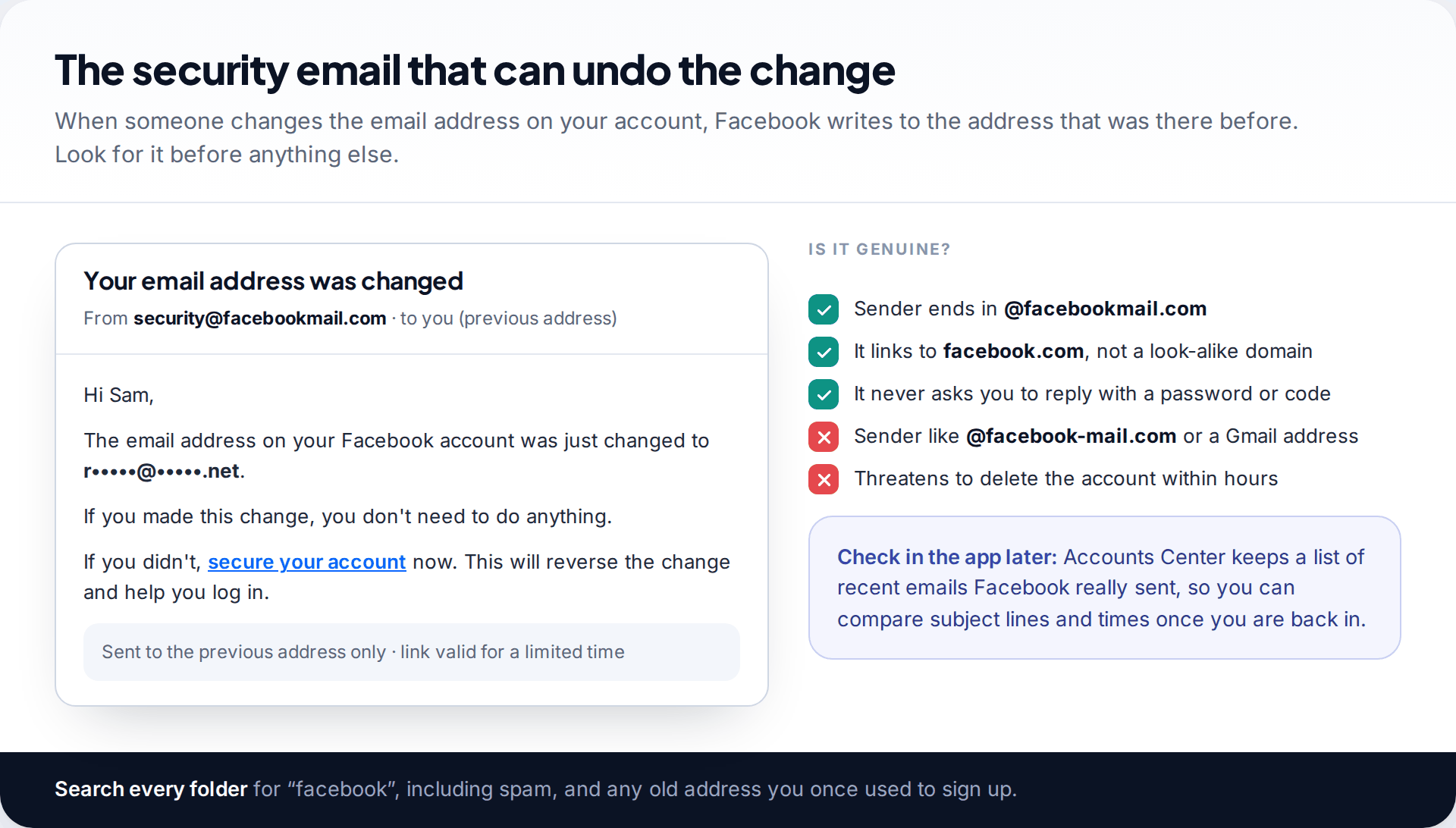
When the email address, phone number or password on a Facebook account changes, Facebook sends a notice to the contact that was there before. If an attacker swapped your email for theirs, that notice went to you. It includes a link, usually worded as a way to secure your account if you didn’t make the change, which reverses it and starts a password reset.
These links only work for a limited time, so this is the one step where speed really matters. Search every folder for “facebook”, including spam and any older address you used when you first signed up.
Check the sender before you click. Genuine security email from Facebook comes from an address ending in @facebookmail.com. Phishers use near-misses with extra hyphens or different domains, and fake “your account will be deleted” warnings are a common way accounts are taken in the first place. When you’re back in, Accounts Center shows a list of the recent emails Facebook actually sent, which is the reliable way to confirm a doubtful one.
Route 2: Forgot password? with a contact you still own
If there’s no security email, or the link has expired, go to the Facebook login page and tap Forgot password?. On a computer you can go straight to facebook.com/login/identify. Enter an email address or phone number linked to the account. If Facebook doesn’t find it, try the other one, or search by name.
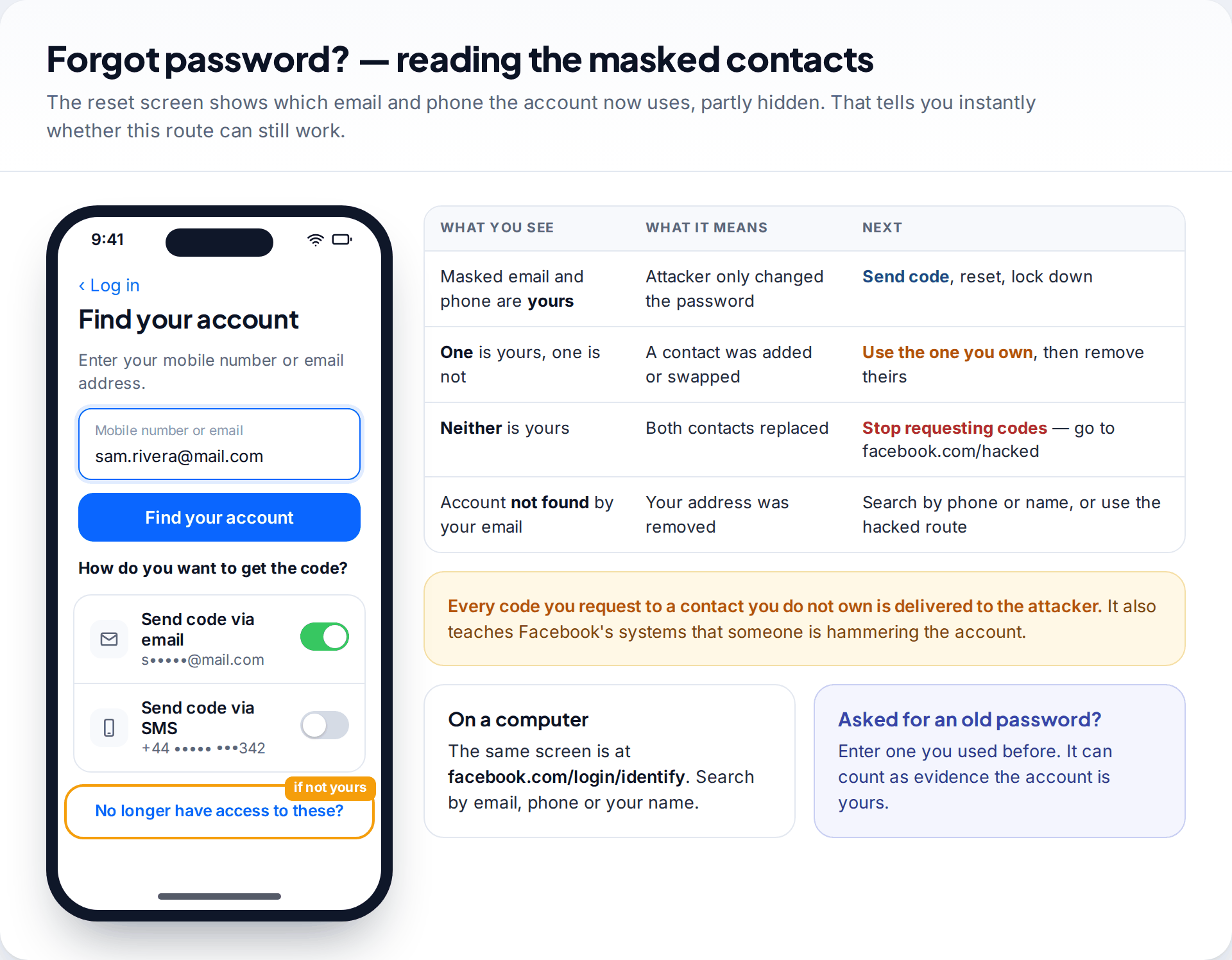
The next screen offers to send a code and shows each contact partly hidden, such as “s•••••@mail.com”. Read it carefully, because it tells you what the attacker changed. If both are yours, send the code, set a new password and go straight to the lockdown below. If only one is yours, use that one. If neither is yours, don’t request anything: every code will be delivered to the attacker. Tap No longer have access to these? instead, or move to Route 3.
Try an old password if you’re asked. The recovery flow sometimes asks for a password you used before. Entering an old one correctly counts in your favour even though it no longer logs you in.
Route 3: recover a hacked Facebook account when the email and phone were changed
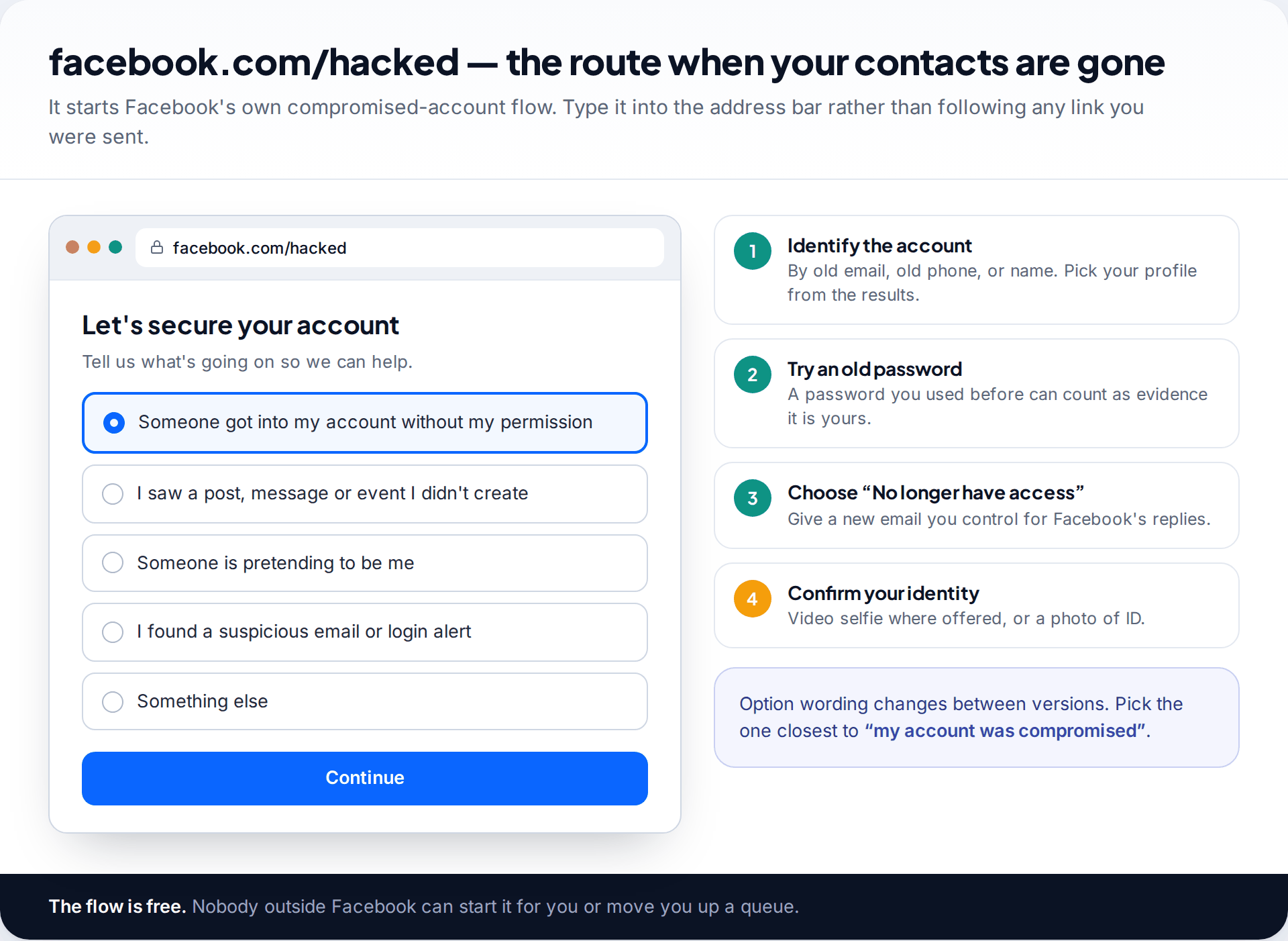
This is where most people who search for help are stuck. The attacker has replaced both contacts, so Facebook can’t send a reset that reaches you. Its answer is the compromised-account flow at facebook.com/hacked.
- Type facebook.com/hacked into the browser on a device you have used Facebook on before, ideally on your usual Wi-Fi.
- Choose the option saying someone got into your account without permission.
- Find your account by an old email, old phone number or your name, and select the right profile.
- Enter an old password if asked, then follow the prompts for when you no longer have access to the listed contacts.
- Give an email address you control now, and make sure its own security is sorted, because Facebook’s replies go there.
- Complete the identity check you are offered, then wait for the reply, checking spam.
Two habits help. Submit once and then leave it; Facebook doesn’t publish a timeframe, and repeated submissions can trigger “try again later” blocks that push you further back. And keep your details consistent across attempts: the same account, the same contact email, the same name.
Passing the identity check: video selfie or ID
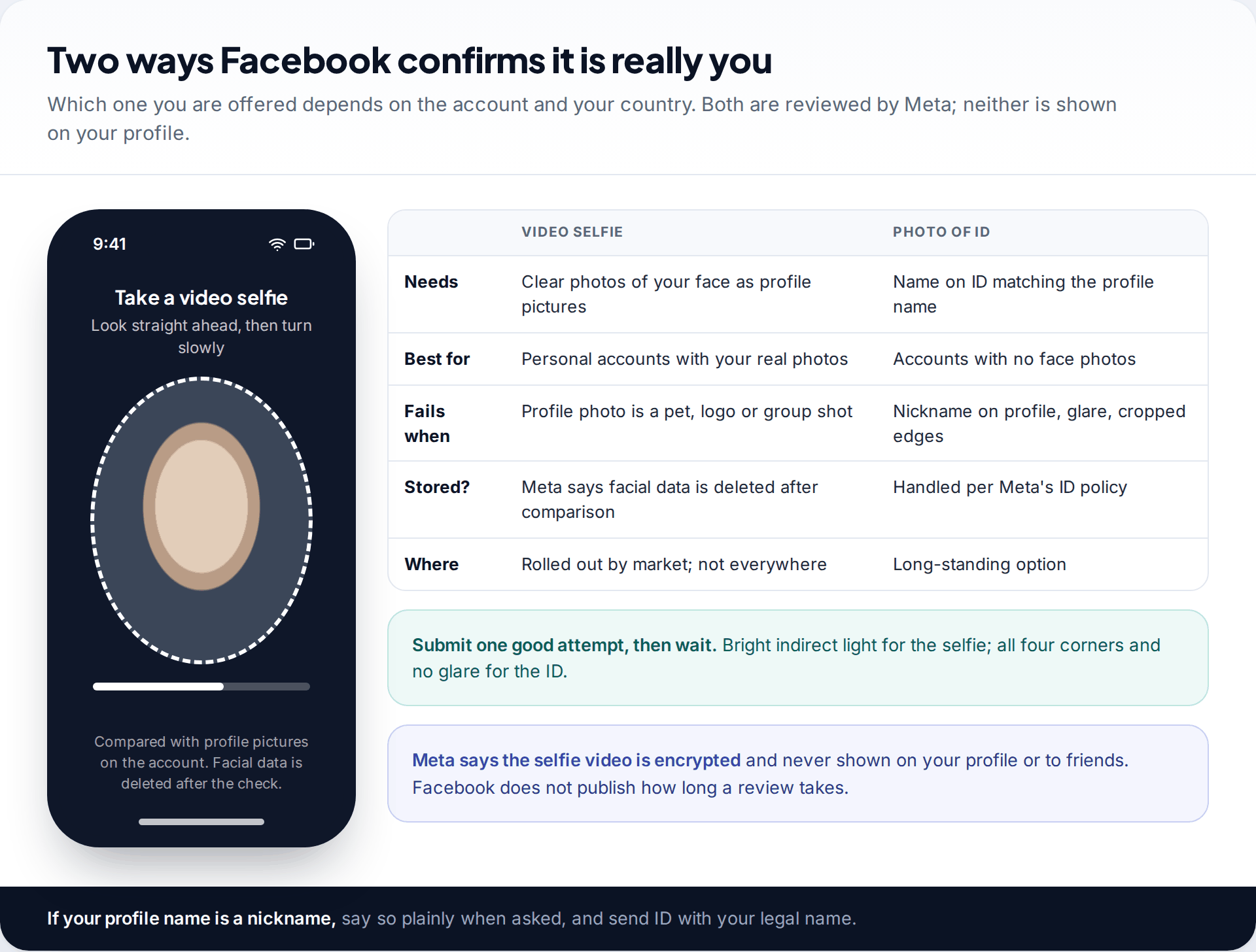
Facebook confirms your identity in one of two ways. The newer one is a video selfie: you record a short clip turning your head, and Meta compares it with the profile pictures on the account. In its October 2024 announcement of the test, Meta said the video is encrypted, never shown on your profile, and that facial data is deleted straight after the comparison whether or not it matches. It has been introduced market by market, so you may not be offered it.
The older route is a photo of official ID, such as a passport or driving licence. The most common reason it fails is a name mismatch. If your profile says “Sammy R” and your passport says “Samantha Rivera”, explain that the profile name is a nickname when asked. Photograph the whole document in good light, with all four edges showing and no glare.
What cannot be verified. If the account has no photos of your face, the selfie has nothing to compare against. If it was opened under a name that appears on no document you hold, ID matching may fail too. Recovery is then slower and not guaranteed, and it’s better to know that before you start.
Route 4: the attacker added their own two-factor authentication
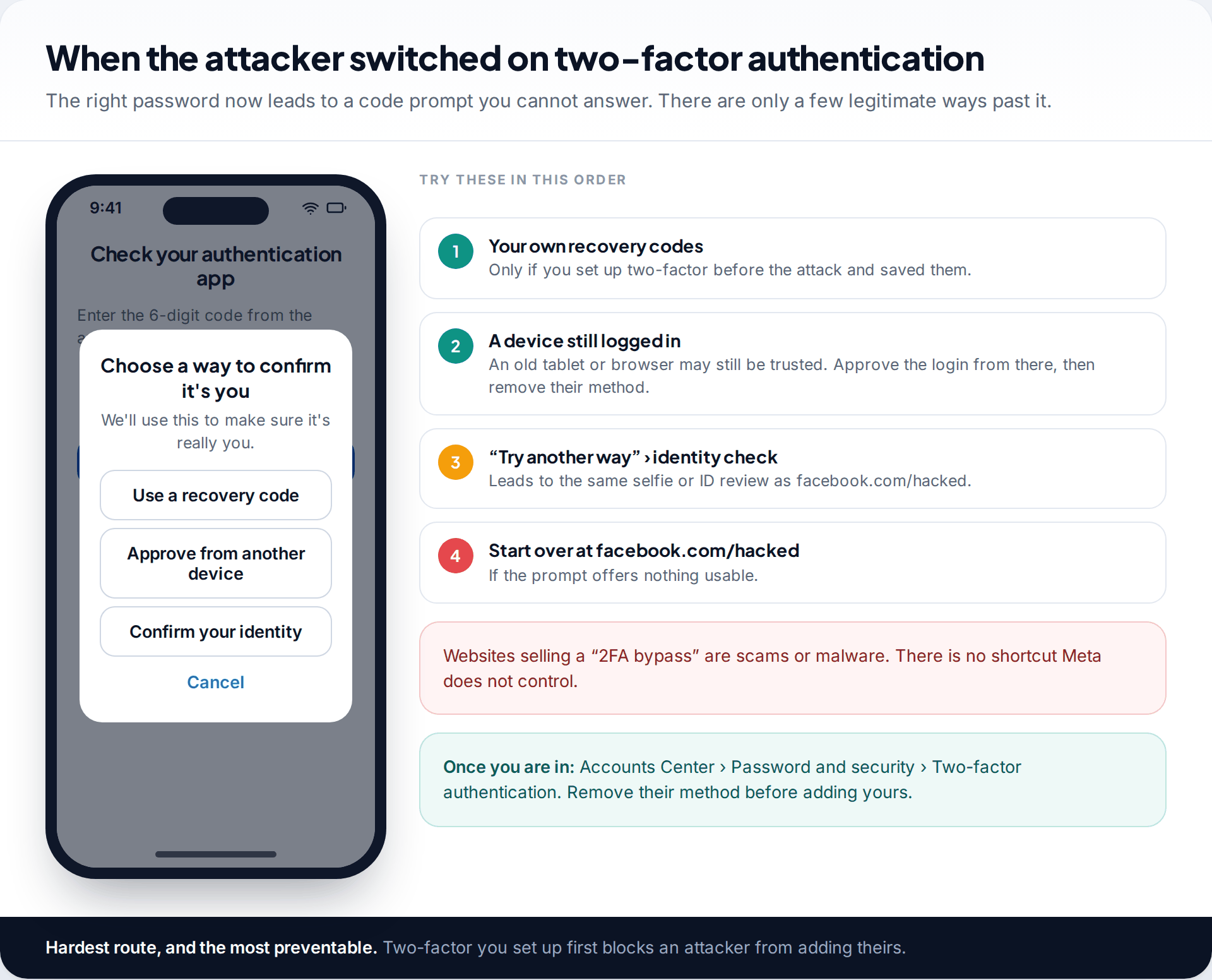
More and more takeovers end with the attacker turning on two-factor authentication using their own app. Now even the right password leaves you facing a code prompt you can’t answer.
Work through the options in order. If you had set up two-factor yourself before the attack and saved the recovery codes, one of them still works. Next, look for any device that still has Facebook open, such as an old phone, a tablet or a work browser, and approve the login from there. If neither exists, tap Try another way on the code screen. It leads to the same selfie or ID review as facebook.com/hacked.
Ignore anyone selling a “2FA bypass”. There isn’t one outside Meta’s own review, and those tools are scams or malware.
Hacked, cloned or disabled: make sure you are fixing the right problem
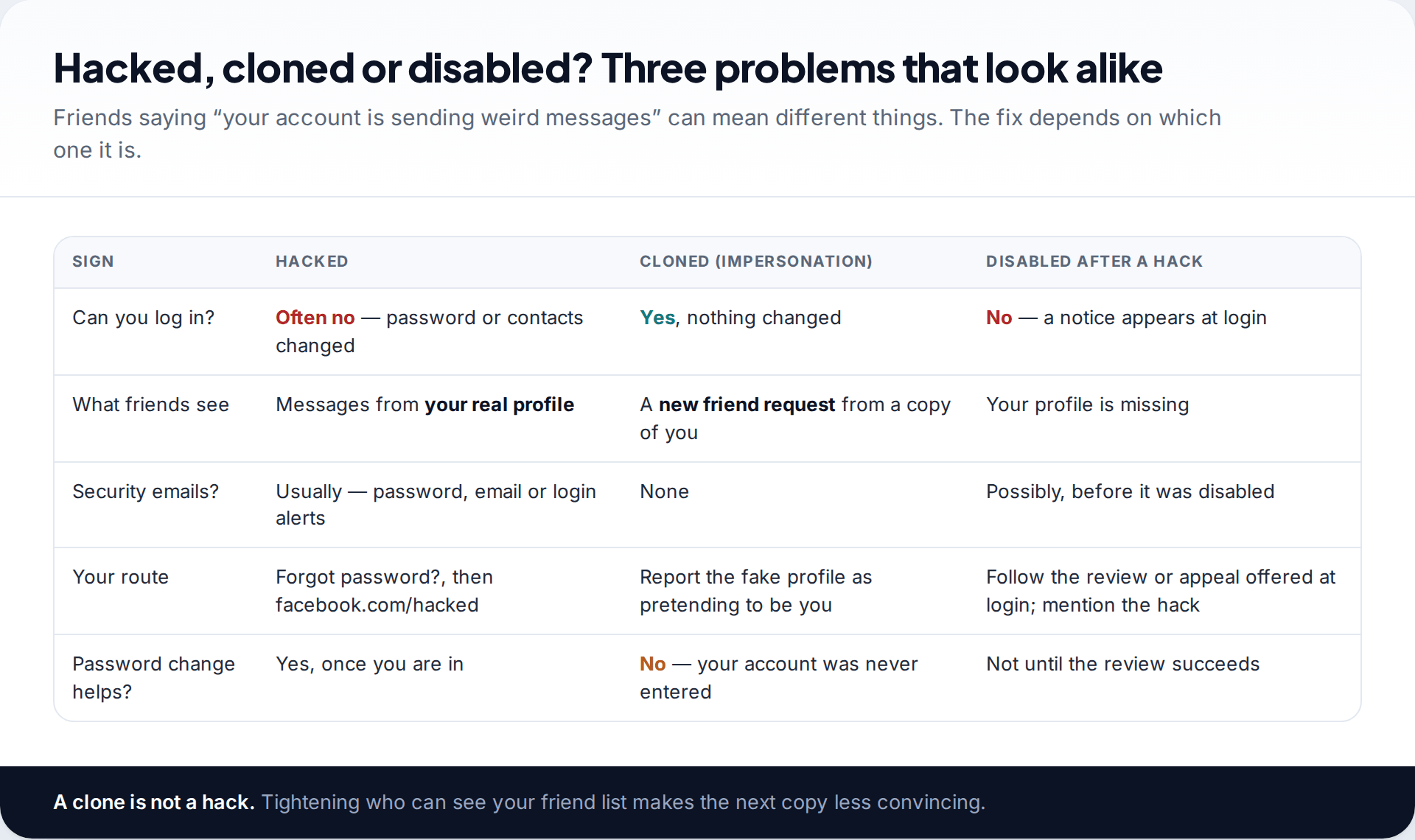
A friend saying “you just sent me a weird message” doesn’t always mean a hack. If you can still log in and nothing on your account has changed, check whether the message came from a second profile using your name and photos. That’s impersonation. The fix is to report the fake profile as pretending to be you, and to make your friend list less visible so the next copy is harder to build.
If the attacker’s spam got the account disabled, you’ll see a notice when you try to log in, usually with an option to request a review. Say plainly that the account was compromised and the activity wasn’t yours. If the attacker requested deletion, Facebook holds the account for 30 days before permanent deletion, and logging back in during that time lets you cancel it. After that, it’s gone.
When recovery goes in circles
“You can’t use this feature right now” or “Try again later”
Too many attempts in a short time have triggered a temporary block.
Fix: stop for a day or more. Come back on a familiar device and network and make one careful attempt.
The code keeps going to an address you don’t recognise
The attacker’s contact is still the only one on the account.
Fix: stop requesting codes and use “No longer have access to these?” or facebook.com/hacked.
You get back in, and lose it again within hours
The attacker still has your email, an open session, or their own two-factor method.
Fix: secure the email first, then log out every session before changing the password.
The ID keeps being rejected
Usually the name doesn’t match, or the photo is blurred, cropped or shows glare.
Fix: send one clear photo of the whole document and explain any nickname. Don’t resubmit the same image.
Once you are back in: close every door the attacker opened
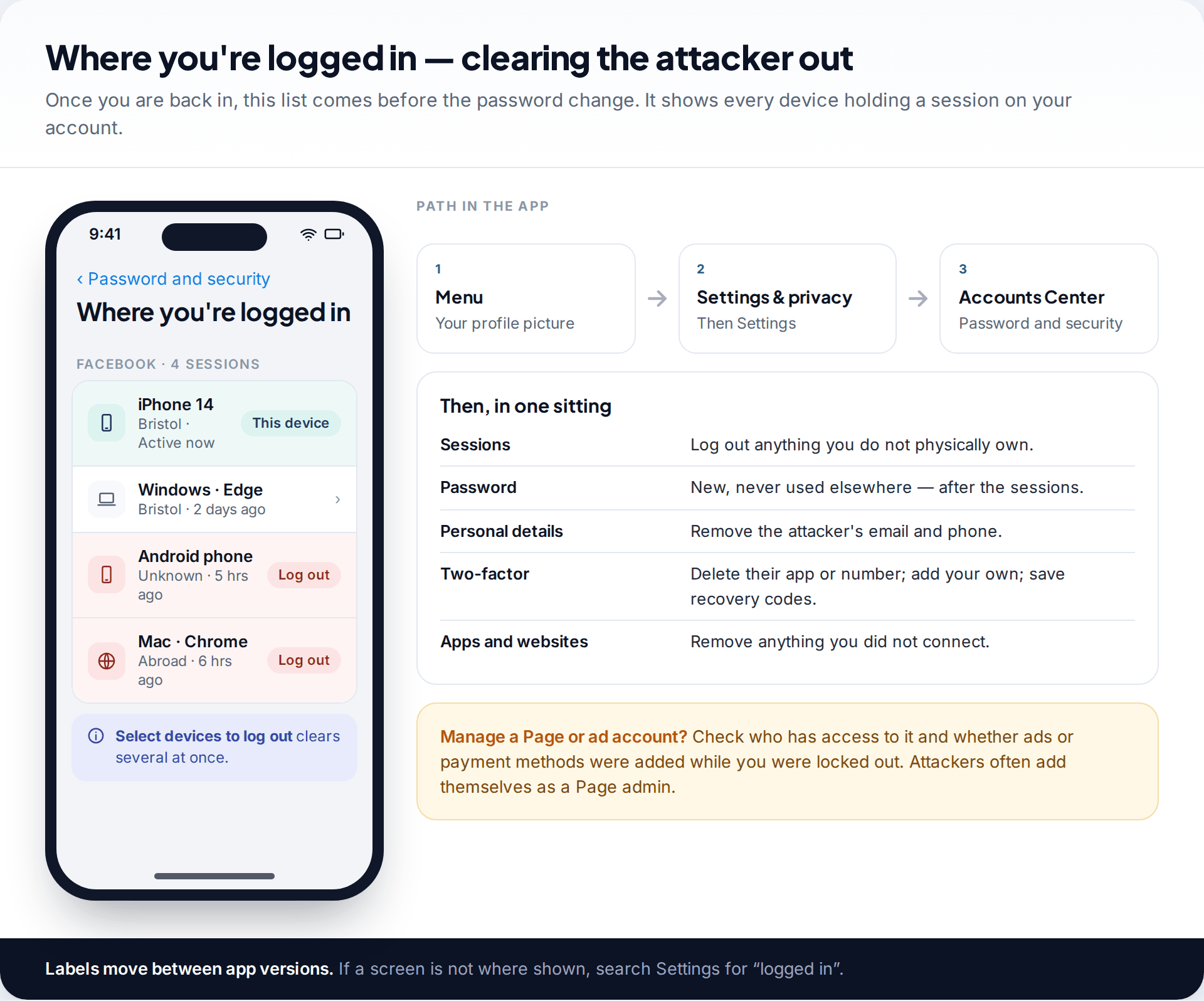
Getting the login back doesn’t undo what the attacker set up. Do all of this in one sitting, starting from Menu › Settings & privacy › Settings › Accounts Center › Password and security:
- Where you’re logged in: log out every device you don’t own.
- Change password: choose one you’ve never used anywhere else. If the old one was reused, change it on those sites too. Our passphrase method makes a unique one easy to remember.
- Personal details: remove any email address or phone number that isn’t yours.
- Two-factor authentication: delete the attacker’s method, add an authentication app or a passkey, and store the recovery codes away from your phone.
- Apps and websites: remove anything you didn’t connect.
- Pages and business assets: if you manage a Page or ad account, check who has access and whether any ads or payment methods were added.
- Posts, Messenger and Marketplace: delete anything the attacker posted or sent in your name.
Warn your friends, and watch for the recovery scam
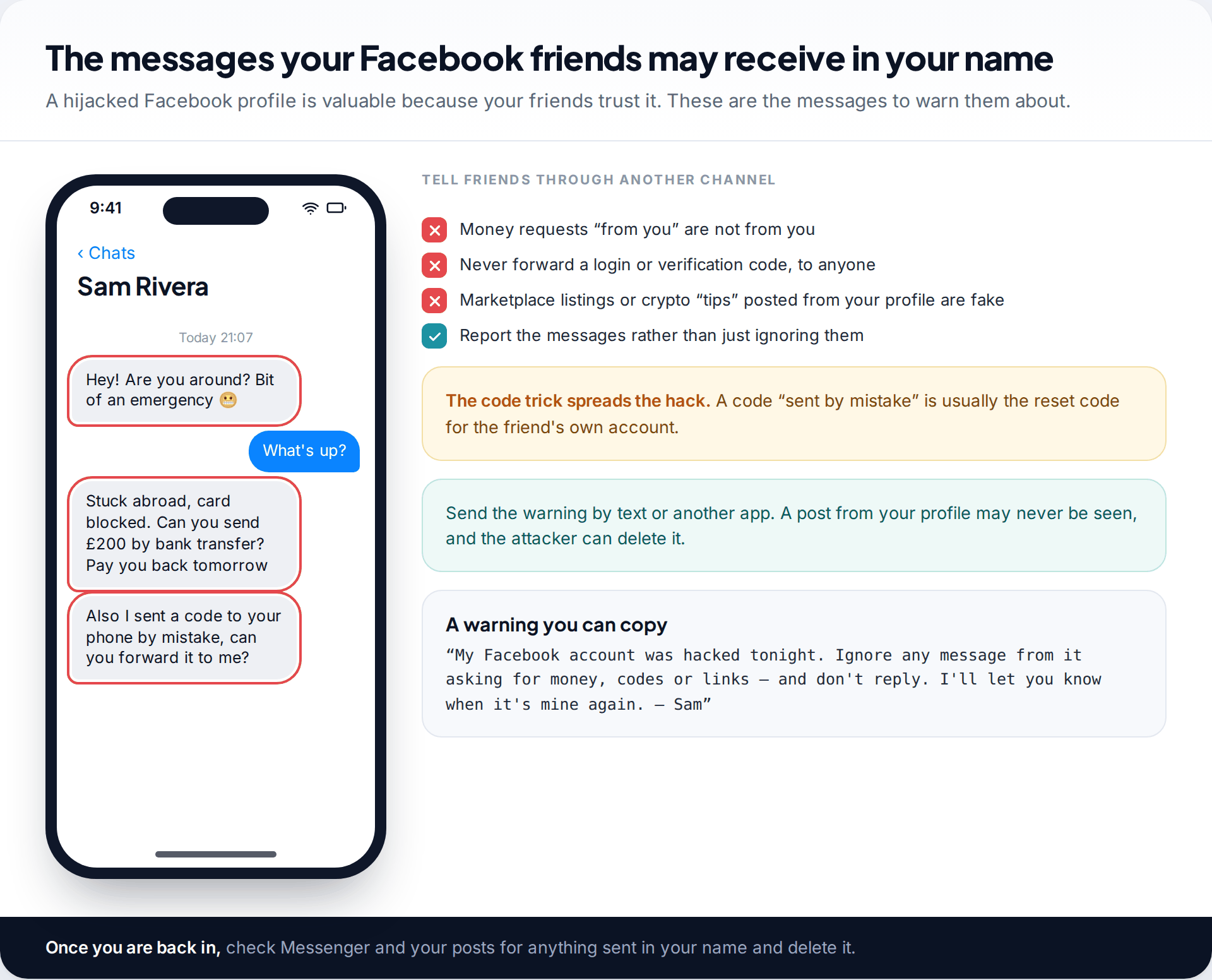
A hacked profile is valuable because people trust it. Attackers use it to ask friends for urgent money, to post fake Marketplace listings or investment “tips”, and to ask for a code “sent by mistake”. That code is usually a reset code for the friend’s own account, which is how one hack becomes several.
The second scam targets you. Posting publicly that you were hacked brings “recovery experts” into your comments, and search results are full of fake “Facebook support” phone numbers. None of them can start or speed up Meta’s review, and many want a fee, your password or a login code. Meta’s personal-account recovery is free. If you subscribe to Meta Verified, its account support is reached from inside the app, not through a number found online.
How this page was put together
We checked the routes against Facebook’s help centre pages on hacked accounts and account recovery and Meta’s announcement of video selfie verification in September 2026. Where Facebook’s labels differ between the app, the website and different regions, we describe what each step does. Search Settings for the same word if a label isn’t exactly where we say.
We don’t link to or recommend any paid recovery service; every route here is free. You can read about how we research and correct our guides.
Common questions
How long does it take to recover a hacked Facebook account?
With the security email link or a reset code sent to a contact you own, minutes. Through facebook.com/hacked with an identity check, it can take days, and Facebook doesn’t publish a fixed timeframe. Submitting repeatedly doesn’t make it faster.
Can I recover my Facebook if the hacker changed my email and phone number?
Often, yes. Use facebook.com/hacked, identify the account by your old email or phone, choose the option for when you no longer have access, and complete the video selfie or ID check.
Is there a Facebook phone number I can call?
Facebook doesn’t offer general phone support for personal account recovery. Numbers in search results claiming to be Facebook support are a common scam. Use the in-app and facebook.com/hacked routes, or Meta Verified support if you subscribe.
Can a friend vouch for me to get my account back?
Not any more. Facebook’s Trusted Contacts feature, which let friends send you recovery codes, was withdrawn in 2022. Your recovery options now are your email, your phone, saved recovery codes and the identity check.
What if my account was hacked and then deleted?
Deletion isn’t immediate. Facebook waits 30 days before permanently deleting an account, and logging back in during that time lets you cancel it. Recover access by any route above within that window and the account comes back as it was.
Will the hacker get back in after I recover it?
Not if you finish the lockdown: secure your email, log out every other session, change the password, remove their contacts and two-factor method, and add your own recovery codes. Skipping one of these is how accounts get taken twice.
Looking for a tool to go with this? TheTruthSpy is a free parental control app for Android that stays visible on the child's phone. If it fits your family, see the Social media alerts feature.
Related guides
How to Check If Your Email Was in a Data Breach
Check if your email was in a data breach for free, then act on what leaked: passwords, card details or…
How to Start Using a Password Manager
Switch to a password manager without stress: built-in or standalone, protecting the main password, and a first-hour plan for the…
How to Tell If Your Phone Has a Virus or Malware
Most 'virus' signs have ordinary causes. How to check an iPhone or Android phone for real malware, remove it, secure…
Parental controls your child can see
Location, screen time limits, a web filter and alerts from notifications — free, and visible on your child's phone. Pair a phone in about ten minutes.
Android · Free to set up · Visible on your child's phone