Stop Someone From Tracking Your Location: Every Route, Closed One by One

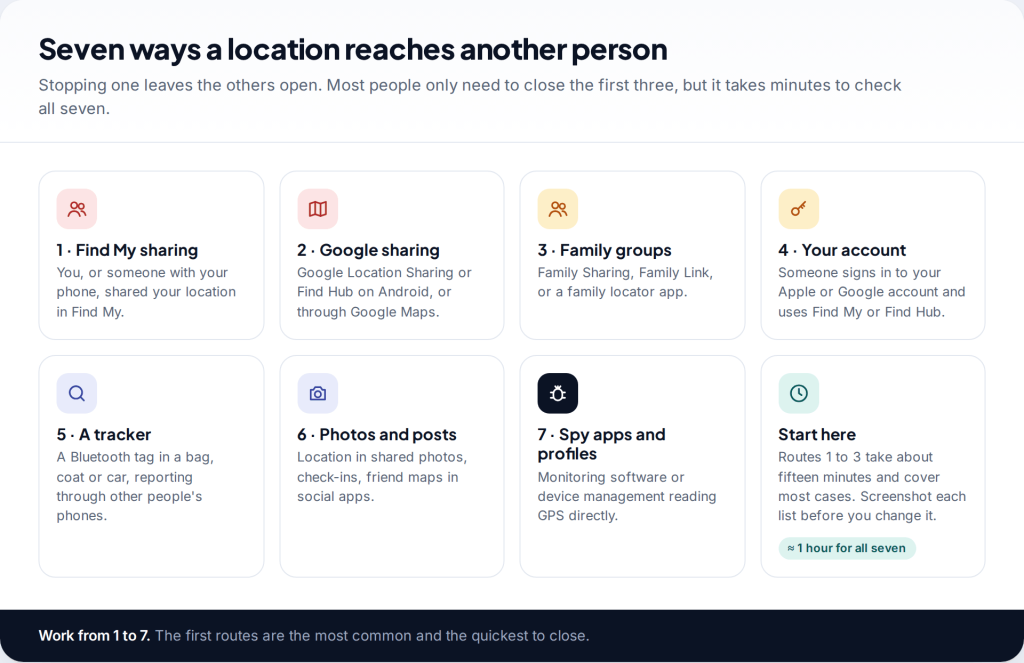
If someone always seems to know where you are, there is a way to stop someone tracking my location for good: find every route your location takes and close each one. There are seven. Location sharing in Find My or Google, family groups, your account, a hidden tracker, photos and posts, and monitoring software. Most take a few minutes. Before you start, decide whether the other person could react badly when your location disappears.
The seven routes, and why closing one is not enough
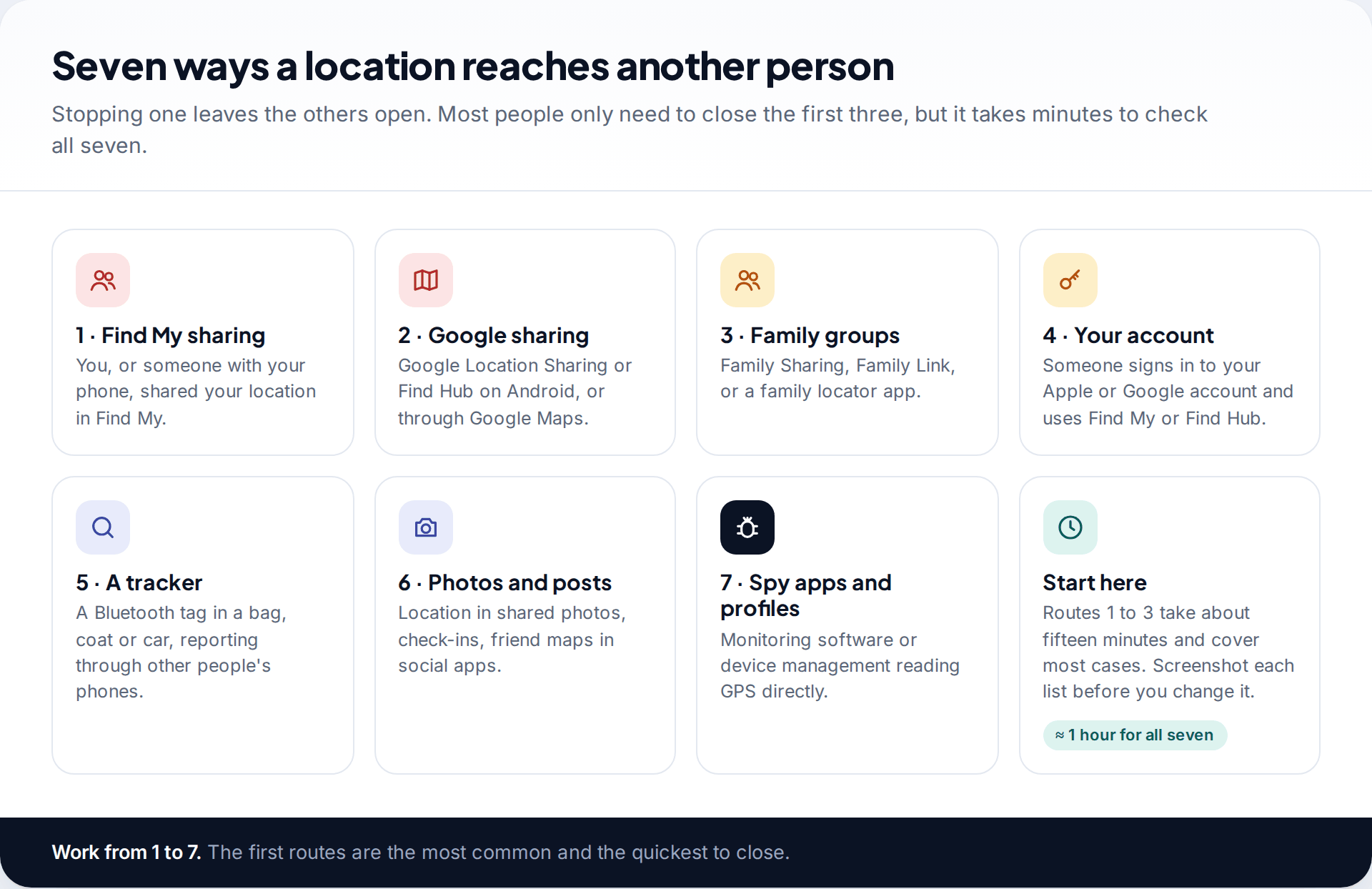
People often switch off one setting, feel relieved, and then find they are still being followed. That is usually because location travels by several routes at once. A partner might see you in Find My, still be in your Google family group, and have an old iPad signed in to your Apple Account. Close one and the other two still work.
So treat this as an audit rather than a single fix. The routes are listed roughly in order of how common they are. The first three are sharing features that someone switched on, often with your agreement at a time when you trusted them. The next two involve access you never agreed to. The last two are less common but easy to overlook.
Before you stop someone tracking your location: timing and safety
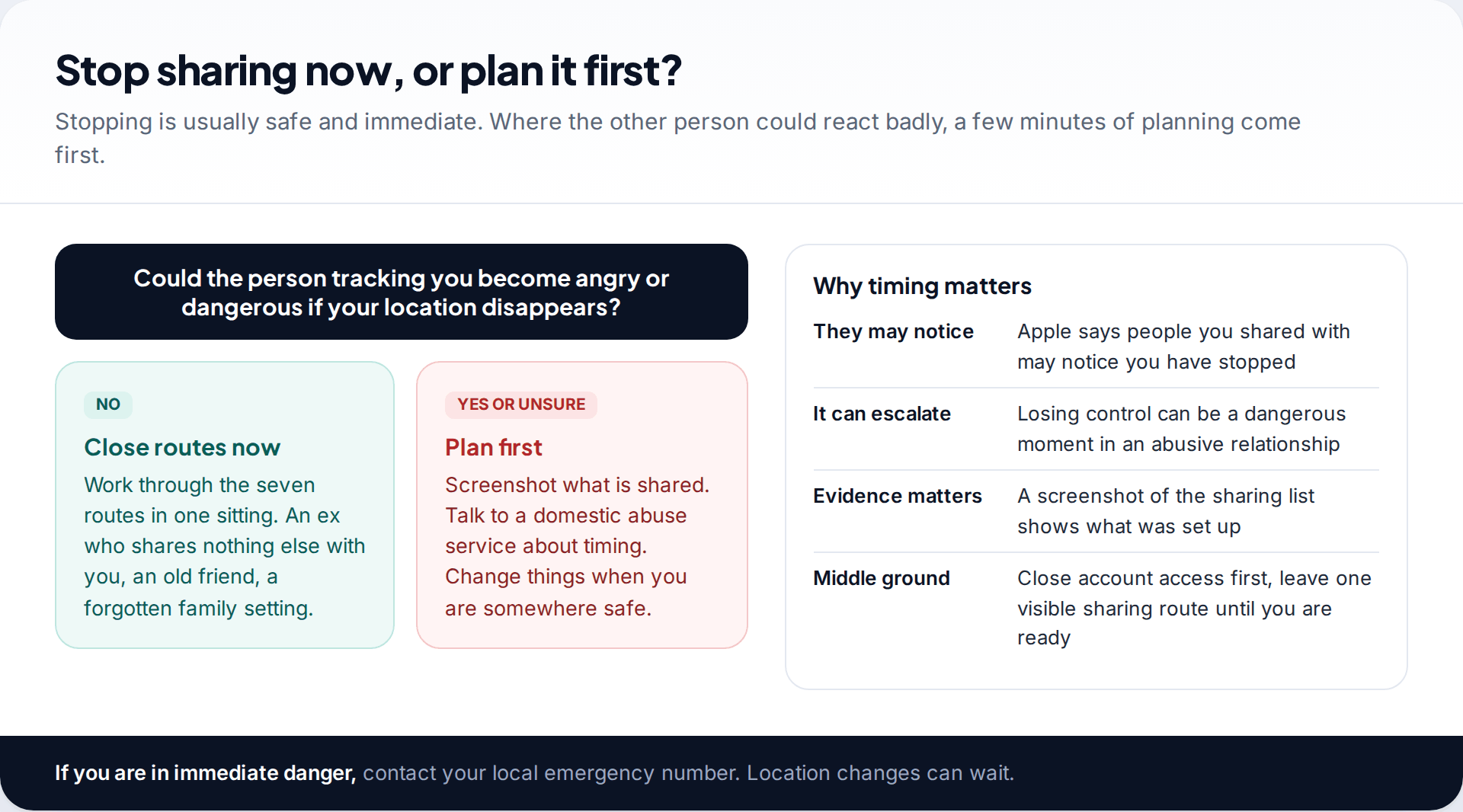
Stopping location sharing is instant, and it can be noticed. Apple says plainly that people you shared with may notice you have stopped. For most people that is fine: an ex, a friend, a family setting nobody uses. But if the person tracking you is controlling or violent, the moment they lose sight of you can be dangerous. Domestic abuse services talk about this a great deal, and they can help you plan when and how to make changes.
If that is your situation, take screenshots of every sharing list first. They show what was set up and when. Then decide on timing: some people close account access first and leave one visible sharing route until they are somewhere safe. If you are in immediate danger, call your local emergency number. None of this has to be done tonight.
Route 1: location sharing in Find My
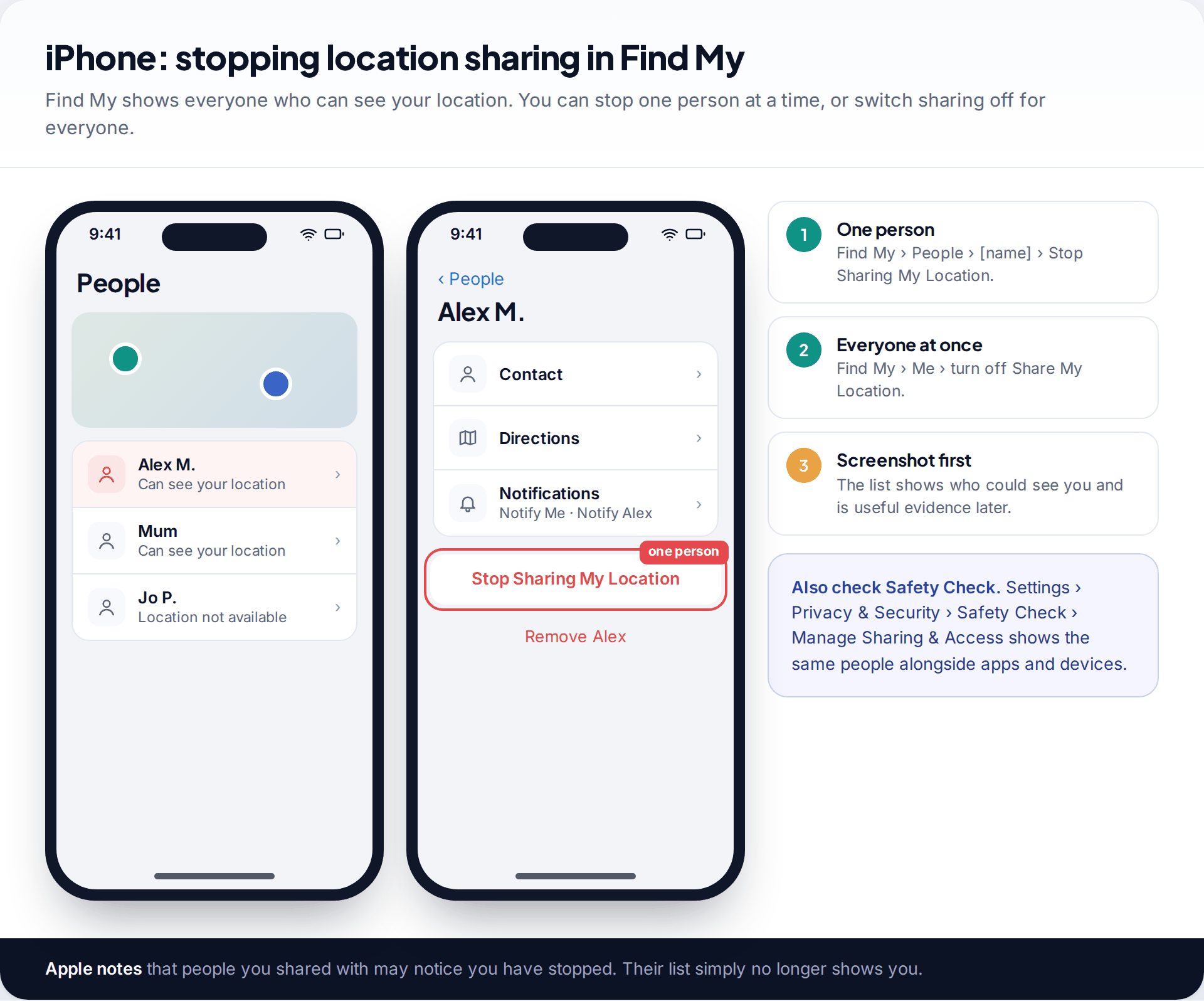
On an iPhone, open Find My and tap People. Everyone who can see your location is listed. To stop one person, tap their name and choose Stop Sharing My Location. To stop everyone at once, go to the Me tab and turn off Share My Location.
Safety Check shows the same information in a different form. Open Settings › Privacy & Security › Safety Check and choose Manage Sharing & Access to review people, apps and devices together. Its Emergency Reset option resets access for all people and apps at once and then takes you through your account security. That is useful when you need everything closed fast, but also the most noticeable option.
Route 2: Google Location Sharing and Find Hub
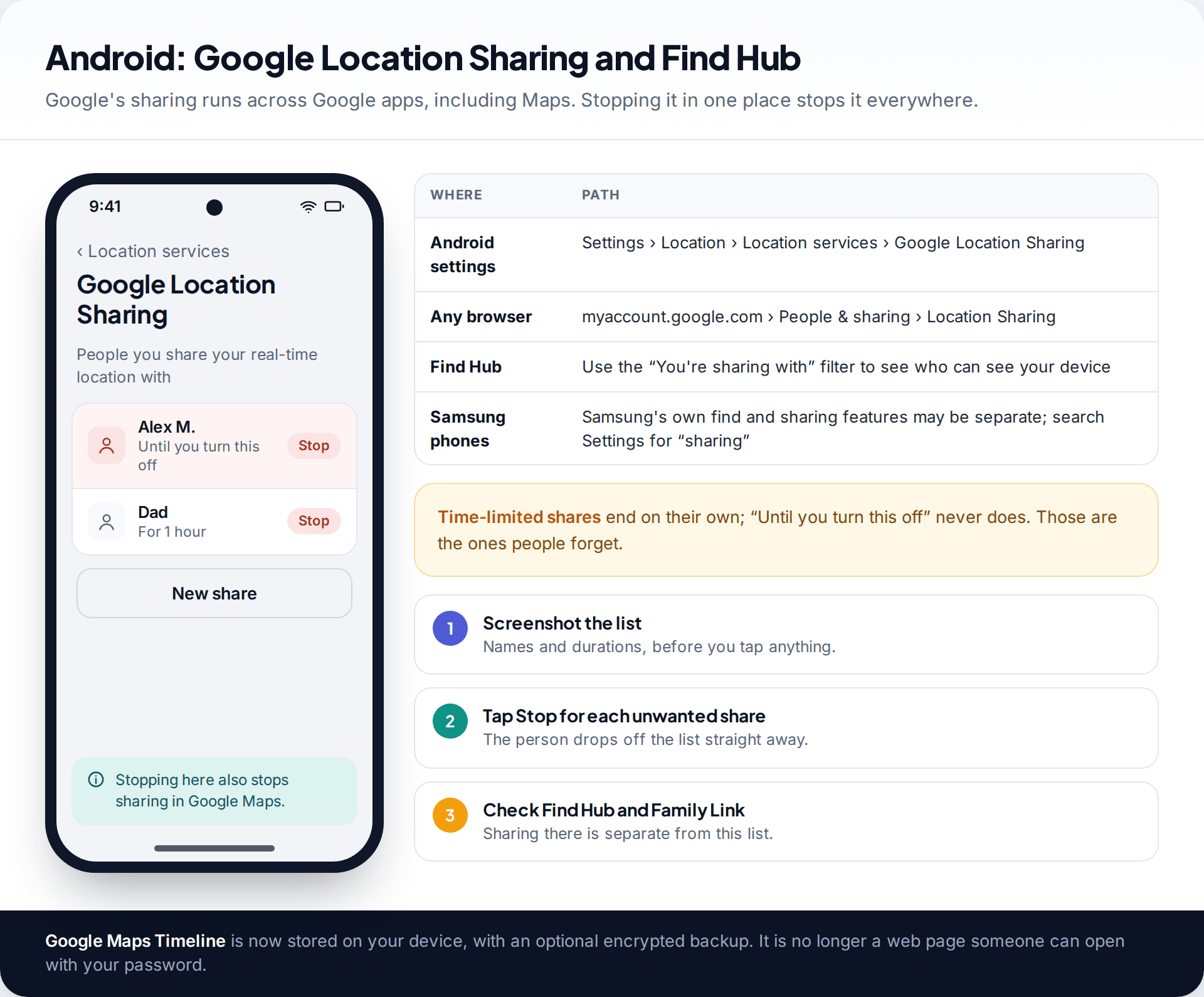
On Android, open Settings › Location › Location services › Google Location Sharing. You can also get there from any browser at myaccount.google.com, under People & sharing. Each person has a Stop option, and stopping it there stops sharing across Google’s apps, including Google Maps. Shares set for an hour end on their own. Shares set to continue until you turn them off are the ones people forget about.
Google’s Find Hub, which locates your phone and other devices, has a You’re sharing with filter showing who can see your devices. It is worth a look even if you have never used it. Android has no single equivalent to Safety Check, so these checks have to be done one by one.
One worry you can set aside: Google Maps Timeline, the history of places you have been, is now stored on your device, with an optional encrypted backup. Someone who knows your Google password can no longer open it on the web.
Route 3: family groups and locator apps
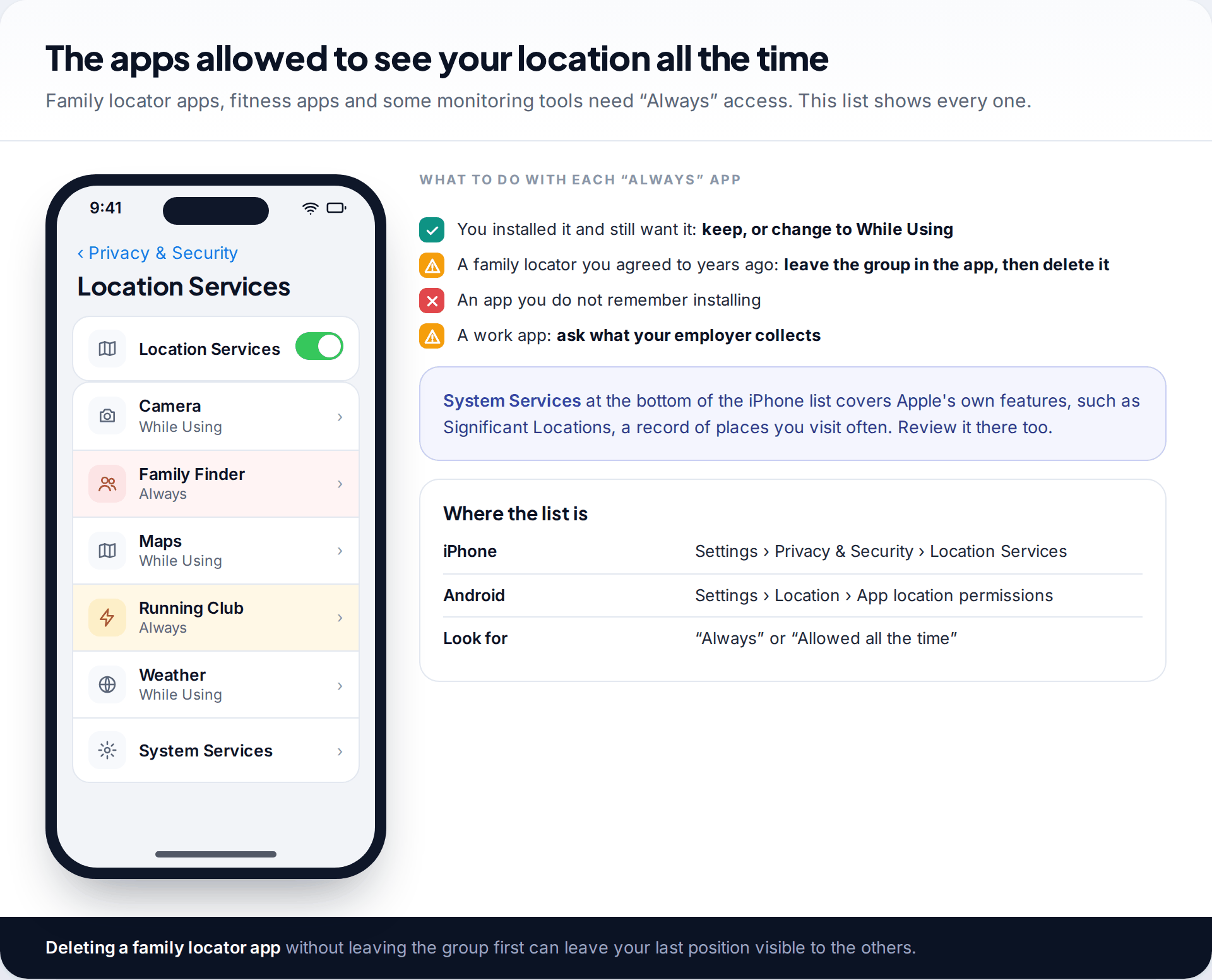
Family features share location by design. Apple’s Family Sharing lets members share their location with each other, and Google’s Family Link lets parents see a supervised child’s device. Third-party family locator apps do the same, and they often stay installed long after the family arrangement ends.
The quickest way to find them is the location permission list. On an iPhone, open Settings › Privacy & Security › Location Services. On Android, open Settings › Location › App location permissions. Look for any app with Always or Allowed all the time. For a family locator you no longer want, leave the group or circle inside the app first, then delete the app. Deleting it without leaving may keep your last known position on the others’ screens.
If you are an adult in a family group run by someone else, you can leave it, although some settings need the organiser’s help. If you are a young person in a supervised account, talk to someone you trust about it. Supervision rules for children differ from the rules for adults.
Route 4: someone signed in to your account
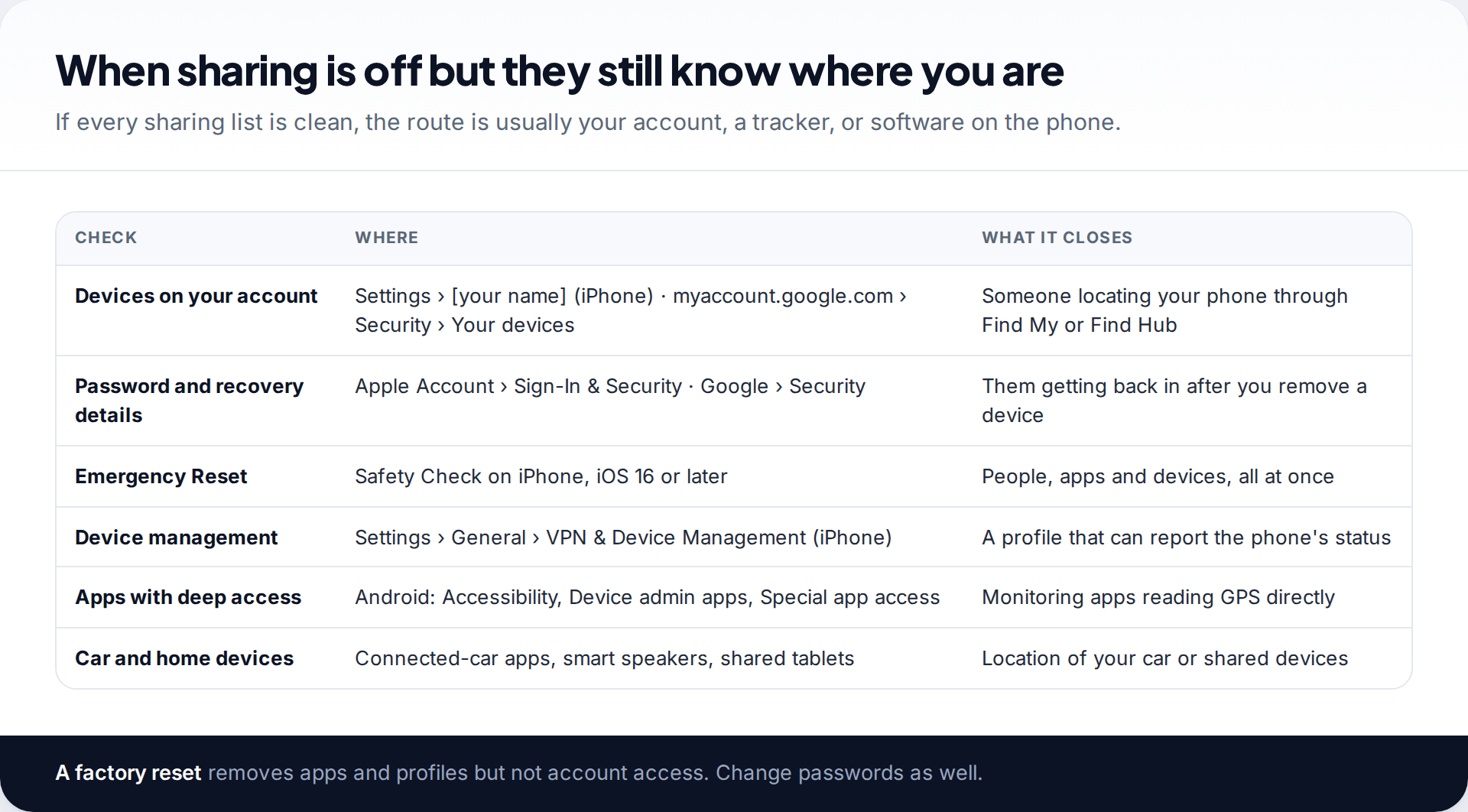
Find My and Find Hub are built to find your phone for you. Anyone signed in to your Apple or Google account can use them too, and they will see your phone on a map without any sharing turned on. Check the devices on your account: on iPhone at Settings › [your name], and for Google at myaccount.google.com › Security › Your devices. Remove any you do not own, then change the password from a device the other person has never used, and check the phone numbers and email addresses that can recover the account.
If the list is clean, the remaining possibility on the phone itself is monitoring software or a management profile. Our guide to checking whether your phone is being monitored walks through those checks. Afterwards, securing your phone against stalkerware keeps them from coming back.
Route 5: a tracker hidden in a bag or car
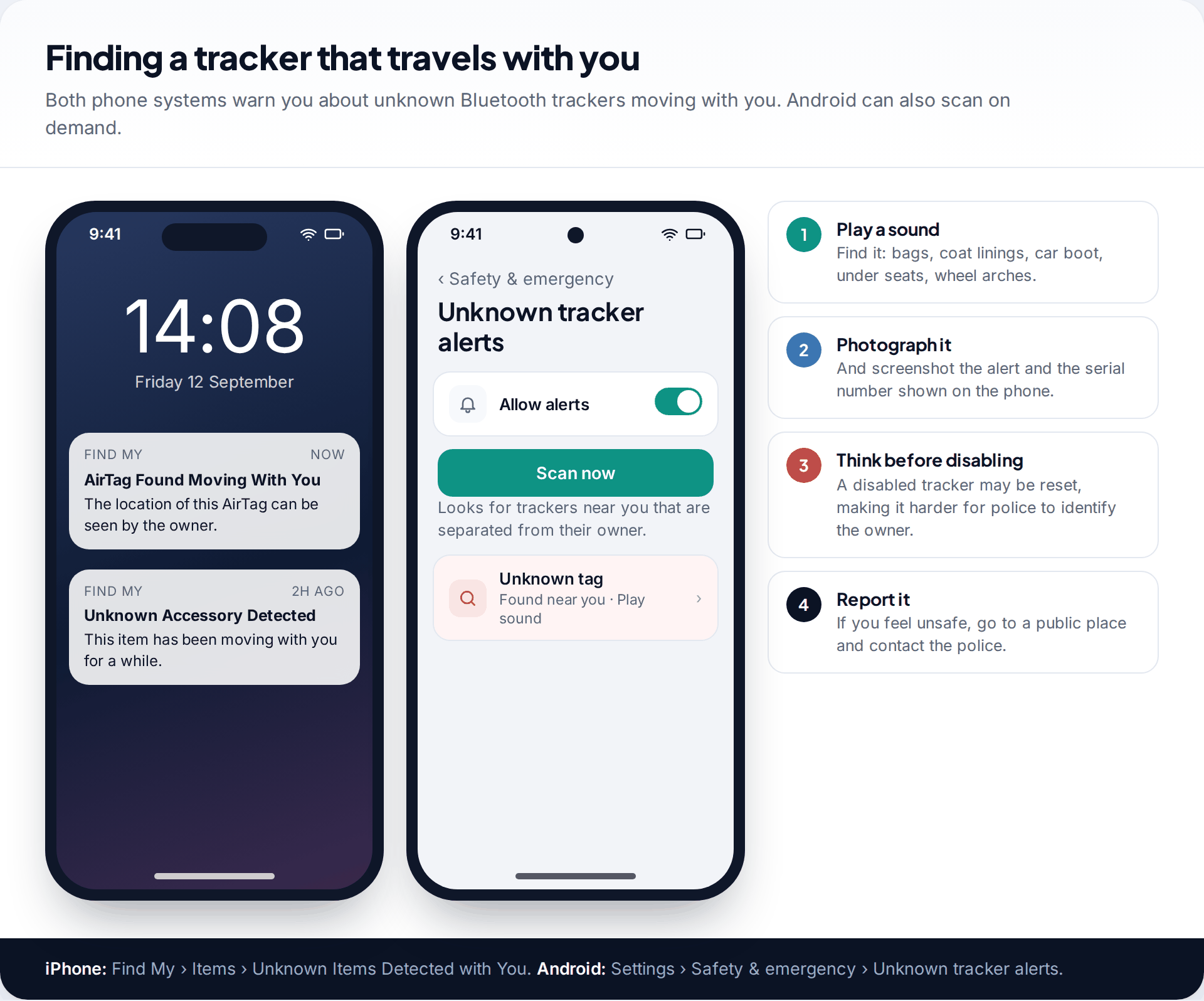
A Bluetooth tracker needs no access to your phone at all. It reports its position through other people’s phones nearby. Both iPhone and Android now warn you when an unknown tracker seems to be travelling with you. On iPhone the alert reads AirTag Found Moving With You or Unknown Accessory Detected, and you can review alerts in Find My › Items › Unknown Items Detected with You. On Android, go to Settings › Safety & emergency › Unknown tracker alerts and tap Scan now. The scan includes AirTags.
If you find one, play its sound to locate it, then photograph it and keep screenshots of the alert. Think before disabling it. Google notes that some trackers, once turned off, can be reset and no longer linked to their owner, which makes it harder for police to identify who planted it. If you feel unsafe, go somewhere public and contact the police with the tracker.
Route 6: photos, posts and friend maps
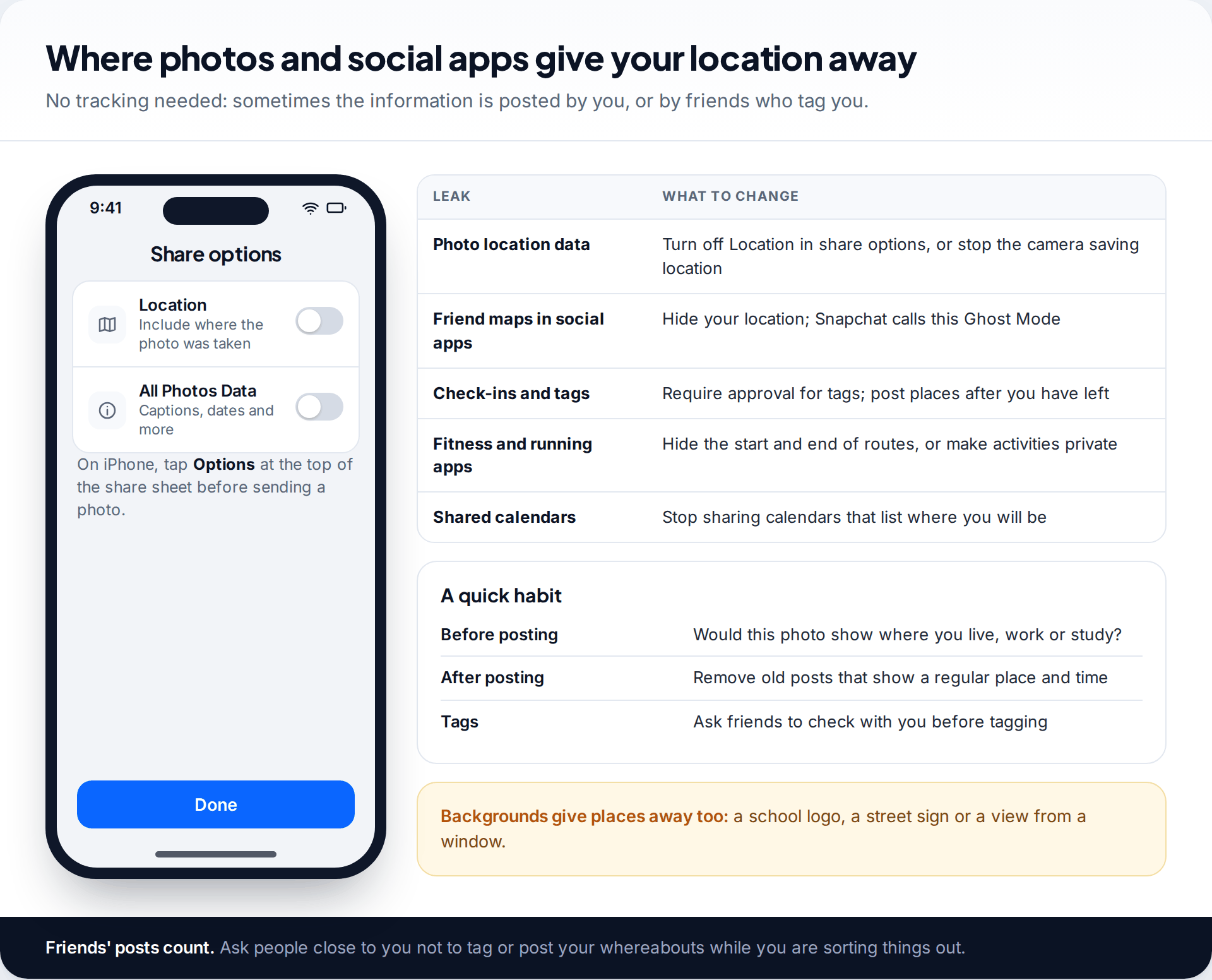
Photos taken on a phone usually carry the place they were taken. On an iPhone, tap Options at the top of the share sheet and switch off Location before sending. Social apps with friend maps let you hide your position. Snapchat calls this Ghost Mode. Fitness apps can reveal where your runs start and end, and shared calendars can list where you will be next week.
Friends matter here too. Someone who tags you in a photo at a café tells everyone where you were. While you are sorting things out, it is reasonable to ask close friends not to post your whereabouts.
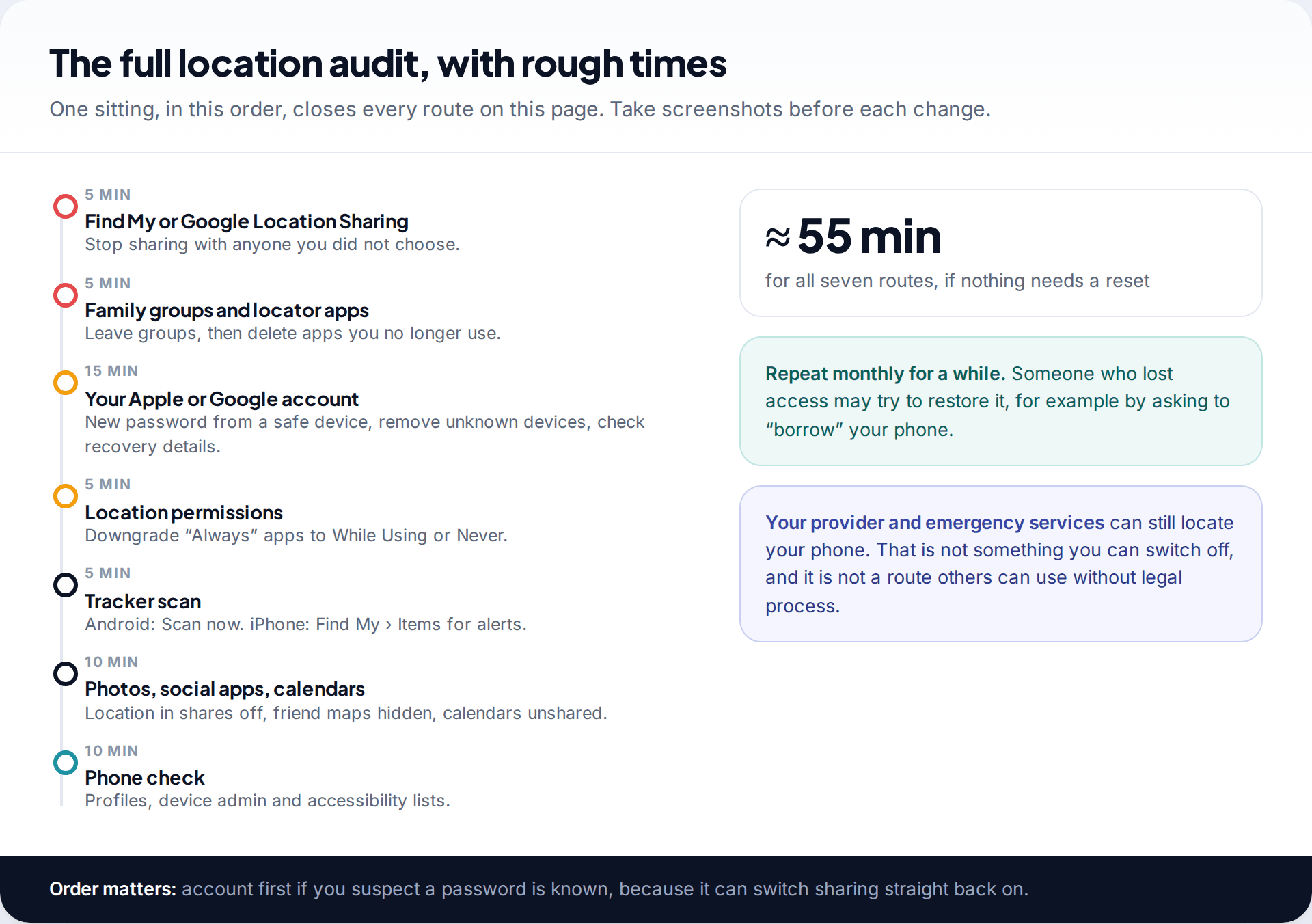
The whole audit, in order
Sharing is off, but he still turns up
Mia stopped sharing with her ex-partner in Find My weeks ago. He still seems to know when she is at the gym. Her device list shows nothing unusual, and Safety Check shows no people. Find My shows no unknown items travelling with her. But her car is one they bought together, and its manufacturer’s app is still signed in on his phone.
What you cannot switch off
Some location data is outside your control. Your mobile provider knows roughly where your phone is, because it has to route calls. Emergency services can locate a phone during an emergency call. Neither of these can be used by a partner or family member without legal process. Wi-Fi networks you join can also log your device, and shared home equipment, such as a smart speaker or a tablet, may reveal whether you are home.
If you share a phone plan with them
A shared contract adds routes that live outside your phone. The account holder can usually see billing records, such as numbers called and when, and some providers sell family location services that the plan owner controls from their own account. Ask your provider, ideally in person or from a phone the other person does not use, whether any location or monitoring service is active on your line. Ask too what it would take to move your number to a plan in your own name. Keeping your number while leaving the shared account removes the other person’s say over it, and it means no reset or new phone can quietly switch a family service back on.
Turning off Location Services entirely stops most of the routes on your phone, but it also switches off maps and Find My for your own use. Keeping it on and closing each route is usually the better trade.
How this page was put together
Menu paths and warnings were checked against Apple’s Personal Safety User Guide, Google’s Account, Maps and Android help pages, and FTC consumer advice in September 2026. Labels differ between versions and makers, so search Settings if a label has moved.
We did not test trackers or apps for this page. You can read how we check sources and correct mistakes on a separate page.
Common questions
Does the other person get notified when I stop sharing my location?
Apple says they may notice. Your location simply stops appearing in their app. Plan for them noticing, whether or not a notification is sent.
Does turning off Location Services stop all tracking?
It stops apps and sharing from using your phone’s location. It does not stop a Bluetooth tracker in your bag, and your provider can still locate the phone for calls and emergencies.
Can someone track me if my phone is off?
Some newer phones can still be found by their owner’s account for a while after being switched off. Removing unknown devices from your account and changing the password closes that route.
Should I get a new phone?
Only if a check finds monitoring you cannot remove, or you cannot use your current phone safely. A new phone signed in to the same compromised account solves nothing, so secure the account either way.
Can I tell who is tracking me?
Sharing lists name the people you share with. For a tracker, the alert may show a partial serial number, which police can use with the manufacturer. Account access usually shows a device, not a name.
Is it illegal for someone to track my location?
In many countries, tracking an adult without consent can be an offence, especially as part of stalking or harassment. The law varies, so ask the police or a legal advice service where you live.
Looking for a tool to go with this? TheTruthSpy is a free parental control app for Android that stays visible on the child's phone. If it fits your family, see the Location & geofencing feature.
Related guides
How to Secure Your Home Wi-Fi Network
A 20-minute router check-up: log in, change the admin password, pick WPA3 or WPA2, turn off WPS, add a guest…
How to Recover a Hacked Instagram Account
Get a hacked Instagram account back: use the revert email, instagram.com/hacked and the video selfie check, avoid recovery scams, then…
How to Spot a Scam Call Pretending to Be Your Bank
Recognise fake bank fraud-team calls, know the exact words to end them, call back safely on 159 or your card's…
Parental controls your child can see
Location, screen time limits, a web filter and alerts from notifications — free, and visible on your child's phone. Pair a phone in about ten minutes.
Android · Free to set up · Visible on your child's phone