5 Best Spy App Detectors for Android, Judged on Independent Tests

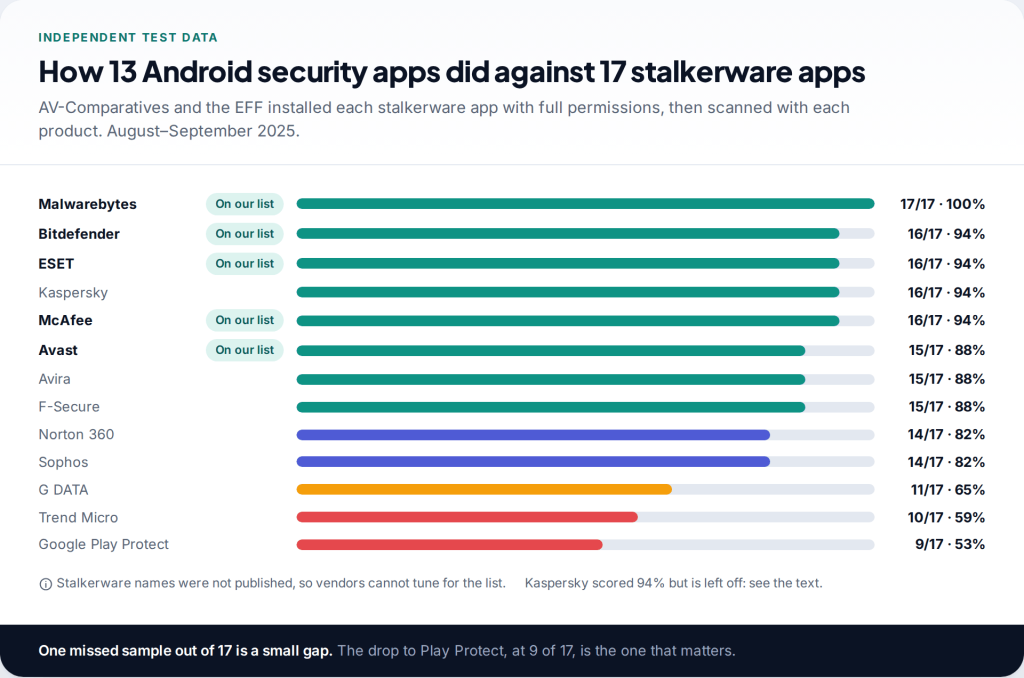
The best spy app detector for Android, on the evidence available, is Malwarebytes: it found all 17 stalkerware apps in AV-Comparatives’ 2025 test with the EFF. Bitdefender, ESET and McAfee each found 16. Avast found 15 and has a free tier. Google’s built-in Play Protect found only nine, so do not rely on it alone.
Read the safety section before you remove anything. If someone you live with or used to live with installed a monitoring app, deleting it can tell them you found it. A scan is safe to run; the uninstall is the step to think about.
The evidence: one independent test, 13 apps, 17 stalkerware samples
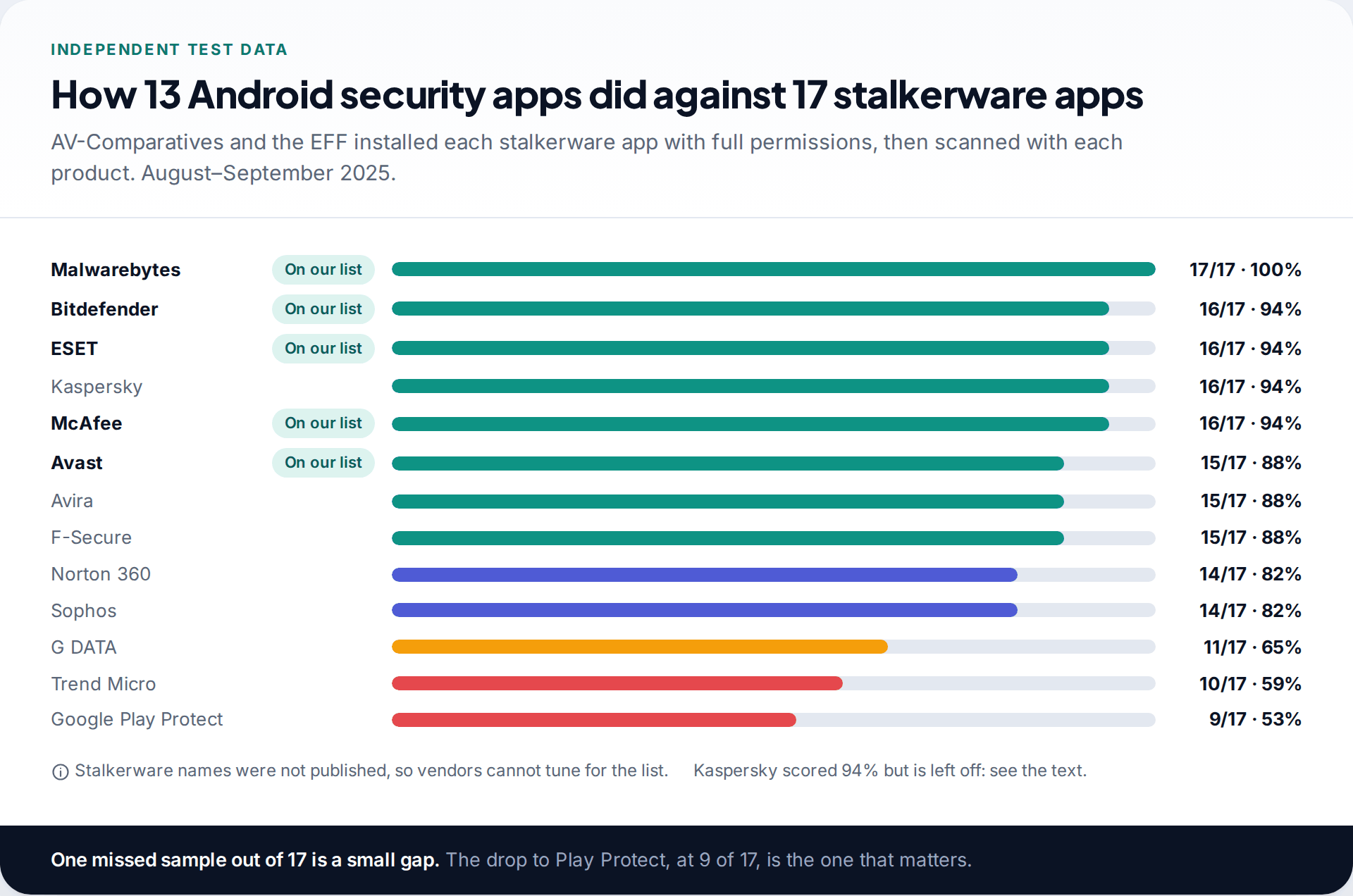
Most “best spy detector” lists rank apps on star ratings or on the writer’s impressions. Detecting stalkerware is testable, and one lab has tested it. In August and September 2025, AV-Comparatives worked with the Electronic Frontier Foundation to install 17 commercial stalkerware apps on Android phones, grant them the full permissions an abuser would, and then check which of 13 security products found them.
The results split into three groups. Malwarebytes Mobile Security found all 17. Bitdefender, ESET, Kaspersky and McAfee each missed one. Avast, Avira and F-Secure found 15, Norton and Sophos 14. Then the drop: G DATA found 11, Trend Micro 10, and Google Play Protect, the protection already on most Android phones, found 9.
The lab did not publish the names of the stalkerware it used. That was deliberate, so abusers cannot pick a product a given scanner misses. It also means you cannot check whether a specific app was covered. Treat the scores as a measure of how seriously each vendor takes this category, not as a guarantee for your phone.
How the five were chosen
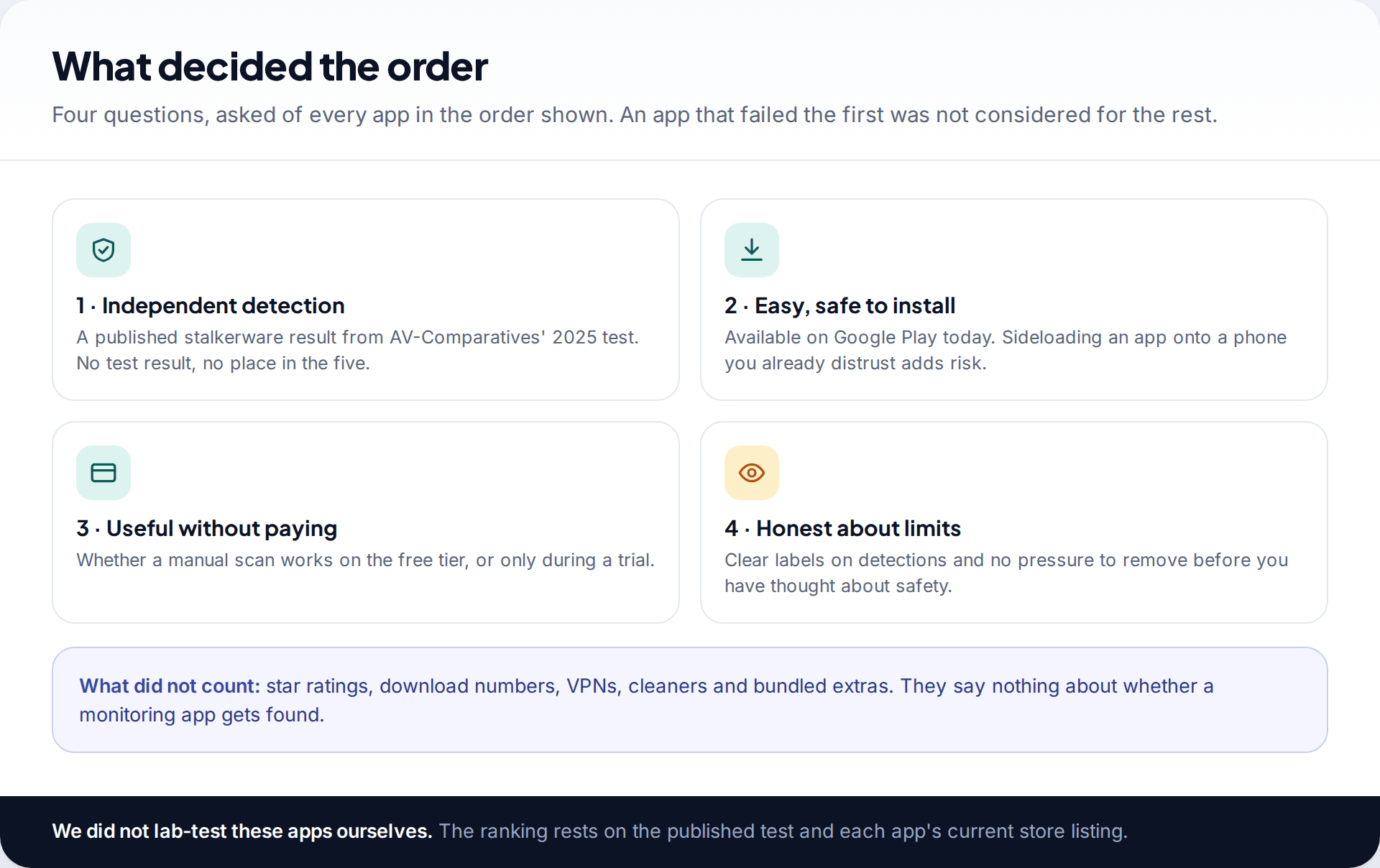
An app had to clear four bars, in this order. First, a published detection result in the 2025 test. Second, it had to be on Google Play now, because installing a security app from a website means allowing unknown sources on a phone you already distrust. Third, we looked at what the free tier does, since many people need to check a phone once, not buy a year of protection. Last, we looked at how clearly each app tells you what it found.
We did not lab-test these apps ourselves, and we did not install stalkerware to see what happens. Everything below comes from the published test report and each app’s current Play Store listing and help pages.
The five spy app detectors for Android, ranked
1. Malwarebytes Mobile Security: 17 of 17
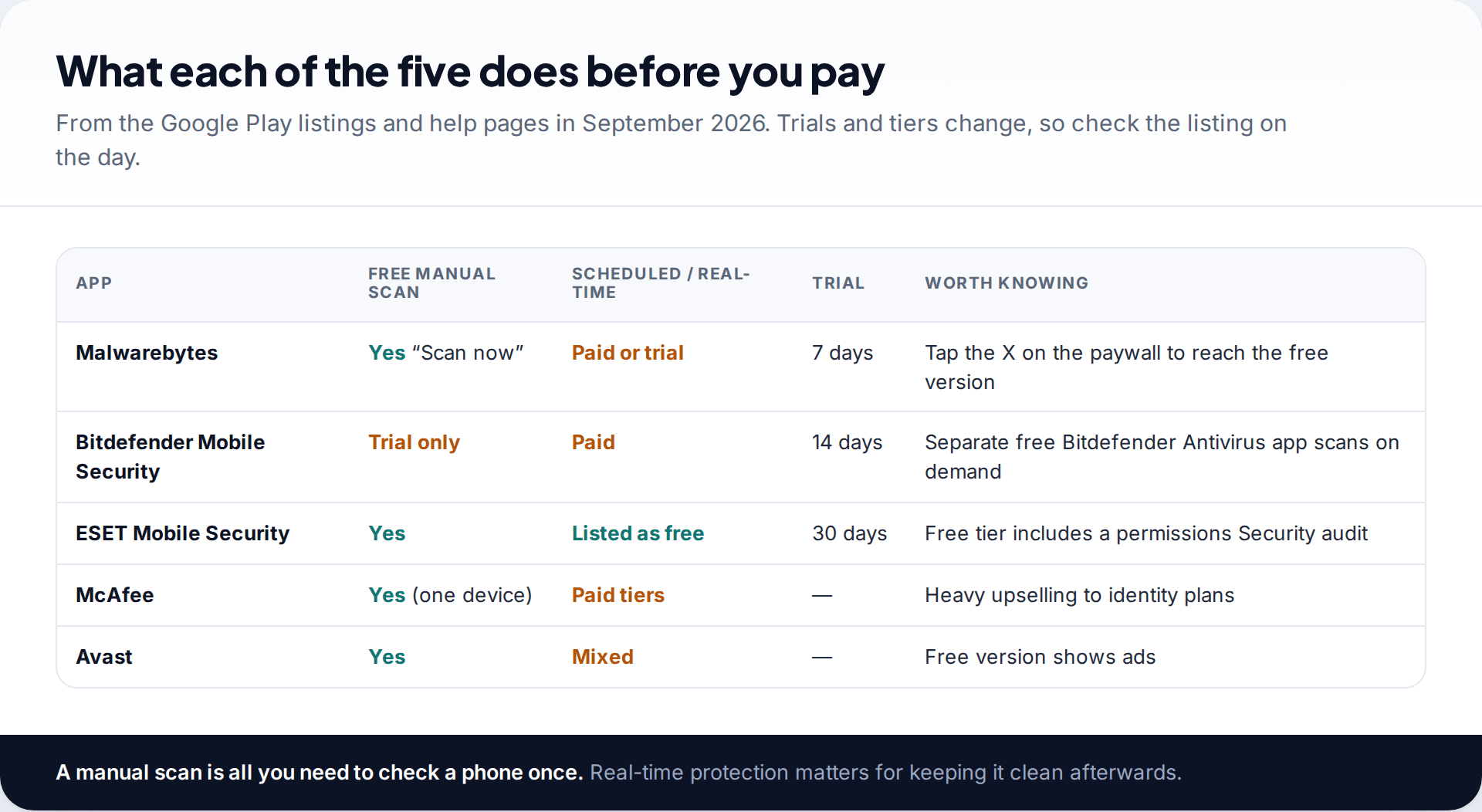
The only product that found every sample. Malwarebytes has published guidance on stalkerware for years and says it writes its alerts with survivors’ safety in mind. On Android you can run a manual scan for free: the app opens on a trial offer, and tapping the X on that screen takes you to the free version. From the dashboard, Scan now checks installed apps and files. Scheduled scans and real-time protection need the paid plan or the seven-day trial.
When it finds something, the result menu offers App info, Ignore once, Always allow and Uninstall app. Be careful with Always allow: it stops that app being flagged in future scans.
2. Bitdefender Mobile Security: 16 of 17
Bitdefender pairs its scanner with App Anomaly Detection, which watches installed apps for malicious behaviour as they run rather than only matching known samples. That is the right idea for monitoring apps that change their disguise. The catch is price: Bitdefender Mobile Security, the version tested, is free for 14 days and then needs a subscription. Bitdefender also publishes a separate free app, Bitdefender Antivirus, which scans on install and on demand, but that app was not the one in the stalkerware test.
3. ESET Mobile Security: 16 of 17
ESET gives away the most. Its Play listing puts antivirus scanning, scheduled scans and a Security audit in the free tier. The audit, which reviews app permissions, is useful here, because stalkerware needs unusual permissions to function. Premium adds app lock and payment protection, with a 30-day trial. If you want a strong result without entering card details, start here.
4. McAfee Mobile Security: 16 of 17
Same detection score as ESET and Bitdefender. McAfee’s free tier covers antivirus scanning on one device plus a Wi-Fi check. The app is built around its paid identity-protection plans and pushes them hard, which is a nuisance rather than a problem. For a one-off stalkerware check, the free scan is what matters and it is there.
5. Avast: 15 of 17
Avast found 15 samples as Avast Mobile Security. The same Play Store package is now titled Avast One. It is free, with ads, and includes the scanner that was tested. Two misses out of 17 put it a step below the others, so if Avast finds nothing and you still have strong reasons to worry, get a second opinion from one of the apps above.
| App | 2025 stalkerware result | On Google Play | Free manual scan | Best for |
|---|---|---|---|---|
| Malwarebytes | 17/17 (100%) | Yes | Yes | The strongest single check |
| Bitdefender | 16/17 (94%) | Yes | 14-day trial | Ongoing behaviour-based protection |
| ESET | 16/17 (94%) | Yes | Yes | Most features without paying |
| McAfee | 16/17 (94%) | Yes | Yes | People already paying for McAfee |
| Avast | 15/17 (88%) | Yes | Yes, with ads | A free second opinion |
What the scan result will actually say
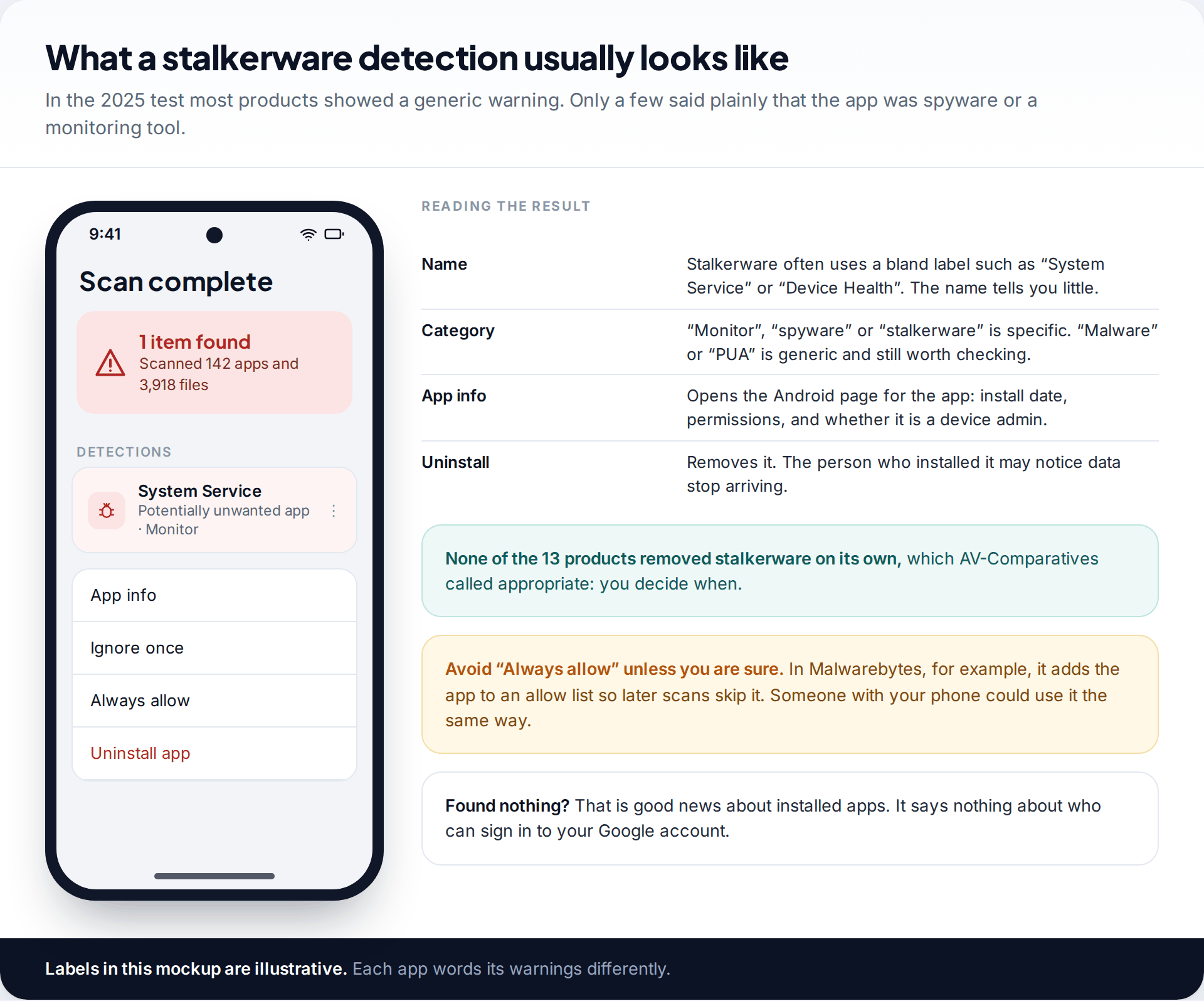
Do not expect a banner that says “your partner is watching you”. The 2025 report found that most products showed a generic alert such as “Malware detected” or “Potential unwanted app detected”, and only a few described the threat as spyware or a monitoring app. The app itself will often have a dull, system-sounding name.
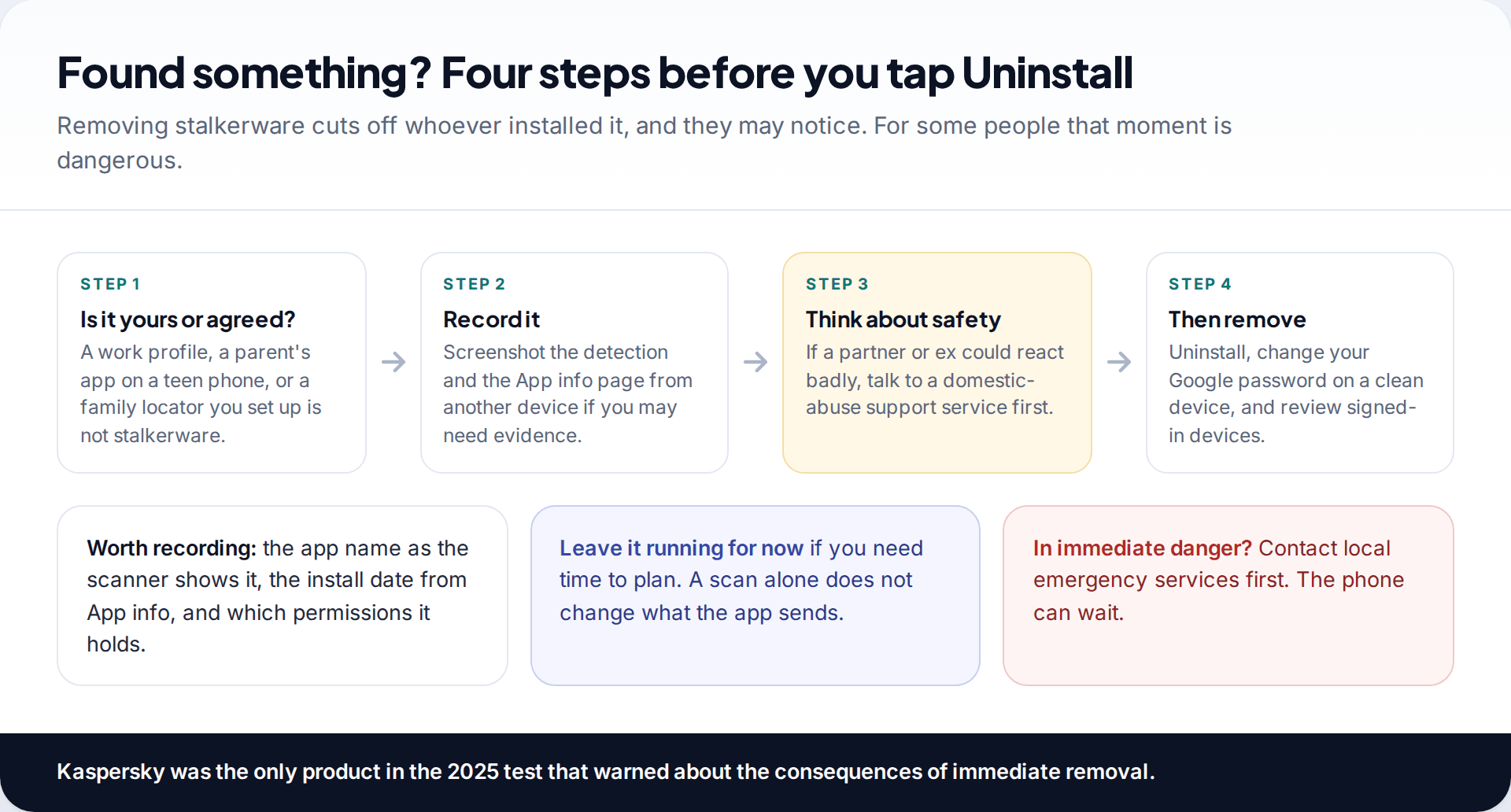
Open App info before doing anything else. The install date is often the most telling detail: it can line up with a day someone else had your phone. The permissions list shows what the app could read. None of the tested products removed stalkerware automatically. The lab considered that correct, because the decision to remove it should be yours.
Before you remove it: consent, context and safety
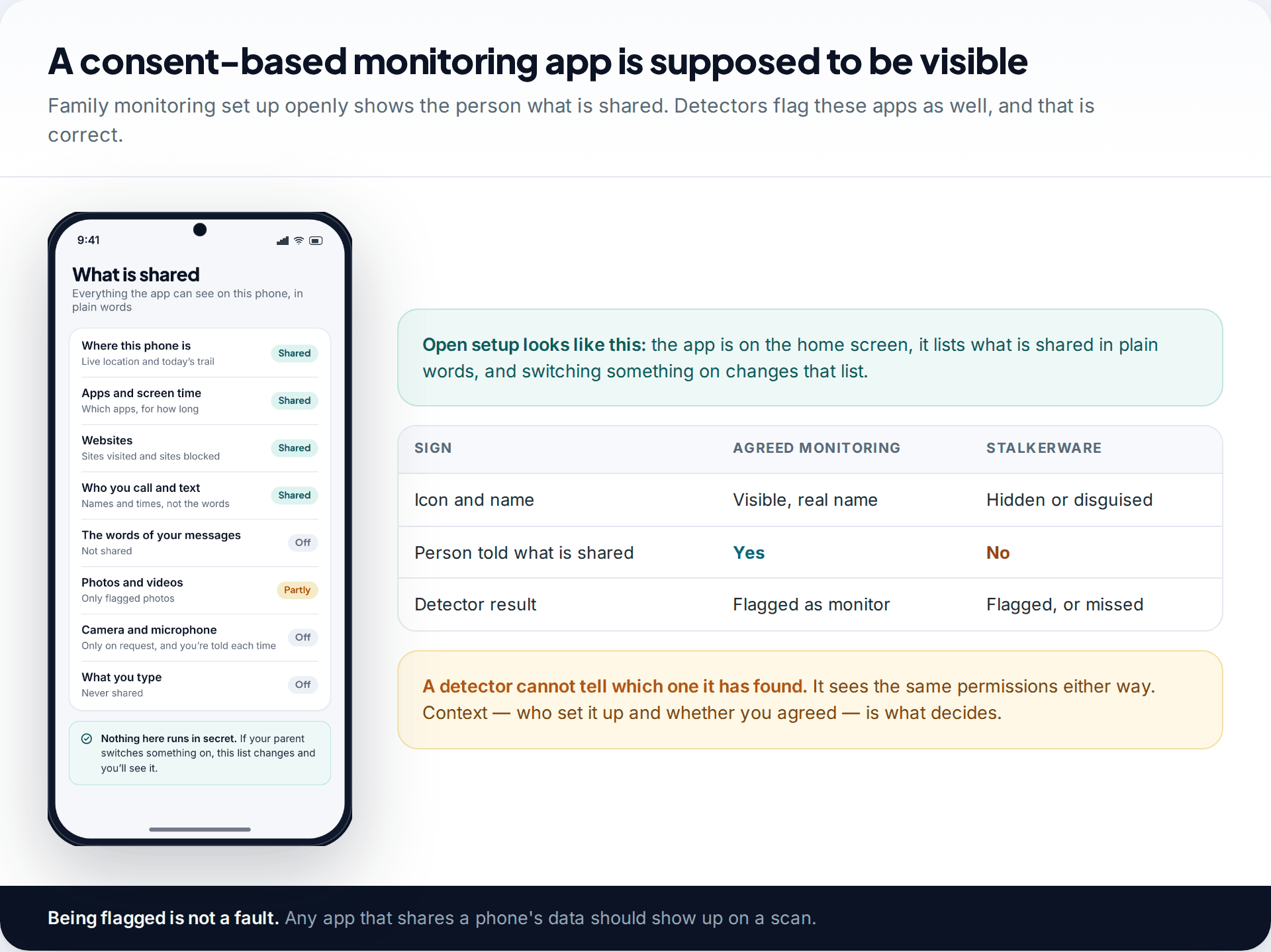
A detector cannot tell whether an app is there with your agreement. A parent’s monitoring app on a teenager’s phone, a work management profile and a family location app you set up yourself all use the same permissions as stalkerware, and a good scanner will flag them. That is how it should work. The question the scanner cannot answer is whether you knew and agreed.
If you did not agree, the next question is who could have installed it, and how they might react when it stops working. Stalkerware sends data to someone. When you uninstall it, that data stops, and the person may notice. If that person is a current or former partner and you are worried about how they will respond, talk to a domestic-abuse support service in your country before you remove it. They can help you plan the timing, and they can advise on keeping a record. Screenshots of the detection and the App info page, taken with another device, are a simple start.
When you are ready, uninstall the app, then change your Google account password from a device you trust and review which devices are signed in. Our guide on what to do if you think you have spyware sets out the full order.
What no spy app detector on Android can find
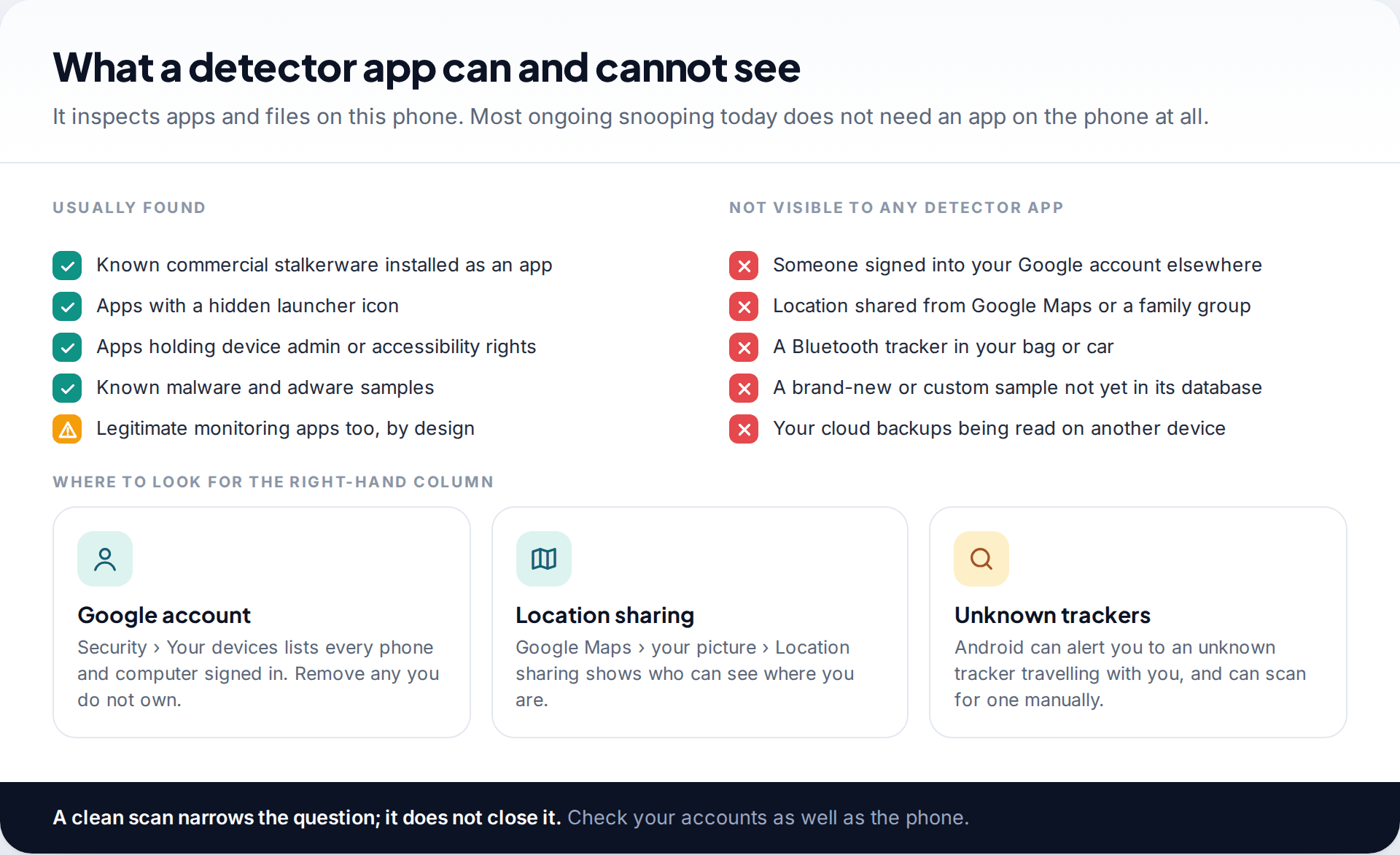
A detector inspects the apps and files on the phone in your hand. A lot of monitoring does not need anything installed there. If someone knows your Google password, they can read your location history, photos, and backed-up messages from their own computer. Location can be shared through Google Maps or a family group. A Bluetooth tracker in a bag or car never touches your phone at all. The EFF suggested cheap trackers may be one reason the stalkerware market has shrunk.
Detectors also work mostly from known samples. A new or custom app that is not yet in the database can get through, which is why even a 17-of-17 result is not a promise. The checks below cover some of that gap.
Three settings checks to do after any scan
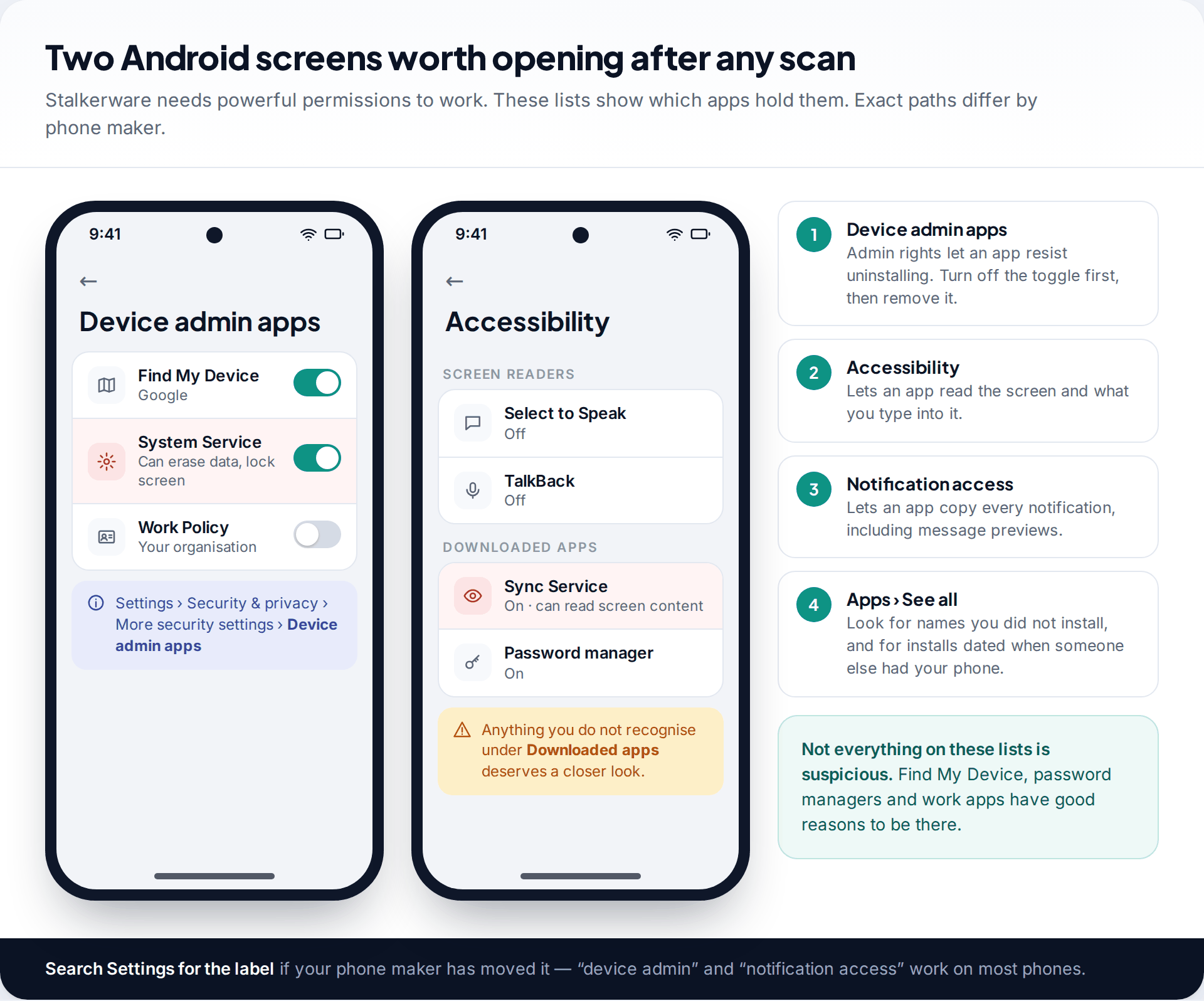
Commercial stalkerware on Android usually leans on a few powerful permissions: device admin, which makes it harder to uninstall; accessibility, which lets it read the screen; and notification access, which lets it copy message previews. Open each list and ask of every entry: did I install this, and does it need this? Labels move between Android versions and phone makers, so if a path does not match, search Settings for “device admin” or “notification access”. Our walkthrough on detecting stalkerware on Android covers each screen in more depth.
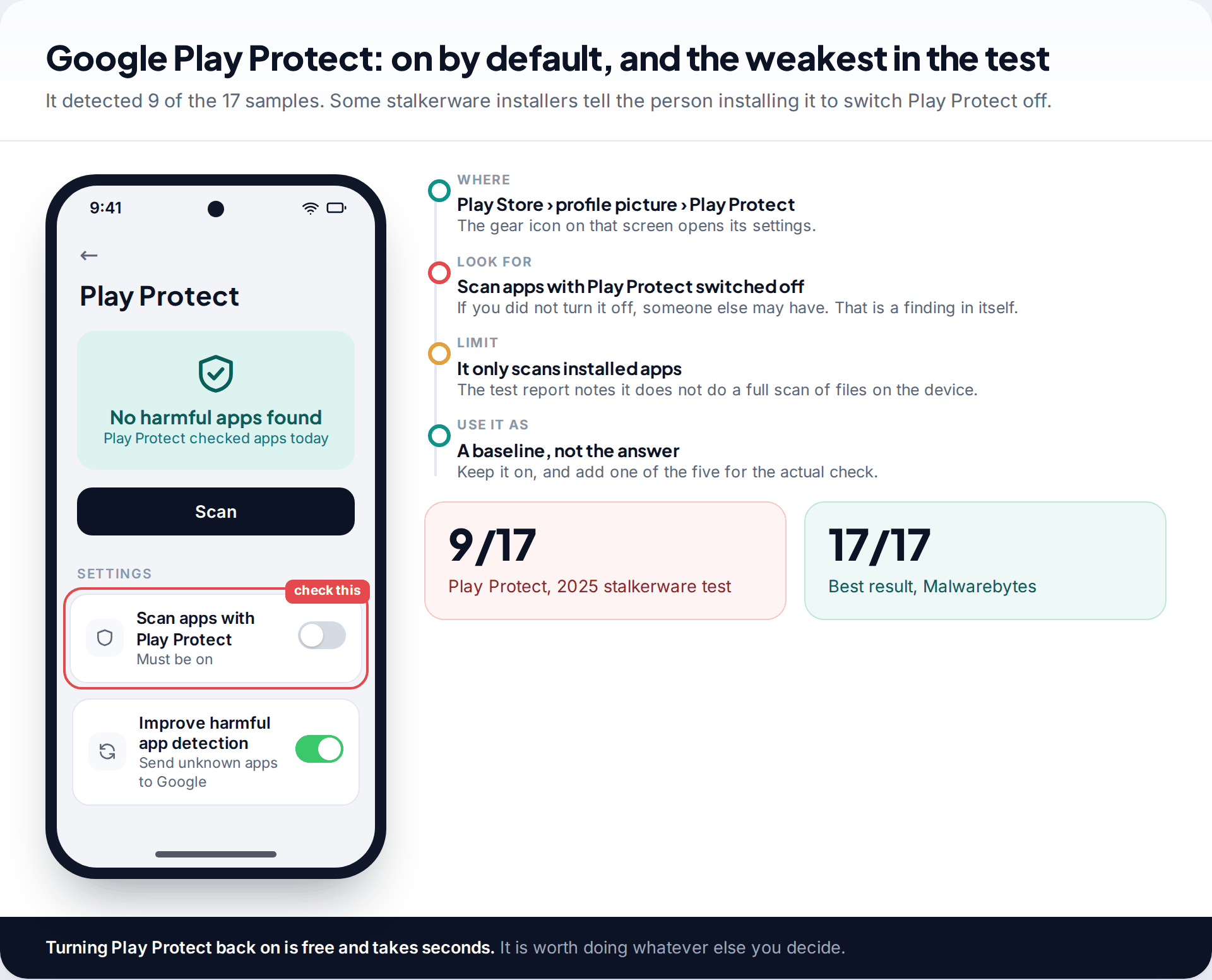
Then open Play Protect: Play Store, your profile picture, Play Protect, and the settings gear. If Scan apps with Play Protect is off and you did not turn it off, that is worth noting. Some stalkerware installation guides tell the installer to disable it.
Why Kaspersky, Play Protect and the “anti spy” apps are not in the five
Kaspersky found 16 of 17 and was the only product in the test that warned about the consequences of removing stalkerware straight away, which is exactly what survivors’ groups ask for. But its apps have been off Google Play worldwide since September 2024, after US restrictions on the company, and it can no longer be sold in the US. Getting it now means installing from another store or the company’s website. On a phone you think has been tampered with, we would rather you did not add a sideloaded app.
Google Play Protect is already on your phone and should stay on, but 9 of 17 is too low to be your only check. The test report also notes that it scans installed apps rather than the whole device.
Dedicated detectors such as Certo and Protectstar’s Anti Spy are on Google Play, specialise in spyware, and offer a free scan with paid real-time protection. They were not part of the 2025 stalkerware test, so we cannot rank them on the same evidence. Used as a second opinion alongside one of the five, they do no harm.
How this page was put together
The ranking is based on AV-Comparatives’ Stalkerware Test 2025 report and the EFF’s write-up of it, together with the Google Play listings and help pages for each app, all checked in September 2026. Store details, trial lengths and free tiers change often, so confirm them on the listing before you rely on them.
We did not lab-test these apps and we have no commercial arrangement with any of them. Our own monitoring app is detectable by design and is not ranked here. More on how our guides are researched and corrected.
Common questions
Is there a free app that detects spyware on Android?
Yes. Malwarebytes, ESET, McAfee and Avast all let you run a manual scan without paying, and all four scored between 15 and 17 out of 17 in the 2025 stalkerware test. Scheduled scans and real-time protection usually need a subscription.
Can Google Play Protect detect spy apps?
Some. In the 2025 test it found 9 of 17 stalkerware apps, the lowest of the 13 products tested. Keep it switched on, but add a dedicated scan from one of the higher-scoring apps.
Will the person who installed the spy app know I scanned my phone?
Running a scan is unlikely to be visible to them. Removing the app is different: the data it was sending stops, and they may notice. If that could put you at risk, get advice from a support service before removing it.
Does a factory reset remove spy apps on Android?
A factory reset removes installed apps, including stalkerware, but it also removes the evidence. It does nothing about someone who knows your Google password, so change that too, from a device you trust. Restoring an old backup may bring an app straight back.
Will a spy app detector flag parental control apps?
Usually, yes. Legitimate monitoring apps use the same permissions, and good detectors flag them as monitoring tools. That is intended. What matters is whether the person using the phone knows the app is there and agreed to it.
Can spyware hide from every detector?
New or custom spyware can go undetected until vendors add it to their databases, and advanced state-grade spyware is a separate problem that these apps are not built for. The commercial stalkerware most people encounter is what these scanners are tested against, and the best of them find nearly all of it.
Looking for a tool to go with this? TheTruthSpy is a free parental control app for Android that stays visible on the child's phone. If it fits your family, see the Social media alerts feature.
Related guides
How to Check If Your Email Was in a Data Breach
Check if your email was in a data breach for free, then act on what leaked: passwords, card details or…
How to Start Using a Password Manager
Switch to a password manager without stress: built-in or standalone, protecting the main password, and a first-hour plan for the…
How to Tell If Your Phone Has a Virus or Malware
Most 'virus' signs have ordinary causes. How to check an iPhone or Android phone for real malware, remove it, secure…
Parental controls your child can see
Location, screen time limits, a web filter and alerts from notifications — free, and visible on your child's phone. Pair a phone in about ten minutes.
Android · Free to set up · Visible on your child's phone