Stop WhatsApp Snooping: Linked Devices, Backups and the Lock Screen

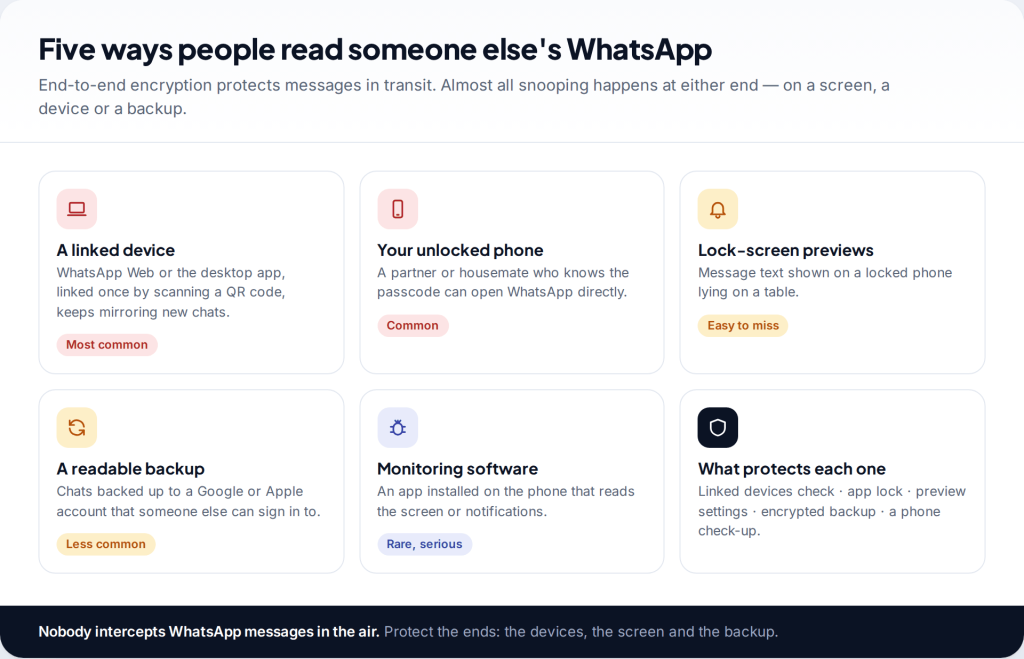
To secure WhatsApp from snooping, start with the five places people actually read someone else’s chats. Remove unfamiliar entries under Linked devices, turn on the app lock and lock sensitive chats. Hide message previews on the lock screen and switch on end-to-end encrypted backup. WhatsApp’s encryption already protects messages in transit. Snooping happens on screens, devices and backups, and each of those has its own setting.
Where snooping on WhatsApp really happens
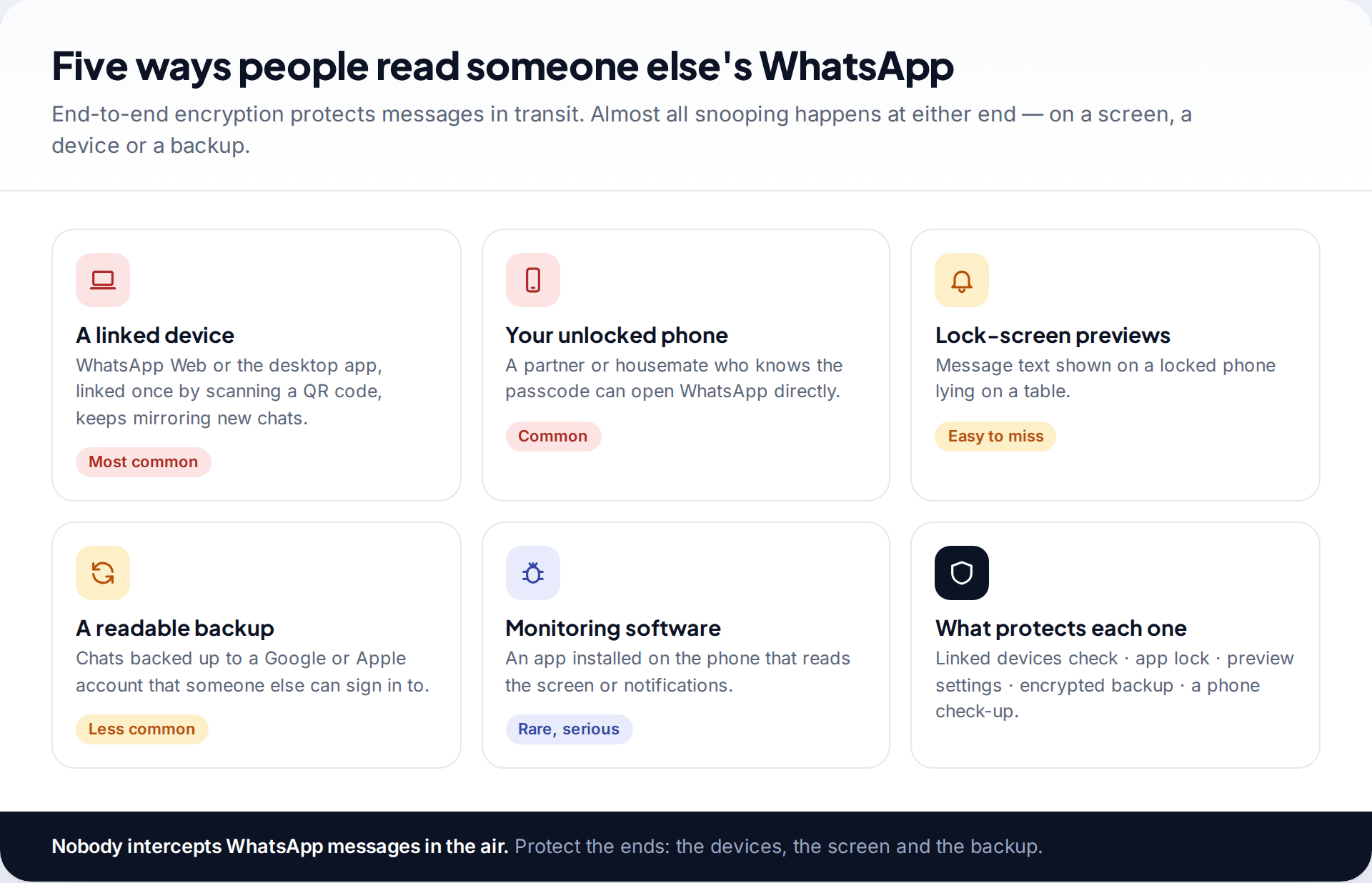
People worried that someone is reading their WhatsApp often picture hacking. The reality is usually more ordinary. Someone scanned a QR code on your phone months ago and a browser tab has been mirroring your chats since. Or they know your passcode. Or your lock screen shows every message in full to whoever is sitting across the table.
End-to-end encryption means WhatsApp itself, your mobile network and anyone on the same Wi-Fi can’t read messages as they travel. It doesn’t help once a message is displayed on a device that someone else can see or use. So the work is on those devices, starting with the one route that leaves the clearest trace.
Step 1: check which devices can read your chats
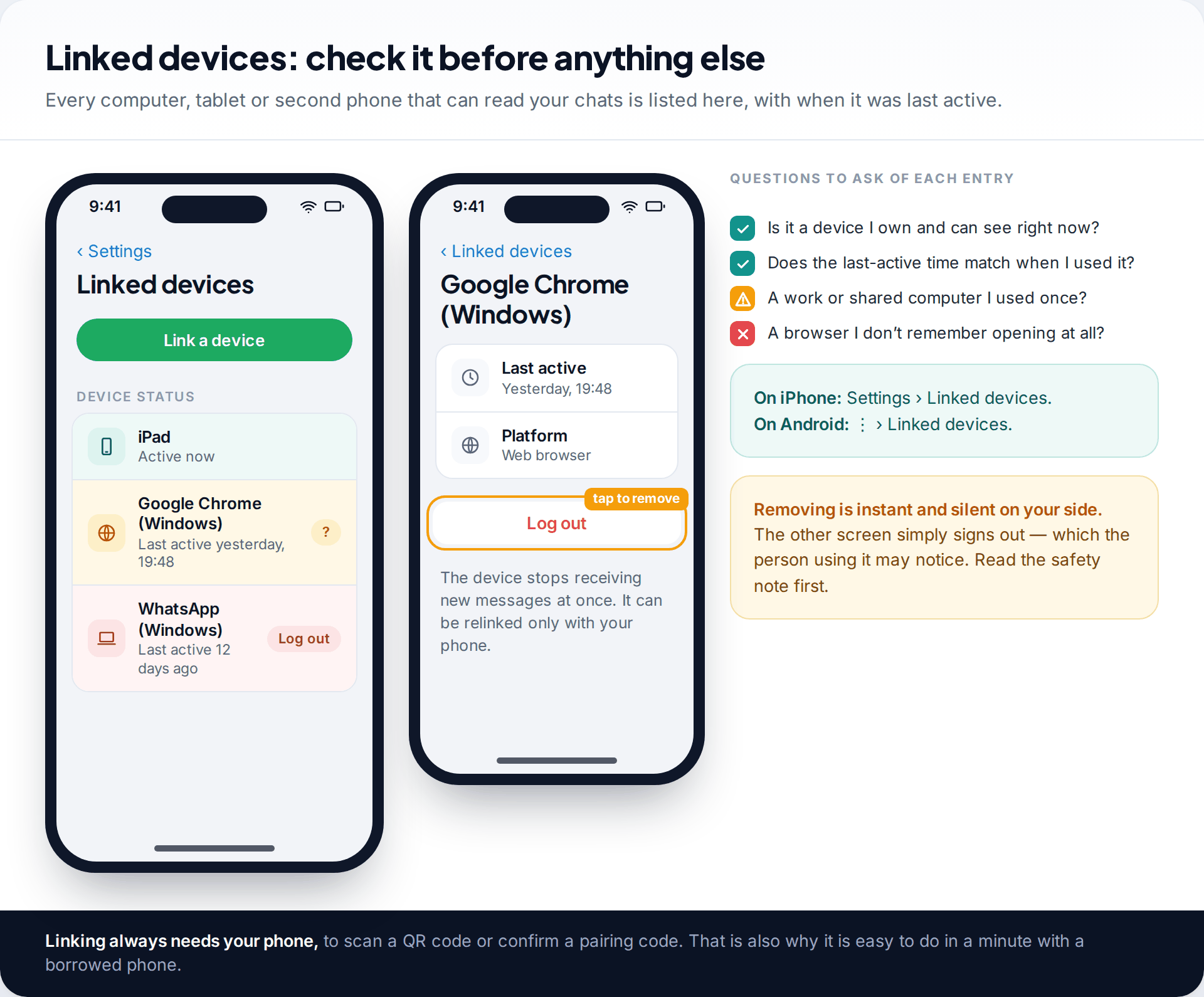
WhatsApp lets you use your account on up to four linked devices alongside your phone: browsers, desktop apps, tablets and a second phone. Each of them receives your new messages in real time. They keep working even when your phone is off. That is useful, and it is also the most common way people read a partner’s or family member’s chats. Linking takes a few seconds with the phone in hand, and nothing on the phone’s home screen shows it afterwards.
Open the list: Settings › Linked devices on iPhone, or the ⋮ menu › Linked devices on Android. For each entry, ask whether it’s a device you own, and whether the last-active time matches when you used it. Tap anything that fails either test and choose Log out. It stops receiving messages straight away. It can’t be relinked without your phone scanning a new code.
Signs a linked device is already reading along
A linked session leaves small traces on your own phone. Chats appear as read when you haven’t opened them, because the message was opened on the other device. Notifications you expected never appear, for the same reason. Someone repeats details you’ve only ever written in WhatsApp. None of these proves anything on its own, since a notification can also be dismissed by a watch. Together with an entry you don’t recognise in the list, they are about as clear as the evidence gets.
A safety point before you remove anything. If the person who linked the device lives with you or has power over you, logging it out may tell them you’ve noticed. That could be dangerous in an abusive relationship. Consider speaking to a domestic abuse support service where you live before changing settings. They can help you plan when and how to do it.
Step 2: lock WhatsApp itself with your face or fingerprint
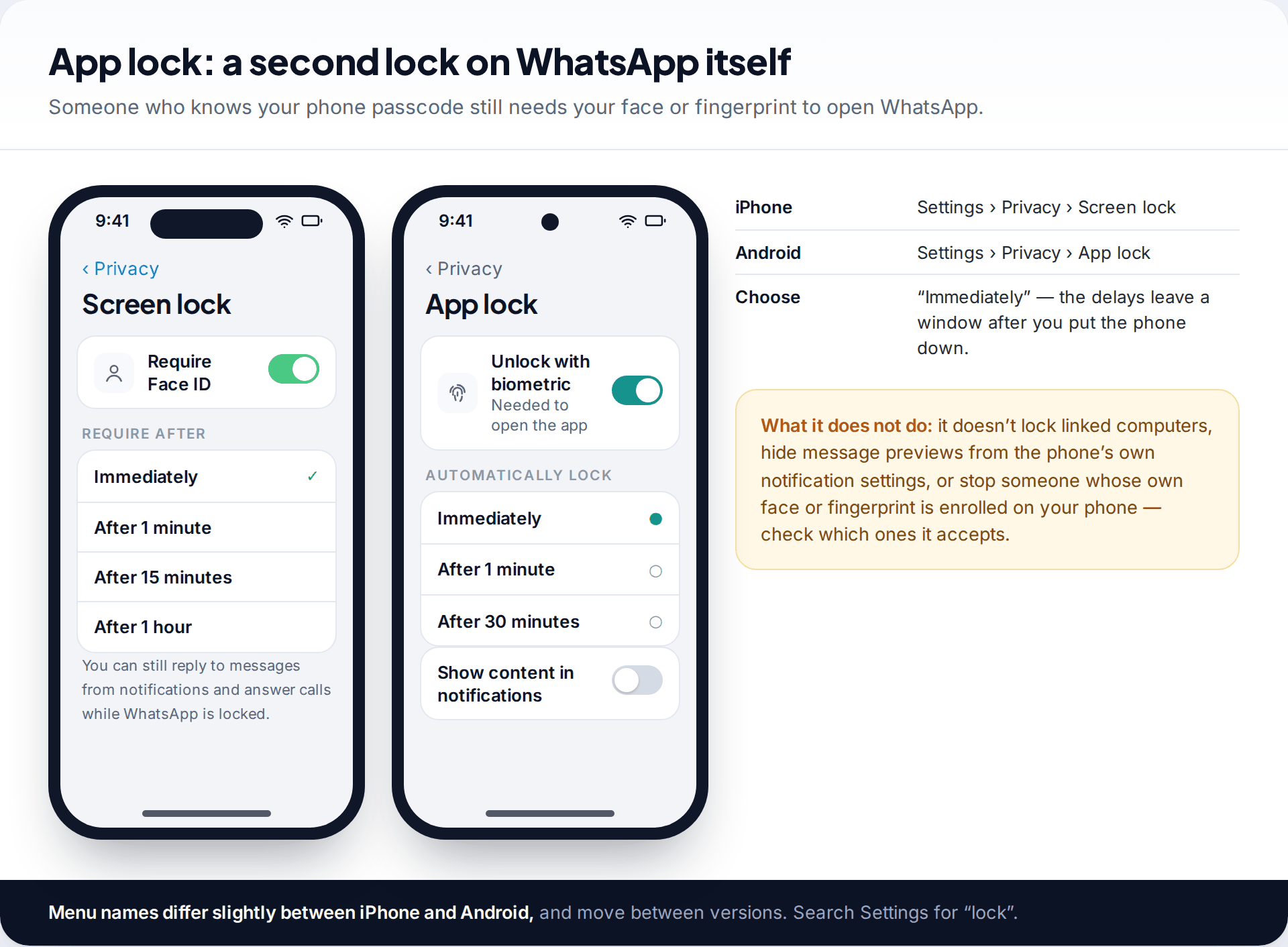
Your phone’s passcode is the weakest link if someone in your home knows it, and many people’s partners and children do. WhatsApp’s own lock adds a second check. With it on, opening WhatsApp needs your face or fingerprint, even on an unlocked phone.
- iPhone: WhatsApp Settings › Privacy › Screen lock › Require Face ID (or Touch ID).
- Android: WhatsApp Settings › Privacy › App lock › Unlock with biometric.
Choose Immediately. The one-minute and longer delays exist for convenience, but they’re exactly the window a snooper needs when you step away. Then check your phone’s own biometric settings. If someone else’s face has been added as an alternate appearance, or their fingerprint enrolled, the app lock opens for them too. On Android the lock falls back to the phone’s own screen lock if biometrics fail, so a known PIN still gets through. The lock is a strong deterrent, but not a vault.
Step 3: lock and hide the chats that matter most
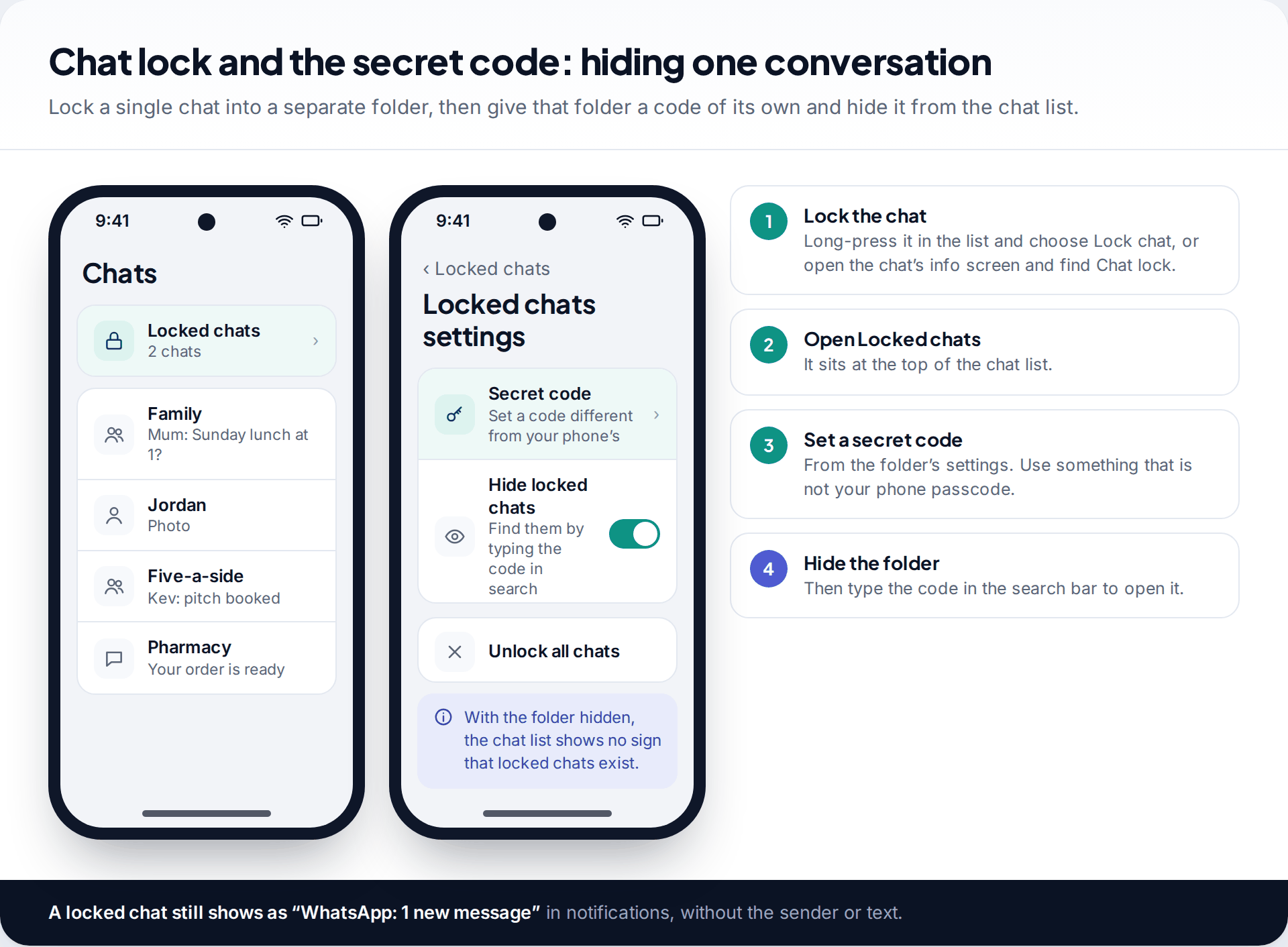
Chat lock moves individual conversations into a separate Locked chats folder that opens only with your biometrics or a code. Long-press a chat and choose Lock chat, or open the chat’s info screen and find Chat lock. Their notifications change too: instead of the sender and text, you see only that there’s a new message.
The secret code, added in late 2023, goes further. You can set a code for the Locked chats folder that is different from your phone’s passcode, and hide the folder completely. The chat list then shows no sign it exists, and you open it by typing the code into the search bar. This matters in the situation where it’s most needed: someone who knows your phone passcode and looks through your WhatsApp while you’re out of the room.
Step 4: stop the lock screen giving messages away
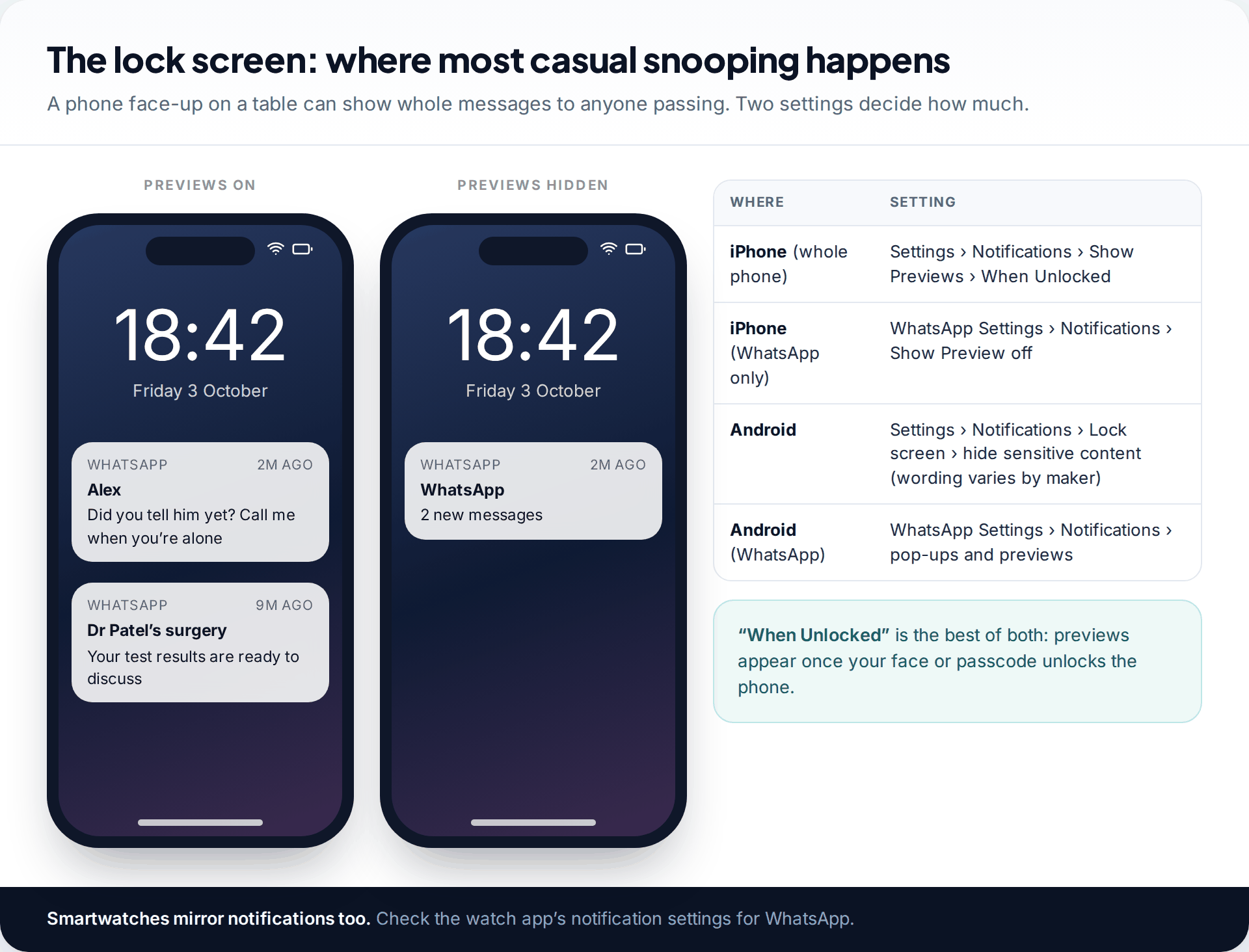
Of all the ways WhatsApp messages are read by the wrong person, a notification on a phone lying face up is the simplest. It needs no access at all. Two layers control it: the phone’s notification settings and WhatsApp’s own.
On an iPhone, the best single change is Settings › Notifications › Show Previews › When Unlocked. Previews then appear only after Face ID recognises you, so glancing at your own phone still shows the text and a passer-by sees only “Notification”. On Android, the setting to hide sensitive content on the lock screen is under the phone’s notification settings. The exact wording varies between Samsung, Pixel and other makers. WhatsApp’s own notification settings can turn previews off for WhatsApp alone. Paired smartwatches have separate notification settings, and they are often forgotten.
Step 5: protect the backup, the copy nobody thinks about
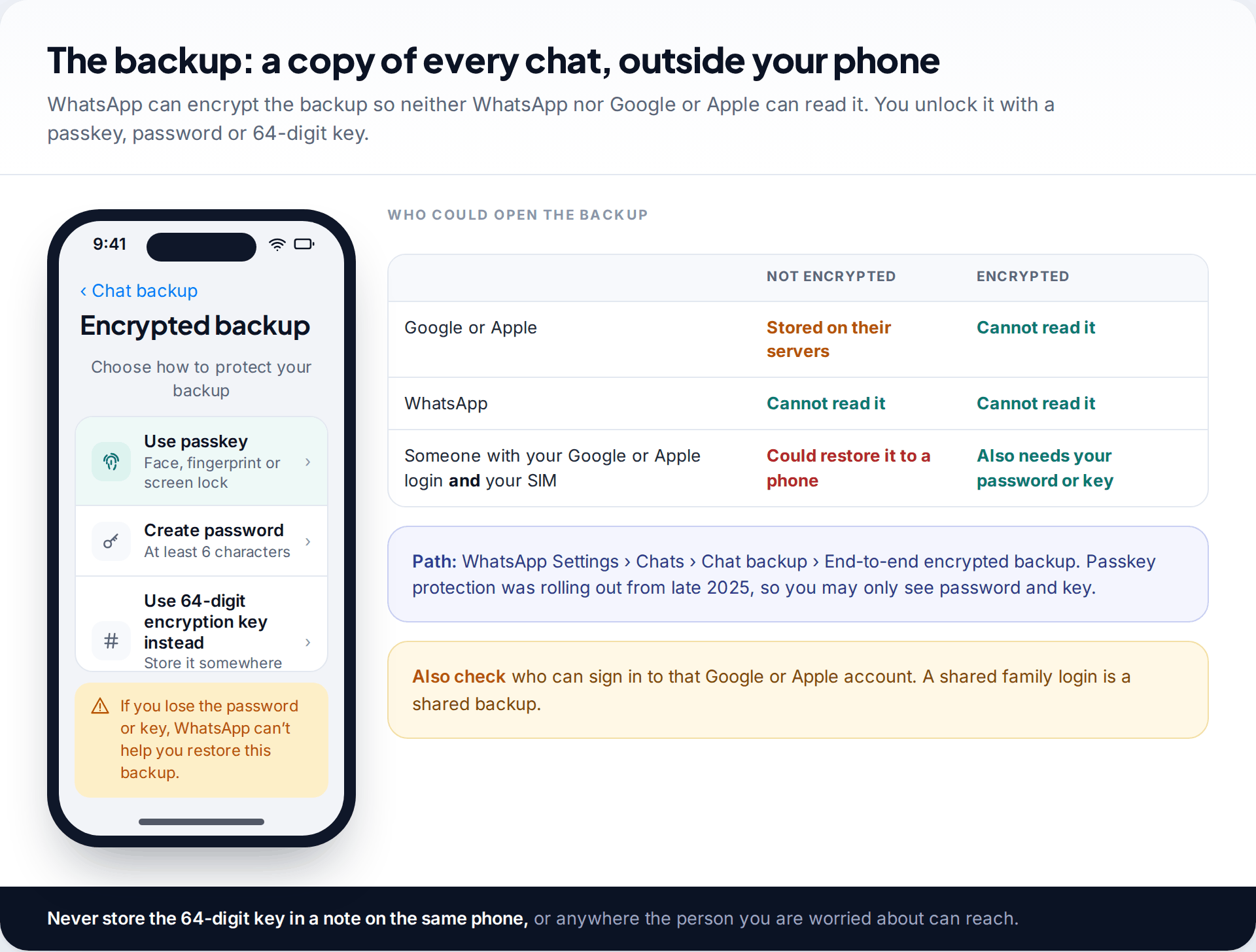
Your chat history is backed up to Google on Android or iCloud on iPhone, usually every night. Without extra protection, that backup is protected by your Google or Apple account. If someone else can sign in to that account, it becomes part of your attack surface. This is typical of a shared family login, or an account a former partner set up for you.
End-to-end encrypted backup closes this. Go to Settings › Chats › Chat backup › End-to-end encrypted backup. You choose how to lock it: a password, a 64-digit key, or, as WhatsApp began rolling out in October 2025, a passkey that uses your face, fingerprint or screen lock. Once on, neither WhatsApp nor Google nor Apple can read the backup. Restoring it on a new phone needs the password, key or passkey as well as your phone number. Lose all of them and the backup is lost too, so store a password or key where only you can reach it.
While you are there, look at the account itself. Change the password on your Google or Apple account if anyone else might know it, and check which devices are signed in to it.
Step 6: protect sensitive groups from the other end
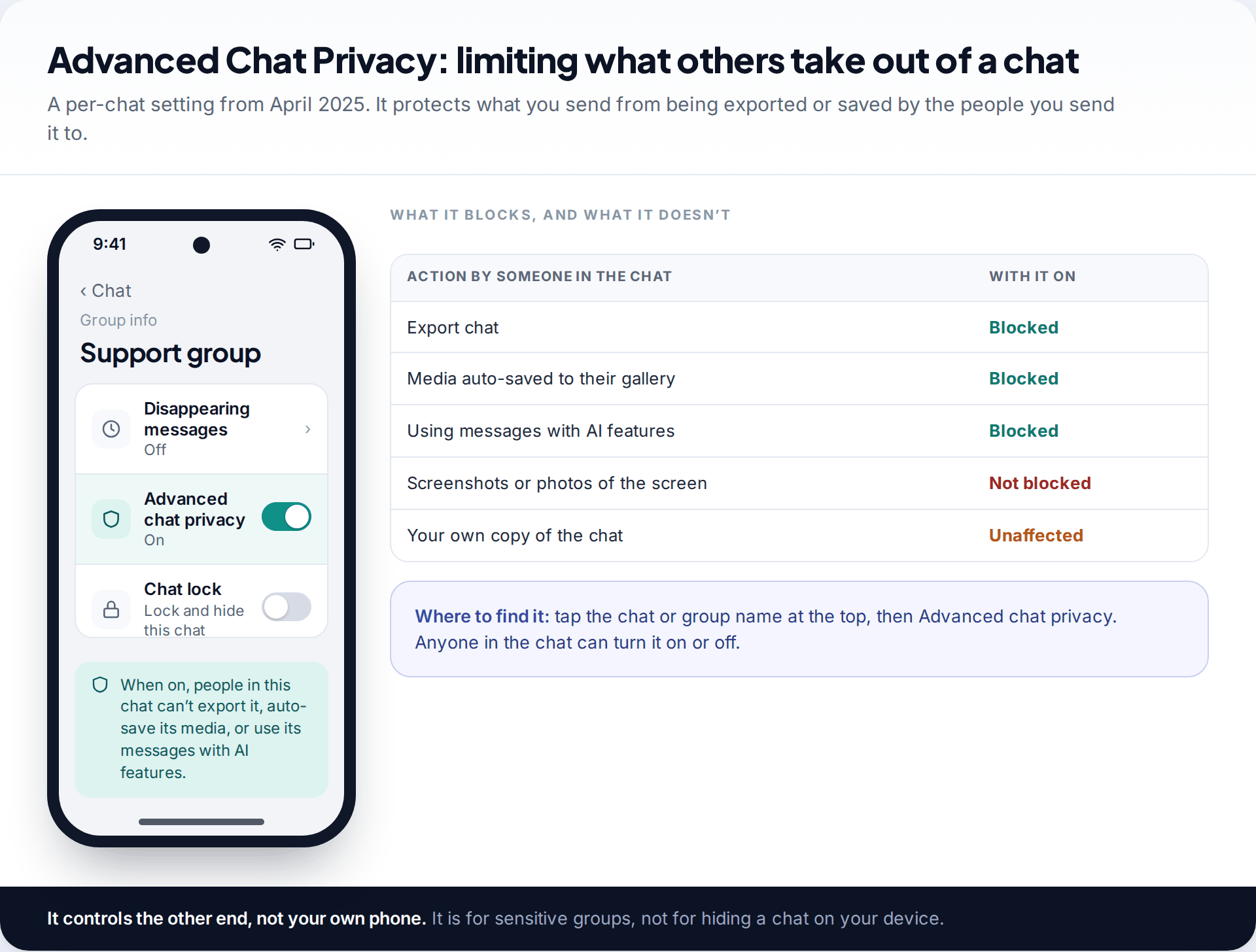
Some snooping happens through the people you are talking to: a chat exported and passed on, or media from a sensitive group saved automatically into someone’s photo gallery. WhatsApp’s Advanced Chat Privacy, launched in April 2025, is a per-chat setting for this. Tap the chat or group name, then Advanced chat privacy. With it on, nobody in the chat can export it, media isn’t saved automatically to their phones, and messages can’t be used with AI features.
WhatsApp describes this as a first version, and it has clear limits. It doesn’t stop screenshots or a photo of the screen, and any member can turn it back off. It is for groups where people don’t all know one another but the subject is sensitive. It won’t protect you from someone who has access to your own phone.
Two smaller settings are worth a moment while you’re in Privacy. Disappearing messages reduce how much history exists to be read at all. Privacy checkup walks through who can see your profile photo, last seen, status and group invitations. Finally, turn on two-step verification under Account. It doesn’t stop snooping, but it stops the next step up, a full takeover. Our guide to recovering a hacked WhatsApp account explains why.
What no WhatsApp setting can fix
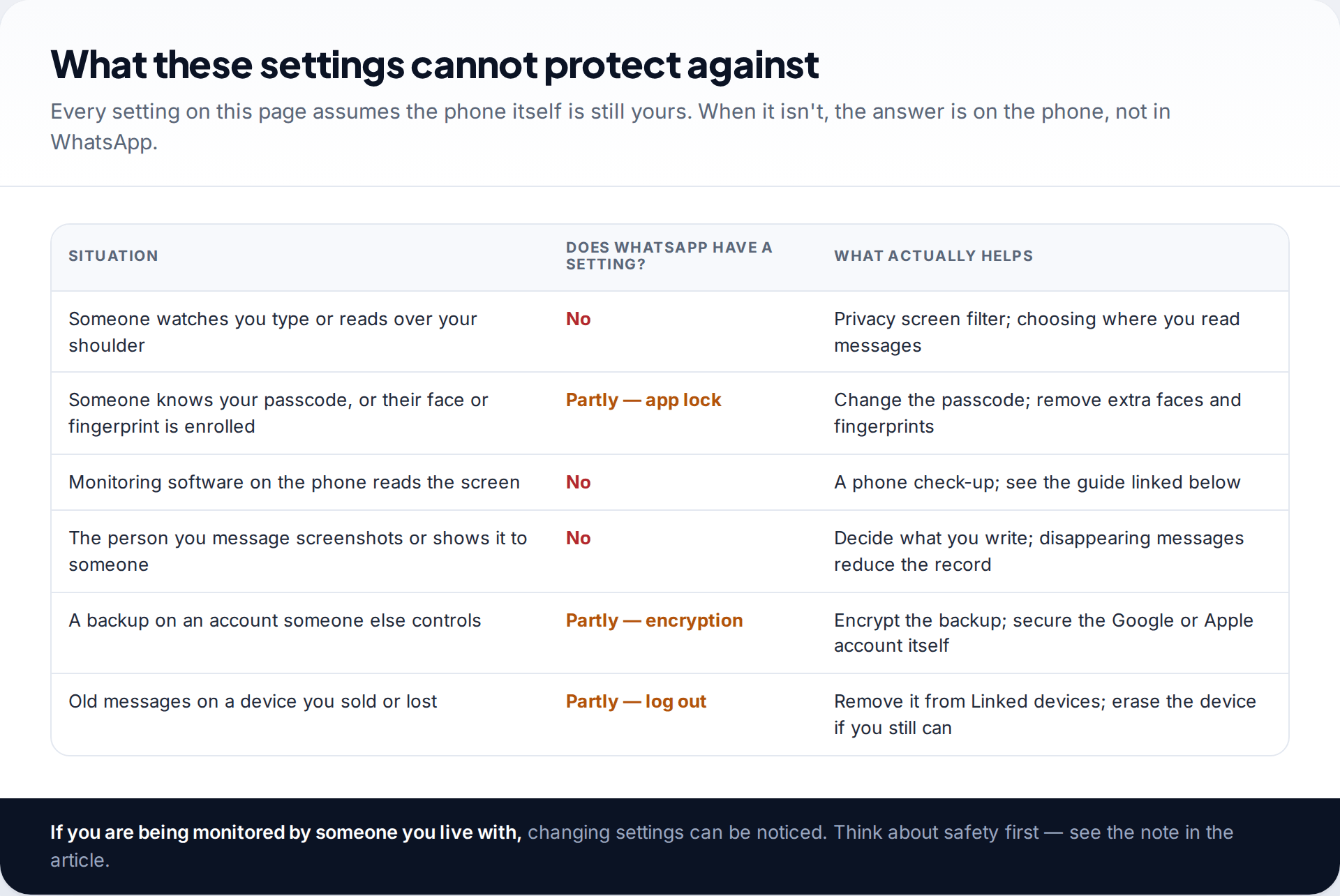
Every setting above assumes the phone is yours alone apart from WhatsApp. If monitoring software is installed on the device, it can read the screen or notifications after WhatsApp has decrypted them. No app lock, chat lock or encrypted backup prevents that. The signs are different — unexplained apps with broad permissions, accessibility services you didn’t turn on, device-admin apps. So is the fix. Our guide to stalkerware-proofing your phone covers the checks, and the risk that removing such an app alerts whoever installed it.
Nor can any setting stop the person you’re writing to from showing your messages to someone else. Disappearing messages and view-once media reduce what’s left lying around, but a screenshot or a second phone pointed at the screen defeats both.
Keep it secure: a five-minute monthly routine
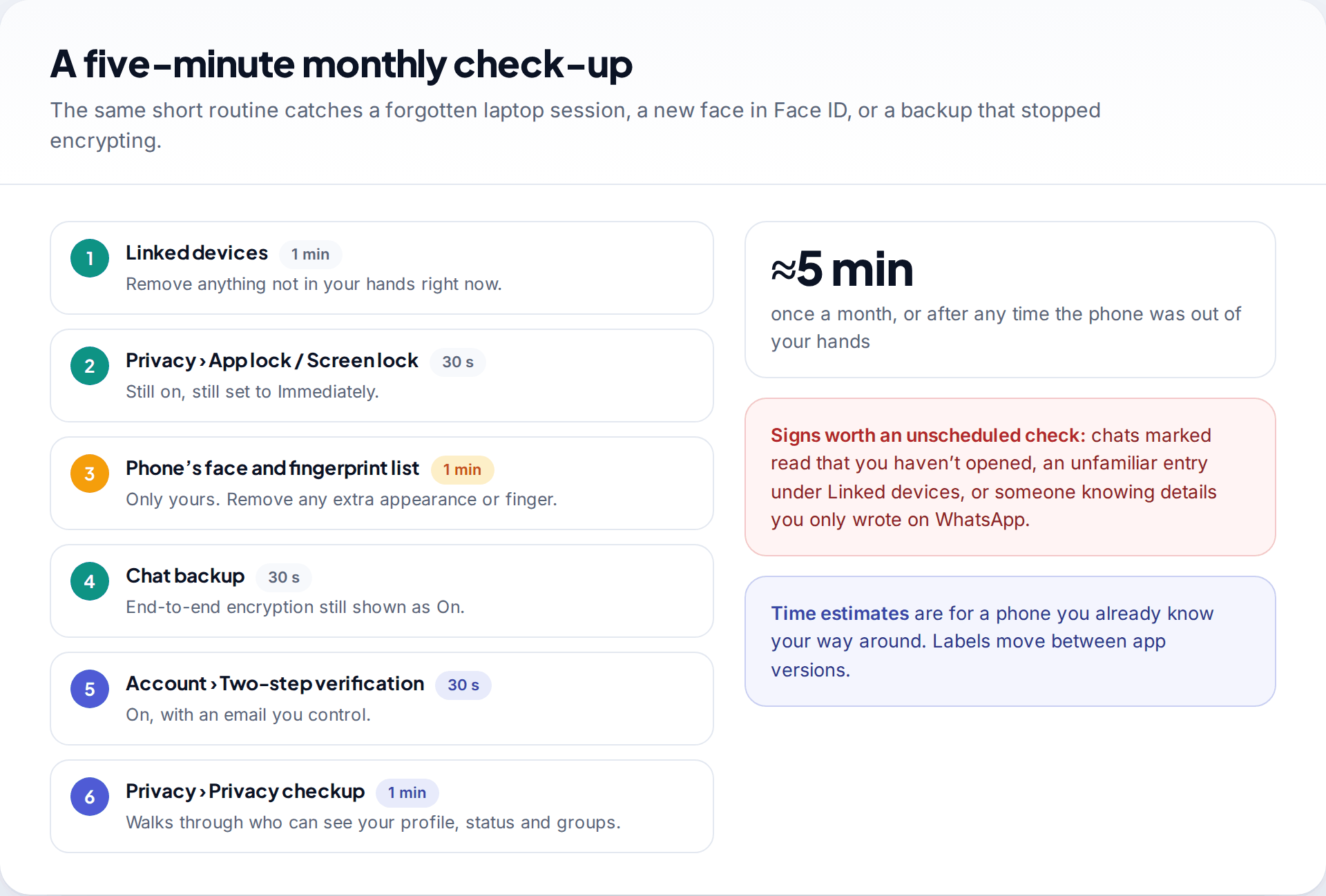
Settings drift. A laptop gets linked for a video call and forgotten. A new face is added to Face ID “just so I can unlock it for you”. A backup gets switched off to free up space. A short routine once a month catches these before they matter: Linked devices, app lock, the phone’s biometric list, backup encryption, two-step verification and the Privacy checkup.
Order matters when you suspect someone right now. Do Linked devices first, because it cuts off live access. The app lock and the lock-screen previews are next. The backup can wait an hour.
How this page was put together
The settings on this page were checked in September 2026 against WhatsApp’s help centre and its official announcements. Those include Advanced Chat Privacy (April 2025), the chat lock secret code (November 2023) and passkey-encrypted backups (October 2025). Where iPhone and Android differ, both are given. Phone makers word notification settings differently, so treat those labels as a guide.
We have not tested any monitoring or snooping tools against WhatsApp, and this page recommends none. For how our guides are researched and corrected, see our editorial standards.
Common questions
Can someone read my WhatsApp messages from another phone?
Only through a device linked to your account, a readable backup, or access to your own phone. The Linked devices list shows every linked device. Removing one ends its access immediately.
Does WhatsApp tell me when a new device is linked?
Linking requires your phone to scan a code or confirm a pairing request, and the device then appears in the Linked devices list with its last-active time. Check that list rather than relying on a notification you may not see.
Can someone see my WhatsApp messages on WhatsApp Web without my phone?
Once linked, yes. Linked devices work even when your phone is off or offline. That’s why logging out unknown sessions is the first step.
Is WhatsApp’s app lock enough on its own?
It’s a good barrier against someone who knows your passcode, but not against someone whose face or fingerprint is enrolled on your phone, or against monitoring software. Combine it with chat lock and a check of your phone’s biometric list.
Do hidden locked chats show up on linked devices?
WhatsApp has extended chat lock to linked devices using the secret code, but support depends on your app version on each device. Check each linked device yourself rather than assuming.
Can someone snoop on my WhatsApp with just my phone number?
No. A number on its own gives nobody your messages. Taking the account needs the six-digit code sent to your phone, and reading along needs a device linked from your phone. Services that claim to show someone’s WhatsApp from their number alone are scams, and often a way to collect payment or your own login details.
Can WhatsApp itself read my messages or backups?
Personal messages are end-to-end encrypted, so WhatsApp says it can’t read them. Backups are encrypted the same way only if you turn on end-to-end encrypted backup.
Looking for a tool to go with this? TheTruthSpy is a free parental control app for Android that stays visible on the child's phone. If it fits your family, see the Screen time & limits feature.
Related guides
How to Check If Your Email Was in a Data Breach
Check if your email was in a data breach for free, then act on what leaked: passwords, card details or…
How to Start Using a Password Manager
Switch to a password manager without stress: built-in or standalone, protecting the main password, and a first-hour plan for the…
How to Tell If Your Phone Has a Virus or Malware
Most 'virus' signs have ordinary causes. How to check an iPhone or Android phone for real malware, remove it, secure…
Parental controls your child can see
Location, screen time limits, a web filter and alerts from notifications — free, and visible on your child's phone. Pair a phone in about ten minutes.
Android · Free to set up · Visible on your child's phone