Kik has been around long enough to fall off many parents' radar, and it has never gone away from children's. It needs no phone number, it has public groups anyone can join, and it is a common place for a stranger to arrive as a username. This page covers what TheTruthSpy sees on Kik, the features that make it riskier than a family messenger, the settings inside Kik that matter, and how to talk about it.
What TheTruthSpy can see on Kik
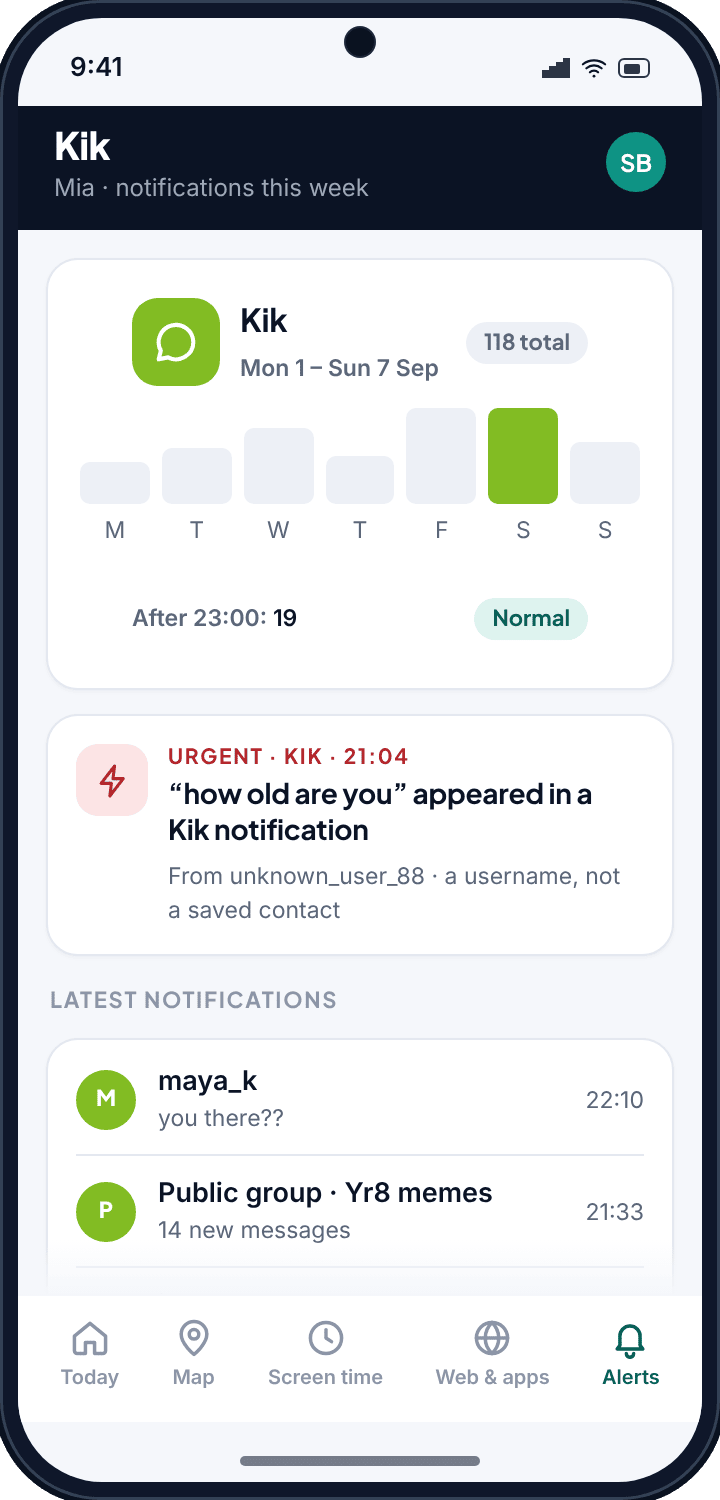
Kik's notifications carry the sender's username and, on most phones, the first line of the message. TheTruthSpy reads them through the notification access your child granted during setup, and turns them into a page you can glance at.
- Who, and the preview line. “maya_k: you there??” — with notification text on, the line is shown; with it off, you see that maya_k messaged and when.
- Public groups. A group notification carries the group name and a count of new messages. For many parents, this is the first time they learn which groups their child has joined.
- Unknown usernames. Kik has no contact list to match against, so TheTruthSpy flags usernames that have not messaged before. A first message from a new name late at night is the pattern worth a question.
- Counts and timing. Notifications per day, and how many arrive after 23:00.
- Keyword alerts. Words and phrases you choose, flagged gently or urgently when they appear in a notification.
Why Kik is different from WhatsApp
Three things set Kik apart, and each one changes what monitoring can and cannot do.
Usernames, not numbers
On WhatsApp a stranger has to know your child's phone number. On Kik they only need a username, and usernames are easy to guess, share or find in a public group. There is no address book to check a name against, so “not in contacts” is not a category; every Kik contact is a username your child chose to accept or a group member they never chose at all.
Public groups
Kik groups can be joined by anyone who finds them, and many are large and lightly moderated. A child who joins a fan group for a game can be messaged privately by any member of that group. TheTruthSpy shows you the group names as they produce notifications; it cannot show you who is in them.
Age
Kik's own rules set a minimum age, but there is no verification, and a younger child with a Kik account is a common finding. If your child is under that age, the sensible move is not better monitoring but no Kik yet, and the app blocker can keep it off the phone until they are older.
What TheTruthSpy cannot see
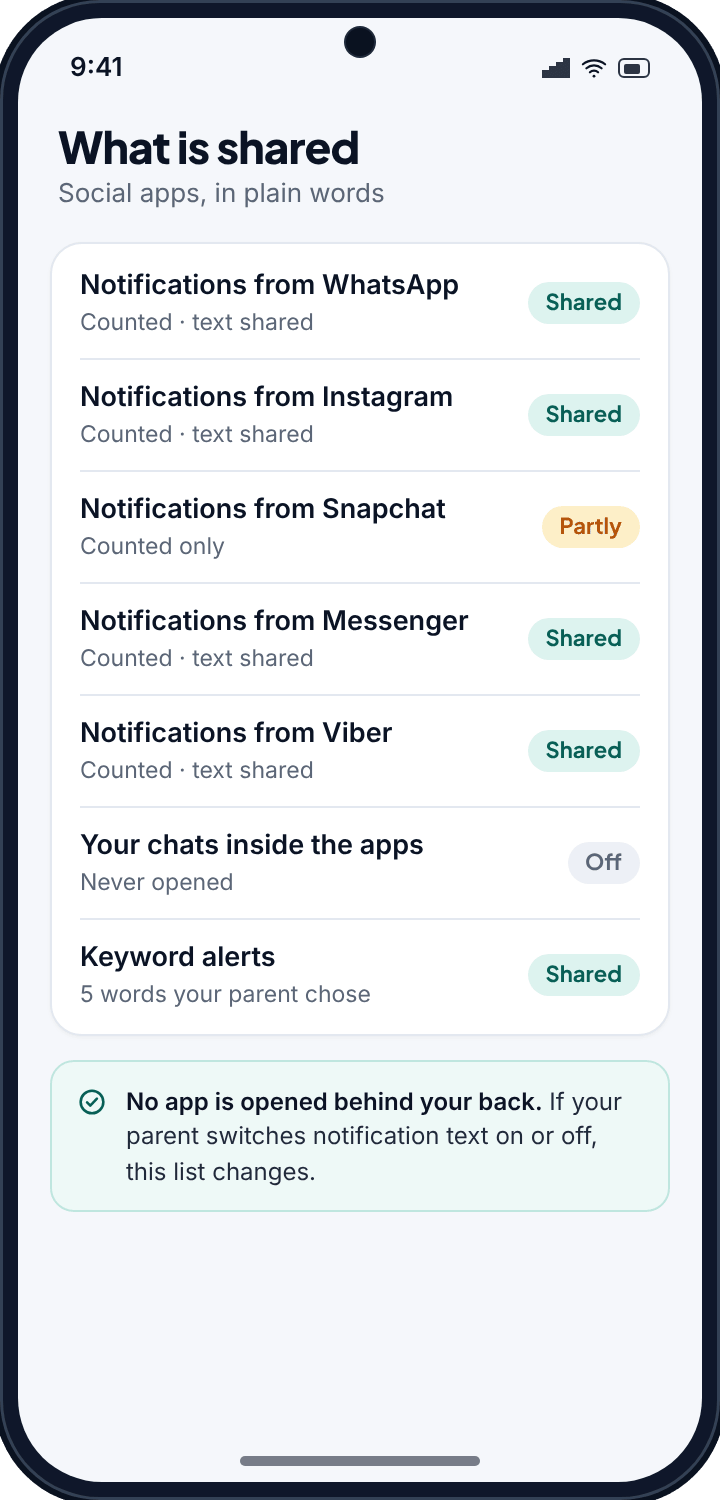
TheTruthSpy never opens the Kik app or reads its chat history. It sees notifications, and a notification is one line at most. It does not see photos or videos sent in chat, messages read while the app was already open (which produce no notification), or anything in a chat where notifications are muted. If Kik's notifications are turned off on the phone, TheTruthSpy sees nothing from Kik at all, and the panel tells you so. No parental app can do more than this without breaking into the app, and one that claims to should not be trusted with your child's phone.
Kik's own settings worth changing together
- Who can message you. Set new messages from people not in your child's contacts to arrive in a separate request area rather than the main inbox, so a stranger has to be accepted before they can chat.
- Hide from search. Make the username unfindable by people who do not already know it.
- Leave public groups. Go through the group list with your child and leave any they cannot explain.
- Block and report. Show them where the block button is. It is the fastest fix for most problems.
Keywords that fit Kik
Because strangers arrive as usernames, the useful keywords on Kik are the ones a stranger uses to get started: “how old are you”, “where do you live”, “send a pic”, “don't tell”, “our secret”, and a request to move to another app. Keep the list short. Ten well-chosen phrases produce a handful of alerts a month; a hundred produce noise you learn to ignore.
Setting it up
- Pair the phone with the six-character code from your panel. Notification access is in both builds.
- Grant notification access on the phone when Android asks. It is one switch in Android's settings.
- In your panel, open Alerts, then Kik. Decide together whether notification text is on or off, and add your keywords.
- Show your child the What is shared screen on their phone, where Kik is listed with the setting you chose.
Talking to your child about it
Kik is one of the apps where the conversation does more than the tool. “I can see who messages you on Kik and I can see the group names. I can't read your chats. If a username I don't know messages you late, I'll ask. And if anyone asks how old you are or wants to move to another app, tell me, because that is the oldest trick there is.” Then set the message-request setting together so it is a shared decision, not an imposed one.
Common questions
Can TheTruthSpy read my child's Kik messages?
No. TheTruthSpy sees the notification, which is the username, the time, and the preview line if notification text is on. It never opens the chat.
Can it show me who is in a Kik group?
No. It shows the group's name when the group produces a notification. The member list is inside the app.
Does it need the direct-download build?
No. Notification access is in both builds.
Can I just block Kik?
Yes. The app blocker can keep Kik from opening, or from being installed, and for a younger child that is often the right call.
Will my child know?
Yes. The TheTruthSpy app on their phone lists Kik notifications as counted and shows whether their text is shared.