Instagram is less a messaging app than a place: photos, Reels, stories, and a direct-message inbox that sits behind all of it. The feed is where the time goes; the inbox is where the risk goes. This page covers what TheTruthSpy can and cannot see on Instagram, the settings Instagram itself provides for teenagers, and how to read the signals without turning every notification into an interrogation.
What TheTruthSpy can see on Instagram
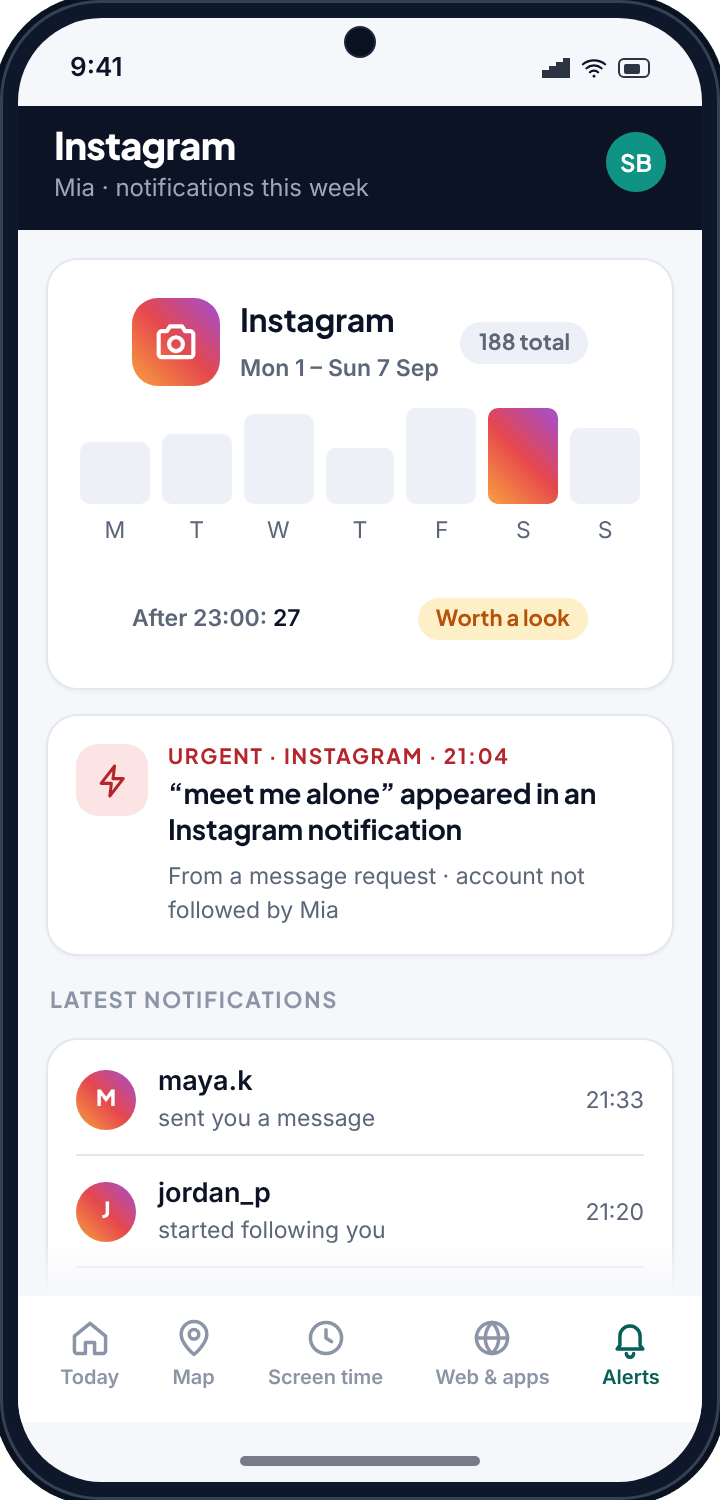
TheTruthSpy reads Instagram's notifications, because your child's phone granted notification access on a screen they saw. Instagram is generous with notifications, and they are more varied than a plain messaging app's, which is useful.
- Direct messages. “maya.k sent you a message”, with the preview line if Instagram shows one and you have notification text switched on.
- Message requests. Messages from accounts your child does not follow arrive as a request. These are the ones that matter most, and they are labelled as requests in the notification.
- Follows and follow requests. A new follower is a notification. A cluster of new followers with no mutual friends is a signal.
- Comments, mentions and tags. Who is commenting on your child's posts and tagging them in stories.
- Counts and timing. Notifications per day, and how many after 23:00, across all of the above.
Keyword alerts run across every one of these. A phrase like “meet me alone” inside a message request from an account your child does not follow is treated as urgent, because that combination is the shape of the thing parents most fear.
What TheTruthSpy cannot see
TheTruthSpy does not open Instagram, does not read the inbox, and does not export conversations. If a message never produces a notification — because your child was already inside the chat, or clears notifications instantly, or has previews hidden — TheTruthSpy sees the count at most. Disappearing messages in “vanish mode” leave no trace on the phone and none in TheTruthSpy. Photos and voice notes show as “sent a photo” rather than the image.
The feed is the other blind spot. TheTruthSpy can tell you how long Instagram was open today (that is screen time, and you can cap it), but it cannot tell you what your child scrolled past. That is by design, and it is also where Instagram's own tools do more than any monitoring app can.
Instagram's own tools for teenagers
Instagram has built a fair amount for under-18s, and it is worth setting up before you rely on alerts. Exact names and availability vary by country and change with updates, so treat these as things to look for in Settings on your child's account.
- Teen accounts. Accounts for under-16s are set to private with tighter messaging defaults, so only people they follow can message them, and sensitive content is limited. Check that your child's account is registered with their real age.
- Supervision (Family Center). With your child's agreement you can link your own account to theirs and see how much time they spend, who they follow, and who follows them — and set daily limits and break times. It does not show messages, which is the right call.
- Message requests and hidden words. Requests from strangers can be filtered so offensive requests never reach the main inbox, and you can add your own list of words to hide.
- Restrict and block. Restrict quietly hides someone's comments and messages without them knowing; block is the full stop. Show your child both.
Supervision plus a keyword list is a strong combination: Instagram shows you the shape of the account, TheTruthSpy tells you when a specific phrase turns up in a notification.
Keywords that fit Instagram
- Strangers and meeting: “how old are you”, “where do you live”, “meet”, “alone”, “our secret”.
- Moving the conversation somewhere with less oversight: “snap me”, “add me on”, “text me”, “my number is”.
- Pressure around images: “send a pic”, “show me”, “just one”, “delete after”.
- Appearance and comparison, if that is a worry for your child: the words that would tell you a comment has turned cruel.
Keep the list short. Instagram produces a lot of notifications, and a long list of common words will bury the alert that matters under twenty that do not.
Reading the pattern
The most useful Instagram signal is not a single message. It is a message request from an account your child does not follow, followed within a day by a new follow, followed by a suggestion to move to another app. Each step on its own is ordinary. Together they are the pattern of an adult trying to move a child somewhere quieter, and it is exactly the sequence that shows up as three notifications in TheTruthSpy's list. When you see it, you do not need the words — you need a conversation, that evening.
In practiceMessage request → new follower → “add me on Snap”. Three notifications, two days. That is the sequence worth an alert, and it is visible without reading a single DM.
Setting it up
- Pair your child's Android phone with your panel — the setup page takes about ten minutes.
- Grant notification access during setup. That is all Instagram monitoring needs, in either build.
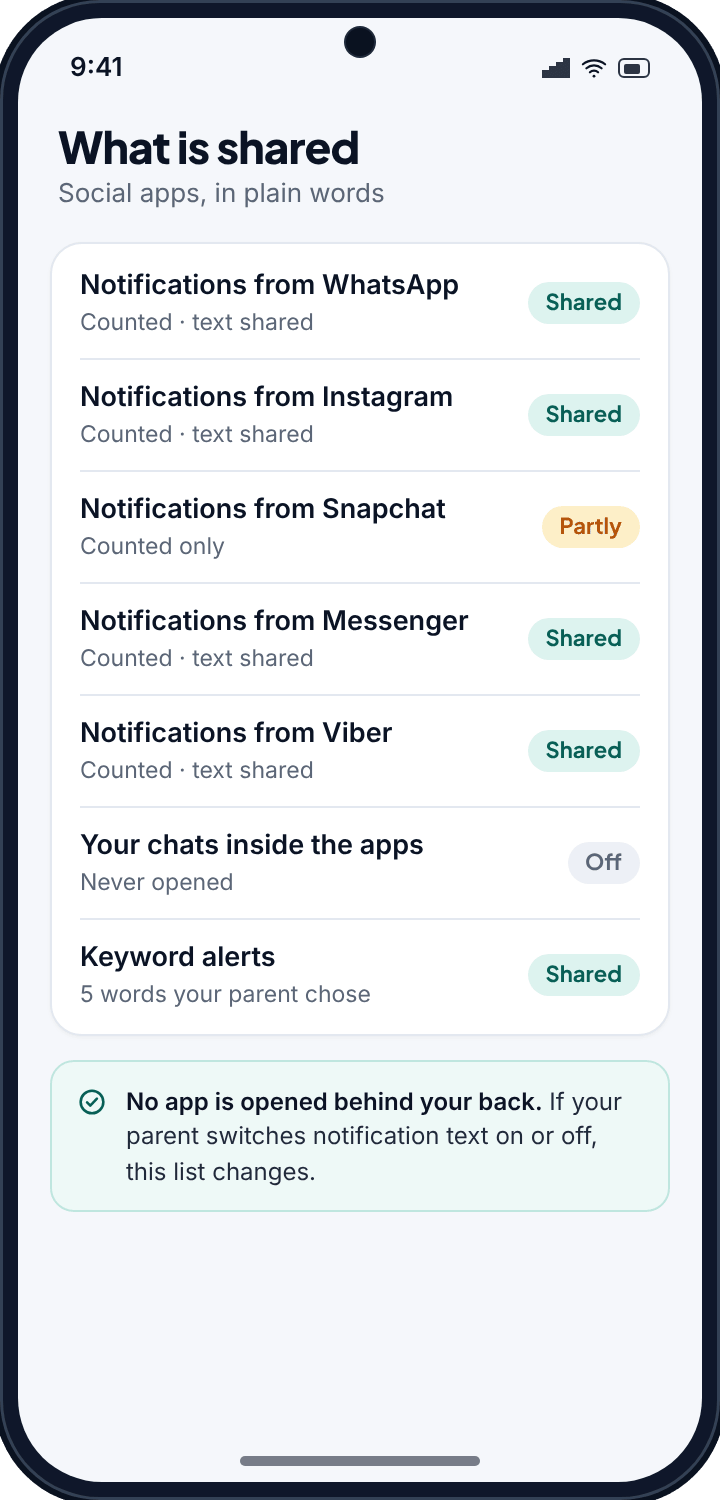
- Choose whether to switch notification text on. Counts, requests and follows are visible either way; the preview line needs text on, and your child's app lists it.
- Add a short keyword list and mark the serious phrases urgent.
Talking to your child about it
Instagram is personal in a way WhatsApp is not; it is where a teenager presents themselves. Lead with the part that is on their side: “If someone you don't know messages you and it feels off, I'll probably see the request too, so you're not dealing with it alone.” Then say plainly what you cannot see — their conversations with friends — and mean it. The aim is a child who tells you about the odd request, not one who works out how to hide it.
Common questions
Can TheTruthSpy read my child's Instagram DMs?
No. It reads the notifications Instagram shows on the phone — who messaged, message requests, follows, comments — and the preview line if notification text is on. The inbox itself stays closed.
Does it see message requests from strangers?
Yes, when Instagram notifies about them, which it does by default. Requests are the most useful Instagram signal, and keyword alerts run on them too.
Can it see what my child scrolls in the feed?
No. TheTruthSpy can show how long Instagram was open and let you cap it, but not what was viewed. Instagram's own supervision and sensitive-content settings are the right tools for the feed.
Does this need the direct-download build?
No. Notification access is in both builds.
Will my child know?
Yes. The TheTruthSpy app on their phone lists Instagram notifications as counted and shows whether their text is shared.