WhatsApp sits in a strange place for parents. It is the app Grandma uses, the app the football team runs on, and also the app where a stranger with a foreign number can message your child the moment they know the number. This page explains exactly how TheTruthSpy treats WhatsApp, why the chats themselves are out of reach for any honest tool, and which of WhatsApp's own settings do the most to keep a child safe.
What TheTruthSpy can see on WhatsApp
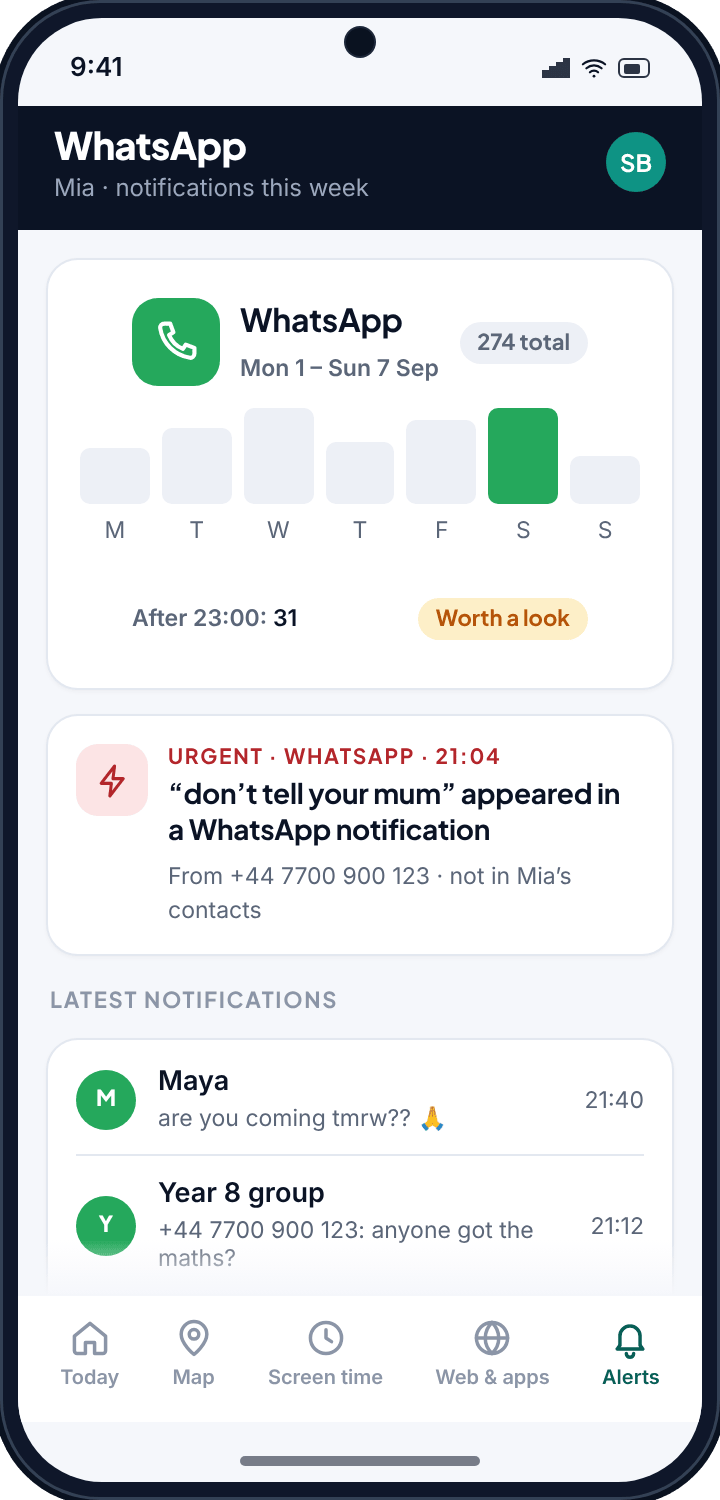
TheTruthSpy works from notifications. When WhatsApp shows one on your child's phone, TheTruthSpy can read it, because the phone granted notification access on a screen your child saw. From that it builds three things.
- Counts and timing. How many WhatsApp notifications arrived each day, and how many after a time you set — 23:00 by default. A Tuesday with 31 messages after eleven at night is worth a look; a Saturday with 90 during the day usually is not.
- Who, and the preview. WhatsApp notifications carry the sender's name (or number) and, on most phones, the first line of the message. With notification text switched on, TheTruthSpy shows that line. In a group chat you also see the group name and which member wrote.
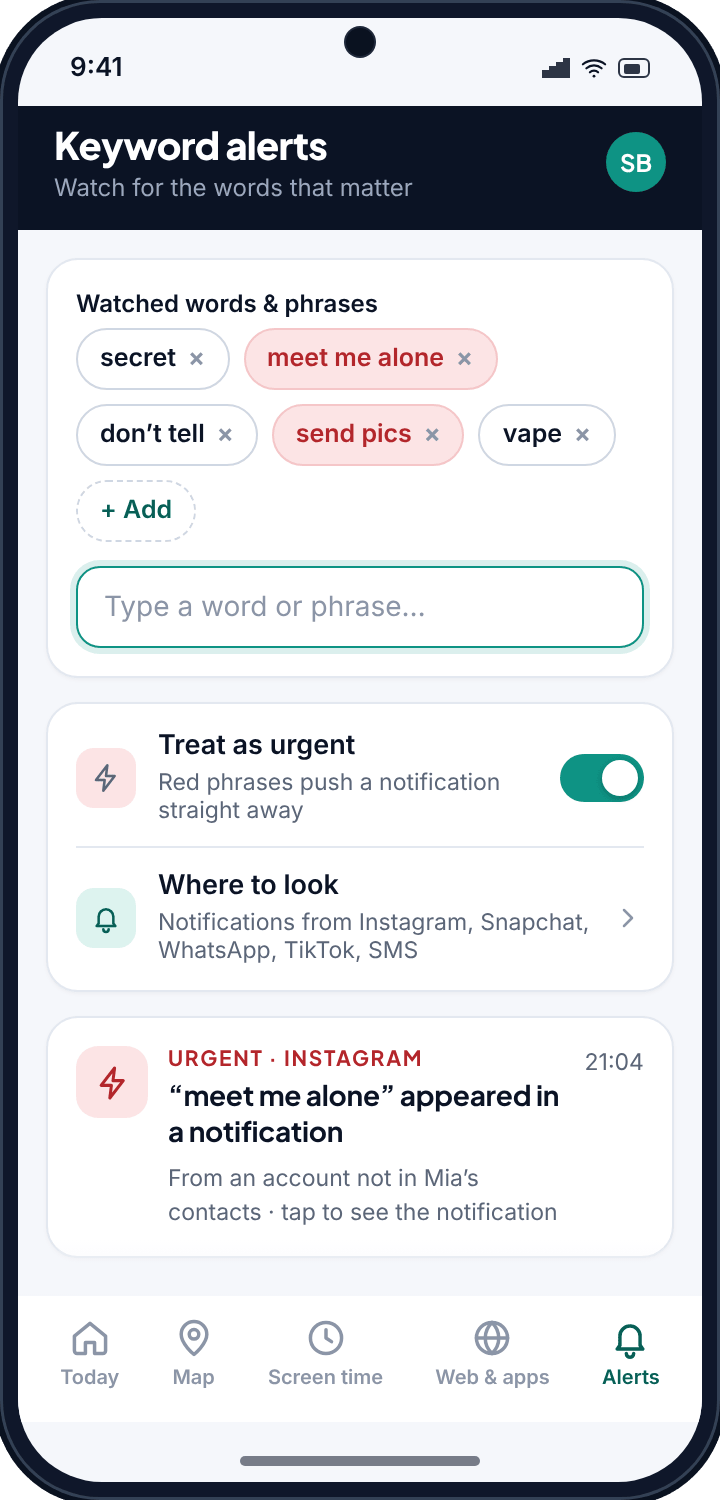
- Keyword alerts. When a word or phrase you chose appears in a notification, TheTruthSpy flags it. Serious phrases can be marked urgent so they push a notification to you straight away.
Two WhatsApp-specific details are useful. Unsaved numbers stand out, because every other sender is labelled with a name from your child's contacts and this one is a bare +44 or +1. And missed voice and video calls produce notifications too, so a run of late-night calls from one number shows up even though there is no text to read.
What TheTruthSpy cannot see — and why no honest tool can
WhatsApp is end-to-end encrypted. The message is scrambled on your child's phone, unscrambled on the recipient's, and nothing in between can read it — not WhatsApp, not TheTruthSpy, not a tool that claims otherwise. Any product promising to “read all WhatsApp chats” is either extracting the app's private database with elevated access that breaks with every update, or it is not telling the truth.
So the honest boundaries are these:
- If your child clears a notification instantly, or has WhatsApp set to hide preview text, TheTruthSpy sees the count but not the words.
- Messages read inside the app while it is open never produce a notification, so they never reach TheTruthSpy.
- Media — photos, voice notes, documents — shows as “Photo” or “Voice message” in the preview, not the content itself.
- Disappearing messages and “view once” photos are gone from the phone; TheTruthSpy has no copy either.
We think most parents want a reliable read on the pattern of a child's messaging over a fragile promise of total capture. If you need the pattern, this works every day. If you need every word, no tool that respects the phone's security can give you that, and you should be suspicious of any that says it can.
WhatsApp's own settings worth switching on
TheTruthSpy is one layer. WhatsApp has privacy settings of its own, and for a child they do a lot of the work. Set these up together on their phone under Settings → Privacy; the exact wording changes with updates, so look for the equivalent if a label differs.
- Groups → My contacts. Stops strangers adding your child to a group they never asked to join, which is how a lot of unwanted contact and inappropriate content arrives.
- Profile photo, About and Last seen → My contacts. An unknown number should not be able to see your child's face or when they were last online.
- Calls → Silence unknown callers. Calls from numbers not in the contacts list ring silently and show only in the call list.
- Two-step verification. A PIN that stops someone hijacking the account with just a SIM swap or a stolen code.
- Block and report. Show your child where it is. A child who knows how to block is far less likely to sit on a problem.
None of this is monitoring; it is simply narrowing who can reach your child in the first place. Do it before you set up any keyword list.
Keywords that fit WhatsApp
Because WhatsApp is where school friends and family live, most of the traffic is harmless, and the list should be short and specific. Families tend to start with a handful of phrases:
- Meeting and secrecy: “meet me”, “don't tell”, “our secret”, “delete this”.
- Pressure to send images: “send pics”, “send a photo of”, “just one”.
- Money and scams: “gift card”, “send money”, “prize”, “verification code” — WhatsApp is a common route for scams aimed at children.
- Anything specific to your child: a name you would rather they were not talking to, a place, a nickname.
Write them the way your child's friends actually type — shorthand, no punctuation — and revisit the list after a month. The keylogging page explains why a short, chosen list beats a transcript of everything.
Reading the pattern
Here is what a typical week looks like in practice. Monday to Thursday: forty or fifty notifications a day, nearly all from three named friends and two school groups, tailing off by ten at night. That is a normal twelve-year-old. Then on Friday an unsaved number appears, three messages late in the evening, and on Saturday the same number is back with a keyword match. Nothing in that is proof of anything — but it is exactly the kind of change you would want to notice within a day rather than a month, and it gives you a specific, calm thing to ask about: “Who's the new number?”
That is the whole value of counts and timing. They tell you when something has changed, which is usually the moment a conversation is worth having.
Setting it up
- Pair your child's Android phone with your panel — the setup page walks through it in about ten minutes.
- Grant notification access during setup. This one permission is all WhatsApp monitoring needs, and it works in both the Google Play and direct-download builds.
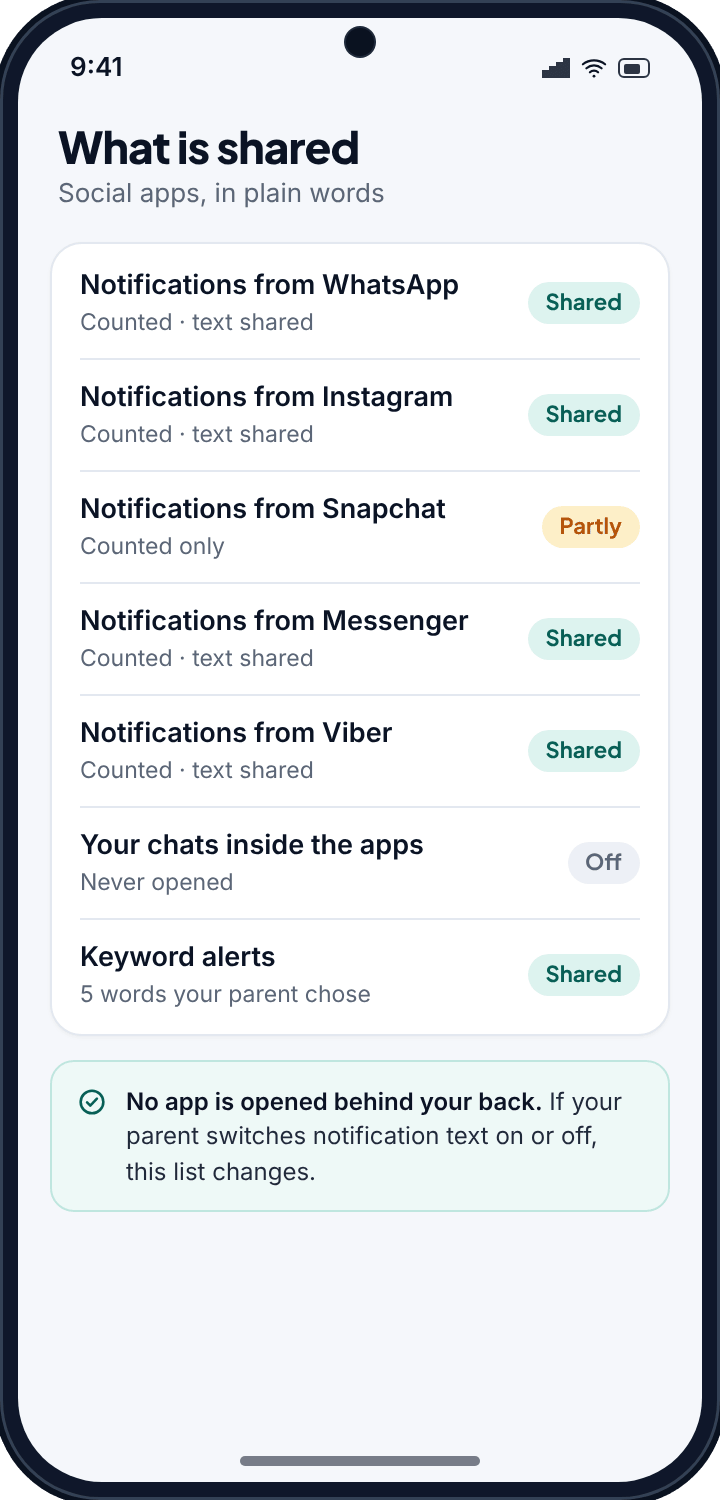
- Decide on notification text. Counts and keyword alerts work with it off. Switch it on if you want to see the preview line, and know that your child's app will list “Notification text: shared”.
- Add your keywords, and mark the serious ones urgent.
Talking to your child about it
Tell them what you can see, in one sentence: “I can see who messages you on WhatsApp and when, and a few words I've set up an alert for. I can't read your chats.” That sentence is true, it is easy to accept, and it means that when you do ask about the new number, your child is not discovering the arrangement for the first time. Monitoring that is known holds up; monitoring that is discovered does not.
Common questions
Can TheTruthSpy read my child's WhatsApp messages?
Not the chats inside the app — WhatsApp is end-to-end encrypted. TheTruthSpy sees what appears as a notification: the sender, the time, and the preview line if notification text is on. That is enough to see who is messaging, how often and how late, and to flag your keywords.
Does it work with WhatsApp groups?
Yes. Group notifications show the group name and the member who wrote, so a school group and a stranger's group look different in the log.
Do I need the direct-download build?
No. WhatsApp monitoring uses notification access, which both builds have. The direct build is only needed for the SMS and call logs and the advanced tools.
Will my child know?
Yes. The TheTruthSpy app on their phone lists that WhatsApp notifications are counted and whether their text is shared.
Can it see WhatsApp calls?
Missed and incoming calls produce notifications, so they appear in the count with the caller's name or number. The call itself is not recorded.