Social Media Monitoring
Alerts from the notifications on your child's Android phone: who messages them on WhatsApp, Snapchat, Instagram, Messenger, Viber, Kik and TikTok, how often, how late, and a keyword alert when a phrase you chose appears. It starts with what you cannot see, because every app in that list encrypts its chats and no app reads them. What survives is the pattern, and the pattern is usually enough.
Free · Permission: Notification access · Visible on your child's phone
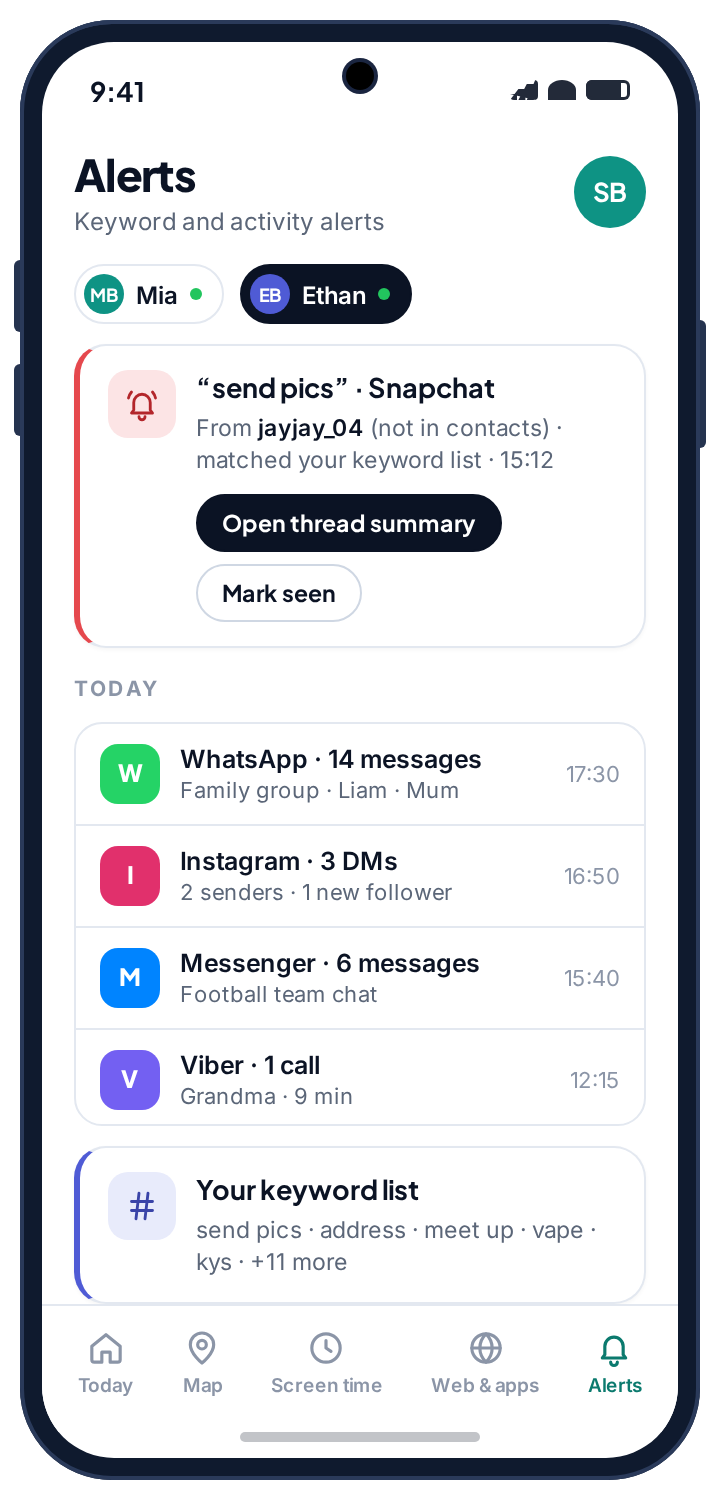
- Nobody can read encrypted chats on a normal Android phone. Not us, not the products claiming otherwise. WhatsApp, Snapchat, Instagram and the rest encrypt end to end.
- What survives is the pattern. Who, how often, how late, and your chosen keywords, all read from the notification shade.
- That pattern is usually enough. A new contact plus high volume plus late hours is the shape of almost every real problem, and it needs no transcript to spot.
- A muted chat produces no alert. Notifications are the source, so a conversation your child has silenced sends nothing. This page says it more than once on purpose.
- One permission, free. Notification access is all this needs, and the child's phone lists every app that is being watched.
What you cannot see, app by app.
Start here, because it decides whether the rest of the page is worth your time. Every app below encrypts its messages end to end, which means the readable text exists only on the two phones in the conversation. Nothing on the device, no app, no permission, no setting, gets between them. What each app gives away is whatever it chooses to put in a notification.
| App | Message text readable? | What you do get from notifications |
|---|---|---|
| No | Sender name, count, timing, unsaved numbers, missed calls, and the notification preview line if you allow it. | |
| Snapchat | No | Least of any app here. Snapchat puts almost nothing in a notification: usernames, counts and timing only. |
| No | Message requests from strangers, new follows, mentions, comments, counts, and preview text if allowed. | |
| Messenger & Facebook | No | Requests, tags, Marketplace replies, and a usable preview line. Messenger is better than most at this. |
| Viber | No | Senders, community invites, unknown numbers, counts and previews. |
| Kik | No | Usernames and new-chat notifications, which matter more here than anywhere, because Kik needs no phone number. |
| TikTok | No | DM notifications, counts and timing. Not what was watched; that is inside the account, not the phone. |
If a product tells you it will show you your child's full Snapchat history, one of two things is true. Either it is extracting an app's private database using elevated access that breaks with every update and disables the phone's security in the process, or it is simply lying to take a subscription. There is no third option, and this is the single most useful thing on this page.
What is actually left, then: counts, names and hours
Every social app on Android announces itself through the notification shade. That shared channel is what the alerts read, with one permission your child granted on a screen they saw. From it come three things. Counts and timing: how many notifications each app produced, and how many arrived after an hour you set. Who: the sender name or username the notification carries. Keyword matches: your chosen phrases, flagged wherever they appear, in any app.
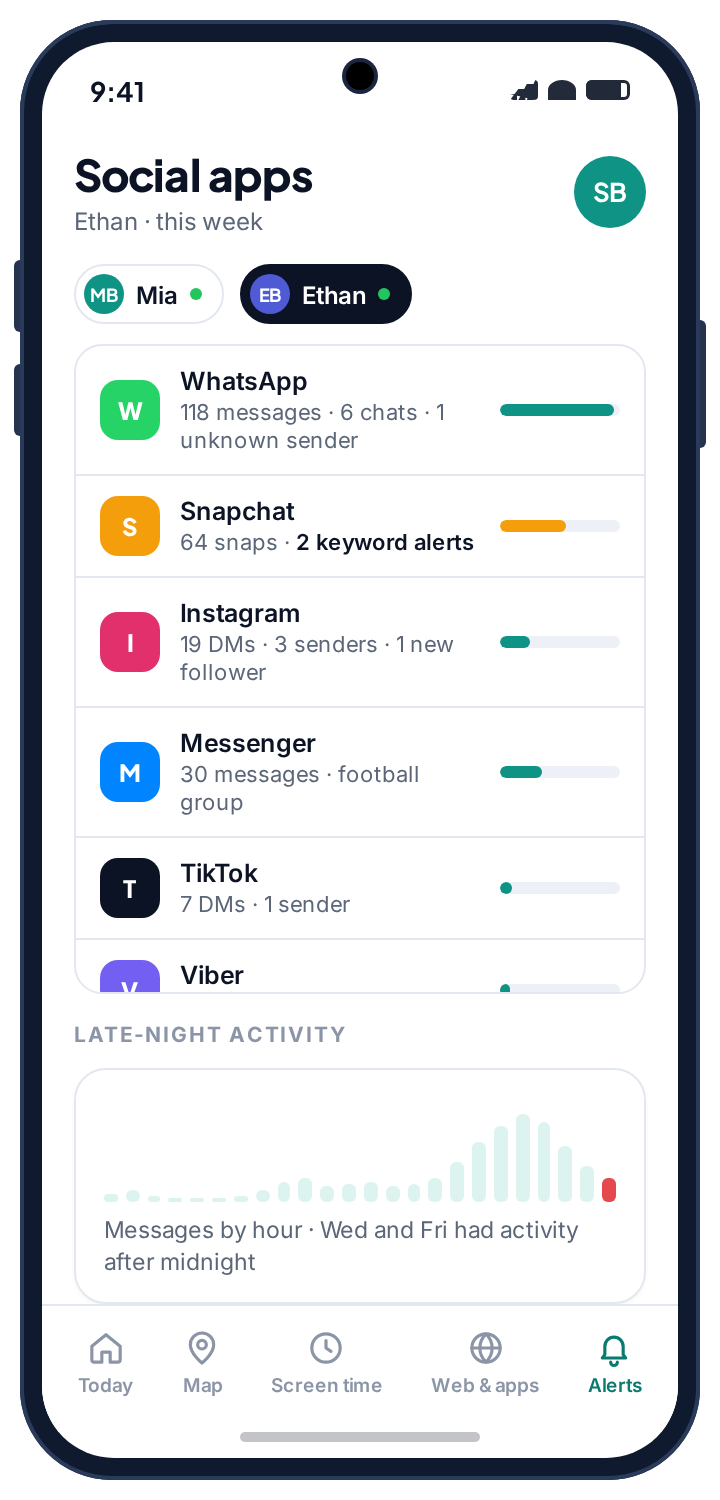
That adds up to who is in contact with your child, how intensely, and at what hours. On the week view it is a short table: WhatsApp 118, Snapchat 64 with two keyword alerts, Instagram 19 DMs, Messenger 30, TikTok 7, Viber 2 calls, and under it a messages-by-hour chart whose after-midnight bars are the ones worth a glance.
Because the source is the notification, the limits are the notification's limits. A chat your child has muted posts nothing to the shade, so it produces no count and no alert. And nothing here involves reading what your child types; there is no keylogger in TheTruthSpy.
- One screen for every app. Chat apps that have no parental tools of their own appear next to the ones that do.
- Late-hour counts. Set an hour, say 22:00, and the week view counts what arrived after it.
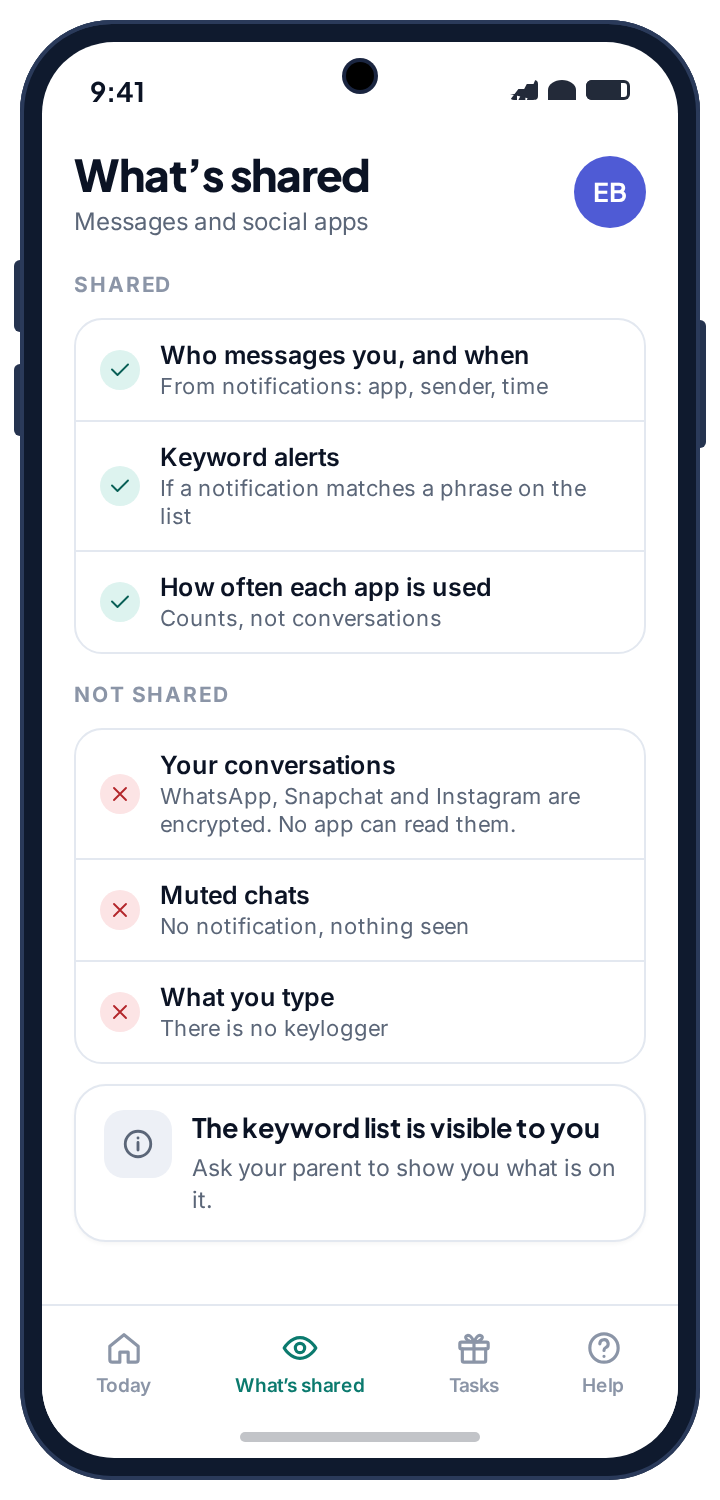
- Nothing is hidden from them. The child's “What's shared” screen names every app being watched and whether preview text is on.
Why the pattern is usually enough
Consider what a real problem looks like from the outside. A username nobody has mentioned appears on a Tuesday. By Thursday it accounts for more notifications than anyone else. Most arrive after eleven at night. A keyword fires on the Saturday. None of that requires reading a word.
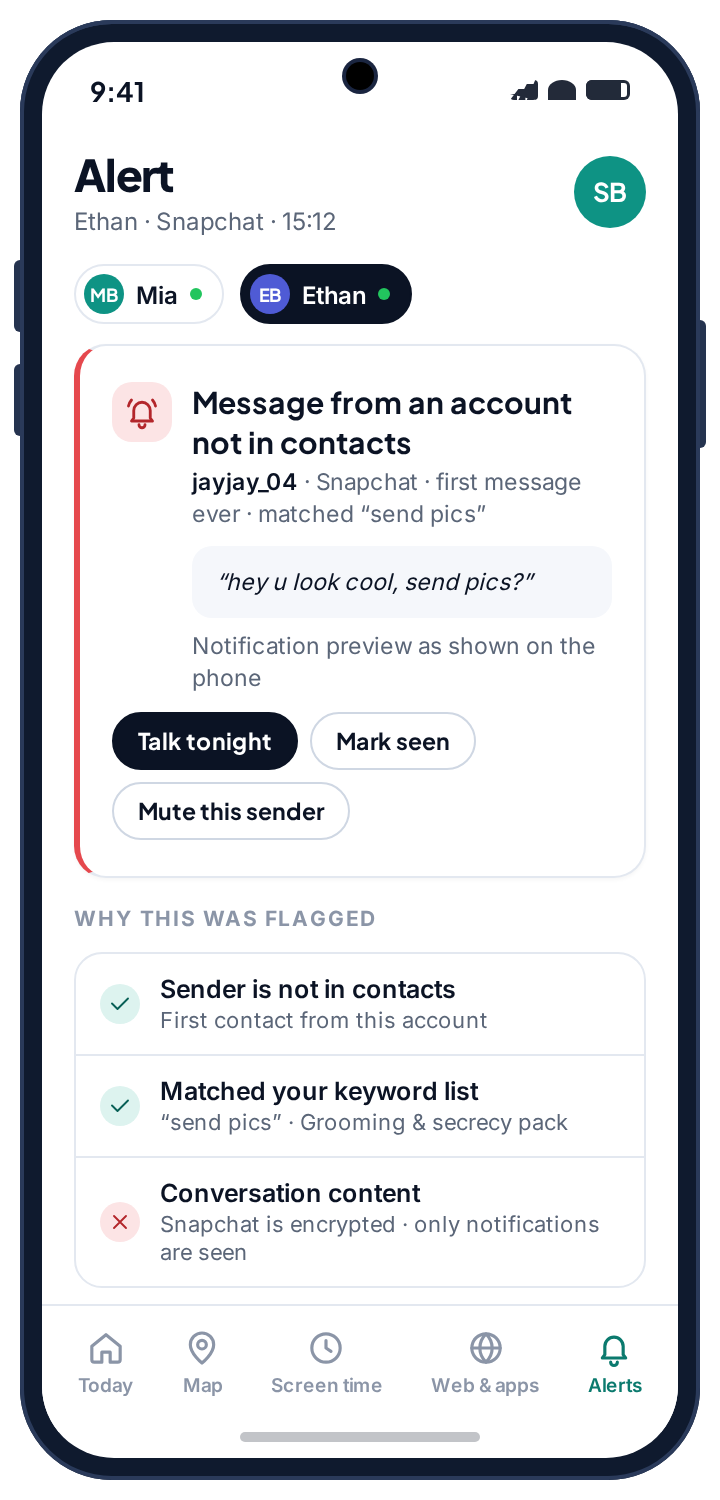
New contact, sudden intensity, late hours: that shape is common to grooming, to scams, and to a relationship going wrong, which is why it is worth more than a transcript would be. A transcript of four hundred messages needs reading; a spike needs noticing. The alert detail screen shows the sender, whether that sender has messaged before, the preview if you allowed it, and a plain “why this was flagged” line, with a reminder that Snapchat is encrypted and only its notifications are seen.
The reverse is also worth saying. An ordinary teenager generates a flat, boring week: the same four names, tailing off by ten. Boring is the signal that nothing needs you, and a system that only speaks up when the shape changes is one you will still be checking in six months. A week as a shape, and the exceptions find you.
- A first-time sender is its own flag. A name or username the alerts have never seen on this phone is marked as new on every alert.
- Read from a notification, nothing more. If the chat was muted, there was no notification, and so there is no alert.
Keyword alerts across every app at once
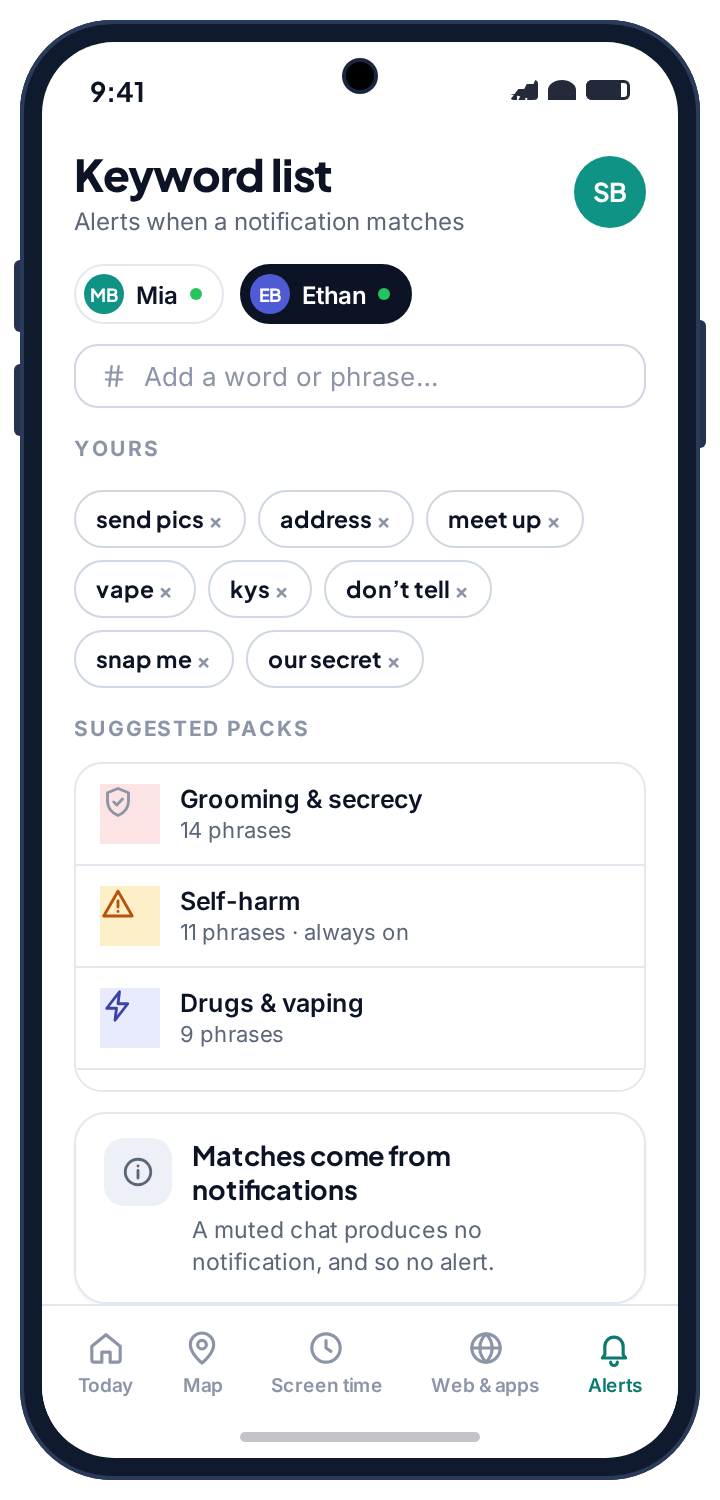
Because alerts run on the notification stream rather than on any single app, one list covers all of them, and reaches apps that have no monitoring features of their own. The keyword screen has your own phrases and a few suggested packs: grooming and secrecy, drugs and vaping, and bullying are optional, and the self-harm pack is always on. Everything else on a new child's profile starts empty, with no limits and no phrases, until you write some.
Keep it short and specific. Identity probing (“how old are you”, “what school”), moving the conversation somewhere with less oversight (“add me on”, “what's your snap”), secrecy (“don't tell”, “our secret”, “delete this”), and pressure for images. Mark the identity and secrecy phrases urgent so they interrupt you; leave the rest to a daily summary. Four phrases you thought about beat forty you copied from a list, and a chosen list beats a transcript of everything typed, which is why TheTruthSpy does not offer one.
The screen repeats the limit in its own words, and so will this page: matches come from notifications, so a muted chat produces no alert, however urgent you marked the phrase. Encrypted text that never reaches a notification is not scanned, because it cannot be.
- Urgent or daily. Each phrase is either a push alert the moment it appears or a line in the evening summary.
- Phrases, not single words. “Secret” on its own fires on a birthday present; “our secret” rarely does.
- Shown on the child's phone. The What's shared screen says keyword alerts are on, without listing the phrases.
Notification preview text, and the choice it involves
Counts, senders and keyword alerts work with preview text off. Switching it on adds the first line of each notification, often the opening sentence of a message. It is a real increase in what you see, and it deserves a real decision rather than a default, which is why it is a separate switch that starts off.
Our rough guidance: on Kik it is worth it, because the opening line from a stranger is the most useful thing that app produces. On WhatsApp it is borderline. On Snapchat it is pointless, because the notifications carry almost no text anyway. Whichever you choose, your child's phone lists it. There is no configuration in which you are reading preview text and they have not been told.
- Per-app decision. Preview text can be on for Kik and off for WhatsApp.
- Not retroactive. It reads from the moment you switch it on; nothing earlier is recovered.
- Visible, with a time. The child's screen shows when it was switched on and by which parent.
| App | Preview text worth switching on? | Why |
|---|---|---|
| Kik | Yes | The opening line from a stranger is the most useful thing the app produces, and strangers are the point of Kik. |
| Borderline | Senders and unsaved numbers already tell most of the story. Previews add the first line of each message. | |
| Borderline | Message requests are the signal. The preview helps mainly for those. | |
| Snapchat | Pointless | The notifications carry almost no text. You get usernames, counts and timing whatever you choose. |
Each app gives away something different, so each has its own page.
The notification shade is the same channel for all of them, but what each app puts there is not. Every page below also covers the platform's own controls, which often do more than monitoring can.
WhatsApp tracker
Sender names, unsaved numbers, missed calls, counts and timing, plus the preview line if you allow it. The chats are encrypted and stay that way; the page covers the unsaved-number flag and WhatsApp's own privacy settings.
Instagram tracker
Message requests from strangers, new follows, mentions and comments, with counts and preview text if allowed. The page concludes that Teen Accounts and Family Center are the more important half.
Snapchat tracker
The least of any app here: usernames, counts and timing only, because Snapchat puts almost nothing in a notification, and a muted chat produces no alert at all. The page covers Family Center and Ghost Mode.
Facebook Messenger tracker
Requests, tags, Marketplace replies and a usable preview line; Messenger is better than most at telling you who is knocking. The page walks through Messenger Kids and the request folder.
Viber tracker
Senders, community invites, unknown numbers, counts and previews, and incoming calls in the same feed. Usually on the phone because of relatives abroad.
Kik tracker
Usernames and new-chat notifications, which matter more here than anywhere because Kik needs no phone number. The page explains why this is the one app where preview text is worth switching on.
What a school day looks like in the alert feed, event by event.
The clearest way to understand what you will and will not be told is to walk through an ordinary day on Mia's phone. This one has one thing worth noticing and one false alarm.
The day starts with a count.
Fourteen WhatsApp notifications in twenty minutes from the class group, all senders the alerts have seen many times before. Nothing is sent to you. The week view adds fourteen to Tuesday's WhatsApp bar, and that is most of what the feed ever records.
A stranger, flagged quietly.
An account with no mutual follows sends a message request. Instagram posts a notification saying so, and the feed marks the sender as new. No keyword, no urgent rule, so it waits for the evening summary.
The thing you will not be told.
Mia has muted a chat with a friend who sends too many memes. Snapchat posts nothing to the shade for it, so TheTruthSpy sees nothing: no count, no sender, no alert. A monitoring app that reads notifications cannot see a conversation that does not produce any.
“Don't tell” on a birthday.
A WhatsApp preview from her cousin reads “don't tell Ethan about Saturday”. The phrase is on your urgent list, so your phone buzzes. You open the alert, see a cousin in contacts and a birthday, and close it. A good false alarm takes ten seconds; two a day means the list needs trimming.
The one worth noticing.
A Snapchat notification from jayjay_04, a name the alerts have never seen, three messages in ten minutes after your 22:00 line. The two words Snapchat does post, “send pics”, match your list. Two rules trip at once, the alert says why, and the detail screen reminds you that Snapchat is encrypted and only this notification was seen. New name, intensity, late hour, keyword: the shape.
The day closes.
The summary lists one message request, one false alarm and one unknown sender after midnight. You ask about the last one at breakfast, with the username on the screen and nothing to accuse her of, because you read a notification, not a conversation. It ends with a block on Snapchat and Ghost Mode checked. Alerts in the day: two. Transcripts read: none.
Five things cause almost every silent feed, and only one of them is your child.
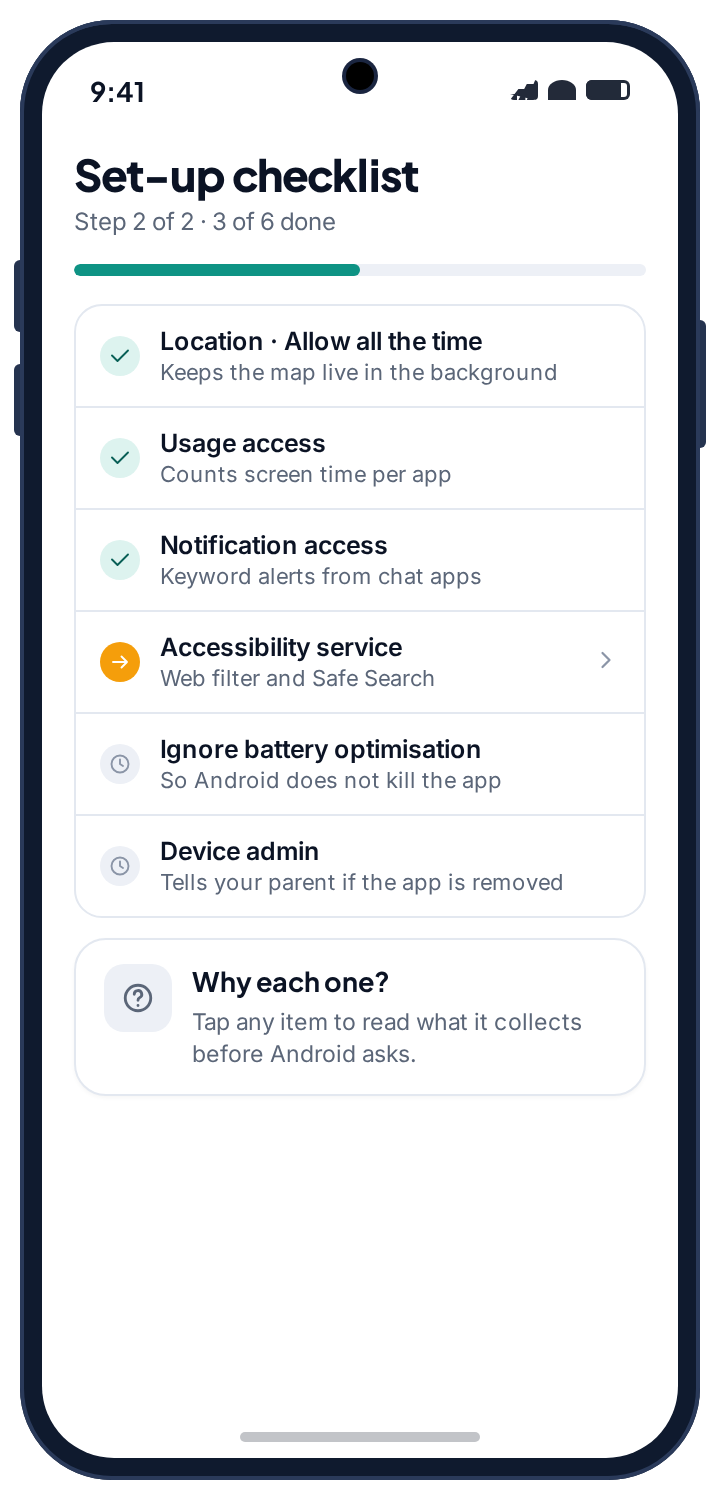
A feed that suddenly shows nothing is the most common support question about alerts, and the cause is nearly always a setting rather than a secret. Before you conclude anything from silence, open Device health: it says whether notification access is still granted, when the phone last reported, and whether the battery-optimisation exemption is in place.
The one cause that is your child is the one TheTruthSpy does not disguise. If notification access is revoked, the panel says so by name rather than showing you a flat week and letting you believe it was a quiet one.
Counts from every app except Snapchat.
Snapchat's own notifications are switched off inside the app, or the chats you expected are muted. A muted chat posts nothing to the shade, so there is nothing to count.
Fix: Check Snapchat's notification settings on the phone together. Silenced chats are invisible to any notification-based tool, ours included.
Nothing from any app since the last Android update.
Notification access was reset. Some updates and some manufacturers' “sleeping apps” lists revoke it quietly.
Fix: Device health flags it and sends your child a one-tap fix. By hand: Settings → Notifications → Device and app notifications → the app → Allow.
Senders and counts, but no preview text.
Preview text is off, which is the default, or the app posts no text in its notifications. Snapchat almost never does.
Fix: Switch previews on per app if you have decided to. For Snapchat there is nothing to switch on.
A keyword fires on something harmless, repeatedly.
A single word rather than a phrase. “Secret”, “pics” and “school” all appear in ordinary teenage conversation several times a day.
Fix: Replace the word with the phrase you actually mean and move it from urgent to the daily summary until it earns its place back.
Reports arrive, then stop for hours, then resume.
Battery optimisation switched back on and is suspending the app overnight, or the phone was flat.
Fix: Check the last battery reading, then Settings → Apps → the app → Battery → Unrestricted.
The feed stopped and the app is gone.
The app has been removed from the phone. Nothing in TheTruthSpy resists an uninstall, and the panel reports it the same day.
Fix: Ask before you reinstall. An alert feed that was switched off from the other side usually means a rule stopped feeling fair, and that is the conversation to have first.
What notification alerts are for, and how to use them without reading over anyone's shoulder.
What it is actually for
Parents switch on alerts for three reasons, and it is worth knowing which one is yours. The first is strangers: is anyone my child has never met messaging them, and how often. The unknown-sender flag and the per-app counts answer this, without previews. The second is hours: is the phone lighting up at one in the morning, and from whom. The messages-by-hour chart answers that. The third is the specific worry, when a parent has reason to think something is wrong and wants to know if a particular kind of phrase is turning up. That is what the keyword list is for.
Most families live in the first two cases almost all the time, and both are served by a boring week view. If you are in the third for more than a week or two, the thing to adjust is not the keyword list but the conversation.
What it is not for
It is not a way to read your child's conversations, and it is worth being blunt about that because the category is full of products that pretend otherwise. Encrypted messages on WhatsApp, Snapchat, Instagram, Messenger, Viber, Kik and iMessage cannot be read by any app, TheTruthSpy included. The notification preview is one line the app chose to show, not a window into the thread. A muted chat produces no alert. What your child types is never captured, because there is no keylogger and we do not think there should be one. If the question in your head is “what exactly did they say”, no honest tool answers it.
It is also not a substitute for the platform's own controls, which prevent problems rather than reporting them. Notifications only cover the apps that send them. Ordinary texts and phone calls are not covered at all: TheTruthSpy does not ask for the SMS or call log permissions, so who your child texts and calls is between you and them. If an app should not be on the phone at all, blocking it is simpler than watching it.
Telling your child
TheTruthSpy is visible on the phone by design, with no stealth mode. The app sits in the app drawer under its own name, and the “What's shared” screen lists social monitoring in plain language: who messages you and when, and keyword alerts. It also lists what is not shared, which is the part that makes the conversation possible: your conversations, because they are encrypted; your muted chats; and what you type. So the question is not whether to tell them, but how.
The version that works is short and specific: “I can see who messages you and roughly when, on every app. I can't read your chats, and I'm not trying to. If someone you don't know starts messaging you a lot, or late, I get told, and I'll ask you about it.” Then show them the list of apps and the keyword packs, and ask which phrases belong there. A thirteen-year-old who helped write the list argues about the list, not about the app.
They can see what is on
The child's phone shows every app being watched, whether preview text is on and when it was switched on, and that a parent opened the panel today. It does not list the keyword phrases, which would defeat them. A child who knows exactly what can be seen has no reason to hunt for what else might be hidden.
Privacy, builds and the law
Social alerts run on one ordinary Android permission, notification access, which Google Play allows for this category and which the child grants on a screen they can read. It is free, with no card and no tier; the pricing page explains how the app stays free. What it keeps is the notification metadata: app, sender, time, and the preview line if you allowed it, tied to your family account and kept for a rolling window of recent days rather than archived. The privacy policy lists exactly what the feature collects.
Reading a notification the phone displayed is a long way from intercepting a conversation, and the distance is deliberate. TheTruthSpy does not record calls, read texts, capture keystrokes or copy chats, and it does not request the permissions that would make any of that possible. If you want to understand how tools that do those things work, and how to tell whether a phone has one installed, our guides on WhatsApp trackers and Android keyloggers explain both.
How this compares with the platforms' own tools
Worth saying plainly on a page selling monitoring: on several of these apps, the platform's own controls do more than we do. Instagram's Teen Accounts and Family Center, Snapchat's Family Center and Ghost Mode, Messenger Kids, and WhatsApp's privacy settings all restrict who can reach your child in the first place, which prevents problems rather than reporting them. Set those up first. Each app's page here walks through the specific settings, and several of them conclude that the platform tool is the more important half.
Against other monitoring products, the difference is honesty about the mechanism. Paid apps typically charge a subscription for the same notification-based view, dress it up as “reading” social messages, and hide from the child. TheTruthSpy reads the same notifications, says so, charges nothing and is visible on the phone. The trade is that it is Android only on the child's side and that it tells your child it exists. We think that is the right trade, and the about page explains why.
The right amount changes faster than most parents adjust it.
Mostly, the apps should not be there yet.
Most of these platforms set a minimum age of 13. The better tools are the app list and the platform's child modes; the feed is a backstop for the apps that arrive anyway.
- Messenger Kids rather than Messenger
- Unknown-sender alerts on, urgent
- Preview text on for whatever exists
The years the feed earns its keep.
Snapchat and Instagram arrive, group chats multiply and so do strangers. Agree the keyword list together and let the week view do the watching.
- Platform family centres set up first
- Four to six keyword phrases, chosen together
- Previews on for Kik, off for the rest
Usually a shape they agreed to, and not much more.
At this age monitoring is either an agreement or an argument. Keep the unknown-sender and self-harm alerts, drop the previews, and loosen it in the open.
- Counts and unknown senders only
- Preview text off everywhere
- Reviewed together every few months
Questions parents ask about the alerts.
Can I read my child's WhatsApp or Snapchat messages?
No, and neither can any other app. These apps encrypt messages end to end, so the readable text exists only on the two phones in the conversation. What TheTruthSpy shows is what the app puts in a notification: the sender, the time, a count, and the first line if you switch preview text on.
What does a social media monitoring app actually see?
Three things, all from the notification shade: how many notifications each app produced and when, the sender name or username each one carried, and whether any of your keyword phrases appeared.
What about chats my child has muted?
Nothing. A muted chat posts no notification, and notifications are the only source, so a muted chat produces no count and no alert. The child's own What's shared screen says so.
Can it see ordinary texts and calls too?
No. Social alerts come from notifications, and the app does not request the SMS or call log permissions, so texts and calls are not covered. If you need to know who a child texts, the honest answer is to ask, or to look at the phone together.
Is there a keylogger?
No. TheTruthSpy does not capture what your child types in any app, and the What's shared screen says so. A short list of phrases, matched against notifications, catches the moments that matter without a transcript of everything else.
Will my child know their social media is monitored?
Yes, by design. The app is visible on their phone, the What's shared screen names every app being watched and whether preview text is on, and there is no hidden mode.
Which apps does it cover?
Any app that posts notifications: WhatsApp, Snapchat, Instagram, Messenger, Viber, Kik, TikTok, and ones we have never heard of. Each of the first six has its own page above.
Does TikTok monitoring show what they watched?
No. TikTok's DM notifications give counts and timing. What was watched is inside the account, not the phone, and no app reads it from the outside.
Can both parents get the alerts?
Yes. Invite a co-parent from Family access and you both see the same feed and keyword list. Every change is stamped with who made it.
Is it free?
Yes. Counts, senders, preview text and keyword alerts across every app are free on either build, with no card and no social-monitoring tier.
Where social monitoring fits with everything else
The feed answers who and when, from notifications, and nothing it cannot see. Ordinary texts and calls are outside it, on purpose. If an app should not be on the phone at all, the app rules are simpler than watching it.
Social media monitoring switches on once the child's phone is paired with your parent account, which takes about ten minutes. The setup guide covers each screen.
How much of this suits an eleven-year-old versus a sixteen-year-old is a separate question, and the guides take it on age by age.
Every chat app on one screen.
Pair the phone, grant notification access, choose four keywords, and let a week of counts tell you the story. No card, no subscription, and nothing hidden from your child.
Android · Free to set up · Visible on your child's phone