WhatsApp Tracker Detection: Linked Devices, Notification Readers and Status Spies, and How to Remove Them
 By TheTruthSpy Editor · Founder and editorPublished October 5, 2026Updated October 12, 202616 min read
Type “WhatsApp tracker” into a search box and you get two kinds of result. The first is a row of products promising to show you someone’s WhatsApp messages. The second is a column of people asking, in various states of worry, whether someone is doing that to them. Both groups deserve the same answer, and it is not the one either of them expects.
WhatsApp encrypts every message end to end. The text exists in readable form in exactly two places: the sender’s phone and the recipient’s phone. The servers in between carry sealed envelopes they cannot open, and an app sitting on the phone cannot open them either, because the decryption happens inside WhatsApp’s own process, not in a place other apps can reach. So a product that says it will let you “spy on WhatsApp messages” remotely is either lying to you, or doing something much narrower than the words on the box.
That narrower thing is real, though. There are four ways a WhatsApp account gets watched, and three of them are in use on a lot of phones right now. This guide takes each one in turn: how it works, what it reveals, how to check your own phone for it, and how to close it off. It is written for the person who suspects their WhatsApp is being read, and for the parent who is about to trust a “WhatsApp monitoring app” and would like to know what it can and cannot actually do before handing over a child’s phone.
What a WhatsApp tracker can see, and what it never can
It helps to start with the boundary, because the whole category lives on one side of it. Because the chats are sealed, every WhatsApp tracker works on something around the conversation rather than inside it. In practice there are four routes in, and they reveal very different things.
| Route | What it reveals | Needs the phone? |
|---|---|---|
| A linked device (WhatsApp Web or the desktop app) | Everything: full chats, media, new messages as they arrive, with history | Once, for about ten seconds, to scan a QR code or type a code |
| Notification reading | Sender, time, and the one line of preview WhatsApp posts to the notification shade | Yes, to install an app and switch on a permission |
| Online-status polling | When the account is online, from which sleep and activity patterns are inferred | No. Only the phone number |
| Backup restore | Chat history up to the last backup | The Google or Apple password, plus a way to receive your SMS code |
Notice what is not on the list. Nothing reads a voice note. Nothing captures a call. Nothing recovers a deleted message from WhatsApp’s servers, because WhatsApp’s servers never had it in readable form. And nothing works on a muted chat through notifications, because a muted chat posts no notification. The first route on the list is by far the most common way one person reads another person’s WhatsApp, and it involves no spyware at all. The second is what nearly every commercial monitoring product does, including every parental control app that claims to “track WhatsApp”. The third is a small industry of its own. The fourth is rare but worth five minutes.
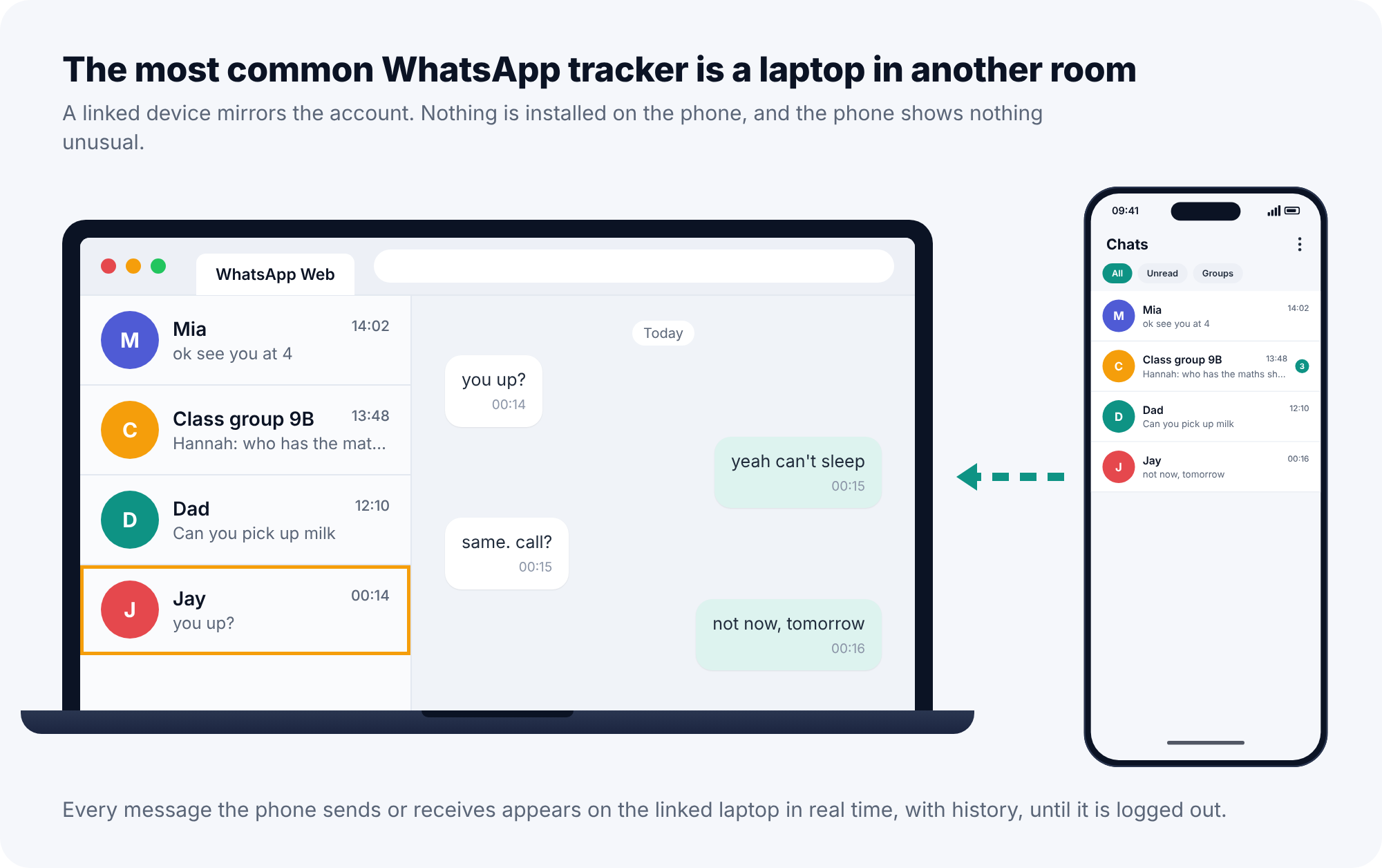
Route one: a linked device
WhatsApp lets one account run on the phone plus up to four other devices: a laptop through WhatsApp Web or the desktop app, a tablet, or a second phone. It is a convenience feature and a good one. It is also, by a wide margin, the thing people mean when they say their WhatsApp is being read.
Linking takes about ten seconds with the phone in hand. Open WhatsApp, tap the three dots, choose Linked devices, point the camera at a QR code on the other screen, and it is done. Since 2023 there has also been a “link with phone number” option that types an eight-character code instead of scanning. Either way, the only thing the person needs is your unlocked phone for the length of a short distraction.
What happens next is the part people underestimate. The linked device receives every message in real time and can scroll back through history. It keeps working after the phone is handed back. It keeps working when the phone is off, flat, or in a different country. It keeps working for months, because nothing about normal use ever logs it out. A partner who borrowed the phone “to look something up”, a flatmate, a colleague who had it for a minute at a desk, could have linked a laptop a year ago and be reading along today. The phone shows nothing unusual, because from WhatsApp’s point of view nothing unusual is happening: you asked for a companion device, and it is being a companion device.
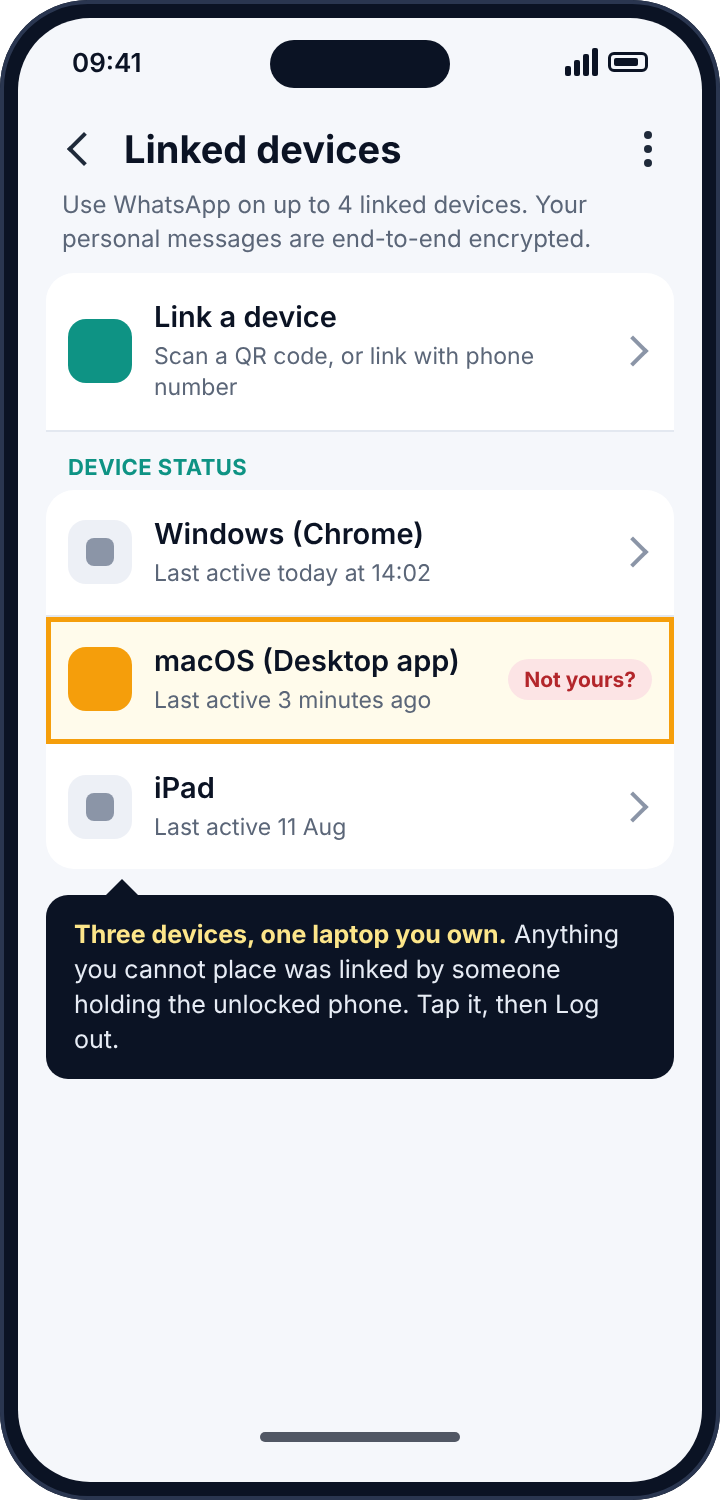
How to detect a linked device
Open WhatsApp, tap the three dots in the top right (on iPhone, Settings), then Linked devices. Every linked session is listed with the device type, the browser or app, and when it was last active. If you have never linked anything, the list should be empty. If there is an entry you do not recognise, or one you recognise but have not used in months, you have found the tracker. A desktop app entry that was “active 3 minutes ago” when you have not touched a computer today tells you not only that someone is linked but that they are reading right now.
Do this check before anything else in this guide. It takes twenty seconds, and in my experience of talking people through it, it is the step that most often ends the search.
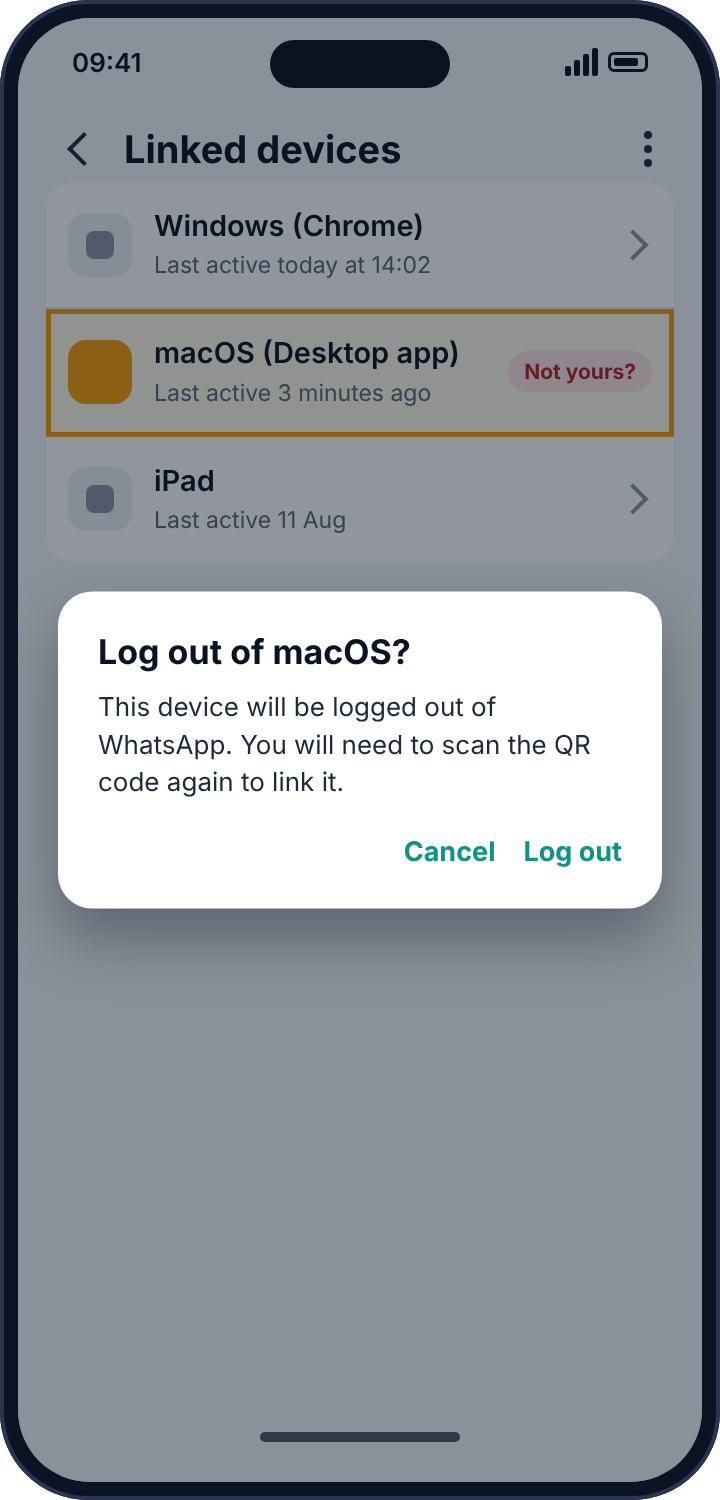
How to remove it
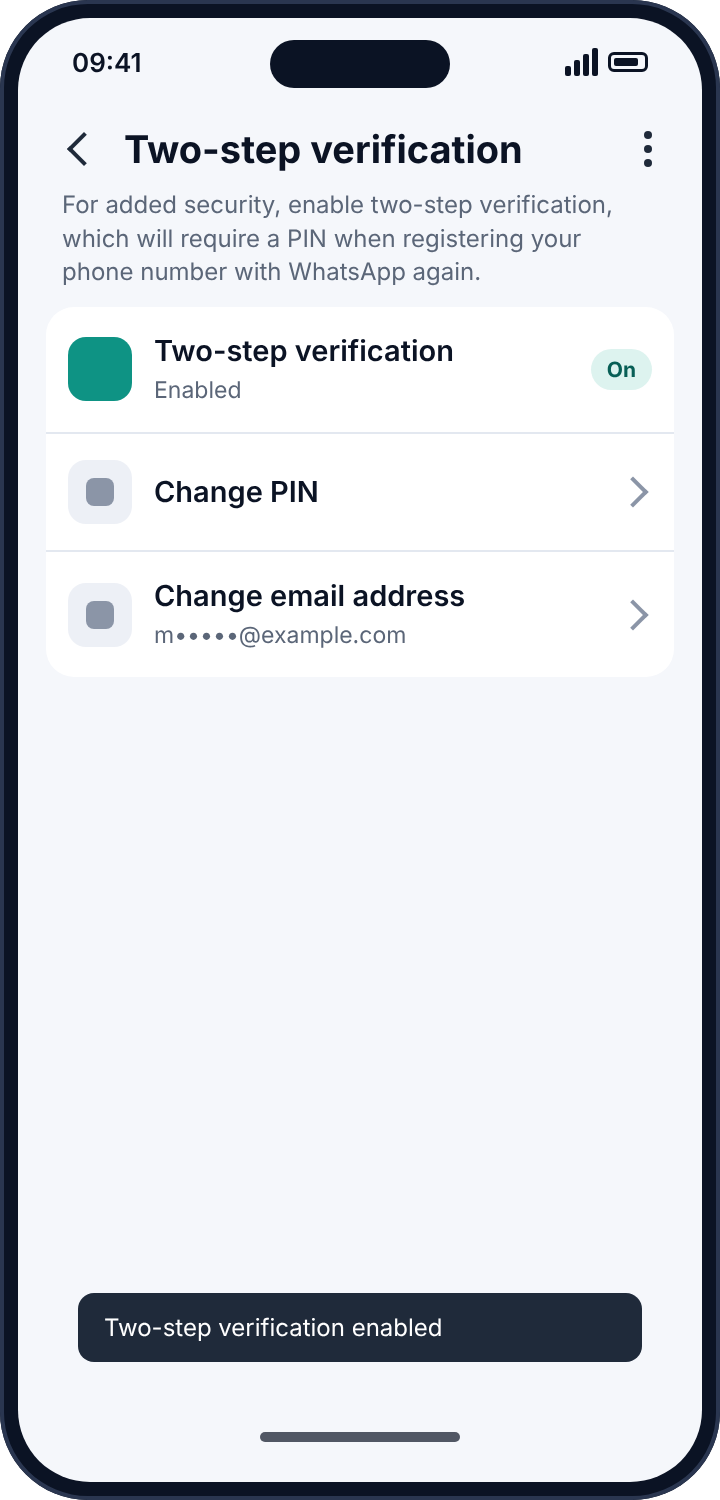
Tap the entry and choose Log out. That ends the session at once, and whoever had it will see WhatsApp Web ask for a new QR code. Then do two things that do not stop linking directly but make it harder to repeat. Turn on two-step verification (Settings, Account, Two-step verification), which stops anyone registering your number on a fresh phone without a PIN you chose. And change your phone’s lock screen code, because the person who linked that device knew the old one well enough to use it.
Route two: notification reading
Android lets an app ask for a permission called notification access. An app with it sees every notification other apps post: the title, the text, the time. It is a legitimate permission with legitimate uses. Your smartwatch app has it, so that your wrist can show you a message. Your car’s app may have it. A parental control app that promises “WhatsApp monitoring” has it, because it is the only way to see anything about WhatsApp at all. And so does every piece of stalkerware that advertises WhatsApp spying.
The mechanism is simple. A message arrives and WhatsApp decrypts it on your phone, as it must in order to show it to you. WhatsApp then posts a notification: the sender’s name and, if previews are switched on, the first line or so of the message. An app with notification access reads that notification, uploads it to a server, and whoever controls the app sees “Jay: you up?” on a dashboard somewhere. Two limits follow, and both matter.
The app sees only what WhatsApp chose to show. If previews are off, it sees the sender’s name and nothing else. If the chat is muted, there is no notification and nothing to read. If the phone was unlocked with that chat open when the message came in, WhatsApp posts no notification and the tracker misses it entirely. And it sees one line, not the conversation. A product that shows you “WhatsApp messages” from notification access is showing you a stack of previews, with the replies missing, because your own outgoing messages never post a notification.
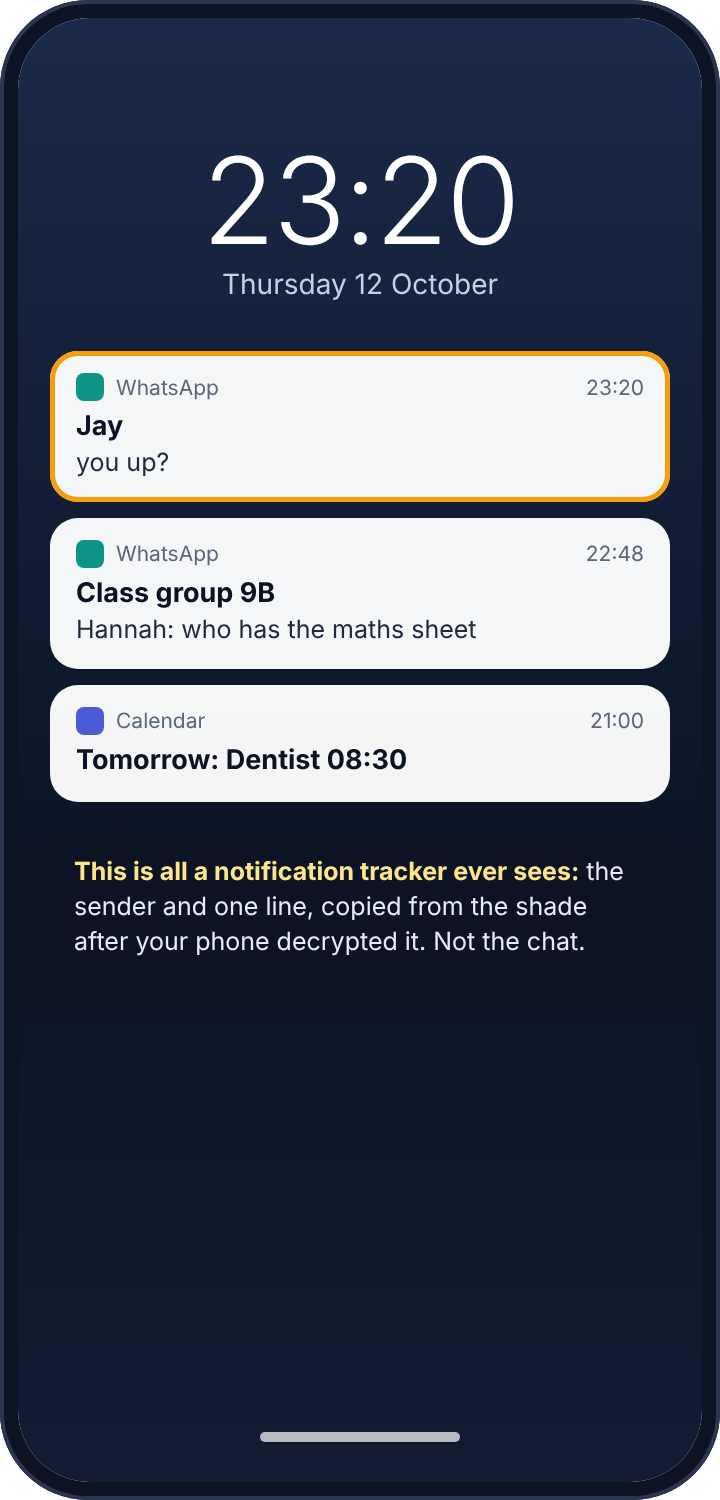
How to detect a notification tracker
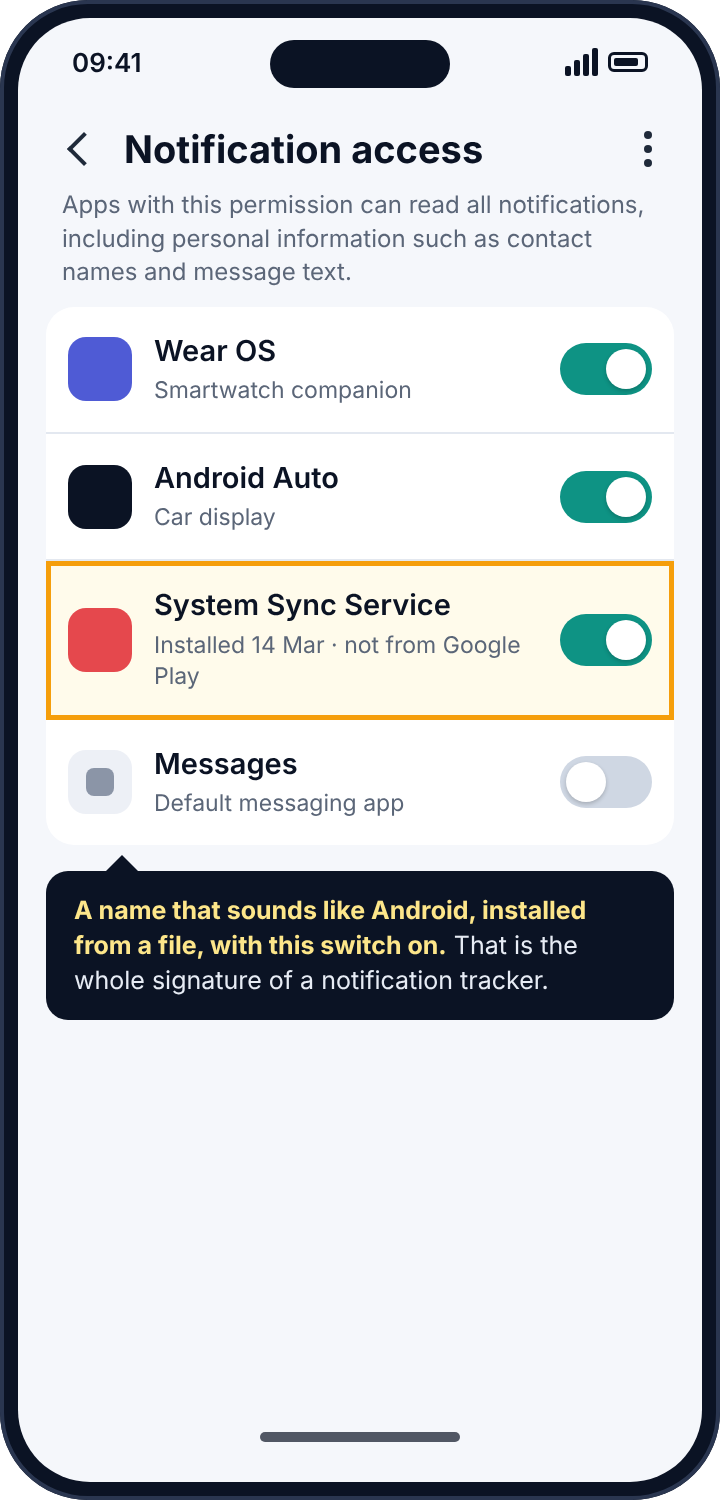
Open the phone’s Settings and search for “notification access”. The exact path varies by manufacturer: on most phones it is Settings, Apps, Special app access, Notification access; on Samsung it hides under Notifications, Advanced settings. The screen lists every app that has the permission, with a switch beside each. Read the list slowly. A watch app, a car app, perhaps a launcher or a password manager: those earn their place. Anything you do not recognise is the thing to look at, and in particular anything with a name designed to sound like part of Android: “System Service”, “Sync Manager”, “Device Health”, “Android Update”. Real system components do not appear in this list, because they do not need to ask.
Tap the suspicious name, then open its App info. Two details settle it. The install date tells you when it arrived; think about who had the phone that week. And the absence of a “View in Play Store” option tells you it was installed from a downloaded file, which is how stalkerware arrives, because Google Play does not carry it.
How to remove it
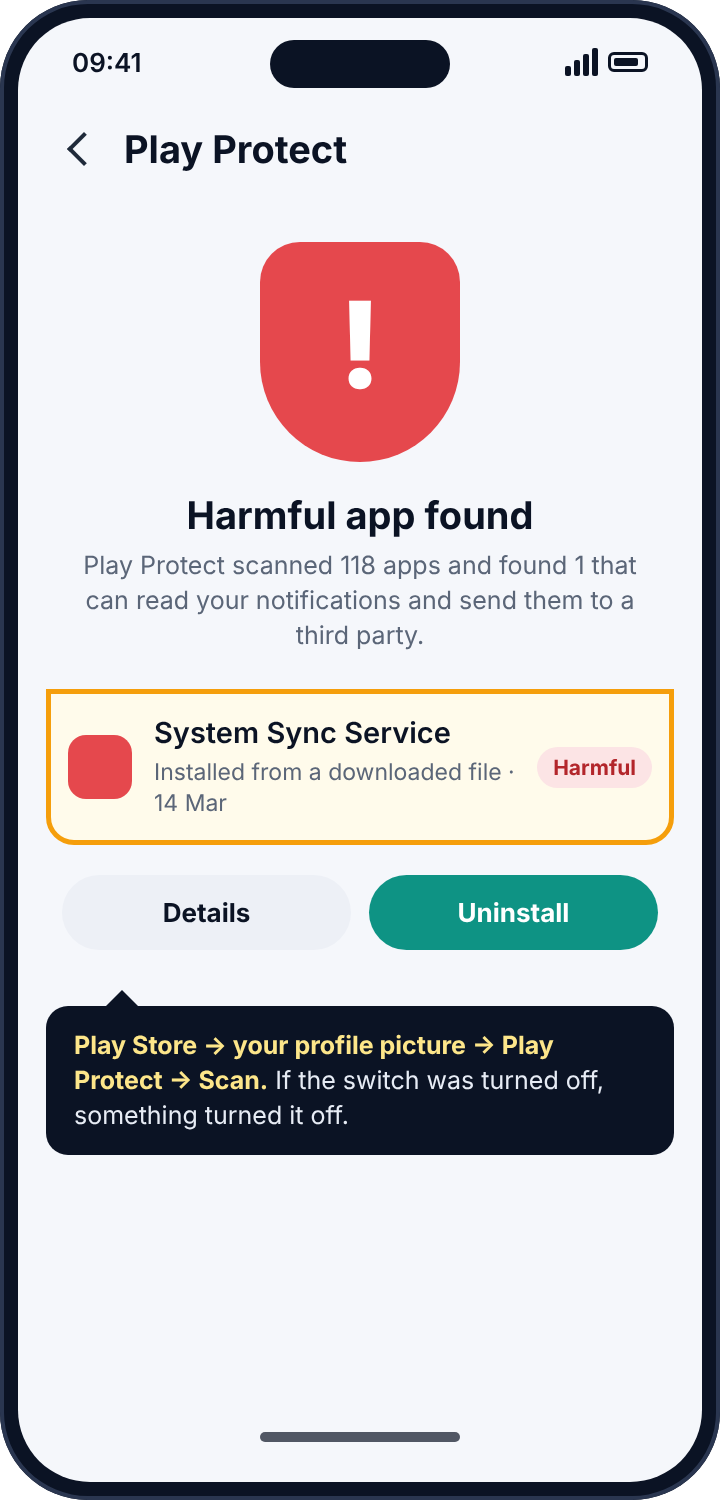
Switch the toggle off first, then uninstall the app from Settings, Apps. If the uninstall button is greyed out, the app has registered itself as a device administrator, a trick that older stalkerware uses to resist removal: go to Settings, Security, Device admin apps, deactivate it there, and the uninstall button comes back. Then run a Play Protect scan, which is Google’s own malware check and recognises most known stalkerware families: open the Play Store, tap your profile picture, choose Play Protect, and tap Scan. If you find that Play Protect had been switched off, that is a finding in itself, because something switched it off.
As a last step, turn off message previews in WhatsApp itself: Settings, Notifications, untick “Show preview”. A future app with notification access would then see that a message arrived from a given sender, and nothing of what it said.
Route three: online-status trackers
WhatsApp shows your contacts when you are online and, unless you have changed it, when you were last seen. Those two indicators are the raw material for a whole category of services that never touch your phone at all. You give the service a phone number. It polls WhatsApp’s online indicator for that number every few seconds, around the clock, and plots the result on a timeline. The output looks like a sleep tracker: online at 23:40, offline at 00:15, online at 07:02. From that someone infers when you went to bed, whether you were up in the night, and, by laying two numbers side by side, whether you and another person tend to be online at the same moments.
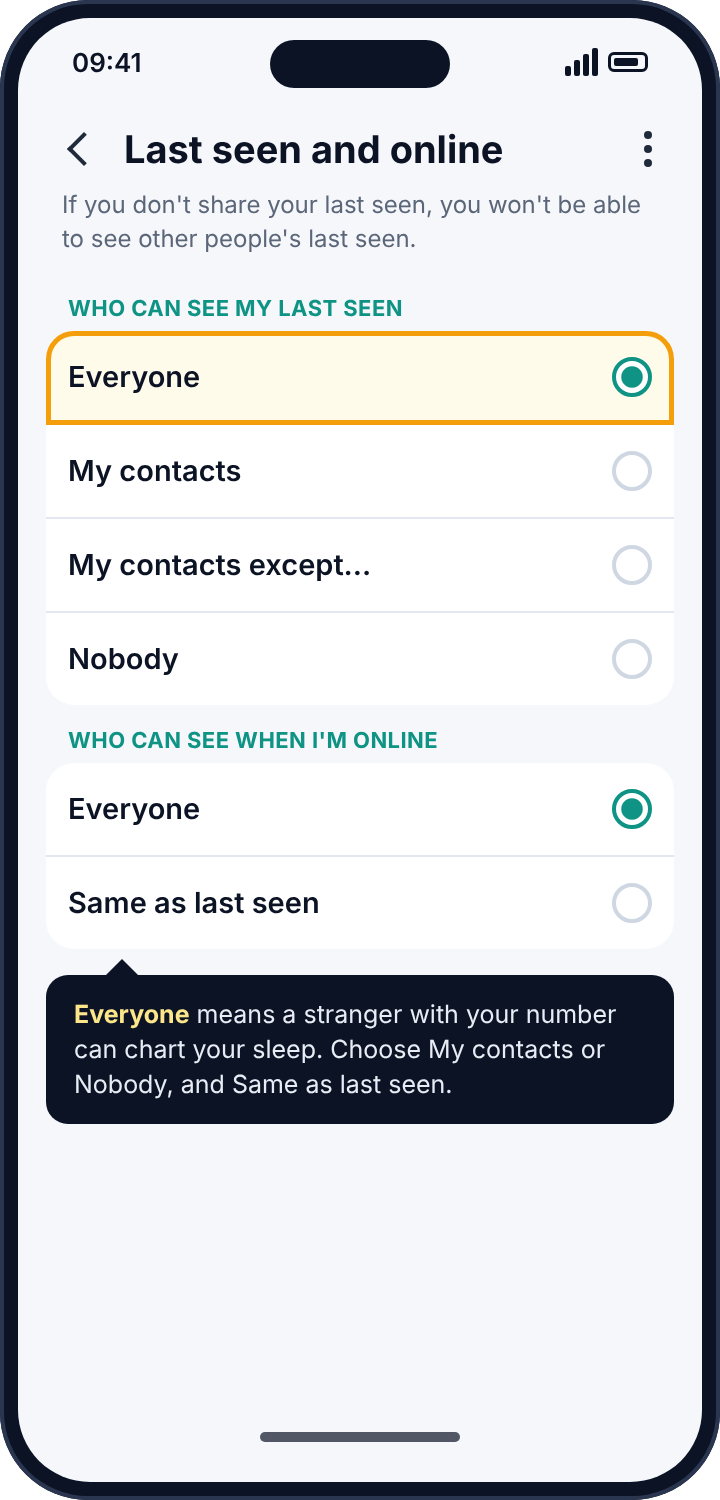
There is nothing to detect, because nothing is on your phone. Whether this is being done to you is unknowable from your side. The only defence is to stop publishing the status.
How to remove it
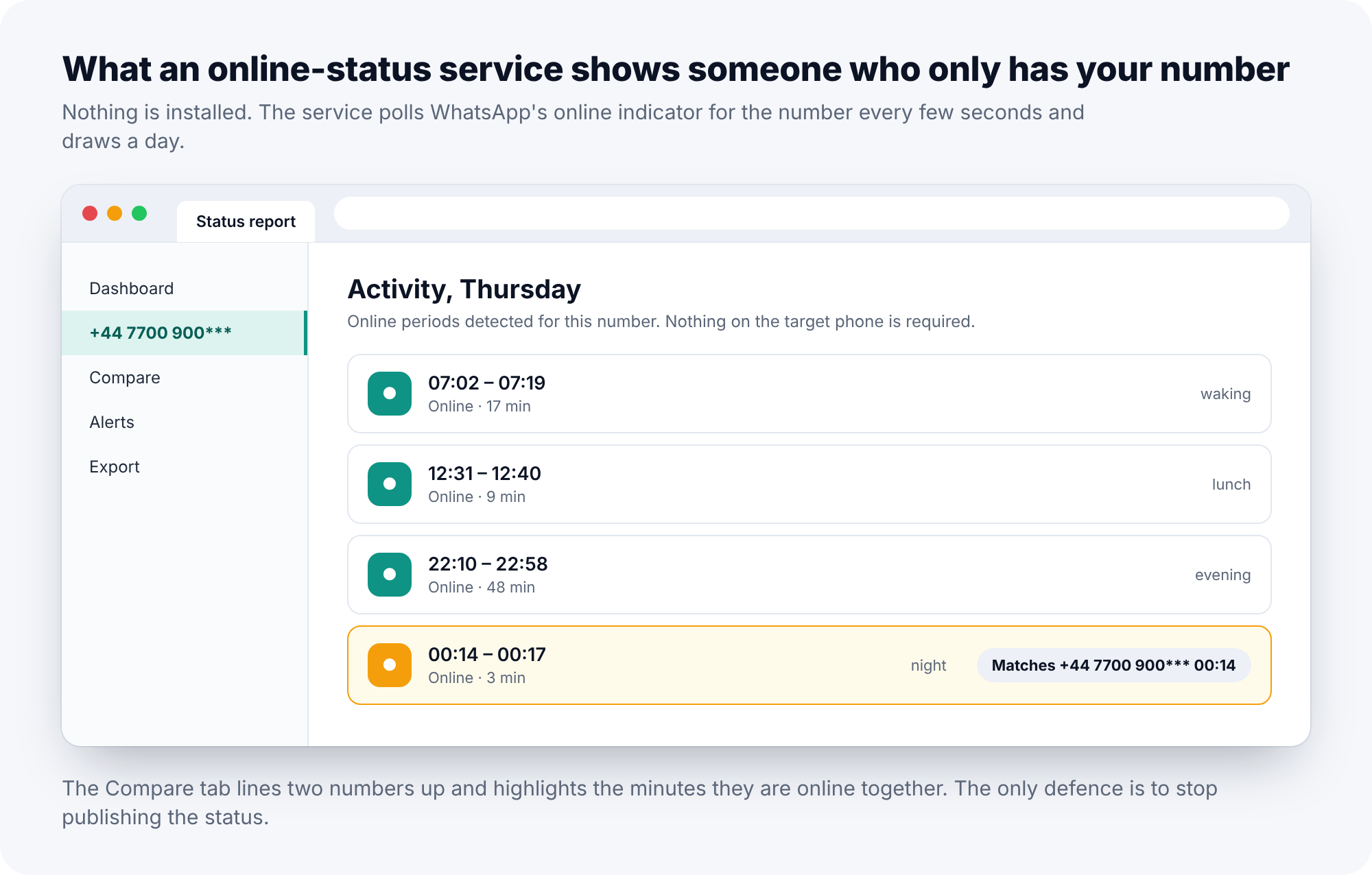
In WhatsApp, open Settings, Privacy, Last seen and online. Set “Who can see my last seen” to My contacts or Nobody, and “Who can see when I’m online” to Same as last seen. With those two settings a stranger who has your number sees nothing. The price is symmetrical: you lose the ability to see other people’s status, which WhatsApp enforces on purpose so that nobody can hide and watch at the same time.
Route four: the backup
WhatsApp backs up chats to Google Drive on Android and to iCloud on iPhone. Someone who knows the Google account password, and who can receive the SMS verification code sent to your number, could set WhatsApp up on another phone and restore the backup, which gives them your history up to the moment of the last backup. In practice that needs your SIM, or a minute with your messages, which makes it a route for someone in your household rather than a stranger on the internet. It is rare. It is also easy to close.
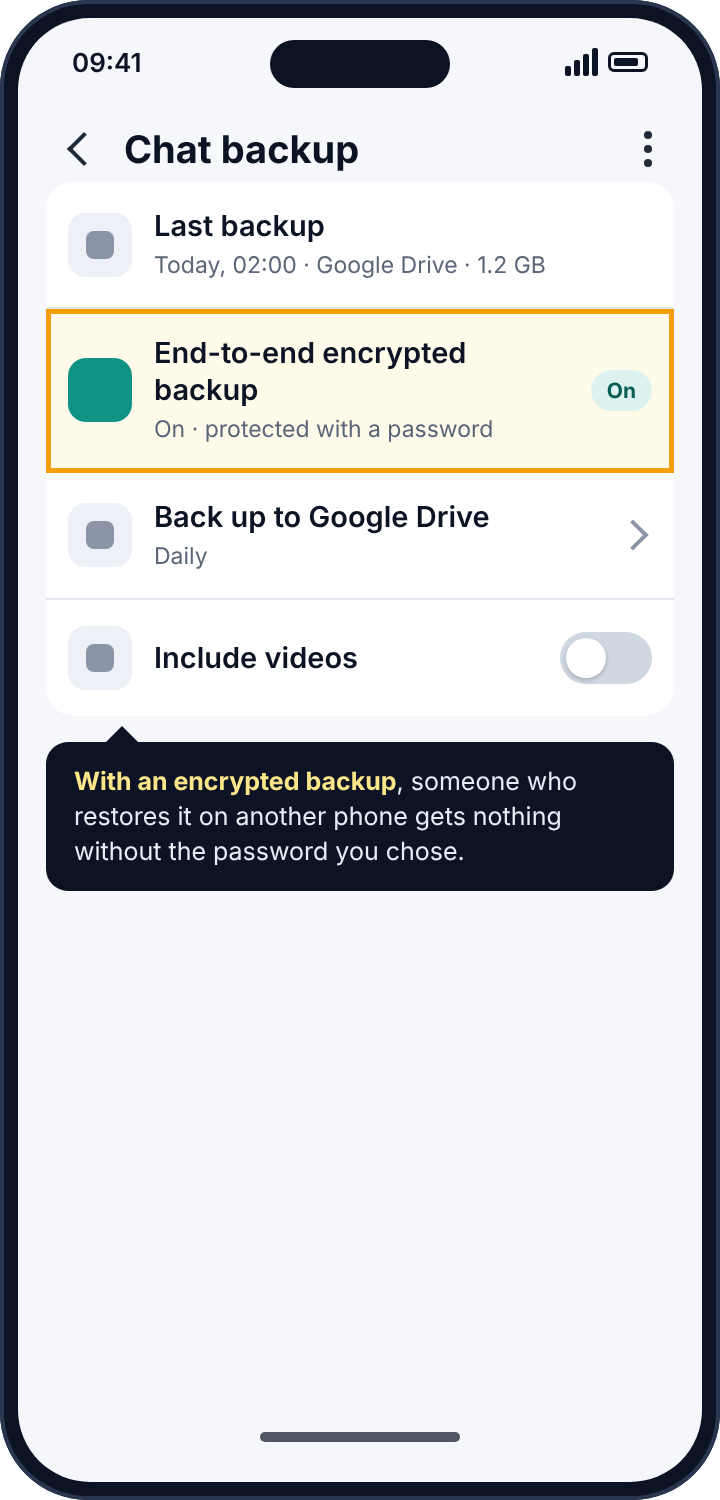
WhatsApp has offered end-to-end encrypted backups since 2021, off by default. Turn it on (Settings, Chats, Chat backup, End-to-end encrypted backup), choose a password or a 64-digit key, and a backup restored anywhere else is a block of noise without it. While you are in the account settings, finish the job with two-step verification if you have not already.
Symptoms that make the check worth doing
Most people start looking for a WhatsApp tracker because someone knew something they had only said on WhatsApp. That is the strongest signal there is, and it is worth more than any of the technical signs below. Still, the technical signs are worth knowing, because they point you at the right route.
If the thing they knew was something you were told rather than something you said, think linked device: outgoing messages never post notifications, so a notification tracker cannot see your side, but a linked laptop sees both. If the person seems to know when you are awake, or that you were “online at two in the morning” when you had not messaged anyone, think status tracker; nothing else produces that. If your battery drains faster than it used to and Settings, Battery shows an app you do not recognise near the top, think notification tracker: reading and uploading costs power. If WhatsApp has asked you to re-verify your number when you did nothing, someone may have tried to register it elsewhere, and two-step verification is overdue.
None of these proves anything alone. The Linked devices list and the notification-access list are the proof, and both are two taps away.
Where the WhatsApp tracker apps for parents fit in all this
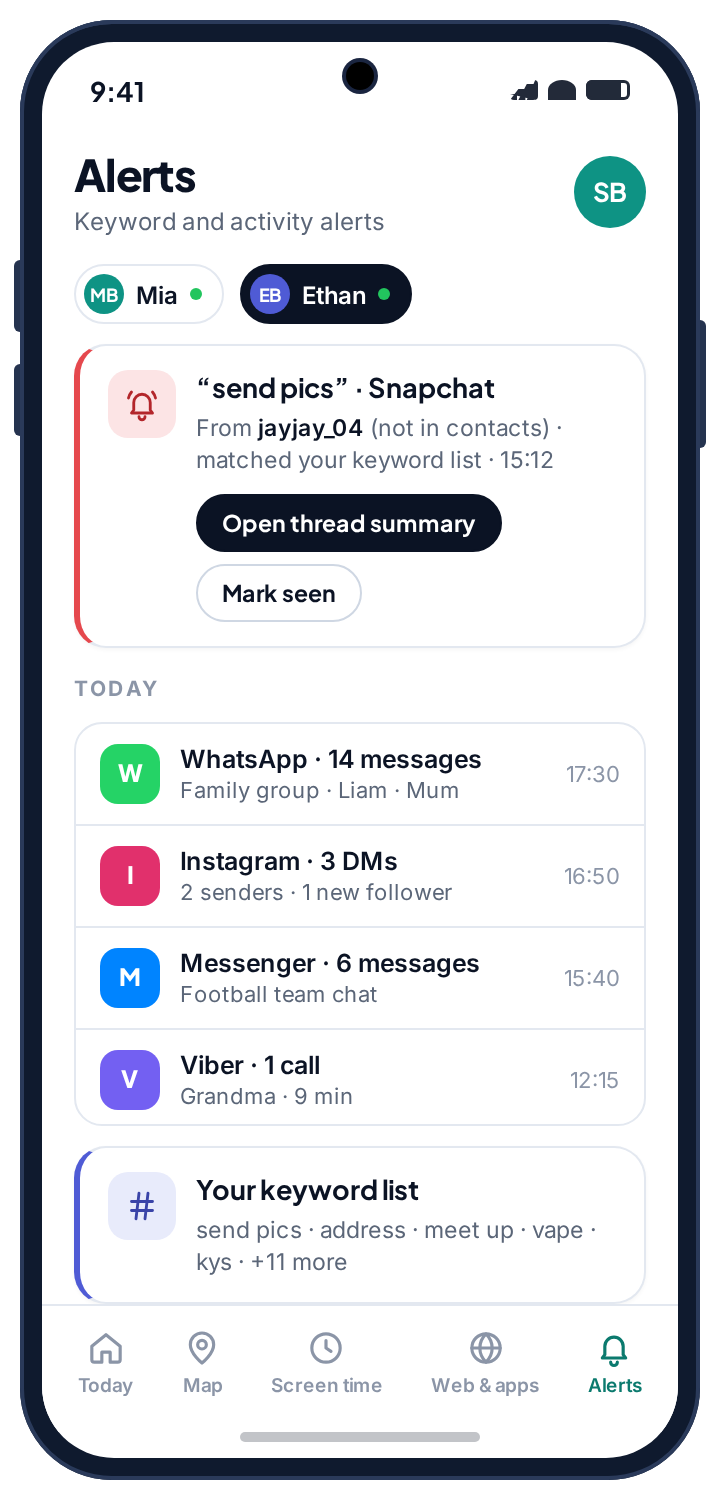
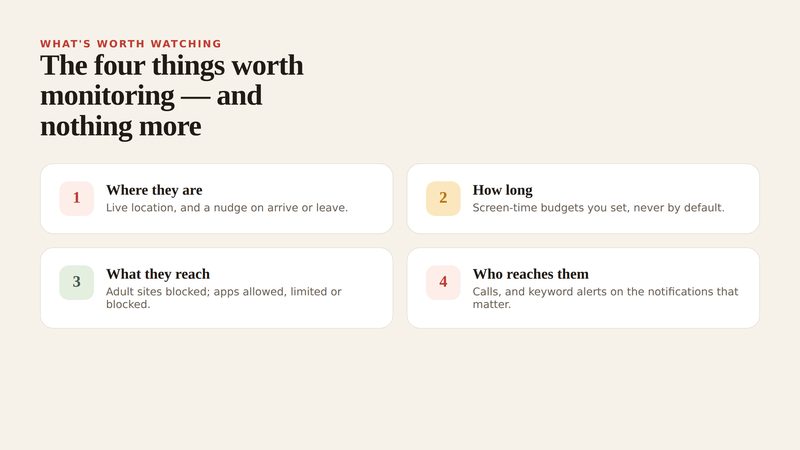
Parents reading this will have noticed that route two, notification reading, is exactly what parental control apps use when they say they monitor WhatsApp. That is worth being plain about, because the marketing in this category is not. There is no parental control app on the market that reads a child’s WhatsApp conversations. There are apps that read the notifications WhatsApp posts, which gives a parent the sender, the timing, how many messages arrived, and a preview line if previews are on. That is enough to notice a new name appearing at midnight or a flood from a group that did not exist last week. It is not a transcript, and a product that implies otherwise is describing something it cannot do.
The difference between a monitoring tool and a spy tool, then, is not the mechanism. It is whether the person holding the phone knows. A parental app built in good faith is visible in the app drawer under its own name, shows the child a list of what it reads, and does not call itself “System Sync Service”. If an app on a phone has notification access and is hiding its own name, that is the whole distinction, right there in one line of a settings screen.
For what it is worth, that is how we built the alerts in our own app: they run from notification access that the child grants on a screen they can read, they are listed on the phone under “What’s shared”, and they produce counts, sender names and keyword matches rather than chats. The social alerts page describes exactly what that looks like from the parent’s side, and the app rules page covers the blunter alternative, which is that if an app should not be on a child’s phone at all, blocking it is simpler than watching it.
WhatsApp itself offers no parental controls. For a child’s account the practical settings are the ones already described above, last seen restricted to contacts and previews off if you would rather less showed on the lock screen, plus one more: Settings, Privacy, Groups, set to My contacts, so that a stranger cannot add them to a group chat. Blocking and reporting from inside any chat is two taps, and a child who knows where those taps are has the most useful WhatsApp safety tool there is.
A note on the law, in both directions
Reading someone else’s WhatsApp without their knowledge is unlawful in most countries, whatever route is used, with the usual exception of a parent and their own minor child. Linking a device to another adult’s account is unauthorised access to a computer system in most legal codes, not a grey area. If you have found that someone did it to you, that matters for what you do next. If you were about to do it to someone else, it matters more.
If the person watching is someone you live with
Everything in this guide can be done in ten minutes, and most of it will tell the person who set up the tracker that you found it: a logged-out laptop, an uninstalled app, a status that went dark. If that person is a partner, an ex, or a family member, and you have any concern about how they will react, do not start with the fix. Start with the record. Screenshot the Linked devices list and the notification-access list. Then talk to a domestic abuse service before you change anything; many have technology-safety specialists who help people plan this, and the Coalition Against Stalkerware maintains a list of such services by country. The tracker has already been there for a while. Another day, with a plan, is safer than tonight, without one.
Frequently asked questions
Can someone read my WhatsApp messages without my phone?
Not without having had it at least once. A linked device needs the unlocked phone for ten seconds; a notification tracker needs it for a few minutes to install. The only route that needs nothing but your number is online-status tracking, and that reveals when you are online, never what you said.
Can a WhatsApp tracker see deleted messages?
A linked device that was already linked when the message arrived saw it before it was deleted, and “delete for me” does not remove it from the companion. Nothing recovers a message that was deleted before the tracker existed, because WhatsApp’s servers do not keep readable copies.
Does WhatsApp notify me when a device is linked?
Linking is done from your own phone, so WhatsApp treats it as your action and does not send a separate warning. The Linked devices screen is the notification. Check it.
Can someone track my WhatsApp location?
Only if you share it. Live location inside a chat is explicit, time-limited, and shown with a banner while it runs. Nothing in WhatsApp publishes your location otherwise, and a notification tracker sees “Live location shared” as a line of text, not the location.
Will a factory reset remove a WhatsApp tracker?
It removes any app on the phone, including a notification tracker. It does not log out a linked device, which lives on the other end, and it does not change your online-status settings, which live in your account. Do those two by hand.
Is WhatsApp Web itself safe to use?
Yes, on your own computer, as long as you log out of it on a shared one. The risk is not the feature; it is a session you forgot on a machine someone else can open.
The ten-minute version
Open WhatsApp’s Linked devices and log out of anything that is not yours. Search the phone’s settings for notification access and remove any app you cannot account for. Turn on two-step verification and encrypted backups. Set last seen and online to contacts or nobody. Run a Play Protect scan. Change the lock-screen code last, after the rest is done, so that nobody watches the new one being typed. The chats were never readable. After those steps, the edges around them are closed too.
Related guides
Android Keylogger Detection: The Two Settings Lists Where One Has to Hide, and How to Remove It
Android keylogger guide: a phone keylogger is an accessibility service or a keyboard. Where each hides, the symptoms, removal steps,…
Call Tracker Detection: Call Logs, Call Forwarding and Call Recording, and How to Stop Each One
Call tracker guide: how call logs, call forwarding and call recording work on Android, the screens and dial codes that…
Who Can See Your Phone Contacts? Shared Accounts, Sync and the Apps That Upload Your Address Book
Who can see your phone contacts: shared Google accounts, forgotten sync, and apps that upload your address book. Where to…
Parental controls your child can see
Location, screen time limits, a web filter and alerts from notifications — free, and visible on your child's phone. Pair a phone in about ten minutes.
Android · Free to set up · Visible on your child's phone