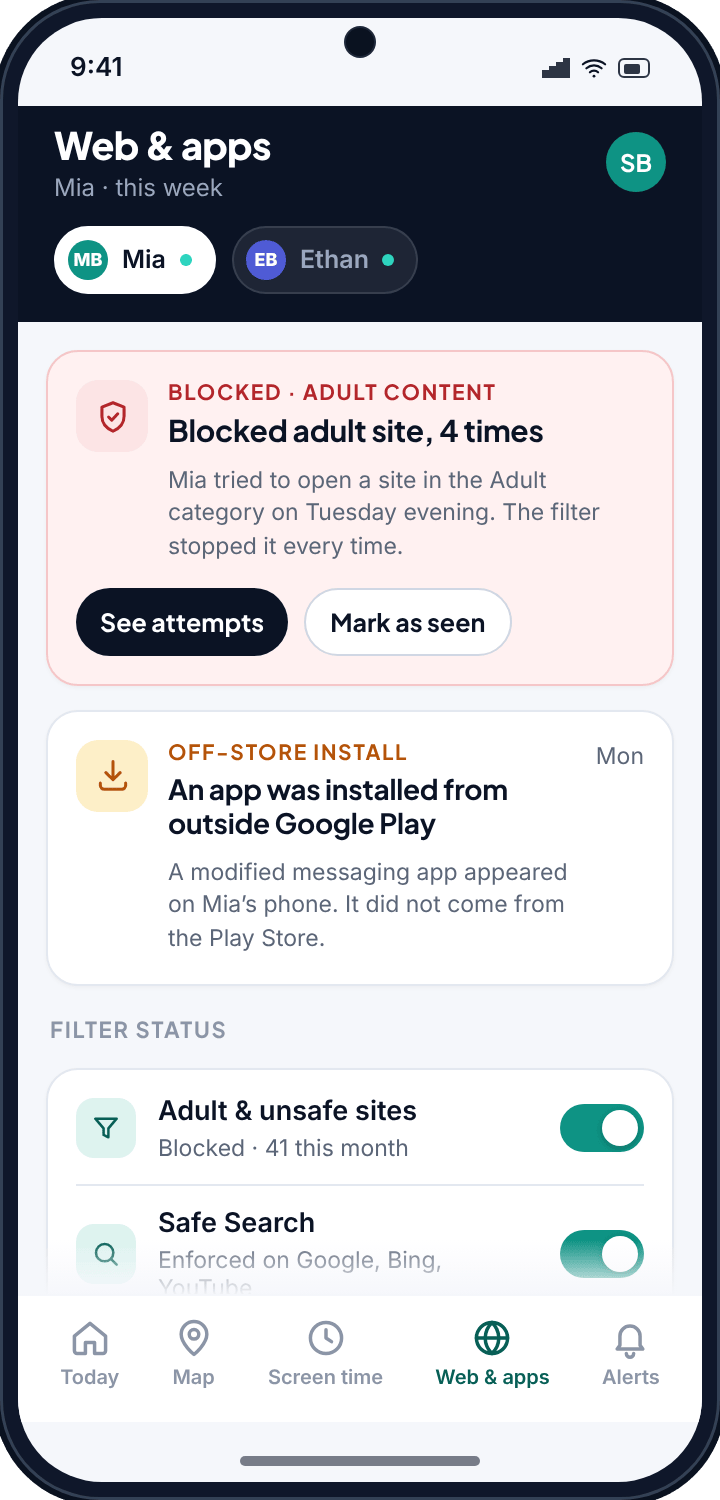
Most filters work in the dark. They quietly block a page, and neither you nor your child ever hears about it. TheTruthSpy does the opposite. When the filter stops something, you see the attempt and you see the block, and so does your child. This page walks through what TheTruthSpy filters on an Android phone, what the app controls do, and where a filter stops being useful and a conversation has to take over.
Block adult sites on Android, and see every attempt
The content filter blocks adult and unsafe websites at the request level. When your child's phone tries to load one, the request is stopped before the page arrives. That much is what any decent web filter for children should do.
What TheTruthSpy adds is the record. You do not get a vague “some content was blocked this week” summary. You get the category, the number of attempts, and the outcome. A typical card in the panel reads: Blocked adult site, 4 times — Mia tried to open a site in the Adult category on Tuesday evening, and the filter stopped it every time.
Notice what the panel does and does not say. It tells you the category, the count and the result. It does not editorialise. There is no red banner shouting that your child is in trouble, and no auto-generated lecture. You get the facts and decide what, if anything, to do with them.
That framing matters. Four attempts at a blocked site is a piece of information. It might mean curiosity, a link someone sent in a group chat, a dare, or something you will want to talk about. The filter did its job in the moment. Whether the four attempts become a conversation is your call, not the app's.
Block whole categories, not one site at a time
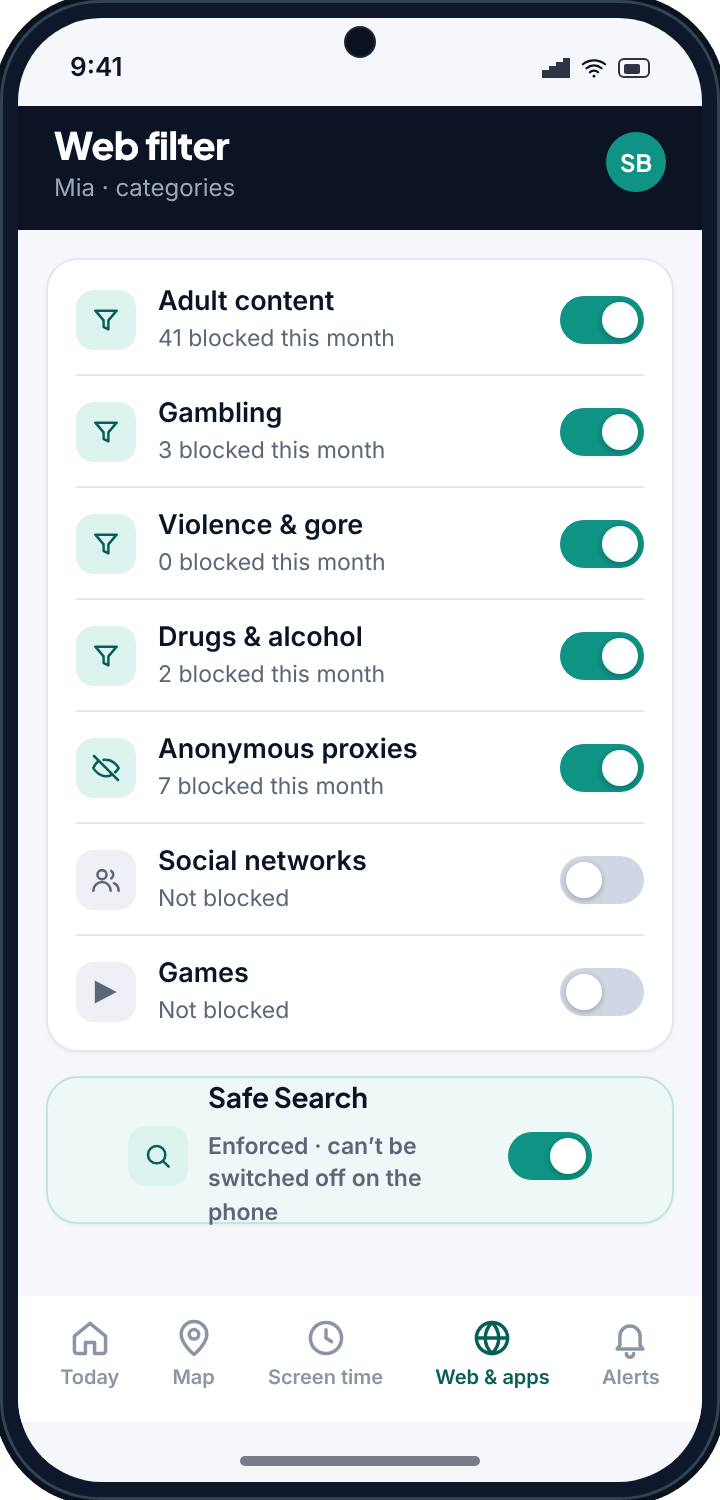
Blocking sites one address at a time is a losing game. There are always more addresses. So TheTruthSpy works by category. Block a category and the sites inside it are covered, including ones you have never heard of and ones that launch next week.
Each category carries a count, so you can see how much it is actually doing. A category that has blocked forty requests this month is earning its place. One sitting at zero might be worth relaxing if it catches things you do not mind. The counts turn filtering from a set-and-forget checkbox into something you can tune to your own child and household.
Safe Search, enforced
A category block does not help if the search engine itself serves explicit thumbnails on an innocent query. TheTruthSpy enforces Safe Search so the results your child sees are filtered at the source. For a lot of families this is the single most useful setting, because so much stumbling happens through image search rather than by typing a site name. It is on, it is enforced, and it is not something a child can toggle back off in the phone's settings.
Close the browser loophole
Here is the trick every filtered child eventually learns: if the filter lives in one browser, install a different browser. Download an obscure one from the store, and suddenly the web is wide open again.
TheTruthSpy blocks unknown and unlisted browsers. The filter is not tied to a single app you approved; browsers TheTruthSpy does not recognise simply do not get to load pages. A child cannot dodge the filter by installing another browser, which is the most common way these tools get beaten in the first week.
This is the unglamorous part of any real web filter, and it is the part cheaper tools skip. A filter that only covers one browser is a filter with a side door propped open.
The difference in one lineYou do not see “content was blocked.” You see “Mia tried to open a site in the Adult category, four times, and the filter stopped it every time.” One is a rule. The other is something you can talk about.
App control: Allowed, Limited or Blocked
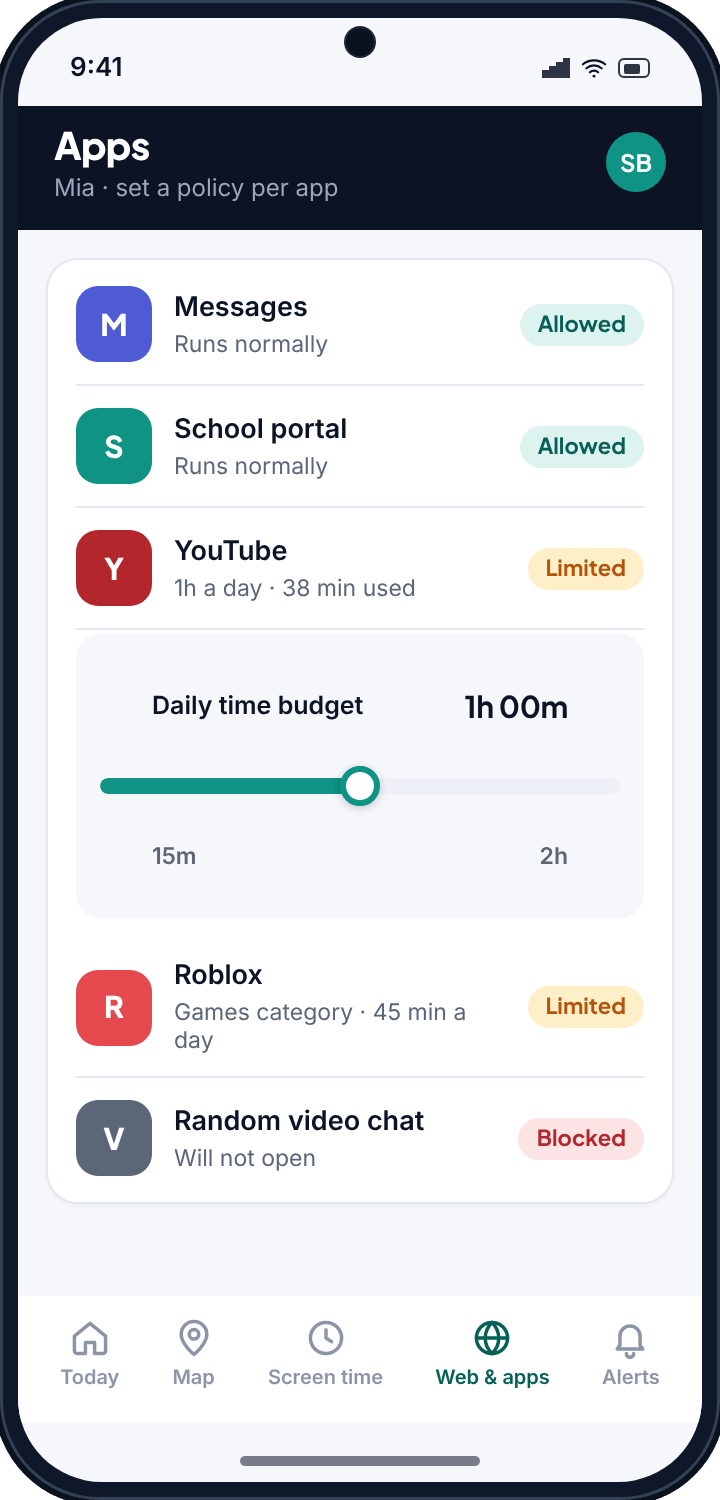
Websites are half the phone. Apps are the other half, and TheTruthSpy gives every app on the device one of three states. You set the policy per app.
- Allowed — the app runs normally, with no restriction. Good for the calculator, the school app, the messaging app you are fine with.
- Limited — the app counts against a daily budget. When the day's time is used up, it stops. This is the setting for the game or video app you do not want to ban outright but do not want swallowing three hours after dinner either.
- Blocked — the app does not open at all.
The three-state model is deliberate. Most parenting is not a clean yes or no. “You can have this, but not endlessly” is the honest answer for a lot of apps, and Limited is what that answer looks like in software. TheTruthSpy is not just a kill switch. It is a dial.
When an app arrives from outside the Play Store
Not every app comes from Google Play. Some are sideloaded — installed from a website, a file or a link, bypassing the store's checks entirely. These off-store apps are worth knowing about, because they are how a lot of risky software gets onto a phone: modified versions of popular apps, workarounds, things pulled from forums.
TheTruthSpy flags them. The alert reads: An app was installed from outside Google Play — a modified messaging app appeared on Mia's phone, and it did not come from the Play Store. The alert states what happened and where the app came from. It does not assume the worst. You get to ask why, rather than finding out months later.
Sideload alerts matter precisely because the store's own screening was skipped. That is not automatically sinister, but it is exactly the kind of thing a parent should get to see.
Deciding what happens to the next app
Phones do not hold still. New apps get installed constantly, and a policy you set today says nothing about the app your child downloads on Saturday. So TheTruthSpy lets you choose what happens to apps installed later.
Set the new-apps rule once, and every new install lands in the state you picked. If you want new apps to arrive Blocked until you look at them, they do, and nothing runs until you have approved it. If you would rather they arrive Limited or Allowed, that works too. You are not stuck re-checking the phone every day to catch what is new.
This is the setting that keeps a good filter from decaying. Plenty of parental controls are airtight the day they are installed and full of gaps a month later, purely because nobody kept up with new apps.
Everything is logged, including what got through
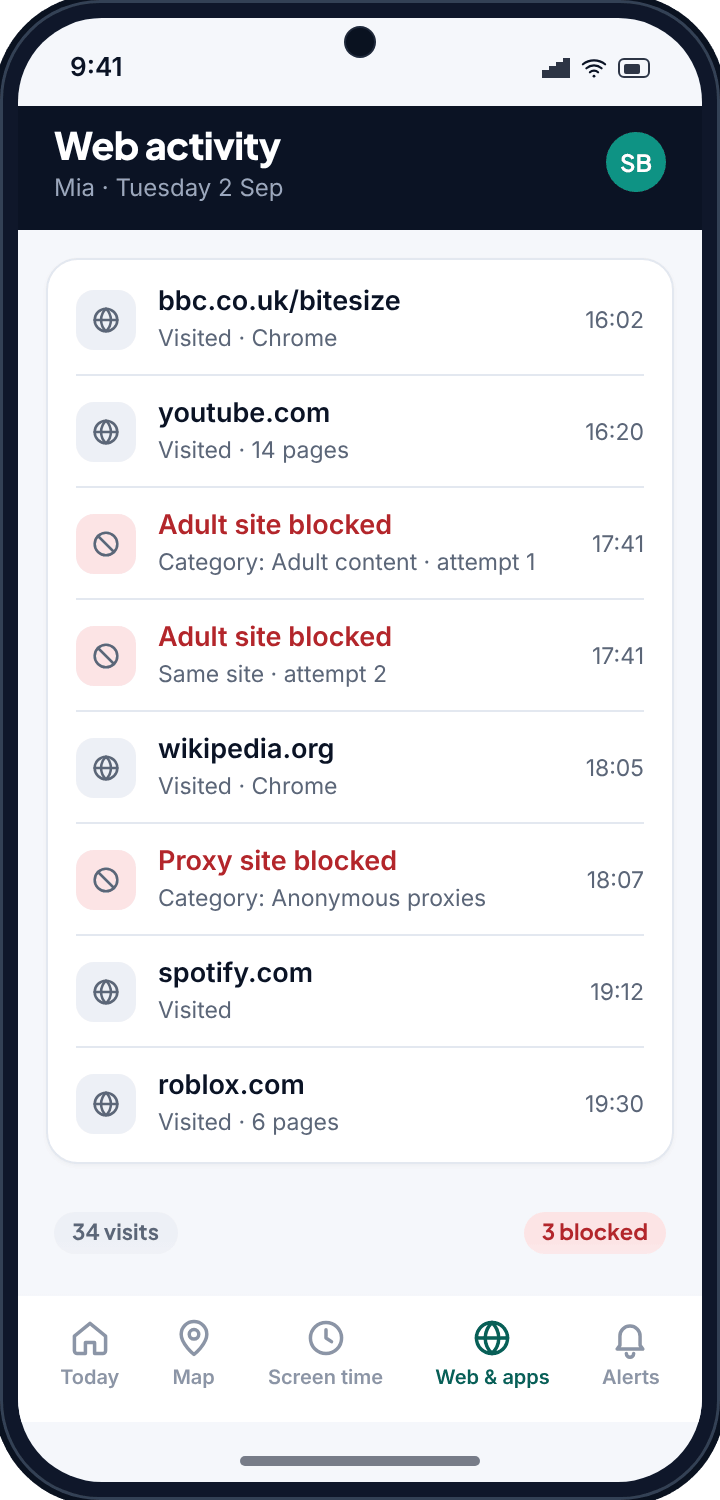
Filtering decides what is allowed. Logging tells you what actually happened. TheTruthSpy records web visits, so you can see which pages were opened, and it records blocks too, so you can see what was stopped.
Both halves matter. The blocks tell you the filter is working and where the pressure is. The visits tell you what your child is spending time on, which is often more useful than the block list. A filter with no log asks you to take its word for it. TheTruthSpy shows the work.
And this is where the visible design comes back. The child's own TheTruthSpy app shows what is being filtered — the categories, the blocks, the app policies. Nothing here is hidden from them. A filter your child knows about invites a conversation. A secret one, when it is discovered, ends trust and usually the arrangement with it.
What a filter cannot do
No content filter is perfect. New sites appear faster than any blocklist can catch them. A determined, technical teenager has options a filter cannot fully close. And a filter has no idea what is happening inside an encrypted chat or on a friend's unfiltered phone.
TheTruthSpy is good at the things it is built for. It blocks the vast bulk of adult and unsafe sites, it stops the obvious browser workaround, it enforces Safe Search, and it gives you a real record instead of a comforting summary. That covers most of what most children run into. It does not, and cannot, replace you.
Use it as one layer. The filter handles the routine blocking so you are not policing every tap. The logs and alerts surface the things worth talking about. Then you have the conversation — about the blocked site, the sideloaded app, what your child is actually running into online. The software buys you information and time. What you do with them is the part that works.
Common questions
Can my child install another browser to get around the filter?
No. TheTruthSpy blocks unknown and unlisted browsers, so installing a different browser does not reopen the web. That workaround is the most common way filters get beaten, which is exactly why TheTruthSpy closes it.
Will I see the actual sites my child tried to visit, or just a count?
Both. The panel shows the category, the number of attempts and the outcome, and the web log lists visited pages as well as blocks, so you can see what was opened and what was stopped rather than a weekly summary.
What is the difference between Limited and Blocked for an app?
Blocked means the app will not open at all. Limited means it runs but counts against a daily time budget and stops once that is used up. You choose the policy per app.
Does the filter work on mobile data as well as Wi-Fi?
Yes. Filtering happens on the phone itself, so it applies on any connection, including mobile data and other people's Wi-Fi.
Does my child know TheTruthSpy is filtering their phone?
Yes, on purpose. The child's own TheTruthSpy app shows what is being filtered — the categories, the blocks, the app policies. A hidden filter, once found, tends to cost you the trust that made it work in the first place.