Browsing History Tracker
Track internet history on your child's Android phone for free. See the sites they visited, when, and which category each one falls into, plus every page the filter stopped, with a straight answer about incognito mode that most trackers quietly avoid. Checking a child's browsing history used to mean picking up their phone and scrolling through Chrome. They notice. They resent it. Then they learn to clear it. A browsing history tracker does the same job from your own screen, keeps the record even when the phone's history is wiped, and, done openly, costs you far less goodwill than a sneaked look.
Free · Permission: Accessibility service · Visible on your child's phone
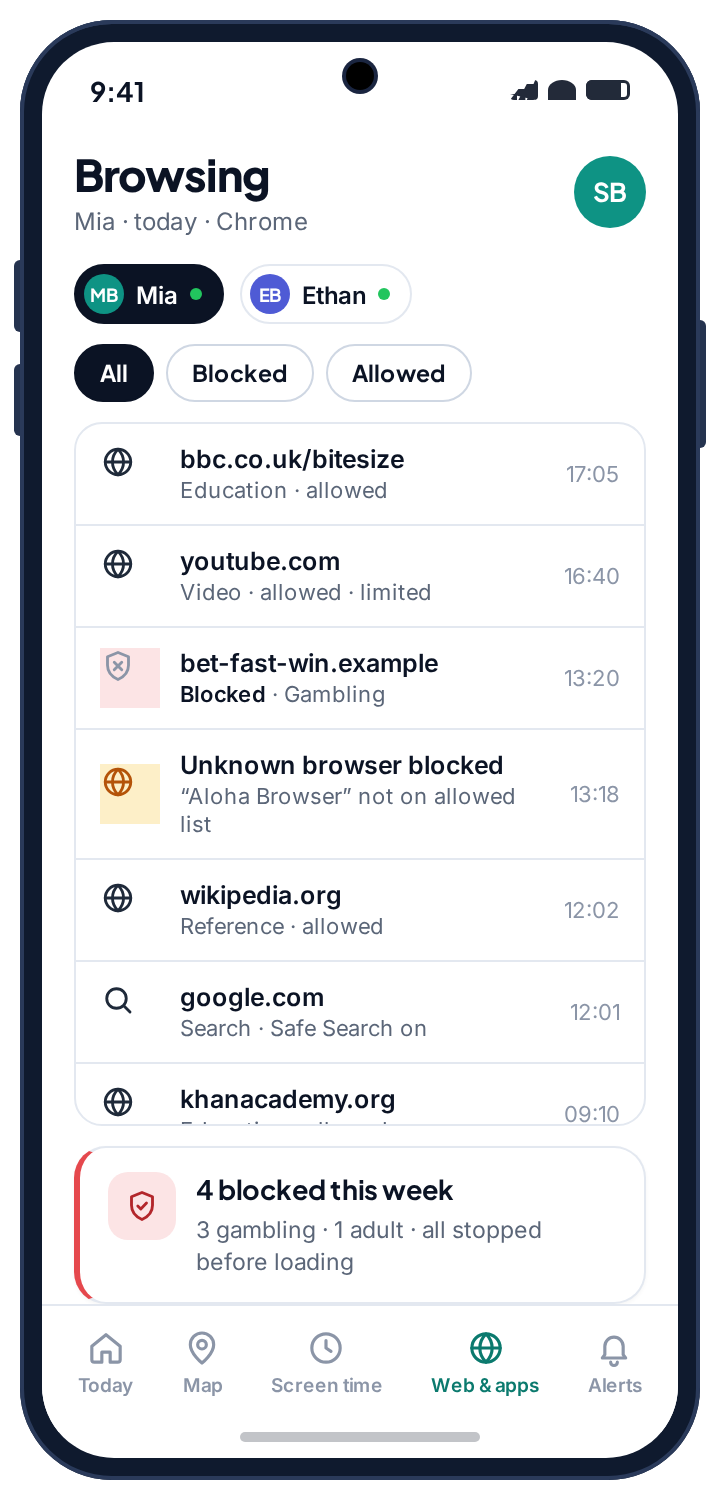
- Four things per visit: the site, the time, the category the filter assigned, and whether it was allowed or blocked.
- The log lives in your panel, not on the phone. Clearing Chrome's history changes nothing on your side, because your panel never read Chrome's history in the first place.
- Incognito hides nothing from it. Private mode stops the browser remembering; it does not stop the request leaving the phone. A VPN does, and TheTruthSpy tells you when one appears.
- Read the categories, not the list. A teenager generates hundreds of page loads a day. The weekly totals and the blocked column are the parts worth five minutes.
- Free, either build, visible. The child can see that browsing is recorded, which shapes behaviour more than anything you will read in the log.
What the browsing history tracker records
Every page request the phone makes through a browser you allow passes through the TheTruthSpy filter, which is what lets it be logged. The web filter and the history write to the same log, so the record is kept on the server from the moment the request leaves the phone, before the browser decides what to remember.
| Field | What you see | Why it matters |
|---|---|---|
| The site | The domain rather than the full address in most cases. | Enough to know where they were without reading over their shoulder. |
| The time | In your child's local time zone. | A run of visits at two in the morning reads differently from the same sites at four in the afternoon. |
| The category | Social, gaming, video, shopping, education, adult, and so on, as the filter assigned it. | This is what makes a long list usable. |
| The result | Allowed, or blocked, with the category that stopped it. | Blocked attempts are often the more interesting half. |
| The browser | Chrome, Samsung Internet, or an unknown browser that was stopped from opening. | A new browser appearing is itself a signal. |
Read the categories, not the list.
A teenager generates hundreds of page loads a day. Reading that line by line is neither possible nor useful, and parents who try give up within a week. The category totals are the part to look at. Forty minutes of video and twenty of social on a Tuesday is an ordinary evening. The same day showing a category you have never seen before, or a spike in blocked attempts, is the thing worth five minutes of attention. Everything else can stay unread, and should.
There is a version of this feature that poisons a relationship. It is the one where a parent reads every line and brings it up. The version that works is simpler: agree that the log exists, check the weekly categories, and open the detail only when the summary actually changes. Because TheTruthSpy is visible on the phone, your child can see that browsing history is recorded. That fact alone shapes behaviour more than anything you will read, and it means that when you do raise something, you are not admitting to snooping.
Blocked attempts tell you more than visits.
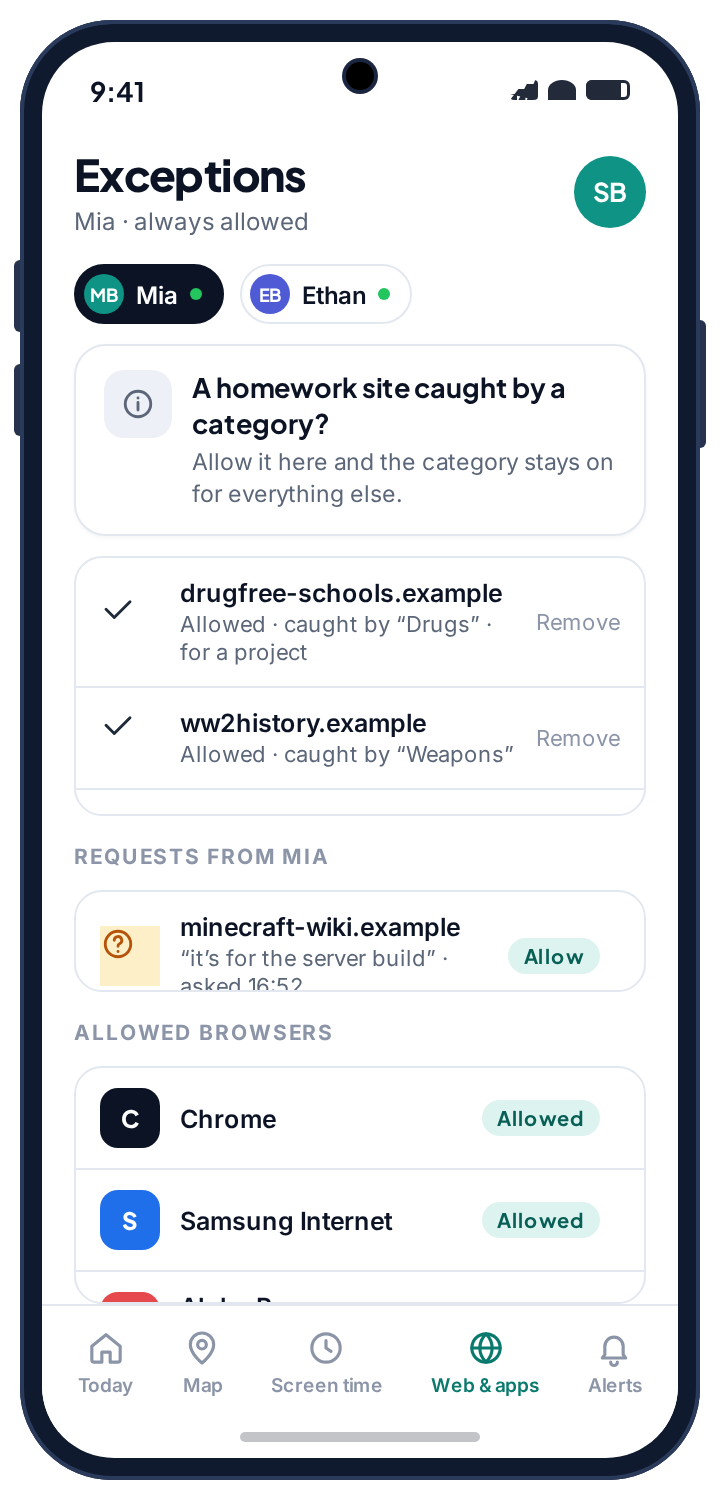
When the filter stops a page, that attempt is logged too. This is the most useful column in the whole tracker, and the one cheaper tools leave out so you cannot check their work. A single blocked page usually means nothing: a mistyped address, an ad redirect, a link in a group chat. A pattern is different. The same category stopped repeatedly, or attempts clustered late at night, tells you something specific is being looked for. That is a conversation, not a punishment.
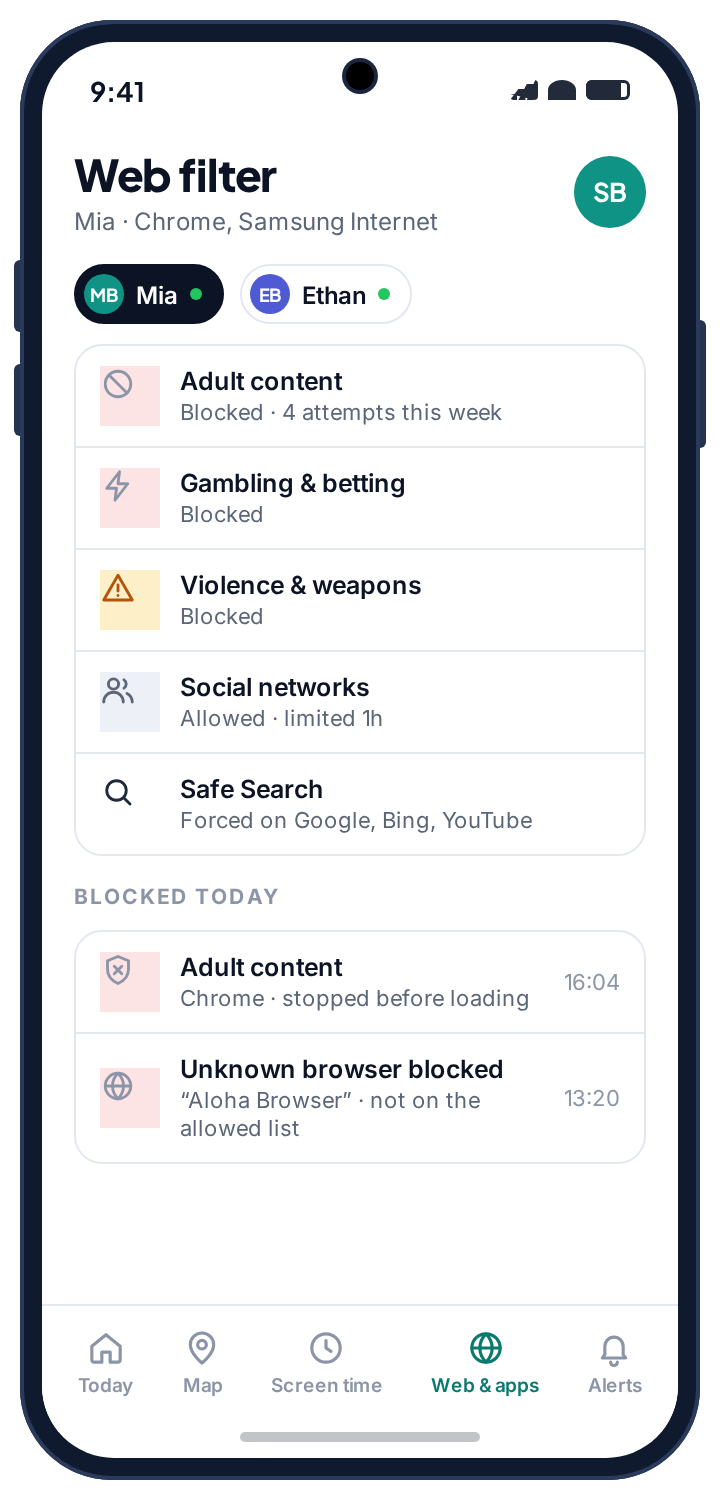
Seeing the blocks also keeps the filter honest with you. If a school research site is being stopped by the Drugs or Weapons category, you will see it in the log and can allow that one site in two taps, instead of your child quietly concluding the whole system is stupid. Doing that quickly, without a negotiation, is what buys the filter its legitimacy.
Private browsing hides nothing from this tracker. A VPN does, and you are told when one appears.
Incognito mode stops the browser saving history on the device. It changes nothing about the requests leaving the phone. TheTruthSpy logs before the browser decides what to remember, so a private tab is recorded like any other. The real limit is different, and no tool escapes it.
Incognito and cleared history
Both only affect what the phone remembers. The log is on the server, written when the request was made. Neither removes anything from your panel.
A different browser
The filter is not tied to one browser. Browsers not on your approved list are blocked from opening and the attempt is logged, so installing an obscure one does not open a way around it.
A VPN
Routes traffic around the filter entirely; that is what a VPN is for. Rather than show you a log with an invisible hole in it, TheTruthSpy flags the VPN's arrival so you know the gap exists and can ask about it. Sometimes it is a school requirement.
How much history is kept: a limited window, then deleted, rather than accumulating indefinitely. A few weeks answers every question a parent realistically has, and a browsing archive spanning years is a security problem waiting to happen, for your child far more than for us.
Questions parents ask about monitoring internet history.
Can I see browsing history if my child clears it on the phone?
Yes. The log lives in your panel, not on the device, so clearing Chrome's history changes nothing on your side.
Does the tracker see incognito browsing?
Yes. Private mode stops the browser saving history locally; it does not hide the request from the filter, which is where TheTruthSpy logs.
Do I see full page addresses or just the site?
Mostly the domain, plus the time, category and result. That is enough to understand the pattern without reading every page they opened.
What if my child uses a different browser?
Unknown browsers that are not on your approved list are blocked and the attempt is logged. Chrome and Samsung Internet are allowed by default; add others from the exceptions screen.
Can a VPN hide browsing from the tracker?
Yes. Rather than show a log with a hole in it, TheTruthSpy flags the VPN's arrival so you know the gap exists and can ask about it.
Is the browsing history tracker free?
Yes. Browsing history comes with the free core on Android, alongside the web filter that writes to the same log. The pricing page page explains how.
What browsing history sits beside
History shows where they went; the web filter decides where they can go, and both write to the same log. Browsing inside apps rather than the browser is handled by blocking or limiting those apps with the app rules. The Wi-Fi history adds one more detail: whether a burst of late browsing happened on the home network or somewhere else.
Browsing history switches on once the child's phone is paired with your parent account, which takes about ten minutes. The setup guide covers each screen.
See where the browser actually went.
Pair your child's phone and see the first day of sites, categories and blocked attempts by the evening. No card, no subscription.
Android · Free to set up · Visible on your child's phone