Sharing Your Location With a Partner: Consent, Settings and an Exit

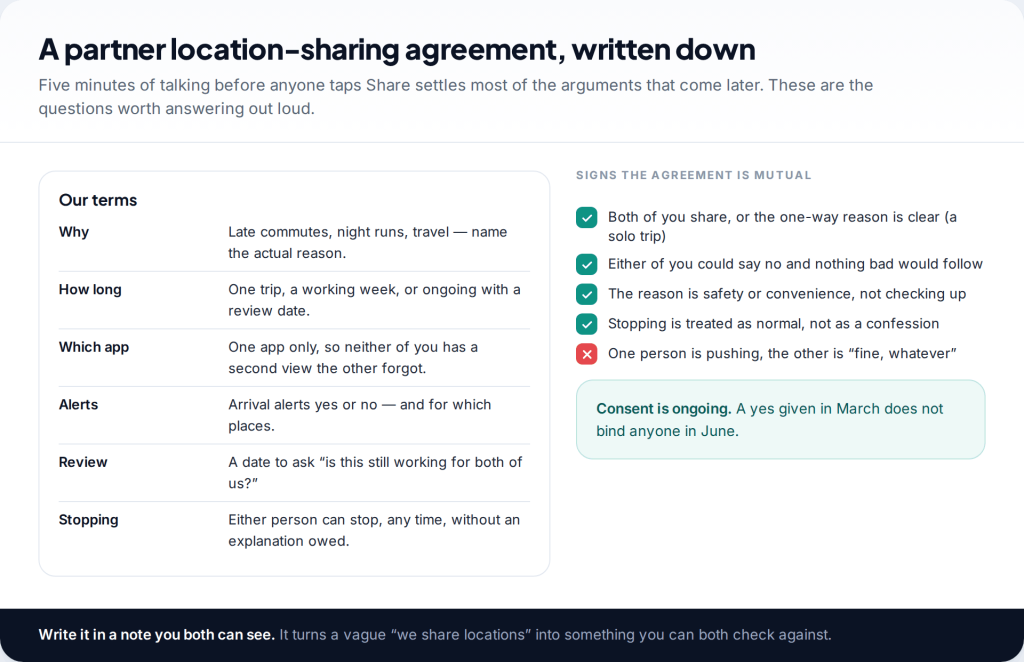
Can you share location with a partner safely? Yes, if three things are true: you both agreed to it freely, you both know exactly what the app reveals, and either of you can stop without fear. Set the terms before you tap Share, pick one app, review it every few months, and know how you would switch it off quickly if the relationship changed.
- Agree first, share second. Reason, duration, alerts and a review date — spoken out loud, ideally written down.
- Know what the dot includes. Some apps also show battery level, place names and arrival alerts.
- Audit every few months. Old shares, family groups and second apps are how people end up visible to someone they forgot.
- Stopping must feel safe. If turning it off would cause a row or worse, the sharing is no longer consent.
Why partners share locations, and where it goes wrong
For many couples location sharing is dull in the best way. It answers “are you nearly home?” without a call while one of you is driving, it reassures someone waiting at a station late at night, and it is genuinely useful if a phone is lost. Most couples who share never think about it again.
It goes wrong in two predictable ways. The first is drift: a share set up for one trip is left running indefinitely, an arrival alert gets added “just in case”, and glancing at the map becomes a habit. The second is control, where location is used to question, check and restrict one partner. The technology is identical in both cases. What differs is whether each person can say no.
This guide is about the safety side: consent, boundaries, auditing, stopping, and what to do if sharing has become part of a controlling relationship. If you both already agree and want the step-by-step setup for iPhone, Android or a mixed couple, our guide to setting up location sharing together as a couple covers the practical side.
How to share location with a partner safely: agree the terms first
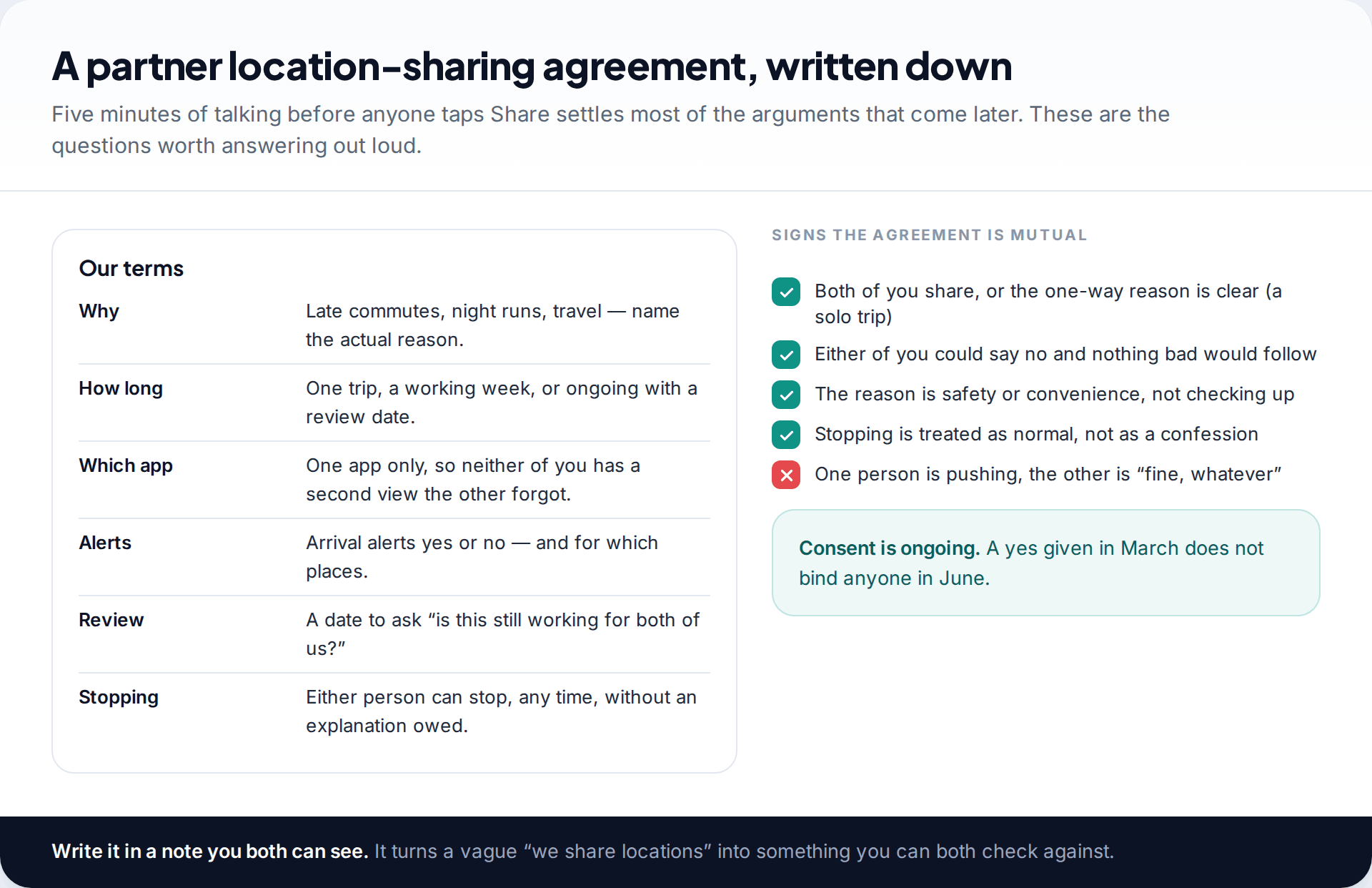
The conversation matters more than the settings. Talk through a few specific questions before either of you starts sharing:
- What is it for? “So I know you got home after night shifts” is a reason. “So I know where you are” is not, because it has no end point.
- For how long? Most apps offer an hour, the rest of the day, or indefinitely. Start with the shortest that does the job.
- Both ways, or one? Mutual sharing is the usual default. One-way sharing can be fine for a clear reason, such as one partner travelling alone, but it should never be a condition.
- Alerts or no alerts? Apps can notify the other person when you arrive at or leave a place. That is a big step up from a map you can check, so agree it separately.
- When will you review it? Pick a date. It makes “shall we keep this?” a normal question instead of a loaded one.
- What happens if one of you stops? The only safe answer is “nothing”. Nobody owes an explanation for switching it off.
Pay attention to how the conversation feels. If one of you is keen and the other says “fine, whatever”, that is not agreement. Neither is a yes given because saying no would start a row.
Know exactly what your partner will see
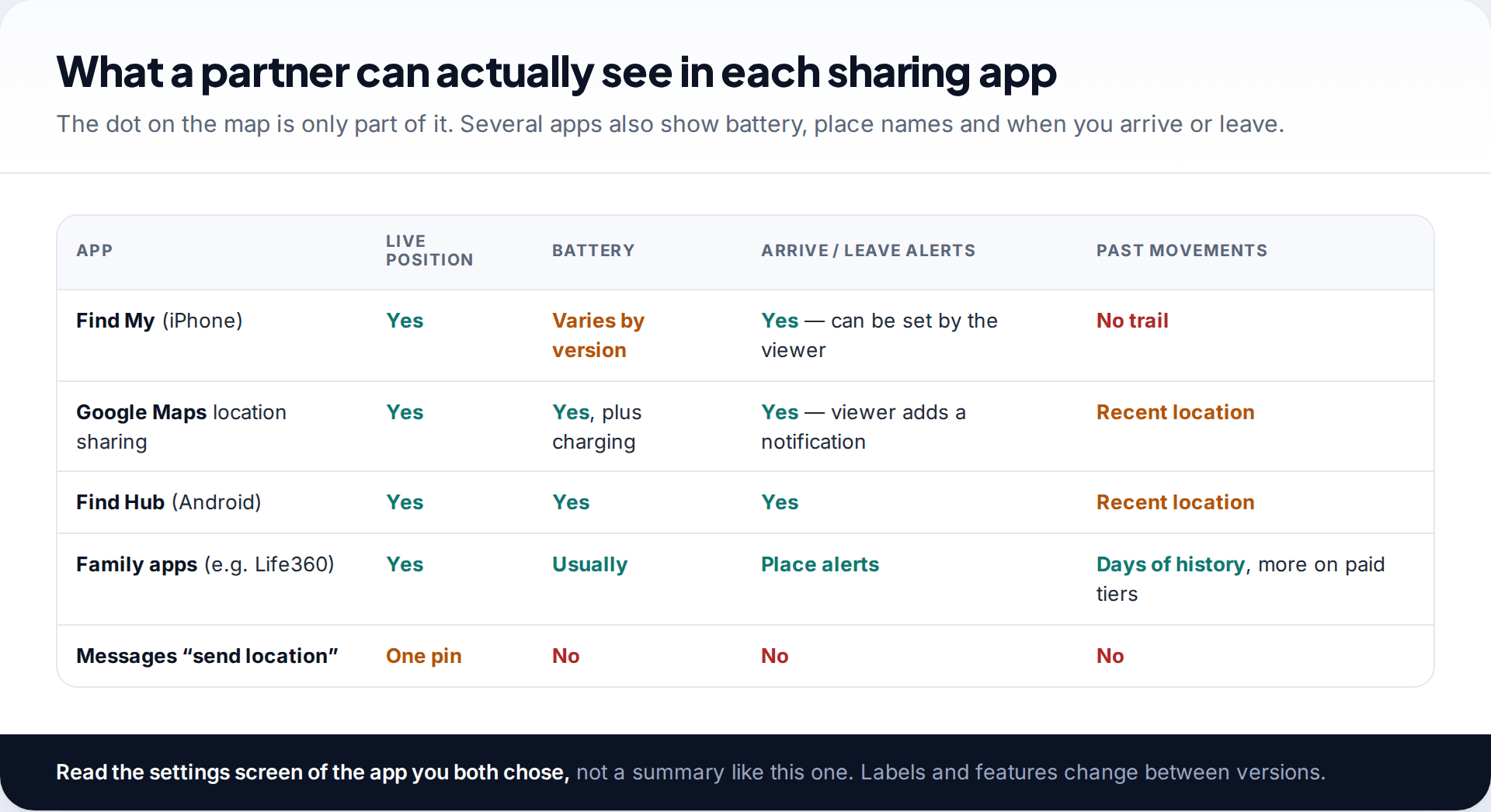
Consent means little if you do not know what you are consenting to. Google’s own help pages say that people you share with in Google Maps can see your name and photo, your device’s recent location, its battery level and whether it is charging, and your arrival and departure times if they add a location-sharing notification. Google’s Find Hub offers a similar share, including your battery percentage. Apple’s Find My shows friends where you are and lets them set notifications for when you arrive or leave somewhere.
Family locator apps go further. Life360, for example, keeps location history, ranging from a couple of days on its free tier to weeks on paid plans, and sends place alerts for arrivals and departures. Those features suit parents of teenagers. Between adults, they are worth thinking about carefully, because history lets someone reconstruct your whole day after the fact.
A one-off pin is different. Sending your current location in a chat shares a single point. It does not keep updating unless you choose a live-location option, which in most apps has its own time limit.
Setting boundaries that hold up over time
Good boundaries are specific enough that both of you would notice if they were broken. A few that work well for couples:
- Temporary by default. Use time-limited shares for trips, nights out and late commutes, and keep ongoing sharing for situations where you both actively want it.
- One app only. Two overlapping apps mean one of you may forget a share is still running.
- No history apps between adults unless you both specifically want a record.
- No “proof” requests. Asking for screenshots, receipts or photos to confirm a location is checking, not caring.
- Pauses are normal. Wanting a weekend off the map, or a surprise-gift shopping trip, should not need negotiating.
If you set up arrival alerts, limit them to one or two places that serve the original reason, such as home or a train station. Alerts for a gym, a friend’s house or a workplace move the arrangement from reassurance to supervision.
How to review who can see your location
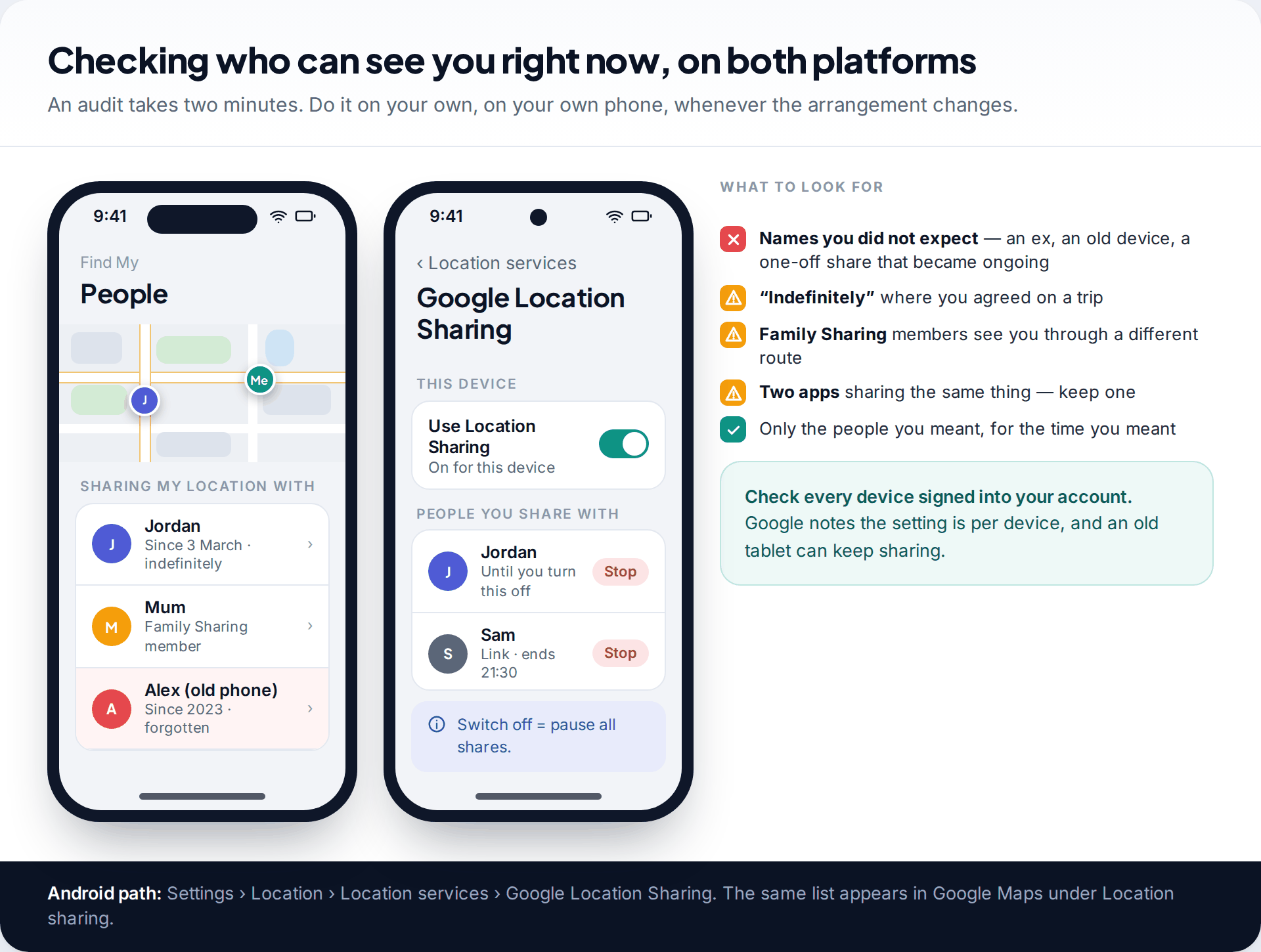
Do a quick audit when you start sharing, every few months, and whenever the relationship changes. You are looking for three things: people you did not expect, durations longer than you agreed, and routes you had forgotten about.
On iPhone, open Find My and tap People. Everyone you share with is listed, including members of your Family Sharing group, who appear there automatically if you share with the family. Family sharing is controlled separately under Settings › your name › Family › Location Sharing. Labels have moved between iOS versions, so if a path does not match, search Settings for “location sharing”.
On Android, Google puts the list in two places. In the Settings app, go to Location › Location services › Google Location Sharing, where you can see everyone you share with and pause sharing from that phone entirely. The same shares appear in Google Maps under your profile picture › Location sharing, and in the Find Hub app. Google’s help notes the setting is per device, so check each phone or tablet signed into your account.
Then look beyond the main apps: any family locator, live-location messages in chat apps, and fitness apps that broadcast a run or ride.
How to stop sharing your location, and what they will notice
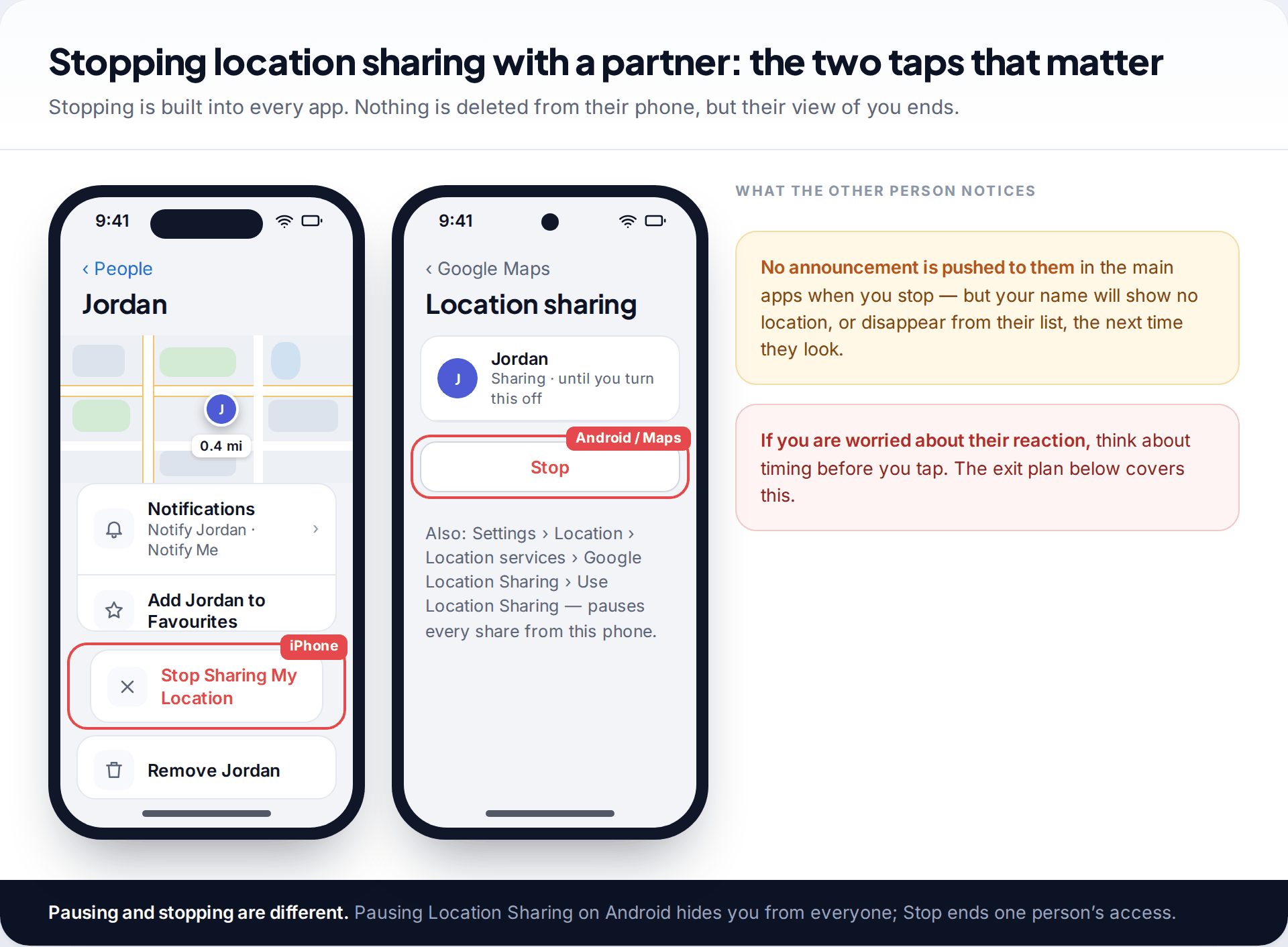
Every legitimate sharing app has a stop control that takes seconds:
- Find My (iPhone): People › choose the person › Stop Sharing My Location. In Messages, tap their name at the top of the conversation and choose Stop Sharing.
- Google Maps (Android and iPhone): profile picture › Location sharing › choose the person › Stop.
- Find Hub (Android): tap the person you share with › Stop sharing › confirm.
- Android system-wide pause: Settings › Location › Location services › Google Location Sharing › turn off Use Location Sharing.
- Family locator apps: leave the circle or group, and then remove the app. Deleting the app alone may not end your membership.
Be realistic about what happens next. The main apps do not push an alert saying “you have been removed”, but the other person will see no location for you, or no entry at all, the next time they look. In a healthy relationship that is fine. If you expect a bad reaction, read the exit plan section before you act.
Warning signs that sharing has become control
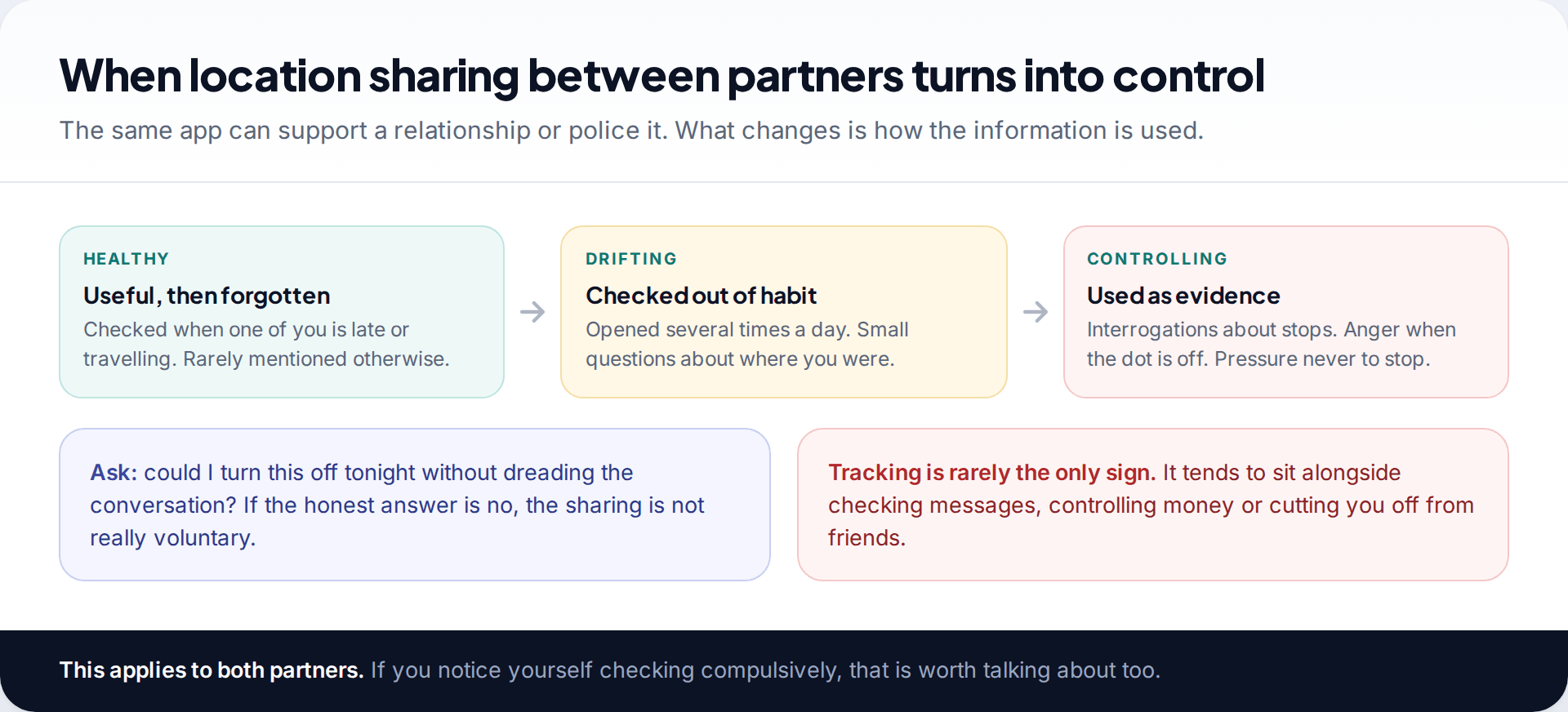
Coercive control is a pattern of behaviour that limits someone’s freedom, and location tracking is one of its most common tools because it is so easy to justify as concern. Watch for:
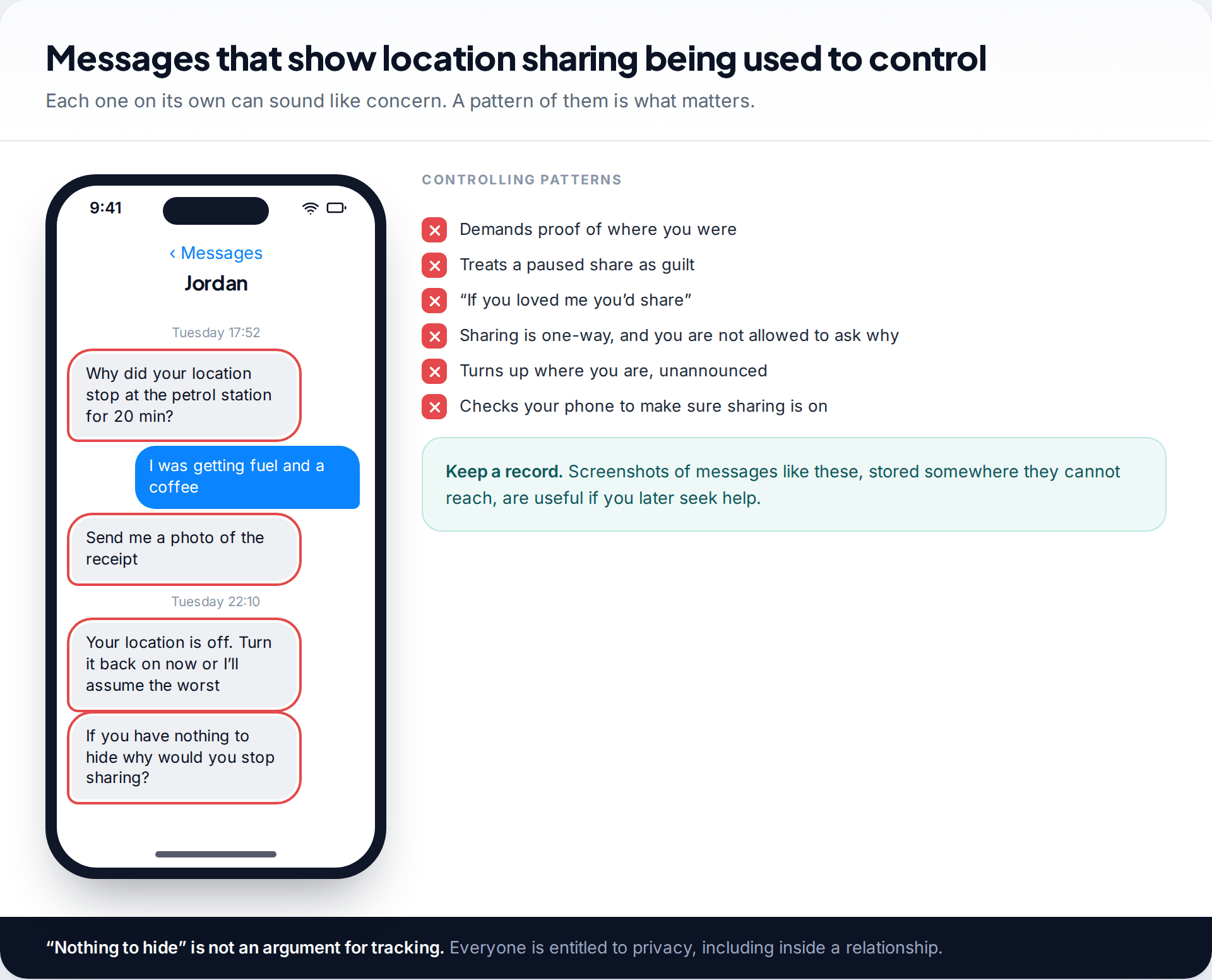
- Questions about every stop, or demands for proof of where you were.
- Anger or accusations when your location is off, delayed or inaccurate.
- Sharing that only runs one way, with no room to ask why.
- Pressure to share with “if you had nothing to hide” or “if you loved me”.
- Your partner checking your phone to confirm sharing is still on, or knowing your passcode and account passwords when you did not choose to tell them.
- Turning up where you are without being invited.
A common myth is that GPS is always exact, so any gap must be deliberate. In reality phone locations drift, lag and drop out indoors, underground or with low battery. Someone who treats every glitch as a lie is not responding to the technology.
Other routes that can keep revealing where you are
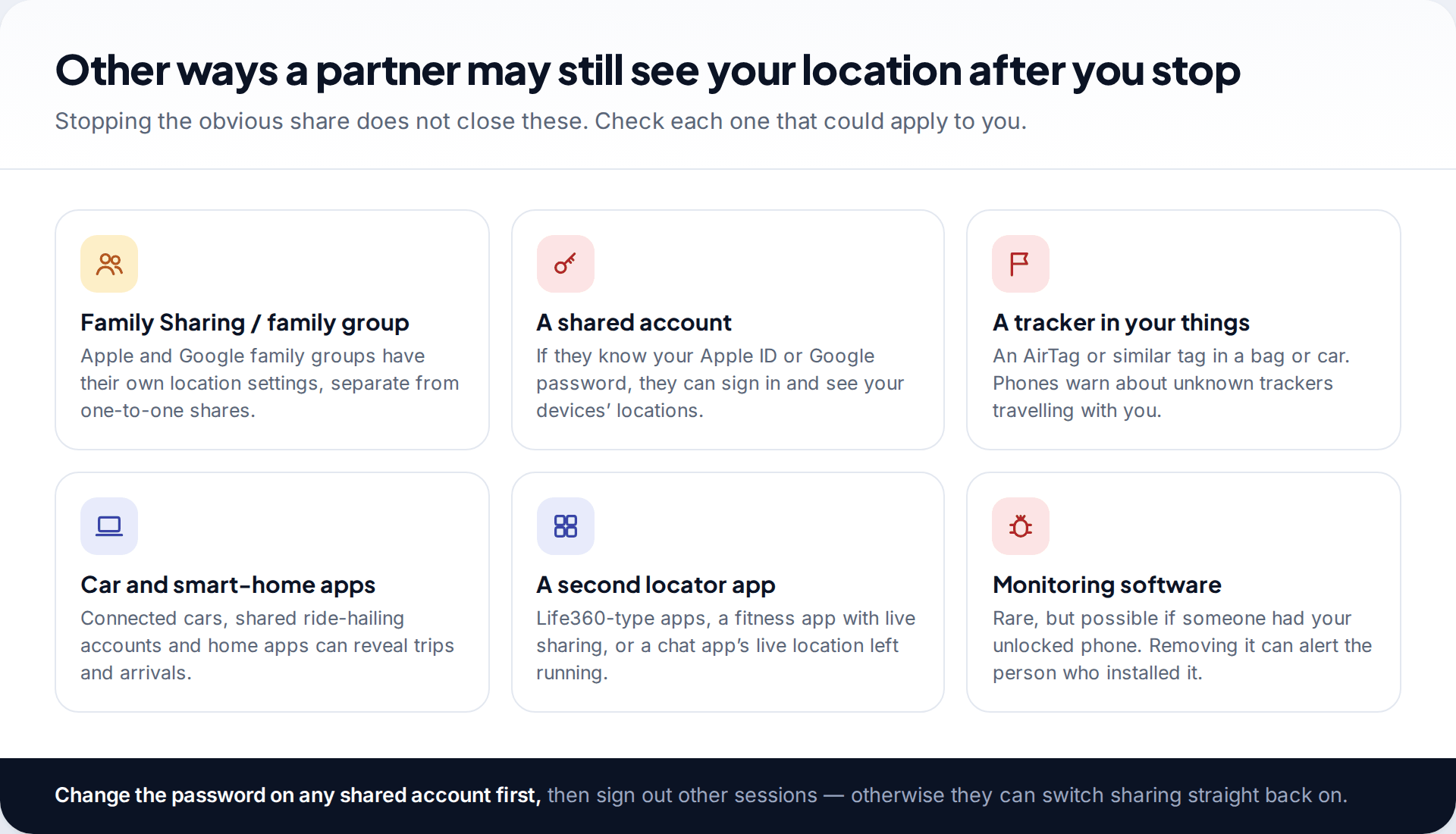
Ending a one-to-one share does not close everything. Family groups on Apple and Google have their own location settings. If someone knows your Apple ID or Google password, they can sign in on another device and see your phone’s location through the device-finding tools. A Bluetooth tag slipped into a bag or car is another route; iPhones and Android phones both warn about unknown trackers that travel with you, so take those alerts seriously.
Connected-car apps, shared ride-hailing or food-delivery accounts and smart-home apps can also reveal trips and arrivals. In rarer cases, someone who had your unlocked phone may have installed monitoring software. If you suspect that, our guide on how to tell if your partner is tracking your phone goes through the checks. Be aware that removing such software can alert the person who installed it, so plan that step with the same care as the rest.
An exit plan if stopping feels unsafe
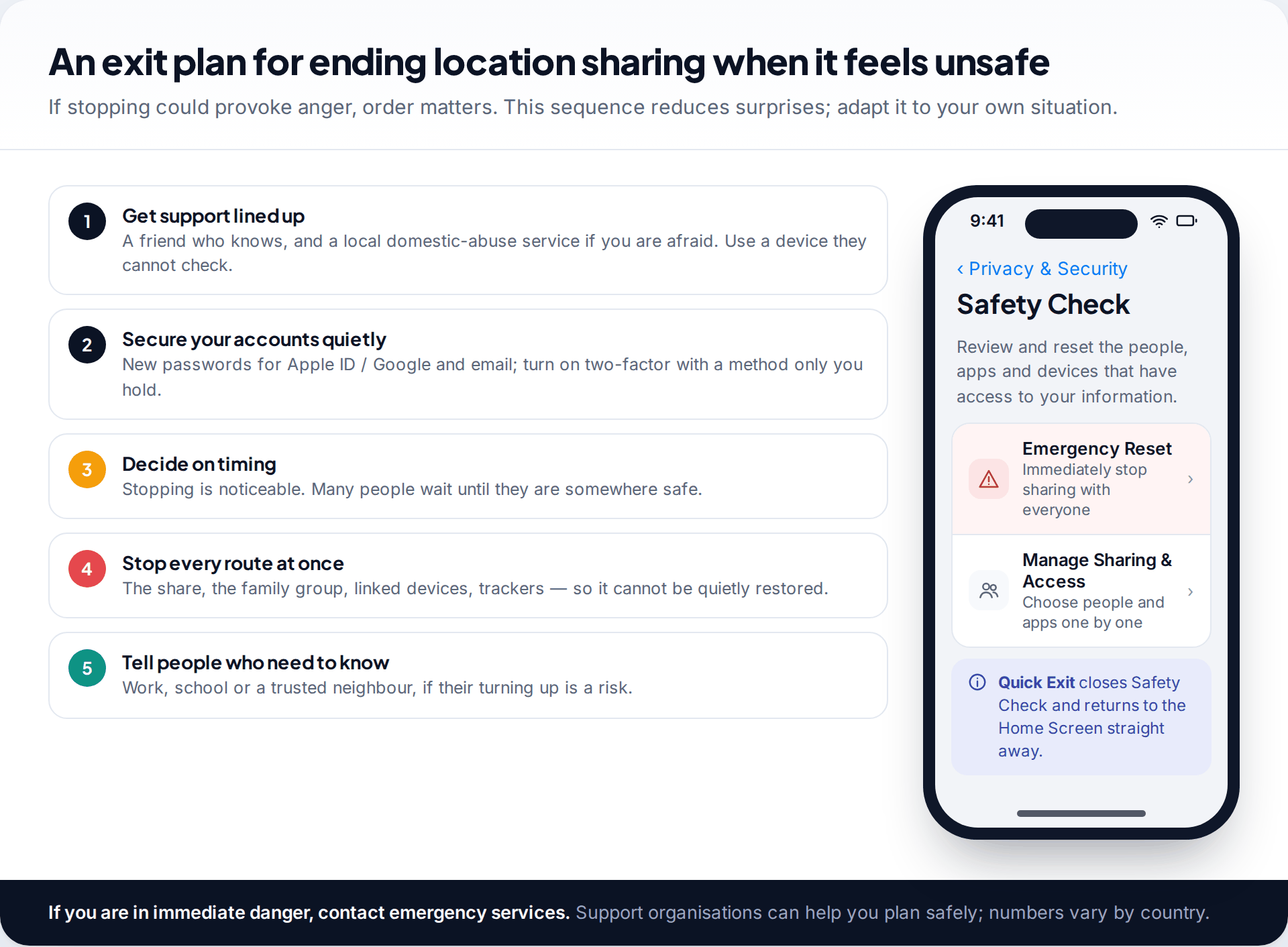
If you are afraid of how a partner will react, the order you do things in matters more than any single setting.
- Line up support first. Tell a friend you trust. Domestic-abuse organisations help with safety planning, including around technology; search for a service in your country from a device your partner cannot check.
- Secure your accounts. Change your Apple ID or Google password and your email password, sign out sessions you do not recognise, and set up two-factor authentication with a method only you hold. Without this step, sharing can simply be switched back on.
- Choose your moment. Because stopping is noticeable, many people wait until they are somewhere safe, or with someone else.
- Close every route together. The share itself, family groups, other apps, and any tracker you find.
- Warn people who may need to know, such as a workplace or a trusted neighbour, if your partner turning up there is a risk.
On iPhones running iOS 16 or later, Safety Check (Settings › Privacy & Security › Safety Check) brings much of this together. Emergency Reset stops sharing with everyone at once and helps you review account security; Manage Sharing & Access lets you go person by person. There is also a Quick Exit button that returns you to the Home Screen straight away. Android has no single equivalent, so work through Google Location Sharing, your Google family group and your account security in turn.
If you are in immediate danger, contact your local emergency number. Changing settings is useful, but it is not a substitute for a safety plan made with people who can help.
What these tools cannot do
No setting can make an unequal relationship equal. Location sharing cannot prove where someone was beyond reasonable doubt, because positions drift and apps lag. Stopping a share cannot be hidden from a person who regularly checks. And no app can tell you whether a partner’s interest comes from care or control. Only the pattern of their behaviour can do that.
How this page was put together
Menu paths and what each app shows were checked in September 2026 against Google’s help pages for Google Maps location sharing, Google Location Sharing on Android and Find Hub, and Apple’s support pages on sharing location and its Personal Safety guide covering Safety Check. Life360’s history ranges come from its own feature pages. Apps rename screens regularly; if a label differs, search the settings for the same word.
We did not test these apps on our own devices for this article, and it is not legal advice. Our approach to sources and corrections is set out in our editorial standards.
Common questions
Is it normal for couples to share locations?
Many couples do, and for many it is simply practical. What makes it healthy is that both people chose it, understand it and can stop it without consequences. Not sharing is just as normal.
Does the other person get a notification when I stop sharing my location?
Find My and Google Maps do not send a “you have been removed” alert, but your location will be missing the next time they open the app. Assume a partner who checks often will notice quickly.
Can my partner see my location history?
Not in Find My, which shows where you are now. Google Maps and Find Hub show your recent location. Family locator apps often keep days or weeks of history. Check the app you use and turn off history features you did not agree to.
Should I share my location if my partner insists?
Insistence is a warning sign in itself. A partner who respects you will accept a no, or a shorter, time-limited share. If saying no feels risky, that tells you something about the relationship, and it may be worth speaking to someone you trust.
Can I pause sharing without stopping it completely?
On Android, turning off Use Location Sharing pauses every share from that phone. On iPhone, Find My has a Share My Location switch in its Me tab that stops sharing with everyone until you turn it back on. Both are visible to the other person as a missing location.
What if I think my partner is tracking me in another way?
Check for family groups, shared accounts, unknown tracker alerts and unfamiliar apps. Change passwords from a device only you use. If you suspect monitoring software, plan before removing it, because removal can alert the person who installed it.
Looking for a tool to go with this? TheTruthSpy is a free parental control app for Android that stays visible on the child's phone. If it fits your family, see the Location & geofencing feature.
Related guides
How Accurate Is Phone Location Tracking? GPS, Wi-Fi and Cell Compared
Phone location accuracy runs from a few metres with GPS under open sky to miles when only the mobile network…
Using Google Maps Timeline to Find a Lost Phone
Can Google Maps find a lost phone? Only in two cases: someone you share your location with can see it,…
GPS Tracking for Small Business: A Starter Guide
A plain starter guide to GPS tracking for a small business: vehicle trackers versus phone apps, what a small fleet…
Parental controls your child can see
Location, screen time limits, a web filter and alerts from notifications — free, and visible on your child's phone. Pair a phone in about ten minutes.
Android · Free to set up · Visible on your child's phone