Call Log Monitoring
See who your child calls and who calls them, when, and for how long, with names from their contacts. It never records what was said, and your child's phone lists that call logs are shared.
Direct-download build · Free · Permission: Call log · Visible on your child's phone
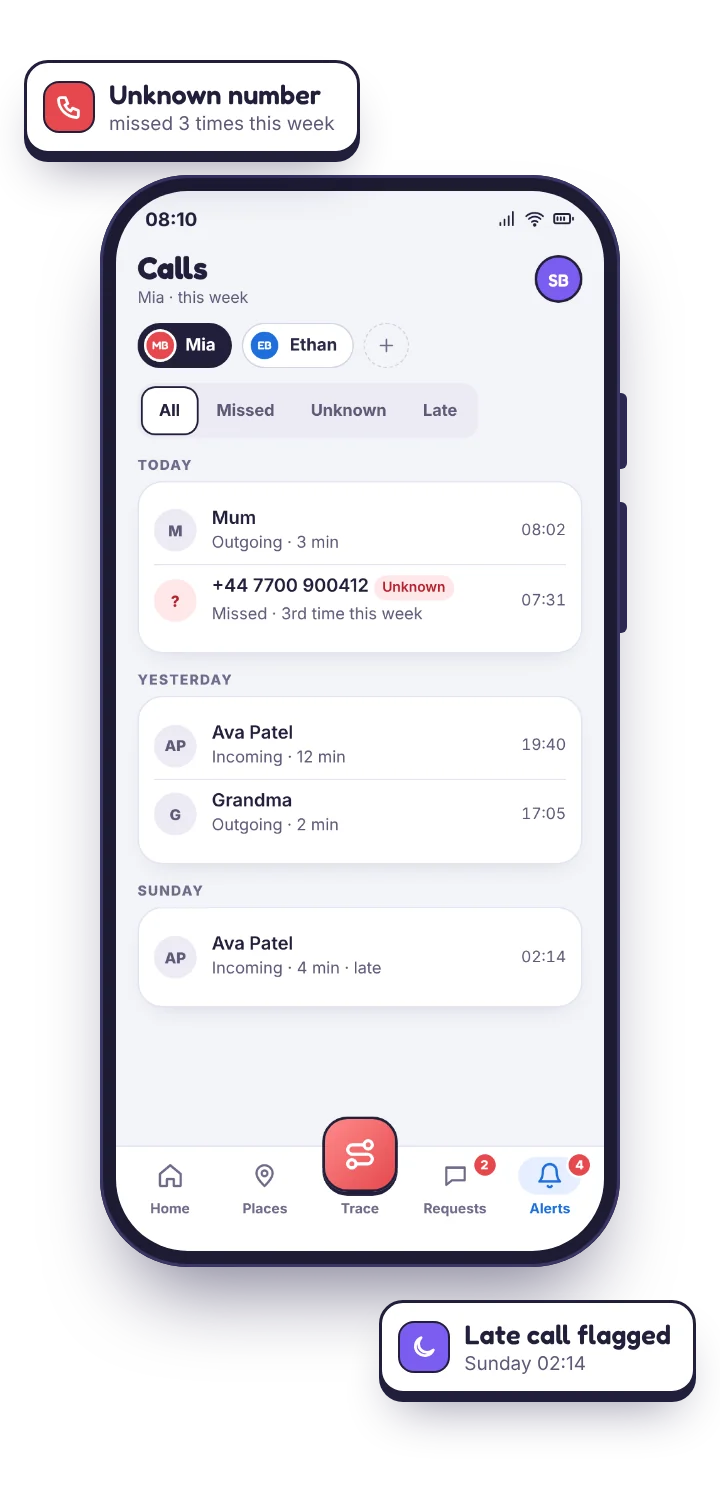
The call log, and the order to read it in
Every ordinary phone call on your child's Android phone lands in the log as one line: a name or a number, a direction, a time, a length. That is less than most people expect and more than most people use. The log is grouped by day with four filters, All, Missed, Unknown and Late, and the last two are the ones that earn the feature its place.
Names come from the phone's own address book. A number saved as “Jas” shows as Jas; a number saved nowhere shows as digits, and the unnamed lines are the ones you notice, which is the point. This is why contacts monitoring quietly makes the call monitor far more useful. It is what turns a column of digits into a list you can read at a glance.
Time is shown in your child's local time zone, so 23:15 reads as 23:15 where they are. Duration is the call as it actually lasted: a string of eight-second calls is a very different thing from one long one, and the log shows you which you are looking at.
- Ordinary calls only. The phone's own dialler, incoming and outgoing. WhatsApp and Viber voice calls never reach the call log; they appear as notifications under social alerts.
- Frequency, without counting. Each contact's volume this week is compared with their normal, so a change stands out on its own.
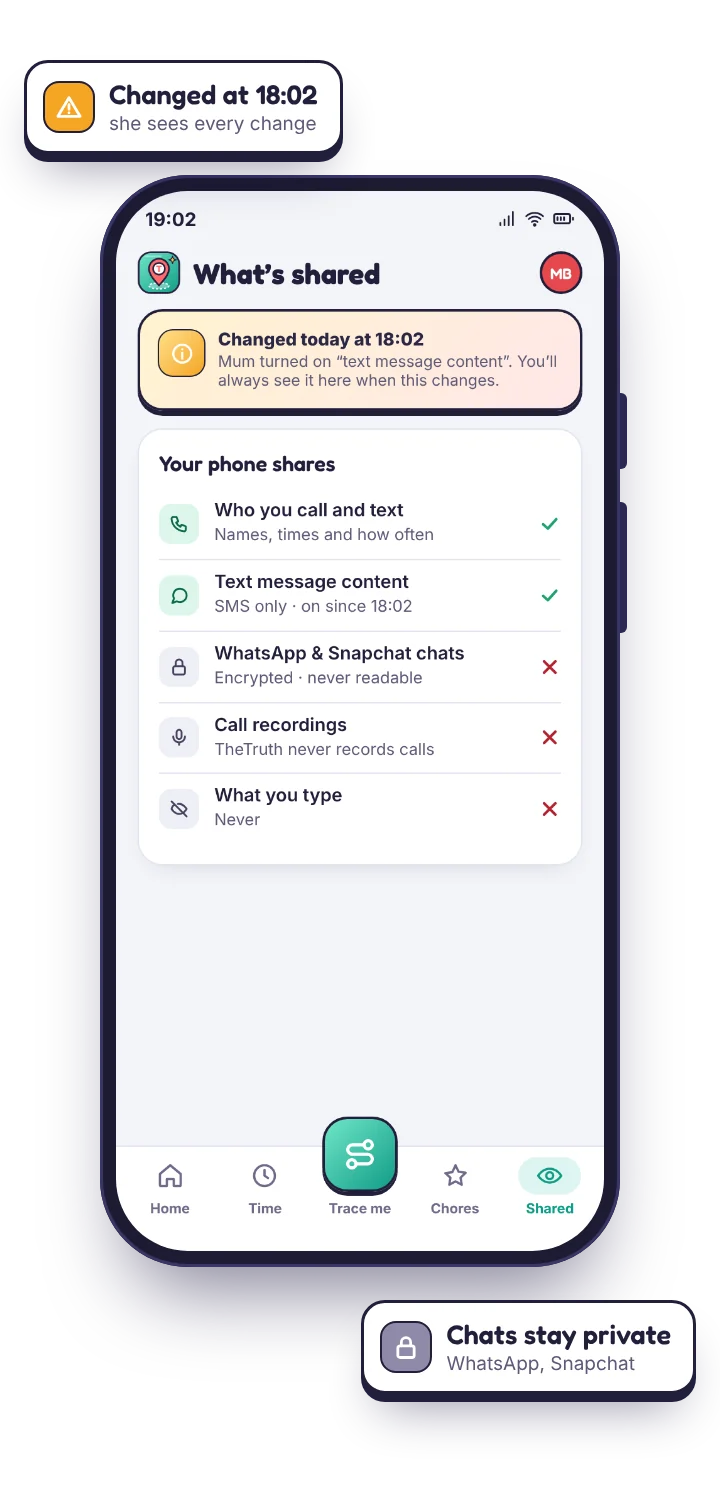
- Nothing is hidden from them. The child's phone lists “who you call and text” on its What's shared screen, and shows when that list changed.
| Field | What it holds | Why it matters |
|---|---|---|
| Who | The contact name where one is saved, the raw number where it is not. | The unnamed ones are the ones you notice, which is the point. |
| Direction | Incoming, outgoing or missed. | The column most often skipped and most often decisive. |
| Time | In your child's local time zone. | 23:15 reads as 23:15 where they are, wherever you are. |
| Duration | How long the call actually lasted. | Eight seconds and forty minutes are different conversations. |
| Frequency | This week's volume per contact against their usual. | A change stands out without you counting. |
| Content | Not collected. | What was said is not part of the log. TheTruthSpy has no call recording. |
An unknown number keeps appearing
This is the situation a call log most often gets opened for. A number with no contact name attached shows up three or four times across a week, usually in the evening. One call is nothing: a wrong number, a delivery, a friend on a new handset. Four calls across five days, all initiated by them rather than by your child, is a different shape entirely, and the direction column is what tells you which. It is the column people forget to read.
What the log settles is whether it is a pattern or a coincidence. The unknown-number card gathers everything about one number in one place: how many times this week, how many were missed, whether any were outgoing, and whether the number has ever been saved on the phone. What the log cannot settle is who the person is. A number is a number. If it matters, the answer comes from asking your child, and the log's real value is that it lets you ask something specific, “who's the 07700 number?”, rather than something vague that gets a shrug.
The most likely outcome is a friend whose number was never saved. The second most likely is a scam caller. Genuine cause for alarm is a distant third, which is worth remembering before you open the conversation.
- All incoming, all missed. Almost always a cold caller. Your child is not picking up, which is the right instinct.
- Incoming, answered, getting longer. Somebody your child wants to talk to. Ask about the person, not the number.
- Outgoing to an unsaved number. The rarest shape and the one worth a question, because your child chose to dial it.
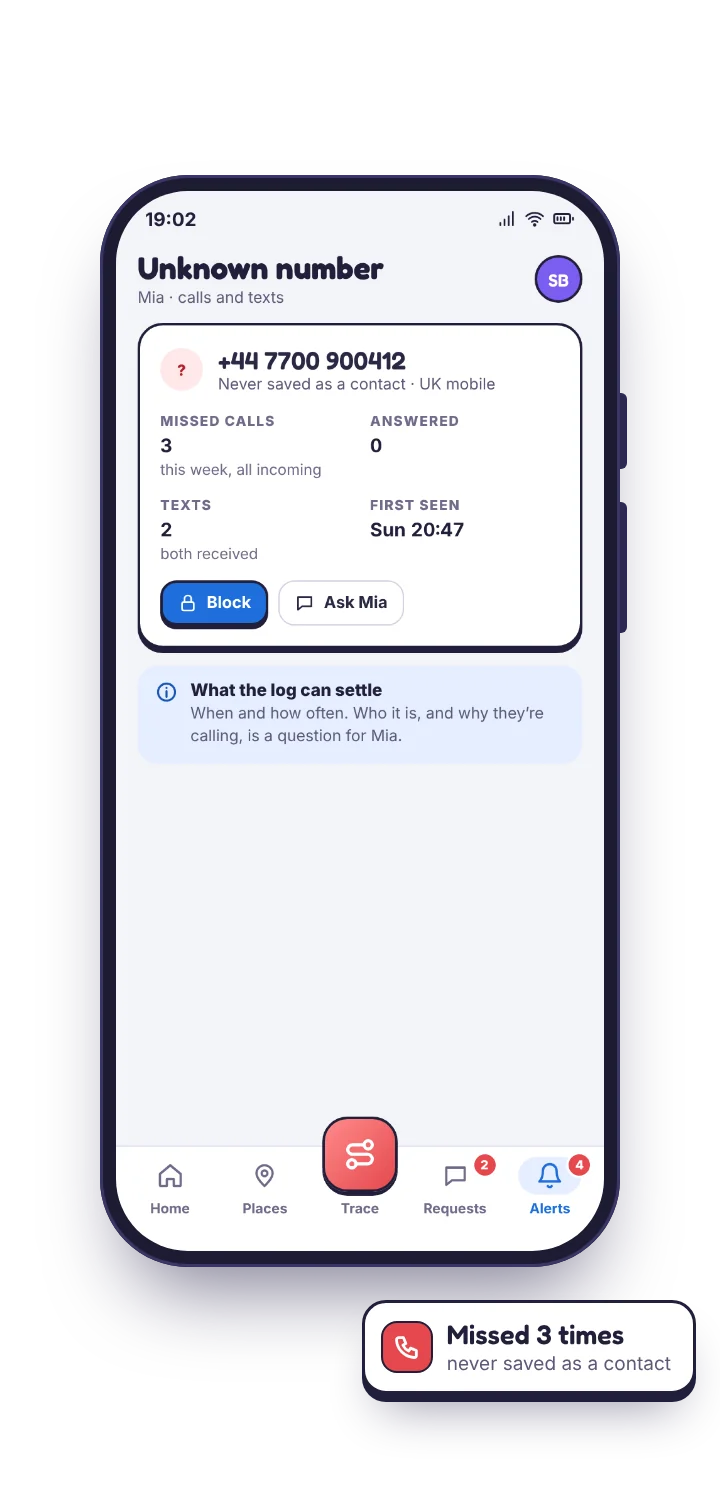
The call monitor lives in the direct-download build, because Google Play does not allow it in this category.
Google Play policy forbids call-log, SMS, contacts and media access for parental-control apps, so the Play build ships without them entirely. It cannot read call logs even if you want it to. The build downloaded directly from our site carries the log, and needs the call-log permission granted on the phone.
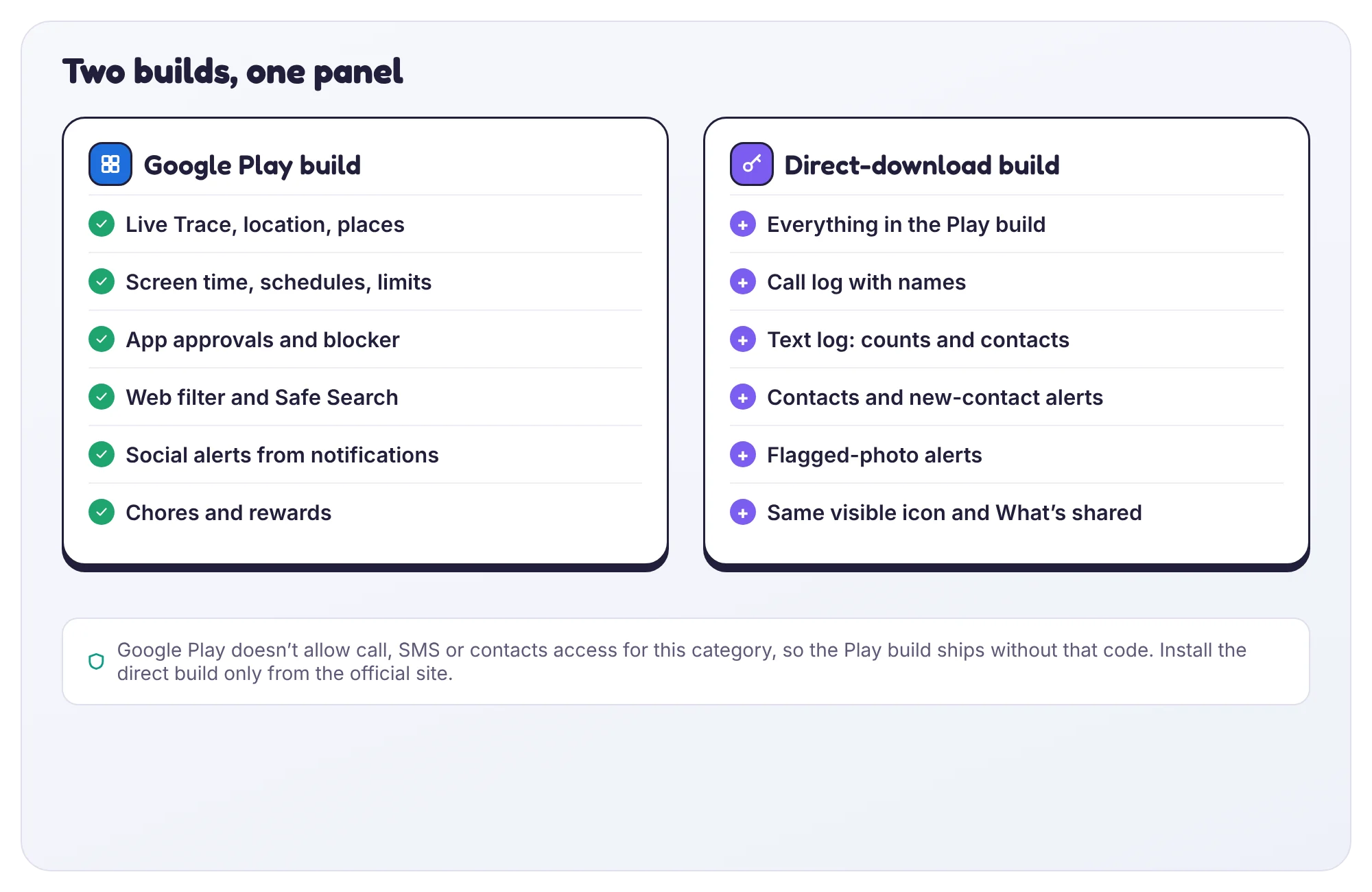
What each build can see
Everything else is identical between the two. GPS tracking, screen time, web filtering and notification alerts all work either way. The table is the whole of the difference.
| Feature | Google Play build | Direct-download build |
|---|---|---|
| Call log | Not available | Yes, with the Call log permission |
| SMS log and contacts | Not available | Yes |
| Location, screen time, web filter | Yes | Yes |
| Social app alerts | Yes, from notifications | Yes, from notifications |
| Visible on the child's phone | Always | Always |
The direct build asks for the Call log permission during setup, using Android's own dialog. It is a single yes or no with no “while using the app” trap. If it is revoked later, Device health tells you rather than leaving you to read an empty week as a quiet one.
An empty call log and a broken one look identical from the outside. Check the sync time before you conclude anything from silence.
An empty call log is usually not a problem with your child. Teenagers barely call anyone, and a week of silence is normal. It is worth checking that the log is actually working, though, because a broken feature looks identical to a quiet week.
Your panel shows the last sync time and the permission state for each phone. If the phone reported an hour ago and the log is empty, the log is empty. If it last reported four days ago, that is the thing to fix, and Settings → Devices will say why. The causes below cover nearly every gap; the one parents assume first is last for a reason.
The log is empty, and the phone synced an hour ago.
Nobody called. By a distance the most common cause, and not a cause at all.
Fix: Nothing. Check the calls and messages overview if you want reassurance; texts are usually where the week's activity actually is.
The log has not changed since setup day.
You are on the Google Play build, which cannot read call logs at all, whatever the settings say.
Fix: Install the direct-download build from our site over the top. Pairing survives, and the Call log permission dialog appears on first launch.
Calls stopped on a particular day and never resumed.
The Call log permission was revoked, usually from Settings → Apps → Permissions, sometimes by an Android update that resets unused permissions.
Fix: Device health flags it and sends your child a one-tap fix. By hand: Settings → Apps → the app → Permissions → Call logs → Allow.
Questions parents ask about the call monitor for Android.
Can I hear what was said on the call?
No. The call log holds who, direction, time and duration, and nothing else. TheTruthSpy has no call recording and never captures audio, in either build. If a call worries you, the honest route is to ask your child about it.
Why is the call monitor not in the Google Play version?
Google Play policy forbids call-log, SMS and contacts access for apps in this category, so the Play build ships without them and cannot read call logs even if you want it to. The direct-download build from our site carries the log and asks for the Call log permission on setup. Everything else is identical between the two.
What permission does the call monitor need?
The Call log permission, granted on the child's phone from Android's own dialog during setup, plus Contacts if you want names rather than numbers. It is a plain allow or deny with no “while using the app” state. If it is revoked later, Device health says so rather than showing you an empty week.
How long is call history kept?
A rolling window of recent weeks, then it is deleted. That covers every situation on this page. There is no permanent archive and no export of a child's call history to anyone else.
Where the call monitor fits with everything else
The call log only covers ordinary phone calls. Texts sit in the SMS log, with content off by default and on a separate switch. Voice calls placed inside WhatsApp or Viber never reach the call log; TheTruthSpy shows those, as notifications, under social app alerts. An unknown number is easier to judge when you can see whether it is saved on the phone, which is what contacts monitoring adds. None of this is billed.
See who is calling, starting tomorrow morning.
Install the direct-download build, pair your child's phone in about ten minutes, and see the first day of call logs by the morning. No card, no subscription.
Android · Free to set up · Visible on your child's phone