7 Best Anti-Spyware Apps for Android: Detection Rates Compared

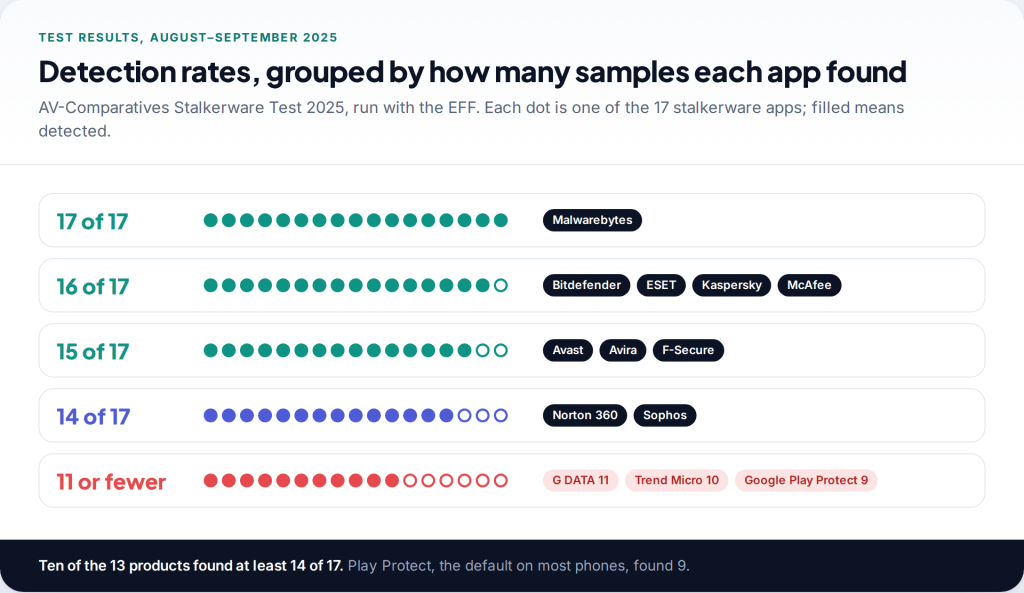
What makes a good anti spyware app for Android is simple to state: it finds the monitoring apps people actually use against partners and family. AV-Comparatives measured exactly that in 2025, installing 17 stalkerware apps and scanning with 13 security products. Detection ranged from 17 of 17 down to 9. Below are all 13 results, and the seven apps worth installing.
- Best all-round: ESET Mobile Security. 16 of 17, with real-time scanning and a permission audit on the free tier.
- Best single detection result: Malwarebytes. The only app to find all 17. Real-time protection is paid.
- Best free and ad-free with a privacy view: Sophos Intercept X for Mobile, at 14 of 17.
- Not enough on its own: Google Play Protect, which found 9.
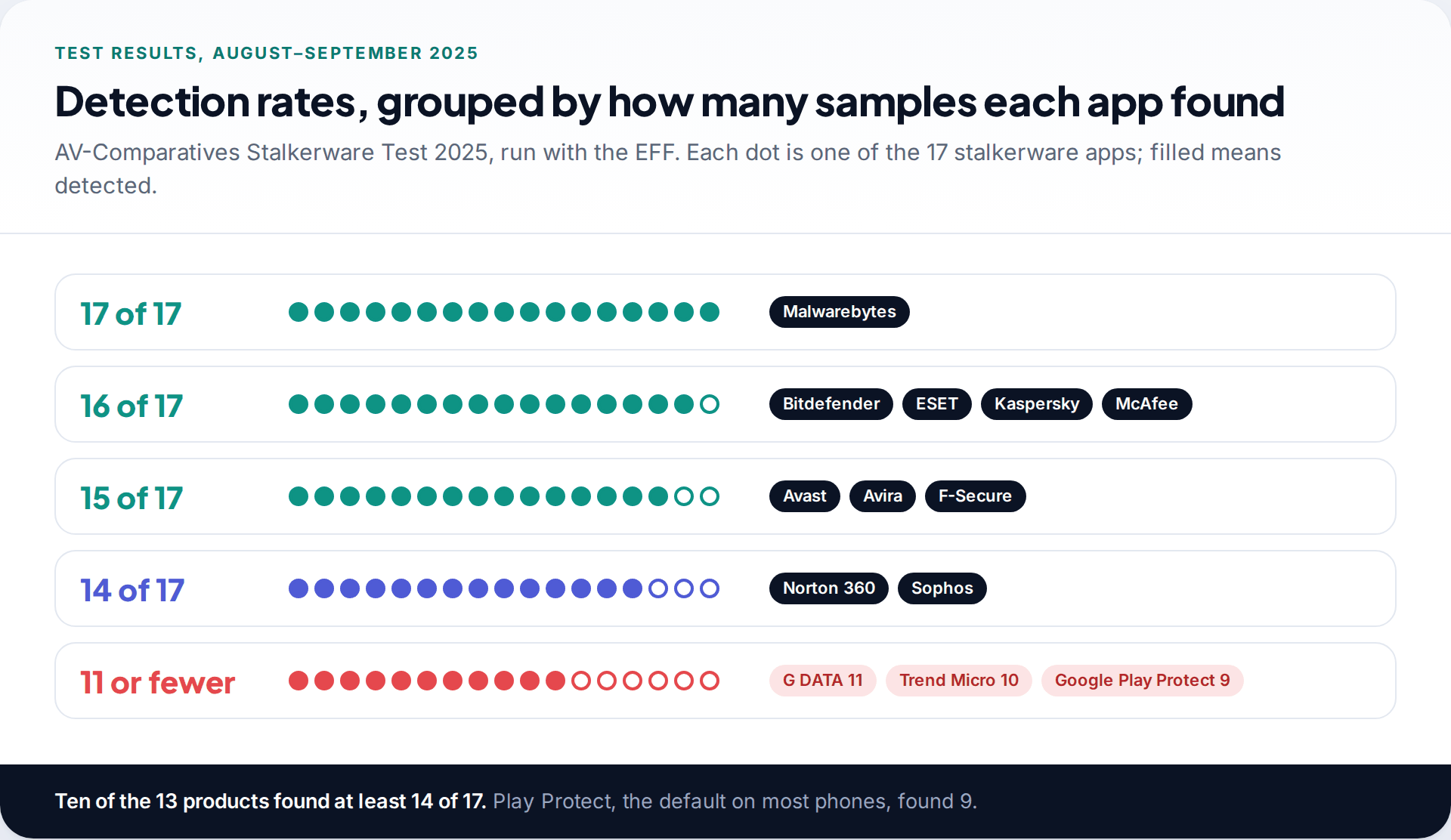
Android anti-spyware detection rates, all 13 apps
| Product (version tested) | Detected | Rate |
|---|---|---|
| Malwarebytes Mobile Security (5.18) | 17/17 | 100% |
| Bitdefender Mobile Security (3.3) | 16/17 | 94% |
| ESET Mobile Security (11.0) | 16/17 | 94% |
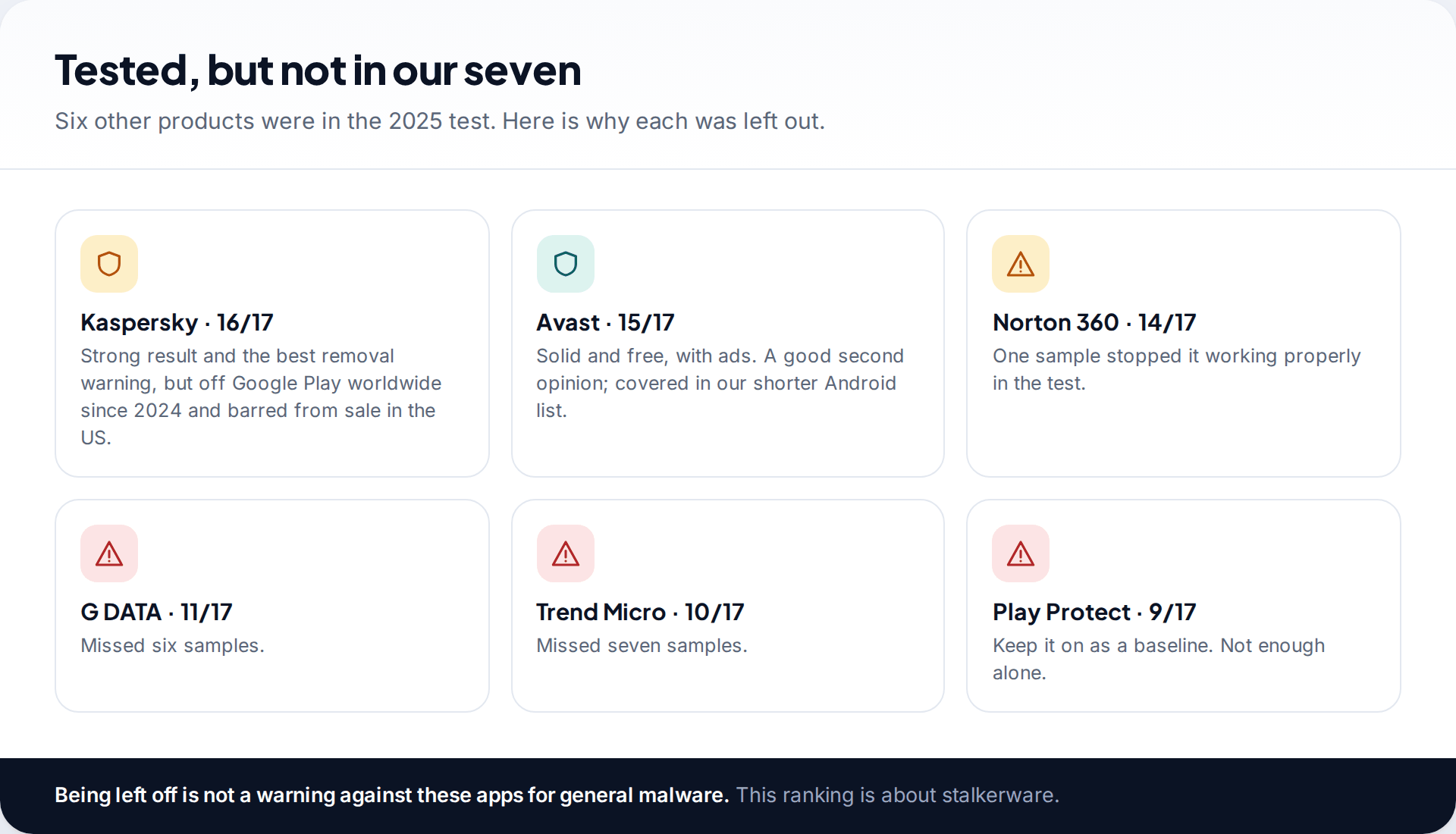
| Kaspersky Mobile Security (11.124) | 16/17 | 94% |
| McAfee Mobile Security (9.8) | 16/17 | 94% |
| Avast Mobile Security (25.17) | 15/17 | 88% |
| Avira Antivirus Security (7.28) | 15/17 | 88% |
| F-Secure Total Security (5.8) | 15/17 | 88% |
| Norton 360 Mobile Security (5.121) | 14/17 | 82% |
| Sophos Intercept X for Mobile (9.7) | 14/17 | 82% |
| G DATA Mobile Security (29.2) | 11/17 | 65% |
| Trend Micro Mobile Security (17.1) | 10/17 | 59% |
| Google Play Protect (48.0) | 9/17 | 53% |
The spread is narrower than most “best anti-spyware” lists suggest. Ten of the 13 found at least 14 samples. The weak results are concentrated at the bottom, and the weakest of all is the one most Android phones rely on by default. The EFF, which ran the test with AV-Comparatives, pointed out that some stalkerware includes instructions for switching Play Protect off during installation.
How the test worked, and why that matters for you
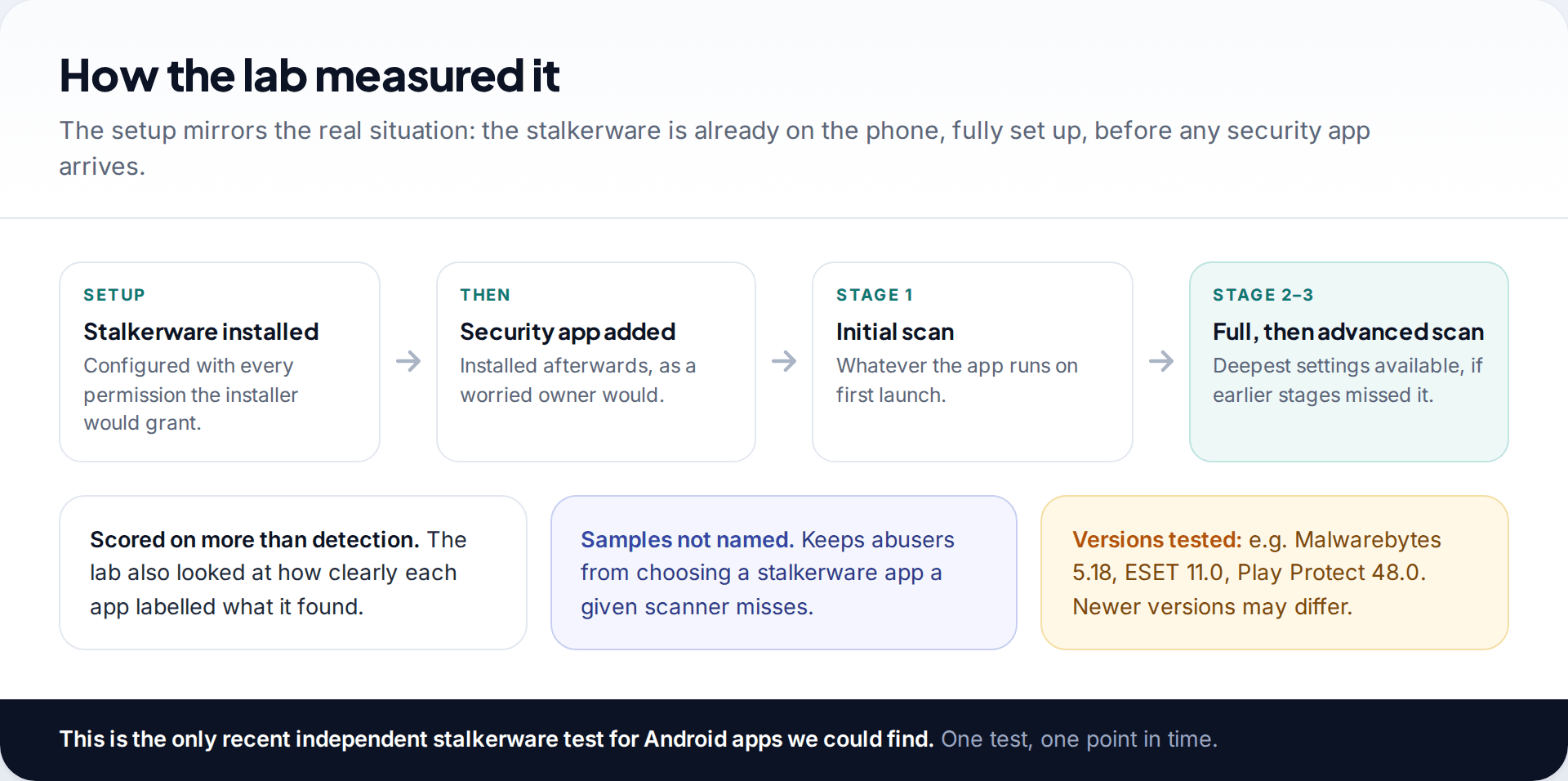
The order of events is what makes this test useful. The lab installed each stalkerware app first and granted it the permissions an abuser would. Only then did it install the security product and scan, in up to three stages: the first scan, a full scan, and a full scan at the highest settings. That is the situation you are in if you suspect something is already on your phone. A test that only checks whether an app blocks a download would tell you much less.
The lab did not name the 17 stalkerware apps, so vendors cannot tune for the list and abusers cannot pick a gap. The product versions it tested are listed in the table. Apps update constantly, so the version on your phone will be newer, usually for the better.
Anti-spyware app or antivirus: is there a difference?
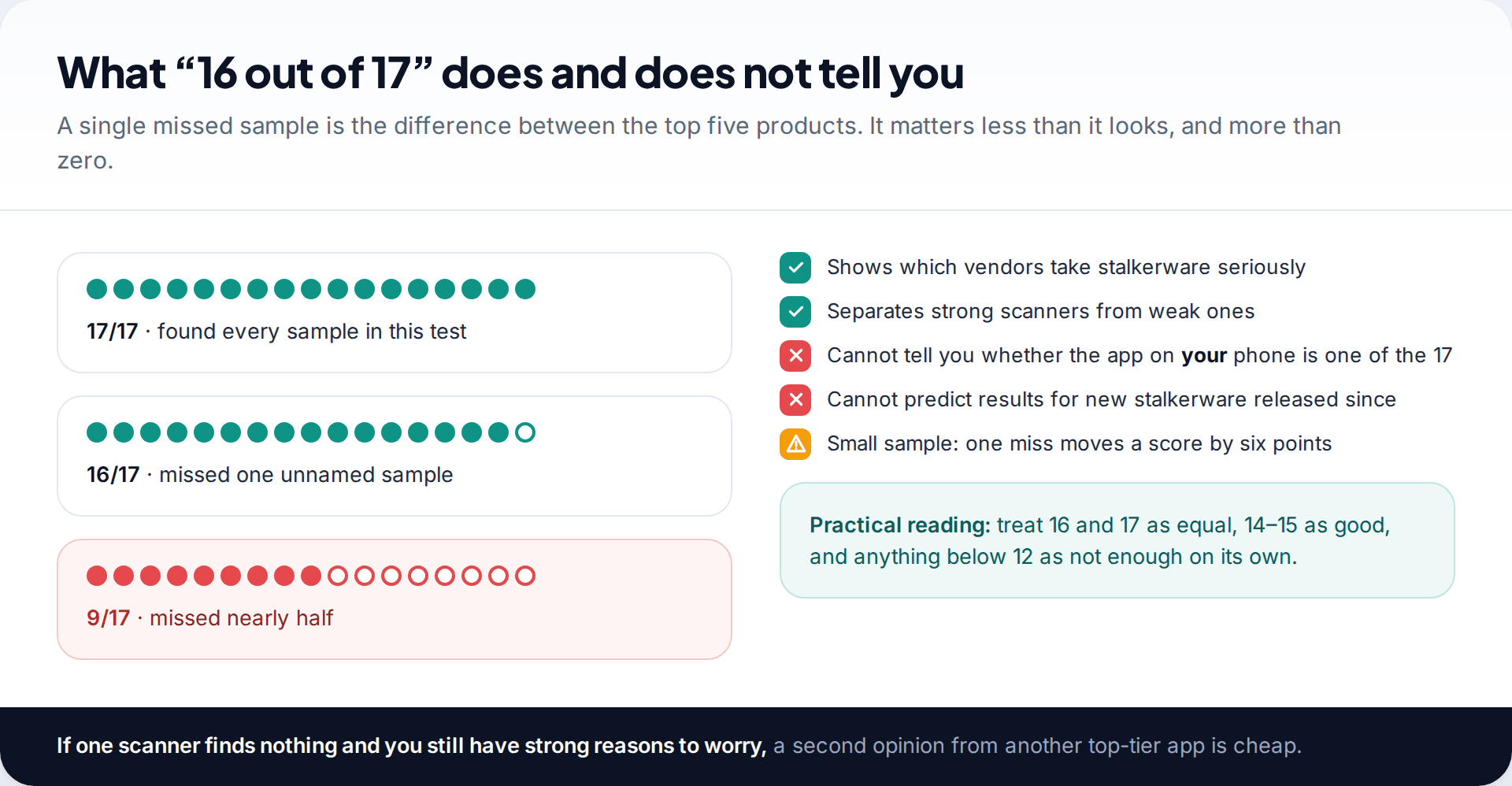
On Android, not much. Every product in the test is sold as general mobile security or antivirus, and none of the seven is a stalkerware-only tool. What differs is how seriously each vendor treats monitoring apps as a threat category. Some report commercial stalkerware as potentially unwanted software, others as spyware or a monitoring tool, and a few miss it entirely. That difference is what the detection rates capture.
Dedicated “anti spy” apps do exist on Google Play, such as Certo and Protectstar’s Anti Spy, and they concentrate on spyware and permissions. They were not in the 2025 test, so we cannot compare them on the same evidence. If you use one, pair it with one of the tested apps.
How we ranked the seven
Detection was the entry requirement, not the whole score. We then looked at four things that decide whether an anti-spyware app keeps helping after the first scan:
- Real-time protection without paying. A one-off scan finds what is there today. Real-time scanning catches a reinstall next month.
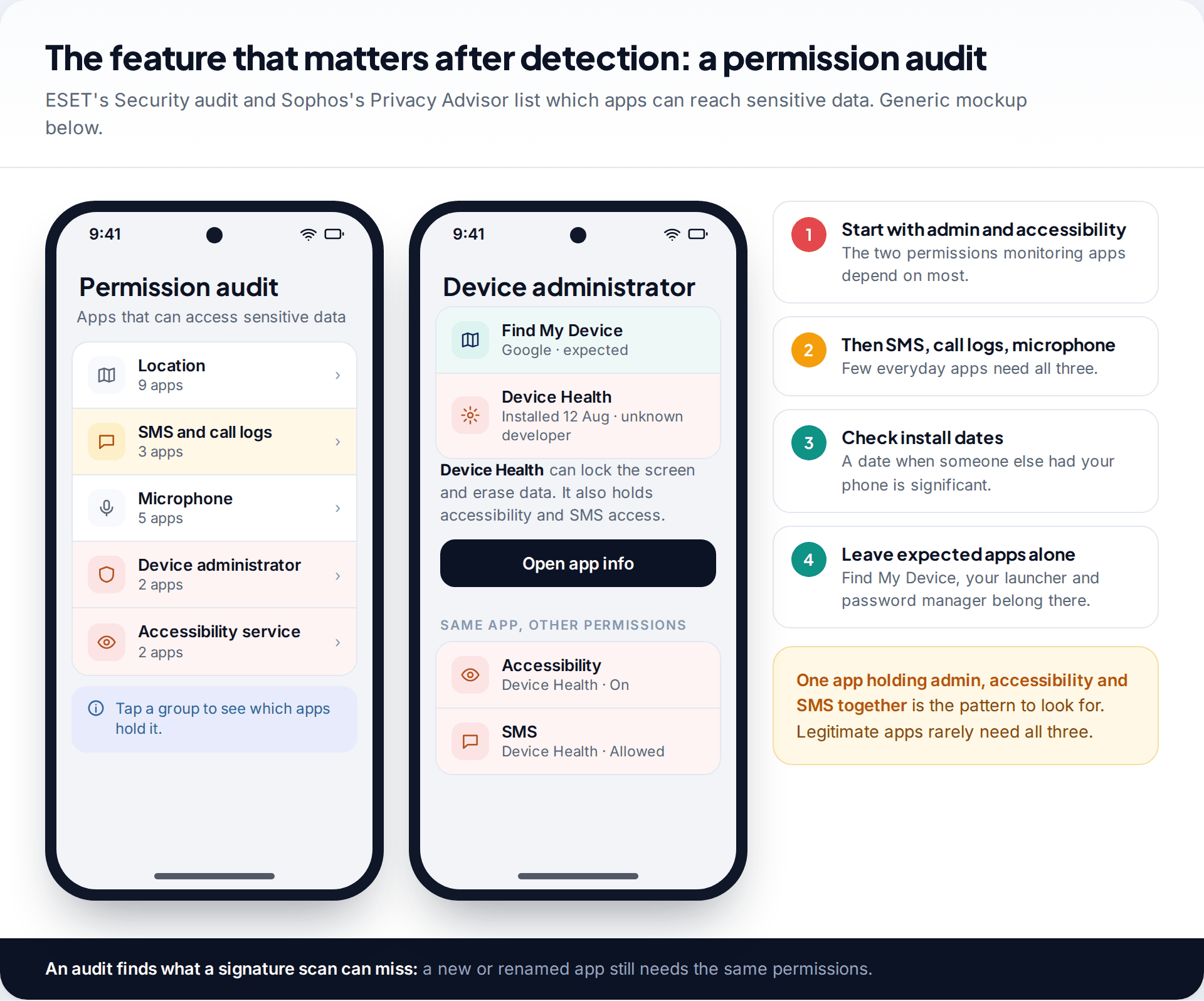
- A permission audit. A list of which apps hold device admin, accessibility, SMS and microphone access finds monitoring tools that a signature scan might miss.
- Ads and upselling. Noise matters when you are stressed and trying to read a warning.
- Data practices as declared in the Google Play data-safety section.
Everything came from the published test report and the current Play Store listings. We did not lab-test any of these apps ourselves.
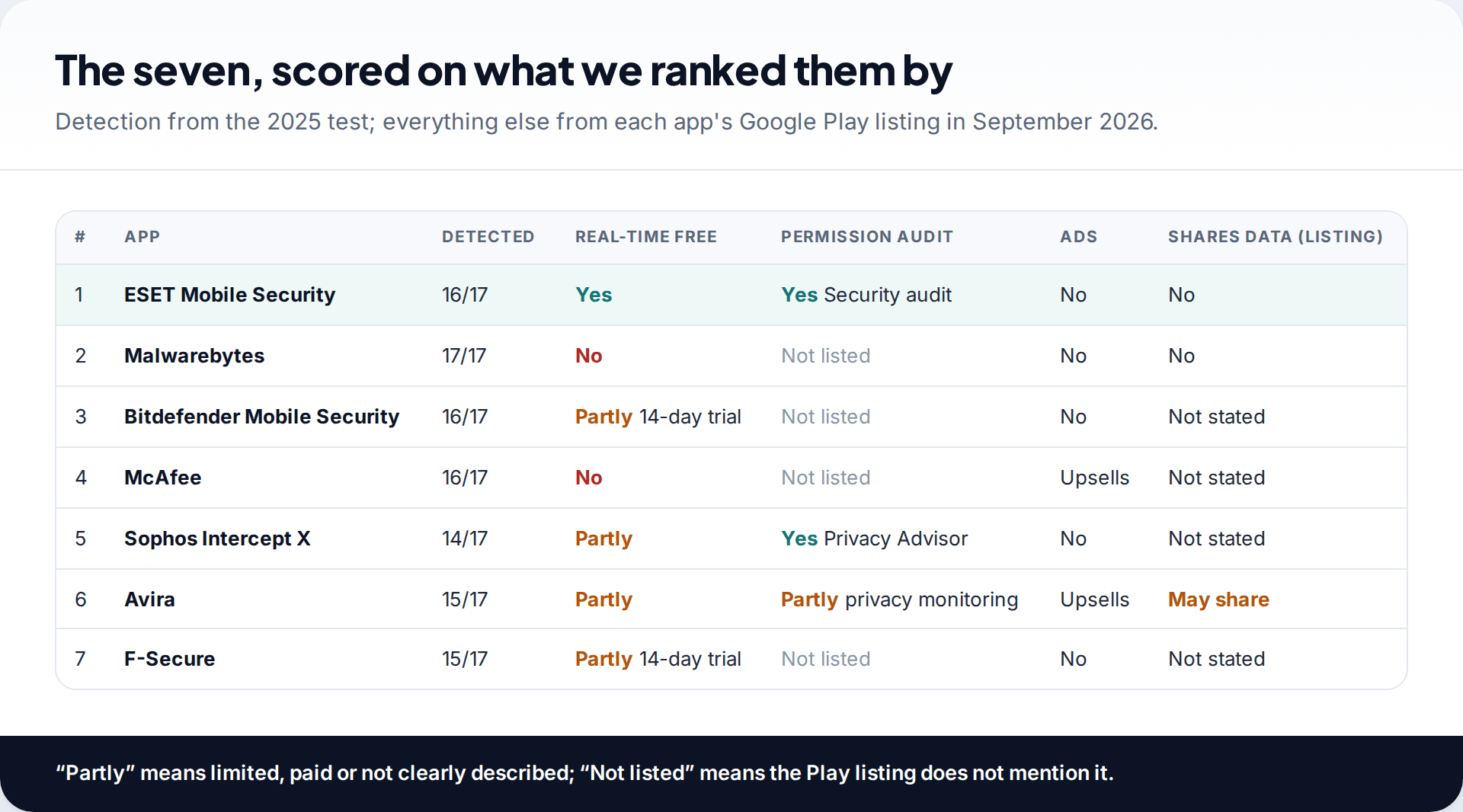
The seven best anti-spyware apps for Android
1. ESET Mobile Security: 16/17, most protection free
ESET combines a top-tier result with the most generous free tier we found. Its Play listing includes real-time scanning, scheduled scans and a Security audit of app permissions without payment. The paid tier, which you can try for 30 days, adds app lock and payment protection. The listing declares no data shared with third parties. For most people, it is the one to keep installed.
2. Malwarebytes: 17/17, best single result
If detection is all you care about, Malwarebytes is the only product that found every sample. Manual scans are free once you close the trial offer. Automatic scanning, whether scheduled or real-time, is part of the subscription, which has a seven-day trial. That makes it ideal for a thorough one-off check, and a strong paid choice after that.
3. Bitdefender Mobile Security: 16/17, behaviour monitoring
Bitdefender’s App Anomaly Detection watches how apps behave while they run, which suits stalkerware that changes names and icons. The tested app is a subscription after a 14-day trial. Bitdefender’s separate free antivirus app offers on-demand scanning but was not the product tested.
4. McAfee: 16/17, a capable free scan
The free McAfee Security tier covers antivirus scanning on one device, and the detection engine is the one that scored 16. The app leans heavily towards paid identity-protection plans, which some people will find tiring. The scan itself is free and it works.
5. Sophos Intercept X for Mobile: 14/17, free with no ads
Sophos is free, carries no ads, and its Privacy Advisor shows which apps can reach your personal data. That pairing, with a Security Advisor for device settings, makes it the best-equipped free app for checking permissions. It found three fewer samples than the leaders, so pair a clean result with a manual check of admin and accessibility apps.
6. Avira: 15/17, free but check the data terms
Avira’s free tier includes scanning and privacy features, and it found 15 of 17. It ranks here rather than higher because its Play data-safety section says it may share some data types with third parties, and because it uses accessibility permissions for web protection. Neither is unusual for security apps, but both are worth knowing.
7. F-Secure Total Security: 15/17, a paid suite
F-Secure found 15 samples. On Android it is subscription-based after a 14-day trial, bundled with VPN and identity features. It suits people who already use F-Secure on a computer and want one subscription.
Why detection wording matters as much as detection
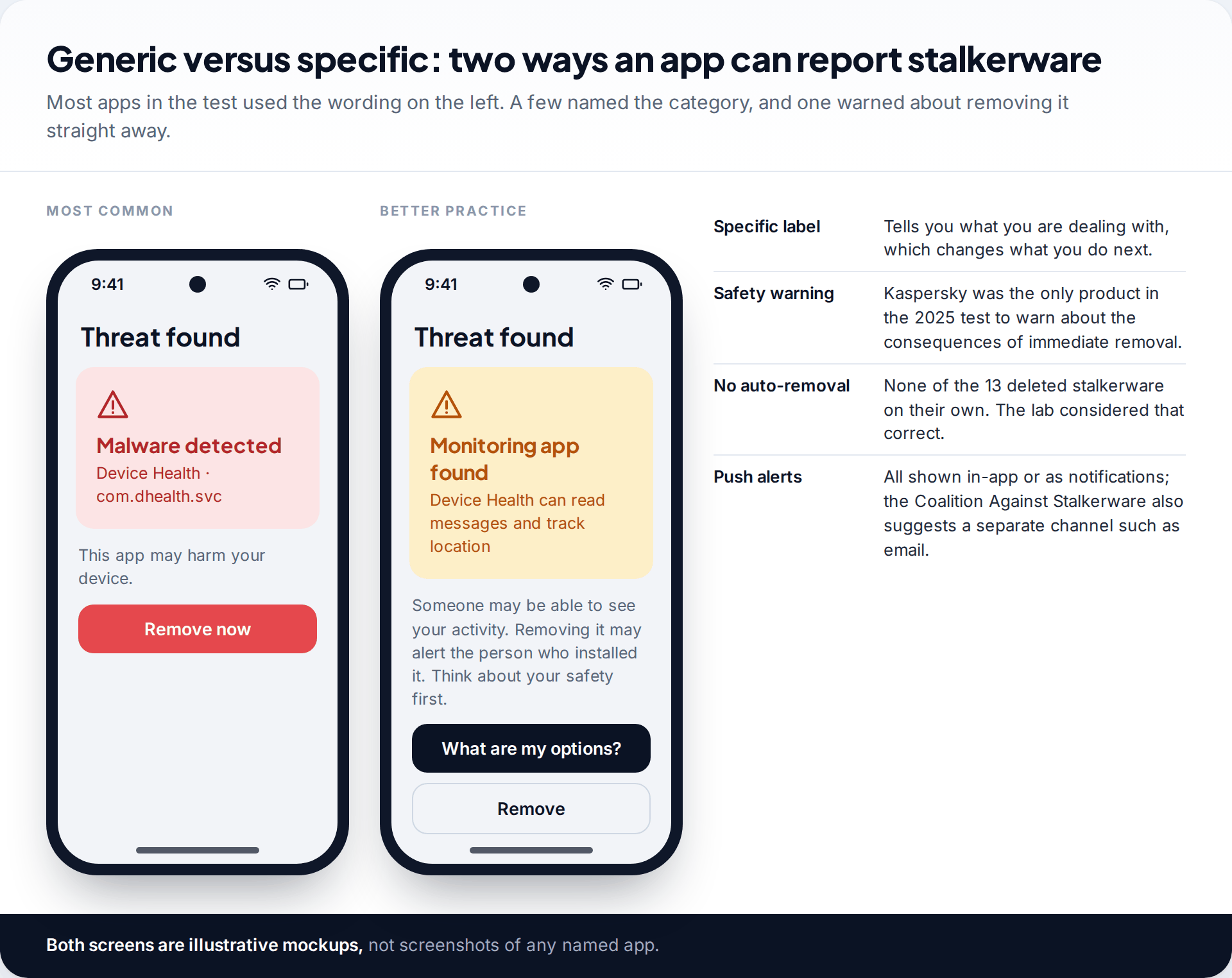
A result that says “Malware detected” and offers a large Remove button is technically correct and practically risky. The 2025 report found that most products used generic wording, few called stalkerware what it is, and most recommended immediate removal without explaining that removal can tip off the person who installed it. Kaspersky was the exception on that last point.
So read past the headline. If the app shows a category, “monitor”, “spyware” or “stalkerware” tells you more than “PUA” or “malware”. If it doesn’t, the permissions the flagged app holds will tell you what it could do. None of the tested products removed stalkerware automatically, which leaves the timing in your hands.
What anti-spyware apps on Android will not catch
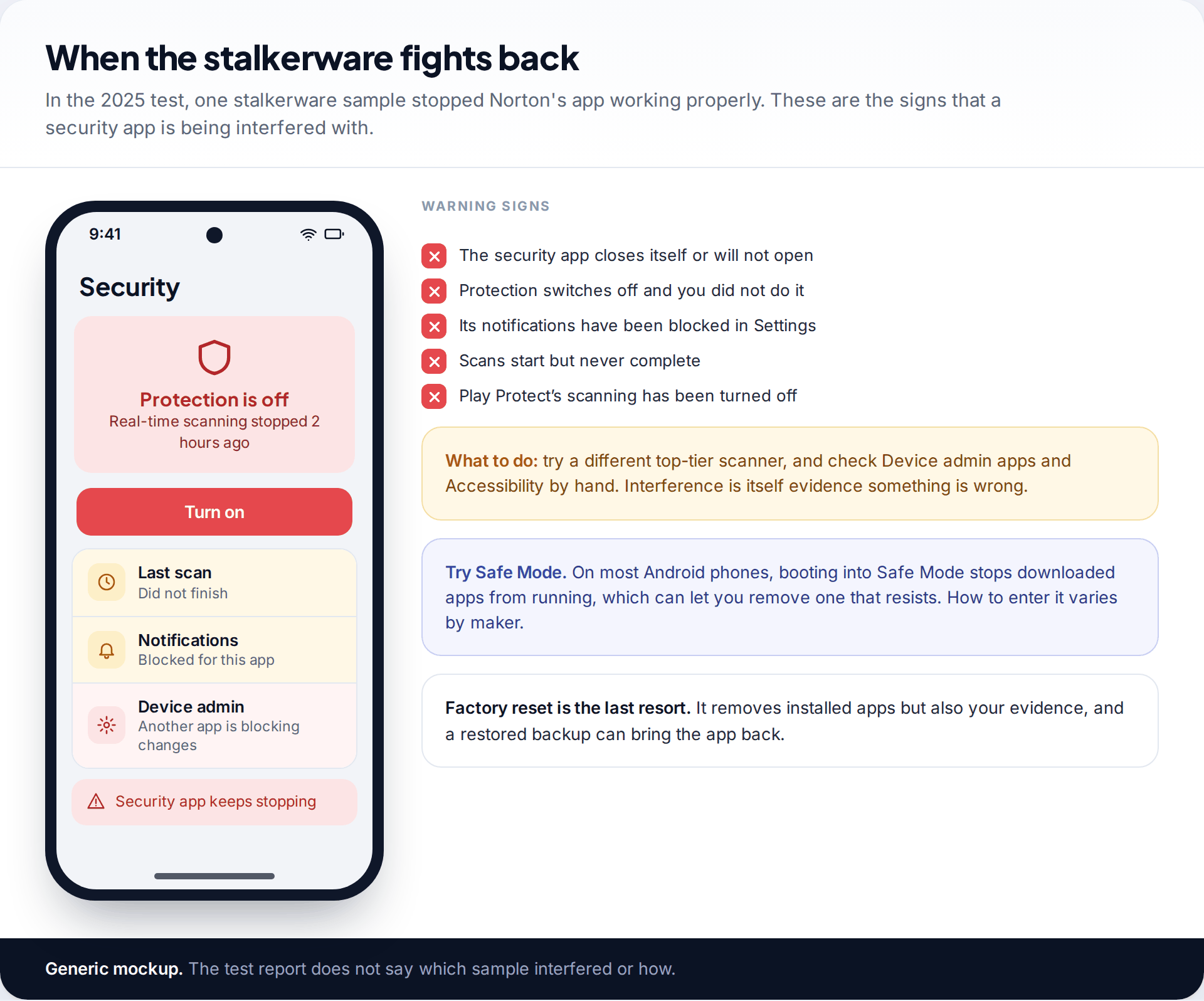
Stalkerware can resist. In the test, one sample stopped Norton’s app from working properly. If your security app keeps turning itself off, won’t finish a scan, or has had its notifications blocked, treat that as a warning sign rather than a glitch.
Beyond the phone, no scanner sees account-level access. Someone with your Google password can read location history, photos and backups from their own device, and a Bluetooth tracker doesn’t touch your phone at all. A clean scan is one check among several. Our guide to stalkerware-proofing your phone covers the lock screen, accounts and permissions side.
If an app finds stalkerware: the order to work in
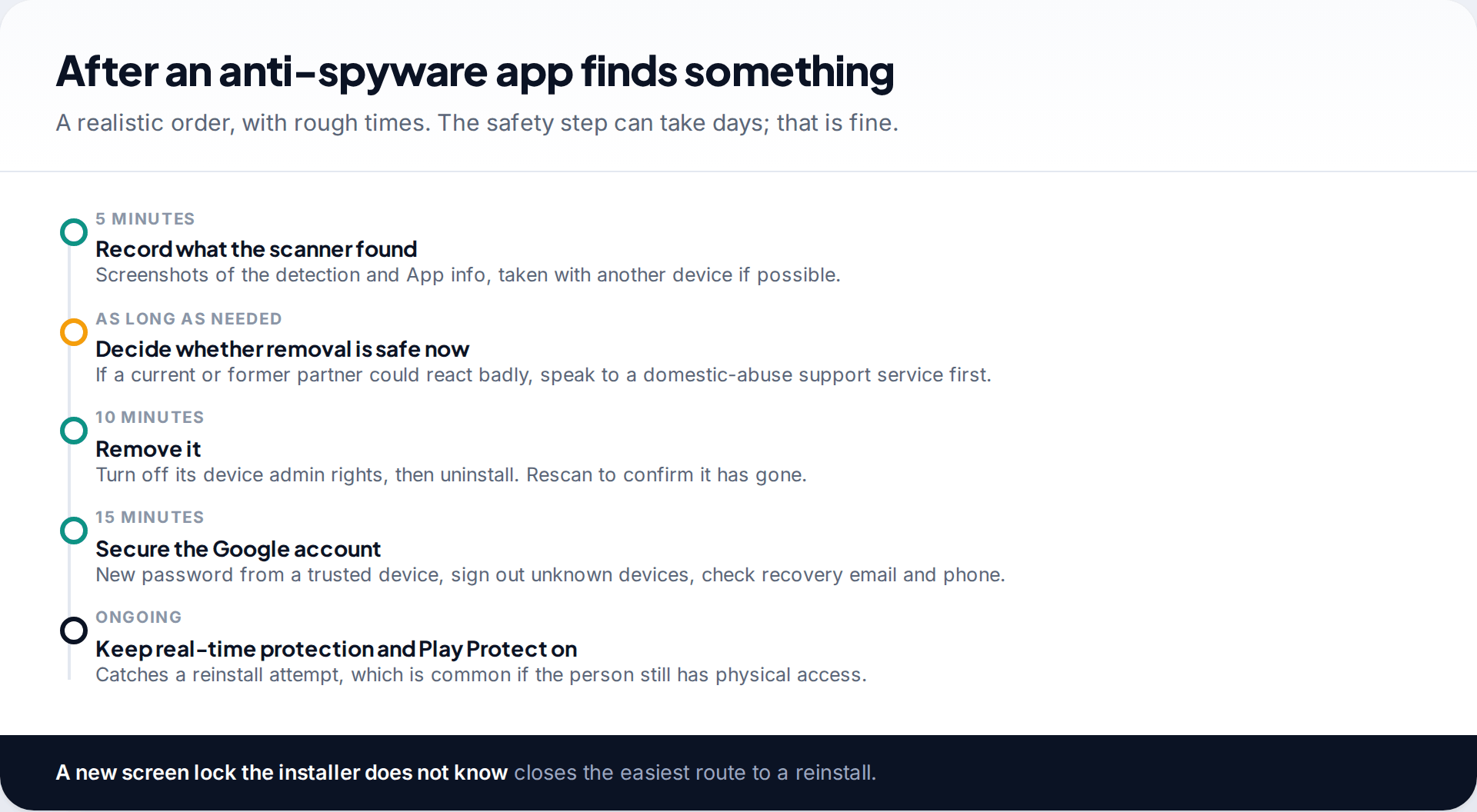
Detectors cannot tell whether an app is there with consent. A parent’s openly installed app on a teenager’s phone, or a work management tool, will be flagged the same way as stalkerware, and legitimate monitoring apps, ours included, are designed to be detectable. If you didn’t agree to what was found, think about who installed it before you remove it. If that person is a partner or former partner and you are worried about their reaction, a domestic-abuse support service in your country can help you plan.
When you remove it, turn off its device admin rights first, then uninstall, rescan, and change your Google password from a device you trust. If you want a shorter, scan-focused list, our five best spy app detectors for Android covers the free options in more detail.
Setting up whichever app you choose
A good anti-spyware app set up badly protects less than a weaker one set up well. After installing, take five minutes over these:
- Run the deepest scan it offers, not only the quick scan on first launch. The test used up to three stages for a reason.
- Allow its notifications. If the app cannot notify you, a reinstall attempt goes unnoticed.
- Keep real-time protection on if your tier has it, and schedule a weekly scan if it does not.
- Never add an unknown app to the allow list just to silence a warning. Anyone with your phone could do the same.
- Check Play Protect is still switched on in the Play Store under your profile picture.
- Change your screen lock to one nobody else knows. Most stalkerware needs a few minutes with the unlocked phone.
How this page was put together
Detection figures come from AV-Comparatives’ Stalkerware Test 2025 report and the EFF’s summary. Features, trials, ads and data-sharing declarations come from each app’s Google Play listing, checked in September 2026. Listings change, so confirm the details before relying on them.
We did not lab-test these apps and have no commercial relationship with any of them. See how we research and correct our guides.
Common questions
What is the best anti-spyware app for Android?
On detection alone, Malwarebytes, which found all 17 stalkerware samples in the 2025 test. For the best mix of detection and free ongoing protection, ESET Mobile Security, which found 16 and includes real-time scanning and a permission audit without payment.
Is there a completely free anti-spyware app for Android?
Yes. ESET’s free tier, Sophos Intercept X for Mobile, Avira and McAfee’s free tier all scan without payment, and Malwarebytes allows free manual scans. Sophos is free with no ads.
Is Google Play Protect enough to stop spyware?
Not on its own. It found 9 of 17 stalkerware apps in the 2025 test, the lowest result. Keep it switched on and add one of the higher-scoring apps.
Can anti-spyware apps remove stalkerware?
They can uninstall it when you choose to. None of the tested apps removed it automatically. If the app has device admin rights, you may need to turn those off in Settings first.
Do I need anti-spyware if I only install apps from Google Play?
Stalkerware is usually installed by someone with physical access to your phone, often from outside Google Play. If nobody else has had your unlocked phone, your risk is lower, but a free scan costs nothing.
Why is Kaspersky not on the list despite a 94% score?
Its apps have not been on Google Play since 2024 and it cannot be sold in the US. Installing it means sideloading, which we would avoid on a phone you already suspect.
Looking for a tool to go with this? TheTruthSpy is a free parental control app for Android that stays visible on the child's phone. If it fits your family, see the App blocker feature.
Related guides
How to Secure Your Home Wi-Fi Network
A 20-minute router check-up: log in, change the admin password, pick WPA3 or WPA2, turn off WPS, add a guest…
How to Recover a Hacked Instagram Account
Get a hacked Instagram account back: use the revert email, instagram.com/hacked and the video selfie check, avoid recovery scams, then…
How to Spot a Scam Call Pretending to Be Your Bank
Recognise fake bank fraud-team calls, know the exact words to end them, call back safely on 159 or your card's…
Parental controls your child can see
Location, screen time limits, a web filter and alerts from notifications — free, and visible on your child's phone. Pair a phone in about ten minutes.
Android · Free to set up · Visible on your child's phone