WhatsApp Taken Over? Re-Register Your Number and Lock It Down

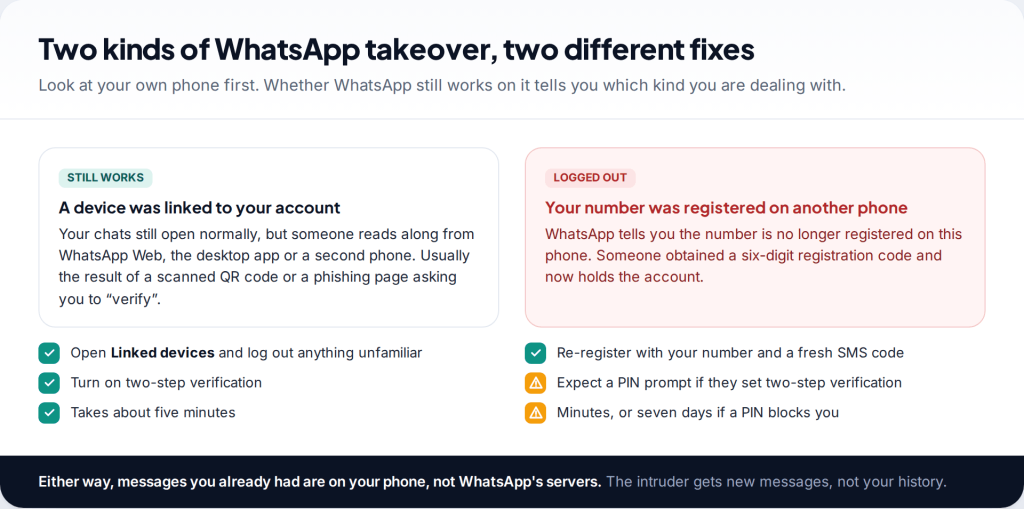
To recover a hacked WhatsApp account, open WhatsApp on your own phone, verify your phone number again and enter the six-digit code sent to you by SMS. Only one phone can be registered to a number at a time, so this signs the intruder out. If they turned on two-step verification, you’ll be asked for a PIN you don’t know, and you’ll have to wait seven days before you can register without it.
- Your SIM is the key. Whoever holds the phone number can take the account back with a fresh code. That is you.
- They cannot read your old chats just by registering your number. History lives on your phone and in your own backup, not on WhatsApp’s servers.
- A PIN you didn’t set means a seven-day wait, unless an email address you control was on the account.
- Check Linked devices even if WhatsApp still works. A linked browser is the quiet kind of takeover.
First, work out which kind of takeover this is
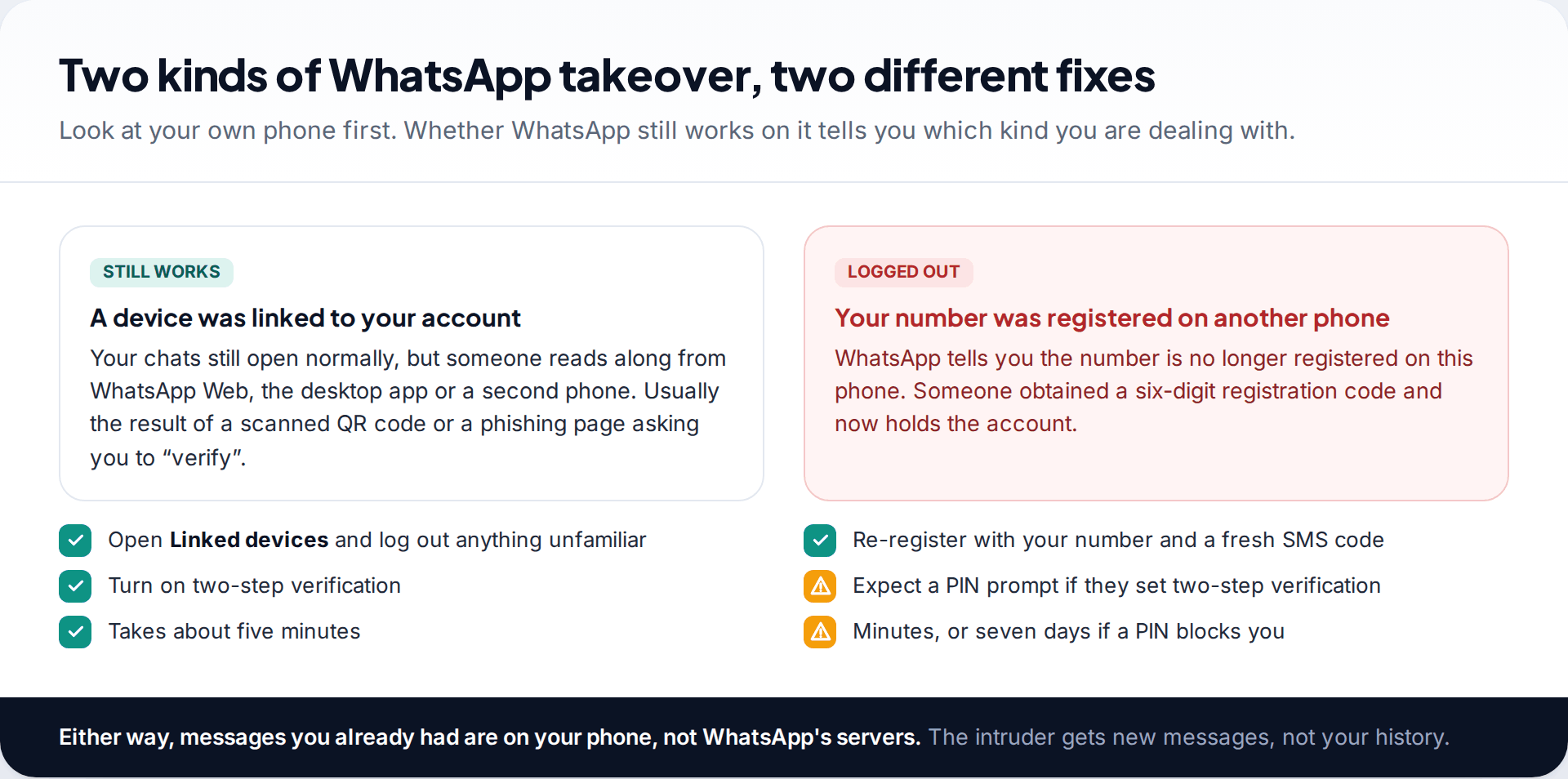
WhatsApp accounts are taken in two distinct ways, and the fix for one does nothing for the other.
In the first, someone links a device to your account. WhatsApp Web, the desktop apps and a second phone in “companion” mode can all mirror your chats. Your own phone keeps working, which is why this type can go unnoticed for weeks. It usually starts with a QR code scanned on a fake “verification” page, or with someone who had your unlocked phone for a minute.
In the second, someone registers your phone number on their own phone. For that they need the six-digit registration code that WhatsApp sends to your number. Once they enter it, your phone is signed out and theirs holds the account. This is the one people mean when they say their WhatsApp was hacked, and it is the one most of this page deals with.
A third possibility is worth ruling out quickly: spyware on the phone itself. That is rarer and needs a different response. If WhatsApp is behaving normally, nothing is on Linked devices, and yet someone clearly knows what you’ve written, read our guide on signs your phone is being monitored.
How to recover a hacked WhatsApp account by verifying your number again
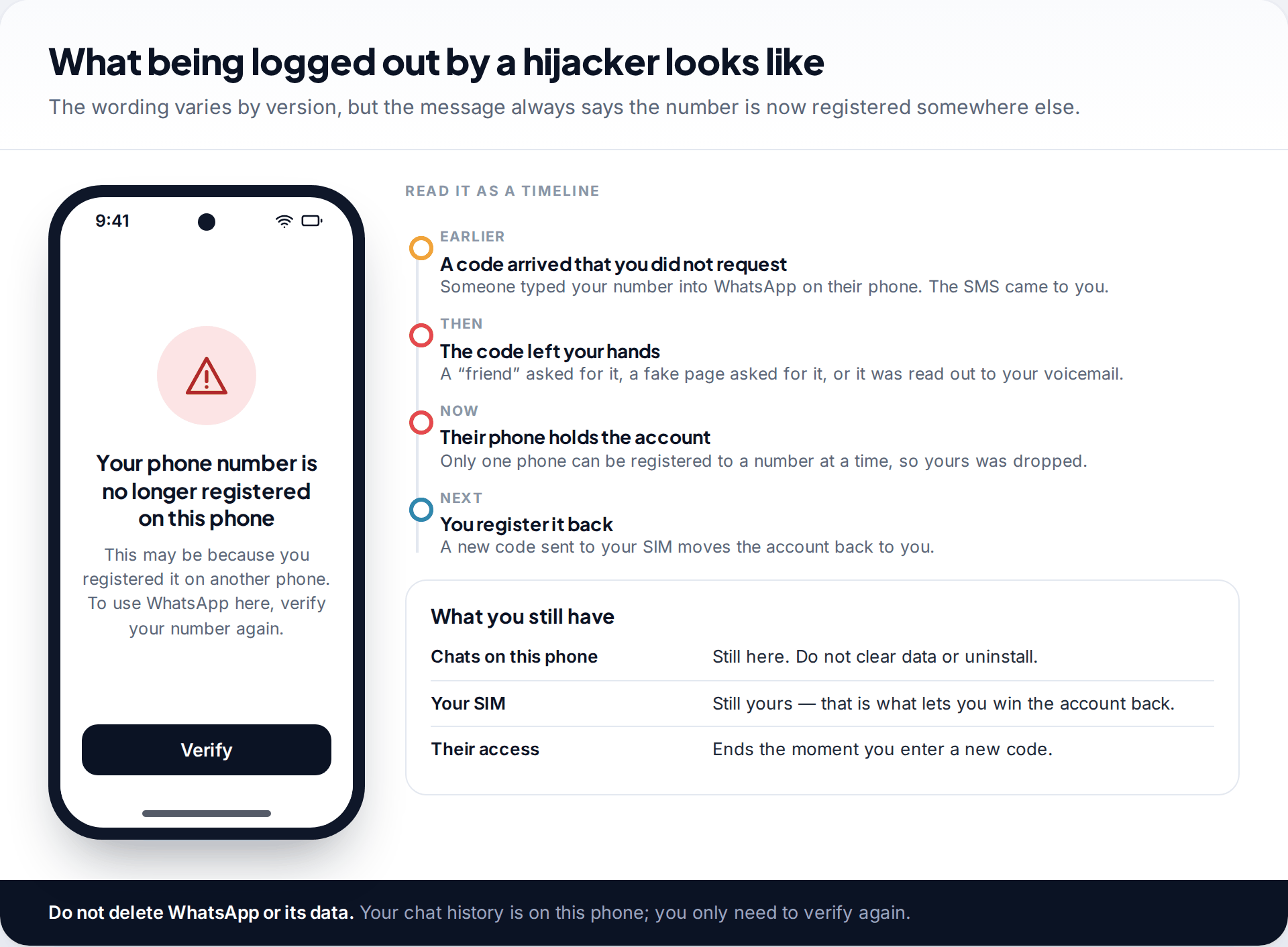
If you’ve been logged out, the fix is the same process as setting up WhatsApp on a new phone. You are simply proving, again, that you hold the SIM.
- Keep the SIM in your phone and make sure it has signal. The code arrives by SMS, or by an automated call if you choose that.
- Open WhatsApp and tap the prompt to verify. If you uninstalled it in a panic, reinstall it from the official app store.
- Enter your own number and then the six-digit code. The moment it is accepted, the other phone is signed out of your account.
- Restore your chats if prompted. This only applies if you reinstalled. If you didn’t, your conversations are already on the phone.
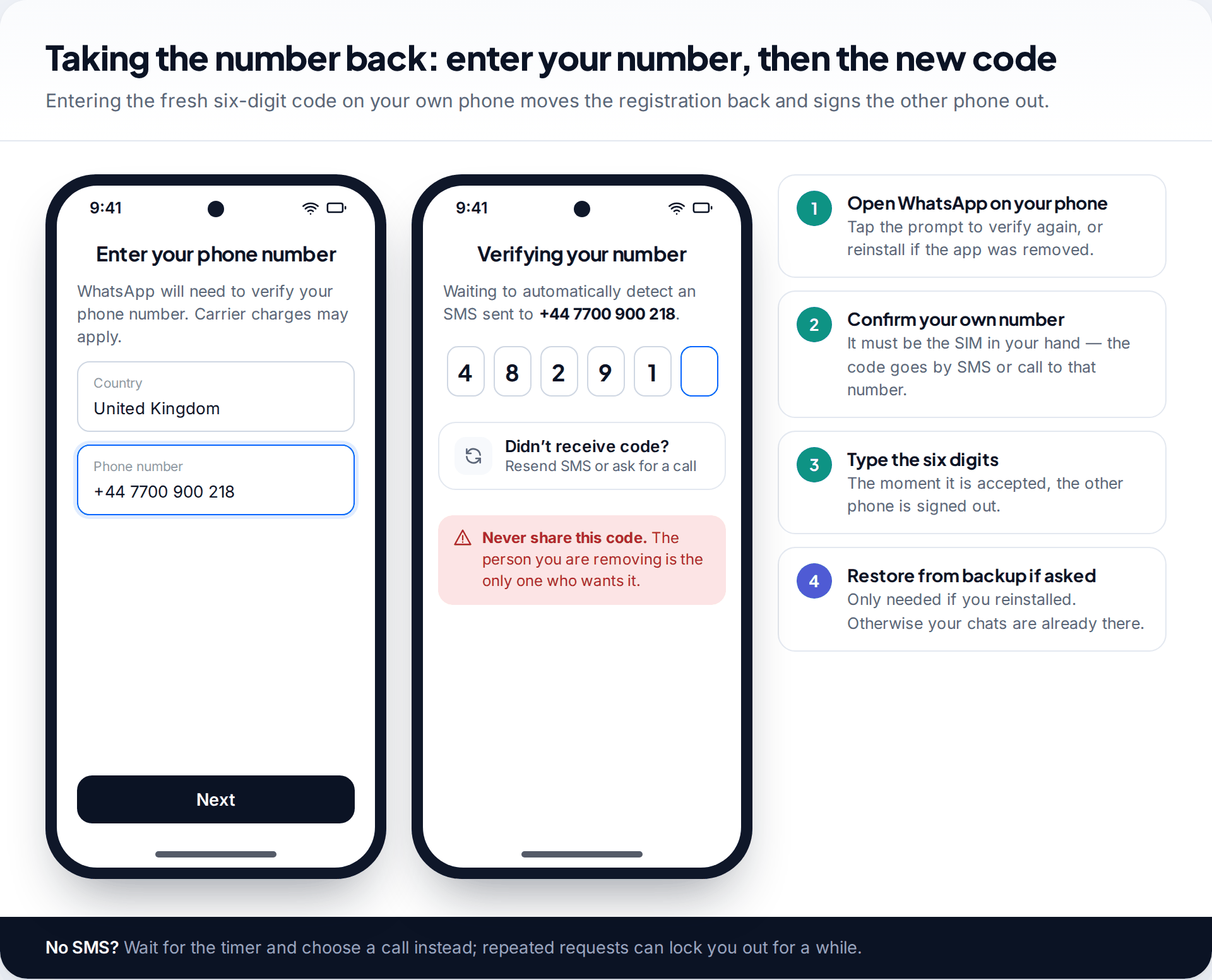
Two things trip people up here. The first is requesting codes over and over when the SMS is slow. WhatsApp enforces waiting periods between attempts, and hammering the button can lock you out for hours. Wait for the timer and use the call option instead. The second is deleting WhatsApp’s data “to be safe”. It doesn’t make you safer, and on Android it can throw away the local copy of your chat history.
What the intruder could see. Registering your number on another phone doesn’t carry your message history with it. That lives on your device and in your own Google or iCloud backup. What they could see is anything sent to you while they held the account, your profile, and your group memberships. They could also send messages as you, which is why the last section of this page matters.
If WhatsApp asks for a two-step PIN you never set
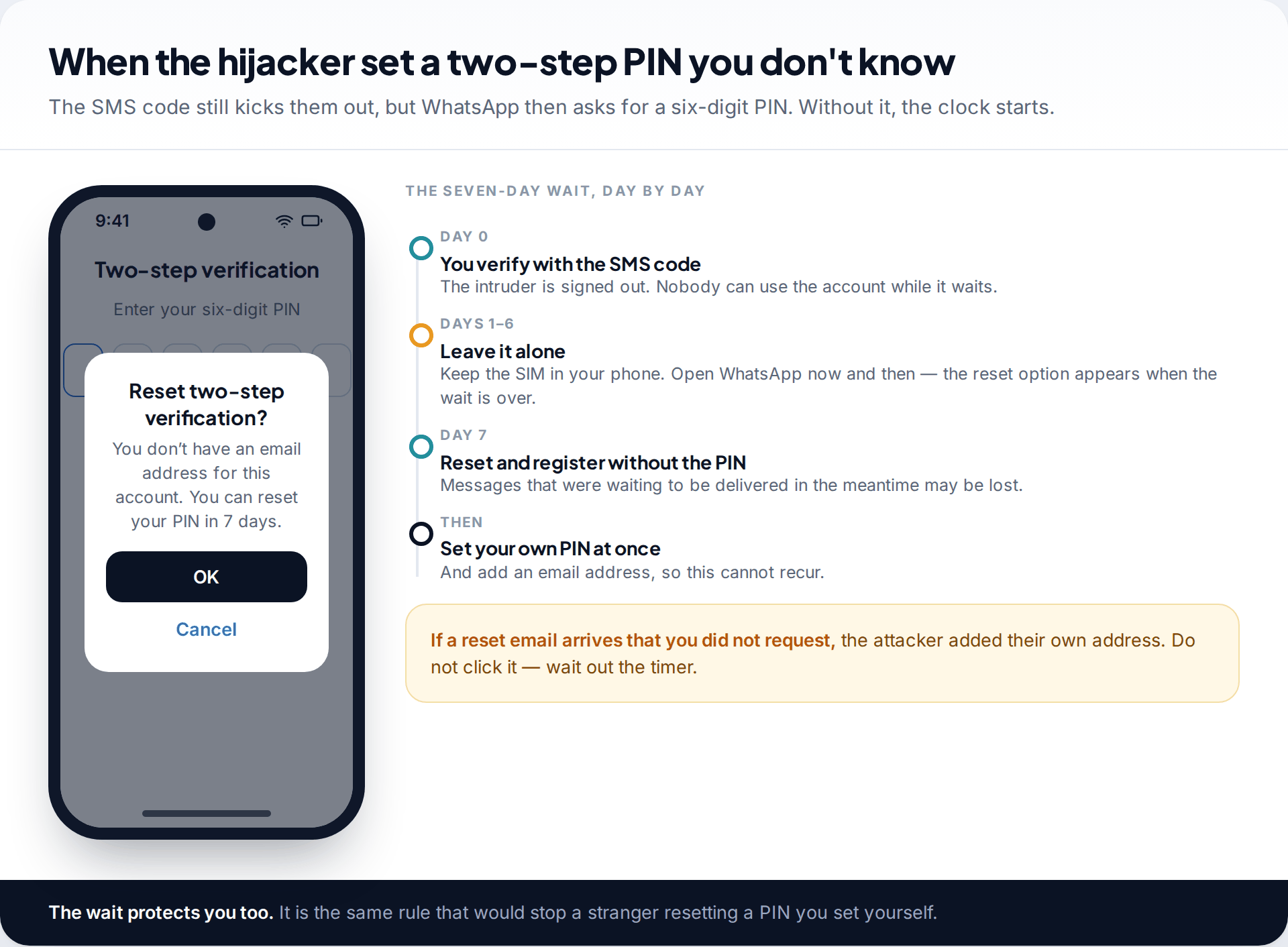
Attackers who know what they are doing turn on two-step verification as soon as they get in, using a PIN of their own. When you re-register, the SMS code is still accepted and they are still signed out. But WhatsApp then asks for that six-digit PIN, and you can’t finish setting up without it.
WhatsApp’s answer is a waiting period. If you don’t know the PIN, WhatsApp makes you wait a full week before it lets you register without one. Nobody can use the account during that week, including the attacker, because their phone has already been signed out. When the week is up, Forgot PIN? offers a reset and you can finish registering.
There is a cost. Messages that arrived for you while the account was waiting may not be delivered after a reset without the PIN. That is frustrating, but it is not a disaster. Your older history is still on your phone, and anyone who urgently needs you has other ways to reach you for a week.
A PIN-reset email you didn’t ask for is a warning sign. If the attacker added their own email address to two-step verification, the reset link goes to them. That is exactly why you should never click one you didn’t request, and why waiting out the timer is the safe path.
What doesn’t help is a paid service. People offering to “bypass” the PIN, or who claim a contact at WhatsApp, are running a second scam. The waiting period is enforced by WhatsApp’s servers and nobody outside the company can shorten it.
Still using WhatsApp normally? Check Linked devices
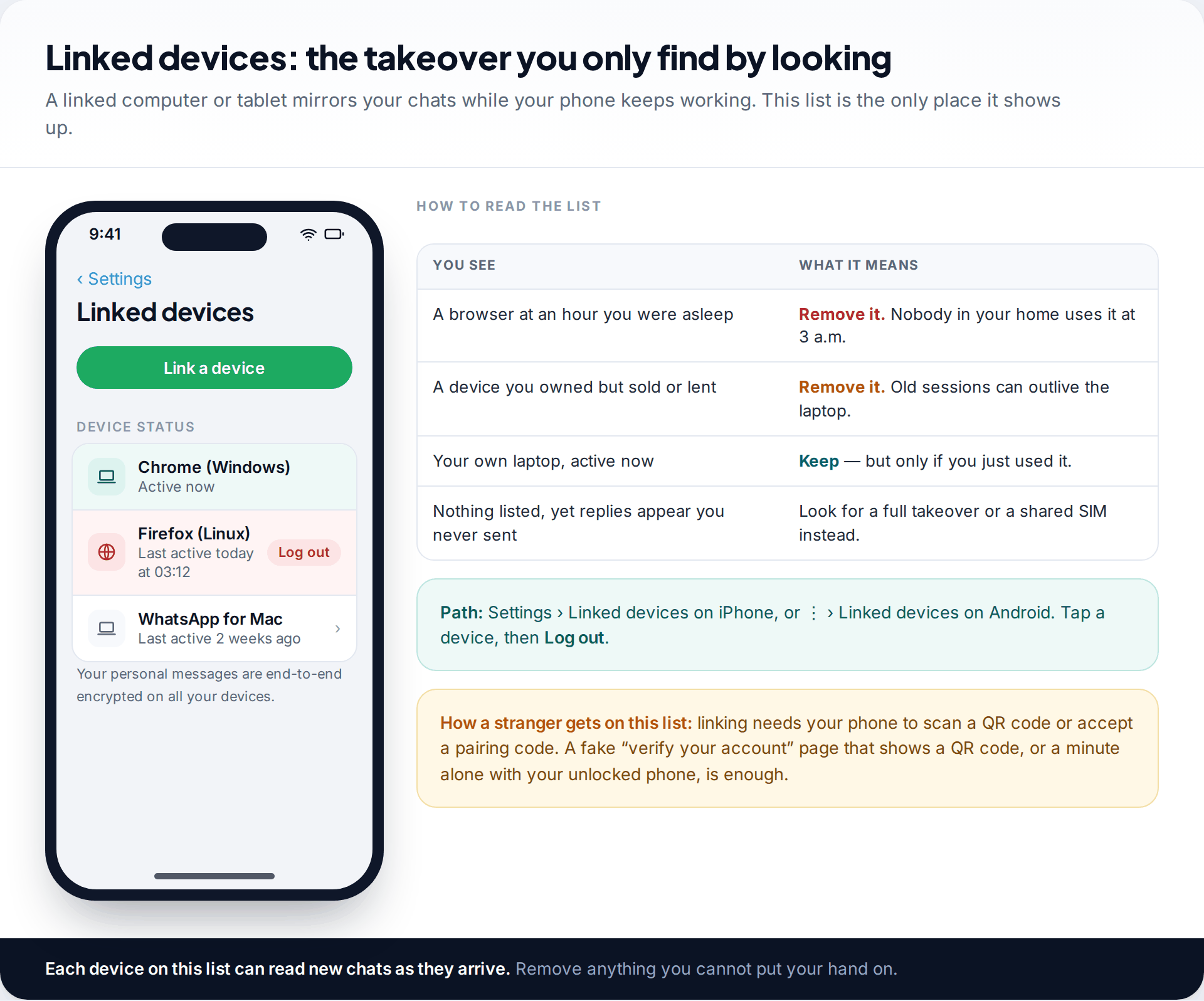
If your phone never lost WhatsApp but someone seems to know what you’ve written, the linked-device list is where to look. It shows every browser, computer and companion phone connected to your account, with a last-active time for each.
On an iPhone, go to Settings › Linked devices. On Android, tap the three-dot menu, then Linked devices. Tap any entry you don’t recognise and choose Log out. Some versions also offer a single option to log out of every linked device at once, which is the quickest route if you’re unsure. You can relink your own laptop later in a few seconds.
Once a device is removed it stops receiving new messages immediately. Anything it already displayed is out of your control, so treat those conversations as seen. Then set up two-step verification (below). It doesn’t block linking, which needs your phone to scan a code, but it does protect the other route.
How the account was taken: the three common routes
Knowing the route stops it happening a second time. Nearly every WhatsApp takeover depends on the six-digit registration code reaching someone other than you. There are three usual ways that happens.
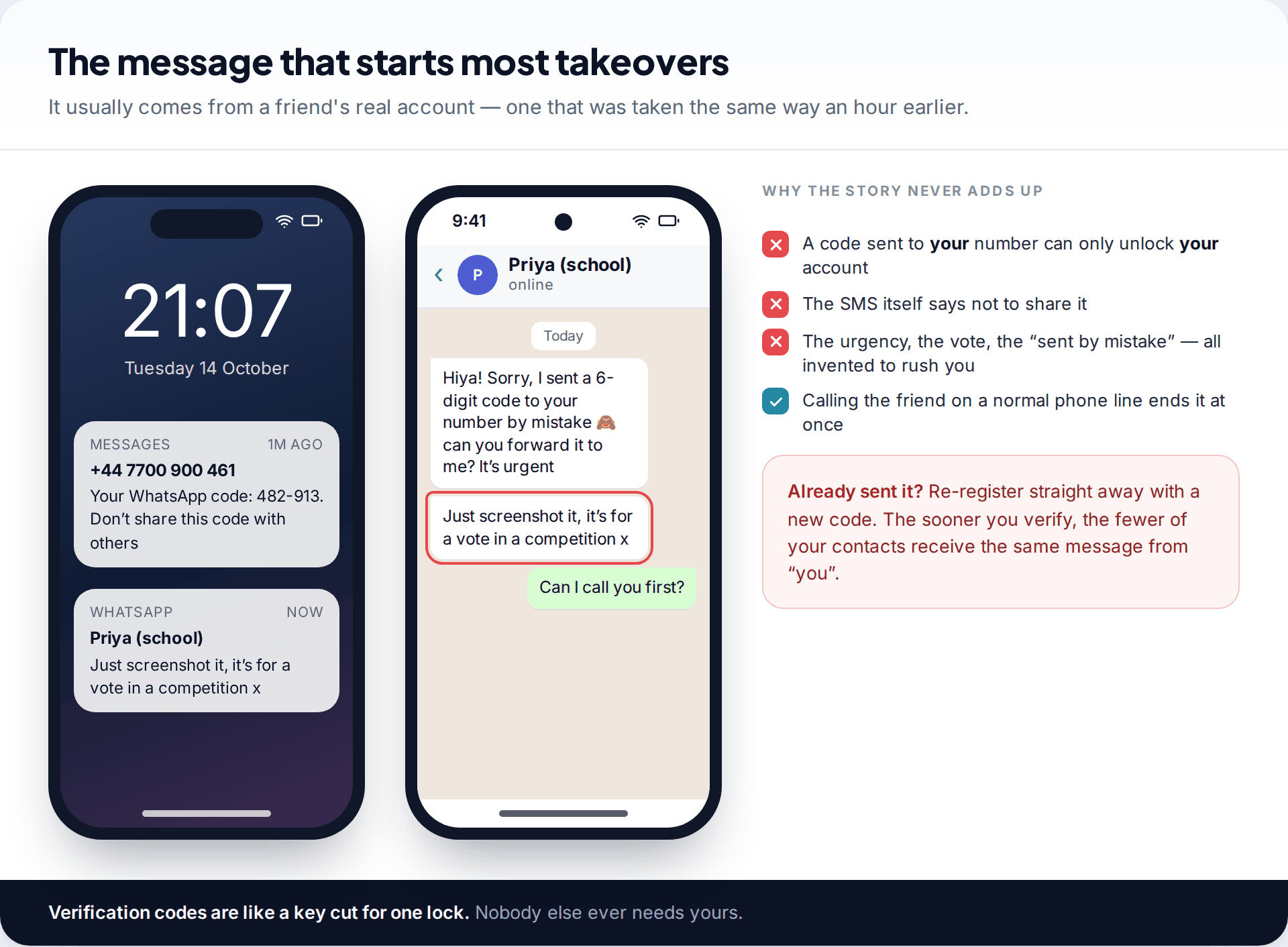
1. A contact asks you for it. This is the most common by far. It arrives from a friend’s real account, taken minutes earlier. The story varies: a code “sent to you by mistake”, a vote in a competition, a problem logging in. The code is always yours. Police forces and fraud-prevention bodies in several countries have warned about this pattern, and it spreads because each victim’s contacts are the next targets.
2. A fake web page asks for it. A text or social media message tells you to “verify” your WhatsApp. The link leads to a page that looks official and asks for your number and then the code. WhatsApp never asks you to verify through a web link.
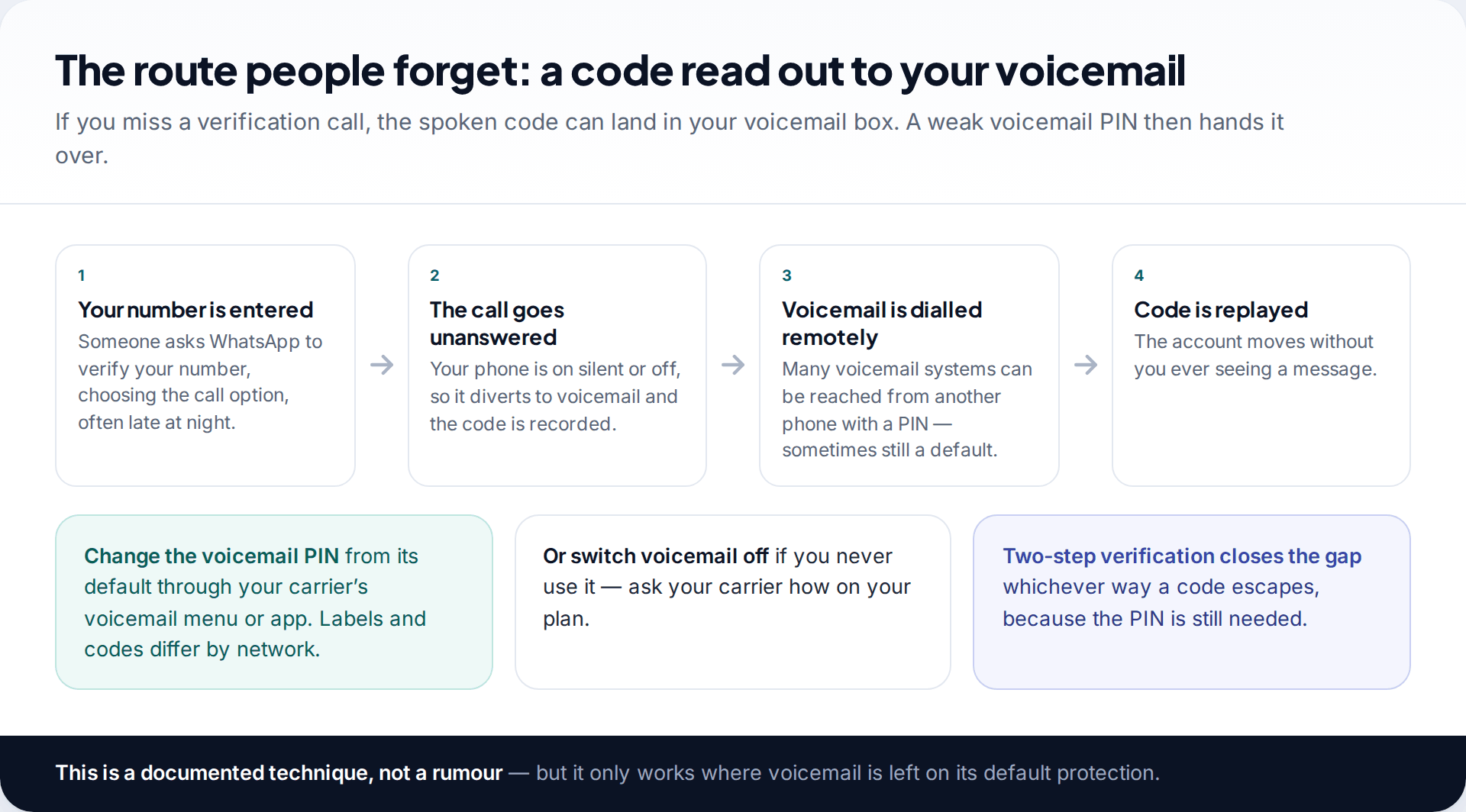
3. Your voicemail hears it. WhatsApp can read a code out in a phone call instead of texting it. If the call goes unanswered, some networks divert it to voicemail. Where voicemail can be reached remotely and still has a default or simple PIN, the attacker can listen to the code. Change your voicemail PIN through your carrier’s settings, or ask your carrier to turn voicemail off if you don’t use it. The menus differ between networks.
Lock it down so it cannot be repeated
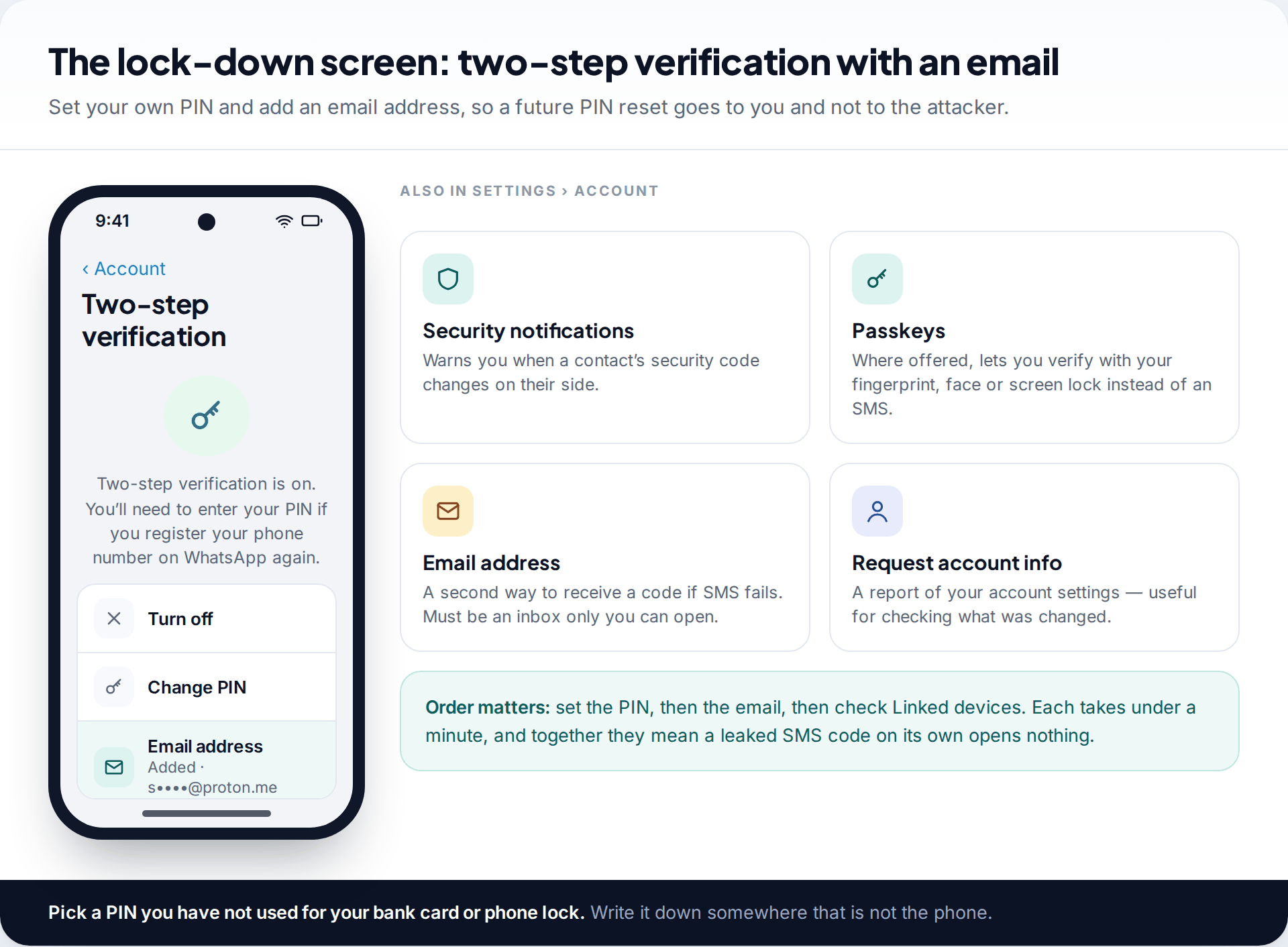
Once the account is back on your phone, spend ten minutes on these, in this order:
- Turn on two-step verification under Settings › Account › Two-step verification. Choose a six-digit PIN you don’t use for anything else. With this on, a stolen SMS code isn’t enough on its own.
- Add an email address to it. The option sits on the same screen. It gives you a way to reset the PIN if you forget it, and stops the seven-day wait from ever applying to you. Use an inbox protected by its own two-factor sign-in.
- Add a passkey if your version offers one. It lets you verify with your fingerprint, face or screen lock rather than an SMS, which takes the code out of the equation altogether.
- Clear Linked devices of anything you don’t use today.
- Check your profile. Name, photo and “About” text are sometimes changed to make the impersonation convincing.
- Look through recent chats and groups for messages sent in your name, and for groups you were added to while you were locked out. Leave any you don’t recognise.
- Fix the voicemail PIN if voicemail is how the code escaped.
For the settings that protect against someone reading along, rather than taking over, see our guide to stopping WhatsApp snooping. It covers the app lock, chat lock and backup encryption.
Warn the people the attacker messaged
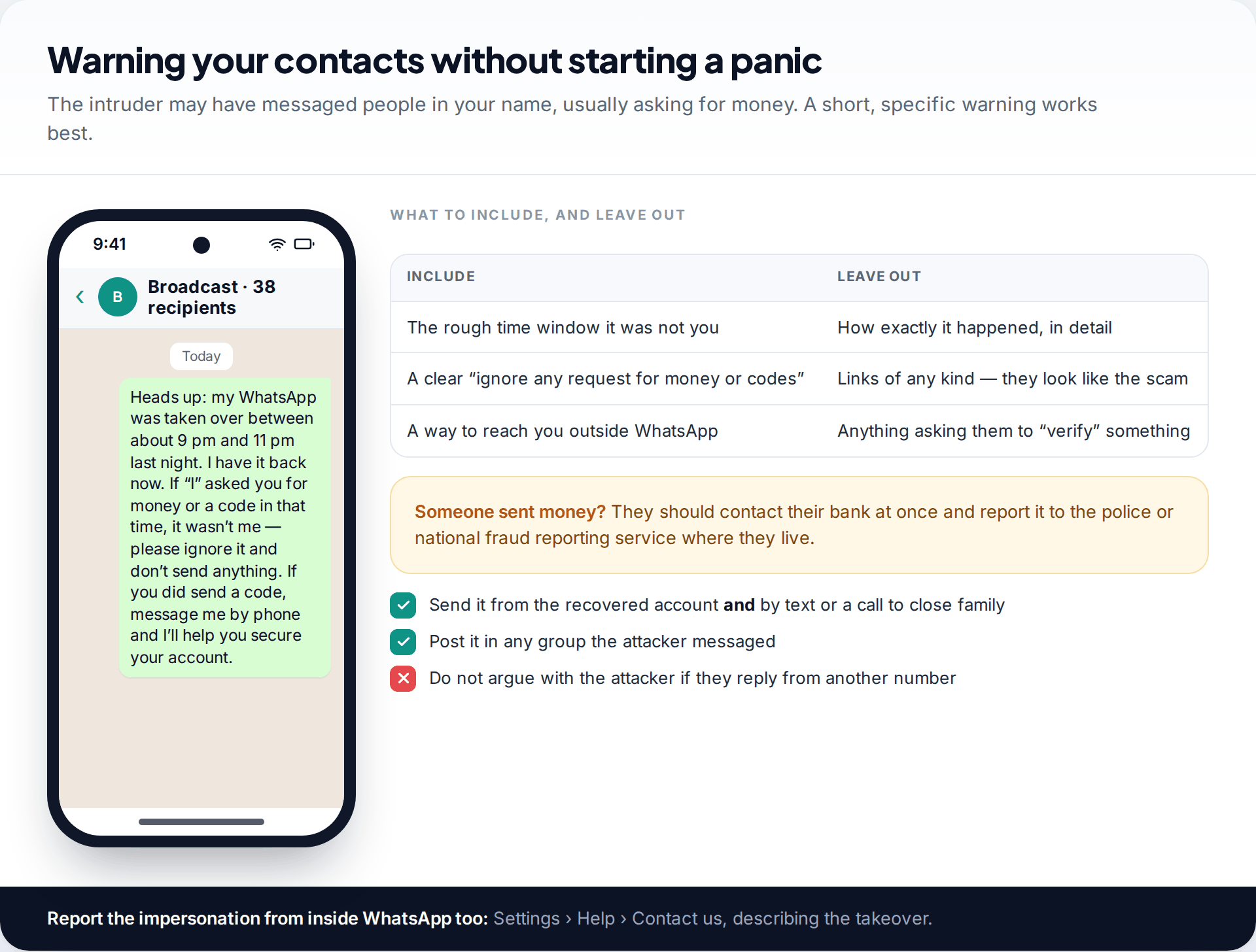
Most attackers want the account for one reason: to ask your contacts for money in your name, or for their codes to take their accounts too. Tell people quickly. A message from the recovered account works, as does a post elsewhere, but keep it short. Say roughly when it wasn’t you, that you’ll never ask for money or codes over WhatsApp, and how to reach you by phone. Don’t include links, because a message full of links looks exactly like the scam.
If anyone sent money, they should contact their bank straight away and report it to the police or their national fraud-reporting service. You can report the takeover from within WhatsApp under Settings › Help › Contact us. If the phone itself was lost or stolen rather than the account hijacked, WhatsApp’s help centre also describes asking support to deactivate the account. You do that by email, with your number in full international format.
What cannot be done
“I want to see what the hacker read”
WhatsApp doesn’t give you a log of messages viewed on another phone or linked device.
Fix: assume anything that arrived during the takeover was seen, and act on that. Change any password or code that was sent to you in that window.
“I lost my SIM as well”
Without the number, you can’t receive a code, so you can’t re-register.
Fix: ask your mobile carrier for a replacement SIM on the same number first, then verify WhatsApp. If a thief swapped your SIM without asking, report that to the carrier as fraud.
“Can someone speed up the seven days?”
No. The wait is enforced by WhatsApp’s own servers.
Fix: ignore anyone offering to shorten it for a fee. It is a recovery scam.
How this page was put together
The recovery steps and the seven-day rule were checked in September 2026 against WhatsApp’s help centre articles on compromised accounts and two-step verification, and against public warnings about the verification-code scam from police and fraud-prevention bodies. WhatsApp moves and renames settings between app versions and between Android and iPhone, so if a label differs on your phone, search Settings for the same word.
We did not take over any real accounts to test this, and we don’t link to or recommend paid recovery services. Every route here is free. You can read about our research and correction process.
Common questions
Can I recover my WhatsApp account if the hacker changed the PIN?
Yes. Verify your number with the SMS code, which signs them out, then wait seven days and reset the PIN from the “Forgot PIN?” option. If you had already added your own email address to two-step verification, you can reset it by email without waiting.
Can the hacker read my old WhatsApp messages?
Not by registering your number on their phone. Past messages are stored on your device and in your own backup. They could see new messages that arrived while they had the account, and anything shown on a device linked to your account.
How do I know if someone else is using my WhatsApp?
Look for being logged out unexpectedly, registration codes you didn’t request, replies to messages you never sent, and unknown entries under Linked devices. Any one of these is worth acting on.
Will the other person know I took the account back?
Their phone is signed out and shows a message that the number is no longer registered on it. A removed linked device simply stops working.
Can I recover a hacked WhatsApp account without my phone number?
No. Registration depends on receiving a code at that number. Get a replacement SIM on the same number from your carrier first, then verify.
Does WhatsApp have a phone number I can call for help?
WhatsApp support works through the app (Settings › Help › Contact us) and its help centre. Anyone phoning or messaging you and claiming to be WhatsApp support is not.
The tools behind this guide. TheTruthSpy is a free parental control app for Android: GPS location tracker with geofencing, a screen time app with app limits, a website blocker and web filter, an SMS tracker and call tracker, and social media monitoring for the WhatsApp tracker, Instagram tracker, Snapchat tracker, Facebook Messenger tracker and Viber tracker. See the full parental control feature list, the free parental control pricing, or the download and setup guide.
Related guides
Instagram Hacked? How to Recover Your Account in Every Situation
How to recover a hacked Instagram account whether you can still log in, the password was changed, or the email…
Finding Hidden Spy Apps: Where They Sit in Your Phone’s Settings
Spy apps hide their icons, not their permissions. A settings-by-settings tour of where they show up on Android (special app…
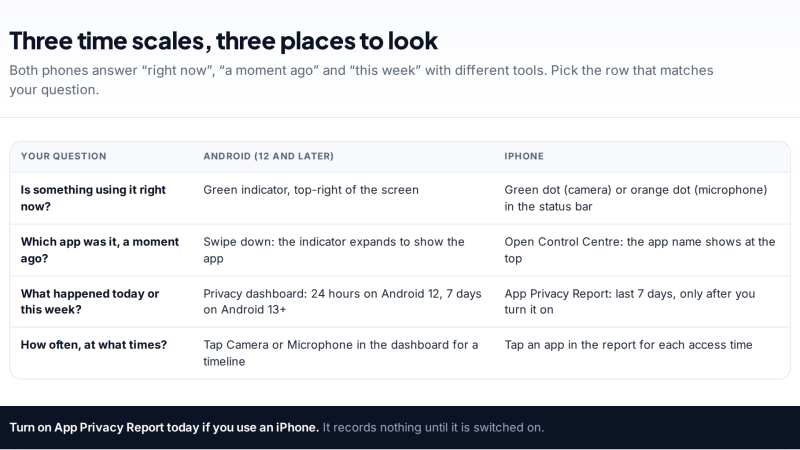
Which Apps Used Your Camera or Mic? Reading the Privacy Dashboard
See which apps used your camera or microphone, and when: the live green and orange indicators, Android's Privacy dashboard timeline,…
Free parental control app for Android
GPS tracking, screen time limits, web filtering, SMS and call monitoring — visible on your child's phone. Pair a phone in about ten minutes.
Android · Free to set up · Visible on your child's phone