Phone Number Tracking: Methods That Work and the Ones That Don’t

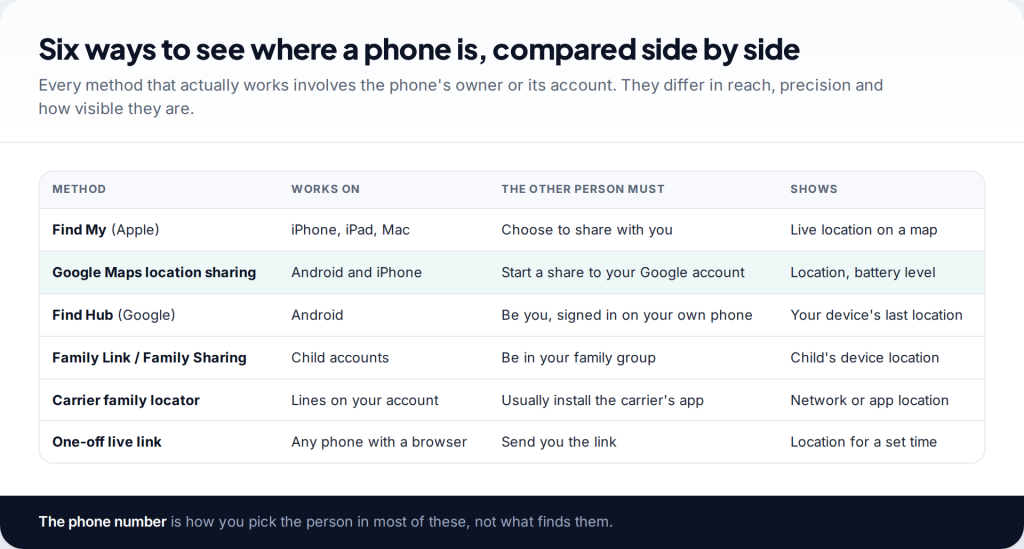
Can you track a phone by number? Not with the number alone. The methods that actually work — Find My, Google Maps location sharing, Find Hub, Family Link, carrier family plans and live links — all need the phone’s owner to switch something on, or need the phone to be yours. The number is often how you choose the person. It is never what finds them.
How to track a phone by number: pick the method that fits
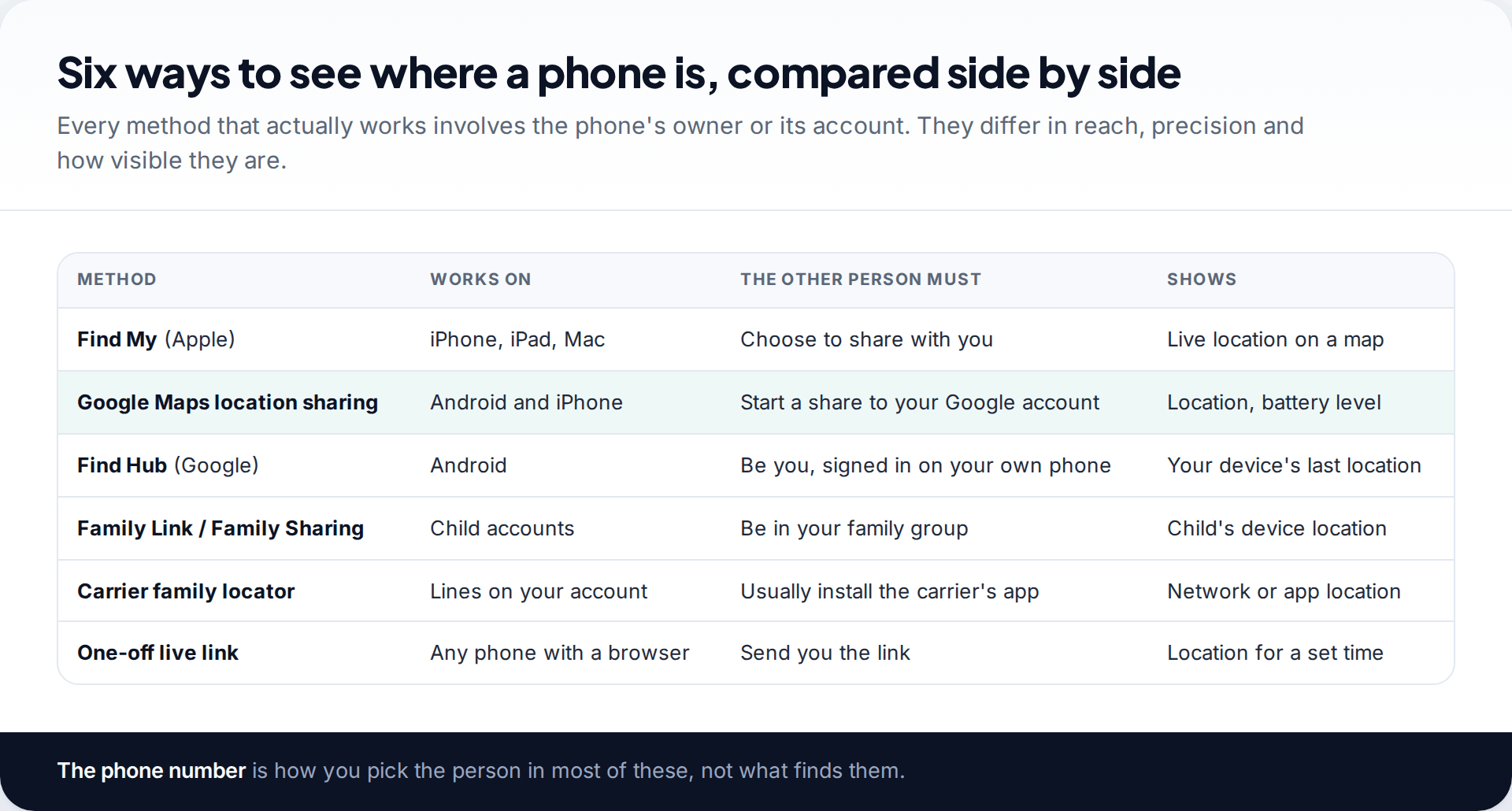
Before choosing, answer two questions. Whose phone is it? And will the owner agree? If it is your own phone, you have the strongest options of all, because your account can locate it. If it belongs to a child in your family group, the platform’s family tools are built for you. If it belongs to another adult, every working method starts with them choosing to share.
There is a third question that narrows things further: what phones are involved? Apple’s tools only work between Apple devices. Google Maps location sharing works on both. Carrier add-ons work on any phone, but only for lines on your own account.
Find My: where a phone number really does start the process
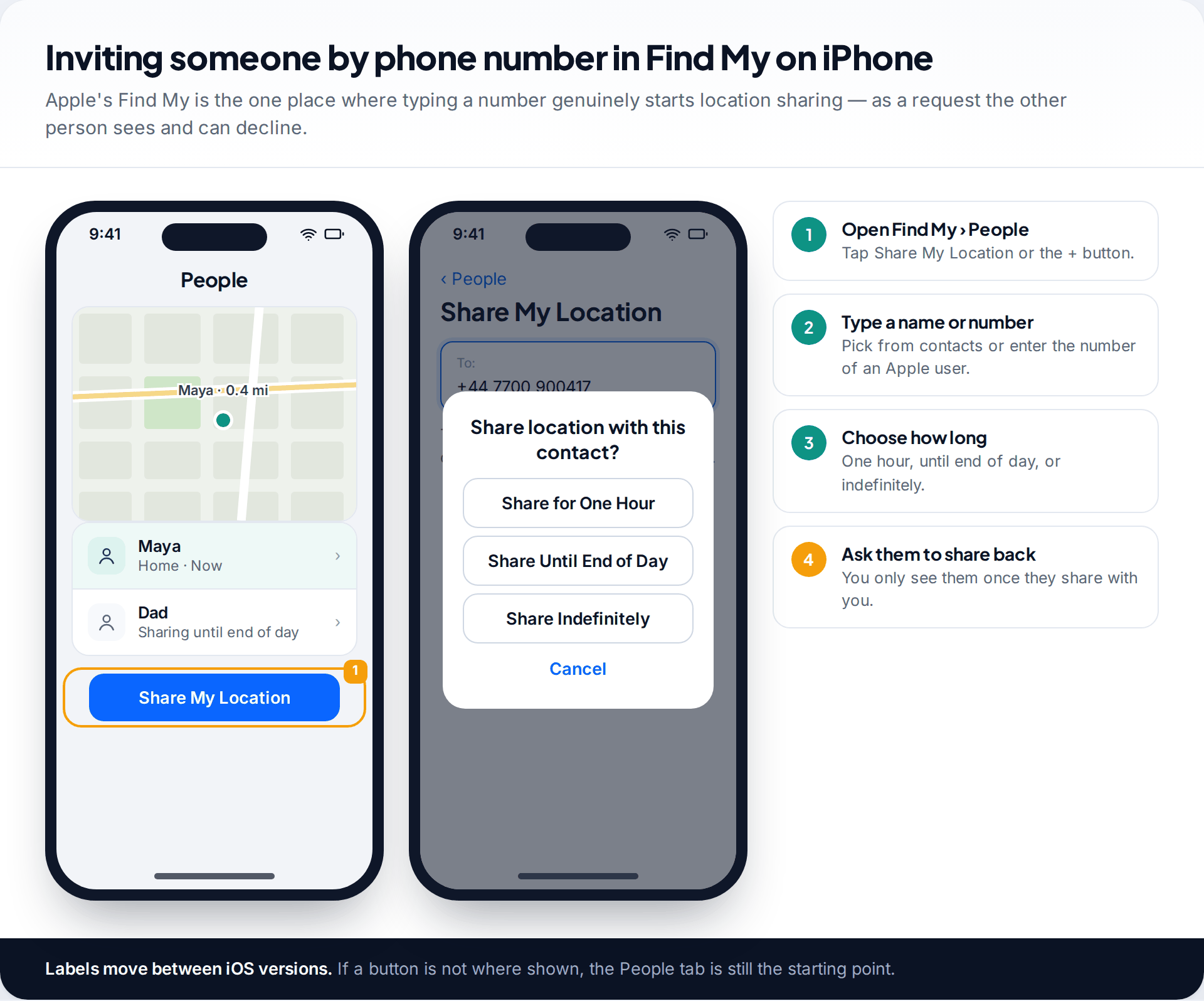
Find My on iPhone is the closest thing to what people mean by tracking a phone by number, and it shows why consent is built in. On the People tab you tap Share My Location, type a contact’s name or phone number, and choose how long: one hour, until the end of the day, or indefinitely. That shares your location with them. To see theirs, they have to share back.
The person receives a notification, can see who they are sharing with in their own People list, and can stop at any time. The number only works if it belongs to an Apple account, so it cannot reach an Android phone. For mixed households, move on to Google Maps.
Google Maps location sharing: iPhone and Android together
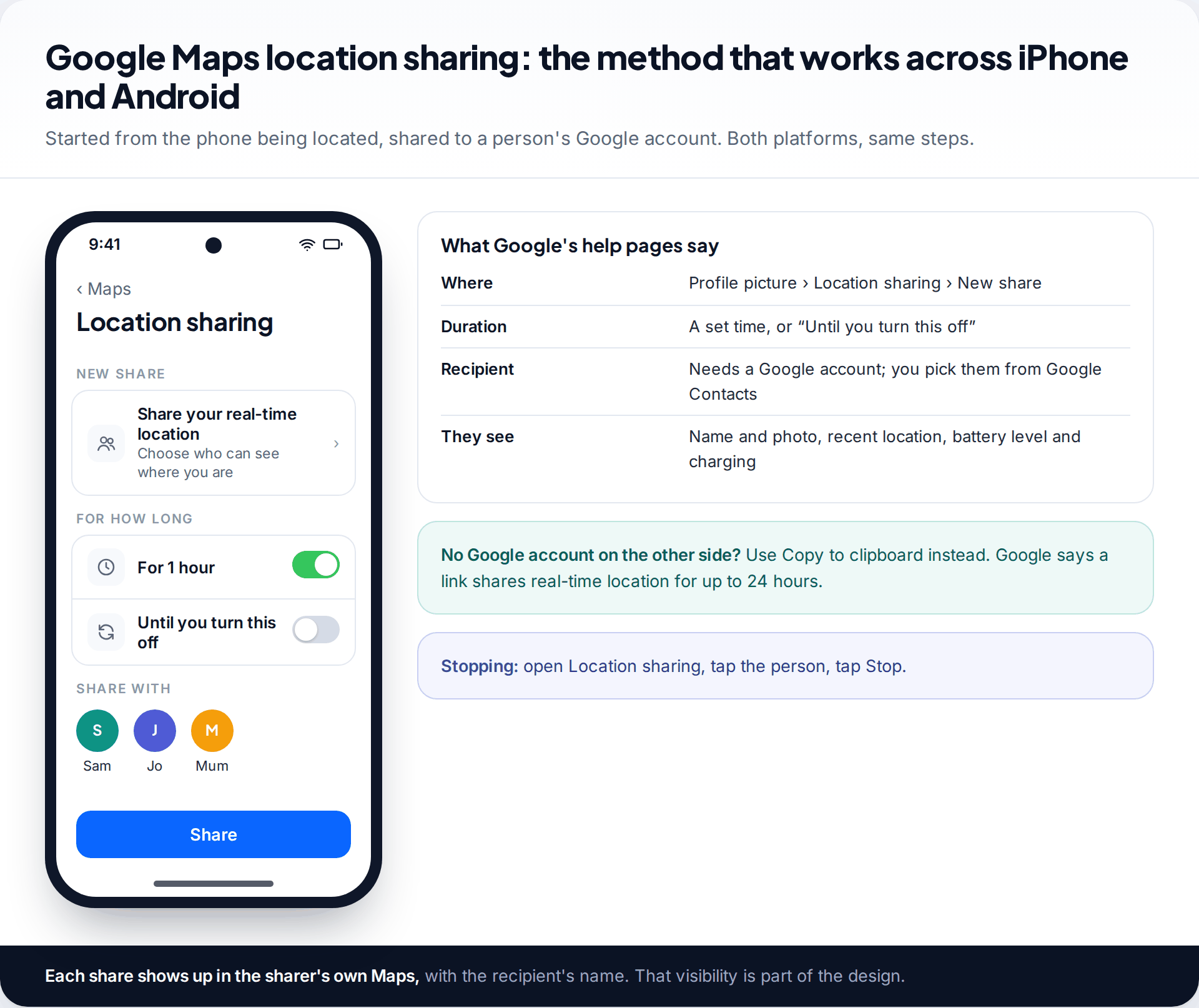
Google Maps can share real-time location from either platform. The person being located opens Maps, taps their profile picture, then Location sharing and New share. They choose a duration — a set time, or “Until you turn this off” — and pick you from their Google Contacts. Google’s help pages say the recipient sees their name and photo, the device’s recent location even when Google apps aren’t open, and battery level.
The recipient needs a Google account. If you don’t have one, the sharer can use Copy to clipboard to send a link instead, which Google says shares real-time location for up to 24 hours. To stop, the sharer opens Location sharing, taps your name and taps Stop. Our guide to setting up location sharing for a whole family covers mixed iPhone and Android households in detail.
Find Hub: for your own lost Android phone
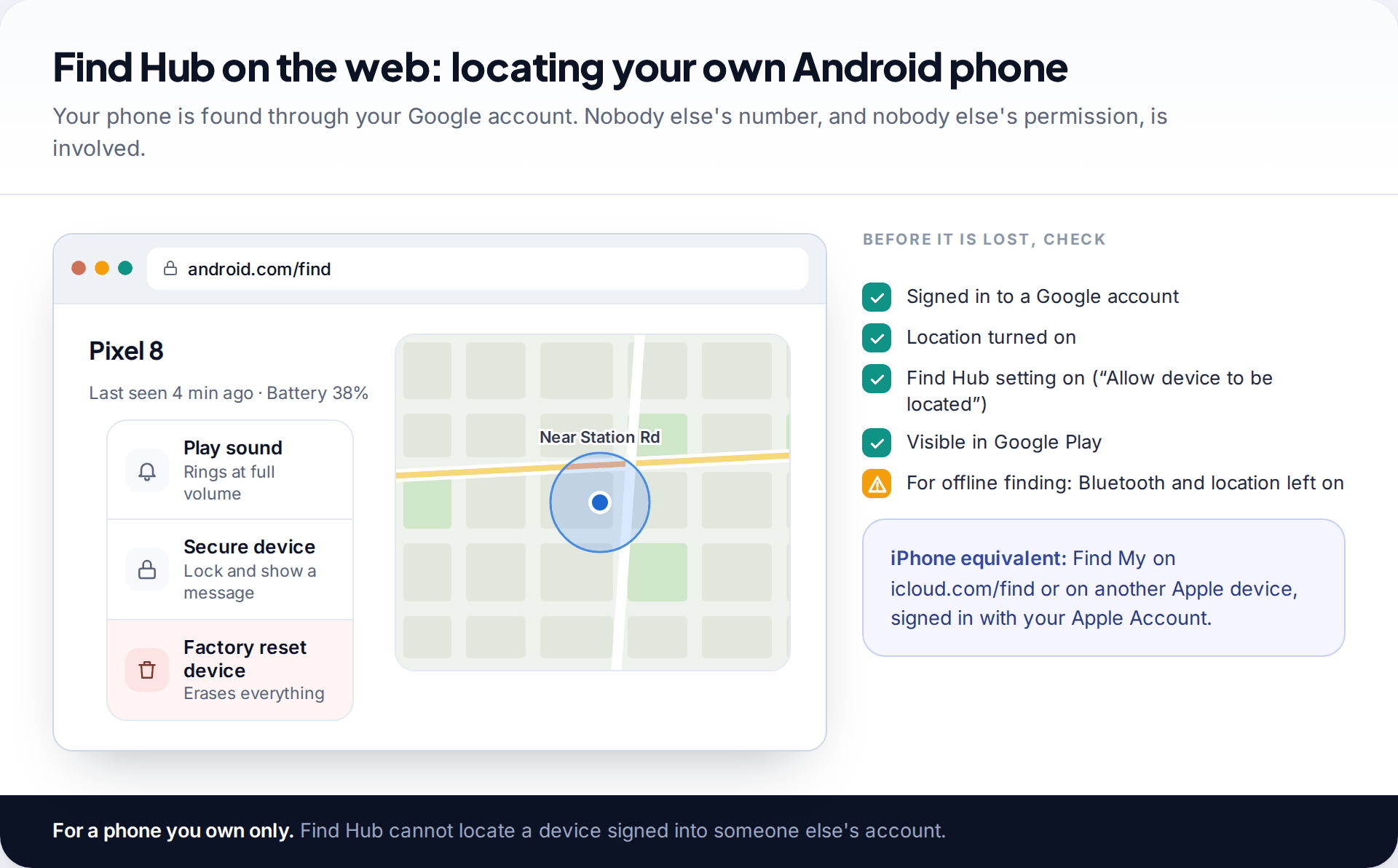
If the phone is yours, forget the number and use the account. On Android that is Find Hub, formerly Find My Device, at android.com/find or in the Find Hub app. It shows your phone’s location and lets you play a sound, secure it with a message, or erase it. Google’s help pages list what has to be in place: the phone signed in to a Google account, location on, the “allow device to be located” setting on, and the phone visible in Google Play.
Find Hub can also use a crowdsourced network of other Android devices to find phones that are offline, and on some models it keeps working for a few hours after the phone is switched off, provided Bluetooth and location were on. On an iPhone, Find My does the equivalent job from icloud.com/find or another Apple device.
Family plans: locating a child’s phone
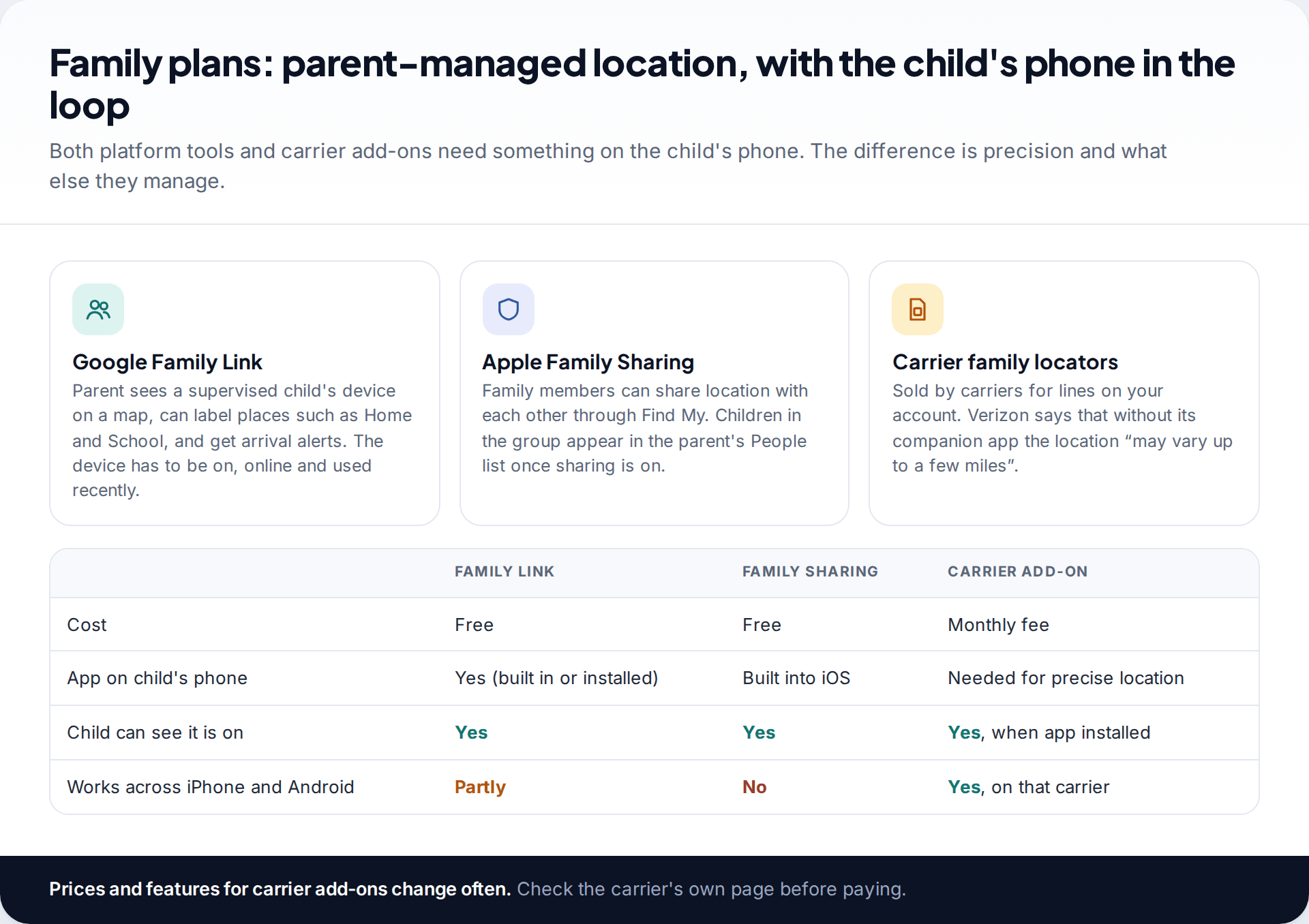
For children, the platform tools are free and designed for the job. With Google Family Link, parents open Location, choose the child and see the device on a map. Parents can save places such as home and school and get arrival alerts. Google notes that the location won’t show if the phone is off, offline, or hasn’t been used recently. Apple’s Family Sharing puts family members into each other’s Find My once location sharing is on.
Carrier family locators are the one option that sounds like tracking by number, because they work on lines on your account. Read the small print. Verizon’s help pages, for example, say that without the companion app on the child’s phone, the parent gets an approximate network location that may vary by up to a few miles. The precise location, alerts and check-ins all need the app installed on the child’s phone.
An eleven-year-old’s first phone, iPhone parent, Android child
Apple’s Family Sharing can’t manage an Android phone, so the parent installs Family Link on the iPhone and sets up the child’s Google account under it. Location, app approvals and screen time are then handled from the parent’s phone. The child sees the Family Link notice on their own device. For a quick check on the way home from school, the child can also share their location in Google Maps, which the parent can view on the iPhone.
A shared live link for one-off situations
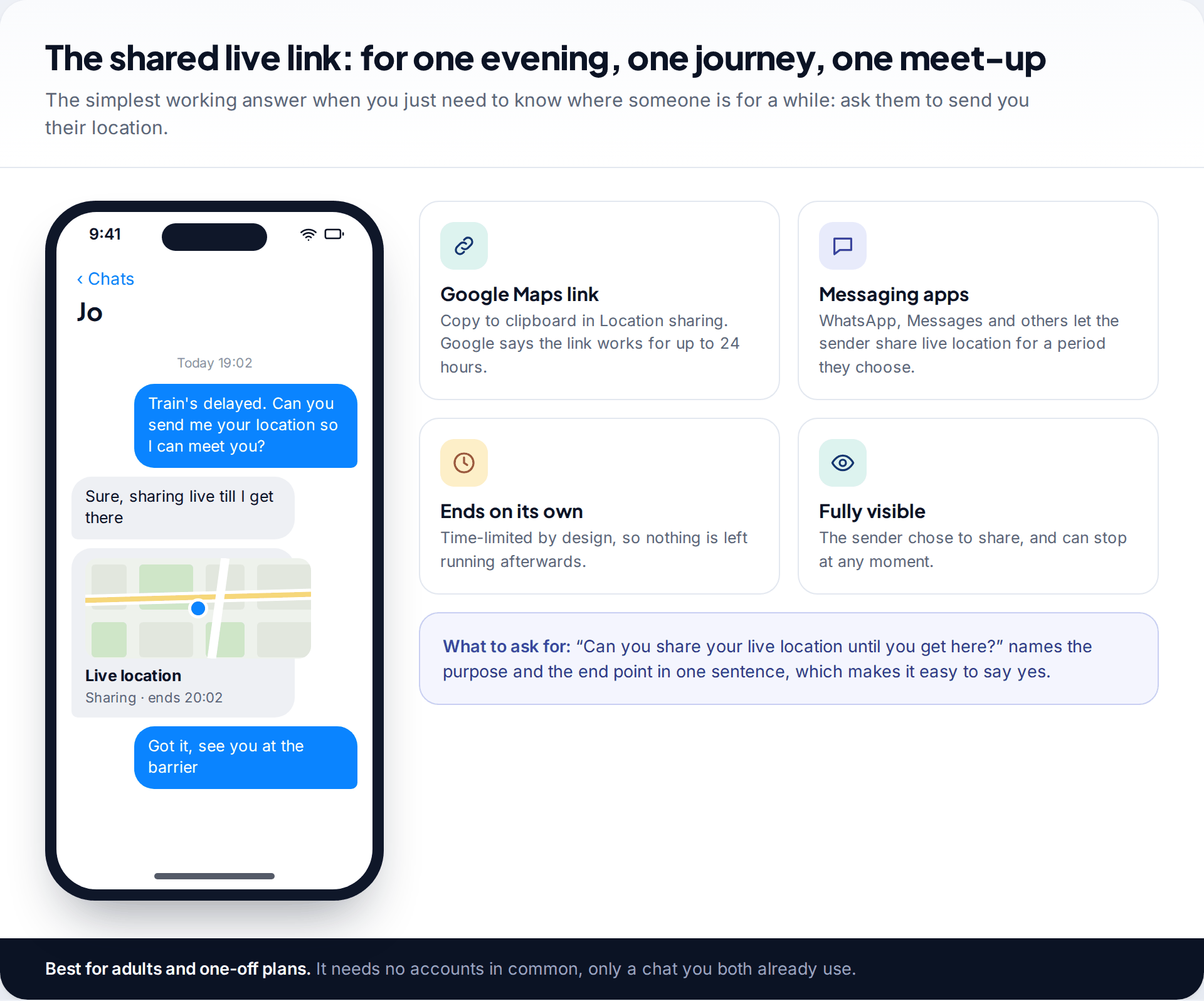
Most real-world needs are temporary: meeting someone off a late train, keeping an eye on a friend walking home, finding each other at a festival. For these, ask the person to send their location. Google Maps links, WhatsApp, Apple Messages and most other chat apps can share a live location for a limited period, then stop on their own.
This needs no shared accounts, works across every platform, and leaves nothing running once the trip is over. It is also the method most people are happy to agree to, because it ends.
The methods that don’t work
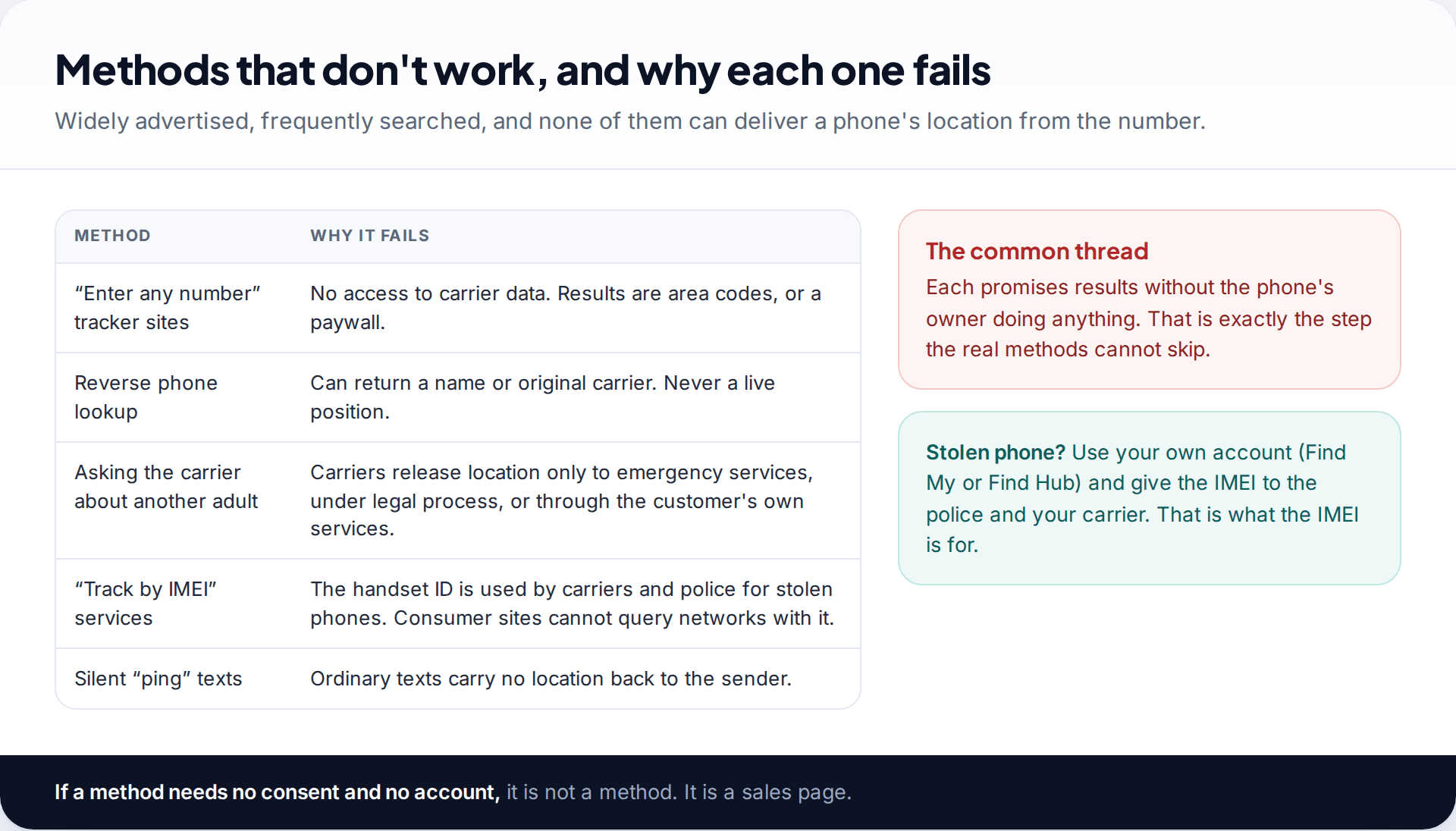
Anything that promises to locate a phone from the number alone, with nothing installed and no one asked, is not doing what it claims. Number tracker websites cannot reach carrier data. Reverse lookup services can sometimes name the owner or the original network, but never the current position. Carriers will not locate another adult for you; they release location to emergency services, under legal process, or through services the customer signed up to. “IMEI tracking” sites have no access to networks either — the IMEI is useful, but only in the hands of your carrier and the police. We explain the business model behind these sites in what’s true and what’s a scam about tracking from a number.
If someone is at risk right now, skip all of this and call the emergency services with the number. They have routes to the carrier that nobody else does.
Older relatives and other adults you care for
A common reason to search for number tracking is an older parent who gets confused, or an adult relative with a health condition. The methods are the same as for anyone else, but the setup deserves more thought, because the person may not remember agreeing later.
- Set it up together, while they are well. Sit with them, turn on sharing in Google Maps or Find My, and let them see their own screen doing it.
- Write it down. A short note in their phone case or on the fridge saying who can see their location, and why, prevents distress if they notice it later.
- Choose “until you turn this off” deliberately. An ongoing share suits this situation better than timed ones that lapse unnoticed, but agree a date to review it.
- Add a place alert where the app supports it. Notifications when someone leaves home are more useful than checking a map repeatedly.
- Keep the phone charged. A location share is only as good as the battery. A charging spot by the bed helps more than any setting.
If the person lacks capacity to agree, decisions about monitoring normally sit with whoever holds legal authority to act for them, and the rules differ by country. A dedicated GPS device or a watch may be more practical than a phone they forget to carry.
What the person sharing gives away
If you are the one being asked to share, it helps to know exactly what the other side sees. Google Maps shows your recent location, your name and photo, and your battery level and charging state. Find My shows your location, and the other person can ask to be notified when you arrive at or leave a place. Family Link shows a supervised child’s device on a map with saved places.
None of these methods hands over your message history or your browsing. Google Maps Timeline, the record of places you have visited, is stored on your own device and is not part of location sharing. You can see everyone you share with in the app’s own list, and removing a name ends it straight away.
Asking for location, and when it stops updating
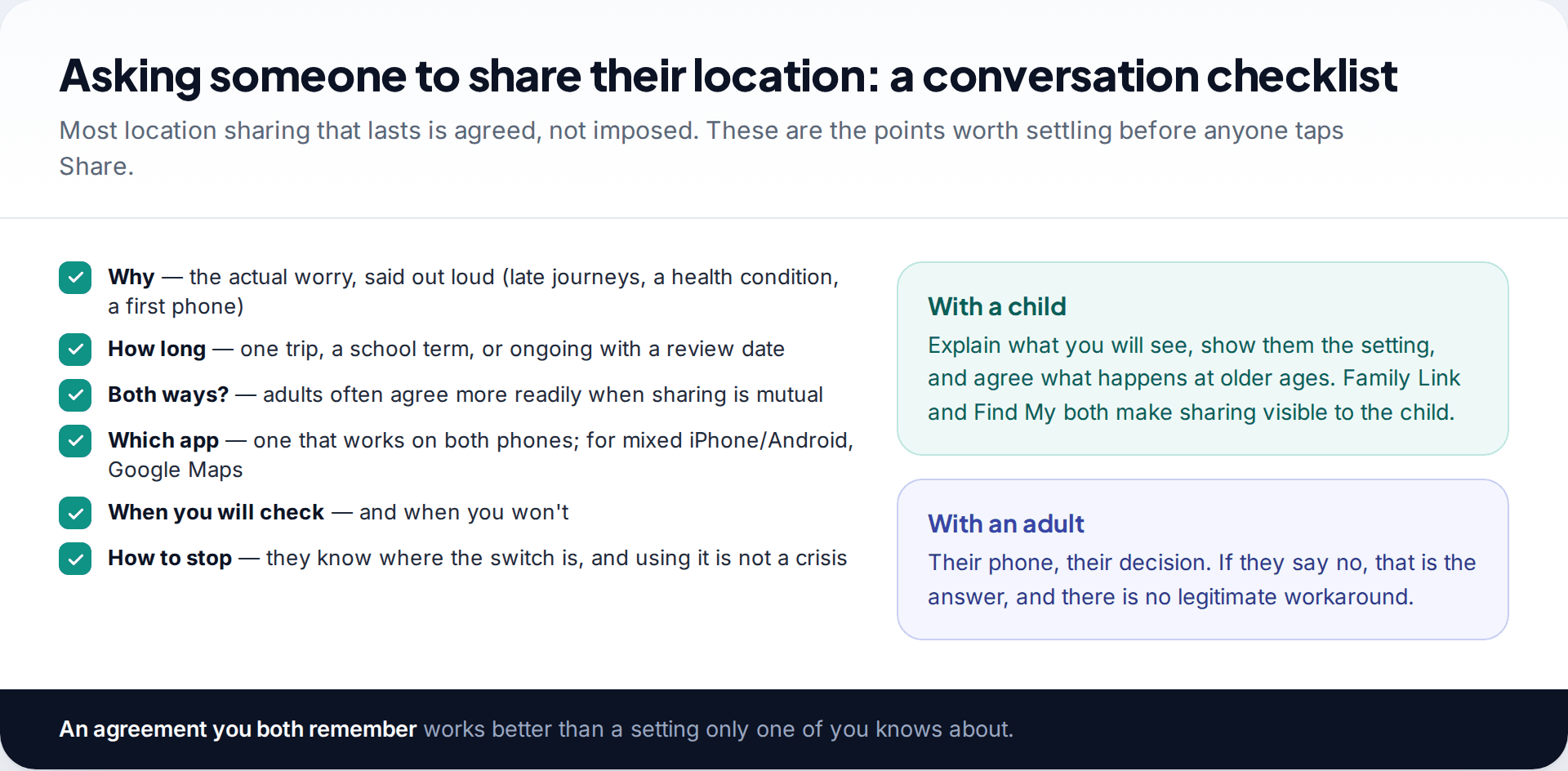
Because every working method depends on the other person, the conversation matters as much as the settings. Say what the worry actually is. Agree how long sharing will last and whether it goes both ways. Choose an app that works on both phones. Make sure the other person knows how to stop, and that stopping won’t be treated as a crisis. With an adult, a no is final; there is no legitimate way around it.
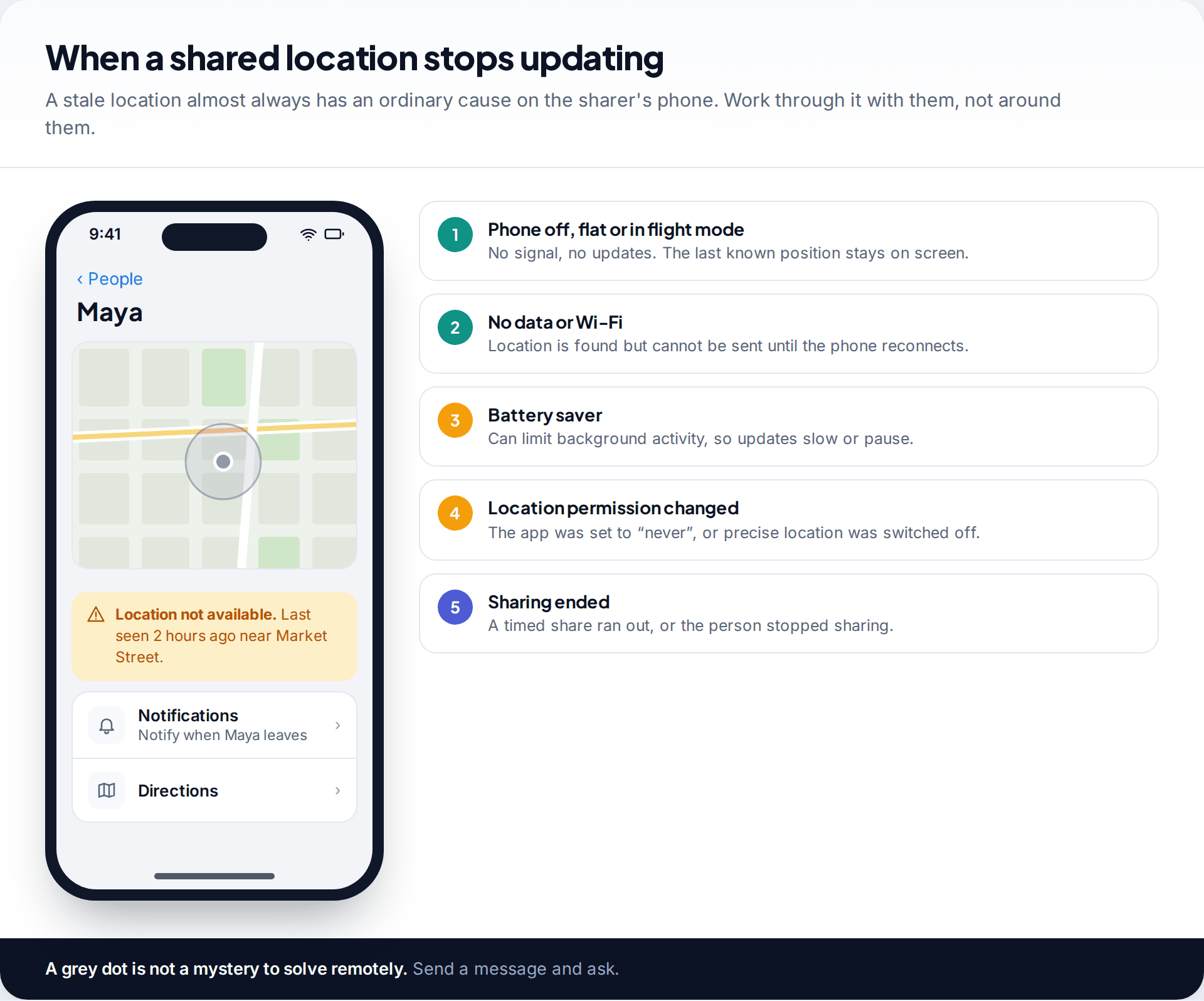
Shared locations go stale for dull reasons: a flat battery, flight mode, no data connection, a battery saver limiting background activity, a changed location permission, or a timed share that simply ran out. The screen keeps showing the last known position, which can look alarming. Before worrying, send a message.
How this page was put together
The steps and labels were checked in September 2026 against Google’s help pages for Maps location sharing, Find Hub and Family Link, Apple’s Find My documentation, and Verizon’s family-locator FAQ. Where a feature’s wording changes between app versions we have said so rather than guess, and we have not listed carrier prices because they change frequently.
We did not test paid tracker services and do not link to any. Read how we research and update our guides.
Common questions
Can I track a phone by number for free?
Only with the owner’s cooperation. Find My, Google Maps location sharing, Family Link and live links are all free, and all need the other person to turn sharing on (or the phone to be yours).
Can I see someone’s location on Google Maps by entering their number?
No. Google Maps shows a person’s location only if they have shared it with your Google account or sent you a link.
Can my carrier track my child’s phone?
Many carriers sell family locator add-ons for lines on your account. Without their app on the child’s phone the location may be approximate; with it, it is more precise.
Will the other person know I am tracking their location?
With every method on this page, yes. Sharing appears in their settings and they can stop it. That visibility is deliberate.
How do I find my own lost phone if I only know the number?
Use your account instead: android.com/find for Android, or Find My on icloud.com or another Apple device for iPhone. Your carrier can also block the SIM and record the IMEI.
Can I track a phone that is switched off?
You will see its last known location. Some newer phones can still be found for a few hours after power-off through Find My or Find Hub’s offline networks, if that was enabled beforehand.
Looking for a tool to go with this? TheTruthSpy is a free parental control app for Android that stays visible on the child's phone. If it fits your family, see the Location & geofencing feature.
Related guides
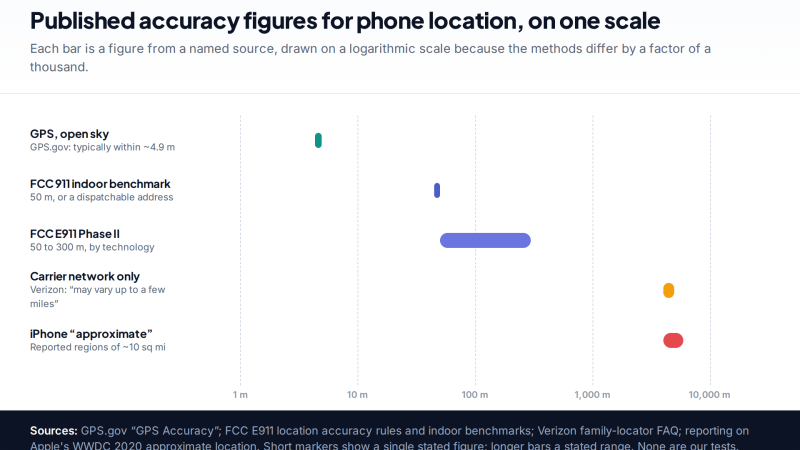
How Accurate Is Phone Location Tracking? GPS, Wi-Fi and Cell Compared
Phone location accuracy runs from a few metres with GPS under open sky to miles when only the mobile network…
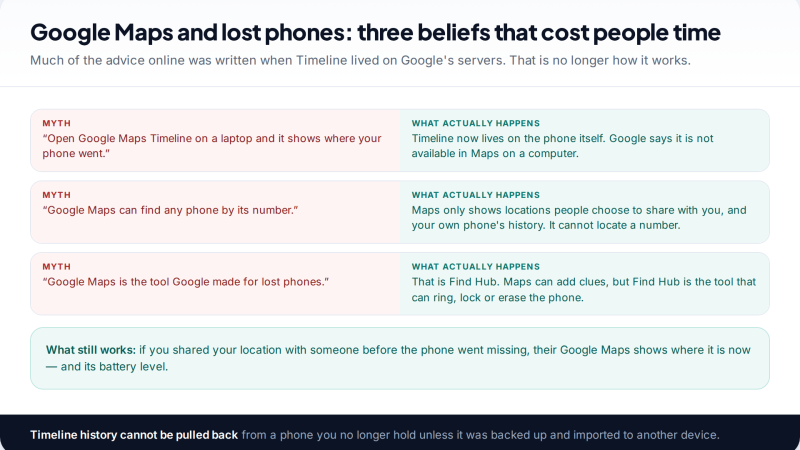
Using Google Maps Timeline to Find a Lost Phone
Can Google Maps find a lost phone? Only in two cases: someone you share your location with can see it,…
GPS Tracking for Small Business: A Starter Guide
A plain starter guide to GPS tracking for a small business: vehicle trackers versus phone apps, what a small fleet…
Parental controls your child can see
Location, screen time limits, a web filter and alerts from notifications — free, and visible on your child's phone. Pair a phone in about ten minutes.
Android · Free to set up · Visible on your child's phone