Deleted Snapchat Messages: What Can Be Recovered and From Where

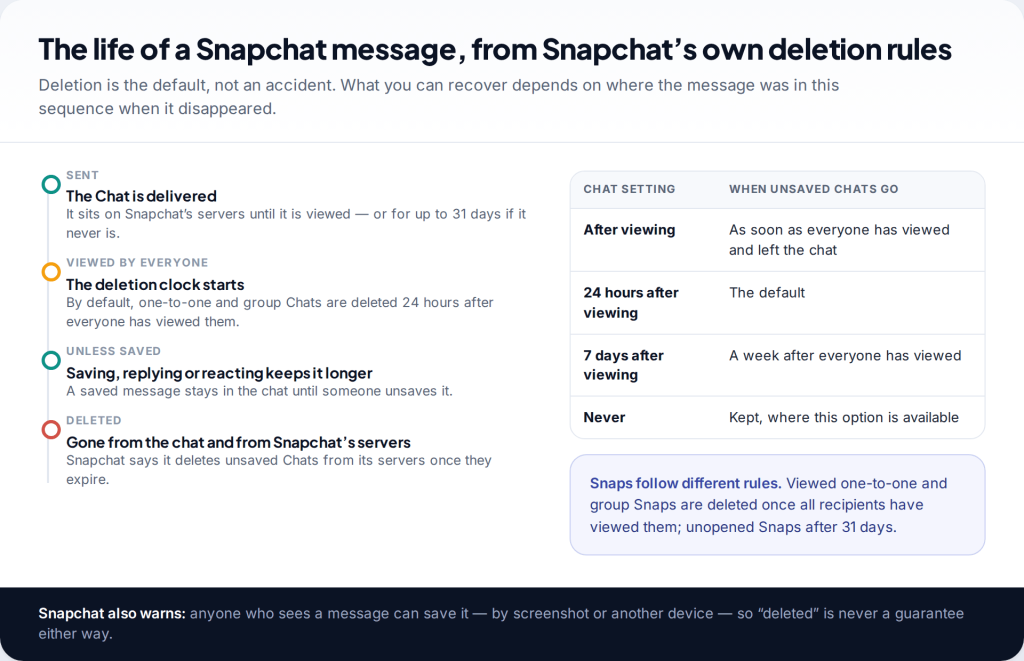
Most deleted Snapchat messages can’t be recovered. Snapchat deletes unsaved Chats from its servers once they expire. By default, that is 24 hours after everyone has viewed them. To recover deleted Snapchat messages, you need a copy that survived somewhere else: a message saved in the chat, your My Data export, Memories or your camera roll, Android’s notification history, or the other person.
Why Snapchat messages disappear in the first place
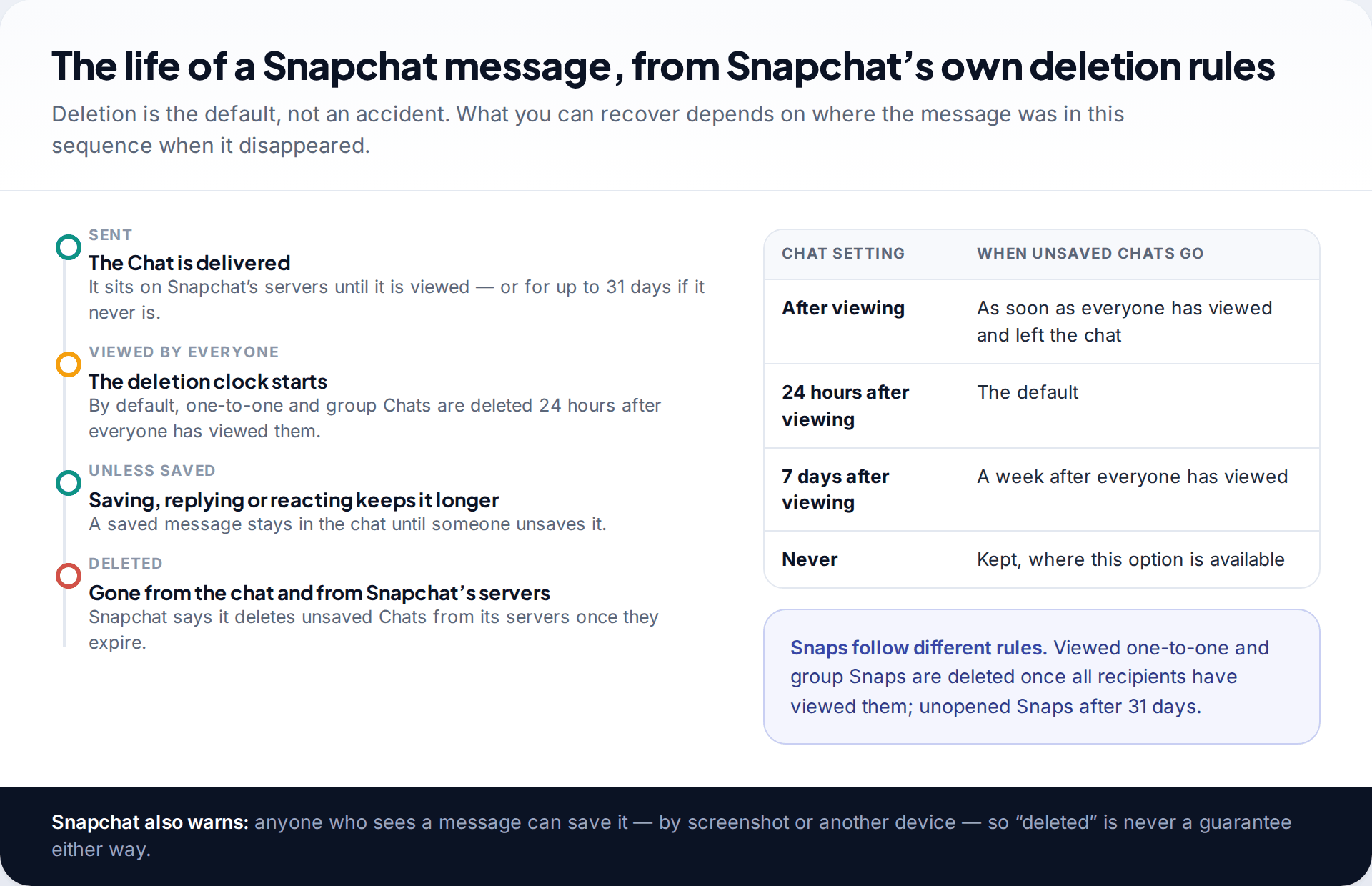
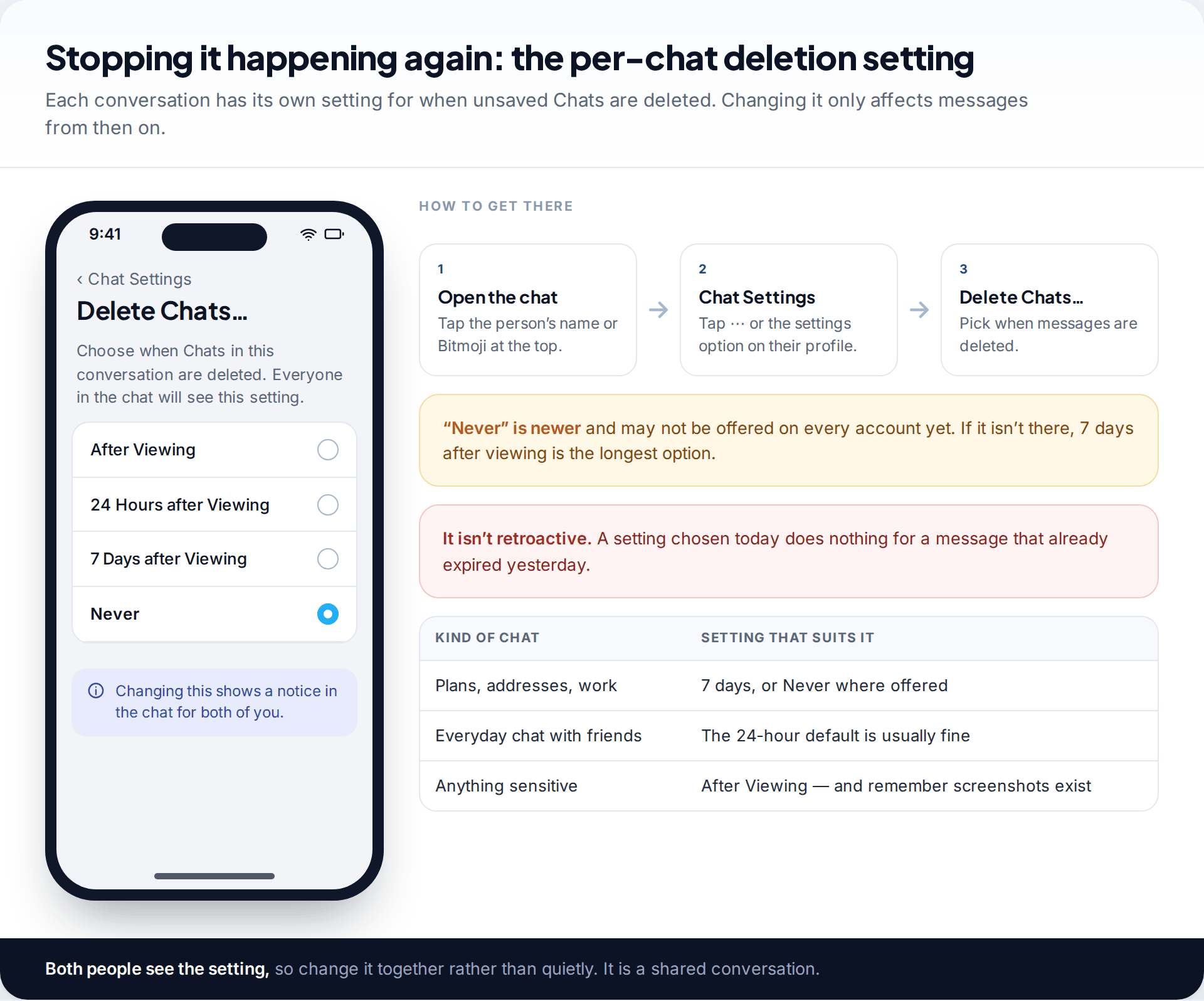
Snapchat’s help centre sets out the rules. One-to-one and group Chats are deleted by default 24 hours after everyone in the conversation has viewed them, or 31 days after sending if they are never viewed, whichever comes first. Each chat can be changed to delete right after viewing, 7 days after viewing, or never. Snaps work differently. Viewed Snaps are deleted once every recipient has opened them, and unopened ones after 31 days.
There is one way around deletion. Snapchat says a message is kept longer if someone saves, replies to or reacts to it. Everything else is designed to vanish, from the app and from Snapchat’s servers. That is why the recovery tools advertised online can’t deliver what they promise for chats. The data isn’t sitting somewhere waiting to be unlocked.
Start here: what kind of message was it?
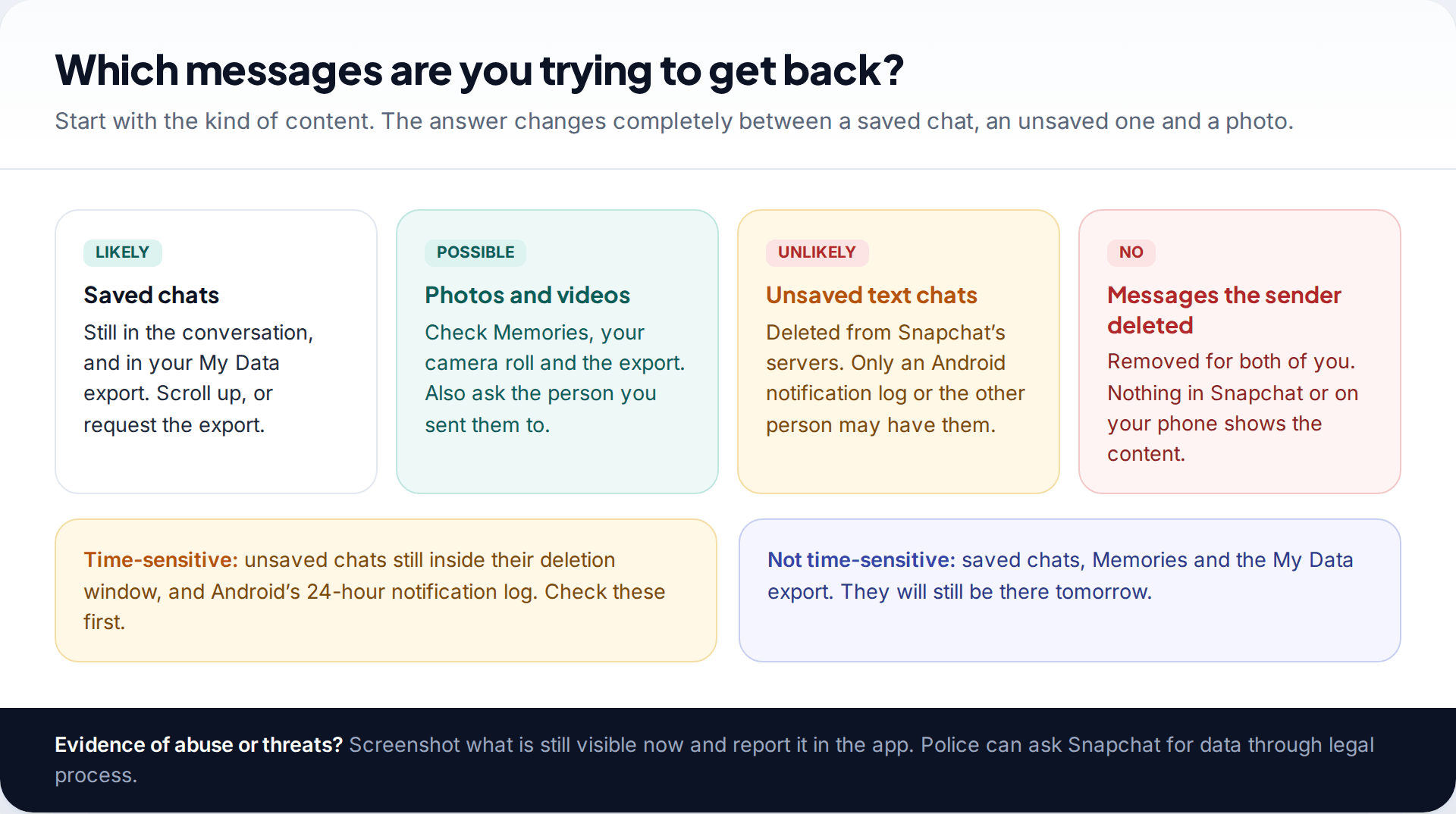
“Deleted messages” covers very different things, and the odds differ a lot. Saved messages are usually still there. Photos and videos often have a copy in Memories or your camera roll. Unsaved text chats are the hard case. When the other person deliberately deleted what they sent, you can’t see the content at all.
Work through the places below in order, and do it soon. Two of them, the Android notification log and any unsaved chats still inside their deletion window, disappear on a timer whatever you do.
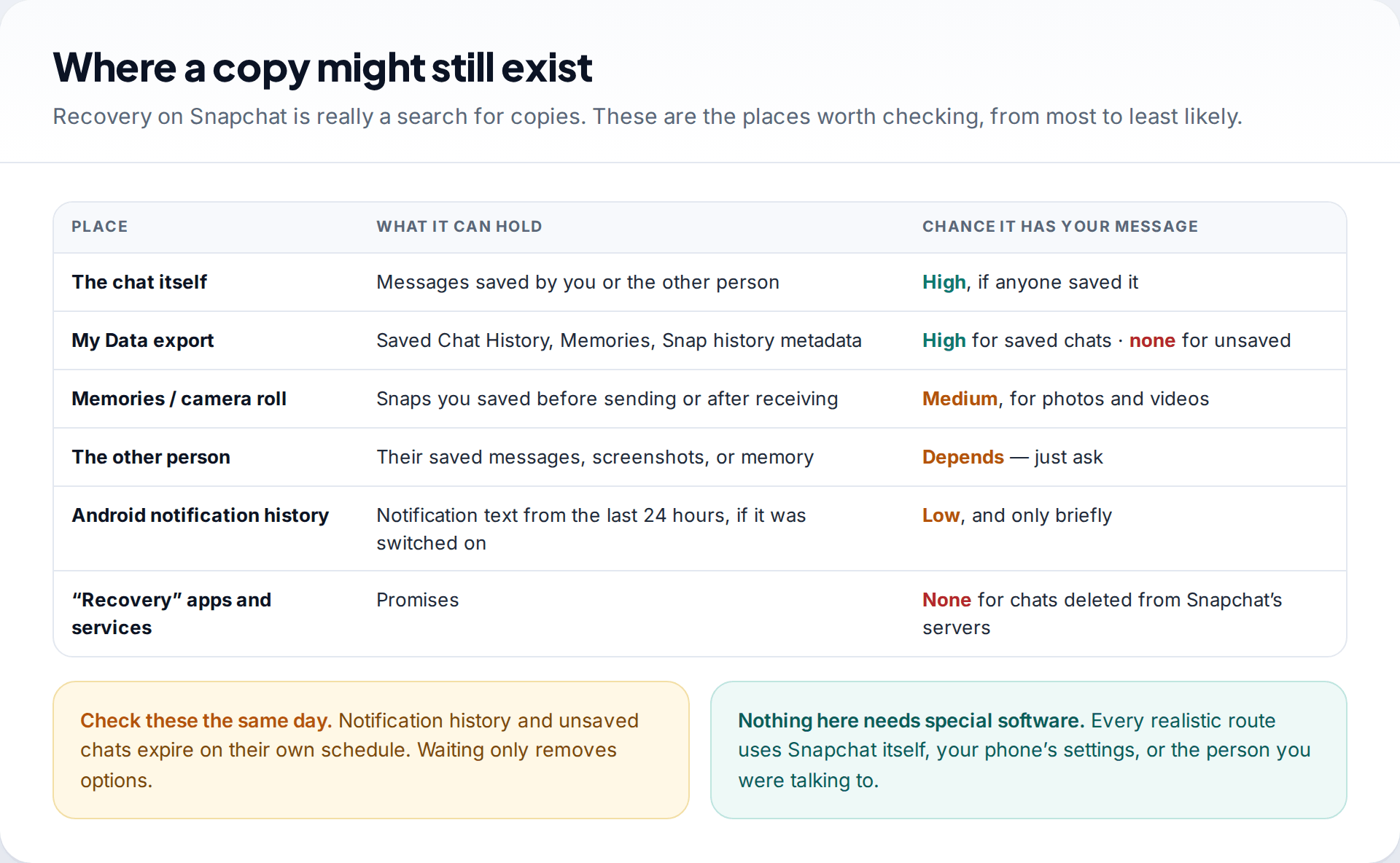
1. Look for saved messages in the chat
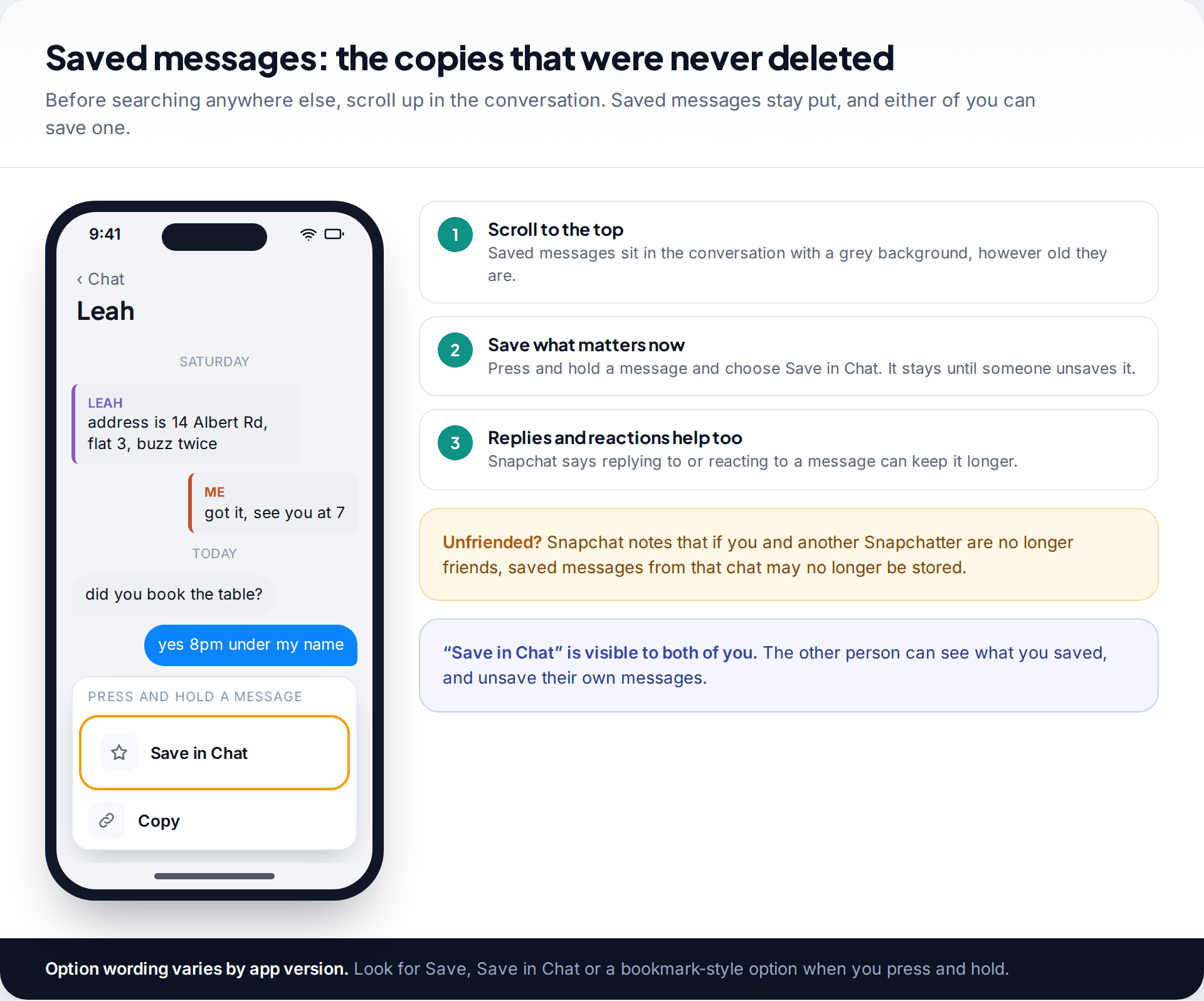
Open the conversation and scroll to the top. Any message that you or the other person saved is still there, shown with a grey background, however old it is. People often assume a chat has been wiped when the important message was saved by the other person weeks ago.
While you’re in the chat, save anything else you want to keep. Press and hold a message and choose to save it. The wording varies by version. Snapchat adds one caveat: if you and the other person are no longer friends, saved messages from that chat may no longer be stored. Unfriending someone to “tidy up” can cost you the messages you meant to keep.
2. Request your data from Snapchat
Snapchat’s My Data export is the official copy of what your account holds. You can request it in the app under Settings › My Data, or by signing in at accounts.snapchat.com. You choose what to include and a date range, and Snapchat emails a download link. Its help centre says it aims to deliver within 7 days, and large downloads can take longer.
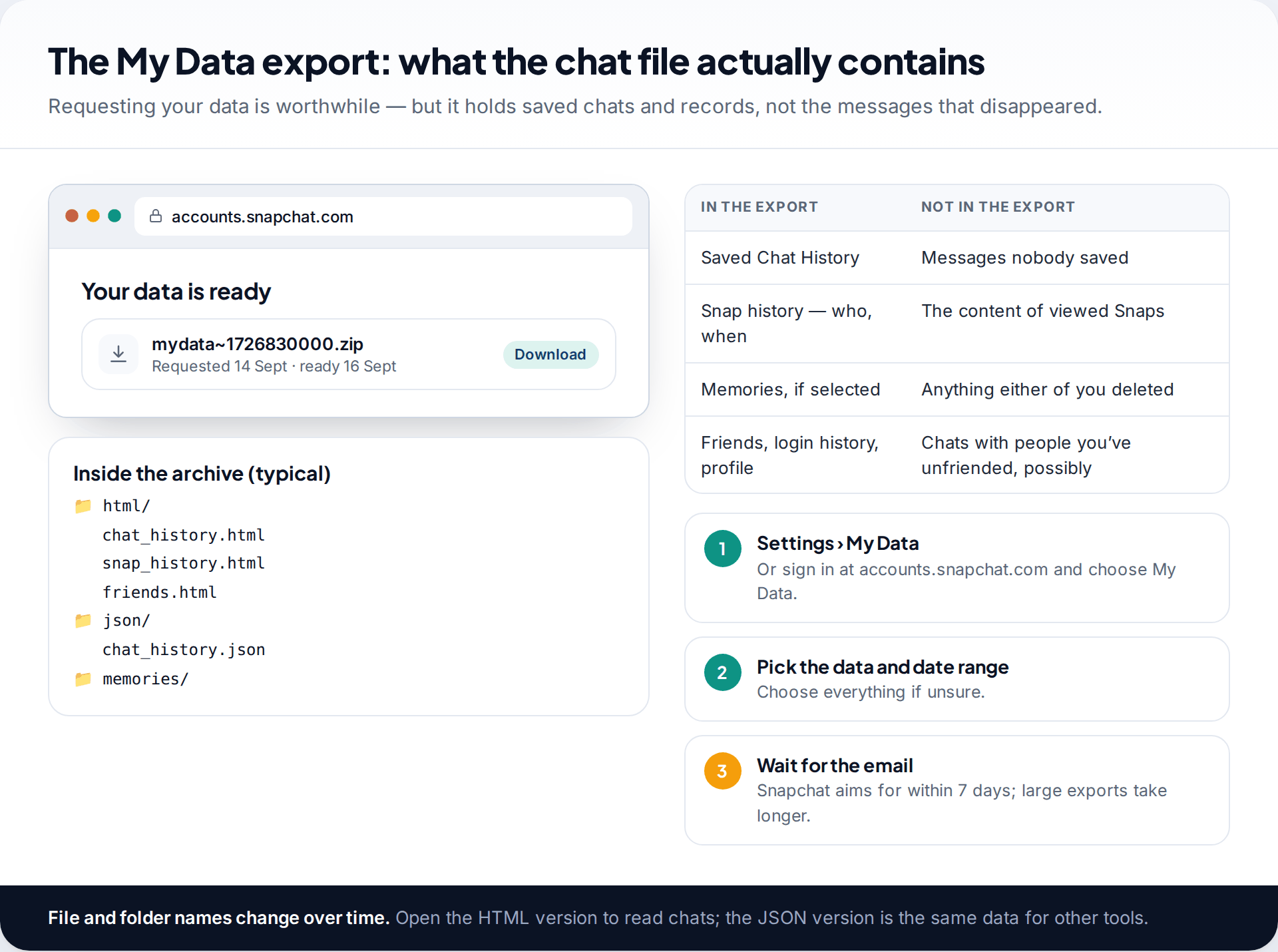
Be clear about what you’ll get. Snapchat lists Saved Chat History among the contents, along with Snap history, friends, login history, Memories and more. Messages nobody saved are not included, because Snapchat had already deleted them. Snap history shows who sent what and when, not the content of Snaps that were viewed. The export is still worth having. It is the only place you can read your saved chats and account records all together, and it lets you prove when a conversation happened.
3. Check Memories, your camera roll and the other person
Photos and videos have more places to survive than text. If you saved a Snap to Memories before sending it, it is still there unless you deleted it. If your Snapchat is set to save to your camera roll, check the phone’s gallery and its cloud backup too, such as Google Photos or iCloud Photos, including their “recently deleted” folders. Our guide to recovering deleted Snapchat Memories covers those folders in detail.
Then there is the simplest route of all: the other person. They may have saved the message, screenshotted it, or can tell you what it said. Snapchat itself warns that anyone who sees a message can save it with a screenshot or another device. That cuts both ways, but here it works in your favour.
4. Android only: notification history
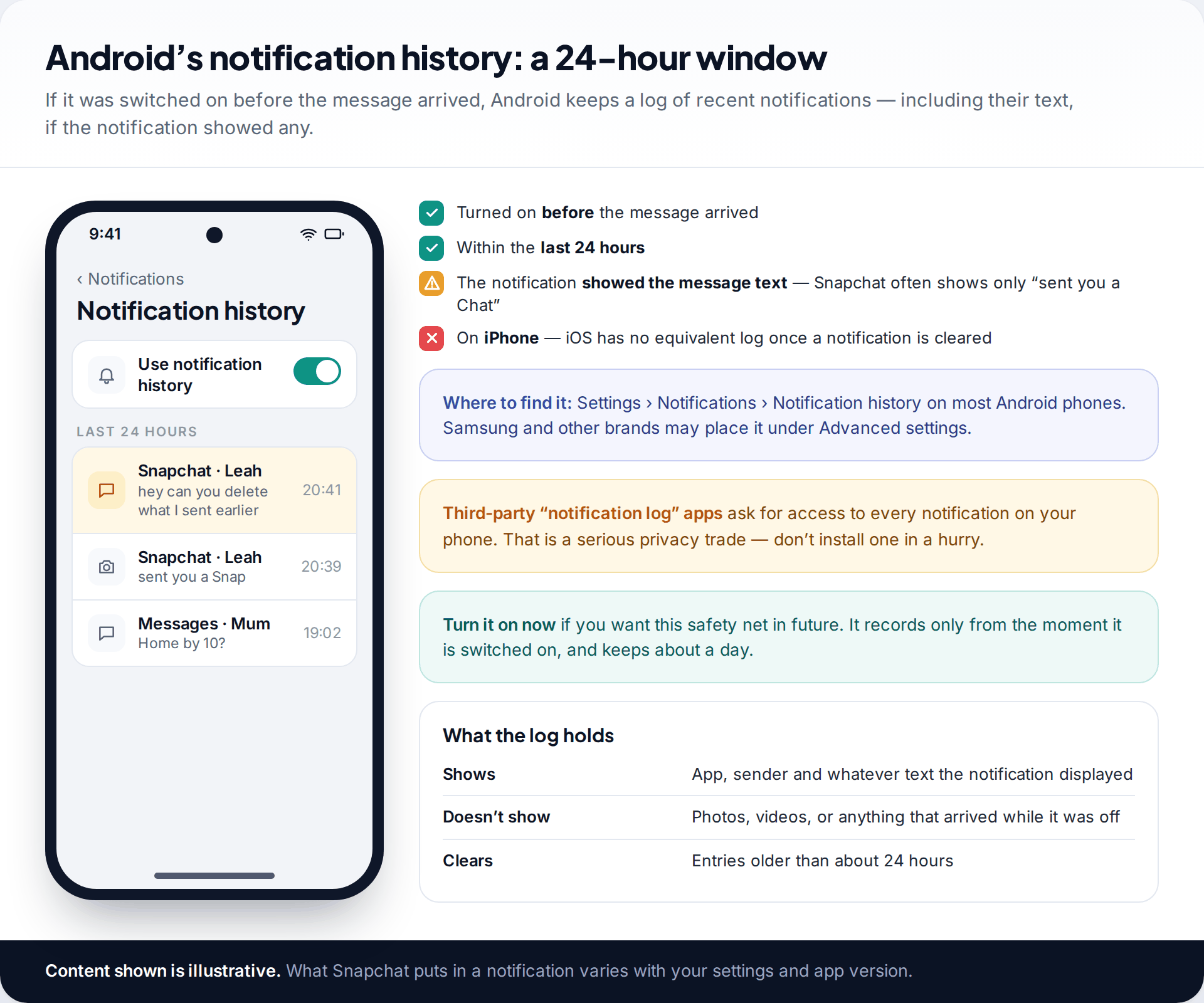
Recent versions of Android can keep a log of notifications from the last 24 hours. It is usually under Settings › Notifications › Notification history, though some manufacturers put it elsewhere. If it was switched on before the message arrived, and Snapchat’s notification included the message text, you may find the words there. Snapchat notifications often say only that someone sent a Chat, so many entries won’t include the text.
iPhones have no equivalent. Once you clear a notification, iOS doesn’t keep a readable history of it. Be wary of apps that promise to log all your notifications from now on. To work, they need access to every notification on your phone, including banking codes and private messages.
When the other person deleted what they sent
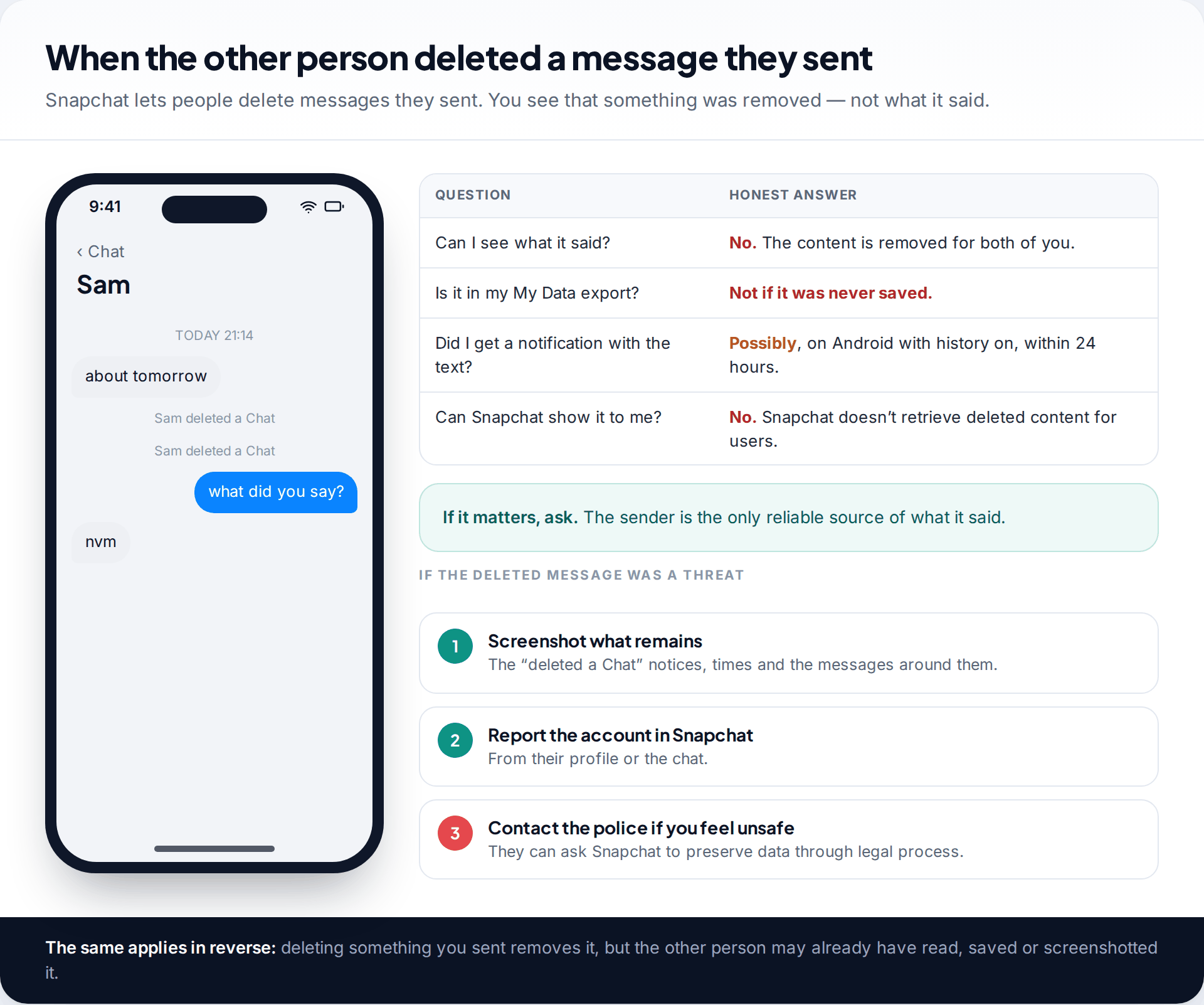
Snapchat lets people delete messages they have sent. When they do, the chat shows a notice that a Chat was deleted, and the content is gone for both of you. It isn’t in your My Data export unless it had been saved, and Snapchat doesn’t recover it for users. If notification history was on and showed the text, you might have caught it there within 24 hours.
A threatening message, then deleted
Someone sends a threat, then deletes it minutes later. The content is gone from the chat. But the “deleted a Chat” notices remain, and so do any messages around them. Screenshot everything still visible, note the time, report the account in Snapchat, and if you feel unsafe, contact the police. Snap publishes guidance for law enforcement and can preserve account data when police request it through legal channels. That route runs through the police, not through individuals or paid services.
Why recovery apps and “experts” can’t help with chats
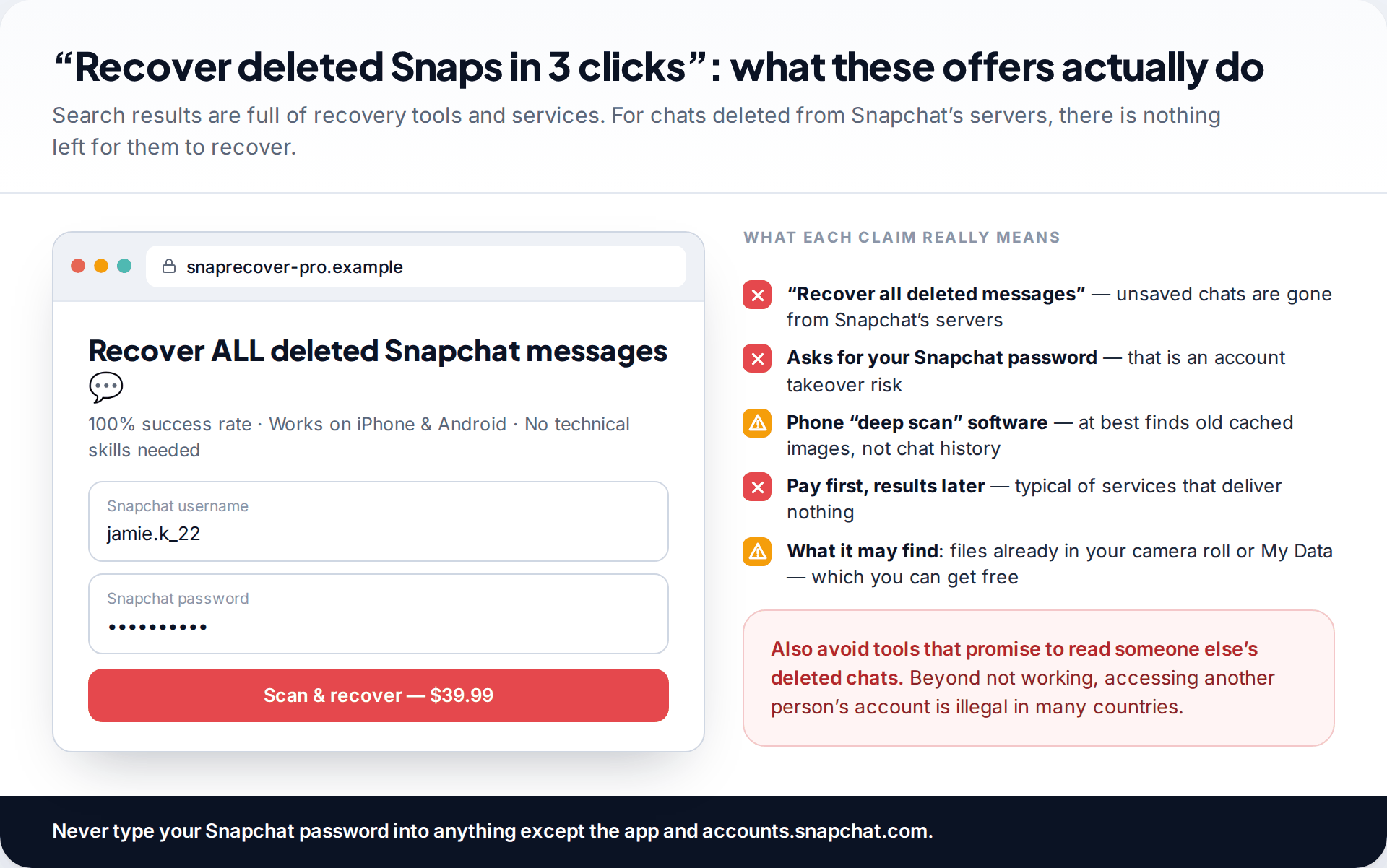
Searches for recovering deleted Snapchat messages bring up desktop recovery software, “deep scan” apps and paid services. For chats deleted from Snapchat’s servers, none of them can help. The content no longer exists anywhere they can reach. At best, phone-scanning software turns up old image files cached on the device, often the same ones already in your gallery or your My Data export.
At worst, the service asks for your Snapchat username and password. That is an account-takeover risk far bigger than the message you lost. Avoid anything that offers to read someone else’s deleted chats as well. Beyond not working, getting into another person’s account without permission is illegal in many countries.
Myths about deleted Snapchat messages
| Myth | What is actually true |
|---|---|
| “Snapchat keeps everything forever on its servers.” | Snapchat’s published rules say unsaved Chats are deleted from its servers after they expire. It can preserve some data when police ask through legal process, and that isn’t a route open to users. |
| “Clearing the app cache deletes your messages.” | Clearing the cache removes temporary files on your phone. Saved chats and Memories are stored with your account and are not touched. |
| “Reinstalling Snapchat brings old chats back.” | Reinstalling shows what your account still stores, which is saved chats and nothing else. It can’t restore messages that expired. |
| “Recovery software can read Snapchat’s database on my phone.” | Chat history isn’t kept on the phone the way these tools imply. At most they find cached images, often ones you already have. |
| “If I delete a message I sent, it’s gone for good.” | It is gone from the chat. The other person may already have read it, saved it or taken a screenshot. |
If the account itself was deleted or hacked
Sometimes the messages are missing because the account is. If the account was deleted, whether by you or someone else, it can be reactivated within 30 days. Reactivating brings back saved chats and Memories along with the account. During that window you can also request My Data and keep a copy without reactivating.
If the account was taken over, the attacker may have unsaved or deleted messages to cover their tracks, or cleared conversations entirely. Get the account back first, then check what remains. Anything the attacker deleted follows the same rules as above. Saved messages that someone deliberately removed are gone, but the other person in each conversation may still have their own saved copies. Asking your friends is often the only way to rebuild what was lost.
Keeping the next message you care about
| If you want to keep… | Do this | Limit |
|---|---|---|
| One important message | Press and hold › save it in the chat | The other person can see it’s saved |
| A whole conversation | Chat Settings › Delete Chats… › 7 days, or Never where offered | Not retroactive. Both people see the change |
| Photos and videos | Save to Memories, or to camera roll as well | Memories can be deleted like anything else |
| A record of everything | Request My Data now and then | Contains saved chats only |
Snapchat was built around disappearing messages. If a conversation matters, whether it holds plans, addresses or anything you might need later, save it as it happens. Don’t count on finding it afterwards. If you’re also worried about losing the whole account, see how reactivating a deleted Snapchat account works.
How this page was put together
The deletion rules, save behaviour and export contents were checked in September 2026 against Snapchat’s help centre articles on when Snaps and Chats are deleted and on downloading your data. Android’s notification history is described from Android’s own settings, and its location varies by phone maker. Screens are illustrative mockups.
We didn’t test any recovery software and don’t recommend any. For chats deleted from Snapchat’s servers, we know of no method that works. Our research and correction policy explains how we handle claims like these.
Common questions
Can you recover deleted Snapchat messages?
Only if a copy survived. That can be a message saved in the chat, your My Data export, Memories or your camera roll for media, Android’s notification history within 24 hours, or the other person. Unsaved Chats that Snapchat has already deleted can’t be brought back.
Does Snapchat keep deleted messages on its servers?
Snapchat says it deletes unsaved Chats from its servers after they expire under your chat’s setting. It can preserve some account data when law enforcement requests it through legal process, which is not available to individual users.
Does My Data show deleted Snapchat messages?
No. It includes Saved Chat History and records such as Snap history, but not the content of messages nobody saved or that were deleted.
Can I see a Snapchat message someone deleted before I opened it?
Not in Snapchat. On Android, if notification history was switched on and the notification showed the text, it may appear there for about 24 hours. Otherwise, only the sender knows what it said.
Does the other person know if I save a message?
Yes. Saved messages are visible in the chat to both people, and either person can unsave their own messages.
Do recovery apps like “Snapchat message recovery” tools work?
Not for chats deleted from Snapchat’s servers. Some find cached images already on your phone. Never give such a tool your Snapchat password.
Looking for a tool to go with this? TheTruthSpy is a free parental control app for Android that stays visible on the child's phone. If it fits your family, see the Social media alerts feature.
Related guides
How to Fix a Phone That Keeps Freezing or Restarting
Fixes for a frozen or rebooting iPhone or Android phone, from a one-minute force restart to recovery mode, with a…

What to Do If Your Phone Gets Wet
Dropped your phone in water? What to do in the first five minutes, hour and day, what IP68 really means,…
Phone Not Charging? How to Find the Cause and Fix It
A ten-minute elimination test for a phone that won't charge: cable, adapter, port, software and battery, plus what liquid, heat…
Parental controls your child can see
Location, screen time limits, a web filter and alerts from notifications — free, and visible on your child's phone. Pair a phone in about ten minutes.
Android · Free to set up · Visible on your child's phone