Remote controls: lock, ring, locate and more
The six remote controls, what your child sees when you use them, and what happens when the phone is offline.
Remote controls send a short instruction to your child’s phone. The panel never takes over the phone, and every instruction is shown on it.
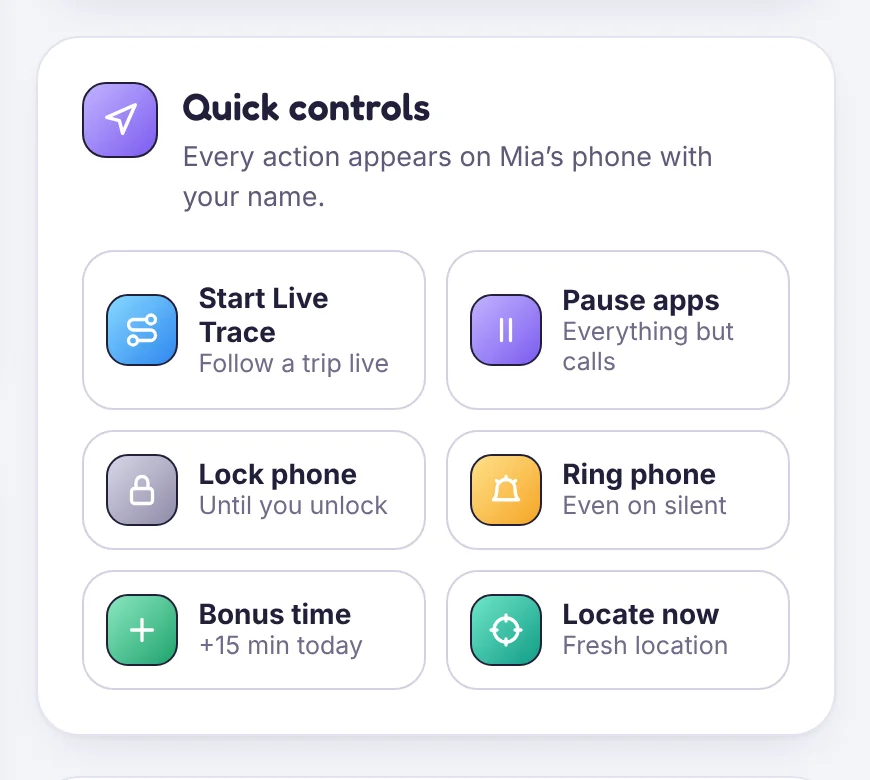
The controls
- Lock phone: for a set time, until you unlock it, or until bedtime ends. Add a line saying why.
- Pause apps: everything except calls and always-allowed apps.
- Bonus time: extra minutes for today.
- Ring phone: at full volume, even on silent. Useful when it’s lost in the house.
- Locate now: asks for a fresh location reading.
- Send a note: a message that stays on screen until it’s read.
When the phone is offline
Instructions wait and apply as soon as the phone reconnects. You can cancel one while it waits.
Command log
Device health → Command log lists every instruction from the last 24 hours: who sent it, and whether it was delivered, waiting, applied or cancelled. Your child’s phone keeps the same list for 30 days.
Tip
A lock with a reason (“Dinner’s ready, back at 7:30”) lands very differently from a phone that just stops.
Still stuck?
Contact support
Tell us which step you reached and what you see on screen. Screenshots help.