Tell your child: the first conversation
A short script for setup day: what you will look at, what you won’t, and how the rules will change as they grow.
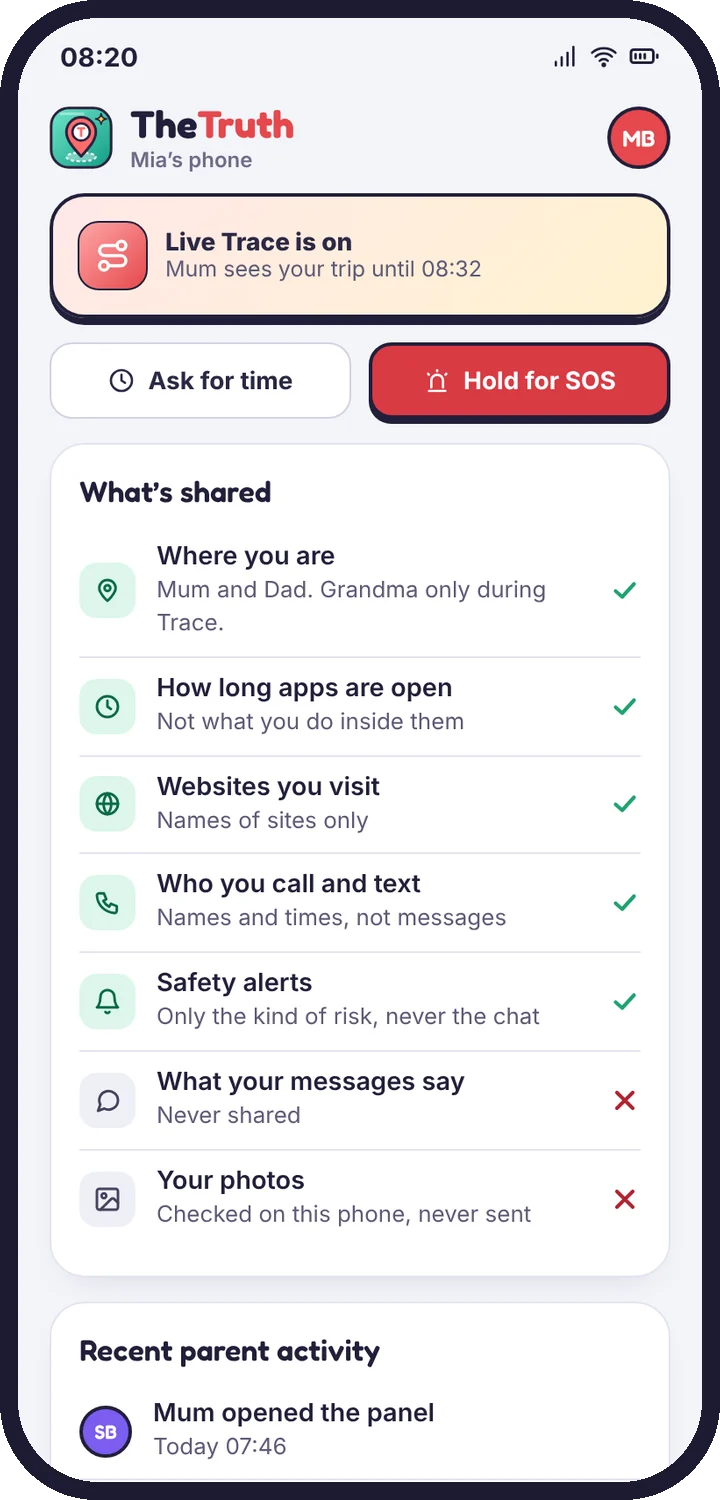
TheTruthSpy is designed to be seen. The app sits on your child’s home screen, their phone lists what’s shared, and it shows when a parent opened the panel. Setup day is the natural moment to talk about it.
A simple way to say it
- Why: “This is so I know you’re safe getting around, and so we can agree on screen time without arguing.”
- What I will see: “Where your phone is, how long apps are open, which websites you visit, and an alert if something looks dangerous.”
- What I won’t see: “I can’t read your chats or see your photos.”
- What changes later: “When you’re older, the rules relax. We’ll look at it again on your birthday.”
Read What’s shared together
Open What’s shared on their phone and go through it line by line. It is the same list you see in the panel, in plain words.
Agree on how to ask
Show them the Ask for more time button and the I’m OK check-in. Knowing there is a polite way to ask makes them much less likely to look for a way around the rules.
Set a review date
Pick a date to review the rules, such as their next birthday. The panel’s Growing up plan can relax rules on that date automatically. See What your child can see.
Tell us which step you reached and what you see on screen. Screenshots help.