Deleted WhatsApp Account: What Comes Back When You Re-Register

Can you recover a deleted WhatsApp account? Not as it was. Once you choose Delete account, WhatsApp says you can’t regain access to it. You can register the same phone number again whenever you like, but that creates a new account. Your contacts reappear from your phone’s address book. Chats return only if a backup survived outside WhatsApp’s reach. Groups, your profile and starred messages don’t come back.
First, check it was really deleted
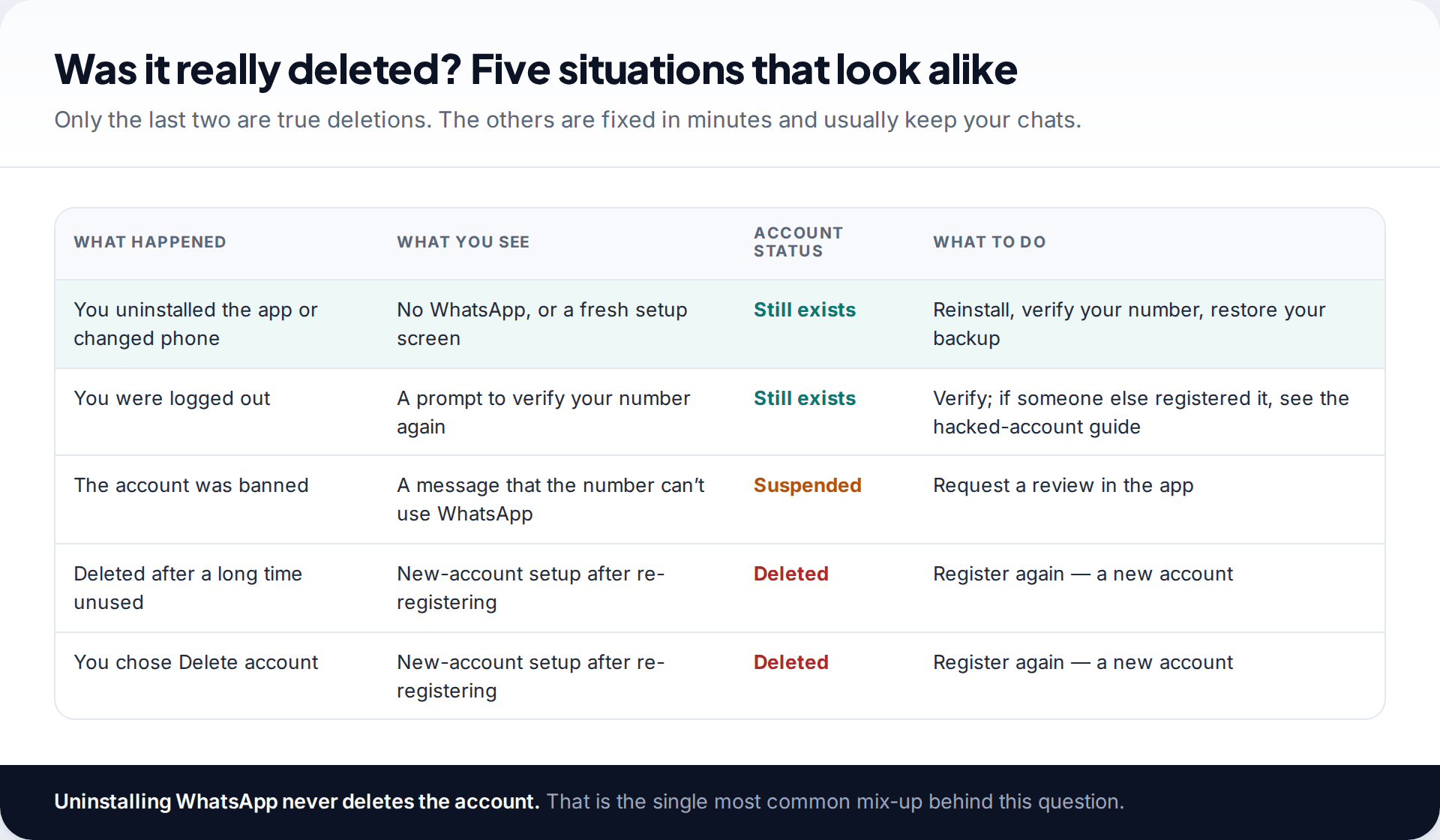
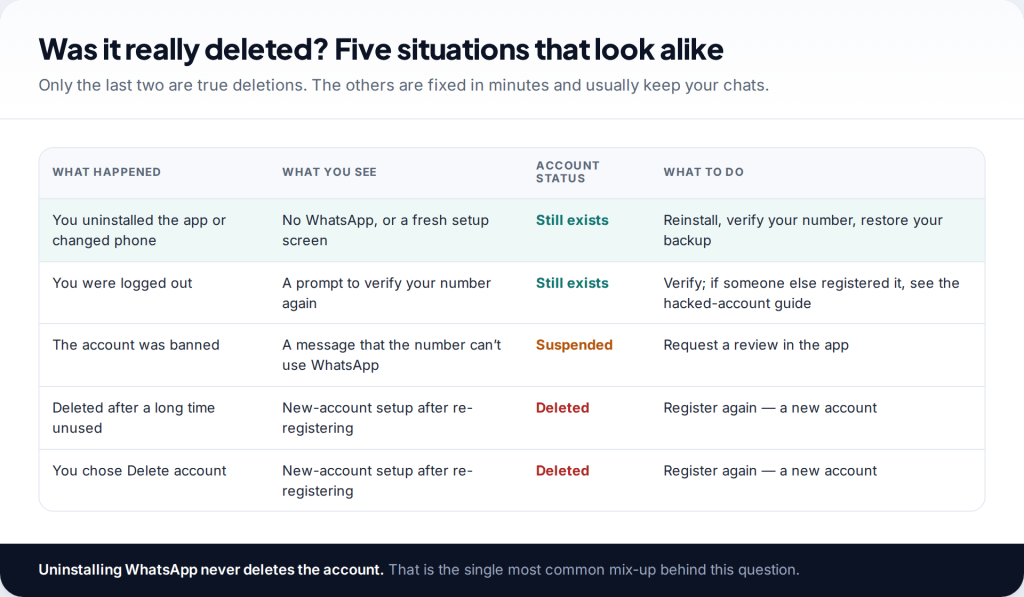
People searching for how to recover a deleted WhatsApp account are often in one of three other situations, all of them better news.
- You uninstalled the app or changed phones. This doesn’t delete the account. Reinstall WhatsApp, verify your number and restore your Google or iCloud backup when prompted.
- You were logged out. WhatsApp asks you to verify your number again. If that happened because someone registered your number on their own phone, see our guide to recovering a hacked WhatsApp account.
- The account was banned. A ban blocks the number from WhatsApp, but it isn’t a deletion, and there’s an appeal (covered below).
The two genuine deletions are when you, or someone with your phone, used Delete account in settings, and when WhatsApp removed an account that hadn’t connected for a long time.
What “Delete account” actually removes
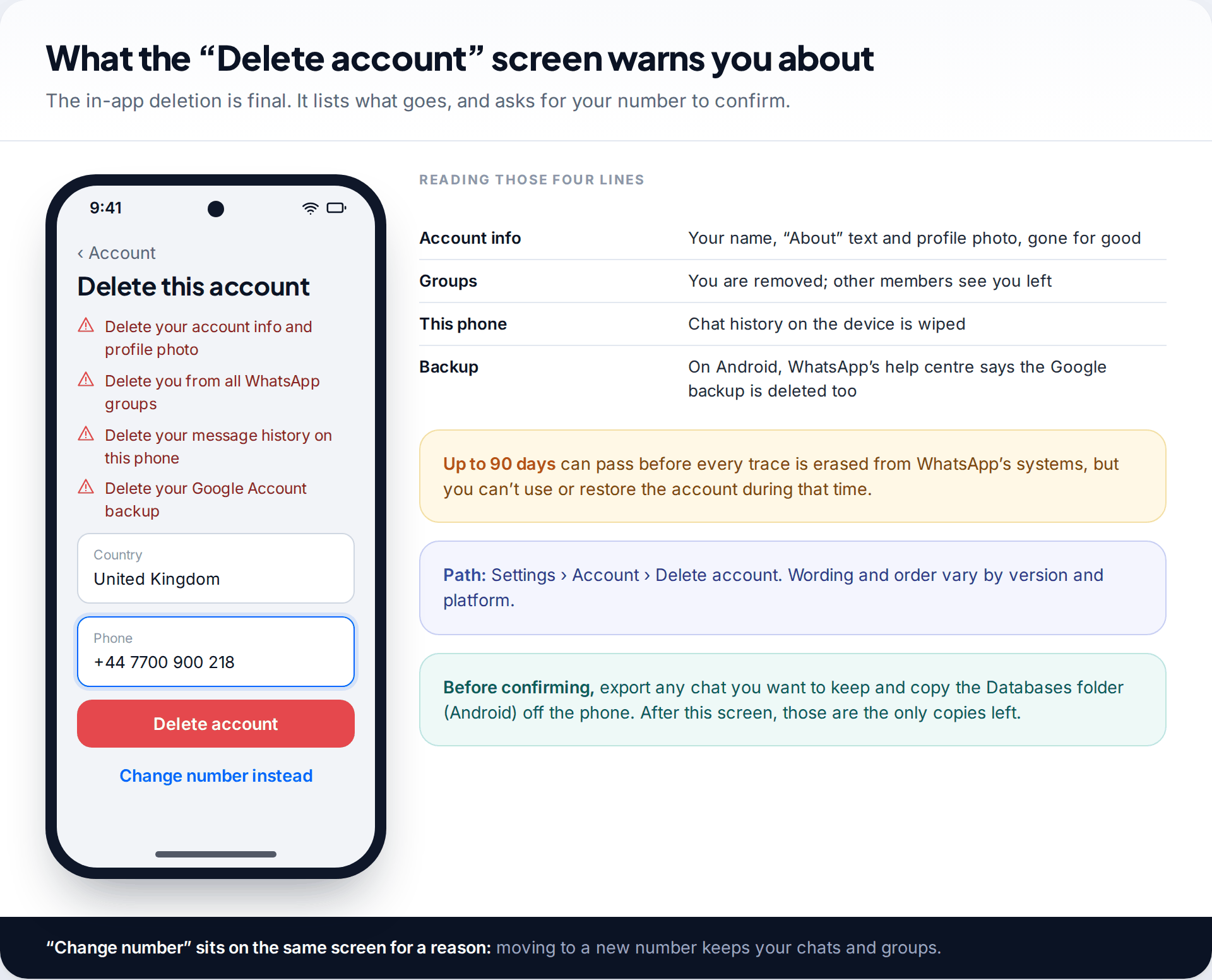
The in-app option lives under Settings › Account › Delete account. It asks you to type your phone number to confirm. The screen lists what happens, and WhatsApp’s help centre repeats it: your account information and profile photo are deleted, you’re removed from all your groups, and the message history on the phone is erased. On Android, WhatsApp says the Google backup is deleted too.
WhatsApp’s help centre is also clear that the step can’t be reversed. If you delete your account, you can’t regain access to it. It adds that full deletion of your information can take up to 90 days from the start of the process, and that copies may remain for a time in backup storage used for disaster recovery. That 90-day figure describes WhatsApp’s housekeeping, not a window in which you can change your mind. Your information isn’t available to you during that time.
Paid “account recovery” services can’t reverse this. Nobody outside WhatsApp can restore a deleted account. Anyone who asks for your verification code as part of “recovery” is trying to take the new account too.
How to recover a deleted WhatsApp account’s number: register again
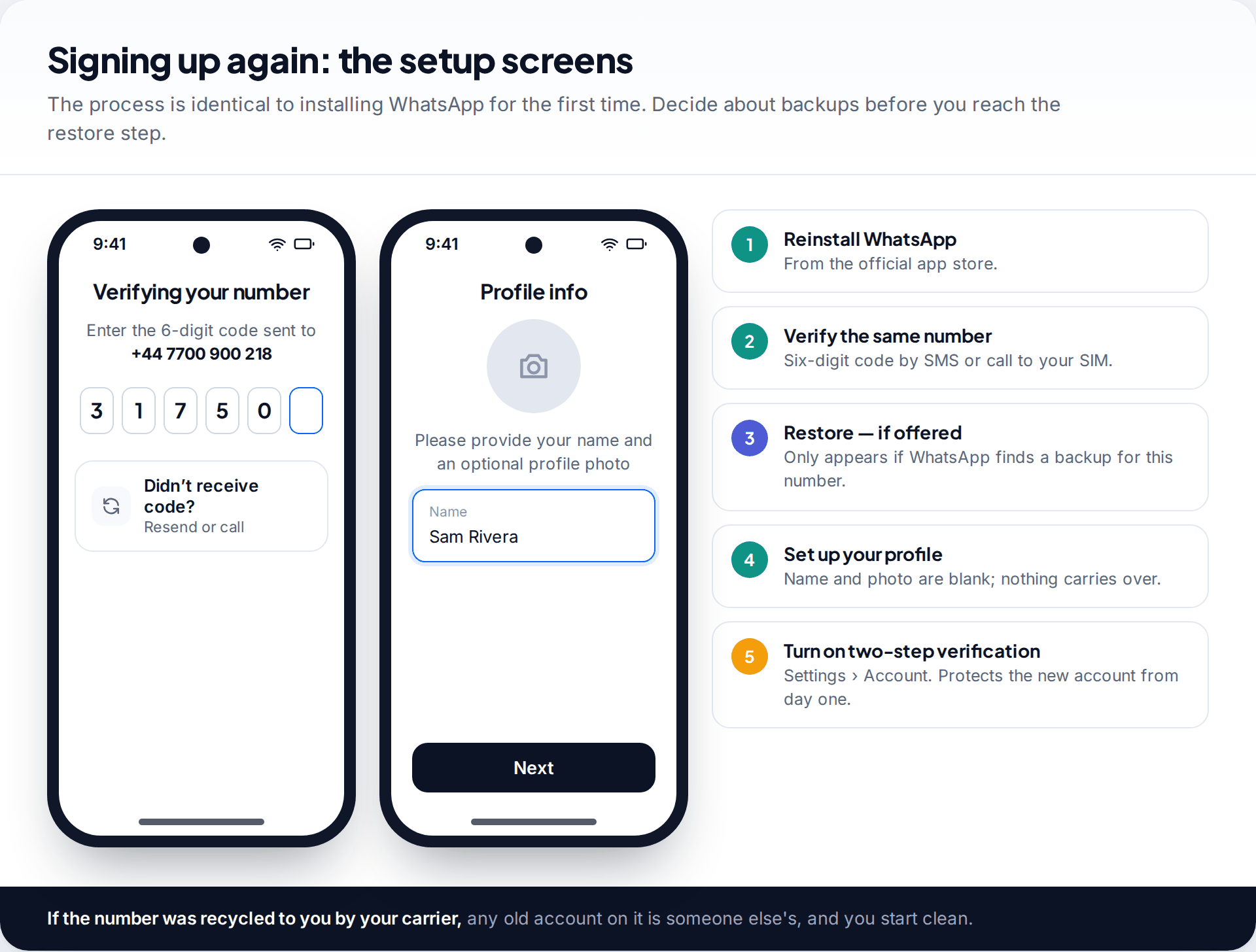
You can use your number on WhatsApp again straight away. Install the app, verify the same number with the six-digit code, and set up your profile. There’s no waiting period for signing up again after deleting. The limit is on getting the old account back, not on having an account.
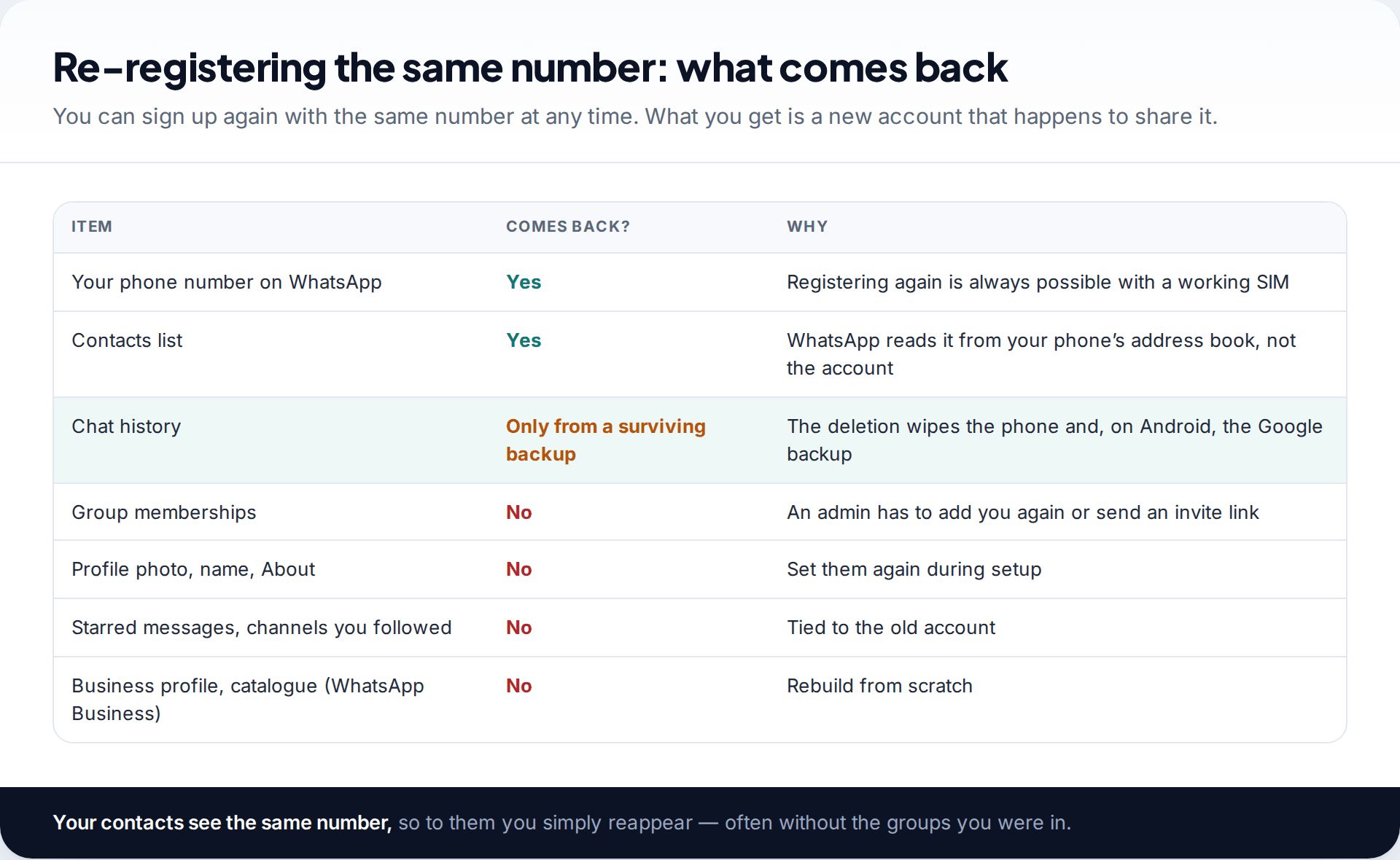
Some things return, some don’t. Your contact list appears as normal, because WhatsApp builds it from your phone’s address book, and your contacts see your number reappear. Your name, photo and About text are blank until you set them. Group memberships are gone. You’ll need an admin in each group to add you again. Starred messages, channels you followed and, for WhatsApp Business, your business profile and catalogue don’t carry over.
Can the chats come back?
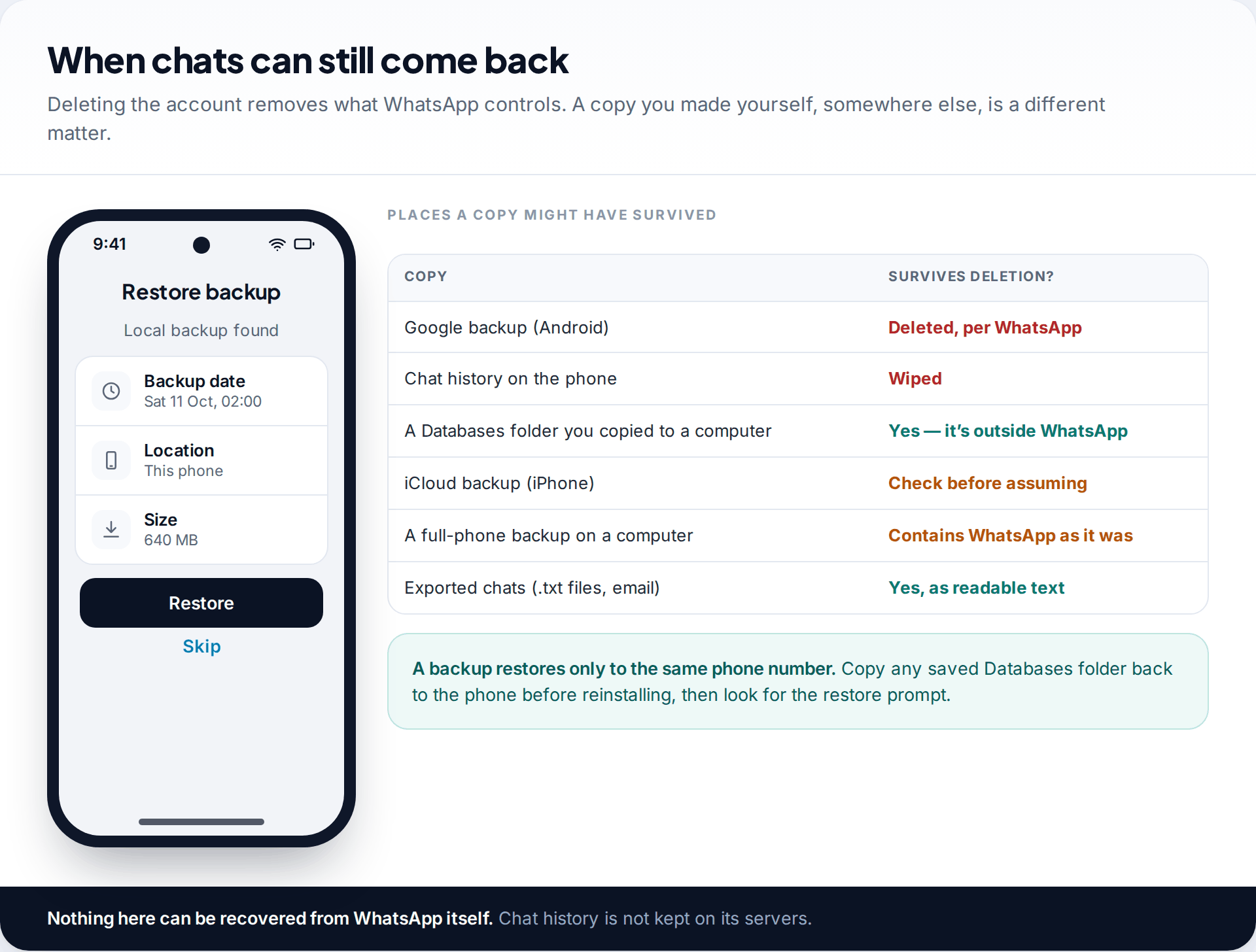
Only if a copy survived somewhere WhatsApp’s deletion couldn’t reach. WhatsApp keeps no chat history on its servers, so it has nothing to restore for you. The deletion wipes the phone’s history and, on Android, the Google backup. What’s left are copies you made yourself:
- A saved copy of Android’s Databases folder, for example one you copied to a computer before deleting. Put it back on the phone in the same location before reinstalling. WhatsApp should then offer to restore it for the same number.
- A full-phone backup on a computer, which contains WhatsApp’s data as it was on that date. Restoring it resets the whole phone to that point, which is a big step, so weigh it first.
- Exported chats. Any conversation you exported as a file stays readable as text. It can’t be imported back into WhatsApp as a chat, though.
Photos and videos may have survived separately
Media often outlives the chats. On iPhone, if WhatsApp’s Save to Photos setting was on, pictures and videos you received were copied into your Photos library, and they stay there after the account is gone. On Android, WhatsApp media is stored in its own folders on the phone. If Google Photos or another app was set to back up those device folders, copies may be in your cloud library. Neither brings back the conversation around them, but for many people the photos are what matters most.
On iPhone, WhatsApp’s chat backup lives in iCloud. We couldn’t confirm from WhatsApp’s own pages whether deleting the account always removes it. If you reinstall and WhatsApp offers an iCloud restore for your number, it’s worth checking the date and trying. Don’t assume either way. For the mechanics of restoring, including dates and file names, see our guide to recovering deleted WhatsApp messages from backups.
Deleted it by mistake just now? The first hour
If you’ve only just tapped Delete account, the old account is already gone, but a few quick steps limit the damage.
- Look for any backup files before reinstalling. On Android, open the Files app and check Android › media › com.whatsapp › WhatsApp › Databases. If any msgstore files remain, copy the whole folder to a computer or cloud storage before doing anything else. They may not survive the reinstall otherwise.
- Register the number again so people who message you reach you, and so your number isn’t left free on WhatsApp.
- Restore if WhatsApp offers a backup, after checking its date.
- Ask the people you talk to most for their copies. Every one-to-one chat you had still exists on the other person’s phone. They can use Export chat to send you a file of the conversation, with or without media. It won’t slot back into WhatsApp, but the words, photos and voice notes are saved.
- Message group admins for invite links while the group names are fresh in your mind.
The same applies if someone else deleted the account while they had your phone: you register again as above. Then secure the phone itself, because whoever did it may try again.
WhatsApp Business accounts
Deleting a WhatsApp Business account works the same way, and it’s just as final. The business profile, catalogue, labels, quick replies and automated messages all go with it. Customers keep their own copies of your conversations. After re-registering, you rebuild the profile from scratch, so keep a note of your business description, hours and catalogue items somewhere outside the app.
The 90-day and 120-day rules
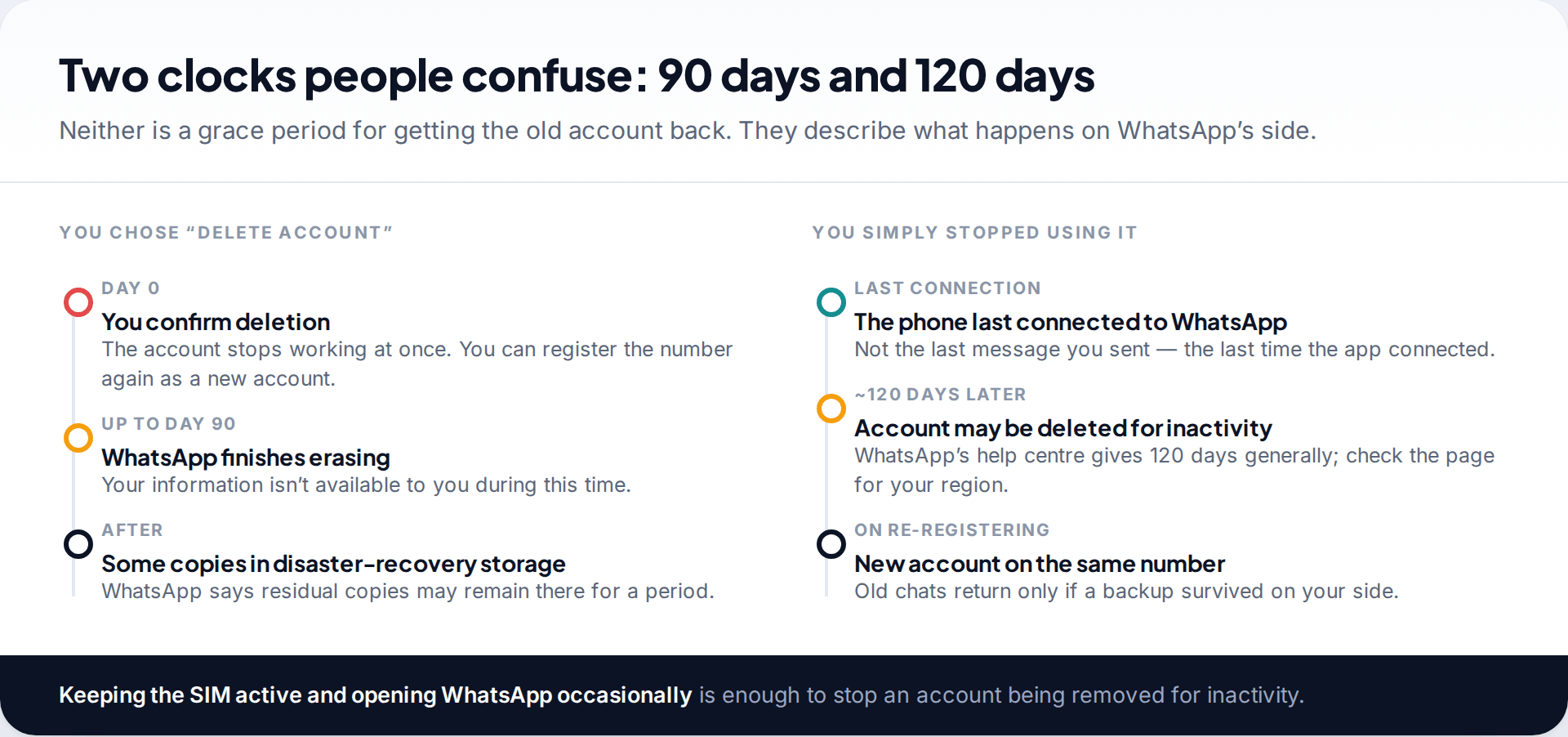
Two numbers come up in almost every discussion of this, and they’re often mixed up.
After you delete
How long WhatsApp may take to erase a deleted account’s information from its systems. The account is already unusable and can’t be restored.
After you stop connecting
WhatsApp’s help centre says accounts are generally deleted after 120 days of inactivity. Inactivity means the app hasn’t connected to WhatsApp. Uninstalling and forgetting about it can end this way. Some reports give different periods for some regions, so check the page that applies to you.
Registering again
You can always sign up again with the same number. After an inactivity deletion, what comes back follows the same rules as above.
The practical lesson from the inactivity rule: if you’re taking a long break from WhatsApp, keep the SIM active and open the app every few months. And keep a backup you can reach.
Banned, not deleted: request a review
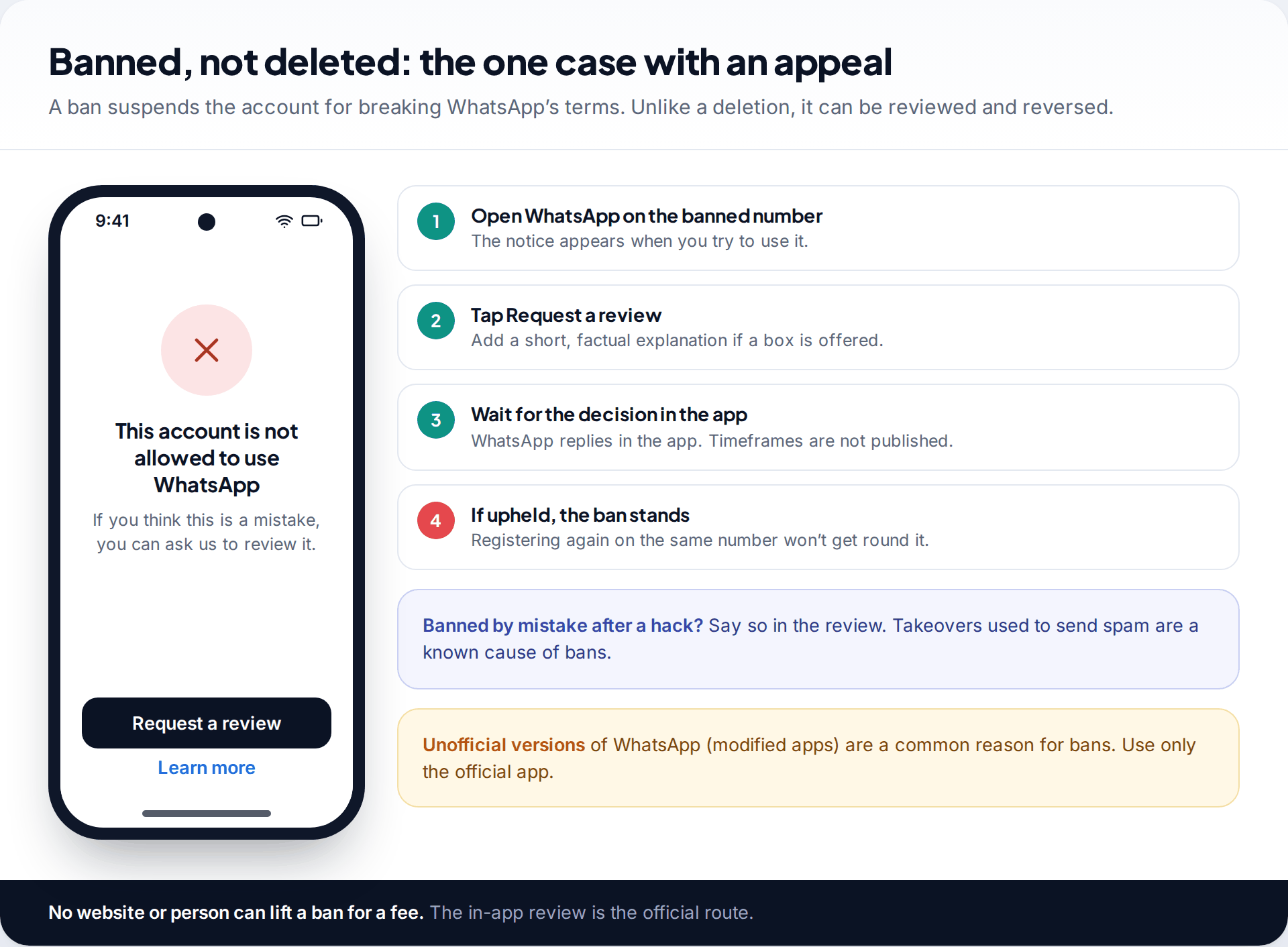
A banned account shows a notice that the number can’t use WhatsApp, usually with an option to request a review. That’s the official appeal route, and it’s free. If the ban followed a takeover in which your account was used to send spam, say so plainly. Common causes include bulk or automated messaging and unofficial, modified versions of WhatsApp.
If the review restores the account, your chats are usually where you left them. If it’s upheld, the ban stays with the number. Services claiming to “unban” accounts for a fee can’t do anything the in-app review can’t.
Rebuilding: groups, profile and the people you talk to
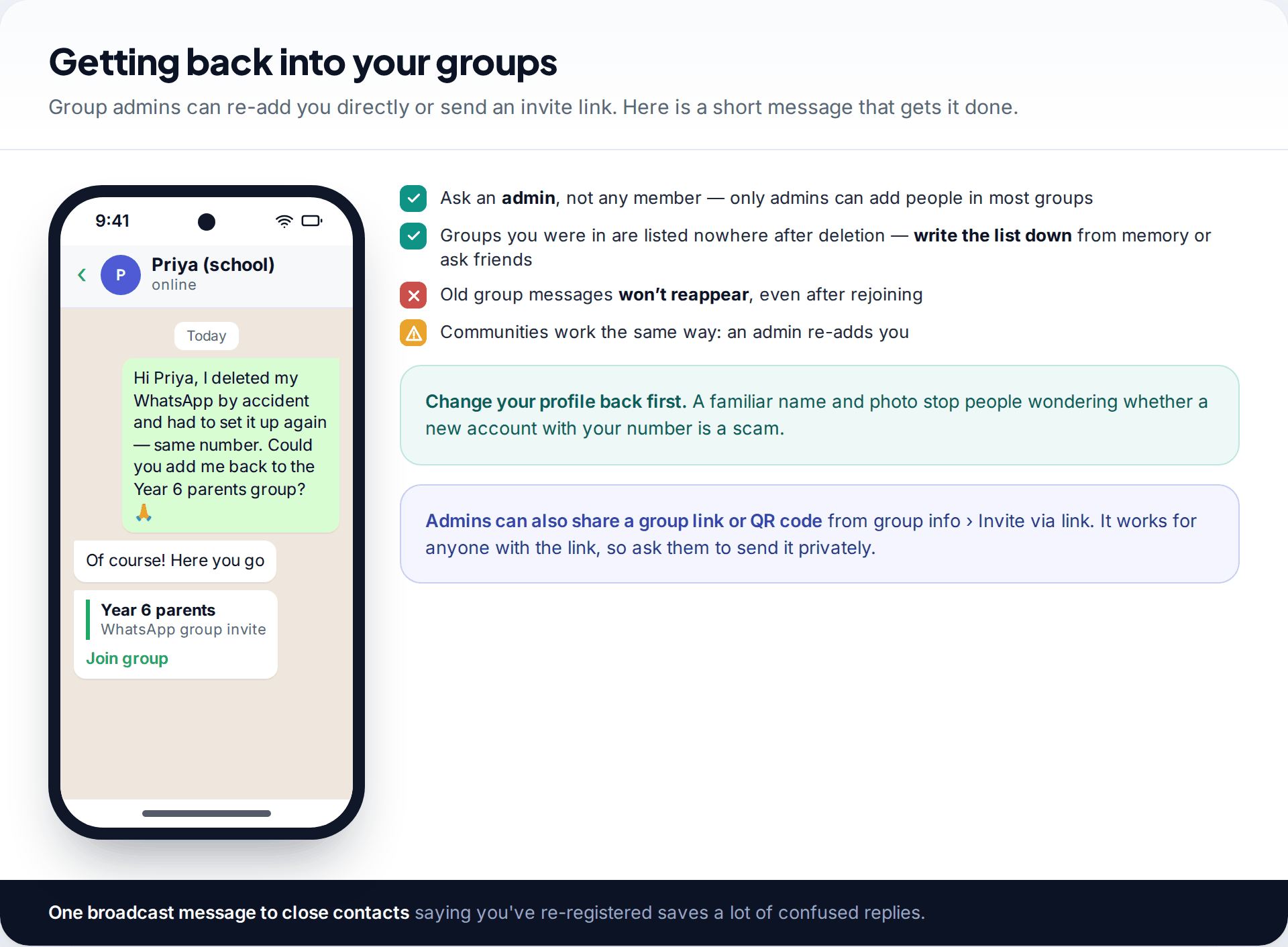
Start with your profile: the same name and photo as before tell people this is really you, not a scammer using your number. Then list the groups you were in, from memory or by asking friends, and ask an admin in each one to add you or send an invite link. Old messages in those groups won’t reappear for you, but you’ll see everything from the moment you rejoin.
Finally, turn on two-step verification under Settings › Account. A freshly registered account with no PIN is easy for someone else to take, especially if people know you’ve just set it up again.
If you’re thinking about deleting it again
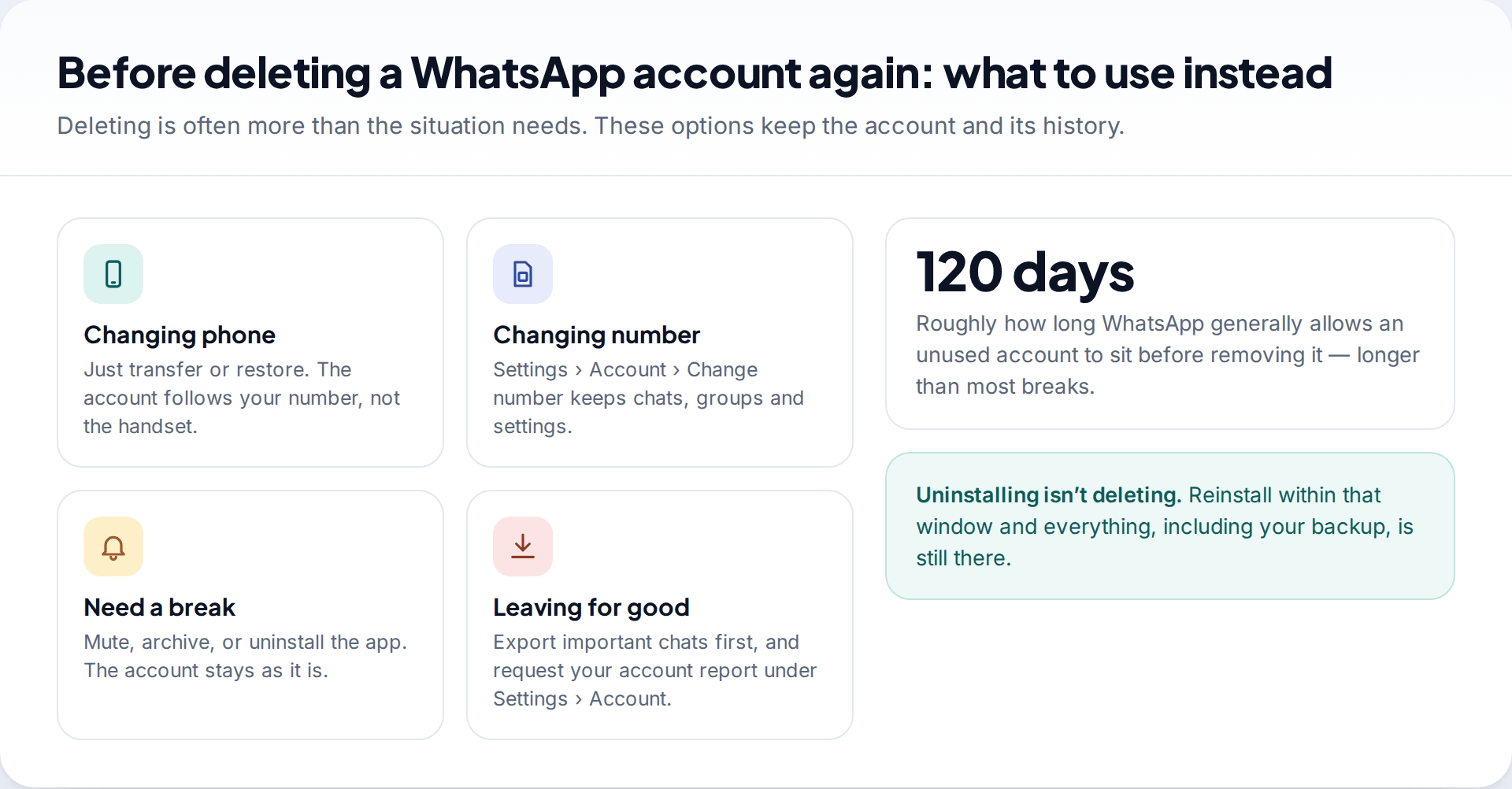
Deleting is often more than the situation calls for. Changing phones only needs a transfer or a restore. Changing numbers has its own feature, Change number, which keeps your chats and groups. A break needs no more than muting, archiving or uninstalling. If you do want to leave, export the chats that matter first, and download your account report from Settings › Account › Request account info.
How this page was put together
The account-deletion steps, the 90-day deletion period and the inactivity rule were checked in September 2026 against WhatsApp’s help centre and its terms, and cross-checked with independent coverage. Where WhatsApp’s pages don’t answer a question, we say so, as with the iCloud backup after deletion, rather than guessing.
We didn’t delete a real account to test this and don’t recommend any recovery or unbanning service. See how we research and correct guides.
Common questions
Can I recover my WhatsApp account after deleting it?
No. WhatsApp says a deleted account can’t be restored. You can register the same number again, which creates a new account without your previous groups or profile.
Can I recover WhatsApp messages after deleting my account?
Only from a backup you kept outside WhatsApp, such as a copied Databases folder on Android or a full-phone computer backup. The Google backup is deleted along with the account on Android.
How long after deleting WhatsApp can I use the same number?
Straight away. The up-to-90-day period refers to WhatsApp erasing your old data, not to a wait before signing up again.
Does uninstalling WhatsApp delete my account?
No. Your account stays active. Reinstall and verify your number to use it again, and restore your backup when prompted. Leaving it unused for around 120 days can lead to deletion for inactivity.
Will my contacts know I deleted my account?
Groups show that you left. Individual contacts may notice your profile photo disappear. When you register again they see the same number, with whatever name and photo you set.
What if I lost the phone number as well?
Without the number you can’t register it on WhatsApp again, because the verification code goes to that SIM. Ask your mobile carrier whether the number can be restored to you. If it has already been reassigned to someone else, it’s theirs to use, and you’ll need to start WhatsApp on a new number.
Can WhatsApp support undo an account deletion?
No. You can contact support from Settings › Help › Contact us with questions, but support can’t restore a deleted account or its chats. The deletion is permanent by design.
Can someone else delete my WhatsApp account?
Only with access to WhatsApp on your phone, or after taking over your number. The deletion screen asks for the account’s number to confirm, which is why a phone lock and two-step verification matter.
Looking for a tool to go with this? TheTruthSpy is a free parental control app for Android that stays visible on the child's phone. If it fits your family, see the Social media alerts feature.
Related guides
How to Fix a Phone That Keeps Freezing or Restarting
Fixes for a frozen or rebooting iPhone or Android phone, from a one-minute force restart to recovery mode, with a…
What to Do If Your Phone Gets Wet
Dropped your phone in water? What to do in the first five minutes, hour and day, what IP68 really means,…
Phone Not Charging? How to Find the Cause and Fix It
A ten-minute elimination test for a phone that won't charge: cable, adapter, port, software and battery, plus what liquid, heat…
Parental controls your child can see
Location, screen time limits, a web filter and alerts from notifications — free, and visible on your child's phone. Pair a phone in about ten minutes.
Android · Free to set up · Visible on your child's phone