Can Someone Track Your Phone and Read Your Texts? What It Takes

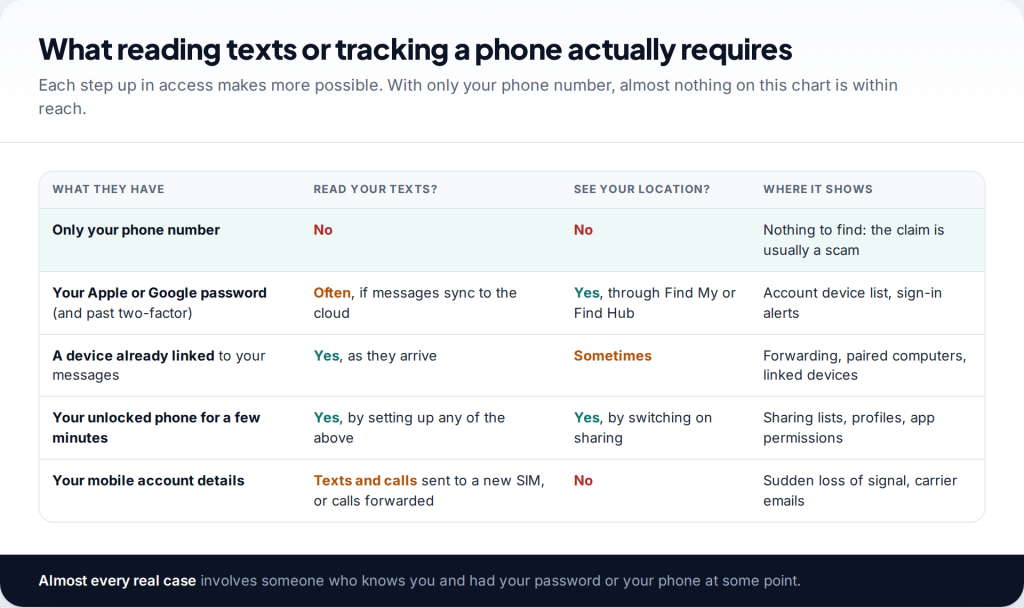
Films suggest that anyone with your number can read your messages and follow your phone on a map. In reality, can someone read my texts? Only with access you would recognise: a device signed in to your account, your unlocked phone, or control of your mobile account. Each route leaves traces you can check in a few minutes, and each one can be closed.
- Your number alone is not enough. Services claiming otherwise are almost always scams.
- Most real cases are account access. A Mac, iPad or browser signed in to your account receives your messages as they arrive.
- Look for the linked devices first. Forwarding, paired computers and linked-device lists show live access directly.
- Closing routes can be noticed. If you are worried about how the other person will react, plan the timing first.
What reading texts or tracking a phone really takes
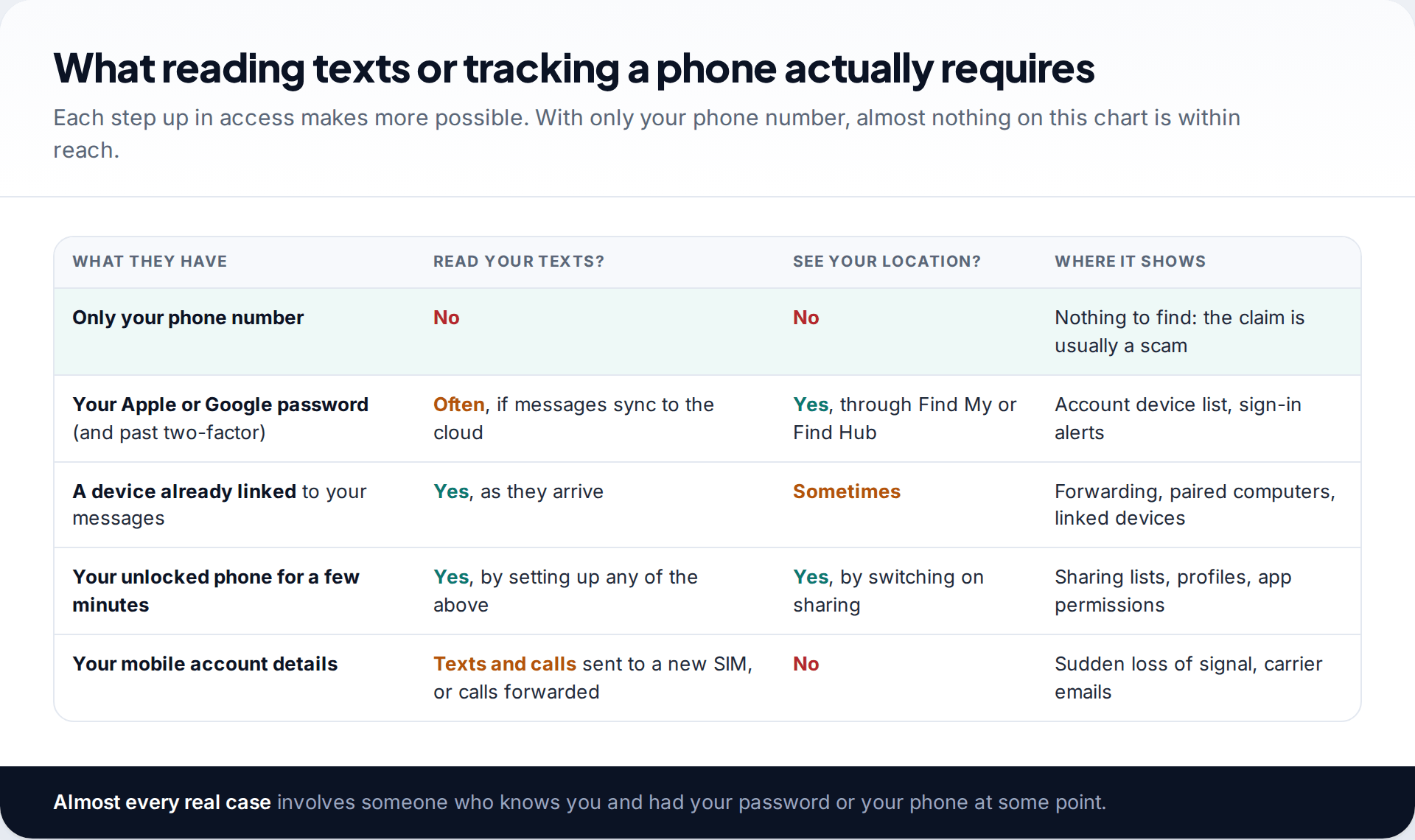
Your texts live in three places: on your phone, in your cloud account if you use sync or backups, and on any other device you have linked to your messaging apps. Your location is similar. It is on your phone, and it is shared only through features that you, or someone holding your phone, switched on. To read or track either, a person has to reach one of those places.
That rules out the most common fear. A phone number is an address for calls and texts. It does not open your messages or your location to anyone. Websites that promise to “track any number” or show your texts are either collecting a fee for nothing or trying to get you to install something. Our explainer on tracking a phone with just the number covers what those services really do.
What actually works is more ordinary and more personal. In almost every real case, the person reading someone’s texts is a partner, ex-partner or family member. They knew a password, had the phone unlocked for a few minutes, or set up the phone or account in the first place.
Can someone read my texts from another device?
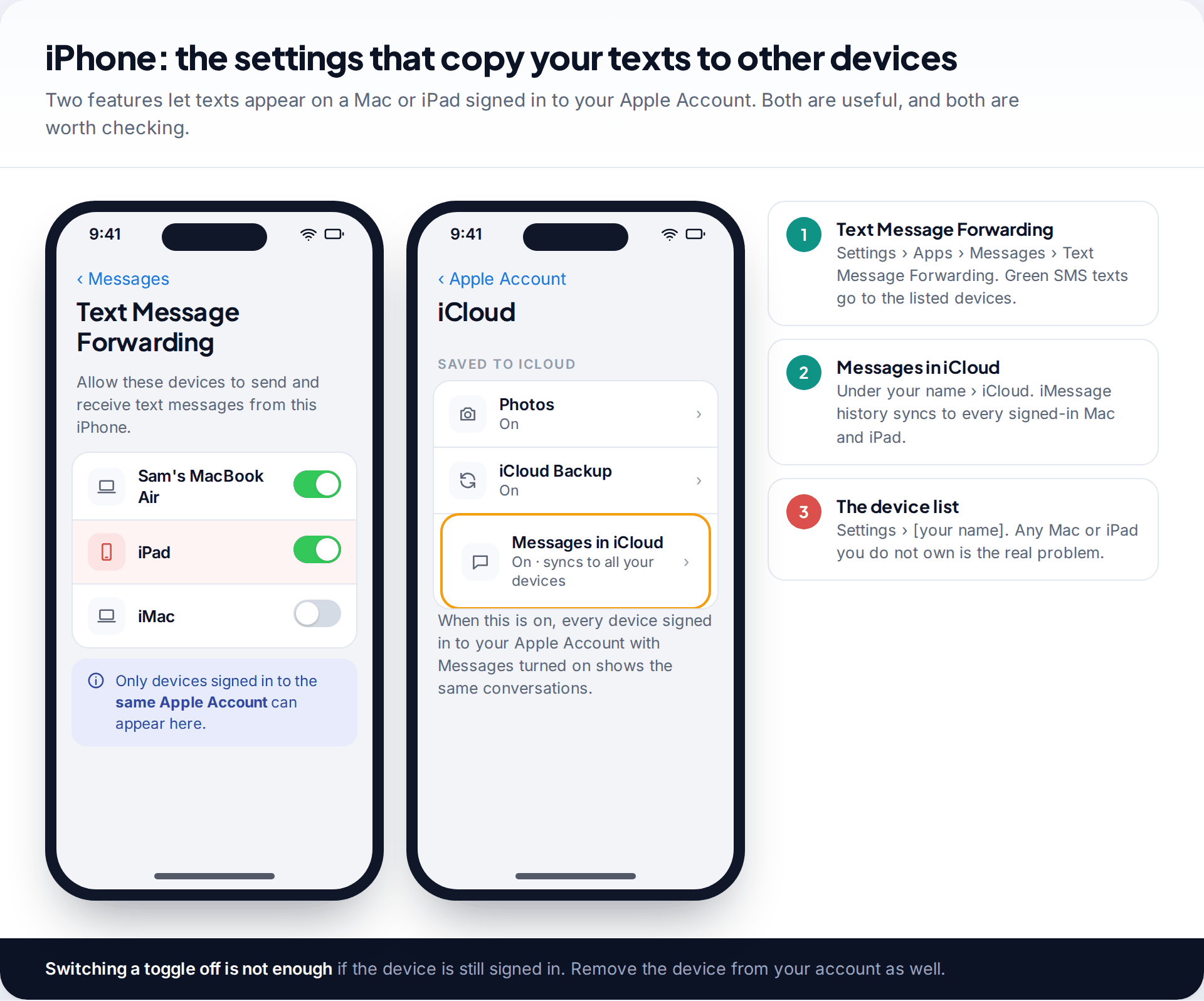
This is the most common route, and the easiest to miss, because it uses features designed for convenience. On an iPhone, Text Message Forwarding sends your ordinary SMS texts to a Mac or iPad, and Messages in iCloud keeps your iMessage history in step across every device signed in to your Apple Account. If someone has an iPad or Mac signed in to your account, they may see your conversations as they happen, without touching your phone.
Check Settings › Apps › Messages › Text Message Forwarding for the devices allowed to send and receive your texts. Then open Settings › [your name] and look at the device list at the bottom. That list is the one that matters. Turning off forwarding while an unknown iPad is still signed in only closes one door.
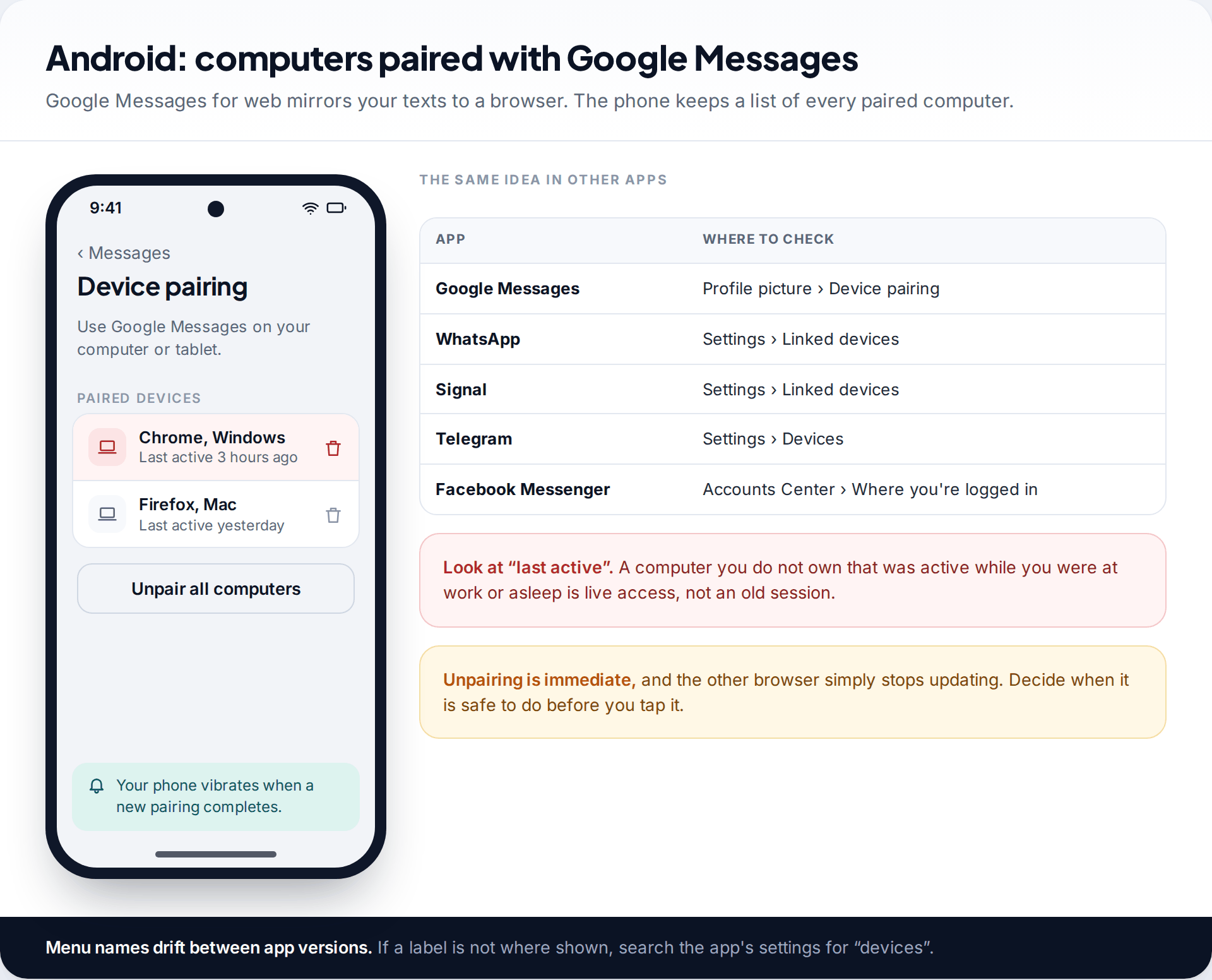
On Android, Google Messages can mirror your texts to a web browser. Tap your profile picture in the app, then Device pairing, to see every paired computer. You can remove one at a time or choose Unpair all computers. Google’s help pages note that your phone vibrates when a new pairing completes, which is worth remembering if the phone ever buzzed while someone else was holding it.
Other apps work the same way. WhatsApp and Signal show linked devices in their settings, and Telegram lists active sessions. Each is a place to look for a computer or tablet you do not own.
Someone inside your Apple or Google account
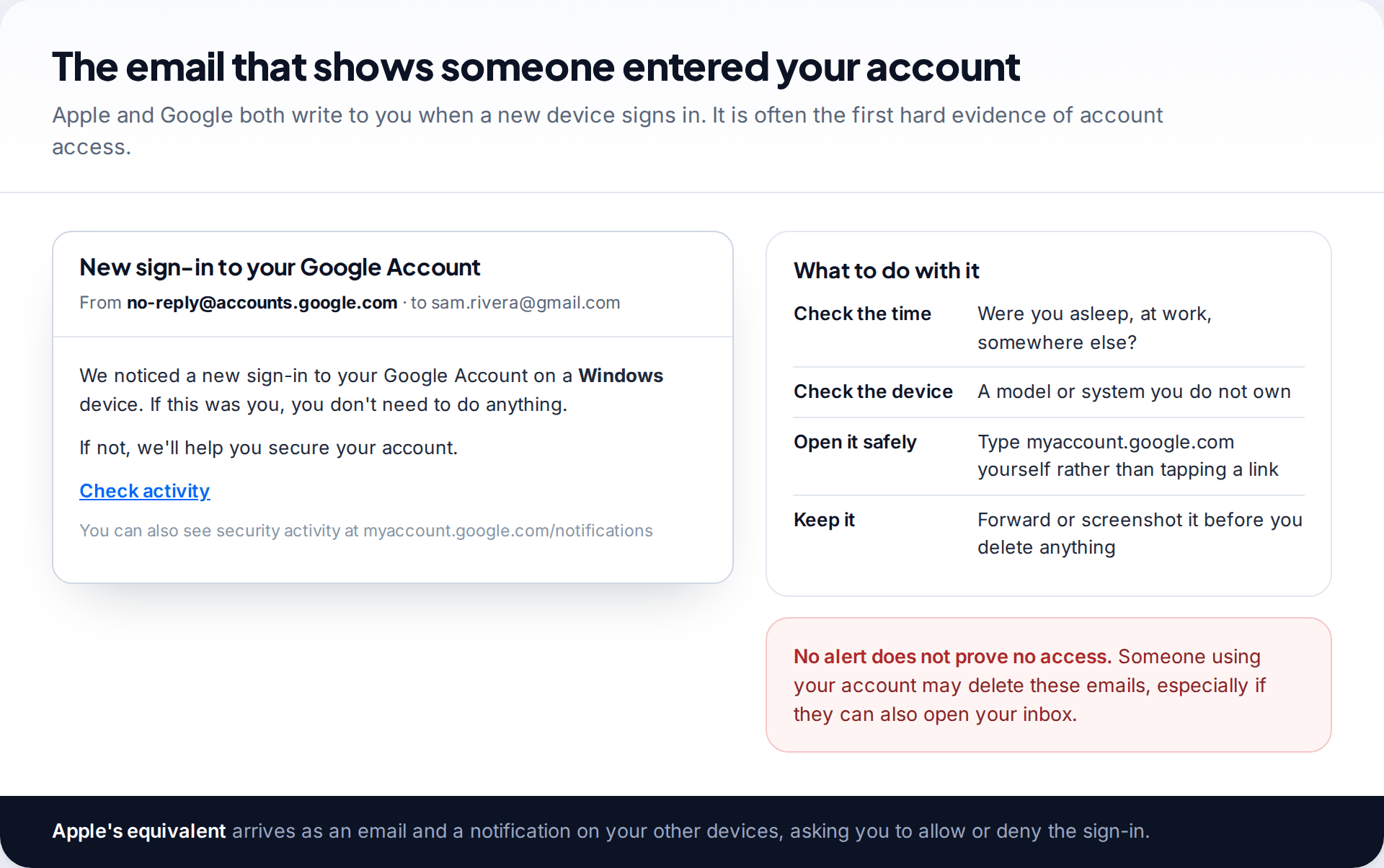
Your cloud account reaches further than your messages. It can hold photo libraries, notes, contacts, browsing history, backups and, through Find My on iPhone or Find Hub on Android, your phone’s live location. Someone who knows your password and gets past two-factor authentication can see these from anywhere.
Both companies notify you when a new device signs in. Search your email for those alerts, and check the device lists: Apple’s under Settings › [your name], Google’s at myaccount.google.com under Security › Your devices. Also look at the phone numbers and email addresses that can reset your password. An extra number there lets someone back in after every password change. The Apple side of this is covered in detail in our guide to telling whether someone has access to your iCloud.
An app on your phone that reads messages
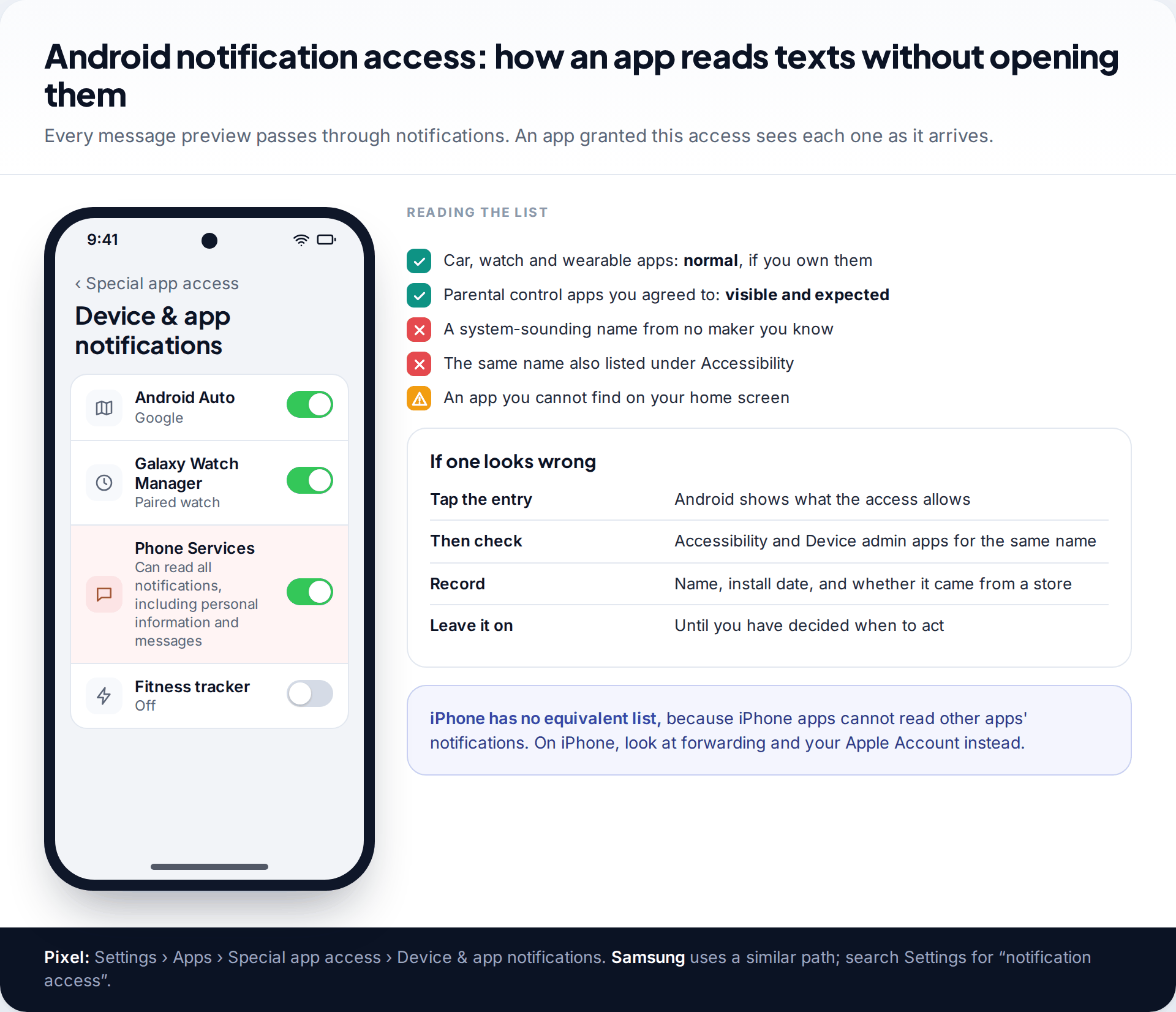
Stalkerware, the monitoring apps sold for installing on someone else’s phone, needs the unlocked phone in the installer’s hands. On Android it usually reads texts through two permissions: notification access, which sees every message preview, and Accessibility, which can read screen content in any app. Both are listed in Settings, and an app cannot use either without appearing there.
On an iPhone that has not been jailbroken, apps cannot read other apps’ messages. Monitoring there almost always runs through the Apple Account instead, which is why the forwarding and device checks above matter more for iPhone users.
Your phone number: forwarding and SIM swaps
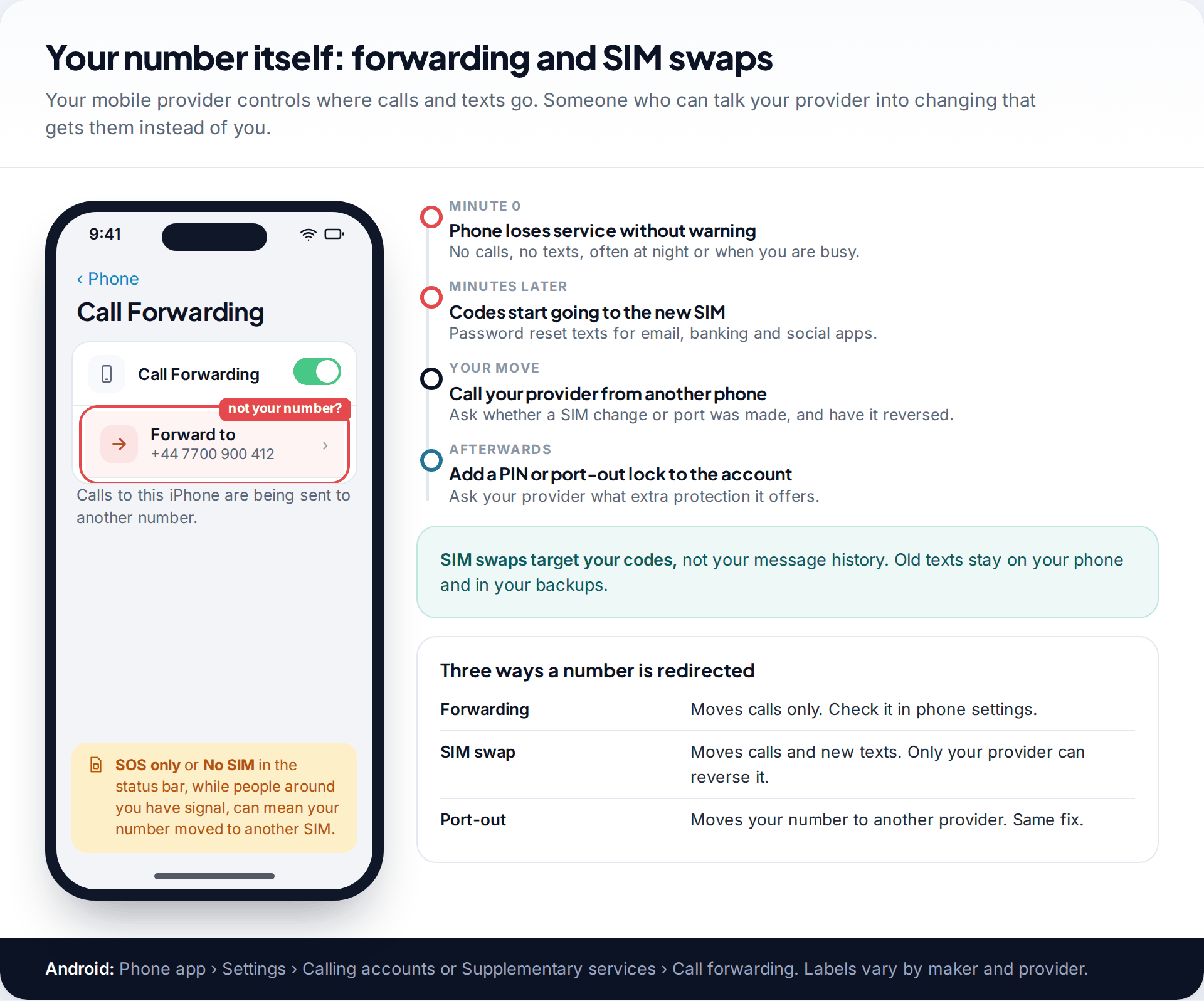
Your mobile provider decides which SIM card your number rings. Someone who persuades a provider to move your number to their SIM, often by impersonating you, starts receiving your calls and new texts. That includes the codes sent to reset passwords. It does not give them your old message history, which stays on your phone. The warning sign is sudden: your phone shows no service or SOS only while others nearby have signal. Call your provider from another phone straight away.
Call forwarding is simpler. It sends your calls, not texts, to another number. On an iPhone it is under Settings › Apps › Phone › Call Forwarding on networks that support it. On Android, look in the Phone app’s settings. If it is on and you did not set it, turn it off and ask your provider to add a PIN or password to your account.
Can someone track your phone’s location?
Location follows the same pattern as texts. Someone can see where your phone is if you share your location with them through Find My, Google location sharing or a family app. They can also see it if they are signed in to your Apple or Google account, or if a tracking device is hidden in your bag or car. Check location sharing on iPhone in Find My under People, and on Android under Settings › Location › Location services › Google Location Sharing. Both phones can warn you about unknown Bluetooth trackers travelling with you, and Android offers a manual scan under Settings › Safety & emergency › Unknown tracker alerts.
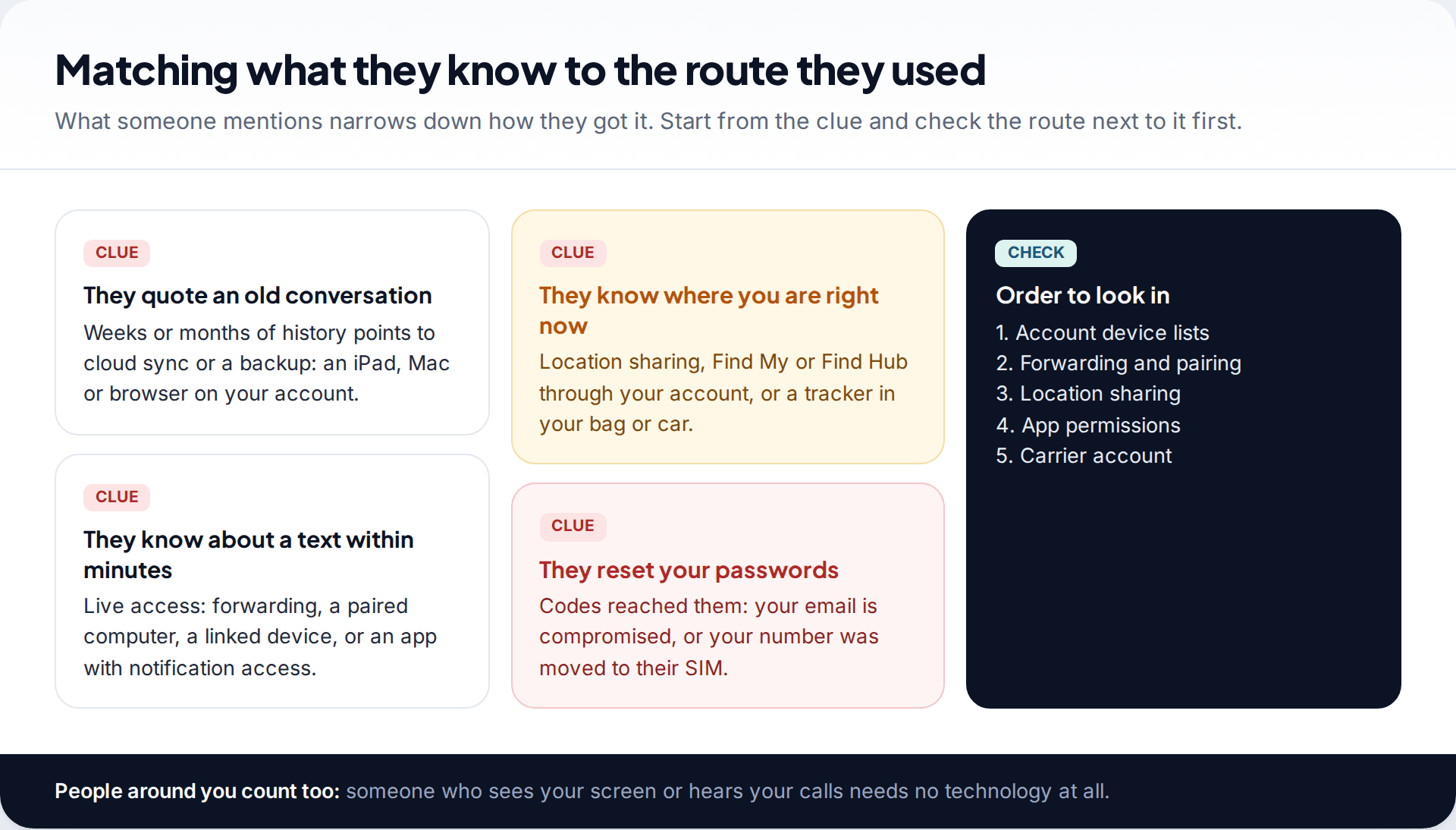
What the clues tell you helps. Someone who knows about old conversations probably has cloud access. Someone who reacts to a text within minutes has live access through a linked device, forwarding or an app. Someone who turns up where you are has location sharing, account access or a tracker.
Why encryption does not settle the question
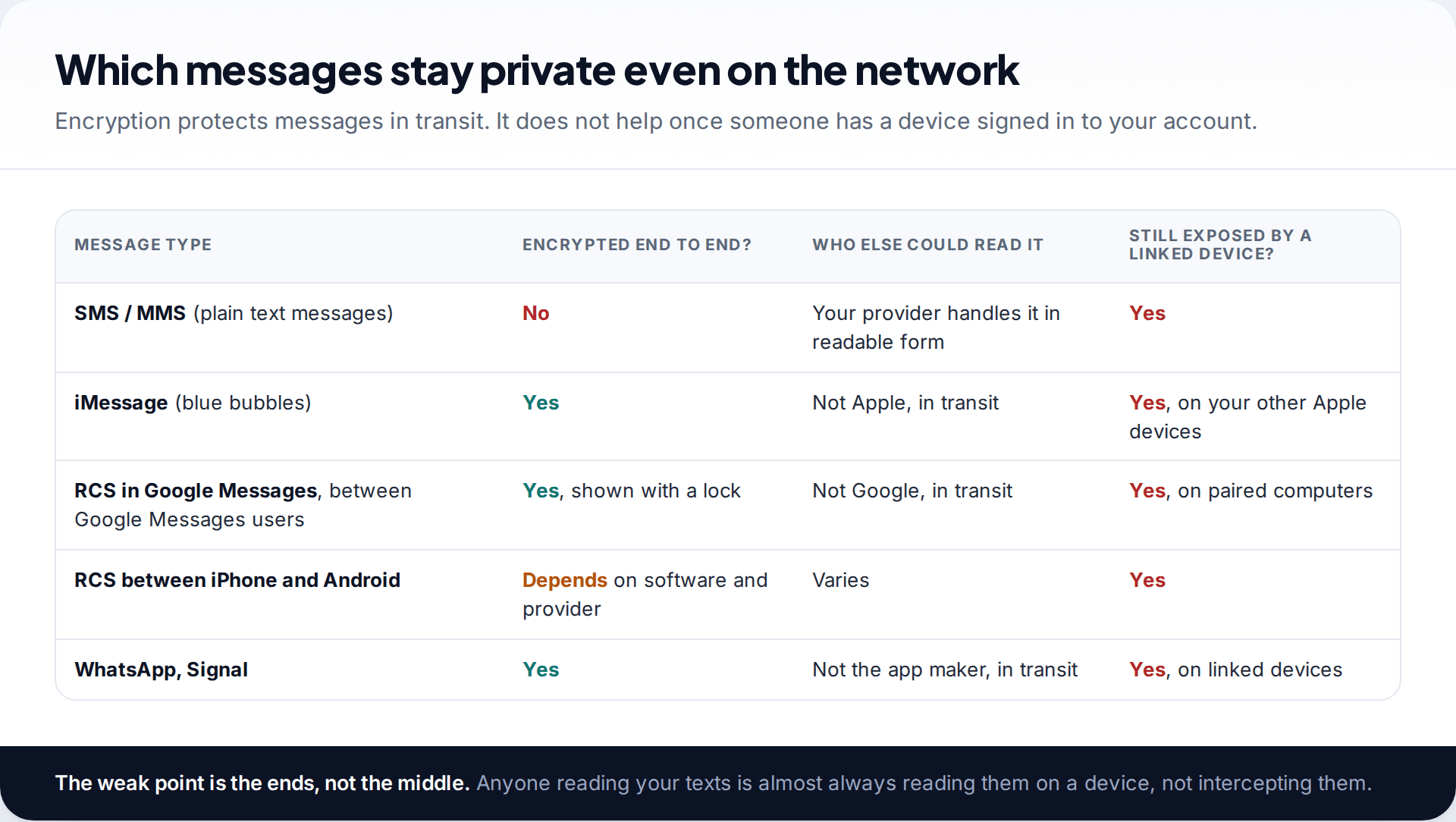
People are often told that end-to-end encryption means nobody can read their messages. It means nobody can read them on the way, including the company that runs the service. iMessage, WhatsApp, Signal and RCS chats between Google Messages users are protected like this. Plain SMS texts are not. Your provider handles them in readable form, and they are the texts copied by forwarding and SIM swaps.
But encryption ends at each device. A Mac signed in to your Apple Account, or a browser paired with your messaging app, decrypts your messages just as your phone does. That is why the checks on this page focus on devices and accounts, not on networks. For the person in your life who might be reading your texts, the network was never the route.
Closing the routes without making things worse
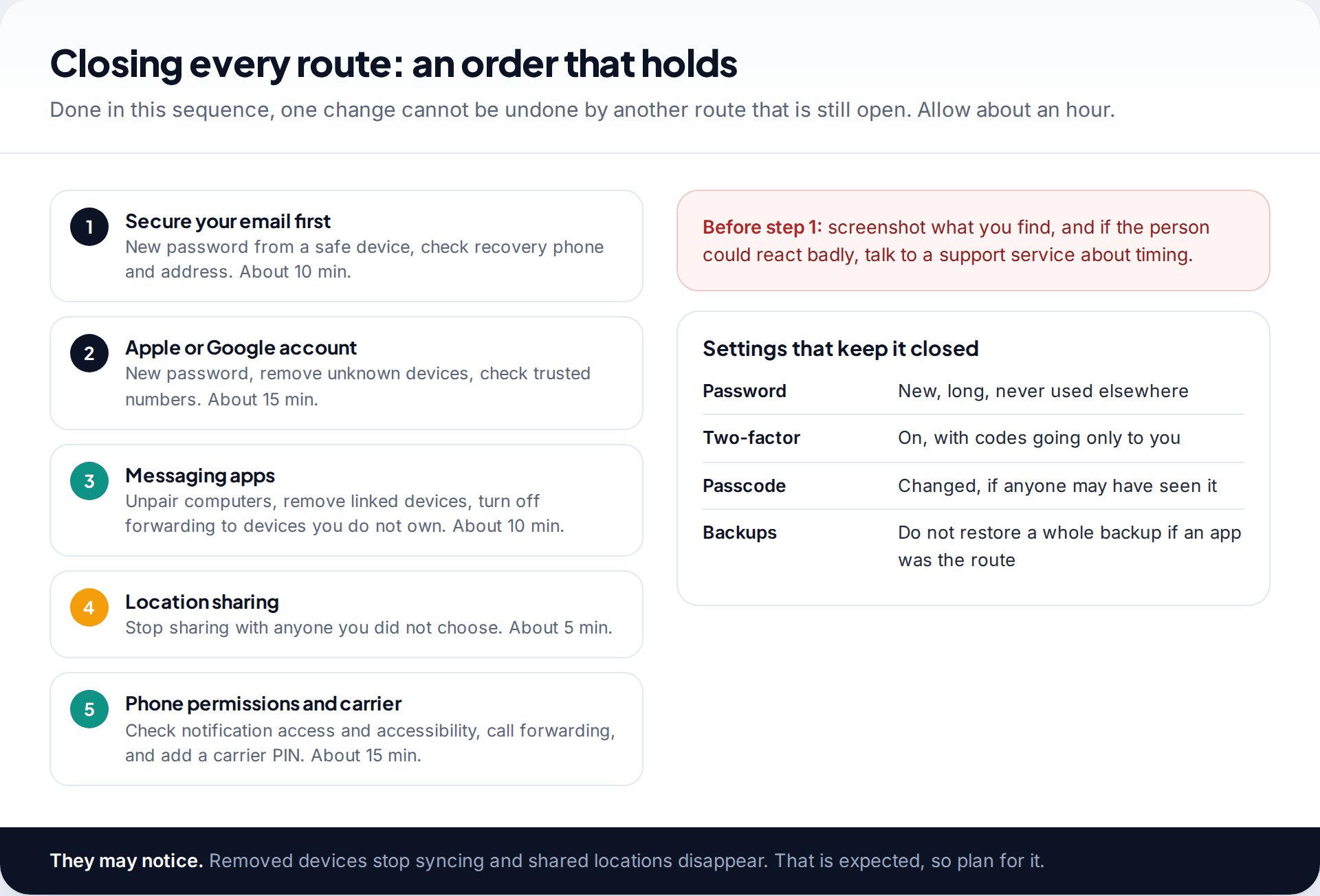
The order matters. Start with your email account, because it can reset every other password. Then secure your Apple or Google account: a new password, unknown devices removed, recovery details checked. Then unpair computers and linked devices in your messaging apps, stop unwanted location sharing, check app permissions, and add a PIN to your mobile account. Do it from a device the other person has never used, if you can.
A removed device appears again
Someone still knows the password, or can receive a code: an extra trusted phone number or a recovery email that is not yours.
Fix: change the password again from a safe device, then remove every trusted number and recovery address you do not control.
They still know what you texted after you unpaired everything
A route is still open: cloud backups, an app with notification access, or simply someone who sees your screen or hears about it from a contact.
Fix: work through the clue cards above again, and check the Android permission lists or your iPhone device list once more.
Your provider says no SIM change was made, but service keeps dropping
Weak coverage and faulty SIM cards cause the same symptom.
Fix: ask for a replacement SIM in person, with ID, and add an account PIN at the same visit.
Think about timing. Removed devices stop receiving messages, and a person who was following your location will see it disappear. If you are with someone who controls or frightens you, talk to a domestic abuse service before you make these changes, and keep screenshots of what you found.
What this page cannot cover
These checks cover the routes behind nearly all personal cases. They do not cover lawful interception by police, which works through providers and is not visible on your phone. Nor do they cover advanced commercial spyware aimed at journalists and officials, which exploits software flaws and is rarely found by ordinary checks. If you believe you are a target of that kind of attack, specialist digital security organisations can help. Keeping your phone updated is the best protection an individual has.
How this page was put together
We checked the menu paths and features against Apple’s Personal Safety User Guide, Google’s Messages and Android help pages, and FTC consumer guidance in September 2026. Apps rename their settings often, so search within settings if a label has moved.
We did not test phones or products for this page. You can read about how our guides are researched and corrected.
Common questions
Can someone read my texts without my phone?
Yes, if they have a device signed in to your Apple Account or paired with your messaging app, or access to your cloud backups. They cannot do it with your number alone.
Can someone read my deleted texts?
If the texts were synced or backed up before you deleted them, someone with access to that account or backup may still see them. Deleting a message on one device usually removes it from synced devices too, but not from older backups.
Can my partner see my texts if we share a phone plan?
The account holder can usually see billing records, such as numbers and times, depending on the provider. They cannot normally read message content through the plan.
Can someone read my WhatsApp messages from their phone?
Only through a linked device or by using your phone. Check Settings › Linked devices in WhatsApp and log out anything you do not recognise when it is safe to.
Will turning on airplane mode stop tracking?
It stops your phone reporting its location over mobile data and Wi-Fi while it is on, but it also cuts your calls and messages. It does not remove the access someone has, so the routes above still need closing.
Does a factory reset stop someone reading my texts?
It removes apps on the phone. It does not unlink an iPad signed in to your Apple Account or a paired computer, so check those separately.
Looking for a tool to go with this? TheTruthSpy is a free parental control app for Android that stays visible on the child's phone. If it fits your family, see what the app does.
Related guides
How to Remove Your Personal Information From Google Search
What Google will and won't remove, how Results about you works, people-search opt-outs, the right to be forgotten, Street View…
How to Protect Yourself From SIM Swap Fraud
How SIM swap fraud works, the signs your number has been moved, what to do in the first 30 minutes,…
How to Spot a Fake Online Shop Before You Pay
Two-minute checks to spot a fake online shop: domain age, reviews, scam checkers and company details, plus how to pay…
Parental controls your child can see
Location, screen time limits, a web filter and alerts from notifications — free, and visible on your child's phone. Pair a phone in about ten minutes.
Android · Free to set up · Visible on your child's phone