Reactivating a Deleted X (Twitter) Account Within 30 Days

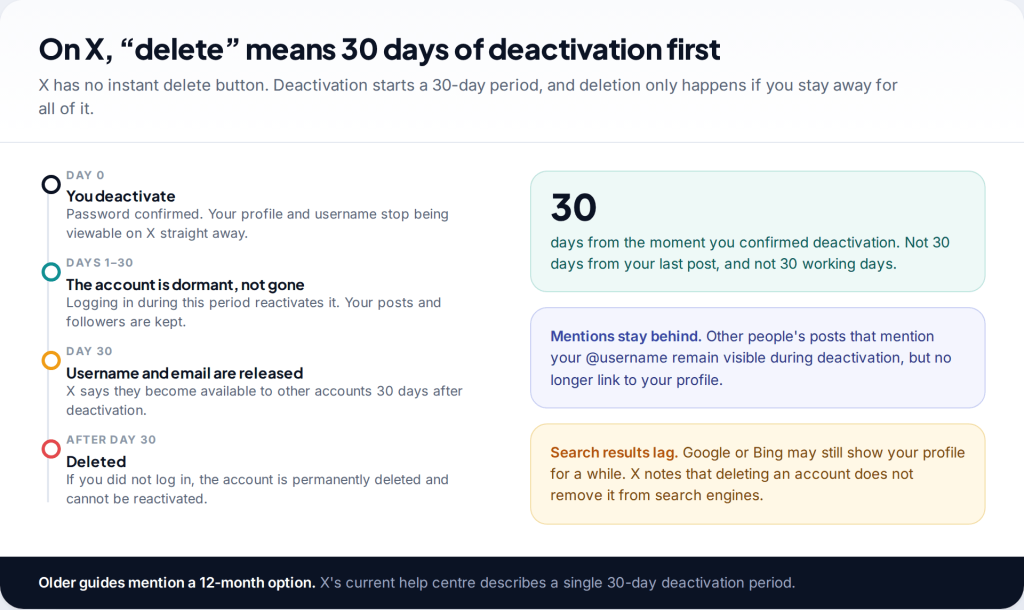
You can recover a deleted Twitter account, now called X, if fewer than 30 days have passed since it was deactivated. Just log in with your username, email or phone number and password, and confirm when X asks if you want to reactivate. Your posts and followers come back. After 30 days the account is permanently deleted, and neither you nor X support can restore it.
How deletion on X actually works
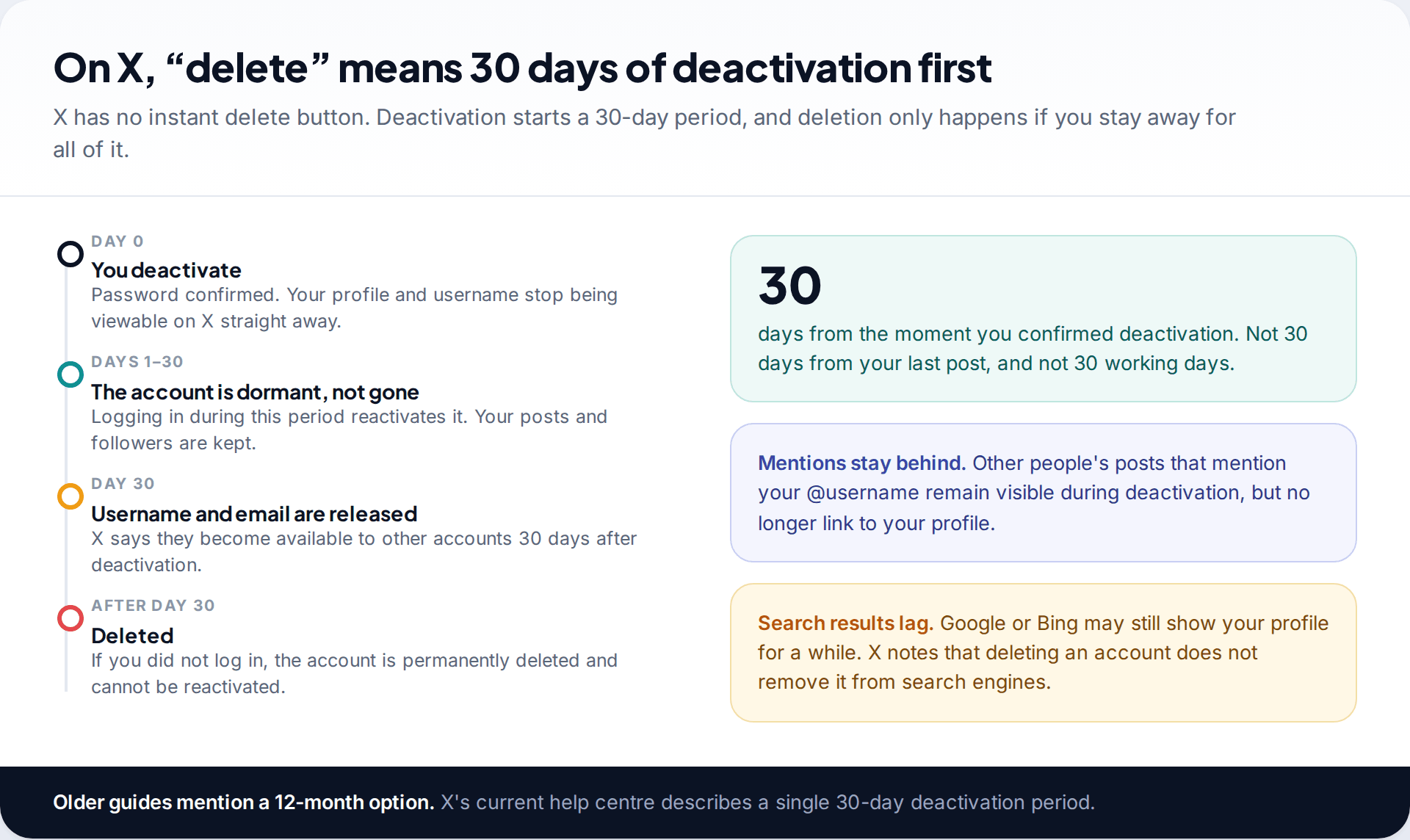
X doesn’t delete accounts on the spot. What people call “deleting Twitter” is deactivation, and deactivation is a 30-day holding period. During that time your display name, @username and public profile aren’t viewable on X. Your posts, follows and likes are kept, though, in case you come back. If you don’t log in before the period ends, the account is deleted for good.
Three details trip people up:
- The clock starts when you confirm deactivation, not from your last post or last visit.
- Your username and email are released after 30 days. X says the username and email address on a deactivated account become available to other accounts 30 days after deactivation. If you wanted to keep the name for a different account, you needed to change it before deactivating.
- Older articles mention longer windows. X’s help centre currently describes a single 30-day period. Plan around that.
Check the deactivation was yours
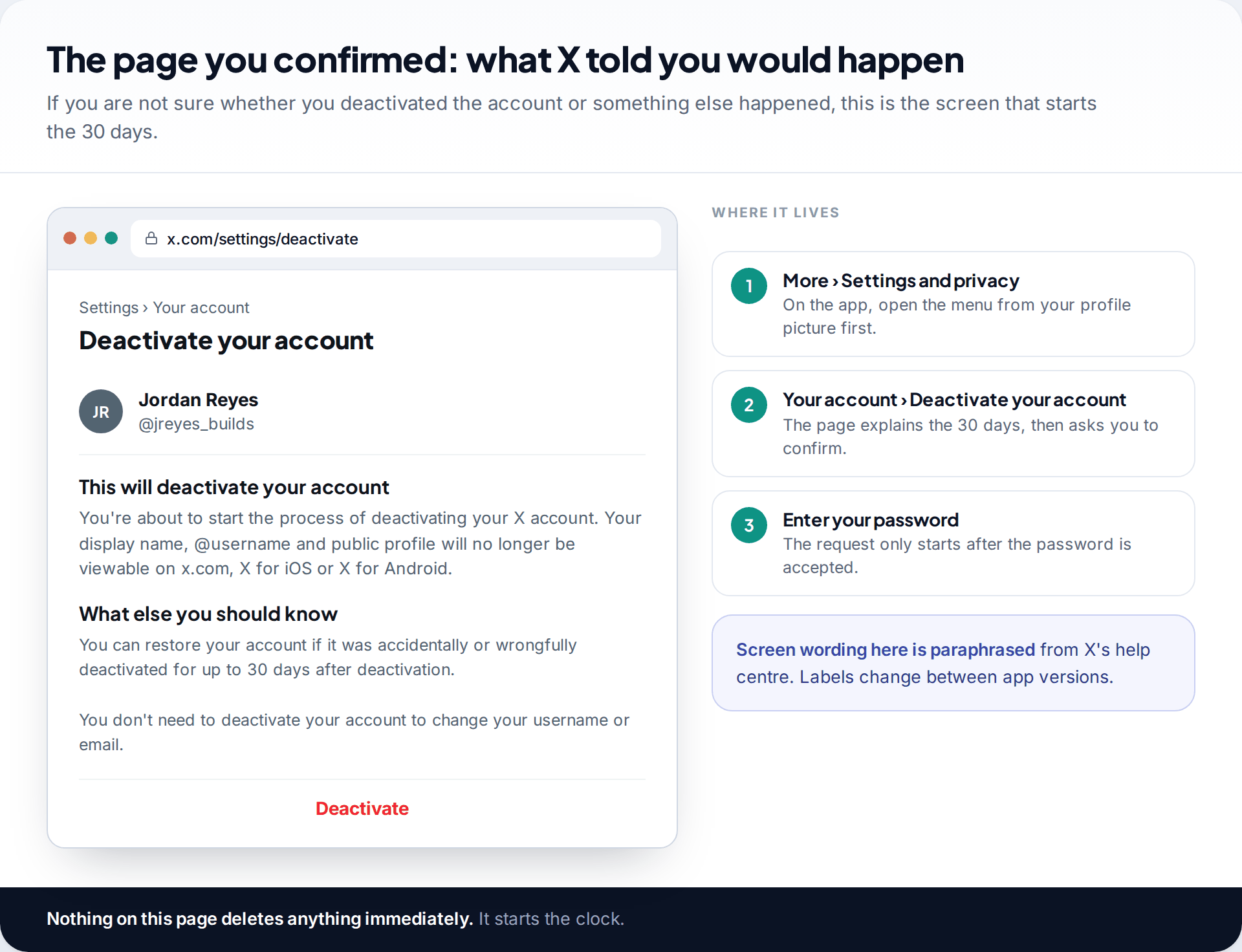
If you remember deactivating, skip ahead. If you don’t, it’s worth knowing what the process involves. On the website it runs through More › Settings and privacy › Your account › Deactivate your account. The app takes the same route from the menu behind your profile picture. X shows a page explaining what deactivation does and asks for your password before anything happens.
So a deactivation you didn’t make means someone had your password. That changes the priority: getting back in is still step one, but securing the email address on the account comes straight after. If the email itself has been taken over, our guide to recovering a hacked email account covers Gmail, Outlook and Yahoo.
How to recover a deleted Twitter account in the first 30 days
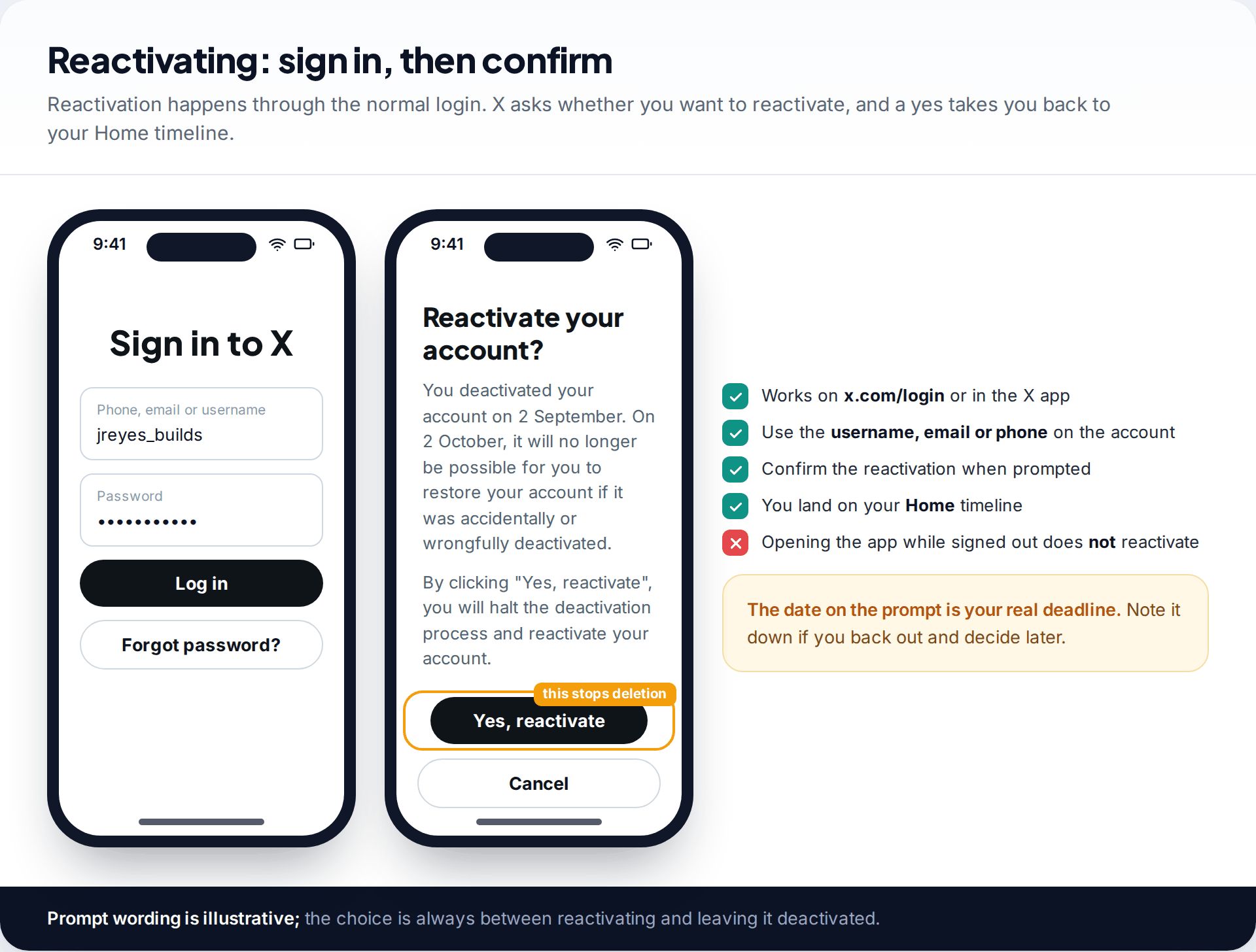
- Go to x.com/login or open the X app.
- Sign in with the username, email address or phone number on the account, and its password.
- Confirm reactivation. X asks whether you want to reactivate and usually shows the date after which restoring will no longer be possible.
- You’re taken to your Home timeline. The account is live again.
That’s all it takes. There’s no form and no need to contact anyone. What matters is a successful login before the deadline. Opening the app while signed out, browsing your old profile link or messaging X support doesn’t pause anything.
Day 27, on a new phone
Jordan deactivated after a bad week and has now changed phones. The X app is installed but signed out, and the password lived in the old phone’s keychain. Rather than trying passwords from memory and risking a lock, Jordan taps Forgot password?, receives the code at a Gmail address, sets a new password, signs in and confirms the reactivation prompt.
If your followers and posts look missing
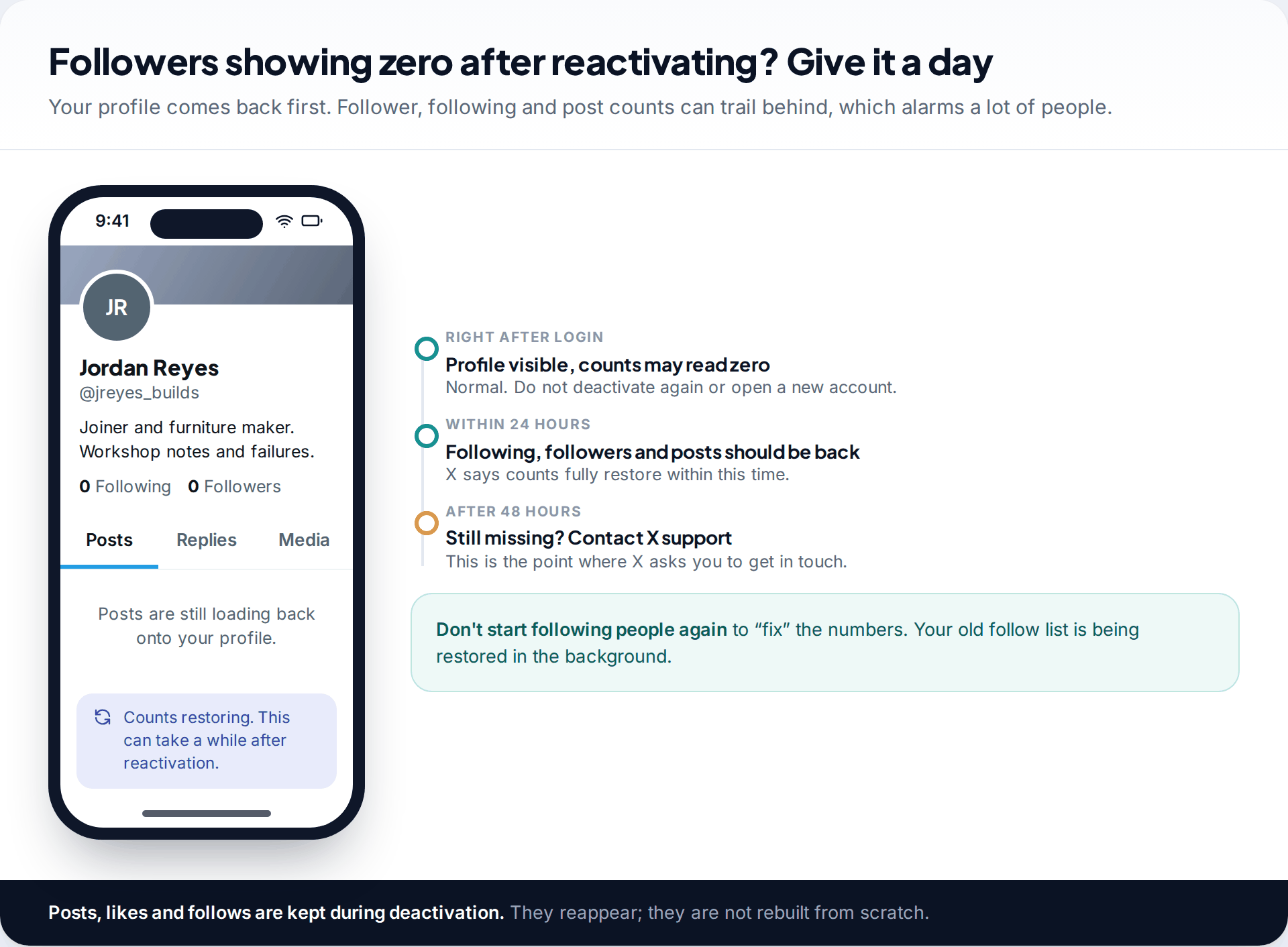
Straight after reactivating, many people see a profile with zero followers, zero following and an empty posts tab. That’s expected. X’s troubleshooting page says follower, following and post counts may not show straight away and should be fully restored within 24 hours. If they still look wrong after 48 hours, that is the point at which X asks you to contact support.
In the meantime, don’t deactivate again, create a second account or start re-following people to “repair” the numbers. Your old follow list is being restored in the background, and doing things twice only makes the result harder to read.
When reactivation doesn’t work
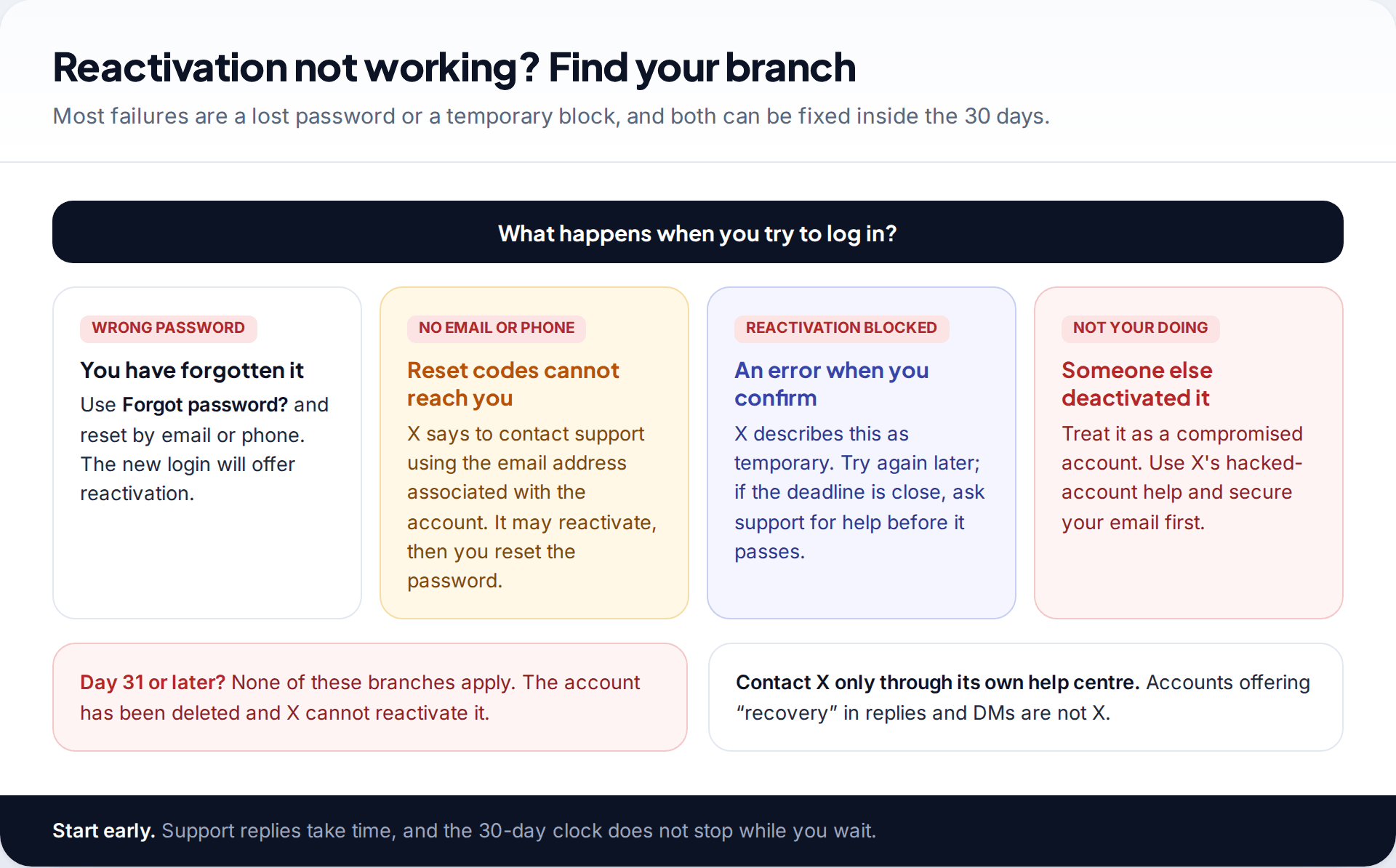
“Wrong password”
Often the password was saved on an old device, or it was changed by someone else.
Fix: use Forgot password? and reset it by email or phone. The login after the reset shows the reactivation prompt.
The reset code goes somewhere you can’t reach
The account uses an old email address or a number you’ve given up.
Fix: X says to contact its support team from the email address associated with the account. Support may reactivate it, after which you can reset the password.
Reactivation seems to be disabled
X describes this as a temporary block.
Fix: wait and try again later. If you’re close to day 30, contact support before the deadline rather than after it.
The account was suspended, not deactivated
Suspension is enforcement by X, not a choice you made, and logging in won’t reverse it.
Fix: use the appeal route X offers for suspended accounts. The 30-day reactivation rule doesn’t apply.
Resetting the password inside the window
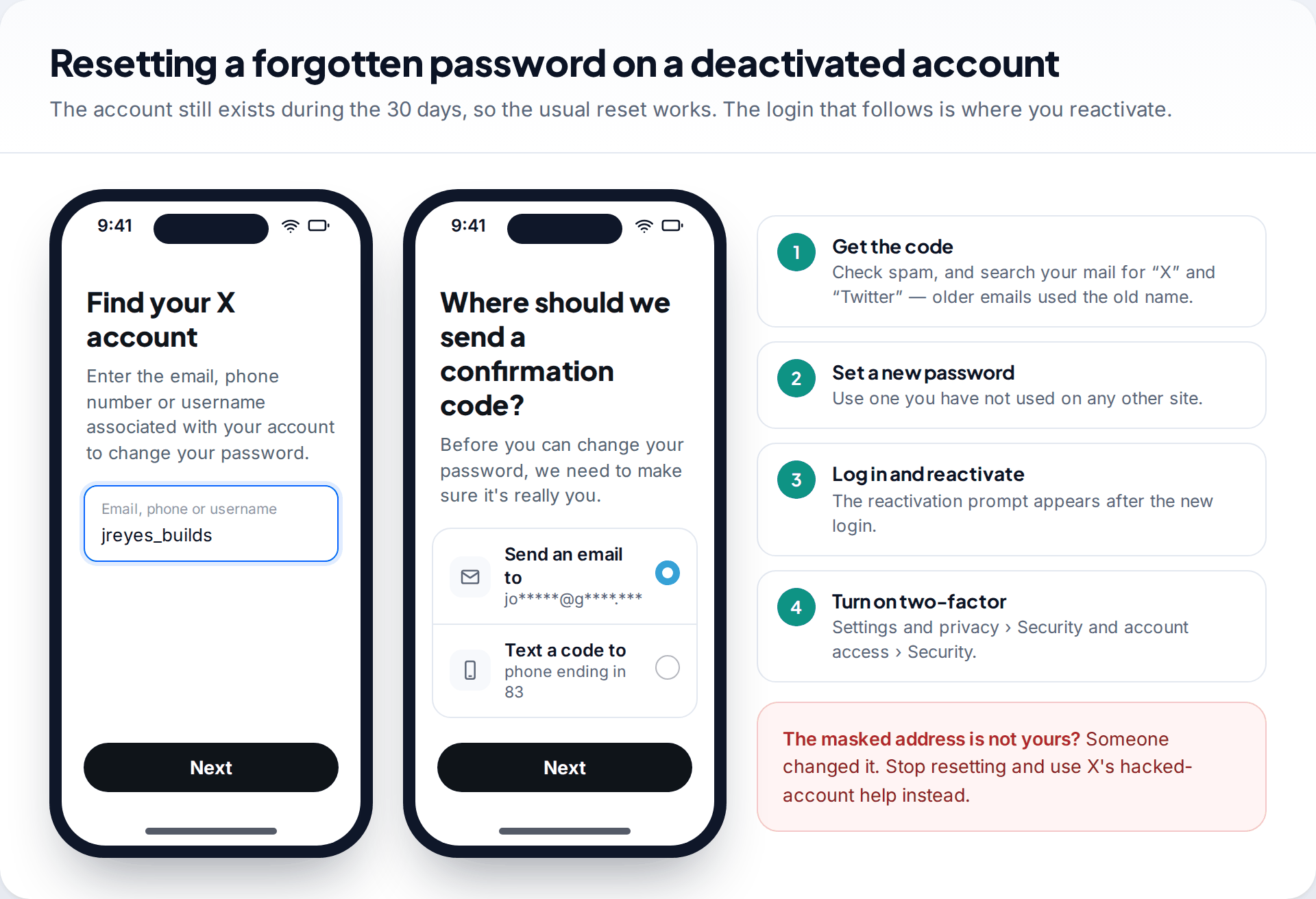
Because the account still exists during deactivation, the standard reset works. Tap Forgot password?, enter the email, phone or username, and choose where the code goes. X masks the destination, for example “jo*****@g****.***”. If that address or number is still yours, finish the reset, sign in and confirm the reactivation.
If the masked destination isn’t yours, someone changed it. Don’t keep requesting codes. Use X’s hacked-account help. Once you’re back in, set a password you haven’t used anywhere else. Our passphrase method gives you one that’s long and easy to remember. Then turn on two-factor authentication under Settings and privacy › Security and account access.
Deactivated, suspended, locked or hacked: know which one you have
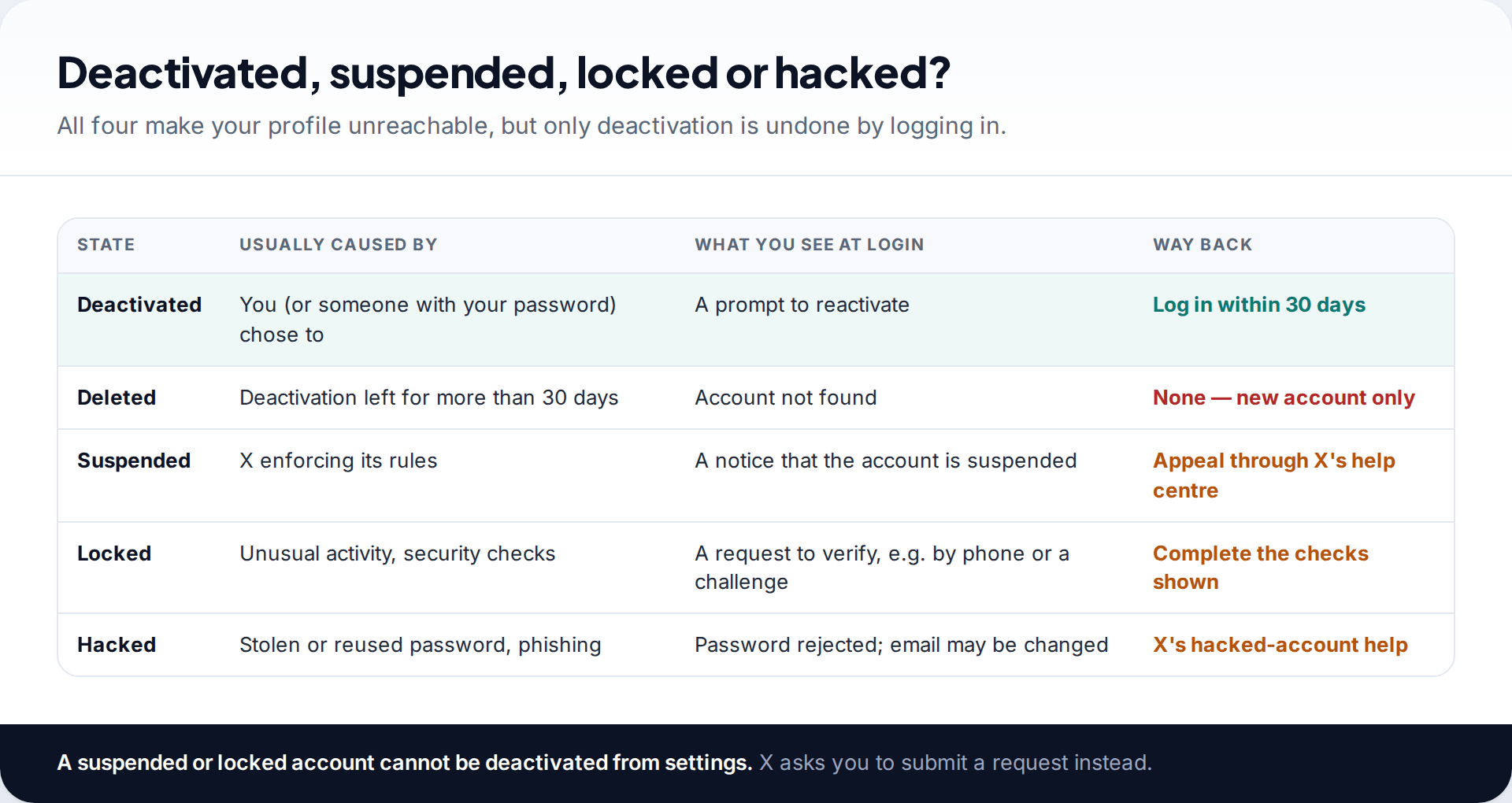
Each of these makes your profile disappear for other people, which is why they get confused. The login screen is the quickest way to tell them apart. A reactivation prompt means deactivated. A suspension notice means X has taken enforcement action. A request to verify with a phone or a challenge means the account is locked. A password that suddenly doesn’t work, and an email you don’t recognise, means someone else has taken over.
One practical detail: a locked or suspended account can’t be deactivated from settings at all. X asks those users to submit a request instead. If you wanted to leave and find the option missing, that’s probably why.
Download your archive, ideally before you ever deactivate
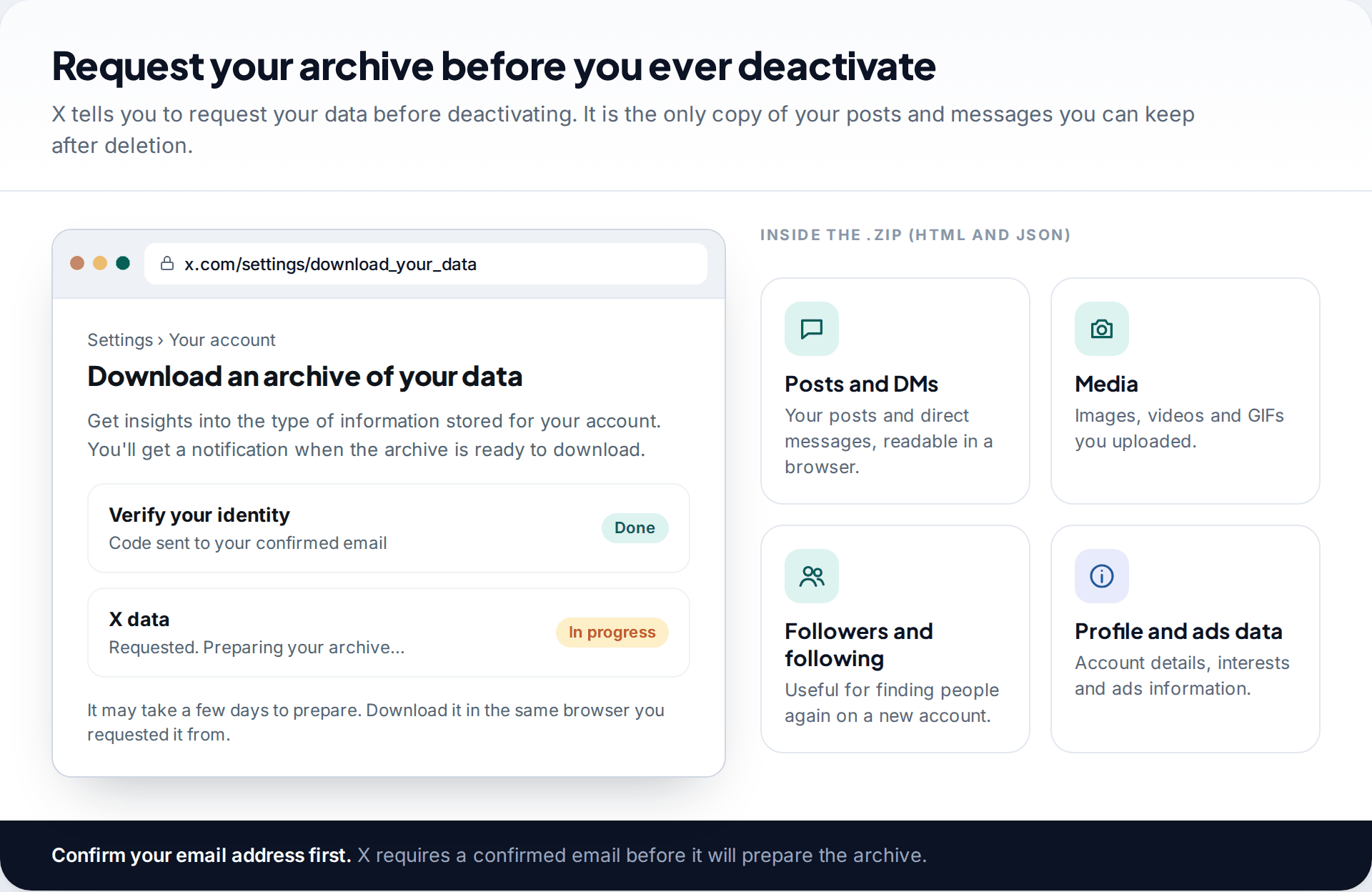
X’s own advice is to request your data before you deactivate. The archive contains your profile information, posts, direct messages, media, followers and following lists, and more, as HTML and JSON in a .zip file. On the web it’s under Settings and privacy › Your account › Download an archive of your data. You’ll need your password and a verification code, and your email address must be confirmed.
It may take a few days to prepare, and X notifies you when it’s ready. If you’ve just reactivated to rescue your content, request the archive now. You can deactivate again once the download is in hand.
After day 30: what you can and can’t do
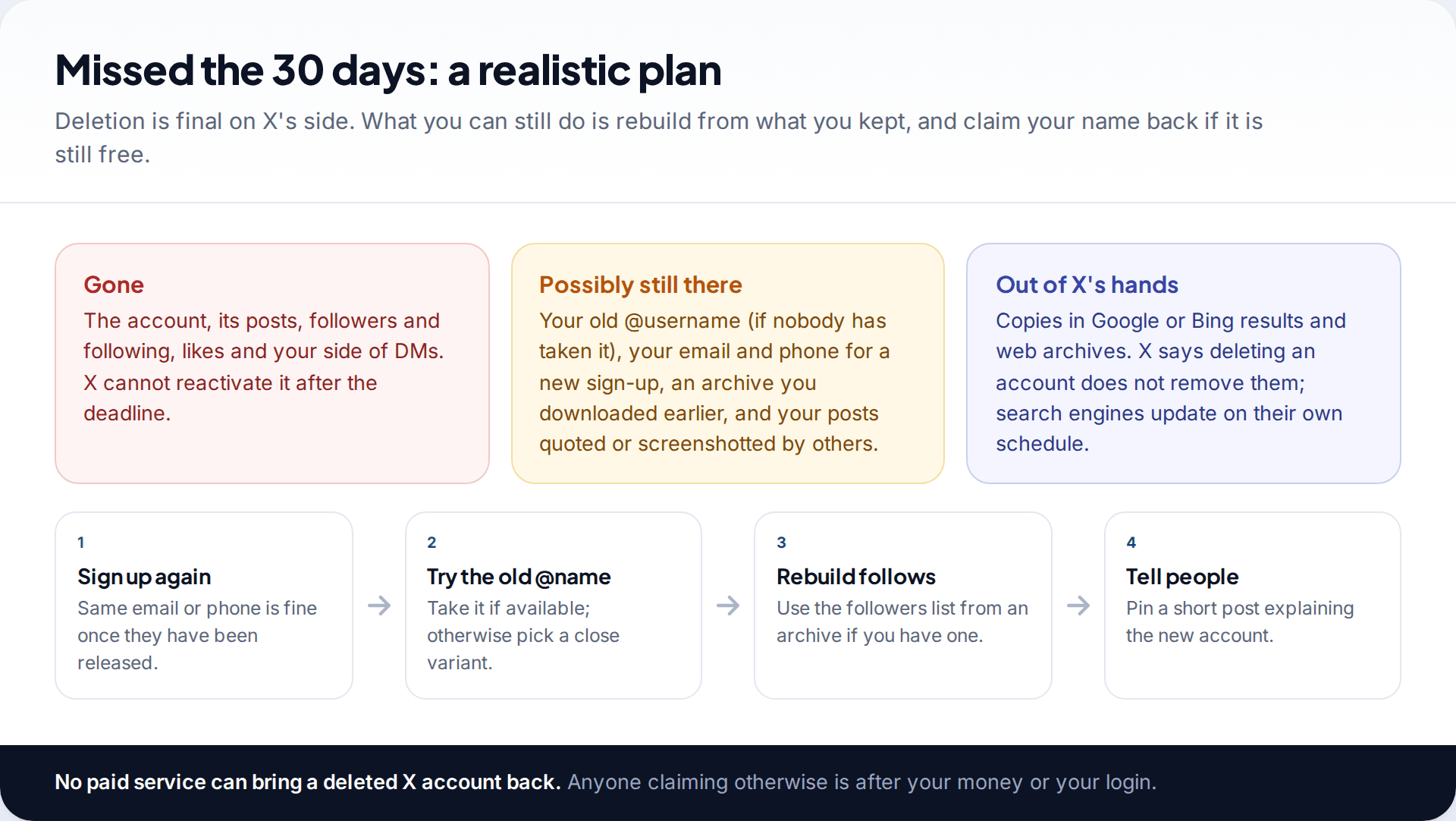
Once 30 days have passed without a login, the account is deleted. X’s help pages are plain about this: reactivation is only possible within the window, and after it you need a new account. That applies whatever the follower count or subscription status. Support can’t reverse it, and nobody else can either.
You can sign up again with the same email address or phone number, and try your old @username. If someone else has registered it since it was released, there’s no route for reclaiming it. If you downloaded an archive, use the followers list to find people again. Pin a short post on the new profile explaining the move, so people don’t mistake it for an impostor.
Old results can linger in search engines. X notes that deleting your account doesn’t remove your information from Google or Bing. Those copies fade as search engines recrawl, and each search engine offers its own tools for requesting removal of outdated pages.
Leaving again? Do it in the right order this time
Plenty of people reactivate only to rescue something, then plan to leave properly. A little order stops the same scramble happening twice.
- Request the archive first and wait until you’ve actually downloaded and opened it. A request that’s still “preparing” doesn’t help you once the account is gone.
- Decide what happens to the name. If you want to use the @username or email address on another X account, change them on this account before deactivating. X points out you don’t need to deactivate just to change either one.
- Tell the people who matter where else to find you. After deactivation, your profile can’t be viewed and nobody can message you there.
- Write down the date you confirm deactivation and the date 30 days later. If you might change your mind, that second date is the one to remember.
- Consider a softer option. If what you want is quiet rather than deletion, logging out, deleting the app from your phone, or muting notifications keeps the account and its name without any deadline.
None of these steps is complicated, but together they mean that deleting is a decision you’ve made rather than something that happened while you weren’t looking.
How this page was put together
The 30-day deactivation period, the reactivation steps, the 24-hour and 48-hour guidance on restored counts, the release of usernames and email addresses, and the archive process were checked against X’s help centre in September 2026. Screens in the images are illustrations, and their wording is paraphrased. X changes labels often, so search Settings if something isn’t where we describe it.
We did not deactivate a live account for this guide, and we don’t recommend any third-party recovery service. Our editorial standards explain how we source and correct pages like this.
Common questions
Can I recover my Twitter account after 30 days?
No. After 30 days of deactivation, X permanently deletes the account and it can’t be reactivated. You can create a new account, with the same email or phone number once they’ve been released.
How long does it take to reactivate an X account?
The reactivation itself is instant once you log in and confirm. Followers, following and post counts can take up to 24 hours to show correctly.
Will I get my old username back when I reactivate?
Yes, if you reactivate within 30 days. The username stays attached to the account during deactivation. It’s only released to others after the 30 days.
Can people see my tweets while my account is deactivated?
No. Your profile and posts aren’t viewable on X during deactivation. Posts by other people that mention you remain visible, but the mention no longer links to your profile.
Why does my profile still show up on Google?
Search engines keep their own copies of pages for a while. X says deleting an account doesn’t remove information from search engines, so results fade on their schedule, not X’s.
Does deactivating X delete my direct messages?
Not during the 30 days. Your messages are kept with the account while it’s deactivated and come back if you reactivate. Once deletion completes, your copy goes with the account. The people you messaged still have their side of those conversations.
I reactivated by mistake. Does the 30-day clock carry on?
No. Reactivating cancels the deactivation. If you still want to leave, you have to deactivate again, and a fresh 30-day period starts from that date.
Can X support restore a deleted account?
Not after the 30 days. Within the window, support can help if you can’t log in, for example if you no longer have the password and the reset isn’t reaching you.
Looking for a tool to go with this? TheTruthSpy is a free parental control app for Android that stays visible on the child's phone. If it fits your family, see the Social media alerts feature.
Related guides
Why Is My Phone Overheating? Causes and Fixes
Warm, hot or dangerous? Why phones heat up when charging, gaming or in the sun, how to cool one safely,…

How to Transfer Photos From Your Phone to a Computer
The best way to copy photos from iPhone or Android to Windows or Mac, what happens to HEIC files, dates…

How to Back Up WhatsApp Chats
Set up WhatsApp backups on Android and iPhone, keep an encryption key safe, check the backup exists, and fix the…
Parental controls your child can see
Location, screen time limits, a web filter and alerts from notifications — free, and visible on your child's phone. Pair a phone in about ten minutes.
Android · Free to set up · Visible on your child's phone